With two individually addressable RGB rings and a handful of different ways to set up your RGB lighting, the Riing Duo 12 radiator fans promise to bring some serious lighting to your system.

Product on Review: Thermaltake Riing Duo 12 RGB Radiator Fan TT Premium Edition
Manufacturer: Thermaltake
Street Price: GBP £89.99 / USD $99.99 / AUS $149.99
Thermaltake are well-respected within the PC Watercooling community, known for their high performance and good value for money approach to enthusiast PC cooling systems. Today we look at their brand new 120mm RGB radiator fans, the, get ready for this, Thermaltake Riing Duo 12 RGB Radiator Fan TT Premium Edition Triple Pack; possibly the longest product name we’ve reviewed yet, for the sake of not having to type that out 15 to 20 times in this review, we’ll refer to them as the Riing Duo 12 from now on.
What sets apart the Riing Duo 12 from theRiing Trio 12? Well, firstly the price is lower, which is always a bonus, but mostly it’s fewer LEDs placed strategically within the fan’s chassis.
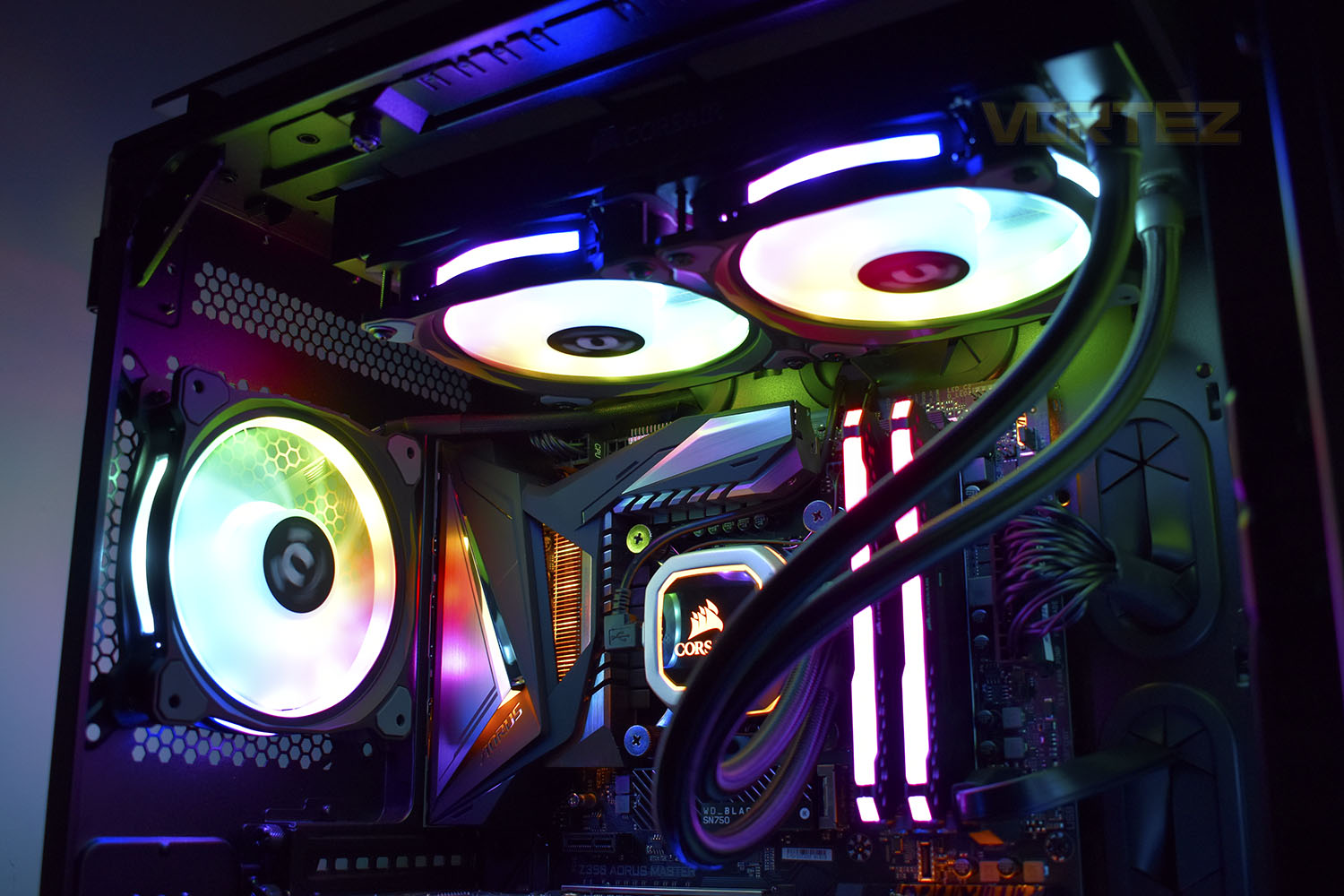
What does remain the same, however, is the ability to customise the RGB lighting via Amazon Alexa, mobile phone application (for iOS & Android) and a Razer Chroma plugin for Synapse 3.0. Thermaltake also provide an RGB and PWM controller in the hope of making your Riing Duo 12 fans that little bit easier to set up.
The Riing Duo 12 is designed for a high static pressure output, suitable for tightly-packed cooling radiators or cases where air vents aren’t optimally located or wide enough for easy airflow. Hydraulic self-lubricating bearings within the central hub of each fan lower noise output while increasing efficiency for a quieter system and longer lifespan.
Let’s throw the fans into our system and see how they do in a very tough marketplace.
Thermaltake on the Riing Duo 12 RGB Radiator Fan TT Premium Edition:
Thermaltake Riing Duo 12 RGB Radiator Fan has two individual addressable 16.8 million RGB colours LED rings with 18 patented LEDs in total and supports TT RGB PLUS software, Amazon Alexa Voice Service, and Razer Chroma software. The 120mm high-static pressure fan is PWM controlled and features long-life hydraulic bearing and compression fan blade design, delivering remarkable cooling performance without sacrificing quiet operation. Riing Duo is economical yet efficient and gorgeous!
Technical Specifications
P/N:
CL-F073-PL12SW-A
FAN DIMENSION:
120 x 120 x 25 mm
INTERFACE:
USB 2.0 connectors (9 Pin)
SYSTEM COMPATIBILITY:
Windows 7 / 8 / 8.1 / 10
FAN STARTED VOLTAGE:
9.0 V
FAN RATED VOLTAGE:
12 V & 5V
RATED CURRENT:
12V- 0.11 A , 5V – 0.7A (only one fan)
POWER INPUT:
12V – 4.32 W . 5V – 10.5 W (Fan*3)
FAN SPEED:
500 ~ 1500 R.P.M
MAX. AIR PRESSURE:
1.45mm-H2O
MAX AIR FLOW:
42.45 CFM
NOISE:
23.9 dB-A
BEARING TYPE:
Hydraulic Bearing
LIFE EXPECTATION:
40,000 hrs, 25℃
WEIGHT:
163g (one fan)
CL-F073-PL12SW-A
FAN DIMENSION:
120 x 120 x 25 mm
INTERFACE:
USB 2.0 connectors (9 Pin)
SYSTEM COMPATIBILITY:
Windows 7 / 8 / 8.1 / 10
FAN STARTED VOLTAGE:
9.0 V
FAN RATED VOLTAGE:
12 V & 5V
RATED CURRENT:
12V- 0.11 A , 5V – 0.7A (only one fan)
POWER INPUT:
12V – 4.32 W . 5V – 10.5 W (Fan*3)
FAN SPEED:
500 ~ 1500 R.P.M
MAX. AIR PRESSURE:
1.45mm-H2O
MAX AIR FLOW:
42.45 CFM
NOISE:
23.9 dB-A
BEARING TYPE:
Hydraulic Bearing
LIFE EXPECTATION:
40,000 hrs, 25℃
WEIGHT:
163g (one fan)
Packaging & Bundle
Thermaltake have a packaging type that they use for the 120mm fans and it works for them, however, it does mean that if they’re side by side on the shelves in a store or warehouse, telling them apart could be very difficult. On the other hand, it does let them stand out and be easily recognised and the front of their packaging gives plenty of information at a glance.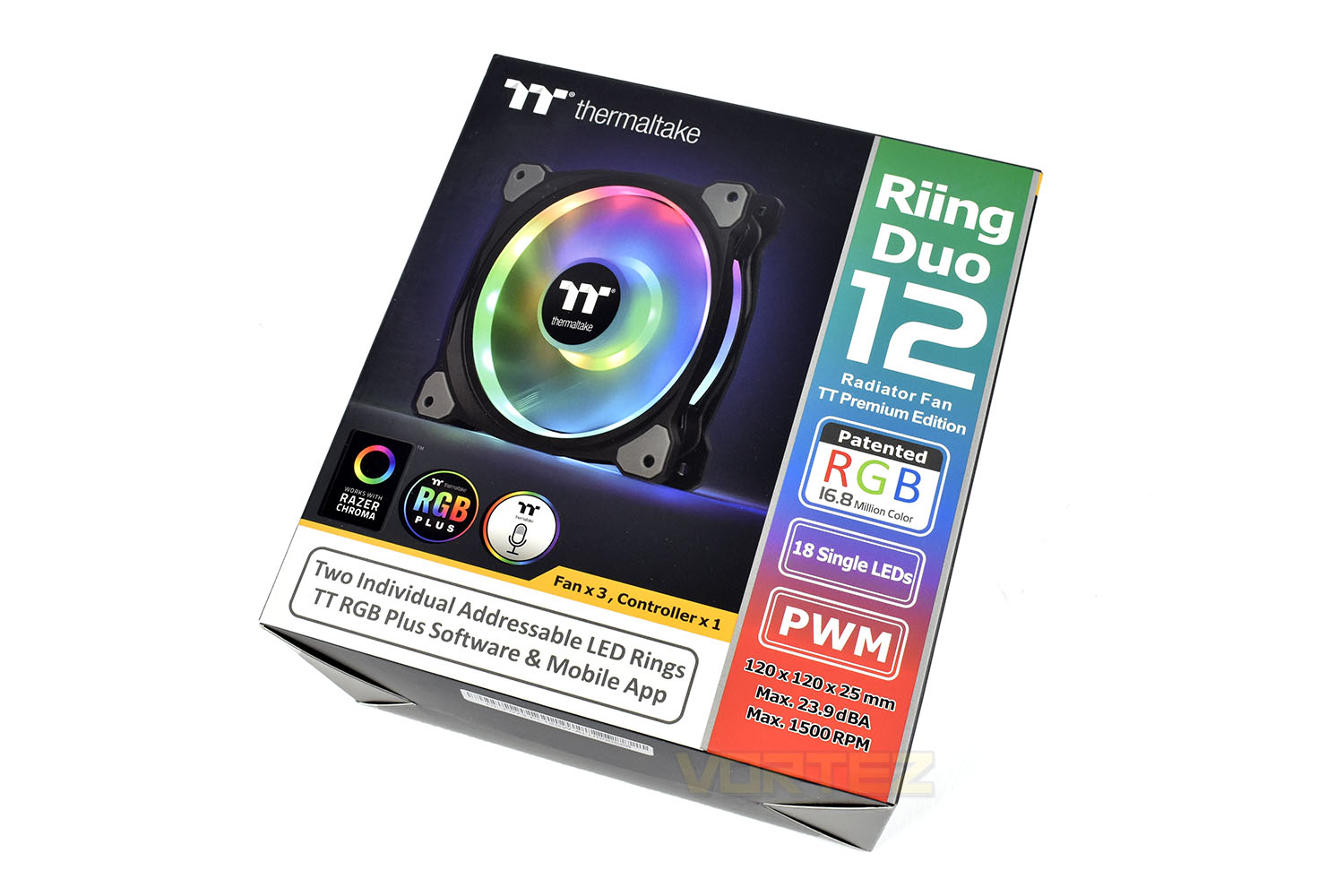
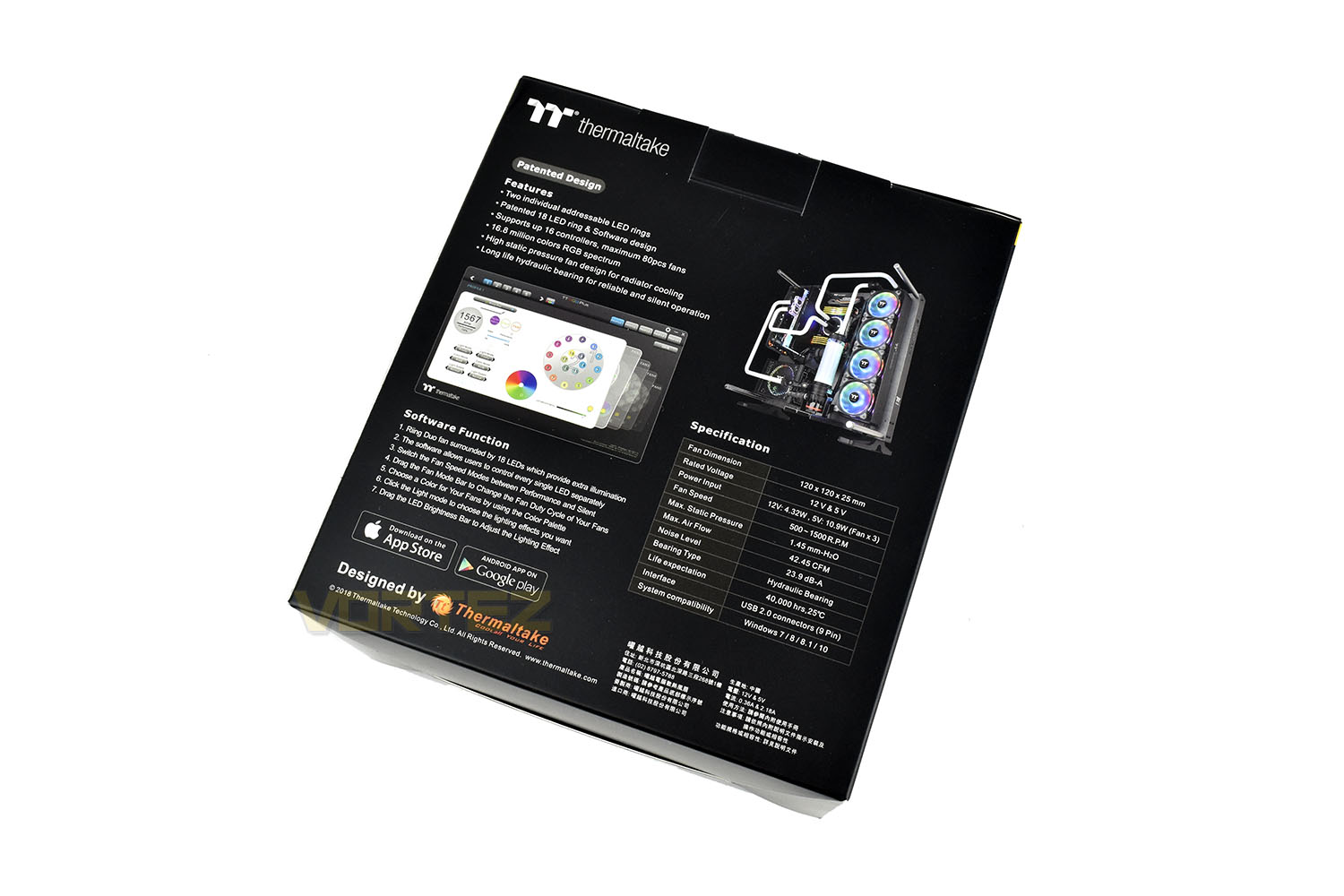
If the front did its job, you can flip the box over and find loads more detail about the products within.
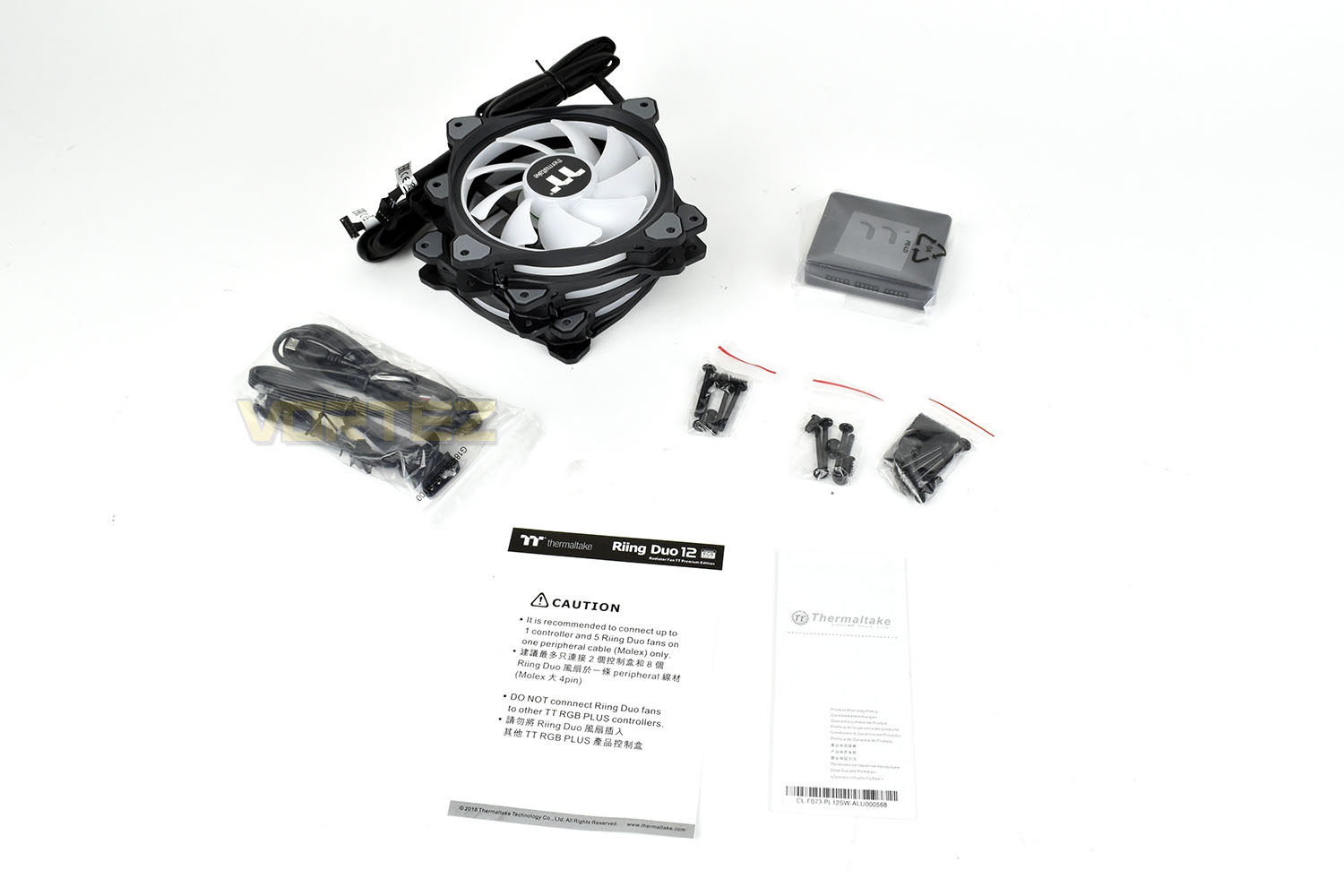
With today’s review being for a triple pack, there’s obviously 3 fans included but alongside that are power and data cables, a 5-fan hub, mounting hardware for everything and installation/setup instructions.
Closer Look
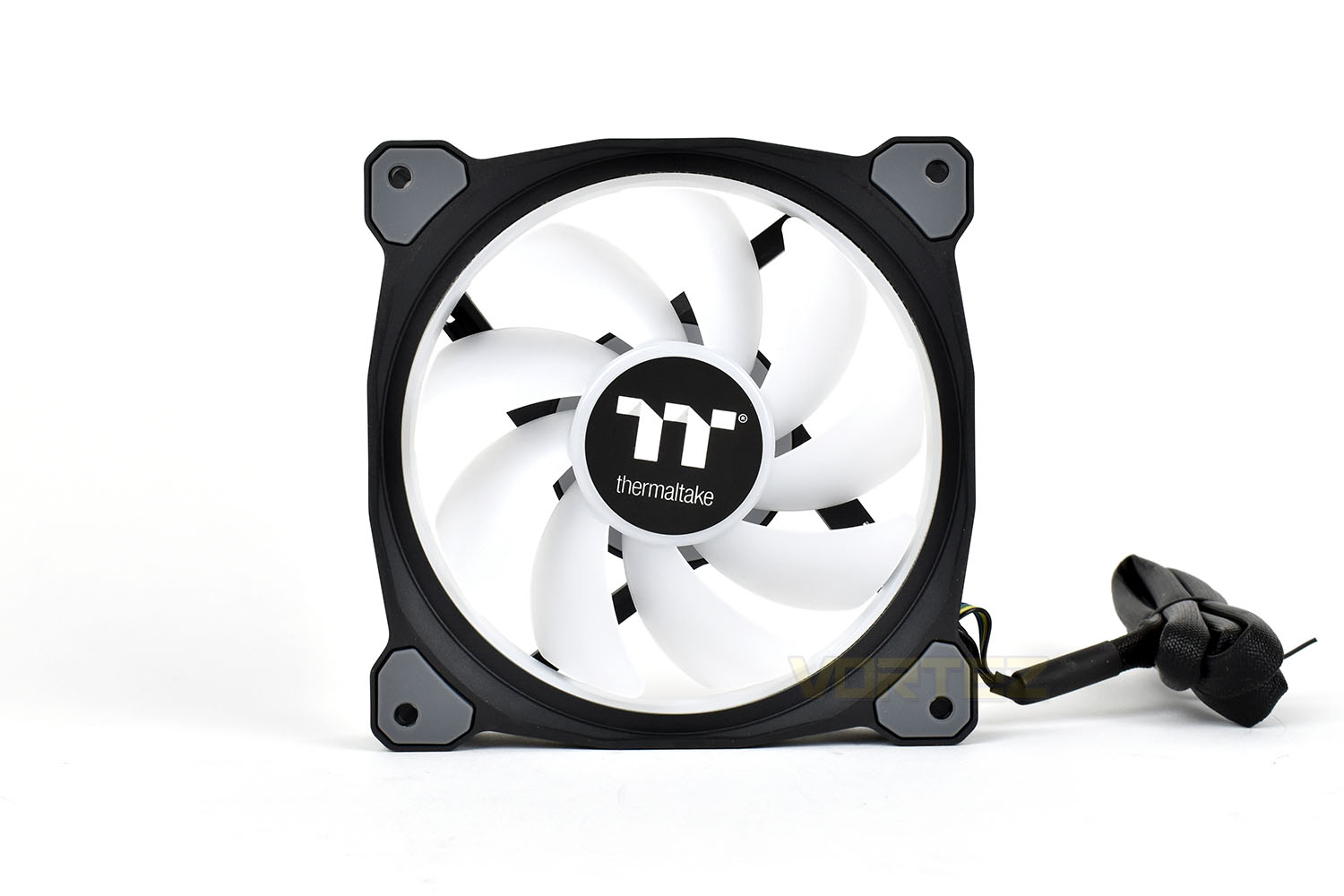
The front of the fan looks very similar to it’s Riing Trio 12 brother, only the internal, white translucent ring is a little less visible. The bright white fan blades, of which there are 9, should do a grand job of bouncing the RGB LEDs output around the case.Each corner houses a large rubber pad to absorb vibrations and dampen any sound output from the fan. These are present on both sides.
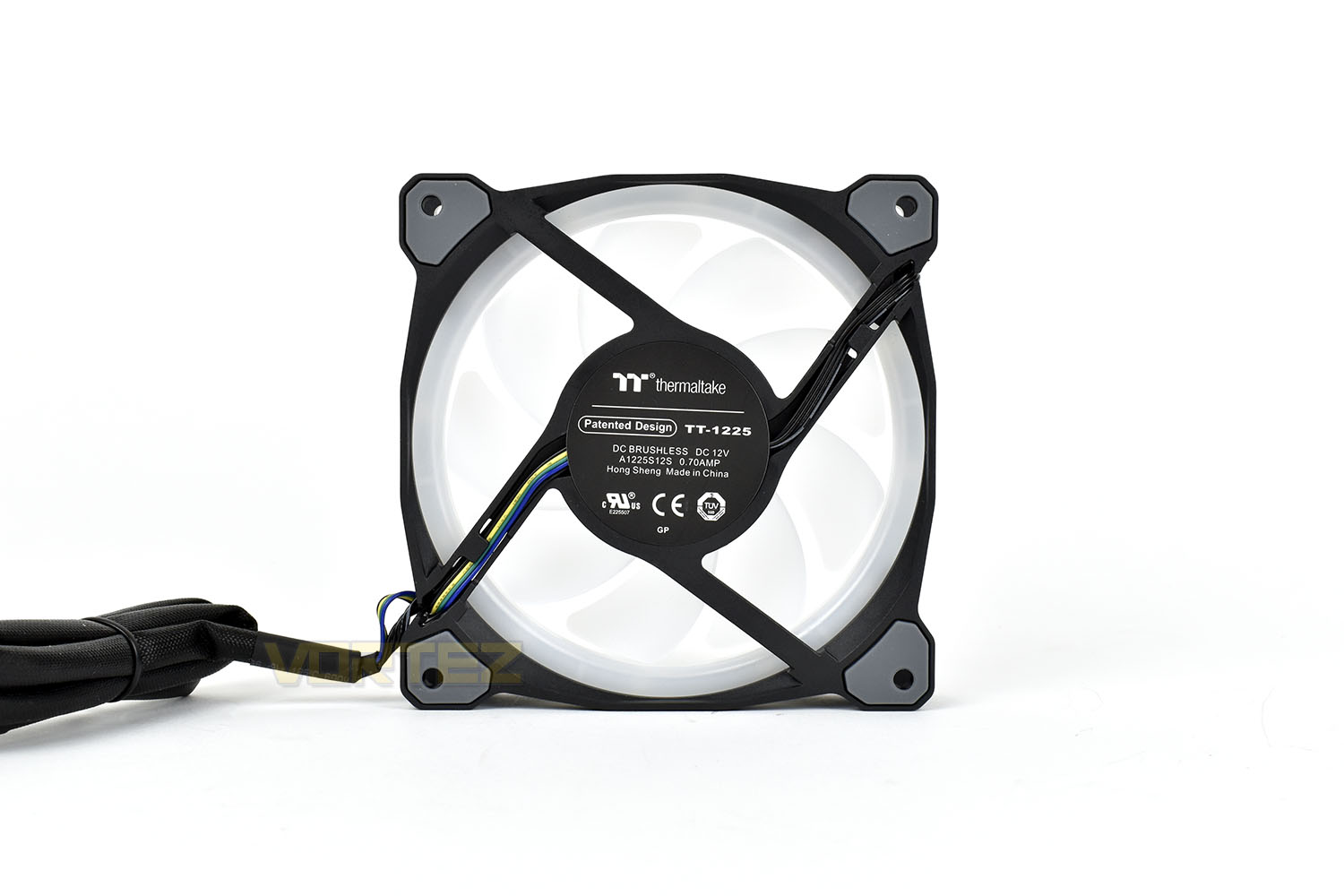
The reverse side of the fan isn’t much different to the front, with four spokes holding the central hub in place. The outer RGB light ring is a little more visible from this side.
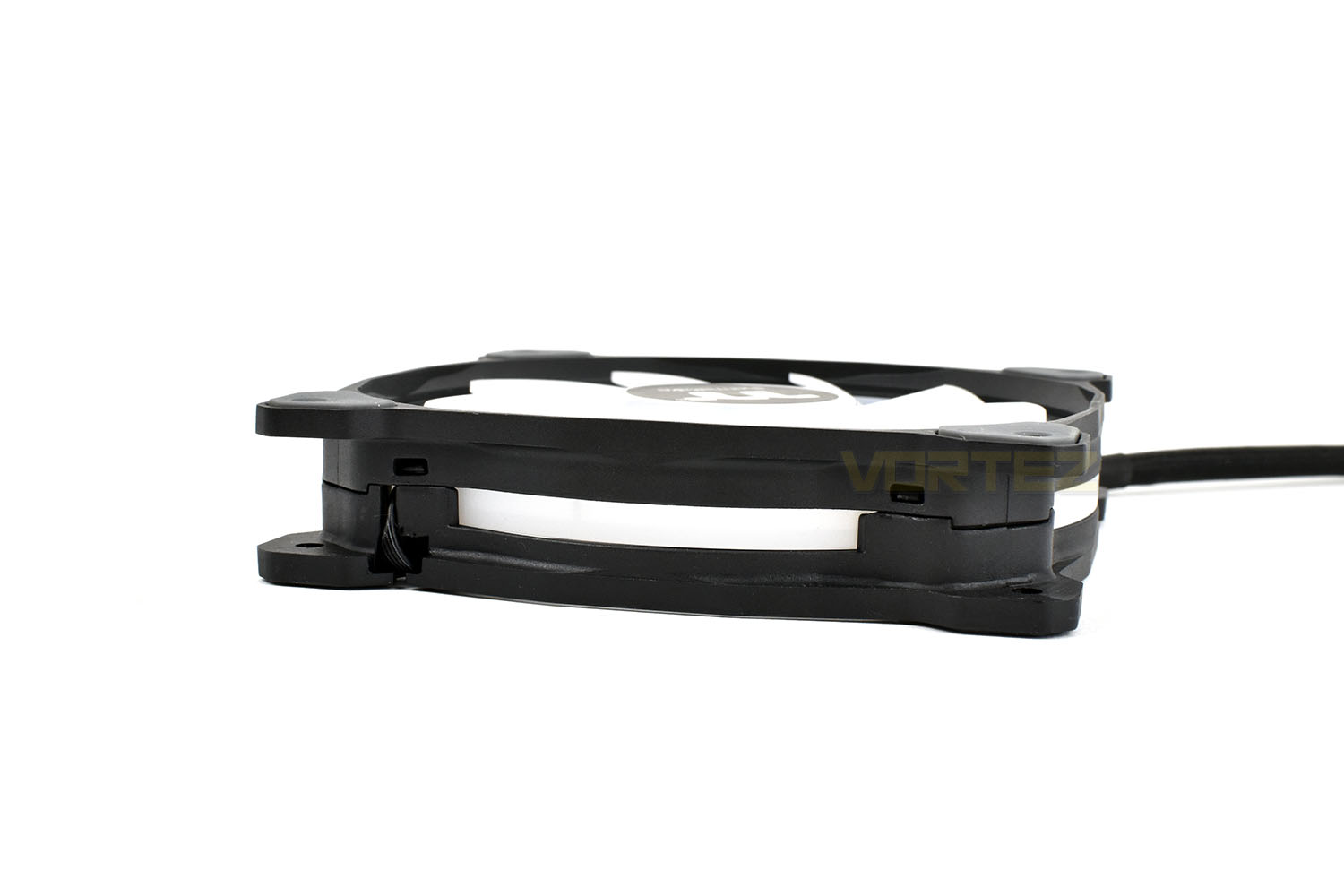
Encompassing the entire outer perimeter of the fan is a see-through light ring which is unique to the Thermaltake Riing fans. This adds a different type of glow to the system and helps to illuminate different sections.
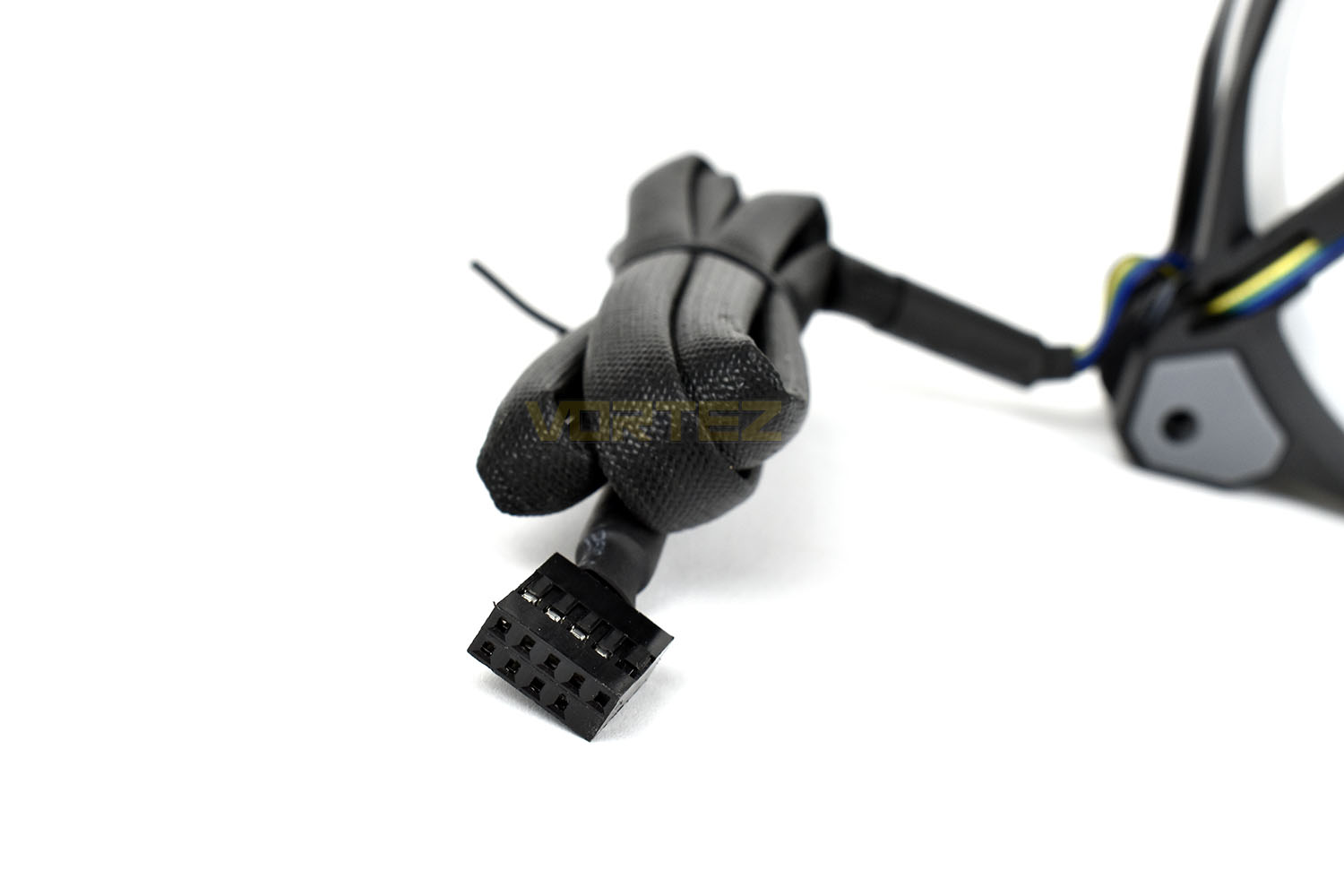
Unlike most RGB fans which would use a 4-pin PWM header and an RGB header of some description, Thermaltake combine the two into one convenient header. This does however mean that the fans are useless without Thermaltake’s controller and prevents your motherboard or fan controller from being in charge of PWM fan speeds. The 900mm cable is sleeved from end to end.
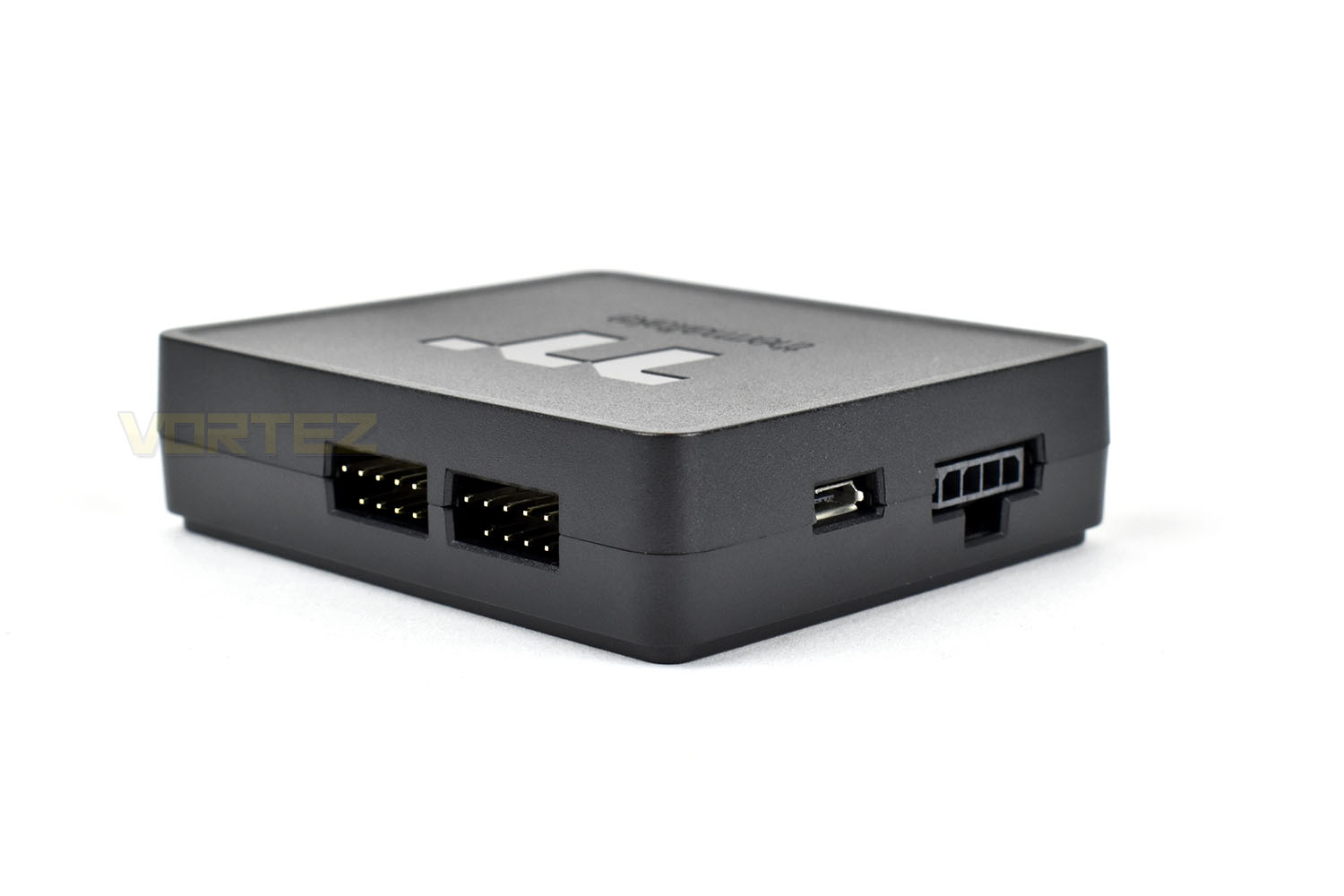
The controller measures in at roughly the size of a credit card, only much thicker, obviously, and connects an internal USB 2.0 motherboard header with up-to 5 Thermaltake fans. It’s possible to mix and match between them, providing they have the same 9-pin header.
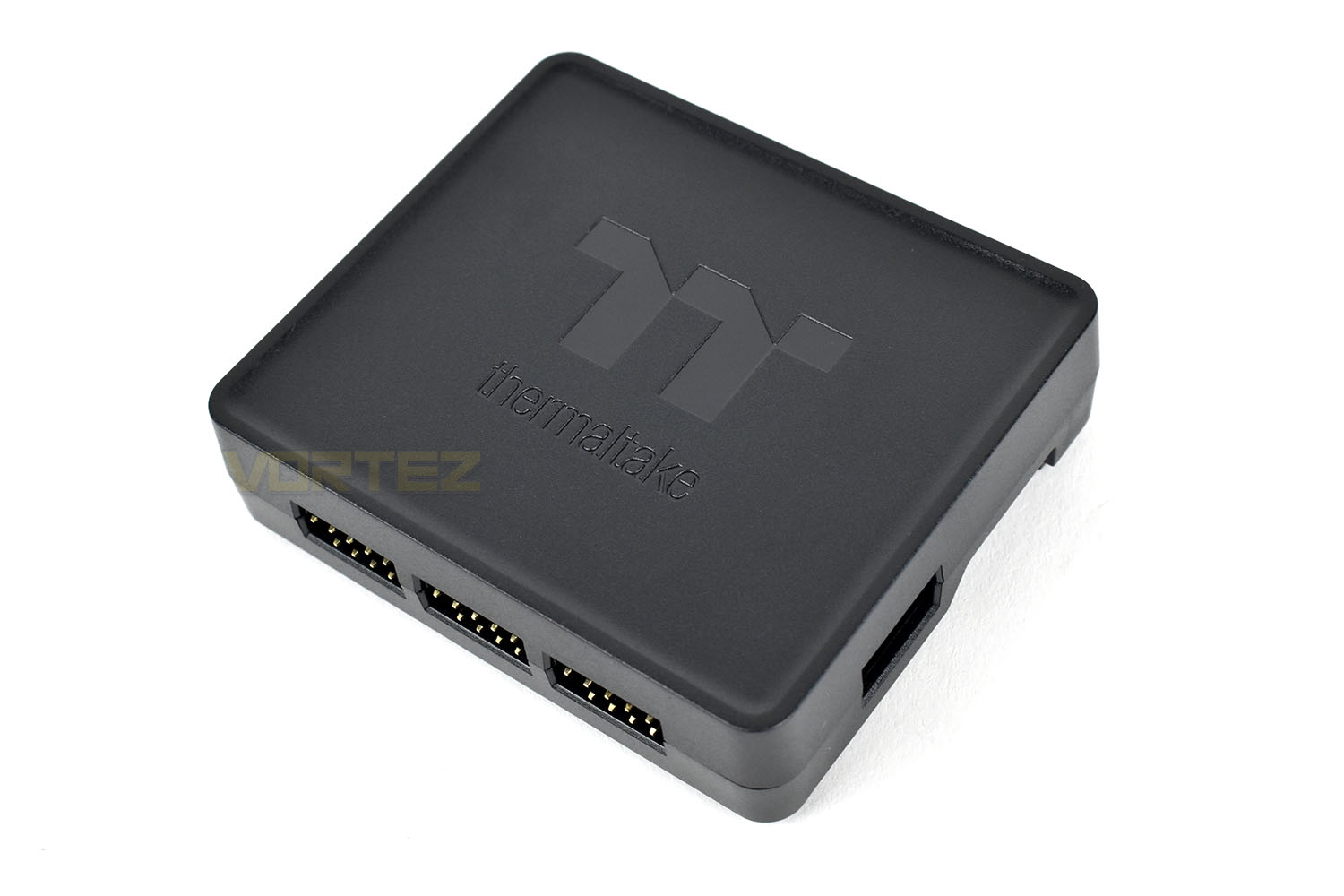
The controllers can be daisy chained together if you need more than 5 fans, up to 20 in total.
Software & RGB Lighting
The Thermaltake Riing Duo 12 fans use the TT RGB Plus software suite for RGB configuration on a Windows PC. Check out the short demo video of the software below:And a demo of some of the RGB effects available with the fans:
Test Setup & Methodology
Due to popular demand, we have retired the long-standing cooling rig that we once used and replaced it with a shiny new system with an Intel Core i7 9700K at its heart. This should benefit you, the reader, in a couple of ways. The first being it can provide you with results on a CPU that is currently available to buy and secondly, the mounting instructions on our installation page will be far more relevant than the outgoing LGA 2066 was, with its pre-installed backplate.We perform two individual testing routines with each CPU cooler that we receive – temperatures and acoustics. The system used is as follows and all tests are performed at stock frequencies.
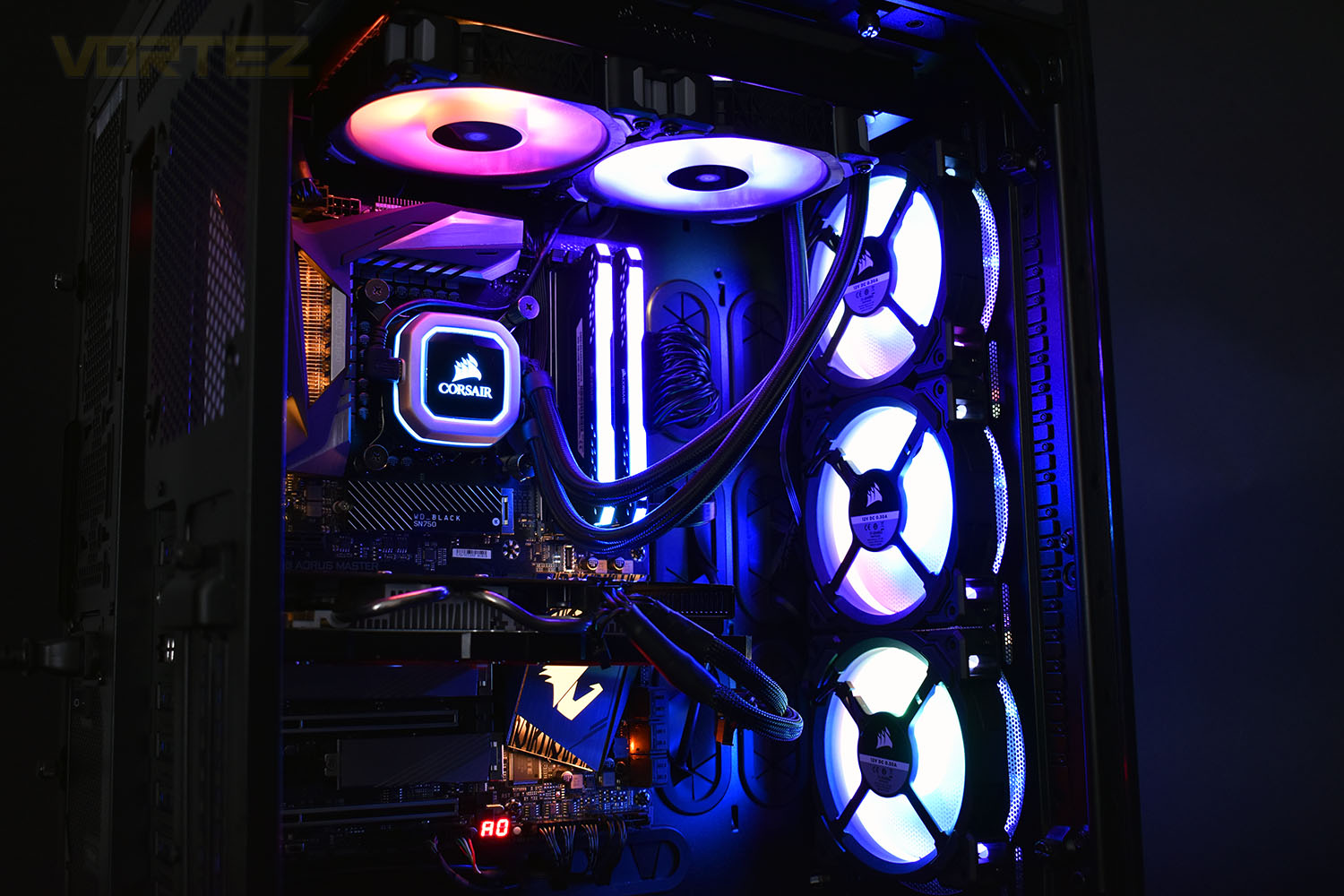
Processor – Intel Core i7 9700K
Motherboard – GIGABYTE Z390 AORUS MASTER
Memory – Corsair Vengeance RGB PRO 16GB – 2666MHz – C16
Video Card – XFX AMD Radeon RX560
Power Supply – Corsair RM650x
Storage Drive – Western Digital Black SN750 1TB NVMe SSD
Case – Corsair Crystal Series 280X RGB
Monitor ASUS ROG SWIFT PG278Q
Motherboard – GIGABYTE Z390 AORUS MASTER
Memory – Corsair Vengeance RGB PRO 16GB – 2666MHz – C16
Video Card – XFX AMD Radeon RX560
Power Supply – Corsair RM650x
Storage Drive – Western Digital Black SN750 1TB NVMe SSD
Case – Corsair Crystal Series 280X RGB
Monitor ASUS ROG SWIFT PG278Q
We test our fans at both 1000 RPM and maximum RPM, or if the fan only has one setting, it’s only included in the maximum RPM graphs.
Firstly, we’ll test acoustics, both as a case fan, mounted on the rear of our Corsair Graphite 760T chassis, and as a radiator fan on the Corsair H100i Pro RGB. (with the pump turned down to 1,100 RPM and all other case fans disabled). We measure the average dB(A) noise levels over 60 seconds in a quiet room with an ambient noise level of around 24dB(A). Acoustics are measured from the same point within the case (20cm from the fan), with every effort taken to ensure test parameters are as close as possible during every test.
We then test the fan’s performance both at 1000 RPM and maximum RPM by running an AIDA64 20-minute stress test while running only a single 120mm fan on the 240mm radiator of the Corsair H100i Pro RGB. This allows us to test single fans as well as multi packs by only relying on a single 120mm fan. We mount the fan under the radiator, inside the case, blowing through the radiator. We measure the average core temperature over a 60-second period and minus the ambient room temperature from this. That leaves us with a Delta °C measurement which is applied to the graphs. Our average room temperature is kept as close to 21°C as possible, roughly the room temperature of most homes and offices. Obviously, if you live in a warmer climate with warmer room temperatures, you can expect higher temperatures.
To ensure the fans RPM are measured consistently, we use the Noctua NA-FC1 fan control unit, allowing the speed of our fans to be infinitely adjusted and monitored via a nearby header on the motherboard.
Benchmarks – Thermal Results
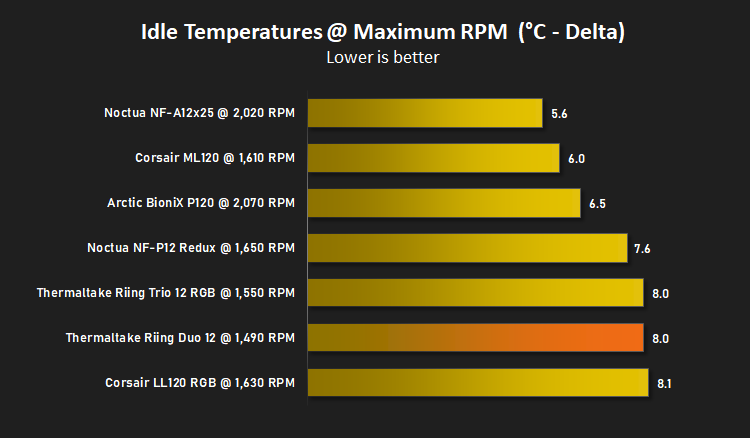
For thermal results we have all case fans running and only a single 120mm fan on our Corsair H100i Pro RGB radiator. We then measure the thermal results at idle, both at 1000 RPM and maximum RPM: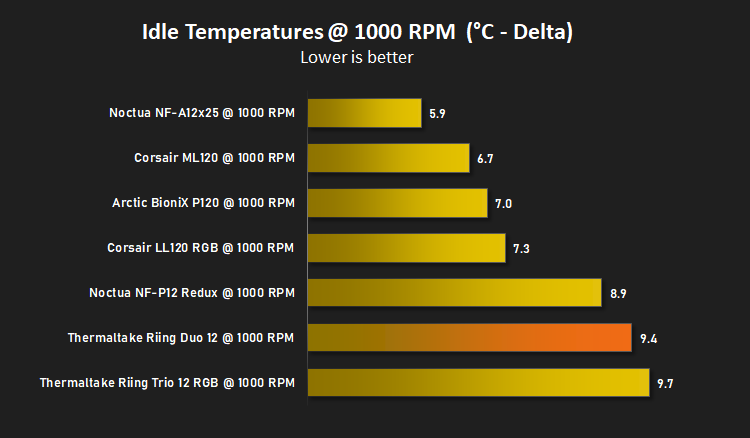
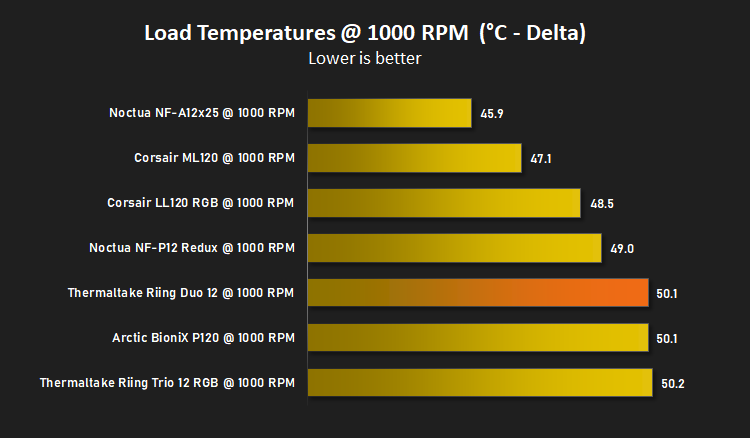
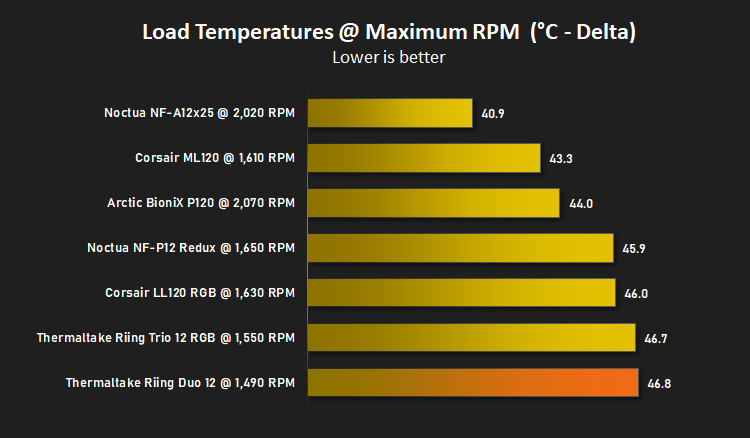
And then again after a 20 minute Stability Test within AIDA64:
Benchmarks – Acoustic Results
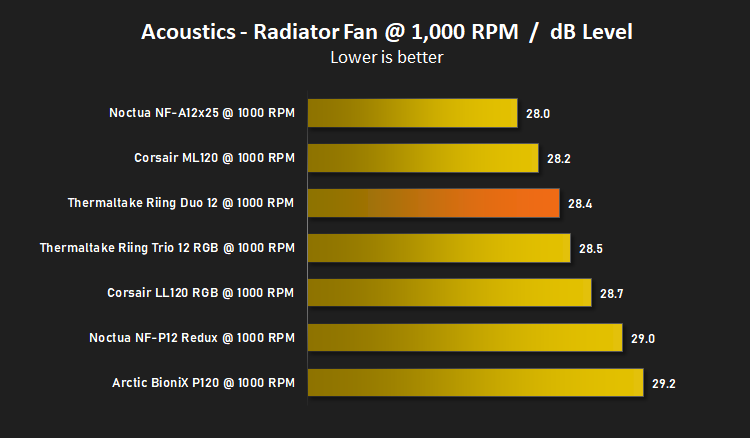
For our acoustic results, all other fans in the case are disabled and the Corsair’s H100i Pro RGB’s pump is turned down to ‘quiet’ (roughly 1100 RPM) and measure the fan noise at 1000 RPM, both as a case fan and as a radiator fan: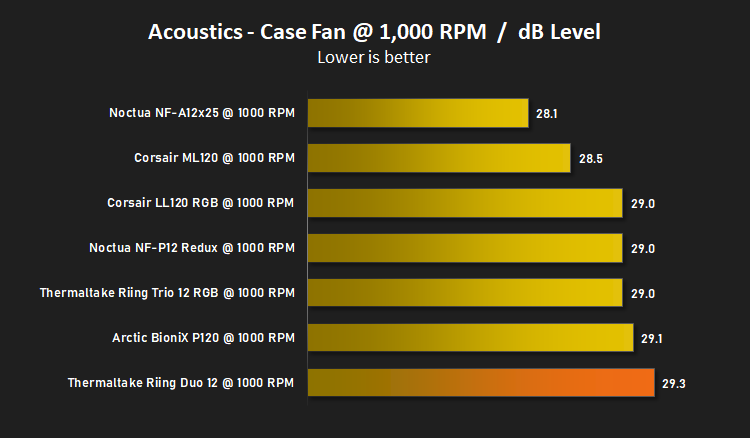
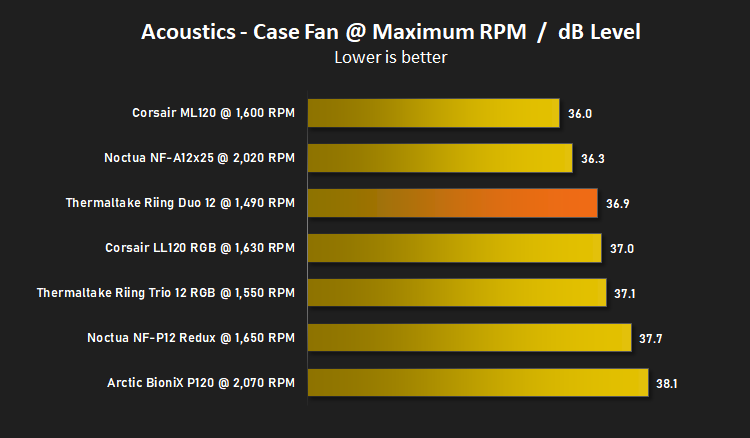
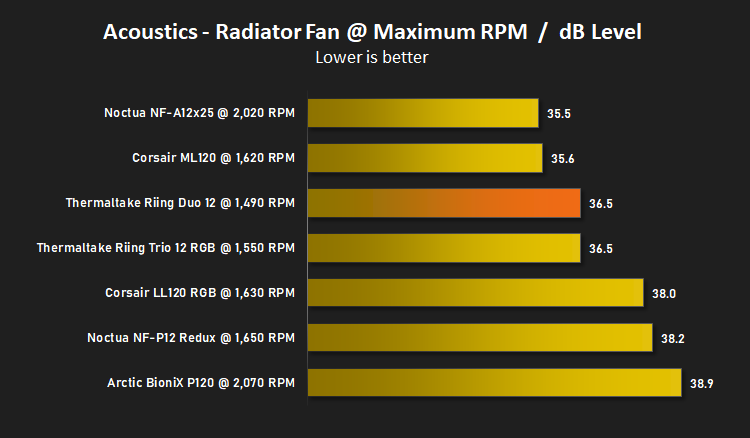
And then again at maximum RPM:
Conclusion
Having already reviewed the Thermaltake Riing Trio 12, we went into the review with a certain degree of expectation and we weren’t let down.The Riing Duo 12 has clearly been tuned by Thermaltake for quiet performance which our acoustics graphs show, though the thermal performance was less impressive, with it finding itself at, or near, the bottom of all of our temperature tests. Having said that, our tests do show that the differences are small, with only around 5°C separating the top and bottom in some graphs, so it’s not going to be the end of the world unless you’re trying to extract an impressive overclock.
The software really needs some work, it looks tacky, isn’t particularly intuitive and is laborious to use for simple tasks such as synchronising all 3 fans. It’s all well and good giving the option to control the lighting from your Amazon Alexa, or via your phone, but if the base software suite isn’t up to scratch, it lets down the entire experience.
RGB lighting, now there’s a show and a half. The illumination from the fans is excellent, definitely some of the best we’ve seen, but the Riing Trio 12 is the more impressive show overall; for the extra £10 they are a much better buy if RGB lighting is your aim.
Wiring in the fans is quite different to most other brands, using the single cable for both RGB and PWM fan speed control, going to a single controller that is monitored and acted upon by the Thermaltake software. However, one thing constantly bugs us about Thermaltake’s controller, the power delivery method – we really need to see the back of Molex power adaptors in 2019. They’re awkward to connect up and quite often require their own separate connection to the PSU, clogging up further space within the system. Please start using SATA power, Thermaltake.
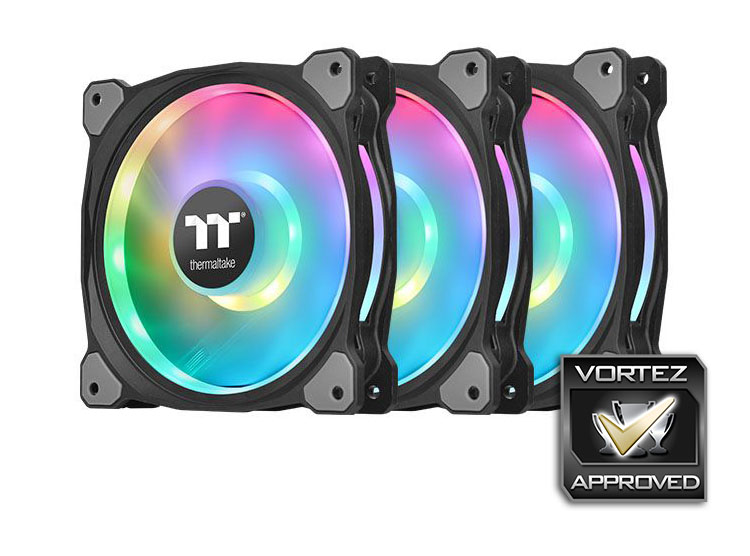
The Riing Duo 12 fans are quiet with reasonable cooling performance but the RGB lighting is definitely its party piece, they’re bright, vibrant and offer plenty of beautiful effects.
Pros
+ Awesome RGB lighting
+ Competitive pricing
+ Good build quality
+ The single cable for RGB and PWM control helps make a cleaner build
Neutral
+- Not the strongest airflow we’ve seen
Cons
– Still using Molex power connectors
– Poor software suite
+ Awesome RGB lighting
+ Competitive pricing
+ Good build quality
+ The single cable for RGB and PWM control helps make a cleaner build
Neutral
+- Not the strongest airflow we’ve seen
Cons
– Still using Molex power connectors
– Poor software suite
Click here for an explanation of our awards at Vortez.net.
Stay connected with the Vortez Social Media pages: