Thermaltake have employed several techniques to produce a fast, stable, good-looking RAM kit, complete with RGB lighting of course. Let’s have a look at the TOUGHRAM RGB in the 4000MHz flavour.

Product on Review: Thermaltake TOUGHRAM RGB 4000MHz
Manufacturer: Thermaltake
Street Price: GBP £118.00 / USD $122.00
Thermaltake are enormous within the PC industry, particularly when it comes to custom watercooling, but their expertise isn’t limited to cooling only. We also find power supplies, cases, mice, keyboards, headsets, desks and much more. Today though, we’re looking at their latest DDR4 kit.
The Thermaltake TOUGHRAM RGB is available in 16GB kits only, but in a range of speeds, starting at 3000MHz and moving all the way up to 4400MHz. The modules can also be found in black or white to match your particular style.
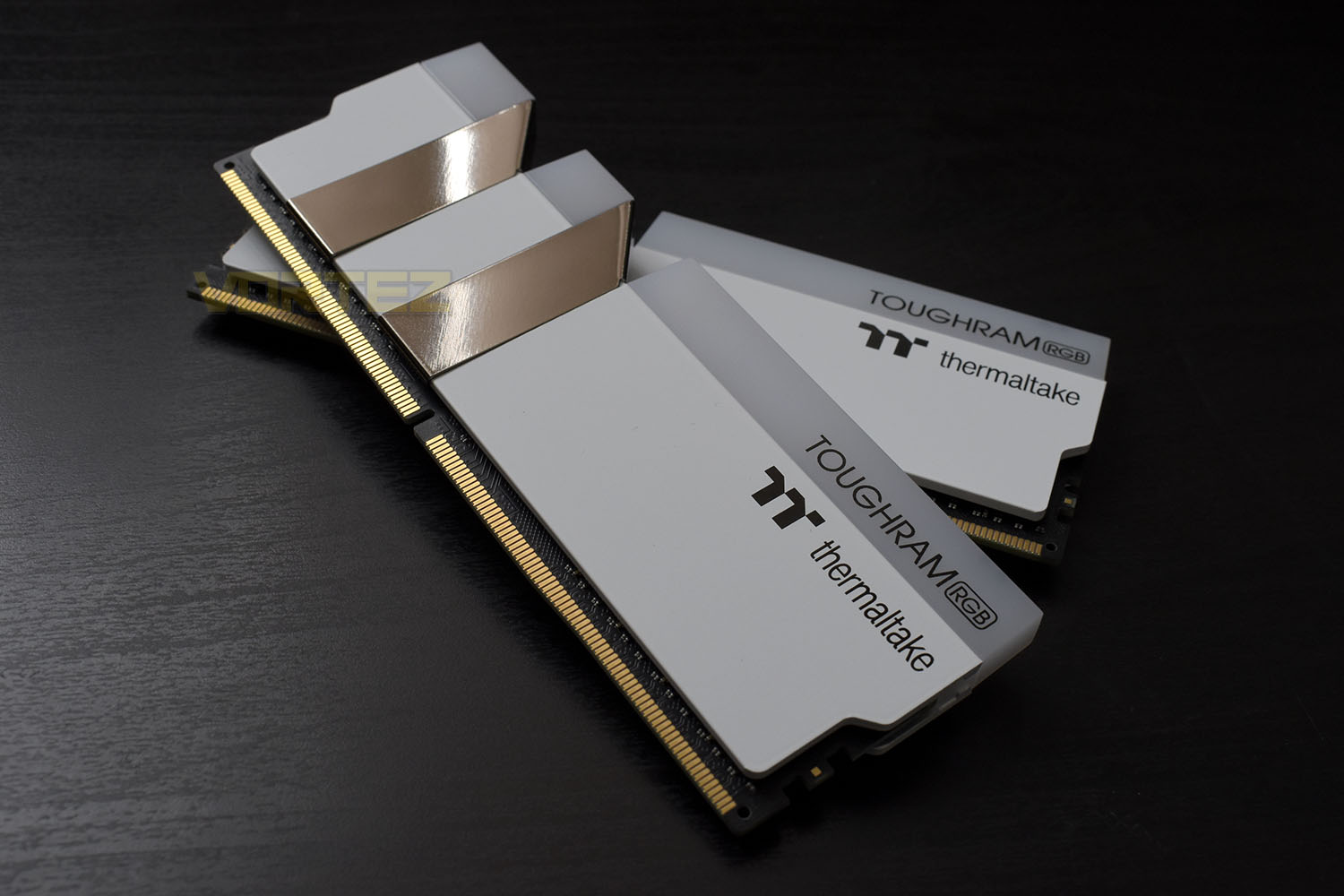
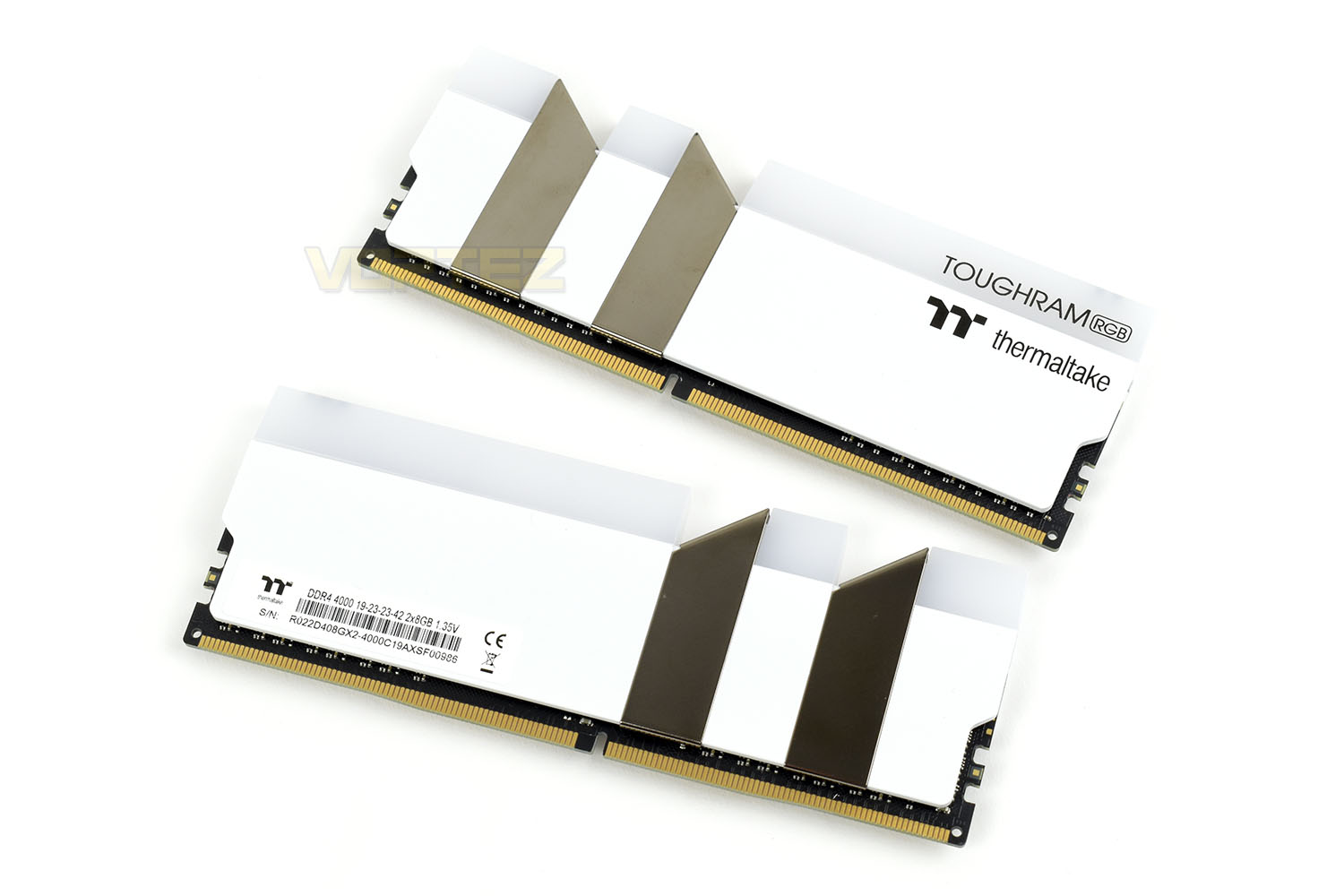
Atop each module are translucent RGB light bars with two large 45° notches taken out and replaced with chromed sections. The RGB lighting is compatible with all of the usual suspects, ASUS Aura Sync, Gigabyte RGB Fusion 2.0, MSI Mystic Light Sync and ASRock Polychrome RGB, but there’s also support for Razer Chroma, Amazon Alexa and even Thermaltake’s own bespoke software. Whichever you choose to use, you should be able to find a style that really suits you.
The entire range of TOUGHRAM RGB supports Intel’s XMP 2.0 for extreme overclocking, utilises a 10-layer construction for improved stability and signal strength, offers real-time temperature, frequency and performance monitoring and is backed by Thermaltake’s lifetime warranty for total peace of mind.
Thermaltake have sampled us the 4000MHz variety, in white, for our evaluation today. Sporting 19-23-23-42 latency timings, we imagine performance will be very decent but the proof is in the pudding. Let’s strap them down on the test bench and see how they fare.
Thermaltake on the TOUGHRAM RGB:
Built with the highest quality of components to the highest of standards, the TOUGHRAM RGB delivers outstanding gaming performance with stunning RGB lighting maximized for effortless sync with your RGB ecosystem.
Technical Specifications
P/N: R009D408GX2-4000C19A
MEMORY TYPE: DDR4
CAPACITY: 16GB Kit (8G x2)
TESTED LATENCY: 19-23-23-42
VOLTAGE (V): 1.35 V
SPEED: 4000 MHz
COMPATIBILITY: Intel X299, Z390 Series, AMD X570
MODULE TYPE: DIMM
PERFORMANCE PROFILE: XMP 2.0 Ready
PACKAGE CONTENT: 2 x 8GB memory modules
COLOR: White
WARRANTY: Limited Lifetime Warranty
MEMORY TYPE: DDR4
CAPACITY: 16GB Kit (8G x2)
TESTED LATENCY: 19-23-23-42
VOLTAGE (V): 1.35 V
SPEED: 4000 MHz
COMPATIBILITY: Intel X299, Z390 Series, AMD X570
MODULE TYPE: DIMM
PERFORMANCE PROFILE: XMP 2.0 Ready
PACKAGE CONTENT: 2 x 8GB memory modules
COLOR: White
WARRANTY: Limited Lifetime Warranty
Packaging & Product
Thermaltake’s trademark packaging is dark black with a colourful image. The speed and capacity is clearly listed in the top-right with the product’s name along the bottom.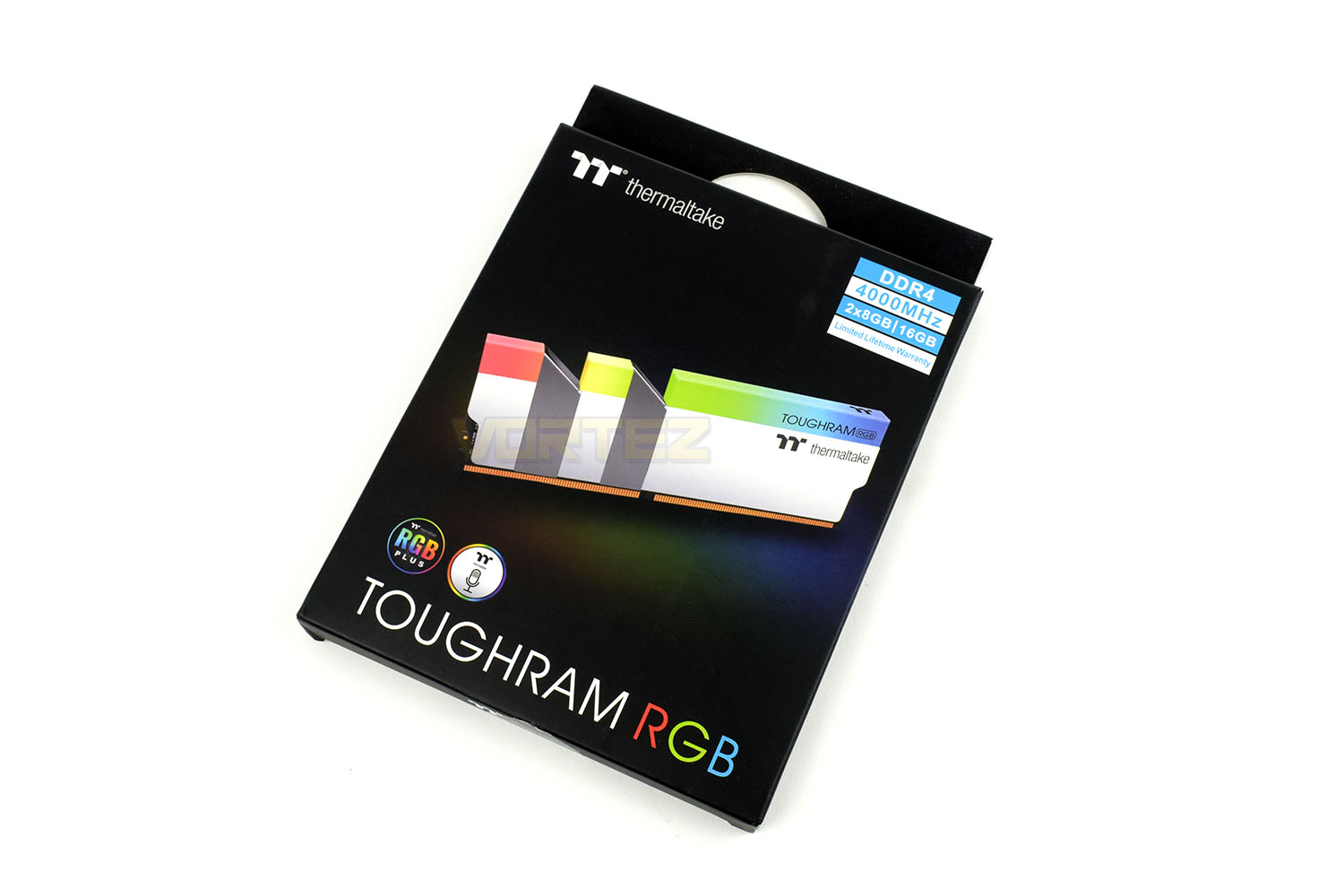
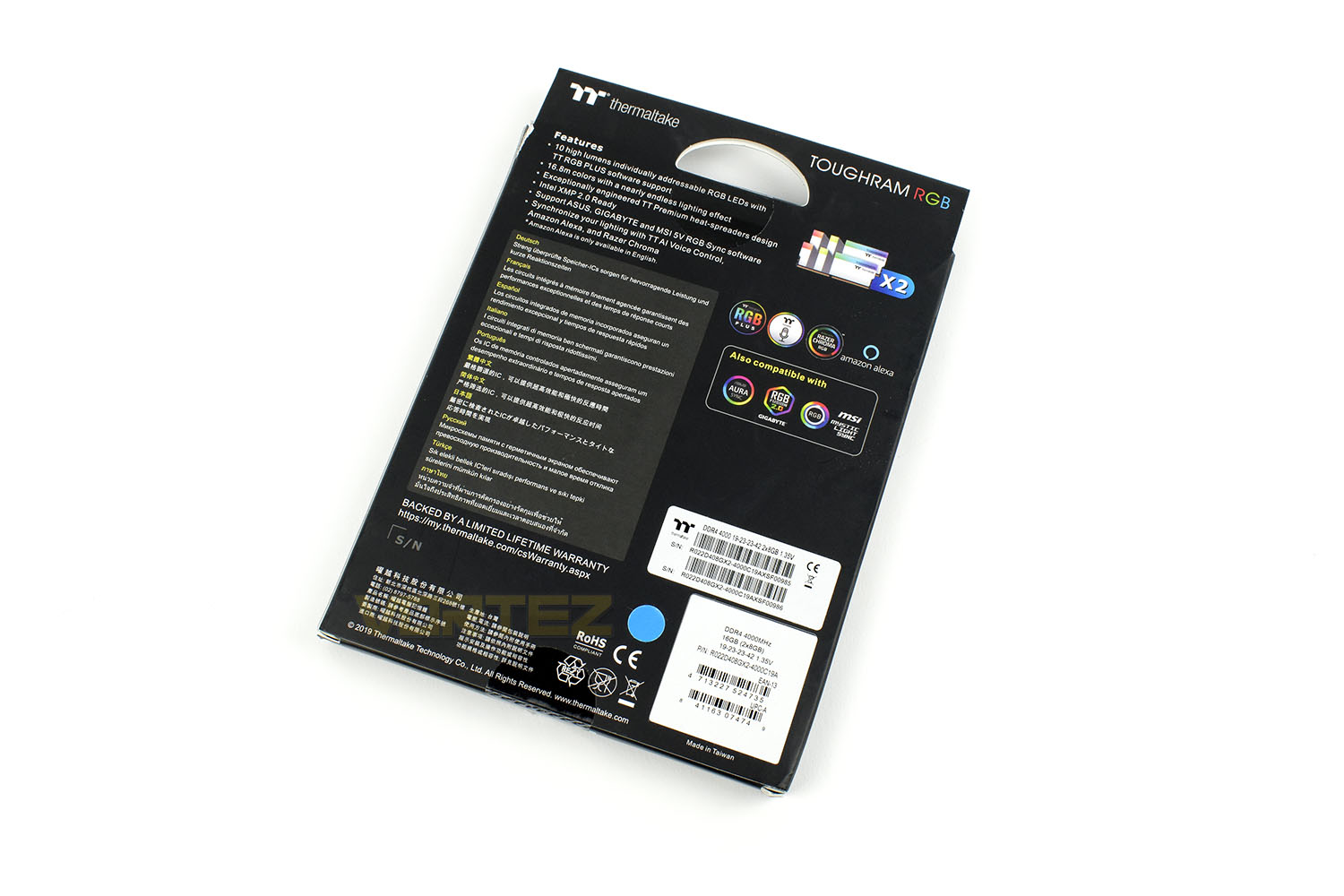
On the reverse is a lot more information. After skimming over this there would be very few, if any, questions left over.
The large aluminium heatspreaders, weighing in at three quarters of the overall DIMM weight, are useful for dissipating heat generated, particularly for modules at 4000MHz with 1.35v pumping through them.
The overall appearance is very clean indeed, even the label is barely noticeable, allowing you to produce a beautifully designed system with no ugly product stickers ruining it.
The modules are 50mm tall so might foul some air coolers if your CPU socket is close to the DRAM slots.
Software & RGB Lighting
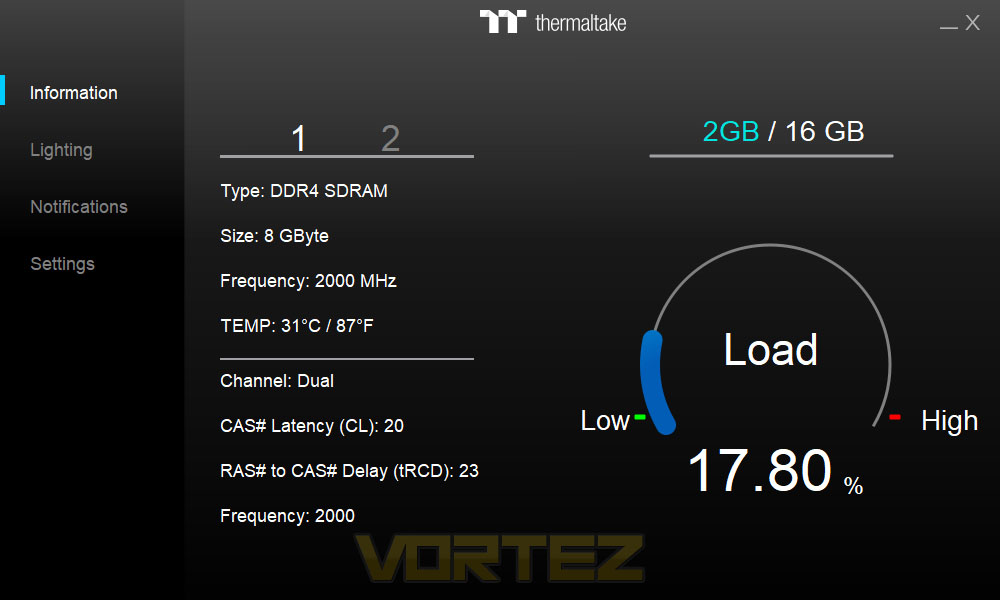
Thermaltake’s TOUGHRAM software is super easy to get up and running, the install file was only 32MB and installed in seconds.Once loaded up you’ll immediately notice how basic the software is. There’s no messing about here at all, you get temperature, frequency and usage data on the information page but it’s strictly no-frills.
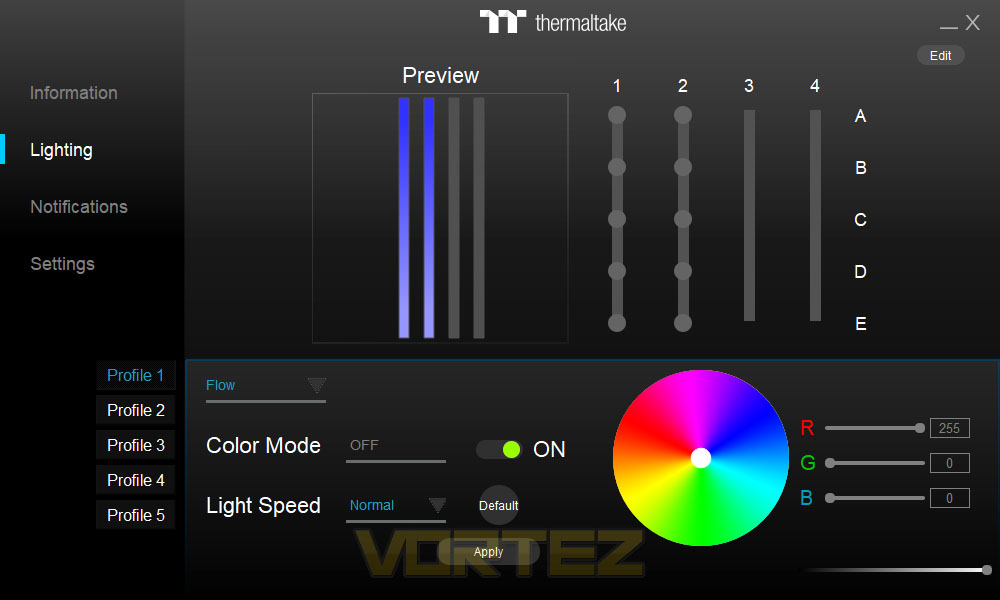
The Lighting tab is similar, but there are a cracking selection of lighting presets to choose from. The software was fast to respond, applied lighting settings easily and presented no issues, exactly what it should do.
Check out the lighting demo below:
Test Setup & Software
Our test system is formatted and a fresh version of Windows is installed with just drives in place – no additional applications. Windows is then updated to the latest release and the drivers are installed.Included in the list of benchmarks are the following applications:
Benchmarks:
AIDA64
SiSoftware SANDRA
Cinebench R20
PCMark 8 Photoshop
Rise of the Tomb Raider
War Thunder
SiSoftware SANDRA
Cinebench R20
PCMark 8 Photoshop
Rise of the Tomb Raider
War Thunder
Test system:
CPU: AMD Ryzen 7 3800X
Motherboard: MSI Prestige X570 Creation
Graphics: AMD Radeon RX480
Memory: Thermaltake TOUGHRAM RGB – 4000MHz
PSU: Corsair RM750x
OS: Microsoft Windows 10 Pro 64-Bit
Monitor: ASUS ROG PG279Q
Motherboard: MSI Prestige X570 Creation
Graphics: AMD Radeon RX480
Memory: Thermaltake TOUGHRAM RGB – 4000MHz
PSU: Corsair RM750x
OS: Microsoft Windows 10 Pro 64-Bit
Monitor: ASUS ROG PG279Q
Memory Transfer Performance – AIDA64
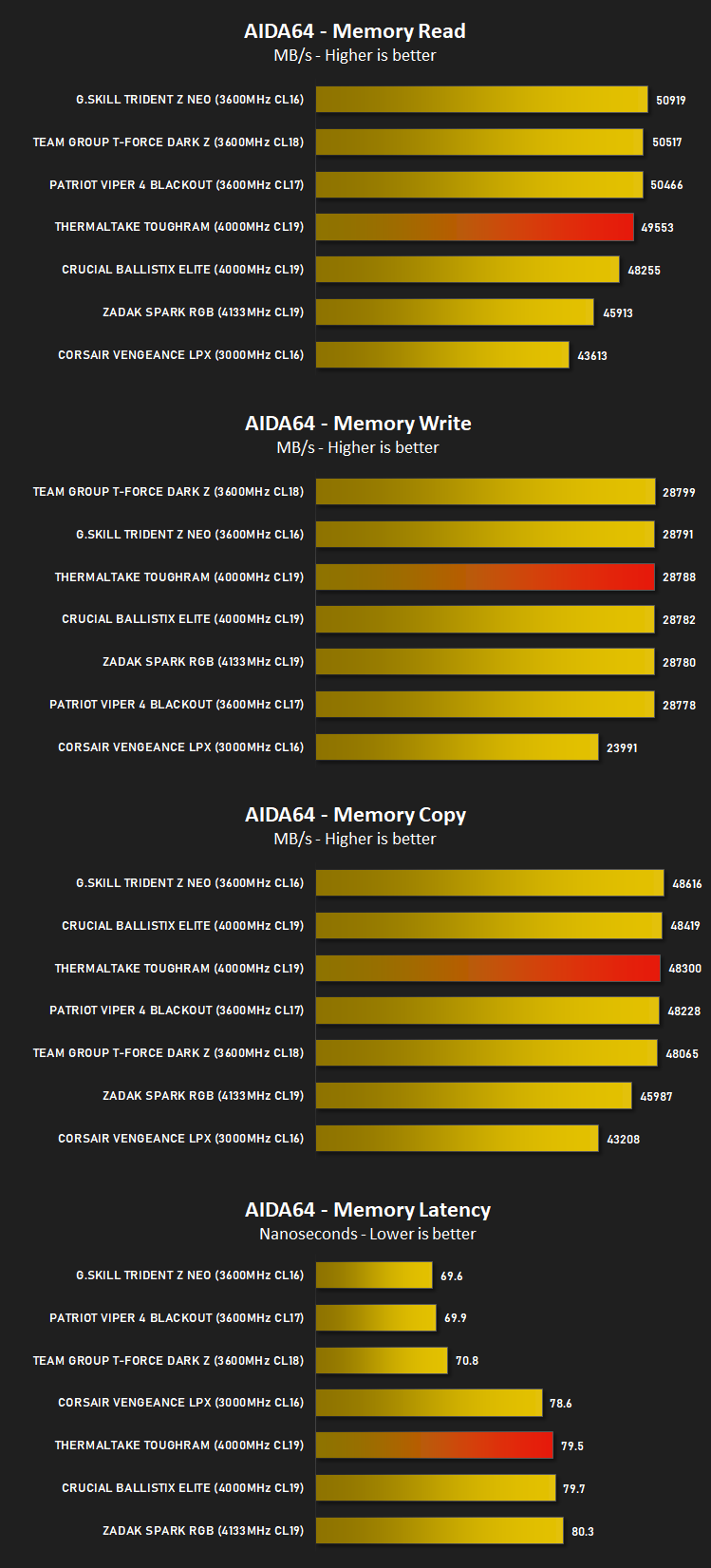
AIDA64 Product PageMemory bandwidth benchmarks (Memory Read, Memory Write, Memory Copy) measure the maximum achiveable memory data transfer bandwidth. The code behind these benchmark methods are written in Assembly and they are extremely optimized for every popular AMD, Intel and VIA processor core variants by utilizing the appropriate x86/x64, x87, MMX, MMX+, 3DNow!, SSE, SSE2, SSE4.1, AVX, and AVX2 instruction set extension.
The Memory Latency benchmark measures the typical delay when the CPU reads data from system memory. Memory latency time means the penalty measured from the issuing of the read command until the data arrives to the integer registers of the CPU.
The Memory Latency benchmark measures the typical delay when the CPU reads data from system memory. Memory latency time means the penalty measured from the issuing of the read command until the data arrives to the integer registers of the CPU.
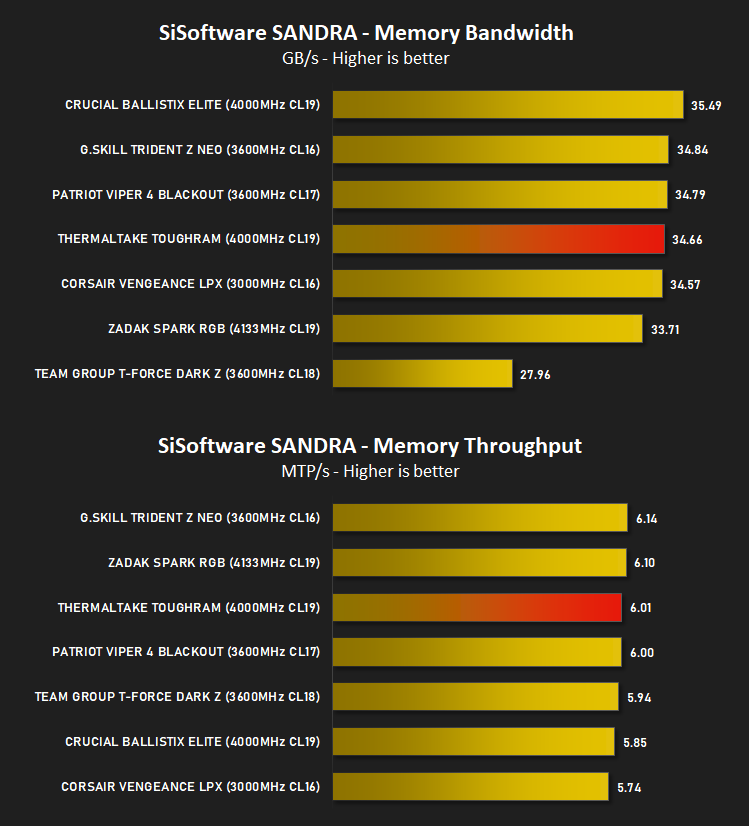
Bandwidth Performance – SiSoftware SANDRA
SANDRA isn’t always a benchmark that is included in hardware reviews but I believe it shouldn’t be ignored. SANDRA provides a vigorous package that tests your system in a rather large array of benchmarks. There are many aspects of benchmark that can be executed.
Processing Power Performance – Cinebench R20
Cinebench is a real-world cross-platform test suite that evaluates your computer’s hardware capabilities. Improvements to Cinebench Release 20 reflect the overall advancements to CPU and rendering technology in recent years, providing a more accurate measurement of Cinema 4D’s ability to take advantage of multiple CPU cores and modern processor features available to the average user.
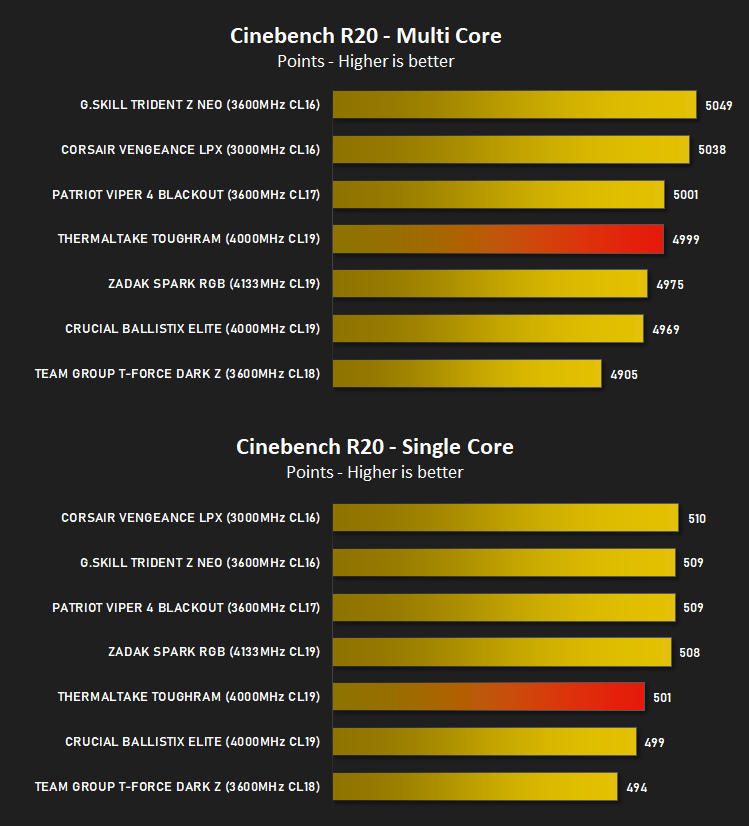
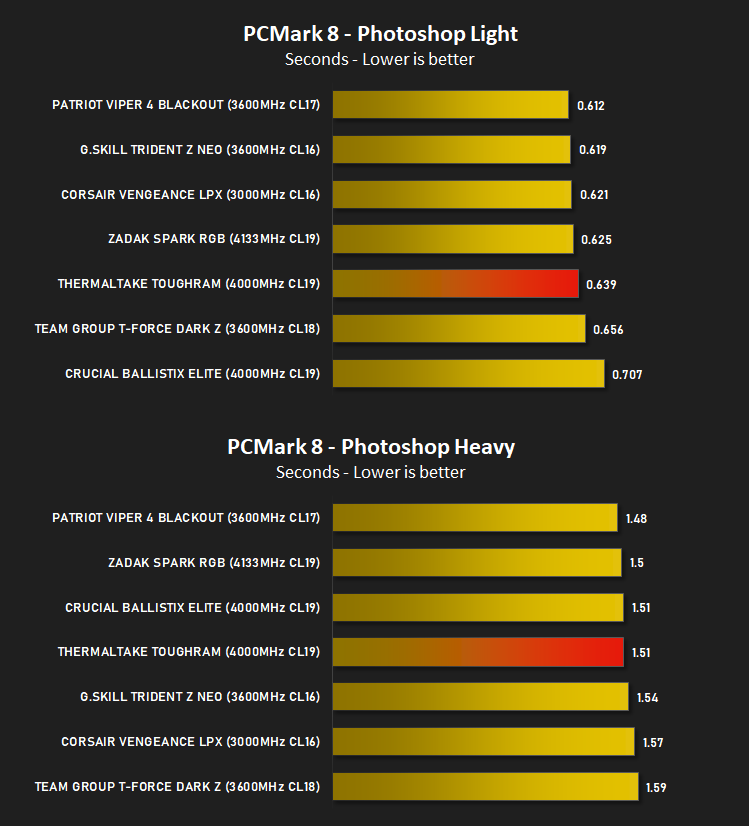
Image Editing Performance – PC Mark 8 Photoshop
PCMark 8 Product Page Developed in partnership with Benchmark Development Program members Acer, AMD, Condusiv Technologies, Dell, HGST, HP, Intel, Microsoft, NVIDIA, Samsung, SanDisk, Seagate and Western Digital, PCMark 8 is the latest version in FutureMark’s popular series of PC benchmarking tools. Improving on previous releases, PCMark 8 includes new tests using popular applications from Adobe and Microsoft.
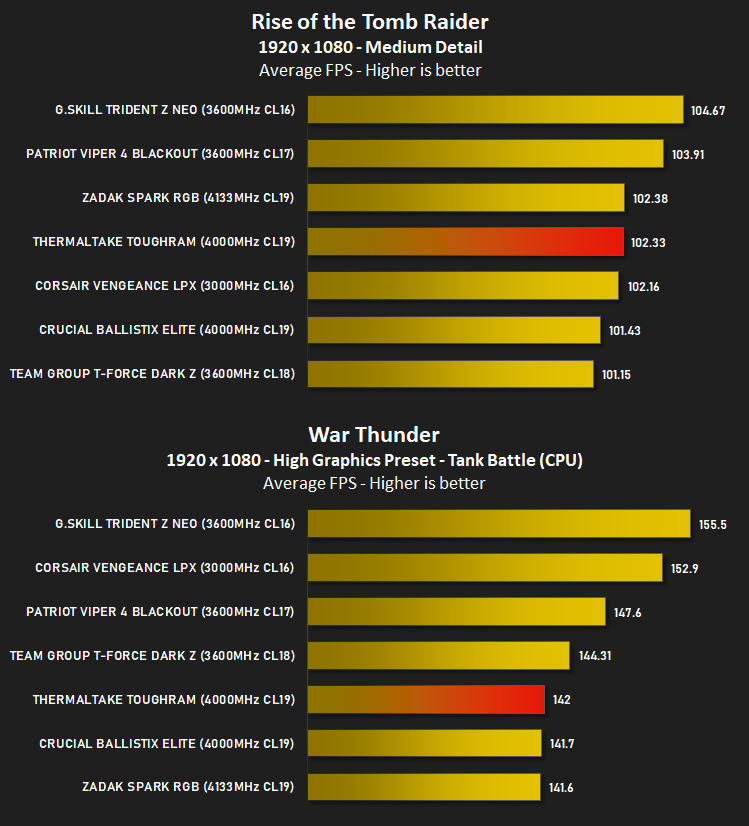
Gaming Performance – Rise of the Tomb Raider & War Thunder
To test out the benefit of faster memory in a real world scenario, we have taken a recent game and created a CPU limited scenario by reducing the resolution and graphics settings to minimum, while setting the CPU dependent settings at their highest.
Conclusion
The DRAM market, now that we’ve had years of development, volatile pricing in both directions and the surge in popularity of RGB lighting, has become awash with hundreds of different DRAM kits, to the point that usually the only important numbers are the price and frequency. However, if you’re willing to pay a little closer attention, it’s possible to see differences that make one kit worth purchasing over another.Kicking off with what you’ll notice first, the RAM kit looks lovely in white with the small product sticker and chromed sections. To suit our testbench, we’d have chosen a black kit but sometimes you take what you’re given in the reviewing world. Besides, white themed builds have become all the rage in the last couple of years with more and more manufacturers catering to the needs of people who prefer a brighter chassis and components. The RGB lighting on top produces vibrant and bright colours but there are noticeable hotspots within the effects, particularly when running sweeping or fading effects. This somewhat detracted from the overall appeal of the DIMMs when compared to competing RGB-equipped modules.
Offering support for the big 4 motherboard manufacturers RGB ecosystems, as well as Razer Chroma and Amazon Alexa can result in a simplification for a lot of people, allowing the modules to blend in straight away with zero fuss. There’s also the option of installing their easy-to-use, simple software suite to pick your favourite effect and apply it straight away.
Clocked in at 4000MHz, the performance was very decent, but it never really performed where you might expect, especially when compared to 3000MHz modules. The trouble, we feel, is the loose timings applied to this kit. It’s advertised as CAS19, which is true, but the rest of the key timings are 23-23-42. While this is standard within the industry, with many manufacturers only advertising the first number, the large difference between the 19 and 23 did feel a little bit misleading, and the effects appear to show within synthetic benchmarks compared to kits with tighter latencies.
Priced at around £120/$120 for a 16GB 4000MHz kit, with RGB lighting, loads of manufacturer lighting support and a bespoke software suite, the Thermaltake TOUGHRAM RGB offers a compelling argument but it could really do with some tighter timings and better RGB diffusion.
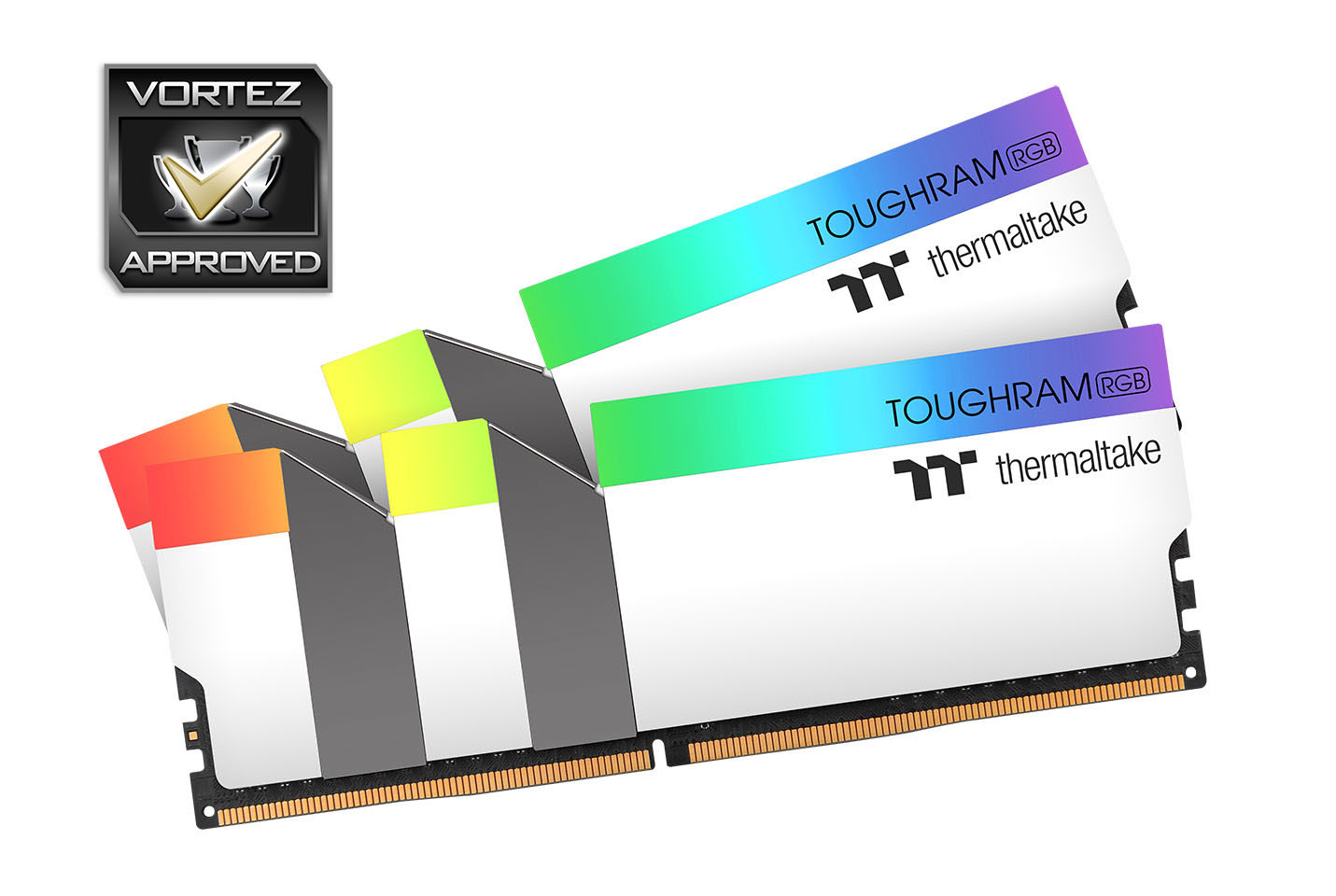
Available in black or white, with decent performance to boot, for a reasonable price. The TOUGHRAM RGB is worthy of consideration.
Pros
+ Attractive heatsinks
+ Decent performance
+ Reasonable pricing
+ Large number of manufacturer’s lighting support
+ Easy software
+ Available in black or white
Cons
– Only available in 8GB modules
– RGB lighting is poorly dispersed
– Loose timings
+ Attractive heatsinks
+ Decent performance
+ Reasonable pricing
+ Large number of manufacturer’s lighting support
+ Easy software
+ Available in black or white
Cons
– Only available in 8GB modules
– RGB lighting is poorly dispersed
– Loose timings
Click here for an explanation of our awards at Vortez.net.
Stay connected with the Vortez Social Media pages:
Join in with the discussions on Discord