







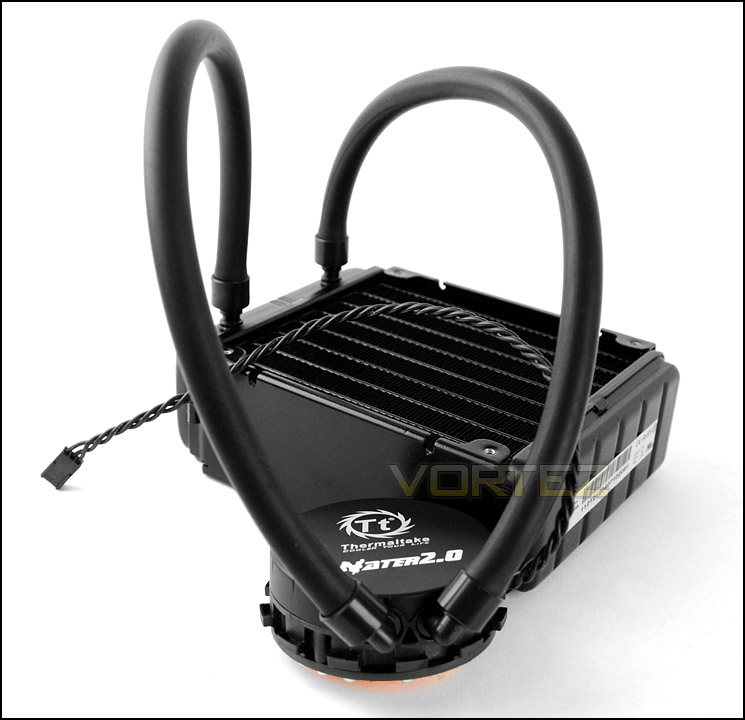
Under the spotlight is one of Thermaltake’s new all-in-one closed loop, liquid coolers named WATER 2.0 Pro. Can it handle Intel Sandy Bridge-E?

Product on Review: Water 2.0 Pro (CLW0216)
Manufacturer and Sponsor: Thermaltake
Street Price: £90 inc. VAT (At time of review)
Thermaltake have been responsible for bringing us a range of hardware over the last decade, from cases and power supplies to smaller storage solutions, drive bays and accessories. But as their name implies, cooling is a particular department they are keen to specialise in and they have had plenty of success in this division in recent years.
Today we will be taking a look at an all-in-one liquid cooler courtesy of Thermaltake. Many cooling brands are taking on these all-in-one coolers in a bid to make life easier for those wanting great performance without the hassle. Back in May Thermaltake launched their new WATER2.0 Series featuring the Performer, the Pro and the Extreme. We will be taking a look at the Pro model, similar to the Performer model with it being 120mm but with a much thicker radiator, in order to dramatically increase the heat-dissipating surface area by almost double.
Will Thermaltake’s WATER2.0 Pro be a success? How will it compare to rival air coolers? Let’s find out!
About Thermaltake
The beginning of every myth and legend is about dreams and desire: the challenging, creative and combative features of Thermaltake Group create an exciting and fascinating user experience to share with everyone, while allowing users to enter a selfless state in terms of function and potential.
Thermaltake Group’s 3 main brands: Thermaltake, Tt eSPORTS and LUXA2 have been merchandising throughout the world, and have successfully established 6 business footholds in areas such as Europe, America, Oceania, Japan and China, with 95 regional distributors and over 4000 premium retailers. All product planning is orientated by observation of global PC peripheral market and understanding of consumer demands. Thermaltake creates direct contact opportunities with resellers and consumers by participating major global ICT exhibitions and trade shows every year, and develop innovative marketing strategies for the promotions of new products. Meanwhile, Thermaltake incorporates the composite marketing system by making branch offices and regional distributors both the distribution channel and technical support or service center to provide instant support; by maintaining close contact with end users, we manage to strengthen corporate competitiveness and create the momentum for the growth of accomplishments.
With its outstanding wisdom and strength, Thermaltake Group is recruiting creative talents to build a cultural brand for the enjoyment of entertainment, e-Sports, technology and lifestyle!
Thermaltake Group’s 3 main brands: Thermaltake, Tt eSPORTS and LUXA2 have been merchandising throughout the world, and have successfully established 6 business footholds in areas such as Europe, America, Oceania, Japan and China, with 95 regional distributors and over 4000 premium retailers. All product planning is orientated by observation of global PC peripheral market and understanding of consumer demands. Thermaltake creates direct contact opportunities with resellers and consumers by participating major global ICT exhibitions and trade shows every year, and develop innovative marketing strategies for the promotions of new products. Meanwhile, Thermaltake incorporates the composite marketing system by making branch offices and regional distributors both the distribution channel and technical support or service center to provide instant support; by maintaining close contact with end users, we manage to strengthen corporate competitiveness and create the momentum for the growth of accomplishments.
With its outstanding wisdom and strength, Thermaltake Group is recruiting creative talents to build a cultural brand for the enjoyment of entertainment, e-Sports, technology and lifestyle!
Technical Specifications
Water Block Material
Copper
Pump
Motor speed : 2800+-150 RPM
Rated Voltage : 12V
Rated Current : 220mA
Fans
Dimension : 120 x120 x 25mm
Speed : 1200~2000RPM
Noise Level : 27.36dBA(Max)
Rated Voltage : 12V
Rated Current : 0.5A
Max. Air Flow : 81.32CFM
Connector : 4 Pin
Radiator
Dimension : 149.9×119.9×48.8 mm
Material : Aluminum
Tube
Length : 326 mm
Material : Rubber
Weight
1,060g
Compatibility
Intel
LGA 2011
LGA 1366
Core i7
LGA 1155/1156
Core i7/Core i5/Corei3
AMD
FM1
A-series
AM3+ / AM3
Phenom II/Athlon II/Athlon/Sempron series
AM2+ / AM2
Phenom II/Phenom/Athlon/Sempron series
Core 2 Extreme/Core 2 Quad/Core 2 Duo/Pentium D/Pentium 4/Pentium/ Celeron D/Celeron
Copper
Pump
Motor speed : 2800+-150 RPM
Rated Voltage : 12V
Rated Current : 220mA
Fans
Dimension : 120 x120 x 25mm
Speed : 1200~2000RPM
Noise Level : 27.36dBA(Max)
Rated Voltage : 12V
Rated Current : 0.5A
Max. Air Flow : 81.32CFM
Connector : 4 Pin
Radiator
Dimension : 149.9×119.9×48.8 mm
Material : Aluminum
Tube
Length : 326 mm
Material : Rubber
Weight
1,060g
Compatibility
Intel
LGA 2011
LGA 1366
Core i7
LGA 1155/1156
Core i7/Core i5/Corei3
AMD
FM1
A-series
AM3+ / AM3
Phenom II/Athlon II/Athlon/Sempron series
AM2+ / AM2
Phenom II/Phenom/Athlon/Sempron series
Core 2 Extreme/Core 2 Quad/Core 2 Duo/Pentium D/Pentium 4/Pentium/ Celeron D/Celeron
Packaging, Bundle & Fans
Water 2.0 Pro is presented in a small box which on the front shows a depiction of the cooler along with a listing of the important features. Thermaltake have printed on the front that Water 2.0 Pro has support for LGA2011 which is great to see.
On the sides there are technical specifications whilst the back contains more detail on the features. Inside, all items are protected with a clear plastic bag/sheet and sit within an eggshell box.
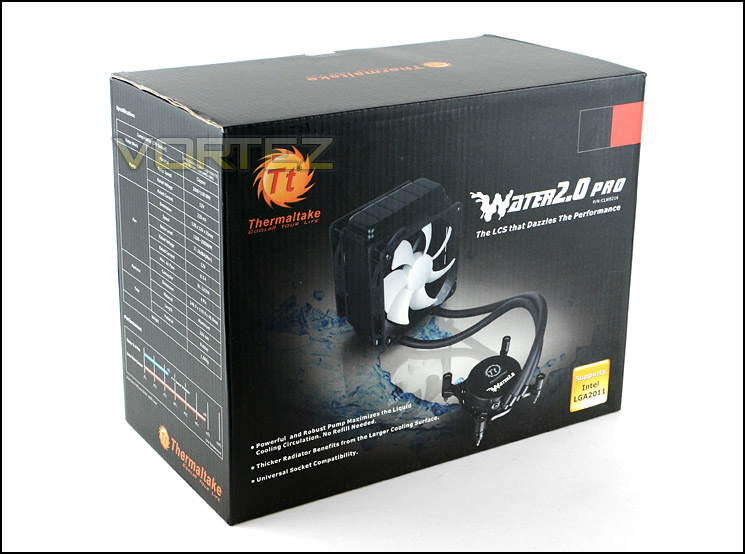
Packaging for Water 2.0 Pro
Opening the box up and taking out the contents, for the bundle we have the radiator/pump itself, dual 120mm cooling fans, mounting kit and an instructions manual.
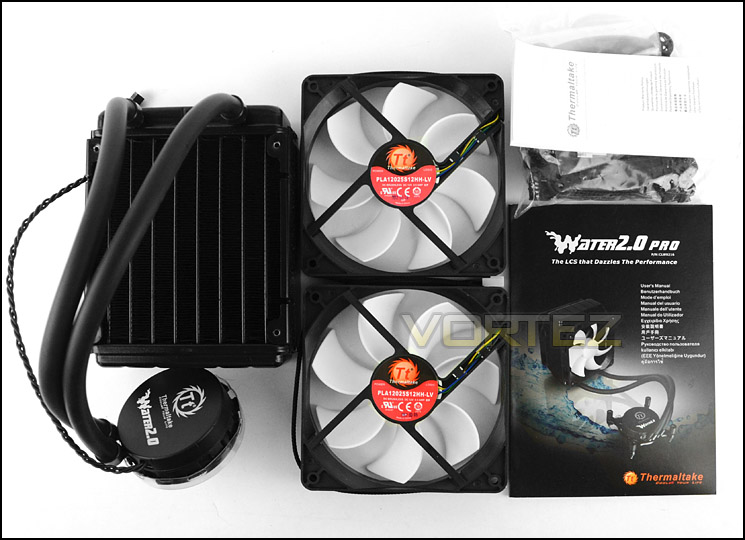
Included items within bundle
The dual 120mm cooling fans are Thermaltake branded and to be used on either side of the radiator for push/pull configuration. The fan used is PLA12025S12HH-LV which is a seven blade 120mm PWM fan capable of up to 2000RPM.
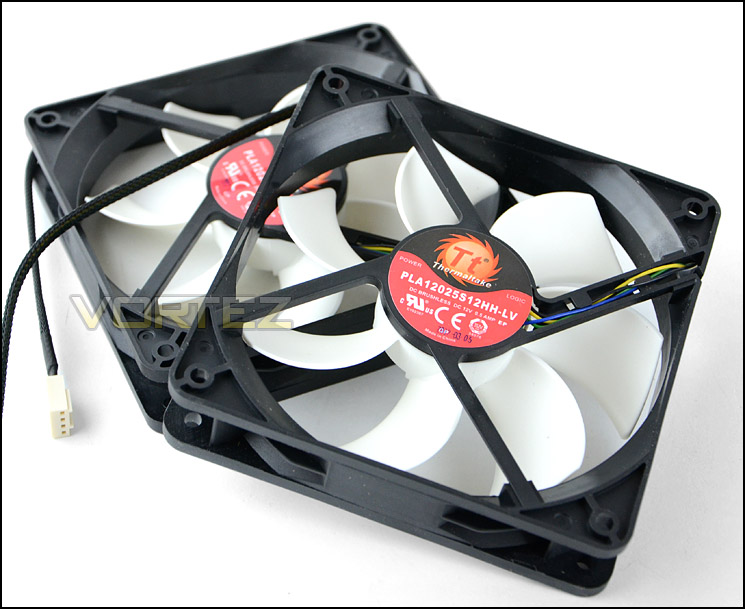
Dual 120mm PWM cooling fans capable of up to 2000RPM
Closer Look
Being an all-in-one, closed loop CPU cooler the Water 2.0 Pro has a pump and radiator. The radiator is aluminium and measures 149.9×119.9×48.8 mm – ideal for installing into the space which occupies the rear exhaust in the typical computer chassis.
The tubes which connect the pump to the radiator are rubber and can be rotated approximately 70 degrees to allow for various orientations.
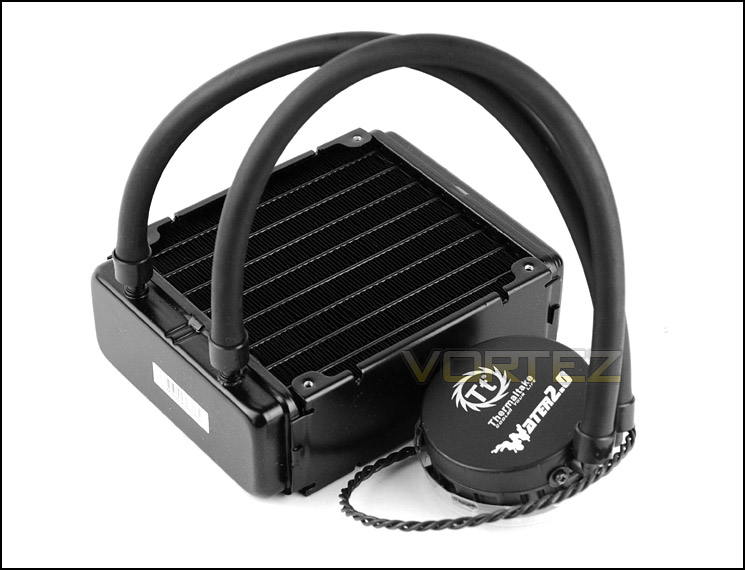
Radiator and pump[i/]
The pump has a plastic outer cover and an integrated copper water block. This water block is screwed to the unit and comes with a thin layer of pre-applied thermal paste. The pump requires a 4-poin connector in order to have its 12V motor operate and has branded as Asetek
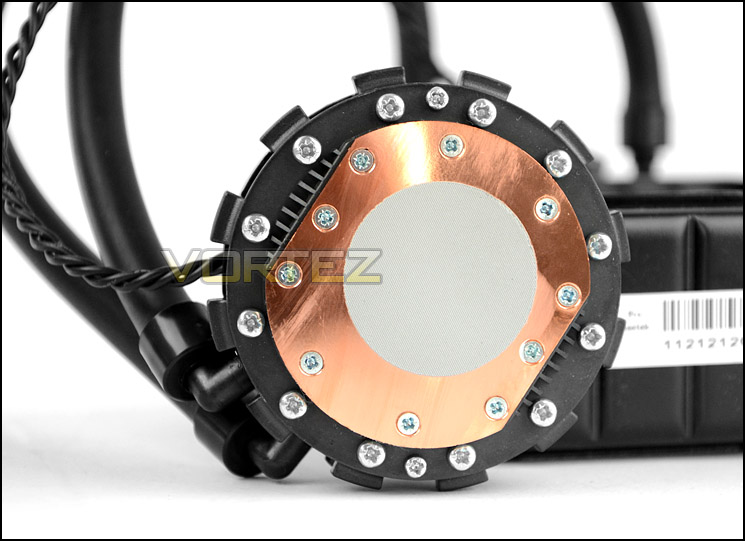
The underside of the pump with copper water block
Installation Process
In order to demonstrate the installation process for Water 2.0 Pro we are installing the cooler on the Intel LGA2011 socket. Thermaltake have a very informative set of insutrctions on the product page for this cooler, showing clear pictures of how to install the cooler: http://uk.thermaltake.com/products-model.aspx?id=C_00001882
The first step is to attach the relevant screws and adapters to the socket ring. Once attached the screws can rotate to suit a variety of different sockets but the LGA2011 socket requires the thicker screws in order to fit properly. Once this has been performed, the socket ring must be attached to the pump – there are a series of ridges which fit into the pump once lined up a plastic retention clip is snapped into place to prevent the ring from separating from the pump. After this the only thing left to do is to place the pump over the socket and tighten up the screws. It’s advisable to tighten two screws at the same time and corner to corner in order to apply even pressure.
The radiator can be installed in different places but it’s advisable to remove the rear exhaust fan inside the computer chassis and have one of the 120mm fans attached in its place along with the radiator and the other fan.
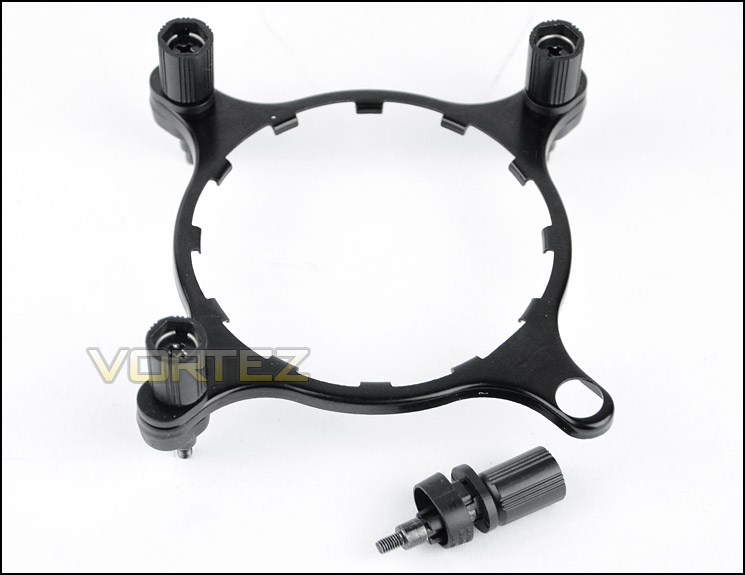
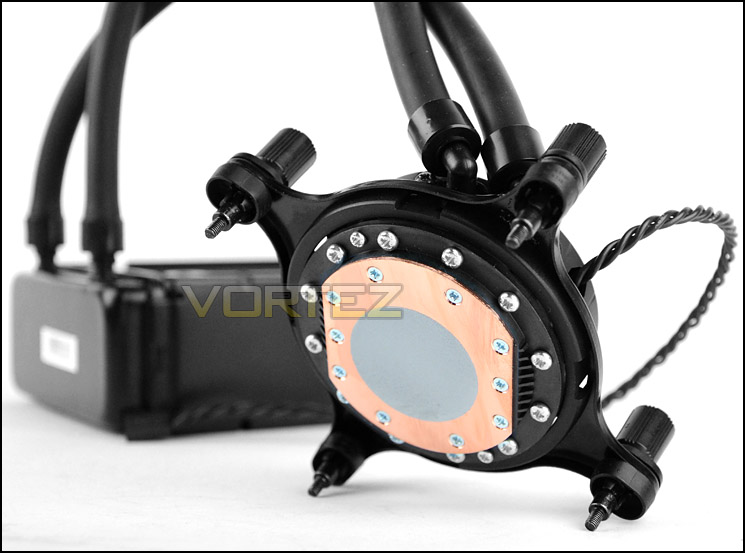
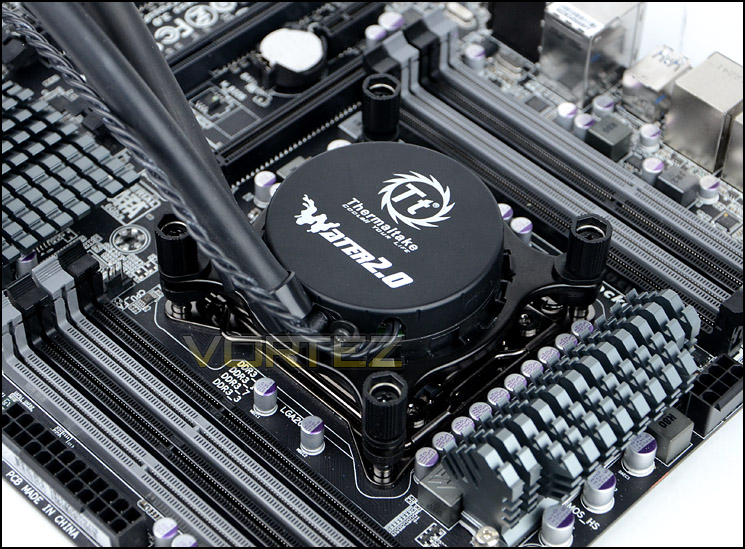
Installed – Memory Clearance
Our usual practise is to observe memory clearance against the heatsink but since Water 2.0 Pro uses a pump this isn’t a requirement.
Since most will be installing the radiator/fans in the rear exhaust position we are showing this in this section instead. Those who are using Water 2.0 Pro with anything other than LGA2011 will not have the issue of memory clearance with the radiator/fans since memory isn’t found on the other side of the motherboard, but for LGA2011 as you can see this could be an issue if you have tall memory modules. Those with anything over 5.5cm will need to alter their memory configuration.
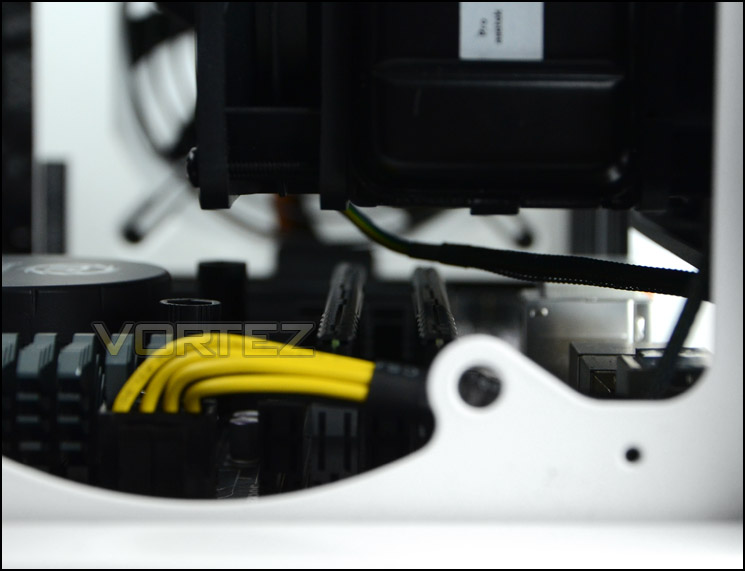
Memory clearance should be observed for LGA2011
Test Setup & Methodology
Test System
CPU – Intel Core i7-3930K (3.6GHz)
Motherboard – GIGABYTE X79-UP4
Memory – 8GB Corsair Vengeance LP 1600MHz CL9
Graphics – Sapphire Radeon HD 6850 1GB
PSU – NZXT Hale90 650W
Hard Drive – Kingston HyperX 240GB SATA III SSD
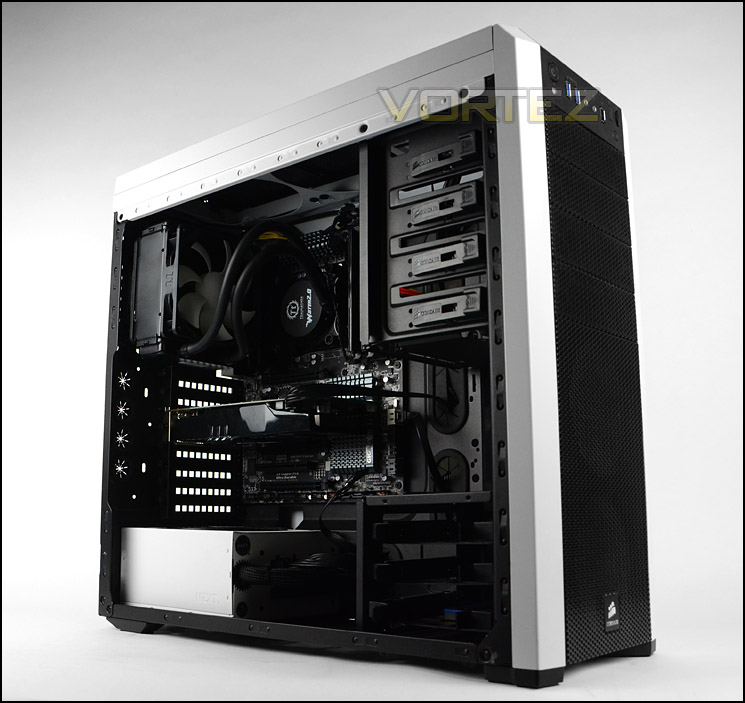
Case – Corsair Carbide 500R White
Motherboard – GIGABYTE X79-UP4
Memory – 8GB Corsair Vengeance LP 1600MHz CL9
Graphics – Sapphire Radeon HD 6850 1GB
PSU – NZXT Hale90 650W
Hard Drive – Kingston HyperX 240GB SATA III SSD
Case – Corsair Carbide 500R White
CPU Coolers
Alpenföhn Matterhorn Pure(120mm Wingboost: 300-1200RPM)
Alpenföhn K2 (120mm Wingboost: 500-1500RPM, 140mm Wingboost: 300-1100RPM)
Alpenföhn Gotthard (140mm Wingboost: 300-1100RPM)
Noctua NH-D14 (120mm NF-P12 PWM + 140mm NF-P14 PWM: up to 1200RPM)
Thermalright SilverArrow SB-E Extreme (Dual TY-143 fans – 600-2500RPM)
Corsair Hydro H100 (Dual 120mm fans – low: 1300RPM, mid: 2000RPM, high: 2600RPM)
SilverStone HE01 (140mm PWM fan – 500RPM-1200RPM – 500RPM-2000RPM)
be quiet! Dark Rock Pro 2 (135mm + 120mm PWM Fans – up to 1500RPM and 1700RPM)
Thermaltake Water 2.0 Pro (Dual 120mm PWM fans – up to 2000RPM)
Program Suite
Real Temp – Maximum temperature analysis
LinX 0.6.4 – Applies thorough stress test to CPU
CPU-Z – Confirmation of CPU frequency/voltage
AIDA64 Extreme Edition – Confirmation of temperatures/fan speeds
Testing methodology
Testing will be based on temperatures recorded by Real Temp after 20 passes of LinX stress test. The maximum absolute temperatures will be recorded after the test and averaged over the 6 cores. The delta is then calculated by subtracting the ambient temperature recorded near the intake fans from the average temperature calculated. Tests are conducted with the Intel i7 3930K at its default 3.6GHz stock speed and overclocked to 4.6GHz @ 1.42V. The tests are done inside the Corsair Carbide 500R chassis to simulate real world conditions. To keep the tests standardised we are using Noctua’s NT-H1 thermal paste on all coolers.
CPU coolers are reviewed as they come out of the box – with their factory cooling fans, as the manufacturer intended and as the consumer expects.
Additional tests include a passive test where the cooling fans are taken away from the heatsink and a comparison between the cooler used with stock thermal paste against our Noctua NT-H1 paste.
A kind thank you to Noctua for supplying us with NT-H1 thermal compound.
Results – Stock Performance
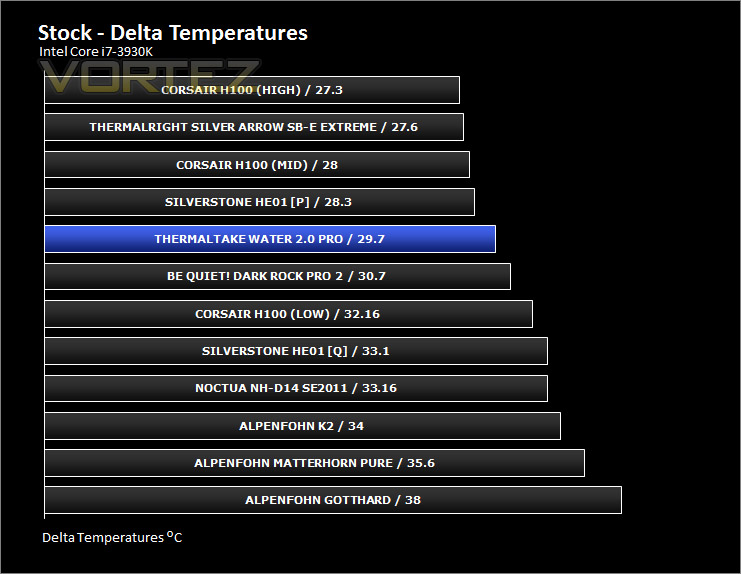
At stock CPU frequency the Water 2.0 Pro gives good performance results, competing with the best air coolers on the market and Corsair’s H100. Cooling fans remained at 1212RPM during this test.
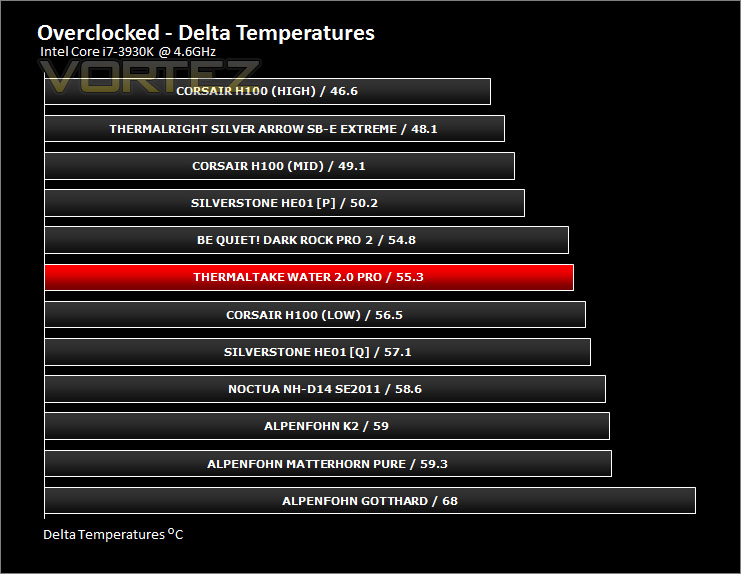
Results – Overclocked Performance
The gulf between the best coolers and Water 2.0 Pro now increases and the cooler appears to fall behind ever so slightly. Cooling fans remained at 1500RPM throughout this test.
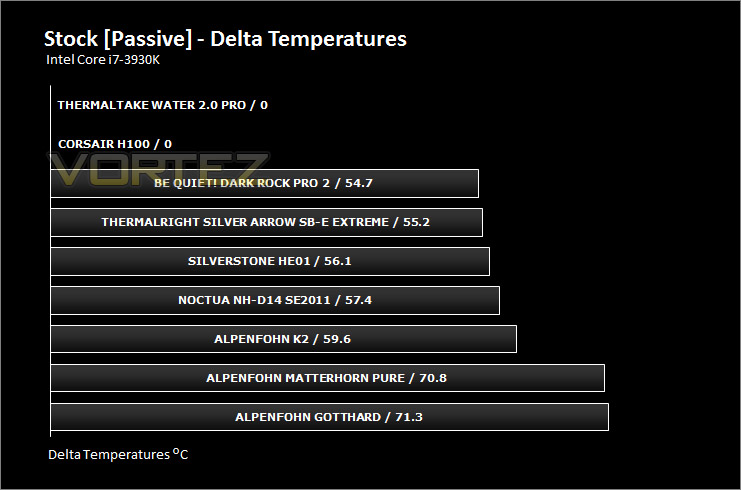
Results – Passive Performance
Unfortunately the passive tests (Without cooling fans attached) resulted in temperatures which exceeded 90 degrees and thus isn’t recommended.
Results – Thermal Paste Comparison
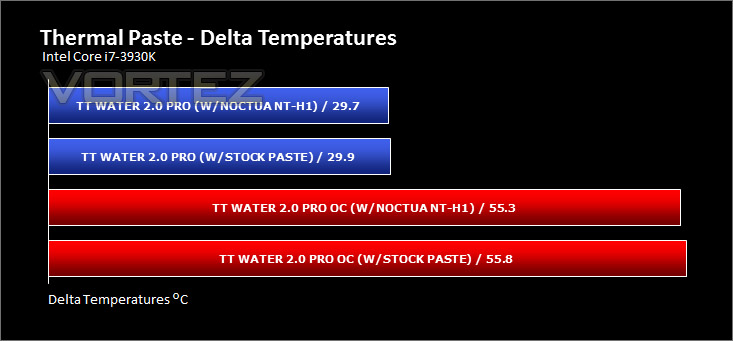
Most CPU coolers come accompanied with thermal paste provided by the manufacturer. For our CPU cooling tests we use Noctua’s NT-H1, so to offer up some interesting analysis we test the thermal paste which is already applied to the water block to see which gives the best results during stock and overclocked performance.
The difference between both pastes is nominal, the Noctua being slightly better but by no means significantly.
Conclusion
All-in-one liquid CPU coolers are an undertaking which many brands are involved in at the moment since these products usually result in low-noise, easy installation and provide more space. It’s the turn of Thermaltake to go under the spotlight today with their Water 2.0 Pro, so how does this product shape up?
Getting Water 2.0 Pro installed is reasonably easy and especially so compared to respective air coolers. After just a few steps the entire CPU cooler can be attached to the system and with it attached on offer is a low-noise solution which is both compact and lightweight. Compared to an air cooler for example, there is little to no memory clearance issues which is often a concern to many who are looking at upgrading their cooling.
On the performance front, Water 2.0 Pro delivers some good results for stock and overclocked tests. When comparing against other liquid coolers our unit does well, but compared to other air coolers the same can’t be so easily asserted. The benchmark for air coolers has been set very high due to materials and advancement in methodologies and the competition between air and liquid has never been so competitive. Water 2.0 Pro offers improved thermal performance compared to a number of rival air coolers but against the top-end its neck and neck in terms of performance comparison.
At £90, Water 2.0 Pro occupies a position nearby Corsair’s H100. At some stores H100 is even cheaper than Thermaltake’s offering, many hold H100 in high regard – Thermaltake should really adjust their pricing accordingly if they want to have a strong chance of competing with Corsair’s Hydro Series.
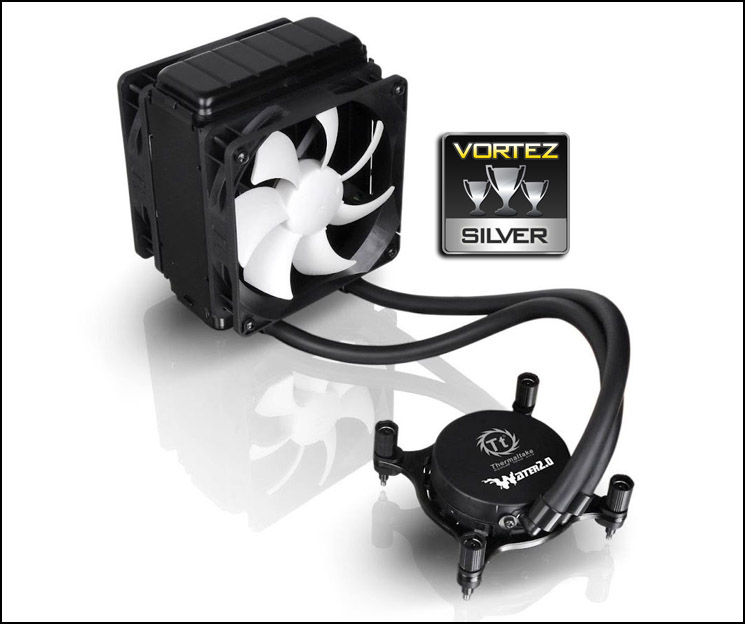
So, pricing is a little too ambitious for this 120mm liquid cooler even though it does have a thicker radiator when compared against the plethora of other 120mm liquid coolers currently occupying the market which hit the £60 mark. Being 120mm means this unit will be more compatible with a wider range of computer chassis compared to 240mm variants which generally require mounting holes and clearance in the roof. So based on the weight, size, compatibility, performance and noise levels we are encouraged to give this cooler the Silver award.
Pros
+ Easy to install
+ Good performance
+ Low noise
+ Better case compatibility (compared to 240mm)
+ Compact, lightweight
+ Less memory clearance restrictions
Cons
– Price
– Part plastic mounting kit
+ Easy to install
+ Good performance
+ Low noise
+ Better case compatibility (compared to 240mm)
+ Compact, lightweight
+ Less memory clearance restrictions
Cons
– Price
– Part plastic mounting kit

Click here for an explanation of our awards at Vortez.net.


