







We take a look at an external USB2 enclosure capable of housing two 3.5” SATA hard disk drives. Welcome the Tsunami Ultimate II 3500!
Product on Review: Tsunami Ultimate II 3500 USB2 EnclosureManufacturer and Sponsor: Tsunami
Street Price: £21.71

In the last few years the storage market has seen huge changes, firstly with the massive increases in capacity and performance of traditional platter-based Hard Disk Drives (HDD), and secondly with the introduction of Solid State Drives (SSD). In the case of HDD’s it is now pretty much seen as standard for a new PC to ship with a 1Tb HDD, and with the cost of these drives as low as £50 – £60 there is also a booming market in replacement parts. So much so that there are even some upgrade HDD and SSD packages being offered for sale which have bundled disk-imaging software to simplify the process of migrating your OS, programs and data to a new drive.
But what do you do with your old drive? I have several collecting dust which could be put to use, but I don’t want to have lots of external caddies lying around nor the hassle of constantly swapping the drives inside them.
Enter the Tsunami Ultimate II 3500 USB2 Enclosure.
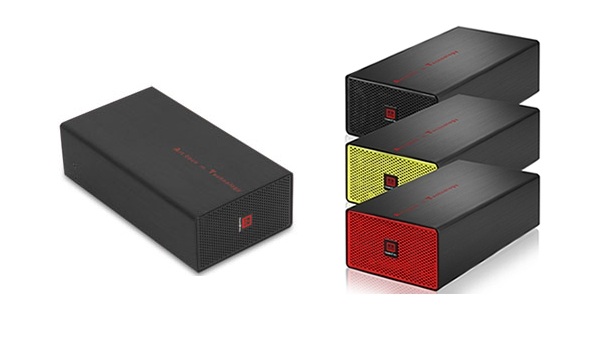
The Tsunami Ultimate II 3500 is an external enclosure with USB2 interface which is capable of housing two 3.5” SATA HDD’s in either JBOD or BIG modes. (JBOD mode means that each drive is totally seperate, whereas BIG mode will bunch the drives together, presenting them to the user as a single disk.) Tsunami also make a RAID compatible model of this enclosure, but we will be testing the JBOD/BIG model today.
A little about Tsunami:
| Tsunami was founded in 1994 with one simple vision: Make technology delightful, enjoyable, and life-inspired. We have established manufacturing plants in emerging markets e.g. China and Brazil. Along the years, Tsunami has successfully developed itself as a main player in supplying innovative and high quality products globally. In 2007, based on it’s extensive experience, Tsunami Group has decided to extend their arms into the UK market. |
So how does Tsunami’s Ultimate II 3500 enclosure fare? Read on to find out.
Features and Specifications
Features
2-bays 3.5” HDD enclosure
Interface: SATA I, II to USB 2.0 (480mb/s).
Support 2 X 3.5” SATA I, II Hard drives
Support JBOD (2 Separated Disk) or BIG (1 Bunched Disk) mode
External JBOD/BIG jumper switch
40 x 40 x 10mm Cooling Fan with great cooling efficiency
Panel with air vent for better colling effect
OTB (one touch backup) function and software bundled
Anti-skid rubber foot stand
Dual color LED display (Power and HDD access)
Comes with 3 stylish changeable color bezels
Anti-shock design
Hot swappable and truly Plug-n-Play
Insulating designed PCB
Soft-start for slow turn-on feature prevents high inrush currents
Backward compatible with USB 1.1
One year manufacturer’s limited warranty.
Free unlimited online support
Specifications
OS support: Windows Vista/XP/2000/Me/Windows98/SE, MAC OS (Drivers bundled)
Power supply: AC100~240V, 50~60Hz; DC5V/3A+DC12V/3A
Case material: Aluminum (great heat dissipation)
Size: L212 x W116.3 x H64(mm)
Weight: 1.3 KG (GW)
Packaging and Contents
Tsunami have packaged the Ultimate II 3500 in a compact and uncluttered box using minimal plastic and ensuring virtually no wasteage, something which I am quite pleased to see.
The glossy white box’s front is colourfully decorated in panels depicting the enclosure itself wearing the red and yellow replacement fascias which are included, along with a short description of the product and finally with the legend 3.5” x 2 in large lettering – clearly something which Tsunami want you to be certain of!
The back of the box has the standard specifications panels in a variety of languages – but this time we have two sets of specifications as there are two models of enclosure on offer here which use the same packaging – the JBOD/BIG one that we are looking at today and also a RAID version.
The sides of the box are basically replicas of the front with the same information, except for the left end which has a panel showing which version of the enclosure you have.
When we open the box we get another pleasant surprise – there is no large plastic blister housing or polystyrene holder for the enclosure, but rather a cleverly folded cardboard tray which securely holds the enclosure safe from harm in transit, which is a good job as the brushed aluminium finish can mark quite easily if poorly treated.
Once the tray holding the enclosure is removed we see underneath the remaining contents. Apart from the enclosure itself you get a pair of replacement fascias in red and yellow (these include replacements for the rear panel too by the way), a small bag with 8 screws for mounting the HDD’s and also a strip of clear 3M adhesive feet for the casing, a USB cable, power supply, and a user manual with CD-Rom. The only thing I couldn’t immediately find was the actual power lead – the supply uses a ‘figure-of-eight’ type lead rather than a std kettle lead and I was a bit concerned at the seeming omission of something so vital… until I opened the enclosure’s casing and found it snugly tucked away inside! Another plus point for Tsunami, making great use of the small box for packing everything in – even if I did miss it at first!
A Closer Look
One of the things which makes the Tsunami Ultimate II 3500 enclosure stand out from the competition (especially at it’s price point) is the attractive brushed aluminium from which it is made – as soon as you unpack it you can tell it really is very well put together, and it looks pretty good too!
The sleek brushed aluminium finish can unfortunately pick up scratches quite easily so using the included clear feet is a very good idea once you have decided which side you will have it standing on. It also picks up fingerprints quite readily, although not as badly as any of the ‘piano-black’ glossy plastic finished items which are so popular these days! I’m not sure about the bright red slogan ‘Art Deco vs Technology’ emblazoned along the side, but it is a definite nod to the clear amount of thought etc that has gone into the design of this device.
Another good design choice made by Tsunami was to include these replaceable fascias and rear panels in the package – again not bad when you consider the price! They are very easy to swap out, having a couple of small screws at the top and bottom of each to secure them with a third middle hole sitting on a ‘locating lug’ so you can’t go wrong – you can see the three holes at the bottom of the fascias in the picture above. The rear panels are a nice touch too – I mean you normally probably wouldn’t even see the rear anyway, but it seems that Tsunami’s attention to detail is never ending.
At the rear we get the USB connector, DC input and power switch, and a tiny switch to select either JBOD or BIG modes – which has to be done when the unit is powered down! There is also the exhaust for the included 40mm cooling fan.
Drive Installation
The Tsunami Ultimate II 3500 enclosure is capable of mounting two 3.5” SATA HDD’s so that’s what I did, putting a pair of brand new Samsung Spinpoint F3 1Tb drives in there for testing.
I decided to use these drives as all the other drives I had were far older and wouldn’t necessarily stretch the USB2 interface to it’s limits – whereas these F3’s will do that with absolute ease and should therefore be a good test for the enclosure and the controller.
Once the cover has been removed (two small screws underneath) you get your first sight of the very tidy internals, with perfectly sized cables. There are two little bundles of cables neatly tucked away which run to led’s mounted just behind the front fascia for power and drive activity. The metal sides are slightly sprung – you can see the bottom one in the pic above bending in a bit, which makes for a very snug mounting when you put the first drive in!
Getting the first drive in was pretty easy and the included screws fit perfectly into the recess provided by the metal frame – if you were to lose these screws then you’d probably be fine with any standard HDD mounting screws as the recess is pretty big.
Installing the second drive is a little tricky though due to the strong grip of those sprung sides – I found that to get the HDD’s screw holes lined up with the recesses on the enclosure’s sides it was easier to take the fascia panel off so I could adjust the height of the drive more easily… you have been warned! Once in however, everything feels very snug and there is absolutely no movement anywhere, just as it should be!
When powered up you get a blue led to the left (or bottom depending on your choice of mounting) which indicates power, and to the right as above a green led indicates activity on HDD 2 (for activity on HDD 1 the right led turns blue).
When switching between JBOD and BIG modes you will need to shut down the enclosure and move the selector switch on the rear panel to the required mode before restarting the unit. On restart you should go into your computer’s management console and then into Disk Management to initialise the Disk before formatting and assinging a drive letter etc – the included user manual is rather good on this with clear instructions for those who haven’t delved into this side of things before!
The included CD-Rom has all sorts of software on it, a lot of which is not pertinant to this device and the folder structure leaves a little to be desired too! There is no auto-run installer telling you what you can install, rather it is left to the user to browse the CD and decide what to install – which could be a bit hit and miss! Unfortunately for me the included ‘One-Touch-Backup’ software simply didn’t want to run on Windows 7 no matter what compatability settings I tried. Some may find this software useful, I suspect that most will simply use either Windows Explorer or an alternate to control the content on the disks.
Testing and Conclusion
To test the performance of the Tsunami Ultimate II 3500 enclosure I will run some Read Speed tests using HD Tune and HD Tach as they are fairly standard benchmarks for hard disk drives and should show if the USB2 interface and controller is doing it\’s stuff properly. I will test the enclosure running in both JBOD and BIG modes to see if there are any differences apparent between them.
Test System
Intel Core i7 920 processor @ 4.2GHz
Gigabyte GA-EX58-UD5 motherboard
6GB OCZ Blade 2000MHz C9 DDR3 RAM (3 x 2048MB)
ATI Radeon 4870×2 2GB graphics
120GB OCZ Vertex SSD
Windows 7 Professional 64-bit
Test Software
HD Tune 2.55
HD Tach 3.0.4.0
Results
It should come as no surprise to hear that the USB2 interface was totally saturated by the two drives contained within the enclosure! USB2 is such a mature standard that the controllers and interfaces should these days be implemented without any hiccups at all, and that is certainly the case here with the tests showing no deviations at all! I will not bore you with publishing every test, but will give you one of each to show the lack of any variation…
HDTach result – JBOD mode
HDTune result – JBOD mode
As you can see both tests show remarkably similar results with virtually no deviations at all. HD Tach shows an avg read speed of 34.9MB/sec and HD Tune shows 33.2MB/sec, but with both tests graphs showing flat lines across the range.
Overall Read Speed results
Nothing to surprise anyone here! As you can see there was absolutely no difference between JBOD and BIG modes either, as the USB2 interface is simply too slow to let any difference in the controller become apparent.
Something which did come as a nice surprise though was how quiet this enclosure is! I have used many devices with 40mm fans before and due to their small size they tend to have to be run rather fast to produce a decent cooling effect, but in this case the bundled fan is pretty silent. It can be heard, but was less noisy than the 180mm fans on my test computer and I doubt it would intrude if used constantly – and they seemed to do a pretty decent job of keeping everything cool too!
Conclusion
Overall I have been mightily impressed by the Tsunami Ultimate II 3500 enclosure. When you consider that it only costs around £20 you do get an awful lot for your money – the ability to house two drives in an actively cooled aluminium enclosure complete with interchangeable fascias, and the flexibility of having either JBOD or BIG modes, well it\’s amazing that Tsunami could pack so much into such a cheap device! The software left something to be desired – or rather the CD did! And my only other gripe has to be the lack of an eSATA interface… I would happily pay a little more for the additional speed that eSATA would bring to this device, and it\’s a shame that it isn\’t included, but it\’s not a deal-breaker. This device is very good at what it does and should be considered by anyone looking to re-use an old drive (or two) and those who are looking to build a cheap high capacity data store, for the money you really can\’t go wrong!
Pros
+ Low Price
+ Holds 2 drives!
+ Ease of Installation
+ Quiet and cool operation
+ Replaceable Fascia and Rear Panels
+ Externally switcheable JBOD and BIG modes
Cons
– Lack of eSATA Interface
– Poor CD-Rom
+ Low Price
+ Holds 2 drives!
+ Ease of Installation
+ Quiet and cool operation
+ Replaceable Fascia and Rear Panels
+ Externally switcheable JBOD and BIG modes
Cons
– Lack of eSATA Interface
– Poor CD-Rom
For it\’s many plus points and it\’s incredible value for money Vortez Hardware are proud to award the Tsunami Ultimate II 3500 their Silver Award.
We would like to thank Tsunami for this sample. Discuss this review on our forums

