







Today we have with us the new Tuniq Tower 120 cooler, the successor to the highly popular and similarly named cooler, save for the "Extreme" moniker. Let’s find out if Tuniq have created a product worthy of its name.
Product on Review: Tuniq Tower 120 ExtremeManufacturer and Sponsor: Tuniq
MSRP: Not mentioned on website
Street Price: £34.99
Tuniq are well known for their high end CPU coolers and for good reason. Their original Tuniq Tower 120 was one of the most successful cooling solution on the shelves a few years ago before the flood of other manufacturers entering the market wanted a bite of Tuniq’s success. Since then, their name have slowly dwindled into the back of enthusiasts’ memories and Tuniq had remained fairly quiet. However the name was still akin to high cooling performance and so their named lived on. Today, they are embarking on a crusade to gain back their title as cooling champions. The previously reviewed Tuniq TX-3 has already shown us a glimpse of what to expect and now we have their new CPU cooler, the Tuniq Tower 120 Extreme!
Tuniq have stuck to the same unique design that can be accustomed to them but they have refined it to no end, while ensuring compatibility with most modern motherboards. Looking at other major players in the cooling segment, they will have some serious competition on their hands.

A few words from Tuniq:
Tuniq was formed as a division of Sunbeamtech and took on a whole new direction in product designs. We at Tuniq aim to provide authentic performance through a minimalist approach by stripping down the unnecessary components in product designs. Our research and development team consists of members who have over a decade of experience as well as young designers who are able to think outside of the box. It is this unique merge of experience and fresh ideas that enables us to bring to our customers such exquisite, elegant, top-quality products.
We feel that product design should be Zen-like: simple, functional, harmonious and without frails. Each product from Tuniq aims to combine the virtues of high performance, elegant design, and extraordinary value. When handling a Tuniq product, you will appreciate its impeccable finish and will be pleasantly amazed by its quality and performance.
With the multitude of awards and acclaims that each of our products has received, we have proven that our vision and approach is the right one and we will continue to provide our valued customers with new and better products.

The Tuniq Tower 120 Extreme represents a no-compromise cooling solution bringing style, performance, silence and functionality all in one product. It is this attitude that brought success to Tuniq and we hope to see the same today so let’s check it out.
Features and Specifications
Their own overview of the cooler:The performance king has returned! The much praised Tuniq Tower 120 has gone through a radical redesign and not only looks cooler but its performance has been boosted. The unique wave-like fins display a tremendous visual impact and increase the air-contact area for an unprecedented thermal performance. The nickel-plated surface combined with the LED fan creates a breath taking visual effect!
To ensure that the maximum cooling performance is obtained, we have also included our highest performing thermal compound, the TX-3. Furthermore, our unique adjustable fan controller places the control in your hands!
If Tuniq’s word are to be believed, and we have no reason to doubt them, we are in for a new title holder. Now, let’s see the more detailed features and specifications.
Features
•Silent 120mm MFDB FAN (Magnetic Fluid Dynamic Bearing)
•3 PCS High Performance 8mm and 2 PCS High Performance 6mm U-shaped Heat pipes
Specifications
Tower 120 Extreme:
•Dimensions: 131(L) x 112.31(W) x 150.7(H)
•Weight: 775g (without fan)
•Heat pipe: 8mm x 3 + 6mm x 2
•Compatibility: Intel LGA1366/LGA775, AMD AM3/AM2/AM2+/SKT 939/940
UPDATE: Tuniq now have the new LGA1156 compatible back plate listed on their site so future revisions of the cooler will be compatible with the new Core i7/i5/i3.
TX-3:
•Appearance: Grey
•Viscosity: 83500cP
•Thermal Conductivity: 6.2 W/mK
•Operating temperature: -45˚C ~ 200˚C
•Specific Gravity: 3.011 @ 25˚C
•Volume: 0.33ml (1g)
MFDB fan specifications:
•Bearing type: Magnetic Fluid Dynamic Bearing
•Rated Voltage: 12V DC
•Rated Current: 0.16A (Max)
•Air Flow: 90.65 CFM (Max)
•Noise: 16~20 +/- 10% dBA
•Speed: 1000~2000 RPM
•Life: 50,000 hours
•Thermal Resistance: 0.092 (Degrees C/W)
From the initial in-house tests, the Tower 120 Extremes fares 5 degrees better on average over the previous Tower 120 at the same fan speeds so initial conclusions would suggest that it uses a more efficient design than its predecessor.
Packaging
A very appealing front cover
The packaging is a very attractive blue cardboard box. The front depicts the cooler itself with the fan lit and on the side, we can see the key features listed. These are the Core Contact Technology, the Tuniq TX-3 and the inclusion of an MFDB Fan. The name “Tower 120 Extreme” stands boldly at the top of the packaging. The front fascia is a simple but modern design.
All the features are listed here
Continuing on the same design, we get to the back cover. Due to the large size of the box, there’s ample space for all the features and packaging contents to be listed on the back and as such Tuniq have done so. The compatible CPUs and Sockets are also listed, typical with all CPU cooler packaging nowadays. The back tells us that included in the package is the Tower 120 Extreme CPU Cooler, 1xMFDB fan, 1xTX-3 thermal paste,1xFan Controller and 1xUniversal Mounting kit. The mounting kit ensures compatibility with Intel LGA1366/775 and AMD socket AM3/AM2(+)/939/940.
More of the shots tower being showcased
On the side, we are greeted with several shots of the Tower 120 Extreme itself and of what is included in the package. Again the sheer size of the box makes everything look neat rather than crammed. The buyer will definitely know what to expect by reading the plethora of information listed on the box.
Highly detailed specifications as is their nature
Finally we have all the specifications listed for the Tower 120 Extreme, the TX-3 thermal paste and the MFBG fan. Those are clearly laid out in tables for easy reading. If Tuniq have put the same amount of thought into their packaging as they have into the cooler, then we can surely expect good things.
Can you feel the suspense!
Opening the packaging, we are greeted with another box. This box is a mere black cardboard box holding all the components. It comes with a nice handle for easy transportation.
Closer Look
Finally we get inside!
On opening the box, we find the manual, a white box and the heatsink in a hard plastic package. The white box contains all the installation kit. The size of the heatsink justifies the need for the large box, which does a good job of keeping it secure. The heatsink is also just as attractive as advertised on the box.
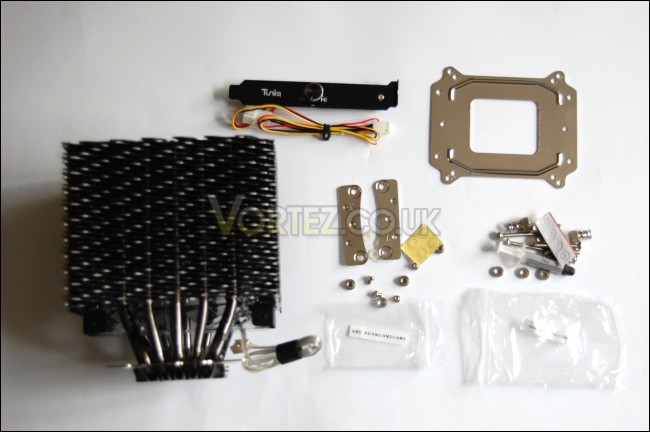
A very healthy bundle is provided
If you read the Alpenföhn Nordwand CPU cooler review, then you can skip this bit. The installation kit is exactly the same as provided by the Nordwand, so much so that the packaging is divided in exactly the same way, the two separate Intel and AMD tool bags. Installation is exactly the same as the Alpenföhn Nordwand and the Tuniq Tower 120 Extreme also comes with the same pre-installed mounting bracket but more on that later.

Haven’t we seen this before?
The back plate has holes for all the supported sockets including Intel LGA1366/775 on the side protrusions and AMD AM3/AM2(+)/939/940 at the top and bottom.
Tuniq’s work ethic is very clear and we can see that they don’t miss the slightest of detail
The manual is very informative detailing all the contents and individual screws while also listing all the specifications and features. A lot of the installation details share the same illustrations as the one provided by the Alpenföhn Nordwand. However, unlike Alpenföhn’s, the instructions don’t rely merely on the illustrations. Tuniq, as is their fashion, use succinct but clear descriptions step by step to make sure you follow the right procedure for each socket.
Closer Look (The Heatsink)
A towering inferno…
The heatsink is very striking from the first look. The flame design and the black coated finish adds to the appeal and gives the cooler a brutal but refined look. The Tower 120 Extreme is made of aluminium with a nickel plated surface. At the top we have a metal cover, which is attached to the fan for easy removal. This also uses the flame shape to conveniently accommodate the top of the heat pipes.
Close up shot of the beast
Upon closer look of the fins, we notice a very familiar design. The fins use a unique wave like design for the greatest surface area through which heat can dissipate and be carried by the airflow. The alternating pattern also helps tunnel the airflow and reduce the acoustic resistance. On each side, we see that the ends of the fins are bent meaning the side profile has no gaps. Again this helps focus the airflow without it leaking out. This is very similar to the Alpenföhn Nordwand.
Very artistic to say the least
From this angle, the pattern stands out more clearly. The blades of each fin create a series of steps going up diagonally.
Each heat pipe bend away from each other for maximum dissipation area on the fins
The Tower 120 Extreme employs 5 thick heat pipes to efficiently transfer heat from the CPU to the fins. Rather than going for a uniform size, there are 3 x 8mms heat pipes and 2 x 6mms ones. The ones directly adjacent the central pipe are the 6mm ones. The heat pipes go through all the fins and out at the top.
The top plate has a very professional metallic finish akin to Tuniq’s craftsmanship
At the top, the heat pipes have rounded edges for a clean finish. Tuniq really takes attention to every tiny details to make give the cooler breath-taking visuals. The heat pipes are spread out so that as much heat can be dissipated radially over the fins for the greatest surface area. Each groove of the top plate accommodates one heat pipe.
Closer Look (The Fan)
The flat finish creates very good contact with the CPU
The base of the heatsink uses the now popular Core Contact approach. The past few products we have reviewed using this technology have had great success so it is no surprise to see Tuniq using it here. In fact, Tuniq’s parent company, Sunbeam, were one of the pioneers of this method with the Sunbeam Core Contact Freezer. Attached to the base is the fixed mounting bracket to help installation. Again this is compatible with the Alpenföhn Nordwand’s mounting kit and I have tried this myself.
I can see this feature becoming very popular in the future
Another interesting feature shared with the Alpenföhn Nordwand is the small heat sink on top of the base. The Tuniq one is nickel plated to match the finish of the cooler, creating a very attractive product. The heatsink helps dissipate some heat immediately from the point of contact, keeping the base cooler so that the heat pipe work more efficiently. While it seems like a simple idea, it’s very clever and proved very useful on the Nordwand.
By having the fan in the middle, the heatsink itself does end up rather large but it should fit most motherboards, check Tuniq’s website for more details
The top plate labelled “Tuniq” can be unscrewed to reveal where the fan goes. The design is very similar to the old Tower 120 and in effect, the one fan acts as both a push and a pull fan, thus removing the limit experienced on other heatsinks. Rather than having one fan pushing air through the whole heatsink or one having to pull air through all the fins, the Tower 120 extreme is built in such a way that the resistance experienced by the one fan pulling and pushing the air is reduced. So, instead of requiring two fans for an optimized, as is the case for many tower heatsinks, the Tower 120 extreme only requires one fan.
The clear plastic fan has blue LEDs to further raise the appeal of this cooler
The top plate also acts as a bracket holding the 120mm fan. The fan is held on by screws so replacing it is not an issue. The connection is a 3pin header and an additional fan controller is provided should you wish to adjust the fan speed. I highly recommend using the fan controller for quieter operation, not that the full fan speed is excessively noisy…
Thankfully the light is subtle rather than overpowering
And the final action shot. It is hard to determine the actual orientation of the airflow because the fan blades are barely visible through the fins. In this case, the Tower 120 Extreme is oriented so that each hook on the fins face downwards, and the airflow is towards the back through the exhaust fan. The blue glowing is mesmerizing to say the least, an absolute stunner.
Test Setup
CPU – Intel Core i7 920 – 4.0ghz
RAM – 6GB (3x2GB) OCZ platinum DDR3 1333mhz
Motherboard – Biostar T-Power x58
Graphics card – Gainward 896MB GTX260 216
Power Supply – Enermax Revolution 85+ 850W
Hard Drive – Samsung F1 320GB / Western Digital Caviar WD3200AAKS 320GB
Drivers – ForceWare 185.66
CPU Coolers
Noctua NH-U12P SE1366
Thermolab Baram (with 2 Noctua NF-P12 fans)
CoolIT Domino A.L.C
Sunbeam Core Contact Freezer
Coolermaster Hyper 212 Plus including test with 2 Noctua NF-P12 fans
Alpenföhn Nordwand including test with 2 Noctua NF-P12 fans
Tuniq Tower 120 Extreme
Program Suite
Core Temp 0.99.5
LinX stress Test
PC Wizard
How I tested
Testing will be based on temperatures recorded by Coretemp and PC wizard after 20 passes of LinX stress test. The absolute temperatures recorded in the tables are averages of the 4 cores and the delta value provided for a fair comparison, taking into account ambient temperatures. The test will be run at stock speed and at an overclocked speed of 4ghz.
Installation
The procedure for installing the Tower 120 Extreme is fairly straightforward but there are a few niggles. Because it uses effectively the same mounting bracket as the Alpenföhn Nordwand, there isn’t much to elaborate on top of that but I might as well give you a quick rundown seeing as how Tuniq have put in the effort to create a clear manual individually detailing installation instructions for each socket type.
LGA 1366
1.First insert the four screws (T120-08) through the back of the back plate and secure them using the screw caps (T120-06). The hole have grooves to ensure that the screws go in the right way and lock.
2.Insert the washers(T120-09) onto the screws on top of the screw caps.
3.Install the back plate onto the motherboard.
4.Squeeze 0.1ml of the TX-3 thermal on the surface of the CPU.
5.Install the cooler onto the motherboard after removing the protective film and secure it using the provided spring screws (T120-04). Screw them on diagonally and gradually.
LGA775
Installation for LGA775 is exactly the same as LGA1366 except for making sure that the screws go in the appropriately labelled holes in the back plate.
AMD AM3/AM2(+)
The difference with AMD sockets is that the stock cooler support has to be first removed from the motherboard and instead of the Intel screw caps and washers, use the AMD ones (T120-07 & T120-10). The T120-03 fittings also have to be screwed onto the cooler’s pre-installed bracket using the T120-05 screws.
The main problem with installation is the final step when placing the cooler onto the motherboard/ back plate fittings. The sheer size of the tower overhangs the screws rendering it nearly inaccessible. Unless you’re a contortionist or have baby hands, this bit might take a while. Alternatively make sure you install the cooler before placing the motherboard back into your case!
I’m sure you’ve had enough of my ramblings so on to the results.
Results
CPU at 2.66ghz
Sound the trumpets and clear the throne because we have a new king in town! At an impressive 33.25 degrees, the Tuniq Tower 120 Extreme breezes its way to the lead, ahead of the Thermolab Baram and the Alpenföhn Nordwand. Idle temperature are slightly behind the other two but 0.25 degrees is no reason to complain. If we reduce the fan speed halfway to 1430 RPM, the temperatures go up by 2 degrees, still an amazing feat for a cooler sporting only one fan. While the reduced fan speed sacrifices performance, it is next to inaudible so for the silence freaks, me being partly one, this is an acceptable compromise. Comparing this setup to other fans, it only lags behind the push/pull Alpenföhn and the Baram. At the lowest fan setting, the Tuniq Tower 120 Extreme still hangs in there with better than acceptable cooling performance. We definitely cannot laugh at a cooler that on the lowest fan setting matched the almighty Noctua NH-U12P.
CPU at 4ghz
This is what we’re really here to see, the overclocked results. At 4ghz, Tuniq truly justifies its Extreme signature and sets itself once again as the king of cooling. Let’s start with the lowest fan speed and make our way up. Practically inaudible at 1025 RPM, Tuniq demonstrates the sheer efficiency of its overall heatsink design. The wave-like fins, the base heatsink, the 5 U-shaped heat pipes and the position of the fan all add up to give us performance on par with the Noctua NH-U12P. By cranking the fan speed up to 1430RPM, we still retain the silence but cooling performance dramatically increases to levels only achieved by the Baram. Following that trend, it comes to no surprise that at full speed the Tower 120 Extreme finally pulls ahead. It may seem a mere 0.25 degree lead but considering the cost and features, the Tuniq delivers a massive blow to its competitors.
Noise
The noise level will inevitably vary when you use the fan controller. The fan speed is advertised as operating between 1000-2000RPM and Everest detects full speed running at 1860RPM. The fan is definitely audible at this speed, starting with a relatively high pitched sounds generated by the motor which gradually blends with the acoustics of the case fans. Although high pitched, it is not intrusive and it would be a miracle for a fan of this calibre to remain quiet. However by dialling it down half way to 1430RPM, the high pitched motor sound disappears leaving only the sound of rushing air. The fan sound in my case was drowned by the front Scythe intake fans. At the other extreme, the fan operates at a lowly 1025RPM and yet generates an adequate amount of airflow to keep even the 4ghz i7 cool.
Conclusion
Tuniq stated from the start that the \\\”Performance King\\\” was back and knowing their work ethic, I had no doubt about that. Still, it\\\’s nice to see that the tests carried out can further contribute to their claims. Funnily enough, I haven\\\’t emphasized the best thing about this cooler but this will follow all in a good time. Looking at the performance, the cooling potential of the Tower 120 Extreme outclasses all its competitors at both 2.66 GHz and 4 GHz. The efficiency of the cooler through the use of the bent fin design, the Direct Core Contact technology, the 5 U-shaped heat pipes and the fiery fins, is reflected very well in the results.We can\\\’t help but compare many of its features with the Alpenföhn Nordwand, with which it shares many similarities. Tuniq still utilizes the same twin tower design as the original \\\’Tower\\\’ with the fan sandwiched in the middle, what classifies the \\\”Extreme\\\” can only be denoted through efficient engineering. At the current time of writing, we are not sure what the relationship between the two companies are but this shouldn\\\’t affect any purchasing decisions.
Now for the best attribute of the cooler, the price. At a mere street price of £29.99 you will be hard pressed to find and cooler cheaper as well as better than the Tuniq Tower 120 Extreme. Not only is it questioning our need to spend vast amounts on cooling solutions but it massively narrows our search for the best balanced cooler in terms of price/performance/noise. And at that price, it does not compromise its cooling efficiency one bit, out rivalling the much more expensive Noctua NH-U12P and even the CoolIT All Liquid Cooling system. The only niggle that might be found is the noise at full speed but I found the medium speed setting to be a sweet spot generating much lower noise levels anyway, without sacrificing much in terms of cooling performance.
Pros:
[+] Best performer in our round-up
[+] Aesthetically very pleasing and a unique design
[+] Cool blue fan
[+] Fan controller included
[+] Compatibility with most socket types*
[+] Includes the award winning TX-3 thermal paste
[+] Price
[+] Very quiet at low-medium fan speed
Cons:
[–] The fan motor is fairly audible at the highest fan speed
[–] The size of the cooler makes screwing it on difficult
UPDATE: Tuniq now have the new LGA1156 compatible back plate listed on their site so future revisions of the cooler will be compatible with the new Core i7/i5/i3.
Without a shadow of a doubt, the Tuniq Tower 120 Extreme earns itself the Vortez Hardware Gold Award.
I would like to thank Tuniq for providing us this sample. To discuss this product further, please visit our forums.
