With the ever-increasing size of game installs on the PS4 system, the pre-installed storage often doesn’t cut it. Western Digital are here to the rescue with a 2TB/4TB external drive capable of storing up to 100 titles.

Product on Review: Western Digital Gaming Drive
Manufacturer: Western Digital
Street Price:
2TB: GBP £85.49 / USD $89.99
4TB: GBP £121.49 / USD $129.99
Back in 2013 Sony launched the PlayStation 4, the original launch model sported only a 500GB hard drive which can very quickly become clogged up with some of the AAA titles of today. That’s where today’s review sample steps up to the plate. Available in both 2TB and 4TB capacities, the Western Digital Gaming Drive offers users the ability to store roughly 50 or 100 extra games (averaging games at 35GB) with a simple setup process.
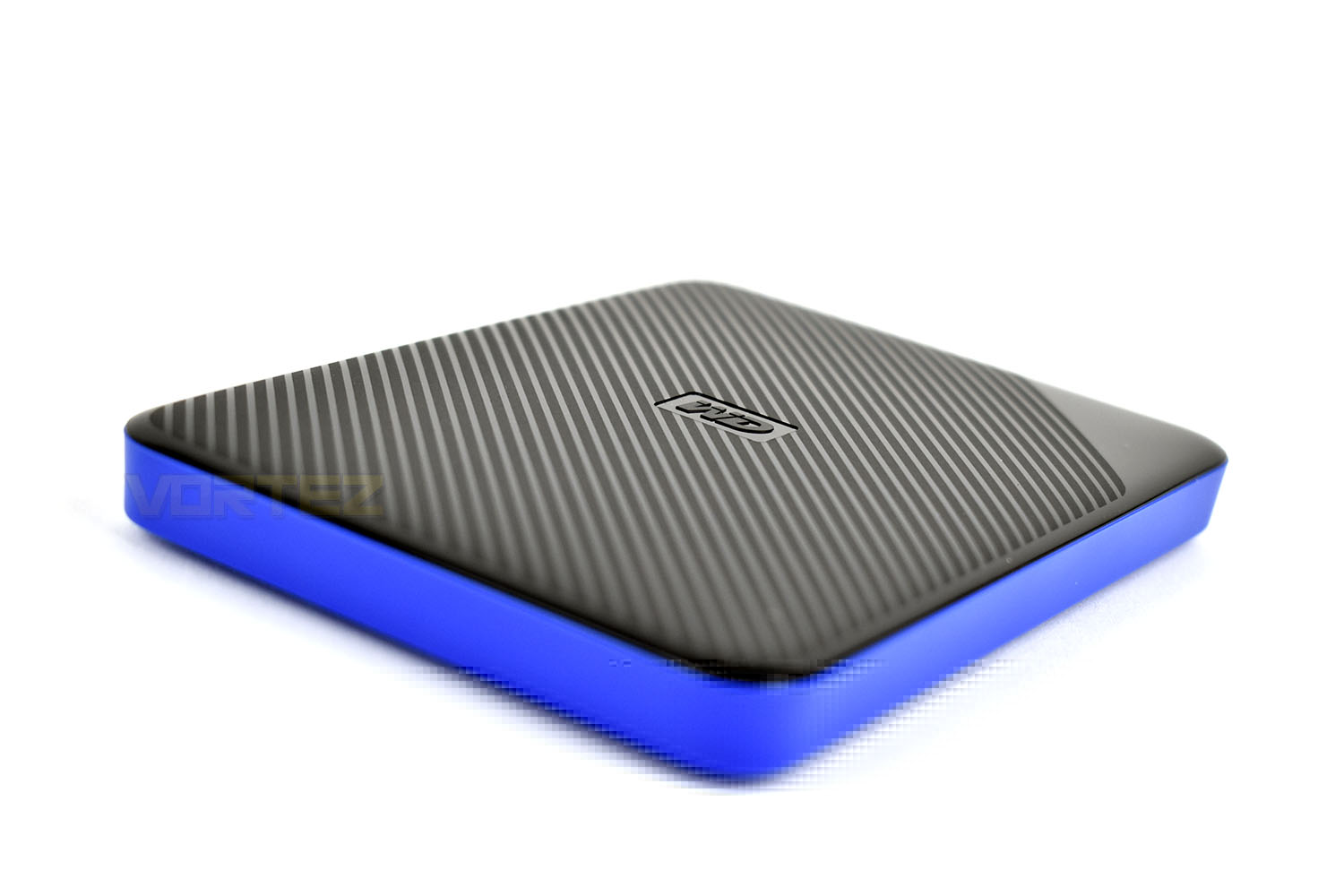
The WD Gaming Drive is compatible with all models of the PS4 and PS4 Pro and arrives in a stylish black and blue enclosure. The casing measures in at 110mm x 82mm with the 2TB being 13mm thick and the 4TB at 21mm. Western Digital have developed the enclosure to provide durability and shock resistance for proper long-term reliability, all of which is backed by a 3-year warranty.
Of course, since the initial launch, Sony have addressed the issue of limited storage space with 1TB and 2TB models available, and they also offer the ability to swap out the HDD for a larger model. However, that option comes with a couple of pitfalls, one of which is the process of reinstalling the console’s operating system and the other being that the existing HDD will likely go to waste. Western Digital’s solution aims to offer a much less problematic solution while also allowing you to take your games library with you.
Priced at £85.49 / $79.99 for the 2TB model and £121.49 / $119.99 for the 4TB, they arrive to market priced at roughly 25% more than models not specifically designed for the PS4. Let’s test out the simplicity of setup and transfer speeds to see how it stacks up.
Western Digital on the Gaming Drive:
With the WD Gaming Drive, you can quickly and easily expand the capacity on your PS4™ console by up to 4TB to conquer boundless new worlds.
Technical Specifications
CAPACITIES AND MODELS
4TB WDBM1M0040BBK-WESN
2TB WDBDFF0020BBK-WESN
CONTENTS
• WD® Gaming Drive portable hard drive
• USB cable
• Quick install guide
INTERFACE
USB 3.1 Gen 1 Type-C up to 5 Gb/s
USB 3.0 Type-A up to 5 Gb/s
Power Supply (DC in)
DIMENSIONS
4TB
Length: 110mm (4.33 in)
Width: 81.6mm (3.21 in)
Height: 21mm (0.83 in)
Weight: 0.23kg (0.51lb)
2TB
Length: 110mm (4.33 in)
Width: 81.6mm (3.21 in)
Height: 12.80mm (0.50 in)
Weight: 0.13kg (0.29lb)
OPERATING SPECIFICATIONS
Operating Temperature: 5° C to 35° C ( 41° F to 95° F)
Non-op Temperature: -20° C to 65° C (-4° F to 149° F)
Operating Relative Humidity: 20% – 80%
Non-op Relative Humidity: 5% – 90%
SYSTEM COMPATIBILITY
• Compatible with Sony PlayStation™ 4 and PlayStation 4 Pro with firmware 4.50 or later
• Requires reformatting via the console for use as game storage
• May require reformatting for other devices
Note: Compatibility may vary depending on user’s hardware configuration and operating system.
LIMITED WARRANTY
3 years
4TB WDBM1M0040BBK-WESN
2TB WDBDFF0020BBK-WESN
CONTENTS
• WD® Gaming Drive portable hard drive
• USB cable
• Quick install guide
INTERFACE
USB 3.1 Gen 1 Type-C up to 5 Gb/s
USB 3.0 Type-A up to 5 Gb/s
Power Supply (DC in)
DIMENSIONS
4TB
Length: 110mm (4.33 in)
Width: 81.6mm (3.21 in)
Height: 21mm (0.83 in)
Weight: 0.23kg (0.51lb)
2TB
Length: 110mm (4.33 in)
Width: 81.6mm (3.21 in)
Height: 12.80mm (0.50 in)
Weight: 0.13kg (0.29lb)
OPERATING SPECIFICATIONS
Operating Temperature: 5° C to 35° C ( 41° F to 95° F)
Non-op Temperature: -20° C to 65° C (-4° F to 149° F)
Operating Relative Humidity: 20% – 80%
Non-op Relative Humidity: 5% – 90%
SYSTEM COMPATIBILITY
• Compatible with Sony PlayStation™ 4 and PlayStation 4 Pro with firmware 4.50 or later
• Requires reformatting via the console for use as game storage
• May require reformatting for other devices
Note: Compatibility may vary depending on user’s hardware configuration and operating system.
LIMITED WARRANTY
3 years
Packaging, Bundle & Closer Look
The front of the box gives a slightly-smaller-than-life image of the drive presented by an astronaut of some kind. The titles and short descriptions are in English and French.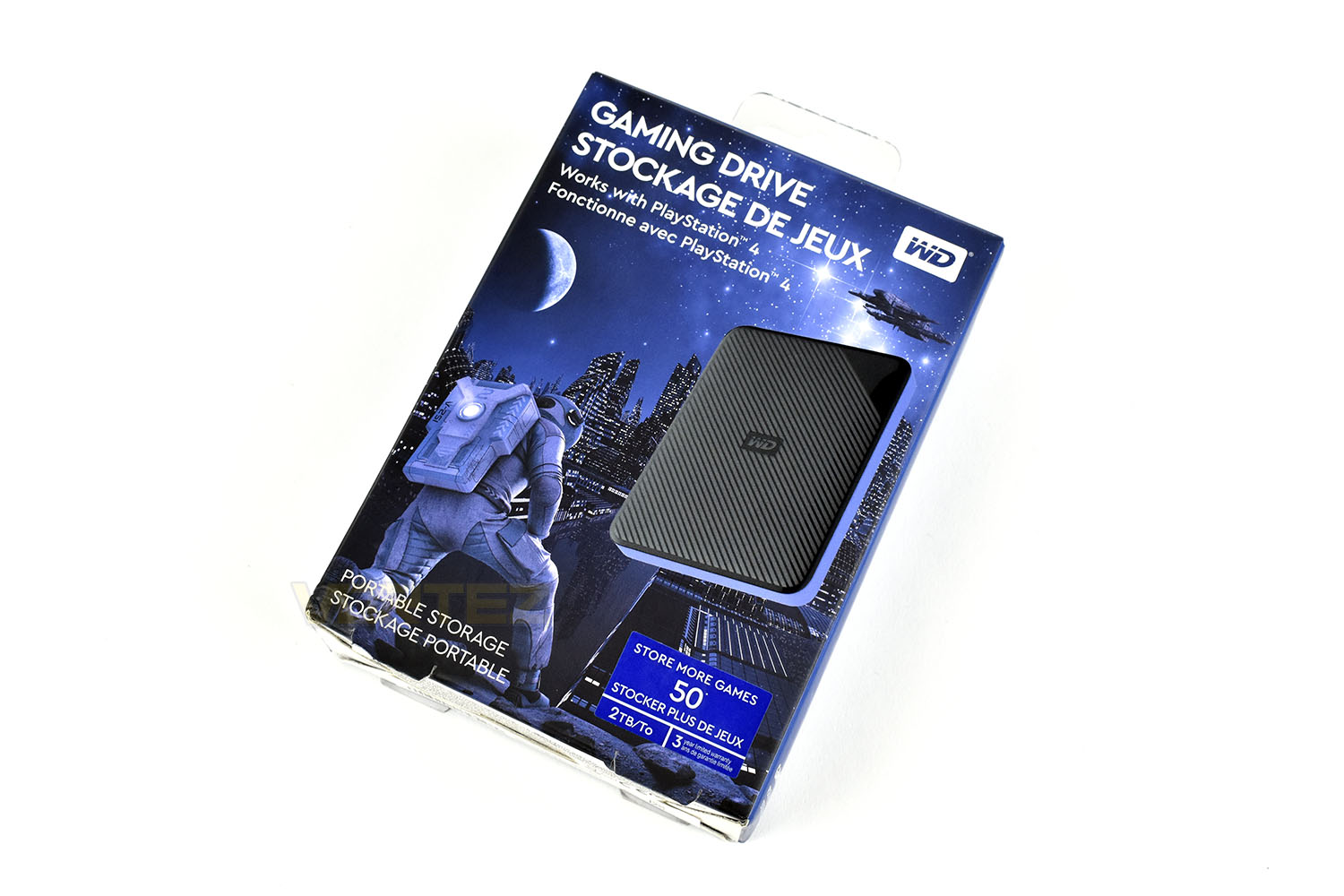
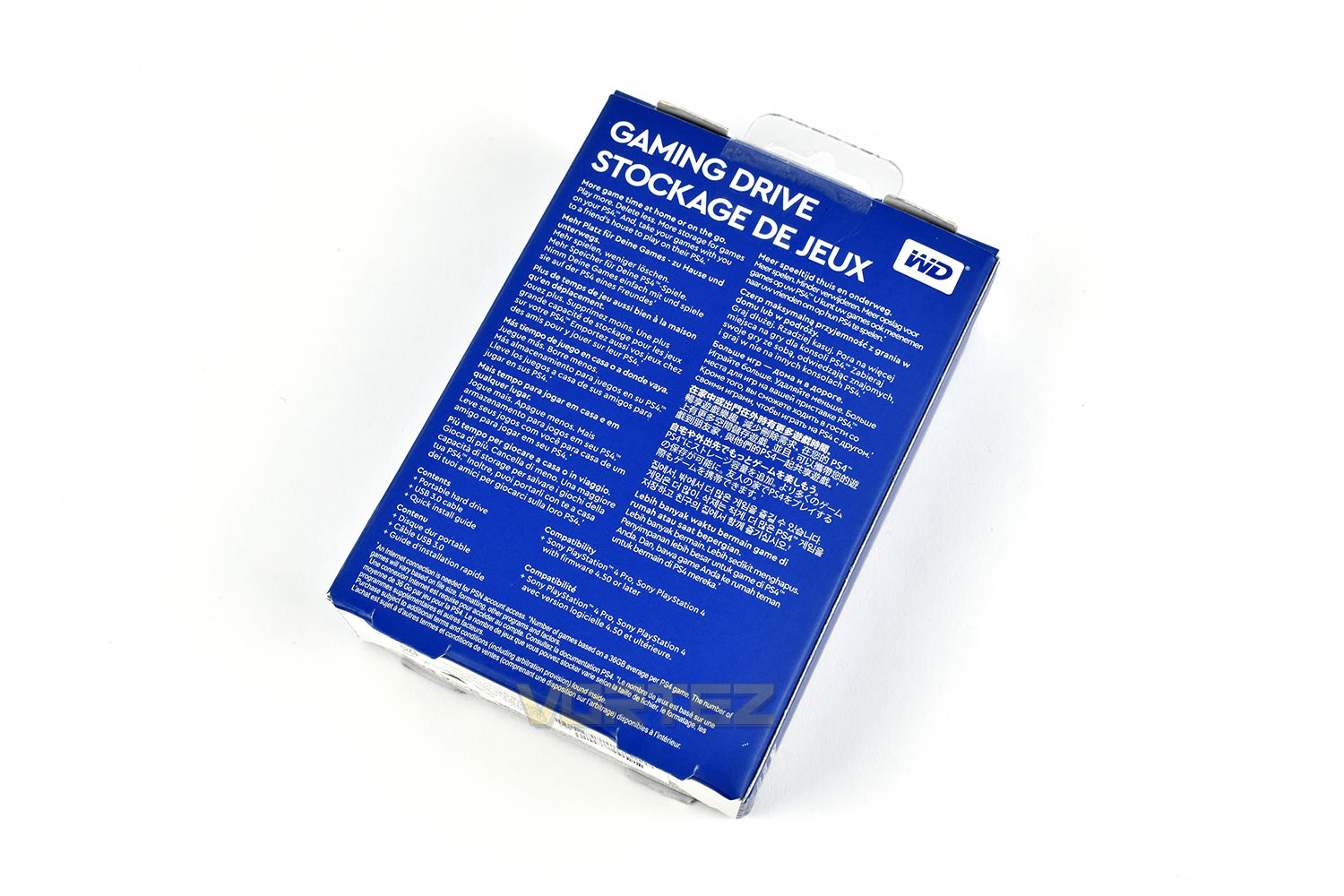
The rear of the box is nothing but a wall of text in multiple different languages. There’s a small contents and compatibility list at the bottom but overall, the packaging gives very few specific details on the drive.
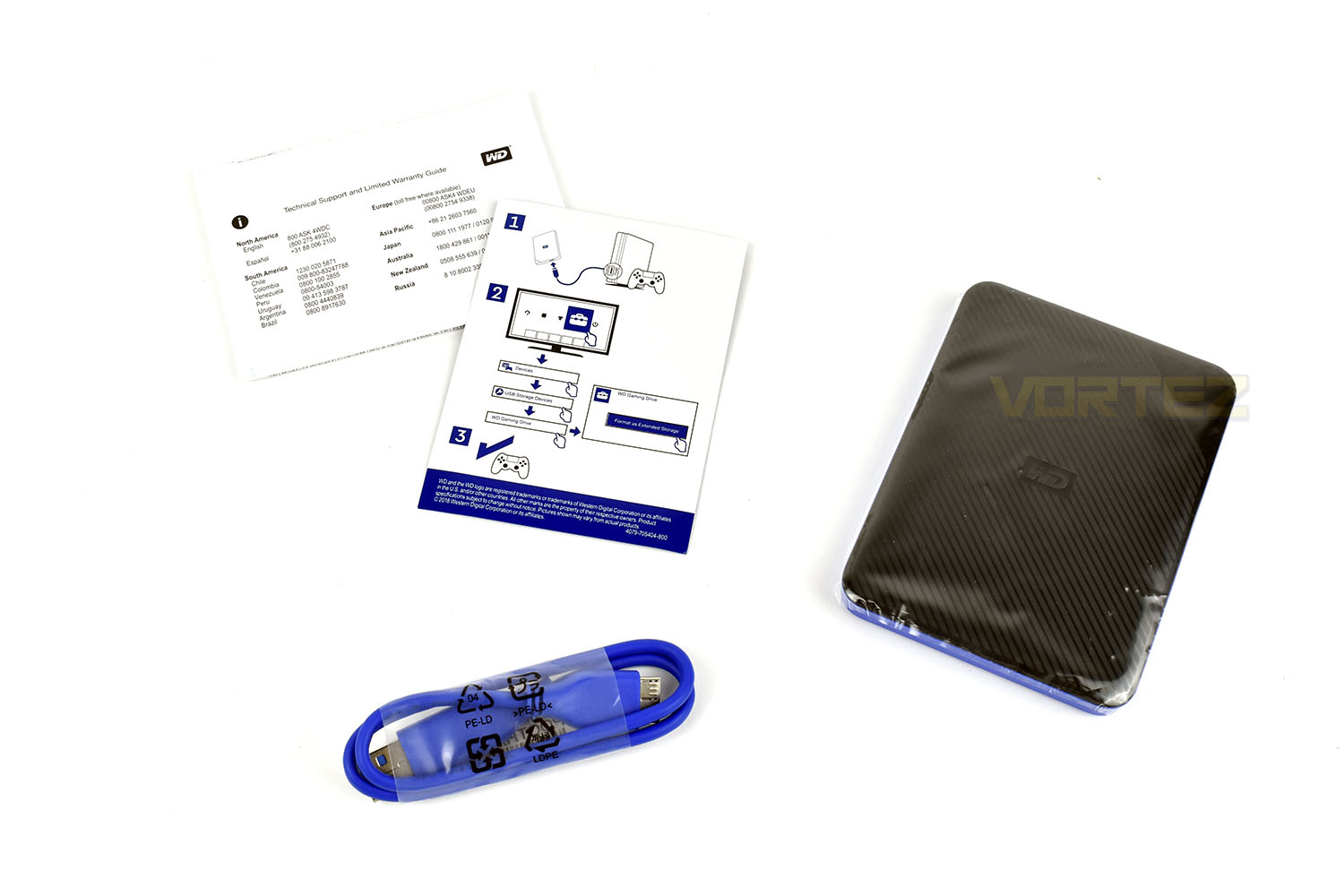
Included with the drive is a 40cm blue cable, USB-A at one end, USB-B at the other, a small instruction sheet and a warranty booklet.
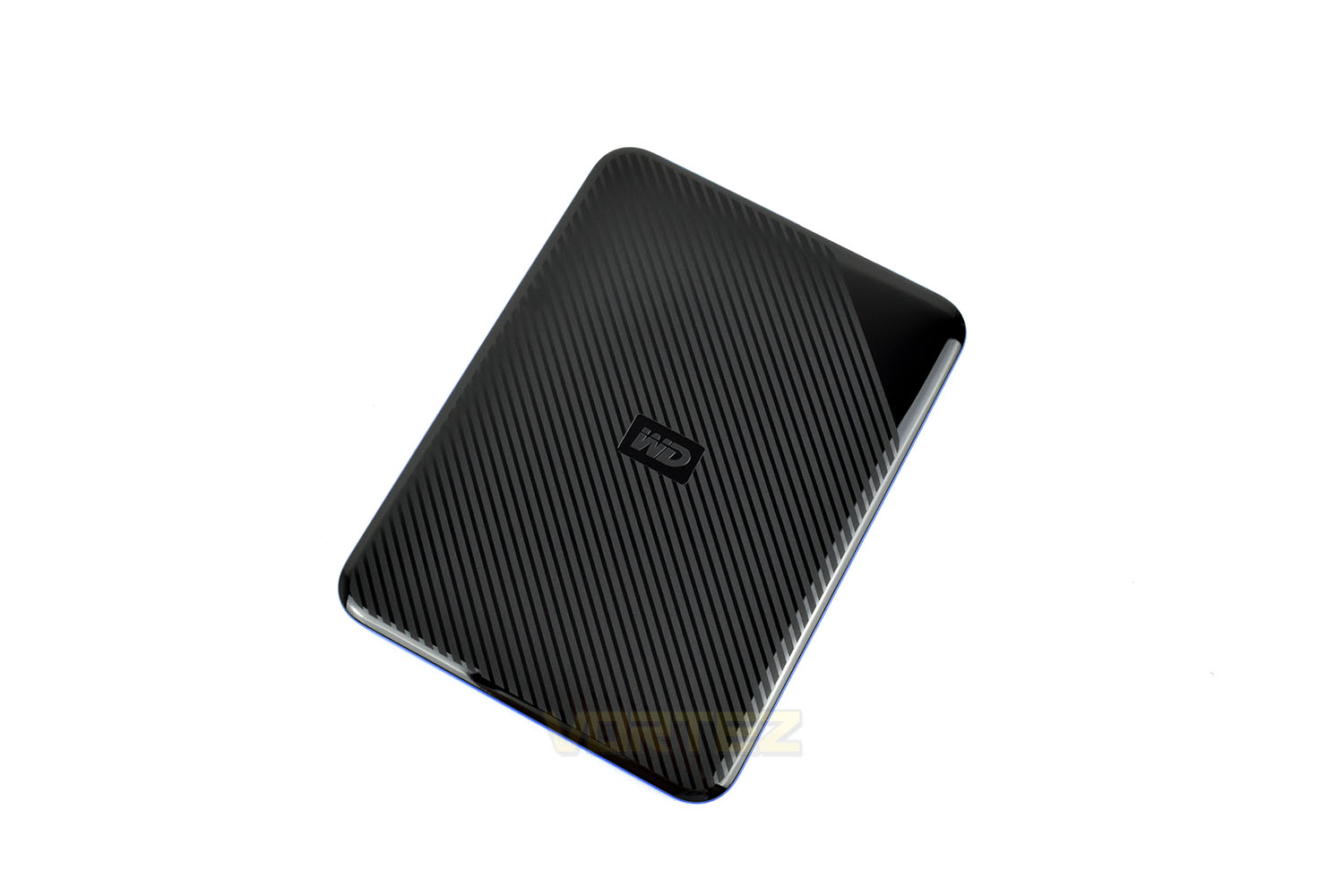
The front of the drive is black with diagonal grey lines, save for a small corner. There’s a 3D Western Digital logo in the centre.
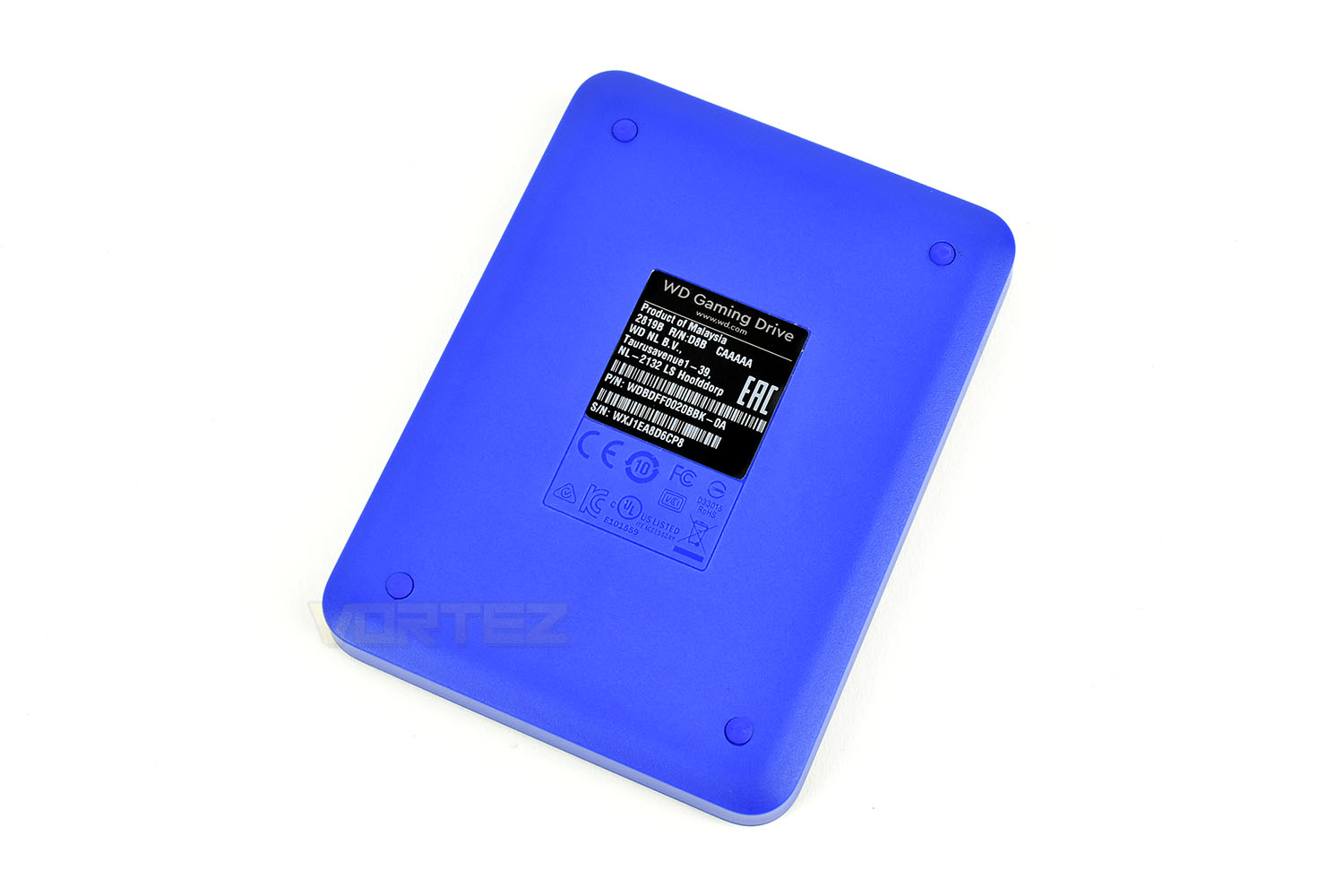
The reverse features four tiny rubber feet, in matching blue, with a product information sticker in the centre. The blue plastic they’ve used is incredibly vibrant.
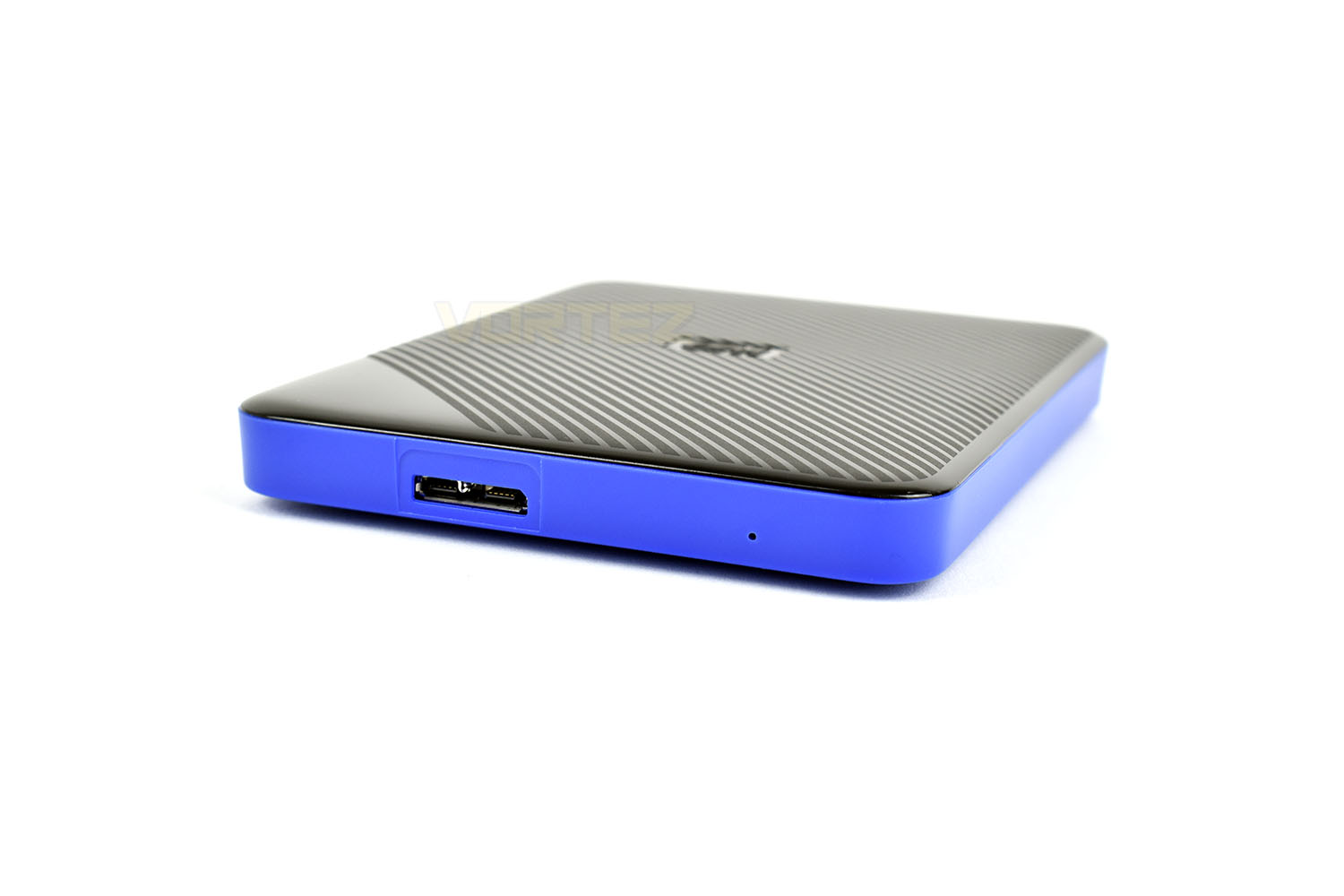
The top edge of the drive is home to the USB 3.0 Type-B connection, this type of connection is almost exclusively used for external storage.
Test Setup & Methodology
Our test system is formatted and a fresh version of Windows is installed with just drives in place – no additional applications. Windows is then updated to the latest release and the drivers are installed.Included in the list of benchmarks are the following applications:
Benchmarks
Anvil Pro
AS SSD
ATTO Disk Benchmark v2.46
Futuremark PCMark 8
AIDA64
AS SSD
ATTO Disk Benchmark v2.46
Futuremark PCMark 8
AIDA64
Test system
CPU: Intel Core i7 7700K
Motherboard: MSI Z270 Gaming M7
Graphics: EVGA GTX 1070 SC
Memory: 16GB CORSAIR Vengeance LPX 3200MHz DDR4
SAMSUNG SM961 256GB NVMe
PSU: BeQuiet Straight Power 11 650W
OS: Microsoft Windows 10 Pro 64-Bit
Monitor: ASUS ROG PG279Q
Motherboard: MSI Z270 Gaming M7
Graphics: EVGA GTX 1070 SC
Memory: 16GB CORSAIR Vengeance LPX 3200MHz DDR4
SAMSUNG SM961 256GB NVMe
PSU: BeQuiet Straight Power 11 650W
OS: Microsoft Windows 10 Pro 64-Bit
Monitor: ASUS ROG PG279Q
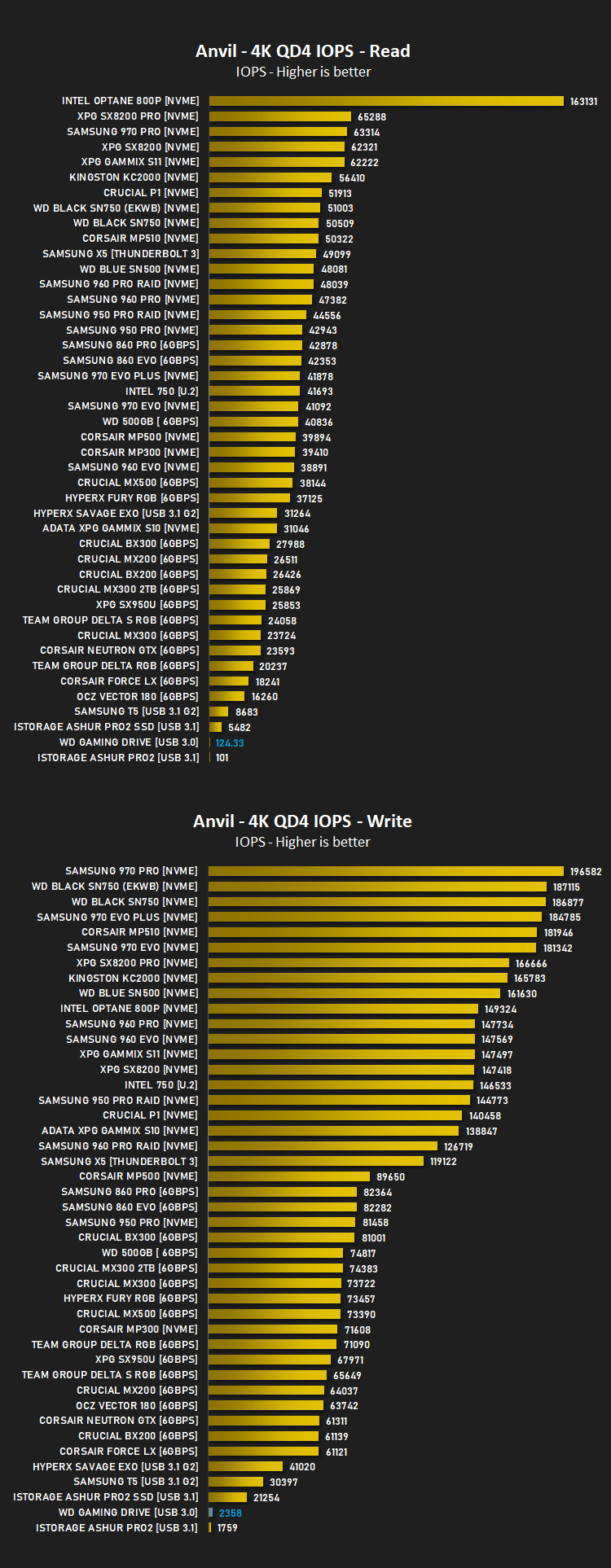
Benchmarks: Anvil Pro
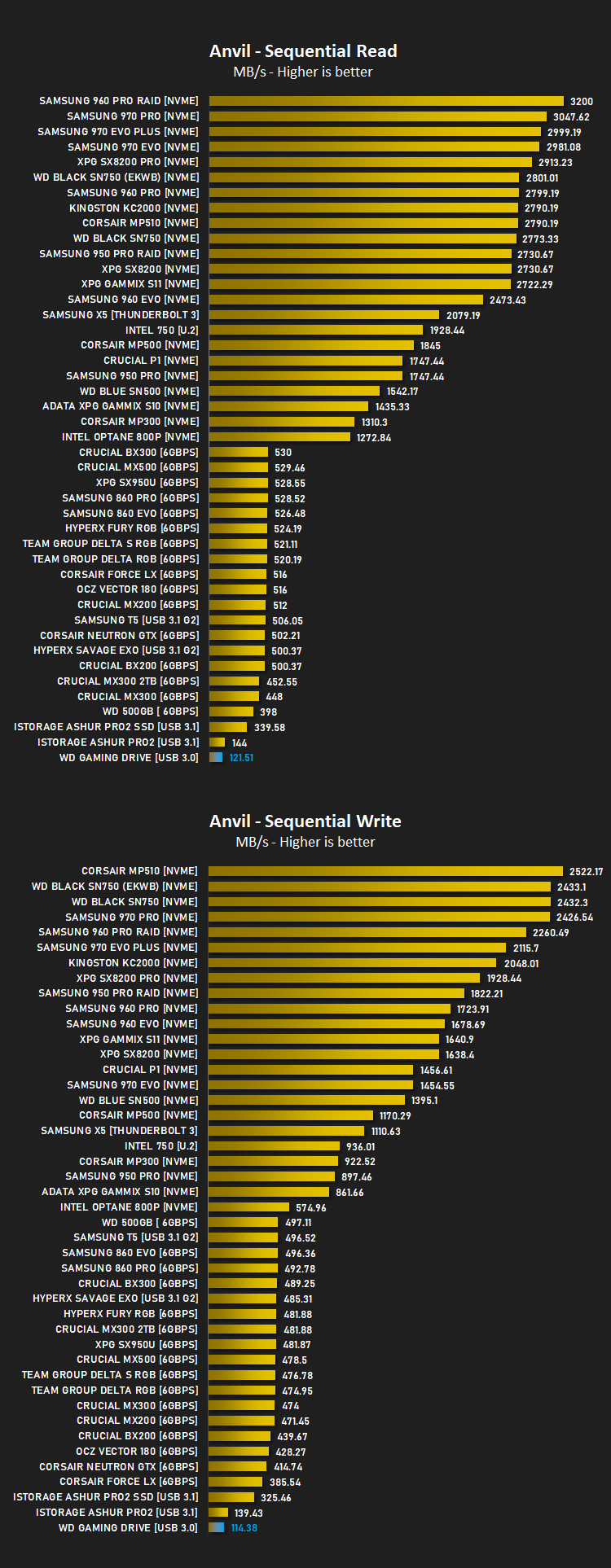
Anvil Pro from Anvil Storage utilities is one of the most popular storage benchmarking utilities today thanks to the large suit of tests available. You can test pretty much anything from Read/write Speed to IOPs with many variables to tweak allowing you to get either a single or host of results to compare with other likeminded enthusiasts. In our test we ran the standard suite 5 times, subtracting both the highest and lowest scores and determined the final result from the average of the remaining three results.
Benchmarks: AS SSD
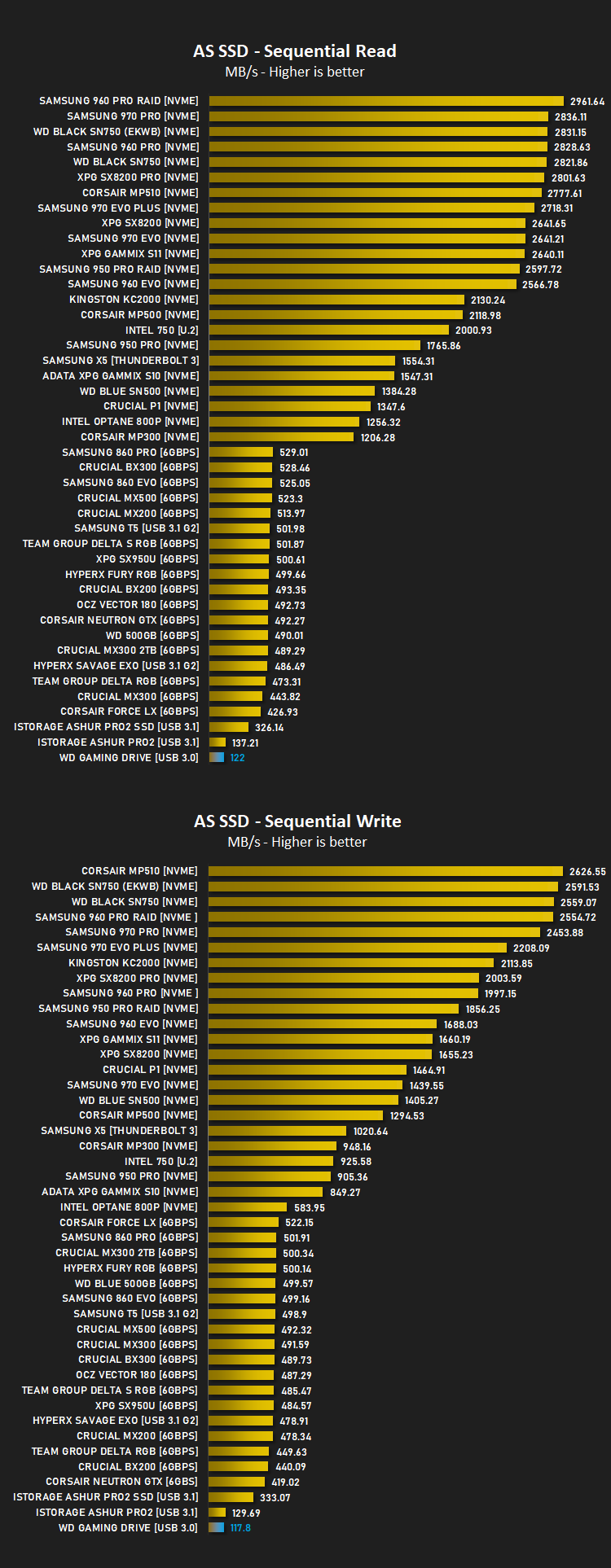
AS SSD Benchmark is a straightforward tool for measuring the speed of your SSD drive.
Simply launch the program, choose your drive, click Start, and it’ll test your SSD’s read and write speed in a variety of ways, delivering a score for each when it’s done. And if that’s not enough, there are also additional file copy and compression-related benchmarks available from the Tools menu. (The author’s support page is German only, but if you need further English explanations then there’s a thread on the program at the OCZ Technology forum.).
Simply launch the program, choose your drive, click Start, and it’ll test your SSD’s read and write speed in a variety of ways, delivering a score for each when it’s done. And if that’s not enough, there are also additional file copy and compression-related benchmarks available from the Tools menu. (The author’s support page is German only, but if you need further English explanations then there’s a thread on the program at the OCZ Technology forum.).
Benchmarks: ATTO
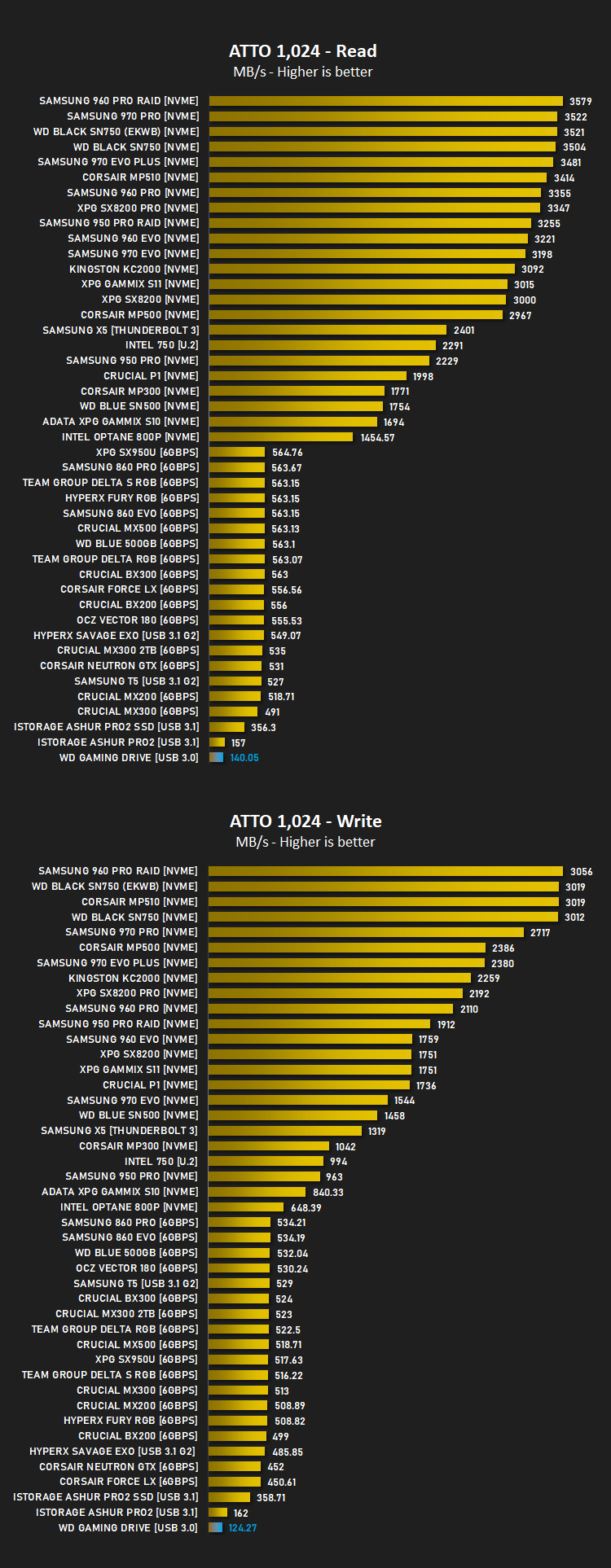
The ATTO Disk Benchmark performance measurement tool is compatible with Microsoft Windows. Measure your storage systems performance with various transfer sizes and test lengths for reads and writes. Several options are available to customize your performance measurement including queue depth, overlapped I/O and even a comparison mode with the option to run continuously. Use ATTO Disk Benchmark to test any manufacturers RAID controllers, storage controllers, host adapters, hard drives and SSD drives and notice that ATTO products will consistently provide the highest level of performance to your storage.
Benchmarks: AIDA64
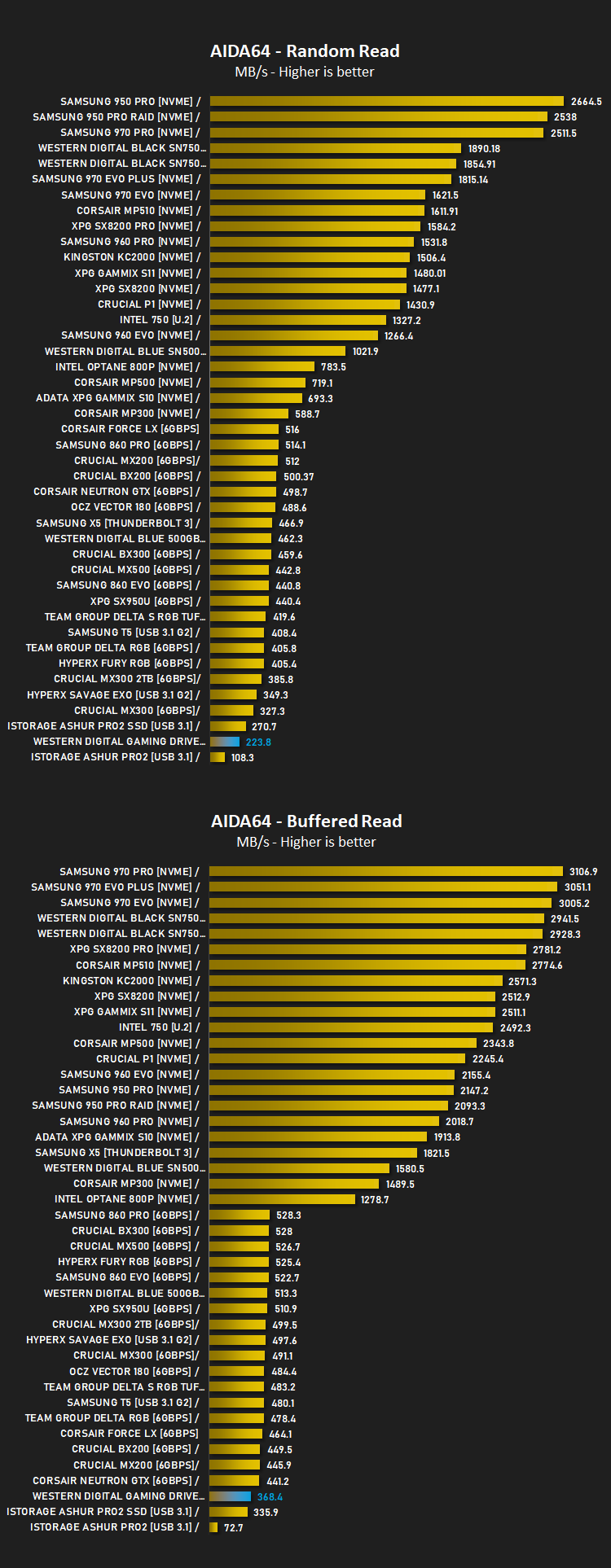
With this module, we can measure the performance of the PC’s storage devices, including (S)ATA or SCSI hard disk drives, RAID arrays, optical drives, solid-state drives (SSD), USB drives and memory cards. It also allows us to perform write tests, which helps us detect fake products and errors on the devices. In order to attain reliable benchmark results we have to make sure to close all background applications.
Benchmarks: PCMark 8
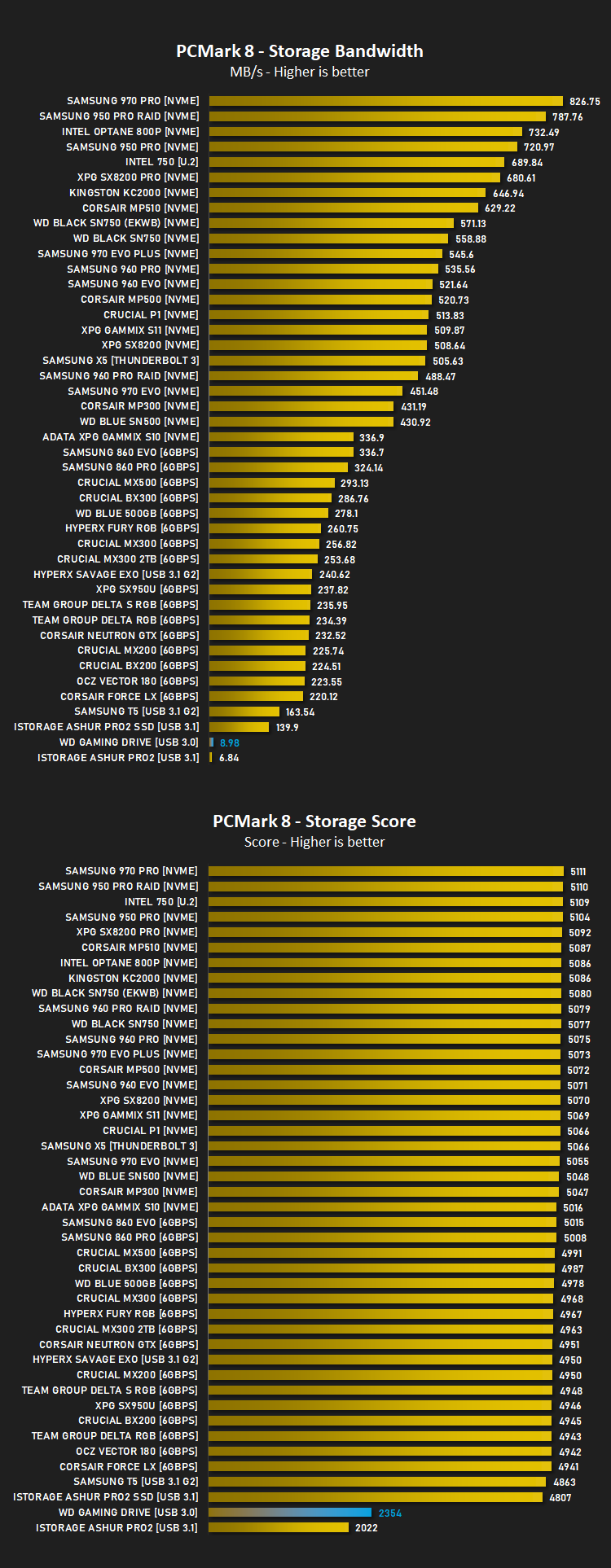
We use the Futuremark PCMark 8 utility to measure storage via Photoshop performance under both light and heavy loading conditions. Accelerated (open CL) is used to perform this test. The test is measured in seconds to complete.
Conclusion
First things first, the Western Digital Gaming Drive provides a huge expansion for any gaming library, preventing the annoying process of finding and deleting older titles to make way for an upcoming launch, only to find you want to play it again in a couple of months. This will be particularly useful for trophy hunters or users with poor internet connections where downloads can take hours, or even days to complete.The Gaming Drive is also very stylish, the black, glossy lid on the enclosure gives a premium finish while the blue cable and base catches the eye. However, having said that, the blue finishes can catch your eye a little too much, particularly if you own an original PS4 or a PS4 Slim, where the rear I/O lacks a USB connection. Plugging a bright blue cable into the front of your console will stand out like a sore thumb; only the PS4 Pro houses a single USB connection on the rear but we can’t blame Western Digital for that.
Performance isn’t bad at all for a 2.5” HDD, definitely more than enough to allow the loading of games directly from it, it’ll certainly keep up with the HDD installed within the system; having said that, we did find some erroneous results within our AIDA64 testing with buffered reads around 360MB/s and random reads in excess of 250MB/s however after running this past Western Digital, we were told this was typical behaviour. We’ve repeated this result on multiple different platforms but we can’t explain it unfortunately.
The biggest issue we see with this drive is the price. Western Digital themselves offer drives at a lower cost, without the PS4-specific branding, mind you. However, that doesn’t detract from the fact that the PS4 will support any USB 3.0 external HDD. Is the blue cable and housing worth an extra £20-£25 for the same capacity? We’re not so sure.
The drive looks great and performs as expected but the price premium is a bit too much for us.
Pros
+ Looks fantastic
+ Adds a significant capacity boost to your games console
Neutral
+- Will stand out considerably when plugged into the front ports on the PS4 or PS4 Slim.
Cons
– Pricey compared to almost identical models
+ Looks fantastic
+ Adds a significant capacity boost to your games console
Neutral
+- Will stand out considerably when plugged into the front ports on the PS4 or PS4 Slim.
Cons
– Pricey compared to almost identical models
Click here for an explanation of our awards at Vortez.net.
Stay connected with the Vortez Social Media pages:
Join in with the discussions on Discord