







XFX unveil their first computer chassis under the Type-01 Series. Bravo Edition follows a unique design which caters for the ATX form factor.

Product on Review: TYPE-01 Series Bravo Edition
Manufacturer and Sponsor: XFX
Street Price: £85 GBP / $120 USD
There has been a trend in recent years for companies to expand into other markets and broaden their portfolio of products. XFX are one such brand which are on a venture to diversify their collection of products by stepping into the computer chassis market. Making an impression in this already thriving market will be key if they hope to have even the faintest glimmer of success.
Type-01 Bravo is a bulky computer case which can cater for ATX and Micro ATX form factors. Bravo’s strengths lie in the clearance options for high-end components and the plentiful allocation for HDD storage but can XFX do enough to make a lasting impression? Let’s find out!
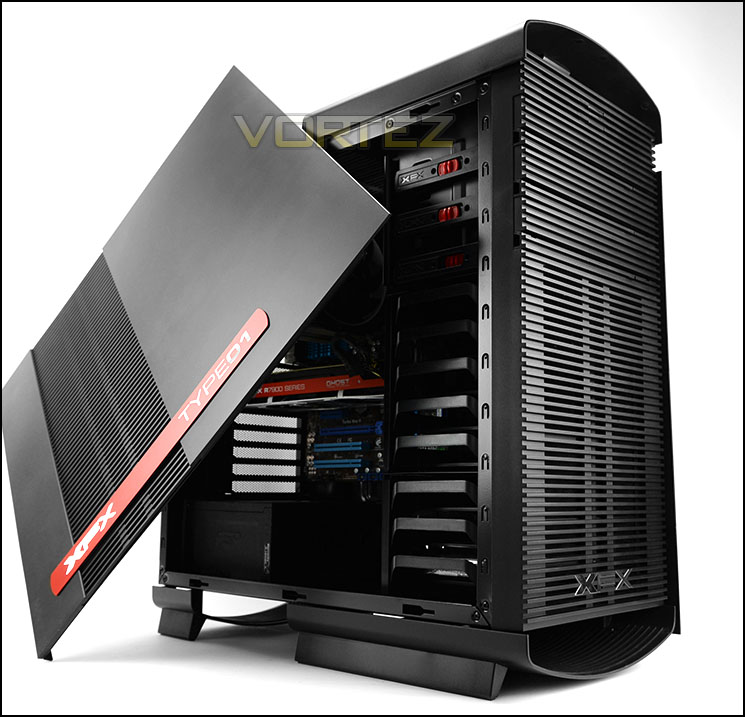
XFX on their Type-01 Bravo
Introducing the first line of PC cases from XFX, the TYPE01 series. With a history of providing graphics solutions for gamers, XFX has branched out into developing new products focusing on what gamers want. Always for gamers by gamers the TYPE01 series was tuned to give you a unique platform for your unique rig.
Technical Specifications
• Classification: Mid-Tower
• Material: Black ABS Exterior Design (Bravo)
• Weight: 22.3lbs 54kg
• Unique XFX Floating Case Design
• Modern Minimalist Design Style
• Full ATX Motherboard Compatibility
• Seamless Hidden Disc Drive Bays w/ Folding Doors
• SECC 0.7mm / AL 3.0mm / ABS
• 235.6 x 518 x 561mm (W x D x H)
• 21 x 23 x 10 Inches (W x D x H)
• (3) 5.25†External Tool less Drive Bays
• (8) Internal Tool less Drive Bays
• Up to Eight PCI Expansion Slots
• Supports up to 8 Fans From 120mm to 200mm
• Pre-Installed 200mm Front Fan
• Includes mounting points for (1) 200mm or (2) 120mm fans
• Pre-Installed 140mm Rear Fan
• Includes mounting points for (1) 120mm or (1) 140mm fans
• 120/140mm Top Fan Mounting Points
• 120/140mm Bottom Fan Mounting Points
• (3) 120mm Side Panel Fan Mounting Points
• 320mm / 352mm Max PCI Length Space
• (2) USB 3.0 Pass-through (Top)
• (2) USB 2.0 Pass-through (Top)
• Mic & Headphone (AC97 & HD Audio)(Top)
• Isolated Bottom Mount PSU Design
• Open Mesh Bottom With Filter
• Material: Black ABS Exterior Design (Bravo)
• Weight: 22.3lbs 54kg
• Unique XFX Floating Case Design
• Modern Minimalist Design Style
• Full ATX Motherboard Compatibility
• Seamless Hidden Disc Drive Bays w/ Folding Doors
• SECC 0.7mm / AL 3.0mm / ABS
• 235.6 x 518 x 561mm (W x D x H)
• 21 x 23 x 10 Inches (W x D x H)
• (3) 5.25†External Tool less Drive Bays
• (8) Internal Tool less Drive Bays
• Up to Eight PCI Expansion Slots
• Supports up to 8 Fans From 120mm to 200mm
• Pre-Installed 200mm Front Fan
• Includes mounting points for (1) 200mm or (2) 120mm fans
• Pre-Installed 140mm Rear Fan
• Includes mounting points for (1) 120mm or (1) 140mm fans
• 120/140mm Top Fan Mounting Points
• 120/140mm Bottom Fan Mounting Points
• (3) 120mm Side Panel Fan Mounting Points
• 320mm / 352mm Max PCI Length Space
• (2) USB 3.0 Pass-through (Top)
• (2) USB 2.0 Pass-through (Top)
• Mic & Headphone (AC97 & HD Audio)(Top)
• Isolated Bottom Mount PSU Design
• Open Mesh Bottom With Filter
Packaging & First Look

Packaging for Bravo
Bravo is packaged within a large double-reinforced cardboard box. On the front there is no illustration of the case – just the writing TYPE 01. Over on the reverse we have a depiction of the case and some of the technical details.
Inside, Bravo is covered in a clear plastic sheet and two large polystyrene blocks which are further protected with cardboard, help to secure the case whilst it’s in transit to the destination address.

Ventilated design on the sides

Distinct styling
Unveiling the case from its packaging we are met by a rather large and bulky computer chassis. Either side of Bravo features an identical panel which consists of thick steel construction which is backed with plastic ventilation. On the prominent side there are mounting holes to attach 3x 120mm cooling fans which also means a 240mm radiator could be fixed to the side panel but this would obstruct the graphics card and therefore isn’t a possibility.
On both side panels there is a red metallic strip which has “TYPE 01” and “XFX” etched in a diamond cut appearance.
Bravo neither fits in the minimalist or gamer style. Overall we think the design is appealing and on the next page we’ll be looking at the external elements in more detail.
Exterior

The front and back of Bravo

Optical drive bay covers open out
At the front of Bravo, the ventilated design continues. In the lower region there is an XFX logo which sits over the area were a 200mm cooling fan sits. This fan is configured to be an intake and has a detachable dust filter attached to the inside of the front fascia. Up at the top there are 3x 5.25” drive bay covers which pull out to gain access. Above the upper-most cover there is a power/reset button – highlighting that both this and other aspects of the front remain disclosed, merging into the visual aesthetic.
Around the back there is an opening at the bottom of the case for mounting the PSU and above this there are eight PCI expansion slot covers which all have ventilation and a rubber grommet sits immediately to the right for cabling/tubing.

Connectivity at the top of Bravo
The front panel connectivity is actually located at the top of Bravo – these ports sit on a curved piece of plastic and consist of the following:
• 2x USB 2.0 ports
• 2x USB 3.0 ports
• Headphone Jack
• Microphone Jack

A view of the top of Bravo
Observing the case from an aerial view there are two smooth curved plastic features and a ventilated section which sits exact to the chassis, proving ventilation and the opportunity to install a 120/140mm cooling fan.

The underside of Bravo
Flipping the case over onto its side we can take a look at the underneath of Bravo. XFX has given the case four rubberised strips which help to give the chassis some clearance on the underside. These feet also prevent the case from slipping on smooth surfaces.
Again, just like the top of Bravo, there is an area marked out for ventilation which happens to coincide with the PSU placement. XFX has supplied a detachable dust filter here which can be extracted without having to flip the case on its side.
On the next page we’ll take a close look at the internal aspects of Bravo.
Interior

A view of the internal layout

Powder coated black internals
The side panels on Bravo are very sturdy and are fixed into place with two thumbscrews on either side. After removing this we can take a look at the internal design.
Although Bravo is rather a large computer case, we were surprised to discover that it only accommodates up to ATX form factor. Nevertheless, the interior has been powder coated in a black to retain sleekness and there are numerous tool-less mechanisms inside to help install hardware as well as a generous supply of grommets to assist with cable management.

Area for installing PSU at the bottom
Located at the bottom of Bravo, XFX has given support for attaching long-PSUs. We’re pleased to see they have included some rubber mounts for the unit to sit on which help cushion the PSU and provide some anti-vibration. Underneath the entire area there is ventilation and a detachable dust filter which can be taken out and cleaned.

Multi-GPU support
Moving up, there are eight PCI expansion slot covers – each have ventilation cut-outs to encourage better airflow inside the chassis and each come with an easy to remove thumbscrew. Additionally, there are two rubber grommets for tubing/cables.
Over the page we’ll continue our look at the inside of Bravo.
Interior (Continued)

Cooling options at the back and top
Placed towards the back of Bravo is a 140mm rear exhaust cooling fan. It’s great to see the cable has been insulated in black to help tuck it away and that it also comes with a Molex connector in case you are struggling to find a fan header on the motherboard.
At the top of Bravo there are some optional spots for mounting a single 120/140mm fan. It’s disappointing to see a lack of dual 120/140mm support at the top here because a vast majority of cases nowadays supply this arrangement to allow for 240mm radiators to be installed at the top – unfortunately we cannot attach such hardware inside Bravo.

Tool-free mechanisms for installing optical drives
Over at the front of the case there are a trio of bays for installing 5.25” devices and each bay has a handy tool-less mechanism to assist with installing hardware into these bays. The mechanism uses a latch to open/lock and it’s very easy to use.

Plenty of HDD storage
Positioned at the very front of Bravo are two HDD cages which provide up to eight locations for installing 2.5” or 3.5” drives. Again, just like the optical drive bay – HDDs are installed by means of a tool-free type of device, this time a tray. These trays are plastic and to remove them you have to squeeze – something which feels uncomfortable to do since they are brittle and feel flimsy. We’d have liked to see better implementation here.
Behind the HDD cages is a large 200mm cooling fan which brings in cool air from outside the case.
Installation

A tidy and nicely arranged system

Cable management is easy to control
From start to finish, installing hardware inside Bravo is very easy thanks to its design and tool-free mechanisms. As you can see, getting kit inside and arranging it in a clean and tidy manner is achievable and we’re happy there is plenty of clearance for high-end components. (More on this over on the next page).
Cable management is particularly easy to control due to the clearance behind the motherboard tray and placement of grommets and hooks. We really like the grommets in particular which are a break-away from the usual type which case manufacturers make use of, XFX’s hide the cables easier and compliment the aesthetic of the case.

Bravo can accommodate 2.5” and 3.5” drives
In order to get your storage devices into Bravo, XFX provide numerous trays – the large type can accommodate 2.5” and 3.5” drives whilst the smaller versions are primarily designed for 2.5”. The tray is simply flexed and the drive placed into the centre with the pins attaching to the mounting holes on the drive.
As we mentioned previously, the quality of these trays or the method by which they attach drives and are attached to the case could be improved.
Clearance – CPU Cooler, Graphics Card, Cable Management
Identifying the clearance options within Bravo is important as it helps to demonstrate what hardware can fit inside the chassis, and what can’t.
CPU Cooler

Lots of space for flagship air cooling
Bravo has a generous amount of clearance for those wanting to go down the air cooling route. Flagship coolers which are over 160mm in height (Noctua NH-D14/D15) will easily fit inside the chassis and allow the side panel to fit on without any obstruction. Pictured inside Bravo is Noctua’s NH-U12P which is 158mm in height.
Graphics Card

Enough space for high-end multi-GPUs
There is some slight limitation for graphics cards when the upper cage remains inside Bravo but this shouldn’t deter system builders because we can still accommodate up to 300mm (12”) cards. With the cage removed we can manage up to 350mm. Pictured is XFX HD 7970 DD which is 265mm (10.5”).
Cable Management

Good space for cable management
Behind the motherboard tray there is more than sufficient space for tucking unwanted cables away. There is approximately 1.8cm between the back of the tray and the side panel, meaning you can store even the thicker 24-pin ATX behind here and can still get the side panel back onto the chassis.
Thermal Performance Testing
Inside Bravo we have two cooling fans – a large 200mm intake fan at the front and a 140mm rear exhaust at the back. This design follows traditional airflow techniques and should yield good results.
To discover the thermal performance of Bravo we will record idle temperatures after 20 minutes from a cold boot. We will then stress the system and temperatures will again be monitored after 30 minutes have elapsed.
For the purpose of accurate analysis the idle and load temperatures for CPU and GPU will be recorded and the range between idle and load will be calculated to determine how efficient cooling is.
NOTE: Ambient temperature is 20C
System Components
CPU AMD Phenom II X6 1055T 2.8GHz
Motherboard ASUS M4A89TD PRO
Graphics NVIDIA GTX 480 (Different from card pictured)
Memory 4GB Kingston HyperX DDR3
HDD Samsung Spinpoint 500GB SATA-II
PSU FSP AURUM GOLD 650M
Motherboard ASUS M4A89TD PRO
Graphics NVIDIA GTX 480 (Different from card pictured)
Memory 4GB Kingston HyperX DDR3
HDD Samsung Spinpoint 500GB SATA-II
PSU FSP AURUM GOLD 650M
Noise
Since there is quite a lot of ventilation on Bravo noise can escape quite easily but whilst this is certainly true, the cooling fans are noticeable but not disruptive.


Conclusion
Type-01 Bravo is XFX’s first attempt at bringing to market a computer chassis and we believe they’ve presented a good product in this new offering.
The outer styling with its heavily ventilated exterior might not bode well with all manner of system builders but there is no denying how distinct the aesthetics really are. Bravo does have lots of plastic, and while there is nothing wrong with this choice of material it doesn’t exude quality that metal construction can.
Inside the case there is a spacious internal layout which lends itself to permitting flagship CPU coolers and long graphics cards. Bravo can house high-end components and has all the right elements for good cable management too – there is generous space behind the motherboard tray, grommets in significant areas, and an assortment of hooks to neatly tie cables back. The grommets are actually a particular feature we really like because they are different to what other case manufacturers use – they complement the overall aesthetic of the case and conceal the cables much better.

The positives don’t end there either. Bravo has lots of flexibility when it comes to HDD storage. Inside up to eight 2.5” and 3.5” drives can be installed and a large 200mm intake fan sits behind the drives to bring in cool air and be partly responsible for the good results when it comes to thermal performance.
There are however a few points to make which come as a disappointment. Most computer cases hitting the market at the moment and indeed in the last 12 months, come accompanied with support for 240mm radiators since all-in-one liquid coolers are extremely popular nowadays but Bravo lacks this compatibility. We’d have liked to see 240/280mm mounting holes at the top to cater for this route. Our other concern is the HDD trays – they can be tricky to get in and out of the case and bearing in mind they are thin, flimsy and brittle but require flexing to install/remove them, it’s only a matter of time before an accident could occur.
Priced at £85 GBP / $120 USD, Bravo represents good value for money considering the size and options this case brings – though there is rather a lot of plastic used for its construction.
Type-01 Bravo is a great first attempt by XFX at designing a computer case, this burly enclosure can accommodate a variety of different hardware and offers good cooling potential.
Pros
+ Distinct aesthetics
+ Can house big CPU coolers & graphics cards
+ Good options for cable management
+ Plenty of storage choices
+ Decent cooling
Cons
– Lots of plastic
– No dedicated 240mm radiator support
– HDD trays need redesigning
+ Distinct aesthetics
+ Can house big CPU coolers & graphics cards
+ Good options for cable management
+ Plenty of storage choices
+ Decent cooling
Cons
– Lots of plastic
– No dedicated 240mm radiator support
– HDD trays need redesigning

Click here for an explanation of our awards at Vortez.net.


