







A mid tower case from Xigmatek with water-cooling capabilities, and interesting air cooling setup and much more.
Product on Review: Xigmatek Pantheon
Manufacturer and Sponsor: Xigmatek
Street Price: £81.58 Inc. VAT / 80 EUR @ Caseking

Established in 2005, Xigmatek may not come to mind for their chassis design but more so with their cooling products such as their CPU coolers and fans. Their reputation is certainly building though and today we will be taking a look at our first Xigmatek product, the Pantheon.
The Pantheon is a mid-tower case with lots to talk about. It has the capabilities of sustaining a 240/280mm radiator at the top and controlling up to 6 fans. There are tool-less design mechanisms throughout and a whole lot more so lets begin our analysis on this, our first Xigmatek review.

Pantheon – Rome’s temple of gods. Big and impressive by a great architecture and dedicated engineering for all your hardware, Xigmatek proudly presents our latest exclusive chassis – the Pantheon. Decent design combined with features such as usb 3.0, 2 fan controllers, last but not least also the radiator support of 240/280mm radiator on the top. Get yourself a piece of ancient experience and flair and start the combat with Pantheon!
Technical Specifications
Product Name
– PANTHEON
Product Number
– CPC-T46DB-U01/U02/U03/U04
Dimension
– 206(W) x 543(H) x 500(D) mm (8.1*21.4*19.7 inches)
Drive Bay
– External x 4 with both side tool-free holders with anti-vibration rubbers.
Expansion Slot
– 7 slots, 330mm free length for long card.(Thumb screws)
Motherboard Support
– ATX, Micro ATX (with cooler blackplate easy installation window)
Power Supply
– Standard P/S2 ATX/EPS power supply unit
1. Intake airflow hole with dust filter.
2. Available for face upward and downward installation.
3. Within anti-vibration rubber.
Cooling System
Air-cooling
– Front Fan: Pre-installed 120mm white LED with black blades x 2 on HDD cage and LED is on/off switchable.(Max. four 120mm fans on HDD cage both side.)
– Rear Fan: Pre-installed 140mm white LED with black blades x 1 and LED is on/off switchable.(120mm fan is available)
– Side Fan:
Pantheon-Original: Optional 120/140mm fan x 2
Pantheon-Window: None.
– Bottom Fan: Optional 120/140mm fan x 1 (with dust filter)
– Top Fan: Optional 120/140mm fan x 2 or 170mm fan*1.
Fan Speed Control: Six fan speeds are adjustable synchronously by two knobs on top panel.
Water-cooling
– Water pipe holes x 4 (with rubber cover)
– Available for 240/280mm radiator on the top.
– Radiator size limitation inside of top panel : (L)290*(W)130*(H)42mm
I/O Panel
– Top Panel: Power switch, Reset switch, USB3.0*1, USB2.0 x 2, e-SATA x 1, Audio in/out x 1 (HD Audio), two knobs of fan controller.
Packaging & First Look
The Pantheon is delivered in a large chassis box which is attached to some creative artwork. Aesthetically, very pleasing to the eye. There are some brief details on the front of the box and around the sides and back, even further information for those wanting a more in-depth run-down of what’s inside. The Pantheon is held inside the box with polystyrene pillars and covered with a clear plastic cover, as you would typically find any other case.
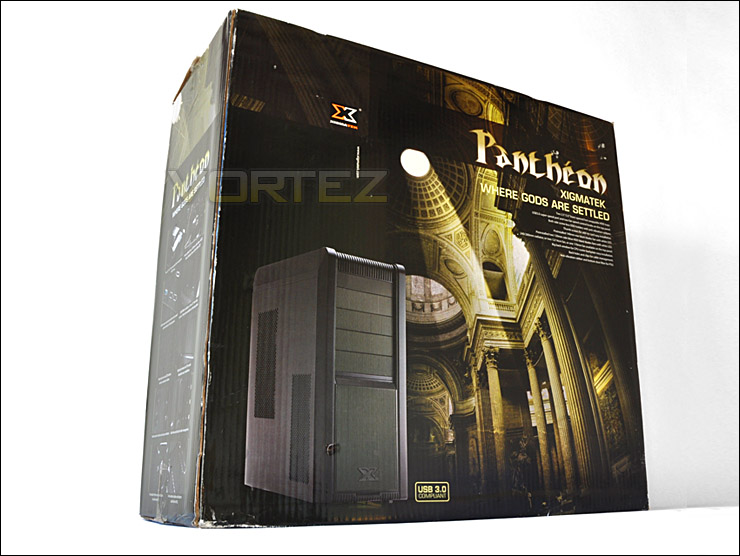
Pantheon packaging looks great
Removing all this packaging we finally get our first look at the Pantheon. For a mid-tower case it has some pleasant aesthetics. It actually looks quite similar to the Cooler Master 690-II Advanced. The Pantheon whilst being a case targeting gamers still retains some classic chassis design by having smooth edges and a less rugged look. Both side panels have perforated mesh and there are fans on the underside of both panels (note, these are not attached to the side panels but can be seen through the ventilation/mesh).
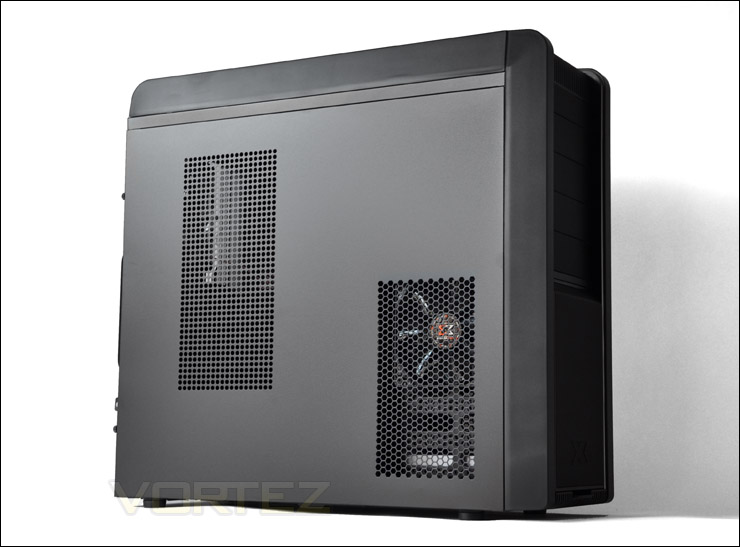
The left side with plenty of ventilation
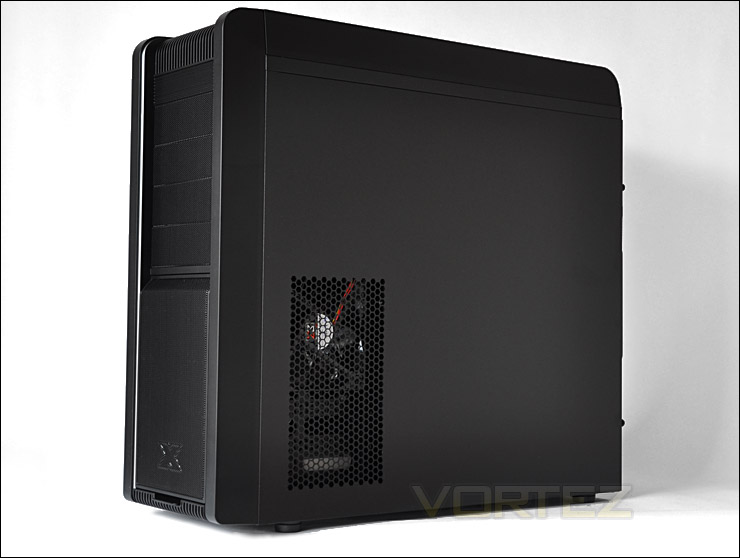
Right side also has mesh and fan cooling can be seen
Exterior
The Pantheon has silver accents that run from the front of the case right to the very back. The front is entirely covered in mesh, with the bottom section clipping out to reveal the HDD bay. We have 4 x 5.25″ drive bays.
Around the back the Pantheon is very well designed. There is a space at the bottom of the case for a bottom mounted PSU. Above this we have a total of 7 expansion slot covers. These are not perforated but are solid plates. Adjacent to this we have 4 rubber grommets for water-cooling tubing or any cabling that needs to be routed outside of the case. Above this we have the opening and perforated steel mesh which holds a preinstalled 140mm white LED fan with black blades. At the very top of the case we have two openings which are to allow us to feed through any tubing, again for a radiator as the top of the Pantheon can accommodate a 240/280mm radiator.
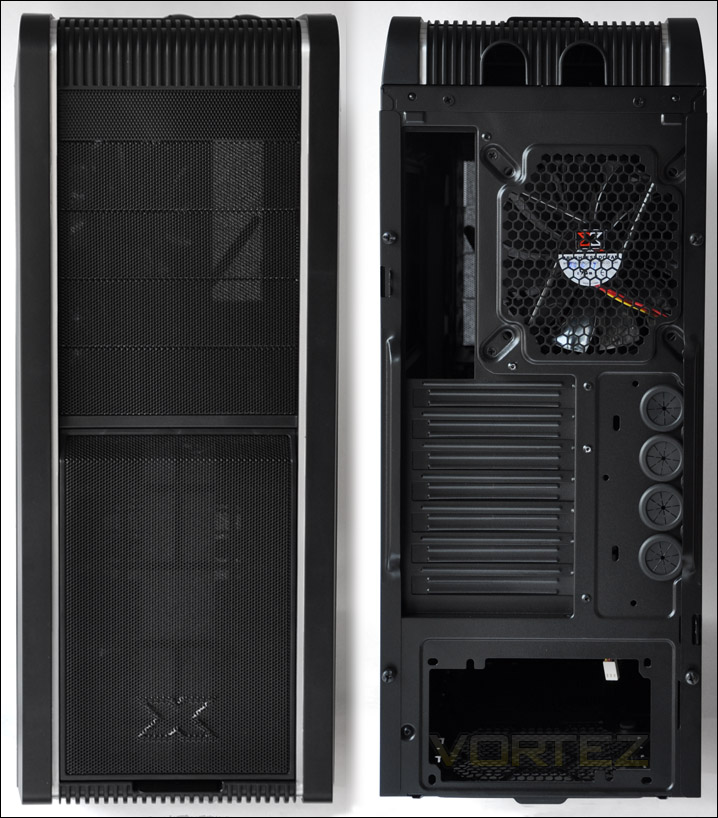
The front and back of the Pantheon
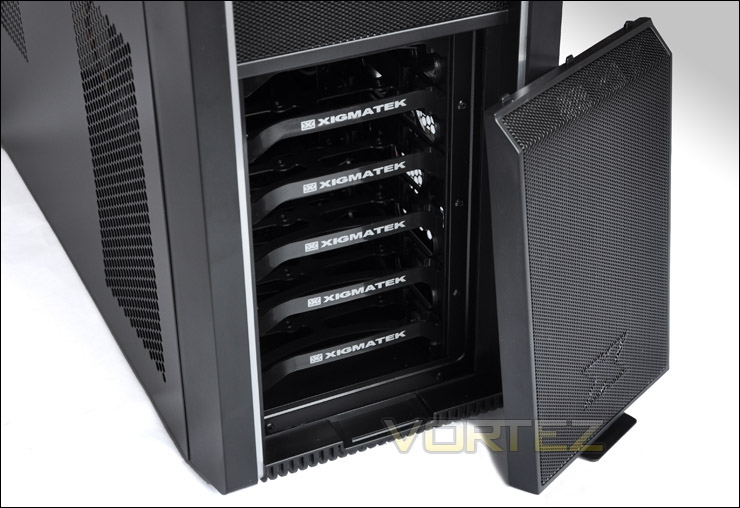
Front panel detaches to allow access to HDD rack
Moving up, we come to the front panel which has an interesting control panel. From the top to the bottom we have: power button, fan speed controls for 2 fans, power and activity LEDs, microphone and headphone ports, e-SATA port, LED on/off switch, reset button, USB 3.0 (blue) and 2 x USB 2.0 ports. So plenty of options there and everything is presented in a nice and informative way that you can understand.
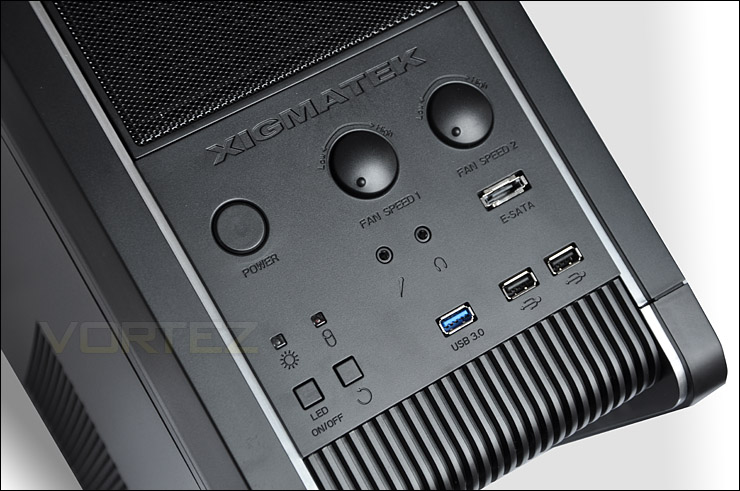
Front panel controls
As previously mentioned the Pantheon can accommodate a 240/280mm radiator in the top cavity by removing the cover. The actual dimensions here are: 290 x 130 x 42 mm L x W x H. We can also mount 2 x 120 or 140mm fans within this cavity to provide additional system cooling. So there are many avenues you can go down with the Pantheon to cool your system. You aren’t stuck with any one option.
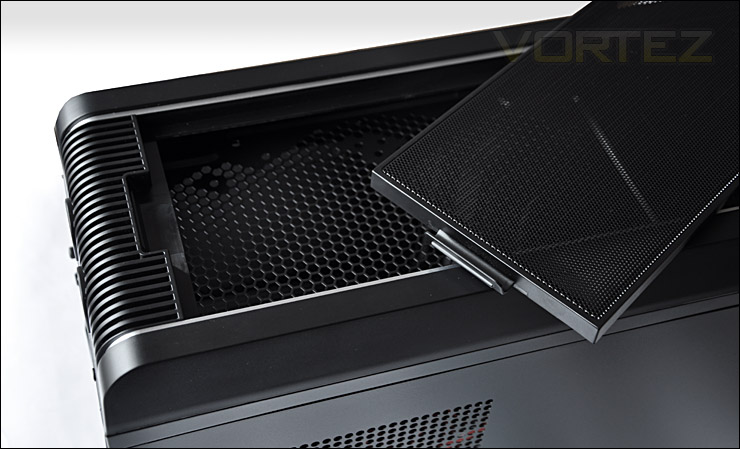
Water cooling or air cooling at the top
Interior
The side panels on the Pantheon are very easy to remove thanks to the thumbscrews. The weight of each panel is actually, surprisingly light. Removing these panels reveal a spacious interior with a rather large CPU backplate coverage and rubber grommets for threading cabling through. The motherboard tray dips down to allow better cable routing around the rear. Strangely though we have a deviation from traditional airflow standards, Xigmatek have chose to attach 2 x 120mm fans to the HDD cage (both of these fans have white LEDs).
Having the fans in this orientation as opposed to having a fan behind the front grill could have a negative impact on efficient airflow. There is no airflow passing into the case from the front to the back. Although the fan acting as a rear exhaust is pulling heat/air out it has no airflow being directed at it from the alternate side. It will be interesting to see how this alternative placement affects thermal performance a little later.
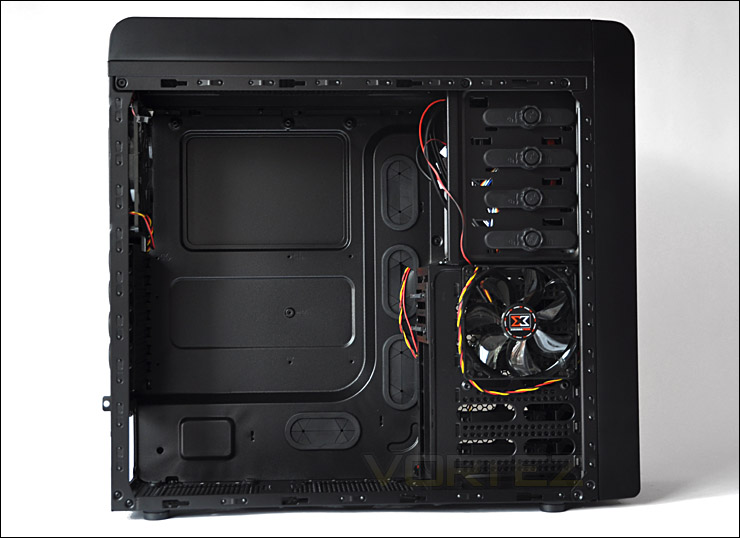
Prominent side panel off
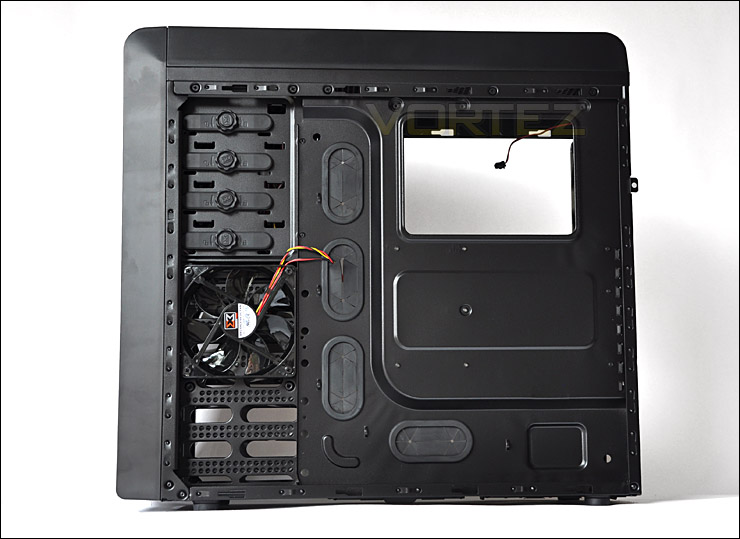
Behind the motherboard tray
At the bottom of the Pantheon there is suitable placement for a bottom mounted PSU. There are rubber mounts here for vibration reduction and also to preserve the coating on your PSU and prevent scratching. There is also a designated spot for 120/140mm fan mounting. Both spots come with air filters that can be removed and cleaned.
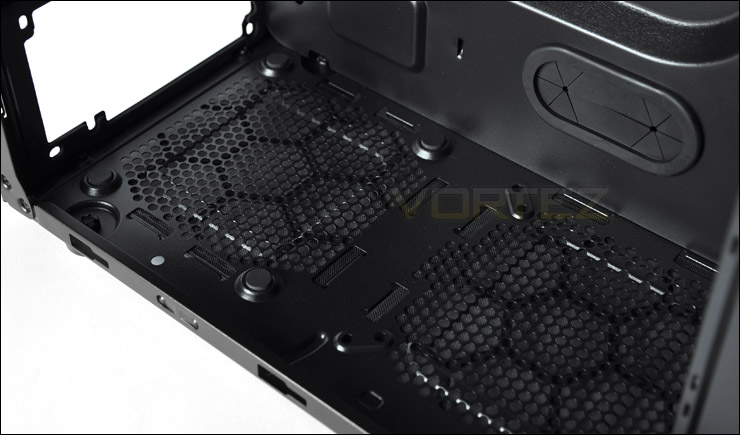
PSU mounting and 120/140mm fan slot
The Pantheon retains tool-less mechanisms throughout, whilst the PCI brackets don’t specifically feature a mechanism they do have thumbscrews which mean that you won’t have to get the screwdriver out. The brackets here are solid steel and do not feature any airflow friendly perforation, there are 7 in total. Next to this of course as we saw earlier, there are 4 rubber grommets for feeding cabling/tubes through.
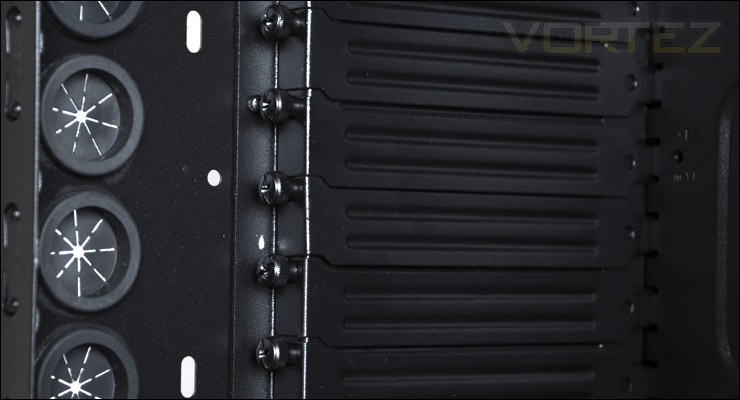
7 PCI brackets with thumbscrews to secure
Interior (Continued)
Moving up we see that there is a 140mm white LED fan with black blades. All of the fans within the Pantheon have dual cabling, the yellow/red for power and the red/black for fan control. At the top there is space to accommodate dual 120/140mm fans for additional cooling.
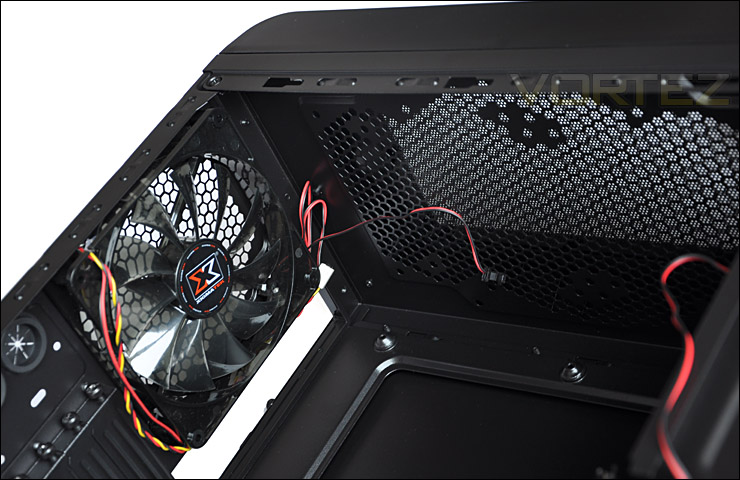
140mm rear exhaust and additional cooling options
On the rear of the HDD cage there is a SATA docking port that allows us to organise cabling better and get at the ports easier. On the other side of this docking port is of course where the HDD would slide in and connect. The ports below in the picture are where you connect SATA power and motherboard cable.
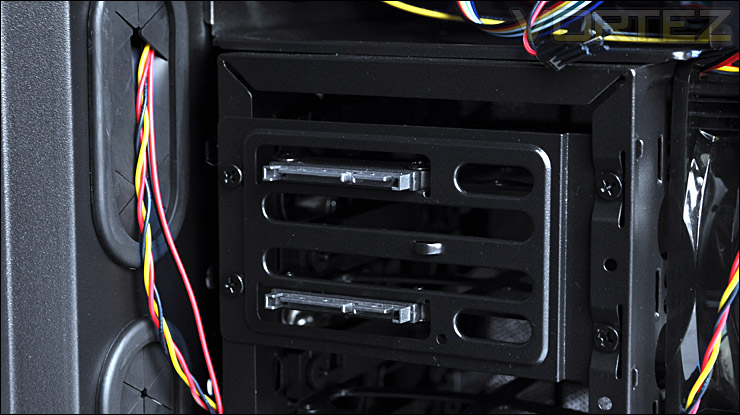
140mm rear exhaust and additional cooling options
The optical drive bay area features a locking mechanism that is tool-less. On either side we have these locking wheels – most cases only secure from the prominent side and not on the motherboard tray side so its good to see this on both sides. It will hold the drives better. A simple turn of the wheel locks the drive into place. Easy!
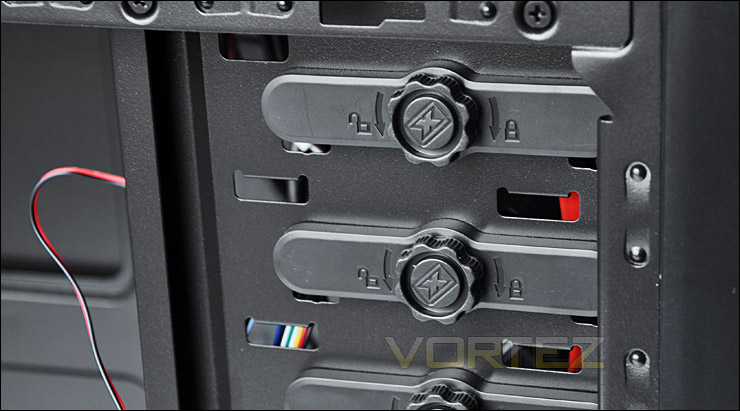
Tool-less 5.25″ drive secure
Here is another view of the HDD cage with the side panel off and front cover removed. We can install up to 6 HDDs, both 2.5″ and 3.5″.
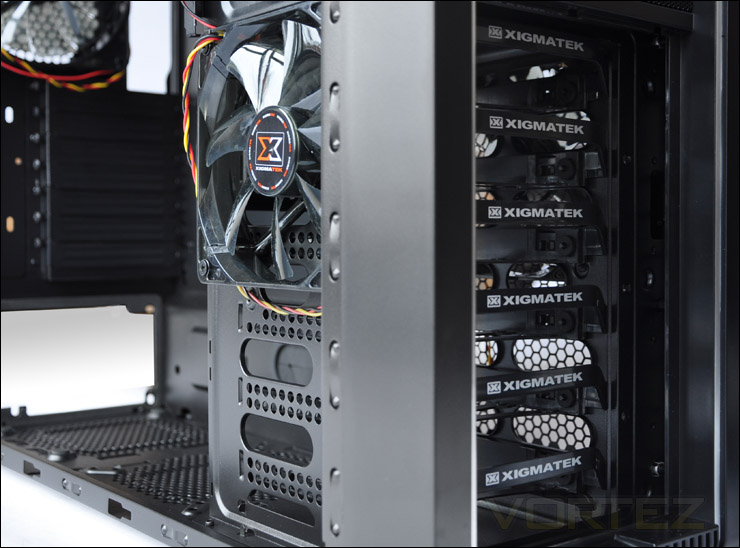
HDD cage with up to 6 drive slots available
Installation
Getting kit into the Pantheon is a relatively painless experience. There are a few things that do hinder a clean, tidy interior though. Cables on the fans are short, meaning that threading them behind the motherboard tray isn’t possible. Inside the Pantheon we are also lacking an area to thread the E-ATX cable behind the motherboard tray and up through the top onto the motherboard E-ATX power. So this cable has to trail across the motherboard. In similar fashion there is no exit hole for the USB 3.0 cable to feed through. Instead we have to feed it through one of the rubber grommets meaning that again this cable has to trail across the motherboard. It would have been more better if there was an option to conceal this cable. So really, cable management isn’t the best with this case.
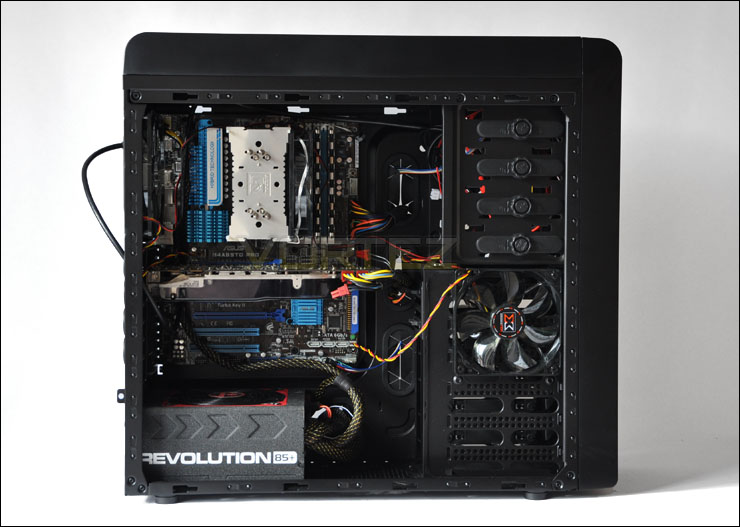
Install has now finished
Included with the Pantheon is an instructions manual and a small bag of accessories including cable ties, and an assortment of screws.
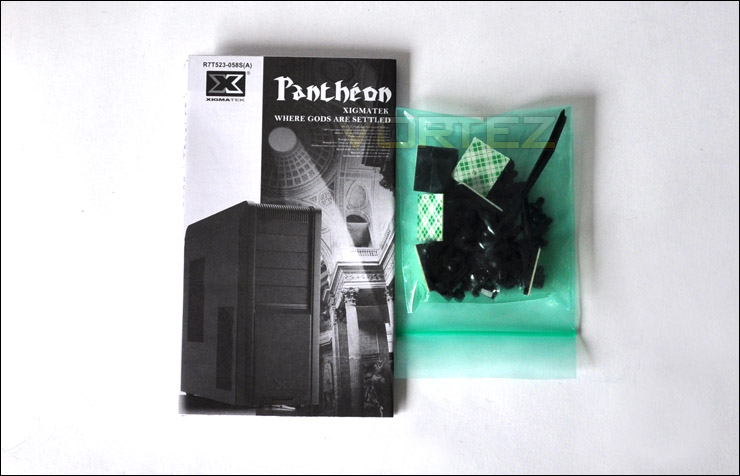
Accessories included
Installing HDDs is really easy, just pull out a tray from the HDD cage and attach the drive. If you want to take advantage of the docking station then you need to make sure that the drive’s ports are at the opposite end to the tray’s handle. The tray is rigid, good quality and features anti-vibration rubber.
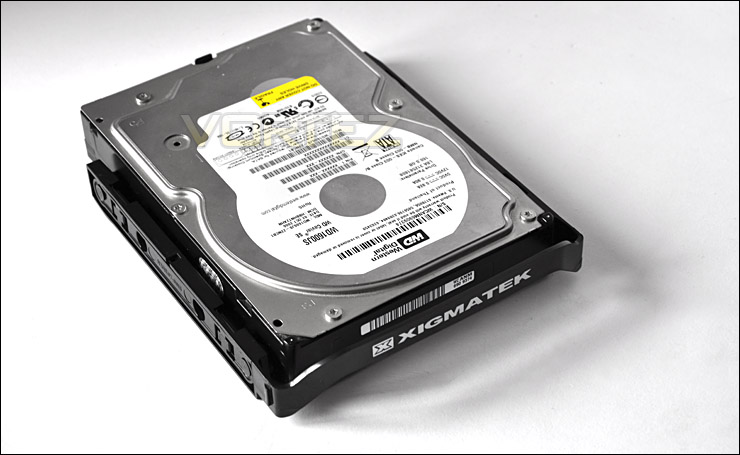
Attaching HDDs is easy
In terms of CPU clearance the CPU cooler installed here is a Noctua NH-U12P which has a maximum height of 158mm. You can see that there is clearance to the side panel but not a great deal. We have roughly 2cm, so I would advise that if your CPU cooler is over 160mm in height then the Pantheon is going to present clearance issues.
Some of the most commonly used CPU coolers on the market to date are 160mm in height. They would probably just about fit but its going to be very tight.
Reference:
• Thermalright Archon: Height 170mm
• Thermalright Silver Arrow: Height 160mm
• Thermalright Venomous X: Height 160mm
• Noctua NH-D14: Height 160mm
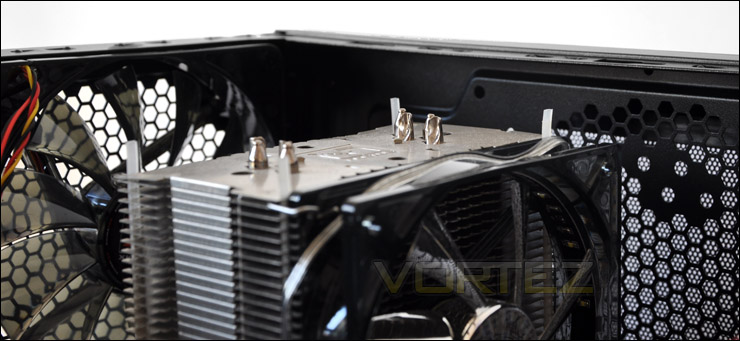
CPU clearance is tight
Looking to the GPU area, we have installed a ZOTAC GTX 480 which is 10.5″ in length. You can see from the image that there is approximately 2″ to spare. The Pantheon will accommodate any current graphics card on the market.
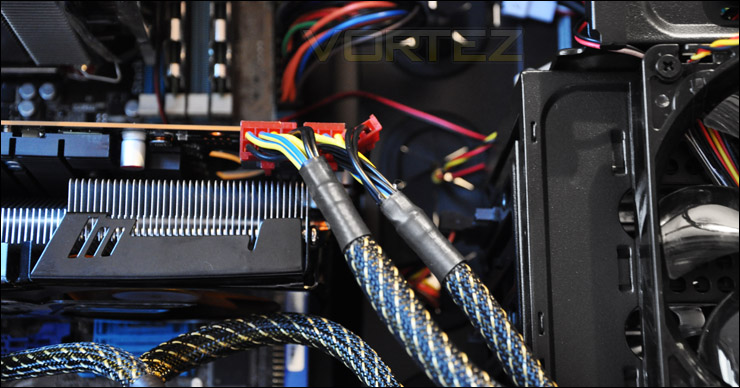
GPU clearance – Pantheon will allow all current graphics cards
Installation (Continued)
Over on the side we have approximately 1.5cm in clearance between the motherboard tray and side panel. Do bear in mind though that this measure taken in the image below is inside
the cable management channel. Above this, there is no clearance for cables. So they have to be routed along this section.
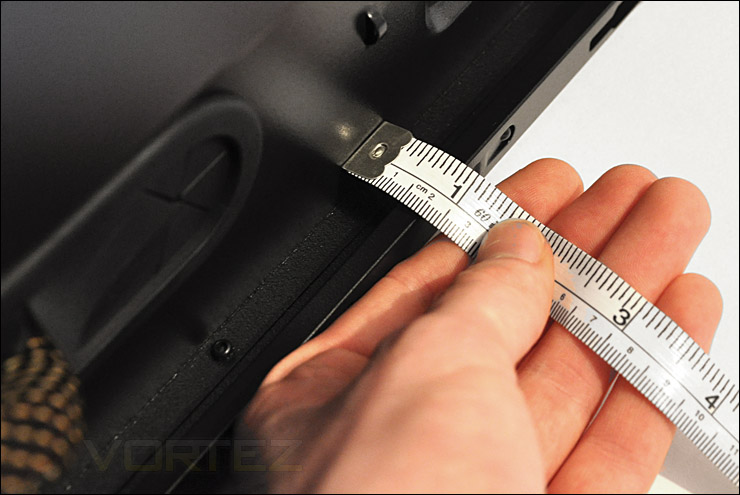
Clearance from the motherboard tray to side panel
With the CPU backplate cut-out being rather large this will certainly cater for any socket currently on the market. As you can see from the AM3 pictured, there is plenty of clearance here.
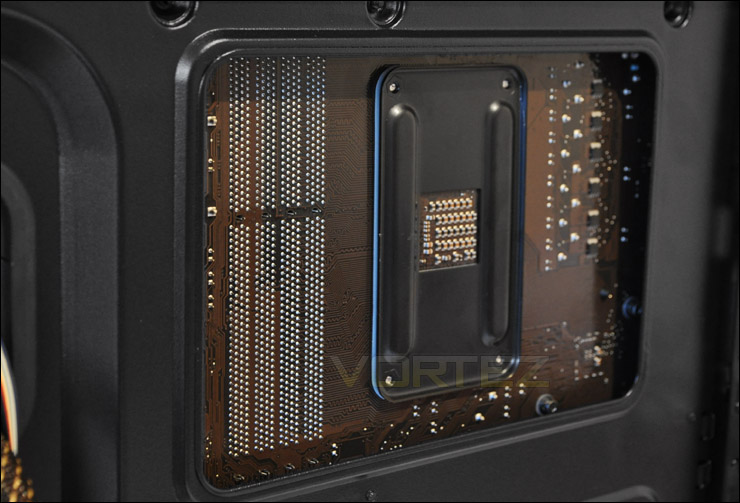
CPU backplate clearance – no problems at all. Lots of space
Powered Up
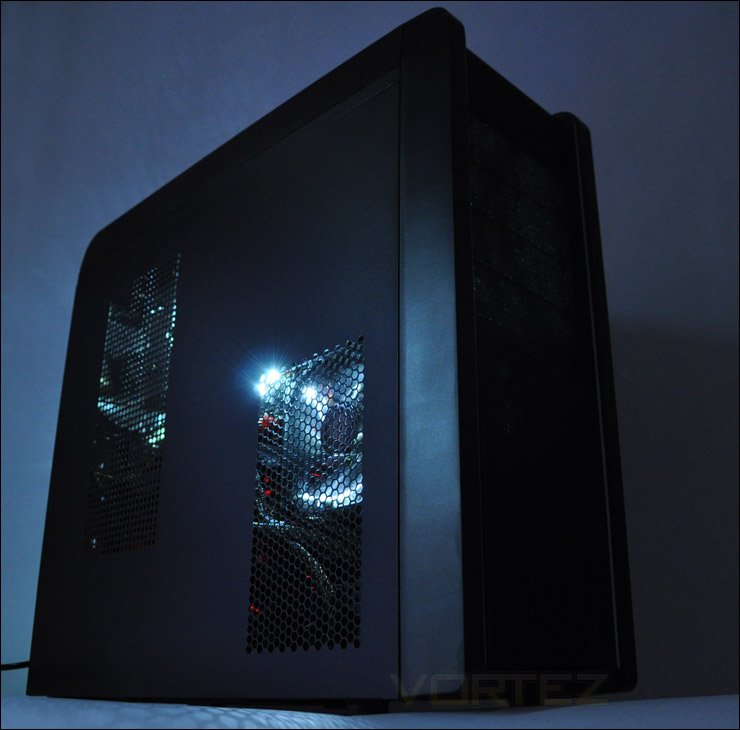
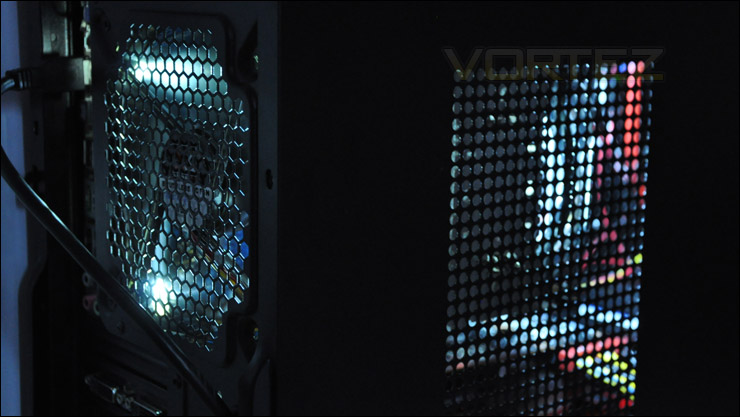
The Pantheon features 3 pre-installed LED fans that give off a lovely white glow. Below you can see the case powered up. Light is emitted from both sides and from the rear too. This creates a nice atmosphere. It’s nice to see a variation from the typical reds and blues that are very much overused within cases these days.
Thermal Performance
The Xigmatek Pantheon moves away from traditional airflow cooling. It doesn’t have a front mounted fan to draw in airflow across the motherboard. Instead there are 2 fans directed towards the HDD cage. As I stated previous throughout this review it will be interesting to see if this has a negative impact on the overall system temperatures. It would seem to do so from the outset.
To discover the thermal performance of the Pantheon I will record idle temperatures after 20 minutes from a cold boot. I will then stress the system and temperatures will again be monitored after a 30 minute have elapsed. Fans will be operating on the lowest setting via front panel controls.
System Components
CPU AMD Phenom II X6 1055T 2.8GHz
Motherboard ASUS M4A89TD PRO
Graphics ZOTAC NVIDIA GTX 480 Amp!
Memory 4GB Mushkin EM3-10666 DDR3
HDD Samsung Spinpoint 500GB SATA-II
PSU Enermax Revolution 85+ 850W
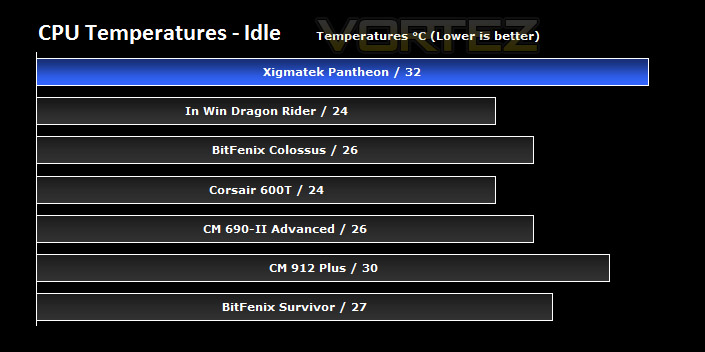
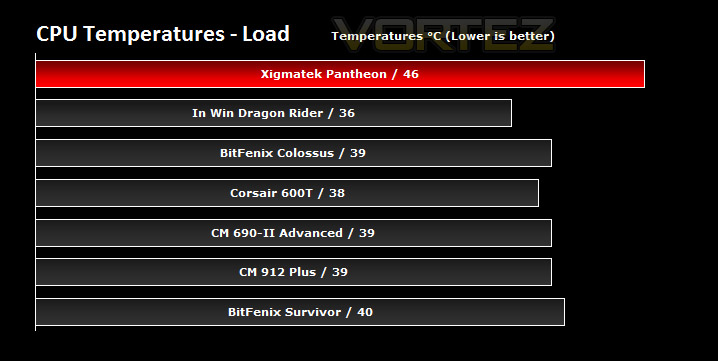
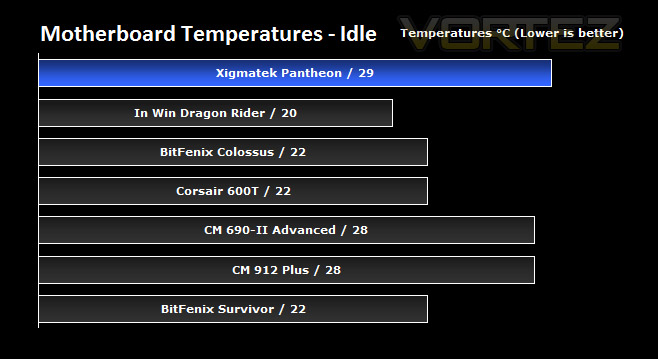
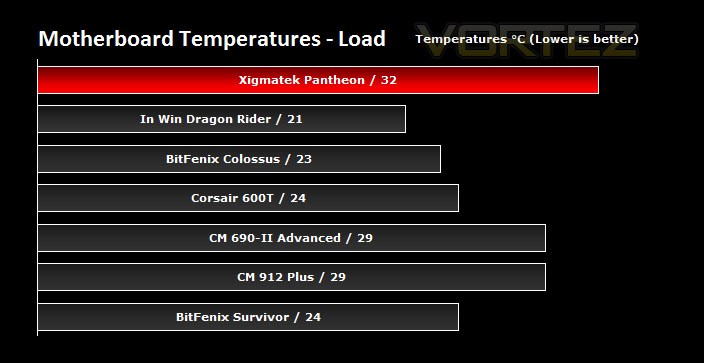
As I predicted, the Xigmatek Pantheon does suffer slightly from a deviation of traditional airflow cooling. Whilst CPU and motherboard temperatures aren’t as low as other cases we have tested HDD cooling is going to be somewhat better.
When fans are turned up to the highest setting the noise is quite disruptive. It’s certain that no-one would sit there with the case fans running at this setting. The low setting that was used for the tests here means that the fans run fairly quietly.
Conclusion
With the Pantheon being the first Xigmatek product review at Vortez I was intrigued to see how it would fare. It’s reasonable to say that the Xigmatek is a good case but it does have some things that let it down slightly.
Firstly, its a nice looking case. It may not have the “wow” factor, but it does come with a nice feature-set. We are able to full equip the Pantheon with a water-cooling setup thanks to the top section of the case accommodating 240/280mm radiators. If water isn’t your thing you can install 120/140mm fans instead. The Pantheon has tool-less design features throughout and the build quality of all items including the case is pleasing. We can also manage fan speed on up to 6 fans inside the Pantheon thanks to the front panel fan controller.
Where the Pantheon falls short is by its cable management. Fan cables are quite short and with the fan controller wiring also attached to each fan, tidying these cables away neatly is nigh on impossible. You cannot thread them behind the motherboard tray. These cables have to be routed across the motherboard as do the front USB 3.0 cable and E-ATX PSU cable because there is no spacing available to feed these cables away and out of sight. So if you are keen on cable management then this case will probably annoy you because there aren’t enough options there to satisfy your needs.
Xigmatek have broken away from traditional airflow standards within the chassis and removed the front intake fan that you would typically find and attached 2 x 120mm fans to the sides of the HDD cage instead which effectively means there is no airflow being directed across the motherboard and out through the rear exhaust fan. In the results on the previous page we can clearly see that this has had a negative impact on CPU and motherboard temperatures.
Priced at around £80 Inc. VAT, I feel there are better options available if you look around. There are many cases that I could list that offer better cooling options and present us with improved cable management such as the CM HAF 912 Plus and CM 690-II Advanced. For a little extra we could even invest in a full tower case for this price.
The bottom line is the Pantheon is a good case but it could have better cable management options for the E-ATX (P4) and USB3.0 cables. The price-tag steers me away as there are better alternatives.
Pros
+ Good build quality
+ Nice features – tool-less throughout
+ Light (weight)
+ Great lighting
+ Fan control for up to 6 fans
+ Can water-cool
Cons
– Limited CPU cooler clearance
– Poor cable management
– Strange default cooling system
– Cables for fans not braided
+ Good build quality
+ Nice features – tool-less throughout
+ Light (weight)
+ Great lighting
+ Fan control for up to 6 fans
+ Can water-cool
Cons
– Limited CPU cooler clearance
– Poor cable management
– Strange default cooling system
– Cables for fans not braided

