







In our first outing with Zalman we look at their CNPS 11X Extreme CPU cooler and see if its able to handle the might of Intel’s Core i7-3930K.

Product on Review: CNPS11X Extreme
Manufacturer: Zalman
Street Price: £40 (At time of review)
Zalman are known the world-over for their wealth of expertise within the cooling sector. Way back in 1999 their journey began with the concept of “Noiseless Computing” which is a passion that many enthusiasts pursue as they build bigger and better computer systems. Having never dealt with Zalman before, this is our first outing and we are filled with anticipation.
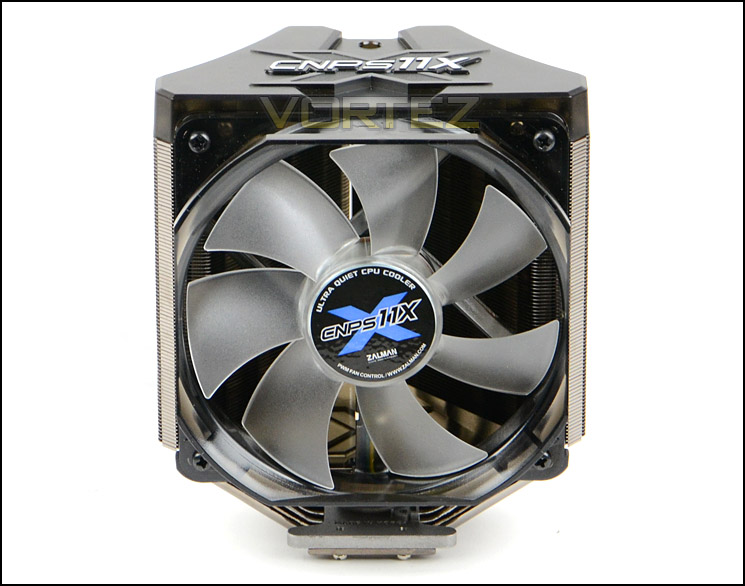
Today we will be taking a look at one of Zalman’s CNPS CPU coolers, namely the 11X Extreme. 11X Extreme is a v-shaped dual heatsink CPU cooler that supports a wide array of socket types. It comes fitted with an attractive Ultra Quiet 120mm Blue LED fan and promises to give great balance between acoustics and performance.
Zalman on CNPS11X Extreme
The high performance super thermal grease maximizes heat transfer from the CPU to the base of CNPS11X Extreme for intensified cooling performance. The entire copper heat sink of CNPS11X Extreme is ‘black-pearl’ nickel plated for long-term corrosion resistance, while the deep ‘black-pearl’ tone along with the high intensity blue LEDs reinforce its powerful aesthetics
Technical Specifications
Dimensions
135(L) x 100(W) x 154(H)mm
Weight
600g
Materials
Pure Copper and Aluminum
Dissipation Area
7,600㎠
Heatpipes
5
Fan
Ultra Quiet 120mm Blue LED PWM Fan
Bearing-Type
Long Life Bearing
Fan RPM
Low Noise Mode (with RC24P) 1,000 ~ 1,450 rpm ±10%
Performance Mode (without RC24P) 1,000 ~ 1,950 rpm ±10%
Noise
Low Noise Mode (with RC24P) 17 ~ 24 dBA ±10%
Performance Mode (without RC24P) 17 ~ 33 dBA ±10%
Input Voltage
12V
135(L) x 100(W) x 154(H)mm
Weight
600g
Materials
Pure Copper and Aluminum
Dissipation Area
7,600㎠
Heatpipes
5
Fan
Ultra Quiet 120mm Blue LED PWM Fan
Bearing-Type
Long Life Bearing
Fan RPM
Low Noise Mode (with RC24P) 1,000 ~ 1,450 rpm ±10%
Performance Mode (without RC24P) 1,000 ~ 1,950 rpm ±10%
Noise
Low Noise Mode (with RC24P) 17 ~ 24 dBA ±10%
Performance Mode (without RC24P) 17 ~ 33 dBA ±10%
Input Voltage
12V
Packaging, Bundle & Fan
11X Extreme is presented in a large, attractive box. Zalman are keen to emphasise that this cooler supports LGA 2011. The back of the box runs through the features of 11X Extreme in close detail for those who are interested in familiarising themselves with it.
Packaging for 11X Extreme
Inside the box the cooler is sealed inside a plastic enclosure. Within the bundle there is an assortment of different items including a mounting kit for compatibility with Socket FM2/Socket AM2+/AM2/Socket AM3+/AM3/Socket FM1/Socket 775/Socket 1156/Socket 1366/Socket 1155/Socket 2011. Also included are some other items such as: – Resistor [RC24P], wrench, loading block, thermal grease [ZM-STG2], double-sided tape and a user manual.
A large array of items within the bundle
Bundled with the 11X Extreme is an Ultra Quiet 120mm Blue LED PWM Fan. This fan is already attached to the heatsink via a combination of plastic brackets. The seven-blade design also features a long life bearing for extended use. Being a PWM fan and using the provided adapter allows for the fan speed to be adjusted. With the low noise adapter fitted the fan runs 1000RPM – 1450RPM whilst without adapter (Performance mode) runs 1000RPM – 1950RPM.
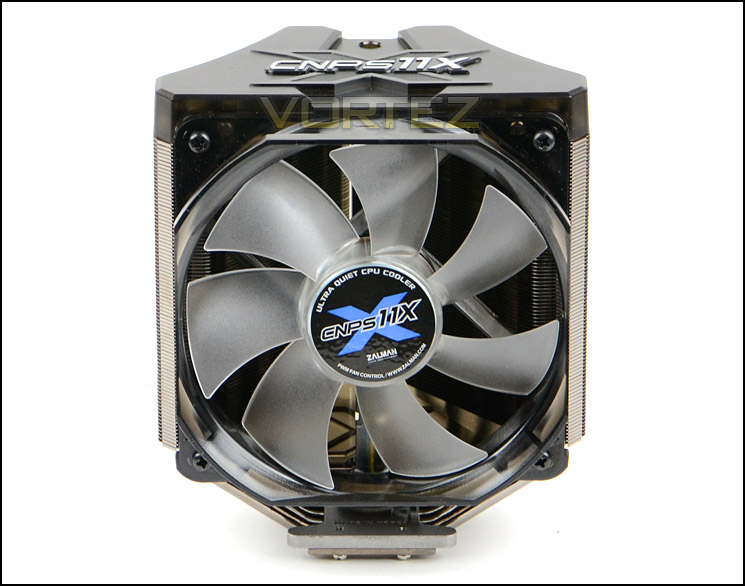
120mm Blue LED PWM fan
Closer Look
11X Extreme offers quite a unique design, its shape follows a ‘V’ type arrangement and overall dimensions mean that memory clearance should be very good. The 120mm cooling fan comes already attached with plastic fascias and can be removed after a series of screws have been unscrewed.
Taking the covers away reveals a dual-tower design using five copper heatpipes. Zalman have chosen to use a ‘V’ design for the 11X Extreme to minimise air resistance and optimise airflow.
11X Extreme in all its glory
Plastic fascia covering top with model carving
Naked and destitute of covers
The heatsink itself is nickel plated to help provide corrosion resistance. Zalman have given this finish a darkened appearance to simply assist with aesthetics. The fin stack is very condensed and has no sharp edges.
Nickel plated fin stack
Observing the underside of the cooler, the baseplate is again of copper construction and has been given a polished/mirror finish. Fixed to the baseplate is another plate which is during the installation process in the next section.
Highly reflective baseplate
Installation Process
In order to demonstrate the installation process for 11X Extreme we are installing the cooler on the Intel LGA2011 socket.
The first step for the installation process with 11X Extreme is to remove the plate which sits above the baseplate. Once this is removed the mounting brackets slot in between the top of the baseplate and this additional plate. Care needs to be taken when fitting the mounting brackets, they must point outwards and the ends are dipping down towards the baseplate. As soon as the mounting brackets are fixed its then time to apply thermal paste to the CPU and place the cooler over the socket. For LGA2011 this cooler has no stand-offs unlike many other coolers, the mounting screws simply pass through the bracket and into the mounting holes on the motherboard socket plate. In order to secure each of the four screws the provided wrench must be used. This is the part of the installation which we encountered some difficulties. Due to the size of the wrench and arrangement of the heatsink, tightening the screws up is very fiddly, furthermore the wrench is slightly too loose for the head on each of the screws; combine this with poor quality screws and the heads on the screws soon become defaced and difficult to tighten/loosen.
We actually spent many hours trying to get the cooler attached to the motherboard and we were quite concerned that rounding the heads off the screws would present big problems trying to get 11X Extreme off our motherboard. Unfortunately two of the screws suffered so much damage the wrench simply turned/slipped inside the hole and so our trusty dremel was required to make an incision, thus allowing us to use a flat-head screw driver to remove 11X Extreme.
The installation aspect of any CPU cooler is one that should be easy and leave you with complete confidence in the product, sadly for Zalman and for the 11X Extreme things couldn’t be further from this statement.
Installed – Memory Clearance
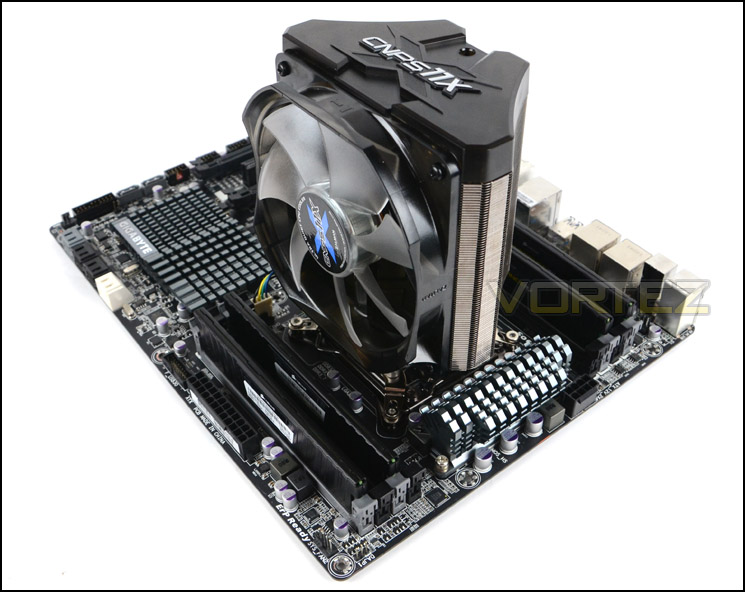
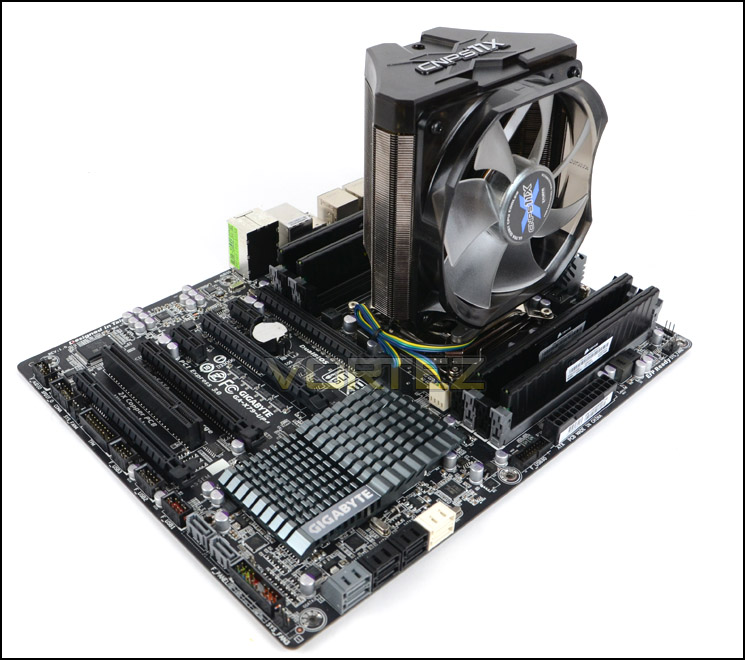
Memory clearance is something which many system builders and enthusiasts are eager to discover since this will ascertain whether a memory kit will be compatible with the CPU cooler or not. To demonstrate this a low profile memory kit is used.
With 11X Extreme now installed on the motherboard its overall size can observed. Due to the dimensions, this cooler gives plenty of clearance and actually presents no issues at all for tall memory because it does not overhang any of the DRAM slots.
Dimensions: 135(L) x 100(W) x 154(H)mm
Test Setup & Methodology
Test System
CPU – Intel Core i7-3930K (3.6GHz)
Motherboard – GIGABYTE X79-UP4
Memory – 8GB Corsair Vengeance LP 1600MHz CL9
Graphics – Sapphire Radeon HD 6850 1GB
PSU – NZXT Hale90 650W
Hard Drive – Kingston HyperX 240GB SATA III SSD
Case – Corsair Carbide 500R White
Motherboard – GIGABYTE X79-UP4
Memory – 8GB Corsair Vengeance LP 1600MHz CL9
Graphics – Sapphire Radeon HD 6850 1GB
PSU – NZXT Hale90 650W
Hard Drive – Kingston HyperX 240GB SATA III SSD
Case – Corsair Carbide 500R White
CPU Coolers
Alpenföhn Matterhorn Pure(120mm Wingboost: 300-1200RPM)
Alpenföhn K2 (120mm Wingboost: 500-1500RPM, 140mm Wingboost: 300-1100RPM)
Alpenföhn Gotthard (140mm Wingboost: 300-1100RPM)
Noctua NH-D14 (120mm NF-P12 PWM + 140mm NF-P14 PWM: up to 1200RPM)
Thermalright SilverArrow SB-E Extreme (Dual TY-143 fans – 600-2500RPM)
Corsair Hydro H100 (Dual 120mm fans – low: 1300RPM, mid: 2000RPM, high: 2600RPM Push Config)
SilverStone HE01 (140mm PWM fan – 500RPM-1200RPM – 500RPM-2000RPM)
be quiet! Dark Rock Pro 2 (135mm + 120mm PWM Fans – up to 1500RPM and 1700RPM)
Thermaltake Water 2.0 Pro (Dual 120mm PWM fans – up to 2000RPM)
Corsair Hydro Series H100i (Dual 120mm fans – up to 2700RPM Push Config)
Be Quiet! Shadow Rock TopFlow(1x 135mm PWM fan – up to 1500RPM)
SilverStone HE02 (Passive – optional fan used: Noctua NF-F12 120mm PWM)
Corsair H55 (Single 120mm fan – 1700RPM Exhaust Push)
Cooler Master Seidon 120M (Single 120mm fan – Up to 2500RPM Exhaust Push)
Zalman CNPS11X Extreme (Single 120mm fan – Up to 1950RPM)
Program Suite
Real Temp – Maximum temperature analysis
LinX 0.6.4 – Applies thorough stress test to CPU
CPU-Z – Confirmation of CPU frequency/voltage
AIDA64 Extreme Edition – Confirmation of temperatures/fan speeds
Testing methodology
Testing will be based on temperatures recorded by Real Temp after 20 passes of LinX stress test. The maximum absolute temperatures will be recorded after the test and averaged over the 6 cores. The delta is then calculated by subtracting the ambient temperature recorded near the intake fans from the average temperature calculated. Tests are conducted with the Intel i7 3930K at its default 3.6GHz stock speed and overclocked to 4.6GHz @ 1.42V. The tests are done inside the Corsair Carbide 500R chassis to simulate real world conditions. To keep the tests standardised we are using Noctua’s NT-H1 thermal paste on all coolers.
CPU coolers are reviewed as they come out of the box – with their factory cooling fans, as the manufacturer intended and as the consumer expects.
Additional tests include a passive test where the cooling fans are taken away from the heatsink and a comparison between the cooler used with stock thermal paste against our Noctua NT-H1 paste.
A kind thank you to Noctua for supplying us with NT-H1 thermal compound.
Results – Stock Performance
During our analysis we used the cooler with and without the low-noise adapter. With the adapter the cooling fan maintained a speed of 1000RPM whilst without the adapter the speed rose to 1300RPM for stock performance.
The performance against noise level for each mode is good. Zalman’s offering managed to keep up with the likes of other popular monoliths such as Dark Rock Pro 2, and NH-D14.
Results – Overclocked Performance
During our analysis we used the cooler with and without the low-noise adapter. With the adapter the cooling fan maintained a speed of 1500RPM whilst without the adapter the speed rose to 1930RPM for overclocked performance. Noise levels are much more noticeable at the higher end of the 120mm’s capabilities.
Again, even with a substantial overclock applied to the CPU the 11X Extreme continues to prove its worth against some keen contenders.
Results – Passive Performance
Although 11X Extreme demonstrated prowess at both stock and overclocked states with the cooling fan attached, unfortunately the same cannot be said for this cooler when it is used passively. Without the cooling fan temperatures soar beyond what is acceptable and therefore Zalman’s offering fails in this test.
Results – Thermal Paste Comparison
Most CPU coolers come accompanied with thermal paste provided by the manufacturer. For our CPU cooling tests we use Noctua’s NT-H1, so to offer up some interesting analysis we test the thermal paste given with the 11X Extreme (ZM-STG2 ) against NT-H1 to see which gives the best results during stock and overclocked performance.
Zalman’s ZM-STG2 actually provides slightly better results in our tests. Although this is nominal it’s still an advantage!
Conclusion
This is our first outing with Zalman and with it brings many different feelings and expectations. So how was our first experience with this well-established brand?
The X11 Extreme is offers a unique visual appearance, its distinctive looks certainly separate it from other coolers on the market. Adopting a ‘V’ shape and having the cooling fan already attached is not only makes life easier but also offers excellent clearance for taller DRAM. With X11 Extreme installed on our LGA 2011 motherboard the cooler refrained from overhanging this area of the motherboard altogether.
On the performance front X11 Extreme handled our Intel Core i7-3930K at stock settings and with a substantial overclock. For a cooler of its calibre it even managed to show prowess against rival offerings which are renowned for their great results. Furthermore, the noise levels with and without the adapter gave good results too, allowing for acoustics which are more than tolerable.
X11 Extreme is priced at £40 which is a good price based on the performance this cooler offers. But unfortunately there are some pitfalls which we cannot and will not excuse. The installation was disastrous with many tedious hours passing, ill-fitting tools and poor quality components we even had to use our trusty dremel just to remove the screws because their heads had rounded. Zalman should really have designed a better fitted wrench for use with 11X Extreme, the screws are awkward to reach and this tool slips when located within the screw head which identifies another issue; poor quality components. Should a screw deface so easily? We think not and because of this oversight we find it difficult to be able to recommend this cooler even though it gives such valiant results.
Pros
+ Great performance
+ Nice aesthetics
+ Low-noise
+ Excellent thermal paste supplied
Cons
– Troublesome installation
– Poor quality components
+ Great performance
+ Nice aesthetics
+ Low-noise
+ Excellent thermal paste supplied
Cons
– Troublesome installation
– Poor quality components

Click here for an explanation of our awards at Vortez.net.


