







ZOTAC step into the light with another small form factor ITX motherboard that takes Intel’s Cedarview Atom to a whole new level. Join us as we explore this new release.

Product on Review:ZOTAC D2700-ITX WiFi Supreme
Manufacturer: ZOTAC
MSRP: £150GBP
Succeeding the renowned ZOTAC IONITX, ZOTAC have taken Intel’s latest ‘Cedarview’ Atom CPU and hardwired it to a NVIDIA GT 520 GPU to create a low power system perfect for creating your own small form factor home media system. ZOTAC add a 802.11n Wi-Fi and Bluetooth mPCIe combo, synonymous with the ‘WiFi’ naming and have even added in an extra mSATA port to house an mSATA solid state drive. The D2700-ITX WiFi Supreme, ticks many boxes those on the prowl for a low power HTPC/media system require, but does it deserve the ‘Supreme’ name it has been given?
ZOTAC’s Overview of the D2700-ITX WiFi Supreme
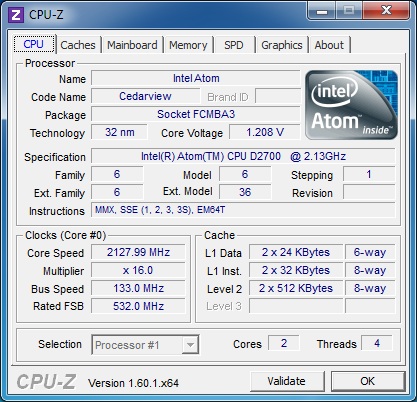
Experience a new generation of energy-efficient computing featuring a balance of CPU and GPU power with the ZOTAC D2700-ITX WiFi Supreme platform. Powered by the latest dual-core Intel® Atom™ D2700 processor paired with an NVIDIA® GeForce® GT 520 graphics processor, the ZOTAC D2700-ITX WiFi Supreme packs everything you need for a general-use desktop or home theatre PC into a compact mini-ITX form factor.
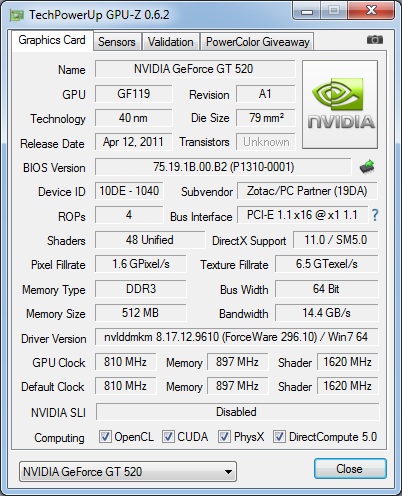
The NVIDIA® GeForce® GT 520 graphics processor enables the ZOTAC D2700-ITX WiFi Supreme to deliver superior video playback features including hardware video decode acceleration for Blu-ray 3D, streaming Internet video and native 1080p24 output. Onboard Gigabit Ethernet, 802.11n WiFi and Bluetooth 3.0 networking technologies on the ZOTAC D2700-ITX WiFi Supreme deliver outstanding network connectivity via wires or wireless to home network and peripherals.
The NVIDIA® GeForce® GT 520 graphics processor enables the ZOTAC D2700-ITX WiFi Supreme to deliver superior video playback features including hardware video decode acceleration for Blu-ray 3D, streaming Internet video and native 1080p24 output. Onboard Gigabit Ethernet, 802.11n WiFi and Bluetooth 3.0 networking technologies on the ZOTAC D2700-ITX WiFi Supreme deliver outstanding network connectivity via wires or wireless to home network and peripherals.
Technical Specifications
Product Name
ZOTAC D2700-ITX WiFi Supreme
MODEL
Model: D2700ITXS-A-E
Chipset: NM10 Express
Manufacturer: Intel
GPU: NVIDIA® GeForce® GT 520 w/512MB DDR3
CPU Compatibility
CPU: Intel® Atom™ D2700 (2.13 GHz dual-core w/ HyperThreading Technology)
Socket: N/A Integrated
Front-side bus: 1066 MHz
MEMORY
Memory Type: DDR3
Speed: 1066 MHz
Slots: 2 x 204-pin SO-DIMM
Capacity: Up to 4GB
DirectX
DirectX 11
OpenGL
OpenGL 4.1
Expansion
1 x PCI Express x16 (single-lane)
1 x mSATA
1 x mini-PCI Express (occupied by WiFi card)
Networking
Ethernet: 10/100/1000Mbps
WiFi
802.11n & Bluetooth 3.0
Audio
Analog: 8-ch HD
Digital: S/PDIF
Ports
DVI: 1
HDMI: 1 (HDMI 1.4a)
DisplayPort: 1
VGA: With included adapter
SATA: 2 (SATA 3.0 Gb/s)
eSATA: 0
PS/2: 1 (keyboard only)
USB Port: 2 USB 3.0 (back panel) 6 USB 2.0 (4 on back panel 2 on pin header)
Serial Port: Serial port header
Cooler
Active (with fan)
OS capability
Windows® Vista/7 premium ready
Packaging
Packaging Content
1 x D2700ITXS-A-E
2 x SATA cables
1 x I/O back plate
2 x WiFi antennas
1 x DVI-to-VGA adapter
Packaging & First Look
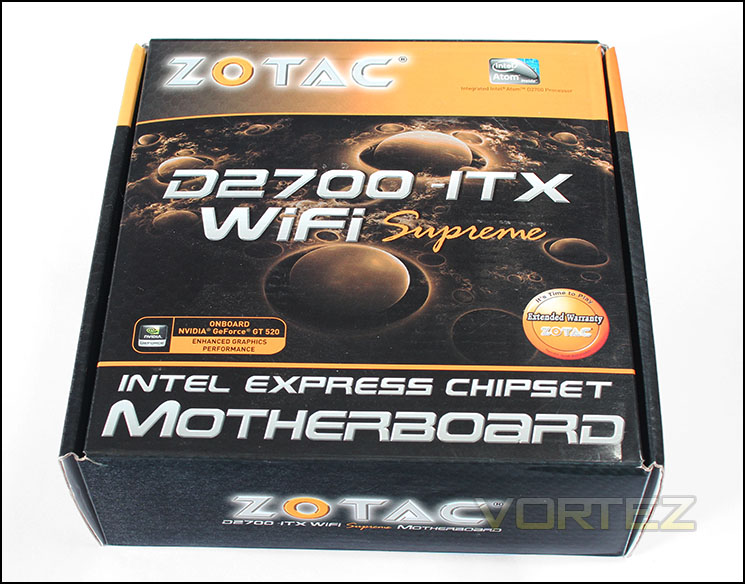
The box face
The box dons the ZOTAC amber and black livery with the product name emblazoned across the centre with a few points of interest, being the Intel Atom logo, a sign to tell us about the onboard NVIDIA GeForce GT 520 GPU and ZOTAC’s extended warranty badge.
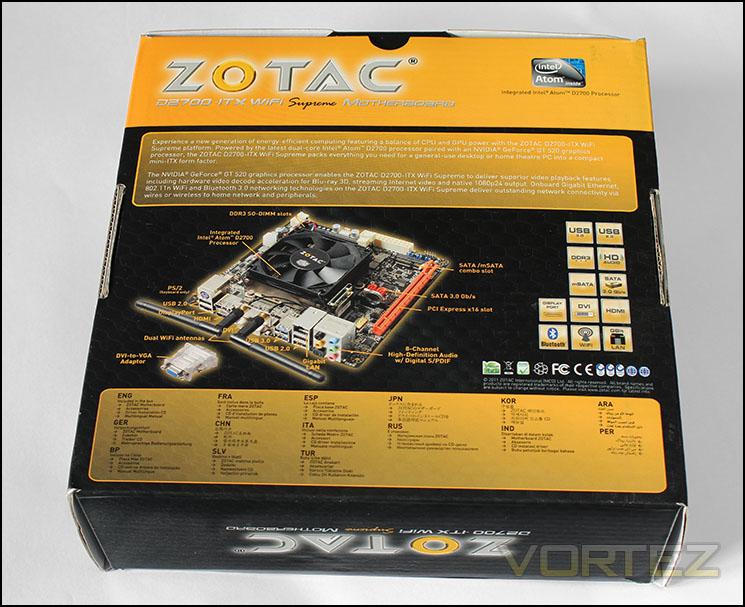
Rear side of the box
On the reverse we have the product description, an image of the product itself and a foundation of compliance certificates that are supporting information tiles detailing some of the product features.
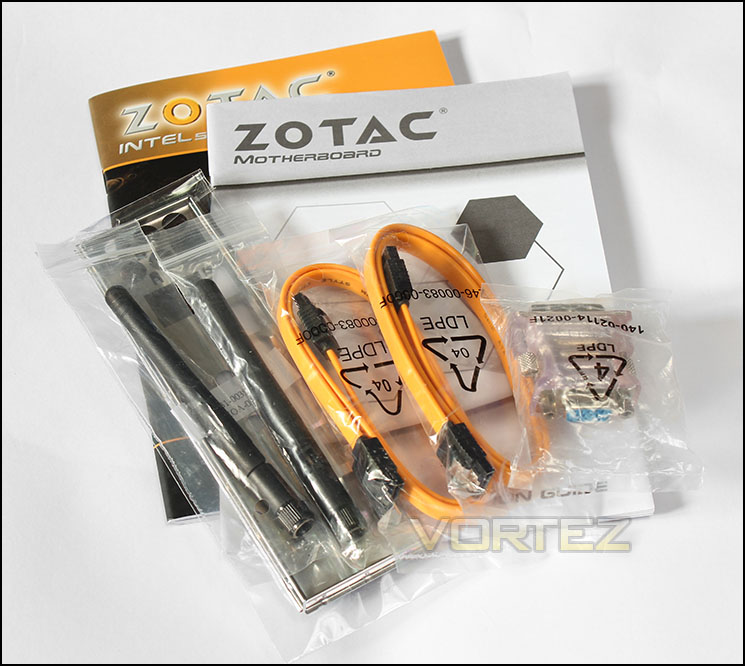
Included accessories
Bundled in the box we find The Manual, an installation guide, driver CD, 2x WiFi Antenna, two of those lovely amber SATA cables, and a DVI-VGA adapter. Everything you need to get started.
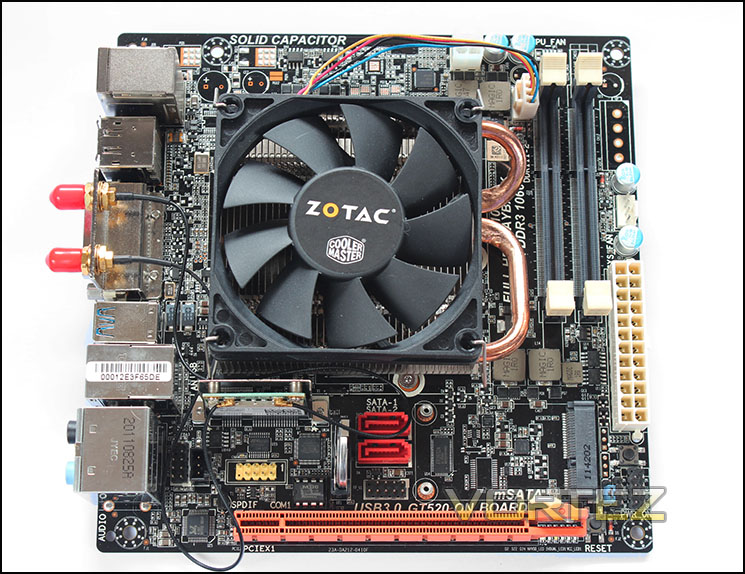
The D2700-ITX WiFi Supreme
The most striking thing we see is the 80mm fan atop the heatsink. Sticking out the side of the heatsink we see the two 6mm heatpipes that run across both the Atom CPU and the NVIDIA GT 520 GPU. The only real points of colour come from the PCIe lane, in the a familiar orange hue and the red SATA ports. The motherboard is attractive and nothing ghastly jumps out. The PCB is riddled with solder points, SMDs, ports and headers, you certainly wouldn’t want to pour your toolbox on to this by mistake.
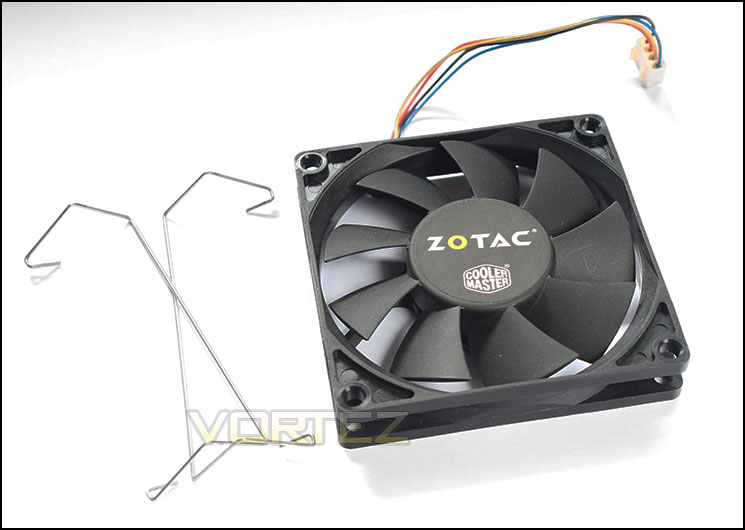
Fan & fan clips
The 80mm x 15mm fan appears to be CoolerMaster branded and takes on the the challenge (hardly) of dissipating the heat from the heatsink. As the fan is only 15mm thick, it would seem ZOTAC have intentionally made the cooler low profile enabling this ITX motherboard to fit in some very tight spaces.
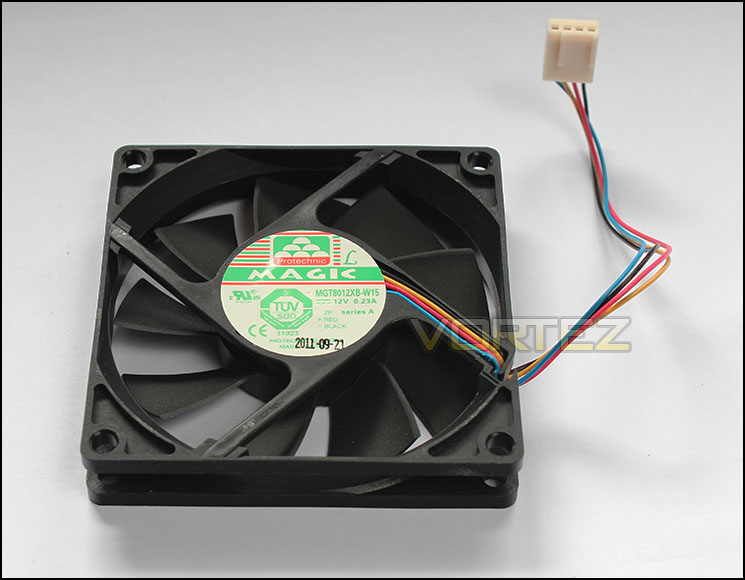
Underside of the fan
The OEM is Pyrotechnic Magic, it has a 4pin PWM connector and draws a max of 0.23A. Detailed specs seem somewhat non-existant but it is likely to be a ball bearing type fan. In testing the fan never changed its speed from 1600rpm even in our ‘power consumption’ burn test to find peak power draw. The sound emitted by this fan is very quiet, to further my point, the system is less than 500mm away from my ear on an open test bed so I have no issue in claiming that this fan will be virtually inaudible in an enclosure and in a more conventional situation. (Yes virtually inaudiable means, ‘I cannot say it is silent because I know it makes sound even if it cannot be heard.’)
Closer Look
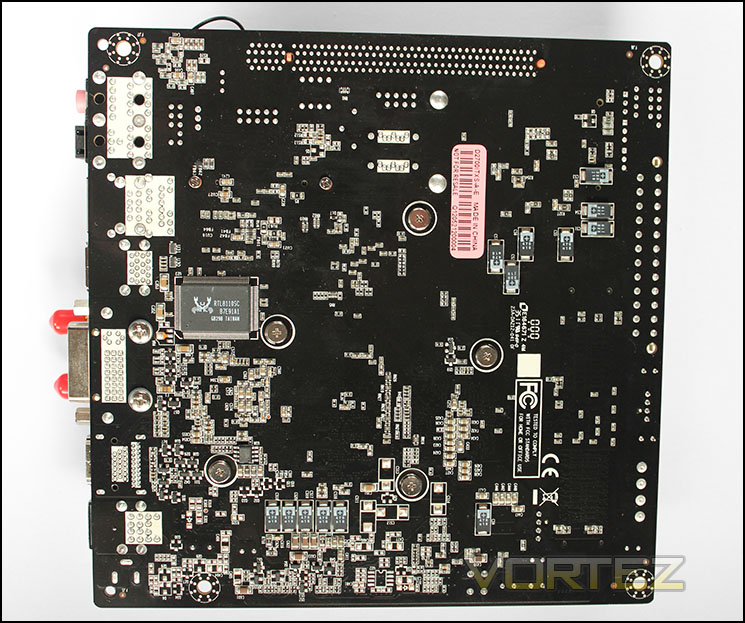
Reverse side of the motherboard
Turning the Zo/preme over we see some low profile capacitors and the RTL8110SC lan controller, it is always a treat to flip an itx motherboard over as you never know what they may mount on this side. In this situation there were no major surprises.
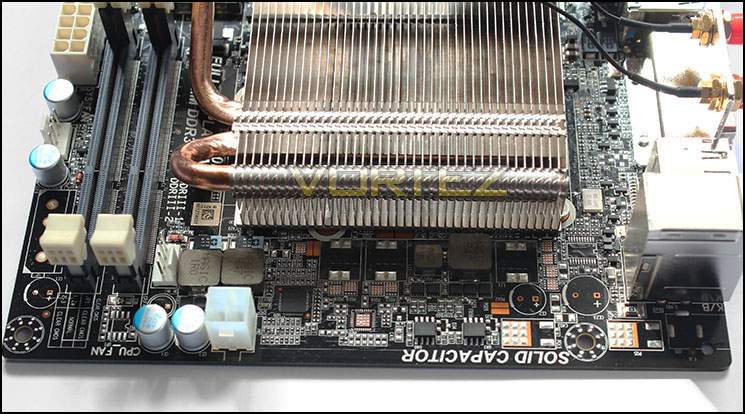
Top edge of the D2700-ITX WiFi Supreme
First we see the bare heatsink and its 40 fins and dual 6mm heatpipes. I had hoped to remove the heatsink to take a look at the Atom and GPU core and anything else lurking beneath, however, the heatsink was firmly attached and despite my attempts I feared that if the heatsink did come off, the forces involved would have caused the dainty ITX motherboard to fly out the window and embed itself into the neighbours cat. So I let it be for fear of risking any damage.
The top edge appears pretty empty with just the 4pin ATX power supply connector standing out amongst a few capacitors and chokes and the 4pin PWM CPU fan header.
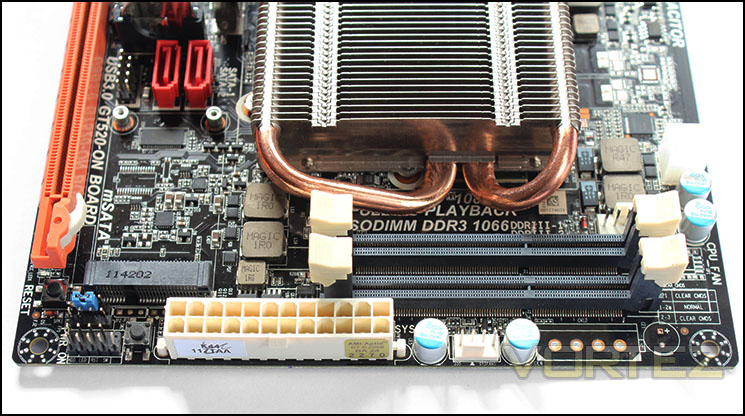
Two SODIMM DDR3 slots
The right side edge affords us with the 24pin ATX power supply connector followed by another 4pin fan header. We get to see the two SODIMM DDR3 1066MHz slots. The Atom only has a single channel IMC and allows for a max memory capacity of a meagre 4GB, the choice to use 2x SODIMM slots seems to be more of one out of balance rather than necessity.
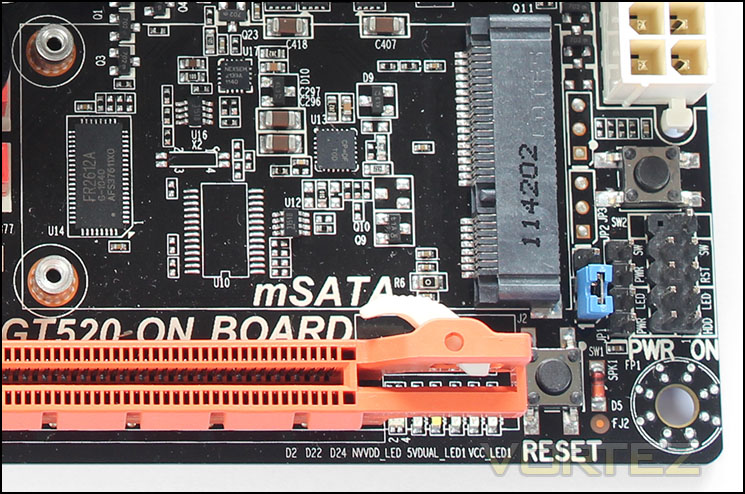
Bottom right corner
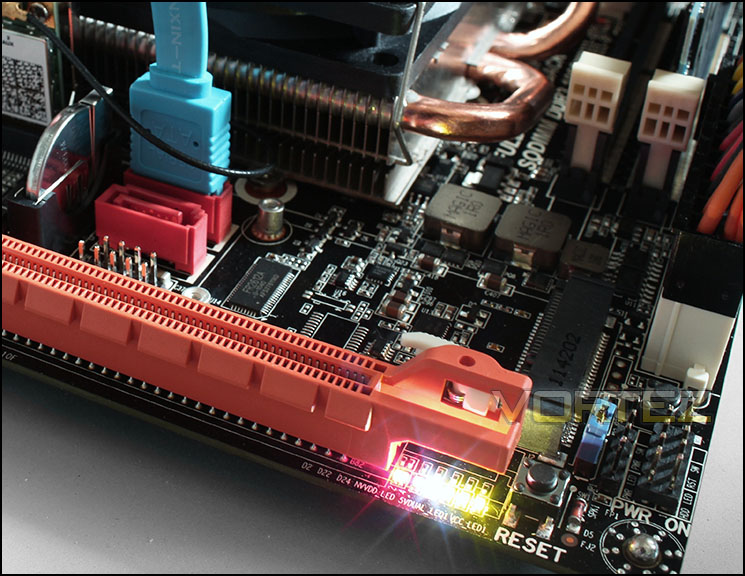
In this sector we have a few nice surprises, firstly we have an onboard power and reset button, always handy for testing. We also see the front panel connection headers, clear CMOS jumper, as well as a neat little mPCIe/mSATA port including standoffs for attaching a mSATA solid state drive. This addition is an interesting one, in the manual though it states
‘You can only use either mSATA or SATA2 device at a time. The default working mode is SATA2. The SATA2 will become unavailable when mSATA SSD is installed.
This is likely a limitation of the Atom CPU, though the option to add a SSD with little space implication is still a worthy consideration.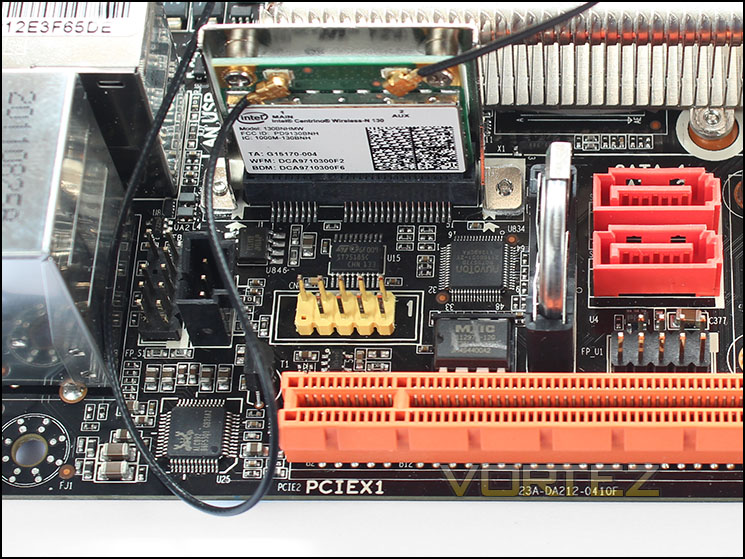
Bottom left section
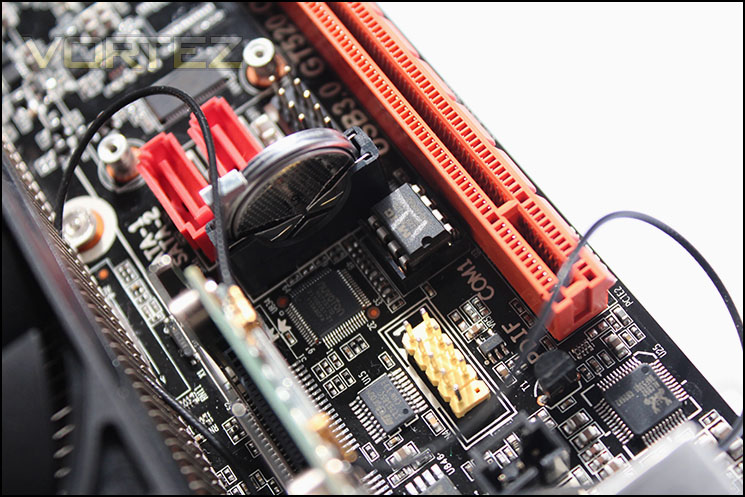
The bottom left corner is jam packed with components and features, here we see the Realtek ALC892 audio codec adjacent to the PCIe x16 lane, above the audio chip you will find the front panel audio header tucked away behind the SPDIF out header. The tell tale yellow base of the COM headers is to the left of the BIOS chip which is then followed by the CMOS battery. To the right of the CMOS battery we see the two vibrant red SATA 3Gb/s ports and the USB 2.0 header. If this area wasn’t packed with all the nutrition an ITX motherboard would need, we also have the mPCIe WiFi combo card delivering the wireless N and Bluetooth connectivity. It is in this small section of PCB that really makes you realise why you pay a premium for ITX motherboards.
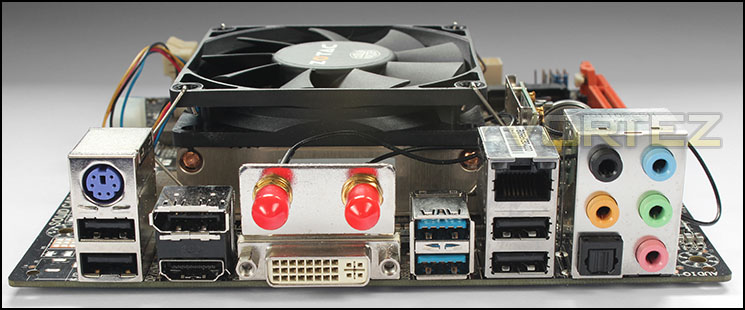
Rear I/O ports
A comprehensive selection of USB, video and audio outputs. In order from left to right we have, PS/2 Keyboard, 2x USB 2.0, Displayport, HDMI 1.4a, 2x aerial connections, DVI, 2x USB 3.0, gigabit lan, 2x USB 2.0, 7.1 audio and mic jacks and finally an optical S/PDIF out.
BIOS
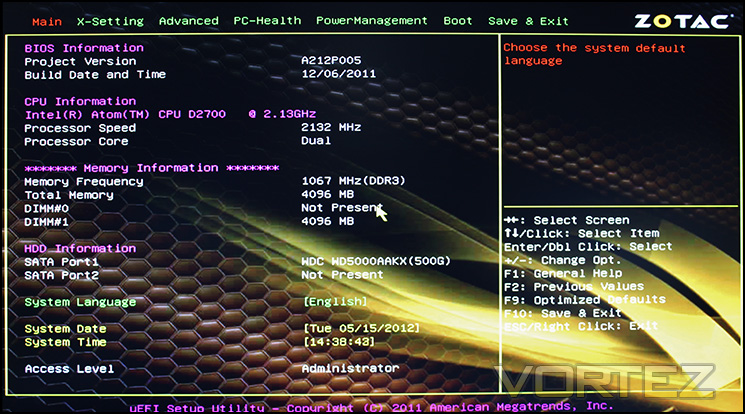
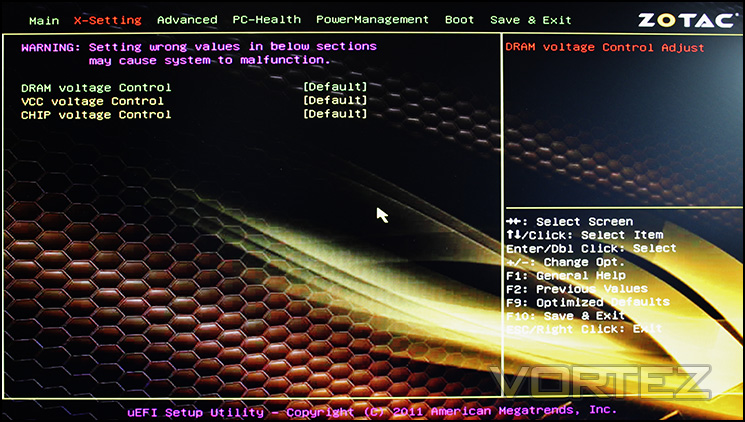
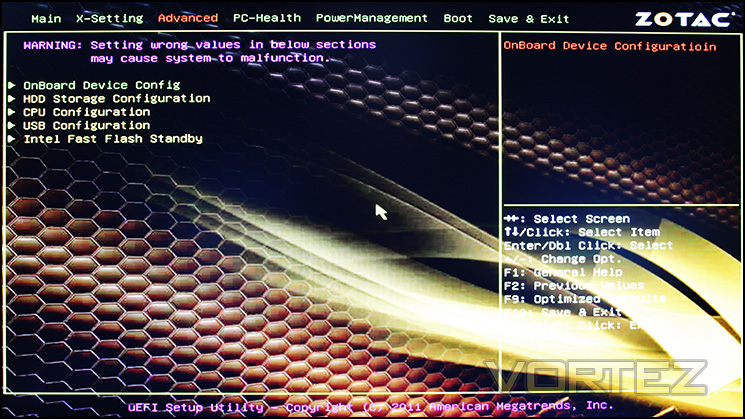
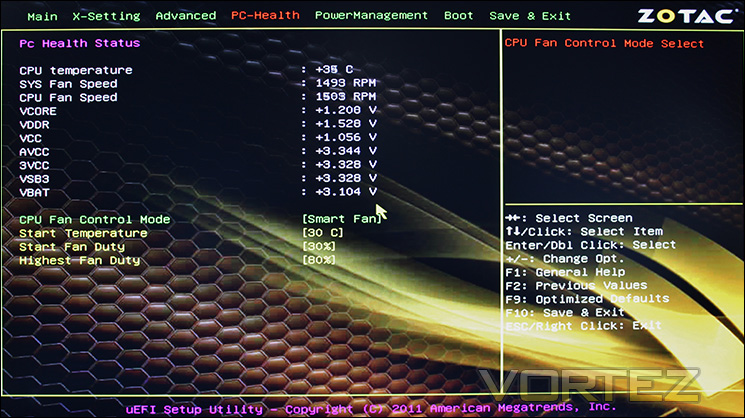
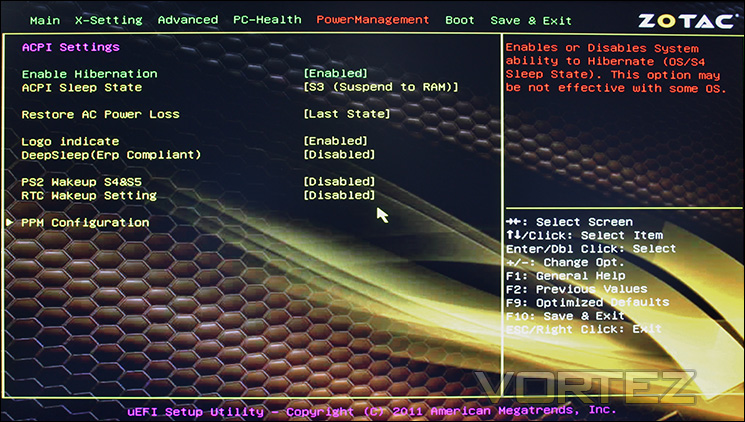
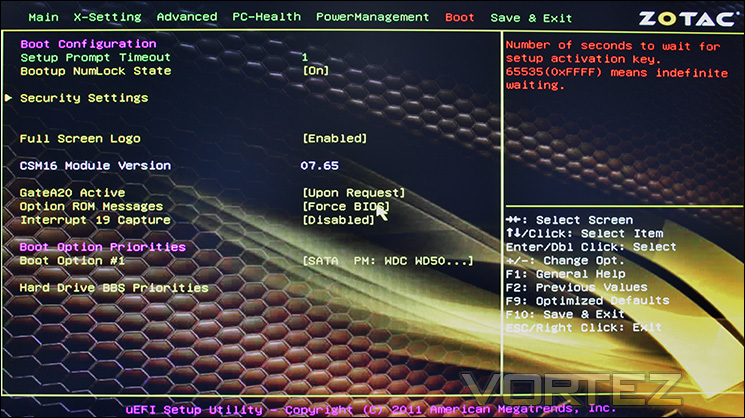
The UEFI BIOS is far from the most polished around and is slow and laggy. Luckily there is little reason for people to be battling the BIOS of a product like this as there isn’t much going on.
Test Setup
CPU: Intel Atom D2700
Motherboard: ZOTAC D2700-ITX WiFi Supreme
GPU: NVIDIA GeForce GT 520
Memory: Nanya Technology 1x 4GB 1066MHz DDR3 SODIMM
APU: AMD A8-3850, A8-3870K, A6-3650
Motherboard: GIGABYTE GA-A75M-UD2H
GPU: Integrated Radeon HD 6550D, HD 6530D
Memory: 2x 2GB Team Xtreem PC3 12800 DDR3 @ 1333MHz 9-9-9-24
PSU: Corsair CX430
HDD: Western Digital Caviar Blue 500GB 7200RPM SATAIII
OS: Microsoft Windows 7 64bit
Motherboard: ZOTAC D2700-ITX WiFi Supreme
GPU: NVIDIA GeForce GT 520
Memory: Nanya Technology 1x 4GB 1066MHz DDR3 SODIMM
APU: AMD A8-3850, A8-3870K, A6-3650
Motherboard: GIGABYTE GA-A75M-UD2H
GPU: Integrated Radeon HD 6550D, HD 6530D
Memory: 2x 2GB Team Xtreem PC3 12800 DDR3 @ 1333MHz 9-9-9-24
PSU: Corsair CX430
HDD: Western Digital Caviar Blue 500GB 7200RPM SATAIII
OS: Microsoft Windows 7 64bit
Power Consumption & Temperatures
It’s interesting to note the power consumption across all motherboards because energy results can fluctuate between manufacturers due to the features and specifications that are integrated. First of all, for the idle tests the system is cold booted into Windows and no additional applications are executed – the watts are noted on the external energy monitor we use. Then the system is loaded with LinX 0.6.4 and MSI Kombustor simultainiously – watts are again monitored throughout the period of testing and the highest and lowest rated watts are then noted down. Below are the results of this energy test.
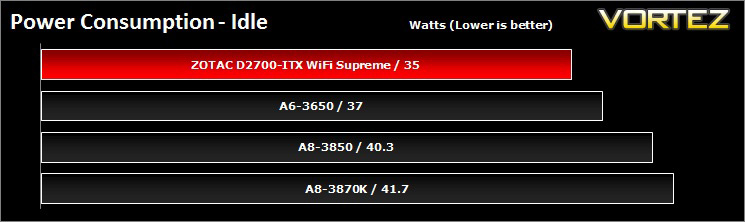
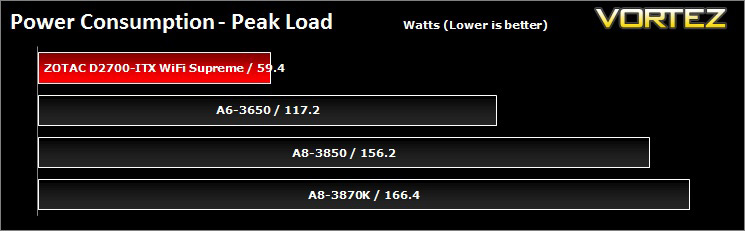
Idle power consumption isn’t too disimilar to what we can observe in the AMD APUs. Once the load kicks in, the ZOTAC D2700-ITX WiFi Supreme could barely draw 60w. Of course adding extra components would draw more power, but that is pretty impressive. It is likely that half of that power draw is going directly to the GT 520 GPU.
Temperatures
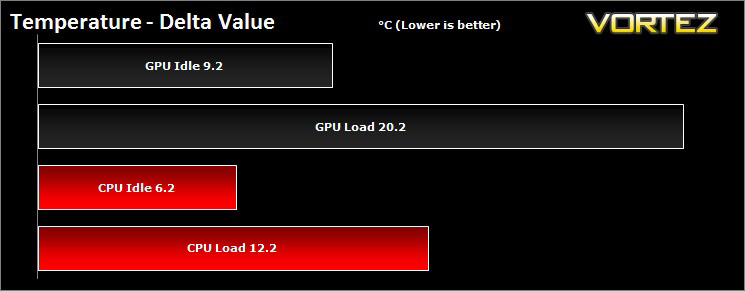
Ambient temperature was 20.8°C, heat from these components do not raise concern and the cooling fan remained quiet.
Synthetic Benchmarks: AIDA64
Memory Tests
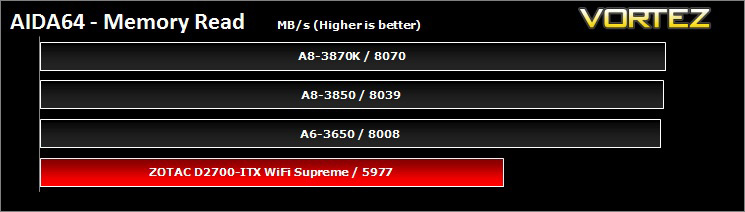
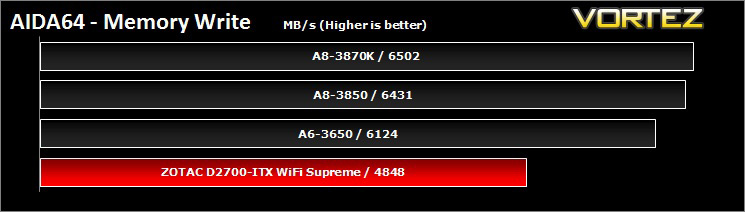
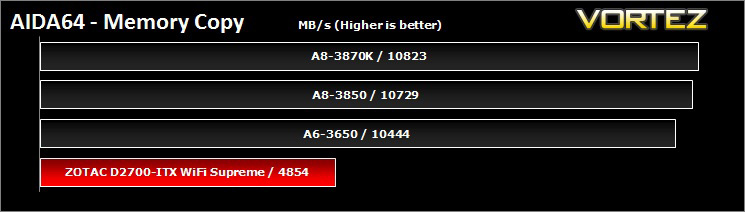
Memory bandwidth benchmarks (Memory Read, Memory Write, Memory Copy) measure the maximum achiveable memory data transfer bandwidth. The code behind these benchmark methods are written in Assembly and they are extremely optimized for every popular AMD and Intel processor core variants by utilizing the appropriate x86, MMX, 3DNow!, SSE, SSE2 or SSE4.1 instruction set extension.
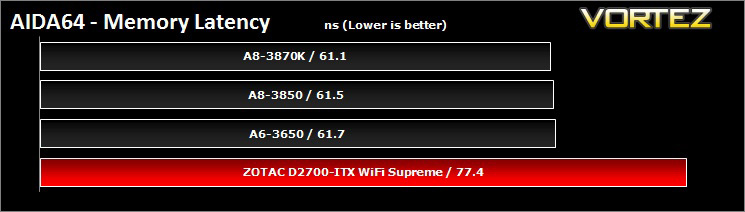
The Memory Latency benchmark measures the typical delay when the CPU reads data from system memory. Memory latency time means the penalty measured from the issuing of the read command until the data arrives to the integer registers of the CPU.
The Memory Latency benchmark measures the typical delay when the CPU reads data from system memory. Memory latency time means the penalty measured from the issuing of the read command until the data arrives to the integer registers of the CPU.
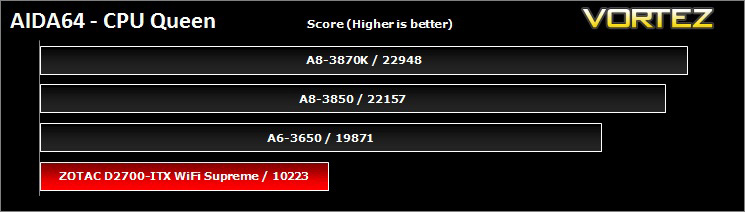
CPU Queen Benchmark
This simple integer benchmark focuses on the branch prediction capabilities and the misprediction penalties of the CPU. It finds the solutions for the classic “Queens problem” on a 10 by 10 sized chessboard. At the same clock speed theoretically the processor with the shorter pipeline and smaller misprediction penalties will attain higher benchmark scores. For example — with HyperThreading disabled — the Intel Northwood core processors get higher scores than the Intel Prescott core based ones due to the 20-step vs 31-step long pipeline. CPU Queen test uses integer MMX, SSE2 and SSSE3 optimizations.
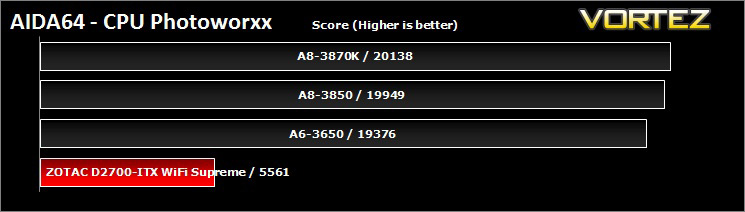
CPU Photoworxx Benchmark
This benchmark stresses the integer arithmetic and multiplication execution units of the CPU and also the memory subsystem. Due to the fact that this test performs high memory read/write traffic, it cannot effectively scale in situations where more than 2 processing threads used. For example, on a 8-way Pentium III Xeon system the 8 processing threads will be “fighting” over the memory, creating a serious bottleneck that would lead to as low scores as a 2-way or 4-way similar processor based system could achieve. CPU PhotoWorxx test uses only the basic x86 instructions, and it is HyperThreading, multi-processor (SMP) and multi-core (CMP) aware.
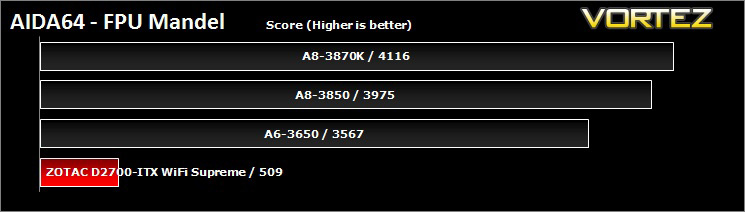
FPU Mandel Benchmark
This benchmark measures the double precision (also known as 64-bit) floating-point performance through the computation of several frames of the popular “Mandelbrot” fractal. The code behind this benchmark method is written in Assembly, and it is extremely optimized for every popular AMD, Intel and VIA processor core variants by utilizing the appropriate x87, SSE2, AVX or FMA4 instruction set extension. FPU Mandel test is HyperThreading, multi-processor (SMP) and multi-core (CMP) aware.
Synthetic Benchmarks: x264 HD
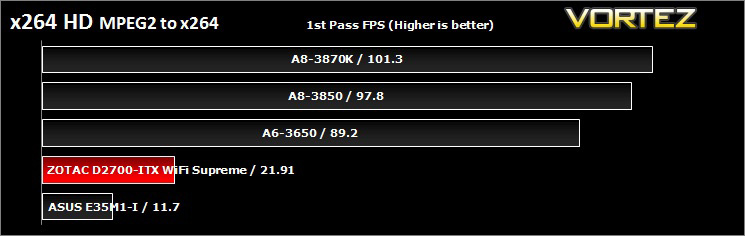
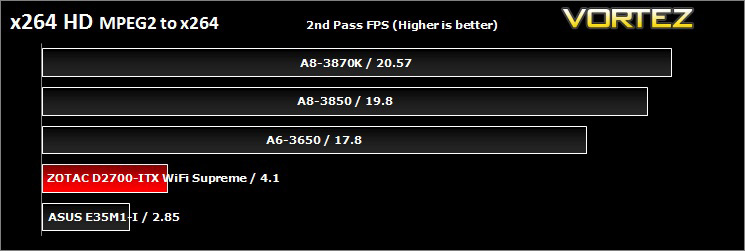
Simply put, this test measures how fast your machine can encode a short, DVD quality MPEG-2 video clip into a high-quality x264 video clip. What’s x264, you ask? It’s more or less the next-generation Xvid/DivX codec. I think it’s ideal for a benchmark because the application (x264.exe) reports fairly accurate compression results (in frames per second) for each pass of the video encoding process, and it uses multi-core processors very efficiently.
Synthetic Benchmarks: Cinebench 11.5
CPU Rendering
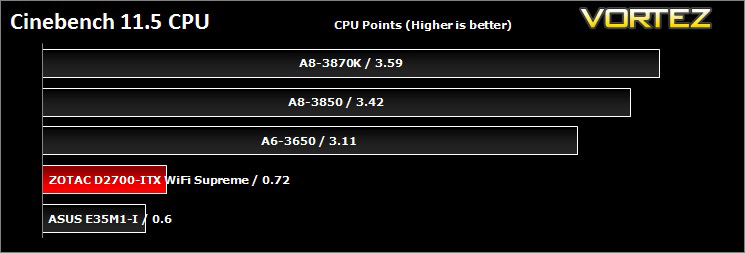
CINEBENCH can measure systems with up to 64 processor threads. This test scene contains approximately 2,000 objects which in turn contain more than 300,000 polygons in total, and uses sharp and blurred reflections, area lights, shadows, procedural shaders, antialiasing, and much more. The result is displayed in points (pts). The higher the number, the faster your processor.
Open GL Graphics Rendering
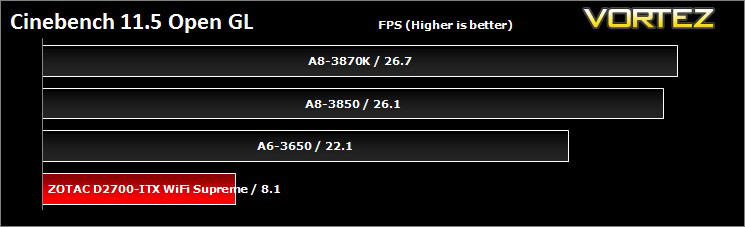
This procedure uses a complex 3D scene depicting a car chase (by renderbaron) which measures the performance of your graphics card in OpenGL mode. The performance depends on various factors, such as the GPU processor on your hardware, but also on the drivers used. The graphics card has to display a huge amount of geometry (nearly 1 million polygons) and textures, as well as a variety of effects, such as environments, bump maps, transparency, lighting and more to evaluate the performance across different disciplines and give a good average overview of the capabilities of your graphics hardware.
Synthetic Benchmarks: SiSoftware SANDRA 2012
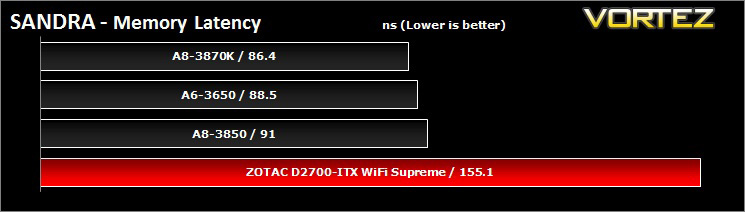
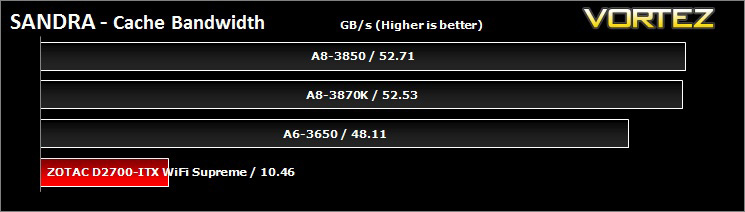
SANDRA isn’t always a benchmark that is included in hardware reviews but I believe it shouldn’t be ignored. SANDRA provides a vigorous package that tests your system in a rather large array of benchmarks. There are many aspects of benchmark that can be executed. We will be considering – CPU, memory and GPGPU tests.
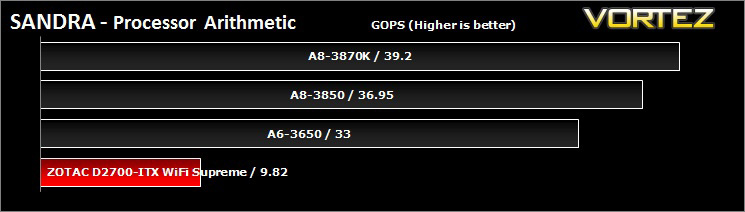
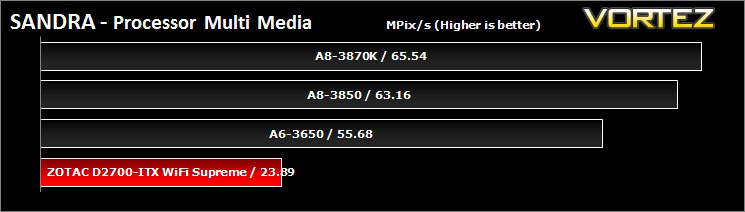
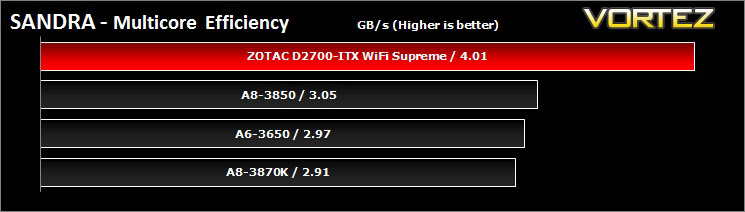
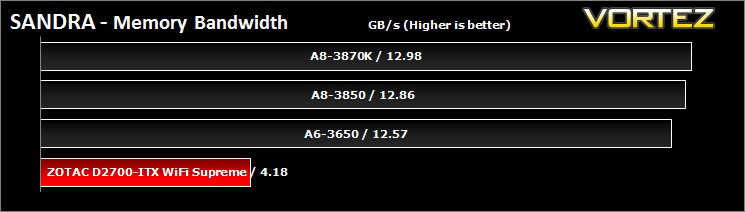
Synthetic Benchmarks: SiSoftware SANDRA 2012 cont…
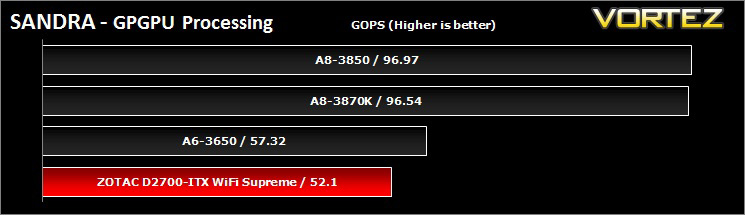
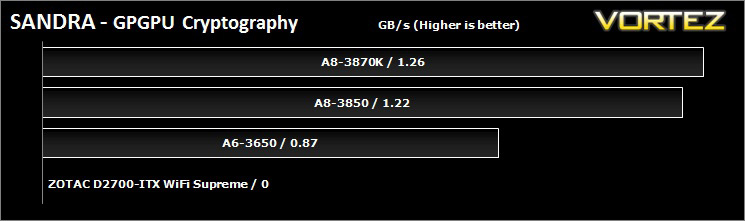
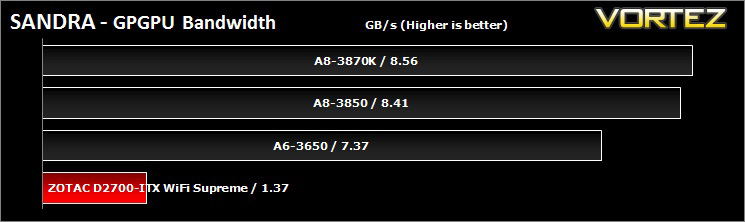
The GT 520 proves to be almost on par with the HD 6530D in GPU processing power but fails trying to complete the cryptography benchmark.
Synthetic Benchmarks: 3DMark Vantage & 3DMark 11
3DMark Vantage
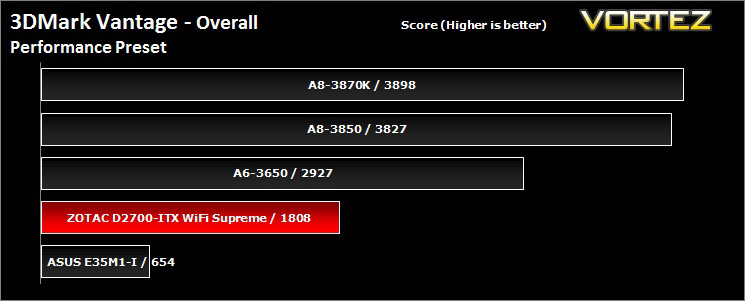
3DMark Vantage is the industry standard performance benchmark for DirectX 10 gaming PCs. It includes two graphics tests, two CPU tests and six feature tests. Trusted by gamers worldwide to give accurate and unbiased results, 3DMark Vantage is the best way to consistently and reliably test DirectX 10 under game-like loads.
3DMark 11
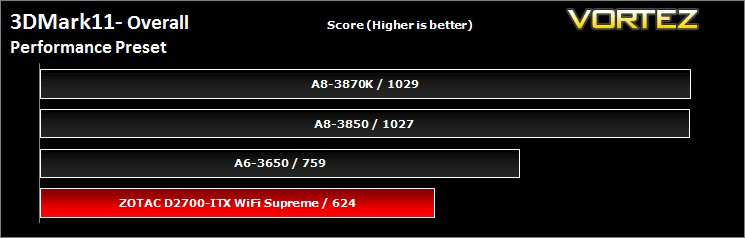
Designed to measure your PC’s gaming performance 3DMark 11 makes extensive use of all the new features in DirectX 11 including tessellation, compute shaders and multi-threading. Trusted by gamers worldwide to give accurate and unbiased results, 3DMark 11 is the best way to consistently and reliably test DirectX 11 under game-like loads.
Synthetic Benchmarks: PCMark 7 & UNIGINE Heaven 2.5
UNIGINE Heaven 2.5
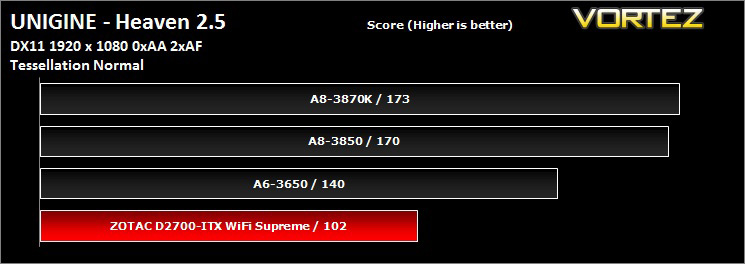
Unigine’s benchmark is to showcase the benefits of DX 11 and the use of tessellation as opposed to normal rendering techniques. The demo has impressive visuals that give an insight into what we can expect from gaming in the future.
PCMark 7
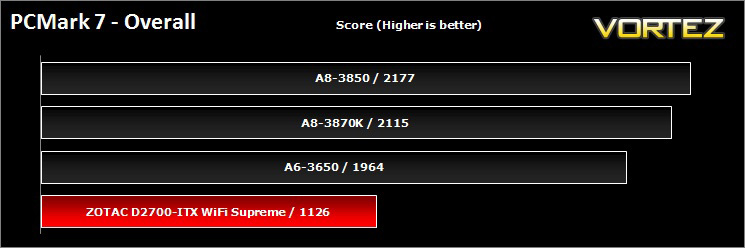
PCMark 7 is a tool provided by FutureMark that tests the PCs ability in general office and everyday use. It produces a number that reflects the all-round performance of the PC and is useful to compare between differing setups. For more information, visit the FutureMark website.
Game Benchmarks: AVP, Deus Ex:HR, Shogun 2
Alien Vs. Predator
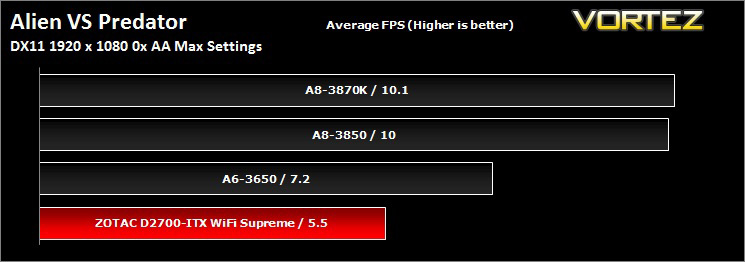
Spawned from the popular Alien and Predator franchises, Rebellion have collaborated to bring the legendary war to us through the medium of a first-person shooter. The game forces you to hunt, prey and most importantly survive in the swamp colony of Freya’s prospect as a Predator, Alien or Marine. The stunning visuals add to the sense of dread and terror that we have become so accustomed to seeing with the series.
The stand-alone Alien VS Predator benchmark tool was used for testing here. All the settings were set to very high and Tessellation was applied. The average FPS was recorded at the end.
The stand-alone Alien VS Predator benchmark tool was used for testing here. All the settings were set to very high and Tessellation was applied. The average FPS was recorded at the end.
Deus Ex: Human Revolution
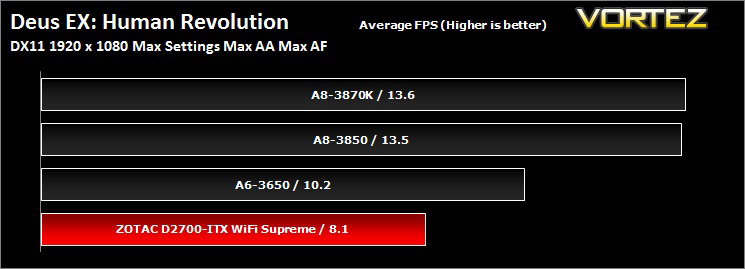
You play Adam Jensen, an ex-SWAT specialist who’s been handpicked to oversee the defensive needs of one of America’s most experimental biotechnology firms. Your job is to safeguard company secrets, but when a black ops team breaks in and kills the very scientists you were hired to protect, everything you thought you knew about your job changes.
Shogun 2
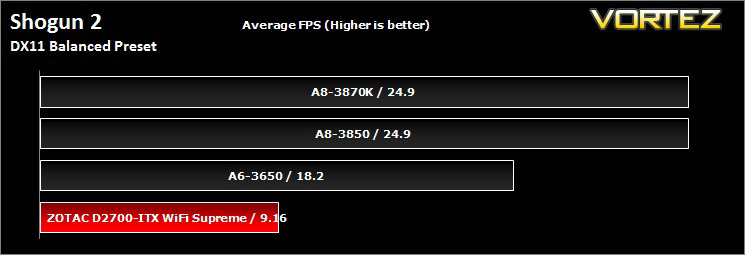
In the darkest age of Japan, endless war leaves a country divided. It is the middle of the 16th Century in Feudal Japan. The country, once ruled by a unified government, is now split into many warring clans. Ten legendary warlords strive for supremacy as conspiracies and conflicts wither the empire. Only one will rise above all to win the heart of a nation as the new shogun…The others will die by his sword.
Conclusion
ZOTAC have managed to put the D2700 on an altar, offering everything a user looking for a dedicated HTPC system could want. The combination of the Atom with the NVIDIA GT520 was an incredibly sensible move, the Atom is able to power the GPU without bottleneck, and the low power GPU gives the Atom a severely needed performance kick which offers everything from Blu-Ray 3D, 1080p24 playback, DX11 and some GPGPU benefits.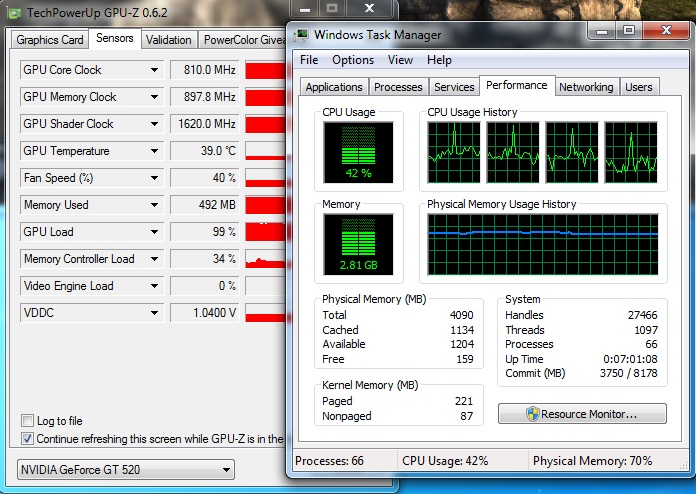
The Atom can fuel the GPU without bottlenecks as seen while running Heaven 2.5
General usability is adequate, though I found during the playback of some high definition MKV files, that different media players had different outcomes. Windows Media Player felt clunky and would often time out and I was left having to wait for it to load in, GOM Media player suffered from audio lag, DIVX Player Plus was very capable and had little issues, the same with VLC player. Most of the ‘clunkyness’ is due to the Atom architecture. AMD’s Bobcat architecture uses an ‘out-of-order’ execution which significantly increases the usability of the system. The Cedarview Atom, is still using an ‘in order’ execution, which is like giving a train an order to turn left. Of course, the train can’t just turn left when you tell it to, you have to wait for it to reach a junction. The extra performance from the aging Atom comes merely from die shrink, higher clock speeds and the addition of HyperThreading Technology. Despite that, the Atom remains capable of delivering sufficient performance, beating out the AMD E-350 ‘Zacate’ APU.
The 32nm ‘Cedarview’ Atom is the weakest point of this product. That being said, it is still capable of giving ‘just enough’ to create a satisfactory user experience in 2012. ZOTAC have done well to combine competent graphics with the Atom in an attractive, quiet, low power mini ITX form factor. With the option to install a mSATA SSD without any off board space requirements, this board screams to be used in the smallest and lowest profile enclosures available for an ITX motherboard. Some may prefer to have more SATA ports, some may prefer to have a higher performance CPU. The point is, there are other options for those situations and for this one, with the Intel Atom D2700, ZOTAC have offered the best.
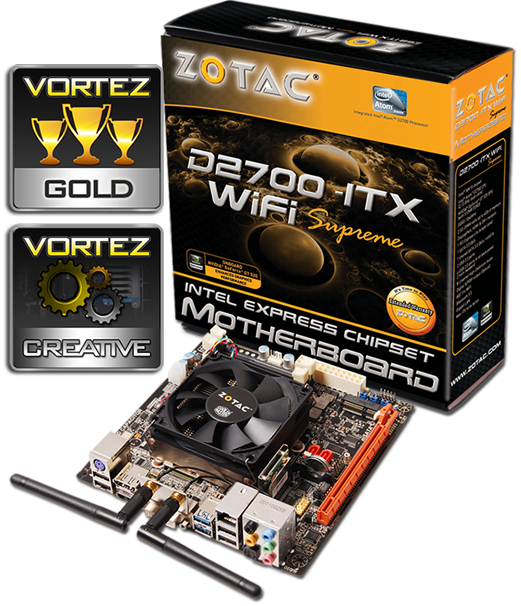
The Gold award was a point of much debate and could have been a Silver, while the Atom’s ‘in order’ approach causes a little niggle here and there, it doesn’t change the fact that it does deliver a capable user experience in a low power envelope. The D2700-ITX WiFi Supreme delivers a reminder of ZOTAC’s ingenuity and innovation which is why the ZOTAC D2700-ITX WiFi Supreme is given our Gold Award and our Creative Award.
Pros.
+ WiFi & Bluetooth
+ Onboard NVIDIA GT 520
+ Low power consumption
+ ITX form factor
+ Quiet
+ Extra mPCIe/mSATA port
Cons.
– Intel Atom
+ WiFi & Bluetooth
+ Onboard NVIDIA GT 520
+ Low power consumption
+ ITX form factor
+ Quiet
+ Extra mPCIe/mSATA port
Cons.
– Intel Atom

Click here for an explanation of our awards at Vortez.net. Thanks to ZOTAC for providing today’s review sample.


