







The ZOTAC AMP! Extreme offers factory overclocked settings and a custom cooler that make it one of the fastest, quietest GTX660’s available.

Product on Review: GTX 660 Ti AMP! EXTREME
Manufacturer and Sponsor: ZOTAC
Street Price: £275 At time of review
Based on the same GK104 processor as the GTX670, it should come as no surprise that the GTX660Ti is one of the best graphics cards available at the £200-250 price point. We’ve already seen what the ZOTAC GTX660Ti AMP! edition can do so today we evaluate the tweaked ‘Extreme’ Edition which has an increased core clockspeed of 1098MHz, 65MHz higher than the standard AMP! Edition which results in a Boost speed of 1176MHz. Coupled with with the GK104’s 1344 CUDA cores, the ZOTAC GTX660Ti AMP! Extreme Edition should be a formidable piece of hardware.
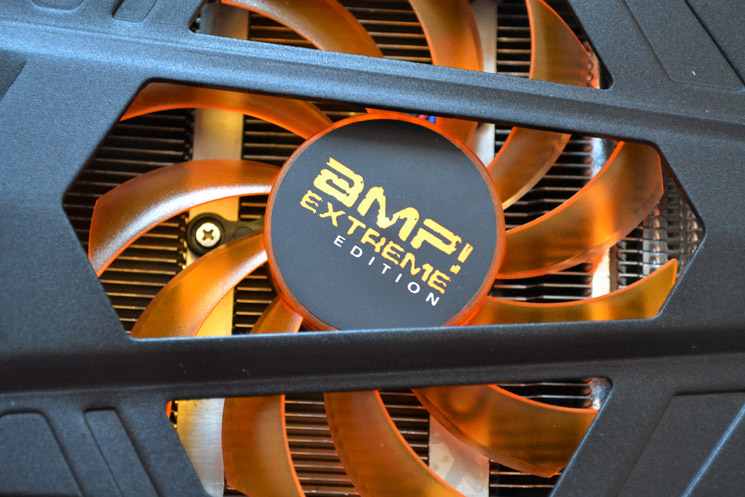
In today’s climate, more people want the fastest card they can afford without having to mess about overclocking so it will be interesting to see just how this performance is reflected in real world applications. Is it worth buying over a reference GTX660Ti? Indeed how does it compare against other cards we have previously reviewed? These questions and more will be covered throughout the review so put the kettle on while we explore one of the fastest GTX660Ti’s currently available.
About ZOTAC
Established in 2006, ZOTAC is the world’s largest and most innovative manufacturer of graphics cards, mini-ITX motherboards and mini-PCs. ZOTAC system components, and mini-PCs can be found in all continents around the globe.
Derived from the terms “zone,” for being distinct in the PC components and systems business, and “tact,” for our superior skill, experience, quality and manufacturing capabilities. Combined, “ZOTAC,” represents technological strength and experience blended with a fresh approach on the industry’s ever-changing needs.
ZOTAC entered the market with an expanded lineup of NVIDIA® GeForce® based graphics cards, which included the passive-cooled ZOTAC GeForce® ZONE Editions and class leading overclocked ZOTAC GeForce® AMP! Editions, in addition to the standard GeForce® series lineup. ZOTAC has since expanded its focus to include motherboards, mini-PCs and innovative accessories worldwide.
ZOTAC products are manufactured to the most rigorous quality standards that combine world-class quality control, reliability, features and performance with superior end-user and channel support.
Derived from the terms “zone,” for being distinct in the PC components and systems business, and “tact,” for our superior skill, experience, quality and manufacturing capabilities. Combined, “ZOTAC,” represents technological strength and experience blended with a fresh approach on the industry’s ever-changing needs.
ZOTAC entered the market with an expanded lineup of NVIDIA® GeForce® based graphics cards, which included the passive-cooled ZOTAC GeForce® ZONE Editions and class leading overclocked ZOTAC GeForce® AMP! Editions, in addition to the standard GeForce® series lineup. ZOTAC has since expanded its focus to include motherboards, mini-PCs and innovative accessories worldwide.
ZOTAC products are manufactured to the most rigorous quality standards that combine world-class quality control, reliability, features and performance with superior end-user and channel support.
Specification
Built upon the same GK104 GPU used in the 690/680 and 670 models, the GTX660 Ti retains the Kepler moniker and deservedly so because the GTX660 Ti utilises the same amount of CUDA cores as the GTX670. Coupled with 2GB of GDDR5 you could be forgiven for thinking there was very little to choose from between the GTX660 Ti and its bigger brother, the GTX670 and to be honest you would be right in thinking that – even the default reference clock speeds are the same.
The difference between the two comes down to memory bandwidth. The GTX660 Ti has a its memory interface reduced 192-bit from 256bit on the GTX670. All is not lost though because the GTX660 Ti’s memory controller supports mixed density memory module operation allowing NVIDIA to cram a 2GB frame buffer onto the board. This will inevitably lower the performance below that of the GTX670 howeverm the GTX670 is not the GTX660Ti’s adversary. That claim is held by the HD7870.
The reference clock speed of the GTX660Ti is 915MHz which equates to around 980MHz ‘Boost’ clock speed, 20MHz short of AMD’s 1GHZ Edition HD7870. The GTX660Ti’s memory is clocked at reference to 6008MHz data rate compared with the HD7870’s 1200MHz with the ZOTAC’s memory weighing in at 6608MHz. Power draw of the GTX660Ti is however a good 40W less than the HD7870. The figures don’t lie though and on paper at least, the HD7870 appears to be the faster card. How this will transpire in real world use we will see later in the review.
there are however a few key differences between a reference GTX660Ti and the AMP! Edition, namely the enhanced core clockspeed which see a 6% boost. This boost, ZOTAC claim, will result in an average 13% increase in performance.
ZOTAC GTX660 Ti AMP! Extreme Specification
CUDA Cores 1344
Texture Units 112
ROP Units 24
Base Clock 1098 MHz
Boost Clock 1176
Memory Clock (Data rate)6608 MHz
Pixel Fillrate 26.4 GPixel/s
Texture Fillrate 123 GTexel/s
Video Memory 2048MB GDDR5
Memory Interface 192-bit
Total Memory Bandwidth 158.6 GB/s
Fabrication Process 28 nm
Connectors 1xDVI-I, 1xDVI-D, 1xHDMI, 1xDisplayport
Form Factor Dual Slot
Power Connectors 2 x 6-pin
Recommended Power Supply 450 Watts
Thermal Design Power 110 Watts
Thermal Threshold 98° C
Features
SMX
Kepler GPUs feature our next-generation Streaming Multiprocessor, SMX. To improve performance, SMX features substantially more shader, texture, and geometry processing units, while the double speed processor clock present in prior GeForce GPUs has been eliminated in favor of more CUDA cores operating at the lower-speed graphics clock. This change dramatically improves Kepler’s performance per watt.
GPU Boost
GPU Boost dynamically adjusts the GPU’s clock speed automatically based on GPU operating conditions. Dedicated hardware circuitry constantly monitors GPU power consumption. GPU Boost automatically adjusts clocks to achieve the maximum possible clock speed while remaining within a predefined power target. GPU Boost operates completely autonomously with no game profiles and no intervention required by the end user, providing an instant performance boost to gamers.
Anti-Aliasing
NVIDIA FXAA technology harnesses the power of the GPU’s CUDA Cores to reduce visible aliasing. It is applied with other post-processing steps like motion blur and bloom. For game engines making use of deferred shading, FXAA provides a performance and memory advantage over deferred shading with multi-sample anti-aliasing (MSAA). FXAA reduces but does not completely eliminate shader aliasing. FXAA’s chief advantage over traditional MSAA is higher performance. In many cases, FXAA can be applied at a cost of 1ms per frame or less, resulting in frame rates that are often 2x higher than 4xMSAA with comparable image quality.
TXAA is a new film-style AA technique that’s designed to exploit GeForce GTX 690’s high texture performance. TXAA combines the raw power of MSAA with sophisticated resolve filters similar to those employed in CG films. TXAA is available with two modes: TXAA 1 and TXAA 2. TXAA 1 offers visual quality on par with 8xMSAA with the performance similar to 2xMSAA, while TXAA 2 offers image quality that’s superior to 8xMSAA, with performance comparable to 4xMSAA.
NVIDIA 3D Vision
NVIDIA® 3D Vision™ technology is a combination of Graphics Processor Units (GPU), specialized 3D glasses, software, and certified displays and projectors that deliver an immersive 3D experience on your PC or workstation. For a complete list of system requirements for NVIDIA 3D Vision Technology
NVIDIA 3D Vision Surround
NVIDIA 3D Vision Surround expands your field of view across three 3D monitors for Breathtaking panoramic gaming. At an ultra-wide resolution of 5760×1080, games like Battlefield Bad Company 2 have to be played to be believed.
CUDA
CUDA is NVIDIA’s parallel computing architecture that enables dramatic increases in computing performance by harnessing the power of the GPU to speed up the most demanding tasks you can run on your PC.
SLI
NVIDIA SLI technology links multiple GeForce GPUs together for dramatically improved graphics performance. With over 1000 supported applications and used by over 94% of multi-GPU PCs on Steam, SLI is the technology of choice for gamers who demand the very best.
NVIDIA PureVideo
Blu-ray and HD DVD movies are bringing a new level of movie-viewing experience; with high-definition image quality far surpassing standard-definition DVDs. NVIDIA PureVideo™ HD2 technology provides unsurpassed Blu-ray and HD DVD movie picture quality.
Dual Link DVI
Dual-link DVI convertible output supports Video/Audio signal integration through DVI to HDMI interface, which drivers resolution of a digital display up to 1920×1200 or higher.
PhysiX
PhysX™ is designed specifically for hardware acceleration by powerful processors with hundreds of cores. Combined with the tremendous parallel processing capability of the GPU, PhysX™ will provide an exponential increase in physics processing power and will take gaming to a new level delivering rich, immersive physical gaming environments
Kepler GPUs feature our next-generation Streaming Multiprocessor, SMX. To improve performance, SMX features substantially more shader, texture, and geometry processing units, while the double speed processor clock present in prior GeForce GPUs has been eliminated in favor of more CUDA cores operating at the lower-speed graphics clock. This change dramatically improves Kepler’s performance per watt.
GPU Boost
GPU Boost dynamically adjusts the GPU’s clock speed automatically based on GPU operating conditions. Dedicated hardware circuitry constantly monitors GPU power consumption. GPU Boost automatically adjusts clocks to achieve the maximum possible clock speed while remaining within a predefined power target. GPU Boost operates completely autonomously with no game profiles and no intervention required by the end user, providing an instant performance boost to gamers.
Anti-Aliasing
NVIDIA FXAA technology harnesses the power of the GPU’s CUDA Cores to reduce visible aliasing. It is applied with other post-processing steps like motion blur and bloom. For game engines making use of deferred shading, FXAA provides a performance and memory advantage over deferred shading with multi-sample anti-aliasing (MSAA). FXAA reduces but does not completely eliminate shader aliasing. FXAA’s chief advantage over traditional MSAA is higher performance. In many cases, FXAA can be applied at a cost of 1ms per frame or less, resulting in frame rates that are often 2x higher than 4xMSAA with comparable image quality.
TXAA is a new film-style AA technique that’s designed to exploit GeForce GTX 690’s high texture performance. TXAA combines the raw power of MSAA with sophisticated resolve filters similar to those employed in CG films. TXAA is available with two modes: TXAA 1 and TXAA 2. TXAA 1 offers visual quality on par with 8xMSAA with the performance similar to 2xMSAA, while TXAA 2 offers image quality that’s superior to 8xMSAA, with performance comparable to 4xMSAA.
NVIDIA 3D Vision
NVIDIA® 3D Vision™ technology is a combination of Graphics Processor Units (GPU), specialized 3D glasses, software, and certified displays and projectors that deliver an immersive 3D experience on your PC or workstation. For a complete list of system requirements for NVIDIA 3D Vision Technology
NVIDIA 3D Vision Surround
NVIDIA 3D Vision Surround expands your field of view across three 3D monitors for Breathtaking panoramic gaming. At an ultra-wide resolution of 5760×1080, games like Battlefield Bad Company 2 have to be played to be believed.
CUDA
CUDA is NVIDIA’s parallel computing architecture that enables dramatic increases in computing performance by harnessing the power of the GPU to speed up the most demanding tasks you can run on your PC.
SLI
NVIDIA SLI technology links multiple GeForce GPUs together for dramatically improved graphics performance. With over 1000 supported applications and used by over 94% of multi-GPU PCs on Steam, SLI is the technology of choice for gamers who demand the very best.
NVIDIA PureVideo
Blu-ray and HD DVD movies are bringing a new level of movie-viewing experience; with high-definition image quality far surpassing standard-definition DVDs. NVIDIA PureVideo™ HD2 technology provides unsurpassed Blu-ray and HD DVD movie picture quality.
Dual Link DVI
Dual-link DVI convertible output supports Video/Audio signal integration through DVI to HDMI interface, which drivers resolution of a digital display up to 1920×1200 or higher.
PhysiX
PhysX™ is designed specifically for hardware acceleration by powerful processors with hundreds of cores. Combined with the tremendous parallel processing capability of the GPU, PhysX™ will provide an exponential increase in physics processing power and will take gaming to a new level delivering rich, immersive physical gaming environments
Packaging & Accessories
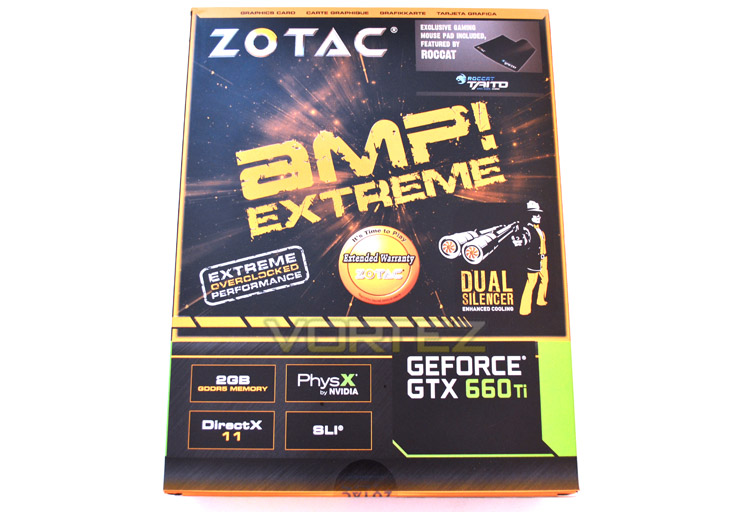
Box Front
The front of the box is typical ZOTAC design with the now trademark matt black and orange design so familiar with ZOTAC products. AMP! EXTREME Edition is emblazoned across the mid section with a double barrelled Dual Silencer figurine toward the right-centre.
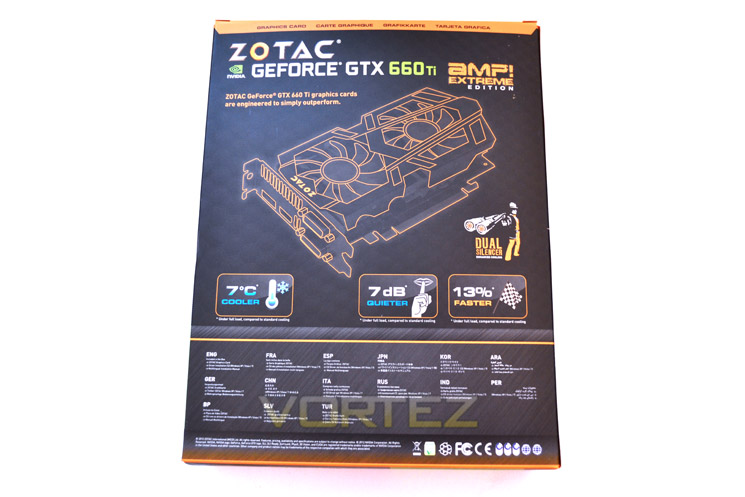
Box Rear
The Rear of the package features a line diagram of the card along with a contents list written in multiple languages below.
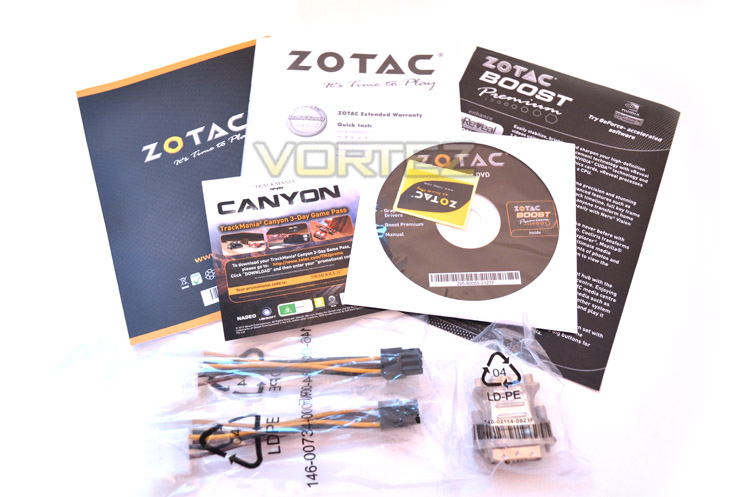
Accessories
The accessory list is well covered which includes: a pair of twin MOLEX-6pin PCIe power adapters, a VGA-DVI adapter, three pamphlets are also included should you be unsure of the product you have bought or more pertinently, how to install it. There is also an included 3 day game pass to TrackMania Canyon. Sadly, no full game is included
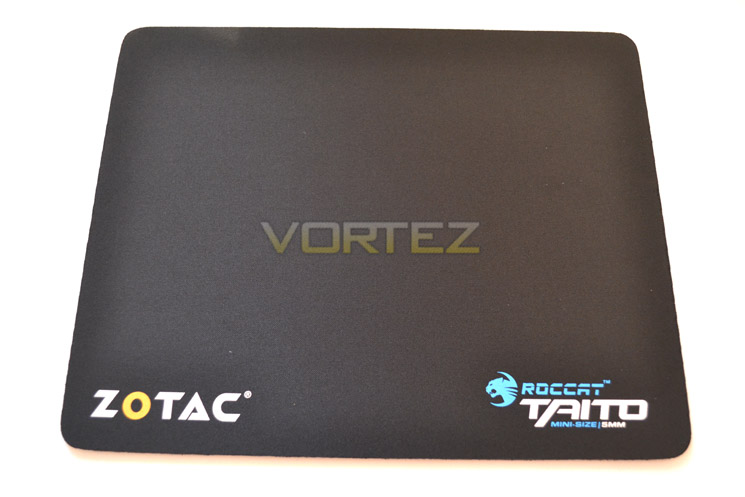
Taito Mousemat
Despite no game being included, you do get a very nice mini mousemat courtesy of Roccat. The Taito mat has been around for some time now and is a firm favourite with gamers the world over so no doubt it will be put to good use should you be in need of replacement.
First Look
Save for the stickers on the Dual silencer fans you could be forgiven for thinking this is the exact same card we reviewed previously so excuse us if the following description seems to be familiar!
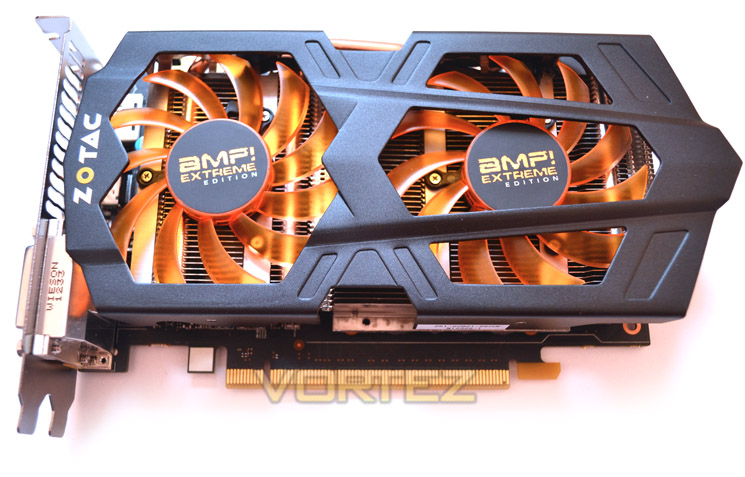
Card Top
The Twin Silencer dominates the cards appearance with two bright orange fans proudly on display hovering over what appears to be an aluminium finned heatsink shrouded by a black metal ‘open’ style frame.
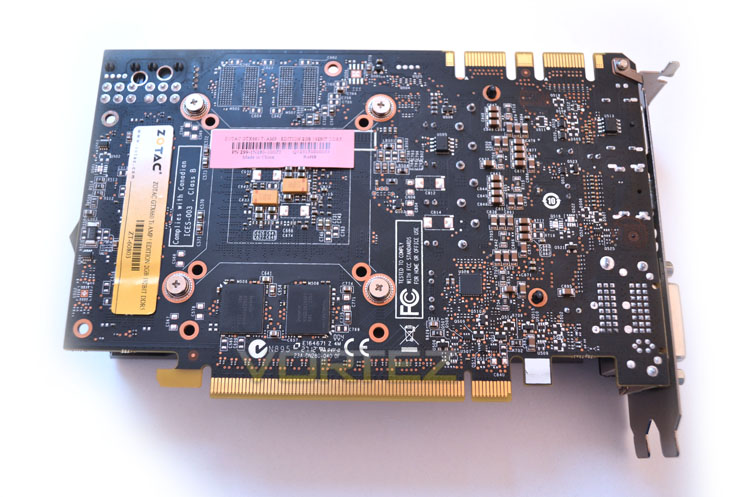
Black PCB
The rear of the cooler shows off what has to be one of the best silk screened PCB’s in the business as the matt black PCB really is matt black. Not dark brown or deep blue but plain old black – just how we like it. Obviously, there is a wealth of soldering and perhaps most interestingly a couple of memory modules which is rare in today’s GPU production.
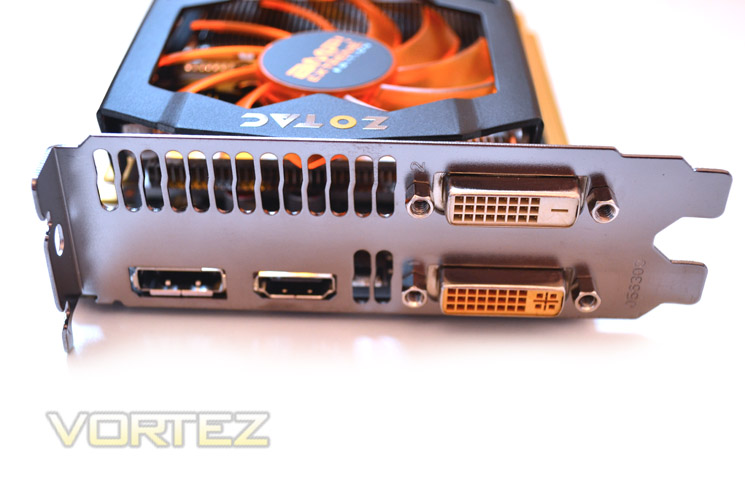
I/O Backplate
The I/O backplate of the card features a twin DVI ports, 1xDVI-I and one DVI-D, HDMI and a display port along with a small vent not that it’s required in all honesty as the majority of hot air is exhausted back into the case.
Profile
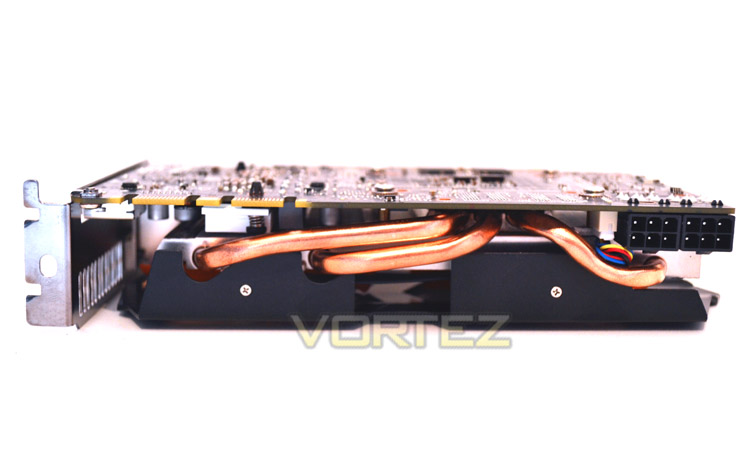
The cards profile is very small with it measuring just 175mm long (185mm including shroud). Despite its diminutive size, 3 copper heatpipes hint at the performance/heat this heatsink will have to deal with. This is near identicle to the dimensions of the GTX660Ti AMP! Edition we reviewed earlier.
Power Ports
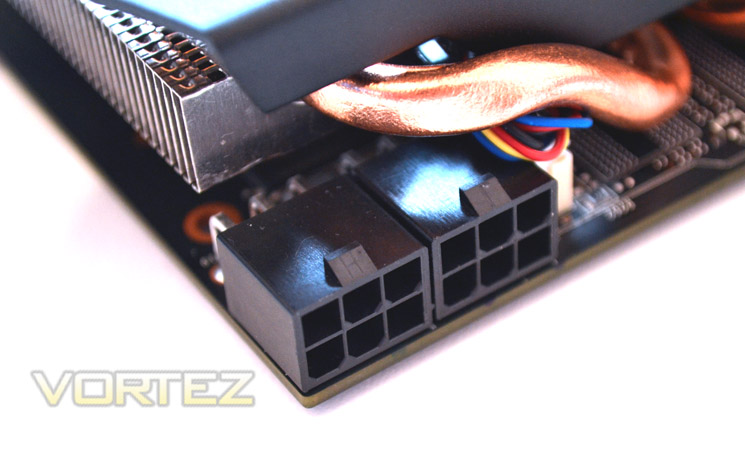
The card is powered by two 6pin PCIe power adapters. NVIDIA claim a TDP of around 134W for a reference design however, I would expect the TDP of this card to be slightly higher due to it being overclocked from the reference specification. A 450W PSU with a 24AMP rating is recommended by ZOTAC for this GPU.
SLI
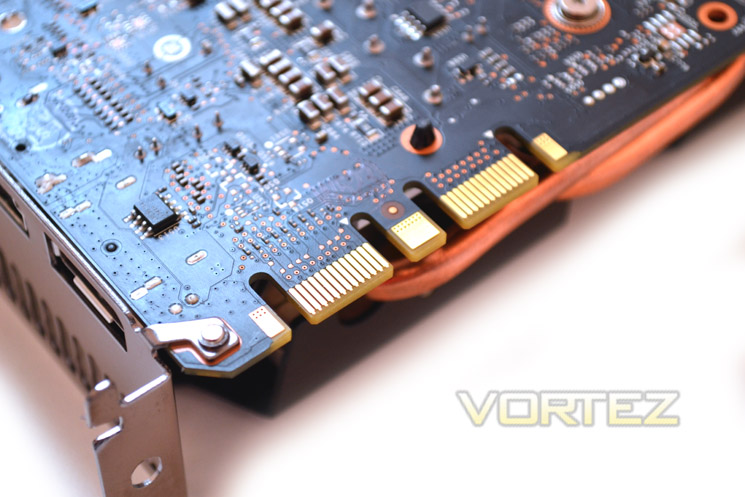
Unlike many mid range graphics cards, the GTX660Ti allows for a multi(3+) GPU setup thanks to the twin SLI tabs.
The ZOTAC GTX660Ti AMP! Extreme is a very attractive piece of kit. The typical black and orange theme of ZOTAC once again works very well with this graphics card. The card is double PCI size which is a shame but what the card sacrifices in height, it makes up for in length because at just 18.5cm long, it will be perfectly suited to mATX builds.
Let’s strip the card down and take a look at the ZOTAC PCB design…
Closer Look
Heatsink
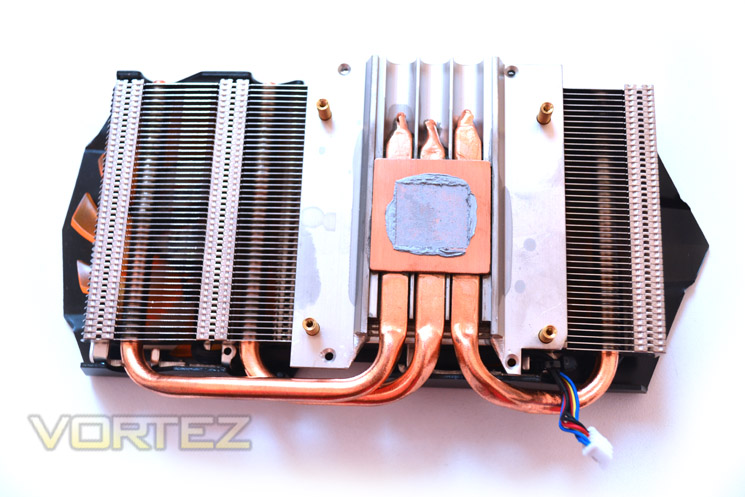
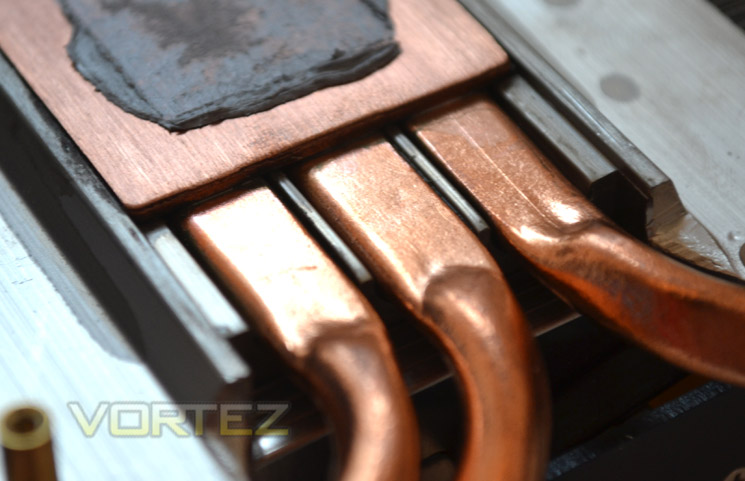
The Heatsink is made up of three sections. The top section is the fan shroud which holds the fans. These hover over the aluminium finned heatsink array which is welded to 3 copper heatpipes on top of which there is a solid copper base plate.
Baseplate
The heatpipes are soldered to a baseplate rather than having direct contact. The baseplate is full copper though which should ensure very good heat transfer. The contact between the core and baseplate was very good with an adequate amount of thermal interface material (paste) being used.
Naked GTX660Ti
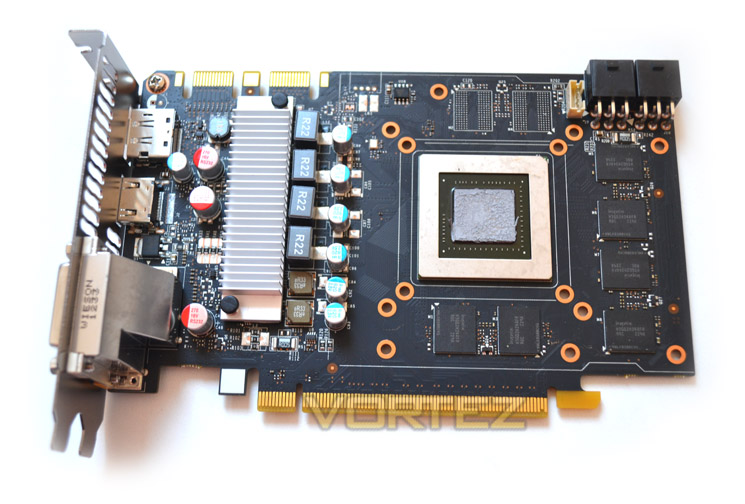
The PCB looks odd due to its length and perhaps more so because the twin power ports are at opposite ends to the VRM. The core, like other Kepler models, is exposed and it is partially framed by 6x256MB memory modules with a further 2x256MB to be found on the rear of the PCB.
Voltage Regulation Module
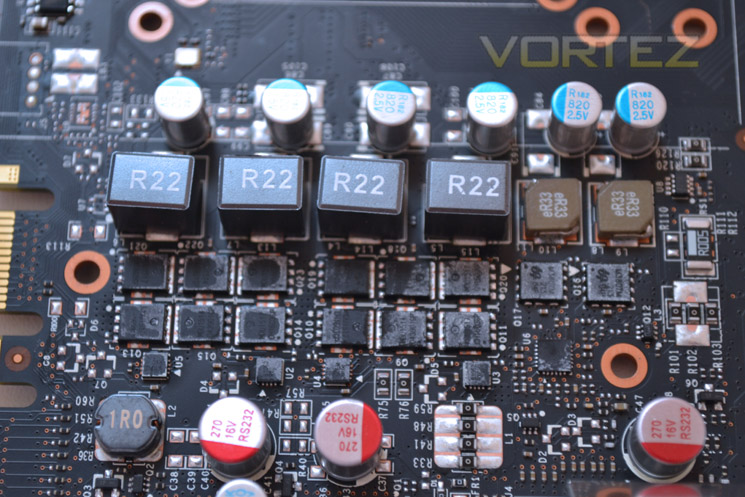
The voltage regulation is a 4+2 affair. Each of the four GPU chokes are matched with 3 MOSFETs with the two memory inductors having a MOSFET each.
Memory
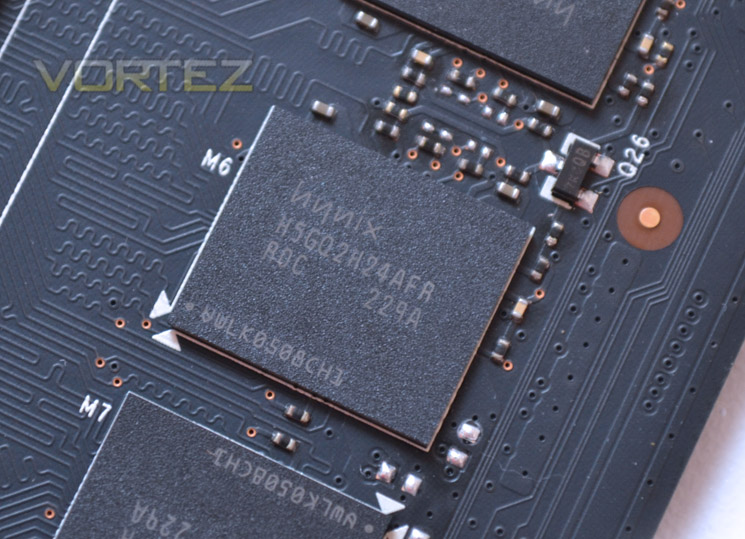
The each of the memory modules hail from HYNIX with the product code of H5GQ2H24AFR R0C which is rated to 6.0Gbps at 1.5v.
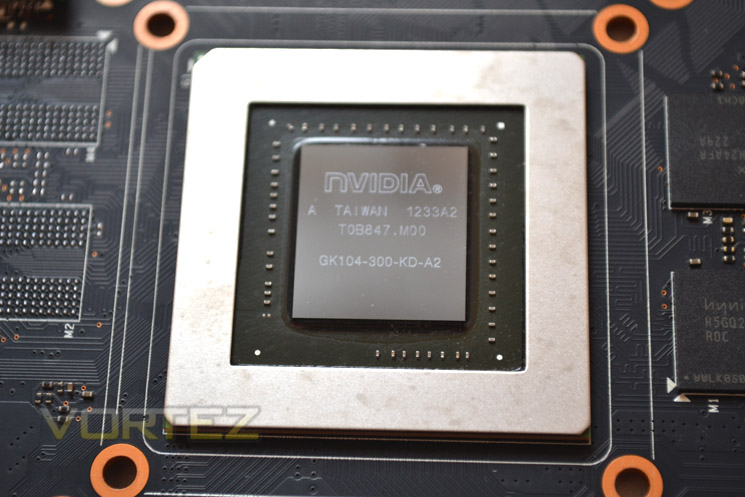
Core
Finally we see the core of the ZOTAC GTX660Ti. Mirroring the GTX670’s GK104 core, we can expect great performance from the sliver of silicon so without further ado it’s time to put the graphics card to the test…
Test Setup
With the latest Intel chipset release we decided to update our ageing X58 setup to the new X79 chipset. Not only that but we will be using the flagship Core i7-3960X Extreme Edition processor clocked to 4.5GHz to ensure we have no CPU bottlenecks. With 16GB of ram on board there should be minimal paging so the benchmarks we run today will hopefully give a true reflection of the graphics card’s performance.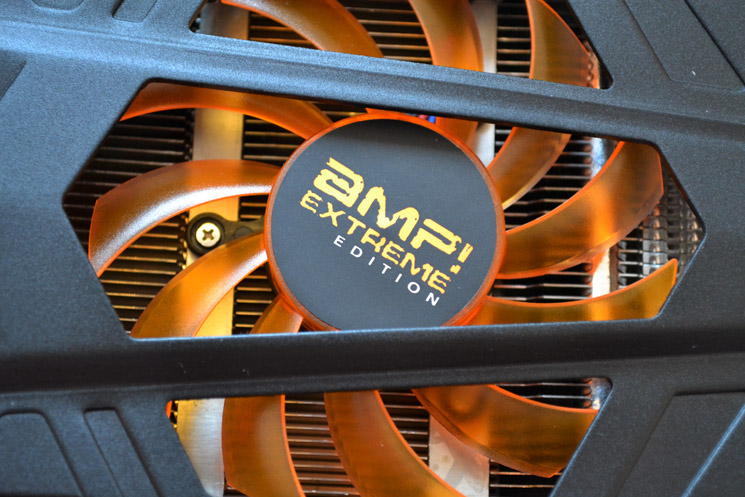
Some of the components for our test bench were kindly donated by CORSAIR who provided the majority of components without whom we would not have been able to bring you this review so a big thanks to them.
Graphics cards on test:
ZOTAC GTX660Ti AMP! Extreme Edition 2GB GDDR5
ZOTAC GTX660Ti AMP! Extreme Edition 2GB GDDR5
GIGABYTE GTX650 Ti 2GB GDDR5
ZOTAC GTX650 Ti 2GB GDDR5
AMD HD7770 1GB GDDR5
ZOTAC GTX660 2GB GDDR5
GIGABYTE GTX680 Super Overclock
MSI GTX680 Twin Frozr 2GB GDDR5
ZOTAC GTX660Ti AMP! Edition 2GB GDDR5
MSI R7870 Hawk 2GB GDDR5
EVGA GTX680 SuperClocked Signature 2GB GDDR5
GIGABYTE GTX680 Windforce 2GB GDDR5
NVIDIA GTX670 2GB GDDR5
HIS HD 7870 IceQ Turbo 2GB GDDR5
MSI HD 7870 Twin Frozr III OC 2GB GDDR5
GIGABYTE HD7850 OC WindForce x2 2GB GDDR5
ZOTAC GTX680 2GB GDDR5
AMD HD7870 2GB GDDR5
ZOTAC GTX580 AMP2! 3GB GDDR5
XFX R7970 Black Edition 3GB GDDR5
XFX R7770 Black Edition ‘S’ 1GB GDDR5
AMD HD7750 1GB GDDR5
HIS HD7970 3GB GDDR5
XFX DD Radeon R7950 3072MB GDDR5
PowerColor PCS+ Radeon HD7950 3072MB GDDR5
AMD Radeon HD7950 3072MB GDDR5
AMD Radeon HD7970 3072MB GDDR5
ZOTAC GTX570 AMP! 1280MB GDDR5
NVIDIA GTX570 1280MB GDDR5
MSI GTX560Ti-448 Twin Frozr III 1280MB GDDR5
MSI GTX560Ti-384 Twin Frozr III 2GB GDDR5
AMD HD6990 4GB GDDR5
***NOTE***
In an ideal world we would like to test all of the GPU’s above on the same driver however, due to the logistics and timescales of release involved it is simply not possible to examine each card on the same driver. We do however only introduce a new driver when forced to do so, in this case, the ZOTAC GTX660Ti AMP! Extreme Edition had to be reviewed with updated Forceware drivers (306.97) due to compatibility issues with older drivers. These drivers have clearly been tweaked for best performance, particularly in Batman: Arkham City and may show the card to have inflated results other GPU’s.
We at Vortez pride ourselves on our honesty and prefer to be upfront about such matters rather than pushing poorly, misinformed results. So when comparing cards it is worthwhile to consider this notion.
Motherboard: MSI X79 Big Bang X-Power II
CPU: Intel Core i7-3960X Extreme Edition @ 4.5GHz
RAM – 16GB (4x4GB) Corsair Vengeance (Red) DDR3 @ 1866MHz 9-10-9-27
Power Supply – ANTEC High Current Pro 1200W
Hard Drive – Kingston HyperX 240GB
Cooler – Corsair H100
CPU: Intel Core i7-3960X Extreme Edition @ 4.5GHz
RAM – 16GB (4x4GB) Corsair Vengeance (Red) DDR3 @ 1866MHz 9-10-9-27
Power Supply – ANTEC High Current Pro 1200W
Hard Drive – Kingston HyperX 240GB
Cooler – Corsair H100
Benchmarks
Normally we would run the tests at four settings however at 2560×1600 both the NVIDIA GTX650 Ti and AMD HD7770 could not produce adequate (playable) frames per second at 2560×1600 so these tests were omitted as they served no purpose other than to state that 1920×1080 is the maximum resolution one could hope to utilise these two cards for.
Battlefield 3
Crysis 2
Crysis Warhead
Metro 2033
Batman: Arkham City
Elder Scrolls: Skyrim
DiRT 3
Futuremark 3DMark 2011
Unigine: Heaven 2.5
Crysis 2
Crysis Warhead
Metro 2033
Batman: Arkham City
Elder Scrolls: Skyrim
DiRT 3
Futuremark 3DMark 2011
Unigine: Heaven 2.5
Let’s see how today’s graphics card performed…
Overclocking
Overclocking graphics cards is a relatively easy, if somewhat frustrating affair. First we stress test the card at reference clockspeeds to ensure we have a solid foundation to work from. You would be surprised just how many factory overclocked graphics cards are unstable!
Once the card is deemed stable, we progress to overclocking the GPU core. We do this by using one of the many GPU overclocking utilities available. Our favourites are MSI Afterburner, Sapphire TRIXX and EVGA Precision but most overclocking utilities have the same features so it is normally a matter of layout and feel which will determine your preference.
We then gradually increase the clockspeed in small increments until we encounter stability issues. To counter stability issues we add a little voltage at a time until stability is regained. This process is repeated until we find the maximum core clockspeed.
Overclocking the memory is the last thing we do by using the same process as above but with the core at reference speed. Once we know both the maximum memory and core clockspeed we try to find the best balance of both which will give us our final overclocking figure.
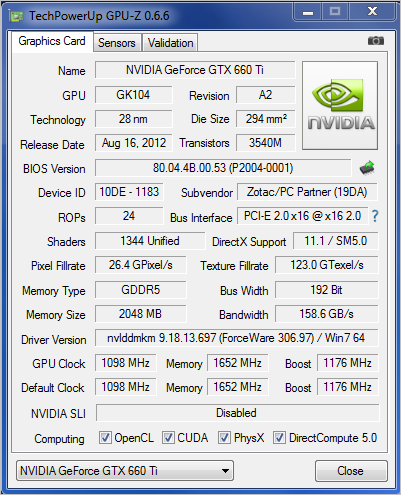
Above we see the ZOTAC GTX660Ti AMP! Extreme Edition comes overclocked from the factory weighing in at a massive 1098MHz on the core which going by previous reviews of the GTX660Ti will not leave much room for overclocking. Regardless we did achieve a small bump…
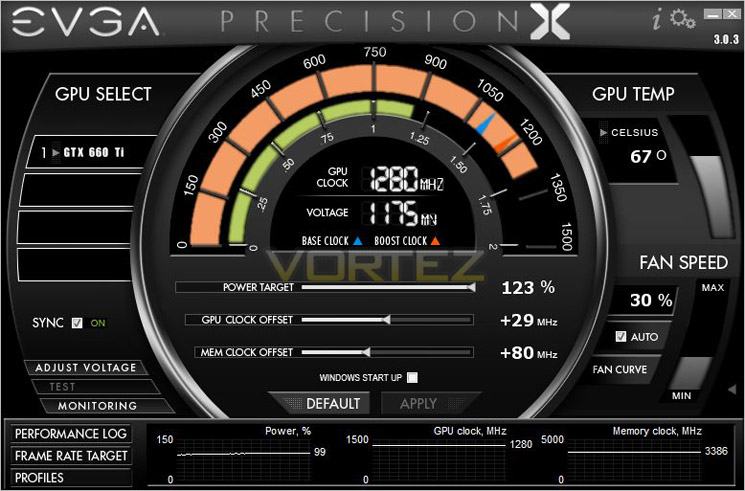
After much testing we managed 29MHz on the core which resulted in a boost speed of 1280MHz! We also grabbed an extra 80MHz on the memory meaning a 6928MHz(effective) speed was achieved.
Temperature, Acoustics and Power Consumption
Power ConsumptionTo test for power consumption we do not use anything too technical, just a wall meter which measures the total system power draw minus the monitor.
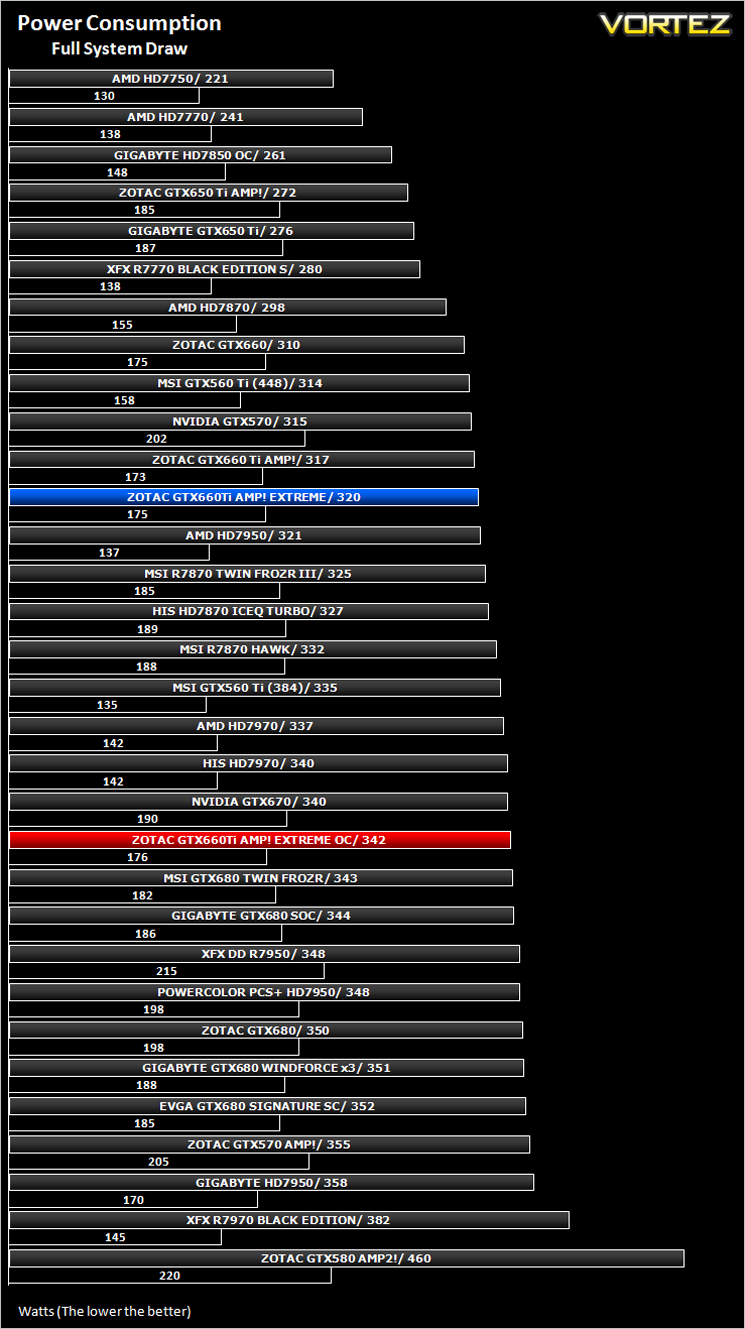
A 450w power supply with a dual 6pin PCIe power cables are required to power the GTX660Ti AMP! Extreme Edition as recommended by ZOTAC. The chart above however shows that a full system draw of 320W under load is all the GPU in today’s review contributed to. Even when overclocked, the wattage increased to just 342W.
Temperature
To test temperatures we measured idle temperatures after booting windows, letting all applications finish loading and ran a few benchmarks. Once the benchmarks were complete we left the card to reach a cooling plateau where we then took the idle temperatures. For the load tests, we would normally run Furmark for 20 minutes, taking the absolute maximum temperature attained however we found that this throttled the card and resulted in spurious results. So we set Heaven running continuously for 20 minutes and used this as a temperature result as the card did not throttle with this application.
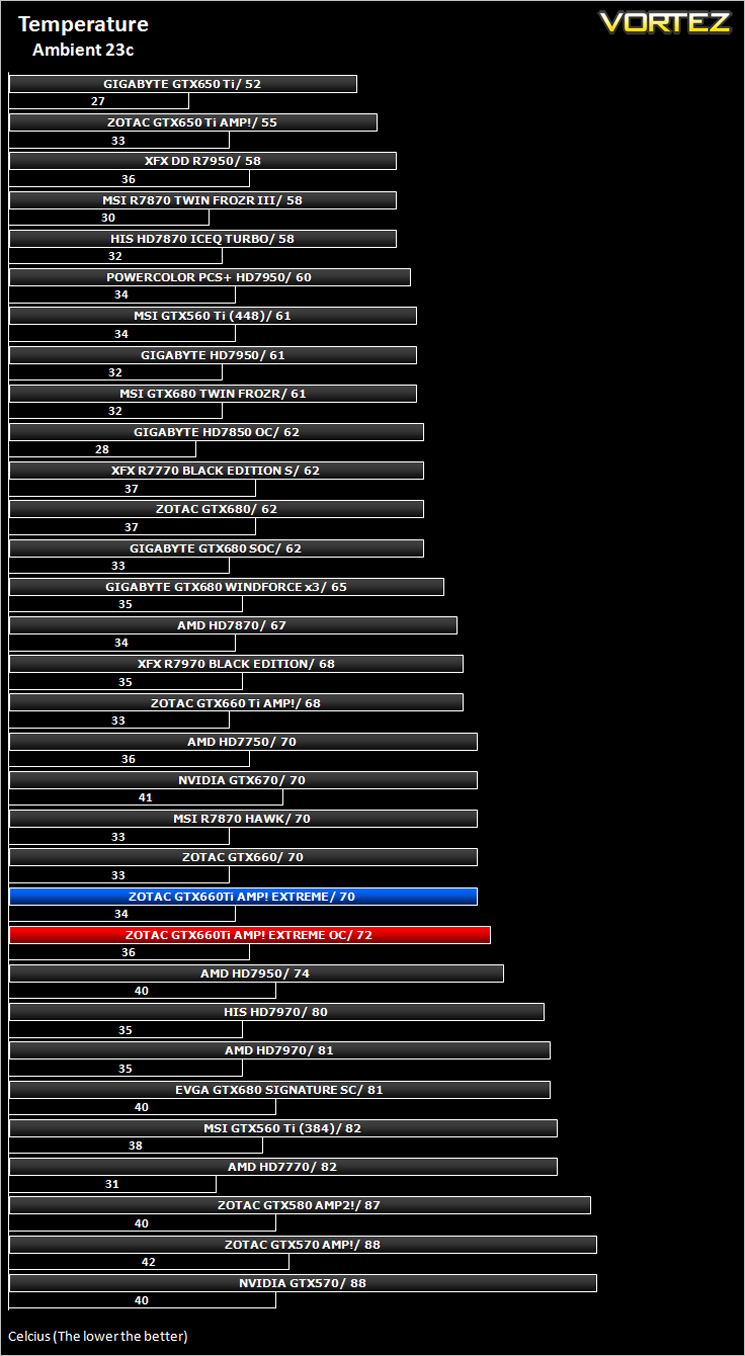
The ZOTAC Dual Silencer cooler is very well made and this is proven by the temperature readouts. While not stunning, 70/72c (stock/overclock) is none to shabby and when you consider this cooler is also relatively small in comparison to the competition this is a great achievement. The GTX660Ti AMP! ran 2c cooler so that can be put down to the reference clockspeed being higher on the Extreme Edition.
Acoustics
Some ZOTAC cards may look quiet but looks can often be deceiving so I am happy to report that on this occasion, the GTX660Ti AMP! Edition looks as quiet as it is. It barely reached a murmur even under full load so you would be hard pushed to hear this GPU over normal case fans.
Let’s move on to our suite of gaming and synthetic benchmarks…
Battlefield 3
Battlefield 3 leaps ahead of its time with the power of Frostbite™ 2, the next instalment of DICE’s cutting-edge game engine. This state-of-the-art technology is the foundation on which Battlefield 3 is built, delivering enhanced visual quality, a grand sense of scale, massive destruction, dynamic audio and incredibly lifelike character animations. As bullets whiz by, walls crumble, and explosions throw you to the ground, the battlefield feels more alive and interactive than ever before. In Battlefield 3, players step into the role of the elite U.S. Marines where they will experience heart-pounding missions across diverse locations including Paris, Tehran and New York.
Average and minimum frames per second were measured using Fraps during the parking lot scene on Operation Sword Breaker. High and Ultra presets were loaded at both resolutions.
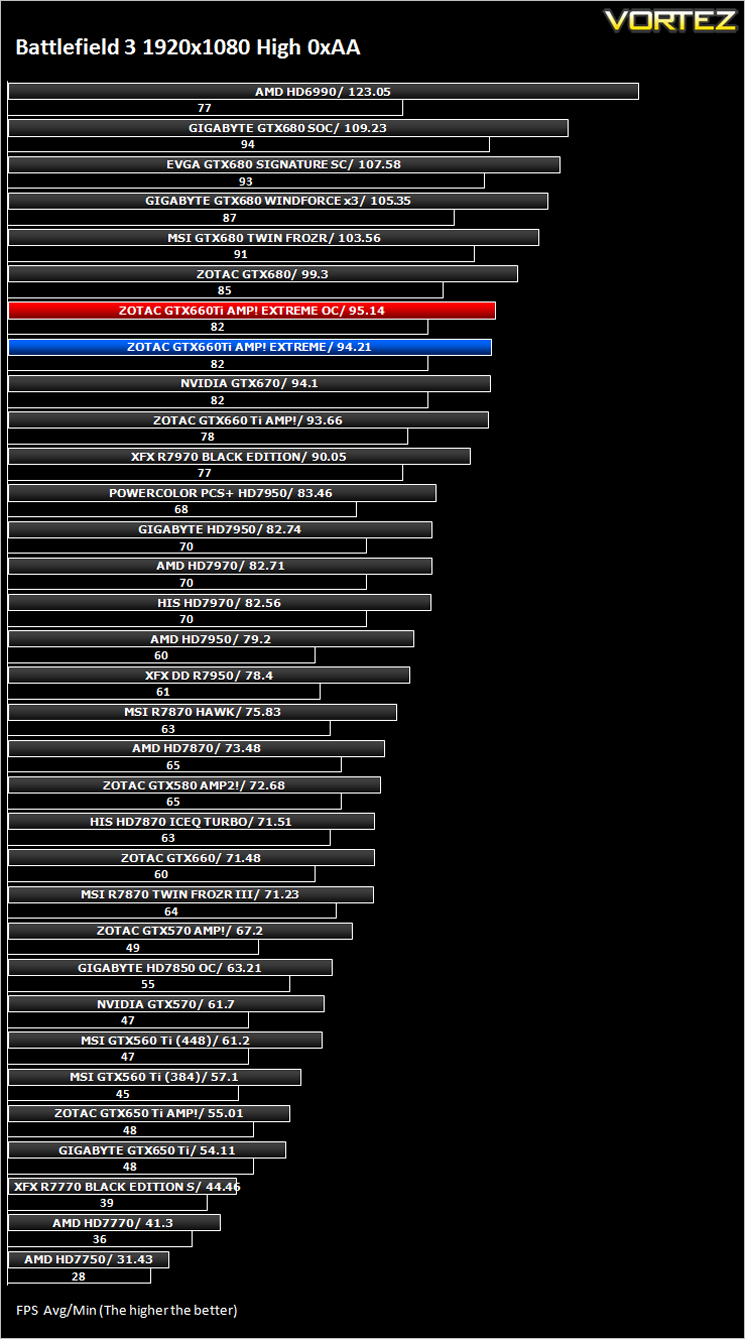
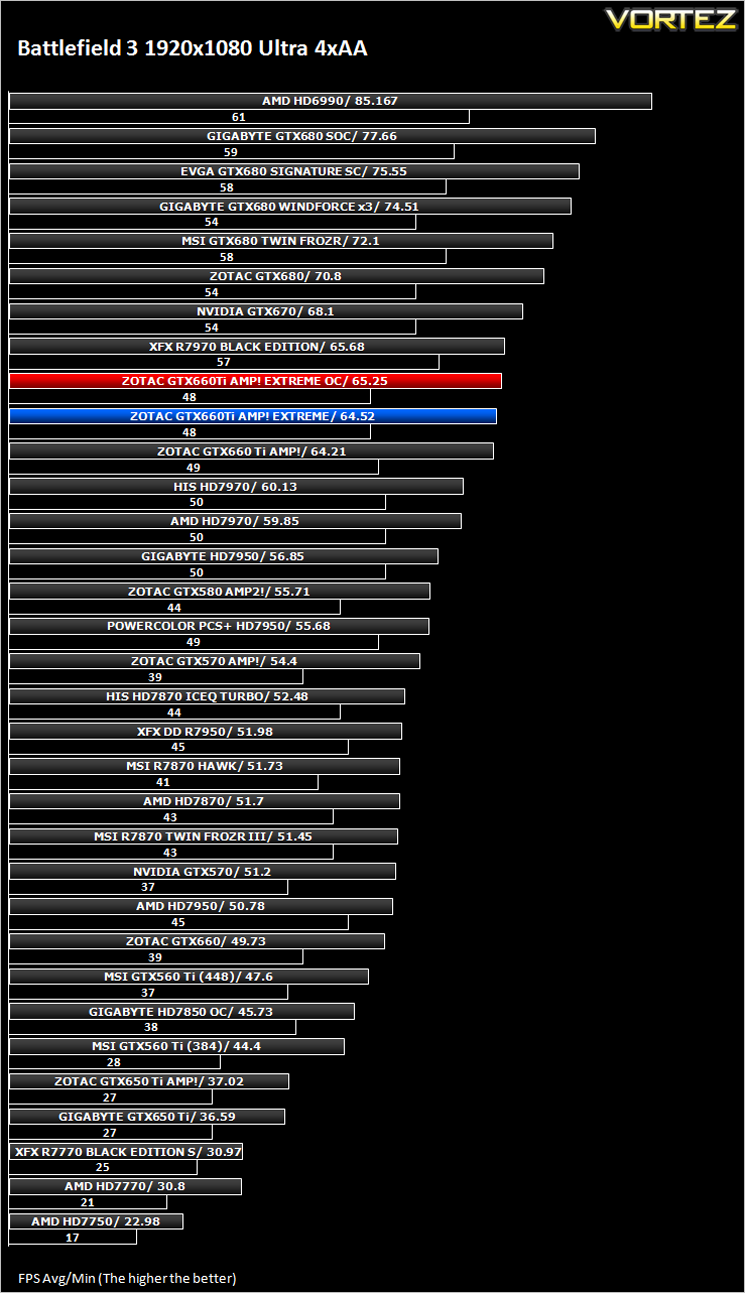
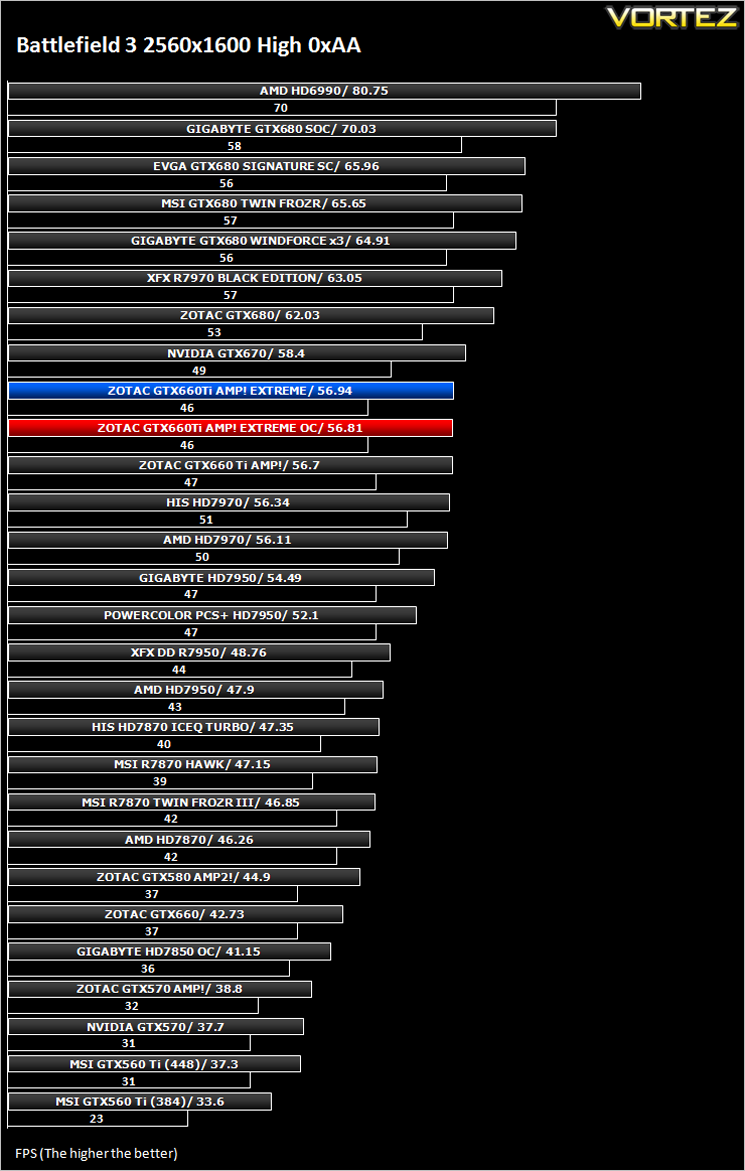
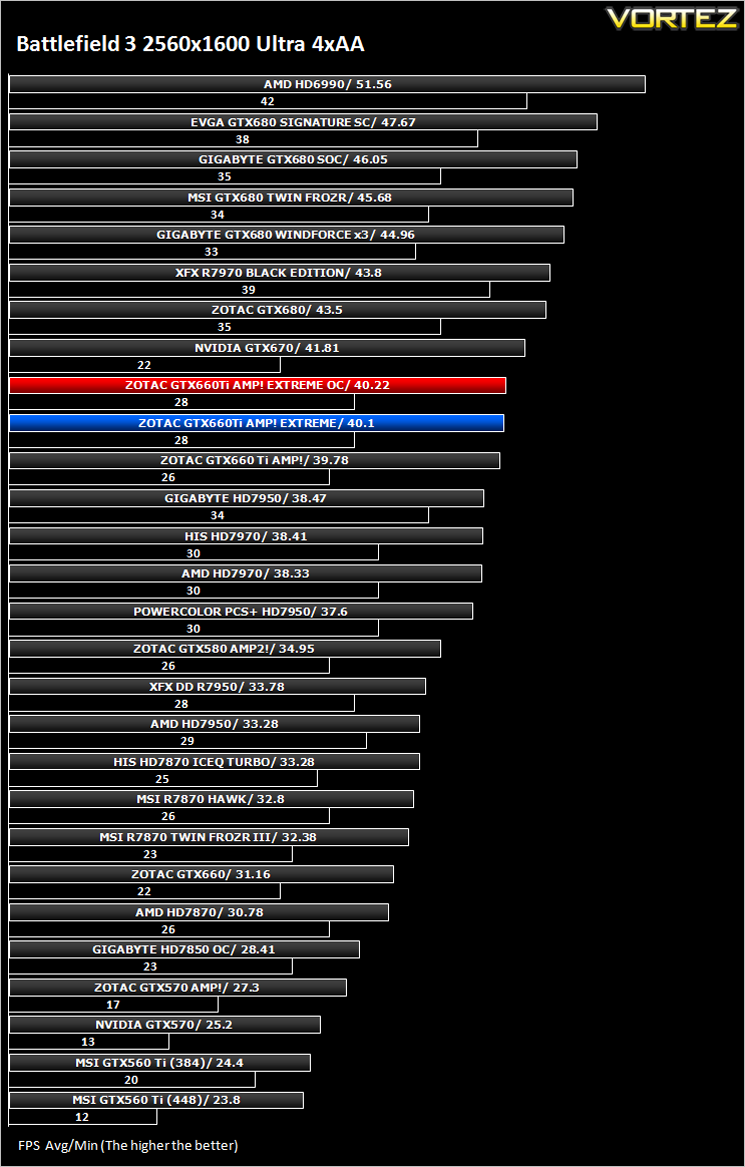
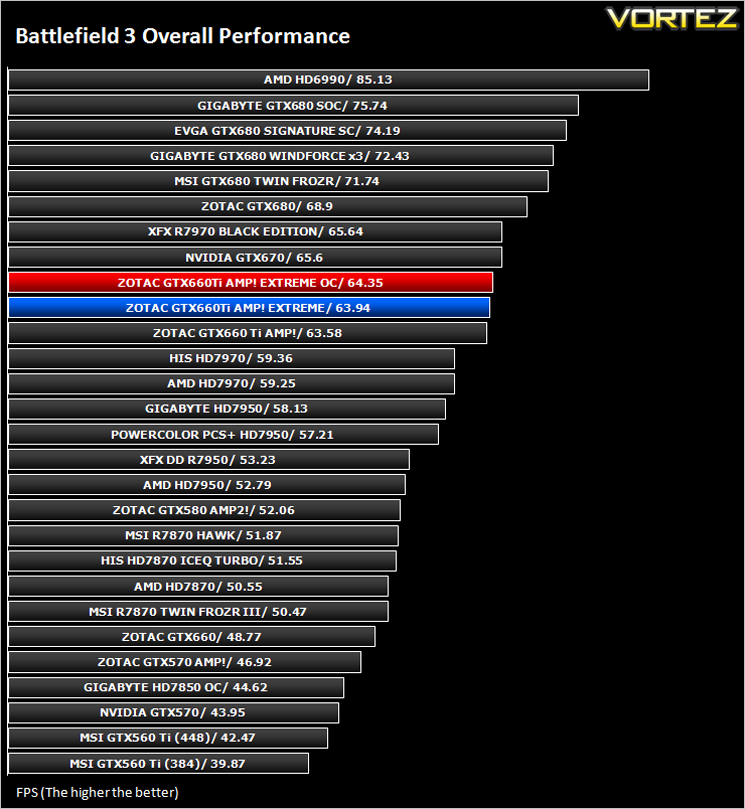
***NOTE*** Updated Forceware drivers (306.97) were used with the ZOTAC GTX660Ti AMP! and Extreme Edition.
Crysis 2
Crytek took an internet beating from its loyal fans due to the fact that they pandered to the console masses and dumbed down the graphics to DirectX 9. Fortunately, fans of the PC version of Crysis managed to force Cryteks hand and they have since developed a DX11 patch and have also enhanced the textures with added tesselation. It is for this reason that we have decided to include it in our suite of benchmarks.
To test the cards we used the Crysis 2 benchmark courtesy of Adrenaline with both the 1.9 patch, DX11 update and Hi-res texture pack. Settings were manually placed to Ultra, DX11 and tessellation enabled with the Central Park map being run 3 times per resolution benchmark test.
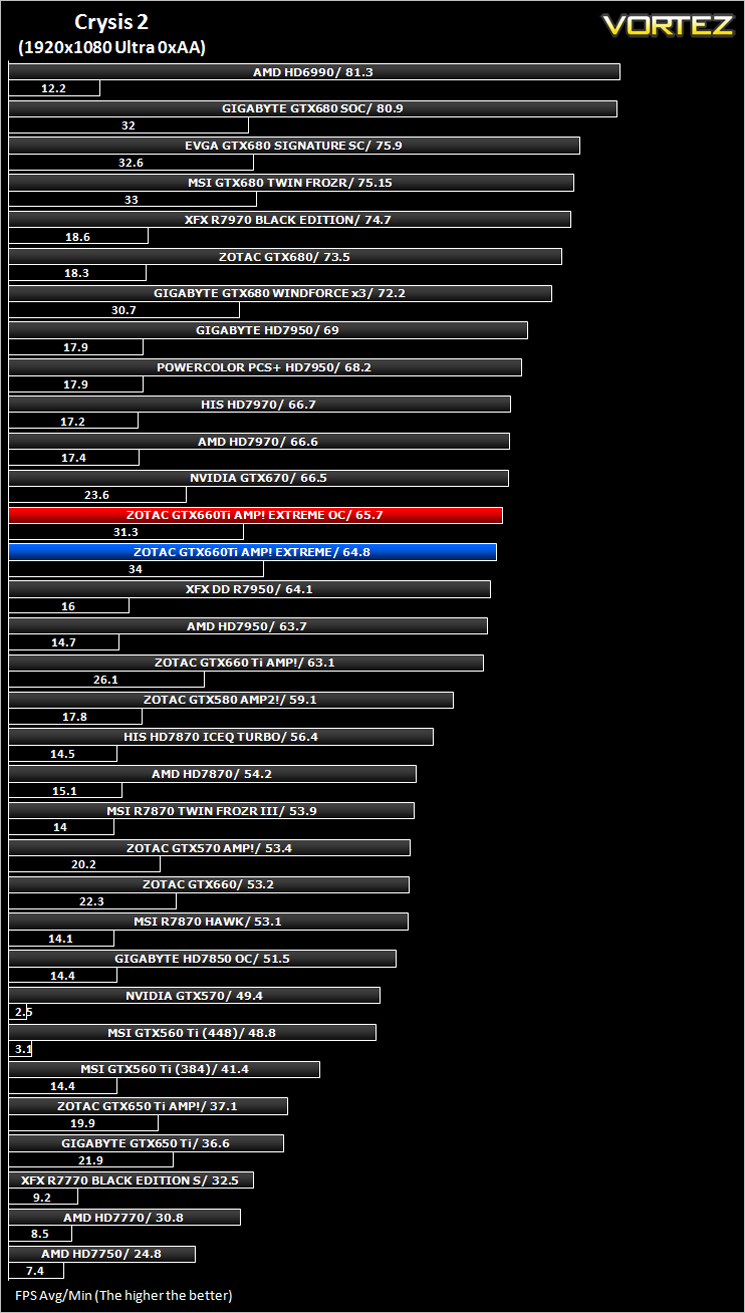
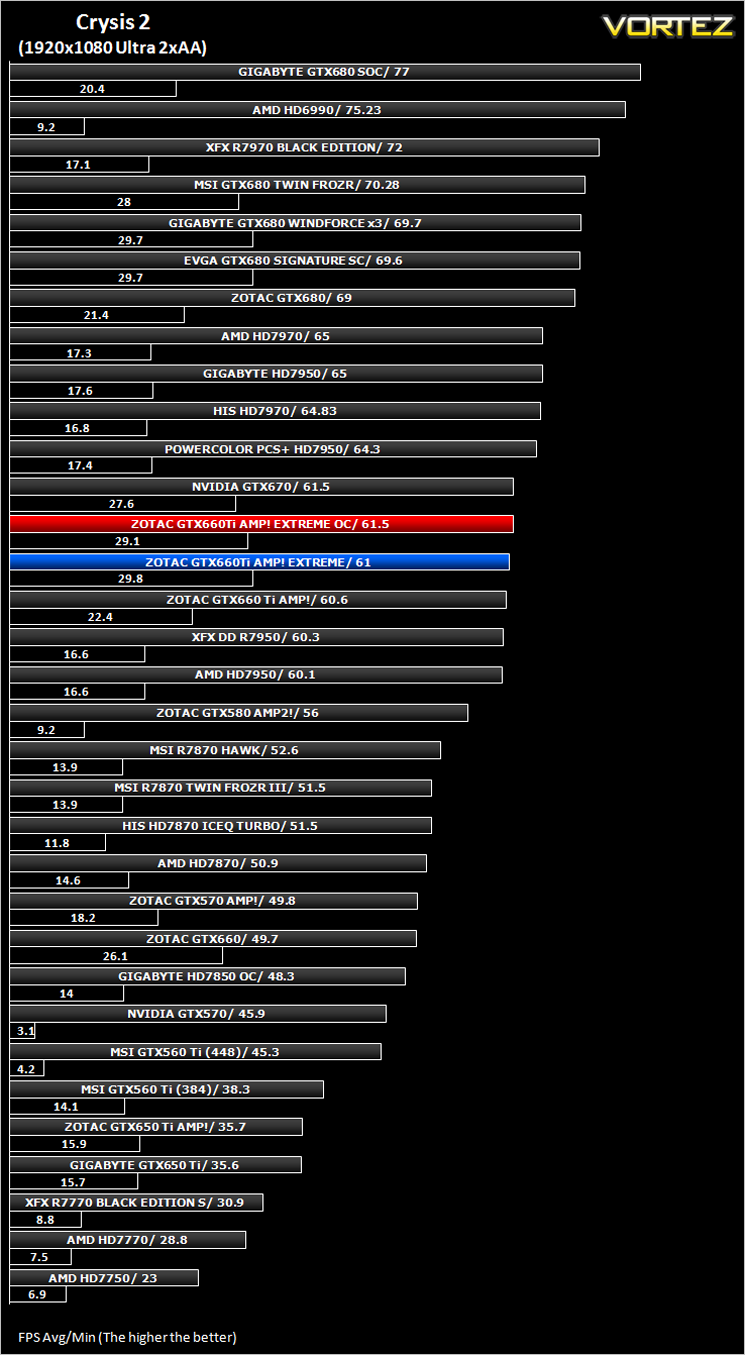
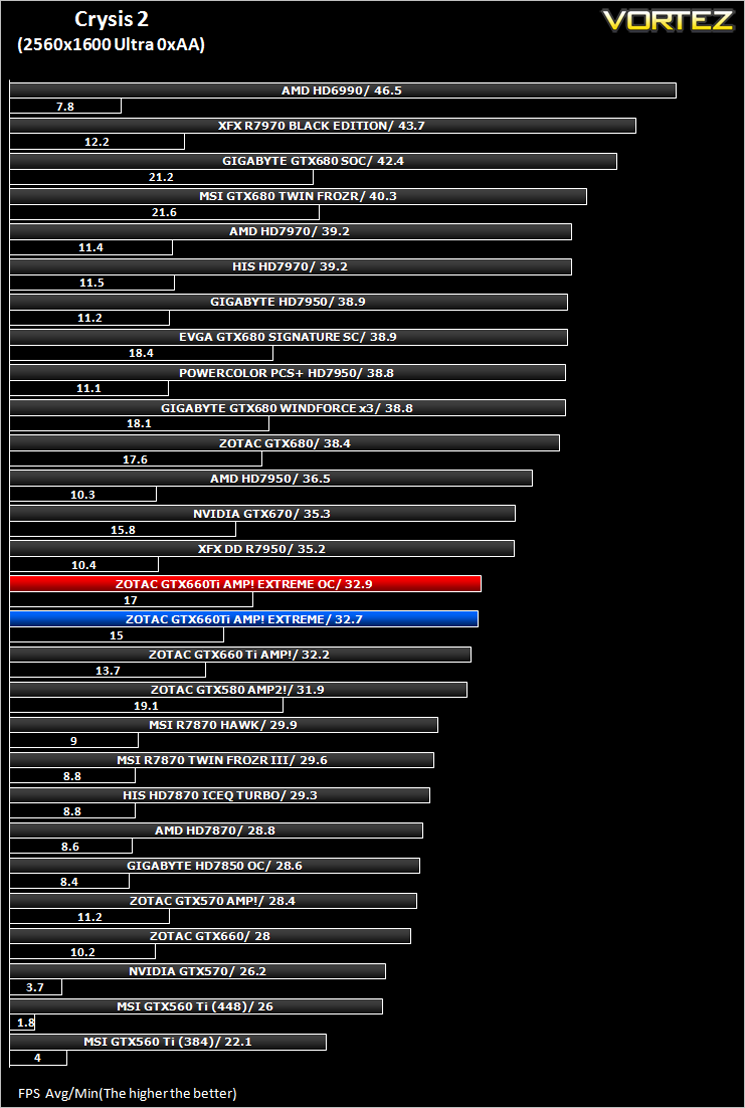
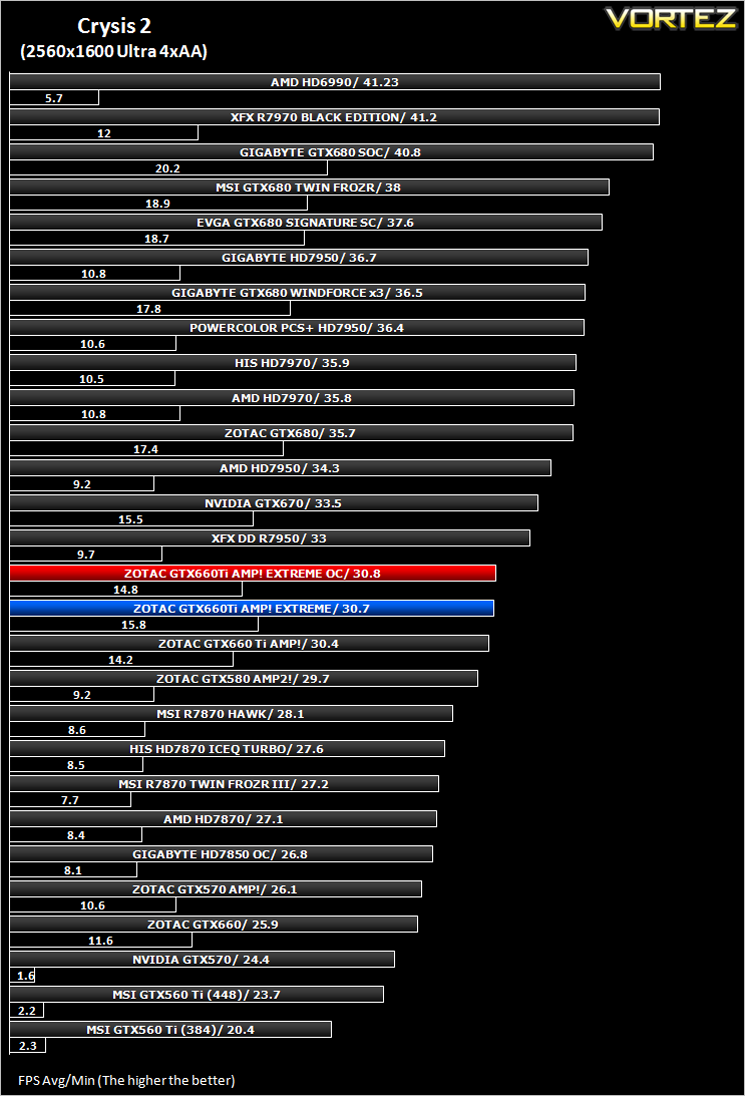
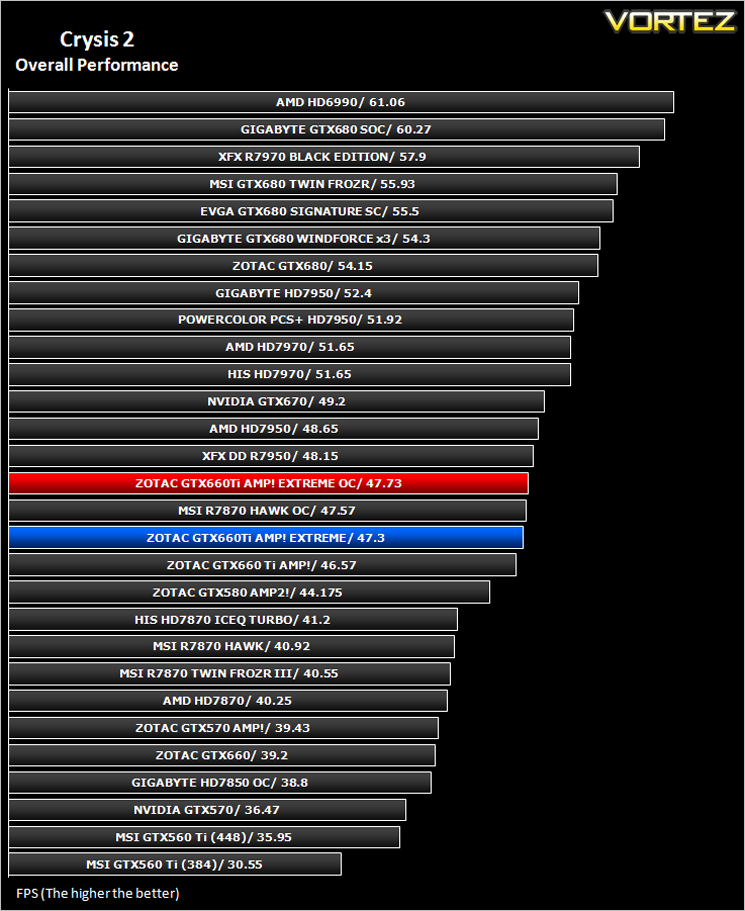
***NOTE*** Updated Forceware drivers (306.97) were used with the ZOTAC GTX660Ti AMP! and Extreme Edition.
Crysis Warhead
Following the success of Crysis, the stand alone expansion “Warhead” was hotly anticipated to bring more game play, more weapons, improved visuals whilst maintaining better performance, the latter being what gamers wanted most. After all how many people upgraded their rigs just to play this game… In the game, you play as the upbeat Brit Sergeant “Psycho” Sykes, chasing down a Korean nuclear warhead. Throw in some ice shooting aliens and we’re bound to have a great game. It sure delivered.
Testing was done using Framebuffer’s Crysis Warhead benchmarking tool. The tests were configured to DirectX 10 at Enthusiast levels. Each test on the Ambush map was looped three times from which the average FPS was recorded.
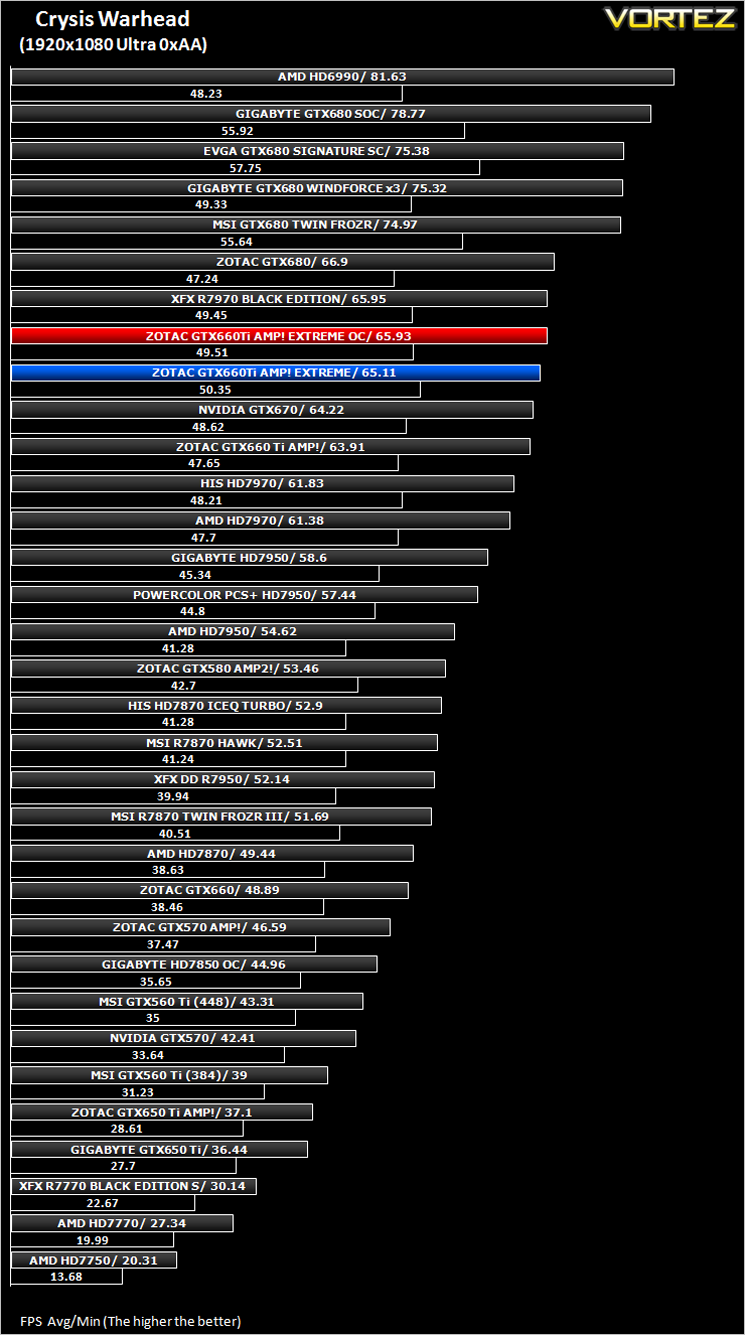
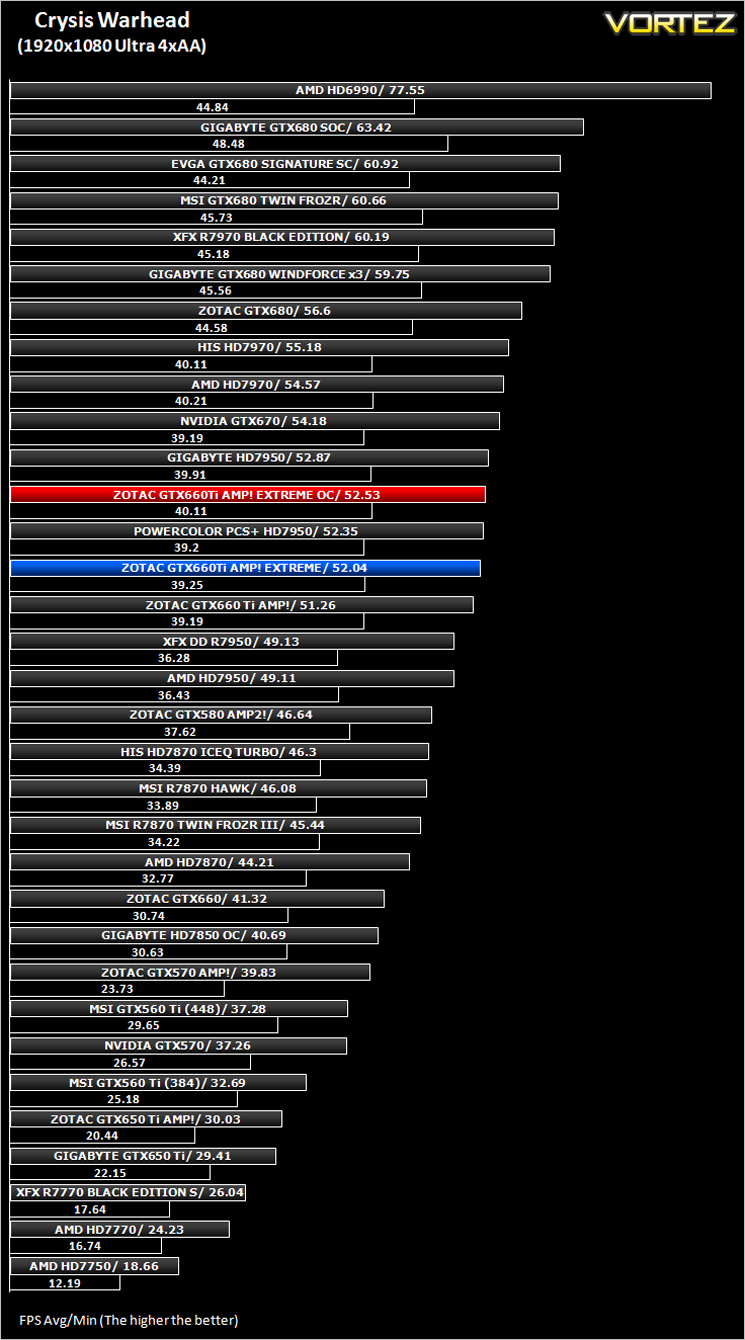
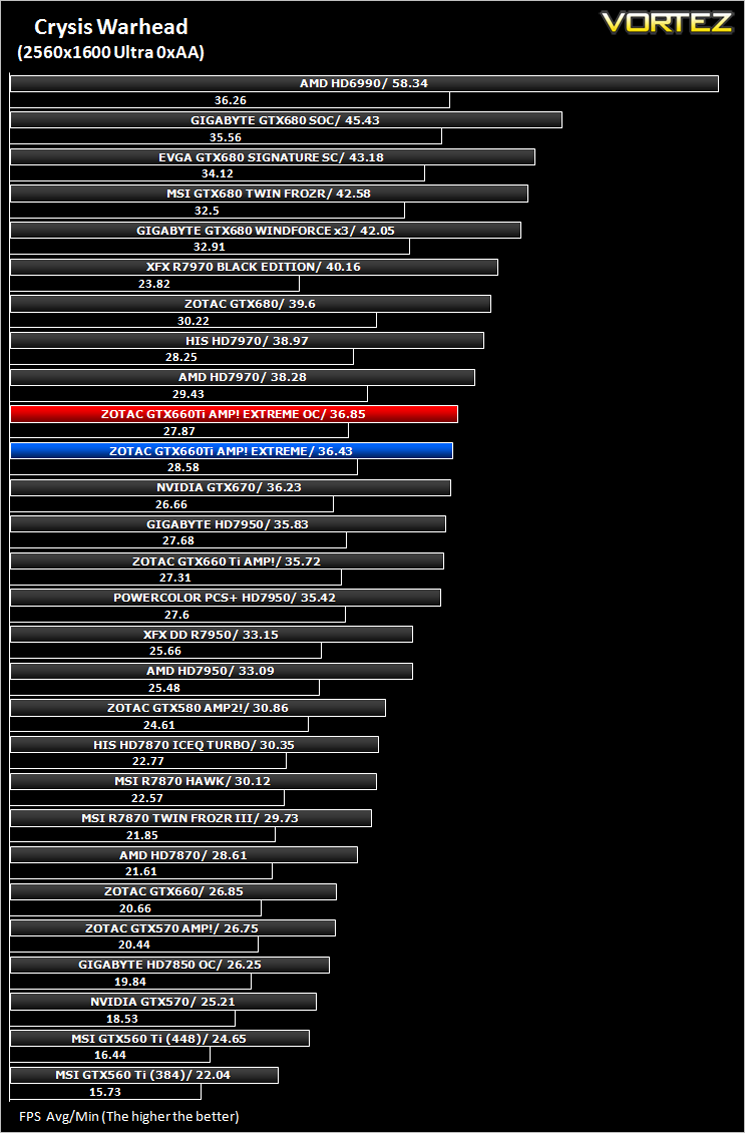
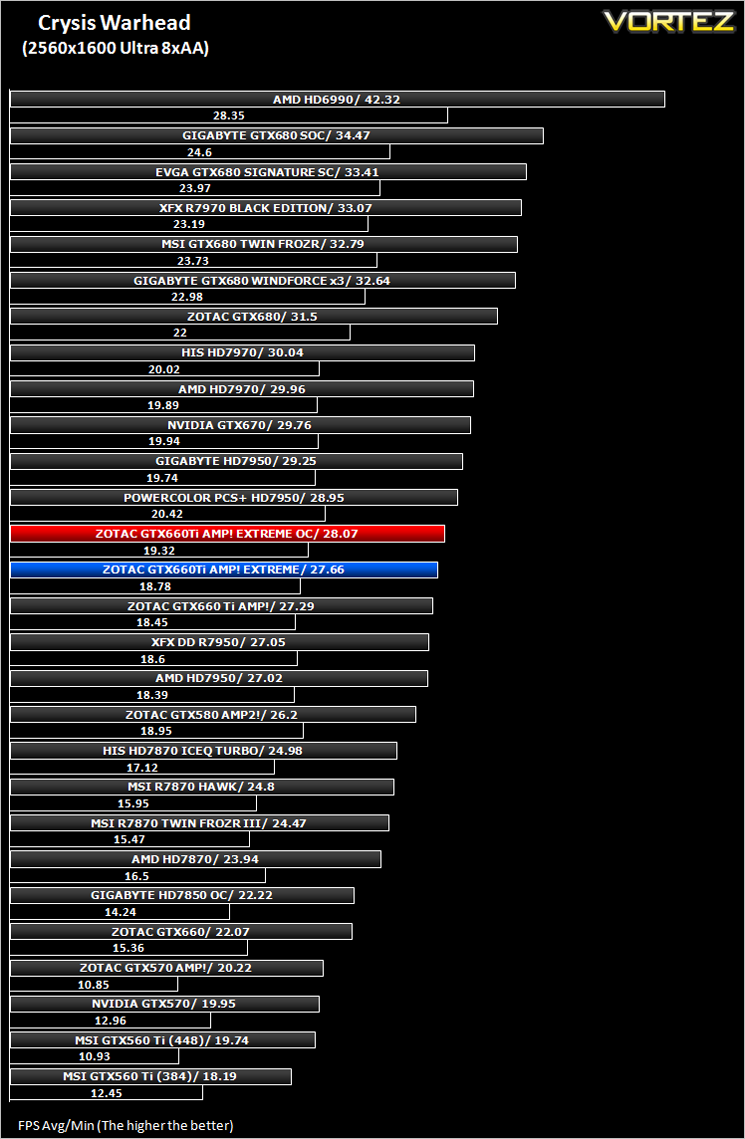
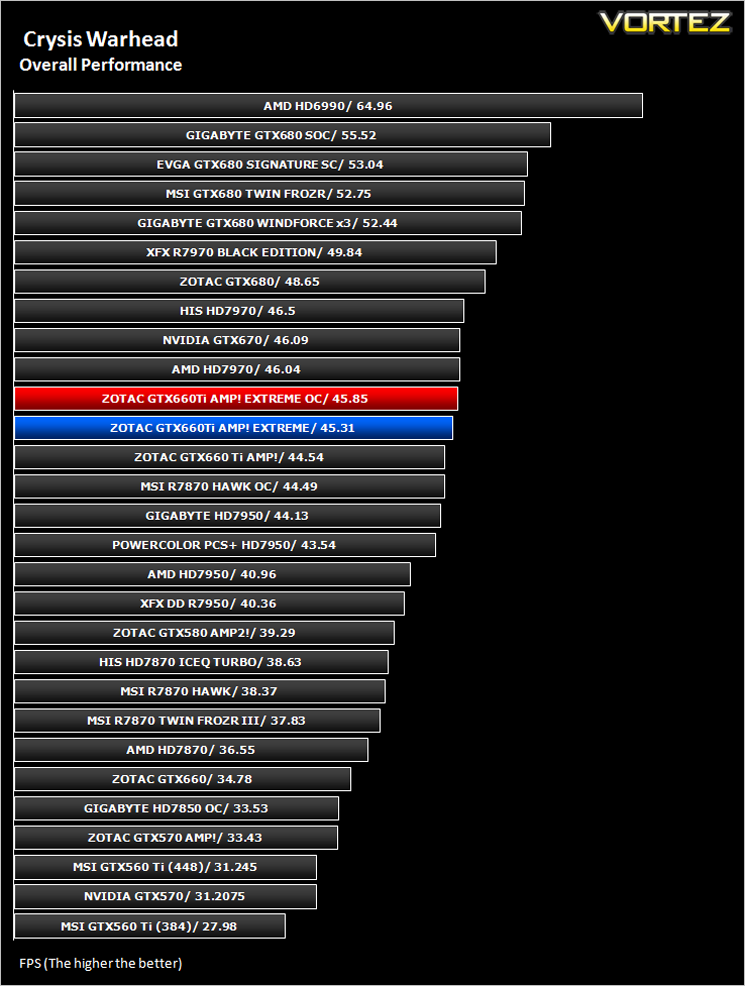
***NOTE*** Updated Forceware drivers (306.97) were used with the ZOTAC GTX660Ti AMP! and Extreme Edition.
Batman: Arkham City
Batman: Arkham City builds upon the intense, atmospheric foundation of Batman: Arkham Asylum, sending players soaring into Arkham City, the new maximum security “home” for all of Gotham City’s thugs, gangsters and insane criminal masterminds. Set inside the heavily fortified walls of a sprawling district in the heart of Gotham City, this highly anticipated sequel introduces a brand-new story that draws together a new all-star cast of classic characters and murderous villains from the Batman universe, as well as a vast range of new and enhanced gameplay features to deliver the ultimate experience as the Dark Knight.
The results below were obtained from the built-in benchmark utility from the game.
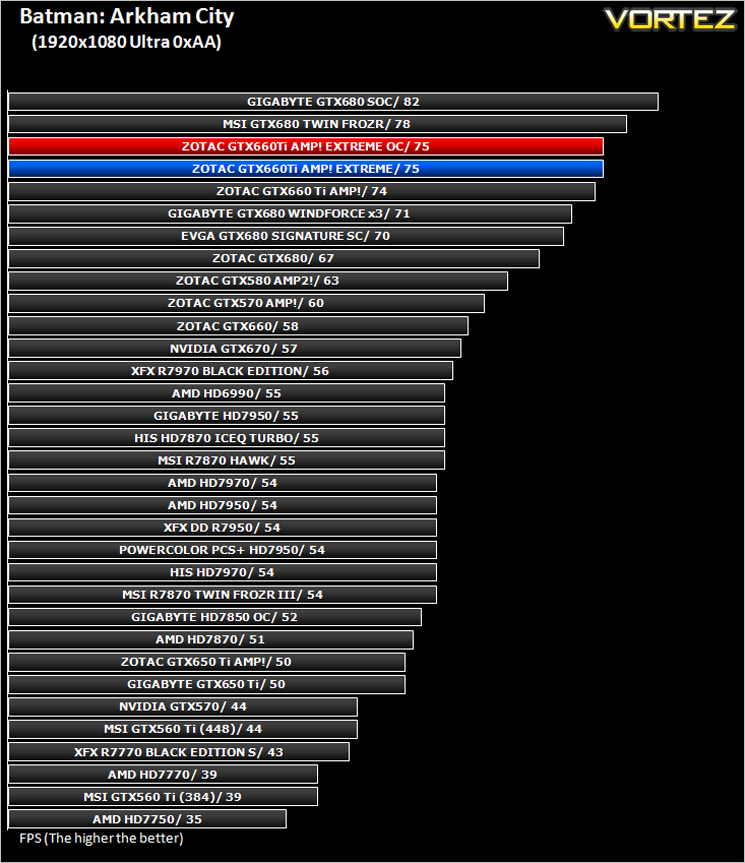
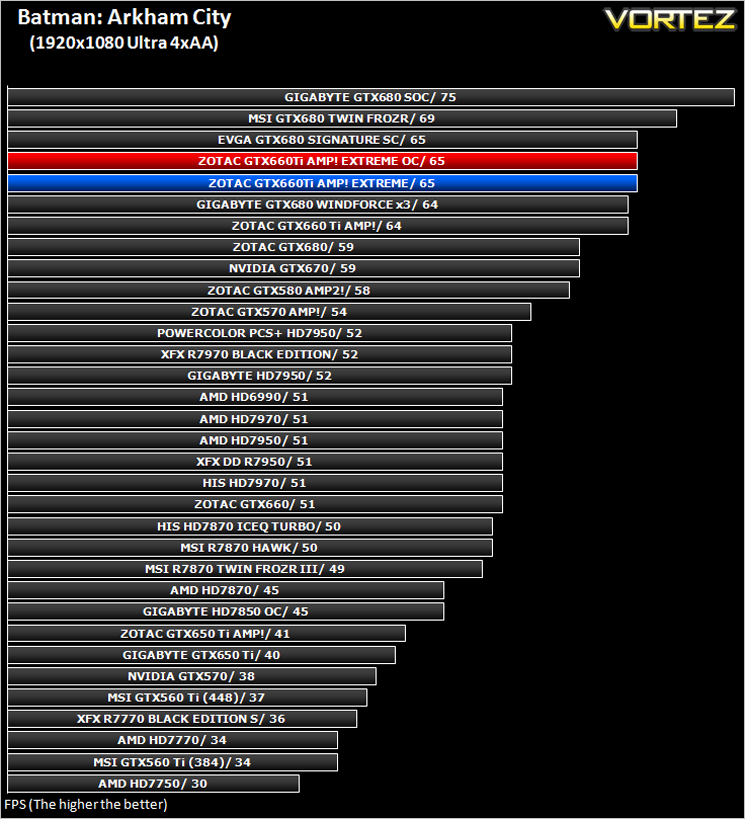
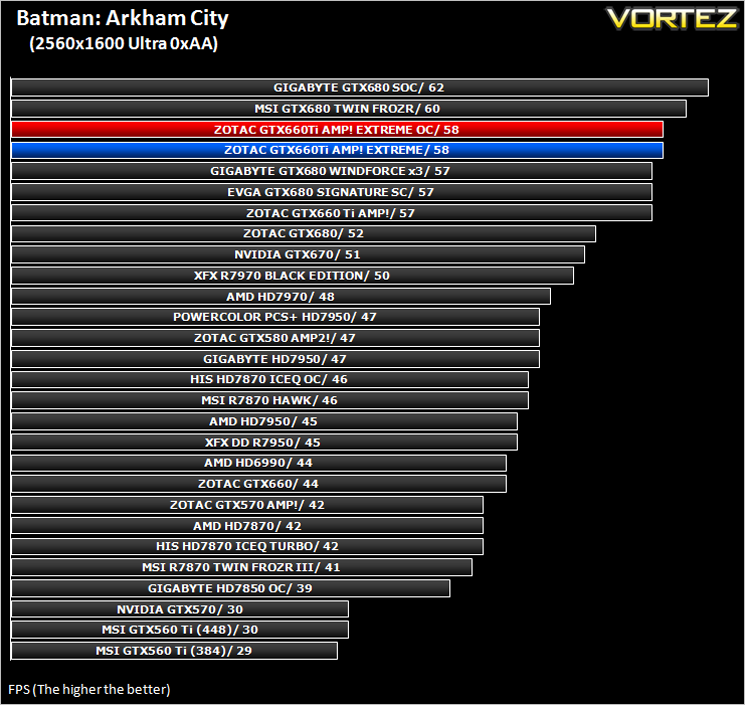
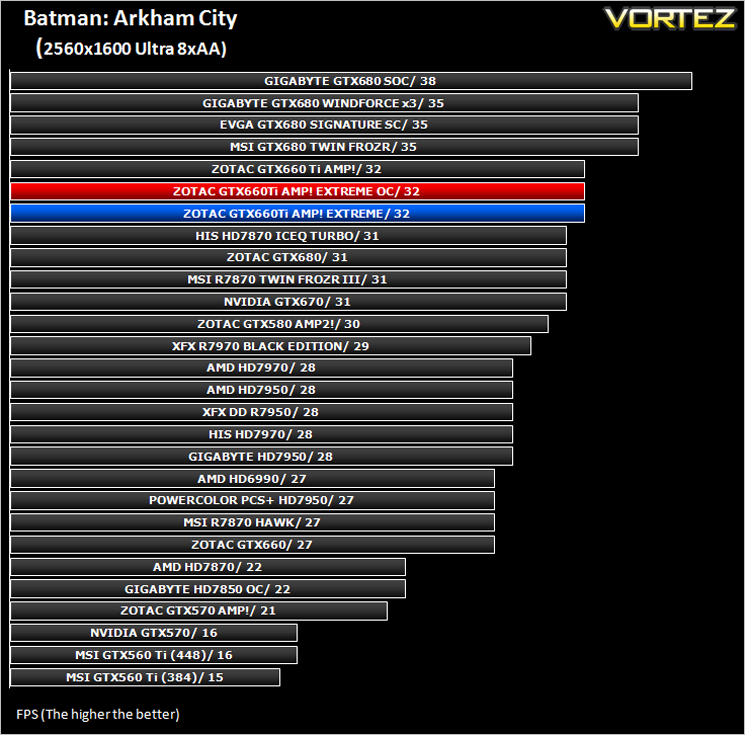
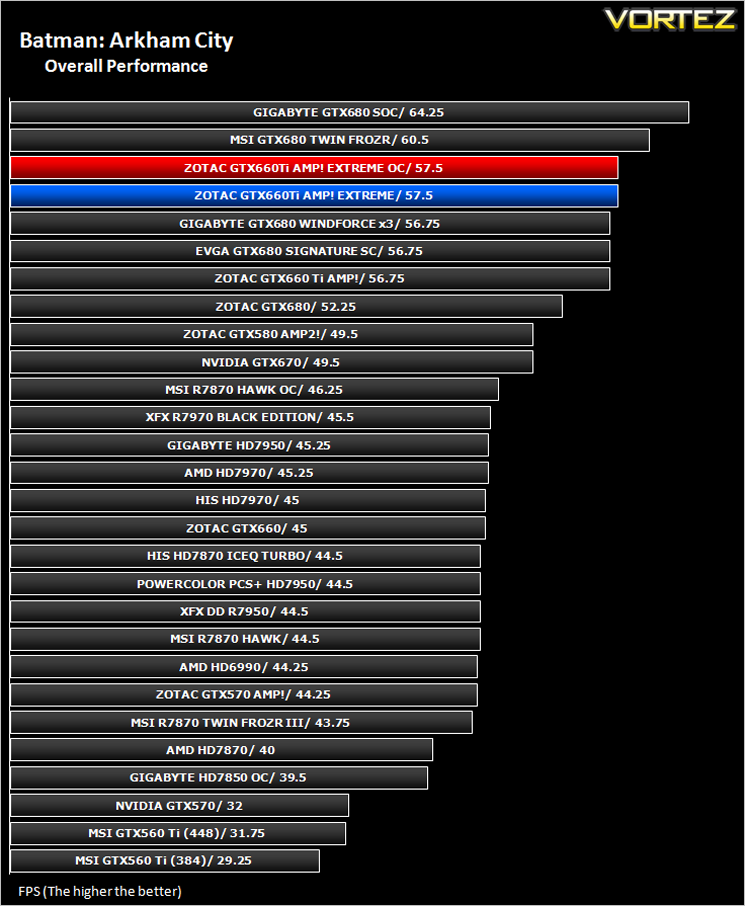
***NOTE*** Updated Forceware drivers (306.97) were used with the ZOTAC GTX660Ti AMP! and Extreme Edition.
The Elder Scrolls: Skyrim
Skyrim is not a direct successor to the very popular Oblivion. Instead it takes place 200 years after the events of Oblivion. The non-linear playing that made the Elder Scrolls such a popular series does however make a return along with the beautiful scenery the encompasses the world of Skyrim.
Average and minimum frames per second were measured using Fraps during the drop down passage to Riverwood. V-sync was disabled to allow fluctuating (higher the 60) FPS for these runs. It is however recommended that v-sync is left enabled during normal gameplay due to the games dynamics.
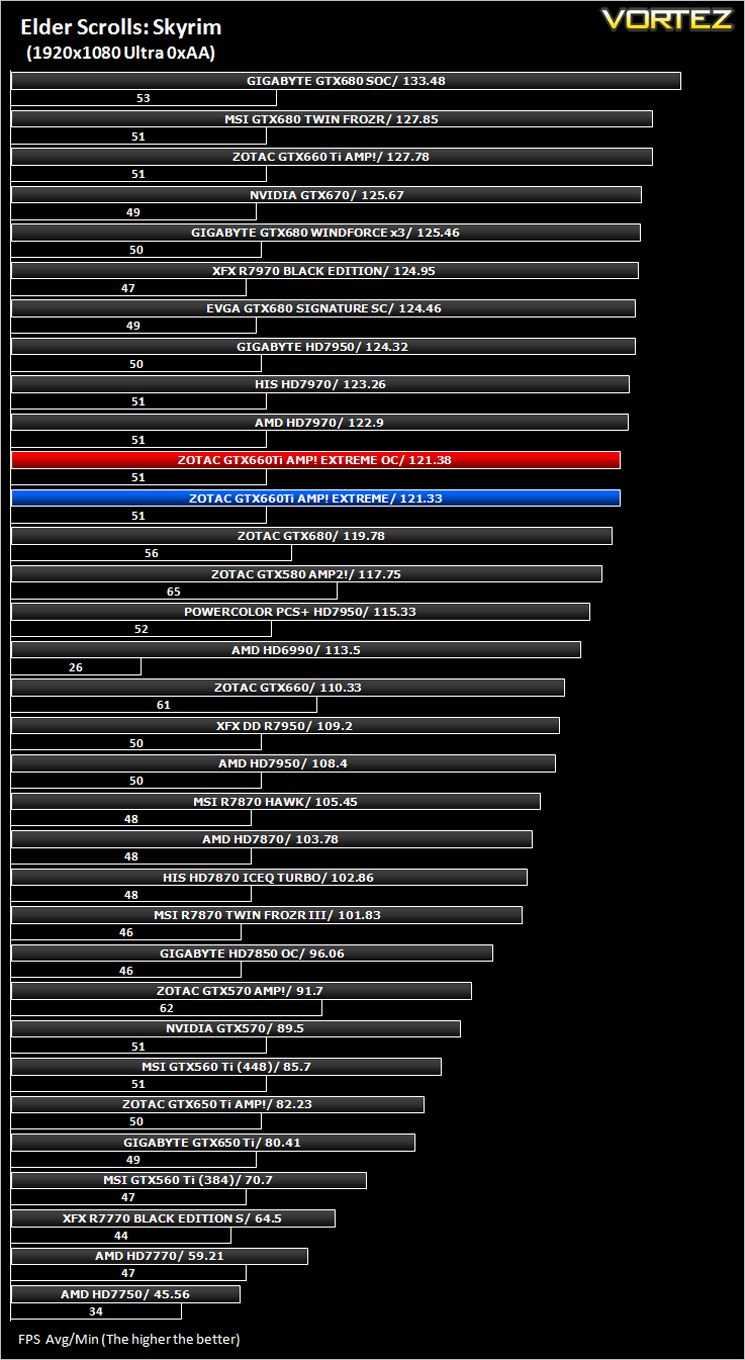
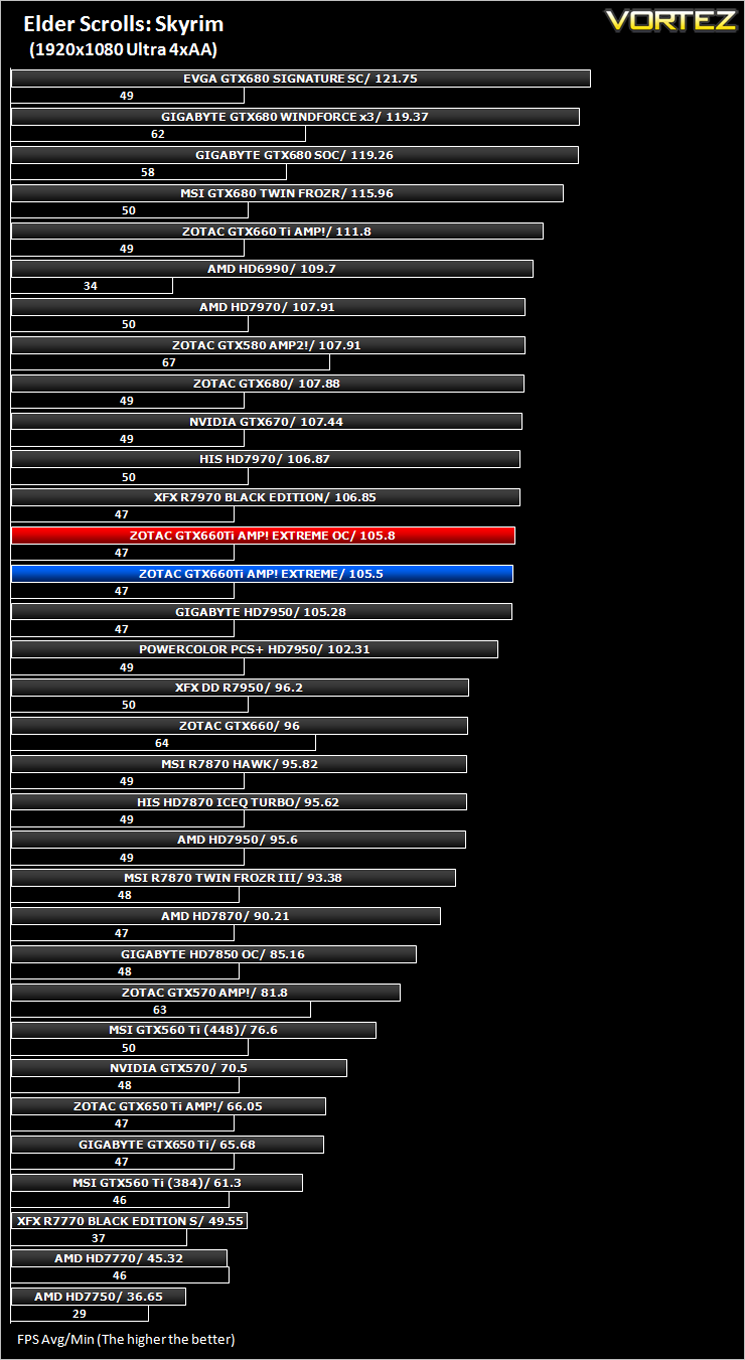
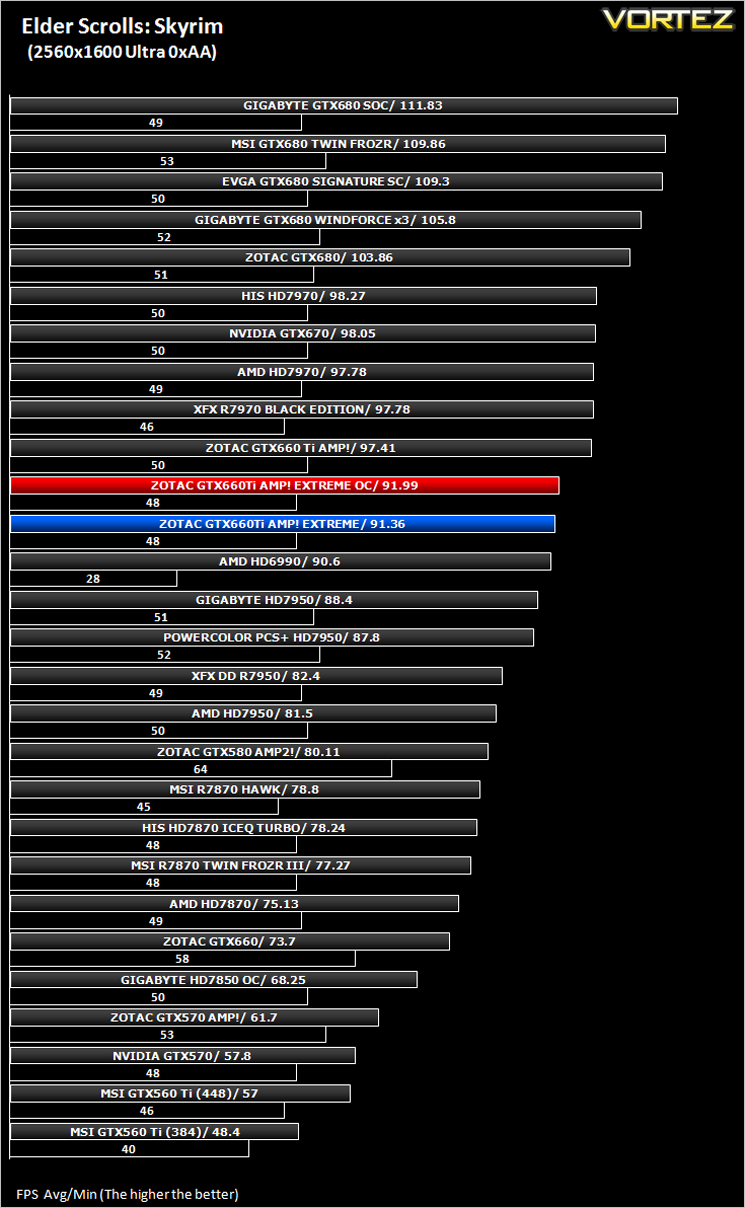
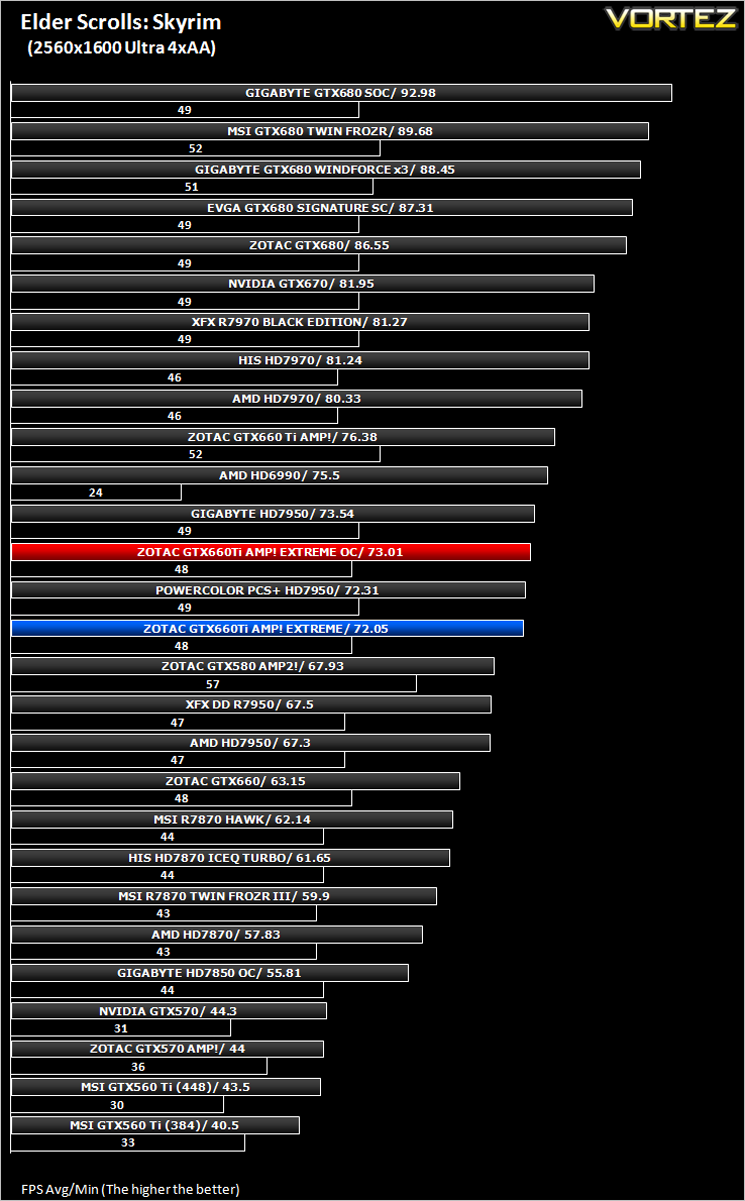
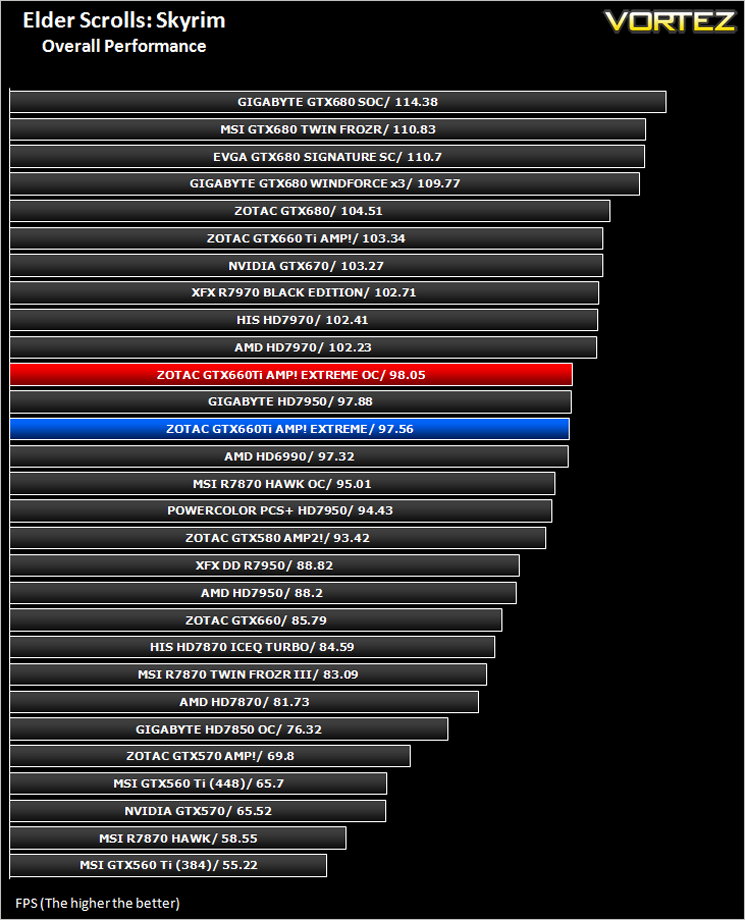
***NOTE*** Updated Forceware drivers (306.97) were used with the ZOTAC GTX660Ti AMP! and Extreme Edition.
DiRT 3
As players race to elevate their global standing, DiRT 3 is back delivering mud, sweat and gears world over: from the intense weather-beaten rally stages of Europe, Africa and the US, to executing performance driving showcases and career challenges where car control is pushed to spectacular limits.
The in-game benchmarking tool was used to test performance. All the display settings were set to the maximum available and DirectX 11 was applied. The average FPS was recorded at the end.
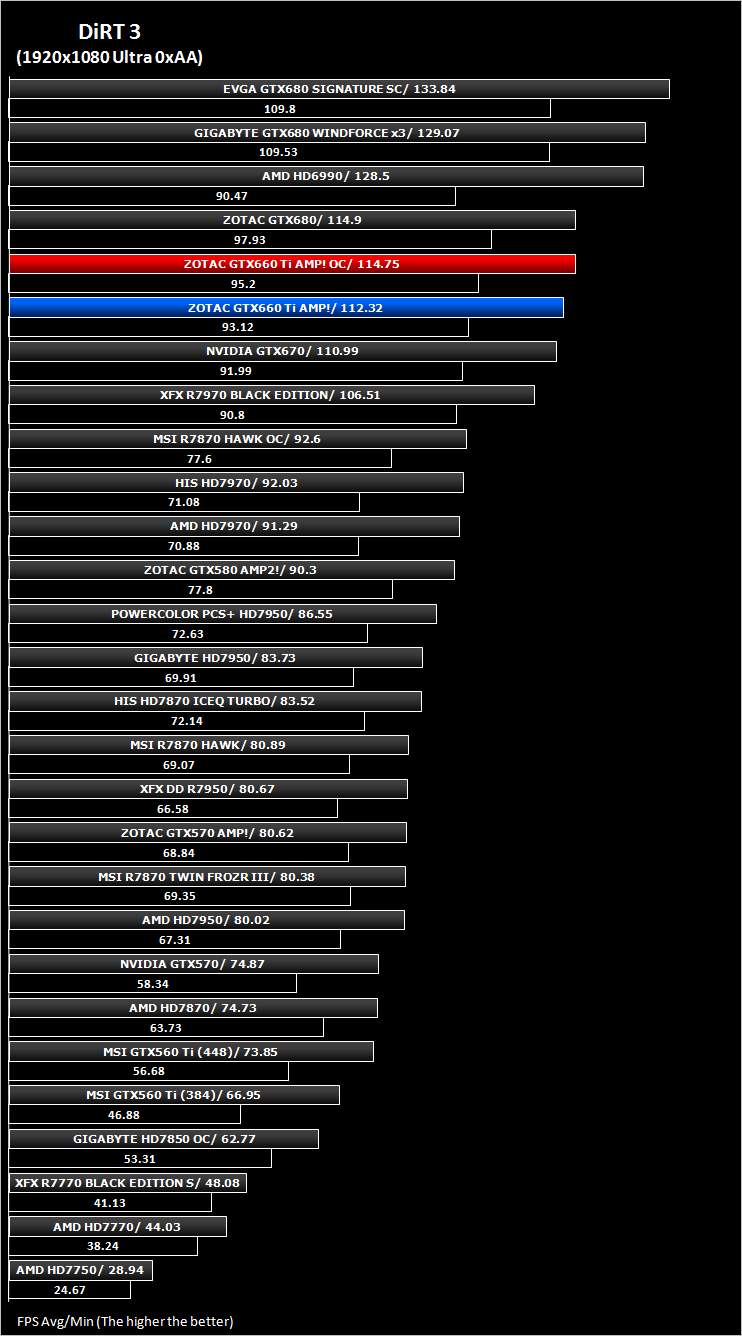
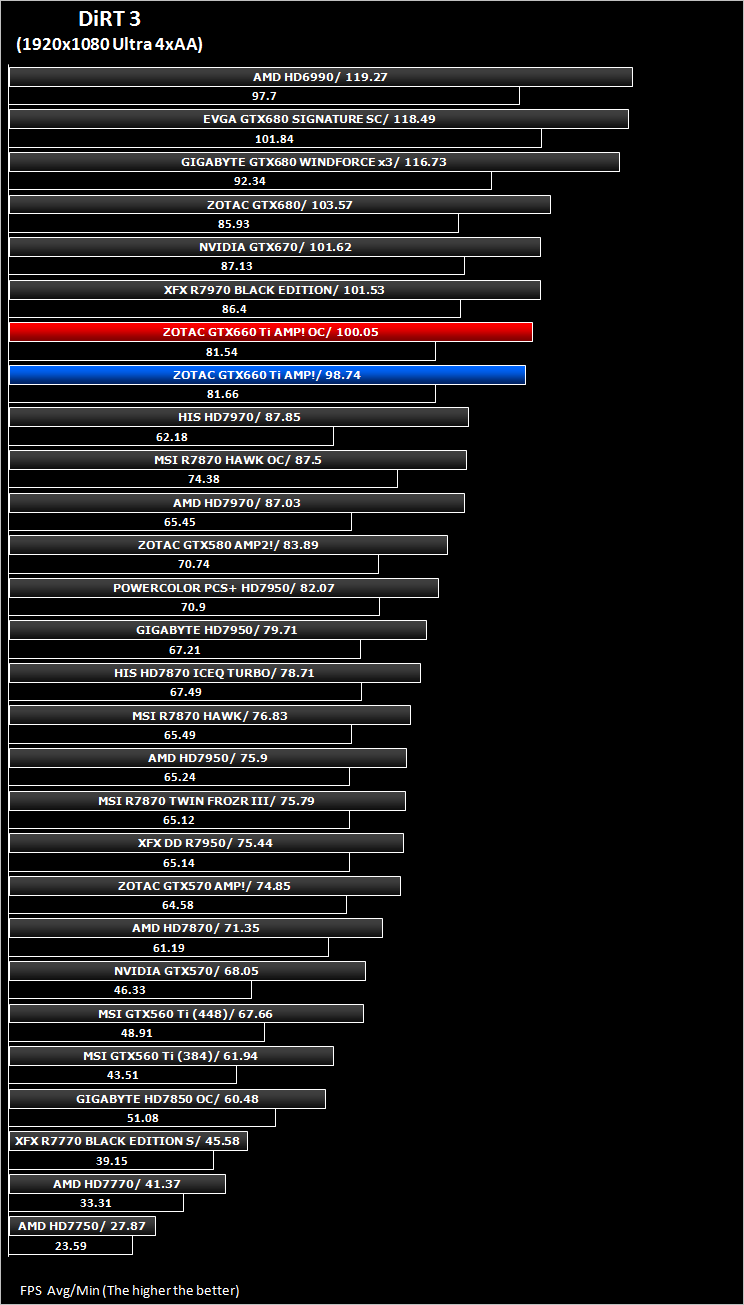
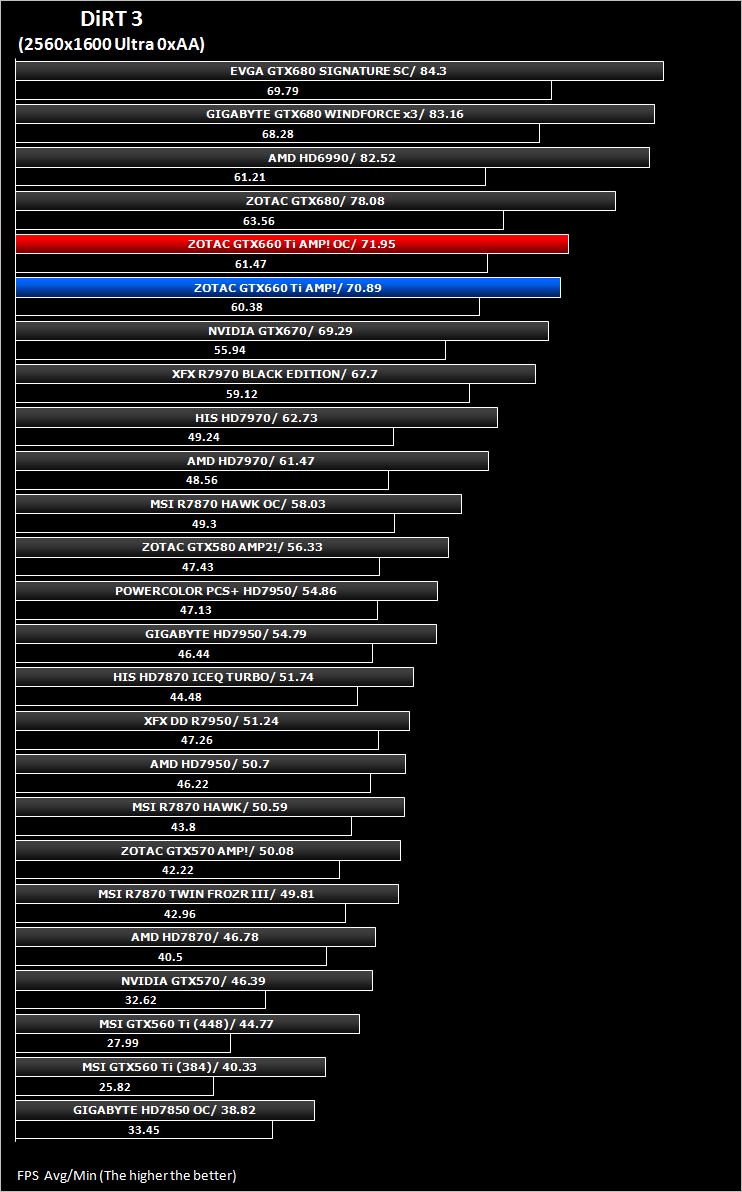
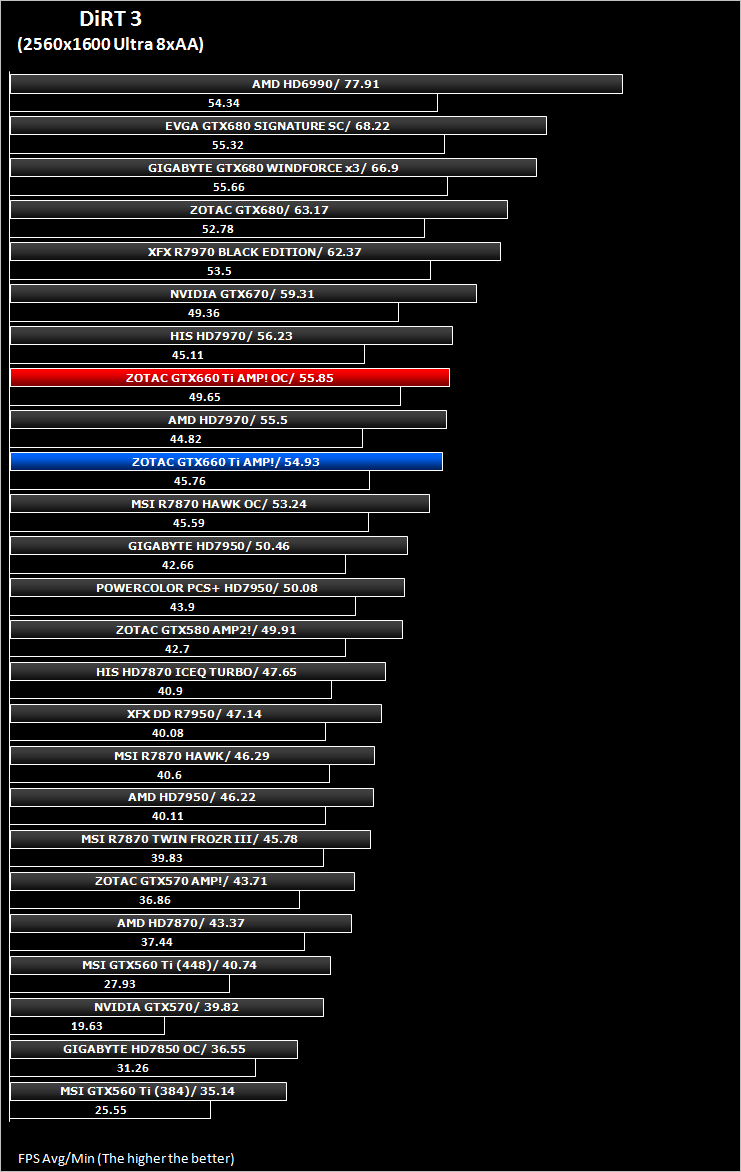
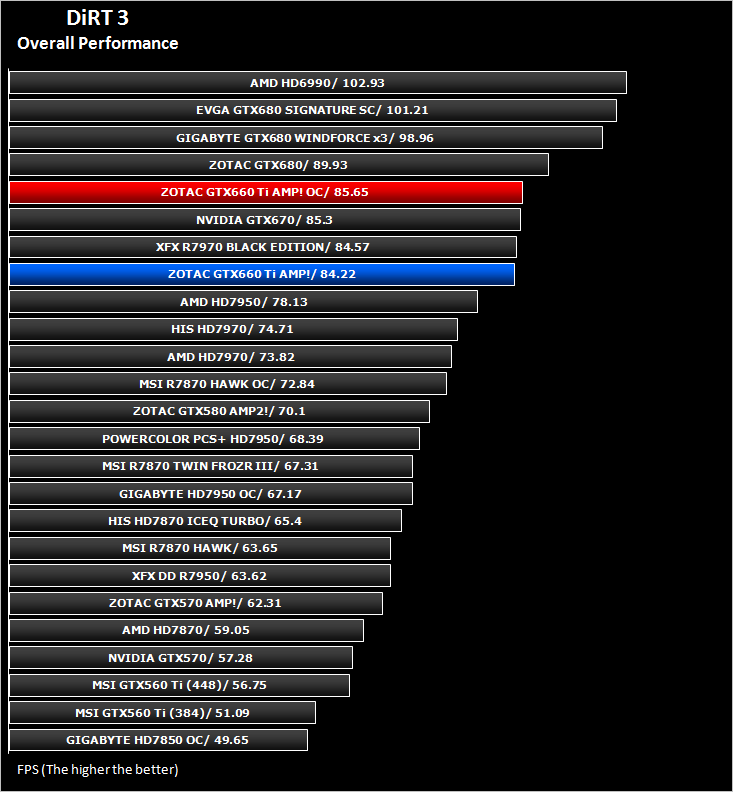
***NOTE*** Updated Forceware drivers (306.97) were used with the ZOTAC GTX660Ti AMP! and Extreme Edition.
Metro 2033
Based on the novel by the same name, Metro 2033 is a first person shooter with elements of survival horror. As Artyom, you trawl through the mutant infested metro systems of post-apocalyptic Moscow. The game delivers presents a grim ambience that reflects on the overall atmosphere of the underground setting. Metro 2033 uses the setting as a back drop to showcase some of the best visuals of any games out now, making it the ideal benchmark for those looking for the best graphics card.
The bundled benchmarking tool was used on Metro 2033, configuring the settings to High and making use of DirectX 11. The frontline scene was looped 3 times for each configuration. The average FPS was recorded at the end.
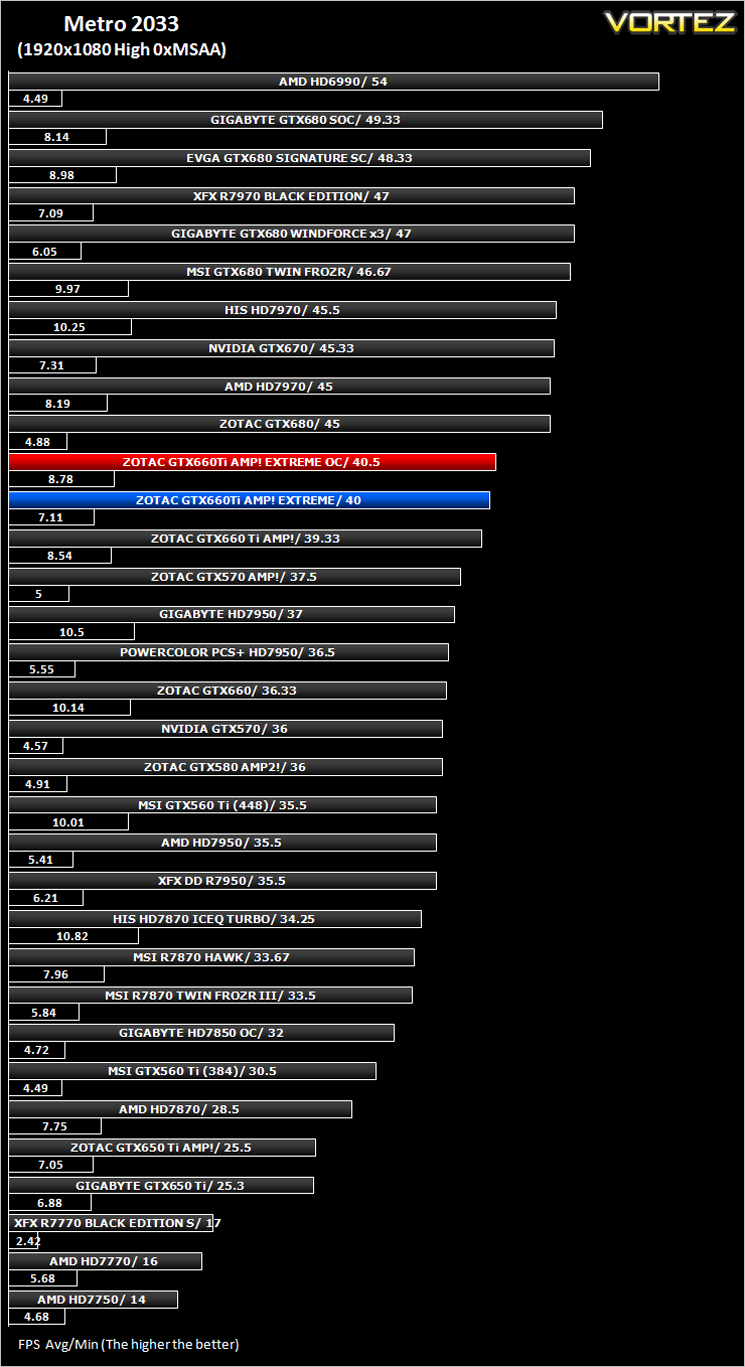
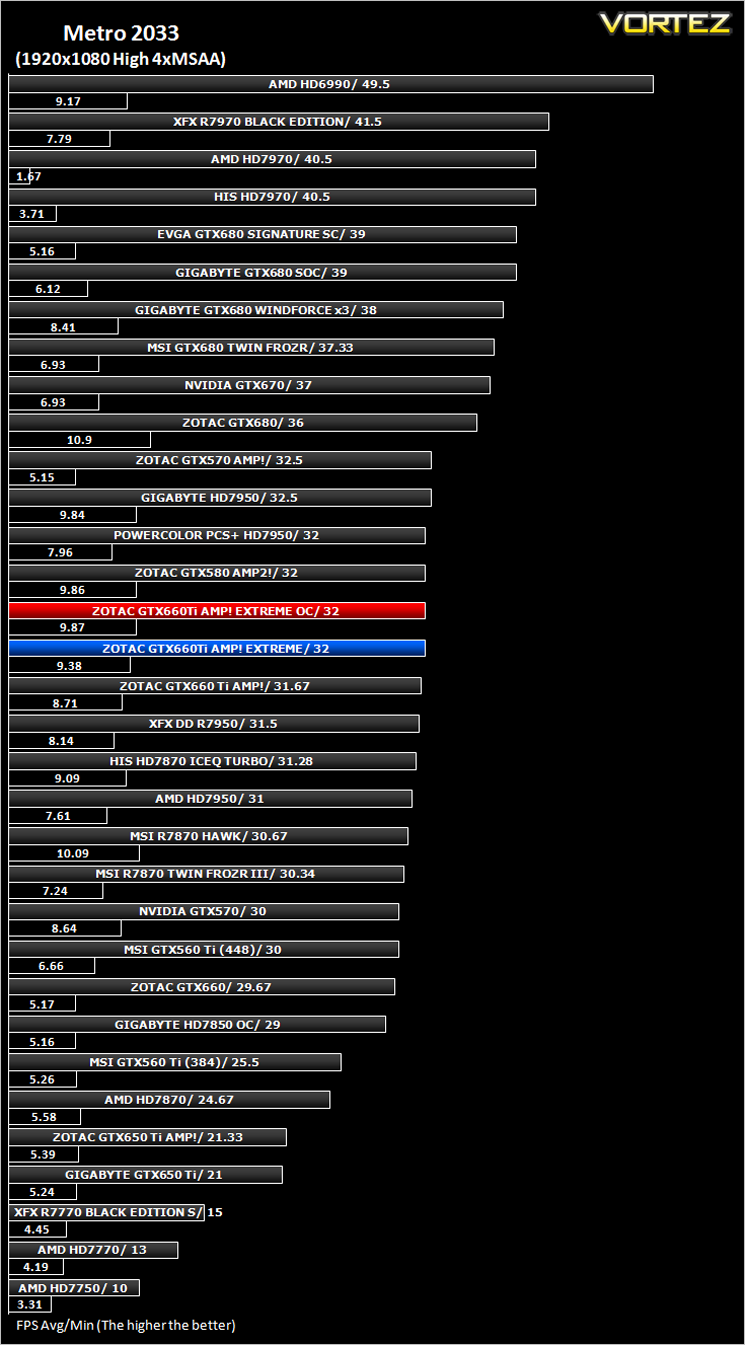
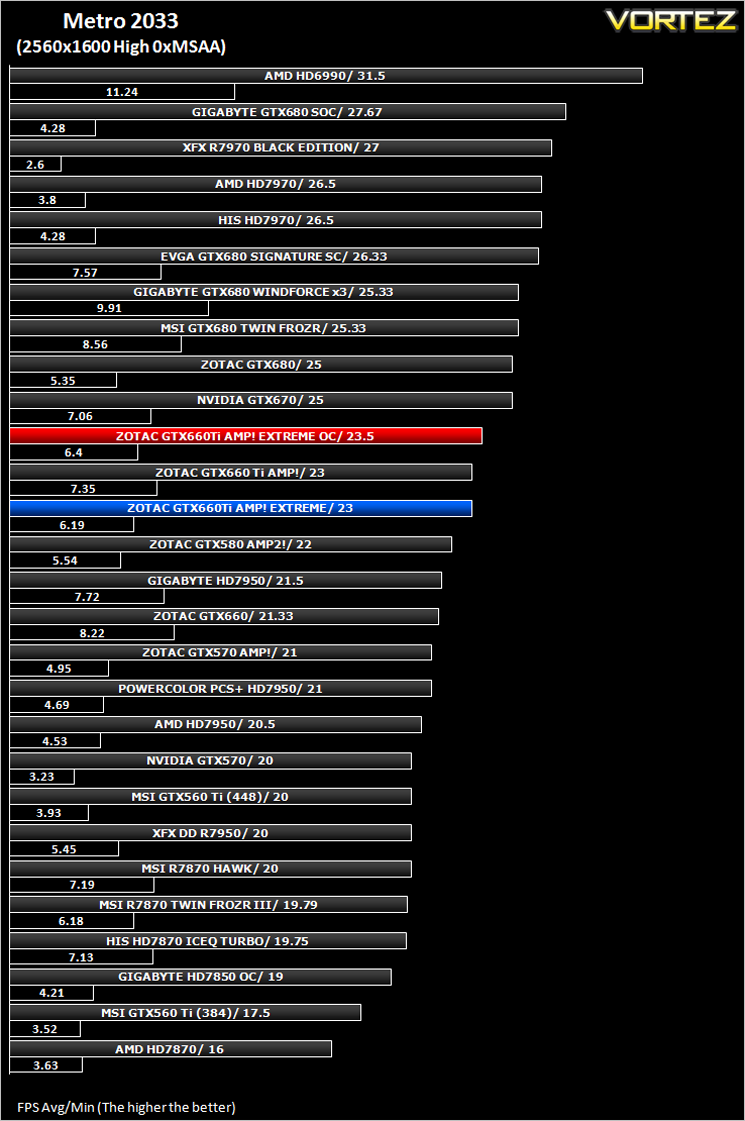
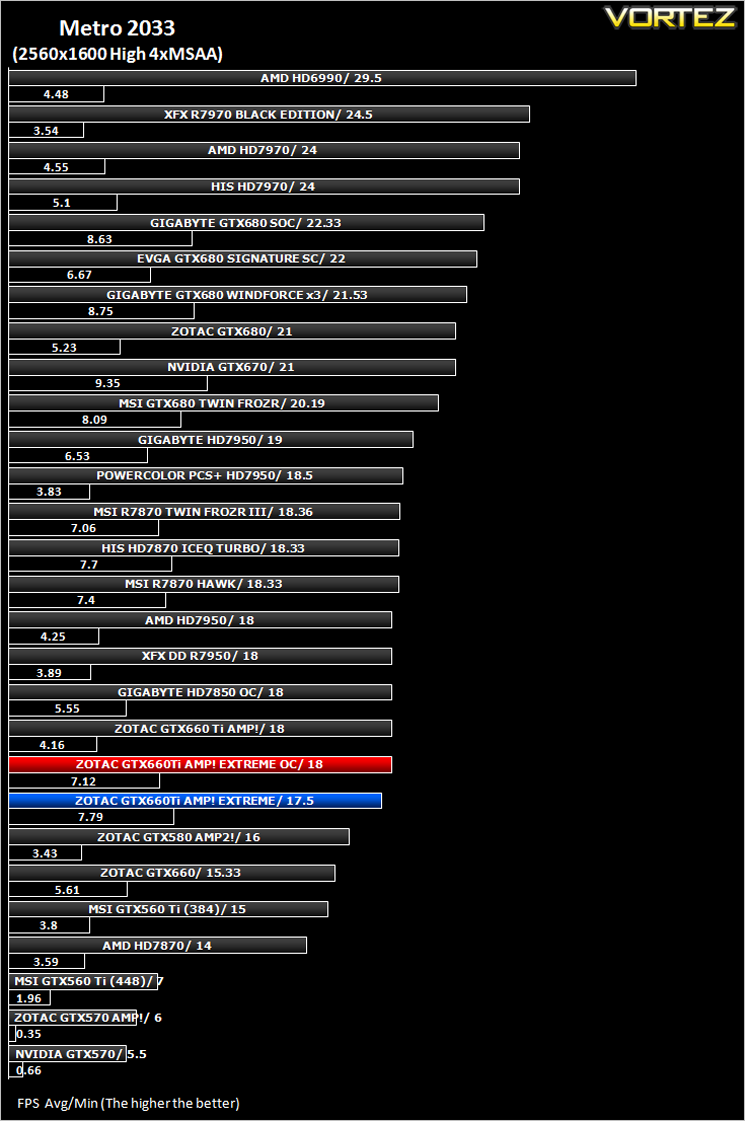
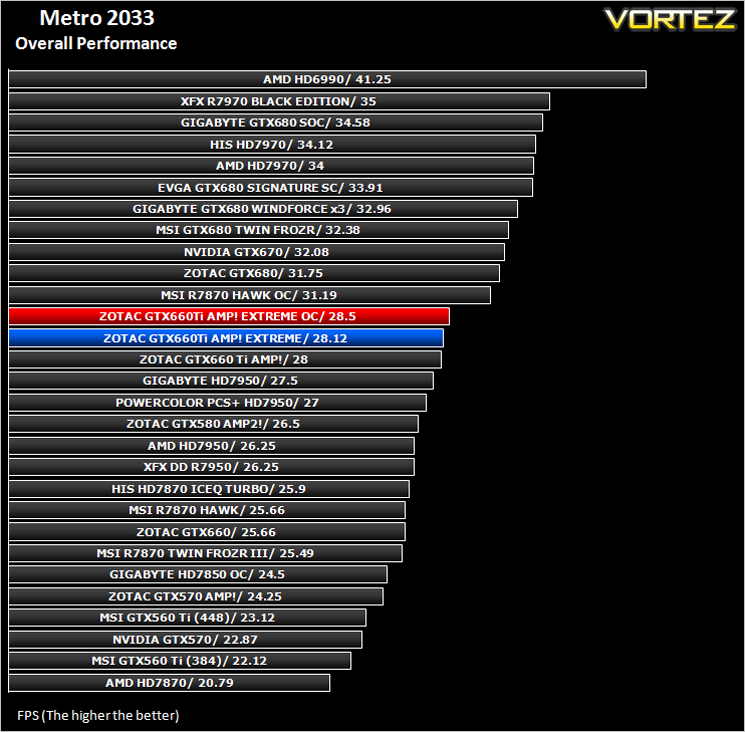
***NOTE*** Updated Forceware drivers (306.97) were used with the ZOTAC GTX660Ti AMP! and Extreme Edition.
Futuremark 3DMark 11
3DMark 11 is the latest version of the world’s most popular benchmark. Designed to measure your PC’s gaming performance 3DMark 11 makes extensive use of all the new features in DirectX 11 including tessellation, compute shaders and multi-threading. The benchmark was run in both Performance and Extreme presets.
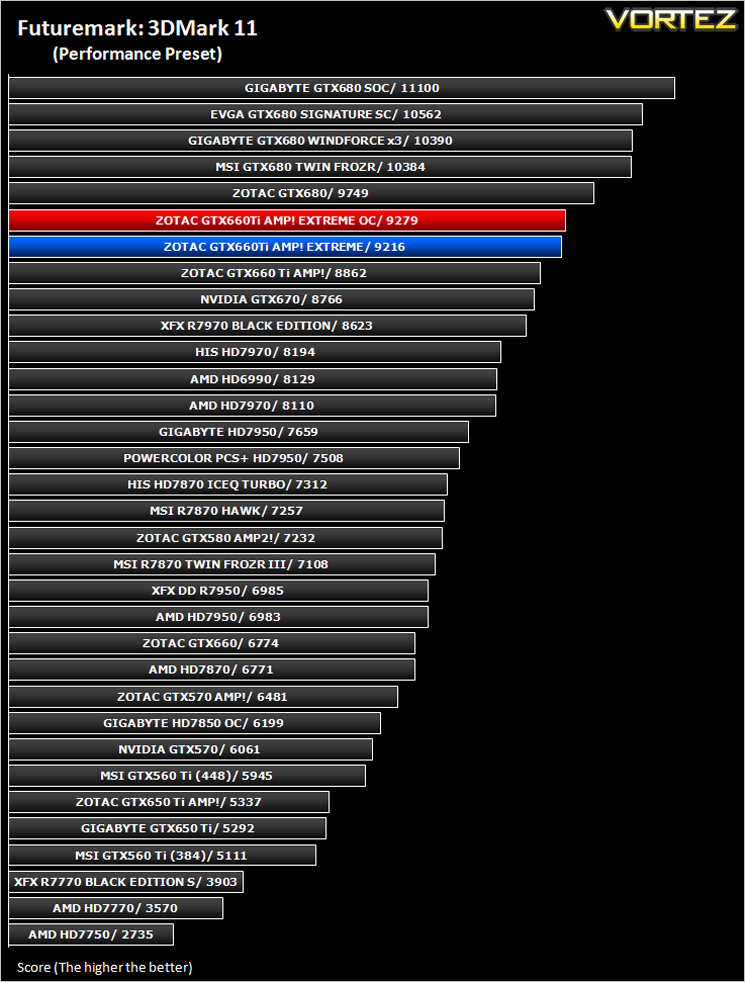
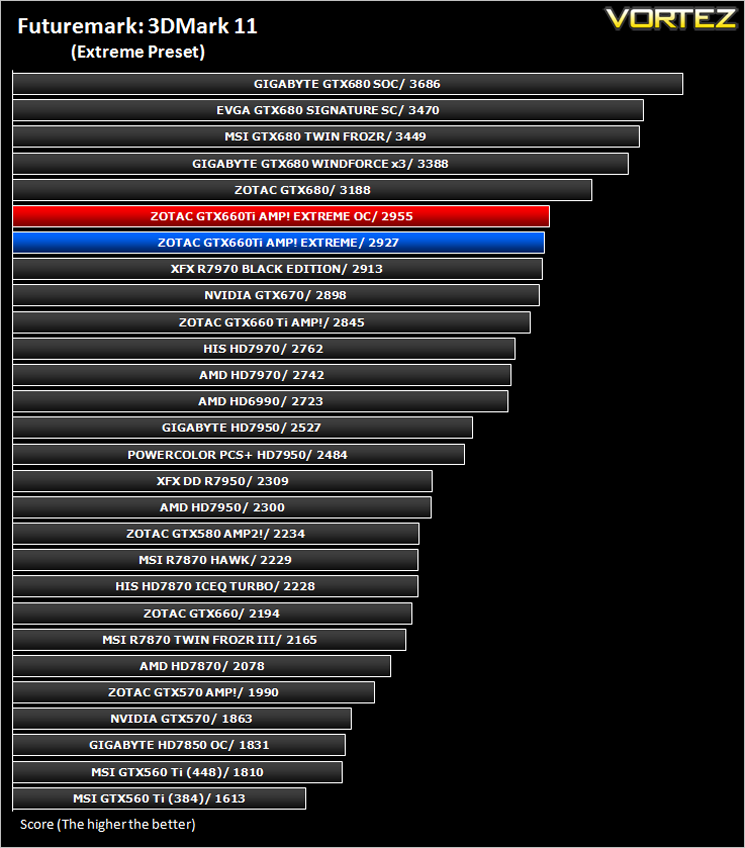
***NOTE*** Updated Forceware drivers (306.97) were used with the ZOTAC GTX660Ti AMP! and Extreme Edition.
Unigine: Heaven 2.5
Heaven Benchmark is a DirectX 11 GPU benchmark based on advanced Unigine™ engine from Unigine Corp. It reveals the enchanting magic of floating islands with a tiny village hidden in the cloudy skies. Interactive mode provides emerging experience of exploring the intricate world of steampunk.
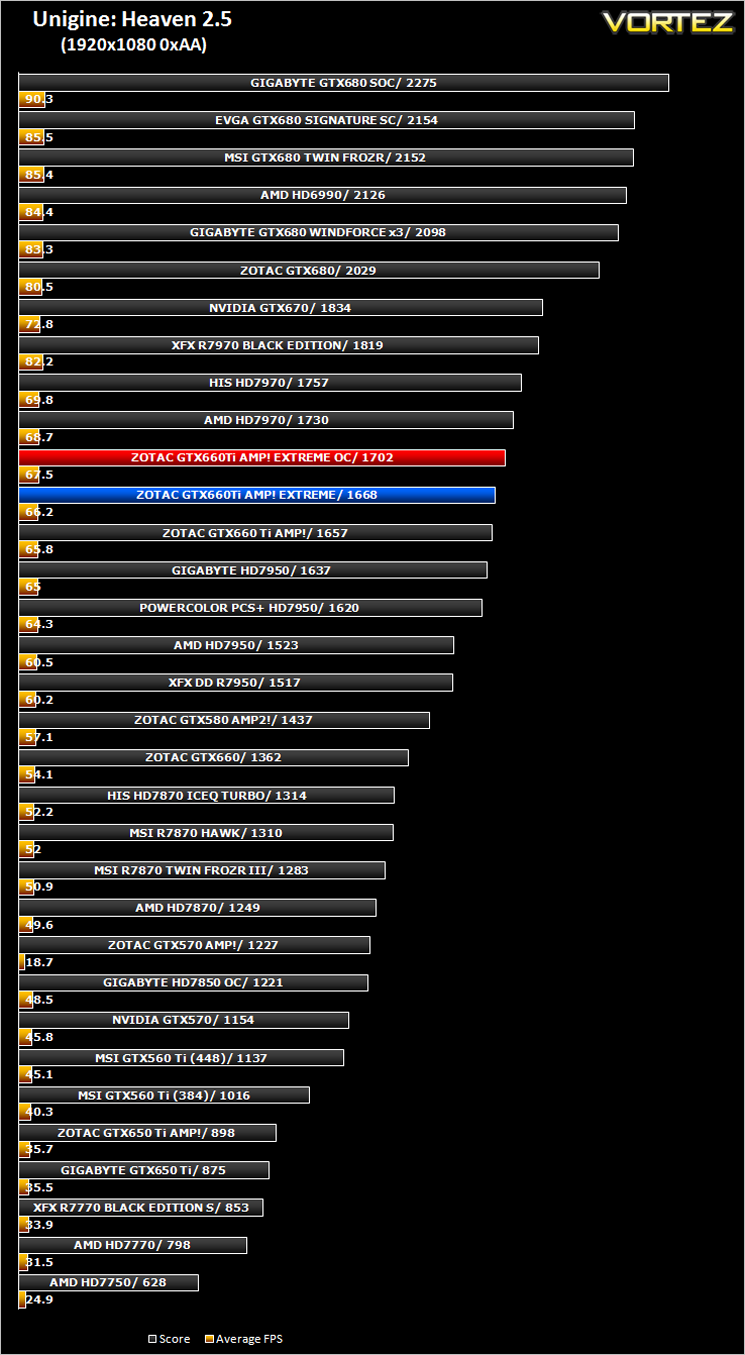
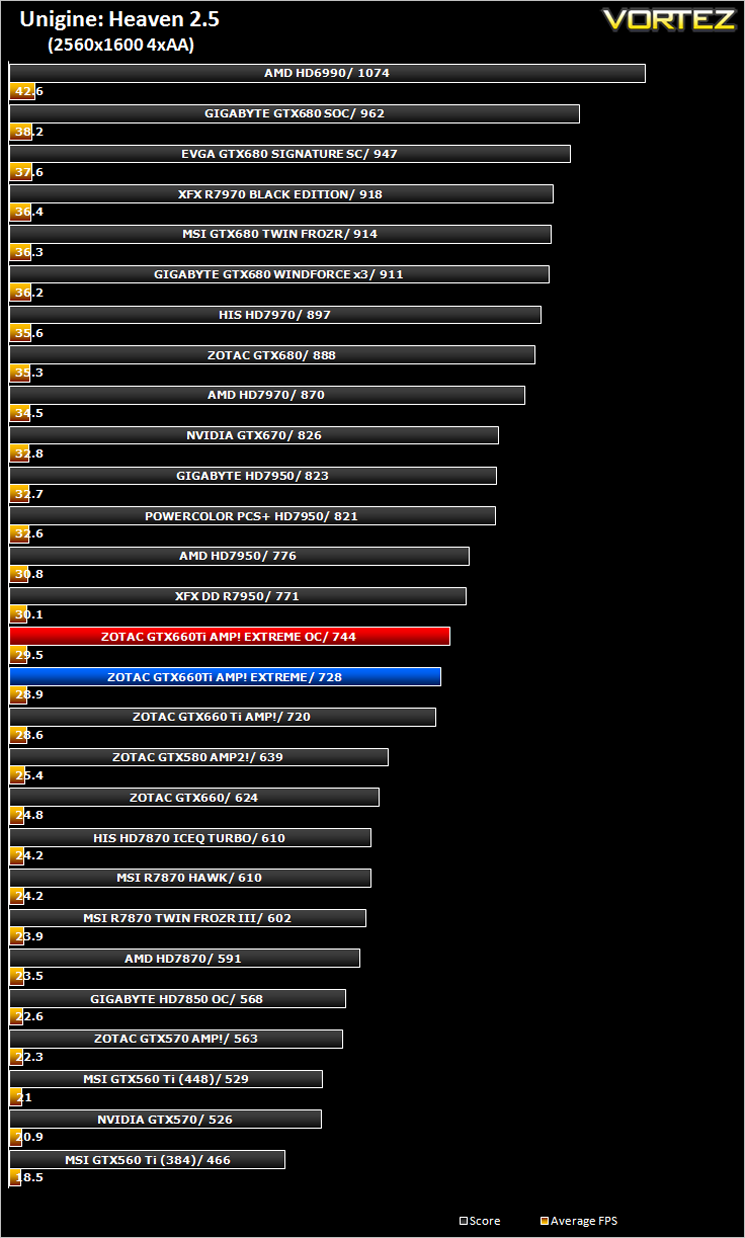
***NOTE*** Updated Forceware drivers (306.97) were used with the ZOTAC GTX660Ti AMP! and Extreme Edition.
Conclusion
When the GTX660Ti first appeared on the scene we thought ‘here we go again’ with the usual re-hash of NVIDIA GPUs, re-badged, tweaked or disabled to spawn a new generation, saturating an already saturated market. Clearly this is still the case as the GTX660Ti is a re-badged, slightly tweaked GTX670. What it lacks in raw grunt though it makes up for in clockspeed and the ZOTAC AMP! Extreme is one of the fastest, if not the fastest factory overclocked GTX660Ti graphics cards out there. Even our own overclocking hardly managed to surpass the factory overclock which is proof that ZOTAC have clocked the GTX660Ti to the limit and thus is worthy of it’s title – Extreme.
We are not massive fans of inflated prices which reflect what is in essence a couple of hours work yourself. This is especially the case when even buying an ‘overclocked’ graphics card results in the end user endeavouring to clock the card further. However, the fact that the factory overclock that comes with the AMP! Extreme is top of the league and also very near the maximum manual overclock is justification for the increased monetary value demanded by this card.
Priced at around £275 it is certainly one of the most expensive GTX660Ti’s available but for that you get an extreme overclock, a great looking card and even a free mousemat. This may still make the Scrooges out there cringe but compared to the competition, some of whom ask £260 for a reference design, the ZOTAC GTX660Ti AMP! Extreme Edition begins to make more sense, especially if you want maximum performance from a plug and play device without having to find a maximum overclock yourself – it’s done for you with the Zotac card. While you could buy the slightly cheaper ZOTAC GTX660 AMP! Edition and attempt to overclock that yourself to the Extreme level, there are no guarantees of success.
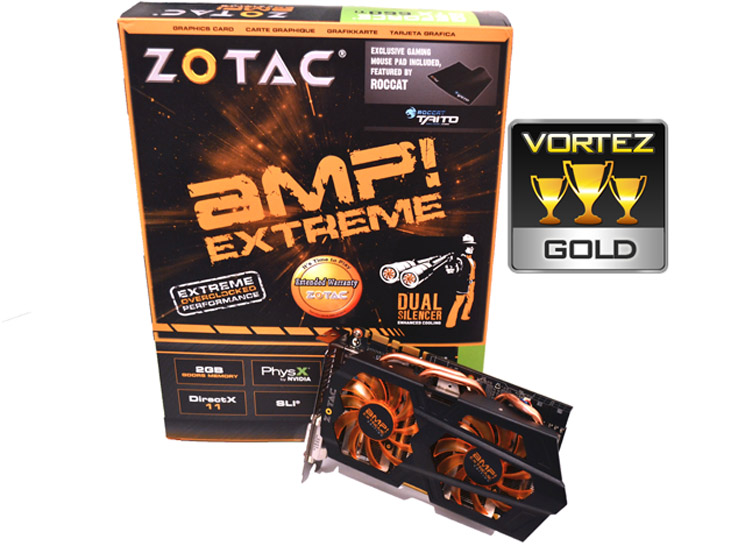
It should come as no surprise then that the product we have reviewed today is worthy of our Gold award. It achieves everything it set out to do. It betters the competition (albeit with updated drivers) and lives up to it’s name which is something few ‘extreme, ultra, overclocked, mega etc’ graphics cards do.
In short, if you want the fastest factory overclocked GTX660Ti, the ZOTAC GTX660Ti AMP! Extreme should be top of your list.
Pros:
– Kepler Architecture
– Massive Factory Overclock
– Quiet
– Comparatively cool
– Free Mouse Mat
Cons:
– Cost. For a little more you could have a full fat GTX670
– Kepler Architecture
– Massive Factory Overclock
– Quiet
– Comparatively cool
– Free Mouse Mat
Cons:
– Cost. For a little more you could have a full fat GTX670

Click here for an explanation of our awards at Vortez.net.


