We pitch both the ZOTAC GTX 970 AMP! Extreme and AMP! Extreme CORE against one another in a head-to-head graphics card showdown to see which one if any, we would buy.

Product on Review: GTX 970 AMP! Extreme & AMP! Extreme CORE
Manufacturer & Sponsor: ZOTAC
Price: AMP! Extreme £369.99 & Amp! Extreme Core £349.99
It’s been quite a while since we had a ZOTAC graphics card on our test bed at Vortez and like buses, two come along at once. Both of today’s samples are based on NVIDIA’s GTX 970 Maxwell core and from the specifications do not appear that different from each other. Indeed, ZOTAC have not two, not even three but six of the GTX 970 in their massive product line up. We would say this is overkill but you cannot fault ZOTAC for giving the buyer the option to choose exactly what they want, not only from a graphics card but from a specific core!
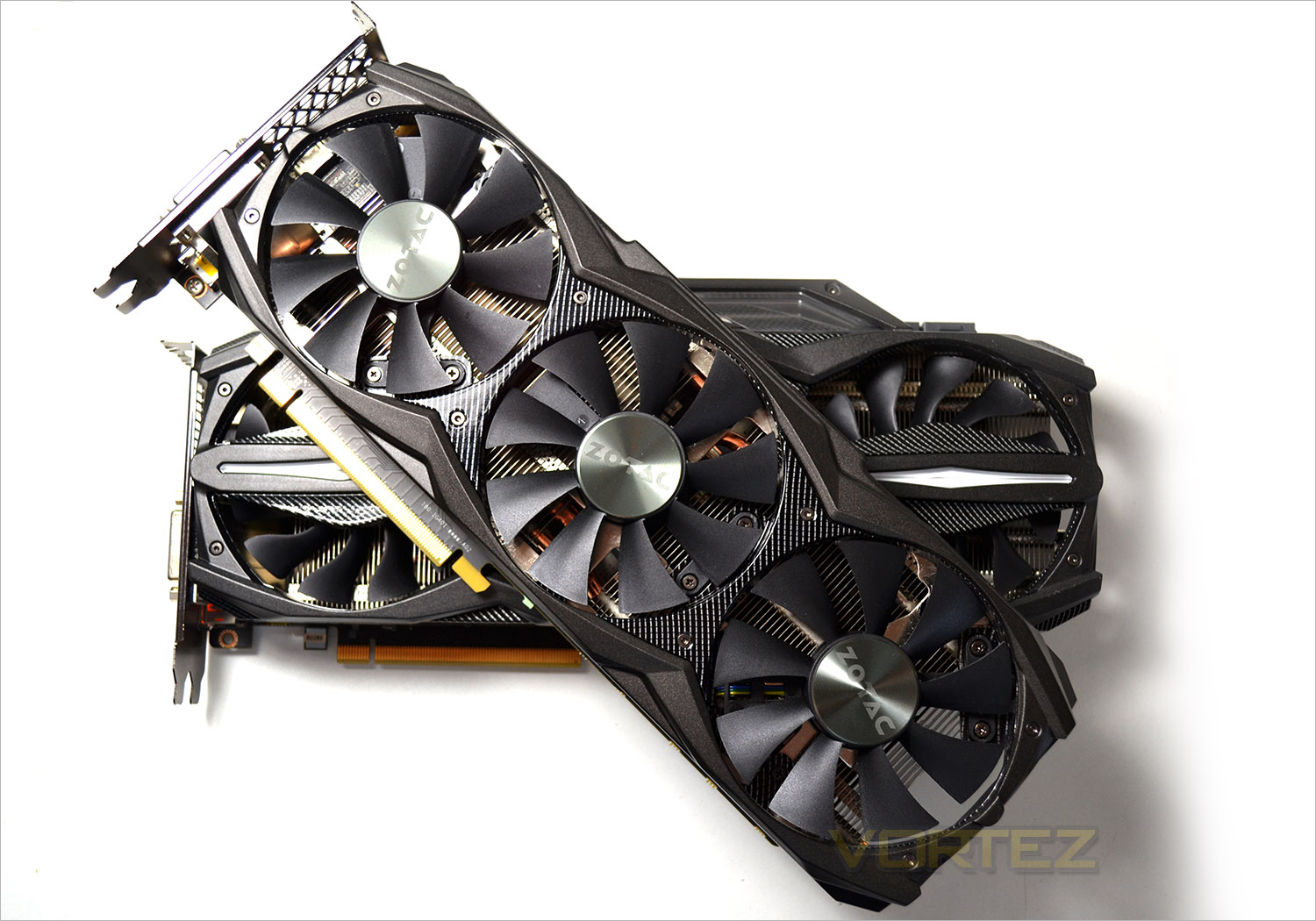
The two samples on review today hail from the AMP! Extreme end of the range with the Core version being the fastest on paper, albeit by just 25MHz (base clock). As you will see though, the two graphics cards are quite different in the flesh. Both cards are cooled courtesy of three fans and each has it’s own unique features but both come with a 5 year warranty and are both heavily overclocked from the factory so you can be assured that whichever your preference, you will be getting a quality assured product that will serve you well for years to come.
How do they compare? Read on….
ZOTAC AMP!
Amplify your gaming experience with the highly tuned ZOTAC GeForce AMP! Edition graphics cards. Too much is never enough when it comes to 3D performance. The ZOTAC AMP! Edition graphics cards start where the ZOTAC GeForce-series leaves off. Starting with a ZOTAC GeForce-series as the baseline, ZOTAC AMP! Editions go through rigorous tweaking and tuning to extract additional performance from the GeForce graphics processors, yielding unprecedented performance in its class. Expect nothing but the best gaming experience with the ZOTAC GeForce AMP! Edition graphics cards.
Specification
ZOTAC GTX 970 AMP! Extreme
Model
Model ZT-90107-10P
Interface
Interface PCI Express 3.0 x16 (Compatible with 1.1)
Chipset
Chipset Manufacturer NVIDIA
GPU GeForce GTX 970
Core clock 1228 MHz (base) 1380 MHz (boost)
Cores 1,664
Shader Clock N/A
Memory
Memory Clock 7200 MHz
Memory Size 4GB
Memory Interface 256-bit
Memory Type GDDR5
3D API
DirectX DirectX 12
OpenGL OpenGL 4.4
Ports
DVI 1 (2560×1600)
HDMI 1 (4K @ 60 Hz)
DisplayPort 3 (4K @ 60 Hz)
VGA With included adapter
General
Tuner None
RAMDAC 400 MHz
Max Resolution 4K
RoHS Compliant Yes
SLI Supported 4-way
Cooler Triple-fan IceStorm w/ Carbon ExoArmor
Dual-Link DVI Supported Yes
Supported OS Certified for Windows 8 / 7 / Vista
Packaging
Package Contents ZT-90107-10P DVI-to-VGA adapter 2 x Dual MOLEX-to-8-pin PCIe adapter Driver Disk User Manual
Game Bundle N/A
Model ZT-90107-10P
Interface
Interface PCI Express 3.0 x16 (Compatible with 1.1)
Chipset
Chipset Manufacturer NVIDIA
GPU GeForce GTX 970
Core clock 1228 MHz (base) 1380 MHz (boost)
Cores 1,664
Shader Clock N/A
Memory
Memory Clock 7200 MHz
Memory Size 4GB
Memory Interface 256-bit
Memory Type GDDR5
3D API
DirectX DirectX 12
OpenGL OpenGL 4.4
Ports
DVI 1 (2560×1600)
HDMI 1 (4K @ 60 Hz)
DisplayPort 3 (4K @ 60 Hz)
VGA With included adapter
General
Tuner None
RAMDAC 400 MHz
Max Resolution 4K
RoHS Compliant Yes
SLI Supported 4-way
Cooler Triple-fan IceStorm w/ Carbon ExoArmor
Dual-Link DVI Supported Yes
Supported OS Certified for Windows 8 / 7 / Vista
Packaging
Package Contents ZT-90107-10P DVI-to-VGA adapter 2 x Dual MOLEX-to-8-pin PCIe adapter Driver Disk User Manual
Game Bundle N/A
ZOTAC GTX 970 AMP! Extreme Core Edition
Model
Model ZT-90103-10P
Interface
Interface PCI Express 3.0 x16 (Compatible with 1.1)
Chipset
Chipset Manufacturer NVIDIA
GPU GeForce GTX 970
Core clock 1203 MHz (base) 1355 MHz (boost)
Cores 1,664
Shader Clock N/A
Memory
Memory Clock 7200 MHz
Memory Size 4GB
Memory Interface 256-bit
Memory Type GDDR5
3D API
DirectX DirectX 12
OpenGL OpenGL 4.4
Ports
DVI 1 (2560×1600)
HDMI 1 (4K @ 60 Hz)
DisplayPort 3 (4K @ 60 Hz)
VGA (with included adapter)
General
Tuner N/A
RAMDAC 400 MHz
Max Resolution 4K
RoHS Compliant Yes
SLI Supported 2-way
Cooler Triple-fan IceStorm w/ Carbon ExoArmor
Dual-Link DVI Supported Yes
Supported OS Certified for Windows 8 / 7 / Vista
Packaging
Package Contents ZT-90103-10P DVI-to-VGA adapter 2 x Dual 4-pin-to-8-pin PCIe adapter Mini USB-to-internal USB header cable Driver Disk User Manual
Game Bundle N/A
DSR & MFAA
Dynamic Super-Resolution
Super Sampling Anti-Aliasing (SSAA) isn’t a new concept, but its adoption in games or graphics hardware over the years has been patchy due how processor-intensive the process is. It relies on sampling the scene at a resolution much higher than your native screen resolution and then blending pixels together to output a ‘normal’ resolution frame, reducing ‘jaggies’. It’s often colloquially referred to as the ‘king of AA techniques’, but has given way to MSAA, MLAA and NVIDIA’s own FXAA, each of which are faster and less computationally expensive even if the quality isn’t as good.
Progress in graphics technology and horsepower has meant that a game which would bring a GPU to its knees five years ago can be comfortably played on mid-range hardware these days, whilst top-tier hardware push frame rates well into the hundreds. That’s a lot of horsepower going to waste when it could, if the game supported it, be used to improve image quality significantly.
Relatively recently enthusiasts have used a homebrew technique to increase the resolution which a game engine renders at, and then apply post-processing techniques to reduce the output resolution down to the monitor’s native. Known as downsampling, it’s essentially a form of SSAA. Unfortunately it’s very hit-and-miss, often relying of 3rd-party applications and prone to throwing up OS-level errors; and of course it’s very computationally expensive. However the rewards – beautiful images from older game engines – make the effort worth it.
Today GPUs such as the GTX 780Ti and Titan are being produced which are capable of and designed for 4K resolutions in even modern titles. However most gamers still use 1080p monitors on a day-to-day basis, making a $500+ GPU obscene overkill for all but the most taxing of titles. Because of this NVIDIA are going to start to support downsampling at the driver level through a method they’re calling Dynamic Super-Resolution (DSR).
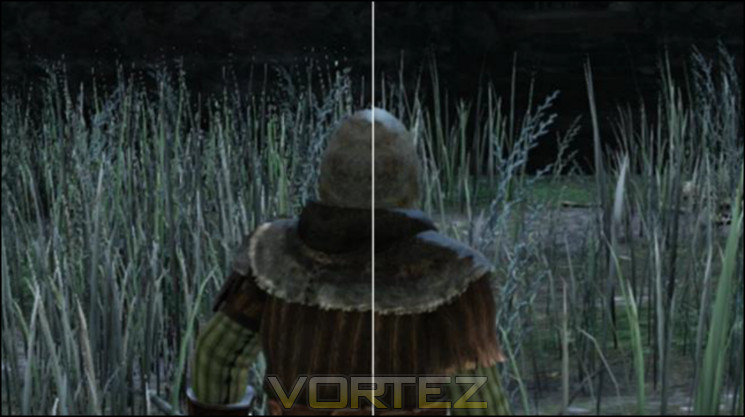
Composite scene, DSR sample on right
Using DSR (which can be enabled automatically through GeForce Experience or the driver application) the game is rendered at a higher resolution and then downscaled to the monitor native resolution. Unlike previous methods however tt’s fully integrated into the driver, meaning not only ubiquitous game support but also a far more stable process than the bespoke solutions previously used.
Whilst the potential image quality benefits are significant it’s also worth noting that DSR would be an excellent measure of assessing whether your setup is capable of supporting a higher resolution monitor in gaming. The performance impact of the downsampling process is apparently only 1-2% (i.e less than a frame per second), so the framerates you get running DSR at 4K on your 1080p monitor should be extremely close to those you get for 4K natively. We’re not sure if NVIDIA intended this, but we’ll certainly take it.
DSR is part of NVIDIA’s launch driver for the GTX 980 and 970, but will also be rolled down to Kepler in the near future. The current implementation is still a little rough around the edges and NVIDIA haven’t supplied a software means of easily showing the downsampled output frame as all in-engine screenshots will be at the supersample resolution, but it shows a great deal of promise.
Multi-Frame Anti-Aliasing
Optimised anti-aliasing techniques is one of the ways GPU manufacturers have sought to differentiate themselves beyond pure frame rates and GFLOP statistics. Recognising that MSAA was insufficient to the needs of shader-based rendering and SSAA was too expensive both AMD and NVIDIA have generated their own methods to combat aliasing, to greater or lesser success. NVIDIA’s most well-known iteration is Fast Approximate Anti-Aliasing (FXAA), initially requiring in-engine implementation but later enabled at the driver level. More recently Temporal Anti-Aliasing was debuted, cleaning up an image based on frame-by-frame changes to pixels around edges. Each has their pros and cons; a good way to get into a fight on enthusiast boards is to claim that one method is flat out better than the other.
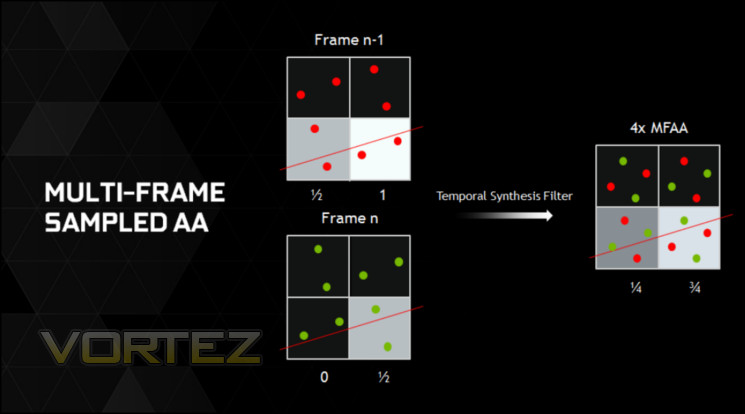
Today Multi-Frame Anti-Aliasing (MFAA, not to be mistaken for AMD’s Morphological Filtering AA) is being announced as a Maxwell-exclusive feature. As the name suggests MFAA is a post-processing anti-aliasing technique which operates by analysing a frame within the context of the previous frame, checking aliasing and rendering colours based on a proprietary algorithm in hardware.
The foundation of MFAA is multi-pixel programmable sampling, a means by which the matrix of sampling positions can be randomised to reduce data processing artefacts caused by repeating the same sample position from frame-to-frame.
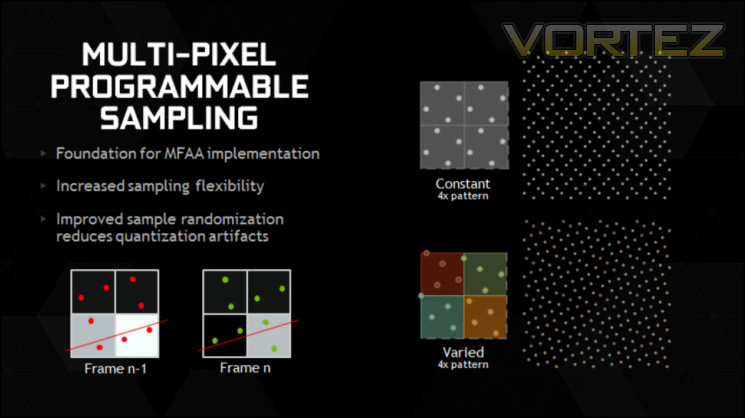
MFAA seeks to be as good as MSAA, but without the performance impact algorithms and with image characteristics that are substantially different from FXAA. The latter has garnered a reputation for slightly blurring images, reducing the overall image quality, and so an effective alternative is probably due at this point.
Sadly MFAA is not quite ready for prime-time and will be issued as part of a driver update at a later date. The obvious question-mark is just how high the image quality presented is, and if it can operate well when the differences between frames is relatively large. However NVIDIA have clarified that the technique will work in tandem with alternate-frame rendering, an SLI mode available when using two or more matched NVIDIA GPUs.
Packaging & Accessories
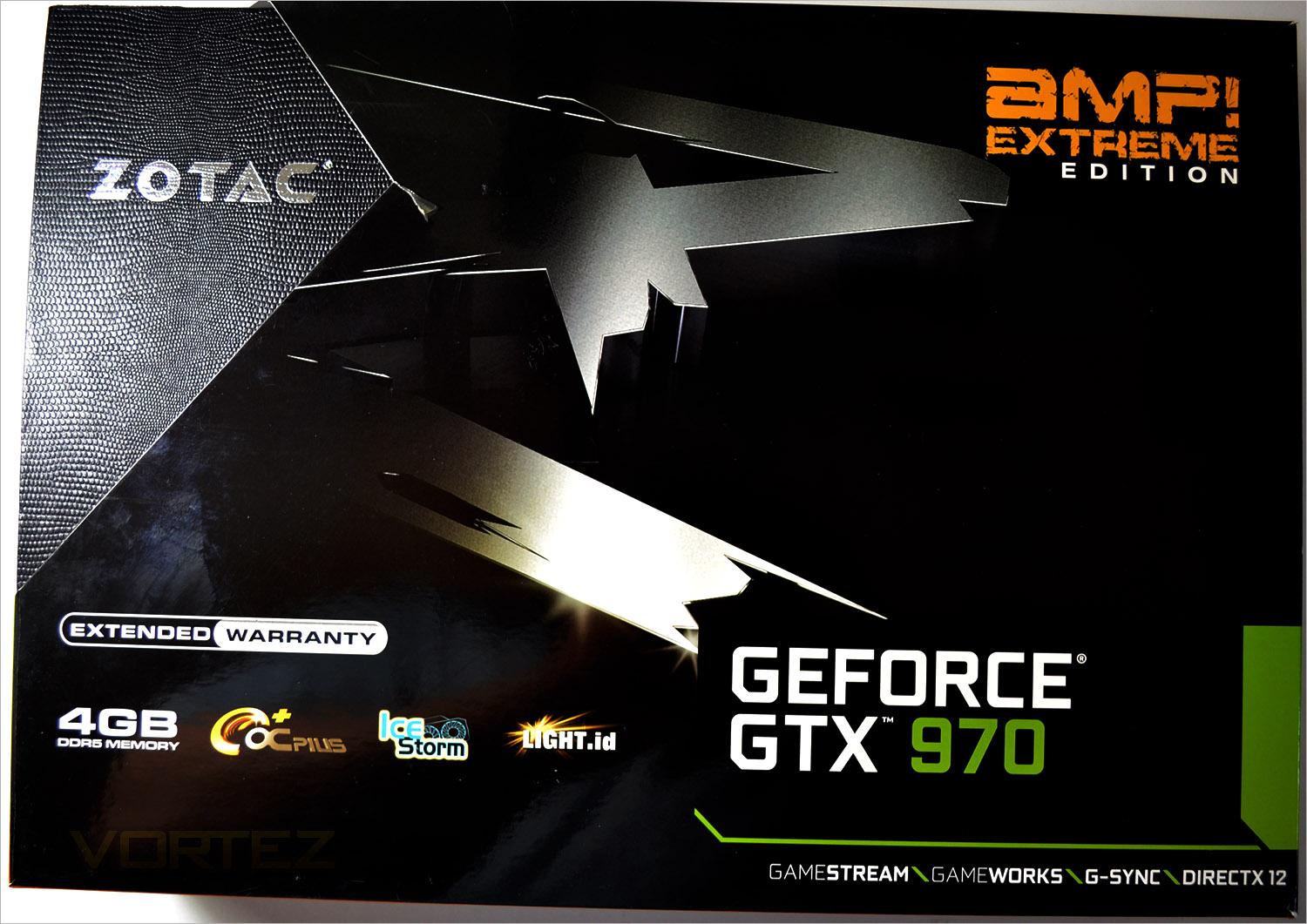
ZOTAC packaging in years gone by have traditionally not strayed far from the NVIDIA reference packaging. What we have here however is immense. The packaging is oversized and more akin to a laptop box rather than a graphics card! The outer skin has cut-outs to reveal a dimpled, luxury box beneath. The AMP! Extreme moniker tells us that this is a special product if the size of the box wasn’t already giving you that message. We also see that ZOTAC have added features such as OCplus Ice Storm cooling and Light.id. This along with an extended 5 year warranty rounds off the info on the front of the package.
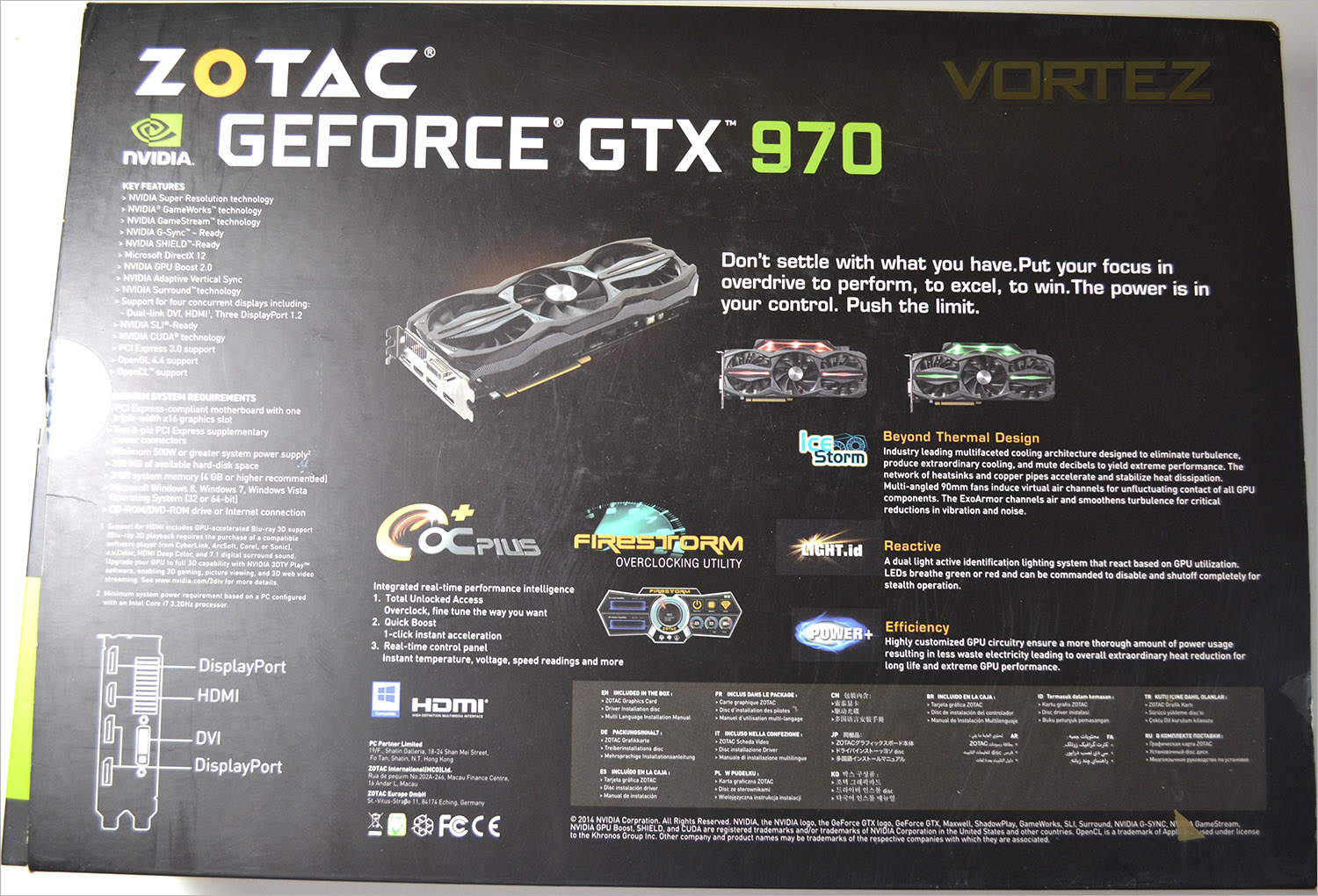
The rear of the package goes into greater detail regarding the feature set but adds more information regarding the system requirements and additional key features such as Power+ and Firestorm overclocking utility.
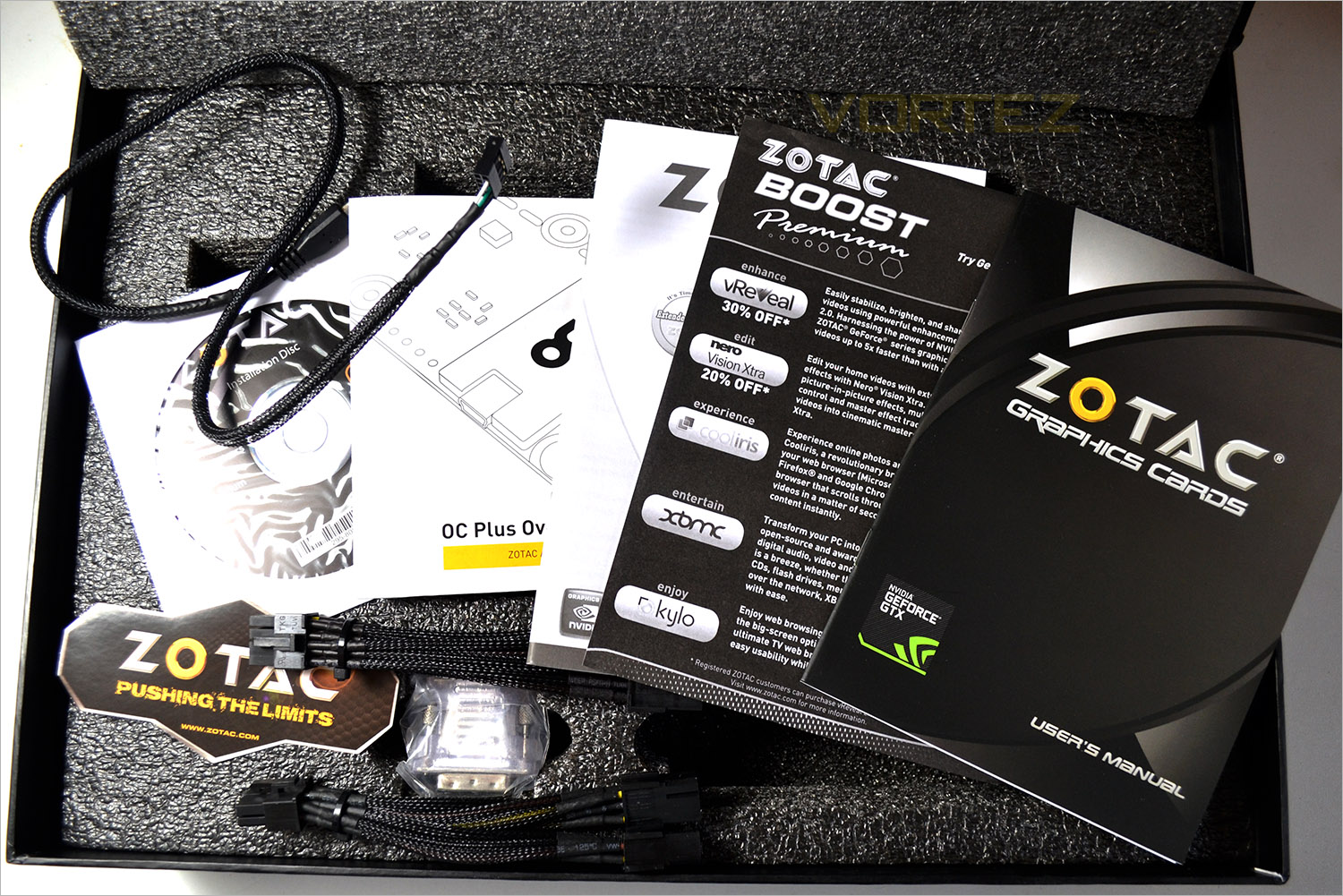
The inner box is an example of what we would like to see other manufacturers use. Rather than a boring old cardboard box, we get a flip lid, suitcase-esque example. Inside the contents are held firm with a compartmentalised foam brace with further protective anti-static padded sleeve for the GPU itself.
The accessory list comprises of 2 twin Molex to 8pin PCIe power cables, a micro USB cable for the OC+ module, DVI-VGA adaptor, case sticker, utility/driver CD and a plethora of manuals and warranty cards. One of the best packages we have seen to date. Well done ZOTAC!
First Look
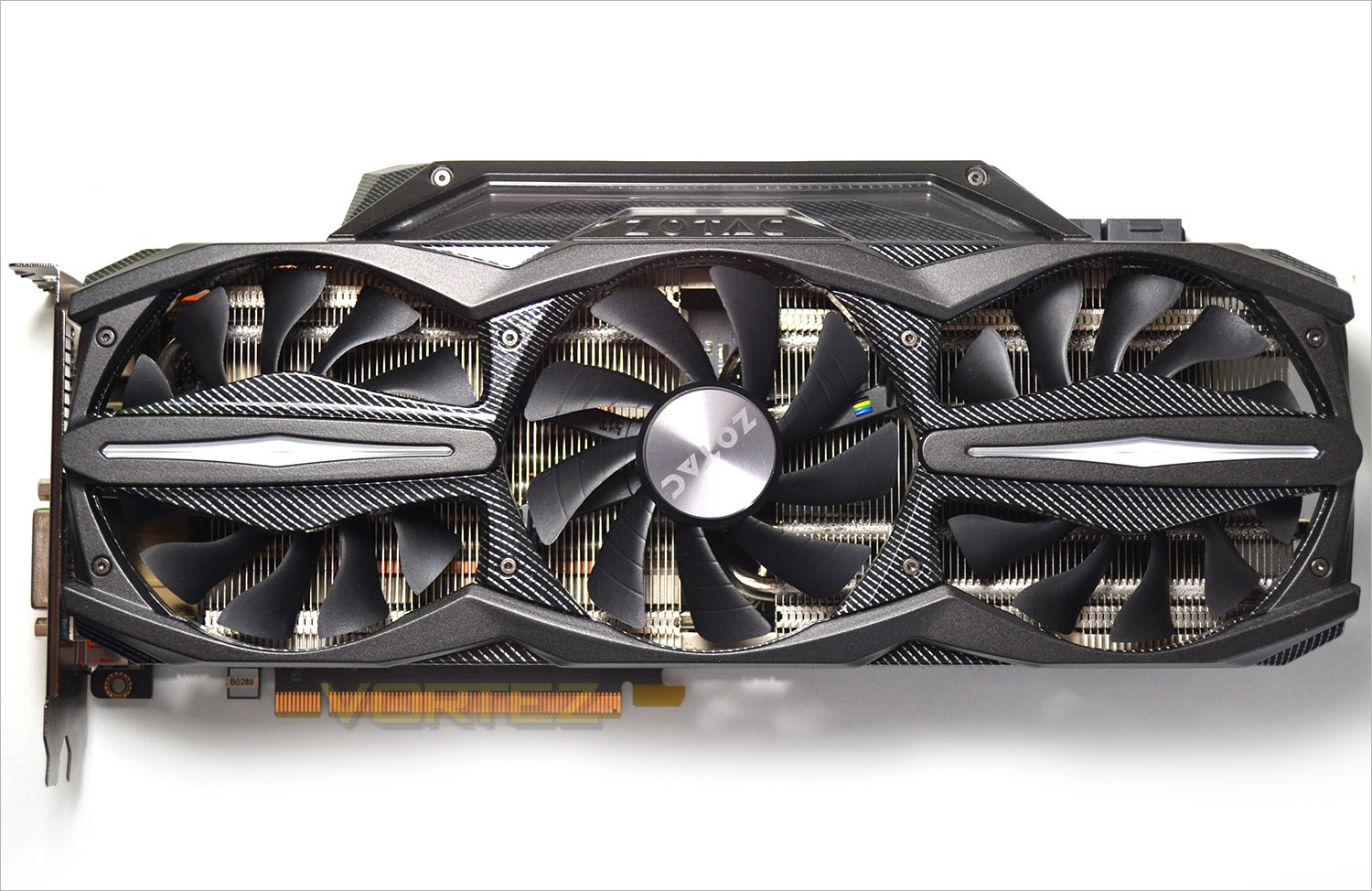
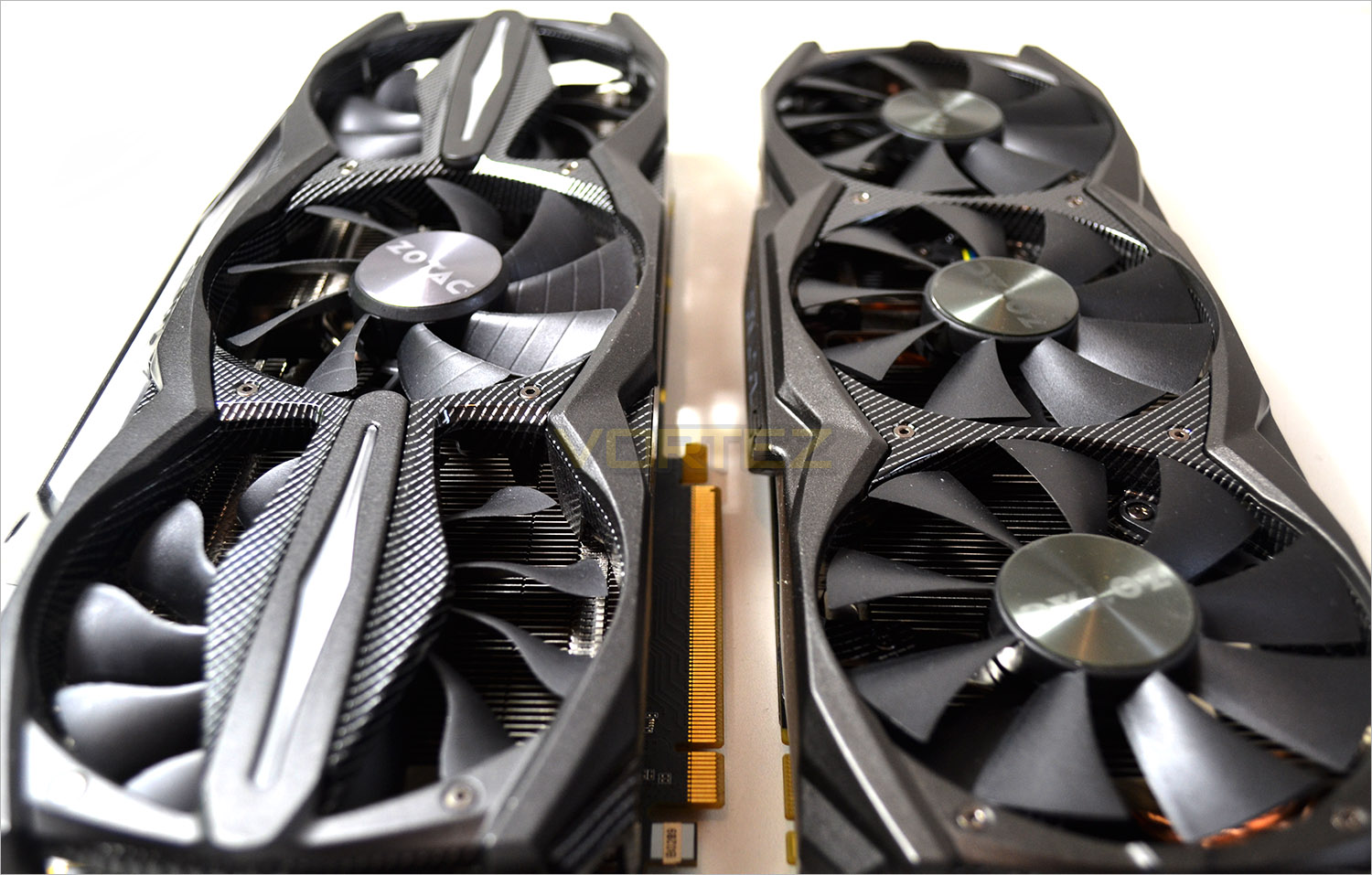
The first thing we noticed was the width of the card. There is a 20mm extension to the standard width of a GTX970 which houses a slanted light unit fully integrated into the design of the card. the brace that holds the three fans in place is reminiscent of carbon fibre with the outer most fans having light ID inserts.
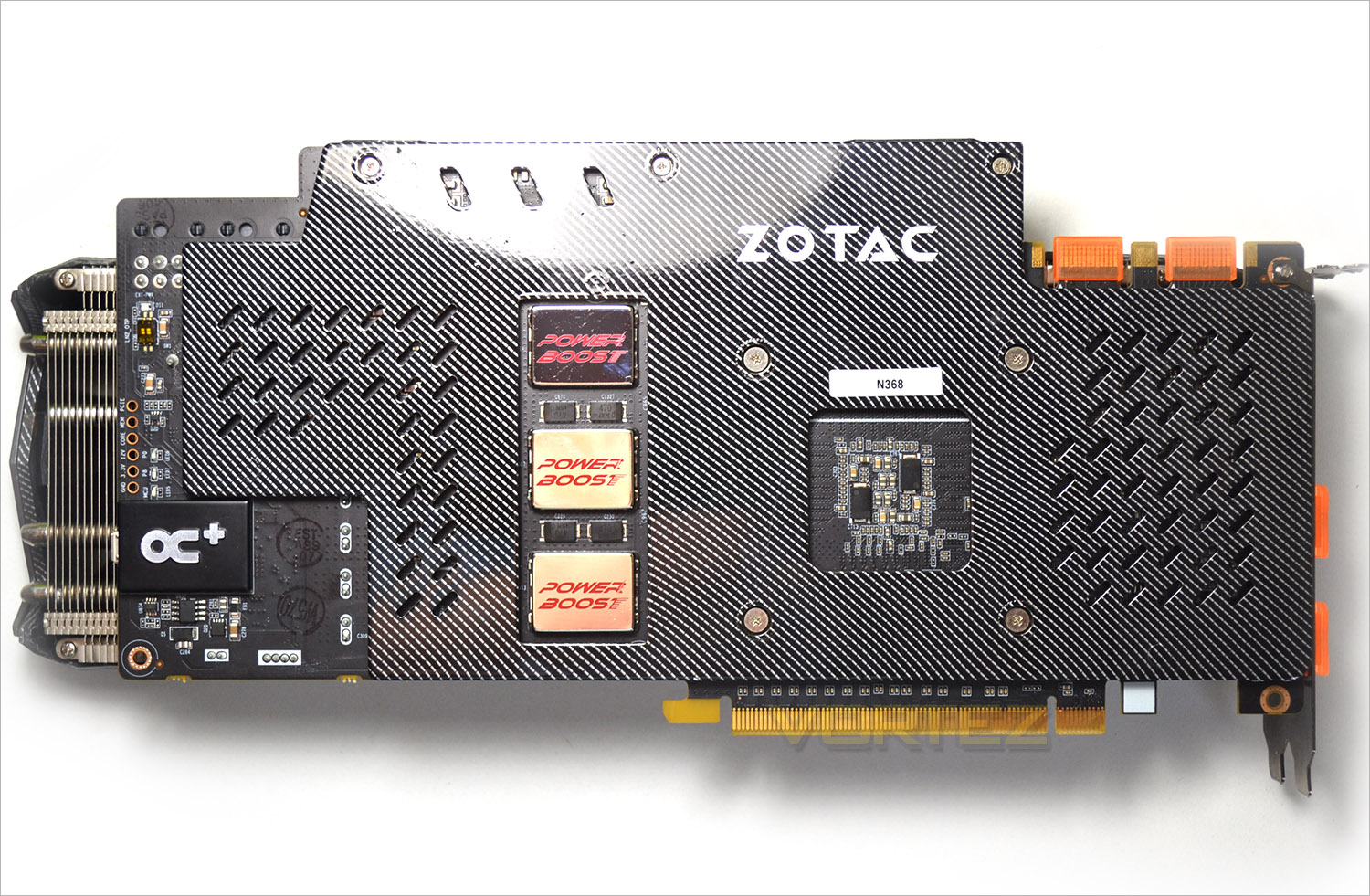
The rear of the card carries on the Carbon fibre theme this time on the back of an aluminium backplate protecting most of the components beneath. There are some cutouts though allowing us to see the 3 Power Boost modules and OC+ unit.
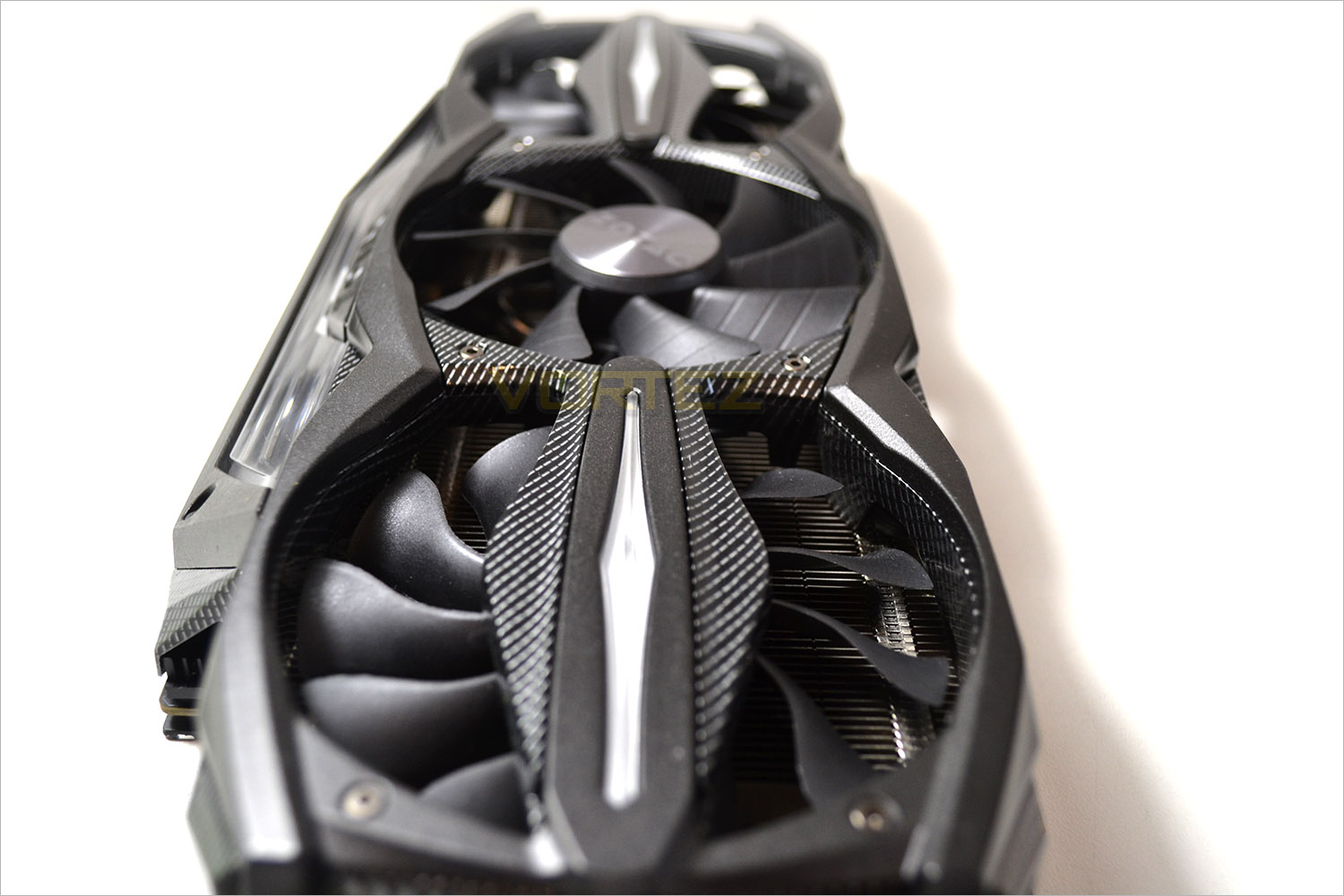
The card measures at the longest points 300mm in length and 120mm in width which is both longer and wider than most graphics cards in the market today.
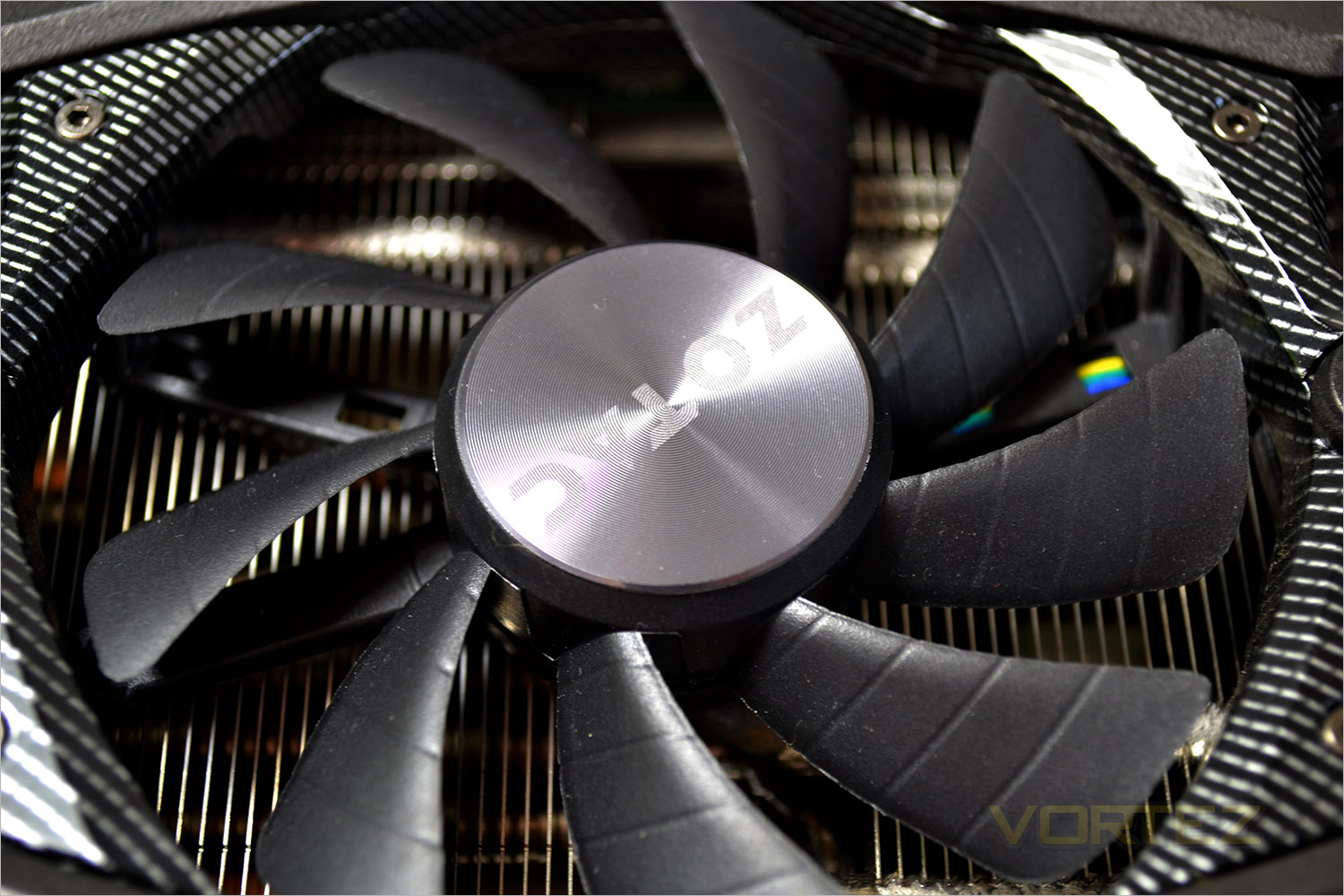
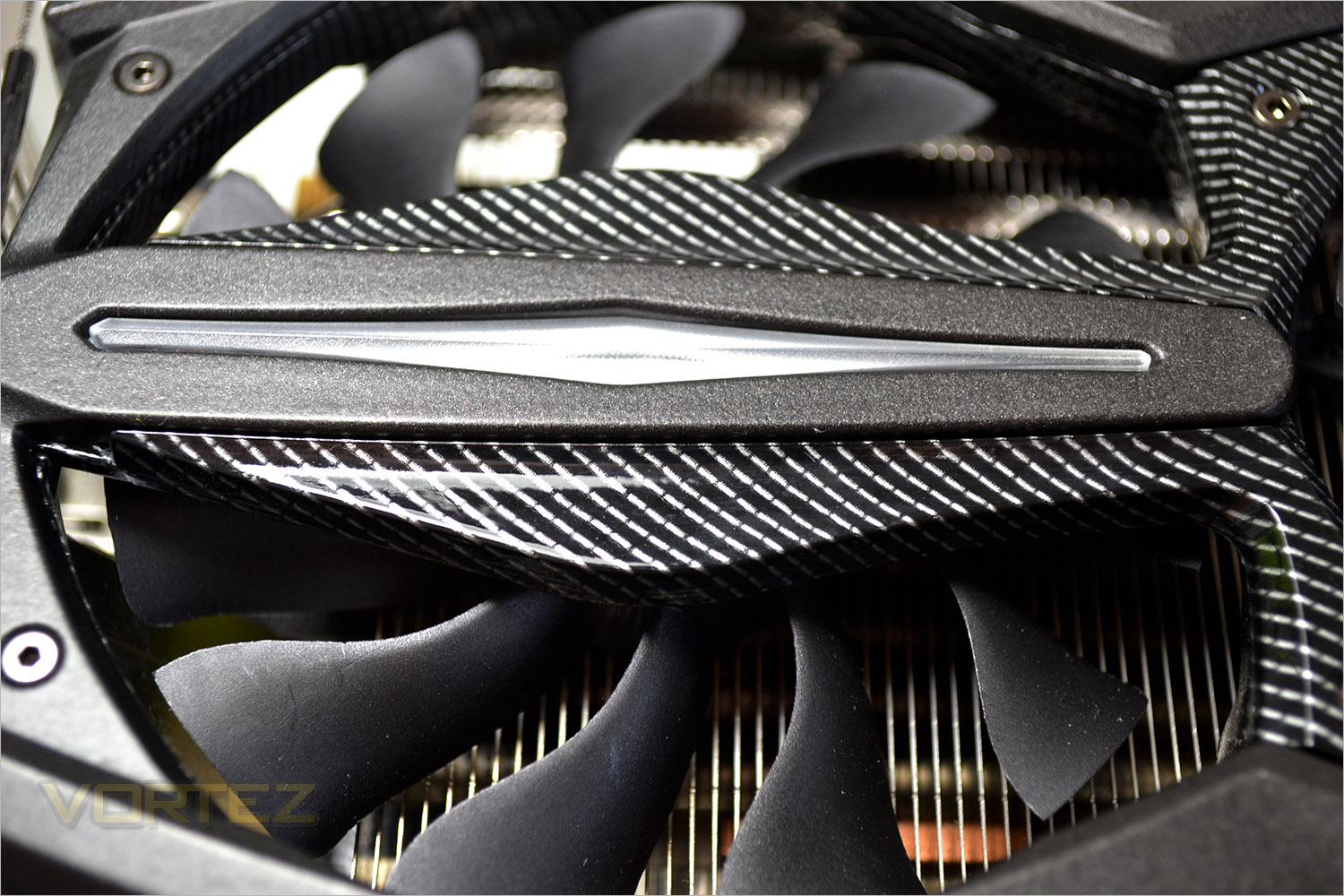
The inner most fan is shaped slightly different to the two outer fans which have a defined twist to the fan blade profiling.
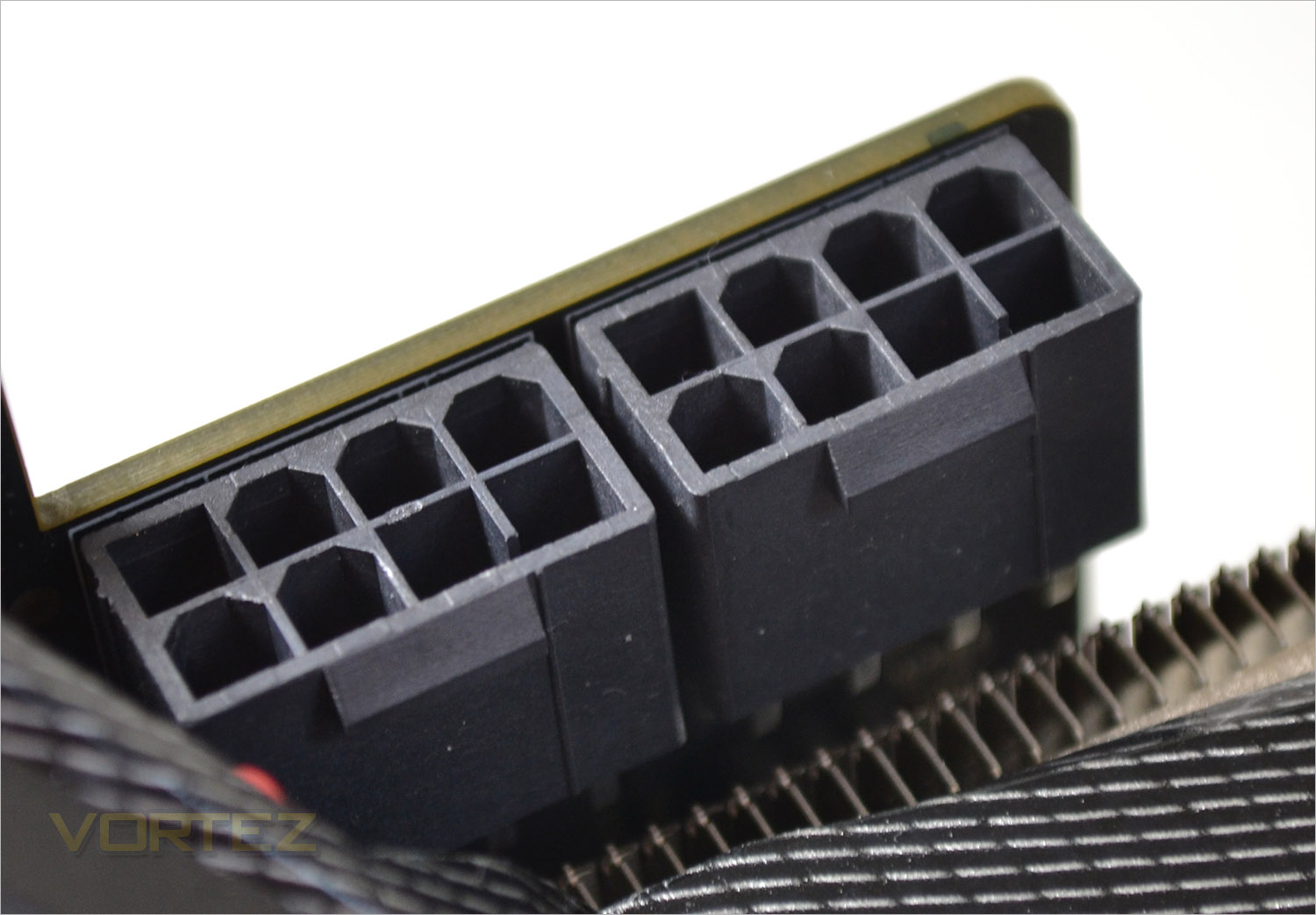
To power this graphics card you will need a PSU rated to 500W and while ZOTAC provide two twin 6pin-8pinPCIE power cables which is fine for moderate use, if you intend on overclocking heavily we would recommend a beefier power supply with dedicated 8pin cables.
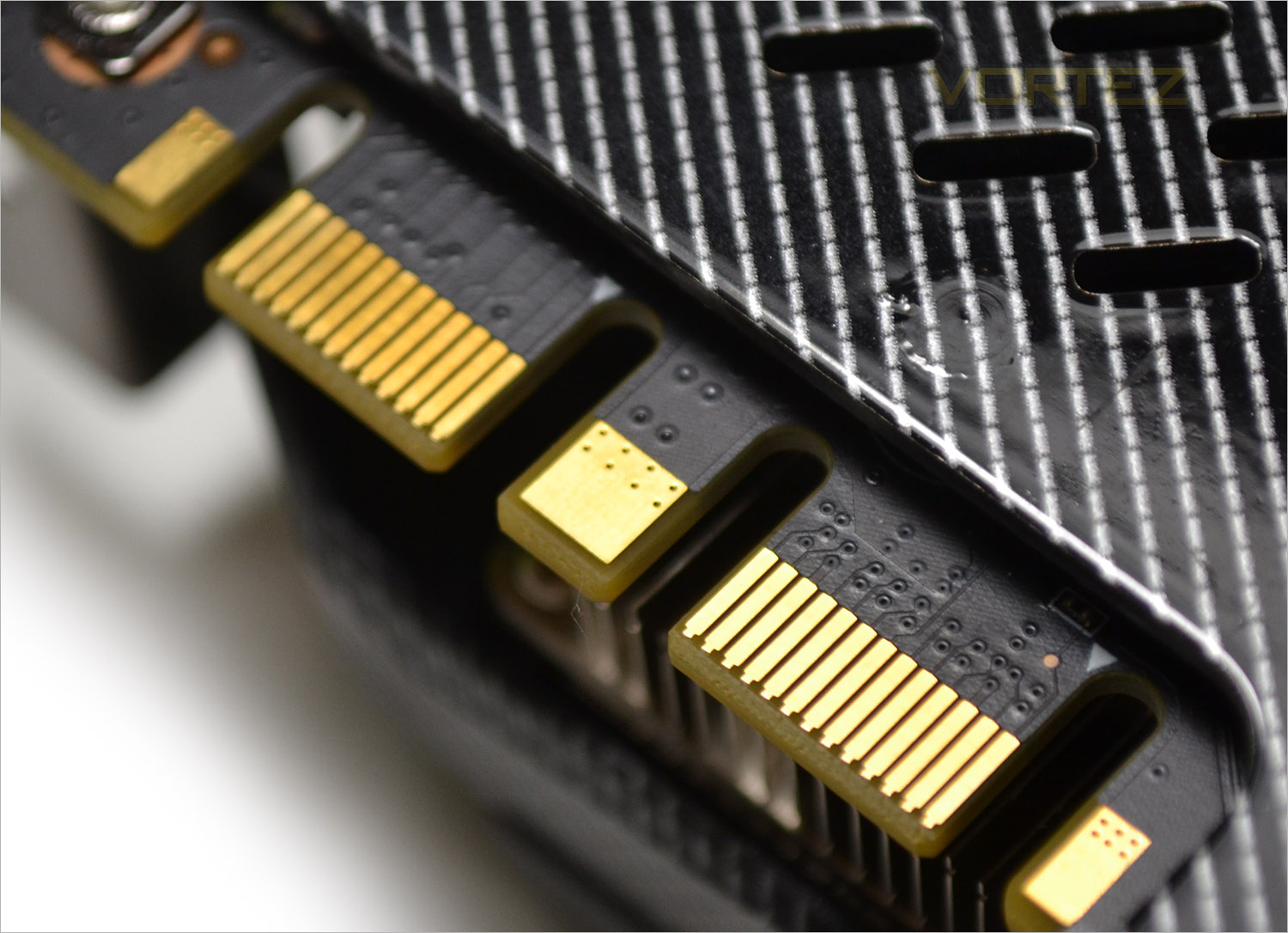
As with other GTX 970’s, the AMP! Extreme is multi SLI capable.
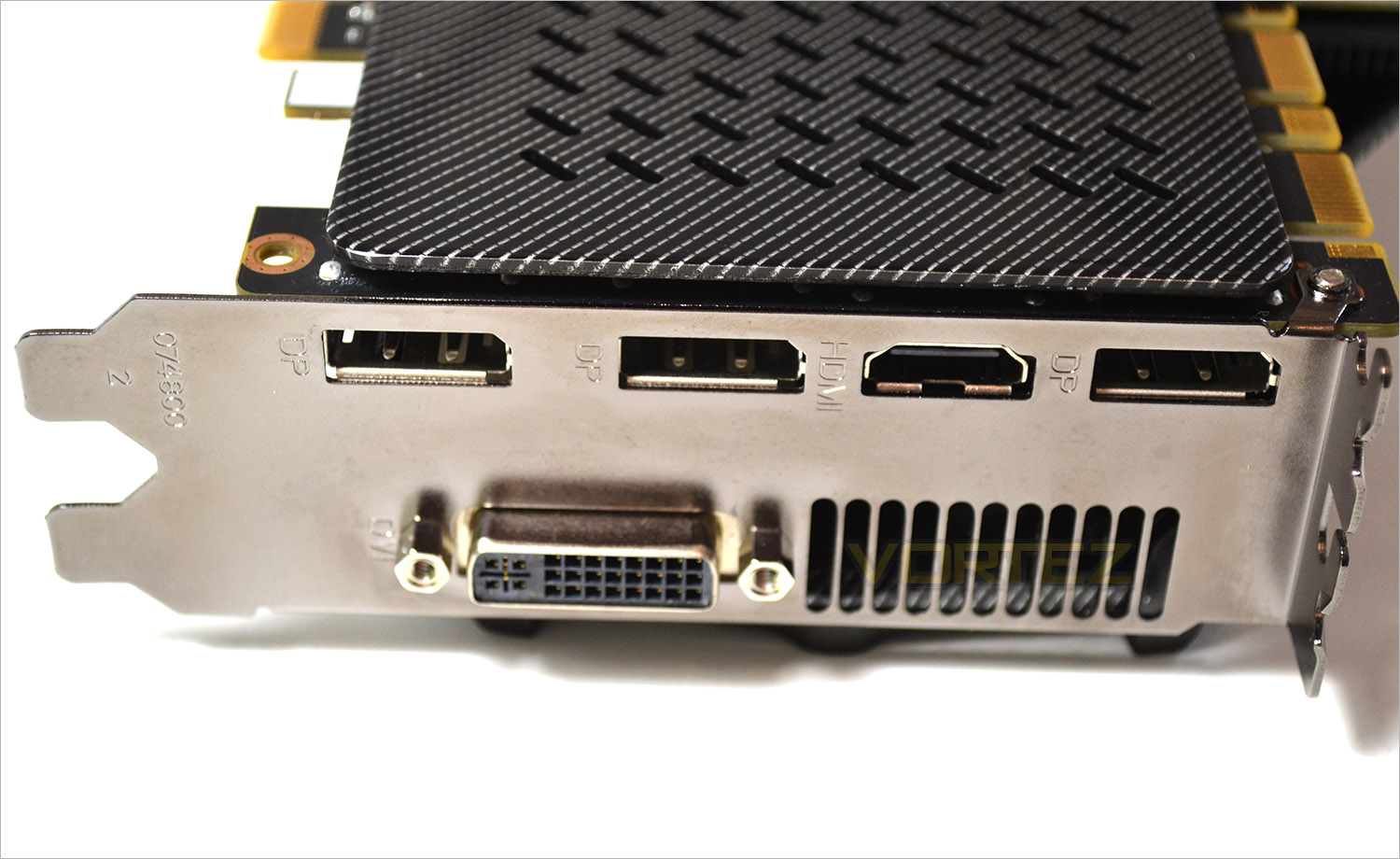
The I/O area differs from most GTX 970’s in that this version features 1xHDMI, 3xDP, 1x DVI.
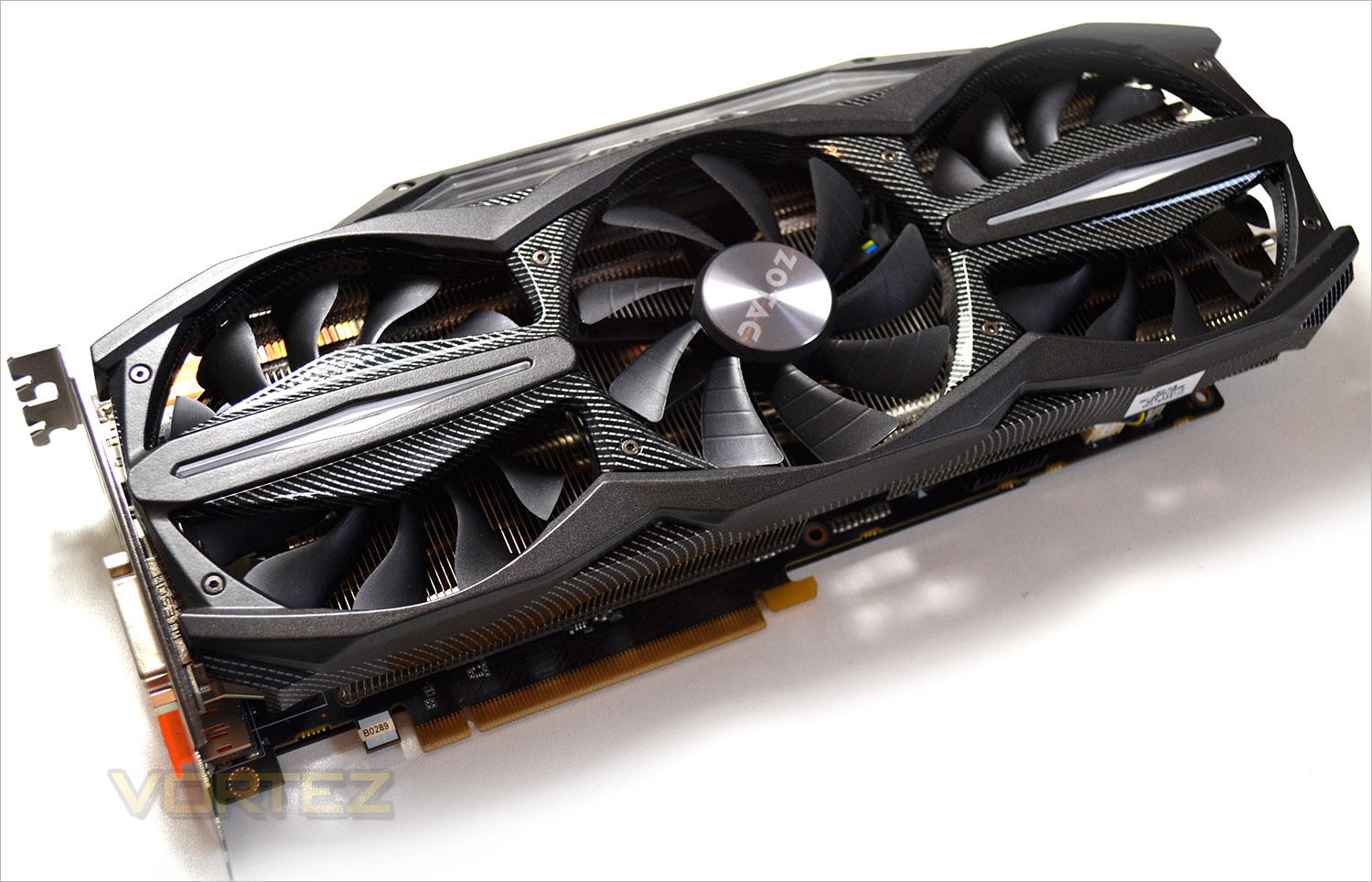
One of the endearing attractions of this card and specifically the ‘Ice Storm’ cooler is the Light I.D feature. A simple yet effective LED effect alternates between green and red to indicate idle and load states. If you’re not a fan of LEDs lighting up your GPU then this can of course be turned off via software and the card doesn’t look any worse for it, just a lot more discreet.
Overall, we really liked the look of this card. Be under no illusions that this card is huge but in terms of length and girth but we feel this only adds to the appeal regardless of the excessiveness. The carbon fibre effect compliments the aesthetics with the black trim rounding off a very polished looking product.
Closer Look
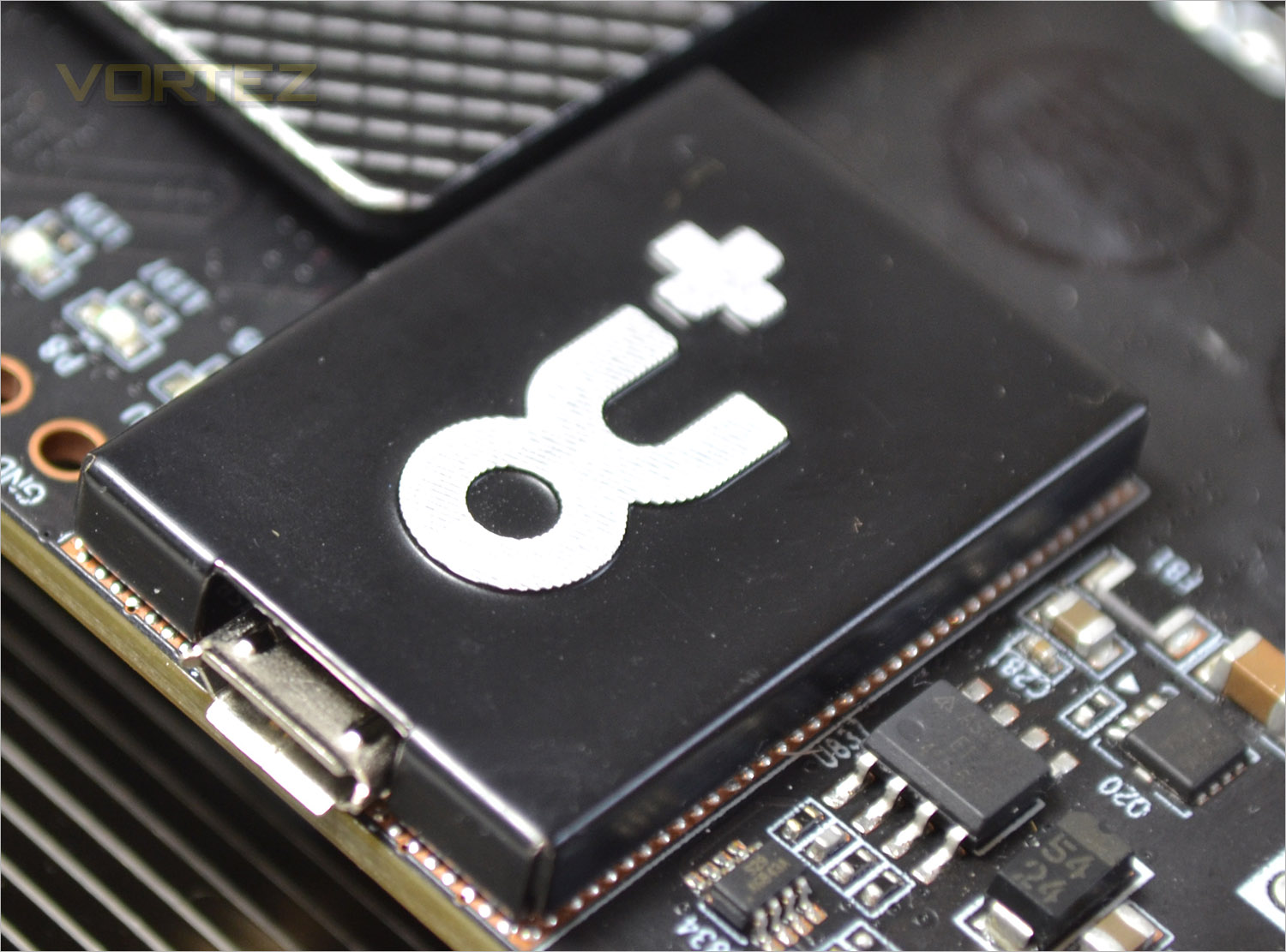
The OC+ controller regulates power to the GPU’s PWM via ZOTAC’s Firestorm overclocking and monitoring tool. Rather than communicate through the PCIe slot though, a separate mini USB connection is used to make this regulation truly unique and independent.
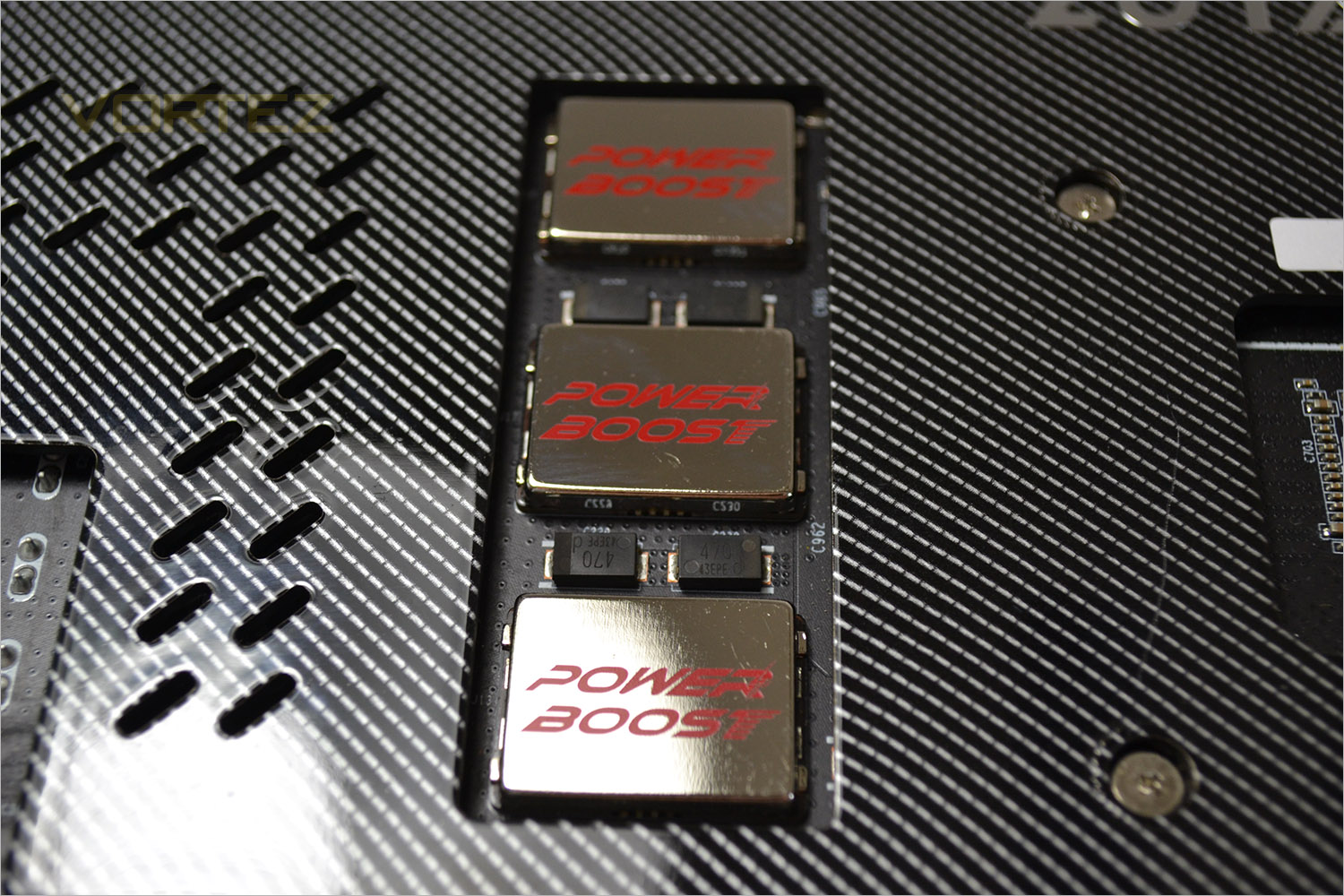
Power Boost branded capacitors are situated to the rear of the card that have a mirror finish. These capacitors help form the Power+ feature of the card that helps smooth out power delivery for optimum stability and efficiency.
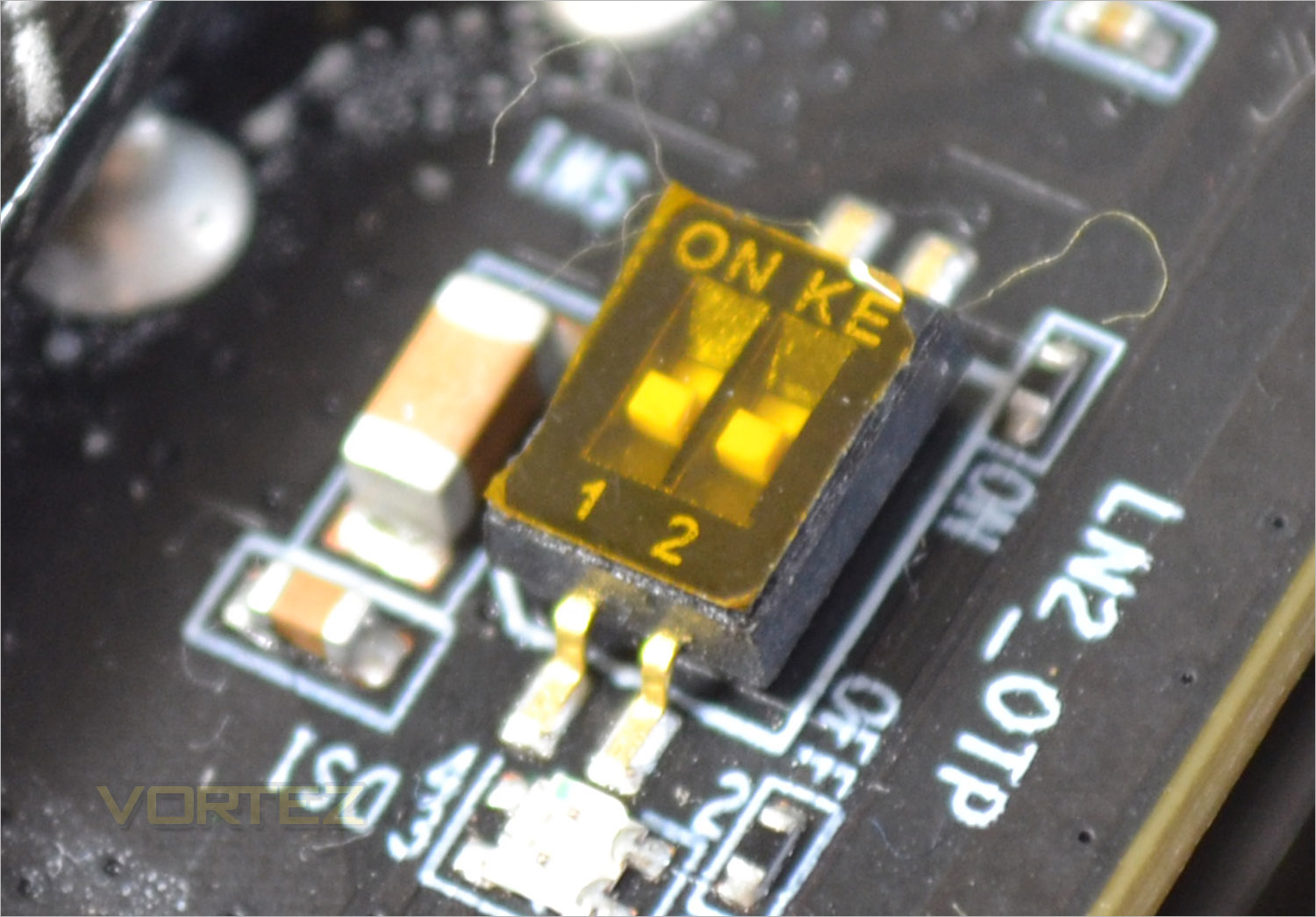
Two tiny dip switches are also found on the back of the PCB which are labelled with LN2_OTP meaning these are over-temp protectors for users on LN2 extreme cooling and should not be tampered with unless you have this cooling available and in use.
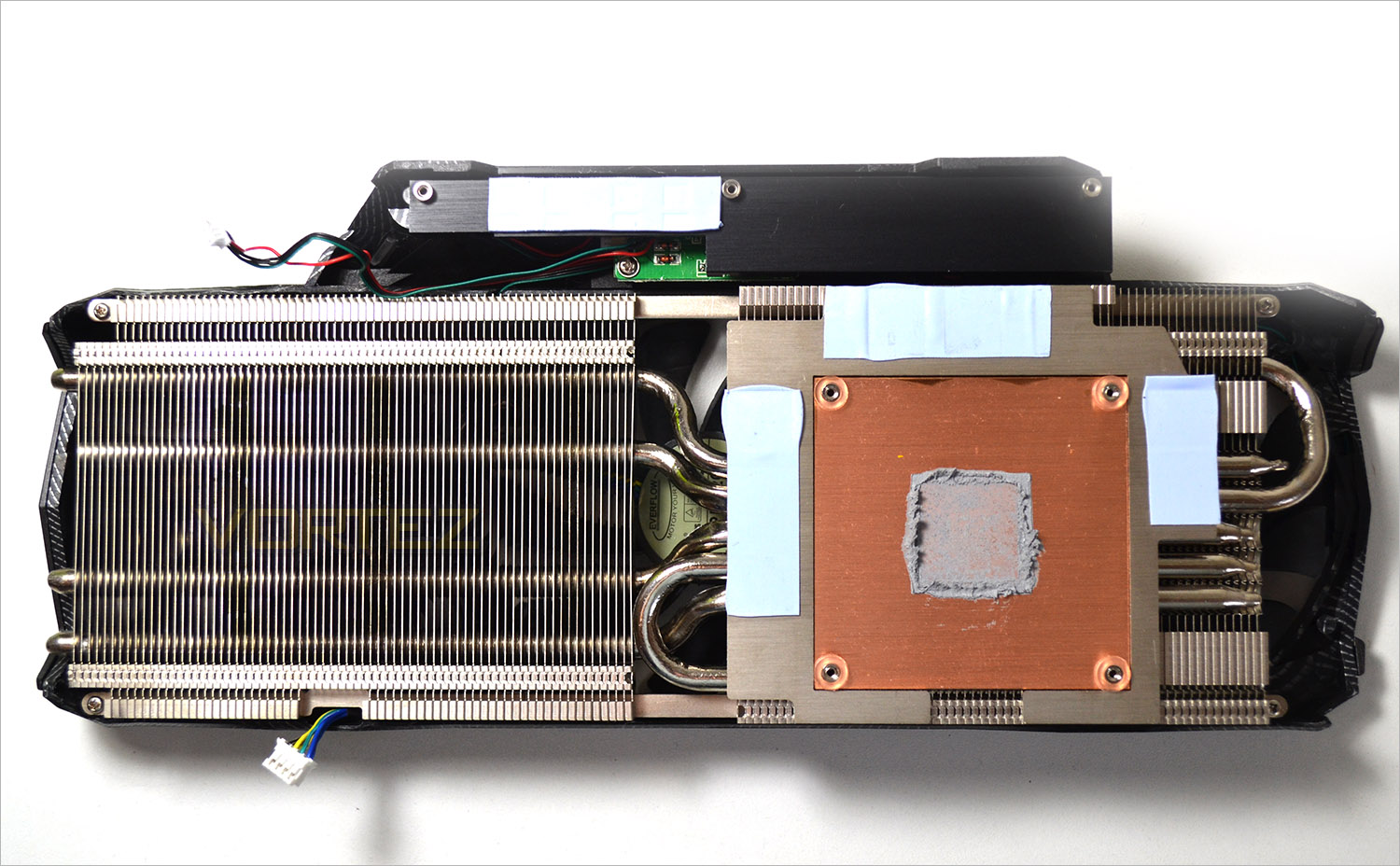
The heatsink cooler is the aptly named Icestorm. The usual array of copper heatpipes and aluminium finned arrays are separated into two sections. Cooling these sections are three 90mm fans with a separate passive XL heatsink for the VRM.
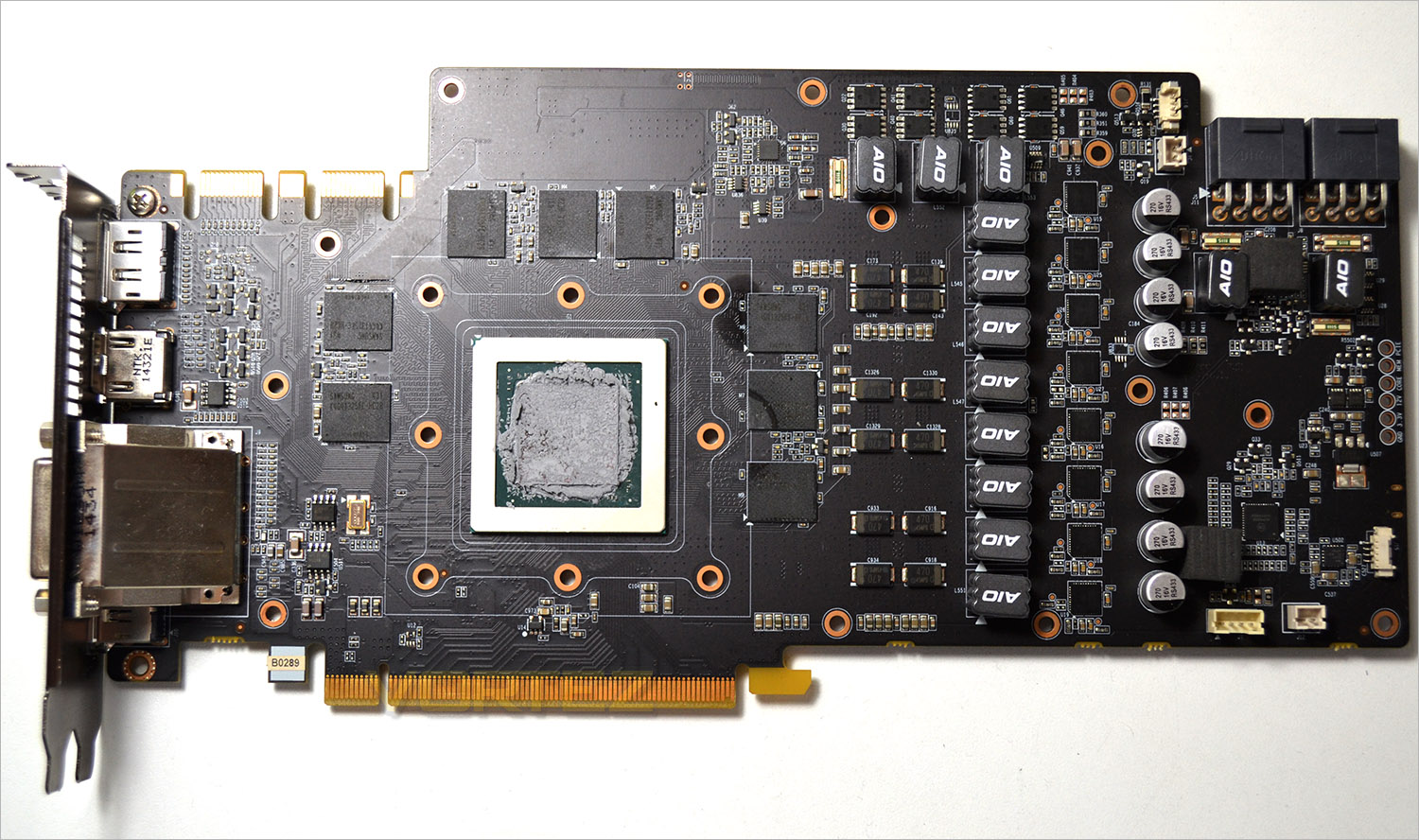
The first thing you may notice is the odd shape of the PCB. We see that the extra section uppermost on the card is not purely for aesthetic purposes but carries 3 extra power phases and the power module for the LED lighting.
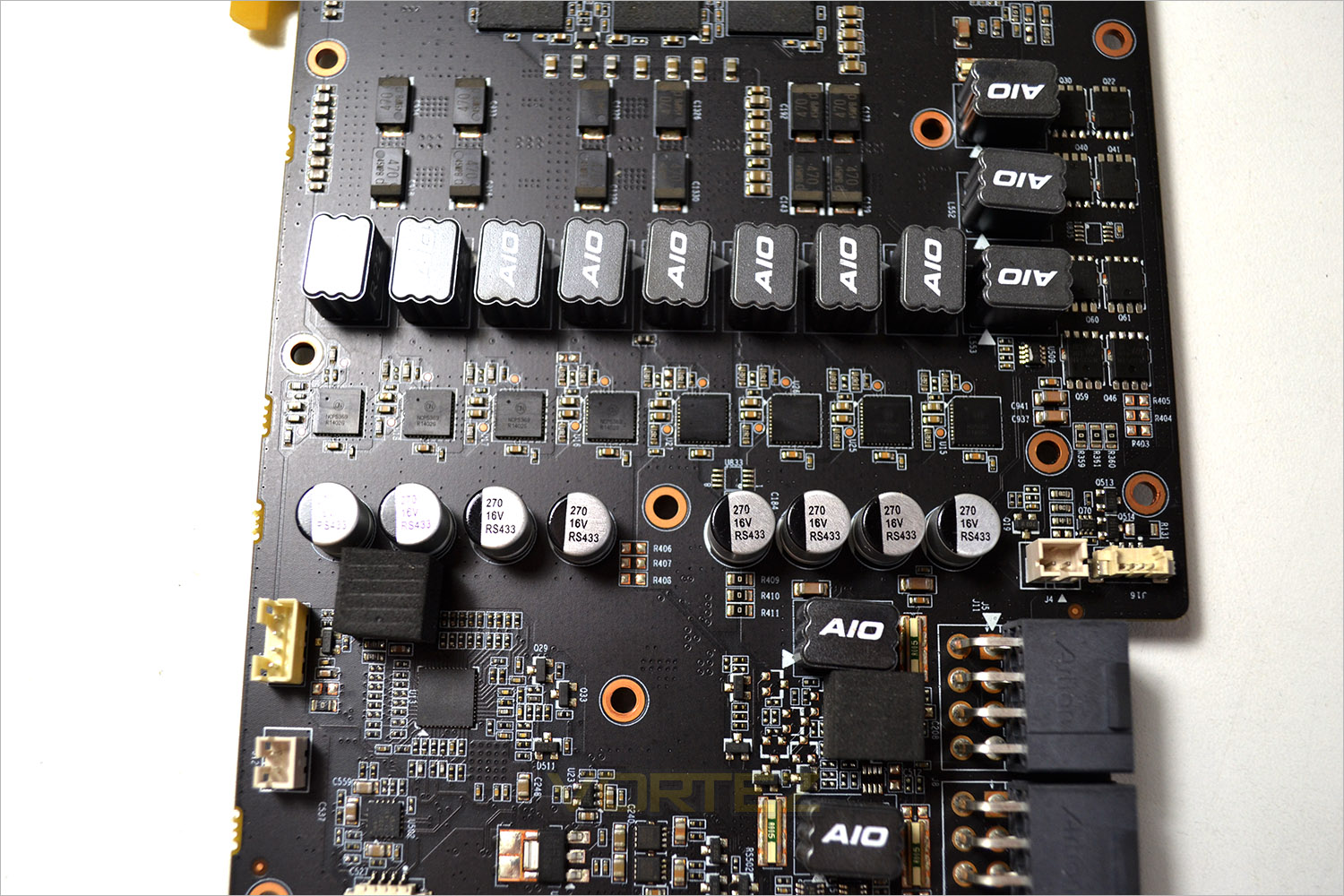
The GTX 970 Extreme AMP! has a huge power base with 8 phases reserved for the core, 3 for the memory and two for auxiliary making a massive 13 power phases overall. Solid capicitors, AIO ferrite chokes and high quality MOSFETs ensure ultra reliability and stability.
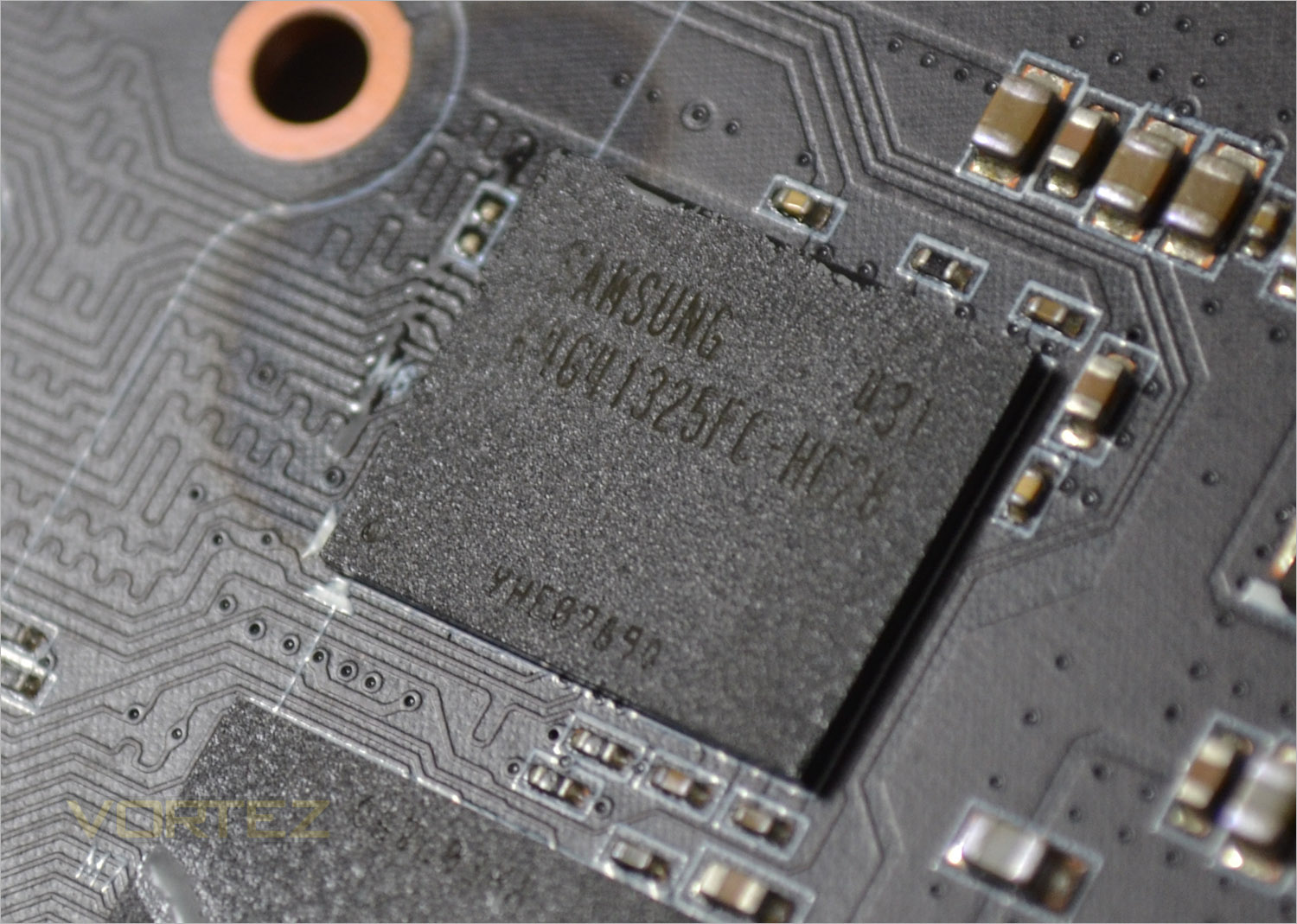
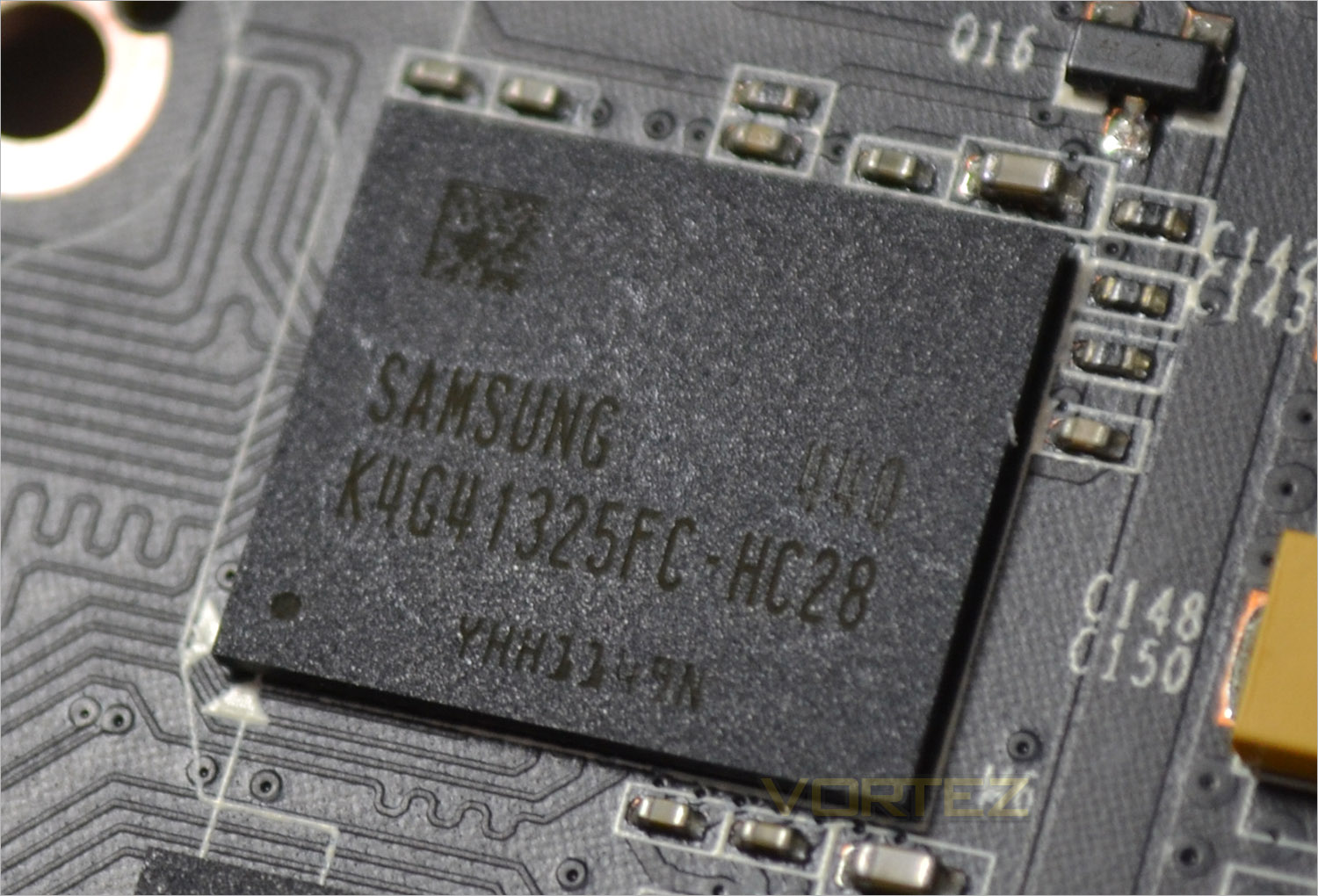
The 4GB (or 3.8GB depending on which side of the NVIDIA camp you sit) hails from Samsung and carries the K4G41325FC-HC28 product line. They are specified to run at 1750 MHz (7000 MHz GDDR5 effective) and are the staple memory of choice for the GTX900 980/970 cards.
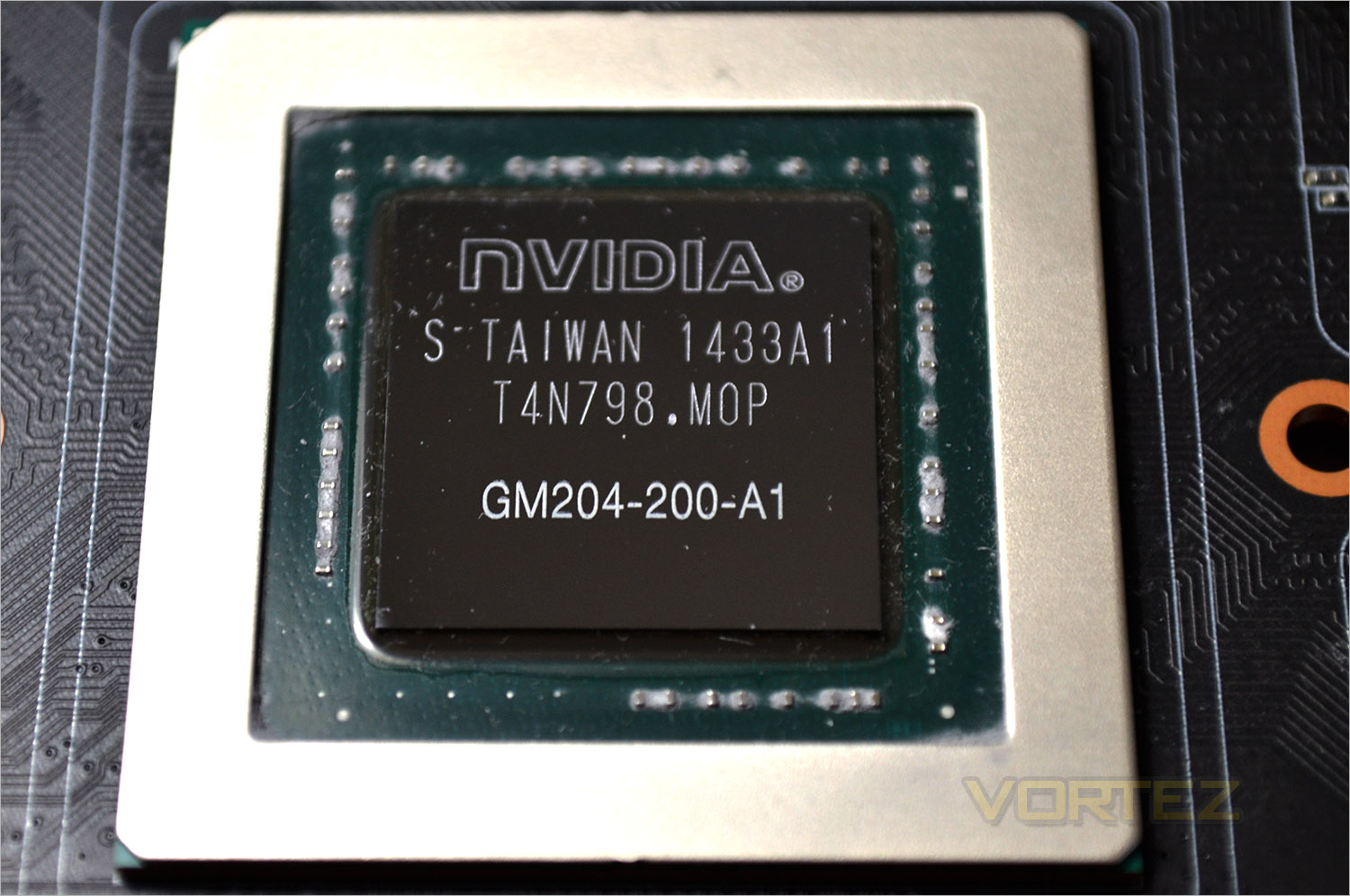
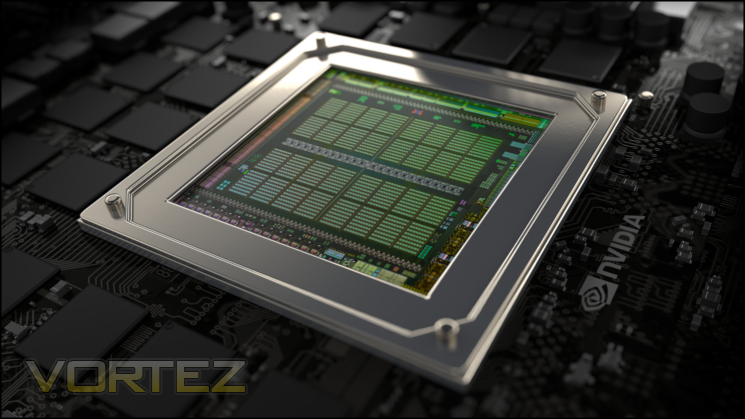
Finally we reach the heart of the beast. Much has been said about the GTX970 based on Maxwell technology so we won’t go over old ground again here but if you didn’t already know, it is a slightly trimmed down version of the all conquering GTX980 without the huge price tag that entails.
Packaging & Accessories (Core)
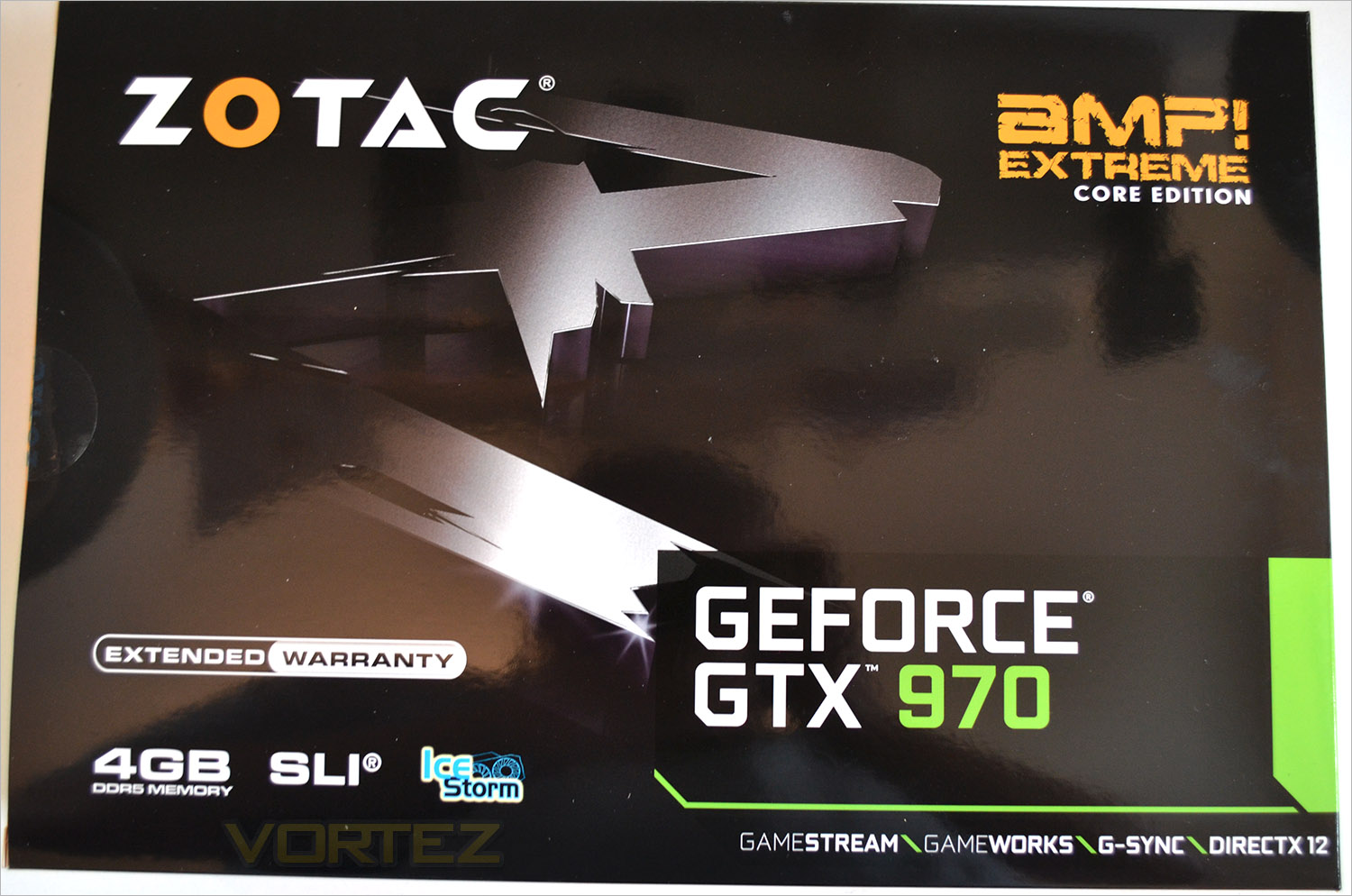
The packaging of the Core version is much more descreet than the vanilla Extreme AMP! which surprised us given that this is the more extreme card on paper thanks to the faster factory overclock. Instead what we get here is an attractive albeit subdued package in comparison.
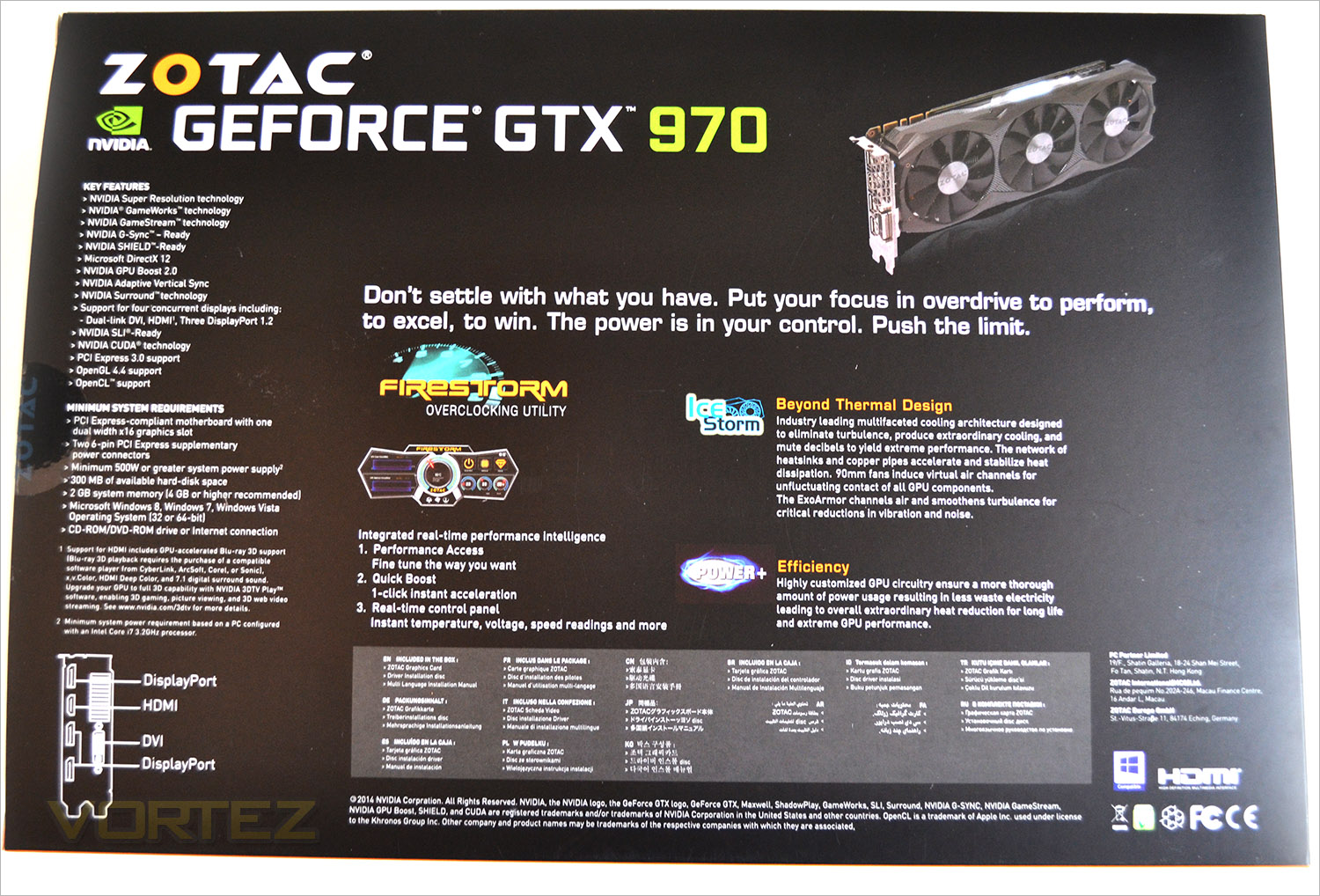
The rear of the box gives us the finer details of the product features and also goes over the system requirements of the Core edition.
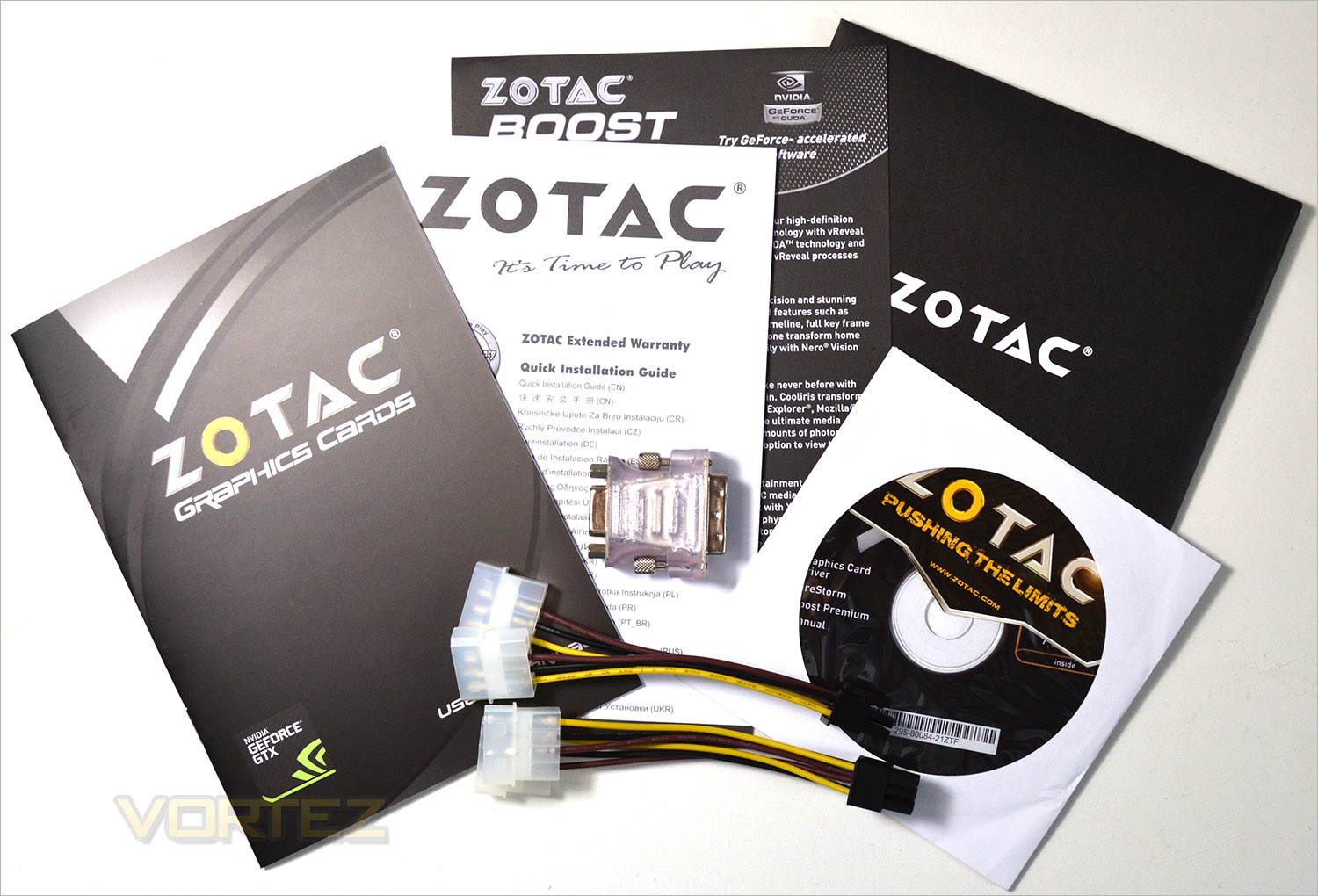
Accessories too are much less impressive than the original AMP! Extreme. You still get the paraphernalia but you won’t get a case badge and the two twin MOLEX-6pin PCIe cables are not braided.
First Look (Core)
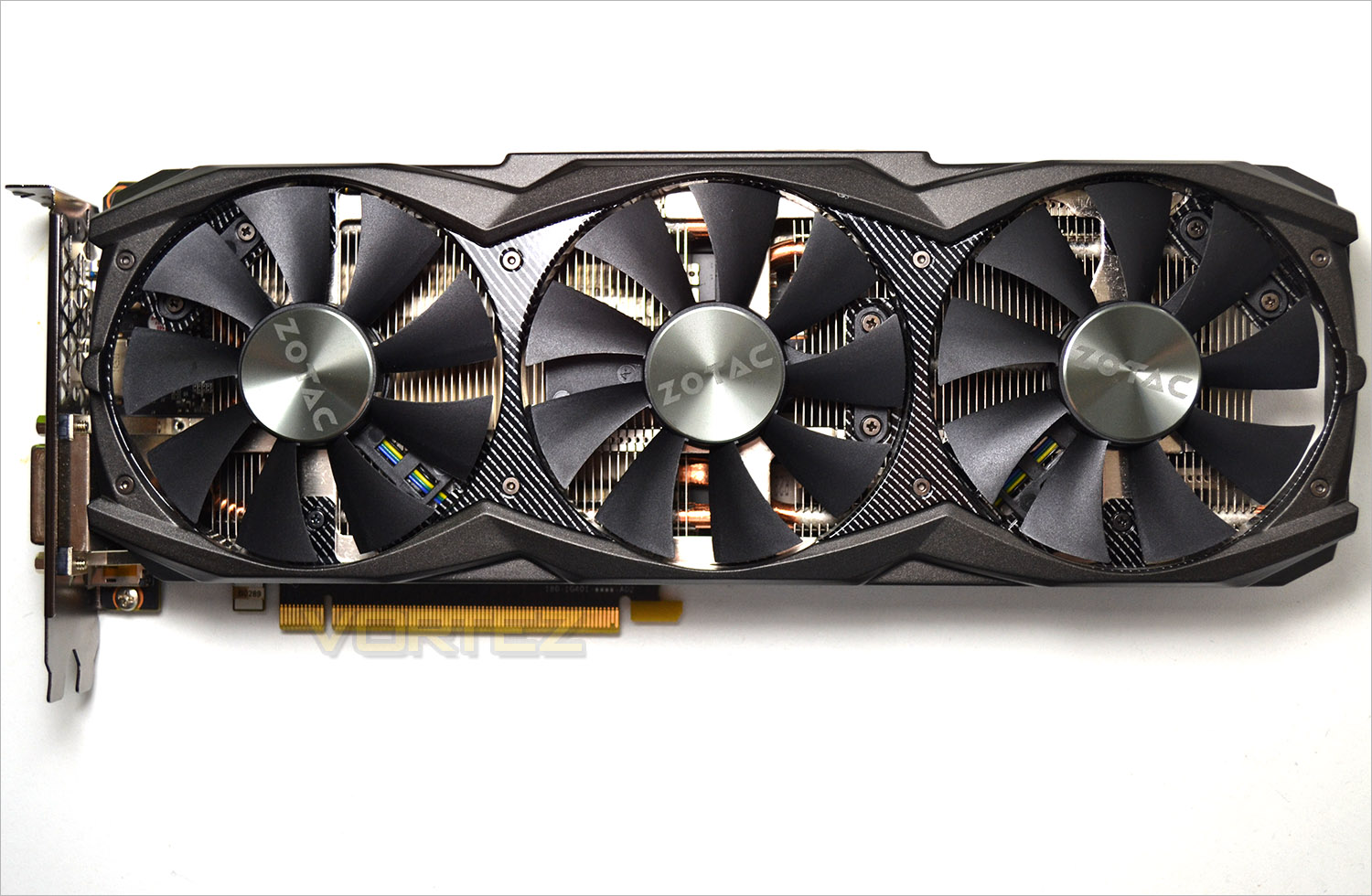
The first thing we notice is that gone are the LED lights and the card is much thinner and ‘regular’ looking. Whether that is a good thing or not will depend on your own preferences, particularly if space is an issue for you. the card still retains some semblance of the older card with imitation carbon fibre highlights beneath a matt black plastic shroud but overall, the card is much less intriguing than the aforementioned AMP! Extreme.
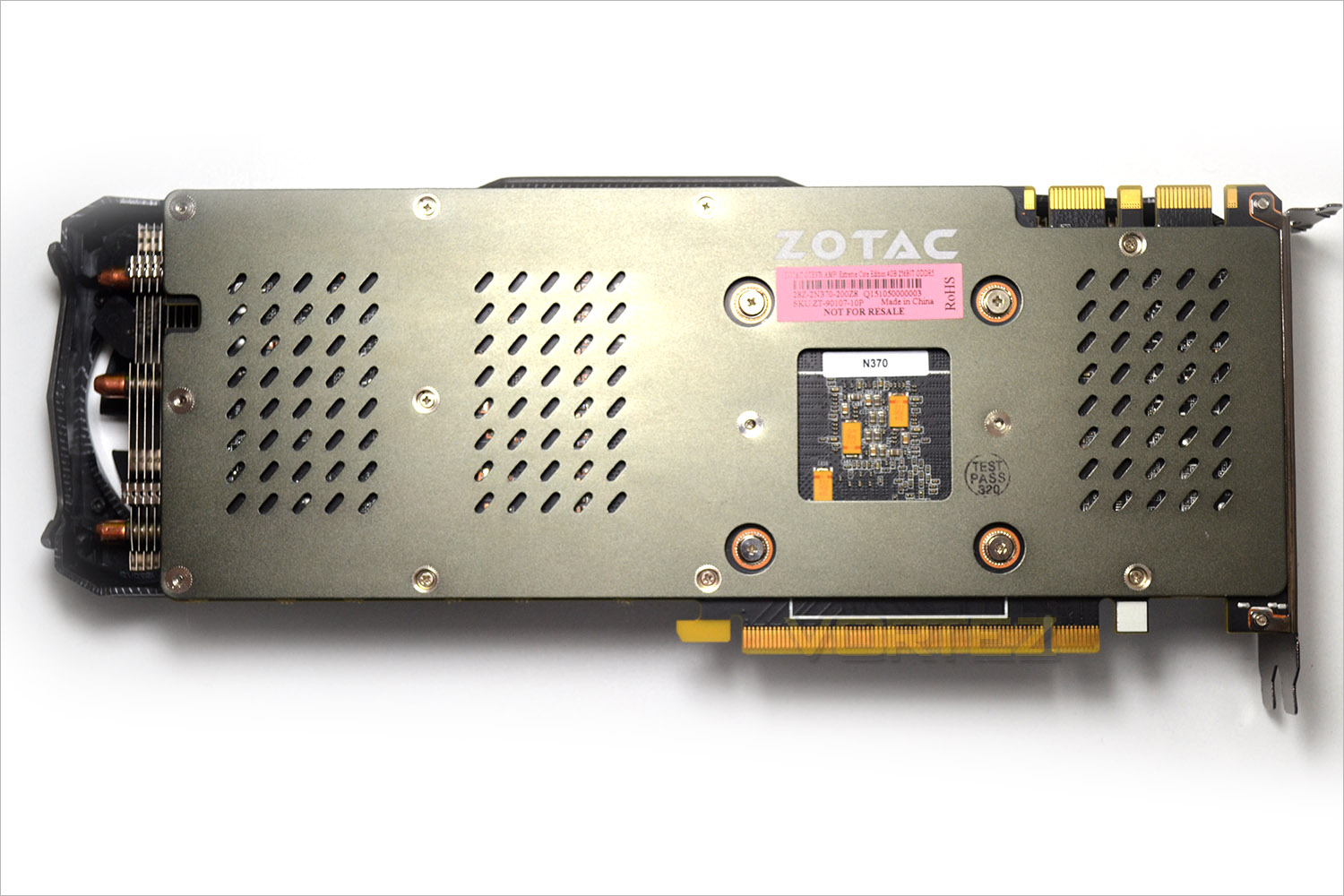
The rear of the card too has seen an overhaul in that the gloss carbon fibre backplate is replaced with an aluminium gun metal grey. Also appeared to have gone are the power boost caps and the OC+ feature.
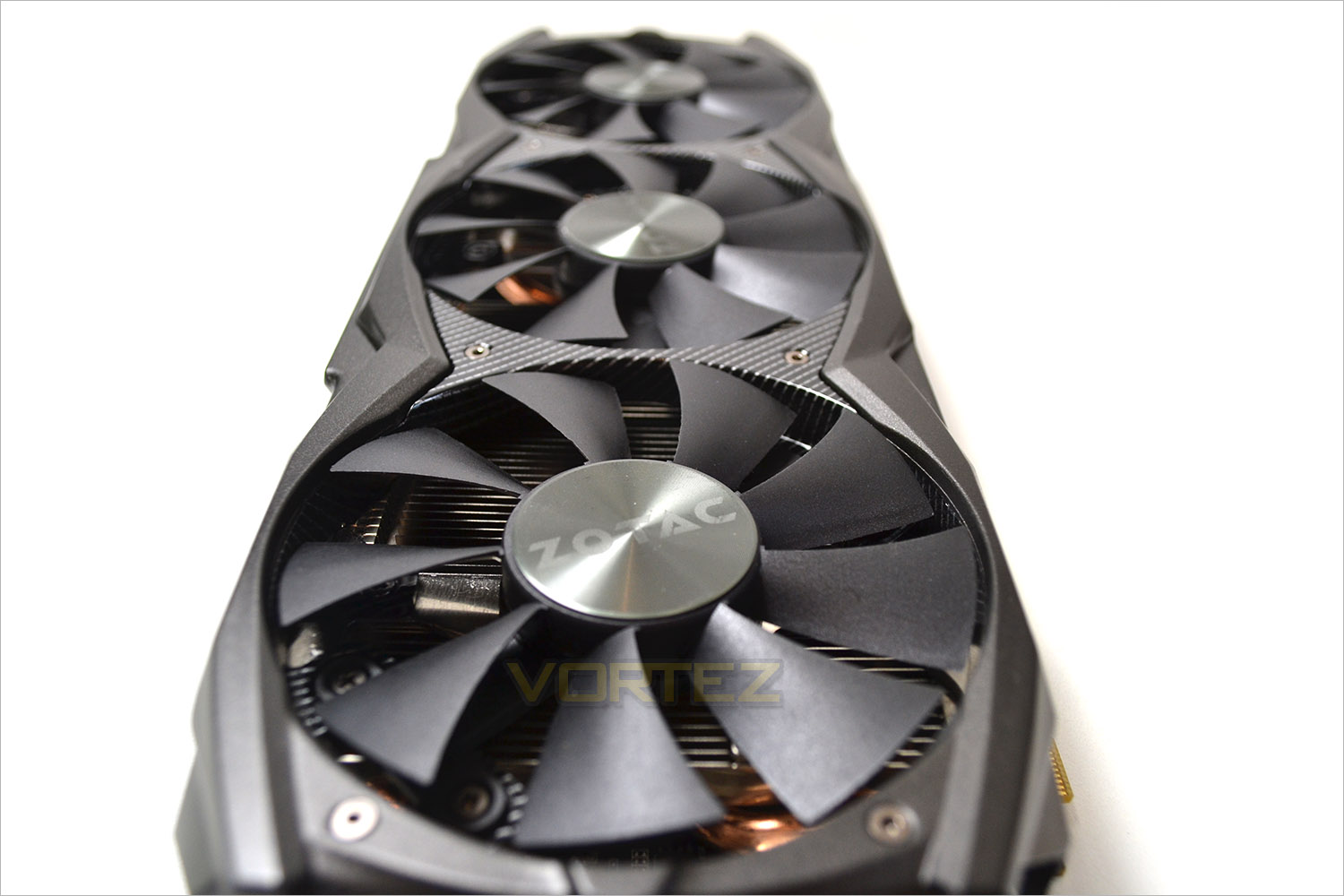
The cards length is identical to the old AMP! Extremes 300mm but the girth is much more palatable at just 100mm.
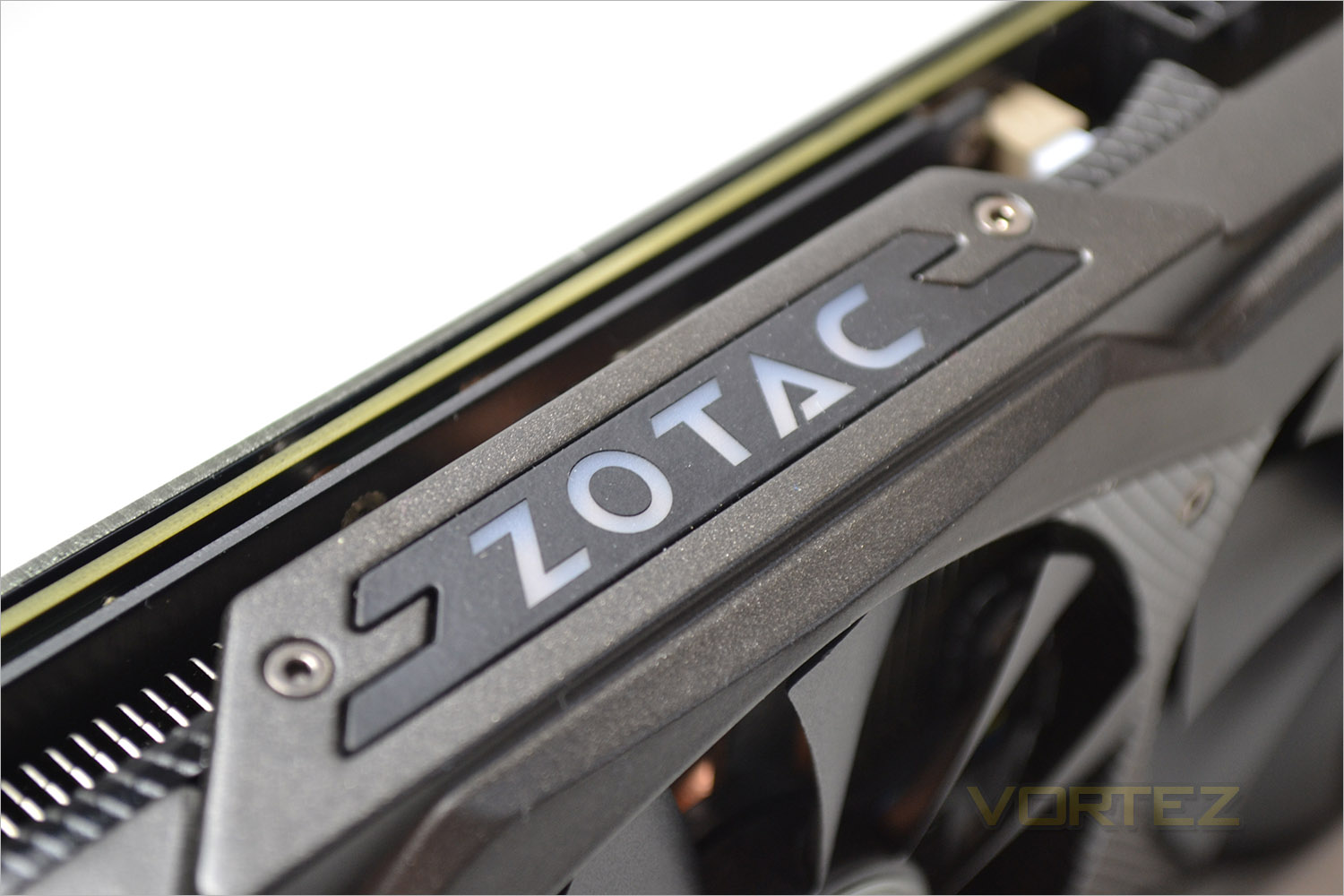
Despite losing the red and green Light I.D feature signifying load/idle states, we have a much more discreet ZOTAC logo illuminated in white signifying power to the graphics card.
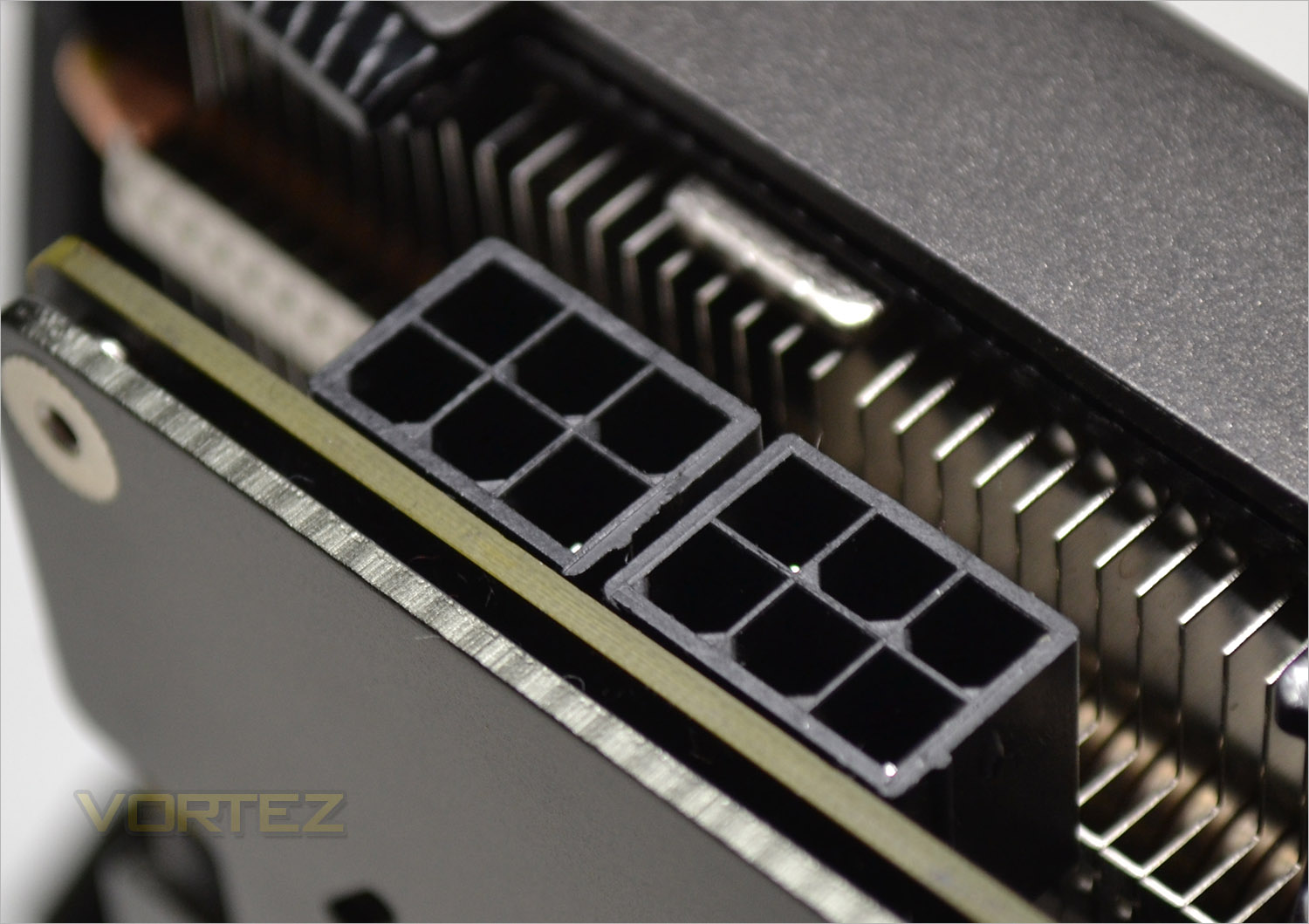
A key feature of this version of the GTX970 is the use of twin 6pin PCIe power modules rather than the 2x 8pin on the older card. This should allow many more users to make use of this card thanks to the new design. The same power requirements are however still in place with a 500W PSU being the recommended minimum.
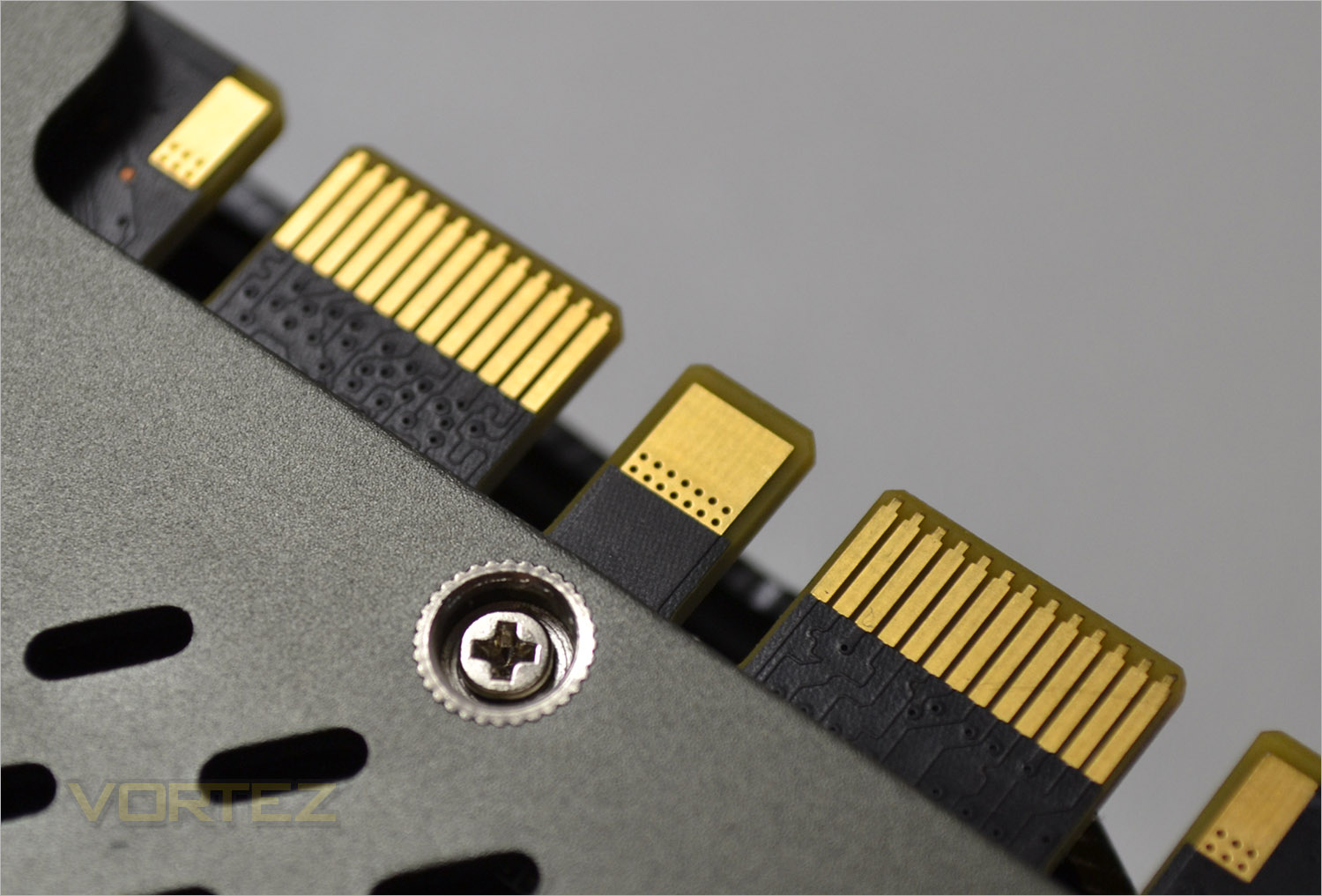
As with all GTX970’s, this version ca be paired up with another card from the same family.
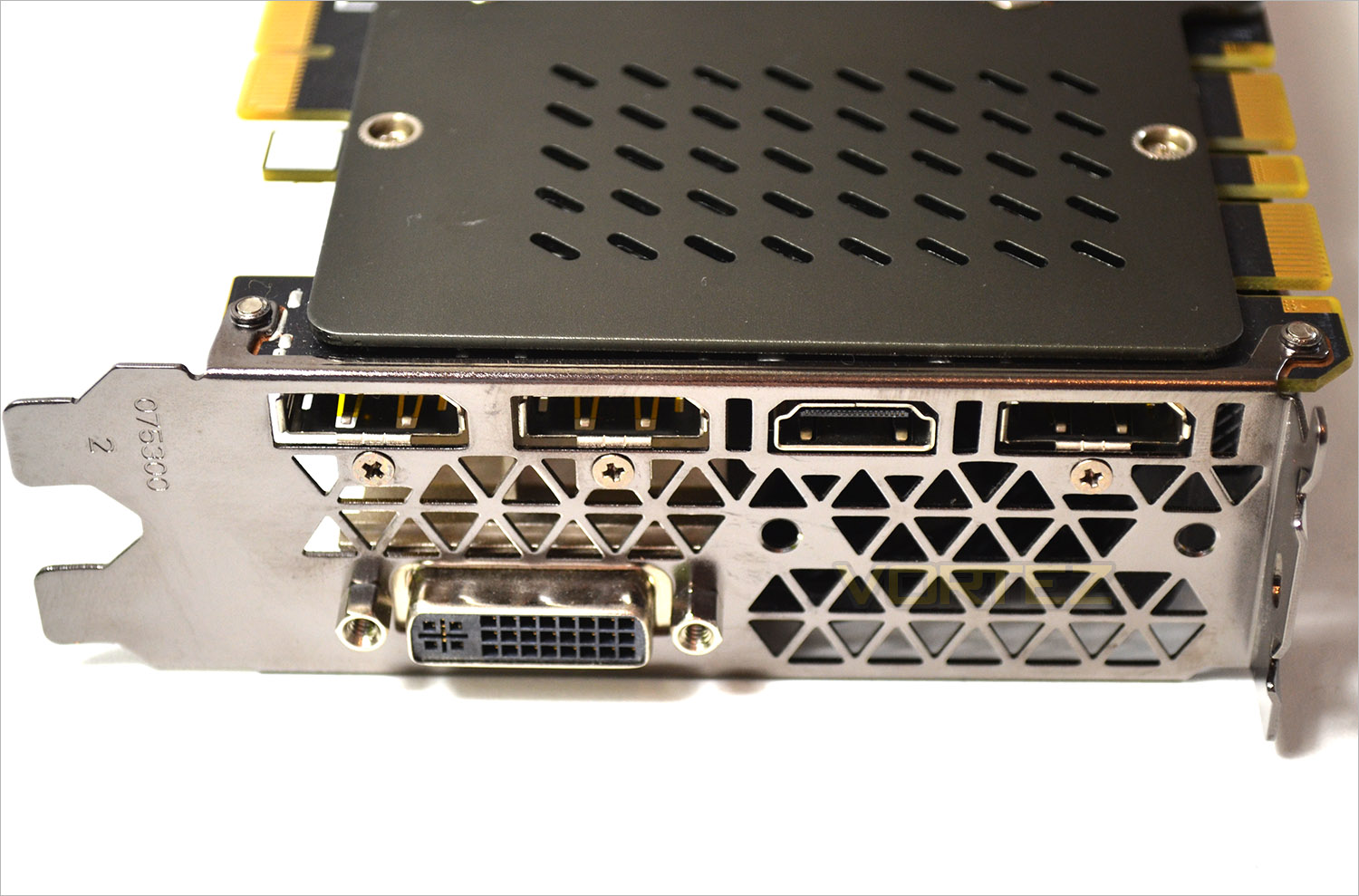
The I/O plate has changed slightly with more vent holes however the same number of connections remain with 3xDisplayPort, a HDMI socket and DVI port being available.
Closer Look (Core)
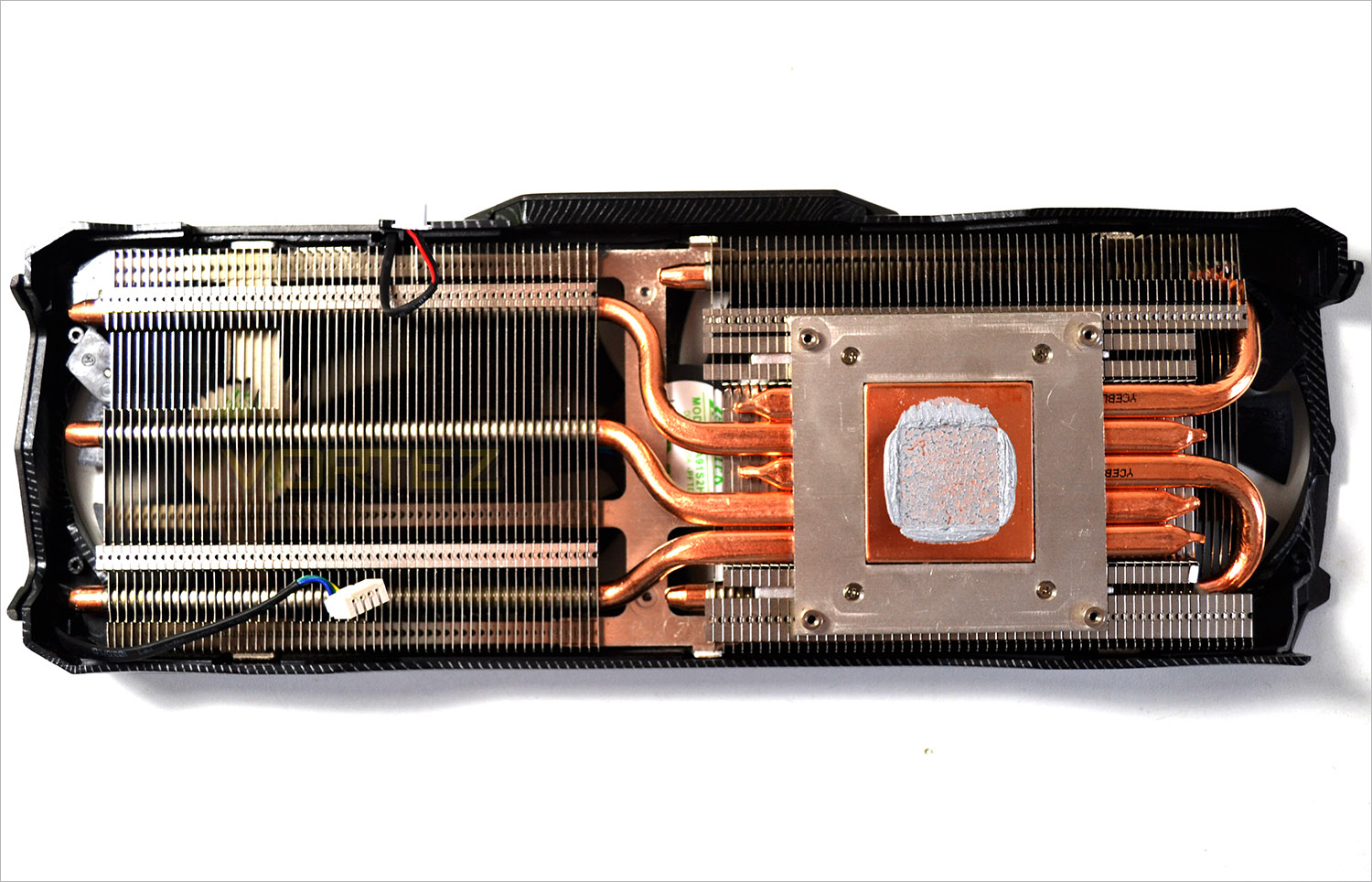
The heatsink has been redesigned slightly from the older card. While both cards make use of 5 heatpipes, the Core edition does not nickel coat the copper and the orientation is also slightly different. the same twin aluminium finned arrays are in place but this time the memory modules do not receive direct cooling from the heatsink. Instead a separate brace is used which is screwed through the card to the backplate making the card much more rigid.
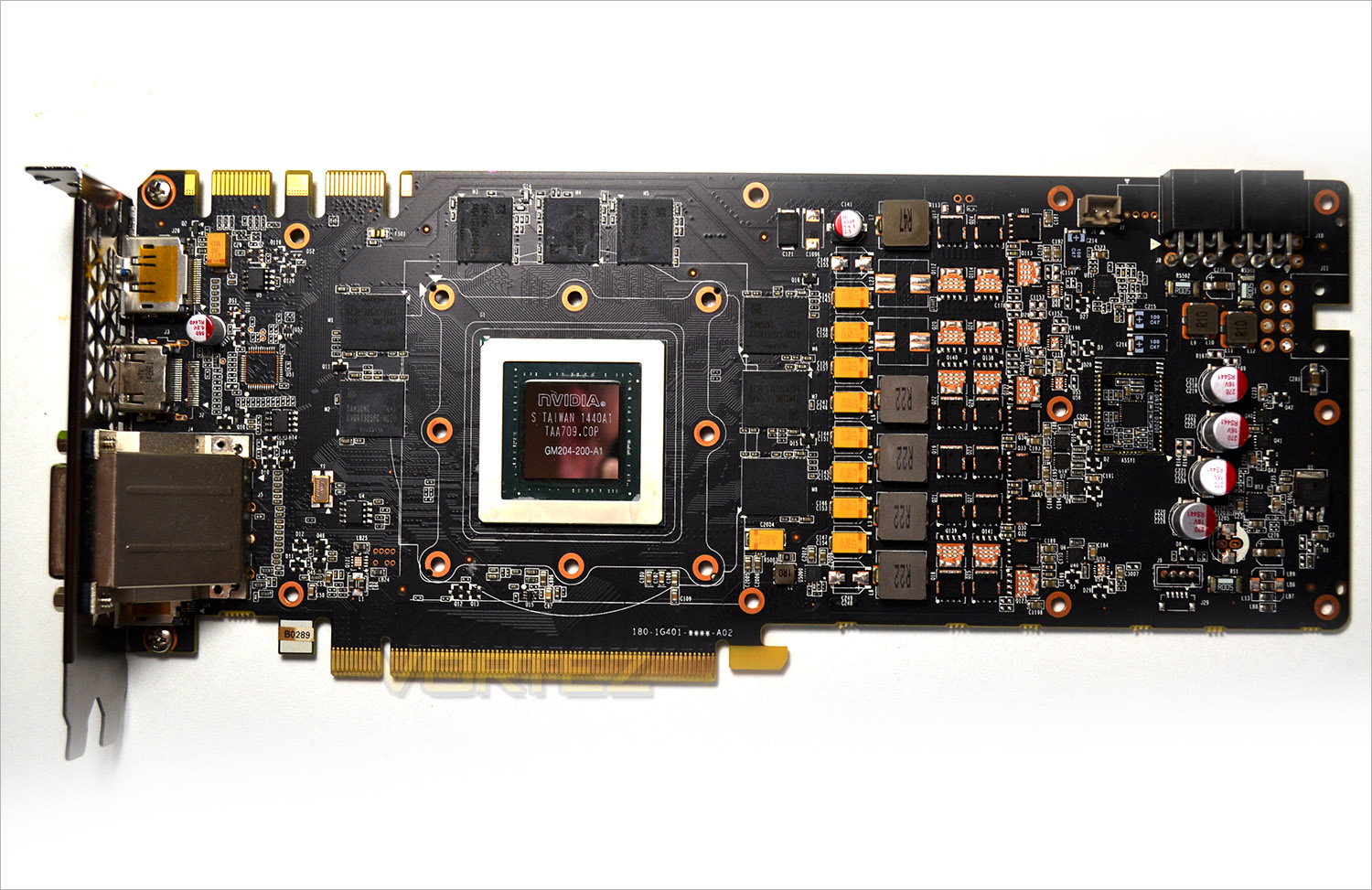
The PCB design is much more regular and more akin to a reference design than the older Extreme version.
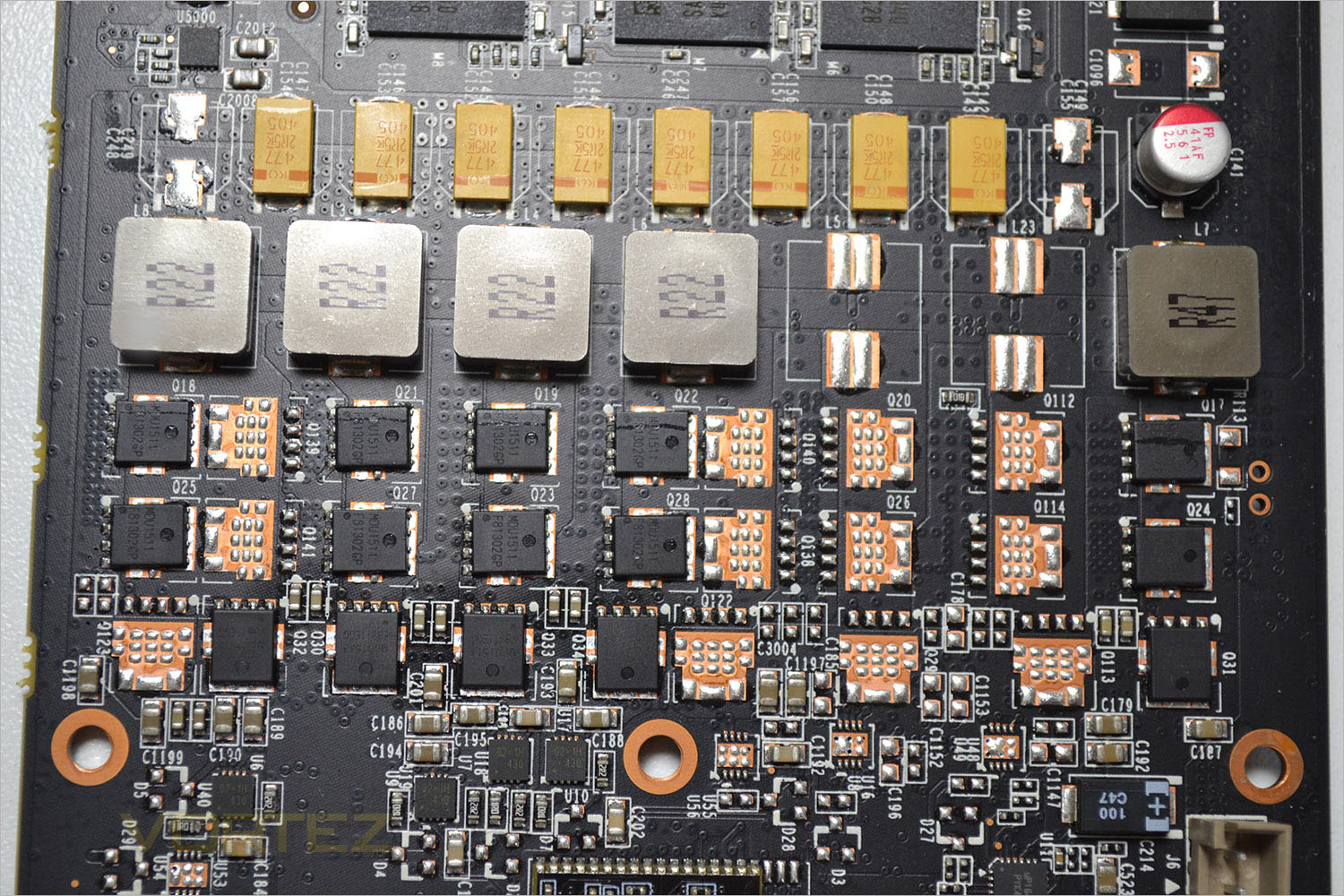
Perhaps the most striking omission is in the VRM area. This time around we see a 4+1+2 setup which is just over half the amount of power phases we saw with the AMP! Extreme. Hopefully this will not equate to a loss in performance and is simply testament to the power efficiencies made in this latest design!
Much has been said regarding NVIDIA’s poor marketing strategy. Some would say it was an oversight, others would say it was a devious tactic. Whichever camp you find yourself in, one thing is clear: NVIDIA won’t be doing that again in a hurry. Unsure what we’re talking about here? Very briefly, the specs of the GTX970 read as 4096MB. While this remains true, what NVIDIA failed to tell us was that the card has been segmented into a 3.5GB section and a 0.5GB section. Previously (and we were guilty of this too), media assumed the GTX970 had the same memory sub-system as the GTX980 however the lower number of ROPs on the 970 should have not added up. We missed it, and so did everyone else until questions started being raised about the memory allocation of the GTX970 by multiple users forcing NVIDIA to release a press statement.
In short, the GTX970 still has its 4GB but will only use 3.5GB for most games. The extra 0.5GB segment will only come into play when required and it does not appear that the extra 0.5GB performs as well as a full ‘priority access’ to 4GB ala GTX980.
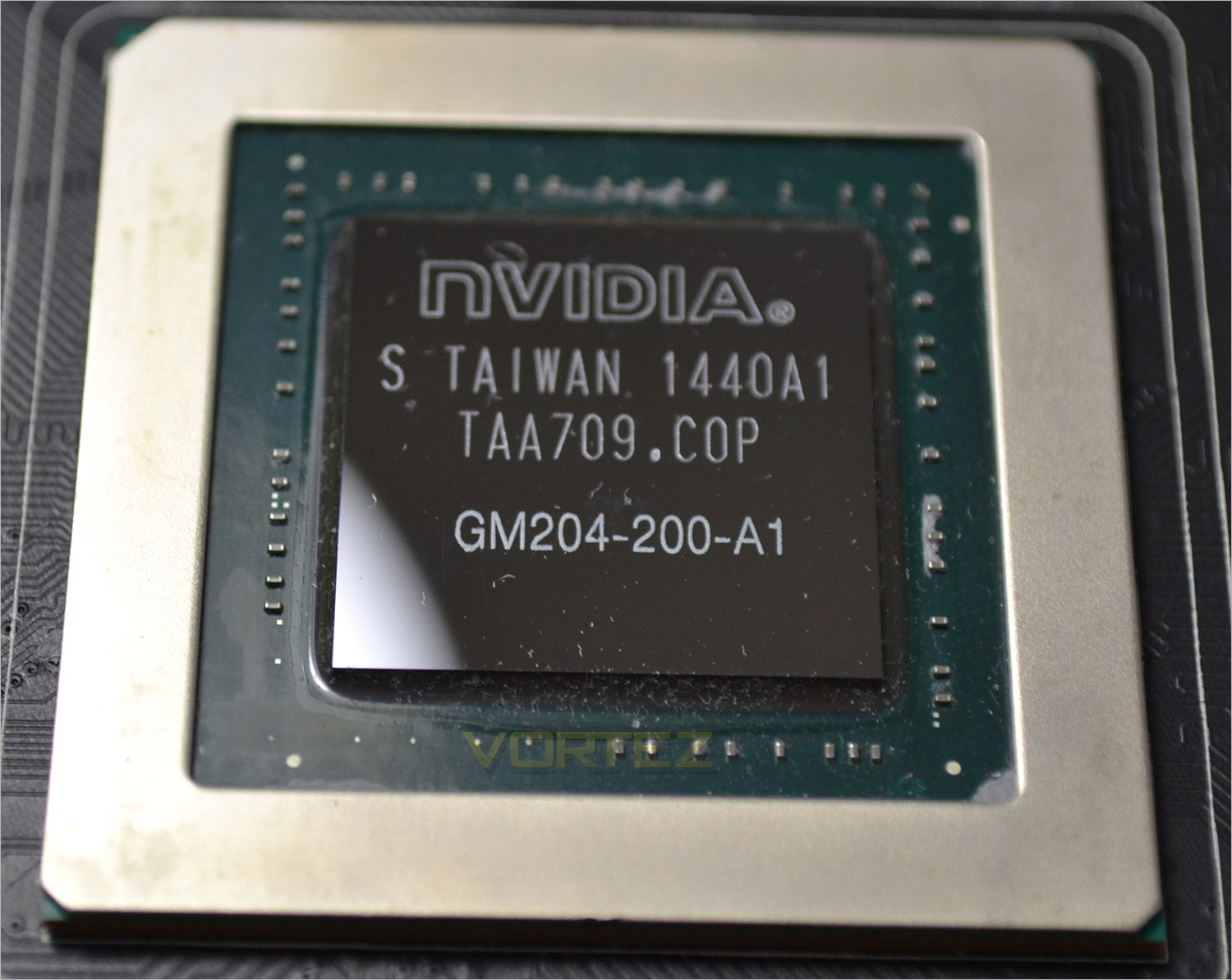
The GM204 GTX970 Maxwell core in all its nakedness!
Test Setup & Methodology
How we test graphics cardsTesting a graphics card is an extremely lengthy process. We sometimes see reviews where a graphic card has been tested using out of date equipment, out of date games and even out of date drivers. While the latter can be excused due to the sheer amount of driver updates making a thorough review impossible we will however notify the reader when we have used a different driver to the normal for example a pre-release driver. For the most part however we will always use the same hardware and latest drivers so this does certainly need to be taken into consideration when viewing our testing results. Each game and benchmark is tested times with the lowest and highest scores omitted out of the 5 results and the average then taken from the three remaining to give us our final result for each resolution and setting used.
HardwareWith the latest Intel chipset release we decided to update our ageing X79 setup to the very latest X99 chipset. Not only that but we will be using the flagship Core i7-5960X Extreme Edition processor clocked to a realistic, achieveable 4GHz to ensure we have no CPU bottlenecks. With 16GB (4x4GB) of GDDR4 at 2666MHz and a 500GB SSD there should be minimal paging so the benchmarks we run today will hopefully give a true reflection of the graphics card’s performance.
High End Graphics cards on test:
ZOTAC GTX 970 AMP! EXTREME CORE
(Forceware 344.75) ZOTAC GTX 970 AMP! EXTREME
(Forceware 344.75) MSI GTX 970 GAMING 4G(Forceware 344.75)
GIGABYTE G1 GAMING SOC GTX 970(Forceware 344.75)
ASUS STRIX GTX 970 4GB GDDR5(Forceware 340.60)
NVIDIA GTX 980 4GB GDDR5(Forceware 340.52)
SAPPHIRE TRI-X R9-290X 4GB GDDR5(Catalyst 14.3)
Special thanks go to Intel, Corsair, MSI and AOC for providing the extreme spec components used for our test bench:
Motherboard: MSI X99S GAMING 9 AC
CPU: Intel Core i7-5960X Extreme Edition @ 4GHz
RAM – 16GB (4x4GB) Corsair LPX Vengeance (Red) DDR3 @ 2666MHz 16-17-17-35 C1
Power Supply – CORSAIR RM Series™ RM1000
Hard Drive – CORSAIR Force Series™ LX 512GB SATA 3 6Gb/s SSD
Cooler – CORSAIR Hydro Series™ H105 240mm Extreme Performance Liquid CPU Cooler
Monitor – AOC 28″ 4K U2868 PQU
CPU: Intel Core i7-5960X Extreme Edition @ 4GHz
RAM – 16GB (4x4GB) Corsair LPX Vengeance (Red) DDR3 @ 2666MHz 16-17-17-35 C1
Power Supply – CORSAIR RM Series™ RM1000
Hard Drive – CORSAIR Force Series™ LX 512GB SATA 3 6Gb/s SSD
Cooler – CORSAIR Hydro Series™ H105 240mm Extreme Performance Liquid CPU Cooler
Monitor – AOC 28″ 4K U2868 PQU
Benchmarks
If you are a regular reader of our reviews you will know we like to test the latest hardware with the latest games and benchmarks on the market. Here are the games we have chosen:
Battlefield 4
Watchdogs
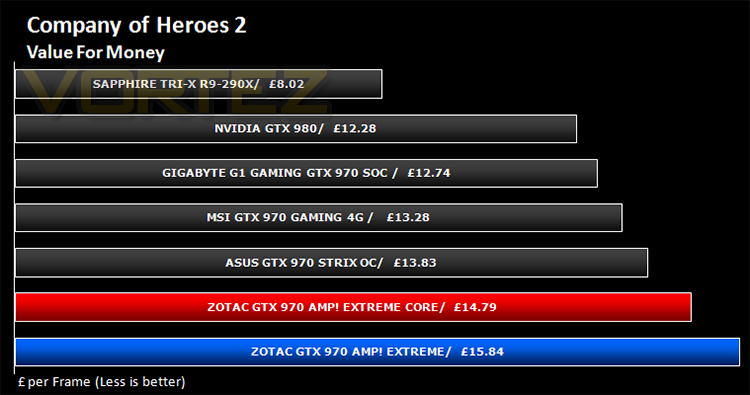
Company of Heroes 2
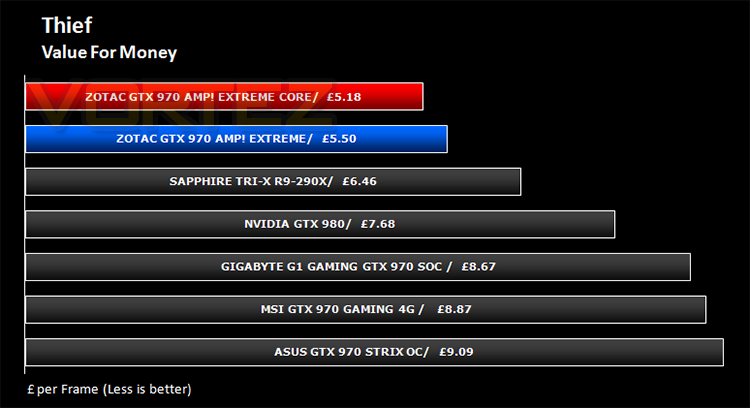
Thief
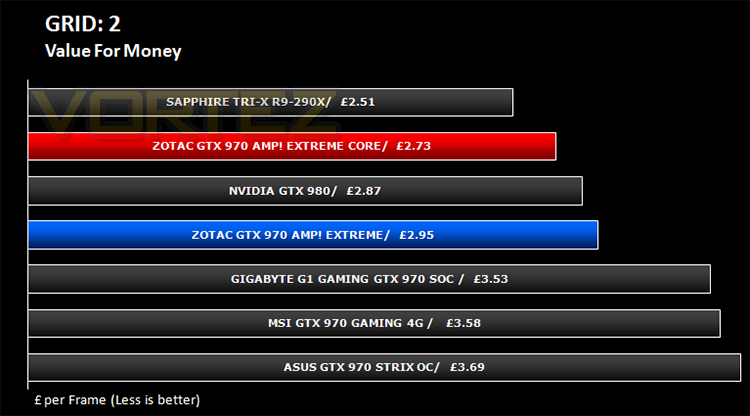
GRID: 2
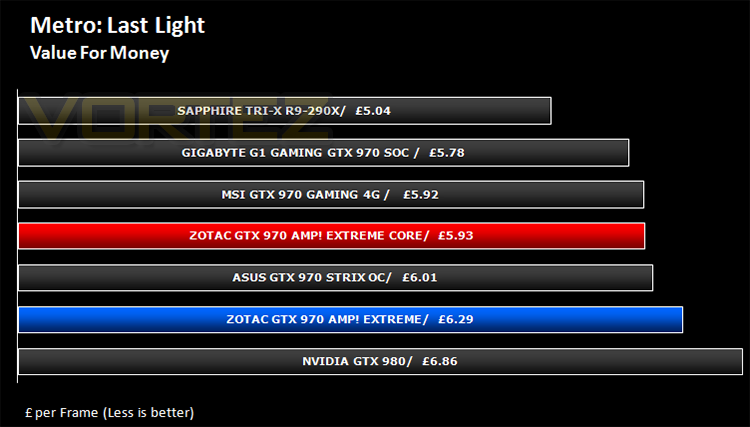
Metro: Last Light
Watchdogs
Company of Heroes 2
Thief
GRID: 2
Metro: Last Light
We also take into consideration the benchmarkers out there so have included 3 of the more popular synthetic benchmarks available:
Unigine: Valley
Unigine: Heaven 4
Futuremark 3DMark Firestrike
Unigine: Heaven 4
Futuremark 3DMark Firestrike
Let’s see how today’s graphics card performed…
Temperature, Acoustics and Power Consumption
Power ConsumptionTo test for power consumption we take a measurement from the plug socket. It is important to note that the figures below represent total system power use and not just the GPU. The CPU was always in a fixed state (4GHz overclock) so did not affect the additional power load when the GPU was placed under 100% load using Furmark which was ran for 15 minutes at which point a load reading was taken. Idle readings were taken 5 minutes after system boot to ensure any background services and applications had loaded.
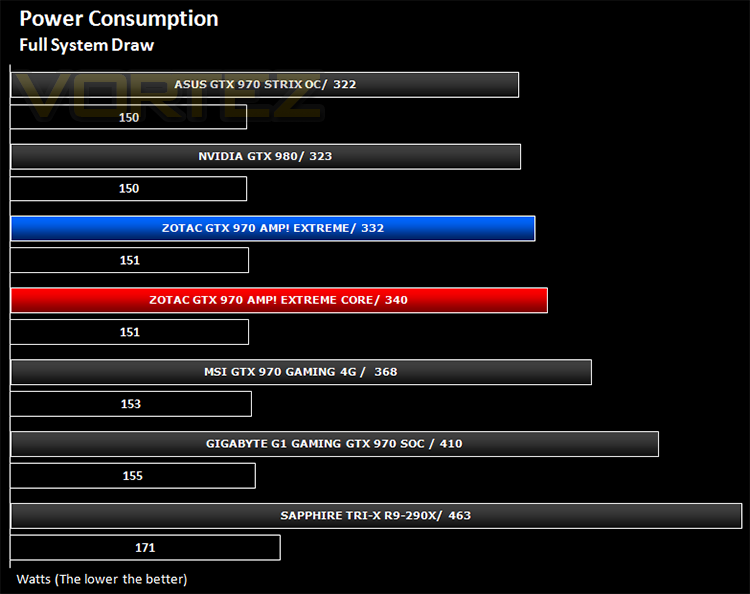
Neither of hte cards were excessively power hungry. The AMP! Extreme performed exceptionally well despite its bigger power delivery. Clearly the effeciency of this card is very good and deserves credit to that end.
Temperature
To test temperatures we measured idle temperatures after booting windows, letting all applications finish loading and ran a few benchmarks. Once the benchmarks were complete we left the card to reach a cooling plateau where we then took the idle temperatures. For the load tests, we would normally run Furmark for 20 minutes, taking the absolute maximum temperature attained however we found that this throttled the card and resulted in spurious results. So we set Heaven running continuously for 20 minutes and used this as a temperature result.
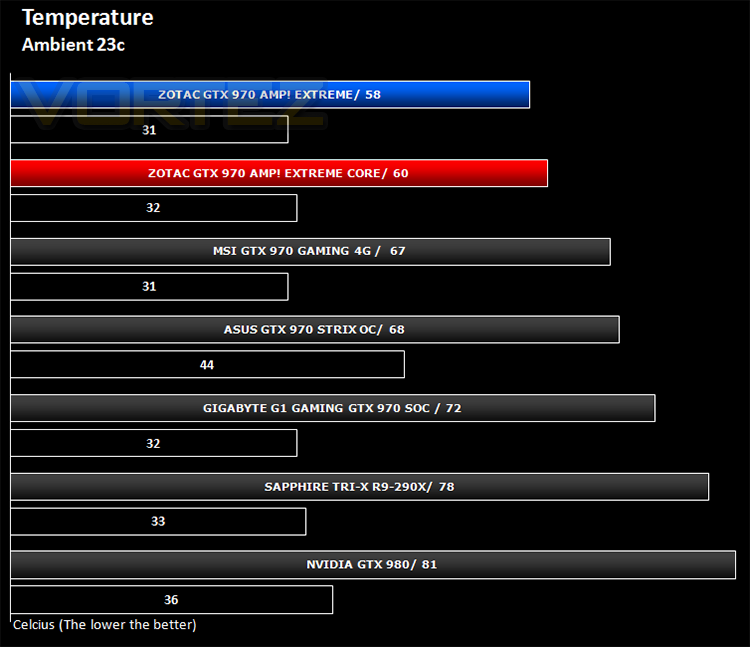
Both cards performed very well in this area. Unsurprisingly the Amp! Extreme with it’s massive cooler top the charts hitting just 58c under 100% load. the newer core version, despite its higher clock speed surprised us by being just 2c behind. Moreover the fact it beat slower clocked cards is testament to the cooling ability of the Ice Storm range of coolers.
Acoustics
Both cards ran very quiet, even under load. Out of the two, the older card was perhaps a little noisier under load but you will be unlikely to hear other card in an enclosure under normal gaming conditions. Even with the fans at 100% the noise emitted wasn’t excessive. Two very quiet cards.
Overclocking
For overclocking today’s sample we will be using ZOTAC’s Firestorm tool as this gives us all of the options we require included the additional voltage controls.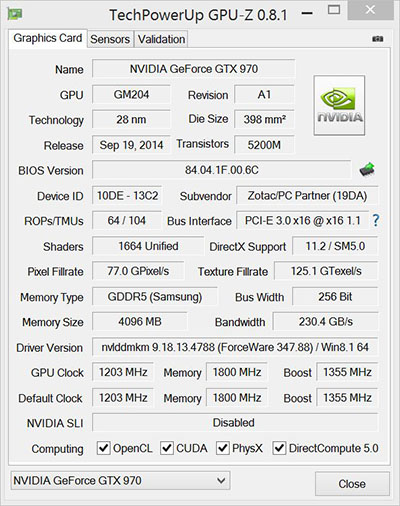
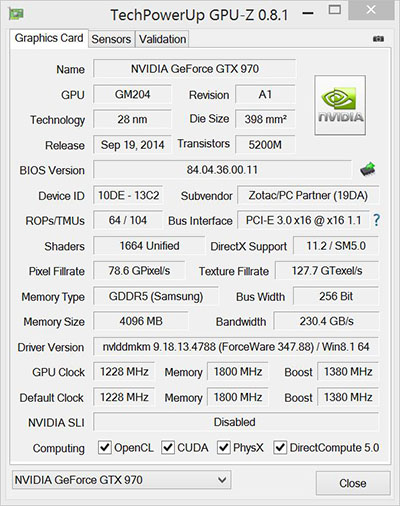
Above is a screenshot of GPU-Z showing the reference (factory overclocked) settings (Core bottom).
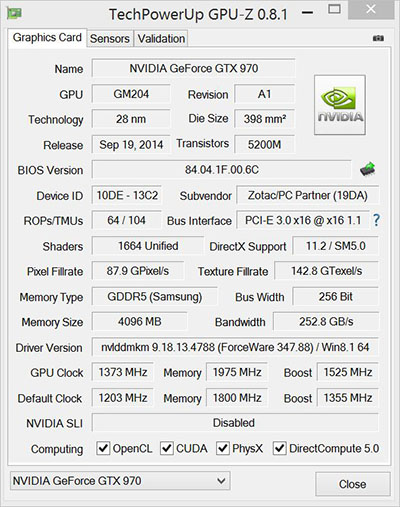
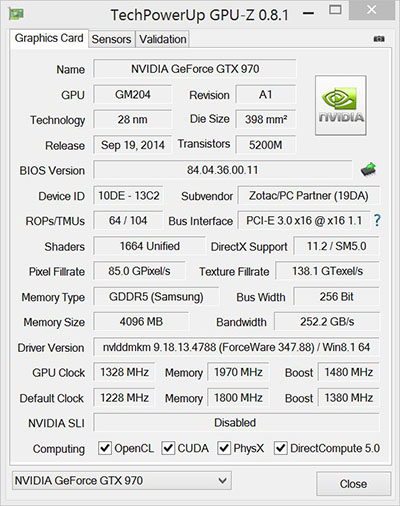
…and manually attained overclock speeds (Core bottom).
The Maxwell core has been a pretty good overclocker since its introduction. Again we find there is ample headroom on both ZOTAC cards. As the Core is clocked from the factory slightly higher than the older AMP! Extreme we were right in thinking there would be as much to be gained however we were shocked to find that the older AMP! Extreme clocked higher. This could be down to the extra punch provided by those additional chokes and features of the AMP! Extreme along with the 2+2 extra pin outs of power supply but this begs the question why this card isn’t clocked higher than the Core version from the outset? Regardless, both cards clocked very well but the older card put its newer sibling to the sword in terms of raw output.
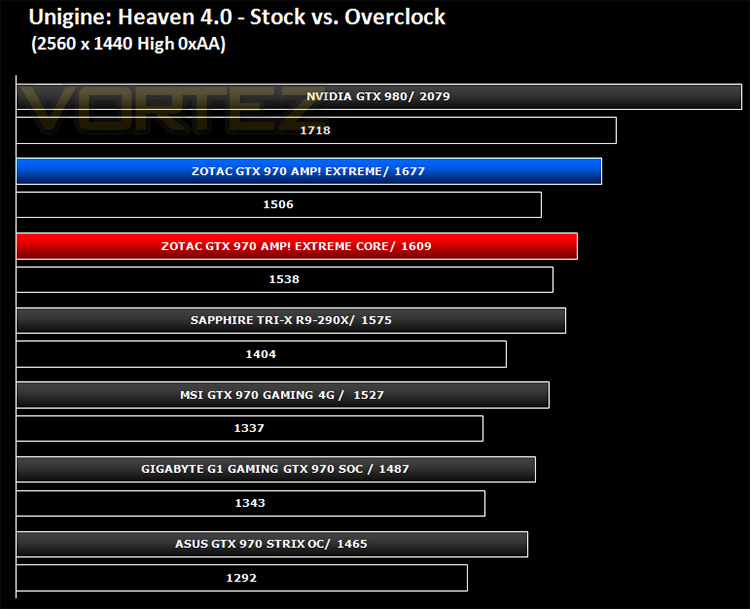
Above we can see the resulting performance increase of the overclock via Unigine Heaven 4.0.
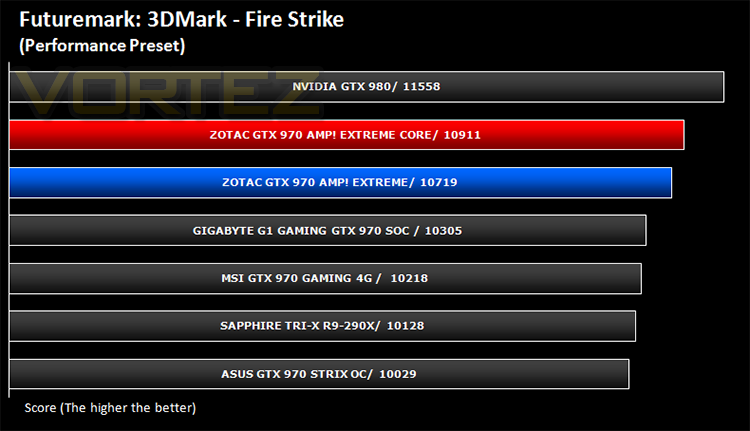
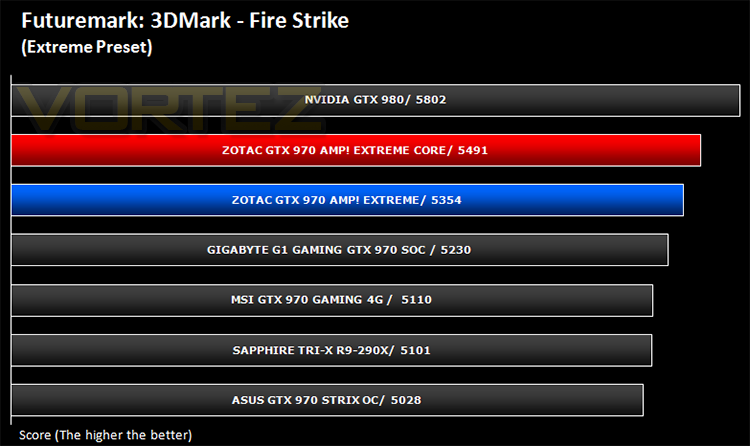
Futuremark 3DMark Fire Strike (Synthetic)
Fire Strike is the new showcase DirectX 11 benchmark designed for high-performance gaming PCs. It is Futuremark’s most ambitious and technical benchmark ever, featuring real-time graphics rendered with detail and complexity far beyond what is found in other benchmarks and games today.
Unigine: Heaven 4 (Synthetic)
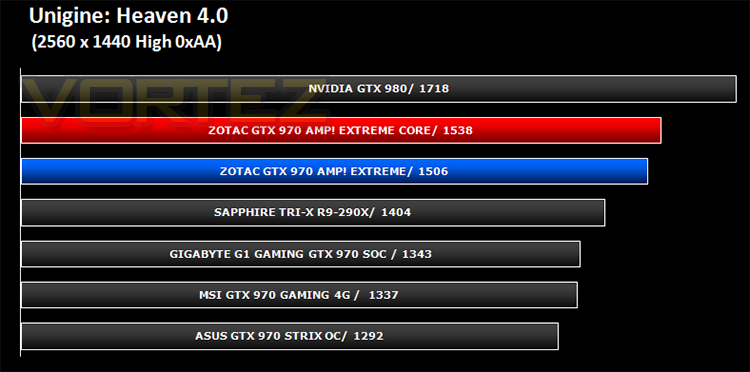
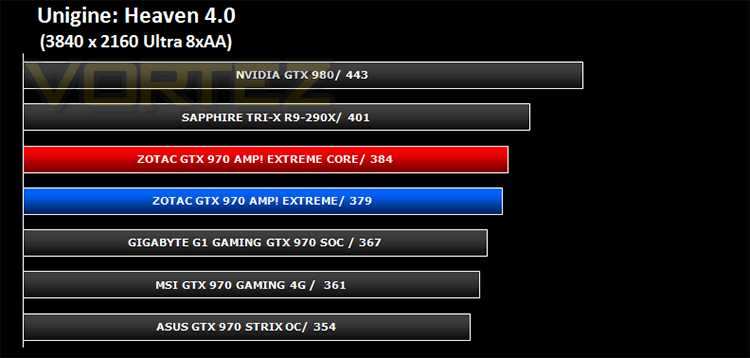
Heaven Benchmark with its current version 4.0 is a GPU-intensive benchmark that hammers graphics cards to the limits. This powerful tool can be effectively used to determine the stability of a GPU under extremely stressful conditions, as well as check the cooling system’s potential under maximum heat output. It provides completely unbiased results and generates true in-game rendering workloads across all platforms.
Unigine: Valley (Synthetic)
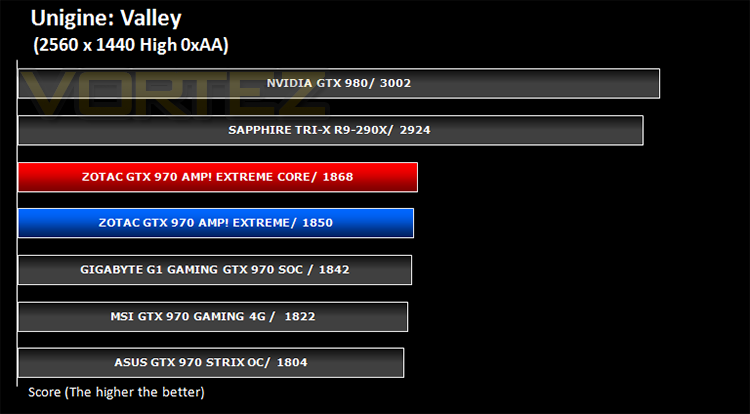
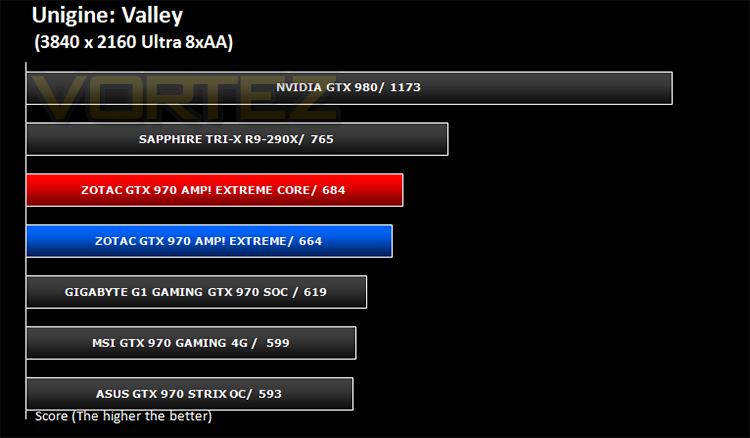
Valley Benchmark is a new GPU stress-testing tool from the developers of the very popular and highly acclaimed Heaven Benchmark. The forest-covered valley surrounded by vast mountains amazes with its scale from a bird’s-eye view and is extremely detailed down to every leaf and flower petal. This non-synthetic benchmark powered by the state-of-the art UNIGINE Engine showcases a comprehensive set of cutting-edge graphics technologies with a dynamic environment and fully interactive modes available to the end user.
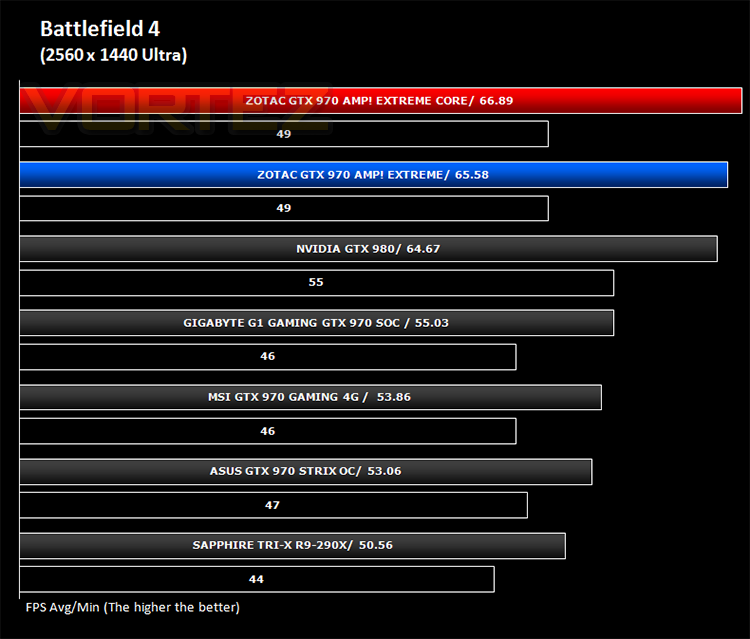
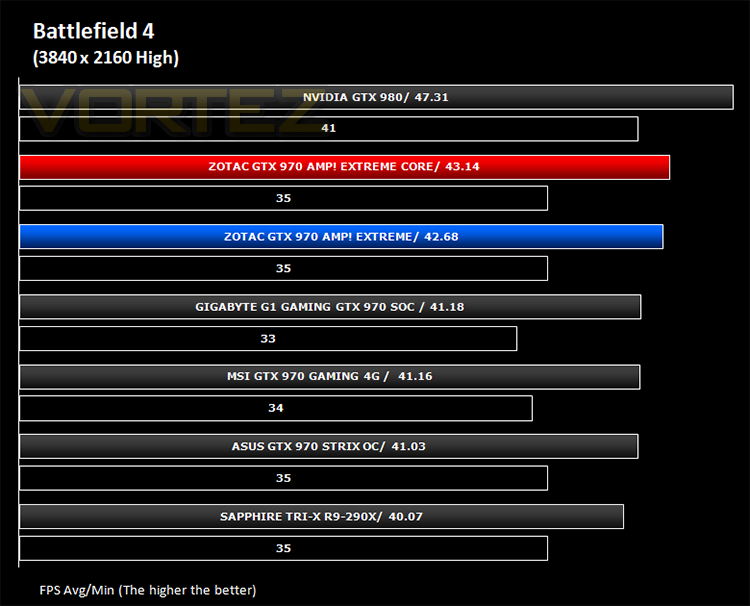
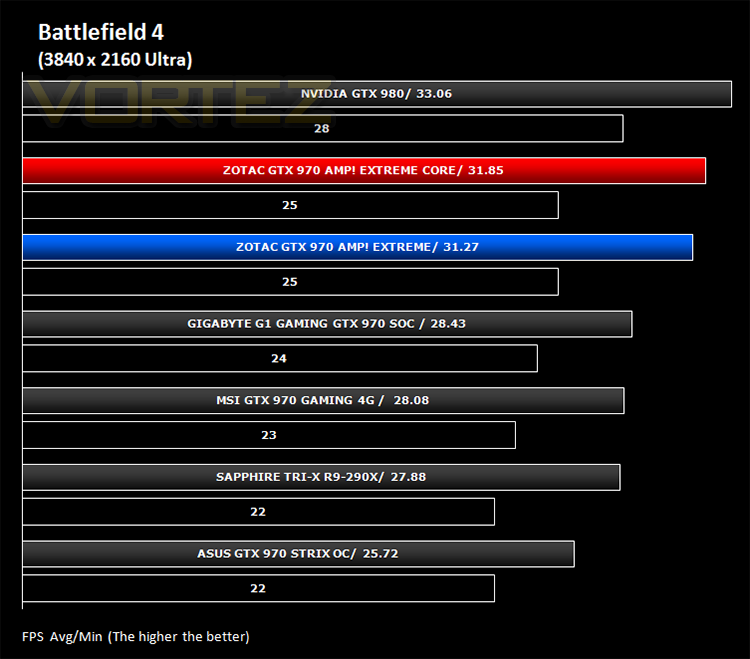
Battlefield 4 (FPS)
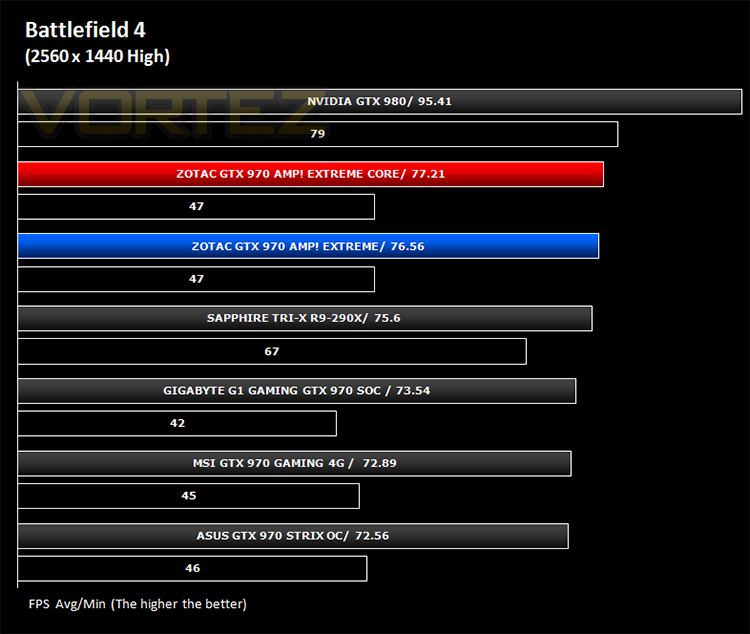
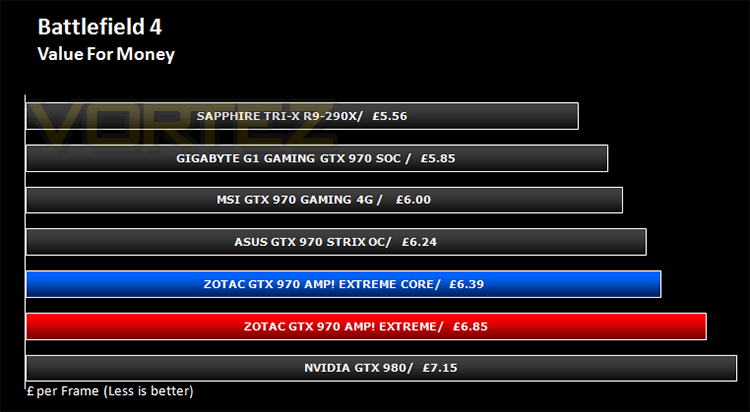
Battlefield 4 is a 2013 first-person shooter video game developed by Swedish video game developer EA Digital Illusions CE (DICE) and published by Electronic Arts. It is a sequel to 2011’s Battlefield 3 and is perhaps currently the most popular online First Person Shooter for PC gamers. It has an extremely powerful gaming engine that will stress components more than most FPS titles available.
Watchdogs (Action/Adventure)
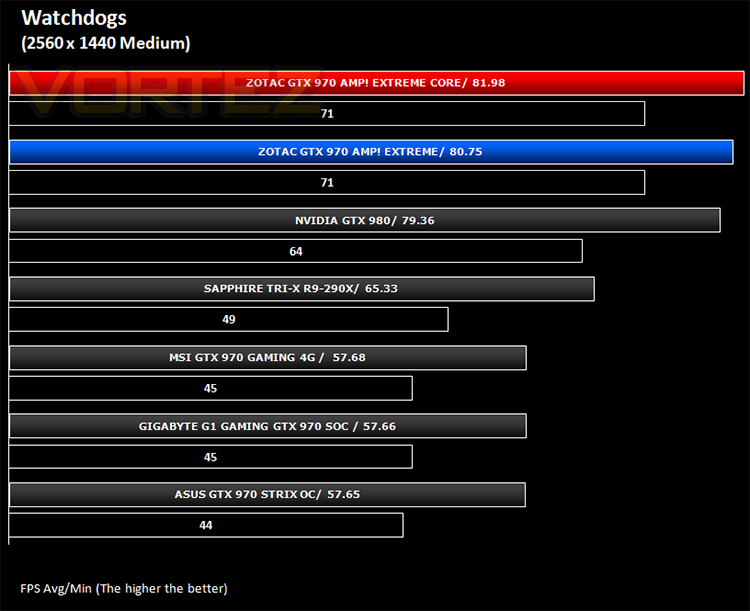
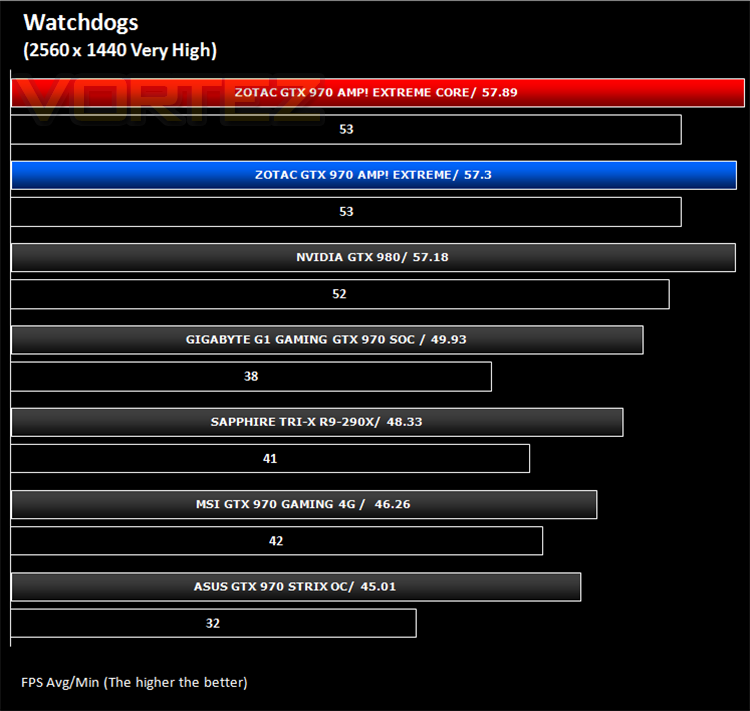
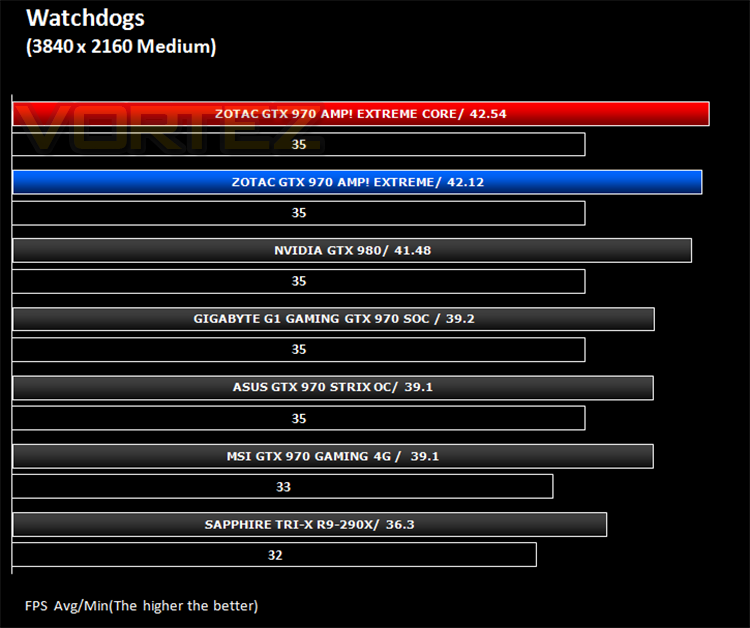
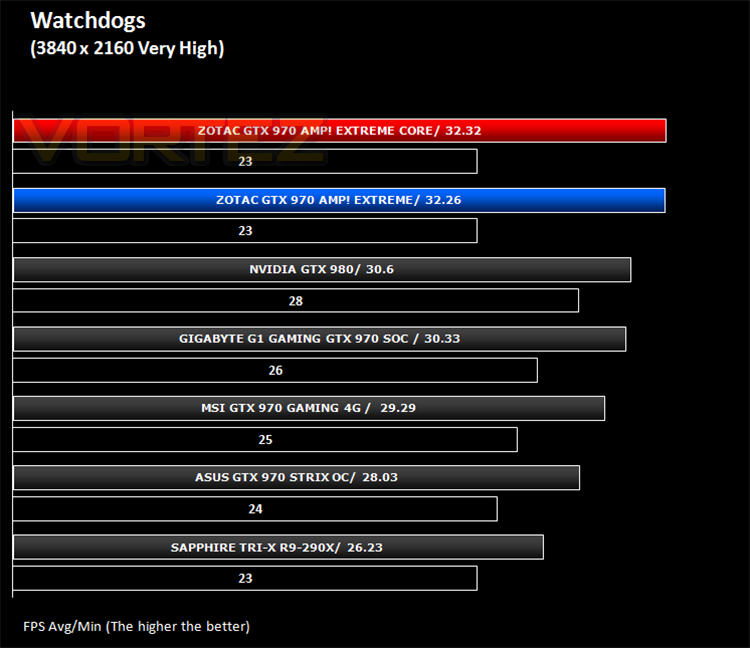
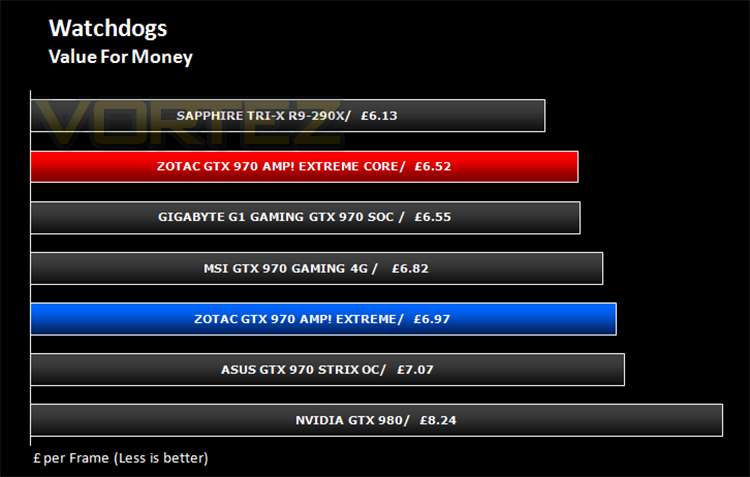
Watch Dogs is a 2014 open world action-adventure video game developed by Ubisoft Montreal and published by Ubisoft. Set within a fictionalized version of Chicago, Illinois, the single-player story follows a hacker and his efforts to seek revenge after the accidental death of his niece. The open world design lets players freely roam Chicago, which includes the urban city, open countryside, and slums. The game is played from a third-person perspective and its world is navigated on-foot or by vehicle. As such this is a very demanding game, especially when graphical options are turned up.
Thief (Stealth)
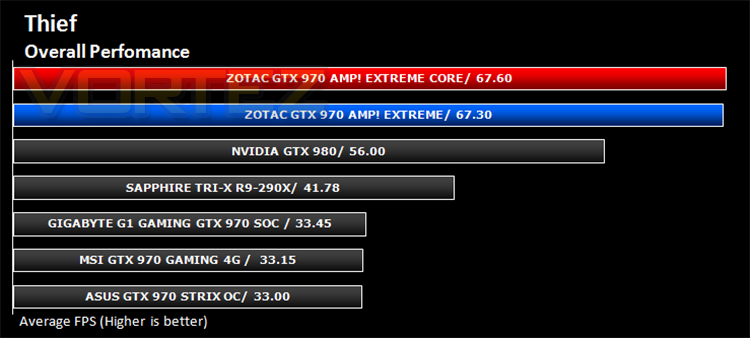
Thief is a stealth video game developed by the Canadian video game developer Eidos Montreal, and published by Square Enix. It is a revival of the cult classic Thief series of stealth games, of which it is the fourth game. Thief is set in a dark fantasy world inspired by Victorian, gothic, and steampunk aesthetics. Using a modified version of the Unreal Engine 3 it makes for a challenging game to pitch against our range of components.
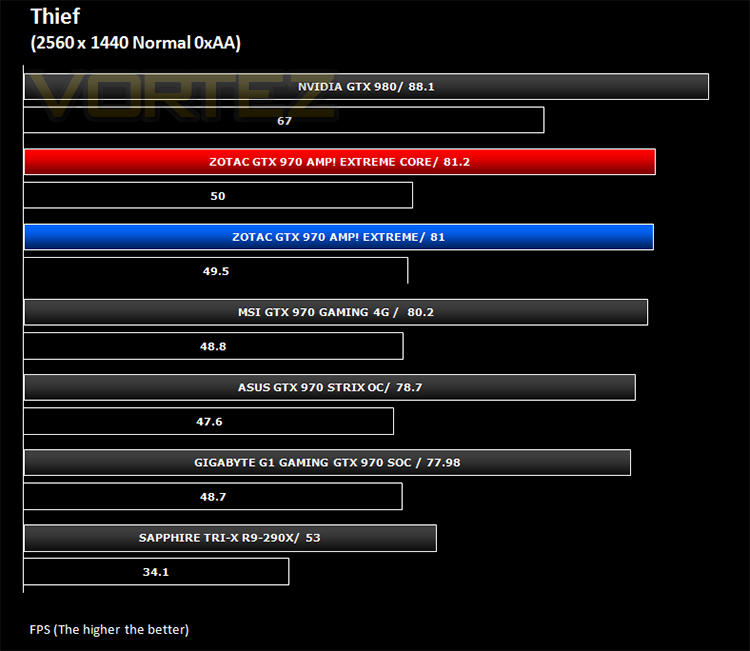
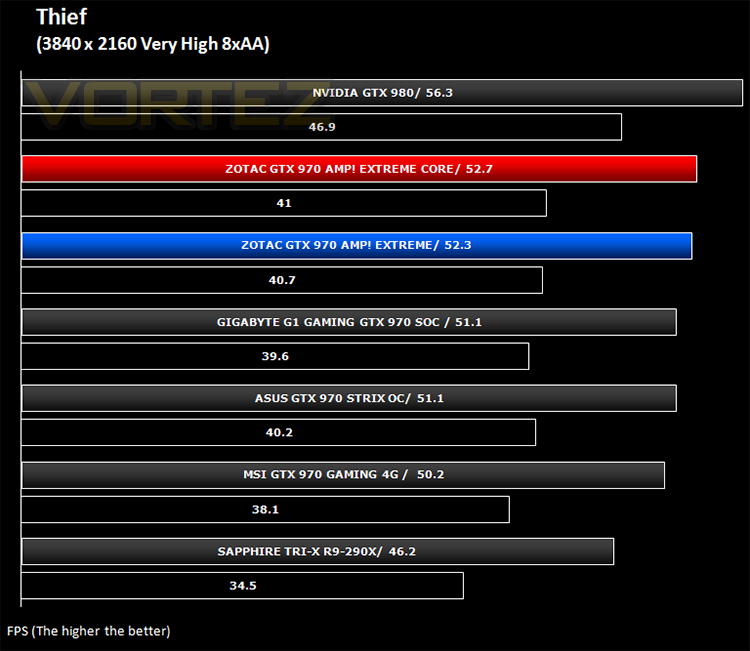
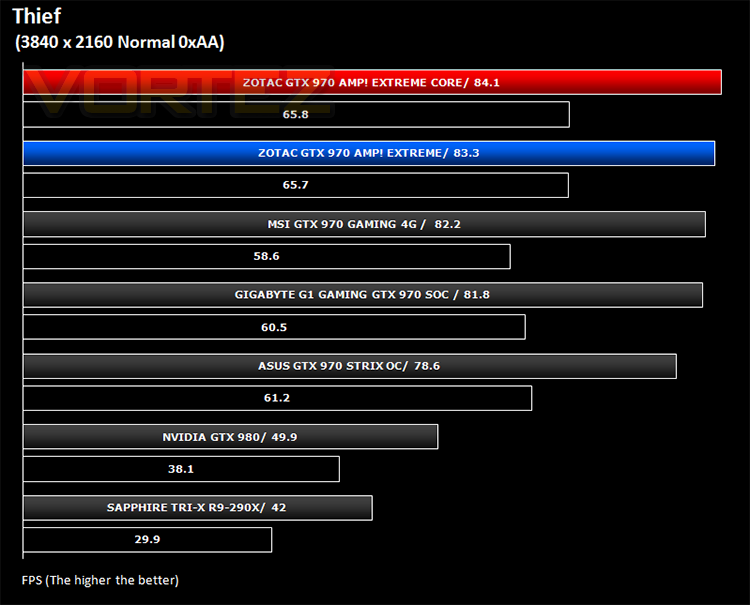
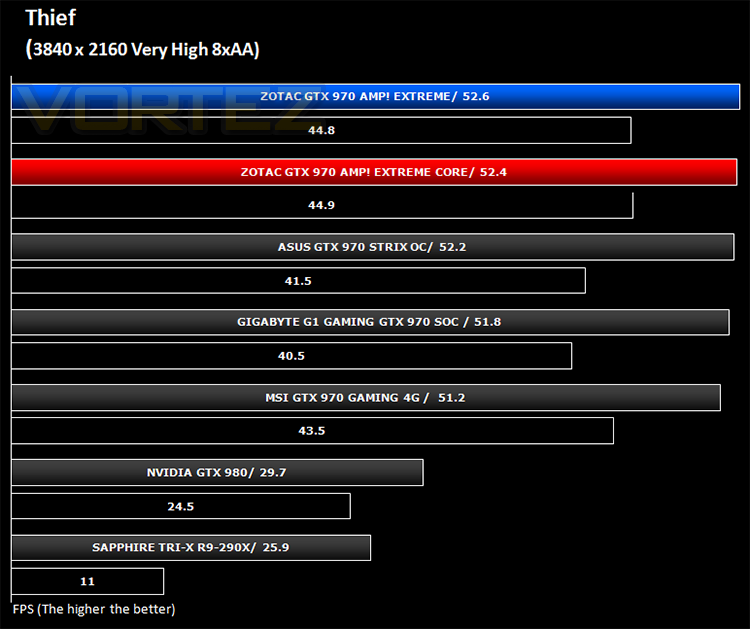
*Note GTX980 and R9-290X old drivers
Company of Heroes 2 (RTS)
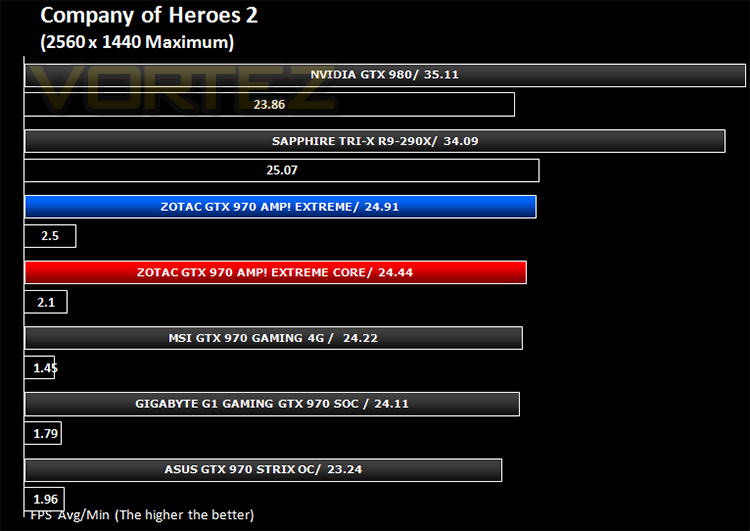
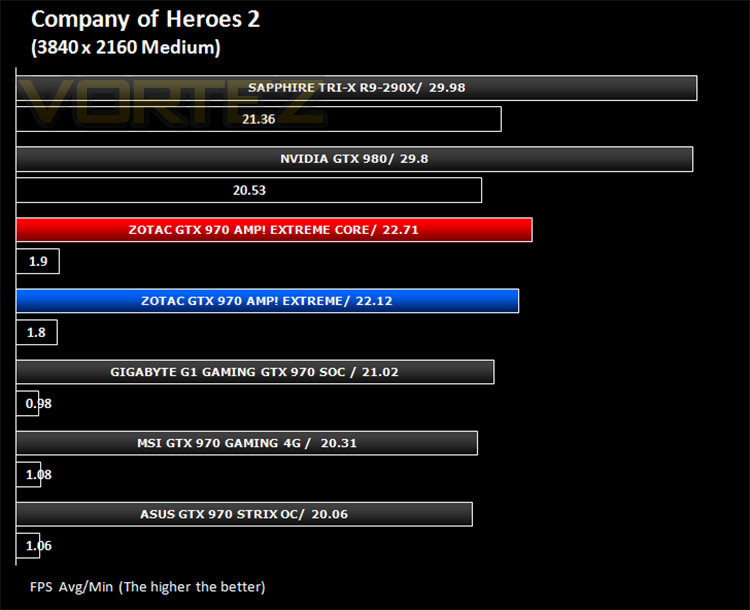
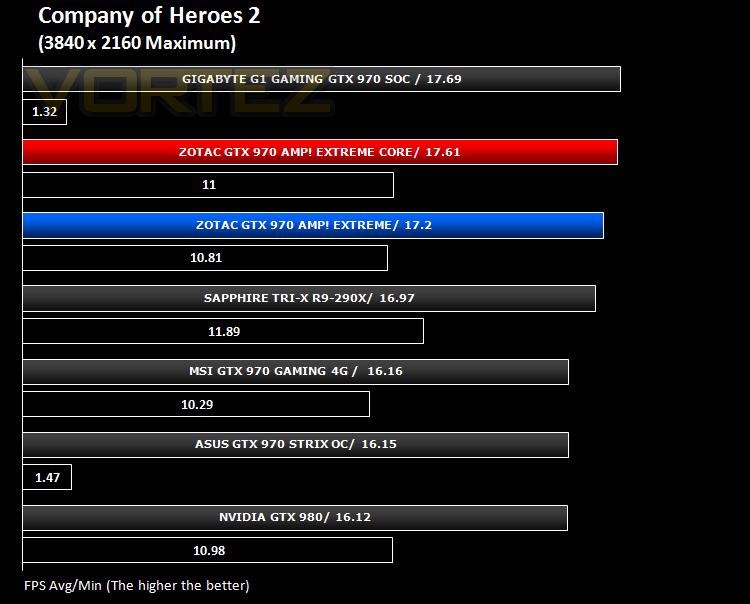
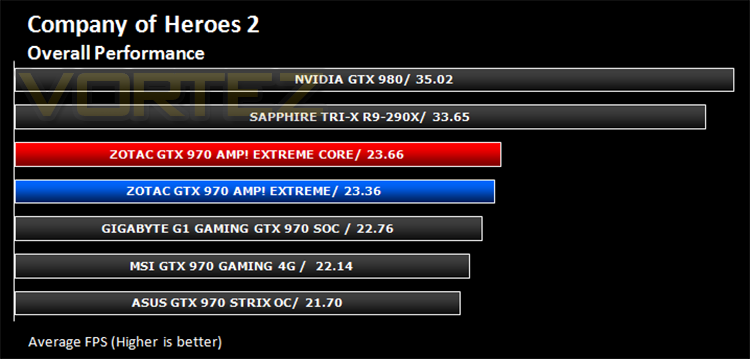
Company of Heroes 2 is a real-time strategy video game developed by Relic Entertainment. It is the sequel to the critically acclaimed 2006 game Company of Heroes.As with the original Company of Heroes, the game is set in World War II but with the focus on the Eastern Front, with players primarily controlling the side of the Soviet Red Army during various stages of the Eastern Front, from Operation Barbarossa to the Battle of Berlin. Company of Heroes 2 runs on Relic Entertainment’s proprietary Essence 3.0 game engine and is extremely demanding of both CPU and GPU.
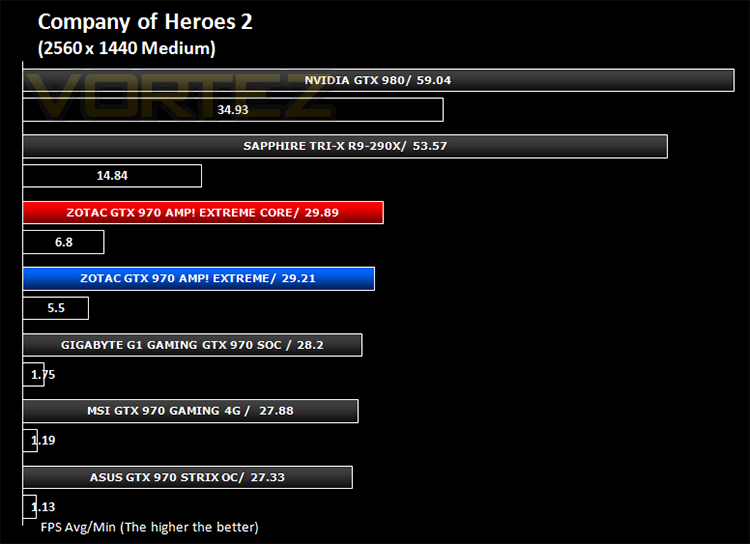
Metro: Last Light (FPS)
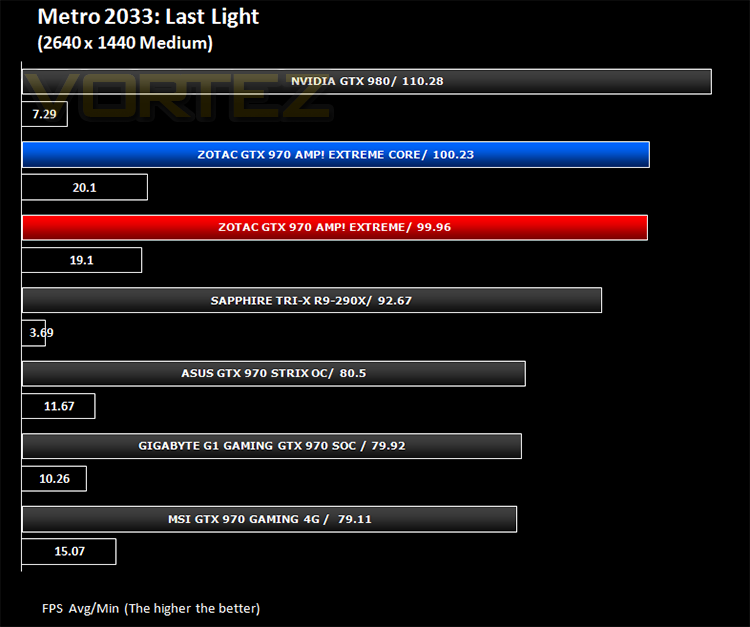
Metro: Last Light is a single-player post-apocalyptic-themed first-person shooter video game with stealth and survival horror elements, developed by Ukrainian studio 4A Games and published by Deep Silver. The game is set in a post-apocalyptic Moscow, part of the universe of the novel Metro 2033 and its sequels, written by Russian author Dmitry Glukhovsky. The second of our FPS titles, it runs on the 4A gaming engine which again, has the capability to stress even the best GPU components.
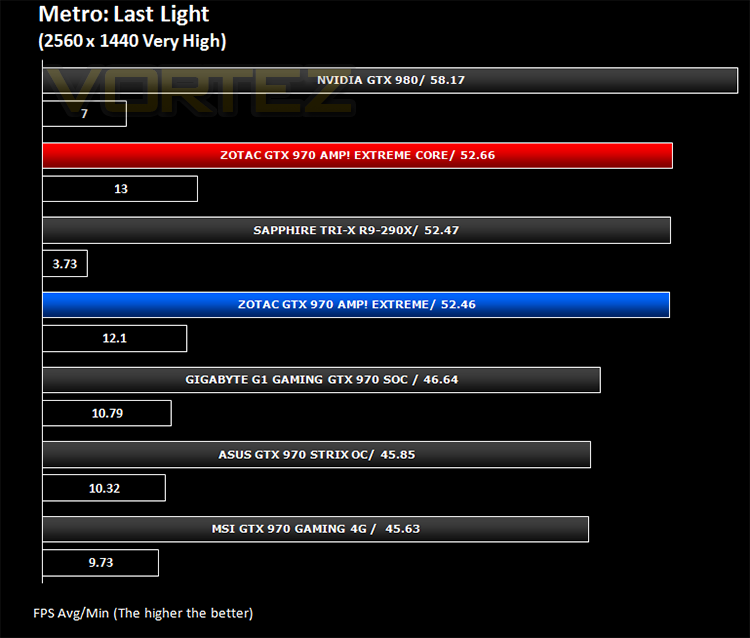
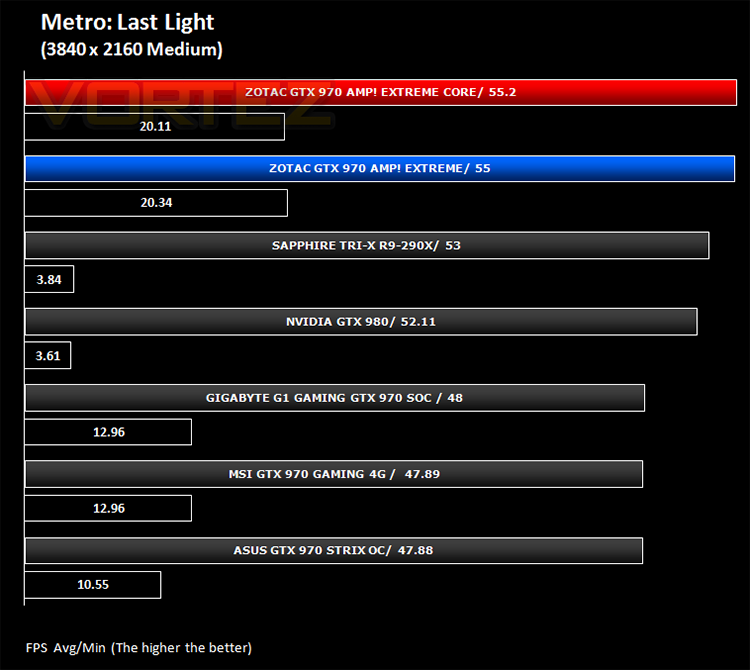
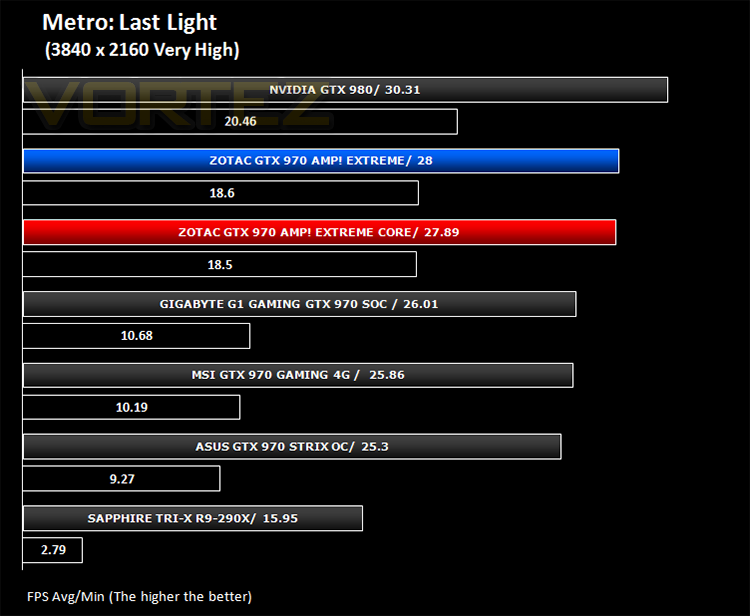
GRID: 2 (Arcade Sim)
Grid 2 (stylised as GRID 2 and known as Race Driver Grid 2 in Japan) is a racing video game developed and published by Codemasters and is the sequel to 2008’s Race Driver: Grid. The game includes numerous real world locations and cities such as Paris. It also includes motor vehicles spanning four decades. In addition, it includes a new handling system that developer Codemasters has dubbed ‘TrueFeel’, which aims to hit a sweet spot between realism and accessibility. It uses the EGO 3.0 engine which while not overly challenging, is representative of games of this genre.
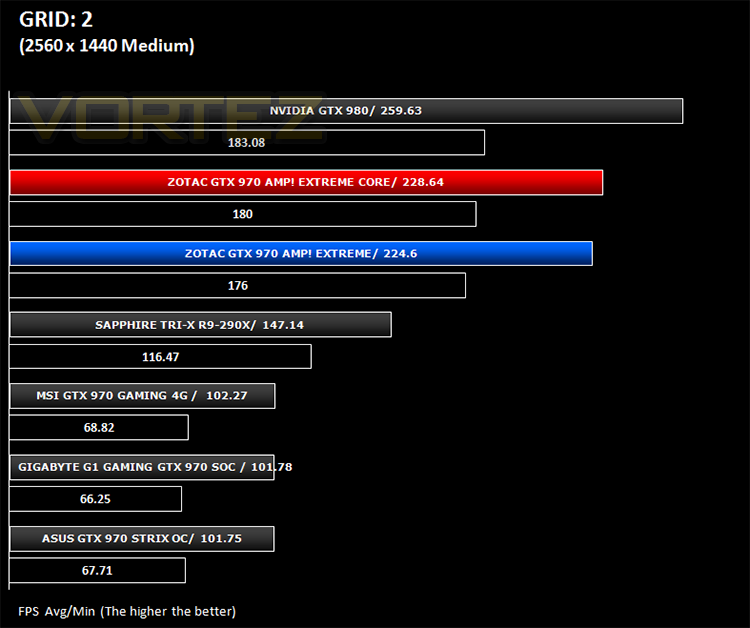
Overall Performance
Here we take a look at the overall performance of the graphics card. This figure is determined by finding the average FPS across all of the settings used in a particular benchmark(game) to give us an overall value.
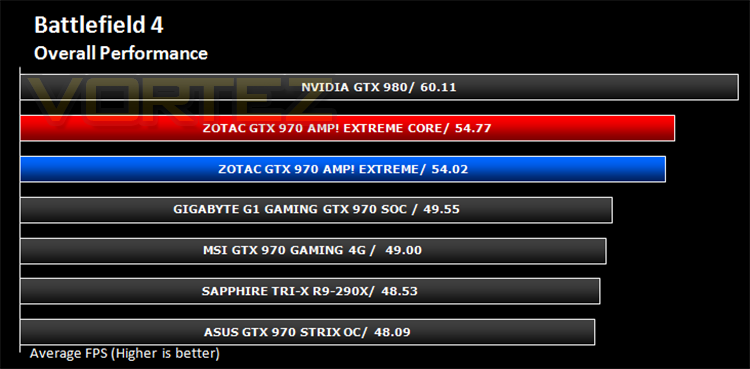
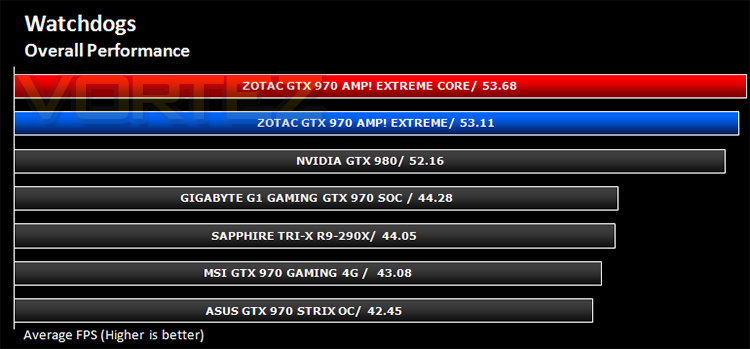
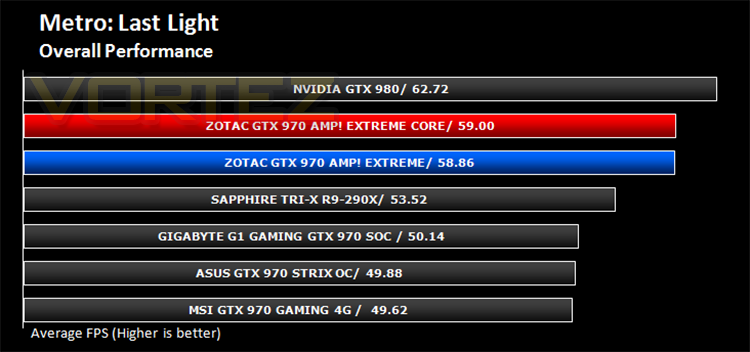
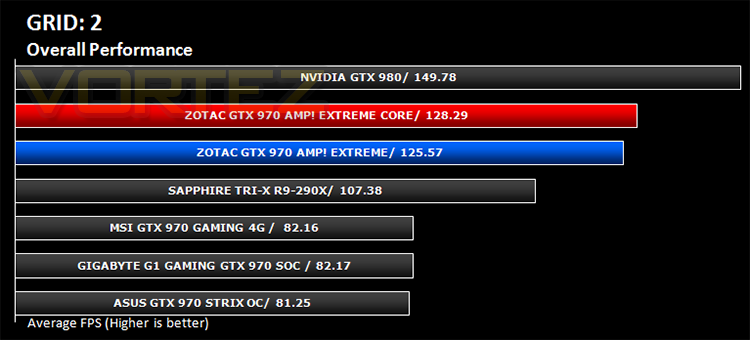
Value for Money
We make a simple calculation for this set of results. For each game we add all of the resulting FPS totals together and then divide by the four sets to give us an overall performance figure. While the figures alone do not give you an accurate picture of how the card will perform in any given scenario, they do tell you, when averaged, which GPU is the more capable across all of the benchmarks and settings tested.
Conclusion
Comparing two cards of the same ilk is difficult at the best of times as both use the same GPU core and the same memory. The main differences between the two cards is in how it delivers the power. The older AMP! Extreme is what it says – Extreme. The voltage regulation is stupendously big, options for serious LN2 over-voltage are there, along with an ambitious USB driven OC+ feature which you may/may not find useful depending on how into overclocking you are and let’s face it if overclocking is not your bag then this card may be a waste on you. On the other side of the ring is the Core Edition. Having faster clocks out of the block you would be forgiven in thinking this was a better card. True, it is more efficient as it requires much less components to attain a faster clockspeed but ultimately, when the overclocking envelope is pushed, we know where our allegiance would lay; with the AMP! Extreme (non-core).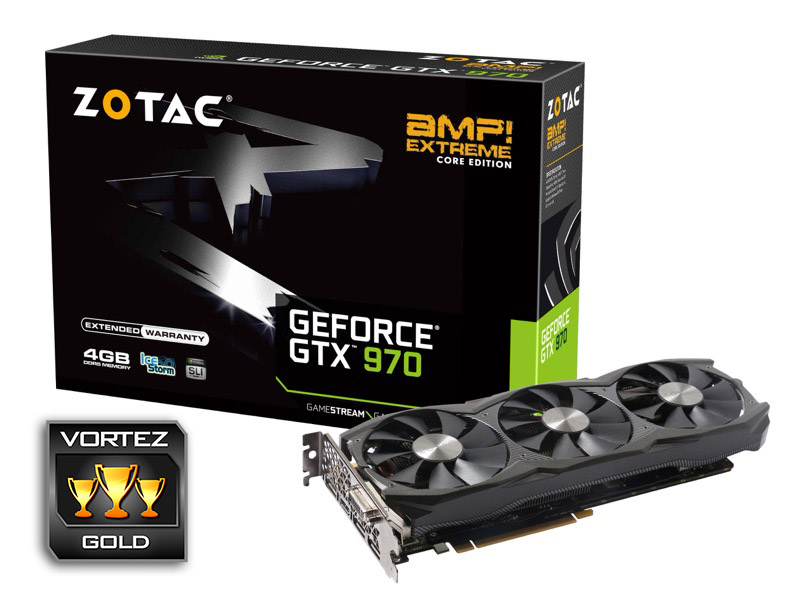
That isn’t of course to say you should dismiss the Core version. By itself it is an exceptionally good graphics card which represents the GTX 970 very well indeed. It is one of the fastest GTX 970’s available and the graphics cooler is comparable, if not slightly better performing than the competition which in itself is no mean feat. The fact it does this with a 2×6 pin setup is further evidence of ZOTAC’s technical expertise. We wouldn’t have called it ‘Extreme’ though. That title should be reserved for the older card which if ever there was a product deserving of that title, this is it. Perhaps our only criticism is the size (width) which will restrict its use in certain enclosures and as it is a little thicker, may also restrict airflow in SLI if the sister card is placed in the next available slot. That said, it wouldn’t be extreme if it were small and conformed to regular dimensions would it?
Price-wise, the older Amp! Extreme comes in at £369.99 RRP which is some £20 more than the Core version at £349.99. The AMP! Extreme price weighs heavy on us because it is perhaps one of the most expensive GTX970’s available which is a shame. The £20 difference from the core can be justified in terms of the extra components used on the older Amp! Extreme and to further entice buyers of the newer card, it comes with a higher factory overclock. So if you are looking for efficiency, a faster stock card and less gimmickry while saving £20 then the Core version will suit you better. Those who look for extravagance and lots of overclocking options, especially for LN2 users then the older card will be better for you.
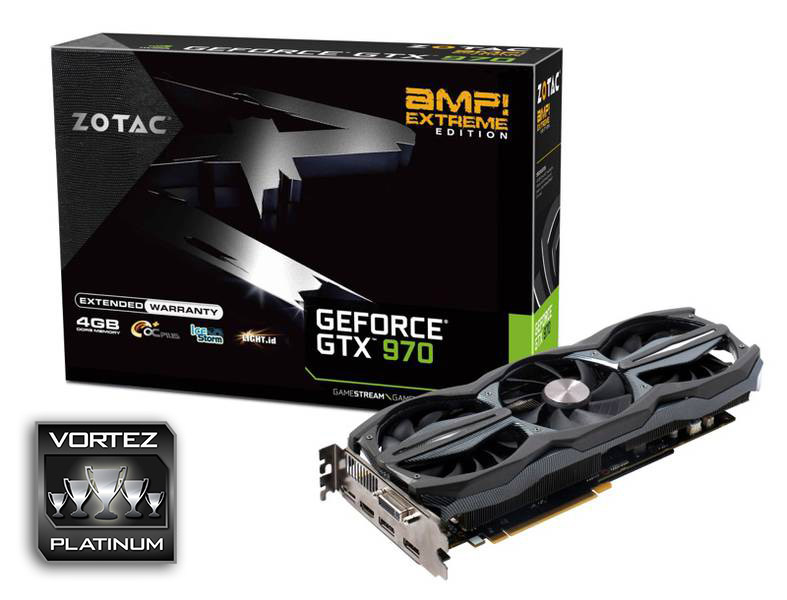
We decided on Gold for the Core version as we feel it is a very good example of what a graphics card should be but adding to that, it also happens to come with one of the fastest factory overclocks available. We rarely hand out platinum awards but we cannot imagine there will be a better GTX 970 than the AMP! Extreme. It has everything. Class leading packaging, cooling, features and overclocking headroom. So whether you want an extremely fast but discreet version of a graphics card or the ultimate in offerings, ZOTAC have provided here two samples that cater for both camps. If you want further options then take a look at the other GTX 970s from ZOTAC (of which there are 5 in total) so you’re sure to find a graphics card based on the GTX 970 that fits the bill. Us? We’ll stick with the AMP! Extreme which is ridiculously excessive, stupidly fast and cares little for anything other than all out performance!
To summarise:
The AMP! Extreme GTX 970 Core Edition is extremely fast, very well cooled and reasonably priced.
Pros
+ Very cool
+ Very quiet
+ Good looking
+ Good overclocking headroom
+ 5 Year Warranty
Cons
– Does not quite live up to the ‘Extreme’ tag in comparison to its brother
+ Very cool
+ Very quiet
+ Good looking
+ Good overclocking headroom
+ 5 Year Warranty
Cons
– Does not quite live up to the ‘Extreme’ tag in comparison to its brother
The AMP! Extreme GTX 970 is Extreme in every sense of the word. We love it!
Pros
+ Extreme Cooling
+ Extreme Power
+ Extreme looks
+ Extreme overclocking potential
+ 5 Year Warranty
Cons
– Girth may be an issue for some
+ Extreme Cooling
+ Extreme Power
+ Extreme looks
+ Extreme overclocking potential
+ 5 Year Warranty
Cons
– Girth may be an issue for some

Click here for an explanation of our awards at Vortez.net.