Looking for a mini pc that has bags of power and a little different along with a small footprint? ZOTAC Sphere is what you need!

Product on Review: ZOTAC ZBOX OI520 Plus
Manufacturer & Sponsor: ZOTAC
Price: £293.62 GBP
Looking back over the past 30 years in my time of using PCs, I have seen the birth of home computing with the ZX81 through to the Spectrum 48K, Commodore 64 and Amiga, 386 and 486 then on to continual evolutions of what we today describe as a home PC. But what is a home PC exactly? I dare say that what you might describe as a home PC would differ to ours, would differ to what the guys in the purple shirts and most other people for that matter. The point being that a home PC is to one person overkill to another and under performing to yet someone else. We all have our own needs from a PC whether it be for simple word processing, writing emails, browsing the web or more demanding tasks such as CAD design, gaming, video editing and the like. A home PC then should be able to complete a variety of tasks if it is to be truly used in the home. Because of the many needs of the home user, PCs had to be large to house the many components needed satisfactorily deliver those needs. Today however, we see that users now want stylish, slim, compact devices such as tablet PCs and Ultrabooks. There is however still a market for the desktop pc but with space at a premium, desktop real estate has been cut down dramatically so to this end manufacturers are looking to deliver desktop pc’s with as small a foot print as possible, without of course compromising on style. The mini-PC was born.
We have reviewed a couple of mini PCs (or nano PCs to give them their correct terminology) and while we were impressed by the size, the functionality was nearly always limited because of this size. Today we see another product from ZOTAC with the aptly named Sphere. Comprising of an Intel i5 Processor, 4GB of speedy DDR3 and a 500GB hard disk it has the specification to match many ‘home PC’ but has the footprint (or rather a diameter) of just 16cm. It has plenty of connectivity, its looks great, it is easy to upgrade if you wish, has a low power consumption rate and should perform as well as any other PC with a similar specification. What ZOTAC have created here is truly astonishing when you look back over the years on how PCs have evolved to what we see today but enough reminiscing. Time we put this product to the test…
About ZOTAC
Established in 2006, ZOTAC is the world’s largest and most innovative manufacturer of graphics cards, mini-ITX motherboards and mini-PCs. ZOTAC system components, and mini-PCs can be found in all continents around the globe.
Derived from the terms “zone,” for being distinct in the PC components and systems business, and “tact,” for our superior skill, experience, quality and manufacturing capabilities. Combined, “ZOTAC,” represents technological strength and experience blended with a fresh approach on the industry’s ever-changing needs.
Derived from the terms “zone,” for being distinct in the PC components and systems business, and “tact,” for our superior skill, experience, quality and manufacturing capabilities. Combined, “ZOTAC,” represents technological strength and experience blended with a fresh approach on the industry’s ever-changing needs.
Specification
Product Name ZBOX OI520 Plus
Chipset Manufacturer Intel
GPU HD Graphics 4400
CPU Intel Core i5 4200U (dual-core) (1.6 GHz)(Turbo up to 2.6 GHz)
Memory Type DDR3L
Memory Speed 1600 MHz
Slots 2 x 204-pin SODIMM
Capacity 4GB (up to 16GB)
3D API
DirectX DirectX 11.1
OpenGL OpenGL 4.4
Ethernet 10/100/1000Mbps
WiFi 802.11ac + Bluetooth 4.0
Analog Stereo output
Digital 8-ch via DVI-HDMI adapter
Hard Drive 500GB 5400RPM HDD
Memory Card Reader 4-in-1 (MMC/SD/SDHC/SDXC)
HDMI 1
DisplayPort 1
SATA 2 (1 SATA 6.0 Gb/s, 1 mSATA 6.0 Gb/s)
USB Ports 4 USB 3.0 (back panel) 3 USB 2.0 (2 on back panel, 1 on side)
Cooler Smartfan
Form Factor
Form Factor mini-PC
OS Compatibility
Windows User installed (Windows 7/8 ready)
Content 1 x ZOTAC ZBOX OI520 1 x AC adapter 1 x Power cord 1 x Warranty card 1 x User manual 1 x Quick Install Guide 1 x USB drive with O/S driver 1 x Driver disc
Chipset Manufacturer Intel
GPU HD Graphics 4400
CPU Intel Core i5 4200U (dual-core) (1.6 GHz)(Turbo up to 2.6 GHz)
Memory Type DDR3L
Memory Speed 1600 MHz
Slots 2 x 204-pin SODIMM
Capacity 4GB (up to 16GB)
3D API
DirectX DirectX 11.1
OpenGL OpenGL 4.4
Ethernet 10/100/1000Mbps
WiFi 802.11ac + Bluetooth 4.0
Analog Stereo output
Digital 8-ch via DVI-HDMI adapter
Hard Drive 500GB 5400RPM HDD
Memory Card Reader 4-in-1 (MMC/SD/SDHC/SDXC)
HDMI 1
DisplayPort 1
SATA 2 (1 SATA 6.0 Gb/s, 1 mSATA 6.0 Gb/s)
USB Ports 4 USB 3.0 (back panel) 3 USB 2.0 (2 on back panel, 1 on side)
Cooler Smartfan
Form Factor
Form Factor mini-PC
OS Compatibility
Windows User installed (Windows 7/8 ready)
Content 1 x ZOTAC ZBOX OI520 1 x AC adapter 1 x Power cord 1 x Warranty card 1 x User manual 1 x Quick Install Guide 1 x USB drive with O/S driver 1 x Driver disc
Packaging & Accessories
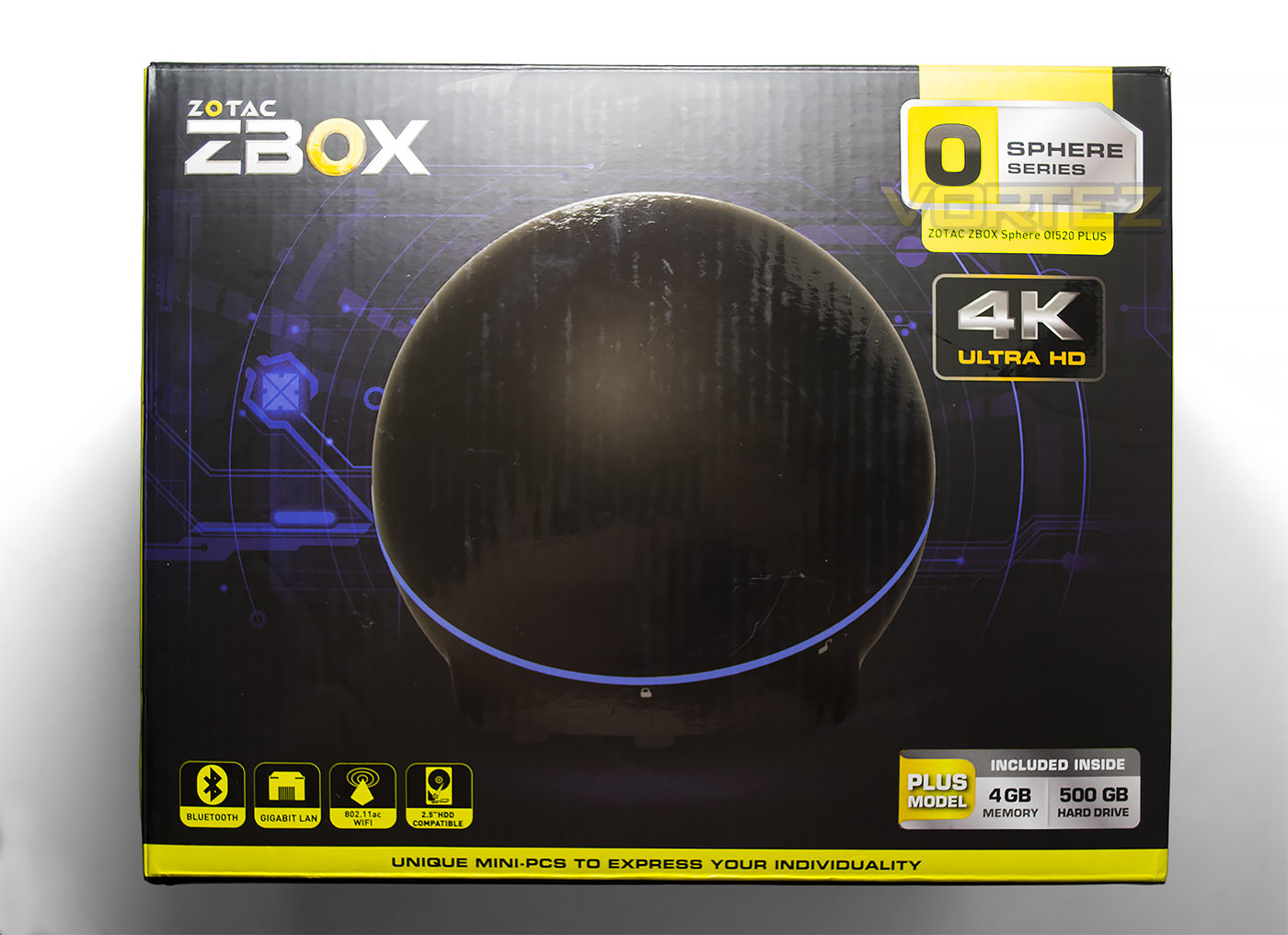
the packaging of the Sphere is very tidy with just a small cube protecting the innards yet the contents are very well protected and separated neatly. The front of the package shows us the Sphere itself along with the main features and specification. As this is the PLUS model it has 4GB of DDR3 and a 500GB hard drive along with Bluetooth, GIGABIT LAN and 802.11ac WiFi.
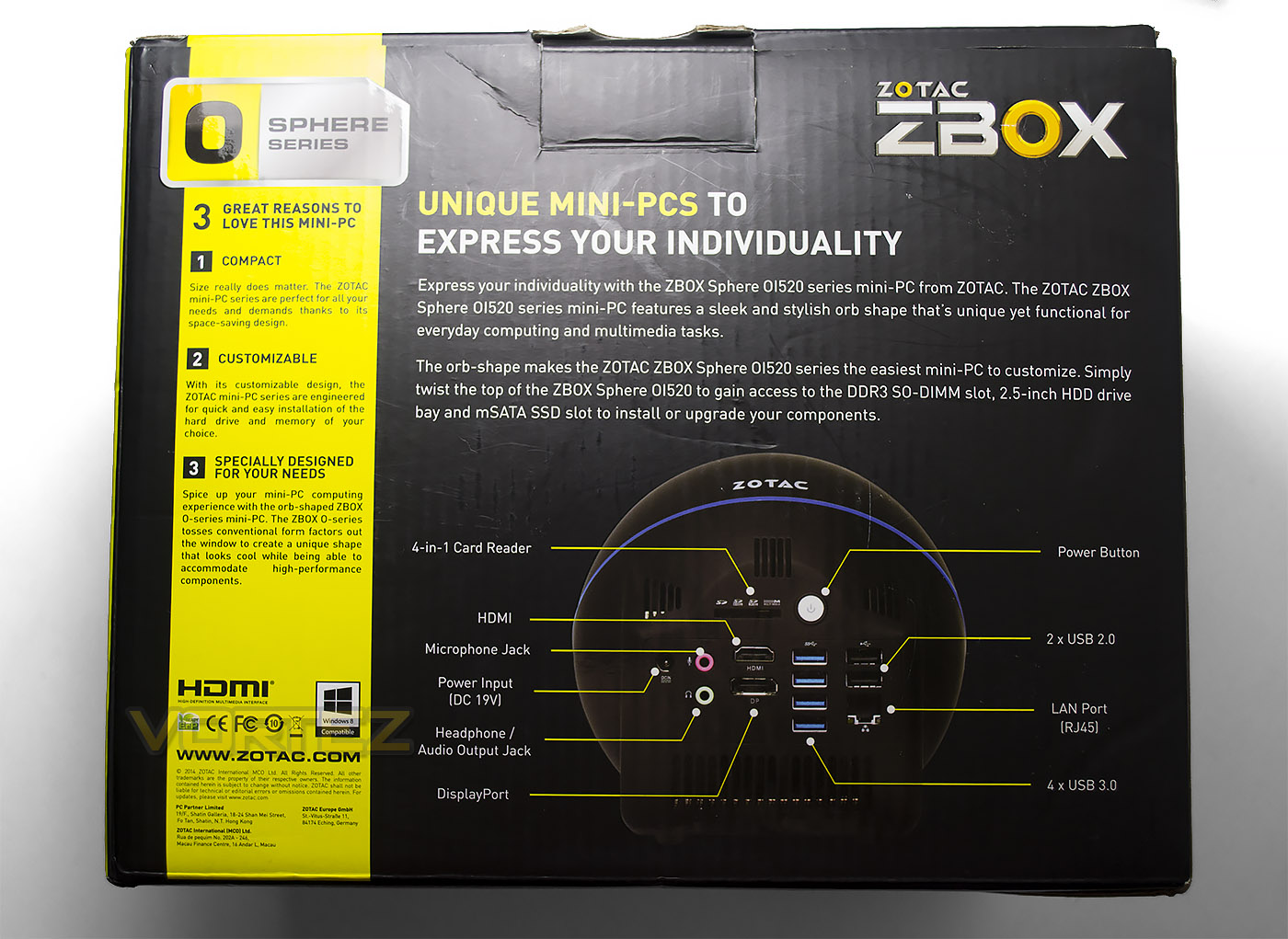
The rear of the packaging shows us the rear of the product (more on this later) and justification for buying a mini-PC mainly that this product is compact, customizable and designed for your needs.
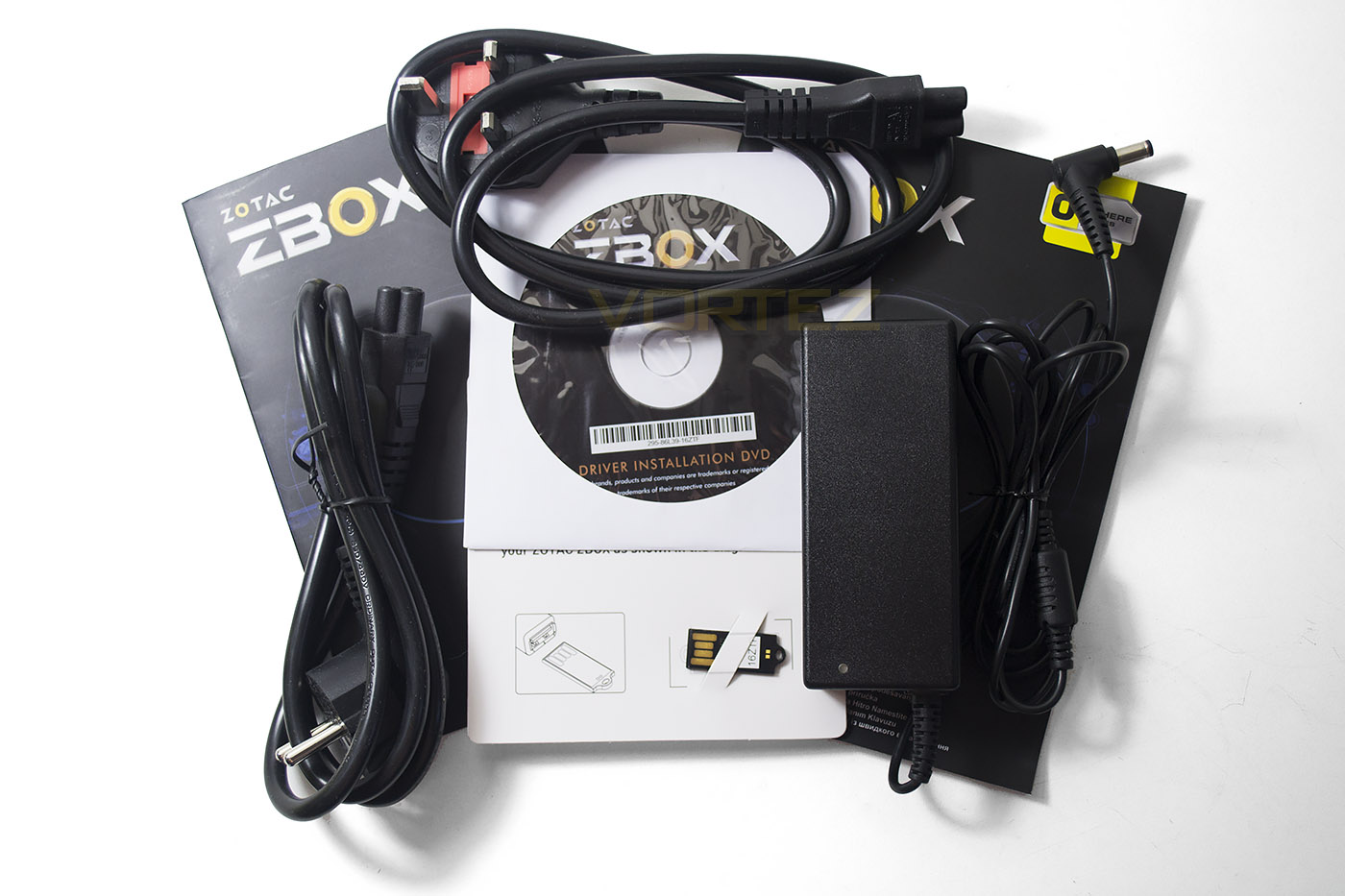
The accessories included with the ZBOX mainly consist of product documentation and powerleads/pack of which both Euro and UK plug designs are catered for. ZOTAC have also included a mini USB drive that has the drivers specific to this model which was very much appreciated and makes for an easy setup. If you have an external DVD drive available then you can also instal the drivers from the included DVD or indeed create your own USB driver on a pen drive of your own. We installed Linux (Ubuntu), Windows 7 and Windows 8 and didn’t have any issues with any of these operating systems.
Let’s take a closer look at the Sphere itself…
Closer Look
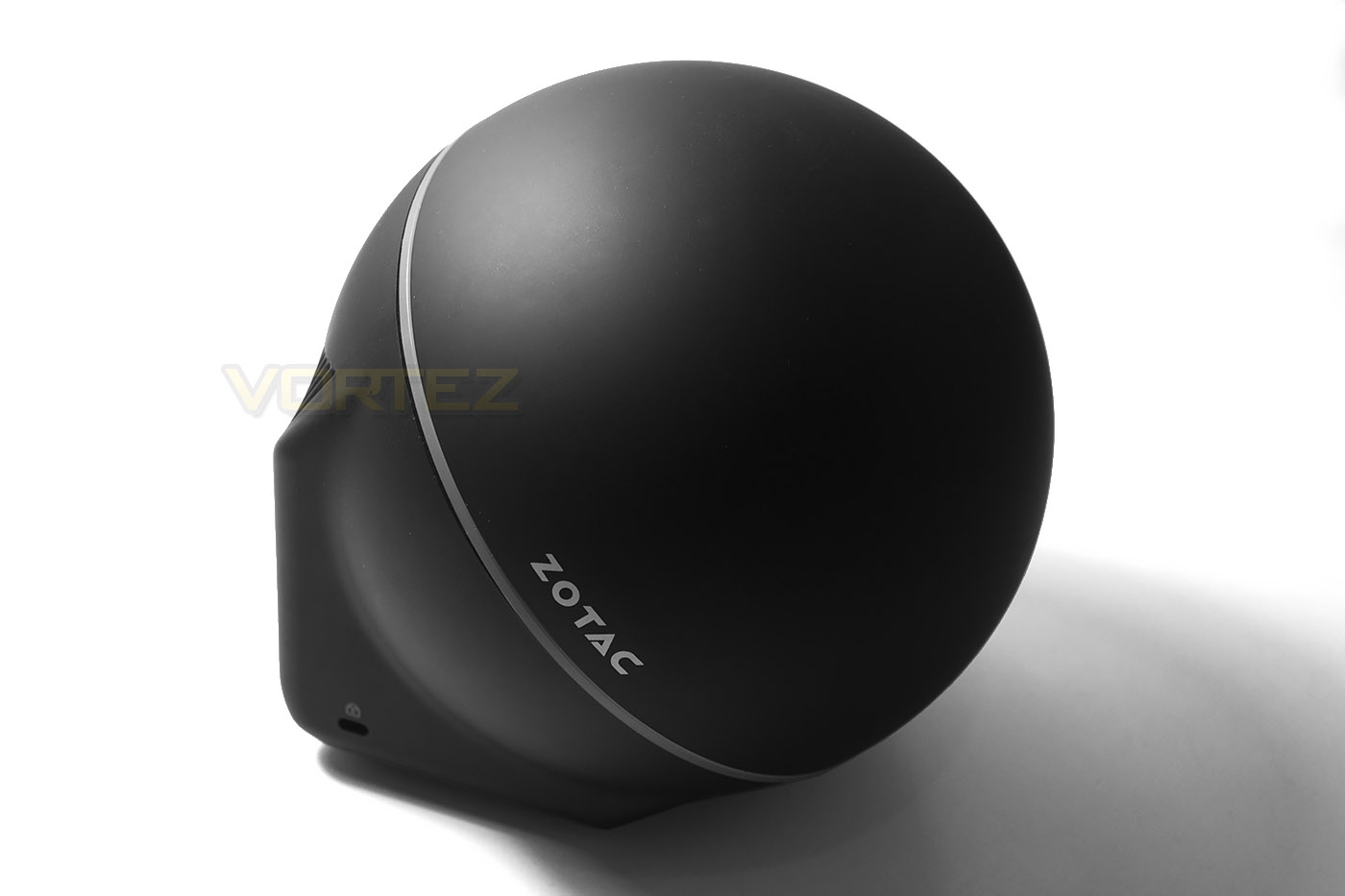
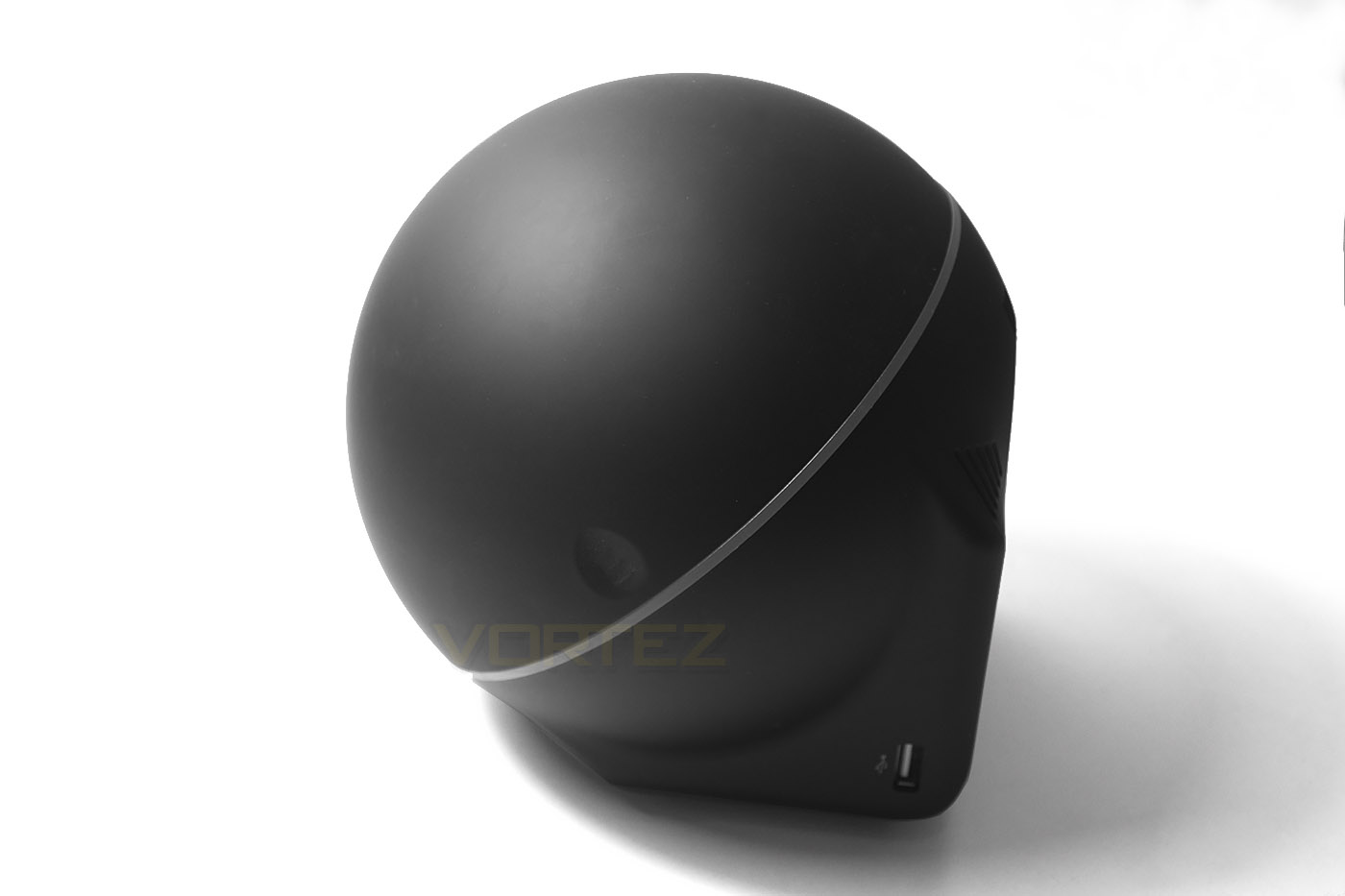
As the name suggests, the Sphere is spherical by design however it would be impractical having a mini-pc that could potentially roll off your desk so the Sphere is actually not totally spherical as it has a square base with a cube like protrusion to the rear. The outer casing is a matt black plastic and quite plush to the touch. We were however a little concerned that the domed area did flex a little under pressure which was a little disconcerting.
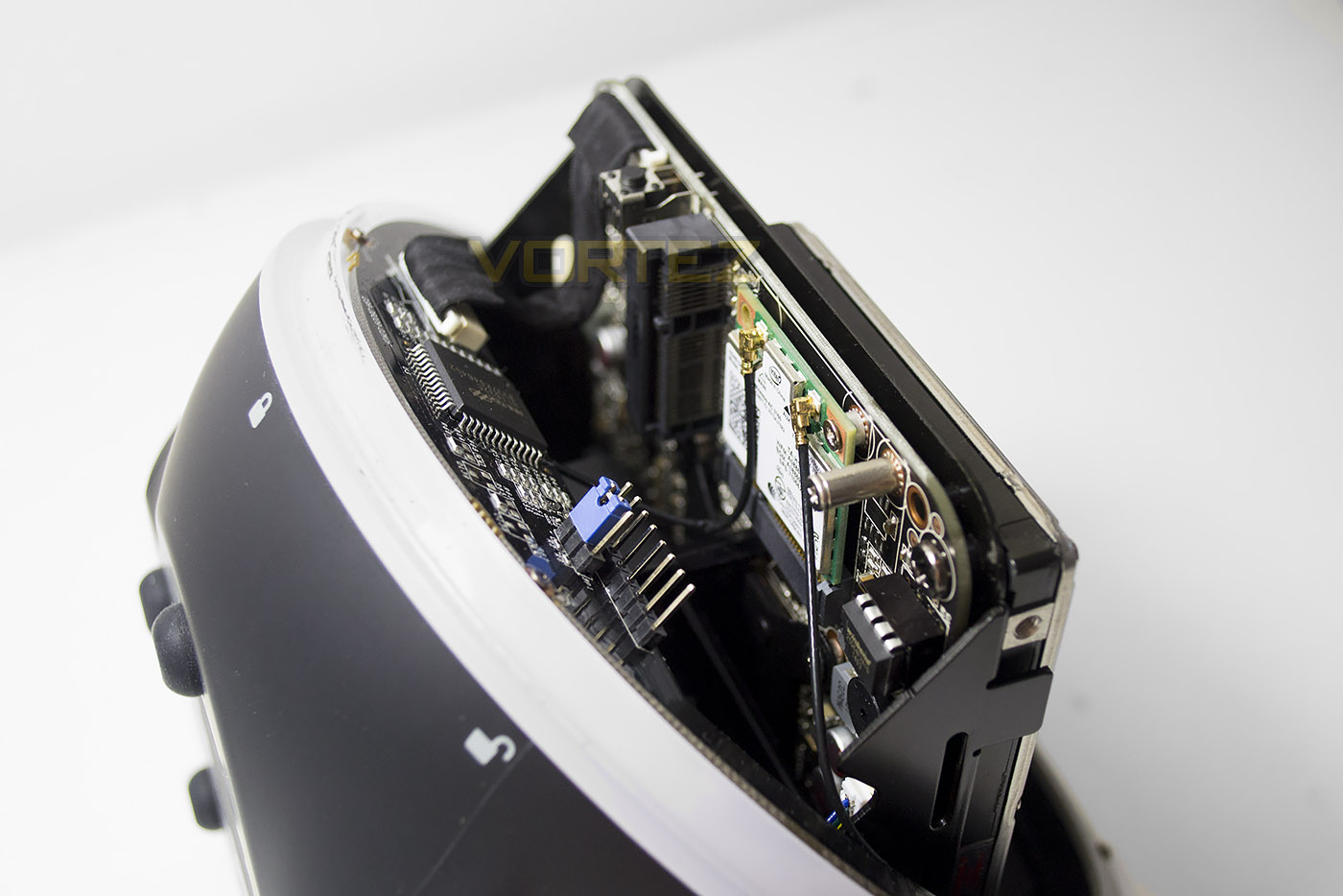
Gaining access to the internal was simply a matter of twisting the dome off a quarter of a turn. While this design is great we can see that regular access would inevitably mean that the plastic tabs would eventually wear down which could impact on the longevity of the product. The ‘lid’ also felt quite flimsy which could be resolved perhaps by adding a metal ring prevent said flex.
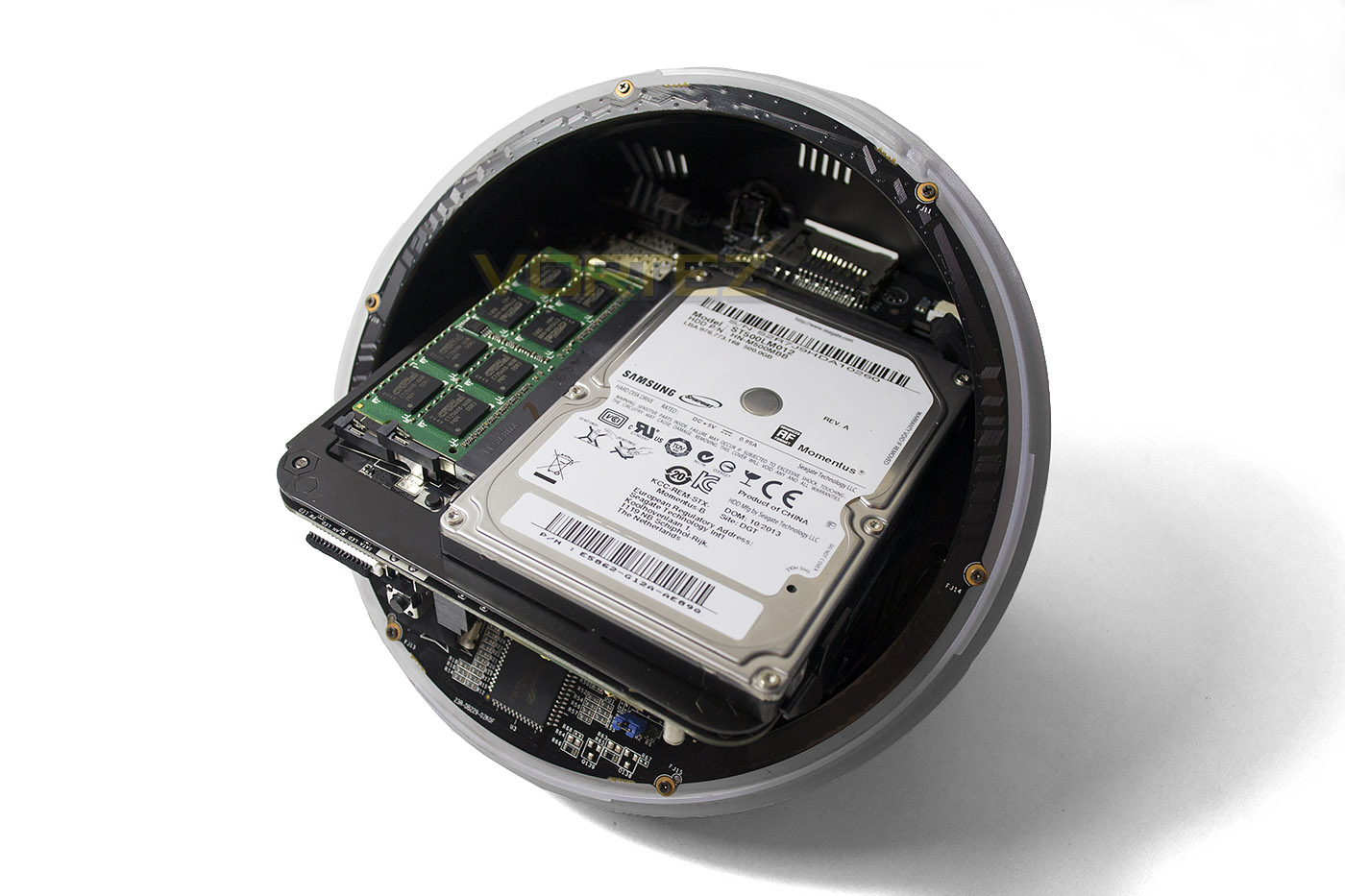
With the lid removed we can see that both memory and hard drive access is readily available and so easily upgradeable. Included with the plus version is 4GB of DDR3 and 500GB 2.5″ mechanical hard drive. We suspect that both the memory and hard drive would be upgraded by the end user eventually with perhaps a further 4GB of DDR3 for dual channel 8GB operation and an SSD but the current specification is more than enough for regular users we feel and helps keep the cost of the product down.
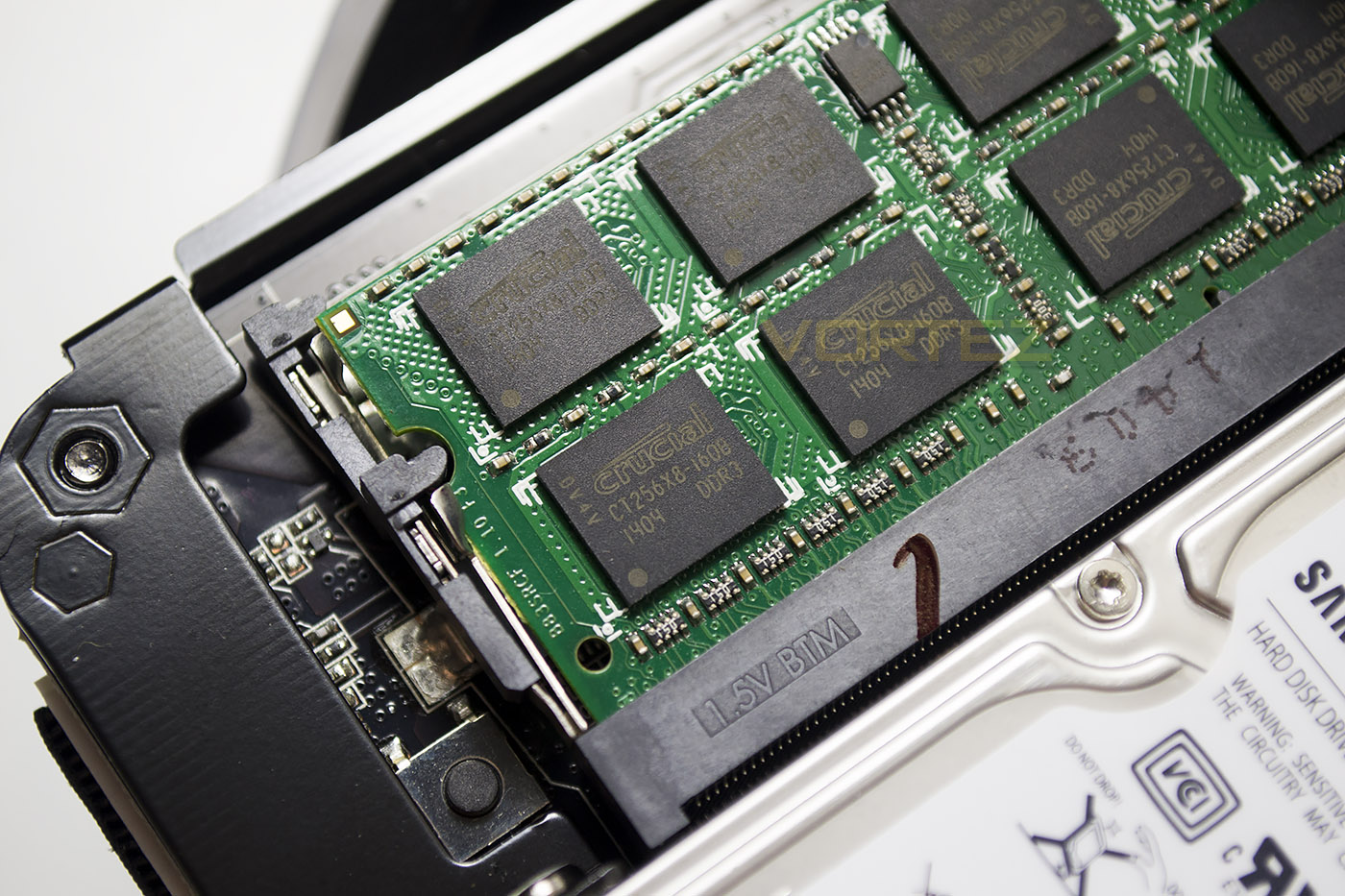
The memory included is Crucial 1600MHz 11-11-11-28 1T which isn’t the fastest memory on the market but sufficient for a product at this entry point.
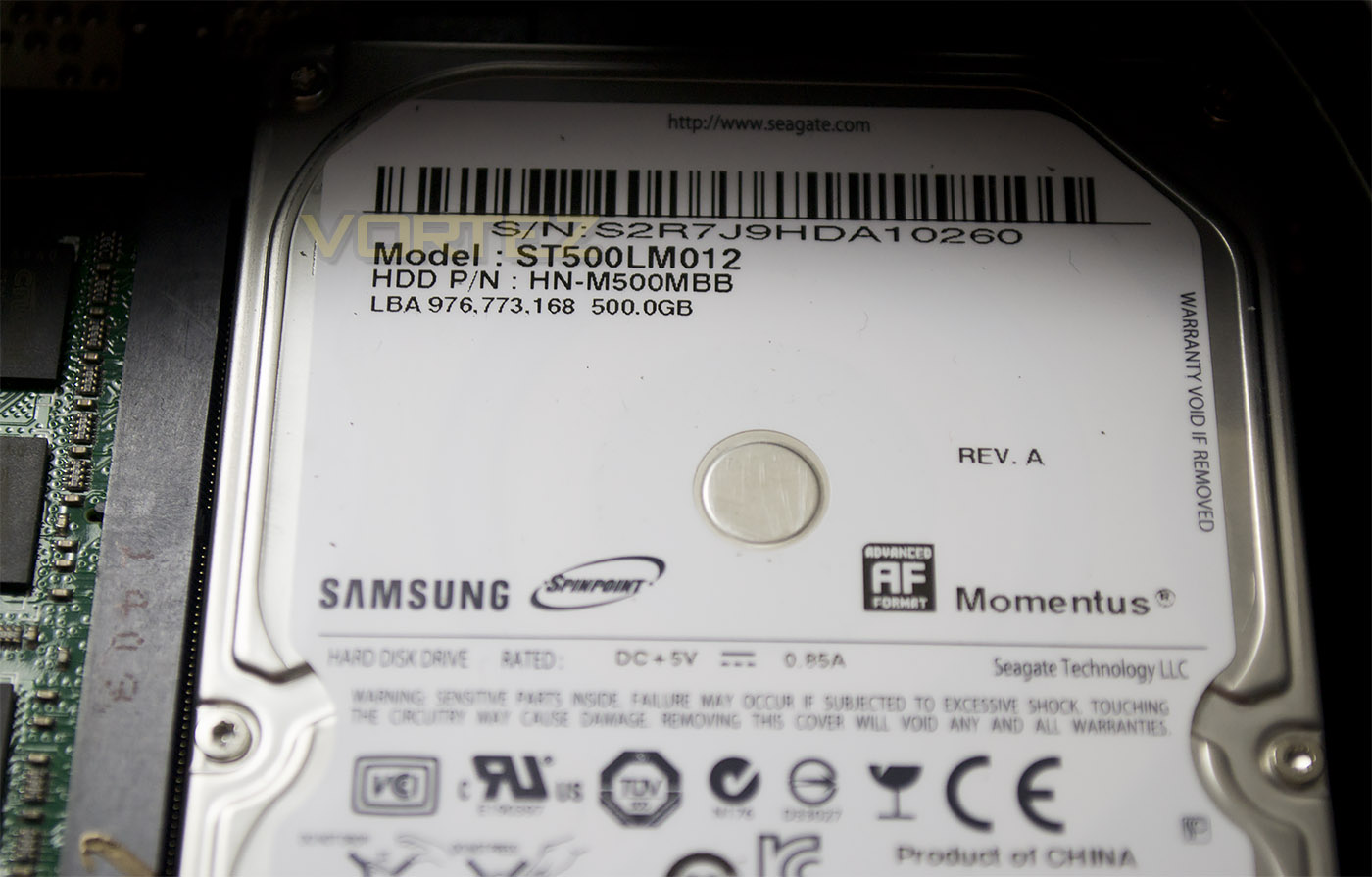
The hard drive is a Samsung Momentus with a 500GB storage capacity which is quite large for a mini-PC and will please those intending to use this product for media storage.
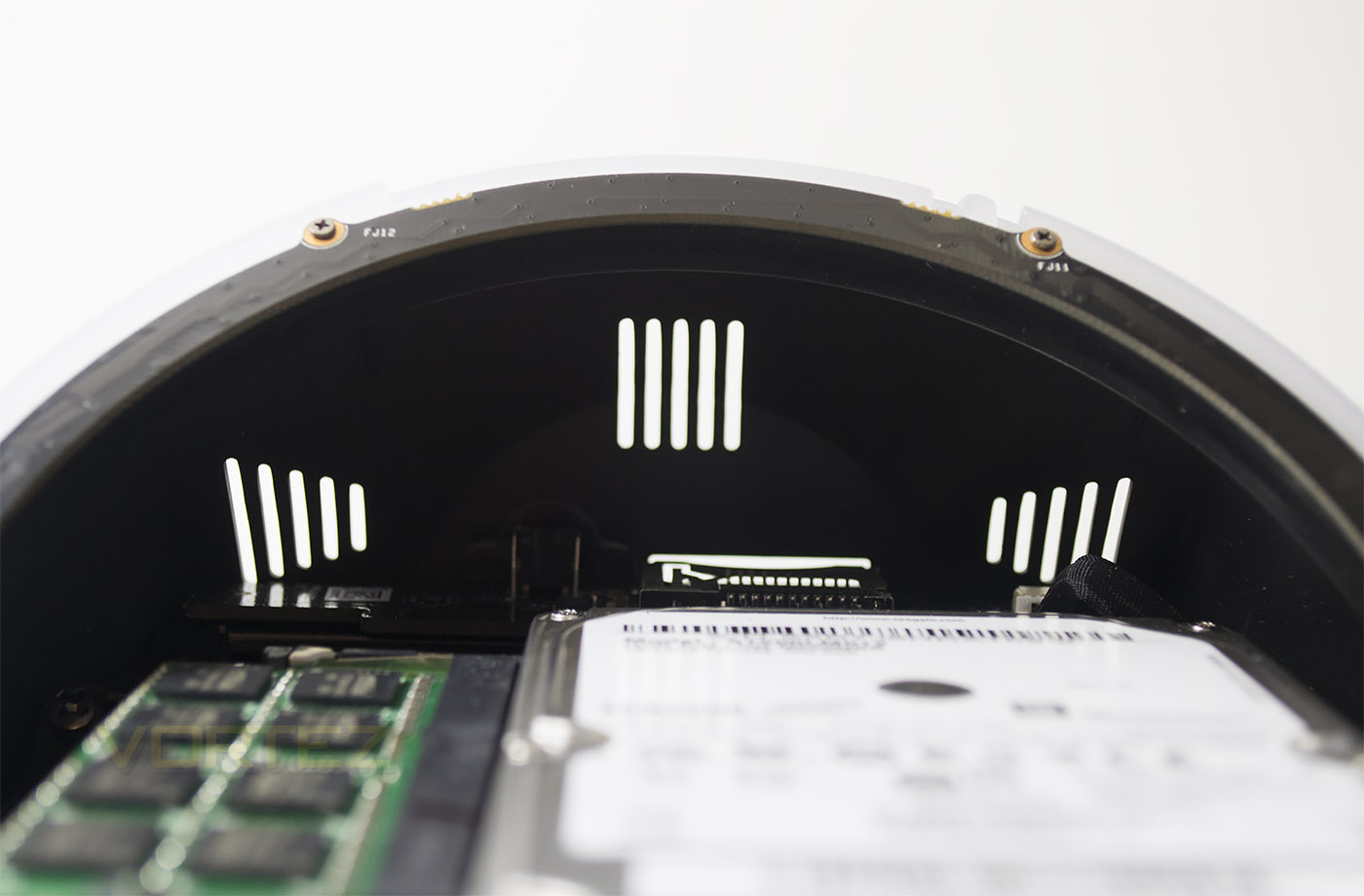
Keeping the components cool is a small fan which during testing was barely audible despite its size with hot air being vented out of the rear and base of the unit.
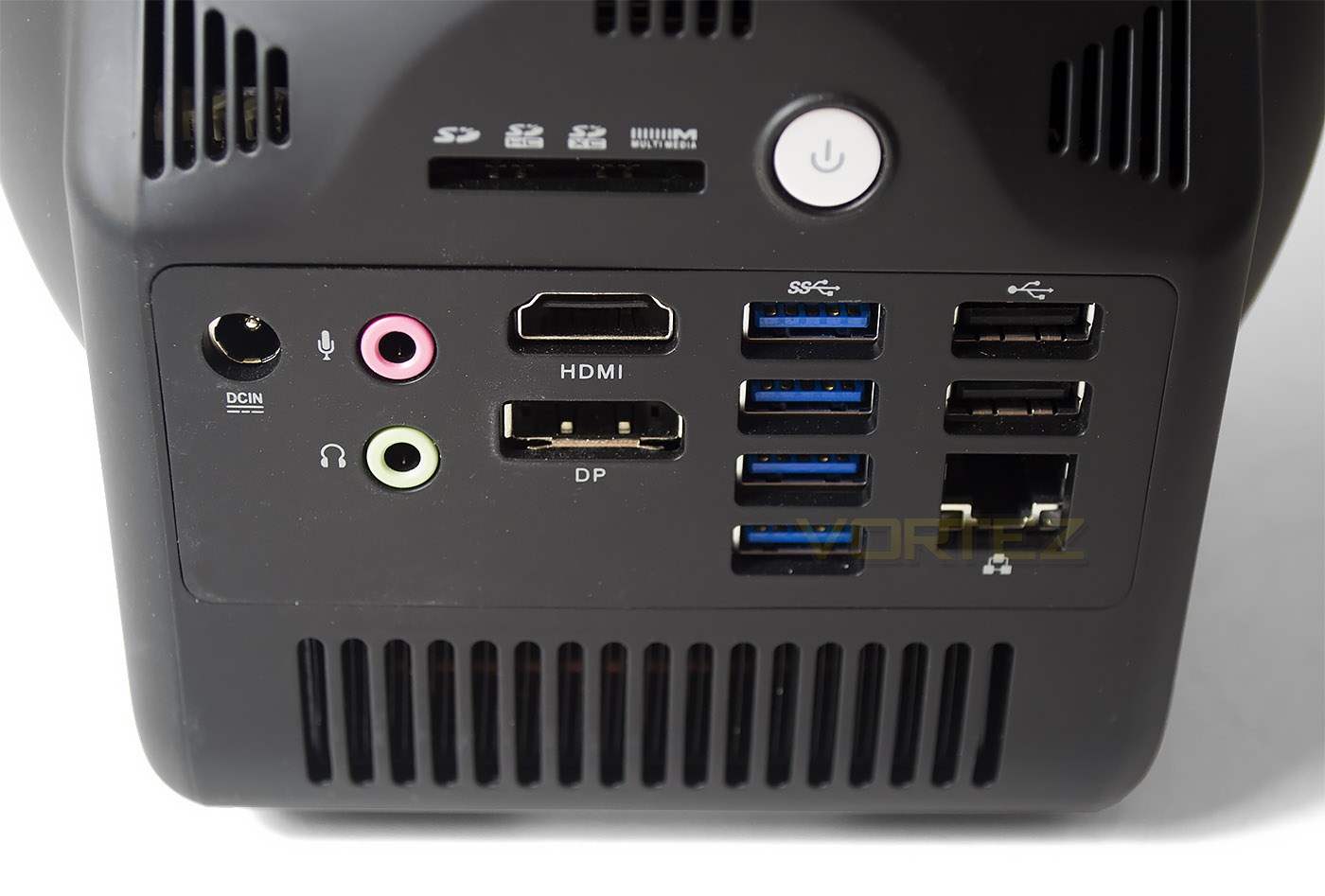
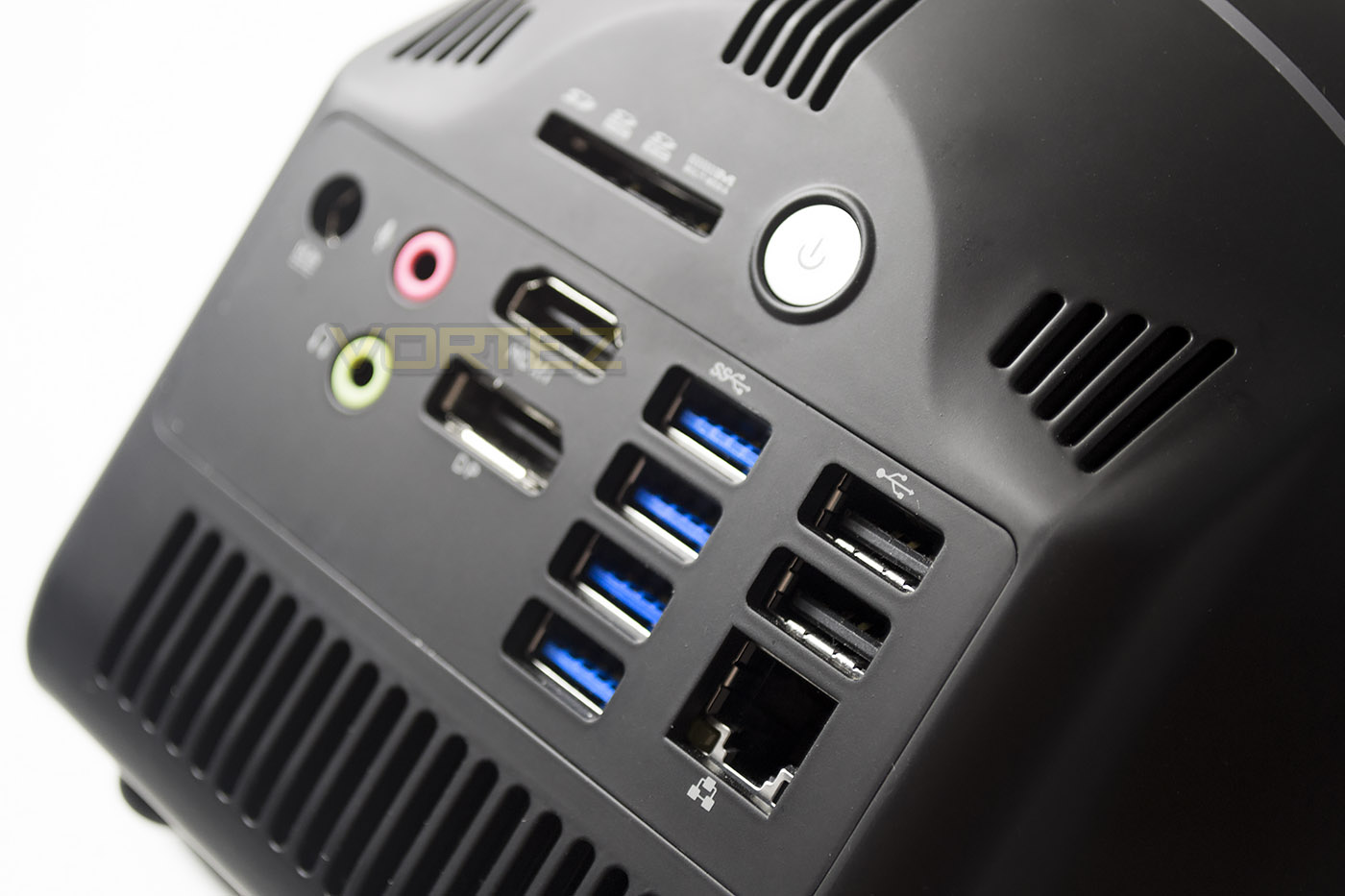
The rear of the product features both 3.5mm mic and audio out jacks. Monitor setups are however limited to either HDMI or DisplayPort as there are no DVI or VGA ports available which was a shame. 4x USB 3.0 ports are included with a further 2x USB 2.0 ports and GIGABIT LAN. There is also an SD slot uppermost next to a small power button. All in all a well featured I/O area which should provide enough ports for the average user however it is worth noting that should you have an older monitor design you may need to think about upgrading if it is not compatible with HDMI or DP.
Benchmarks: Windows 7 Boot & Power Consumption
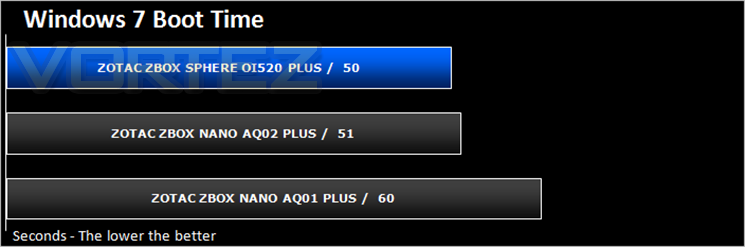
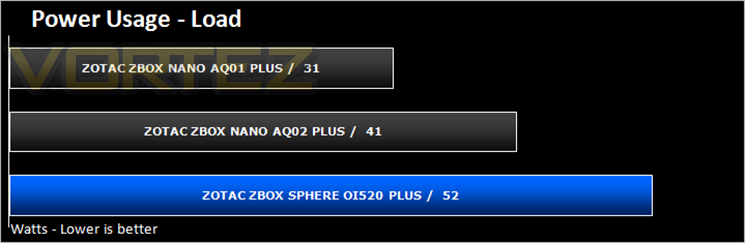
We install Windows 7 on the ZBOX, bring it right up-to-date and then use a digital stopwatch to time the bootup period. To measure the power consumption, we load up 3DMark and then use a power energy monitor to view wattage.
Benchmarks: Cinebench & X264 HD
In order to test the efficiency of the APU within our ZBOX, Cinebench is used first of all – this gives a processing score. We then use X264 HD to demonstrate how the APU performs in terms of encoding media files.
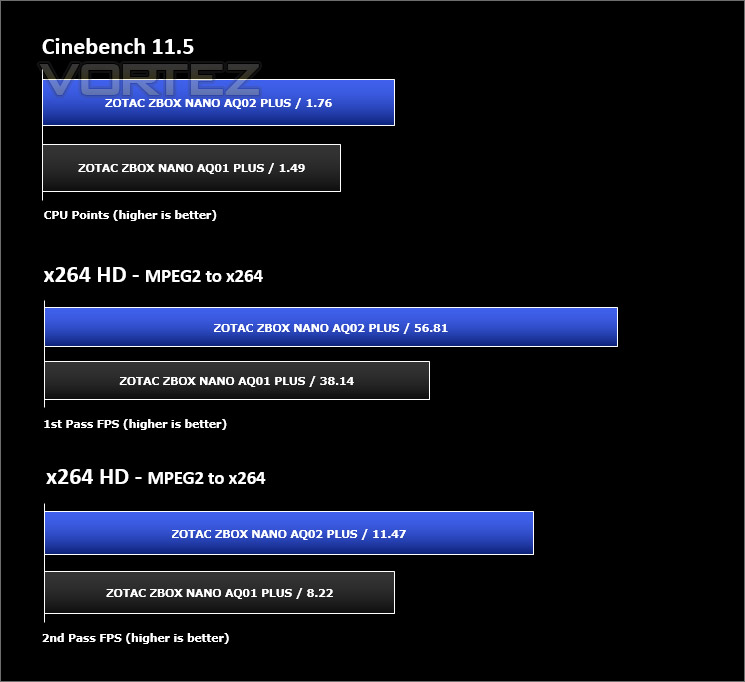
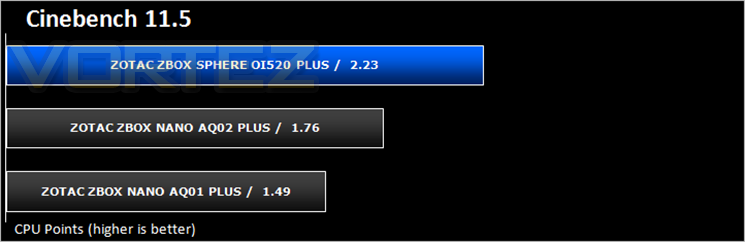
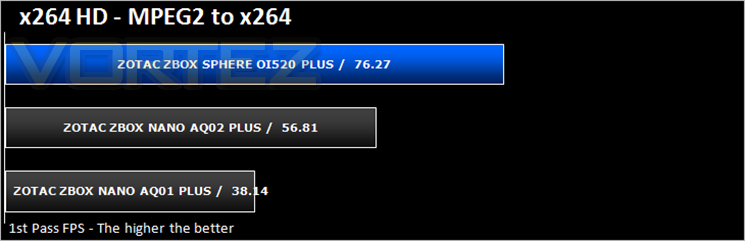
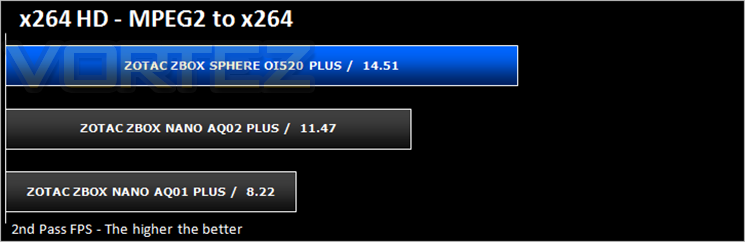
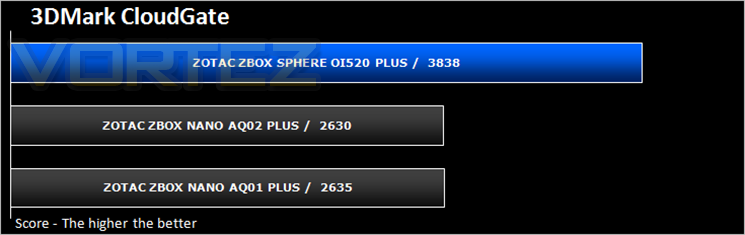
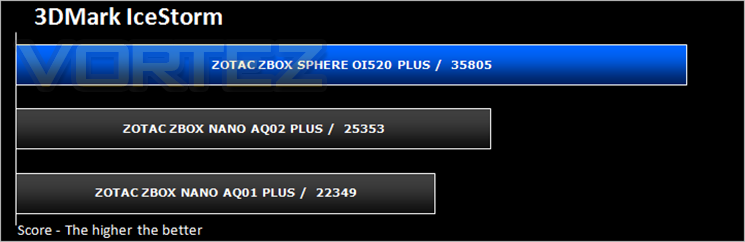
Benchmarks: 3DMark
The new 3DMark includes everything you need to benchmark your hardware. With three all new tests you can bench everything from smartphones and tablets, to notebooks and home PCs, to the latest high-end, multi-GPU gaming desktops. And it’s not just for Windows. With 3DMark you can compare your scores with Android and iOS devices too. It’s the most powerful and flexible 3DMark we’ve ever created.
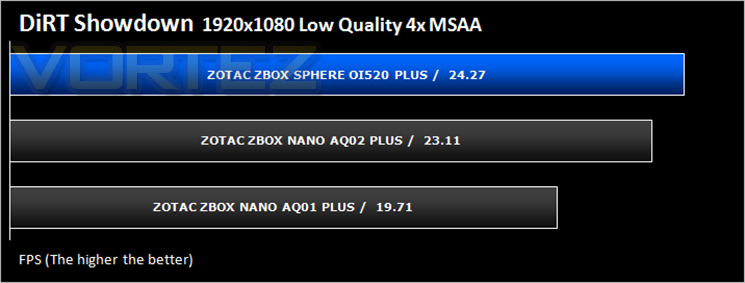
Benchmarks: Sleeping Dogs, Tomb Raider & DIRT Showdown
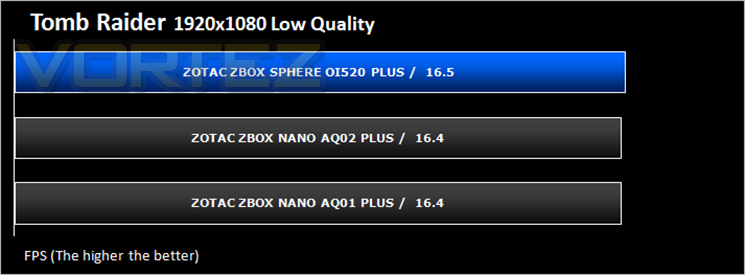
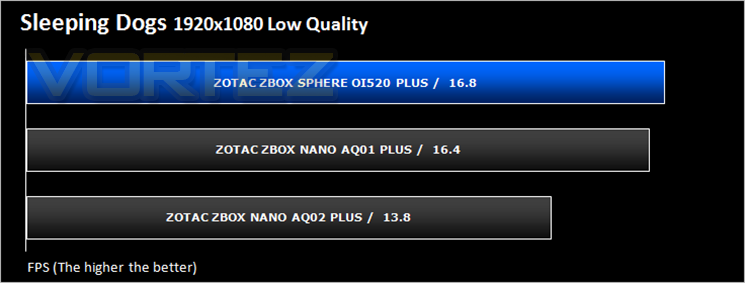
Our ZBOX uses an integrated chip for graphics delivery. To test how effective the 3D capabilities are we run two benchmark tests within 3DMark and then we use the benchmarking tool within Sleeping Dogs, Tomb Raider and DIRT Showdown to obtain average framerate
Conclusion
First off let’s talk about the design. Having a spherical shaped PC was always going to be tricky to pull off due to the fact the vast majority of components found in a PC are angular. Motherboards, hard drives, memory modules all have 90 degree angles so fitting this into a sphere was prone to have wasted space, thus enlarging the overall dimensions of the Sphere. That said, ZOTAC have done a pretty good job inspacing the components out inside to ensure that there is adequate airflow over the components thereby ensuring there are no heat issues which, thanks to the very small fan and strategically placed vents also happens to be pretty quiet during operation. We liked the look of the Sphere and while it isn’t truly spherical (think of a square inside a sphere), the design does ensure it won’t roll off your desktop. The illuminated blue equator line looks neat and will no doubt be the highlight on any tabletop. The majority of the ports are to be found to the rear of the Sphere of which there are many, while ZOTAC have also managed to cram an additional USB port to the right hand side. Overall then, the Sphere ticks all the boxes in terms of design, especially if you are looking for something a little different that you can show off rather than hide around the back of your monitor.
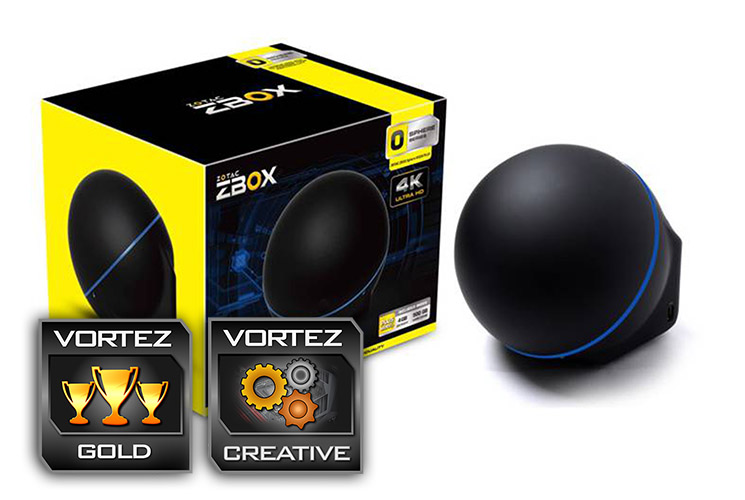
Performance wise it is certainly faster than previous incarnations thanks to the Intel i5 (with integrated GPU), 4GB of DDR3 and a beefy 500GB hard drive. Our main complaint specification wise would be that a single stick of DDR3 is unlikely to impress. There is an additional port to expand the memory and run the memory in dual mode which, we suspect, many users will eventually do and of course upgrade that ageing mechanical drive to a faster SSD. Both of these upgrades will be very easy to complete if you have ever upgraded a notebook. Simply twisting the sphere in two reveals both components uppermost which are the easiest to access. This however brings to our main complaint. The ‘lid’ feels flimsy. It is very easy to misalign the lid due to the thin plastic and while not difficult to sort out it does take away the feel of a premium product. Other than that we feel ZOTAC have got the balance right between cost, design and performance specification.
This is a very innovative design which will certainly appeal to those who crave something a little different but do not want to compromise on performance to get it.
It’s hard not to like the Sphere. It is a very well ’rounded’ product that can compete with PC’s much larger than itself.
Pros
+ Innovative design
+ Plenty of ports & functionality
+ Memory & HDD included
+ Option to upgrade memory & HDD capacity
+ HD ready
Cons
– Plastics questionable
– No OS included
+ Innovative design
+ Plenty of ports & functionality
+ Memory & HDD included
+ Option to upgrade memory & HDD capacity
+ HD ready
Cons
– Plastics questionable
– No OS included

Click here for an explanation of our awards at Vortez.net.