







Lean, mean and built for competitive gaming, does the Zowie FK mouse tick all the right boxes at the price point?

Product On Review: Zowie FK FPS Gaming Mouse
Manufacturer: Zowie Gaming Gear
Price: £51.95 inc. V.A.T. (at time of review)
Founded in 2008, Zowie Gaming Gear were originated on the principle of creating core gaming peripherals which allow gamers to maximise competitiveness no matter their skill level. Billing themselves as a free-thinking company not bound by shareholders or market conventions, they haven’t been concerned by market fads or the latest flavour-of-the-month technology. Their designs are typically minimalist, eschewing unnecessary features such as lighting and over-elaborate layouts in favour of being the best at helping you to play games.
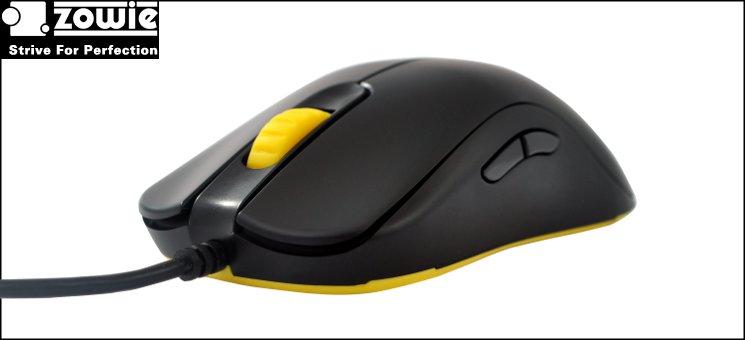
David reviewed their most well-known product – the Zowie Celeritas – in 2011 and it made a lasting impression as our first look at mechanical keyboards. In the intervening period the market for those products have become all the more competitive, but no more competitive than that of the product we have to review today: the Zowie FK. An evolution of the Zowie AM, but redesigned primarily as a competitive gaming mouse, the FK utilises a 2300DPI optical sensor optimised for low lift-height and an innovative tapered design lending itself to a true ambidextrous layout.
About The Zowie FK
This is where the ZOWIE FK comes in! The FK is similar to the AM in terms of specifications and features, and they are both ambidextrous mice developed for gamers who prefer a claw-grip play style, but that is where the similarities end.
The FK has a \ / grip, where the AM has a / \ gripping style. The design of the FK has changed slightly compared to the AM, amongst other minor adjustments, the height is lower. The adjustments to the overall design have been made to make the FK lighter and faster. We hope that the design makes it more comfortable to use, not only for gamers who prefer the claw-grip, but also for gamers with smaller hands who prefer to palm-grip their mouse.
Furthermore the FK features a new coating, which feels smooth and fine like regular rubber paint, but has increased resistance towards wear and tear. The coating helps increase grip for gamers with tendency to sweaty palms and it is easy to clean!
Zowie set great store by their design and component choices for the FK and this is reflected in the asking price, putting it up squarely against premium products from the likes of Razer, SteelSeries and ROCCAT. Professional gamers will happily pay top dollar for the best in their chosen field, but can the mouse live up to the needs of a gamer with more diverse tastes?
Features and Specifications
Features
* Two thumb buttons on both sides to comfortably serve left- and right-handed users
* Easy to switch between left- and right-hand functionality, no driver needed
* New improved coating method, feels like rubber, increased durability
* 450 / 1150 / 2300 DPI adjustment
* Adjustable USB report rate 125 / 500 / 1000 Hz
* ZOWIE custom-designed lens for a very low lift-off distance = 1.5 ~ 1.8mm
* Operating system: Win2000/XP/VISTA/7/8, Mac OS X v10.2 after
Technical Specifications
Connector: USB
Buttons: 5
Length of cable: 2m / 6.6 ft
Weight: ~85g excl. cable
Packaging and First Look
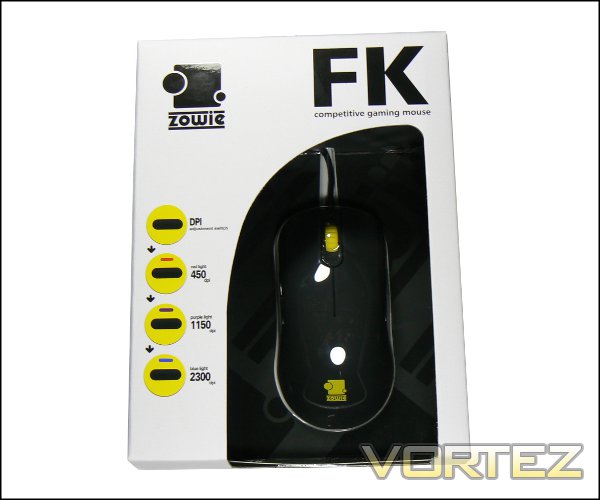
If there were awards for getting people enthused by how the packaging would look on a shelf, Zowie probably wouldn’t even get a nomination. As with most peripheral packaging the front provides you with your first look at the mouse thanks to a window, but apart from the branding the rest of the plain white front is devoted to the 3 DPI preset functionality. Note that although it isn’t listed, DPI presets are selected through a button on the base of the mouse.
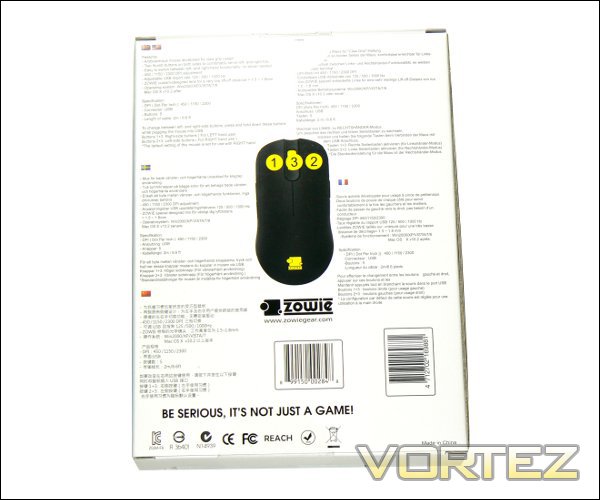
Rather than include a printed user guide, Zowie have included an explanation of how to adjust the other options on the outside packaging. This includes printing instructions on how to change USB polling rate – for compatible USB connections – on the left side, and the handedness on the rear (shown above). It’s a curious decision given the lack of an online user guide, but saves on overall cost.
Also on the rear are the features and technical specifications of the mouse, repeated in six non-English languages in the same level of depth. Interestingly there’s no information on angle-snapping or bundled software, the former of which would be crucial for high-level players and the latter for fans of more esoteric titles. The impression therefore is one of dense information as if it were an engineering part, but missing one or two key points of interest.
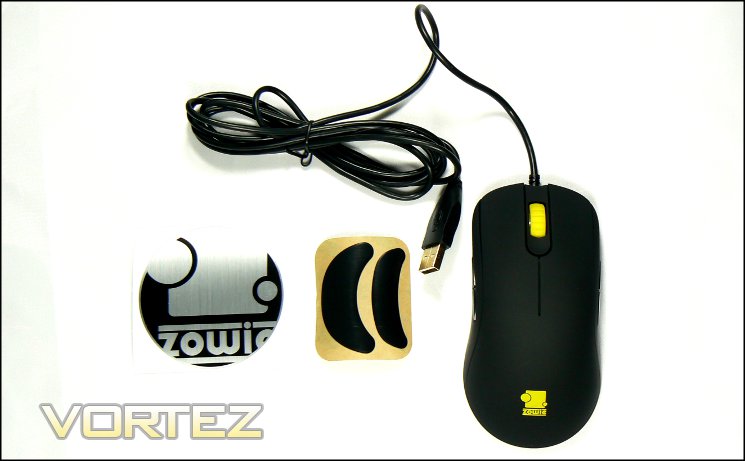
Along with the FK mouse itself, the retail package also includes replacement skates – something we always appreciate on any mouse which doesn’t use the more common small skates – and a Zowie case sticker for those who like to ‘bling-up’ their chassis. As mentioned though, no user guide means that you’ll want to make note of those configuration instructions on the packaging.
For a mouse very much looking for a place in the high-to-premium end of the shelves as far as wired mice go the FK doesn’t do very much to leap off the shelf. Still, it’s what’s inside that counts.
A Closer Look
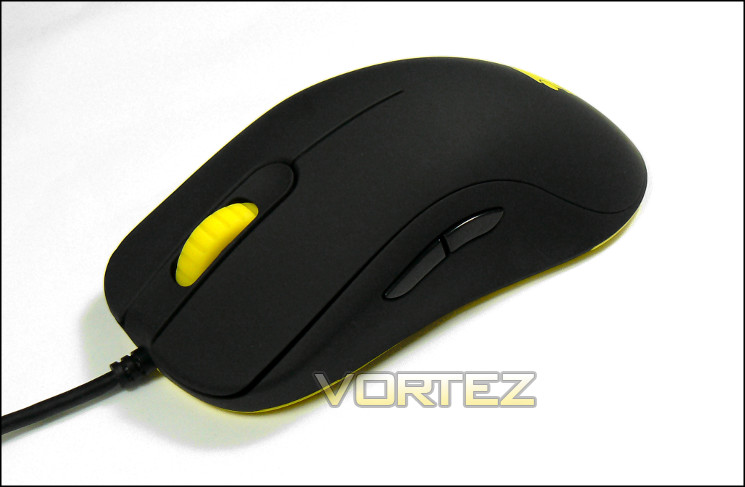
The first aspect of the Zowie FK which will likely strike you is the colour-scheme: yellow and black, although cool, are fairly rare as an off-the shelf combination right now. The black is a matte black, which will tend to be a little more resistant to fingerprints than the glossy alternative, whilst the yellow is fairly bright. Nothing wrong with that.
The shape of the FK is deliberately ambidextrous, and brings to mind classic shapes such as the old Intellimouse designs. In this instance however Zowie curved the sides inwards*, allowing you to grip and lift the mouse without the danger of pushing side buttons, increasing overall control. When lifting the weight is evenly distributed, i.e. the mouse will remain horizontal when lifting from just below the rear-most side buttons. Without additional weights Zowie had to make sure that they didn’t unbalance the mouse, causing it (or more precisely the mouse cursor) to become erratic when performing mundane tasks; in this they have been eminently successful.
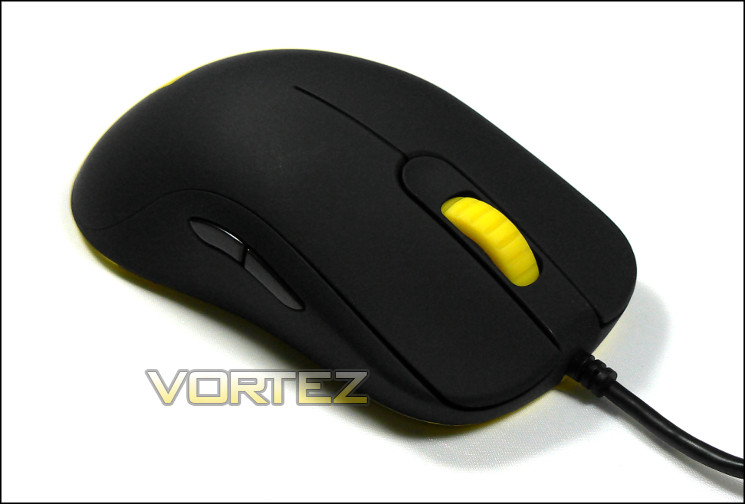
Mouse side-walls aren’t the only feature to see a few tweaks from a traditional design. The two main buttons are slightly concave, contoured to the shape of your finger when resting on the top. The central wheel has a heavily ratcheted movement whilst also having a ridged cucumference such that it’s tactile and easy to grip. Middle-button presses are gentle and there’s no give in the wheel axis, which combined with the notched movement should make it relatively easy to use in comparison to mice with smaller wheels and more resistive clicks.
Moving to the side-buttons, all four have a very consistent actuation that’s light without being too springy. A quite shallow actuation point means that reaction times should be good, and they don’t press inwards too far either so fast repeated clicking isn’t problematic. As side buttons go they’re very satisfying, and some of the best we have felt in any price bracket.
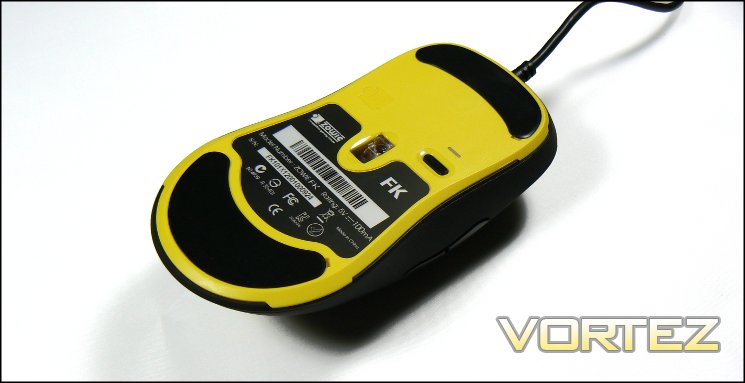
The floor is a separate piece of durable yellow plastic which is dominated by two large skates with low-friction coating. Centrally located is the sensor, with technical information such as serial number and model ID also present on the label below. To the right of the sensor is a black button, which serves as the DPI selector; a three-colour indicator LED is located slightly above.
Finally, rather than choosing a braided sheathe Zowie have chosen a soft rubber cable for the USB connection. The cable itself is therefore less stiff, exerting less force on the mouse both when resting and during gameplay for optimum stability. The trade-off may be one of durability – we would anticipate that the cable would degrade more quickly than a high quality braided design, but that shouldn’t be much of an issue for most usage patterns.
*if that’s hard to envision, imagine the difference between how easy it is to lift an upturned bucket vs one that right-side up
Customisation Options
Zowie have avoided aesthetic customisation on the FK, but that doesn’t mean they assume an optimal configuration right out the box. They offer customisation options in three key areas – DPI, handedness and USB Polling Rate – each of which are selected through the mouse itself rather than software.
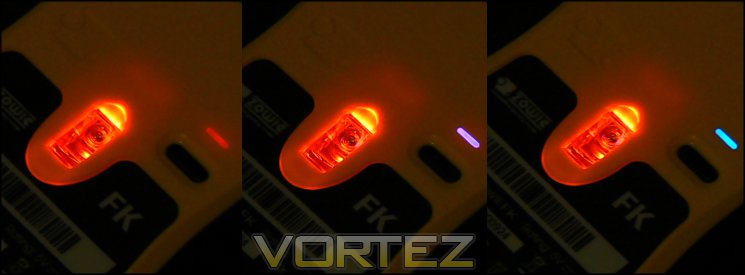
As you should expect from a gaming mouse the Zowie FK includes multiple onboard DPI levels for the optical sensor – 450, 1150 and 2300 DPI respectively. These levels represent modes for three different usage scenarios: FPS gaming, where you tend to require low DPI for higher precision; RPG/RTS gaming, which mixes precision with shorter responses; and general use, where small movements make desktop navigation easiest. These levels are adjusted through a small recessed button on the floor of the mouse, and the level selected is indicated by the colour of the indicator LED above:
Purple:- 1150 DPI
Blue:- 2300 DPI
Obviously this isn’t anywhere near as convenient as either software-based systems or those which have dedicated top-mounted buttons for the purpose. However it does have the benefit of being totally software independent – useful in competition where installing your own software may be forbidden – and is difficult to trigger accidentally.
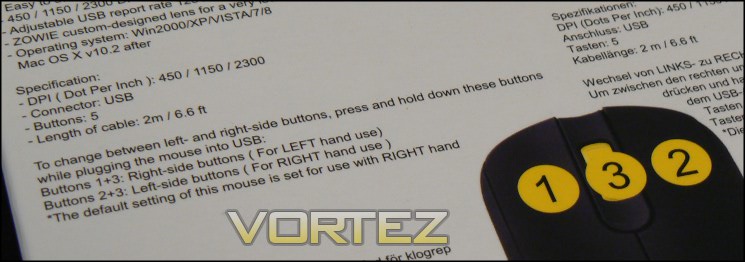
The mouse can also be switched between left and right handedness, although the procedure isn’t performed on the fly. Pressing the left mouse button + middle mouse button will set the mouse to a left-hand orientation by mirroring buttons, whilst pressing middle+right will set it to right (the default). As this is something you’re likely to only want to do once it’s not too much of a hardship, however those who share their PC with someone of the opposite handedness may find this process a little frustrating.
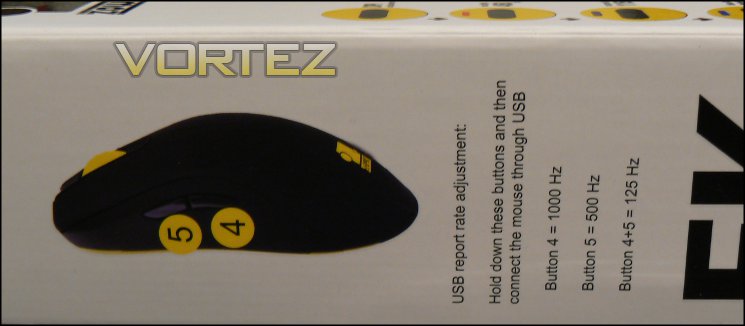
USB polling rate is a feature for slightly more advanced users and defines how quickly the position of a mouse is updated. The Windows default is 125MHz, a rate which is also a good compatibility setting for mouse-enabled UEFI BIOS, but that corresponds to a position/action update only once every 8 milliseconds. In a lag-intolerant environment this could mean the difference between a headshot and a fractional miss, and should be reduced if possible. Out of the box the mouse is set up for for the maximum 1000Hz polling rate (or an update every 1ms), but this can be changed by holding down a combination of buttons when the mouse is first plugged in:
Hold back-left side button:- 500 Hz
Hold back-left & front-left side button:- 125 Hz
Although shifting down to a lower polling rate is typically not optimal it’s often very handy for older mouse-driven motherboard BIOS designs which are often incompatible with anything outside 125 Hz.
So, you can’t customise the look of the mouse, but there’s plenty there to configure if you so desire. Generally speaking it’ll be fine for you right out of the box unless you’re left-handed, in which case you simply need to hold down a couple of buttons. It’s not clear whether this can truly take the place of high-quality config. utilities, but for titles with extensive button rebinding options it’s unlikely to matter.
Performance
We paired the Zowie FK with a standard cloth-topped rubber mouse pad during testing, the same as used in recent mouse reviews which proved to be a good fit for high DPI laser sensors. It’s notable that optical sensors, such as the one fitted to the FK, are reputed to be unreliable with glass and highly-reflective. Given the relative scarcity of these types we feel confident omitting them, but it is a factor you should be aware of unless you have previous experience of such a surface with a lesser optical mouse.
General Performance
Minimising friction with the mousing surface is all important in gaming and the FK’s two large non-slip feet are more than acceptable in their role, allowing this mouse to slide with ease over fabric mousing surfaces. After three weeks quite intensive use they exhibited good short-term durability; if they can last into the years of projected use expensive peripherals are subject to they will prove to be an excellent solution.
The FK is on the lighter side even as far as wired mice goes. Weighing in at approx. 85g, thanks mainly to its durable but lightweight plastic construction materials, the mouse does not have any option to change weight distribution. Size-wise, it’s also relatively elongated, supporting the hand a little more than many other designs. The ubiquitous shape should be suitable for a wide variety of hand sizes, whilst the shallow curve will be ideal for claw grip styles.
The two major buttons are quite resistive with a moderate travel distance. This should mean that the chances of accidentally pushing either of the main buttons will be low, and that you can move the mouse around with some vigor without having to be too careful. Over the course of the testing period the feel of these buttons remained very consistent, and will hopefully be very durable in the medium term. They are however a little loud, making them slightly less ideal in a shared workspace or with an open microphone whilst streaming.
Due to the ratcheted design of the mouse wheel scrolling through long documents is quite a laborious process, although the mouse wheel did become noticeably less resistant over the testing period. On the other hand it does offer plenty of precision thanks to a relatively large movement being required for each input registered in the OS.
All-in-all, the FK is fine for general use without being tailored to any specific non-gaming application. It shouldn’t ever present a problem, especially given that DPI levels are adjustable, but if non-gaming activities take up a large majority amount of your time at the PC you’ll probably want to look at a substitute in office hours..
Gaming Performance
For all that, the Zowie FK has been designed for gaming, so it behoves us to discuss its capabilities in that arena. Gamers who favour first-person shooters are the primary target for the FK’s stripped-down design, in part due to the lack of complicated software which may just get in the way of the experience, but if we’re realistic relatively few people isolate a single genre in this way. Hence, as is usual, we also took a look at how suited it turned out to be in other titles with a different gaming experience.
FPS Gaming – Team Fortress 2 and Borderlands 2
Shape often defines the range of features on a mouse and this is especially true in the FK. Unlike other recently reviewed mice it features no sniper button on or near where the thumb would rest, instead relying on two main buttons, a wheel and shoulder buttons in a true ambidextrous design. It’s therefore not especially ergonomically adapted to a right hand and doesn’t allow for many of the mod-cons common these days, relying instead on core performance. But what does this mean in reality?
First off, exceptionally consistent button clicks. On the FK they’re solid on the main two buttons, requiring enough force such that accidentally actuating them is unlikely but not so much that pushing it is an unwarranted effort. Similarly the side buttons also show this dynamic, although they are a little lighter so as not to impair stability when aiming precisely. This is exactly what you need from a 4-button design to enable fast reaction times and good control over your actions if you’re a little on the twitchy side.
The mouse wheel is going to be a matter of taste – it’s heavy, rendering it ideal in many respects for gaming for exactly the same reasons it was less optimal for non-gaming use. When cycling through weapons/powers in an FPS (or FP-RPG such as Skyrim) speed and precision are key, and so clear and consistent notches on a wheel mean that scrolling too far becomes far less likely. In addition, the stronger the resistance to scrolling the easier it is to use the wheel button functionality, again because it’s more stable.
The mouse as a whole is lightweight and low resistance thanks to the choice of materials and a couple of very good low-friction feet. Once again, given the typically low-DPI configuration of a mouse when playing FPS games this set-up works well. Sceptical as we were of the impact of angling the sides in a concave manner, it was noticeable how much easier it makes stably lifting the mouse without accidentally pressing a button compared to otherwise similar ambidextrous mice. Of course it’s down to the position of the side buttons and the texture of the finish, but it does seem to be a big positive for the FK when gaming. Optimisation for lower lift height is always nice too.
We noted that Zowie didn’t indicate in their technical specifications or on the packaging whether the mouse implemented angle snapping. For the uninitiated, angle snapping is a means by which the mouse’s firmware would seek to predict whether you’re attempting to move exactly horizontally, and if so straighten out the movement information sent to the OS. We were pleased to note that the FK didn’t appear to do this, or if it did it was extremely subtle; this choice should make the mouse more accurate, which is optimum for a wide variety of gaming applications.
The three DPI settings chosen are very well selected within the optical sensor’s maximum DPI, although we were sometimes frustrated that we couldn’t change DPI particularly easily on-the-fly. Specifically in FPS games where the desirable DPI for shooting from the hip vs. down sights is different (e.g. sniping), you need to re-train yourself to playing at a specific fixed DPI. Fine tuning DPI is also more difficult, and although most games should now allow you to adjust mouse sensitivity it’s neither a given nor desirable due to how the implementation often adds in acceleration.
As with general use, sensor tracking was precise and smooth when gaming. This shows quite well that in many respects the arms race for ever higher DPI isn’t perhaps as necessary as one might think so long as the quality of the mousing surface is good, and in our view the 2300DPI optical sensor was more than able to fight it out with the nowadays more common laser variant.
RPG & RTS Gaming – Skyrim, World Of Warcraft, Starcraft 2
Role Playing Games were more of a mixed bag. The lack of mouse software allowing macro functionality certainly harmed the FK, forcing us to rely on the often-times poor options available within the game UI. Skyrim plays similar to a FPS, and the key rebinding options the title provides mitigates the issue somewhat. World of Warcraft was a slightly different matter – other mice on the market tend to offer very substancial macro configuration software which can then be adapted to your own game-specific keybinds. The Zowie FK made this approach impractical, necessitating some considerable set-up time before it became natural to use. Even that, two side buttons tends to be the bare minimum for RPG titles these days, even ARPGs such as Torchlight 2, and so it can hardly be said to be well suited to such titles.
We did appreciate the ability to change DPI settings with relative ease. 1150 or 2300DPI is plenty for a top-down or third-person RPG where you’re only covering what’s on screen and demands for precision are different. For these titles specifically we didn’t find that not being able to change DPI through a top-mounted mouse button problematic in the slightest.
Due to the low arch of the FK and light-weight construction the mouse turned out to be comfortable during long gaming sessions, not generating any of the ache sometimes associated with them. The surface is non-slip even when sweating profoundly, and easy to clean with a lint-free cloth or similar.
Overall, we’d have to give the Zowie FK very good marks for FPS gaming despite a few niggles. RPG gaming won’t be bad – the button play and mouse precision still make it a good mouse – but if you’re used to full configuration options it’s not going to be so adaptable in comparison. We can’t fault it for comfort and the finish, and the build quality appears to be great.
Conclusion
Zowie pitches the FK mouse as a core gaming product, and as such it is difficult to assess in many respects. They don’t have the flashy additional (but all too often ancillary) features many of the value-added peripherals include and are instead built to be excellent at one role. If anything, the Zowie FK exemplifies that more than most.
As an ambidextrous FPS gaming mouse it doesn’t get much better than the FK. For claw grip gamers the shape should be comfortable for long periods, and small touches Zowie have made to the button contours and the arching of the sides will make it a more stable design in twitch-gaming situations. Thanks to their attention to detail lifting the mouse off the surface is far less likely to bring with it unintended button presses, and the low lift-off distance will tend to reduce inaccuracy too.
Outside of an FPS setting however the FK is less ideal. Unlike many other products in the price range the mouse offers no macro functionality and fewer buttons within easy reach, restricting options for MMO and ARPG gameplay. Furthermore the ‘clicky’ wheel makes scrolling relatively laborious and as such is far less suited to general office work. Even within a FPS setting quick DPI adjustment requires the inconvenience of upending to gain access to the bottom of the mouse, hardly ideal in a fire-fight.
Build quality is also very good, with part of the mouse feeling loose or in danger of splitting off if dropped from anything but a very great height. The rubberised matte black finish should be durable in the long run, even though it exhibited a small amount of discolouration and developed a smooth patina over our testing period.
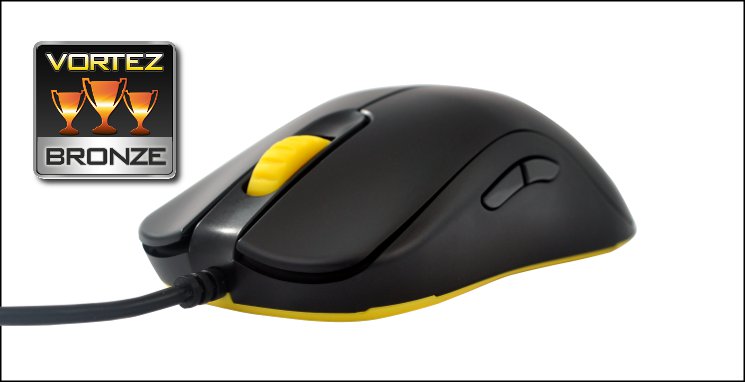
Zowie are obviously cognisant of the FK’s potential shortcomings and the way that Zowie have compensated for the lack of software is well worthy of highlighting. Normally mouse configuration, from DPI through to polling rate, is strictly within a proprietary software utility (although in some cases the settings are stored within on-board memory). On the FK DPI is switched at a touch of the button, whilst configuring USB Polling Rate and Left/Right handedness occurs when you plug the mouse into USB. If you’re attending plenty of FPS non-BYOC LANs this is a solid alternative to mice with on-board memory, and clearly superior to those which can only be configured with driver software (which you may be prohibited from installing).
The Zowie FK is a mouse which excels in FPS gaming and scenarios where you wouldn’t have access to advanced mouse configuration software. Furthermore, small design touches which don’t immediately leap out add up to a quite flexible and truly ambidextrous product. However it doesn’t come cheaply, and with a £50 price tag many users will be left wanting without macro functionality or on-the-fly DPI control. When compared with the current high-quality stable of products currently on offer at or near this price it’s worthy of a Bronze Award, but those who exclusively play FPS titles – especially left-handed gamers – may value it much more highly.
+ Solid Construction
+ Ambidextrous design
+ Concave sides
+ Three DPI presets
+ Left/Right handed layout swapping
+ Polling rate selection
+ No driver suite software required for features
Cons
– Price
– No on-the-fly DPI selection
– No macro utility
– Less optimal for non-FPS gaming


