







DirectX 11 is here and what better way to welcome it than a review of the hottest new graphics card on the market: The Asus EAH5870!
Product on Review: EAH5870/G/2DIS/1GD5Manufacturer and Sponsor: ASUS
MSRP: Not mentioned on site
Street Price: £300 but subject to change.

Today we have with us the first DX 11 graphics card to be released, the ATI HD 5870. Much hype has surrounded the card and for good reason, and with the onset of Windows 7\’s release, being a PC gamer has never been so exciting. But for ATI, the story has not always been one of faultless execution as we see today. To understand how we got to the HD 5870, we need to cast our minds back to the darker days of ATI when Vista was released and DX 10 was to revolutionize gaming. Back then, ATI were expected to obliterate the competition with its HD2900XT, promising outstanding performance with its GDDR4 memory and 512bit bus. Following, a successful DX 9 line up of cards, the HD2900XT only held disappointment and this triggered to a chain of events that has lead to the 5870 today.
Since their unsuccessful attempt at gaining the performance crown, ATI opted for a different strategy, bringing you bang for your buck. Their first attempt was with the HD38xx series of graphics cards and performance was still not on par with Nvidia\’s offering. However, ATI was crawling back in the game slowly, providing cheap solutions that ran cool and had decent performance. It was for this reason that many including Nvidia underestimated ATI\’s next generation of cards. The HD4870 was a formidable card (and still is!), taking everyone by surprise by the sheer amount of performance it offered at such a low price. Often outperforming Nvidia\’s flagship card, the GTX280, enthusiasts rightly went back to ATI. This subsequently lead to a price war that proved further beneficial to us, the consumers. ATI were on full steam ahead, constantly tweaking their cards, and innovating by supporting DX 10.1.
This takes us to today, as ATI has taken their success further adding injury to Nvidia\’s wounds by releasing a whole line up of DX 11 cards ready for Windows 7 and Vista. It\’s no surprise that we have already been hit by massive shortages in supply because the demand has been huge and ever growing.
Enough of the history lesson and time for me to show exactly why ATI\’s new cards have proved so ground breaking. The sample I\’m going to be reviewing can be considered one of the most highly sought after card currently, the ASUS EAH5870 1024MB. Promising to deliver high overclocking headroom on top of class leading performance, ASUS aim to please casual gamers and enthusiasts alike through their unique \”Voltage Tweak Technology\” and other exclusive features.
A bit about ASUS:
ASUS comes from the last four letters of Pegasus, the winged horse in Greek mythology that represents the inspiration of art and learning. ASUS embodies the strength, creative spirit and purity symbolized by this regal and agile mythical creature, soaring to new heights of quality and innovation with each product it introduces to the market.
ASUS pursues technological and aesthetic perfection through continuous innovation. We place ourselves in our customers’ shoes to develop a deep understanding of, and genuine empathy for, their needs—enabling us to create user experiences that transcend the norm.
ASUS Design Philosophy
ASUS Design develops high-quality solutions our customers will enjoy.
Our design process is built on thorough research, early anticipation and well-planned execution.
We act with a global vision and a focus on local strengths, conditions and heritage.
Now let\’s go check out the card.
Features and Specifications
Features
• 1GB GDDR5 video memory
• ATI EyefinityTM Technology for 3-monitor output!
•HDCP compliant
• ATI CrossfireX Technology with multi-GPU support
• ATI PowerPlay Technology
• Variety Connectivity: Dual DVI * 2/D-Sub/HDMI/HDCP/DisplayPort Compliant
• More than 2 teraflops!
• ATI Stream Technology for parallel processing tasks
• Microsoft Direct X 11 & OpenGL 3.1 compliant
• PCI Express 2.0 support
• ASUS Exclusive innovations
ASUS Exclusive innovations
• ASUS Splendid: Watching video on PCs is now as good as on the best TVs
• ASUS GamerOSD: Real-time overclocking, benchmarking and video capturing in any PC game!
• ASUS SamartDoctor: Intelligent hardware protection and overclocking tool for your graphics card
Comparing the full specifications of the HD 5870 to its predecessor shows that it sports some very impressive upgrades over the RV770 chip. Using a 40nm process, ATI have managed to fit an impressive 2.15 billion transistors on a 334mm2 die size. This is over double that of the HD 4870 which consisted of a “mere” 956 million transistors. So what is ATI using all those extra transistors for?
The first thing we can take notice of in the specifications table is that the number of stream processors, texture units and raster operations have all doubled! While this does not match Nvidia’s GTX 295, it is a first approximation of what we can expect from the new card. The core clock has been boosted by 100 MHz and the memory, by an impressive 300 MHz. This is effectively a 1.2GHz increase considering the use of GDDR5 memory. Impressively, those changes help achieve a compute performance of 2.72 GFLOPS, over double that of the HD 4870 and just under 1 GFLOP higher than the current crown holder, the GTX 295.

Packaging and Content
The front of the box
The HD5870 comes packaged in a fairly standard but attractive box, making use of vivid colours and mythical graphics to allure to customers. However this is not the most striking feature to be presented on the front of the box.
Closer look at the features
To the left are some of ASUS’s unique features that sets it apart from its competition. Not only does it come with a free coupon for the upcoming Colin McRae DIRT 2 game, but it also contains a utility CD with the voltage tweak and Smart Doctor programs. Also listed are some of the key features of the cards such as 1GB DDR5 memory, Eyefinity support and DisplayPort/HDMI certification.

The back of the box
Off to the back, we see all manner of details including a list of features, ASUS exclusive innovation and recommended system requirements.
Another box…
Upon opening the box, we are greeted with another sleeker looking one with the ASUS emblem right in the middle.
More boxes and the card
Inside the box are 3 compartments, one rectangular open ended box holding all the cables and connectors and the other containing the utility and driver CDs. Finally, hidden away beneath them is the card itself neatly wrapped in an anti-static bag.
The bundle
The bundle consists of the utility and driver CD, the Colin McRae DIRT 2 coupon, a multilingual manual, a crossfire adapter, a Molex to 6 pin connector and the card itself. Overall it’s a very standard package with the thoughtful addition of a free game to fully utilize the card.
Closer Look

The front of the card
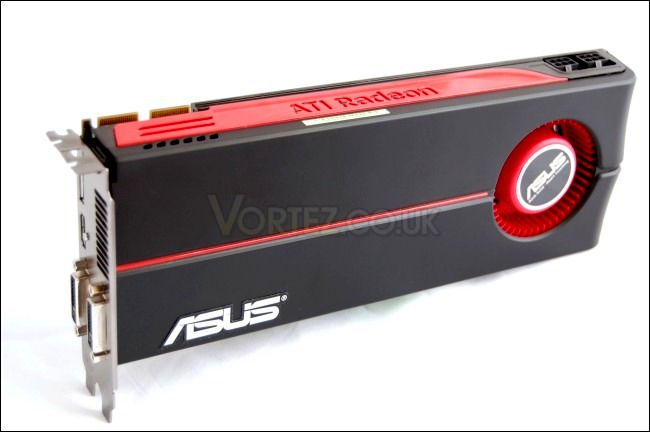
The card is a very attractive piece of kit. ASUS have retained the original look of the card without defacing it with pointless stickers. Instead, they have settled for a more appropriate approach of just putting their badge on there. The main advantage of this is that you don’t get a tacky looking card whose sticker will eventually come out anyway and leave a residue behind. I’ll award points to ASUS on that front.

The back of the card
The card is covered by a tough plastic shroud. In fact it is made to seem almost metallic and is certainly a major improvement over ATI’s previous series of coolers. On the back, we can see the metallic backplate and the mounting bracket for heatsink that lies on top of the GPU die. One thing I did notice was that the paint rubbed off easily after heating up during testing, if you check the top left corner.
The ASUS logo thankfully with no other sticker
The card’s appeal lies in its understated looks rather than the clear, flimsy, cheap plastic employed in previous cards. ATI must have taken a leaf out of Nvidia’s book in that respect. In my opinion, it’s one of the most attractive cards on the market that does justice to anyone’s computer once installed. Inside, the card sports an aluminium heatsink that contains 4 heat pipes for improved cooling over the last generations of cards.
The two nostrils…
For some reason, the card reminds people of the old batmobile and you can really see why… Anyway, at the front end of the card, there are two vents through which additional air can be pulled. The fan itself is comprised of numerous fins and works up to 4600 RPM at 100% speed, pulling air from underneath and venting it through the tight fins and out of the back exhaust.
Closer Look (Continued)
The Crossfire connectors
On the side of the card are the two crossfire connectors and with the supplied CrossfireX adapter, 3 cards can be connected for the ultimate gaming experience.
The 6-pin connectors are on the side for easy access and installation
The card uses 2 6-pin connectors, as is the case with most high end graphics card these days.
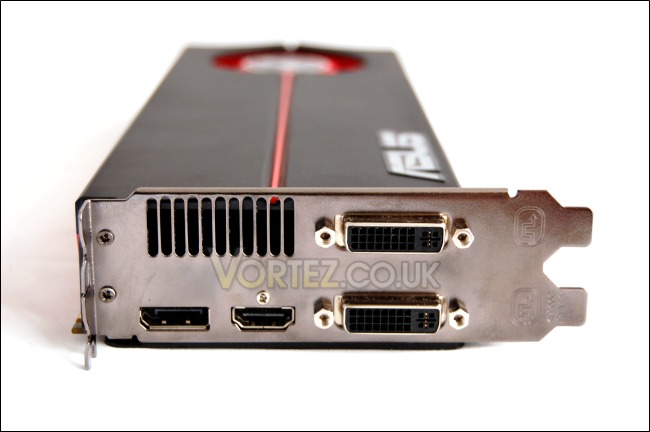
A vast array of connections for all your needs
The ASUS has a plethora of connections at the back including 2 dual DVI ports, 1 x HDMI and 1 x DisplayPort connector. This card supports 3x 2560×1600 resolution monitors and Eyefinity can be set up as long as one of the monitors supports DisplayPort. There’s also a small vent at the back from which hot air can exhaust out of your computer.
Mine’s bigger…
If you hadn’t already noticed, this card is an absolute beast, in keeping with the trend of recent reviews. The card measures just over 11.1 inches, making it longer than the HD 4870×2 and GTX295 at 10.5inches both, let alone the HD 4870 presented in the picture above. Do make sure your case has enough clearance before buying one. Thankfully though, the 6-pin connectors are on the side to avoid installation issues with the cables.
Test Setup
CPU – Intel Core i7 920 – 4ghz
RAM – 6GB (3x2GB) OCZ platinum DDR3 1333mhz
Motherboard – Biostar T-Power x58
Power Supply – Enermax Revolution 85+ 850W
Cooling – Tuniq Tower 120 Extreme
Hard Drive – Samsung F1 320GB/Western Digital Caviar WD3200AAKS 320GB
Graphics cards
Nvidia GeForce GTX 295 1792MB – Forceware 191.07
ATI HD 4870 1024MB – ATI Catalyst 9.9 Vista x64
ASUS EAH5870 1024MB – ATI Catalyst 9.10 Vista x64/Win 7 x64
Benchmark Suite
Crysis Warhead using the FRAMEBUFFER Crysis benchmark tool
Far Cry 2
Resident Evil 5
Street Fighter IV
Unreal Tournament 3 using the HOC Bench tool
Enemy Territories Quake Wars using the HOC Bench tool
GTA IV
3DMark 06
3DMark Vantage
Unigine DX 11 Benchmark
Temperature and Overclocking
To overclock the GPU, I will use a combination of the Overdrive tab on the Catalyst Control Centre, the ASUS SmartDoctor utility and the MSI Afterburner 1.3 application. All three have their individual characteristics. The unique feature with the ASUS bios is that the GPU clock and Memory clock are unlocked on Overdrive to 1200/1400MHz respectively. To further improve the overclocking headroom of the card, ASUS provides the SmartDoctor utility which allows for the voltage to be altered to 1.5V. The Smart Doctor allows user control of the fan profile, whereby the fan speed can be altered depending on the temperatures thresholds you set. The maximum recommended voltage is 1.35V. The MSI Afterburner is based off Rivatuner and can monitor temperature/fan speed/GPU clock speeds.
For my first overclocking attempt, I kept the voltage at the stock 1.162V and enabled Overdrive in CCC. I was able to take the core to 920/1270MHz quite easily and testing it with Furmark and Crysis made sure the clocks were stable. This represents a 8% overclock on the core and 6% on the memory.
Of course, this was not enough, especially for a card advertised for its overclocking abilities, so off it was to use the SmartDoctor. After much tweaking, I settled on using 1.35V and managed to achieve a clock of 1000/1250MHz. 1000MHz is an amazing 18% overclock on the core, remaining stable throughout Furmark stress testing and the benchmark suite.
One of the most impressive features of the card is the cooler. Set on auto mode, the fan speed operated at 24% while idling and even during the Furmark stress test, it only reached a maximum of 44%. Temperatures did not go astray either remaining at a safe 87 degrees. When the voltage was increased to 1.35V, the fan worked harder to stabilize the temperatures to the same level as the stock clocks and at 56% fan speed, it was definitely audible. However considering the fact that the card only operated in 3D mode when gaming, it was not much of an issue.
On the whole, the fan stays very quiet when operating unlike ATI’s notorious previous attempts. Much of it also comes down to PowerPlay ensuring that the card downclocked to 400/1200MHz to conserve power and run cooler when idling. Whenever a change was applied to the stock clock speed, an enhanced PowerPlay kicked in reducing the speed of the card to 157/300MHz. This feature is certainly very welcomed for such a powerful card and will no doubt cut your electricity bills! However, I did notice a bug when running a dual screen setup in that the secondary screen started experiencing flickering during the enhanced PowerPlay mode.
Crysis Warhead
Following the success of Crysis, the stand alone expansion “Warhead” was hotly anticipated to bring more game play, more weapons, improved visuals whilst maintaining better performance, the latter being what gamers wanted most. After all how many people upgraded their rigs just to play this game… In the game, you play as the upbeat Brit Sergeant “Psycho” Sykes, chasing down a Korean nuclear warhead. Throw in some ice shooting aliens and we’re bound to have a great game. It sure delivered.

Vs The GTX295
Here, we see that the GTX295 came out on top at all the settings but generally the gap was quite small. At both resolutions, the GTX295 produced quite a lead over the HD 5870 when anti-aliasing wasn’t applied with being as much as 10FPS better or 13%/20% at each resolution. With 4x anti-aliasing, the gap reduces favouring the HD 5870’s massive 1GB frame buffer. Remember that the Nvidia’s memory isn’t shared so it is still limited in that sense. The difference is reduced to around 5FPS making the GTX295 only about 10% better, which doesn’t justify its price mark up over the ATI card.
Vs The HD4870
So how do all those specification changes translate into performance? The answer is monumental. The new HD 5870 is up to 20FPS better at 1920×1200 with anti-aliasing applied. With a much higher minimum FPS, Crysis Warhead is actually playable on the new card where the old card series struggled at such demanding settings.
Vista Vs Windows 7
There does not seem to be much changed here and variations could well be down to error margins. They sure aren’t significant enough to judge the superior platform.
OC Vs Non OC
1GHz on the core bags the HD 5870 4-5FPS which isn’t bad at all for free performance. This represents to as much as an 11% boost putting the card right on the heel of the more pricey GTX295.
Far Cry 2
One of the most hyped games of 2008, Far Cry 2 had some big shoes to fill. It was built to be the next best thing since well… Far Cry I suppose. Combining an open-world game play with highly detailed graphics, physics and AI, what more could we possibly want? The game puts us in the body of a malaria inflicted mercenary hunting down the “Jackal” in the heart of Africa, in a bid to stop an ongoing conflict between two rival factions. The storyline can be hard to follow sometimes but I’m no game reviewer, so let’s concentrate on the graphics and performance. After all, we all need to know if our hardware will be able to handle the scorching savannah burning at the hands of our flamethrowers.



Vs The GTX295
The HD 5870 is generally only behind the GTX295 by a few FPS in the tests but it does take the crown at 1920×1200 with 8xAA. Not only is the average FPS higher, but so are the minimum and maximum for a better gaming experience.
Vs The HD4870
The results we see here demonstrate that the new card is a worthy successor and can be deemed an upgrade over the HD 4870.
Vista Vs Windows 7
Both platforms generate similar average results although Windows 7 has a higher maximum FPS in 5 out of the 6 tests.
OC Vs Non OC
Overclocking may not be enough to take the crown away from the Nvidia card, but it does demonstrate the value of the ASUS card which through some tweaking can achieve performance levels of a more expensive card.
Resident Evil 5
Resident Evil 5 is the sequel to the Resident Evil series, exploring the life of main protagonist, Chris Redfield. You play as either Chris Redfield or Sheva Alomar in an African desert area in Kijuju. In true Resident Evil fashion, your main objective is to investigate a terrorist bio-organic weapon threat whilst killing infected “Majinis” on your way.
Vs The GTX295
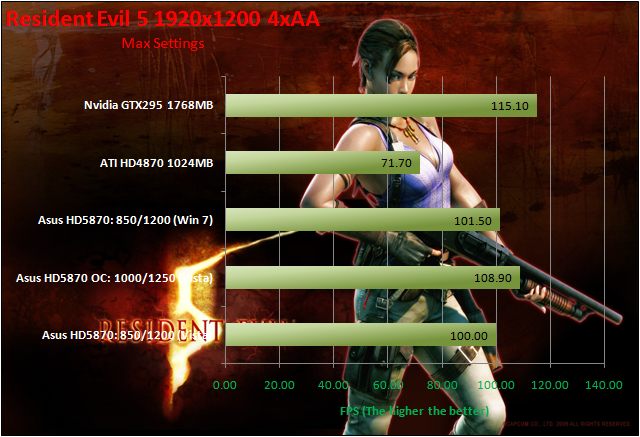
The HD 5870 performs remarkably in Resident Evil 5 falling short of the GTX295 by a very tiny amount, 11% at most.
Vs The HD4870
The HD 4870 is no slouch in Resident Evil 5 but the new card ensures much smoother gameplay and allows for the details to be cranked up without sacrificing performance. Being able to play with such high settings on a newly released game is truly joyful.
Vista Vs Windows 7
There is a consistent 1 FPS boost in all the tests on the Windows 7. This is not much by any justification but it’s better than nothing.
OC Vs Non OC
The 150MHz overclock puts the card on level grounds with the more expensive GTX295 where they start trading blows for superiority. No clear winner can be claimed from those results but it goes to show the usefulness of overclocking.
Street Fighter IV
Street Fighter is back in its 4th iteration and its bigger and better than ever. Combining fluid, fast based sparring with stunning artistic visuals, the game delivers tremendous game play. Be reacquainted with some of the most popular characters in video game history while you battle your way to the top, be it with Ryu or the mighty Bison. The game might be frustratingly hard in some cases but there’s nothing like the satisfaction of K.O’ing your opponent with a well stringed death bringing combo.

Vs The GTX295
First off, let’s look at the 1680×1050 results. The GTX295 is in a league of its own during the benchmarks. But then we look at the 1920×1200 results and as expected the GTX295 suffers some performance loss. The HD 5870 however defies the rule and begins to perform similar to the dual card. With 8x anti-aliasing, ATI proves to have the most powerful card on the market.
Vs The HD4870
At 1680×1050, the HD 4870 lags behind the HD 5870 but increasing the AA level shows the new card suffering a bigger drop in performance. As before, at 1920×1200, the HD 5870 begins to work as expected leaving its older brother far behind.
Vista Vs Windows 7
Here, Windows 7 does not have much of an impact but the same phenomenon is observed with the resolution changes. It’s possible that the new ATI card prefers SF IV to be played at the native screen resolution.
OC Vs Non OC
Overclocking yields a much better game experience on Street Fighter, producing 12% more FPS for an 18% overclock.
Unreal Tournament 3
Built around the unreal 3 engine, Unreal Tournament is all about mindless fast paced shooting, decapitation with a plethora of game modes to so in. Not much else can be said really except that it promises hours of enjoyment on multiplier whether it be against bots, your friends at a LAN or online. It was one of the more popular games out there to adopt PhysX in the form of partially destructible maps, tornadoes and hail.
Vs The GTX295
The GTX295 outperforms the HD 5870 by up to 34% in Unreal tournament 3 and increasing the resolution causes the HD 5870 to have a dramatic drop in performance.
Vs The HD4870
The fact that the HD 4870 is outperforming its successor in this scenario plainly suggests that the new card is experiencing some problems on the Vista platform.
Vista Vs Windows 7
Windows 7 unlocks the performance that seemed to have been hidden away on Vista, offering a very large boost in performance. Despite 100 FPS being very playable, seeing those results on Windows 7 confirms the hard work ATI have done on the drivers, and Microsoft’s dedication to support gaming on the PC platform.
OC Vs Non OC
Overclocking doesn’t alter the performance by much but that could be down to CPU limitations. At the higher resolution, the overclocked card maintains a higher FPS without suffering the same FPS drop as the non overclocked card.
Enemy Territories Quake Wars
Earth is struck once again by Extra-Terrestrials, this time in the form of the Strogg. In the game you play as either the humans, defending the their beloved planets, or the Stroggs, attempting to invade with their arsenal of futuristic weapons. The games has vast open battlefields with an enormous array of vehicles and weapons at your disposable promising fast paced strategic battles.
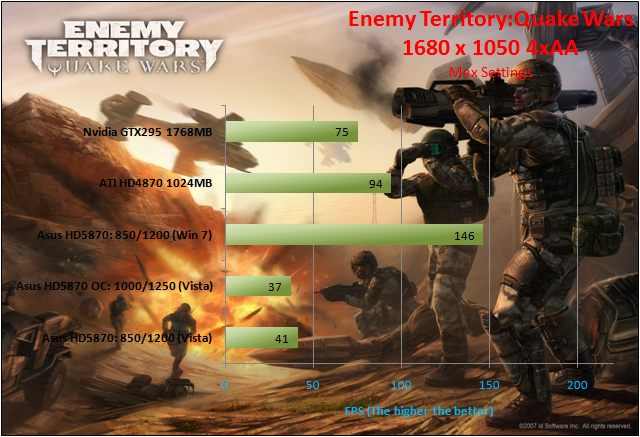

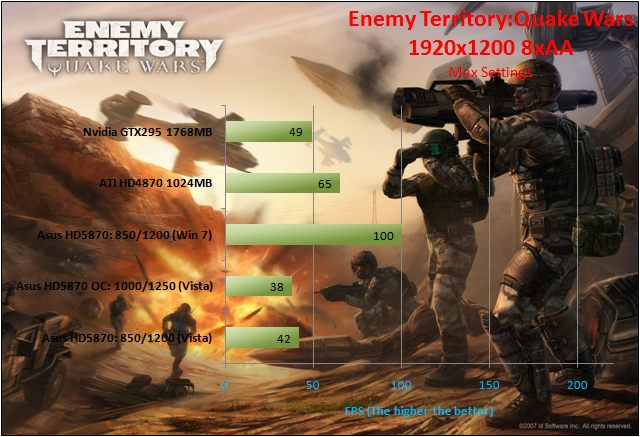
Vs The GTX295
The Enemy Territories benchmark was a frustrating experience for the HD 5870 because it would not go above 41 FPS and no v-sync/FPS cap was imposed on the settings. Not surprisingly, this was a walk in the park for the GTX295.
Vs The HD4870
Strangely, the HD4870 proved to be a better card than both the GTX295 and the HD 5870, meaning ATI has absolutely no problem running the game, thus further baffling us with the poor showing of the HD 5870.
Vista Vs Windows 7
Finally, we see Pandora’s box opening, revealing the true performance of the HD 5870. The card trawled through the game with ease and over 100 FPS can be expected at the highest of settings, ensuring a smooth gameplay where accuracy is key.
OC Vs Non OC
With Vista non able to portray the true performance of the HD 5870, overclocking made no apparent change to the results
3DMark 06 & Vantage
3DMark 06Futuremark has been the testing ground for enthusiasts ever since their first release in 1999! While 2006 is long gone, it’s still very popular amongst benchers.
Vs The GTX295
Despite obvious CPU limitations on such an old benchmark, the ASUS still manages to pull ahead of its main competition here, relying heavily on its superior shader power to grab the crown.
Vs The HD4870
The CPU bottleneck doesn’t stop the HD5870 from gaining 6000 points over its predecessor.
Vista Vs Windows 7
Windows 7 helps provide a hefty 1000 point increase in this case, making it faster than even the overclocked HD 5870 on Vista.
OC Vs Non OC
This is one of those tests where the CPU bottleneck really comes into play and as such, overclocking doesn’t yield much increase over stock clocks. For a higher score, a faster CPU would be required.
3DMark Vantage
This latest benchmark suite from Futuremark introduces DX 10 PhysX support. Despite being on the verge of DX 11 games arriving, Vantage is still the chosen benchmark amongst enthusiasts these days.
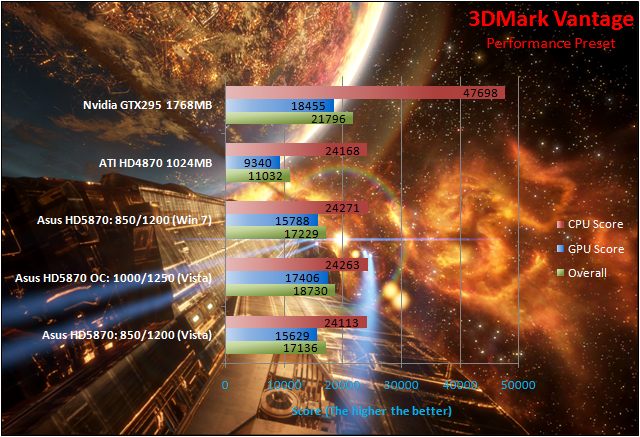
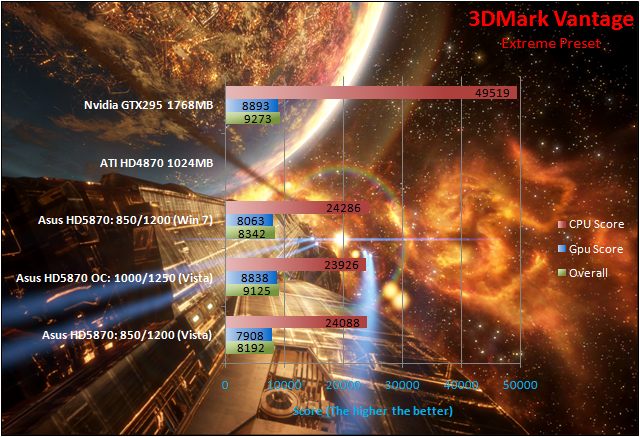
Vs The GTX295
The GTX295 is the clear winner on preset mode here and immediately we can tell that PhysX plays a big part in differentiating its performance above the ATI card. On extreme mode, the performance lead reduces from 18% to 12% in a much more GPU intensive test, showing us that the HD 5870 is a very capable card indeed. Looking at the actual GPU scores though, the GTX295 has to be commended for its raw power. The HD 5870 as a single GPU solution is still very impressive nonetheless.
Vs The HD4870
There isn’t much of a contest here since the new card is a league above the HD 4870. There may not be a linear doubling in performance as one may initially expect, but this is merely a synthetic benchmark where other limitations may also come into account.
Vista Vs Windows 7
Windows 7 provides a slight boost here which again, can be considered negligible.
OC Vs Non OC
Overclocking works wonders on the HD 5870 boosting the scores by a significant margin. At extreme mode, the HD 5870’s performance gets very close to that of the GTX295.
Unigine DX 11 Benchmark
Unigine’s benchmark is to showcase the benefits of DX 11 and the use of tessellation as opposed to normal rendering techniques. The demo has impressive visuals that give an insight into what we can expect from gaming in the future.
DX 10 Vs DX 11
It’s not really surprising in this situation that DX 10 performs much better than the new API because DX 11 here does offer more intensive tessellation features that improve the graphics significantly, adding new depth and a level of realism unmatched by anything else. Have a look below at the visual differences that should justify the drop in performance witnessed.

Tessellation off

Tessellation off – wireframe mode
Tessellation on
Tessellation on – wireframe mode
Tessellation is a features that adds much more detail to rendered objects by drawing more line than the regular triangular polygons. The effect, as you can see, is very impressive if you look at the rope. You can actually see the two strands intertwined rather than being just a blocky cuboid shaped rope. In wireframe mode, we see what changed tessellation has brought. ATI have had this technology for a very long time but Windows 7 should hopefully make this implementation standard.
More examples on the next page.
Tessellation
DX 10
DX 11 Tessellation off
DX 11 Tessellation off – wireframe mode
DX 11 Tessellation on

DX 11 Tessellation on – wireframe mode
Let’s focus on a few characteristics of tessellations in this one image. Firstly, when we compare the wireframe mode, it is clear that tessellation is adding a lot more features and details, which may at first not be recognisable. The surfaces are divided in many more shapes. The ground for example is one of the features that benefits from it. To make it as efficient as possible, tessellation becomes a function of distance, generating more shapes closer to the viewer.
Now let’s look at the application of this. If we gaze at the rock pillar closest to us, we can immediately notcie that with tessellation, they are not just mere square blocks but that they in fact looked chipped, as a natural rock would be. Now, let’s move on to the stairs, which again is a notable improvement on the past. Rather than being flat, they have depth and look like proper stairs, and not a slide. The same applies for the cobbled road although the compressed/downsized pictures make it hard to judge. The last thing I’ll point out are the tiled roofs. With tessellation, they do not appear flat at all, and actually resemble a real roof. You’ll have to take my word for it if you don’t notice them or try the demo for yourself!
Power Consumption
To measure the power consumption of the cards, I will be using a plug in power meter for the idle and load results.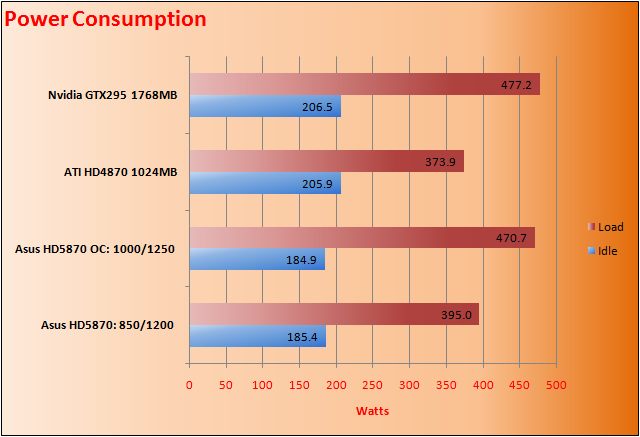
The ASUS HD 5870 has very impressive idle readings, lower than even the power conscious HD4870. PowerPlay has a big part in this as it lowers the clock speeds significantly to make sure that for general usage, your computer will not be power hungry despite being a power house. At load, the story is slightly different. While the stock clocks on the card generate mildly higher consumption compared to the HD 4870, over volting drives it up to the GTX295’s level. A much better compromise could be achieved by using slightly lower clocks at stock voltages.
Conclusion
The combination of the ASUS HD 5870 and Windows 7 was a match made in heaven. There\\\’s no better way to compliment one than by buying the other for some downright brilliant performance. In our results, the GTX295 still kept its performance crown, but it would be unfair to penalise ATI\\\’s offering because it has been set at lower price point at which Nvidia can\\\’t compete. Granted that prices have increased, but the GTX295 is sparsely available and does not feature the key features unique to ATI\\\’s current line up. If Eyefinity doesn\\\’t impress you with its up to 3 monitor support, then surely, DX 11 is a major selling point. ATI has made all DX 10 cards above £200 obsolete and the HD 5870 plays a key role in their successful initiation. Features such as tessellations holds promise for a very exciting future and getting a HD 5870 will prepare you for those.There were a few anomalous results with the HD 5870 on Vista in that, Enemy Territories Quake Wars and Unreal Tournament 3 failed to deliver the right performance but moving on to Windows 7 unlocks the potential that the card holds. In true ATI fashion, I expect future drivers to deliver incremental performance boosts and optimizations.
At £300, the card is at the perfect price point and not surprisingly, demand has grown. We also have to talk about how ASUS have managed to differentiate themselves from their competitors. Often, I see people recommending others to buy cards regardless of the brand. While that might be fair advise, ASUS not only delivers their cards at a lower price point than most, but they also bundle a free game and their excellent Voltage Tweak system. Why bother getting another brand, only to tweak it to use the ASUS bios when you can buy the original ASUS offering and retain your warranty at no extra expense?
Pros
[+] Excellent performance at all resolution and settings
[+] Direct X 11 compatibility and associated technological feature sets
[+] Eyefinity support
[+] Very aesthetically pleasing
[+] Reasonably priced
[+] Free game
[+] Quiet and efficient
[+] Unique software bundle for maximum overclocking
Cons
[-] Does not outperform the GTX295
[-] Some questionable Vista results
[-] Price is set to increase
[-] Very long
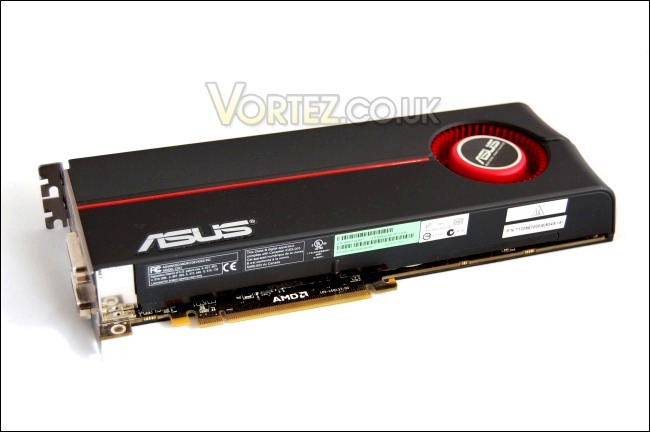
Despite its shortcoming, the ASUS HD5870 is still a brilliant card and I highly recommend it. It may not outperform the GTX295 but at a lower price, that\\\’s not its aim. Some of the results may be down to the benchmarks themselves but again, there were absolutely no issues on Windows 7, which I believe will compliment the card well.
ASUS delivers the whole package with the HD5870, so I will award them the Vortez Hardware Gold Award.
I would like to thank ASUS for their utmost patience and support in providing the sample for this review, and Jimmyt1988 in our forums for lending me his GTX295 without which this review would not have been possible.
To further discuss this product, please visit out forums.
To further discuss this product, please visit out forums.

