







We take a look at the newly released Acclero Twin Turbo Pro and see if its up to cooling the ATI HD5870
Product on Review: ARCTIC COOLING Accelero Twin Turbo Pro
Manufacturer and Sponsor: ARCTIC COOLING
Street Price: £25-30

Stock graphics card coolers aren’t always what they’re cracked up to be. For the average gamer or system user graphic card temperatures won’t be something that will even capture their attention, they may not even uncover these type of attributes – why would they need to? For the system builder, hardware enthusiast and hardcore gamer however, temperatures and sound are important. Especially so if you are wanting to squeeze even more performance out of your graphics card by overclocking it past its specified clock settings.
Over the years these kind of requirements have led to the formation of a group of products known as after-market coolers. There are currently three or more companies that engineer such products to actively improve the thermal performance in the graphics card department. One of these companies is ARCTIC COOLING. If you haven’t heard of them, they have been around little under 10 years and are known in the community as the thermal cooling experts – without doubt.
It’s not just a question of lowest temperatures though, noise is a big player. How loud a cooler operates at is important to a lot of individuals including myself. This is another of ARCTIC COOLING’s award-winning facets. They know how to cool your chip and they can do it quietly!
Building on the successful Accelero product range ARCTIC COOLING launched the Twin Turbo Pro at the beginning of this year with added compatibility for the ATI HD4890 and HD5870. Today I will be taking a good look at this new arrival and slotting it onto a HD5870 to see if it really does shave off the high temperatures this card gives out. Excited? You should be, if their previous Accelero products are anything to go by we are in for a real treat.

This is what ARCTIC COOLING have to say about the Accelero Twin Turbo Pro:
Features
• Unmatched cooling performance – 120 Watts
• Dual ultra quiet 92mm PWM fans with low noise impeller
• Excellent heat dissipation via 4 heatpipes
• RAM and voltage regulator cooling
• Pre-applied MX-2
• Multi-compatible with high-end VGA cards
Dimensions 213 L x 115 W x 49 H mm
Fan 92mm x 2 fans
Fan speed 1000 – 2000 RPM (controlled by PWM)
Air flow 54 CFM / 92m3/h
Max. Cooling Capacity 120 Watts
Bearing Fluid Dynamic Bearing
Weight 446g
Patents DE 20307981, US 7101149
Warranty 6 year
Manufacturer code DCACO-V3400-BLA01
EAN-Code 0872767002517
Compatibility
ATI Radeon
HD 5870
HD 4890, 4870, 4850, 4830
HD 4770
HD 3870, 3850
HD 2900XT, 2900 Pro
X1950, X1900 series
X1800, X1650 series
X1600, X1550 series
X1300 series
nVIDIA GeForce
GT240, GTS250
GTS150 (not LP), GT130 (not LP)
9800GTX+, 9800GTX, 9800GT
9600GT, 9600GSO
9500GT (not LP), 9400GT (not LP)
8800GTS(G92), 8800GT, 8800GS
8500GT (not LP), 8400GS (not LP)
7950GT, 7900, 7800, 7600 series
6800, 6600 series
Packaging and Twin Turbo Pro
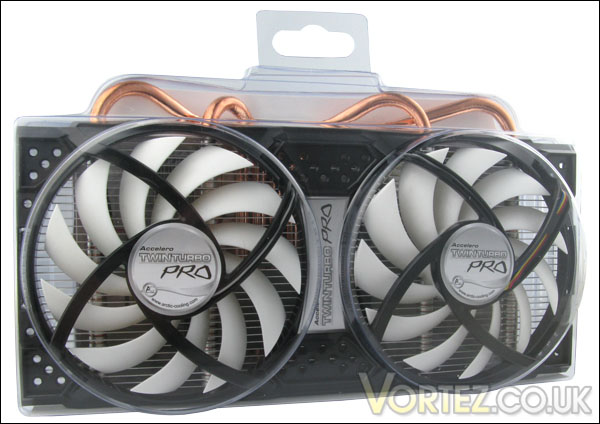
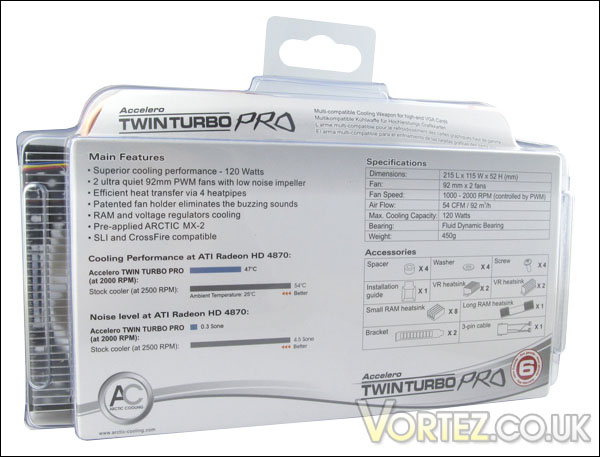
If you’ve purchased ARCTIC COOLING products in the past, you will be familiar with the product packing approach that they take. The packaging for the Twin Turbo Pro is rather minimalist. The cooler and bundle are encased in a clear plastic shroud giving you a great view of what’s inside. Whilst there are other areas of a product that take the spotlight, the packaging may not be the most important aspect of a product but its still an area that should be given attention and I quite like the approach that ARCTIC COOLING take. It allows customers to inspect the product inside.Flipping the packet over, on the rear side we have information regarding the features, specifications and bundled accessories.
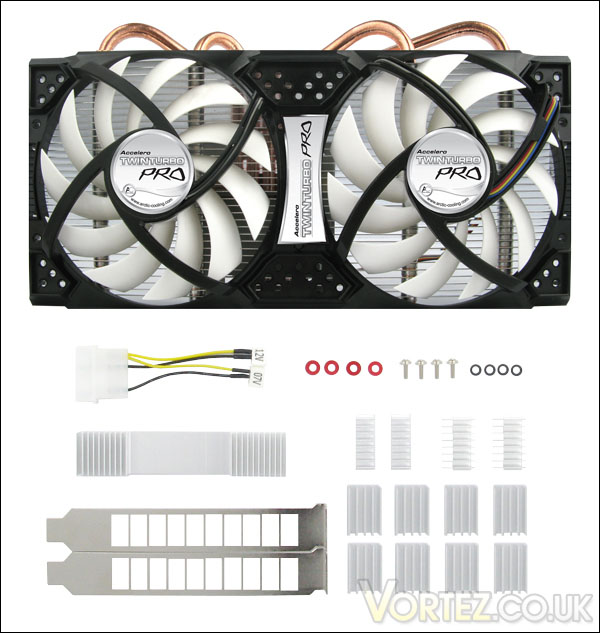
Opening the packet reveals the contents which include the following.
• Twin Turbo Pro
• Power converter
• x4 washers
• x4 screws
• x4 spacers
• x13 heatsinks
• x 2 expansion brackets
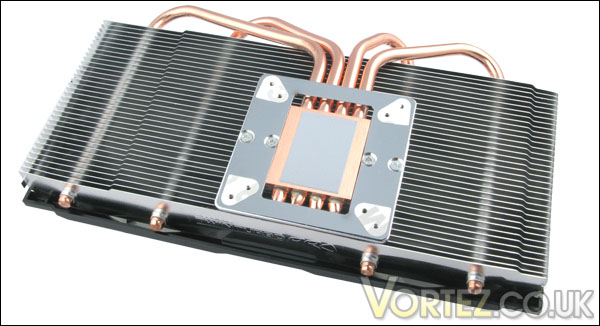
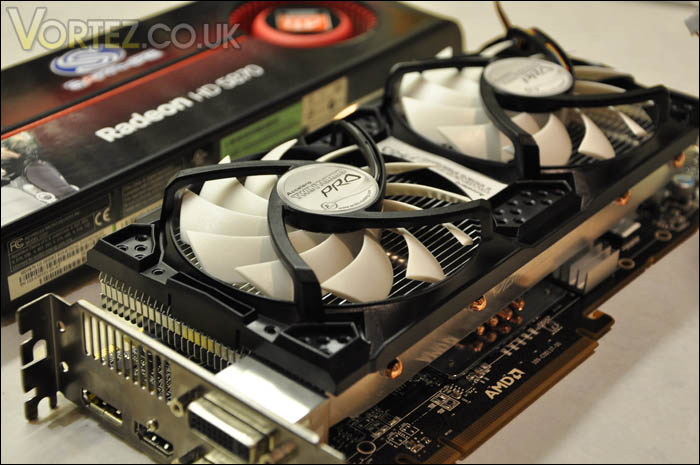
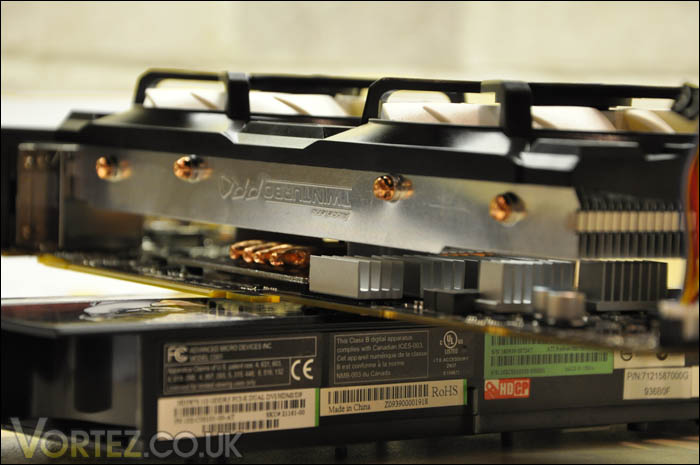
Upon opening the Twin Turbo Pro, we aren’t met with something that we haven’t seen already because of the transparent casing. The cooler has the notorious black and white fan make-up. There are four rather thick heatpipes that stem from the GPU plate. The Twin Turbo Pro takes quite a conventional approach of following the Accelero design by its looks and methods. On the GPU plate there is some pre-applied MX-3 paste – be careful not to touch this as it will obviously get stuck to your fingers and will interfere with the smoothness of the surface finish.
In this review I’ve taken two approaches in order to provide the reader with a good all-round observation of the Twin Turbo Pro. I’ve compiled a video tutorial on how to apply the cooler, and have taken some photos for those wanting to get a closer look at the installation process. So, over the page we will being installing.
Installation – Video
Installation takes around 30 minutes depending on the pace at which you take things apart and apply the Twin Turbo Pro. It’s always better to allow yourself extra time as taking apart such a component requires you to be extremely careful as the PCB and various parts are fragile. You will appreciate that taking apart a £300 graphics card can be quite nerve racking so, take your time and make a spacious environment so you make it as easy as possible.
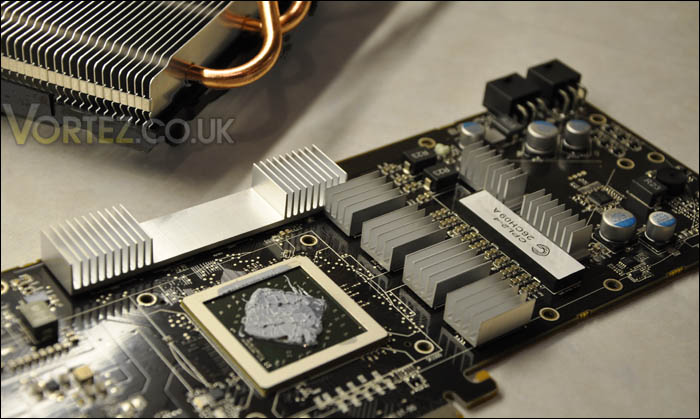
I’ll just say from the outset, this whole process isn’t very well documented in the instructions manual. Often I found myself having to work it out for myself. Now I appreciate that ARCTIC COOLING can’t provide support for every single graphics card that the Twin Turbo is compatible with I would expect better guidance with the process and as this cooler is the upgrade from the Twin Turbo signifying that the Pro is suitable for the HD5870 it would have been nice to know where the heatsinks for the VRM chips and such like to be included. Hopefully ARCTIC COOLING will take this onboard for the next release, you can’t criticise over support but you can criticise lack of support.
NOTE: Fan can be controlled at 7V and 12V via the PSU adapter.
(Videos currently processing on youtube)
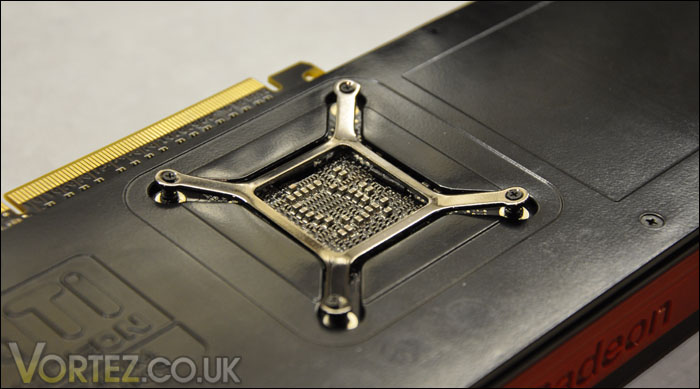
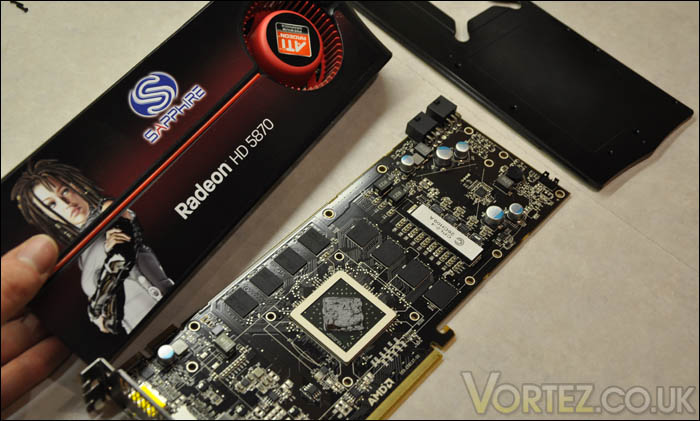
Installation – Pictures
ATI HD5870
Furmark Performance
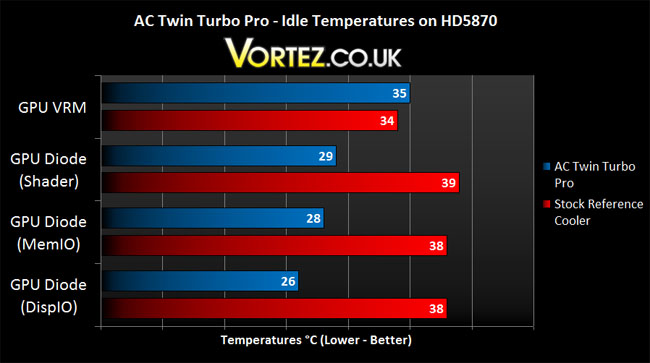
This is what we really want to know. The Twin Turbo Pro may look good, but does it perform? Afterall this is the whole reason we replaced the reference cooler. So to establish whether the Twin Turbo Pro is a worthy upgrade it will be going head to head with the stock reference cooler on an ATI HD5870.
The testing methodology is simple. With the original stock reference cooler on our ATI HD5870 we will monitor the idle temperatures from a cold boot, then, following on from this, the card will be put through a meticulous stress test courtesy of oZone3D’s Furmark generating a full load state and thus pushing the temperatures up. This establishes the maximum temperature the HD5870 operates at under full load. This will be monitored for up to 20 minutes and the temperature recorded. Similarly, when the Twin Turbo Pro is installed on the graphics card the same testing process will be performed. This will produce an accurate evaluation as to whether the Twin Turbo Pro is an inferior or superior after-market solution compared to the stock reference cooler.
Test System
Processor: Intel Core i7 920 (3.9GHz)
Motherboard: ASUS P6T Deluxe
RAM: Mushkin PC3-10666 6GB
Graphics: ATI Radeon HD5870 2GB
HDD: 3X SATA-II
Case: Antec Twelve Hundred
Test Applications
Everest Ultimate 5
oZone 3D Furmark 1.7.0
IDLE
LOAD (5v)
LOAD (7v)
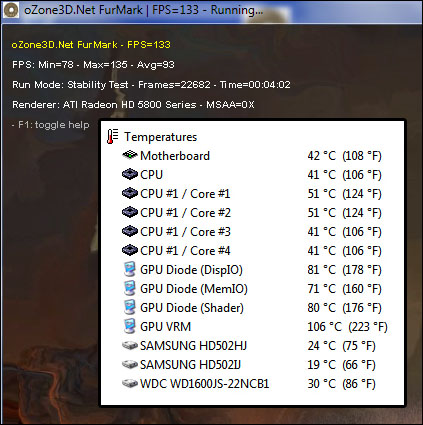
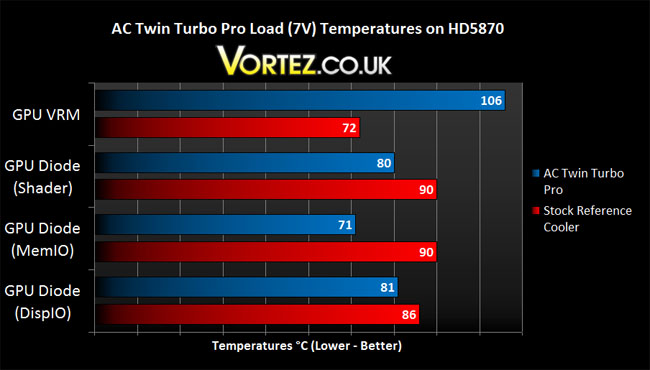
LOAD (12v)
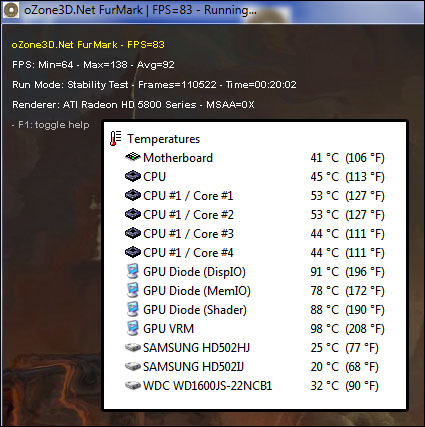
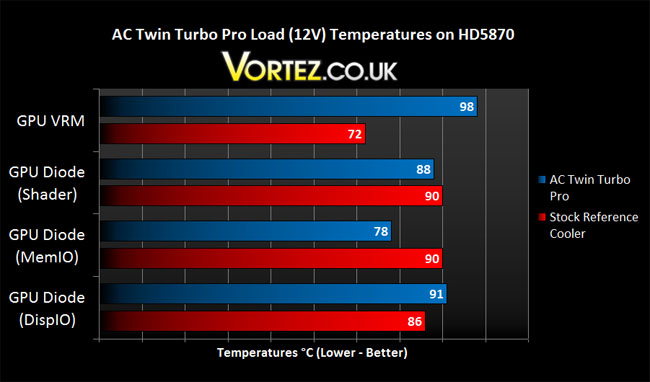
Modern Warfare 2 / DIRT 2 Performance
As someone pointed out, synthetic benchmarking whilst it does give us the worst case scenerio (and reading those Furmark temperatures will leave you in no doubt of that) it’s also a beneficial practise to benchmark some games in order to ascertain a ‘real-world’ example of how the Twin Turbo Pro would react.So I’ve chosen two popular titles to test the thermal performance of both the stock reference cooler and the ARCTIC COOLING Acclero Twin Turbo Pro. Both offer intense rendering and complex arctitecture and should provide an example to the typical gamer – what temperatures they should expect from both coolers whilst in game for approx. 20 minutes. With the stock reference cooler using 5v for the operating of the fan, I chose to stick the AC Accelero Twin Turbo Pro on 7v giving it the benefit of the doubt. 7v is extremely quiet and it shouldn’t trouble even the most sensitive of ears. (Check the video in the conclusion section).
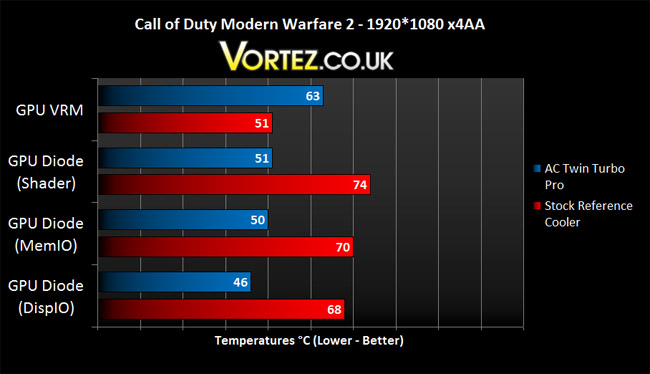
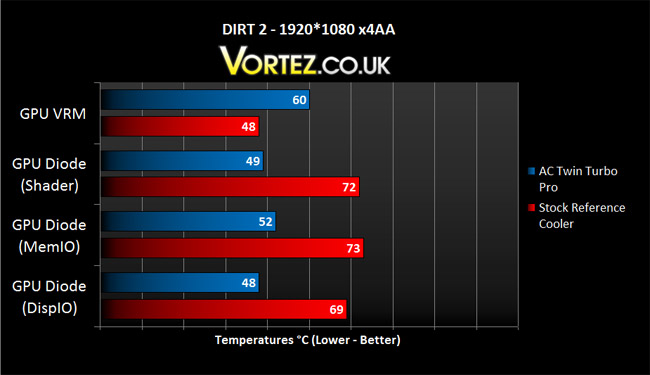
Quite miraculously, the turn of events change whilst in game. No longer is the Twin Turbo Pro the inferior cooler. Sure enough the VRM is higher, but at no point did it ramp up any further than the stated values above. It’s quite pleasing to see things change like this, because the Twin Turbo Pro is a quieter solution. This makes it ideal for those wanting to dull out the noise, have a bit more control over the fan speed and lower temperatures in game.
Problems
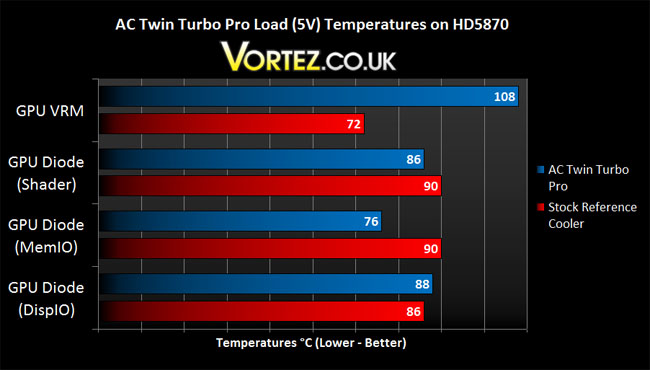
As you can tell from the results, the Twin Turbo Pro is far from a satisfactory solution for the HD5870 in our Furmark benchmark tests. Those results weren’t concluded in a momentary observation either. Hours of testing, reseating and buying thermal tape and solution to cleanup the mess of taking the cooler on and off the card. The results were obtained after much toil and those the VRM/RAM heatsinks have been re-applied at least three times before compiling those graphs.
I have been in contact with ARCTIC COOLING regarding the shoddy thermal abilities and have been told that the thermal tape has been revised since the S1 cooler. Now I wouldn’t like to undermine anyone but the RAM/VRM components on the HD5870 get hot very quickly, small heatsinks aren’t going to be sufficient to dissipate massive amounts of heat, and at the first instance they don’t even properly bond to the components anyway. With the superior sticking properties of the Akasa tape, we are still seeing poor performance. Thermalright have a cooling solution solely for the VRM on the HD5870/5970 so surely there is a need for some high-end heatsinks to cater for the massive temperatures that this ATI card generates.
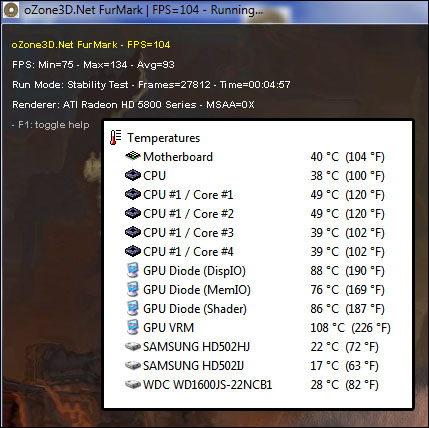
At both the 5V and 7V operating levels the temperatures of the VRM chips were reporting over 105C and I wasn’t prepared to allow the test to continue any further. The stock reference cooler on our HD5870 reported 33C less, surely this indicates that those tiny heatsinks are inferior.
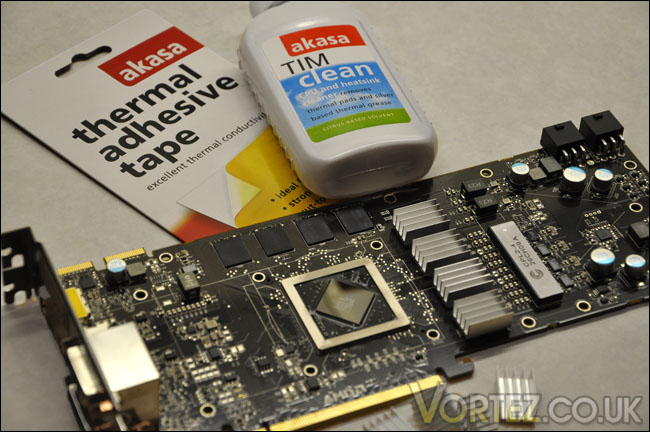
Akasa Thermal Adhesive Tape and TIM cleaner ready to re-apply the heatsinks and cooler
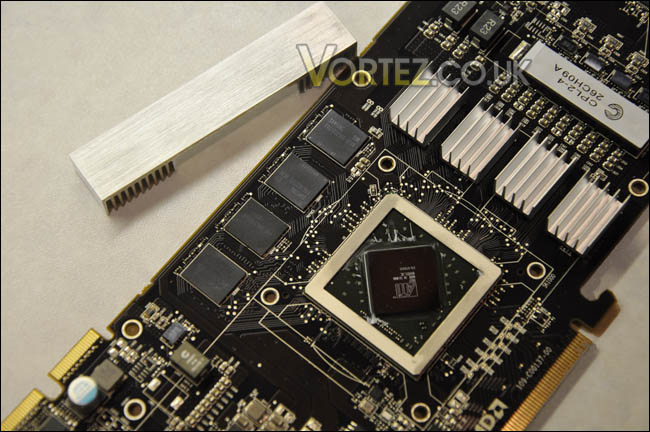
Removed original thermal compound with petrol, cleaned with TIM and re-applied heatsinks for secure attachment
Conclusion
ARCTIC COOLING have a solid name in the world of cooling and they continue by offering a good solution for the HD5870. I must admit it’s quite a mixed bag, because the Furmark benchmarks put the Twin Turbo Pro in a rather dark place, with the thermal performance suffering quite significantly over the stock reference cooler but fire up a game and those temperatures are reversed and the Twin Turbo Pro comes out as the victor.
Heatsinks dropping off Accelero’s is unfortunately something that is reported as quite common across the internet. I followed the instructions manual to the letter and still found myself with the same ill-fated occurrence. I ended up having to purchase some Akasa thermal tape to carry on with the investigation and although this was a superior method of sticking the heatsinks to the RAM/VRM the results were still poor. In the Furmark tests my VRM’s were exceeding 105C during full load when connected to the molex connector at both 5V and 7V. It was only 12V mode that allowed the temperatures to remain under 100C and when you consider the stock reference cooler cools the VRM’s at around 70C under load It’s clear that in this particularly harsh bench test the stock reference cooler shames the ARCTIC COOLING offering.
With regards to noise, the AC Accelero Twin Turbo Pro does operate without any hindrances. At 5v, at 7v (see video below) the noise levels are hardly inaudible, with the 12v hooked up though sound levels obviously incease.
The thermal performance in Furmark does concern me. The HD5870 needs specialist, independent attention rather than being bundled with a list of other graphics cards which do not operate with the same power and aggressiveness as the 5800 series. It’s a very demanding card and as a result needs some exclusive cooling. A good example of what I mean is with the range from Thermalright, isolated cooling for the VRM’s: http://www.thermalright.com/new_a_page/product_page/product_vga_cooler.html and cooling for the GPU/RAM in seperate units.
I do hope that ARCTIC COOLING will take on board the crticisms I have highlighted in this review by addressing the bonding issue with their heatsinks.
After a purchase of around £25-30 and a gentle 30 minutes of labour you can have the Accelero Twin Turbo Pro installed and it does offer some significant improvement over the stock reference cooler in game.
Pros
+ Positive thermal performance in game
+ Fairly quick to install
+ Affordable
+ Extremely quiet
Cons
– Worryingly high temperatures in Furmark
– Bonding on heatsinks very poor
– Flimsy mounting system
– Poor instructions manual

