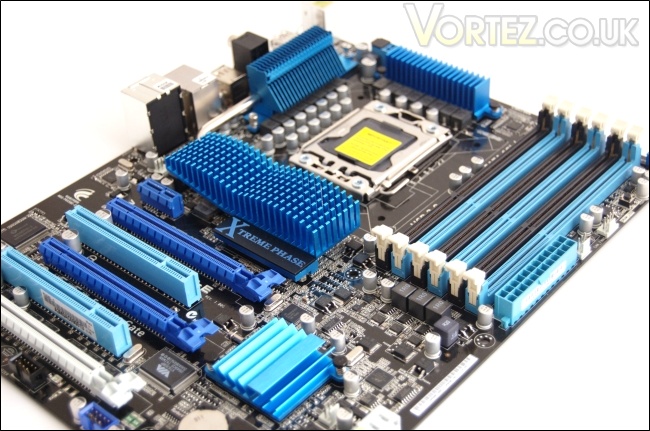
Today, we have with us ASUS’s entry level SATA III 6Gbps and USB 3.0 compliant X58 motherboard.
Product on Review: ASUS P6X5
 -E
-EManufacturer and Sponsor: ASUS
MSRP: Not listed
Street Price: £169.19
With the introduction of the X58 platform, ASUS were prompt in delivering a whole line of motherboards to cater for a range of people. Of course, being the latest Intel flagship chipset, not everyone could easily get access to the newly released motherboards but over time, most manufacturers began releasing more ‘budget’ solutions. More recently, SATA III and USB 3.0 implementation has led to the evolution of the platform and it’s not surprising to see that products compliant to those standards hold a premium. However, ASUS have done an excellent job in bringing those features to a price point on the good side of £200 with the P6X5
-E motherboard. The question we have to ask ourselves is whether it compromises on performance and other features. On initial looks, the P6X5
-E sports all the features we have been accustomed to see on other high-end ASUS motherboards. For a start, the board supports 3-way SLI and Quad-GPU CrossfireX with the use of two ATI HD5970s. Other features present include the TurboV application for easy overclocking and with a true 16+2 phase power design, we can immediately see that ASUS haven’t compromised on this front. With growing emphasis on green solutions, the EPU power saving engine has also been implemented to intelligently moderate a range of components. A welcomed addition is ASUS’s Express Gate utility, an exclusive operating system enabling users to connect to the internet without booting into windows. ASUS are renowned for their performance as well as their attention to detail. In the recent pre-Computex seminar, one of their key focus was on design concepts that give their motherboards a truly unique finish. Their design philosophy entails performance, overclocking and aesthetics, and the P6X5 -E falls under their ‘Xtreme Design’ concept. 
A bit about ASUS:
ASUS comes from the last four letters of Pegasus, the winged horse in Greek mythology that represents the inspiration of art and learning. ASUS embodies the strength, creative spirit and purity symbolized by this regal and agile mythical creature, soaring to new heights of quality and innovation with each product it introduces to the market.
ASUS pursues technological and aesthetic perfection through continuous innovation. We place ourselves in our customers’ shoes to develop a deep understanding of, and genuine empathy for, their needs—enabling us to create user experiences that transcend the norm.
ASUS Design Philosophy
ASUS Design develops high-quality solutions our customers will enjoy.
Our design process is built on thorough research, early anticipation and well-planned execution.
We act with a global vision and a focus on local strengths, conditions and heritage.
ASUS comes from the last four letters of Pegasus, the winged horse in Greek mythology that represents the inspiration of art and learning. ASUS embodies the strength, creative spirit and purity symbolized by this regal and agile mythical creature, soaring to new heights of quality and innovation with each product it introduces to the market.
ASUS pursues technological and aesthetic perfection through continuous innovation. We place ourselves in our customers’ shoes to develop a deep understanding of, and genuine empathy for, their needs—enabling us to create user experiences that transcend the norm.
ASUS Design Philosophy
ASUS Design develops high-quality solutions our customers will enjoy.
Our design process is built on thorough research, early anticipation and well-planned execution.
We act with a global vision and a focus on local strengths, conditions and heritage.
The P6X5
-E doesn’t fall short on its feature list, being very similar to its more expensive P6X5 -Premium sibling so let’s see if it has the performance to match.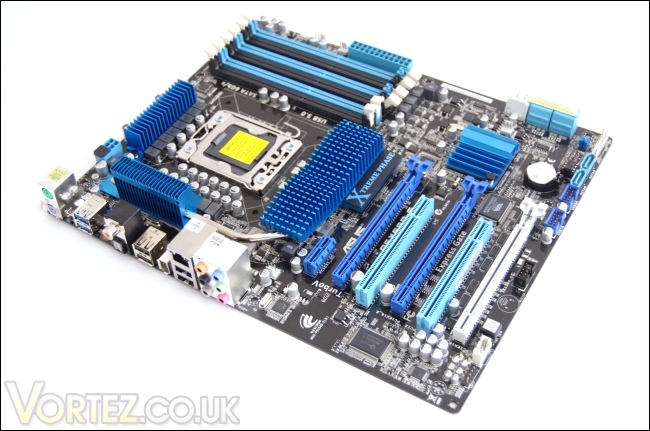
Specifications
| CPU -Intel® Socket 1366 Core™ i7 Processor/Core™ i7 Processor Extreme Edition -Supports Intel® Turbo Boost Technology *Note: This board does NOT support the i7 8xx series of CPU Chipset -Intel® X58/ICH10R System Bus Up to 6.4 GT/s with QuickPath Interconnection Memory – 6 x DIMM, Max. 24 GB, DDR3 2000(O.C.)/1800(O.C.)/1600/1333/1066 Non-ECC, Un-buffered Memory modules -Tri Channel memory architecture -Supports Intel® Extreme Memory Profile (XMP) Expansion Slots – 3 x PCIe 2.0 x16 (at x16/x8/x8 or x16/x16/x1 mode) – 1 x PCIe x1 – 2 x PCI 2.2 Multi-GPU Support -Supports 3-Way NVIDIA® SLI™ Technology / ATI® Quad-GPU CrossFireX™ Technology Storage Intel® ICH10R Southbridge -6 x SATA 3.0 Gb/s ports -Intel Matrix Storage Technology Support RAID 0,1,5,10 Marvell® PCIe SATA 6Gb/s controller – 2 x SATA 6.0 Gb/s ports (Grey) – Supports EZ Backup and SuperSpeed functions LAN – Gigabit LAN controller Marvell 88E8056® PCIe Gigabit LAN controller featuring AI NET2 Audio Realtek® ALC889 8-Channel High Definition Audio CODEC – DTS Surround Sensation UltraPC – BD audio layer Content Protection – Supports Jack-Detection, Multi-streaming, Front Panel Jack-Retasking – Coaxial / Optical S/PDIF out ports at back I/O IEEE 1394 2 x 1394a ports (1 port onboard, 1 port at back I/O) USB NEC® USB 3.0 controller – 2 x USB 3.0/2.0 ports (at back I/O) Intel® ICH10R Southbridge – 8 USB 2.0/1.1 ports (4 ports at mid-board, 4 ports at back I/O) Back Panel I/O Ports 1 x IEEE 1394a 1 x LAN(RJ45) port 8 -Channel Audio I/O 1 x PS/2 Keyboard (Purple) 1 x PS/2 mouse port (Green) 1 x Clear CMOS button 1 x Coaxial S/PDIF Output 1 x Optical S/PDIF Output 2 x USB 3.0/2.0 ports 4 x USB 2.0/1.1 ports Software -Drivers and Applications -Anti-virus software (OEM version) -ASUS TurboV Utility -ASUS PC Probe II -ASUS Update -ASUS AI Suite Other Special Features True USB 3.0 Support True SATA 6Gb/s RAID Support ASUS Xtreme Design ASUS Xtreme Phase – ASUS 16+2 Phase Power Design ASUS Exclusive Overclocking Features – ASUS TurboV ASUS Exclusive Features – MemOK! – ASUS EPU – Express Gate ASUS Quiet Thermal Solution – ASUS Fanless Design: Heat-pipe solution – ASUS Fanless Design: Stack Cool 3+ – ASUS Fan Xpert ASUS Crystal Sound – ASUS Noise Filter ASUS EZ DIY – ASUS Q-Design: Q-Slot – ASUS Q-Shield – ASUS Q-Connector – ASUS O.C. Profile – ASUS CrashFree BIOS 3 – ASUS EZ Flash 2 – ASUS MyLogo 2 – Multi-language BIOS Form Factor ATX Form Factor: 12 inch x 10.6 inch ( 30.5 cm x 24.4 cm ) |
Compared to the more expensive P6X58D Premium motherboard, the P6X58D-E only has a single Gigabit LAN controller and lacks an onboard reset switch. In terms of accessories, the board comes without the optional chipset fan and the 2-port USB2.0/ eSATA module that are present on the premium motherboard. In terms of its physical layout, the P6X58D-E misses the extra heat pipe which runs from the X58 chipset cooler to the ICH10R southbridge heatsink. In essence, these are the only difference between the P6X58D-E and the premium board so unless the extra features are required, the former is adept at meeting your requirements.
Features
| True ASUS 16+2 Phase Power Design Unprecedented Innovation with the Best Quality Component for Best Performance The groundbreaking 16+2 phase VRM design is brought to the ASUS motherboards. 16+2 phase power design, 16-phase for vCore and extra 2-phase for QPI/Memory controller inside CPU, can provide the highest power efficiency, and hence generates less heat to effectively enhance the overclocking capability. With the high quality power components such as low RDS (on) MOSFETs, Ferrite core chokes with lower hysteresis loss and 100% high quality conductive polymer capacitors, ASUS 16+2 phase VRM design also ensure longer component life and minimum power loss. ASUS TurboV New OC Records with Real-Time Super-precise Tunings Feel the adrenaline rush of real-time OC – now a reality with the ASUS TurboV. This extreme OC tool lets you set new ambitions on the OC stage with an advanced and easy-to-use interface – allowing you to overclock without exiting or rebooting the OS. With micro adjustments of the CPU PLL, NB, NB-PCIe, and DRAM voltages in 0.02v intervals, there are no limits – only extreme results to break new OC records! ASUS EPU Friendly reminder on Voltage Settings The new ASUS EPU – the world´s first power saving engine, has been upgraded to a new six engine version, which provides total system power savings by detecting current PC loadings and intelligently moderating power in real-time. With auto phase switching for components (which includes the CPU, VGA card, memory, chipset, drives and system fan), the EPU automatically provides the most appropriate power usage via intelligent acceleration and overclocking – helping save power and money. MemOK! Any Memory is A-OK! MemOK! quickly ensures memory boot compatibility. This remarkable memory rescue tool requires a mere push of a button to patch memory issues. MemOK! determines failsafe settings and dramatically improves your system boot success. Get your system up and running in no time ASUS Express Gate 0 to Internet in Seconds! Express Gate™ is an ASUS exclusive OS that provides you with quick access to the Internet and key applications before entering Windows®. ASUS Fanless Design Heat pipe Solution More power for the power hungry monsters The Heat Pipe design effectively directs the heat generated by the chipsets to the heatsink near the back IO ports, where it can be carried away by existing airflow from CPU fan or bundled optional fan. The purpose of the innovative heat pipe design on this motherboard is that the groundbreaking fanless design does not have lifetime problems as a chipset fan does. Furthermore, it provides options for users to install side-flow fan or passive cooler. The Heat Pipe design is the most reliable fanless thermal solution to date. Stack Cool 3+ Effective Fanless Heat Dissipation at 0dB Stack Cool 3+ is a fanless cooling solution offered exclusively by ASUS. It effectively and noiselessly transfers heat generated by the critical components to the other side of the specially designed PCB (printed circuit board) for effective heat dissipation – making temperatures cooler by up to 20°C. ASUS Crystal Sound DTS Surround Sensation UltraPC! DTS Surround Sensation UltraPC delivers exceptional 5.1 surround experience through the most common PC audio setups – your existing stereo speakers or headphones. In addition to virtual surround, “Bass enhancement” provides stronger low frequency bass sound, and “Voice clarification” provides clear human dialogue even with loud background sound. With these technologies, you may experience a better home-theatre audio with ease. Onboard Switch No more shorting pins or moving jumpers With an easy press during overclock, this exclusive onboard switch allows gamer to effortless fine-tune the performance without having to short the pins! ASUS Q-Design DIY quickly, DIY easily! ASUS Q-Design enhances your DIY experience. All of Q-Slot, Q-Shield and Q-Connector design speed up and simplify DIY process! ASUS Q-Connector Make connection quick and accurate! The ASUS Q-Connector allows you to connect or disconnect chassis front panel cables in one easy step with one complete module. This unique adapter eliminates the trouble of plugging in one cable at a time, making connection quick and accurate. Q-Shield Easy and Comfortable Installations EZ-Flash 2 Simply update BIOS from a USB flash disk before entering the OS Loadline Calibration Optimal power boost for extreme CPU overclocking! |
As we’ve grown to expect from ASUS, the board combines a range of features to deliver easy installation, cool and quiet operation, excellent overclocking tools with high end components to match. Best of all is the surprisingly affordable price point of the P6X58D-E which is a point I will no doubt emphasize continuously throughout the review.
ASUS’s design philosophy can certainly be seen through this motherboard, bearing power saving features such as the EPU engine and Stack Cool 3+ to drive efficiency in our ever growing environmentally aware time.
Packaging and Content
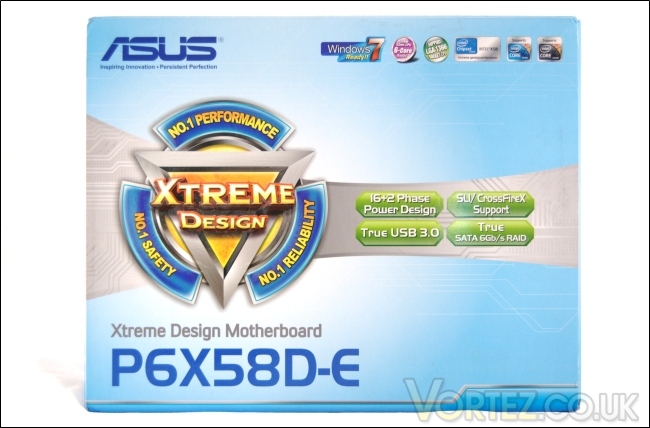
Front of the box
ASUS have opted for a vibrant sky blue cardboard packaging for the Xtreme Design motherboard. The front of the packaging is attractive and details the main aspects of the motherboard. The logo immediately give users an idea of the three key principles ASUS aim to deliver with the P6X58D-E. Performance comes with the SLI/CrossFireX support while reliability is through the 16+2 phase power design. Evidently, two of the selling points for this motherboard is support for USB 3.0 and SATA 6Gb/s with RAID capability as shown as the front of the box. With the motherboard being based on Intel’s flagship X58 chipset, it supports all LGA1366 processors including the latest 6 core i7 980x. On the whole, it’s a nicely designed package that contrasts to the minimalistic approach taken with the Rampage III Extreme.
Back of the box
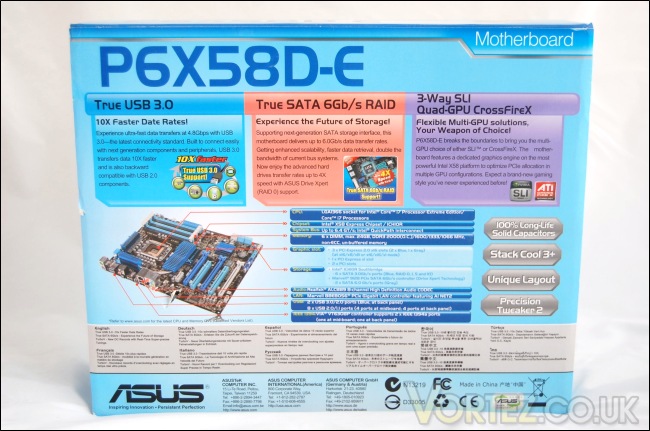
Onto the back, ASUS provide a lot more in depth information about the features shown on the front of the packaging. Conveniently, there’s a labelled diagram of the motherboard detailing the location of all the onboard connectors and modules. There are four other aspects of the P6X58D-E motherboard that ASUS also boast about on the back, including the 100% long life solid capacitors, Stack Cool 3+ cooling design, its unique layout for dual or even triple GPU configuration and the Precision Tweaker 2 feature for superior overclocking. Typical to most hardware packaging, the details are repeated in 12 other languages.
Front flap opening
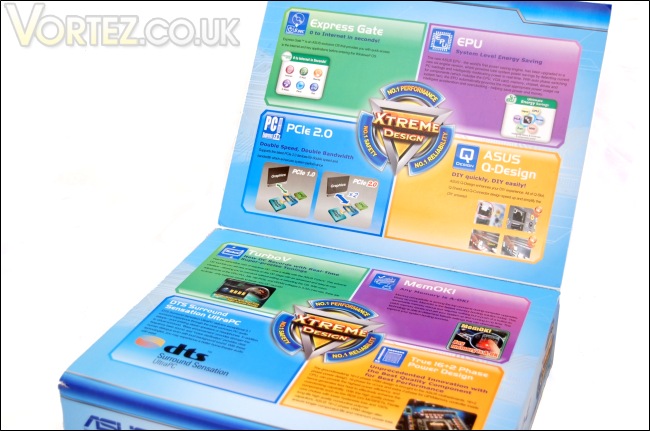
As with the Rampage III Extreme, the packaging has a front flap which reveals what seems to be the motherboard’s never ending list of features. Displayed around the Xtreme Design logos are the various features with small illustrations of their applications. All of them have already been covered on the last page so I won’t go into further details here. What’s striking about the packaging is the range of colours ASUS have opted for. In my opinion, it lacks the professional finish of their ROG line of motherboards but it is certainly very informative, sometimes overly so.
Inside the box
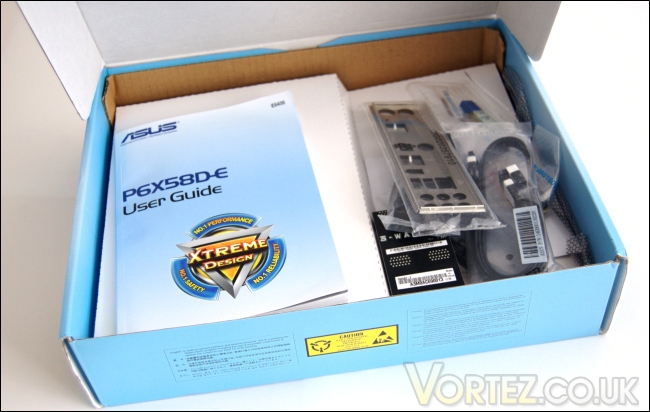
The box itself, which houses the bundle and motherboard, slides out of the outer cardboard frame. Opening it reveals the user guide and the bundle. A cardboard divider separates the bundle from the motherboard below. On initial impressions, the box looks quite bare and doesn’t have the same rich bundle we previously saw with the ROG motherboards but for the price point, all you really need are the essentials and ASUS don’t disappoint on that front.
The bundle
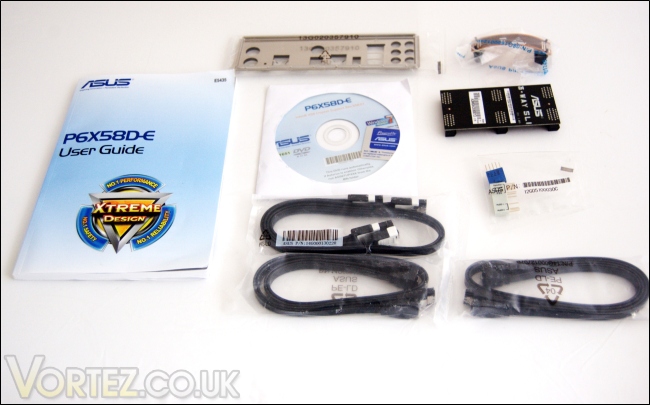
A closer look at the bundle and we see it comes with:
– 1 x User Guide
– 1 x Support DVD
– 2 X Serial ATA 6Gb/s cables
– 4 x Serial ATA 3Gb/s cables
– 1 x 2-in-1 ASUS Q-Connector kit
– 1 x ASUS Q-Shield
– 1 x ASUS 3-Way SLI bridge connector
– 1 x ASUS SLI bridge cable
Strangely no Crossfire bridge cables are provided but those may come bundled with ATI graphics cards. Each SATA cable packs contain two cables, one with a right angled end connector and the other with straight end connectors. A complimentary ASUS sticker is also bundled in the DVD sleeve.
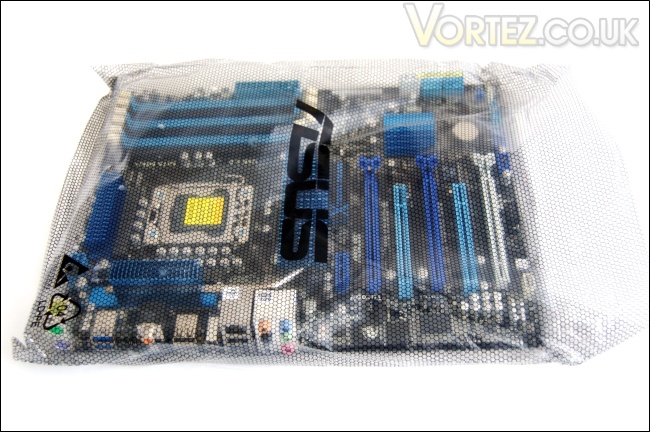
The anti-static bag…
And finally, once we go to the lower compartment, we get to the motherboard itself. The P6X58D-E comes packaged in a large anti static bag labelled ASUS in bold print.
Closer Look
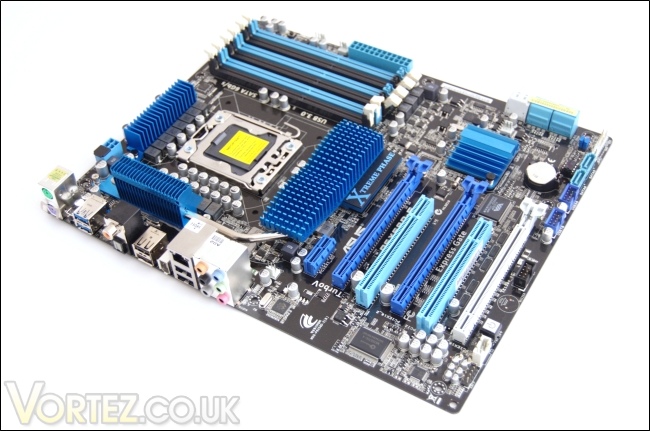
The motherboard
The P6X58D-E introduces a new theme into ASUS’s motherboard line up. Using a more docile blue and white them as opposed to the red and black of the ROG boards, it makes for an aesthetically pleasing finish. The motherboard uses the normal ATX form factor and the real estate makes efficient use of space to include as many features as possible. ASUS are keen to emphasize the unique layout of the board and while this may be an exaggeration, the board is very to work with once other components are added.
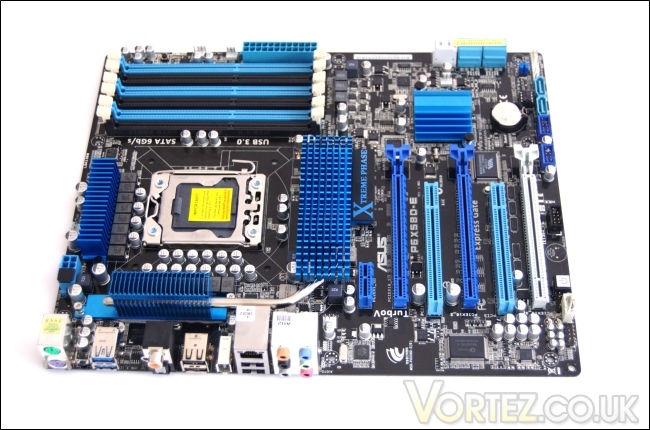
Excellent layout and colour scheme
At the recent pre Computex seminar, ASUS shared their design philosophy with us and one of the aspects they touched on was the need to create more efficient designs. As such, the CPU socket has been placed strategically in line with the middle of the RAM slots to minimize the distance for the traces between the two, thus reducing latency. This attention to detail is something we have become very accustomed in seeing from ASUS. The usual array of RAM slots, PCIe and PCI slots, and SATA connectors are all present.
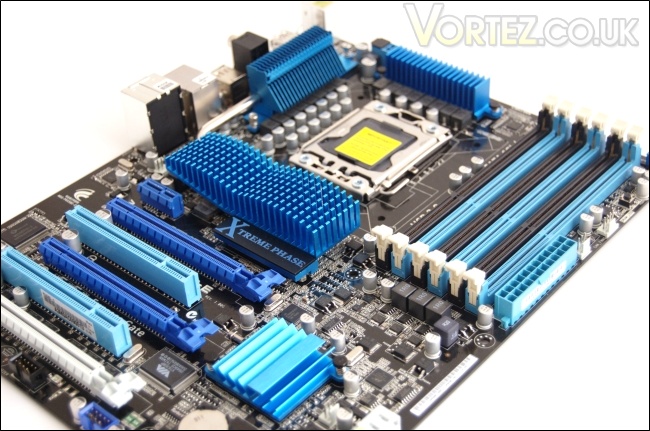
The chipset cooling
Different line of ASUS motherboard fall under different design themes as portrayed by the chipset cooling. With the ROG line, ASUS dubbed the angular cooling heatsinks as “Crystal Clash”. This particular board seems to take its design inspiration from waves and the colour scheme further insinuates this concept. The Stack Cool 3+ cooling system, as it is known, is a completely fanless design that makes use of a southbridge heatsink, X58 chipset heatsink and 2 MOSFET heatsinks. Unlike the premium board, the P6X58D-E only has one heat pipe that is shared between the larger X58 chipset heatsink and the side MOSFET heatsink, transferring heat towards the I/O panel so that it can be dissipated more effectively by air cooling solutions on the CPU. One thing to note is that the heatsinks are low profile to ensure compatibility with the majority of CPU coolers including the Noctua NH-D14.
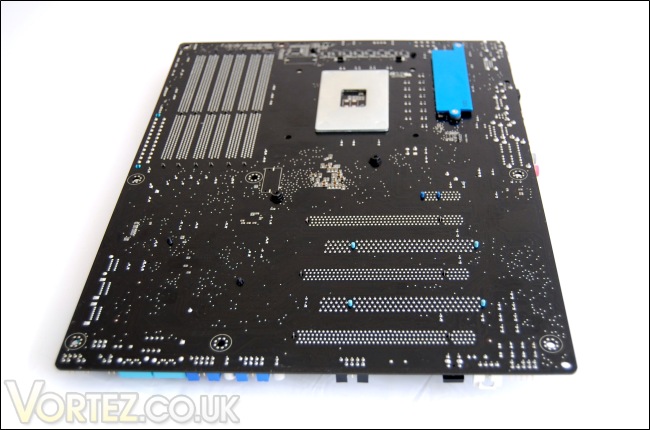
Back of the motherboard
On the back of the motherboard, the LGA1366 socket retention backplate can be seen. Next to it is the backplate to the MOSFET heatsink at the top. It’s a welcoming change to see more robust cooling systems which are screwed on more securely for maximum contact with the chipsets, as is the case for the X58 chipset heatsink as well. The smaller ICH10R and upper MOSFET heatsinks still use a push pin mounting system.
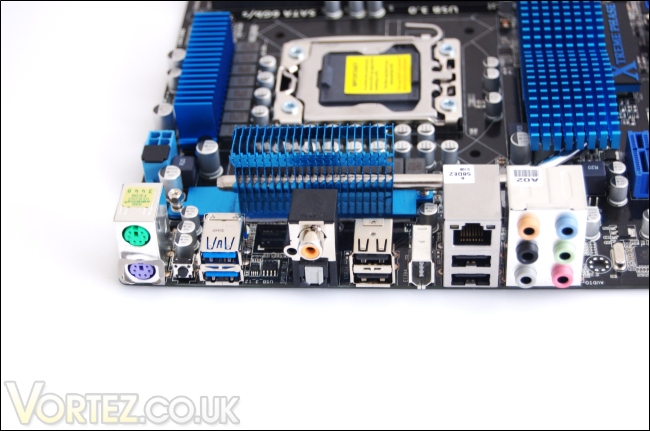
The I/O panel
The P6X58D-E has an assortment of connectors. Going from left to right there are the:
-PS/2 mouse port (green)
-PS/2 keyboard port (purple)
-Clear CMOS switch
-2 x USB 3.0 ports (blue)
-Coaxial S/PDIF Out port
-Optical S/PDIF Out port
-2 x USB 2.0 ports
-IEEE 1394a port
-2 x USB 2.0 ports
-8 Channel Audio I/O ports.
Although the motherboard supports 8 x USB 2.0 ports, only four of them are at the back and the other 4 are supported through front panel connectors on the board itself. The audio comes from the onboard ALC889 8 channel high definition audio CODEC.
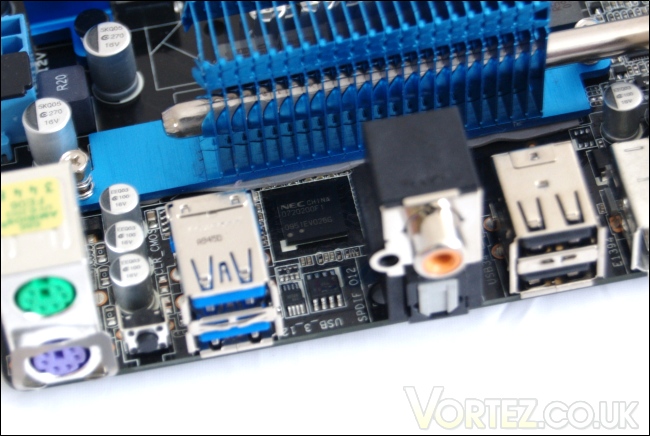
The NEC D720200F1 chip
Tucked away behind the I/O ports is the NEC D720200F1 chip that delivers USB 3.0 support to the board.
Closer Look (Continued)
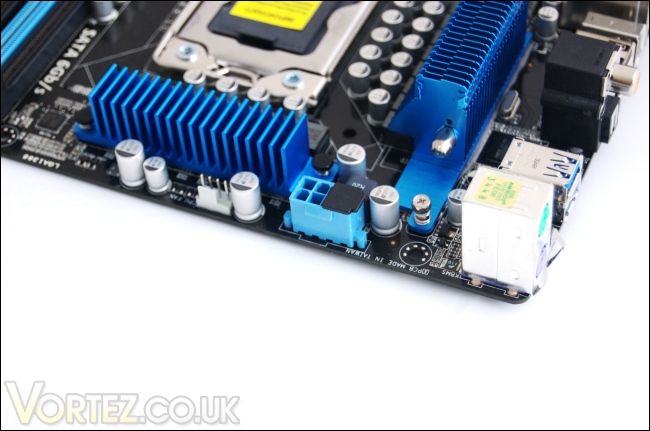
The 8 pin ATX 12V power connector
The motherboard sports a single 8 pin ATX 12V power connector, as found on all X58 based motherboards. This provides adequate power for your overclocking needs. We can also take a closer look at the mounting screws used on the chipset cooler as mentioned before. The spring loaded screw creates more pressure and assures maximum contact with the components the heatsink is cooling.
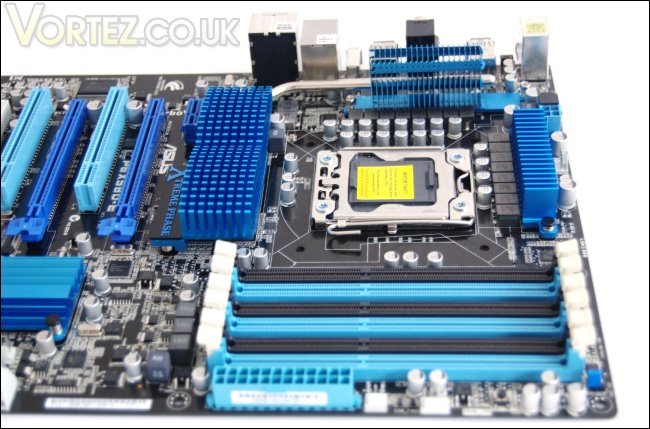
The top of the motherboard
The motherboard is neatly laid out not just for aesthetic reasons but for better performance. Having the LGA1366 CPU socket lined up with the middle of the RAM slots ensures that the motherboard trace length is minimized between the CPU and RAM for lower latencies. As usual, 6 DIMM slots are present with support for triple channel memory. Since there are no conflicts between the slots and possible PCIe devices installed, the Q-DIMM feature present on the ROG motherboards was unnecessary and thus left out. As such, both end of the DIMM slots have the retention latches. There is also a set of jumpers next to the DIMM slots which allow the CPU to be overvolted by increasing the upper vCore limit to 2.10V
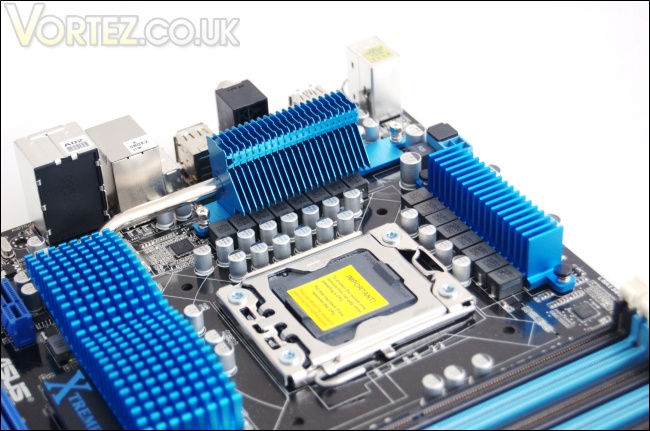
Ferrite chokes and capacitors
Taking a closer look at the CPU area, we can see the traditional metal retention mechanism surrounded by capacitors and ferrite chokes. The power delivery system uses a 16+2 phase VRM design with 16 phases for the vCore and 2 phases for the QPI/Memory controller for more excellent efficiency. The board also uses high quality conductive polymer capacitors and ferrite chokes for sustained power delivery without the risk of failure or power loss. It’s gratifying to see that ASUS haven’t compromised on these core features to reduce costs so we can expect the same performance and overclocking abilities on the P6X58D-E motherboard as we would see on the premium board.
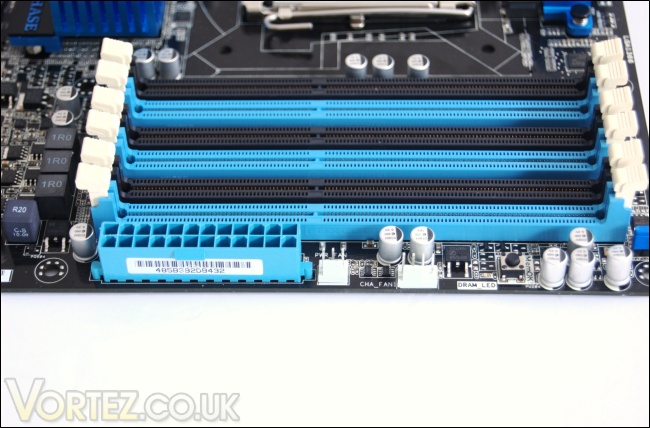
The right side of the motherboard
Here we see the 24 pin ATX motherboard connector and two fan headers. There is also the MemOK! button which initiates self-memory patching when pressed if there are compatibility issues. The Q-LEDs also make a comeback. This feature indicates whether all the components are operating well. In total the board carries 5 fan headers, 2 of which with PWM capability and the other 3 being three pinned headers. Those are distributed around the board for ease of installation.
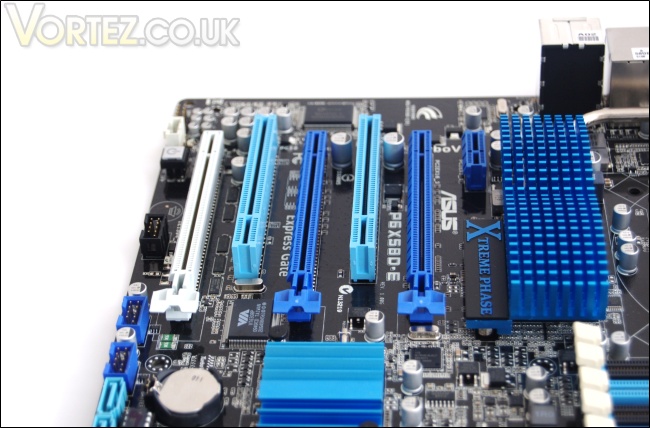
The PCIe and PCI slots
The expansion slots are arranged ideally for dual card or even triple graphics card usage. Along with the three PCIe 2.0 x16 slots are two PCI slots and one PCIe x1 slot. It’s good to see two PCI slots present so compatible devices can still be installed if the top PCIe 2.0 x16 slot is filled by a dual slotted graphics card. The two blue PCIe 2.0 x16 slots both operate at x16 link width with two cards installed for SLI or Crossfire, thus leaving the last white slot operating at x1 link width. For three card configurations, the slots operate at x16/x8/x8, which still provide adequate bandwidth for all high end graphics cards. The slots have been ideally colour coded to avoid confusion during installation. The slots also make use of the Q-Slot design to lock the graphics card when installed, and allows easy unlocking for their removal.
The SATA II & III ports
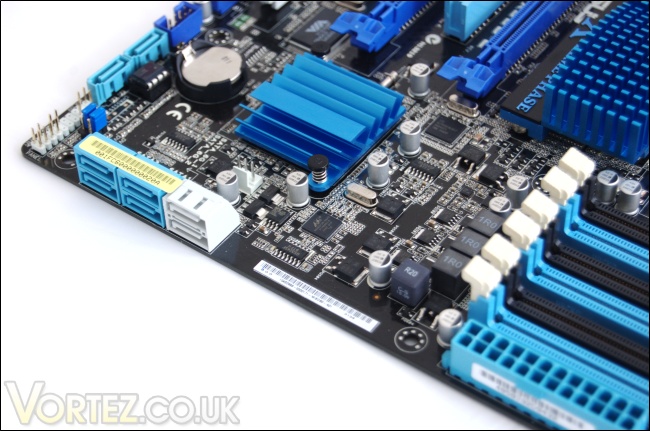
On the side of the motherboard are 6 horizontally mounted SATA ports. The four light blue ones operate at 3Gbps through Intel’s ICH10R southbridge controller while the two white ones are SATA III 6Gbps compliant thanks to the additional Marvell controller. Two more vertical ports can be found at the bottom giving users more flexibility when managing their SATA cables. Using the built in Intel Matrix Storage Technology, users can create a RAID 0, 1, 5 and 10 configuration through the ICH10R RAID controller.
Closer Look (Continued)
The front panel headers
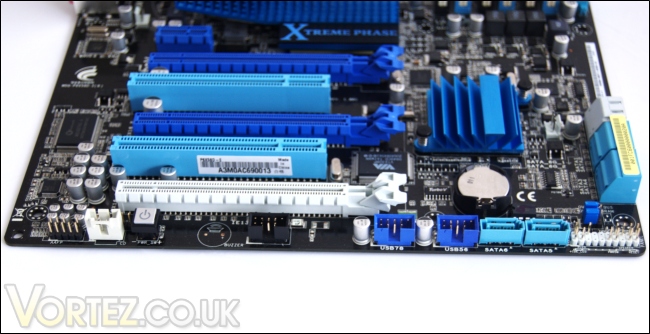
There are a range of internal connectors and front panel headers at the bottom of the motherboard. ASUS provide their famed Q-Connectors for the system panel connectors on the right, saving users the difficulty of determining which pins are needed for the front panel cables. Going to the left, past the SATA ports are two USB headers, each supporting two USB 2.0 ports for a maximum 480Mbps connection speed. Another notable inclusion is the onboard ON switch that is becoming more and more popular these days. It’s certainly a good idea to cater for enthusiasts who work on test benches and thus lack a case switch or front panel cables.
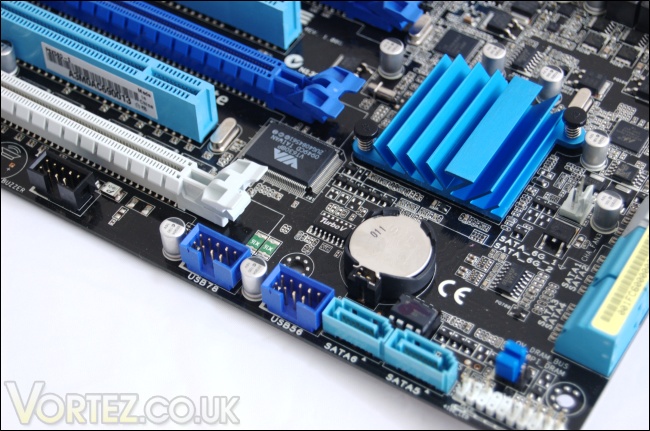
CMOS battery and TurboV chip
Hidden amongst the array of chips and components is the small TurboV chip allowing users to overclock in a windows environment using the bundled TurboV utility. There are two more sets of jumpers just above the front panel pins to overvolt the DRAM bus and the QPI-DRAM link bus to 2.46V and 1.90V respectively.
Test Setup
Graphics card – XFX HD5870 1024MBPower Supply – Enermax Revolution 85+ 850W
Hard Drive – Samsung F1 320GB
Western Digital Caviar WD3200AAKS 320GB
Drivers – ATI Catalyst 10.5
Cooler – Noctua NH-D14
CPU/Motherboard/RAM
CPU – Intel Core i7 920
RAM – 6GB (3x2GB) OCZ platinum DDR3 1333mhz
Motherboard – ASUS Rampage III Extreme
CPU – Intel Core i7 920
RAM – 6GB (3x2GB) OCZ platinum DDR3 1333mhz
Motherboard – Biostar T-Power x58
CPU – Intel Core i7 920
RAM – 6GB (3x2GB) OCZ platinum DDR3 1333mhz
Motherboard – ASUS P6X58D-E
Benchmark Suite
Core Temp 0.99.5
LinX stress Test
PC Wizard
3DMark Vantage
3DMark 06
Cinebench 11.5
x264 HD Benchmark
SiSoftware Sandra
Everest 5.01.1700
Far Cry 2
Street Fighter IV
Batman: Arkham Asylum
BIOS
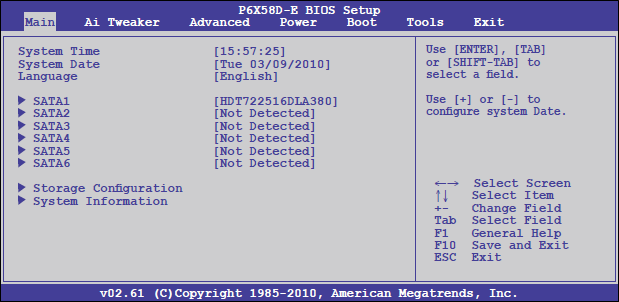
Moving on to the BIOS, we see that ASUS have retained the general format found on all their motherboards and that comes courtesy of AMI. There’s a range of tweaking tools and customizations tools. In fact, it’s very similar to the BIOS found on the flagship Rampage III Extreme. The first screen that greets us is the ‘Main’ screen displaying the time, date, language and information concerning installed drives. Navigating through in a simple matter of using the cursor keys as indicated on the side.
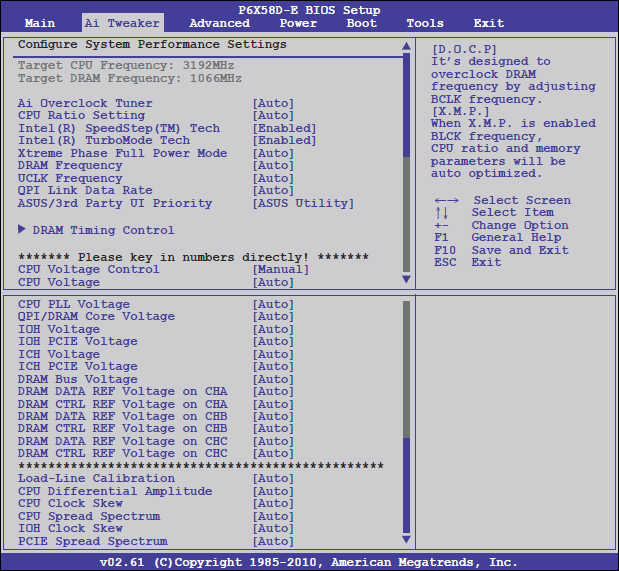
This is where we finally get down to business. The AI Tweaker tab gives users the opportunity to change a range of system parameters to allow for an in-depth, yet intuitive overclocking process. Unlike the Rampage III Extreme, the CPU Level Up feature is absent but most people prefer manually overclocking anyway so it’s not much of a miss. All the main settings for vCore, QPI/DRAM core voltages and frequency tweaks are situated nearer the top of the window. More options are unveiled when the Ai Overclock Tuner is set to manual. It might seem daunting on first impression by looking at the plethora of settings at the users’ disposal but generally the key parameters are CPU voltage, QPI/DRAM Core voltage and the DRAM Timing Control. The rest can be left on auto. With the P6X58D-E, ASUS have introduced the Precision Tweaker 2 feature allowing users to change voltages in increments as small as 0.00625V for the CPU voltage and 0.02V for the QPI/DRAM Core voltage. As the name implies, it allows for more precision in overclocking without overvolting and generating more unnecessary heat. As usual, the side of the window informs users how each parameter will affect the system.
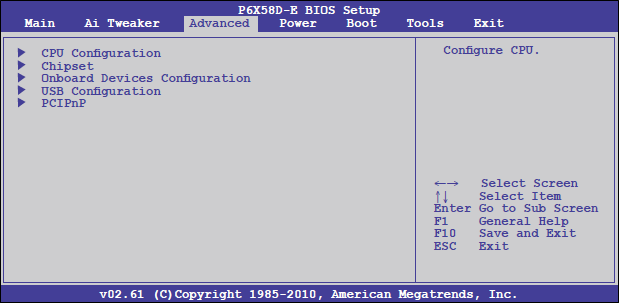
Going across to the next tab, we land on the advanced menu. Here users can change the settings for the CPU and other system devices. Onboard devices such as the HDA/1394 controller can also be configured from here.
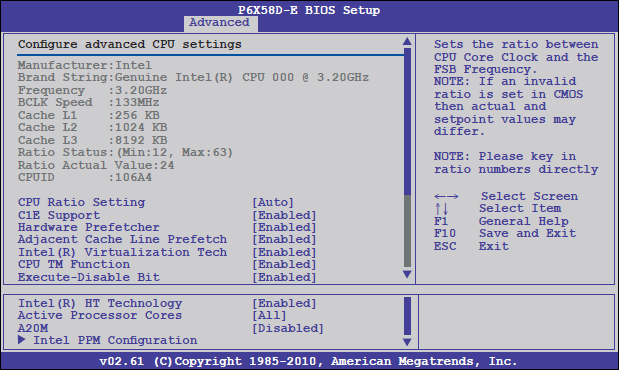
Selecting the CPU Configuration tab, a range of CPU settings can be enabled/disabled. Disabling unneeded settings such as the Virtualization Tech may improve overclocking headroom. All the other power management features such as Speedstep, C1E enhanced halt state and Turbo mode can be configured here.
BIOS (Continued)
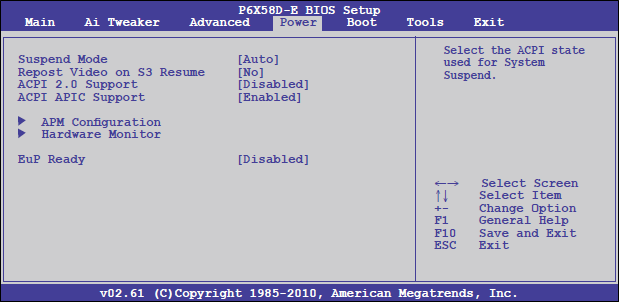
The Power window allows the user to monitor hardware voltages, temperatures and fan speed.
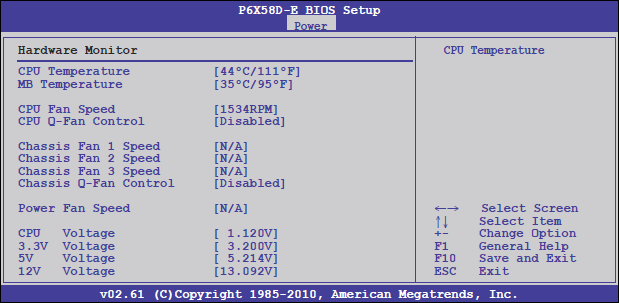
Here, in the hardware monitor window, the CPU and motherboard temperatures can be monitored. Note that the CPU temperature displayed here is different to the core temperatures registered on software such as Coretemp and Realtemp. Fans can have the rotation speeds adjusted here, should they have PWM functionality.
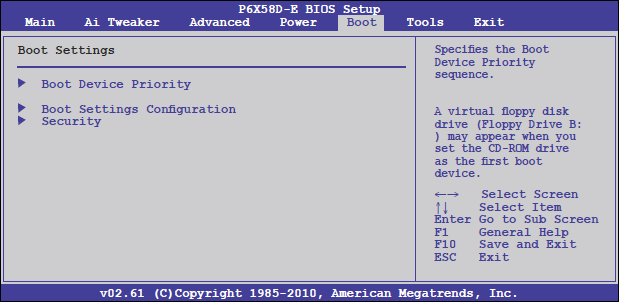
The Boot menu allows users to select the order of the devices from which they want to boot from. It is also possible to select whether the ASUS logo appears on boot or not. There are also security options if users wish to limit who can enter BIOS and what options can be configured.
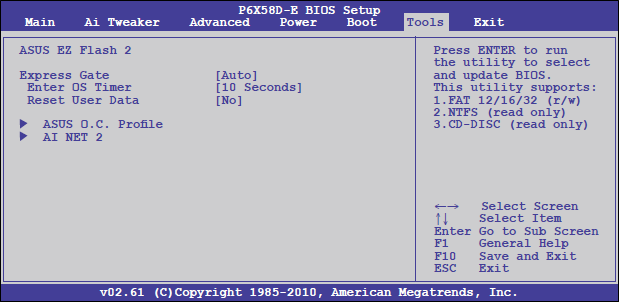
The Tools menu has a number of ASUS specific utilities such as EZ Flash 2, to update the BIOS, and Express Gate, a unique feature that provides quick access to the internet.
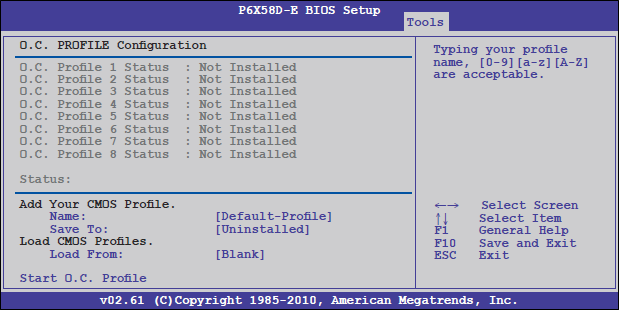
Going to the ASUS O.C. Profile sub menu, users can save their system settings on up to 8 CMOS profiles. This is a very handy tools for overclockers who may want to save a certain overclock for access later on. It is also possible to name the profiles prior to saving them.
Software Bundle
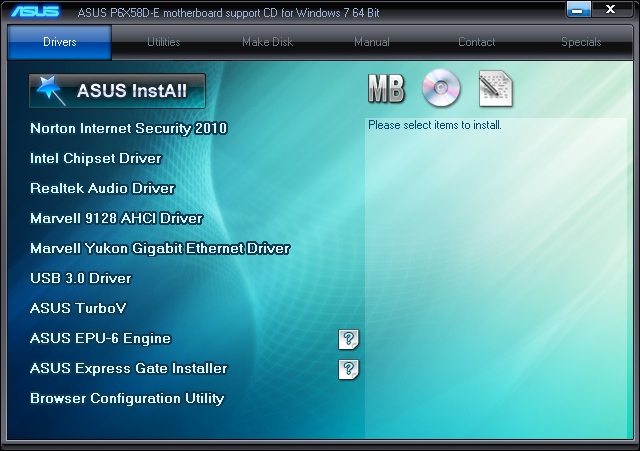
The bundled DVD includes numerous onboard drivers and utilities. ASUS also bundle Norton Internet Security 2010 so the system is ready to go and secure following installation. The drivers are for RAID, USB 3.0 and SATA III 6Gbps support. It is recommended to install all the drivers and for the latest ones, visit ASUS’s download page. There are also three specific ASUS application on the drivers tab. The ASUS TurboV utility allows users to overclock the CPU from a windows environment. The EPU-6 engine is an additional power management tool giving users the freedom of choosing how fast the CPU should run depending on the task at hand. Finally there’s is the Express Gate feature which we will touch on later.
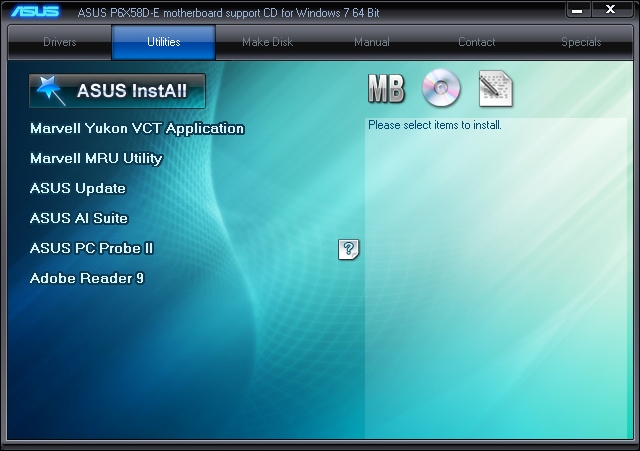
The Utilities tab reveals some more handy utilities, the PC Probe II and AI Suite being two useful hardware monitoring programs.
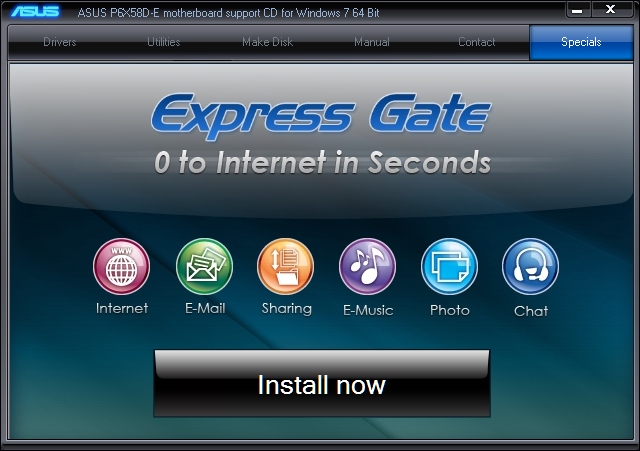
The final tab on the driver DVD prompts users to install the ASUS exclusive Express Gate operating system bringing users a range of quick launch applications as soon as the system boots.
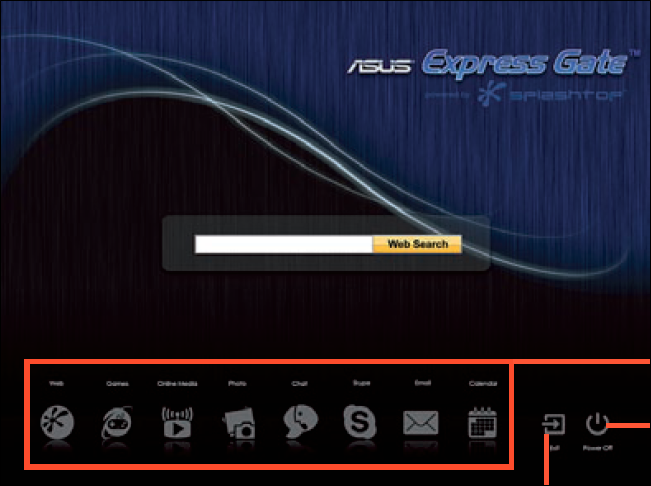
Express Gate has been a unique feature present on most premium ASUS motherboard over the past few years. It is an exclusive Linux based operating system that users can access on system boot up to immediately connect to the internet. Powered by Splashtop, ASUS Express Gate features an intuitive graphical user interface, a web browser based on Mozilla Firefox 3.0, a Skype VoIP client and an additional chat client based on Pidgin. The web search is powered by Yahoo. User can also browse photo albums or conveniently access their emails without having to go into Windows. It only takes a few seconds for the Express Gate splash screen to appear once the system is switched on but it will proceed to the regular boot sequence if the user decides not to interact with it. The Express Gate feature can be configured in BIOS and can also be switched off if not required.
Software Bundle (Continued)
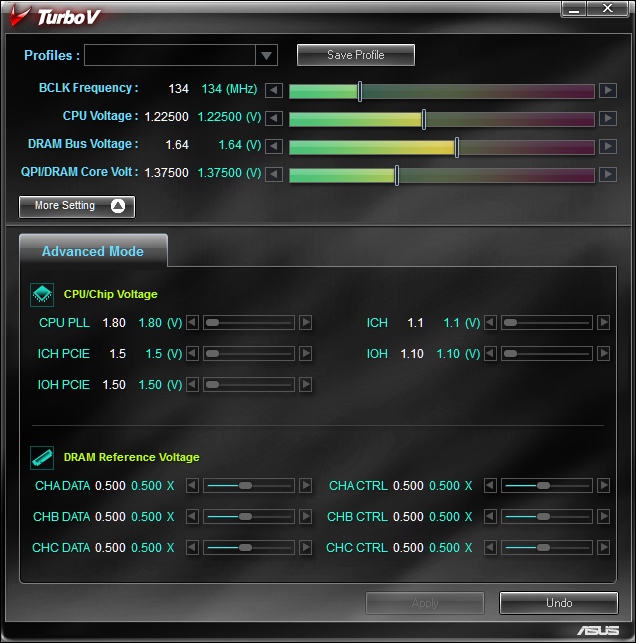
The ASUS TurboV utility is a unique, easy to use approach at overclocking the CPU in a windows environment. It provides a comprehensive list of configuration settings and voltages that is akin to using the BIOS. The utility caters for those are who are new to overclocking and thus ASUS only list the key parameters to avoid overwhelming users. The only missing feature is the ability to tweak memory settings but it’s best to do this through BIOS for stability. Changes made here happen in real time and can be saved to profiles, similar to what we saw in BIOS. However, unlike the TurboV EVO utility on the Rampage III Extreme, the changes are not permanent so all changes will be lost on reboot. This makes it somewhat useless for overclocking but its main advantage is that it familiarizes users to settings in the BIOS. The tool is also good at tweaking overclocks made in BIOS to improve stability. I wouldn’t recommend relying on the TurboV utility solely when overclocking.
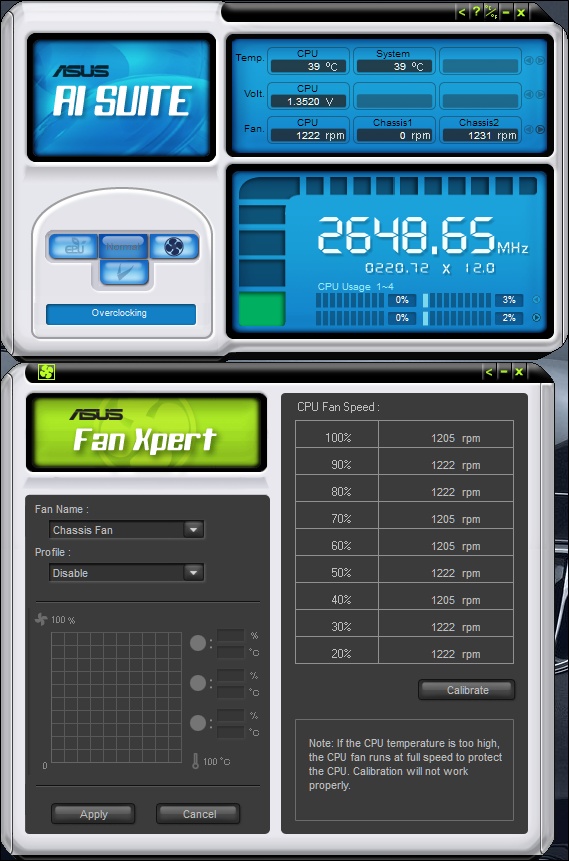
The AI Suite utility is common to most ASUS motherboards and helps monitor voltages and clock speed. From the AI Suite, users can access the EPU-6 Engine utility and Fan Xpert. Fan Xpert is a very useful tool that allows users to create fan profiles to adjust fan speeds in accordance to the CPU temperature. The result is a quieter system when idling and full operation under load.
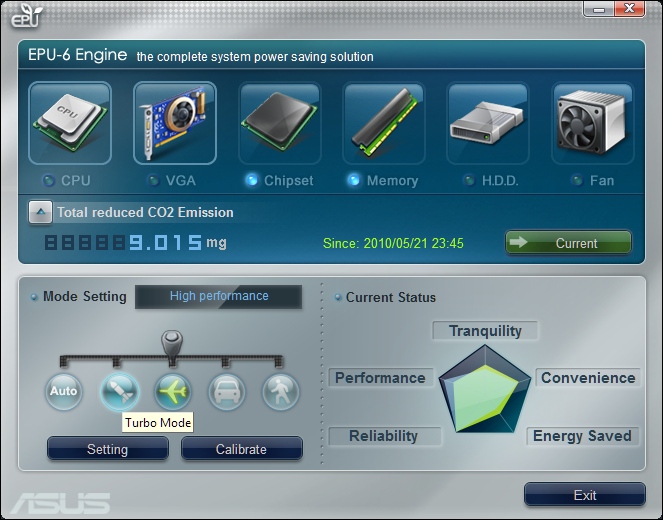
The EPU-6 Engine demonstrates ASUS’s keen interest in producing greener products in these environmentally conscious times. The system allows users to control various compatible components for the most efficient operation. Those components are highlighted with the glowing blue dot. The utility even informs users by how much CO2 emission has reduced as a result of the power saving settings. The chipset has 5 different settings; auto, turbo, high performance, medium power saving and max. power saving modes. Turbo and high performance mode overclock the CPU dynamically for the best performance while retaining stability and the latter two modes underclock the CPU for tranquillity, convenience and reducing power consumption. The status is displayed as a radar chart telling users how each mode setting will benefit their system.
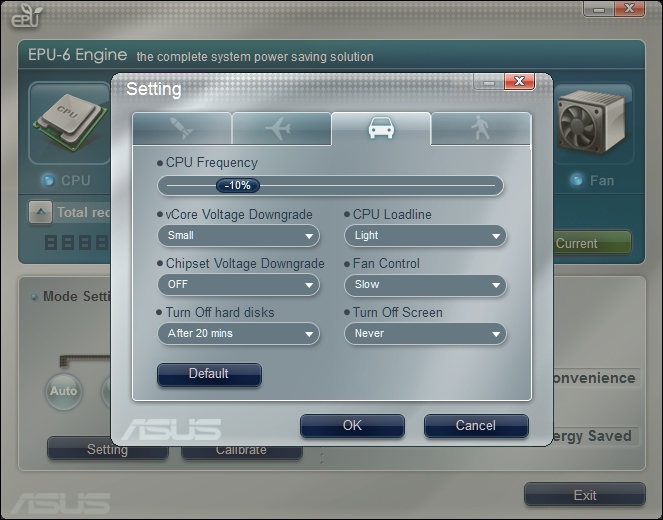
Here we can see how each mode can be customized by the user to suit their needs. ASUS have done a tremendous job in giving users an intuitive graphical user interface to control many aspects of their system without having to rely on other third party programs.
Overclocking
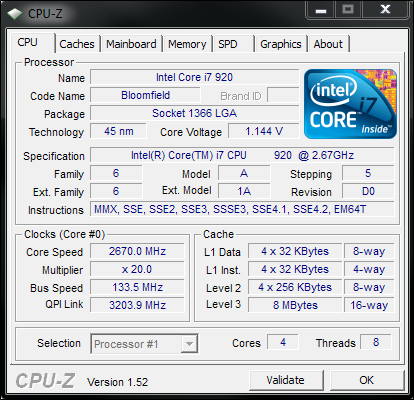
Stock speed
Knowing that the CPU was capable of 4Ghz, it didn’t take long to achieve those clocks on the P6X58D-E motherboard. By simply increasing the BCLK to 200MHz and setting the core voltage/QPI-DRAM voltage to 1.296V/1.35V in BIOS respectively, I already had a stable system running at 4GHz. Similarly to the Rampage III Extreme, the board is also very good at handling overclocked memory. The P6X58D-E had no issues running the OCZ 1333MHz at 1600MHz with slightly loosened timings at CAS 8.
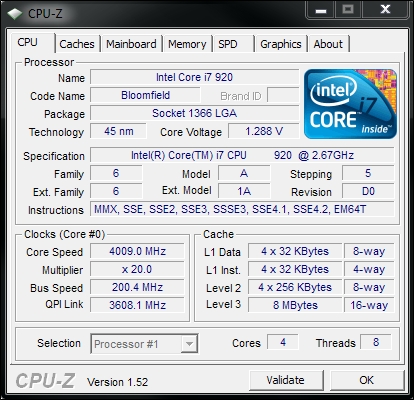
4GHZ
Another similarity to the Rampage III Extreme was the fact that it required less voltage than my Biostar X58 board to get 4GHz stable. The Precision Tweaker II feature makes it efficacy apparent here. One thing to note though is that Load-Line Calibration was enabled by default. Disabling it made the core voltage fluctuate such that under load, it would decrease and when idling, the vCore increased. This is counter intuitive to what we should expect with C1E enhanced halt state enabled and was definitely a downside of the motherboard compared to the Biostar. However, this problem can easily be overcome by enabling LLC but slightly higher idle temperatures can be expected. Load line calibration is enabled by default when overclocking even when left on ‘Auto’ in BIOS. The problem is that voltages do not drop while idling in accordance to core clock reduction through Speedstep and C1E enhance halt state. What this means is that higher than usual idle temperatures are to be expected, even if the core clock has lowered.
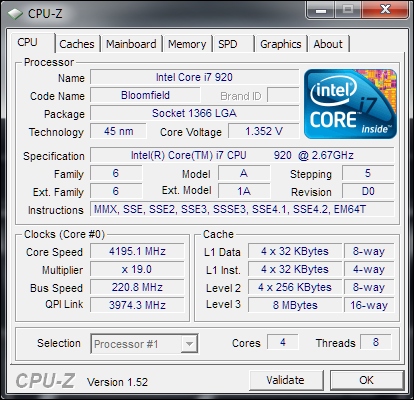
221MHz BCLK
Of course, following in the footstep of the Rampage, I tried to see how far I could push the CPU and the base clock. In the end, the board managed to achieve a BCLK of 221MHz stably, 1MHz short of what was possible on the Rampage III Extreme. You might notice that the actual CPU clock speed is actually slightly higher than what was achieved on the Rampage, making this a very impressive result. However, anything higher than a 221MHz BCLK did not boot. To attain this high base clock, it is recommended to raise the PCIe clocks to around 112MHz. Of course, overclocking is at the users’ risk and the headroom may vary.
Overclocked memory
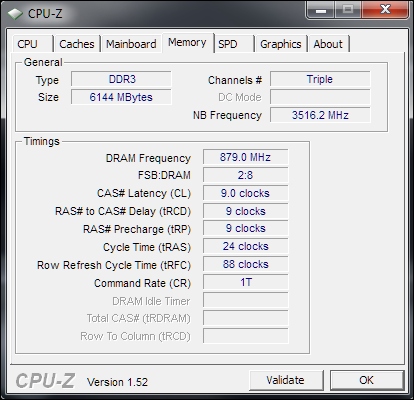
The P6X58D-E is also an excellent board when it comes to overclocking memory. The board managed to keep the OCZ RAM stable at 1758MHz 9-9-9-24 from a stock 1333MHz 7-7-7-20. On the whole, the motherboard delivers brilliant overclocking headroom and I’m sure more capable CPUs and RAM can have their potential fully unlocked on this ‘budget’ board.
Cinebench 11.5 & x264 HD Benchmark
Cinebench 11.5
Based on the MAXON animation software CINEMA 4D, Cinebench is a test suite that uses the system’s processing power to render a photorealistic 3D scene. This makes it an excellent benchmark to measure CPU and motherboard performances.
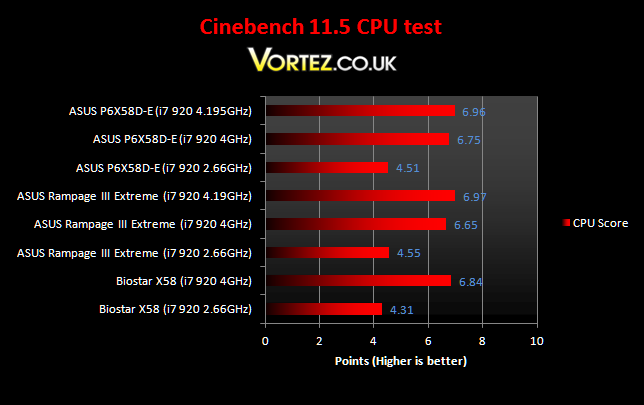
The P6X58D-E performs very well here, leading the Biostar by a healthy amount but trailing the Rampage III Extreme at stock speed. The tables turn with the CPU at 4GHz with the board leading the rampage but trailing the Biostar. Fully overclocked, the Rampage is the winner despite the P6X58D-E running the i7 920 at slightly higher clock speeds.
x264 HD Benchmark
The x264 HD Benchmark from Tech ARP is a useful benchmark that demonstrates the encoding performance of systems by encoding a short HD quality video clip into a high quality x264 video file. The test uses multiple cores efficiently to give a good representation of real world performance.
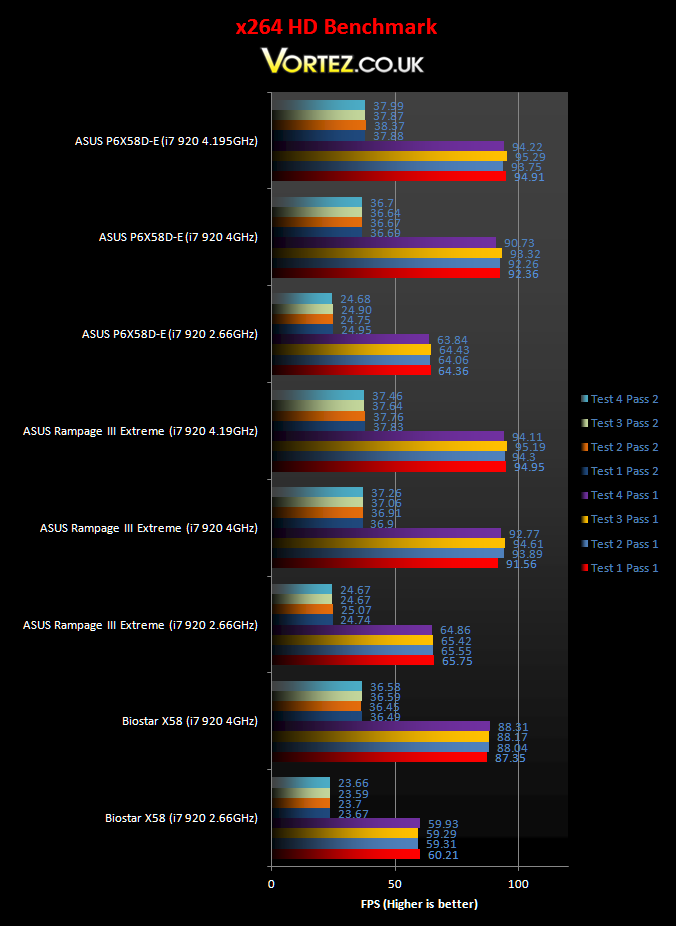
The two ASUS motherboards show a clear lead over the Biostar boards but distinguishing between the former two is very hard. Both perform exceptionally well throughout the benchmark. For a budget board, it appears to become more and more of a bargain.
SiSoftware Sandra
SiSoftware Sandra is a Windows system analyzer that includes benchmarking, testing and listing modules. It tries to go beyond other utilities to show you more of what is really going on under the hood so comparisons can be drawn. With an array of CPU and memory tests, it is ideal in comparing the P55 platform against the X58 chipset.
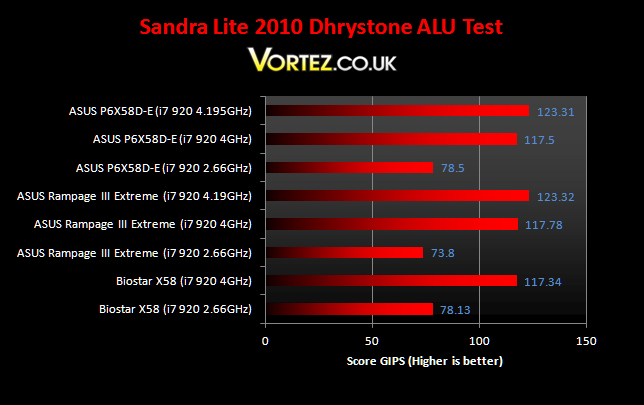
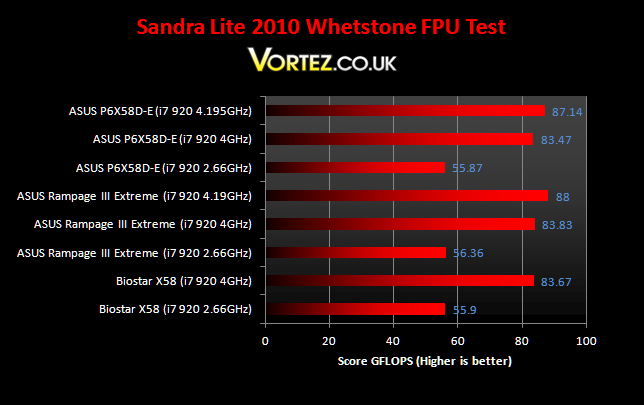
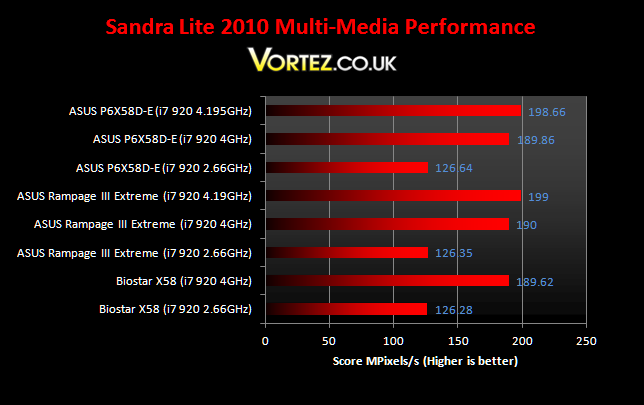
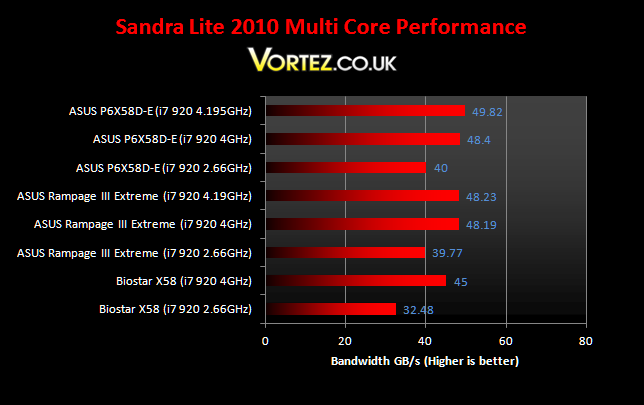
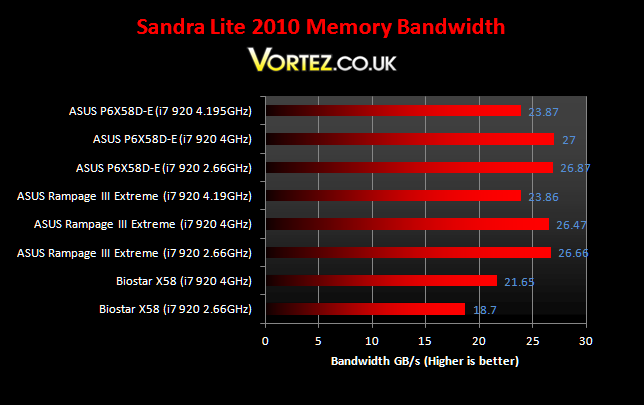
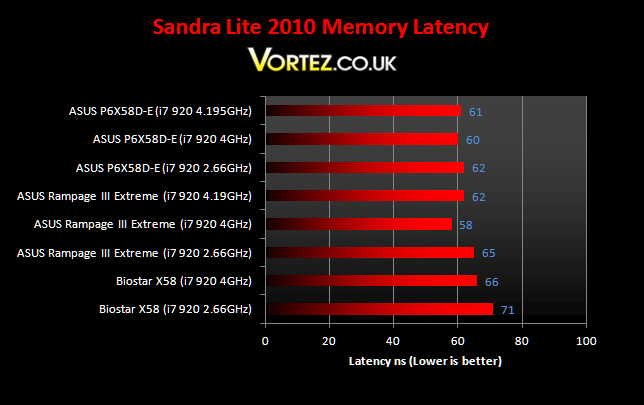
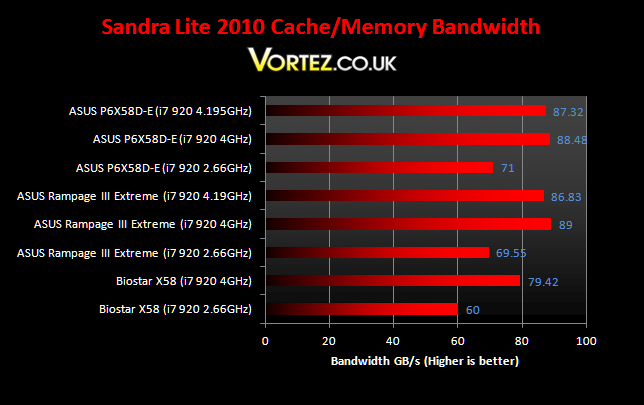
Again, we see exceptional results from the P6X58D-E. It outperforms even the Rampage III Extreme at stock speeds. In the memory tests, the overclocked i7 carries on the P6X58D-E’s lead showing how ASUS’s claver positioning of the CPU socket in relation to the memory slot has benefitted performance. In the CPU tests however, it loses out marginally to the Rampage III Extreme. Nonetheless, it is still an impressive feat for such a board.
Everest
Everest Ultimate is another useful computer diagnostic tool that provides the most up-to-date hardware information. It is home to a number of CPU and memory benchmarks, supporting all the latest motherboard chipsets and processors. Everest also provides accurate hardware monitoring capabilities that makes it a must have tool for system tweaking and maintenance.
Cache & Memory benchmark
Stock speed
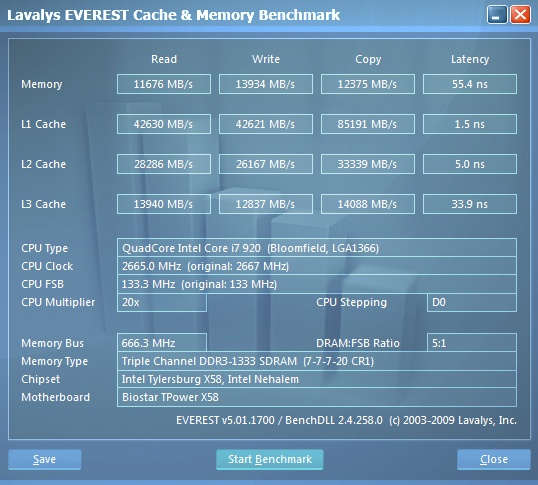
Biostar T-Power X58
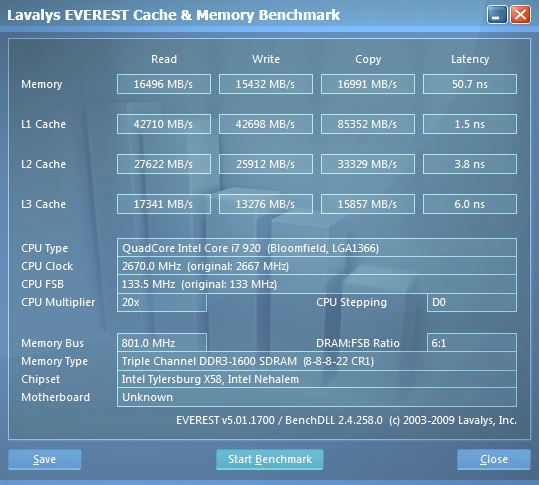
ASUS Rampage III Extreme
ASUS P6X58D-E
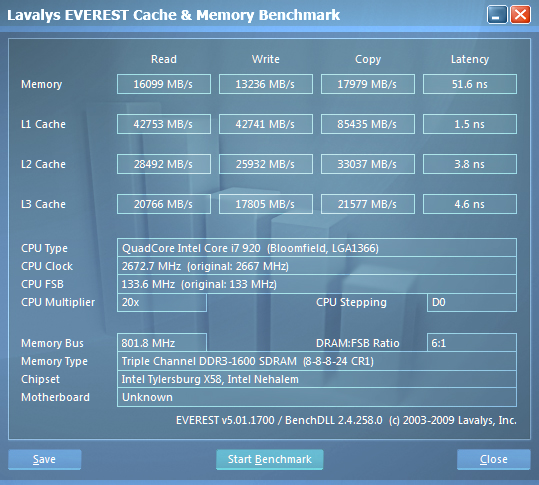
The P6X58D-E continues to impress and this time it yields significantly better performance than the Rampage III Extreme on the L3 Cache. The memory tests show better write speeds on the flagship Rampage but lower copy speeds. Both motherboards are still superior to the Biostar thanks to better memory support.
Overclocked 4GHz
Biostar T-Power X58
ASUS Rampage III Extreme
ASUS P6X58D-E
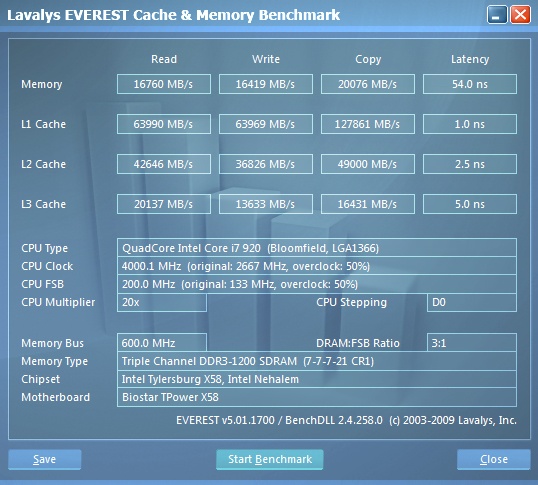
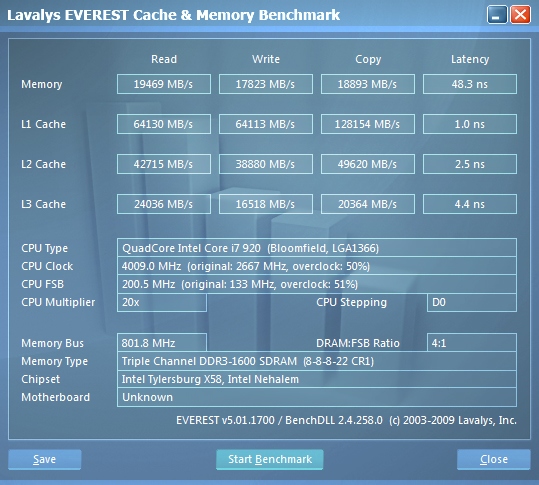
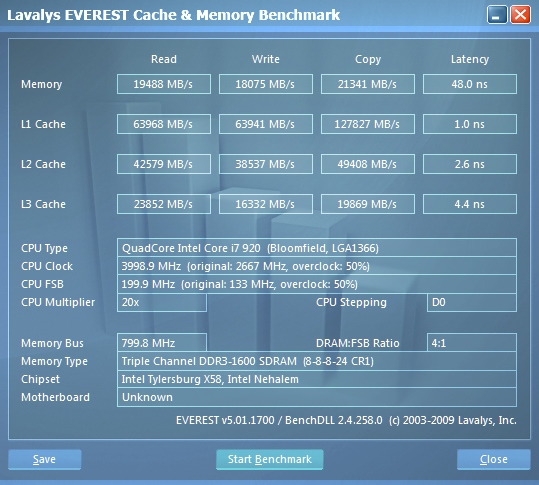
At 4GHz, the two ASUS motherboards perform very similarly. Their memory and L3 Cache performance are better than the Biostar which is unable to run the RAM at 1600Mhz stably. Distinguishing between the Rampage and the P6X58D-E is more difficult.
Overclocked 4.19GHz
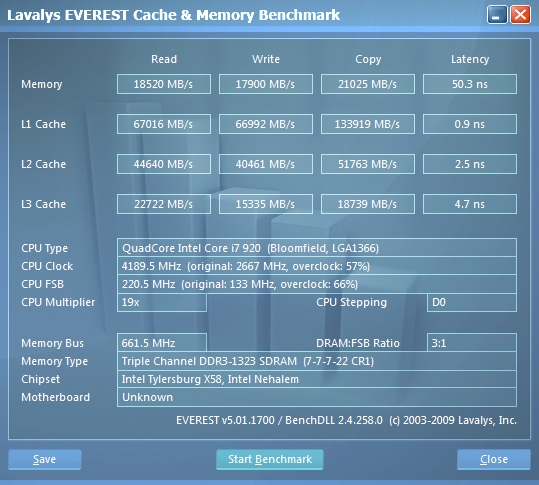
ASUS Rampage III Extreme
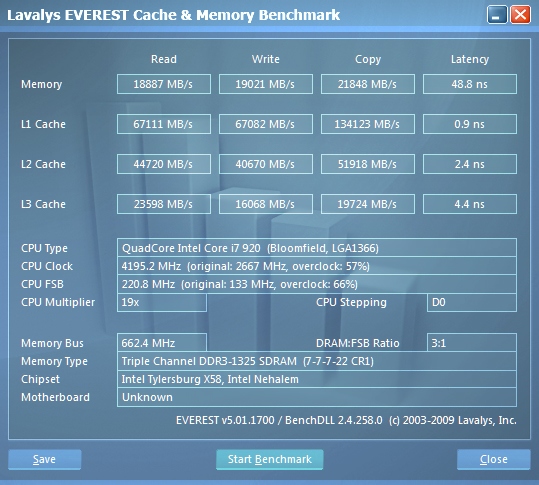
ASUS P6X58D-E
When fully overclocked, the P6X58D-E outperforms the Rampage throughout the benchmark thanks to its slight clock and memory speed advantage. It even yields lower latencies, no doubt thanks to the actual layout of the motherboard.
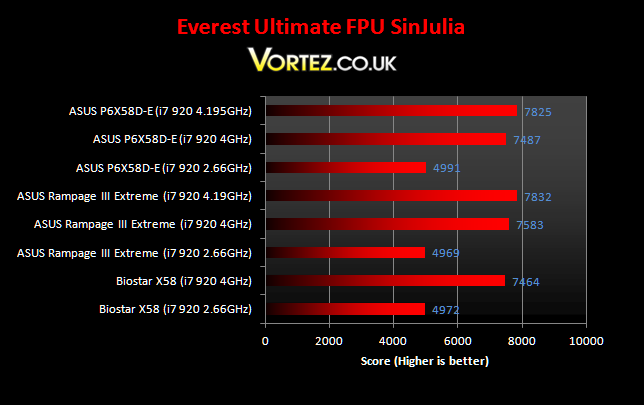
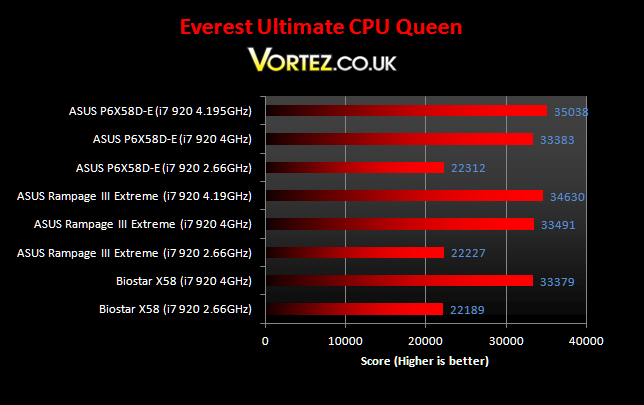
The two CPU tests show similar results with all three boards at all CPU speeds.
Far Cry 2
One of the most hyped games of 2008, Far Cry 2 had some big shoes to fill. It was built to be the next best thing since well… Far Cry I suppose. Combining an open-world game play with highly detailed graphics, physics and AI, what more could we possibly want? The game puts us in the body of a malaria inflicted mercenary hunting down the “Jackal” in the heart of Africa, in a bid to stop an ongoing conflict between two rival factions. The storyline can be hard to follow sometimes but I’m no game reviewer, so let’s concentrate on the graphics and performance. After all, we all need to know if our hardware will be able to handle the scorching savannah burning at the hands of our flamethrowers.
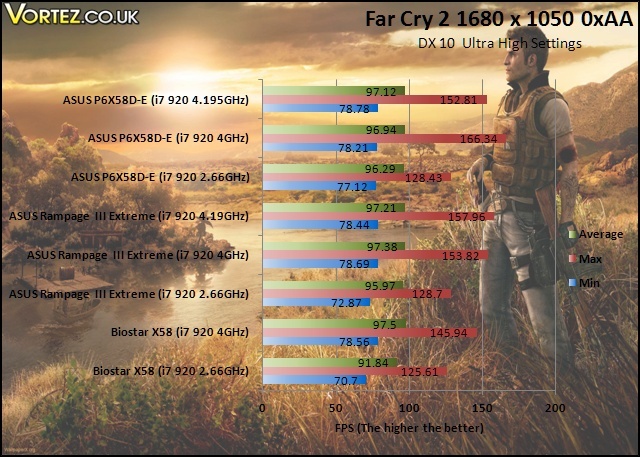
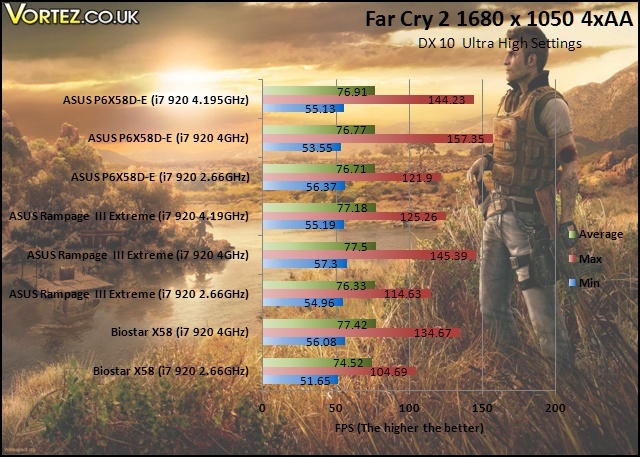
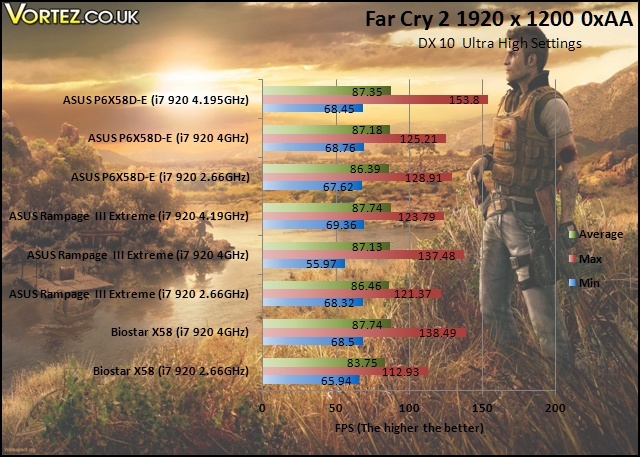
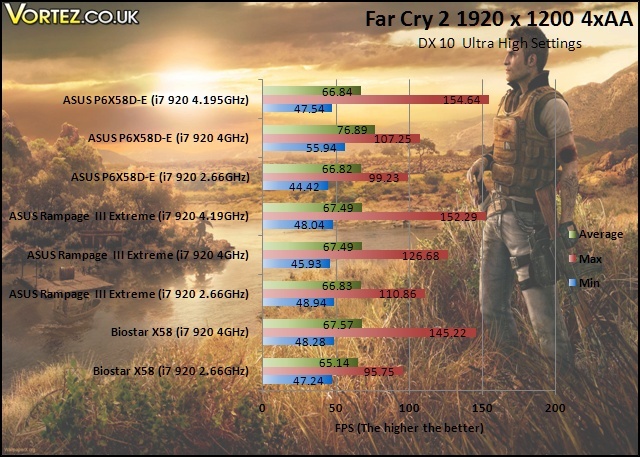
Again, we see very little difference in the average FPS. At 4GHz, the Biostar has a very small lead over the two ASUS motherboards. It is also interesting to see that overclocking on the CPU has little benefit to the overall game performance, contrasting to the earlier CPU intensive tests.
Street Fighter IV & Batman: Arkham Asylum
Street Fighter IV
Street Fighter is back in its 4th iteration and its bigger and better than ever. Combining fluid, fast based sparring with stunning artistic visuals, the game delivers tremendous game play. Be reacquainted with some of the most popular characters in video game history while you battle your way to the top, be it with Ryu or the mighty Bison. The game might be frustratingly hard in some cases but there’s nothing like the satisfaction of K.O’ing your opponent with a well stringed death bringing combo.
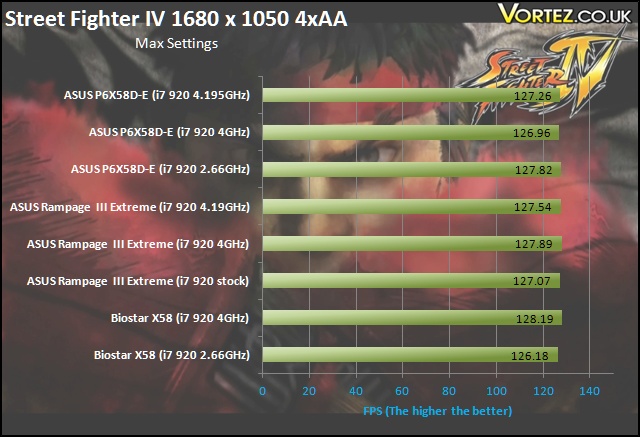
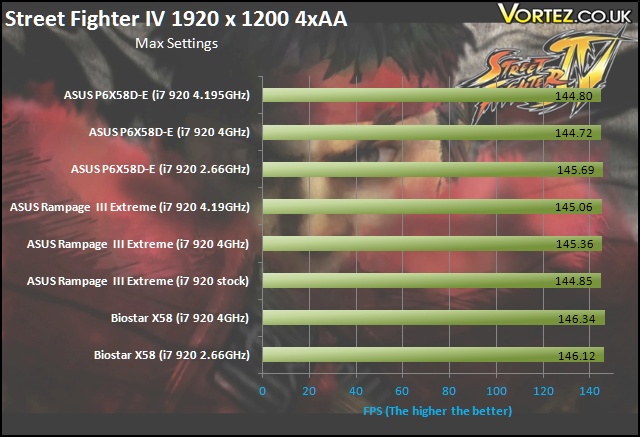
The most notable difference in the test results here is that the performance is better at the monitor’s native resolution of 1920×1200. This has also been observed in previous reviews where the Nvidia GTX260 was used instead. Overclocking on all three boards made very little impact on performance at both resolutions and there is no way of differentiating the boards.
Batman: Arkham Asylum
The Dark Knight takes on his greatest challenge yet when he becomes trapped with all of his most dangerous villains inside the insane asylum of Gotham City – Arkham Asylum. The game exposes you to a unique, dark and atmospheric adventure that takes you to the depths of Arkham Asylum, Gotham’s psychiatric hospital for the criminally insane.
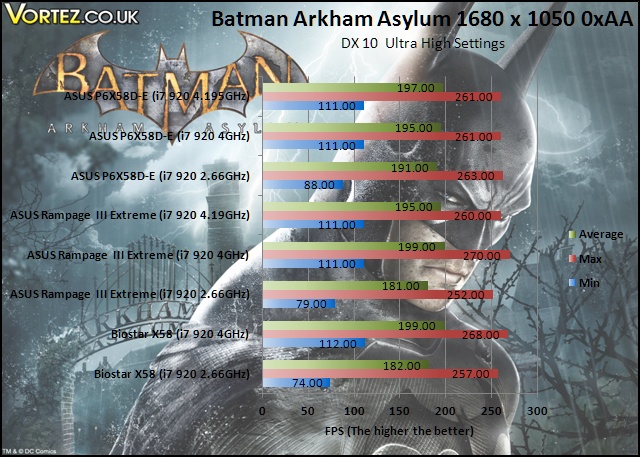
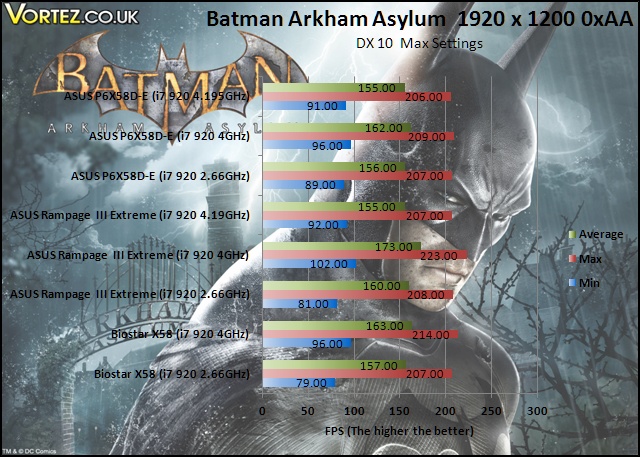
Unlike Street Fighter IV and Far Cry 2, overclocking does have some benefits in Batman, especially when it comes to the minimum FPS. Gains there ensures smoother gameplay. However, all three motherboards still perform very similarly, with the game being more GPU limited.
3DMark 06 & Vantage
3DMark06
Futuremark has been the testing ground for enthusiasts ever since their first release in 1999! While 2006 is long gone, it’s still very popular amongst benchers.
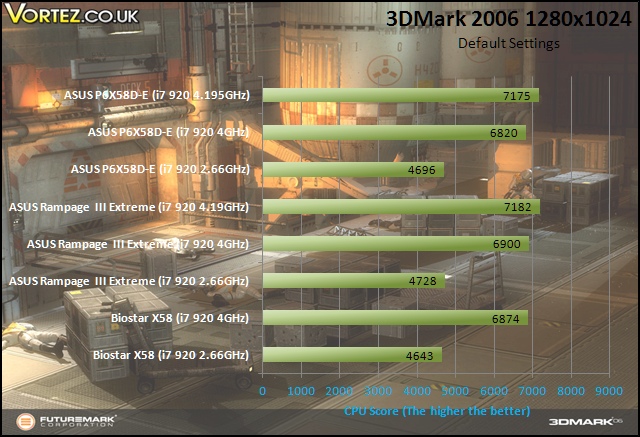
Another excellent showing from the ASUS P6X58D-E but the Rampage retains its crown. This is not surprising given that the latter is designed to get the most from such benchmarks.
3DMark Vantage
This latest benchmark suite from Futuremark introduces DX 10 PhysX support. Despite being on the verge of DX 11 games arriving, Vantage is still the chosen benchmark amongst enthusiasts these days.
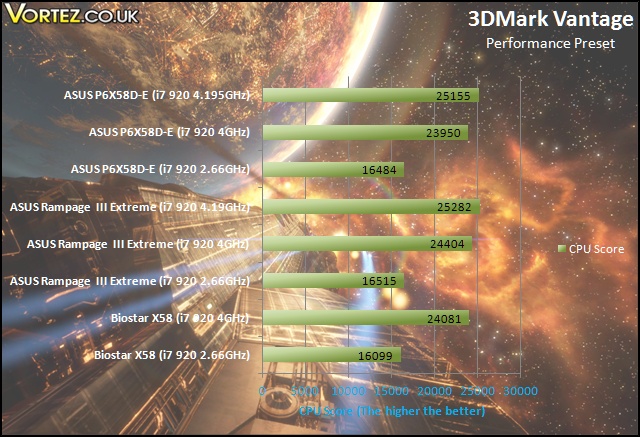
Vantage follows suit from 3DMark 06, with the Rampage III Extreme still holding the lead. Nevertheless, the P6X58D-E performs admirably and leads the Biostar motherboard.
Power Consumption
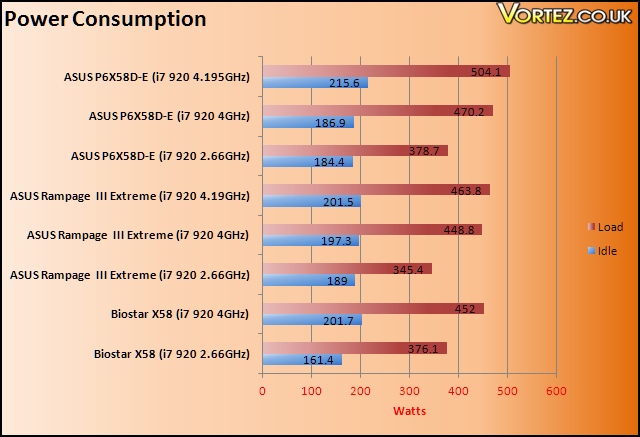
The ASUS P6X58D-E motherboard was very power hungry, as the results show. At all the given CPU speeds, it ended up with a higher load power consumption. Even the Rampage III Extreme with the two 8-pin CPU connectors consumed less power. The leap from 4GHz to 4.19GHz was also greater on the P6X58D-E than the Rampage suggesting that the higher voltage used was the main culprit. It could also be down to the 16+2 phase power design which isn’t as efficient as the Rampage’s use of ML Caps and a hybrid digital phase power circuitry.
Conclusion
There\’s no doubting that the ASUS P6X5
-E is a tremendous board. It has features to rival more expensive boards and rather than compromising on performance and overclockability, ASUS has removed others less useful features to reach its current price point. This entry level board represents the cheapest offering from ASUS to have SATA III 6Gbps and USB 3.0 compatibility. The board has many unique features that combine to give the best user experience such as true 16+2 phase power design and an excellent chipset cooling solution for the optimal temperatures and thus overclocking potential. It came as no surprise that the motherboard yielded some brilliant overclocking results, matching that of the Rampage III Extreme under normal air cooling conditions. It may not have been designed for extreme overclocking like the Rampage, but for a budget board, it generates more than enough overclocking headroom with an excellent upper BCLK limit of 221MHz. As usual, ASUS also has some unique selling points that focus on ease of installation and use such as the various on board switches, Q-Slot and Q-Shield. The bundled software are also very useful, giving users intuitive applications to monitor and control how the motherboard operates. This level of flexibility is one of the key philosophies of ASUS and it\’s good to see that their implementation works very well. Again, it is the close attention to detail that has made ASUS successful in the past and the P6X5
-E is no exception. Designing the board such that the distance between the CPU and the RAM slots is minimized actually translated to a slight performance gain, pitting it close to the flagship Rampage III Extreme in many cases.There isn\’t much in terms of negative with this motherboard. The bundle might be a bit lacklustre but all the necessities are there. There is also very little difference in its specifications compared to the more expensive P6X5
Premium. The most notable ones are the fewer bundle accessories, the missing chipset heat pipes and one less Gigabit LAN controller. Overall, it\’s a budget board that\’s punching way above its weight so don\’t be fooled by the price because the P6X5 -E has the makings of a vastly more expensive motherboard.Pros
[+]Loaded with features
[+]Stable and high overclocking headroom
[+]Cool and efficient
[+]USB 3.0 and SATA III 6Gb/s
[+]Attractive finish and brilliant layout
[+]Excellent performance
[+]Price
Cons
[-]Power consumption
The ASUS P6X5
-E thoroughly deserves the Vortez Hardware Gold Award.I would like to again thank ASUS for providing us with this sample. To discuss this article or product, please visit our forums.