







Intel have sent us their flagship hexcore Core i7 990x Extreme Edition. Is this the last hurrah for the X58 chipset?
Product on Review: Intel Core i7 990x Processor Extreme Edition
Manufacturer and Sponsor: Intel
MSRP: $999.00
Street Price: £763.40/$999.99
We are currently living in very interesting times when it comes to the sheer amount of hardware and choice that is available to us. Looking at the CPU front, we are greeted with a wide variety of platforms, chipsets and processors aimed at slightly different markets and price points. It’s therefore not surprising for consumers to be overwhelmed when considering a new PC. Do they opt for the cheap and cheerful AMD option that promises them a hexcore for under £150 or do they go for the slightly more expensive Intel route? This is where matters get somewhat more complicated because the processor we are reviewing today isn’t exactly affordable by common standards, nor is it even the latest generation microarchitecture from Intel so where exactly does the Intel Core i7 990x Extreme Edition fit in this hugely populated/saturated market?
Let’s go back three years when Intel reached the “Tock” in their architectural cycle and Nehalem was born alongside the X58 chipset it was coupled with. The platform was completely new and designed from the ground up to replace all previous processor microarchitectures and chipsets, the biggest change being the replacement of the ageing LGA775 socket. Based on the 45nm manufacturing process, Nehalem in the form of Bloomfield and mainstream Lynnfield processors immediately proved to highly successful performance wise, paving the way for the established Core iX series of processors we are familiar with today. In early 2010, Nehalem was succeeded by Westmere, a 32nm die-shrunk of the same architecture. A number of new processors were based off the Westmere shrink, namely the mainstream Arrandale and Clarkdale processors packaged for LGA1156, and the six core Gulftown processors destined for the high-end market on the X58 chipset that used LGA1366 instead. As well as the extra two cores/4M Cache and smaller transistors, a number of other benefits were brought along such as higher clock speeds and the introduction of new instruction sets including Advanced Encryption Standard (AES). The first Gulftown processor was the hexcore Core i7 980x Extreme Edition available at a pricey $990 and promising up to 50% more performance than the quad core i7 975x it was replacing. Unfortunately for consumers, hexcore Gulftown processors never reached mainstream pricing. The Core i7 980x was succeeded by the 990x Extreme Edition a year later at the same price point, and a non-unlocked variant (i7 980 non-X) was introduced in its place at the $583 price point. A mere 133MHz differentiates the two processors despite the $419 price difference. In essence then, the i7 990x doesn’t represent a major step-up to what we saw back in early 2010 but this is no reason to completely disregard it. Clocked at 3.46GHz with a peak Turbo speed of 3.73GHz across 6 cores or 12 threads, it remains the highest clocked Intel processor available to consumers. Armed with 12MB of L3 Cache, tri-channel DDR3 memory support, a QPI speed of 6.4GT/s and an unlocked multiplier, it has the making for the ultimate CPU and yet its crown was already up for challenge since its birth…

Come in Sandy Bridge. Intel couldn’t have timed the release of its i7 990x any worse even if they had tried. Sure, it might have specifications to have enthusiasts drooling but when a new platform based on new microarchitecture and chipset is released that has promise to be future proof for the next few years, the drama is lost somewhat. The most powerful Sandy Bridge processor out currently is the quad core, eight threaded i7-2600K delivering better performance clock for clock than the previous generation Nehalem and Westmere based processors in a smaller package on LGA1155. The Sandy Bridge platform suffers from a few limitations, the most notable ones being that the P67/Z68 chipsets do not support 2x PCIe2.0 x16 slots at full bandwidth without additional chips, and the lack of six core processors. On the other hand, the new architecture not only promises better performance but it also supports a range of new instruction sets and features. More importantly, Sandy Bridge processors occupy more affordable price points so the question is whether Intel releasing the i7 990x on the older generation microarchitecture makes sense.
In our review today, we will focus on the merits of the Core i7 990x on the X58 chipset and have a look at the evolution of the architecture. How different is it really to the old faithful i7 920?
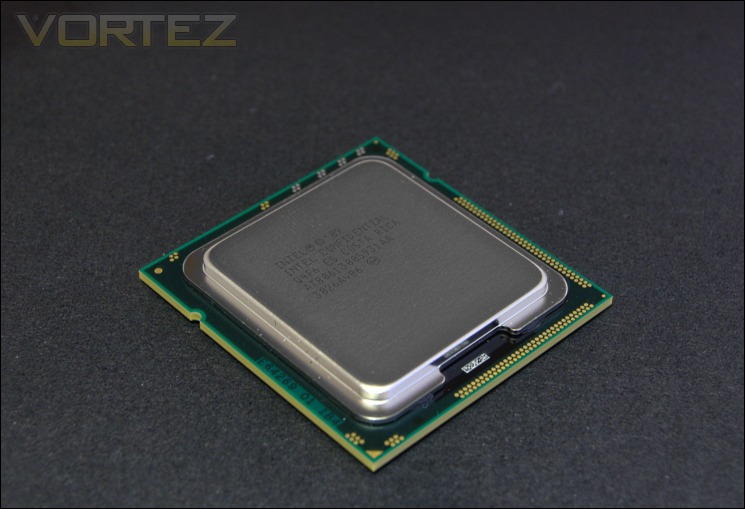
Features & Specifications
Specifications:
Processor Number: i7 990x
Number of Cores: 6
Number of Threads: 12
Clock Speed: 3.46GHz
Max Turbo Frequency: 3.73GHz
Intel Smart Cache: 12MB
Bus/Core Ratio: 26
Intel QPI Speed: 6.4GT/s
Number of QPI Links: 1
Instruction Set: 64-bit
Instruction Set Extensions: SSE4.2
Lithography: 32nm
Max TDP: 130W
VID Voltage Range: 0.800V-1.375V
Memory Specifications:
Max Memory Size (Dependent on memory type): 24GB
Memory Types: DDR3-1066
Number of Memory Channels: 3
Max Memory Bandwidth: 25.6GB/s
Physical Address Extensions: 36-bit
Package Specifications
Max CPU Configuration: 1
Tcase: 67.9C
Packaging size: 42.5 x 45.0mm
Processing Die Size: 239mm squared
Sockets Supported: LGA1366
Processor Number: i7 990x
Number of Cores: 6
Number of Threads: 12
Clock Speed: 3.46GHz
Max Turbo Frequency: 3.73GHz
Intel Smart Cache: 12MB
Bus/Core Ratio: 26
Intel QPI Speed: 6.4GT/s
Number of QPI Links: 1
Instruction Set: 64-bit
Instruction Set Extensions: SSE4.2
Lithography: 32nm
Max TDP: 130W
VID Voltage Range: 0.800V-1.375V
Memory Specifications:
Max Memory Size (Dependent on memory type): 24GB
Memory Types: DDR3-1066
Number of Memory Channels: 3
Max Memory Bandwidth: 25.6GB/s
Physical Address Extensions: 36-bit
Package Specifications
Max CPU Configuration: 1
Tcase: 67.9C
Packaging size: 42.5 x 45.0mm
Processing Die Size: 239mm squared
Sockets Supported: LGA1366
Features:
Intel® Turbo Boost Technology
Intel® Hyper-Threading Technology
Intel® Virtualization Technology (VT-x)
AES New Instructions
Intel® 64
Idle States
Enhanced Intel SpeedStep® Technology
Execute Disable Bit
Intel® Turbo Boost Technology
Intel® Hyper-Threading Technology
Intel® Virtualization Technology (VT-x)
AES New Instructions
Intel® 64
Idle States
Enhanced Intel SpeedStep® Technology
Execute Disable Bit
Architecturally, the Core I7 990x is no different to the processor it succeeds, the 980x. Both Gulftown processors boast 6 cores and 12 threads through hyper threading supporting a 12MB Cache, 4MB more than the quad core Bloomfield variants based on the 45nm Nehalem. The 12MB Cache is shared across all the cores but sticks to the 2MB per core rule (Westmere based Xeon quad core processors still retain the full 12MB L3 Cache despite the two disabled cores). The 990x simply ups the multiplier by one compared to its predecessor giving it a 133MHz boost in clock speed and Max Turbo Frequency. Like all other Extreme Edition processors, the multipliers are unlocked and the QPI speed is set to 6.4GT/s rather than 4.8GT/s. Thanks to the 32nm fabrication process, the actual processor package hasn’t changed in size and still retains a 130W thermal envelope. Quite impressively, Intel manages to pack 1.17 billion transistors in a smaller 239mm square die compared to Bloomfield which packed 731 million transistors on a 263mm square die. The on board memory controller remains unchanged supporting tri channel memory at the official speed of 1066MHz, although that is easily rectified using higher memory multipliers and overclocking.
The X58 chipset is very nicely suited to the Core i7 990x thanks to its 6.4GT/s QPI bus that communicates with the processor and memory channels. Unlike the recently released P67/Z68 chipsets for Sandy Bridge, X58 supports 36 PCIe lanes by default allowing for uncompromised SLI/CrossFire configurations at 2×16 lanes. This makes the Core i7 990x processor ideal for multi-GPU configurations.
Westmere also supports new AES instruction sets which come in benefit in some of our benchmarks compared to Nehalem. Let’s take a look at the comparison table.
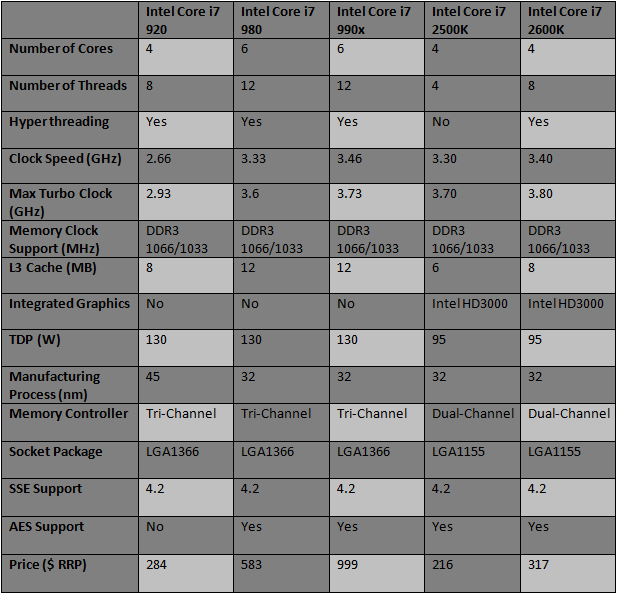
Comparing the Intel Core i7 2600K, we see that on paper it doesn’t match up to the previous generation Core i7 990x with a lower default clock speed and fewer cores/threads. Sandy Bridge also goes back to dual channel memory since it is aimed at the mainstream market, thus representing the rightful successor to Lynnfield on the P55 chipset rather than Bloomfield/Gulftown on X58. What is important to note however is that the new architecture is superior clock for clock and finds itself in a lower 95W thermal envelope. Prices also favour Sandy Bridge which only the cheapest Bloomfield processors can match; currently the i7 960 at $294 with a clock speed of 3.2GHz. Architectural changes also give Sandy Bridge processors new instruction sets such as AVX, and an on-die GPU. Are the extra threads on the 990x enough for it to claim Intel’s flagship position? Let’s find out.
Closer Look

The bundle
Since the Core i7 980x, the Extreme Editions processors have come bundled with Intel’s own tower cooler rather than the traditional low profile ones which to be frank are useless. They might work for CPUs with low TDPs but are not designed for the likes of a hexcore processor. This is therefore a welcoming move even if enthusiasts or overclockers are more than likely to buy something heftier like the Noctua NH-D14 or Thermalright Silver Arrow or more exotic alternatives. The bundled cooler even has a motherboard back plate support and PWM fan. With its four 6mm heat pipes it is more than capable at cooling a stock 990x. The packaging for our sample was a simple white box due to it being a non-retail sample, albeit the same stepping as the retail ones so we don’t expect any performance deficits. Alongside the 990x processor, which comes enclosed in a clamshell style box, is a complimentary tube of Dow Corning TC-1996 thermal compound. Corsair also employ Dow Corning thermal compound on their latest Hydro Series coolers.
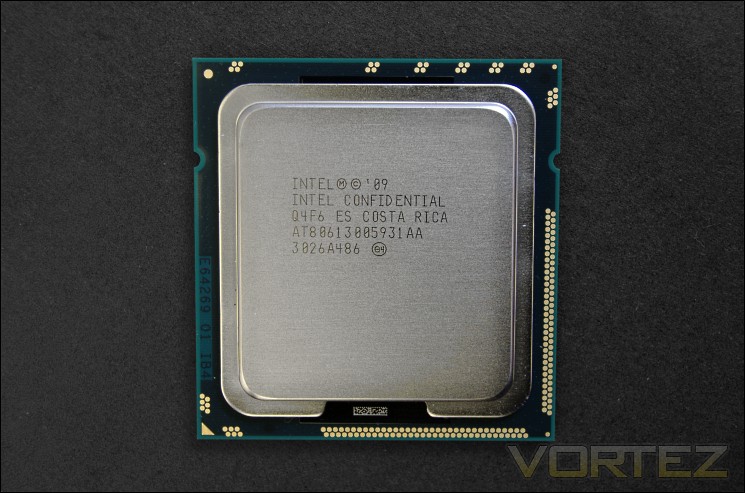
The i7 990x CPU
The Core i7 990x isn’t exactly a small chip, the whole package being 42.5×45.0mm. In comparison, Sandy Bridge processors are 37.5×37.5mm. The die itself, beneath the processor’s integrated heat spreader, packs 1.17billion transistors in a 239mm square space. The die is smaller than Nehalem based quad core processors and even AMD’s Phenom II X4 for which it is 258mm squared. Four core Sandy Bridge processors use an even smaller 216mm square die. The chip we received is an Engineering Sample but there is no reason to suggest that it doesn’t perform the same as the retail chips. After all, they are exactly the same steppings.
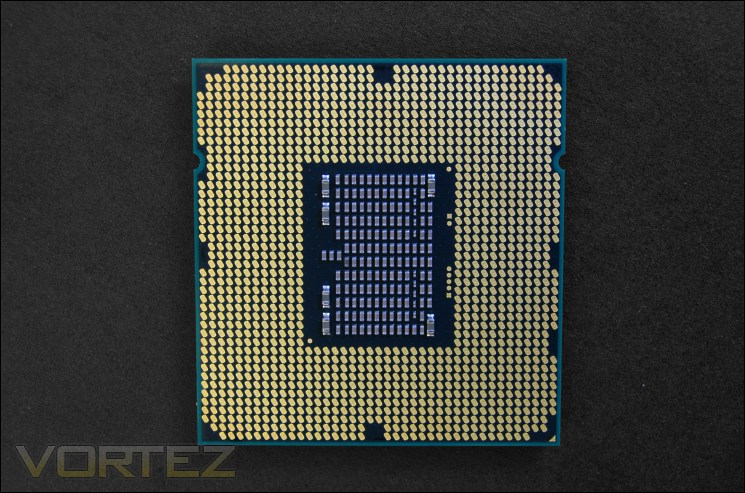
The back of the i7 990x
At the back, we can count the 1366 copper connections (I didn’t actually count…) that fit onto the LGA1366 socket. We can also see the back of the die.
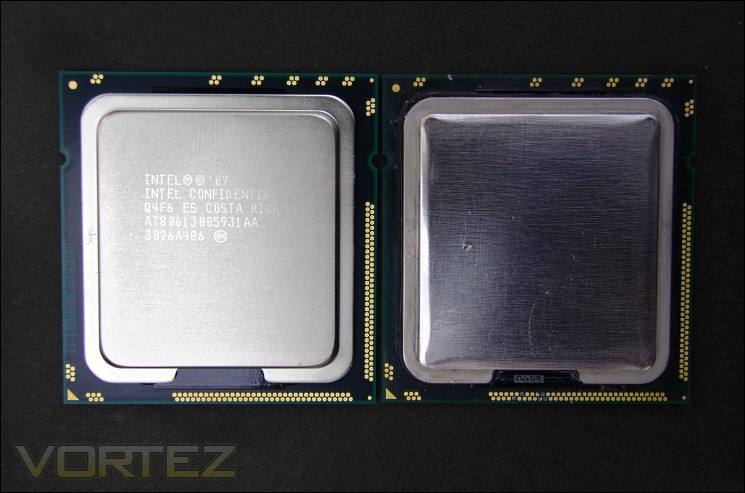
Intel Core i7 990x (Left) vs. i7 920 (Right)
Here we have the Gulftown i7 990x on the left and the Bloomfield based i7 920 on the right. They look identical in shape and size bar the markings on the processor IHS.

Back of the Intel Core i7 990x (Left) vs. i7 920 (Right)
At the back, there are some notable differences to the processors reflecting the slightly different die layout. In essence, the Westmere architecture should be very similar to Nehalem regarding the core layout, shared memory controller and L3 Cache, the only differences being the extra two cores and 4MB of L3 Cache.
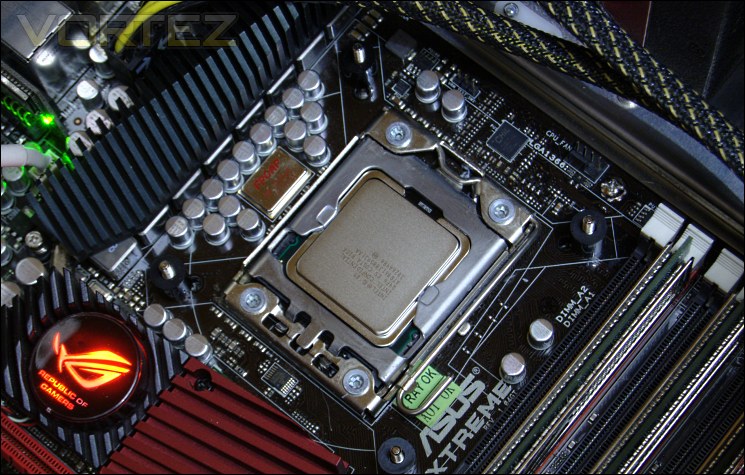
Intel Core i7 990x installed
And finally we have it installed on the ASUS Rampage III extreme.
Test Setup
X58 Setup
Graphics Card: Inno3D GTX570 1GB @ 800/4000MHz – ForceWare 275.33
RAM – 6GB (3x2GB) OCZ Platinum DDR3 1333MHz
Motherboard – ASUS Rampage III Extreme
Power Supply – Enermax Revolution 85+ 850W
Hard Drive – OCZ Vertex 2E 120GB
Samsung F3 1TB
Samsung F1 320GB
Cooler – Phanteks PH-TC14PE
Z68 Setup
Graphics Card – Zotac GTX460 1GB
RAM – 4GB (2x2GB) Kingston Genesis DDR3 1600MHz
Motherboard – ASRock Extreme4 Gen3
Power Supply – OCZ Fatal1ty 750W
Cooler – Noctua NH-D14
Graphics Card: Inno3D GTX570 1GB @ 800/4000MHz – ForceWare 275.33
RAM – 6GB (3x2GB) OCZ Platinum DDR3 1333MHz
Motherboard – ASUS Rampage III Extreme
Power Supply – Enermax Revolution 85+ 850W
Hard Drive – OCZ Vertex 2E 120GB
Samsung F3 1TB
Samsung F1 320GB
Cooler – Phanteks PH-TC14PE
CPUs:
Intel Core i7 920 @ 2.66GHz (133MHz x 20, 1600MHz 8-8-8-24), 4.0GHz (200MHz x 20, 1600MHz 8-8-8-24), 4.189GHz (220.5MHz x 20, 1323MHz 7-7-7-22)
Intel Core i7 990x @ 3.46GHz (133MHz x 26, 1600MHz 8-8-8-24), 4.0GHz (200MHz x 20, 1600MHz 8-8-8-24), 4.6GHz (184MHz x 25, 1472MHz 7-7-7-22)
Intel Core i7 920 @ 2.66GHz (133MHz x 20, 1600MHz 8-8-8-24), 4.0GHz (200MHz x 20, 1600MHz 8-8-8-24), 4.189GHz (220.5MHz x 20, 1323MHz 7-7-7-22)
Intel Core i7 990x @ 3.46GHz (133MHz x 26, 1600MHz 8-8-8-24), 4.0GHz (200MHz x 20, 1600MHz 8-8-8-24), 4.6GHz (184MHz x 25, 1472MHz 7-7-7-22)
Z68 Setup
Graphics Card – Zotac GTX460 1GB
RAM – 4GB (2x2GB) Kingston Genesis DDR3 1600MHz
Motherboard – ASRock Extreme4 Gen3
Power Supply – OCZ Fatal1ty 750W
Cooler – Noctua NH-D14
CPUs:
Intel Core i5 @ 3.3GHz (100MHz x 33, 1600MHz 9-9-9-24), 5.0GHz (100MHz x 50, 1600MHz 9-9-9-24)
Intel Core i5 @ 3.3GHz (100MHz x 33, 1600MHz 9-9-9-24), 5.0GHz (100MHz x 50, 1600MHz 9-9-9-24)
Benchmarks
Cinebench 11.5 – CPU Score
x264 HD 4.0 – 1st and 2nd pass encoding
SiSoftware SANDRA 2011 – CPU benchmarks
AIDA64 – CPU benchmarks
CyberLink MediaEspresso 6.5 – Convert 145MB MP4 to avi
PCMark 7 – System Benchmark
3DMark 11 – Performance and Extreme preset Overall and Physics Score
Games – Battlefield Bad Company 2, Far Cry 2, Street Fighter IV, Unigine V2.1
Other Software
Core Temp 0.99.5
LinX stress Test
CPUID HWMonitor
Overclocking
For any enthusiast, the Core i7 990x is the ultimate dream processor for overclocking. It comes with an unlocked multiplier and allows for base clock alterations presenting overclockers the freedom to manipulate these settings as well as a range of voltages. The maturity of X58 boards like the ASUS Rampage III Extreme or Gigabyte’s latest dedicated OC board are the ideal weapon for this process. This is one area where Sandy Bridge falls short in terms of enthusiast appeal as it is restricted to multiplier overclocking and even then it is reserved to the ‘K’ variants (Not denying that they are solid overclockers). Thanks to its smaller 32nm fabrication process and its ability to sustain voltages under 1.5V without issues, the Westmere based i7 990x has all the makings of an overclocker’s dream, not to mention the fact that they are likely to be binned parts that never quite made it as an i7 980. Overclocking the i7 990x is overclocking in its purest form, the joys of finding successful and stable results, the tears from constant BSODs, and most of all the precision tweaking and fine balance required to try and get that last MHz stable. Despite being limited to air cooling in this instance, we still managed to get some very good results…
By default, the Intel Core i7 990x comes clocked at 3.46GHz, driven by a 133MHz base clock (BCLK) and a 26x multiplier. If the max TDP isn’t met during operation, Intel Turbo mode kicks in to boost performance. The first step increases the multiplier across all the cores by one for a blistering 3.6GHz clock speed. For lightly multi-threaded applications, Turbo mode increases the multiplier another notch for a peak Turbo speed of 3.73GHz, this time across fewer cores.

Stock i7 990x at idle
At stock speed, the Core i7 990x operates at a very low 1.144V when under full load. The QPI link operates at its full potential which for the Extreme Edition CPU is a full 6.4GT/s using a 48x multiplier.

Stock i7 990x under load
The Westmere architecture implements excellent power gating technology that is able to shut down cores when not operational. Speedstep alongside the different C-State modes also reduces the multiplier to a minimum of 12x so the processor can operate at a measly 0.952V when idling. This ensures much cooler day-to-day operation and lower power draw. In this case, the idle clock speed drops to 1.6GHz.
Onto Overclocking
Before I started getting down to the fine tuning aspects of finding the maximum overclock, I decided to see how easy it would be to reach 4GHz so that I could at least compare the 990x’s clock for clock performance against a similarly clocked quad core i7 920. As one would expect, it was comically easy. Where my i7 920 requires a touch over 1.3V to be stable using a BCLK of 200MHz and 20x multiplier, the 990x only need a paltry 1.197V for the same clock settings.

4GHz i7 990x
Apart from the increased Vcore, the only other voltage changed required was the QPI/DRAM voltage which was set to 1.3V to ensure stability across the memory controller. The Uncore frequency was automatically set to twice the memory frequency making it 3200MHz in this case.
4.6GHz
Finding the maximum stable clock speed at a reasonable voltage and temperatures proved to be far trickier. My first step was to get to the 4.5GHz milestone but this was the easy step. To do so, I set the BCLK to 180MHz and the multiplier to 25. The voltage was set to 1.35V which translated to around 1.37V in windows even with full LLC calibration, and the QPI/DRAM voltage was left at 1.3V. From there on, I progressed by increasing the BCLK 1MHz at a time and testing stability and finally I reached 4.59GHz with a base clock of 183MHz (183.5MHz on the Rampage III Extreme). The 90MHz boost in clock required a hefty 0.04V bump in Vcore and for the QPI/DRAM voltage to be set to 1.3125V.
Of course, this wasn’t enough for me because my goal was set to the 4.6GHz milestone. Getting a further 1MHz on the BCLK to achieve 4.6GHz using the 25x multiplier proved tricky. In the end, I settled for 1.4125V on the Vcore and 1.35V on the QPI/DRAM voltage in the BIOS, which translated to 1.442V and 1.36V respectively in Windows. So moving from 4.5GHz to 4.6GHz required a 0.07V boost in voltage which in retrospect isn’t worth it when we consider the negative impact on temperature and power consumption. At 4.6GHz using a BLCK of 184MHz, the memory operated at 1472MHz and the Uncore Frequency at double that. The end result is a 30% boost in clock speed over the default 3.46GHz; not quite as impressive as the percentage boost achieved on the i7 920, but a 1.14GHz overclock nonetheless! Stability testing was done with LinX using all available free memory.

4.6GHz i7 990x
Can 5GHz be broken?
Ok, so I can’t say I was particularly happy with the final 4.6GHz I achieved so I set my sight to 5GHz knowing it wouldn’t be easy or even stable. It was still a challenge I was willing to take. After many attempts to get my settings to boot without crashing, I successfully managed to break the 5GHz for long enough to run a couple of benchmarks and get the result validated.
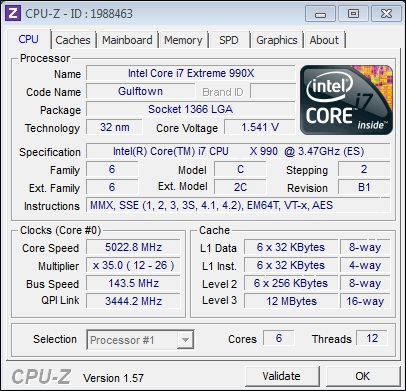
Breaking the 5GHz barrier required the CPU voltage to be set to 1.525V translating to 1.541V in Windows. To make sure I could at least boot into Windows, I decided to lower the BCLK and rely on the Multiplier so that all other system clocks remained lower. The QPI/DRAM voltage was kept at 1.35V for good measure. Once the 5GHz was broken, I used the RC TweakIt utility on my Android phone to bump the BCLK by a further 2MHz for a final clock of 5.09GHz. Not surprisingly it crashed, but not before I could validate the result.
Super Pi 1m
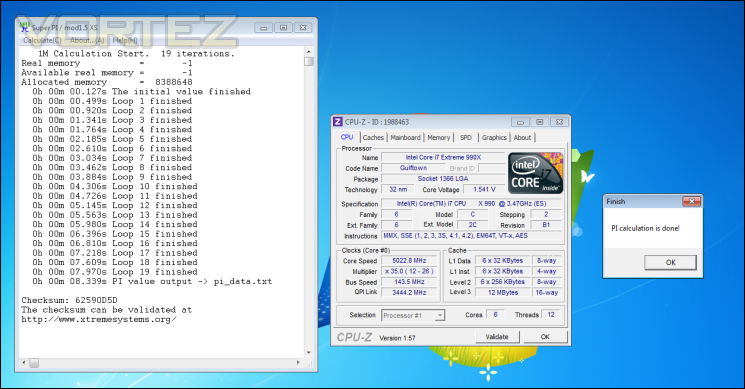
The final clock was enough for several runs of Super Pi 1m as shown above, all of which was done on air cooling courtesy of the Phanteks PH-TC14PE.
Temperatures
Load temperatures were measured using Coretemp after doing 20 runs on LinX as we do in all our CPU cooler reviews. The max temperatures were recorded and averaged for each clock speed we benchmarked the CPU at. The Phanteks PH-TC14PE was used for cooling.
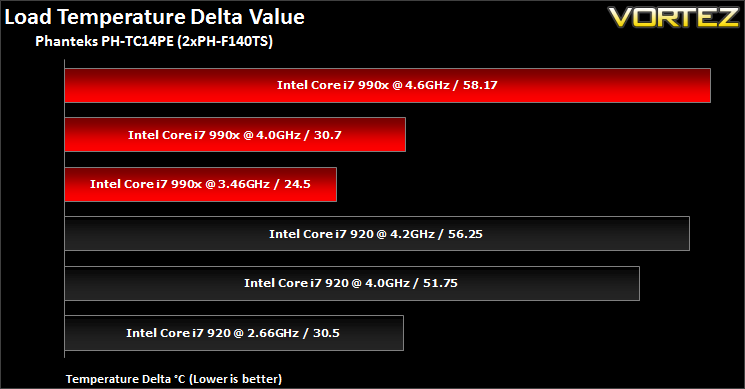
It’s interesting to observer the Core i7 990x ran much cooler than even the bottom of the range i7 920 despite its extra two cores and 0.8GHz overhead. This goes to show the benefits of the 32nm manufacturing process and Intel’s engineering. At 4GHz, the Core i7 990x yielded the same maximum temperature deltas as the similarly clocked i7 920. This is down to the much lower voltages it required for the overclock. It is still impressive that the processor is seemingly unfazed by its 4GHz clock speed. Going up to 4.6GHz drastically increases temperatures, undoubtedly due to the 1.4V+ Vcore. It is not dissimilar to the 920 clocked to 4.2GHz at 1.35V. I’d like to add that idle temperatures were always in the low-mid 20s thanks to Intel’s clever power gating technology.
Power Consumption
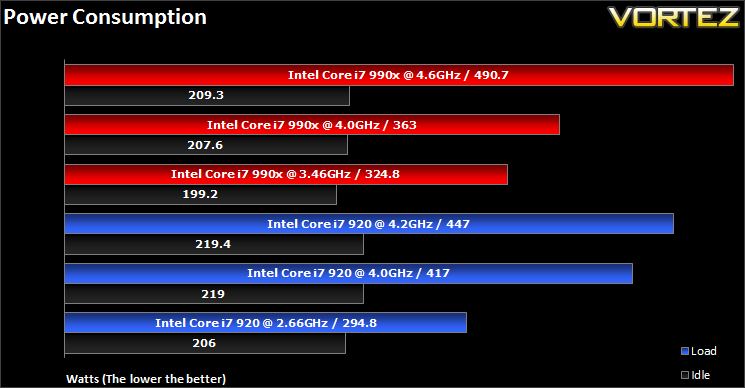
The Intel Core i7 990x has a max TDP of 130W, no different to the i7 920. At default speeds, the 990x consumes 30W more power than the 920. At 4GHz, the 990x proves to be more efficient as a result of the lower operating voltage. The overclock only increased power consumption by 39W in the case. However, cranking it up to 4.6GHz dramatically increases power draw. Speedstep and C1E Enhanced Halt State do a very good job at keeping the idle power draw low.
Benchmark: Cinebench 11.5
Based on the MAXON animation software CINEMA 4D, Cinebench is a test suite that uses the system’s processing power to render a photorealistic 3D scene. This makes it an excellent benchmark to measure CPU and motherboard performances.
CINEBENCH can measure systems with up to 64 processor threads. This test scene contains approximately 2,000 objects which in turn contain more than 300,000 polygons in total, and uses sharp and blurred reflections, area lights, shadows, procedural shaders, antialiasing, and much more. The result is displayed in points (pts). The higher the number, the faster your processor.
CINEBENCH can measure systems with up to 64 processor threads. This test scene contains approximately 2,000 objects which in turn contain more than 300,000 polygons in total, and uses sharp and blurred reflections, area lights, shadows, procedural shaders, antialiasing, and much more. The result is displayed in points (pts). The higher the number, the faster your processor.
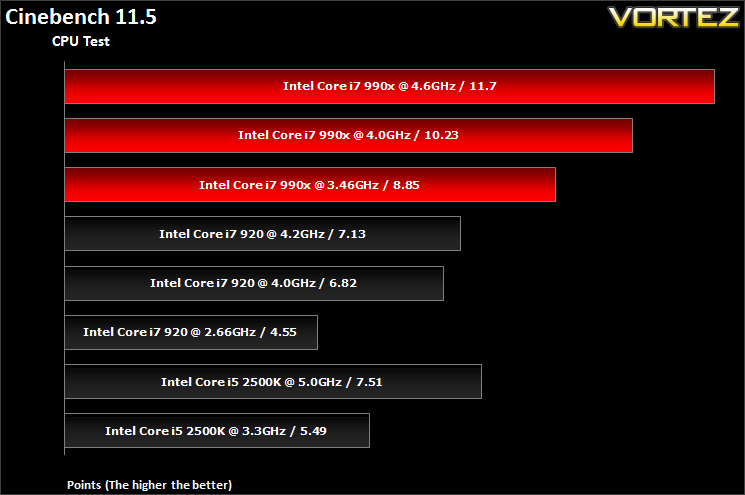
The six core i7 990x completely dominates performance in the multi-threaded Cinebench test. None of the other processors were able to match it, either due to lack of hyper threading in the 2500K’s case or lower CPU clock speeds. Compared to the 4GHz i7 920, the similarly clocked 990x proves to be exactly 1.5 times faster reflecting the additional two cores. Overclocking results in a linear performance boost.
Benchmark: x264 HD V4.0
Simply put, this test measures how fast your machine can encode a short, DVD quality MPEG-2 video clip into a high-quality x264 video clip. What’s x264, you ask? It’s more or less the next-generation Xvid/DivX codec. I think it’s ideal for a benchmark because the application (x264.exe) reports fairly accurate compression results (in frames per second) for each pass of the video encoding process, and it uses multi-core processors very efficiently. The test uses multiple cores efficiently to give a good representation of real world performance.
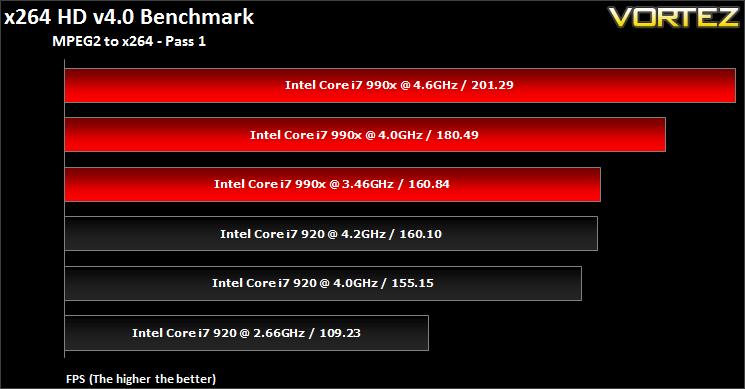
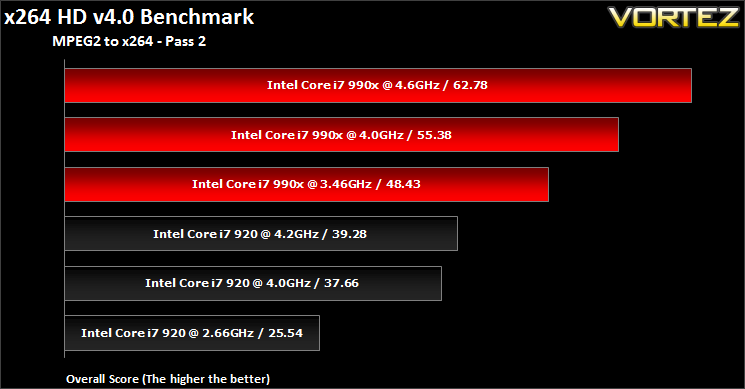
Once again, the i7 990x demonstrates why it is the flagship CPU on X58. It remains unmatched even when the default clocked processor is compared to the fully overclocked i7 920. The test makes efficient use of all the cores and overclocking results in improved performance. The more demanding Pass 2 test shows the i7 990x to be near 50% better than the i7 920 clock for clock at 4GHz.
Benchmark: SiSoftware Sandra 2011
SANDRA isn’t always a benchmark that is included in hardware reviews but I believe it shouldn’t be ignored. SANDRA provides a vigorous package that tests your system in a rather large array of benchmarks. There are many aspects of benchmark that can be executed. We will be considering – CPU and memory tests.
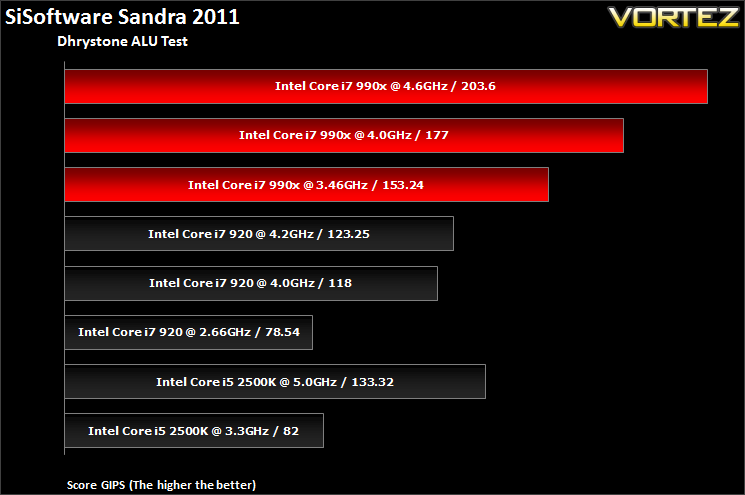
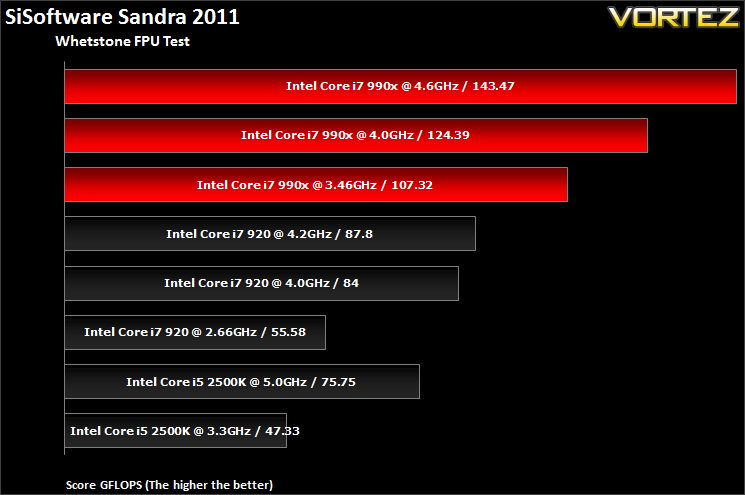
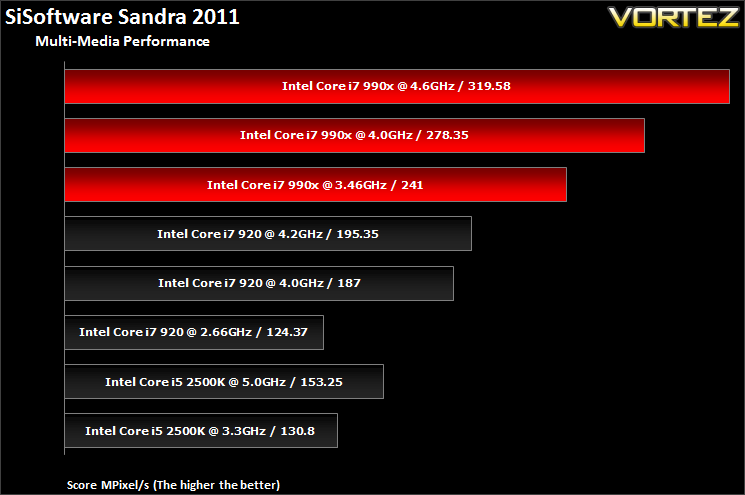
In the three above CPU tests, we see the same trend as before. The Core i7 990x takes a massive lead in performance thanks to its 12 threads and clock for clock, it performs 50% better than the i7 920. The quad core i5 2500K falls short of the 920 due to the lack of hyper threading.
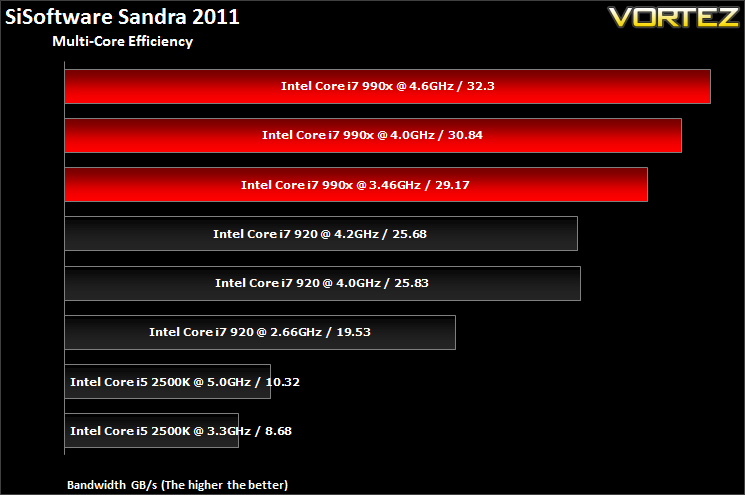
X58’s prowess comes to light in the multi-core efficiency tests where the faster QPI proves beneficial.
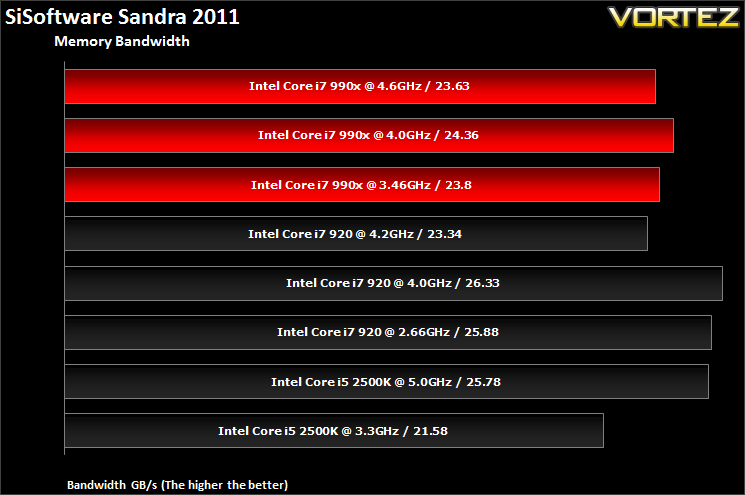
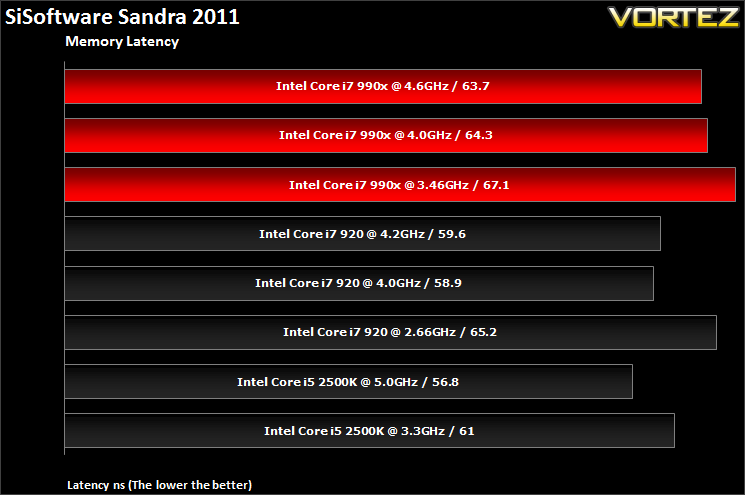
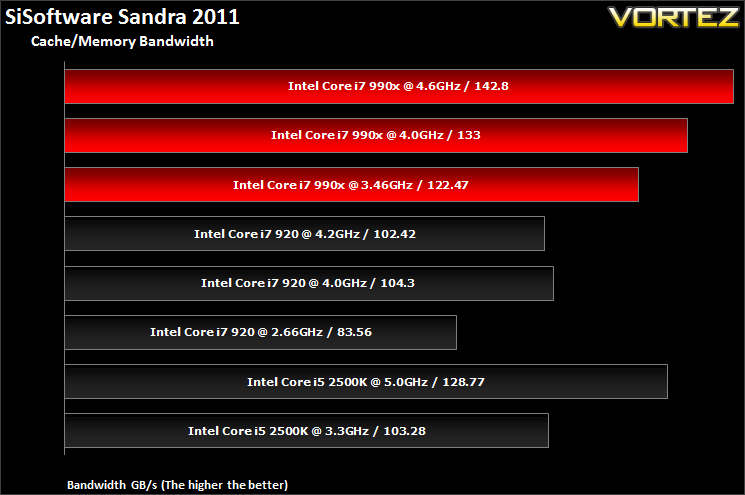
The 990x picks up where it left off here and proves to be the better performer. The Sandy Bridge processor isn’t far behind in this case.
Benchmark: AIDA64
This simple integer benchmark focuses on the branch prediction capabilities and the misprediction penalties of the CPU. It finds the solutions for the classic “Queens problem” on a 10 by 10 sized chessboard. At the same clock speed theoretically the processor with the shorter pipeline and smaller misprediction penalties will attain higher benchmark scores. For example — with HyperThreading disabled — the Intel Northwood core processors get higher scores than the Intel Prescott core based ones due to the 20-step vs 31-step long pipeline. CPU Queen test uses integer MMX, SSE2 and SSSE3 optimizations.
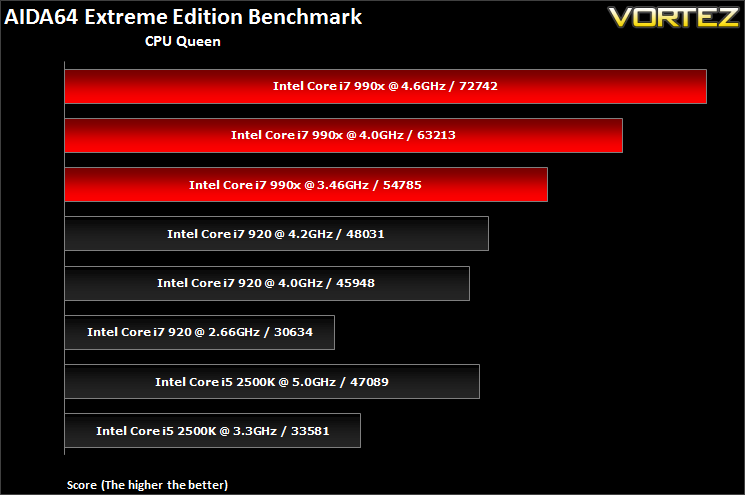
In CPU Queen, the i7 990x takes a massive leap ahead of the i7 920 and clock for clock, it I 37.5% better. The 990x is simply unparalleled when overclocked.
CPU Photoworrx
This benchmark stresses the integer arithmetic and multiplication execution units of the CPU and also the memory subsystem. Due to the fact that this test performs high memory read/write traffic, it cannot effectively scale in situations where more than 2 processing threads used. For example, on a 8-way Pentium III Xeon system the 8 processing threads will be “fighting” over the memory, creating a serious bottleneck that would lead to as low scores as a 2-way or 4-way similar processor based system could achieve. CPU PhotoWorxx test uses only the basic x86 instructions, and it is HyperThreading, multi-processor (SMP) and multi-core (CMP) aware.
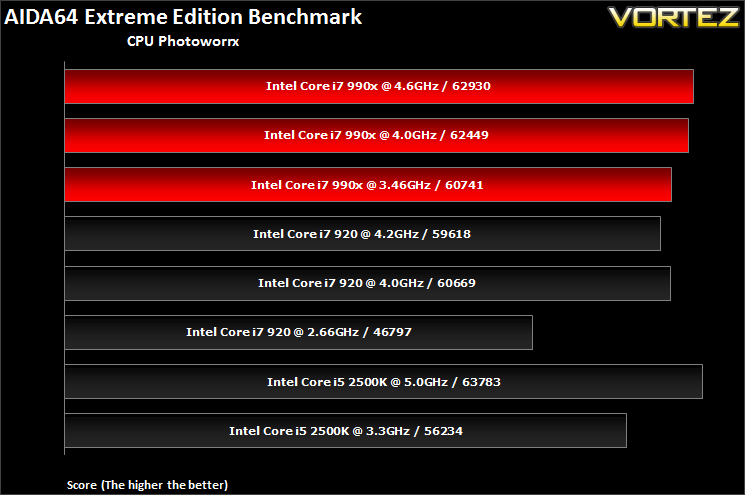
Here we see very little difference between the different CPUs, implying the performance stems from more than the clock speed or number of cores.
CPU AES
This benchmark measures CPU performance using AES (Advanced Encryption Standard) data encryption. In cryptography AES is a symmetric-key encryption standard. AES is used in several compression tools today, like 7z, RAR, WinZip, and also in disk encryption solutions like BitLocker, FileVault (Mac OS X), TrueCrypt.
CPU AES test uses only the basic x86 instructions, and it’s hardware accelerated on VIA PadLock Security Engine capable VIA C3, VIA C7 and VIA Nano processors; and on Intel AES-NI instruction set extension capable processors. The test is HyperThreading, multi-processor (SMP) and multi-core (CMP) aware.
CPU AES test uses only the basic x86 instructions, and it’s hardware accelerated on VIA PadLock Security Engine capable VIA C3, VIA C7 and VIA Nano processors; and on Intel AES-NI instruction set extension capable processors. The test is HyperThreading, multi-processor (SMP) and multi-core (CMP) aware.
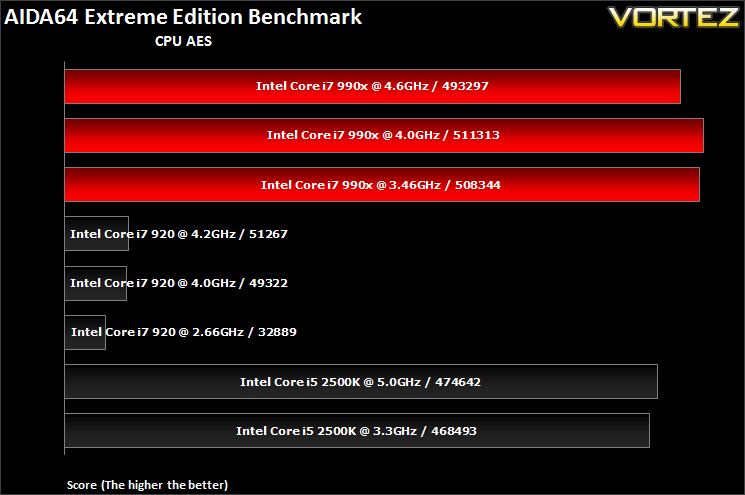
Both Westmere and Sandy Bridge support the latest AES instruction sets so not surprisingly, the i7 990x and i5 2500K take a significant lead over the Nehalem based i7 920. Overclocking doesn’t yield any benefits in this case.
FPU Mandel
This benchmark measures the double precision (also known as 64-bit) floating-point performance through the computation of several frames of the popular “Mandelbrot” fractal. The code behind this benchmark method is written in Assembly, and it is extremely optimized for every popular AMD, Intel and VIA processor core variants by utilizing the appropriate MMX, MMX+/SSE, SSE2, SSSE3, or AVX instruction set extension. FPU Mandel test is HyperThreading, multi-processor (SMP) and multi-core (CMP) aware.
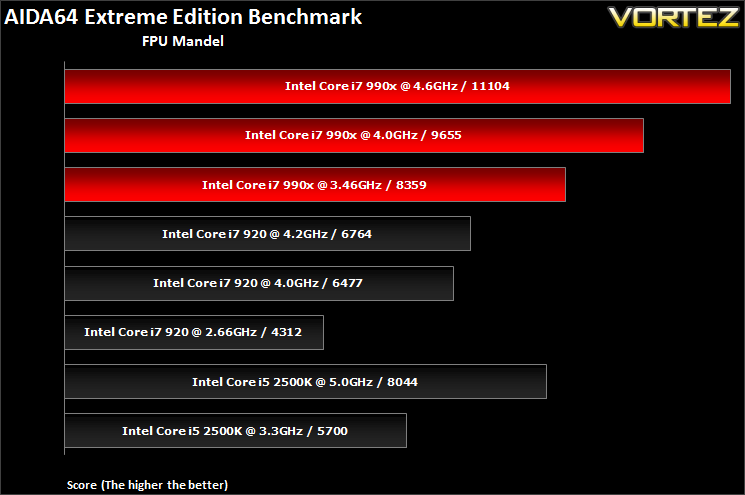
FPU Mandel showcases the processor’s floating point performance and the i7 990x is no slouch. At stock speed, it is nearly double the performance of the i7 920 and clock for clock, performance is 1.5x that of Bloomfield.
Cache and Memory Benchmark
Stock
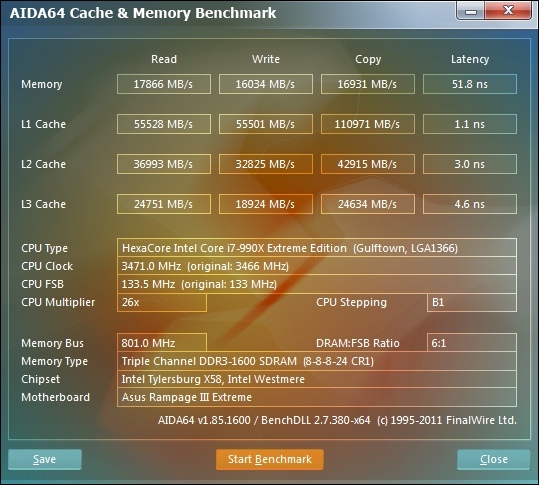
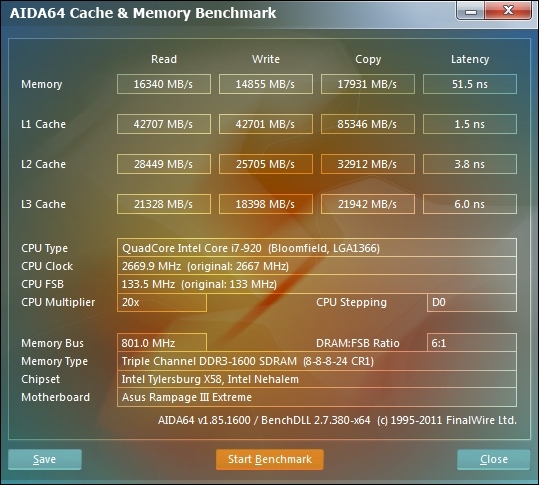
The hexcore i7 990x produces better memory and Cache results than the i7 920, falling short only in memory latency.
4GHz
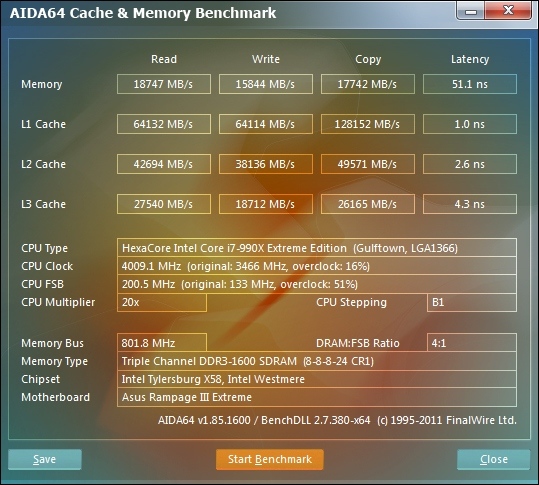
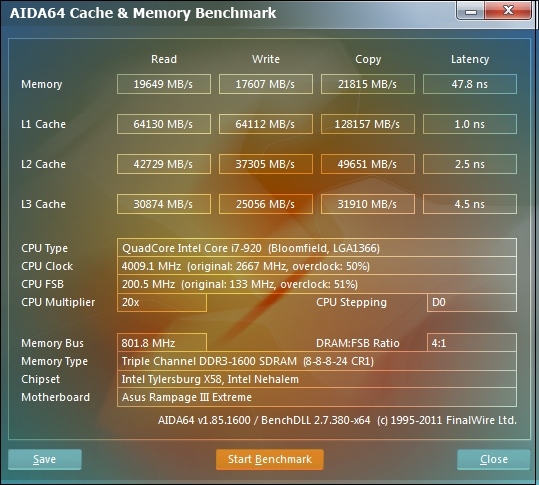
At the same clocks, the i7 920 produces better results reflecting the results we saw earlier with Sandra memory tests.
Maximum overclock
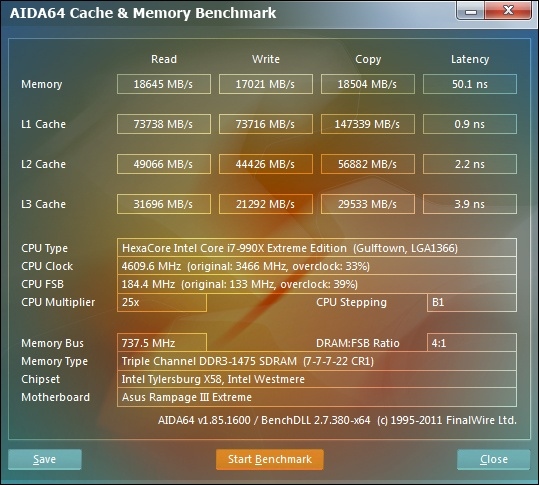
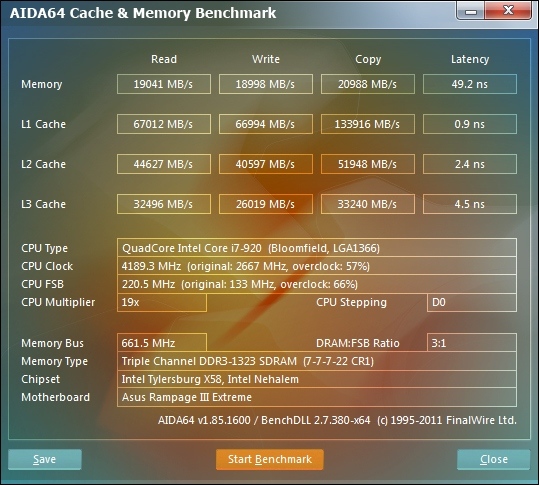
Even with the clock speed difference and memory speed favouring the i7 990x setup, memory bandwidth is higher on the i7 920 as with the L3 Cache performance.
Benchmark: PCMark 7
PCMark 7 is a tool provided by FutureMark that tests the PCs ability in general office and everyday use. It produces a number that reflects the all-round performance of the PC and is useful to compare between differing setups. For more information, visit the FutureMark website.
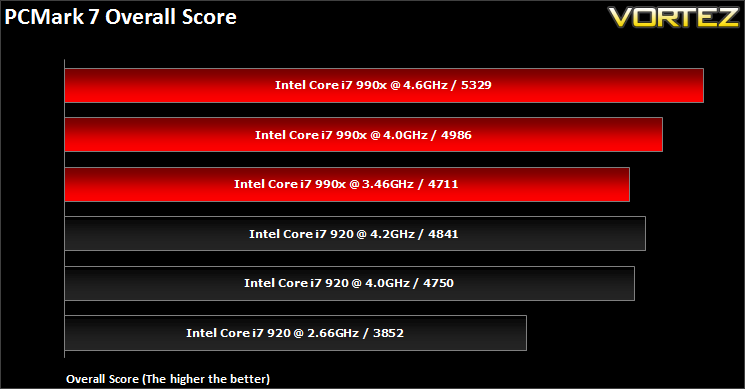
At reference speeds, the i7 990x is leaps and bounds ahead of the i7 920. Above 4GHz, the performance benefit of the two extra cores is marginal.
Benchmark: 3DMark 11
Designed to measure your PC’s gaming performance 3DMark 11 makes extensive use of all the new features in DirectX 11 including tessellation, compute shaders and multi-threading. Trusted by gamers worldwide to give accurate and unbiased results, 3DMark 11 is the best way to consistently and reliably test DirectX 11 under game-like loads.
Overall Scores
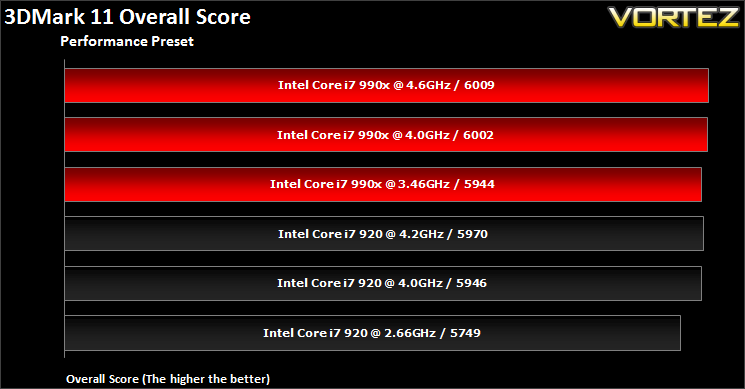
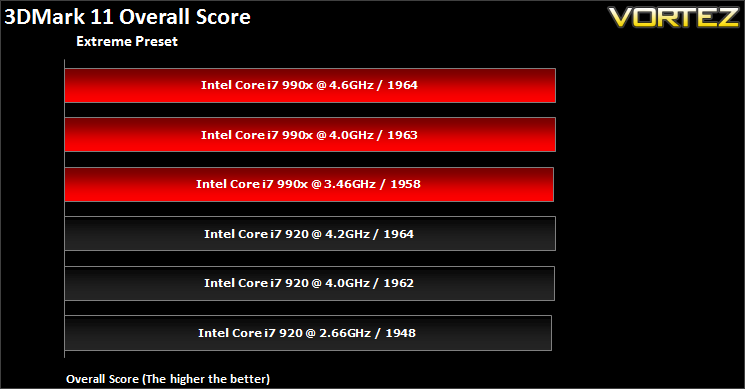
Overall scores vary little across the different CPUs. The i7 990x is only marginally better by reducing the CPU limitations of the benchmark.
Physics Scores
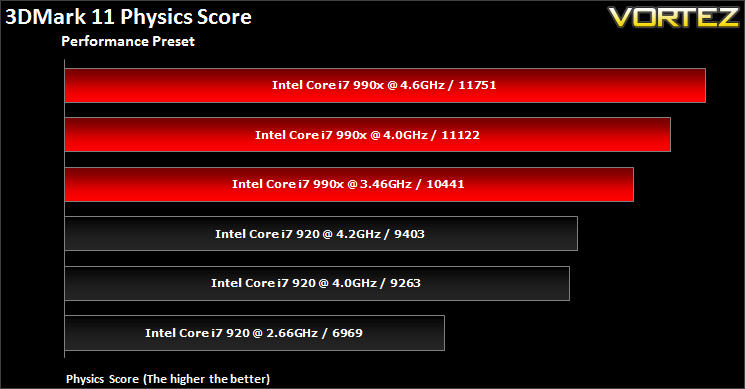
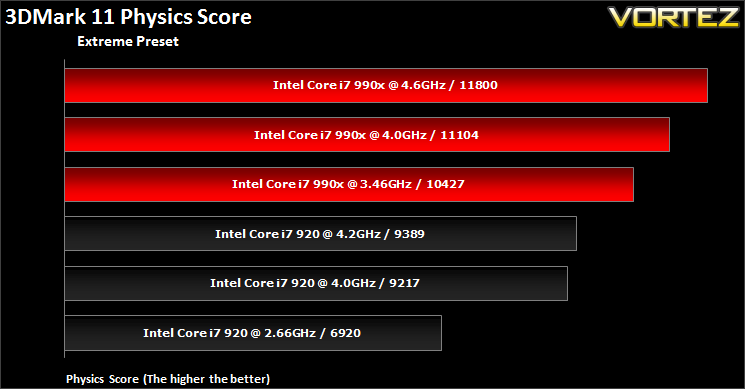
The physics scores are more representative of the processors’ impact on performance. The i7 990x flexes its muscle once more to claim a lead over the i7 920
Game: Far Cry 2
One of the most hyped games of 2008, Far Cry 2 had some big shoes to fill. It was built to be the next best thing since well… Far Cry I suppose. Combining an open-world game play with highly detailed graphics, physics and AI, what more could we possibly want? The game puts us in the body of a malaria inflicted mercenary hunting down the “Jackal” in the heart of Africa, in a bid to stop an ongoing conflict between two rival factions. The storyline can be hard to follow sometimes but I’m no game reviewer, so let’s concentrate on the graphics and performance. After all, we all need to know if our hardware will be able to handle the scorching savannah burning at the hands of our flamethrowers.
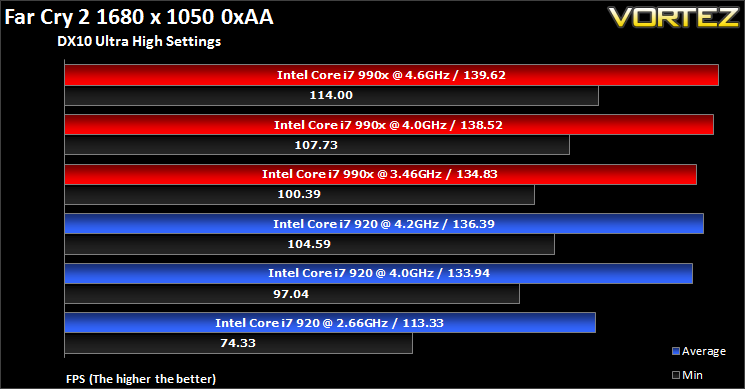
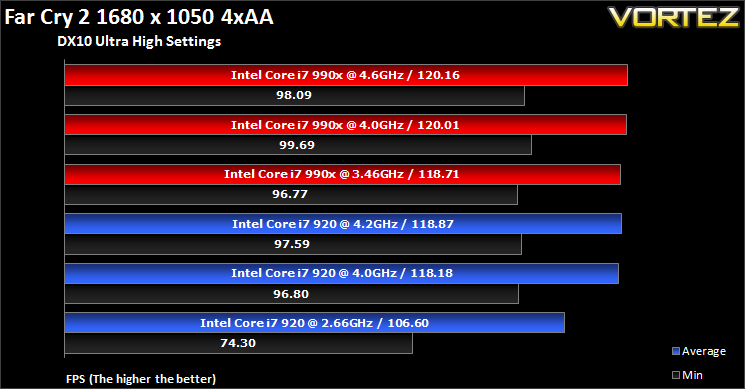
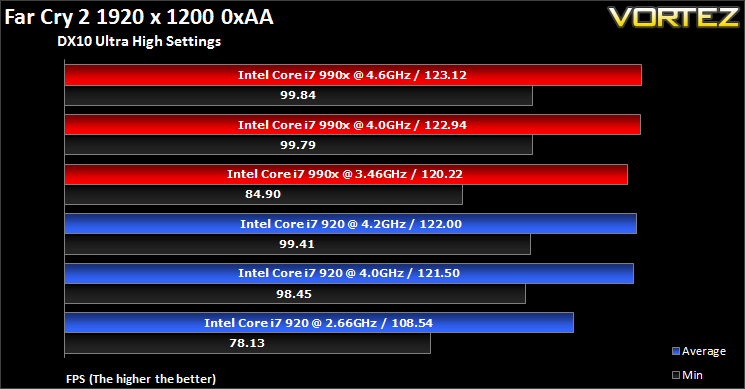
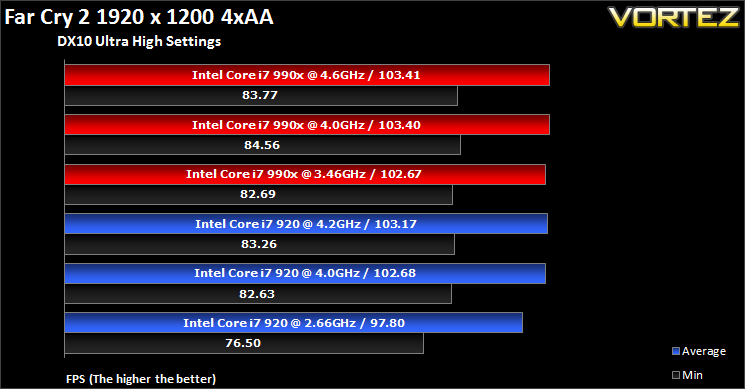
Far Cry appears to benefit from the higher clocked i7 990x and the extra cores make a slight difference when comparing clock for clock performance. Increasing the settings makes the game more GPU limited thereby making performance differences marginal. The game benefits from higher minimum frame rates with the 990x.
Game: Street Fighter IV
Street Fighter is back in its 4th iteration and its bigger and better than ever. Combining fluid, fast based sparring with stunning artistic visuals, the game delivers tremendous game play. Be reacquainted with some of the most popular characters in video game history while you battle your way to the top, be it with Ryu or the mighty Bison. The game might be frustratingly hard in some cases but there’s nothing like the satisfaction of K.O’ing your opponent with a well stringed death bringing combo.
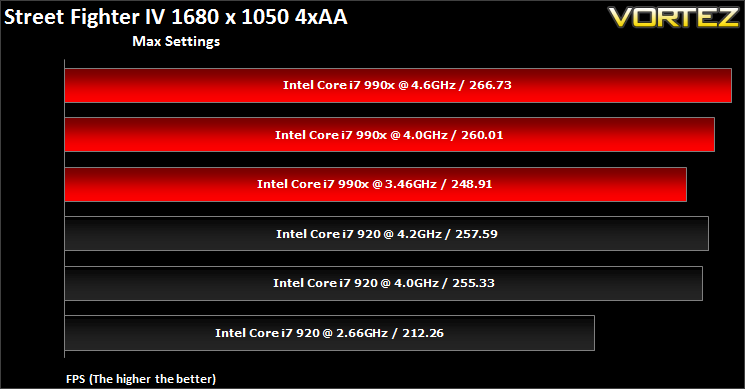
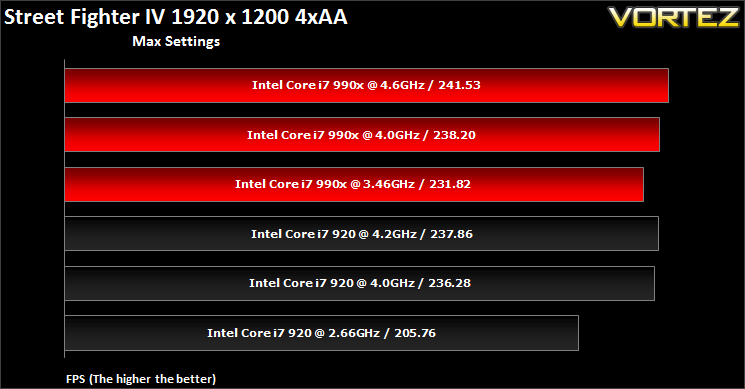
Street Fighter IV is another game where the i7 990x has a slight advantage but not one to warrant its price tag.
Game: Battlefield Bad Company 2
Battlefield Bad Company 2 is the new rendition of the widely successful Battlefield series of game. Having more in common with the console release of Bad Company, the sequel hopes to inject the DNA of the timeless Battlefield 2 online experience with the witty action packed single player shooting adventure of the original. As Private Preston Marlowe, your goal as a member of Bad Company is to once again save the world by securing a scalar weapon device.
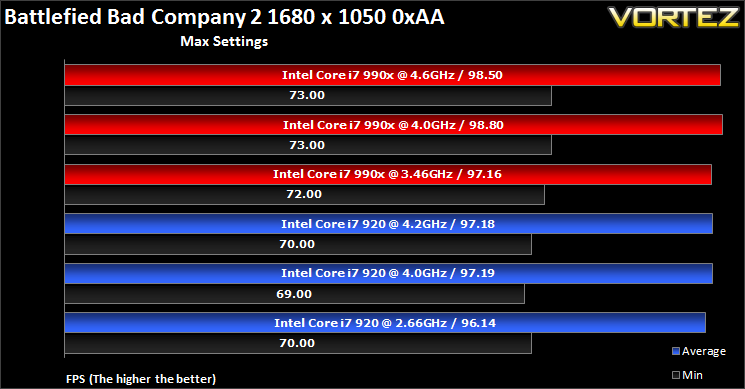
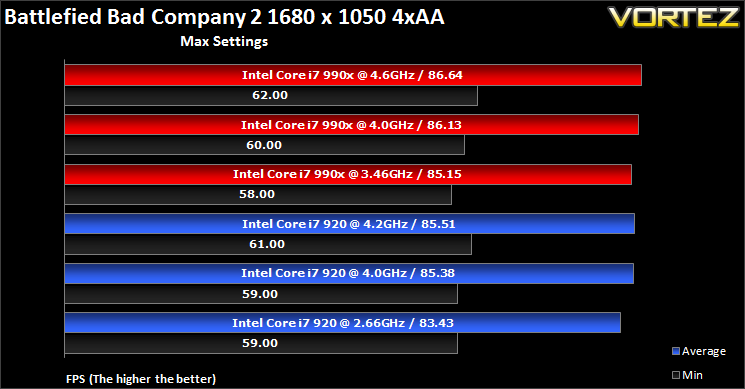
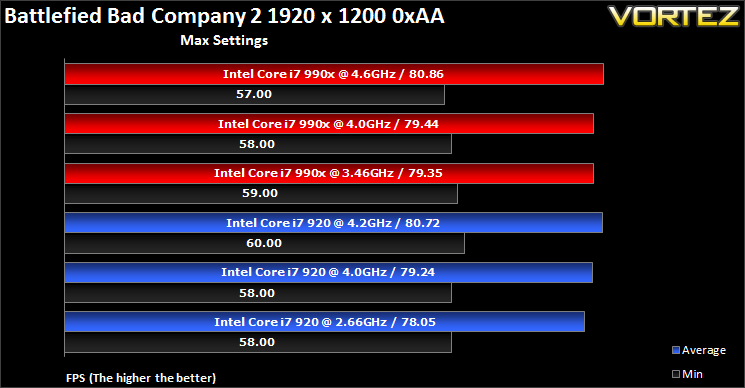
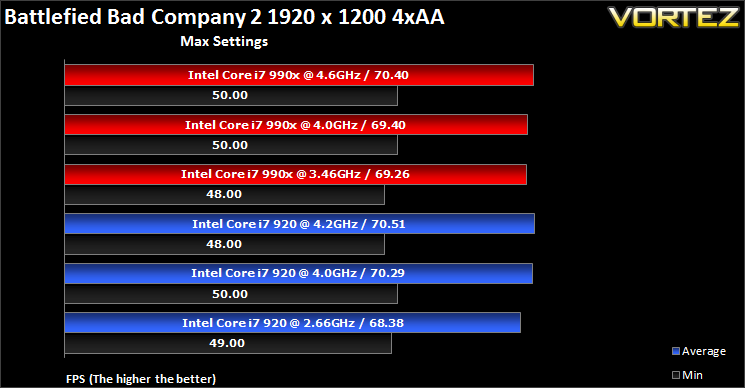
There is little that differentiates the 990x from the 920, especially when both are overclocked.
Game: Unigine Benchmark V2.1
Unigine’s benchmark is to showcase the benefits of DX 11 and the use of tessellation as opposed to normal rendering techniques. The demo has impressive visuals that give an insight into what we can expect from gaming in the future.
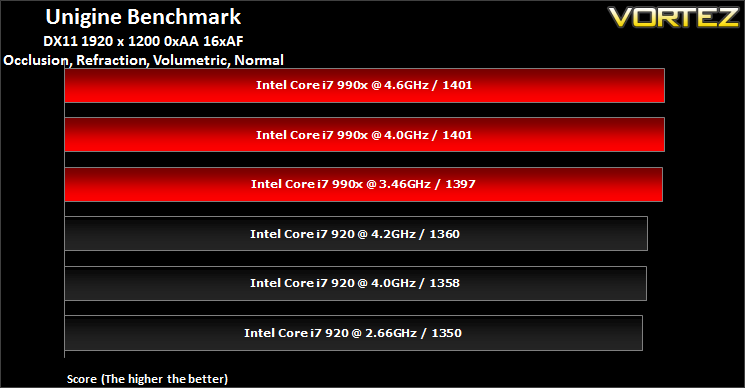
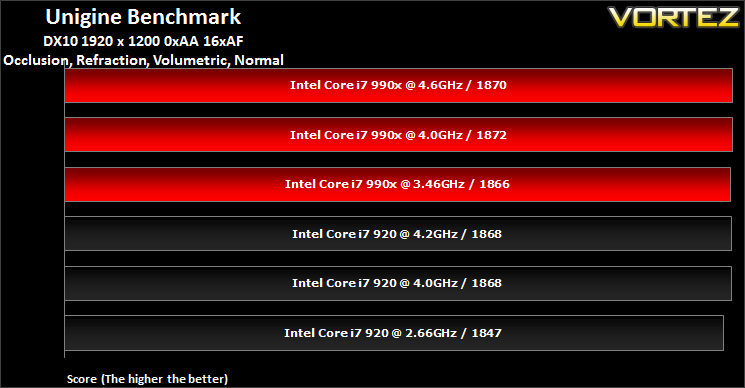
Unigine is another benchmark that doesn’t appear to benefit from the i7 990x extra cores and clock speed. In the DX11 benchmark, 47 points differentiates the i7 990x to the i7 920, and in DX10 the difference is even less.
Conclusion
With the imminent arrival of Sandy Bridge-E in November, the X58 chipset will finally give way to its rightful successor leaving the current generation Extreme Edition i7 990x in a somewhat awkward position. As mentioned in our introduction, the time of its release wasn’t exactly clever and Intel has ended up competing with themselves across different platforms. Sandy Bridge threw a spanner into the works, delivering brilliant performance in the form of the 2600K at a much lower price point than the 990x. For consumers looking to buy a new system, there is no compelling reason to consider the i7 990x when X58 is already destined to phase out, and $1000 is hardly a price tag to get people scrambling for a chip. For those already using the LGA1366 platform and are looking to prolong its longevity, the non-Extreme Editions hexcore i7 980 or 970 are nearly half the price.
Price aside, let us focus on the actual performance. Intel’s Core i7 990x demonstrates to us what Intel engineers are capable of. It might not be targeted at the mainstream market, but if you told us a few years ago that they could produce a six core processor that had a much higher clock speed than the i7 920 and ran much cooler, we would have laughed. Even the current Sandy Bridge and P67/Z68 chipset platform are unlikely to receive the six core treatment and yet the 990x on X58 has made the SKUs it has replaced significantly cheaper and closer to mainstream consumers’ grasps. Performance was unparalleled when we considered highly multi-threaded application such as Cinebench 11.5, encoding and transcoding, and other synthetic benchmarks. In many cases, we saw 50% gains over the quad core Bloomfield i7 920 in clock to clock comparisons. Gaming didn’t benefit hugely but there were still some slight gains observed, perhaps not enough to warrant its price tag but that was never the i7 990x’s true purpose. And then we consider how efficient the processor turned out. Thanks to the 32nm fabrication and Westmere architectural tweaking, the i7 990x proved to run very cool, draw as much power as the earlier Nehalem processors, and offer significant overclocking headroom. For a processor to mindlessly overclock to 4.5GHz or beyond demonstrates the progression of a successful platform.
If anything, the i7 990x on X58 proves to be the perfect ‘halo’ chip. It encourages early adopters to stick to the platform and gives them the scope to upgrade and match the performance of current Sandy Bridge CPUs. Even according to Intel, the i7 990x is set to challenge the new SB-E processors. Ok, so I would not advise anyone to go buy a $1000 CPU (you could easily upgrade to the more future-proof Sandy Bridge for that sort of money) but the i7 970 and 980 are much cheaper alternatives with similar overclocking potential, not to mention that prices on the second hand market will drop. The i7 990x is a fitting farewell to a truly excellent and last-lasting platform.
Pros
+Brilliant performance
+X58 chipset supports more PCIe lanes
+Overclocking headroom
+Cool operation
+Bundled tower cooler
+Prolongs longevity of LGA1366 platform
Cons
-Price
-Sandy Bridge offers similar performance
-X58 set to be replaced by X79 soon
+Brilliant performance
+X58 chipset supports more PCIe lanes
+Overclocking headroom
+Cool operation
+Bundled tower cooler
+Prolongs longevity of LGA1366 platform
Cons
-Price
-Sandy Bridge offers similar performance
-X58 set to be replaced by X79 soon
Intel’s Core i7 990x Extreme Edition deserves our Vortez Elite Award.


Click here for an explanation of our awards at Vortez.net.


