Intel’s new LGA2011 platform is finally here with a new batch of Sandy Bridge-E CPUs. We compare the new Intel Core i7-3960X Extreme with 4 other popular CPUs.

Product on Review: Intel Core i7-3960X Extreme Edition
Manufacturer and Sponsor: Intel
MSRP: £900
It seems like forever since we were all salivating over the x58 chipset three years ago and while we have seen the release of the latest generation of processors in the form of Sandybridge, today we have the latest incarnation, Sandybridge-E. Three years is a long time for any product family in computer terms but the raw power of the Tylersberg chipset and compatible i7 CPU’s coupled with AMD’s diminishing appeal has meant Intel have kept a very tight grip on the enthusiast market. The Sandybridge chips released in January took the world by storm with 5GHz overclocks achieveable from the best silicon. The disappointing results from Bulldozer has meant people have held off, waiting for the next big thing from Intel and finally it’s here. The waiting is over.
We have a special treat in store for you today as we take a look at the current flagship product, the Intel Core i7-3960X Extreme Edition. The new LGA 2011 socket compatible processors have an introductory range of three new CPU’s: 3820, 3930K and the range topping 3960X. The Extreme Edition chips have traditionally held a premium over their stable mates so it should come as no surprise that the 3960X weighs in at considerable expense, with an expected premium of £900. That will be enough to put a very large dent in anyones bank account so with such a high price, what can you expect to get for your hard earned?
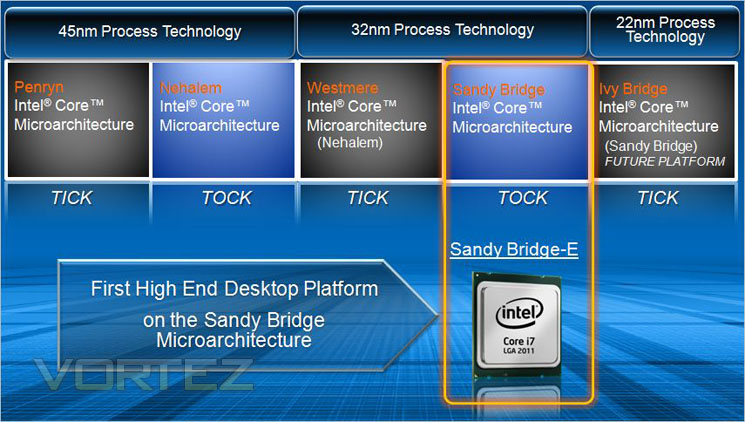
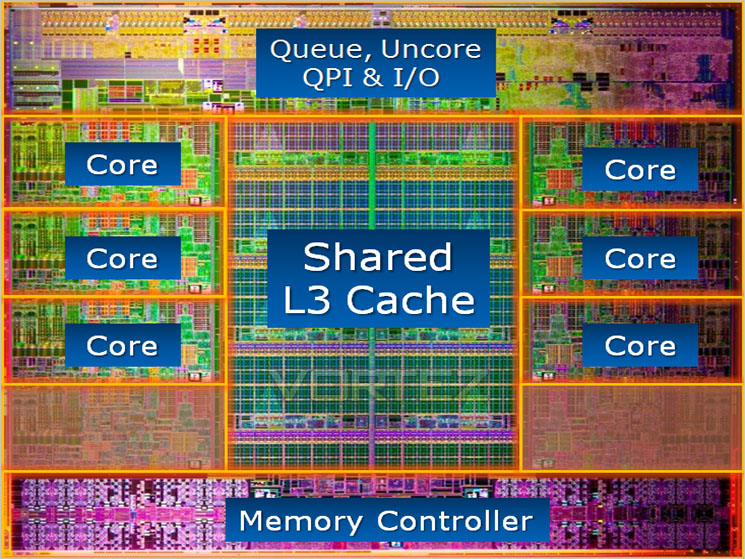
Well for starters you get 6 physical cores (emulating 12 cores with hyperthreading technology enabled). A clockspeed of 3.3GHz rising to 3.9GHz (Turbo technology) comes as stock and this is coupled with a mammoth 15MB of L3 cache. Not only that but quad channel DDR3 is also supported with the x79 motherboards upon initial release bragging upto 128GB support – crazy! If that wasn’t enough power then unlocked multipliers on both the 3930K and 3960X are sure to appeal to the overclocking community who crave speed above all else. Speaking of overclocking, the Sandybridge-E processors will require a little more time investment to overclock as Intel have answered the calls to allow Base Clock overclocking, a missing feature that was frowned upon with Sandybridge processors being overclocked simply by raising multipliers. We will get to the overclocking section later in the review but rest assured, Intel have put the fun back into overclocking. A little more complex it may be but overclocking is not just about the final result, it’s also about the enjoyement it takes to get there and with more options to drain every last drop of performance from a CPU with Sandybridge-E, the whole process becomes much more rewarding.
Before we put the Core i7-9360X to the test, let’s take a look at the specifications and features of Intel’s latest and greatest..
Specifications & Features
Specifications:
-Processor Name: i7 3960x Extreme Edition
-Number of Cores: 6
-Number of Threads: 12
-Clock Speed: 3.3GHz
-Max Turbo Frequency: 3.9GHz
-Intel Smart Cache: 15MB
-Bus/Core Ratio: 33
-Intel QPI Speed: 6.4GT/s
-Number of QPI Links: 1
-Instruction Set: 64-bit
-Instruction Set Extensions: SSE4.2
-Lithography: 32nm
-Die Size: 20.8mm x 20.9mm
-Max TDP: 130W
-VID Voltage Range: 0.800V-1.375V
-Processor Name: i7 3960x Extreme Edition
-Number of Cores: 6
-Number of Threads: 12
-Clock Speed: 3.3GHz
-Max Turbo Frequency: 3.9GHz
-Intel Smart Cache: 15MB
-Bus/Core Ratio: 33
-Intel QPI Speed: 6.4GT/s
-Number of QPI Links: 1
-Instruction Set: 64-bit
-Instruction Set Extensions: SSE4.2
-Lithography: 32nm
-Die Size: 20.8mm x 20.9mm
-Max TDP: 130W
-VID Voltage Range: 0.800V-1.375V
Features:
-Intel Turbo Boost Technology 2.0
-Intel Hyper-Threading Technology
-Supports LGA 2011 socket Intel X79 Express Chipset based motherboards
-15MB Intel Smart Cache
-Integrated Quad Channel Memory Controller
-Intel AVX and AES
-40 PCI Express lanes
-SSE 4.1 & SSE 4.2 Instructions
-Intel Turbo Boost Technology 2.0
-Intel Hyper-Threading Technology
-Supports LGA 2011 socket Intel X79 Express Chipset based motherboards
-15MB Intel Smart Cache
-Integrated Quad Channel Memory Controller
-Intel AVX and AES
-40 PCI Express lanes
-SSE 4.1 & SSE 4.2 Instructions
On the face of it, the i7-3960X does not appear to be too dissimilar to the Intel i7-990X. Both have 6 cores and equally, 12 threads when Hyperthreading is enabled. They both too make use of 6.4GT/s QPI speed. Indeed, both range topping CPU’s are based on 32nm lithography, have the same VID range of 0.800V-1.375V and also have an identical TDP of 130W.
Here’s a brief overview of the current crop of high-end CPU’s available:
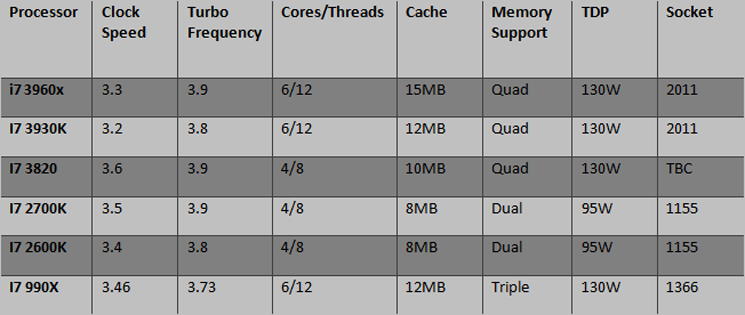
The i7-990X has a faster ‘stock’ clockspeed than the i7-3960X, 3.46GHz vs 3.3GHz, however the tables are turned when Intel Turbo-boost II iss enabled with the i7-3960X hitting 3.9GHz as opposed to the i7-990x settling for 3.73GHz. The good news doesn’t stop there either as the i7-3960X also has more cache to play with (15MB) and perhaps most significantly, quad channel DDR3 support. The new Sandybridge-E processor crams in 2.27 Billion transistors on a larger much larger die of it’s predecessor, measuring 434.72mm square in total. Intel have suggested that this will equate to 20% better video editing, 102% better memory performance and 34% better gaming performance. We shall put those very bold claims to the test later in the review.
Closer Look
Our package did not arrive with the stock Intel heatsink but after viewing a picture of the standard heatsink it appears to be exactly the same as the heatsinks packaged with previous generation Intel CPU’s save for an opaque instead of black fan. This has been done to keep prices down as most enthusiasts would opt for an aftermarket cooler anyway so the Intel heatsinks serve for nothing other than an extravagant paper weight. Intel however has made a bold move by sponsoring Asetek to create a watercooling solution based around a 120MM radiator. With an estimated retail price of around $85-100, it is sure to prove a competitive option for those looking for an all-in-one cooling solution. As you would expect, third party coolers are thin on the ground however the Corsair ‘H’ range are compatible along with Antec’s H20 range. MSI are bundling a Thermaltake FRIO with limited editions package deals on their X79A-GD65 (8D) motherboards and no doubt the cooler will also be available to buy separately which is one of the few air cooling solutions available at present.
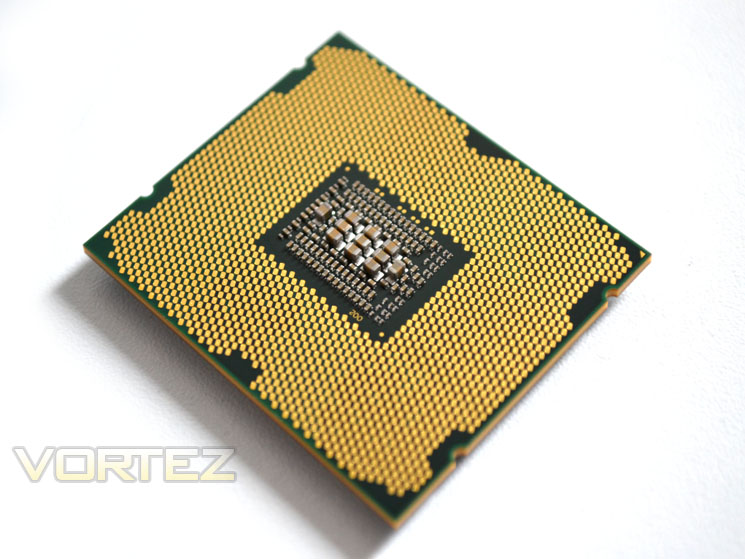
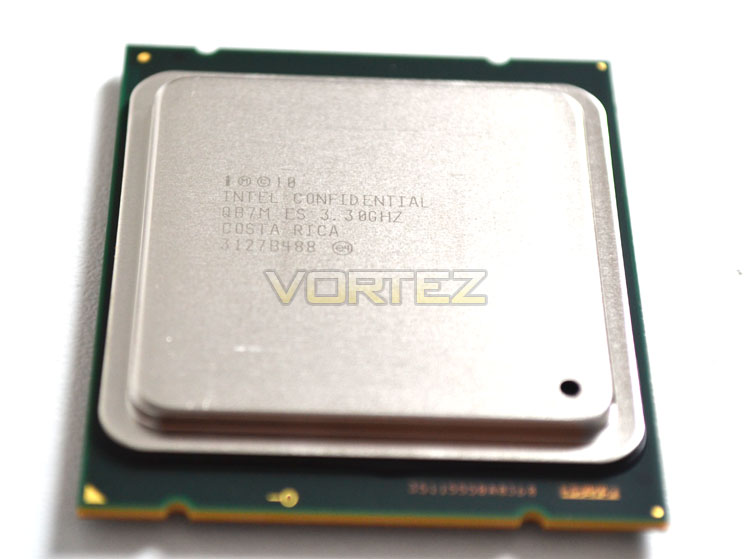
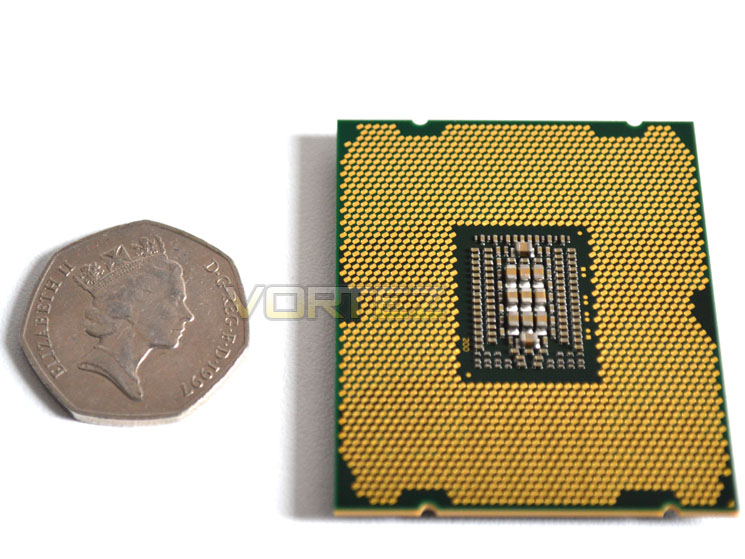
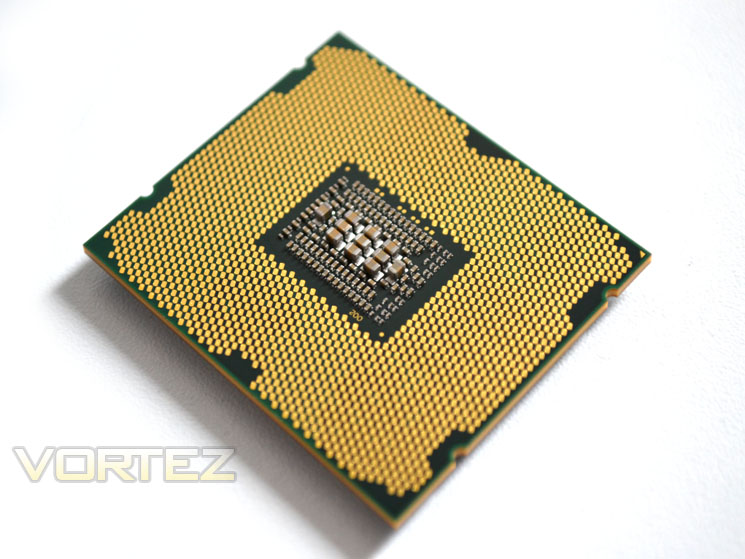
I was surprised at the size of the i7-3960X as it was much larger than previous generation Gulftown/Bloomfield Processors. Hidden beneath the nickel plated copper integrated heatspreader is a die measuring just over 434mm Sq.. The overall size of the processor takes me back to the old AMD Thunderbird processors but even that would be dwarfed by this monster! The LGA 2011 socket based processors are the largest in the current Intel range.
While our chip is an engineering sample, it is the latest ‘D’ stepping which should perform to the same level as retail units so all being well, our suite of benchmark results will give an accurate account of the performance you can expect. Below you can see the scale of the thing next to a British 50p piece.
Because the chip is much larger than before, the LGA 2011 socket has two set of retention clips to secure the CPU into place. The CPU also has an extra set of notches rather than the two previously seen on the last generation of CPU’s. Fitting the CPU is a little trickier than previously thanks to the extra hassle of the two retention bars which are a little fiddly to begin with.
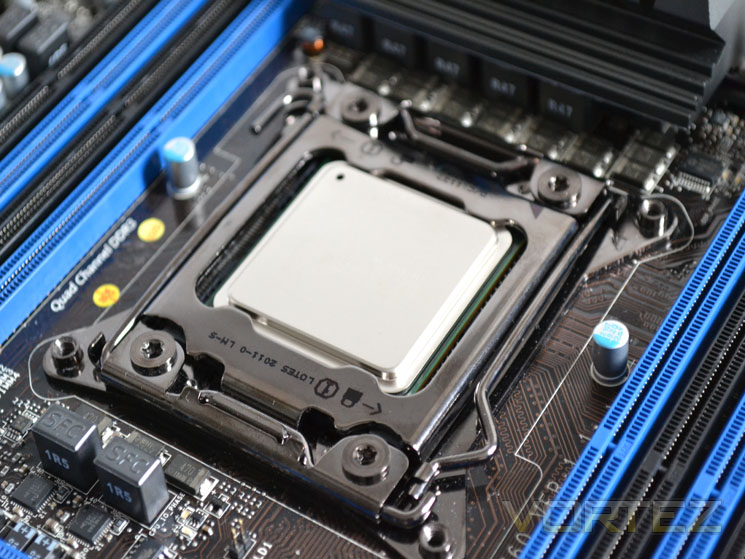
Once you figure out you have to bend one outwards before rising (along with which one to raise first) it becomes simple. We will cover this in greater depth on our motherboard reviews but suffice to say, it’s not rocket science to fit this CPU however, it could be a little easier. Above we can see the processor fitted to the MSI X79A GD65 (8D) motherboard.
Test Setup
When we decided to put the test bench together for X79 we wanted a system that would not only perform well but also last the test of time given that X58 has been around for some 3 years now so we saw no reason to believe that its successor, X79 would not be able to do the same.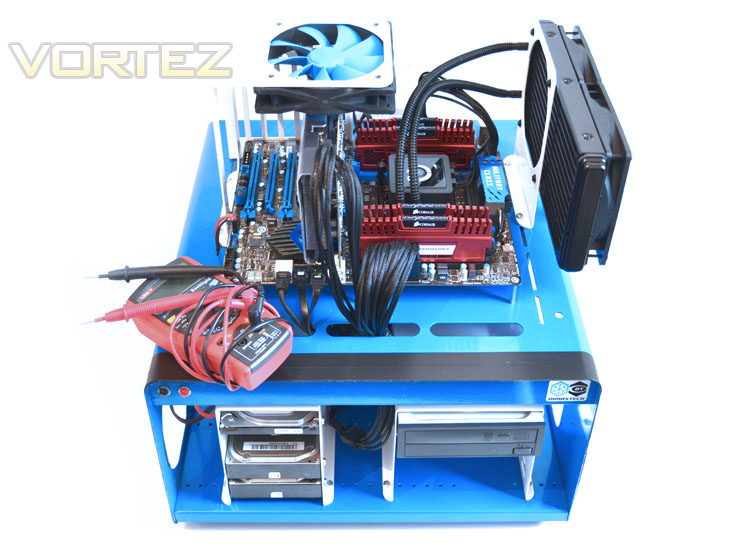
Our test bench was kindly sponsored by CORSAIR who provided the majority of components without whom we would not have been able to bring you this review so a big thanks to them. Thanks also go to MSI who donated their NVIDIA GTX560Ti.
X79 Setup
Motherboard – MSI X79A GD65 (8D)]
Intel Core i7-3960X Extreme Edition
Graphics Card: MSI GTX560Ti 2GB Twin Frozr II Edition @
RAM – 16GB (4x4GB) Corsair Vengeance (Red) DDR3 @ 1866MHz 9-10-9-27
Power Supply – Corsair TX750M 750W
Hard Drive – Hitachi SATA II 250GB
Samsung F3 1TB
Cooler – Corsair H100
Motherboard – MSI X79A GD65 (8D)]
Intel Core i7-3960X Extreme Edition
Graphics Card: MSI GTX560Ti 2GB Twin Frozr II Edition @
RAM – 16GB (4x4GB) Corsair Vengeance (Red) DDR3 @ 1866MHz 9-10-9-27
Power Supply – Corsair TX750M 750W
Hard Drive – Hitachi SATA II 250GB
Samsung F3 1TB
Cooler – Corsair H100
X58 Setup Mainstream
Intel Core i7 920 @ 2.66GHz
Graphics Card: Inno3D GTX570 1GB @ 800/4000MHz – ForceWare 275.33
RAM – 6GB (3x2GB) OCZ Platinum DDR3 1333MHz
Motherboard – ASUS Rampage III Extreme
Power Supply – Enermax Revolution 85+ 850W
Hard Drive – OCZ Vertex 2E 120GB
Samsung F3 1TB
Samsung F1 320GB
Cooler – Phanteks PH-TC14PE
Intel Core i7 920 @ 2.66GHz
Graphics Card: Inno3D GTX570 1GB @ 800/4000MHz – ForceWare 275.33
RAM – 6GB (3x2GB) OCZ Platinum DDR3 1333MHz
Motherboard – ASUS Rampage III Extreme
Power Supply – Enermax Revolution 85+ 850W
Hard Drive – OCZ Vertex 2E 120GB
Samsung F3 1TB
Samsung F1 320GB
Cooler – Phanteks PH-TC14PE
X58 Setup Extreme
Intel Core i7 990X @ 3.46GHz
Graphics Card: Inno3D GTX570 1GB @ 800/4000MHz – ForceWare 275.33
RAM – 6GB (3x2GB) OCZ Platinum DDR3 1333MHz
Motherboard – ASUS Rampage III Extreme
Power Supply – Enermax Revolution 85+ 850W
Hard Drive – OCZ Vertex 2E 120GB
Samsung F3 1TB
Samsung F1 320GB
Cooler – Phanteks PH-TC14PE
Intel Core i7 990X @ 3.46GHz
Graphics Card: Inno3D GTX570 1GB @ 800/4000MHz – ForceWare 275.33
RAM – 6GB (3x2GB) OCZ Platinum DDR3 1333MHz
Motherboard – ASUS Rampage III Extreme
Power Supply – Enermax Revolution 85+ 850W
Hard Drive – OCZ Vertex 2E 120GB
Samsung F3 1TB
Samsung F1 320GB
Cooler – Phanteks PH-TC14PE
Z68 Setup
Intel Core i5 @ 3.3GHz
Graphics Card – Zotac GTX460 1GB
RAM – 4GB (2x2GB) Kingston Genesis DDR3 1600MHz
Motherboard – ASRock Extreme4 Gen3
Power Supply – OCZ Fatal1ty 750W
Cooler – Noctua NH-D14
Intel Core i5 @ 3.3GHz
Graphics Card – Zotac GTX460 1GB
RAM – 4GB (2x2GB) Kingston Genesis DDR3 1600MHz
Motherboard – ASRock Extreme4 Gen3
Power Supply – OCZ Fatal1ty 750W
Cooler – Noctua NH-D14
AMD Setup
AMD A8-3850 @ 2.9GHz
Motherboard – GIGABYTE GA-A75M-UD2H
RAM – Team Xtreem PC3 12800 DDR3 1600 7-7-7-21
HDD – Western Digital Caviar Blue 500GB 7200RPM SATAIII
Power Supply – OCZ StealthXtream 2 600W
Cooler – CoolerMaster Hyper 212+
AMD A8-3850 @ 2.9GHz
Motherboard – GIGABYTE GA-A75M-UD2H
RAM – Team Xtreem PC3 12800 DDR3 1600 7-7-7-21
HDD – Western Digital Caviar Blue 500GB 7200RPM SATAIII
Power Supply – OCZ StealthXtream 2 600W
Cooler – CoolerMaster Hyper 212+
Benchmarks
Cinebench 11.5 – CPU Score
x264 HD 4.0 – 1st and 2nd pass encoding
SiSoftware SANDRA 2011 – CPU benchmarks
AIDA64 – CPU benchmarks
CyberLink MediaEspresso 6.5 – Convert 145MB MP4 to avi
PCMark 7 – System Benchmark
3DMark 11 – Performance and Extreme preset Overall and Physics Score
Games – Crysis 2, DiRT3, Metro 2033
Other Software
Core Temp 0.99.5
LinX stress Test
CPUID HWMonitor
Overclocking
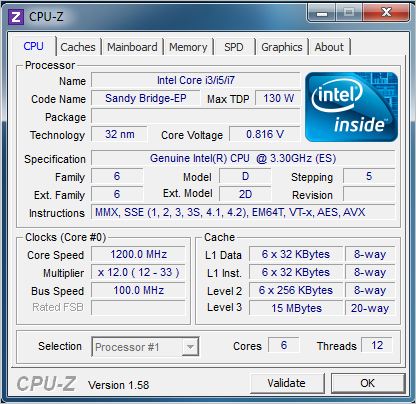
Intel is very keen to point out that overclocking will be much more in-depth than simply adjusting a multiplier as with skt 1155 Sandybridge CPU’s. The Sandybridge-E is essentially an enhanced high-end version of its younger brother and while architecturally different from the X58 platform which has a plethora of overclocking options available, X79 is also more complex than P67/Z68 systems. The top two processors (3960X and 3930K) both have unlocked multipliers with a maximum multiplier of 57x. The lower specced i7-3820 will unfortunately have its multiplier locked and thus only has the Turbo ratio to rely on. Therefore if you like to dabble in the dark art of overclocking you would be best served by either the 3960X of 3930K processors. Below we see a stock shot of the CPU in idle state with SpeedStep enabled:
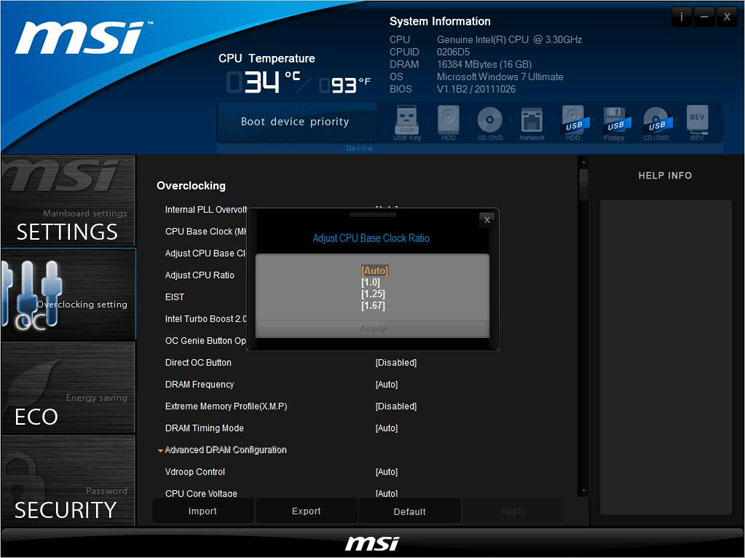
As previously stated, overclocking on the X79 platform is a little different from previous generations in that the CPU base clock is determined by DMI Clock x Base Clock Ratio. Some motherboard manufacturers will inevitably create a clock generator that will do this calculation for you thus making the process a little easier (as with our test bench motherboard, the MSI X79A GD65(8D).
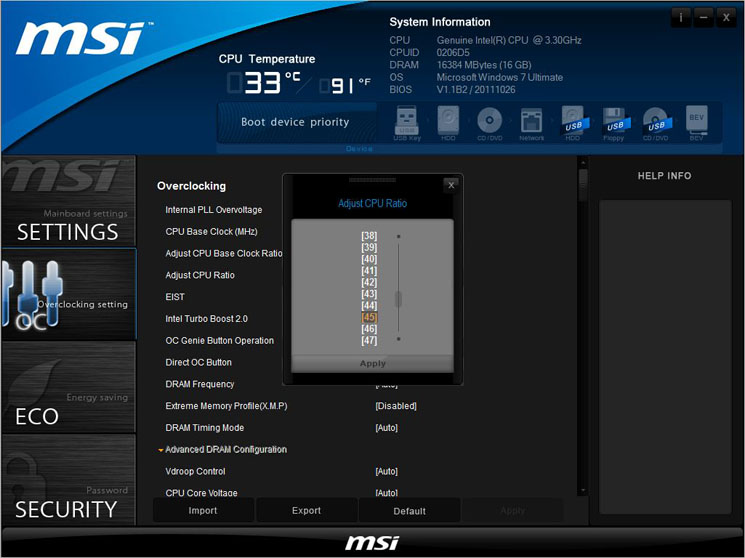
Memory overclocking has been expanded with the addition of another ratio, theoretically allowing the X79 platform to overclock memory to DDR3 2400 at a ram ratio of x9.
Other than the ram ration there are essentially three main settings that can be adjusted: CPU Ratio, CPU Core Ratio and CPU Base Clock. As with skt1156 Sandybridge processors, the CPU ratio yields the biggest bulk of the overclocking as this multiplies the bus speed so for example 40x CPU ratio x 100 bus speed would result in a clockspeed of 4000MHz. The bus speed is in essence the Baseclock and thus this can be fine tuned to extract the maximum amount from the CPU. Couple the base clock with the CPU core ratios of 1.00, 1.33 and 1.67MHz and you can (hopefully) extract the absolute maximum. MSI recommend a maximum +/-10% overclock on the base clock at each ratio so it will be interesting to see exactly how this affects our overclock.
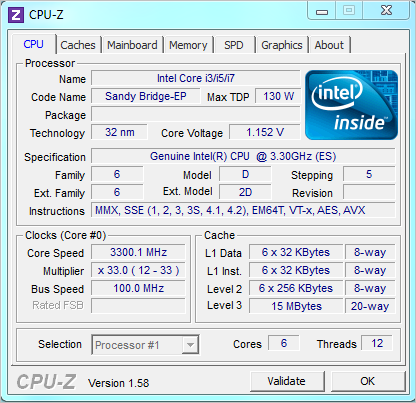
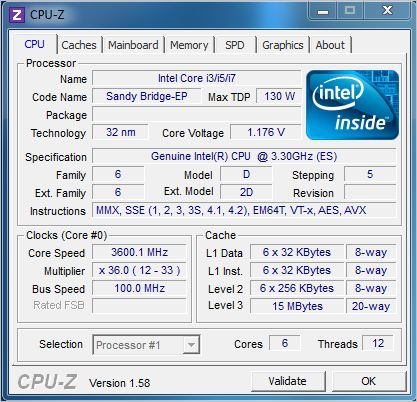
Here we see the CPU in its stock format with Turbo Boost II enabled and thus a resulting speed weighs in at 3.6GHz. This clockspeed can theoretically rise up to 3.9GHz on this processor on individual cores when placed under stress or drop to 1200MHz when idle with the CPU features enabled. When overclocking, especially when attempting to find a stable overclock it is best to disable such settings though as this can affect stability at the highest point. Therefore we did just that and set about achieving our highest STABLE overclock.
Initially we simply could not get the CPU to overclock at all. I feared that the multiplier was locked as despite setting the core multiplier anything higher than 33 failed to latch and despite altering a variety of settings in the UEFI BIOS, nothing would allow us to break the 33X barrier. Ultimately a BIOS update was required and while this BIOS was also a little buggy, it did allow us to adjust the multiplier AND get it to stick. Unfortunately, the same could not be said for the baseclock which refused to go anything above 100MHz.
Voltage was another hurdle to traverse as being a totally new processor, I was not sure how far I could push things. Couple this with the astronomical price point of £900 and fear of destroying the chip before the NDA had passed perhaps made me err on the side of caution. I initially settled for a maximum 1.4v Vcore to achieve the maximum overclock but due to the Vdroop (despite the load line calibration level set to maximum) I nudged a little passed this mark to ensure the 1.4v was attained for the duration of the stress testing.
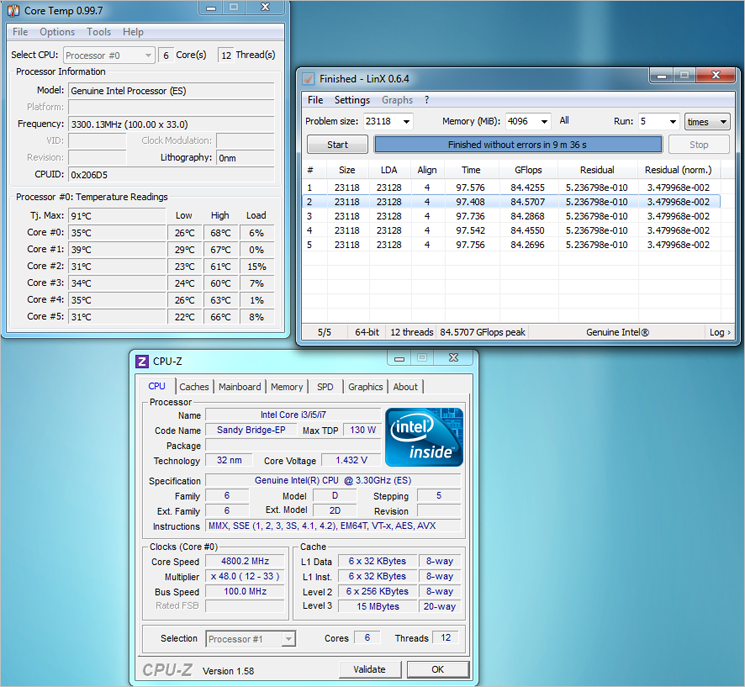
After many hours, lots of head scratching and numerous experimental settings, I eventually hit a brick wall at 4.8GHZ. While this is a fantastic achievement, especially considering all 6 cores (along with hyperthreading) were enabled, failing to reach the ‘golden’ 5GHz mark was frustrating. It is never easy overclocking on a new platform, especially when there is so little concrete information available so getting this far was a victory and testament to the ease of use of the MSI BIOS. This overclock was rock solid stable however nudging the CPU ratio one notch higher to x49 resulted in stability issues, often being unable to boot. With other motherboard issues plaguing my attempts to push the envelope further, 4.8GHz was the figure I settled for on this occasion but I have no doubts at all with a more mature BIOS, higher results can and will be attained. As with all overclocking, each result is dependent on the components used so while we achieved this result, there are no guarantees this will be the case with an identical setup.
Temperature & Power Consumption
Temperatures
As mentioned earlier in the review, Intel are going to be selling a rebranded all-in-one watercooling solution from Asetek. They wouldn’t make such a move unless the feared CPU temperatures could become an issue. The watercooling solution is aimed specifically for the enthusiast market and thus the overclocker.
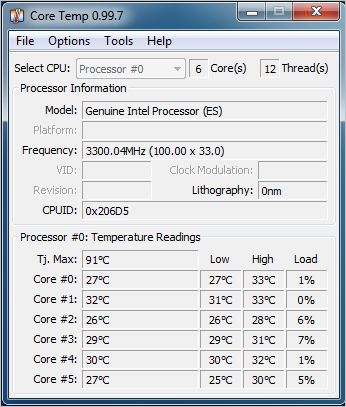
The temperature as stock is excellent, hitting an average 28.5 across all six cores, just 5.5c above ambient (23c) temperature. Obviously, temps should be good at the very low voltage of just 0.816v.
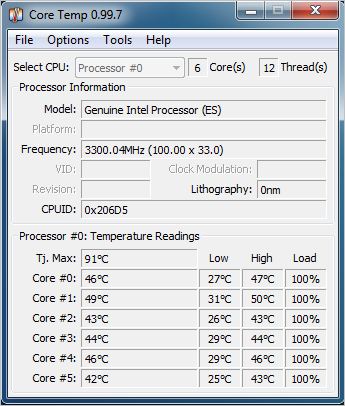
Placing the CPU under stress using Intel LinX software we see a maximum temp of 45.5c which again is very good considering the clockspeed had risen to 3.6GHz.
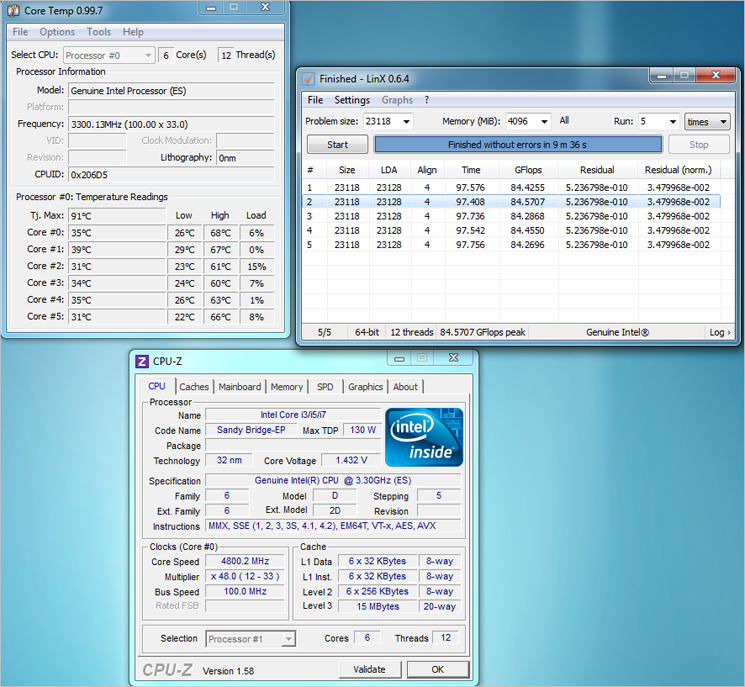
Upon maximum overclock and with the Corsair H100 set to medium setting, the temp rose dramatically, peaking at an average 64c. Still well within the comfort zone though and with a clockspeed set to 4.8GHz along with a Vcore of just above 1.4v this is fantastic achievement.
Power Consumption
Despite being Ultra high end, I had hopes that the test setup would consume less power than our old i7 Core i7 test setup. I did not however expect the results to be so fantastic.
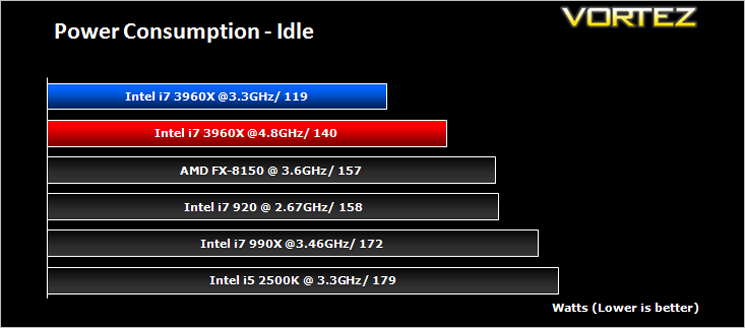
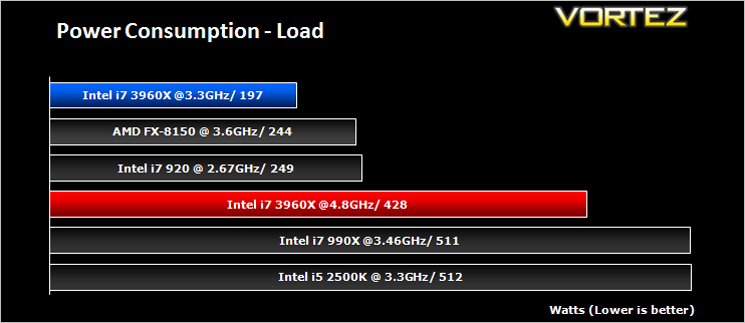
When idle (and with eco settings enabled) the whole setup consumed just 119W. This value rose slightly when clocked to 4.8GHz but was still well below the copetition whose clockspeeds were much lower. The good news continued as we put the system under stress with the stock clocked i7-3960X consuming the least amount of power out of all the setups tested. Obviously running such a high overclock will consume a much larger amount of power but this was still less than the stock clocked i7 990X and i5 2500K setups. Consideration however should be given to the fact that each setup has varying hardware and thus the power readings are an indication only as it is impossible to truly give a like for like power usage comparison as to the best of our knowledge an Intel i7 3960X will not fit in an AMD motherboard and vice-versa! Nonetheless, this is a fantastic achievement from Intel.
SiSoftware Sandra
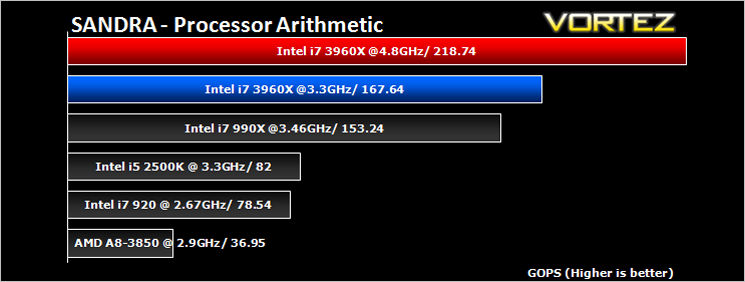
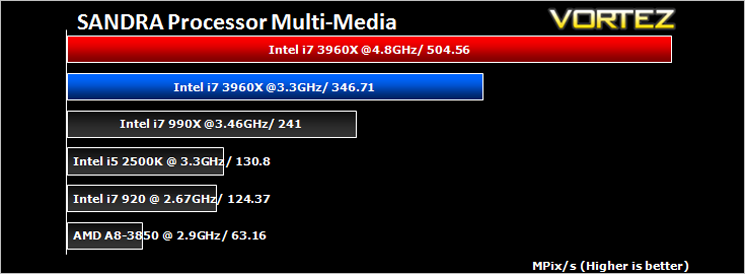
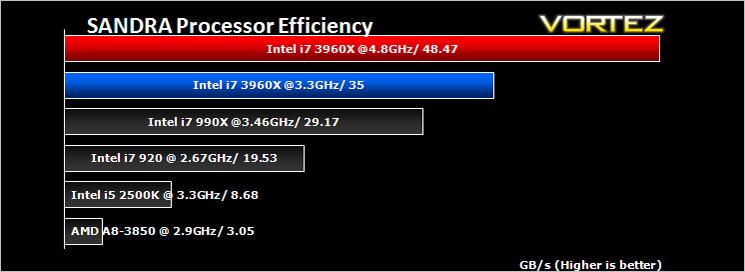
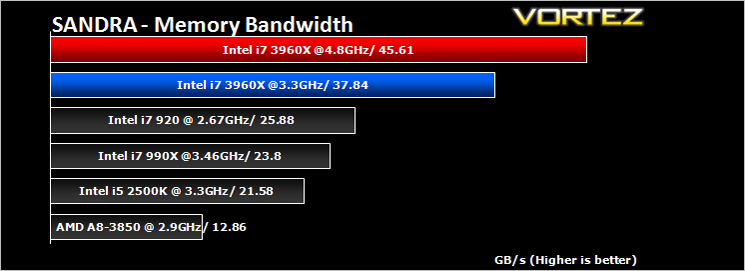
SANDRA isn’t always a benchmark that is included in hardware reviews but I believe it shouldn’t be ignored. SANDRA provides a vigorous package that tests your system in a rather large array of benchmarks. There are many aspects of benchmark that can be executed. We will be considering – CPU and memory tests.
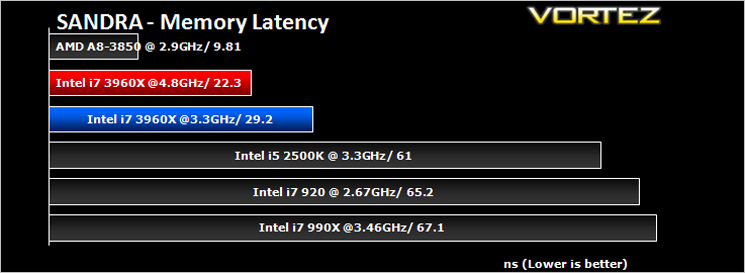
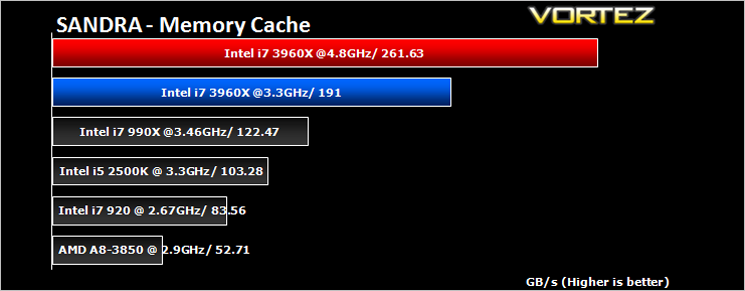
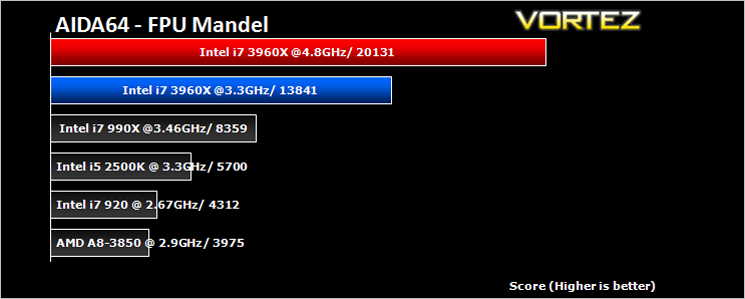
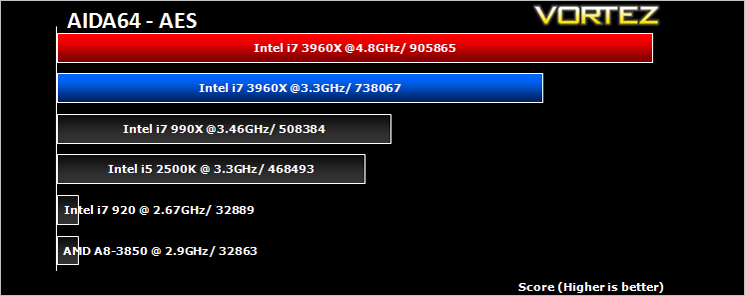
AIDA64
This simple integer benchmark focuses on the branch prediction capabilities and the misprediction penalties of the CPU. It finds the solutions for the classic “Queens problem” on a 10 by 10 sized chessboard. At the same clock speed theoretically the processor with the shorter pipeline and smaller misprediction penalties will attain higher benchmark scores. For example — with HyperThreading disabled — the Intel Northwood core processors get higher scores than the Intel Prescott core based ones due to the 20-step vs 31-step long pipeline. CPU Queen test uses integer MMX, SSE2 and SSSE3 optimizations.
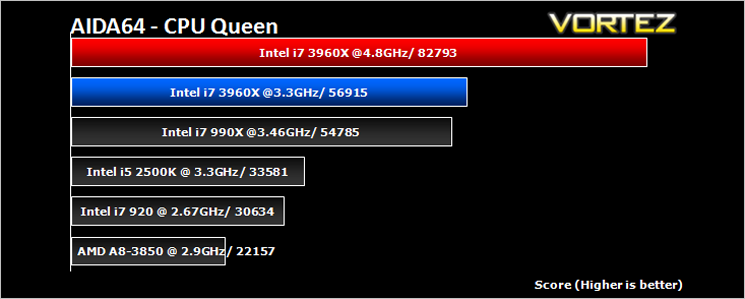
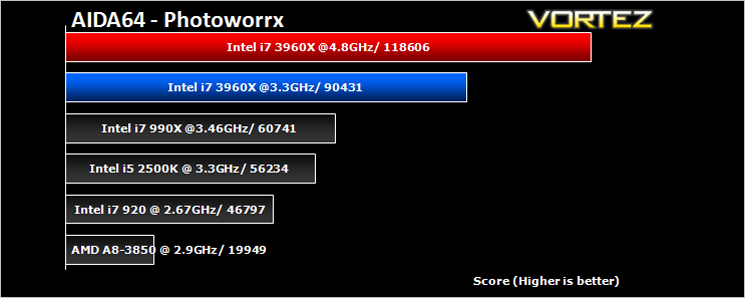
x264 HD V4.0
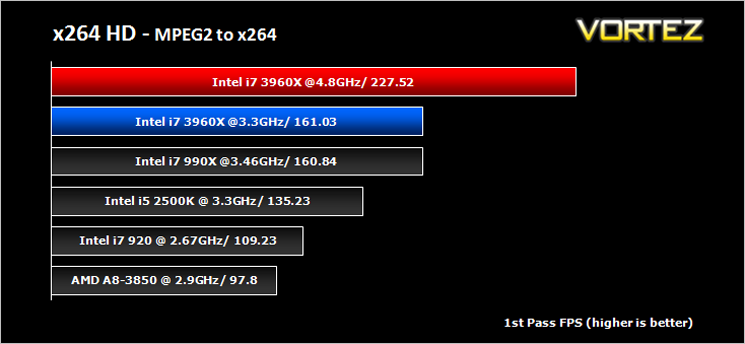
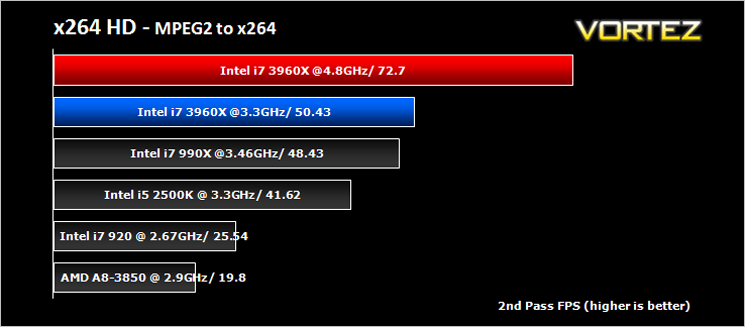
Simply put, this test measures how fast your machine can encode a short, DVD quality MPEG-2 video clip into a high-quality x264 video clip. What’s x264, you ask? It’s more or less the next-generation Xvid/DivX codec. I think it’s ideal for a benchmark because the application (x264.exe) reports fairly accurate compression results (in frames per second) for each pass of the video encoding process, and it uses multi-core processors very efficiently. The test uses multiple cores efficiently to give a good representation of real world performance.
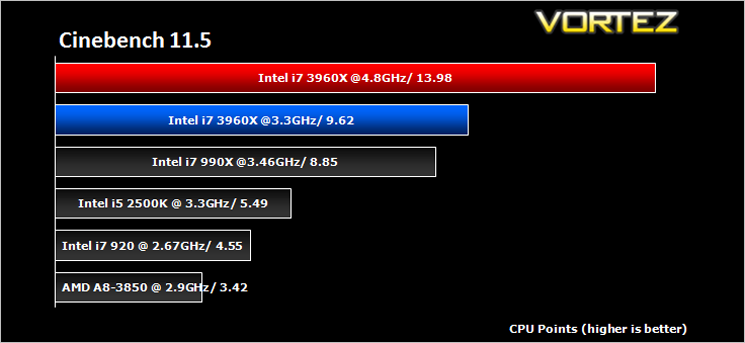
Cinebench 11.5
Based on the MAXON animation software CINEMA 4D, Cinebench is a test suite that uses the system’s processing power to render a photorealistic 3D scene. This makes it an excellent benchmark to measure CPU and motherboard performances.
CINEBENCH can measure systems with up to 64 processor threads. This test scene contains approximately 2,000 objects which in turn contain more than 300,000 polygons in total, and uses sharp and blurred reflections, area lights, shadows, procedural shaders, antialiasing, and much more. The result is displayed in points (pts). The higher the number, the faster your processor.
CINEBENCH can measure systems with up to 64 processor threads. This test scene contains approximately 2,000 objects which in turn contain more than 300,000 polygons in total, and uses sharp and blurred reflections, area lights, shadows, procedural shaders, antialiasing, and much more. The result is displayed in points (pts). The higher the number, the faster your processor.
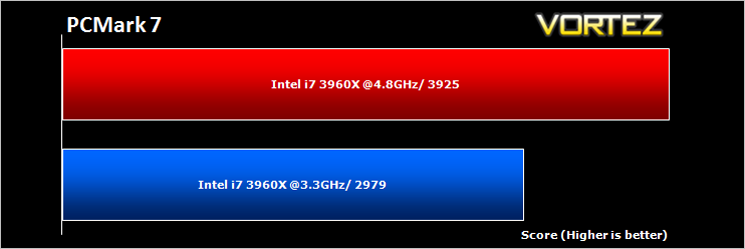
Futuremark PCMark 7 & 3DMark 11
PCMark 7 is a tool provided by FutureMark that tests the PCs ability in general office and everyday use. It produces a number that reflects the all-round performance of the PC and is useful to compare between differing setups. For more information, visit the FutureMark website.
Designed to measure your PC’s gaming performance 3DMark 11 makes extensive use of all the new features in DirectX 11 including tessellation, compute shaders and multi-threading. Trusted by gamers worldwide to give accurate and unbiased results, 3DMark 11 is the best way to consistently and reliably test DirectX 11 under game-like loads.
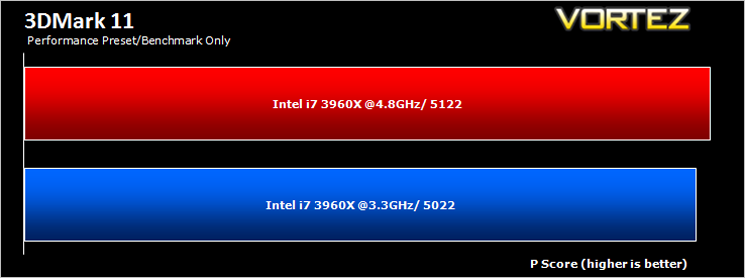
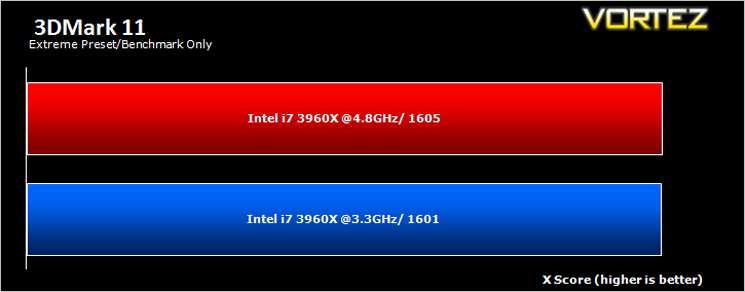
*Note* Other systems were omitted due to varying GPU’s being used which would have had an adverse affect on the results.
Gaming Benchmarks
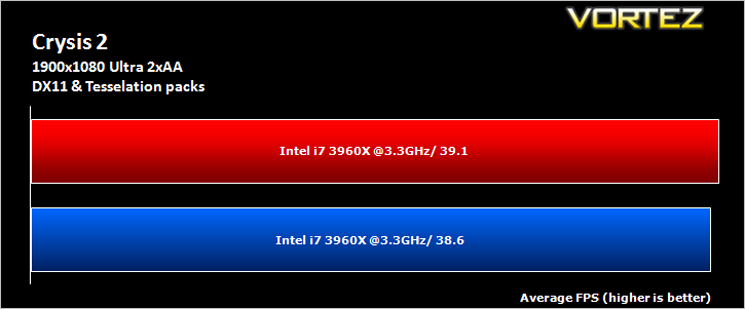
Crysis 2
Crytek took an internet beating from its loyal fans due to the fact that they pandered to the console masses and dumbed down the graphics to DirectX 9. Fortunately, fans of the PC version of Crysis managed to force Cryteks hand and they have since developed a DX11 patch and have also enhanced the textures with added tesselation. It is for this reason that we have decided to include it in our suite of benchmarks.
Crytek took an internet beating from its loyal fans due to the fact that they pandered to the console masses and dumbed down the graphics to DirectX 9. Fortunately, fans of the PC version of Crysis managed to force Cryteks hand and they have since developed a DX11 patch and have also enhanced the textures with added tesselation. It is for this reason that we have decided to include it in our suite of benchmarks.
DiRT3
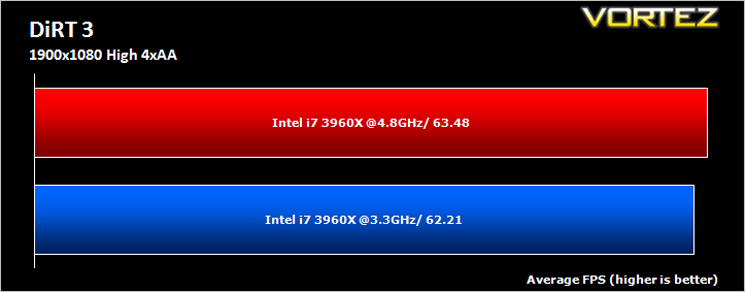
As players race to elevate their global standing, DiRT 3 is back delivering mud, sweat and gears world over: from the intense weather-beaten rally stages of Europe, Africa and the US, to executing performance driving showcases and career challenges where car control is pushed to spectacular limits.
As players race to elevate their global standing, DiRT 3 is back delivering mud, sweat and gears world over: from the intense weather-beaten rally stages of Europe, Africa and the US, to executing performance driving showcases and career challenges where car control is pushed to spectacular limits.
Metro 2033
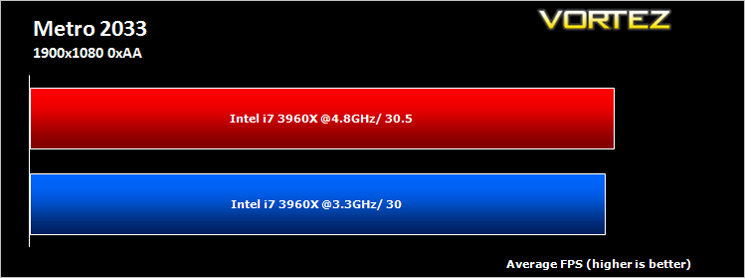
Based on the novel by the same name, Metro 2033 is a first person shooter with elements of survival horror. As Artyom, you trawl through the mutant infested metro systems of post-apocalyptic Moscow. The game delivers presents a grim ambience that reflects on the overall atmosphere of the underground setting. Metro 2033 uses the setting as a back drop to showcase some of the best visuals of any games out now, making it the ideal benchmark for those looking for the best graphics card.
Based on the novel by the same name, Metro 2033 is a first person shooter with elements of survival horror. As Artyom, you trawl through the mutant infested metro systems of post-apocalyptic Moscow. The game delivers presents a grim ambience that reflects on the overall atmosphere of the underground setting. Metro 2033 uses the setting as a back drop to showcase some of the best visuals of any games out now, making it the ideal benchmark for those looking for the best graphics card.
*Note* Other systems were omitted due to varying GPU’s being used which would have had an adverse affect on the results.
Conclusion
There can be no doubting the performance of the i7-3960X. It truly is a monster. Our results have shown it tops the tables in everything you can throw at it from CPU arithmetic to memory bandwidth. Whatever your need, the Intel i7-3960X will satisfy your craving for outright performance. Throughout our suite of benchmarks, the i7-3960X consistently took apart the competition which is testament to the awesome processing power this new range of CPU’s have to offer. That however is just for starters.Experiencing the power of this processor while overclocked was nothing short of spectacular. There are few components that make my jaw drop these days but witnessing this processor in action was truly awe inspiring. My face was akin to the famous Scream mask such was the blistering speed the processor produced. It wasn’t only the CPU speed either as having quad channel memory made the whole setup blisteringly quick. While it is debateable if a home user would ever need such extravagances and masses of bandwidth after all, it wasn’t so long ago that we (me included) ridiculed those looking for 4GB of ram. Who would ever need such a ‘huge’ amount of physical memory? Indeed times change along with peoples requirments.
If you have ever sat waiting for Photoshop to process huge batch files or indeed gone to make a cup of tea as Winrar was taking an age then you will certainly see the benefits of such a setup. With HD video editing now much more mainstream, working with larger files requires more speed and more memory if we are to keep the cobwebs at bay while processing these files. This is where a the Intel core i7-3960X comes into its own.
The bad news however is the price of this beast. Estimated to be around the £900 mark it is anything but cheap and no doubt will be out of reach for the majority of enthusiasts. Extreme Edition chips have traditionally held a premium and this version is no different. While it will soon be succeeded by the hugely anticipated ‘Ivy Bridge’ range of processors, this will not deter those who are looking for the absolute pinnacle of processing power which at present is the Intel i7-3960X Sandybridge-E processor and for that reason alone is deserving of the Vortez Elite and Platinum awards.
Pros
+ Breathtaking Performance
+ Ultra High Overclocking
+ Cool Running
+ High Efficiency
+ Bragging Rights!
Cons
– Nothing but the price!
+ Breathtaking Performance
+ Ultra High Overclocking
+ Cool Running
+ High Efficiency
+ Bragging Rights!
Cons
– Nothing but the price!


Click here for an explanation of our awards at Vortez.net. Thanks to Intel for providing todays review sample.