







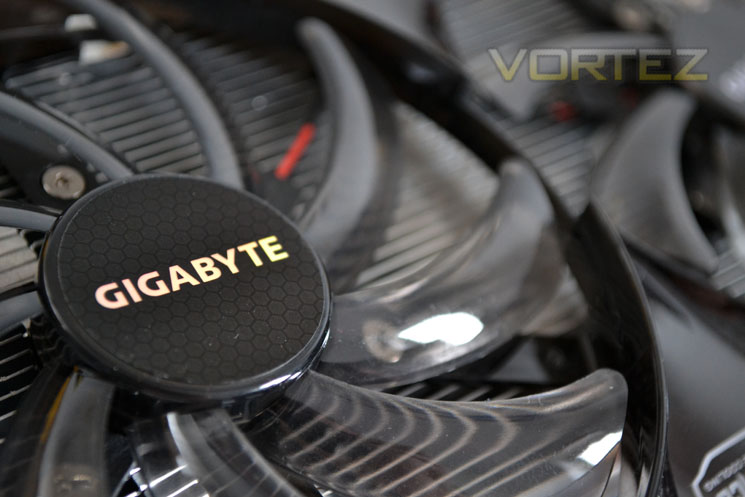
We like the Windforce coolers here at Vortez because they are cool, quiet and good looking. Today we see if it can continue that trend with a factory overclocked HD7850…

Product on Review: GIGABYTE HD7850 OC
Manufacturer and Sponsor: GIGABYTE
Street Price: £215inc. VAT (At time of review)
We’ve had a few WindForce cooling designs through our doors at Vortez and each one has impressed both with their attractive design but more importantly their performance. They ran very quietly and they kept the graphics card cool, even when overclocked. Today, we will be looking to see how it performs on an already cool running card, the HD7850. Is such a cooler needed on a cool running card you might ask. Well GIGABYTE have seen fit to overclock the GPU core on the HD7850 from 860MHz to 975Mhz which will add to the heat but will it be enough to justify the cooling ability of the WindForce design?
The AMD HD7850 holds the 28nm Pitcairn GPU as its heart which is slightly trimmed back from the full blown HD7870. It has four compute units less than the 7870 which means a 25% drop in stream processor count from 1280 to 1024 and the texture units sinking to 64 from 80. This results in a performance drop of 25 GT/s. The HD7870 is also clocked higher at 1GHz while the 7850 (reference) makes do with 860MHz. Because the HD7850 is lower clocked and has less GCUs it consumes less power, 130w vs 175w. The HD7850 still packs a solid punch though thanks to the identical memory configuration of the HD7870 which works off a 256-bit bus and clocked to the same 1200MHz (4800MHz effective) which gives us an impressive 153.6 GB/s memory bandwidth. The GIGABYTE HD7850 OC makes up a fair bit of ground though because of the 115 extra MHz factory overclock applied to the core raising the 55GT/s to an impressive 62.4. While the memory clockspeed remains the same, we hope to eek a little more performance from both the memory and the core clockspeeds when we test the maximum overclock of the card.
Here’s what GIGABYTE had to say about their latest card:
GV-R785OC-2GD features two 100mm inclined fans and two pure copper heat pipes. With 100mm fans, the card is virtually silent that its noise level runs 31dB at full loading. Each fan has 30.5 CFM airflow to enhance heat dissipation. With king-size fans and inclined fan design, heat can dissipate quickly by the most effective airflow. New WINDFORCETM 2X also adapts Direct Heat Pipe Touch technology, which means that heat pipes physically contact with GPU directly. Processor’s heat will transfer to heat pipes and fins.
Let’s take a look at the specification…
Specification
AMD have positioned the reference HD7850 between NVIDIA’s GTX570 and the GTX560Ti graphics cards. I would however wage that the GIGABYTE varient will be closer to the GTX570 than the GTX560Ti due to the overclocks applied.
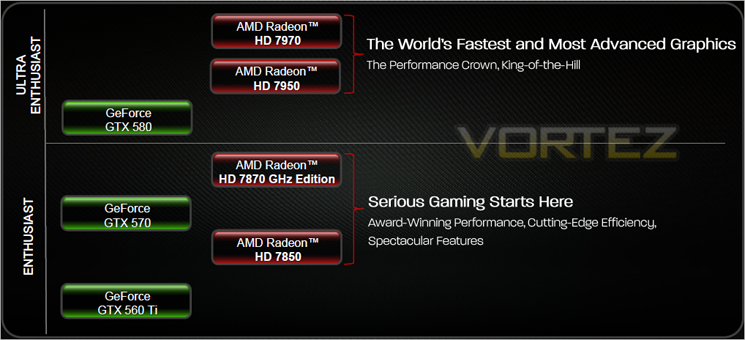
Below is a full run down of the graphics card’s specifications:
GIGABYTE HD7850 OC (GV-R785OC-2GD)
-975MHz Engine Clock
-2GB GDDR5 Memory
-1200MHz Memory Clock (4.8 Gbps GDDR5)
-153.6GB/s memory bandwidth (maximum)
-1024 Stream Processors
-GCN Architecture
-16 Compute Units (1024 Stream Processors)
-64 Texture Units
-128 Z/Stencil ROP Units
-32 Color ROP Units
-Dual Geometry Engines
-Dual Asynchronous Compute Engines (ACE)
-256-bit GDDR5 memory interface
-PCI Express 3.0 x16 bus interface
-DirectX® 11.1-capable graphics
-OpenGL 4.2 support
-Partially Resident Textures (PRT)
-Ultra-high resolution texture streaming technology
-Image quality enhancement technology
-Up to 24x multi-sample and super-sample anti-aliasing
-Adaptive anti-aliasing
-Morphological Anti-Aliasing (MLAA)
-Enhanced Quality Anti-Aliasing (EQAA)
-DirectX® 9/10/11 Supersample Anti-Aliasing (SSAA)
-Requires AMD Catalyst™ 12.2 or later
-16x angle independent anisotropic texture filtering
-AMD Eyefinity multi-display technology2
-Up to 6 displays supported
-Independent resolutions, refresh rates, color controls, and video overlays
-Display grouping
-Combine multiple displays to behave like a single large display
-Discrete Digital Multi-Point Audio (DDMA)
-AMD App Acceleration3
-Supports OpenCL™ 1.2, DirectCompute 11 & Microsoft C++ AMP
-Double Precision Floating Point
-AMD HD Media Accelerator
-Unified Video Decoder (UVD)
-H.264
-VC-1
-MPEG-2 (SD & HD)
-MVC (Blu-ray 3D)
-MPEG-4 Part 2 (DivX/Xvid)
-Adobe Flash
-DXVA 1.0 & 2.0 support
WMV HD
-Video Codec Engine (VCE)
-Multi-stream hardware H.264 encoder
-Full-fixed mode: 1080p @ 60 FPS encoding
-Hybrid mode: Stream Processor-assisted encoding
-Enhanced Video Quality features
-Advanced post-processing and scaling
-Deblocking
-Denoising
-Automatic deinterlacing
-Mosquito noise reduction
-Edge enhancement
-3:2 pulldown detection
-Advanced video color correction
-Brighter whites processing (Blue Stretch)
-Independent video gamma control
-Flesh tone correction
-Color vibrance control
-Dynamic contrast
-Dynamic video range control
-AMD HD3D technology5
-Stereoscopic 3D display/glasses support
-Blu-ray 3D support
-Stereoscopic 3D gaming
-3rd party Stereoscopic 3D middleware software support
-AMD CrossFire™ multi-GPU technology6
-Supports dual-GPU performance scaling
-Cutting-edge integrated display support
-DisplayPort 1.2
-Max resolution: 4096×2160 per display
-Multi-Stream Transport
-21.6 Gbps bandwidth
-High bit-rate audio
-Quad HD/4k video support
-1080p60 Stereoscopic 3D
-HDMI® (With 4k, 3D, 3GHz, Deep Color and x.v.Color™)
-Max resolution: 4096×2160
-1600p60 Stereoscopic 3D
-Quad HD/4k video support
-Dual-link DVI with HDCP
-Max resolution: 2560×1600
-Integrated HD audio controller
-Output protected high bit rate 7.1 channel surround sound over HDMI with no additional cables required
-Supports AC-3, AAC, Dolby TrueHD and DTS Master Audio formats
-AMD PowerPlay™ power management technology4
-Automatic power management with low power idle states
-AMD PowerTune technology4
-Intelligent TDP management technology
-Dynamic clockspeed/performance enhancement for games
-AMD ZeroCore Power technology4
-Ultra-low idle power when the connected display is in power saving mode
-Efficient low power mode for desktop work
–Secondary GPUs in an AMD CrossFire™ technology configuration power down when unneeded
AMD Catalyst™ graphics and HD video configuration software
-Software support for Windows 7 and Windows Vista
-AMD Catalyst™ Control Center – AMD Catalyst™ software application and user interface for setup, configuration, and accessing features of AMD Radeon products.
-Unified Graphics display driver – AMD Catalyst™ software enabling other PC programs and devices to use advanced graphics, video, and features of AMD Radeon™ products.
-975MHz Engine Clock
-2GB GDDR5 Memory
-1200MHz Memory Clock (4.8 Gbps GDDR5)
-153.6GB/s memory bandwidth (maximum)
-1024 Stream Processors
-GCN Architecture
-16 Compute Units (1024 Stream Processors)
-64 Texture Units
-128 Z/Stencil ROP Units
-32 Color ROP Units
-Dual Geometry Engines
-Dual Asynchronous Compute Engines (ACE)
-256-bit GDDR5 memory interface
-PCI Express 3.0 x16 bus interface
-DirectX® 11.1-capable graphics
-OpenGL 4.2 support
-Partially Resident Textures (PRT)
-Ultra-high resolution texture streaming technology
-Image quality enhancement technology
-Up to 24x multi-sample and super-sample anti-aliasing
-Adaptive anti-aliasing
-Morphological Anti-Aliasing (MLAA)
-Enhanced Quality Anti-Aliasing (EQAA)
-DirectX® 9/10/11 Supersample Anti-Aliasing (SSAA)
-Requires AMD Catalyst™ 12.2 or later
-16x angle independent anisotropic texture filtering
-AMD Eyefinity multi-display technology2
-Up to 6 displays supported
-Independent resolutions, refresh rates, color controls, and video overlays
-Display grouping
-Combine multiple displays to behave like a single large display
-Discrete Digital Multi-Point Audio (DDMA)
-AMD App Acceleration3
-Supports OpenCL™ 1.2, DirectCompute 11 & Microsoft C++ AMP
-Double Precision Floating Point
-AMD HD Media Accelerator
-Unified Video Decoder (UVD)
-H.264
-VC-1
-MPEG-2 (SD & HD)
-MVC (Blu-ray 3D)
-MPEG-4 Part 2 (DivX/Xvid)
-Adobe Flash
-DXVA 1.0 & 2.0 support
WMV HD
-Video Codec Engine (VCE)
-Multi-stream hardware H.264 encoder
-Full-fixed mode: 1080p @ 60 FPS encoding
-Hybrid mode: Stream Processor-assisted encoding
-Enhanced Video Quality features
-Advanced post-processing and scaling
-Deblocking
-Denoising
-Automatic deinterlacing
-Mosquito noise reduction
-Edge enhancement
-3:2 pulldown detection
-Advanced video color correction
-Brighter whites processing (Blue Stretch)
-Independent video gamma control
-Flesh tone correction
-Color vibrance control
-Dynamic contrast
-Dynamic video range control
-AMD HD3D technology5
-Stereoscopic 3D display/glasses support
-Blu-ray 3D support
-Stereoscopic 3D gaming
-3rd party Stereoscopic 3D middleware software support
-AMD CrossFire™ multi-GPU technology6
-Supports dual-GPU performance scaling
-Cutting-edge integrated display support
-DisplayPort 1.2
-Max resolution: 4096×2160 per display
-Multi-Stream Transport
-21.6 Gbps bandwidth
-High bit-rate audio
-Quad HD/4k video support
-1080p60 Stereoscopic 3D
-HDMI® (With 4k, 3D, 3GHz, Deep Color and x.v.Color™)
-Max resolution: 4096×2160
-1600p60 Stereoscopic 3D
-Quad HD/4k video support
-Dual-link DVI with HDCP
-Max resolution: 2560×1600
-Integrated HD audio controller
-Output protected high bit rate 7.1 channel surround sound over HDMI with no additional cables required
-Supports AC-3, AAC, Dolby TrueHD and DTS Master Audio formats
-AMD PowerPlay™ power management technology4
-Automatic power management with low power idle states
-AMD PowerTune technology4
-Intelligent TDP management technology
-Dynamic clockspeed/performance enhancement for games
-AMD ZeroCore Power technology4
-Ultra-low idle power when the connected display is in power saving mode
-Efficient low power mode for desktop work
–Secondary GPUs in an AMD CrossFire™ technology configuration power down when unneeded
AMD Catalyst™ graphics and HD video configuration software
-Software support for Windows 7 and Windows Vista
-AMD Catalyst™ Control Center – AMD Catalyst™ software application and user interface for setup, configuration, and accessing features of AMD Radeon products.
-Unified Graphics display driver – AMD Catalyst™ software enabling other PC programs and devices to use advanced graphics, video, and features of AMD Radeon™ products.
Let’s move on to the features of the GIGABYTE HD7850 OC…
Features
Overclock Edition
GIGABYTE GV-R785OC-2GD is an Overclock Edition Graphics Card. Not only built with AMD’s latest 28nm GPU and GDDR5, GIGABYTE overclocks these cards to provide end users an incredibly immersive HD gaming experience and unrivaled performance.
GIGABYTE WINDFORCE™3X & WINDFORCE™2X
GIGABYTE always dedicates to providing the best thermal solution for serious gamers.GV-R787OC-2GD features WINDFORCE™3X Cooling Technology, GIGABYTE’s innovative new generation triple-fan solution with patented anti-turbulence inclined fans and two 8mm pure copper heat pipes. The combination of anti-turbulence inclined fans and pure copper heat pipes helps to reduce excessive heat and minimizes the flow of turbulence between fans. For GV-R787OC-2GD, GIGABYTE creates the first unique “Triangle Cool” Technology (patent pending) to enhance the speed of heat dissipation.
GV-R785OC-2GD features two 100mm inclined fans and two pure copper heat pipes. With 100mm fans, the card is virtually silent that its noise level runs 31dB at full loading. Each fan has 30.5 CFM airflow to enhance heat dissipation. With king-size fans and inclined fan design, heat can dissipate quickly by the most effective airflow. New WINDFORCETM 2X also adapts Direct Heat Pipe Touch technology, which means that heat pipes physically contact with GPU directly. Processor’s heat will transfer to heat pipes and fins.
AMD CrossFire™ Technology
The AMD Radeon™ HD 7870 GPU supports AMD CrossFire™ Technology and provides excellent multi GPU scaling. With the introduction of the AMD Radeon™ HD 6900 Series Graphics, AMD began delivering improved AMD CrossFire™ Technology scaling when using two GPUs. AMD is proud to continue to offer that amazing performance with its newest AMD Radeon™ HD 7000 series graphics products.
AMD Eyefinity Technology
AMD Eyefinity Technology provides advanced multiple monitor technology enabling an incredibly immersive graphic and computing experience with innovative display capabilities, supporting massive desktop workspaces and super-high resolution gaming environments. AMD Eyefinity technology with DisplayPort connectivity enables a single GPU to support up to six independent display outputs simultaneously, depending on the OEM implementation.
AMD Eyefinity technology works with games that support non-standard aspect ratios, which is required for panning across multiple displays. To enable more than two displays, one of two cases must be satisfied:
1) Additional panels with native DisplayPort™ connectors are used;
2) Certified DisplayPort™ adapters to convert your monitor’s native input to your cards
DisplayPort™ or Mini-DisplayPort™ connector(s) are used.
With the introduction and wide availability of DisplayPort™ to single-link DVI dongles, option 2 above is a low cost way to convert a set of already-owned monitors into an AMD Eyefinity technology ready display configuration.
Unlike a similar multi monitor gaming solution offered by NVIDIA, AMD Eyefinity technology does not require two graphics cards to work. Therefore, AMD offers a multi monitor gaming solution with potential for a lower setup cost. A single AMD Radeon™ 7970 GPUs can employ AMD Eyefinity technology and AMD CrossFire™ technology to provide an outstanding multi monitor gaming experience. The following chart shows the AMD Radeon™ HD 7970 graphics in a dual AMD CrossFire™ configuration versus the NVIDIA SLI GTX 580 in three monitor gaming scenario’s.
Improved Tessellation
The latest iteration of architecture in the AMD Radeon™ HD 7970 GPU features a brand new Generation of Tesselator (Gen 9) in its Geometry Engine. This features optimizations such as; Increased vertex re-use, Off-chip buffering improvements and larger parameter caches. This helps Improve performance at all tessellation factors at up to 4x the throughput of AMD Radeon™ HD 6900 series graphics (Gen 8 ).
AMD HD3D Technology
AMD HD3D Technology is supported by an advanced and open ecosystem that, in conjunction with specific AMD hardware and software technologies, enables 3D display capabilities for many PC applications and experiences.
Your PC has evolved, offering unprecedented amount of games, photos and movies for you to play, watch, design, create, share and download in 3D. With the arrival of the latest in 3D technology you can now enjoy an enhanced visual experience on Stereo 3D-capable desktops and notebooks powered by AMD HD3D Technology.
HDMI 1.4a
More bandwith than standard HDMI allows full implementation of 60Hz Stereo 3D. Standard HDMI ports do not have adequate bandwidth for more than 3D 1080p at 24fps.
Ultra-high resolution (4k Panels)
– Current implementations currently use 4*DVI or 2*DP 1.1, which is expensive and unwieldy.
– AMD will move to a single-connector output for 4k via DP 1.2 HBR2 and HDMI 1.4a 3GHz mode.
AMD Quad Buffer SDK
– Native 3D support for Developers.
– functions with Dx9, 10 and 11
– Native support scheduled for Windows 8
Nearly 600 games support AMD’s implementation of 3D either natively or through middleware partners. Also support for many 3D displays already on the market including Samsung and LG’s proprietry implementation.
Video Codec Engine (VCE)
– H.264 HD Encoder
– Power efficient
– faster than realtime 1080p @ 60 FPS
– Variable Compression Quality
– Multiple Input Options:- (1) Frame Buffer, (2) GPU Display. (2) is useful for wireless displays.
AMD ZeroCore Power
When a discrete GPU is in a static screen state it works to minimize idle power by enabling a host of active power saving functions including (but not limited to); clock gating, power gating, memory compression, and a host of other features. However, GPUs with AMD’s exclusive ZeroCore Power technology can take energy savings to entirely new heights by completely powering down the core GPU while the rest of the system remains active.
Nearly all PCs can be configured to turn off their displays after a long period of inactivity. This is known as the long idle state; where the screen is blanked but the rest of the system remains in an active and working power state (ACPI G0/S0). As soon as the system goes into long idle state and applications are not actively changing the screen contents, the GPU enters the ZeroCore power state. In the ZeroCore power state, the GPU core (including the 3D engine / compute units, multimedia and audio engines, displays, memory interfaces, etc.) is completely powered down.
However, one cannot simply remove the GPU and its associated device context completely; particularly when it is the only GPU in the system as is the case in many enthusiast platforms. The operating system and SBIOS must still be aware that a GPU is still present in the system. For this reason, the ZeroCore Power state maintains a very small bus control block to ensure that GPU context is still visible to the operating system and SBIOS. The ZeroCore power state also manages the power sequencing of the GPU to ensure that the power up/down mechanism is self-contained and independent of the rest of the system.
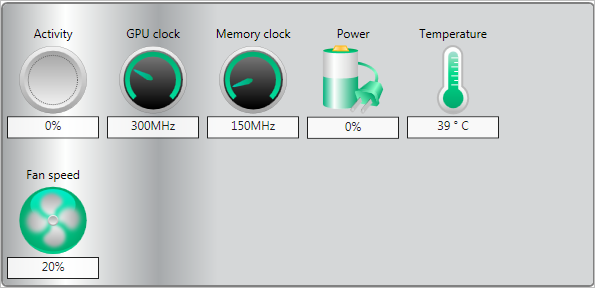
The enablement of the ZeroCore Power feature is controlled by the driver. The driver monitors the display contents and allows the GPU to enter the ZeroCore Power in the condition that the GPU enters long idle and subsequent work requests are no longer being submitted to the engine. If any applications update the screen contents, ZeroCore Power technology can periodically wake the GPU to update the framebuffer contents and put the GPU back into the ZeroCore Power state. Furthermore, applications such as Windows 7 desktop gadgets are architected to minimize activity and save power in the long idle state. These applications are active during screen-on mode to display dynamic content such as weather, RSS feeds, stock symbols, system status, etc. but also have the intelligence to suspend any updates and activity when the system enters long idle. These applications will not wake the GPU from the ZeroCore Power state in long idle.
AMD ZeroCore Power technology delivers tremendous energy savings. Many PCs remain in the long idle state for a variety of use cases that are highly relevant to everyday consumers, enthusiasts and professionals. In ZeroCore Power mode, users can still enjoy non-graphics activities such as file serving/streaming, motherboard audio and music, and remote access while the GPU core is essentially powered off.
ZeroCore Power technology also scales with AMD CrossFire™ technology. With an AMD CrossFire platform, all non-primary GPUs are in the ZeroCore Power state when not in use. For AMD CrossFire workloads, the driver will engage the non-primary GPUs to deliver full performance on-demand. The primary GPU can also enter the ZeroCore Power state during long idle as well. This delivers scalable benefits for the enthusiast. First, it effectively removes the power increase for users of AMD CrossFire under idle and light (single GPU) workloads. Second, it removes the noise penalty multiGPU users have always had to endure since the GPU fans are off in ZeroCore Power mode.
Nearly all PCs can be configured to turn off their displays after a long period of inactivity. This is known as the long idle state; where the screen is blanked but the rest of the system remains in an active and working power state (ACPI G0/S0). As soon as the system goes into long idle state and applications are not actively changing the screen contents, the GPU enters the ZeroCore power state. In the ZeroCore power state, the GPU core (including the 3D engine / compute units, multimedia and audio engines, displays, memory interfaces, etc.) is completely powered down.
However, one cannot simply remove the GPU and its associated device context completely; particularly when it is the only GPU in the system as is the case in many enthusiast platforms. The operating system and SBIOS must still be aware that a GPU is still present in the system. For this reason, the ZeroCore Power state maintains a very small bus control block to ensure that GPU context is still visible to the operating system and SBIOS. The ZeroCore power state also manages the power sequencing of the GPU to ensure that the power up/down mechanism is self-contained and independent of the rest of the system.
The enablement of the ZeroCore Power feature is controlled by the driver. The driver monitors the display contents and allows the GPU to enter the ZeroCore Power in the condition that the GPU enters long idle and subsequent work requests are no longer being submitted to the engine. If any applications update the screen contents, ZeroCore Power technology can periodically wake the GPU to update the framebuffer contents and put the GPU back into the ZeroCore Power state. Furthermore, applications such as Windows 7 desktop gadgets are architected to minimize activity and save power in the long idle state. These applications are active during screen-on mode to display dynamic content such as weather, RSS feeds, stock symbols, system status, etc. but also have the intelligence to suspend any updates and activity when the system enters long idle. These applications will not wake the GPU from the ZeroCore Power state in long idle.
AMD ZeroCore Power technology delivers tremendous energy savings. Many PCs remain in the long idle state for a variety of use cases that are highly relevant to everyday consumers, enthusiasts and professionals. In ZeroCore Power mode, users can still enjoy non-graphics activities such as file serving/streaming, motherboard audio and music, and remote access while the GPU core is essentially powered off.
ZeroCore Power technology also scales with AMD CrossFire™ technology. With an AMD CrossFire platform, all non-primary GPUs are in the ZeroCore Power state when not in use. For AMD CrossFire workloads, the driver will engage the non-primary GPUs to deliver full performance on-demand. The primary GPU can also enter the ZeroCore Power state during long idle as well. This delivers scalable benefits for the enthusiast. First, it effectively removes the power increase for users of AMD CrossFire under idle and light (single GPU) workloads. Second, it removes the noise penalty multiGPU users have always had to endure since the GPU fans are off in ZeroCore Power mode.
GCN Architecture
Available on select, high-performance AMD Radeon™ HD 7000 Series graphics products, the Graphics Core Next (GCN) Architecture is a radically new approach to the design of a consumer GPU.Most importantly, it is the world’s first 28nm GPU architecture, which enables AMD to fit up to 4.3 billion transistors-the most basic building blocks of a GPU-into approximately the same space once needed to fit 2.6 billion. Increasing transistor density by greater than 60% is more than just a feat of engineering-it’s responsible for the world’s most powerful and advanced GPU.1
Designed to push not only the boundaries of DirectX® 11 gaming, the GCN Architecture is also AMD’s first design specifically engineered for general computing. Equipped with up to 32 compute units (2048 stream processors), each containing a scalar coprocessor, AMD’s 28nm GPUs are more than capable of handling workloads-and programming languages-traditionally exclusive to the processor. Coupled with the dramatic rise of GPU-aware programming languages like C++ AMP and OpenCL™, the GCN Architecture is truly the right architecture for the right time.
Performance
In simple terms, increasing the number of transistors in a GPU has a big impact on the potential performance of a graphics card-but transistors alone are not enough. It takes a truly great design, like the GCN Architecture, to effectively utilize that potential for real-world performance.
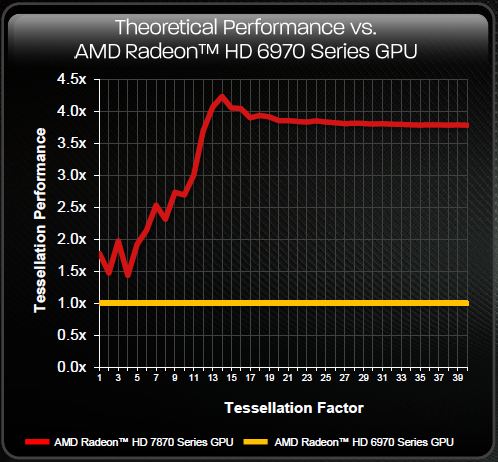
Below you will find just a few examples of how this truly next-generation architecture delivers on one very simple design goal: enable the world’s most powerful graphics cards.1
Starting with GPU utilization, AMD has taken great strides to ensure that the GCN Architecture is capable of efficiently using its hardware resources. This seems like such a simple idea, but designing a GPU to frequently approach its peak theoretical performance is a challenge the GCN Architecture tackles with ease.
The GCN Architecture is designed for improved utilization, which ensures that the GPU is making optimal use of its resources for maximum performance.
DirectX® 11 tessellation has also seen incredible improvement from previous AMD Radeon™ products. On the left in the image below, a chart plots the AMD Radeon™ HD 7970’s performance across 32 levels of tessellation, and the results are stunning: a 350% boost at the highest factors.2 And on the right, the GCN Architecture’s ability to effectively utilize its potential again shines through: highly-tessellated games are decisively faster by an average of 79%!
The GCN Architecture also benefits from dramatically improved tessellation performance. Games featuring this DirectX® 11 technology are considerably faster than they were on the previous generation of AMD Radeon™ products.
Every gamer knows that the GPU’s clockspeed also has a big impact on the performance of a graphics card, and the GCN Architecture keeps that in mind.
But what many don’t know is that every graphics card is designed to draw only a certain amount of power from your PC’s power supply. This is called the Thermal Design Profile, or TDP, and it’s critical that the GPU architecture is capable of making the most of every watt. The GCN Architecture can do that thanks to a technology called AMD PowerTune technology.
AMD PowerTune is an intelligent system that performs real-time analysis of the games and applications that utilize a GPU. Examples of such software might include Battlefield 3 or Furmark. In the event that an application is not making the most of the power available to the GPU, AMD PowerTune can improve that application’s performance by raising the GPU’s clockspeed by up to 30%! Best of all, this technology is completely automatic and is designed specifically to improve gaming performance.
Available on all 28nm AMD Radeon™ products, AMD PowerTune is designed to enable significantly higher clockspeeds in your favorite games-automatically!
Image Quality
But performance is not enough for today’s demanding gamers. Image quality, or the clarity and accuracy of textures and effects, is equally important. The GCN Architecture is equipped with three key technologies that dramatically raise the bar in this regard.
Partially Resident Textures (PRT)
Even in the latest titles, gamers may have noticed that games often re-use or repeat textures, particularly on the ground or in background scenery such as mountains or trees. This is because increasing the physical size or number of textures in a game can have a negative impact on the performance of a GPU. PRT is a radical new technology that hopes to break this cycle.
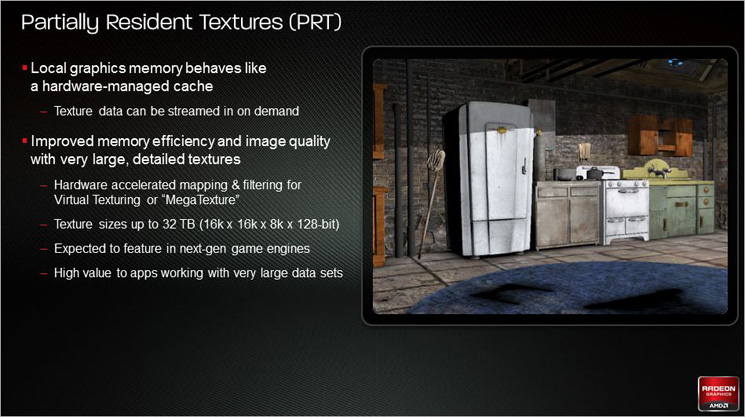
PRT can utilize absolutely enormous texture files, up to 32 terabytes large, with minimal performance impact. PRT accomplishes this by streaming small bits of these massive textures into the GPU as needed, giving compatible games a virtually endless supply of unique texture data it can apply to the game world. The GCN Architecture in 28nm AMD Radeon™ products is the first GPU design to feature a hardware implementation of this technology.
Partially Resident Textures (PRT) enables future games to utilize ultra-high resolution textures with the same performance as today’s small and often repetitive textures.
Improved Anisotropic Filtering (AF)
Available on every modern GPU, anisotropic filtering is a technique that assists the GPU in making sure textures in your favorite games remain razor sharp, even at a distance. Most games now offer the ability to enable this feature, and the AMD Catalyst™ driver suite has long provided players with the option to force enable anisotropic filtering for all of their games.
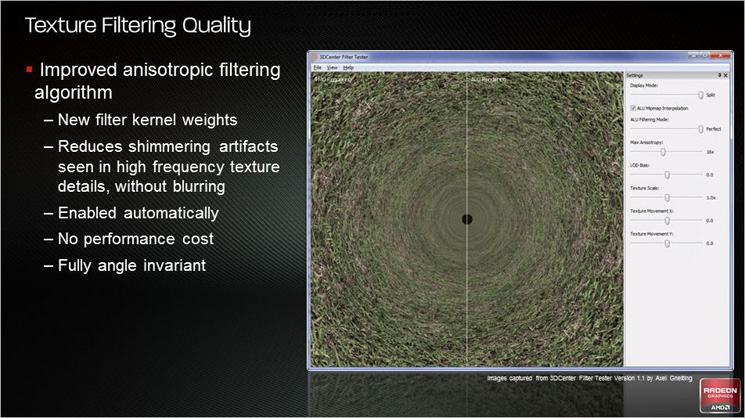
Where every GPU design differs, however, is in the way the anisotropic filtering is actually executed. The GCN Architecture has been specifically optimized to produce superior results when AF is enabled.
Improved anisotropic filtering in products like the AMD Radeon™ HD 7900 Series ensure gamers get sharper, better textures when this technology is enabled.
Improved DirectX® 11 Tessellation
As DirectX® 11 titles become more mature, game developers are naturally pushing the envelope of realism by utilizing a greater degree of special rendering effects. One such effect is tessellation, which can dynamically generate additional detail in a scene on the fly.
A wireframe scene of a rally car in DiRT 3 driving through water. On the left, notice there are no ripples. On the right, after tessellation, there is new and dynamic detail in the game.
As with anisotropic filtering, tessellation is not new to GPUs, but the manner in which tessellation is executed can have a large impact on the gaming experience. Because of this, the GCN Architecture has again been optimized to deliver up to 4x the performance of the AMD Radeon™ HD 6000 Series in heavily-tessellated games.
First Look
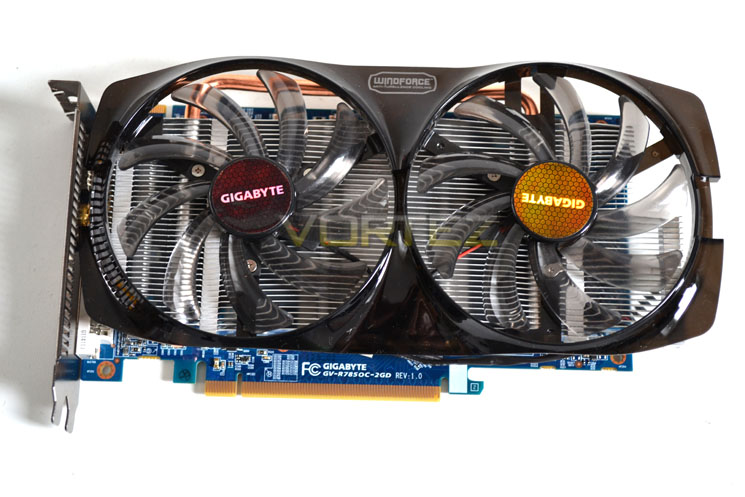
Graphics Card Top View
The GIGABYTE HD7850 OC is a striking graphics card. The Windforce x2 design dominates the cards appearance with its black shroud framing the twin 100mm smoked black fans. The shroud may look flimsy but as actually quite robust as far as plastic goes. The card measures 241 mm in length and 137mm in width due to the cooler overhanging the PCB by a fair margin.
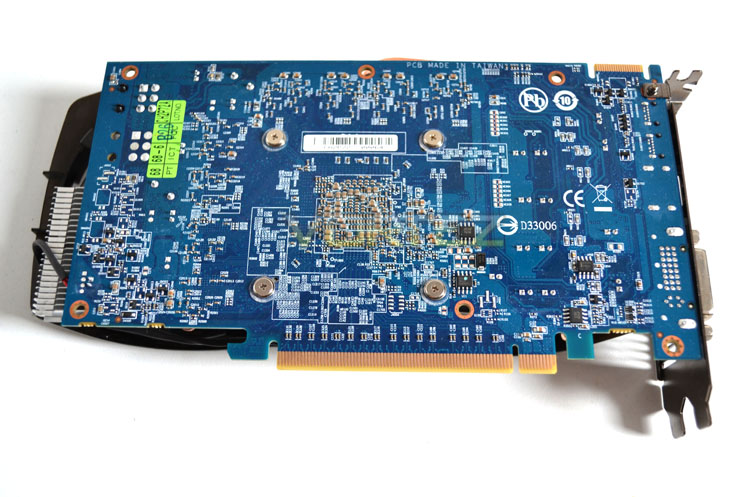
Graphics Card Bottom View
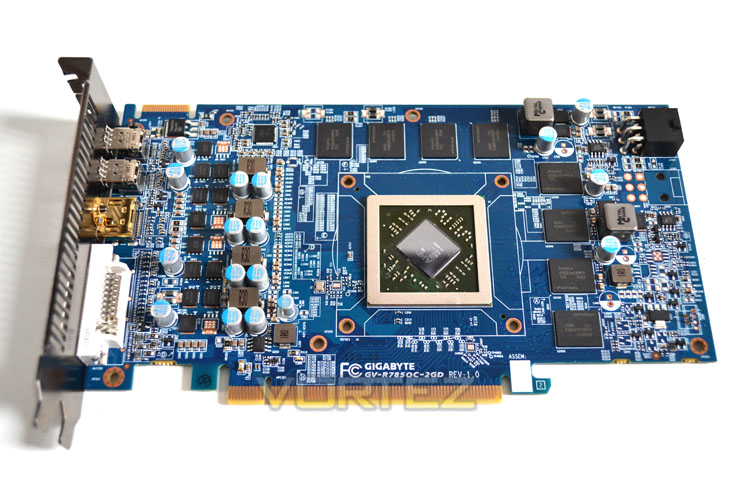
The power circuit board is printed in the now all too familiar GIGABYTE sky Royal Blue colour. Some people like this design but personally I prefer a more discreet black PCB as it will match most PC setup colour schemes. Nevertheless, the HD7850 OC is immediately identifiable as a GIGABYTE card and if you have a blue colour scheme, this card will work very well in your setup.
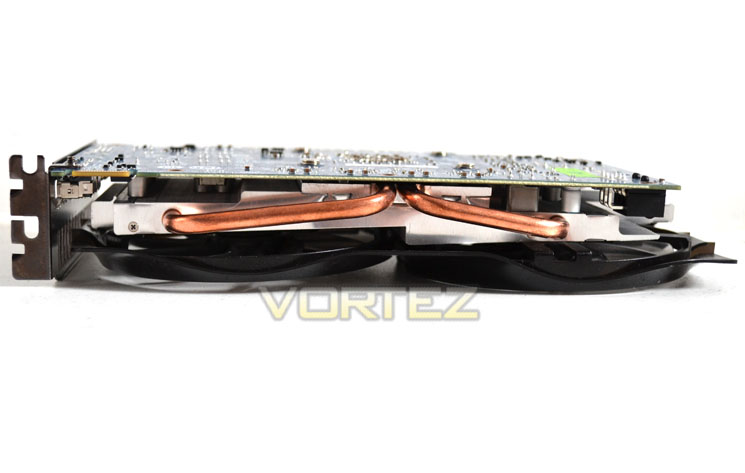
Graphics Card Side View
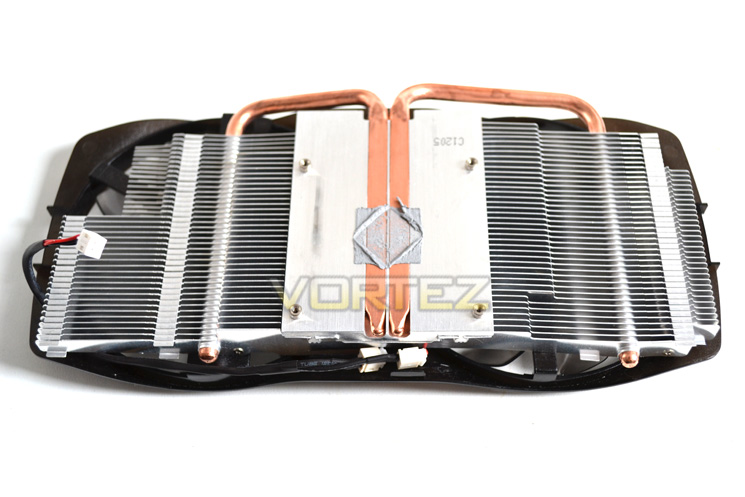
As you can see from the side view above, the HD7850 OC makes use of twin heatpipes which stretch out from the core area to maximise the heat dissipation of the aluminium cooler.
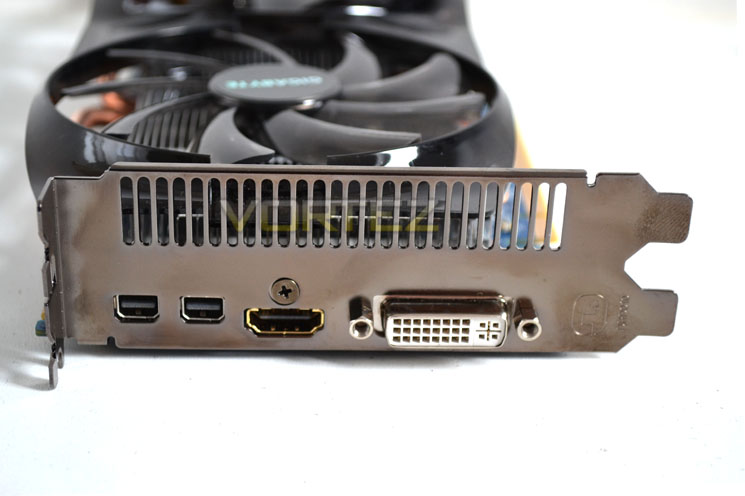
I/O Backplate
The backplate is identical to the reference design having a DVI-I port with HDMI and twin mini DisplayPorts.
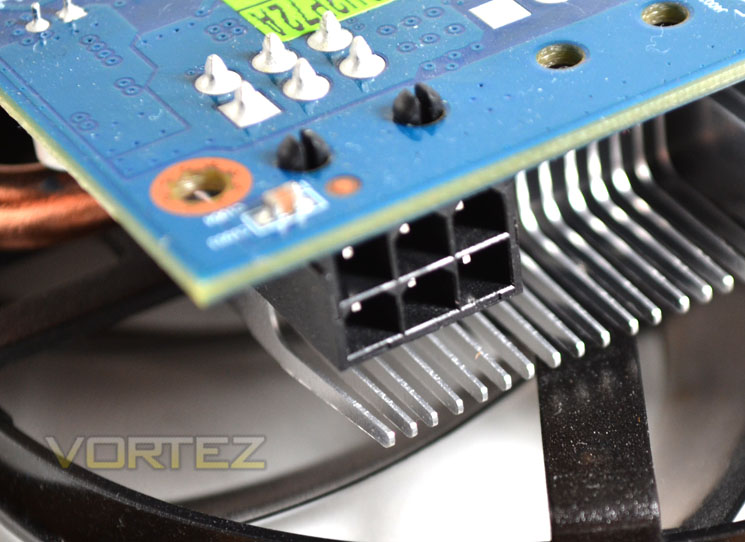
Power Port
GIGABYTE recommend a PSU capable of 500W to run this card which will also require a 6pin PCIe power lead. AMD specify the TDP of the reference card to be 130W so I do not expect this card to be much higher than this despite the factory overclocked state. We will of course mesure power consumption later in the review.
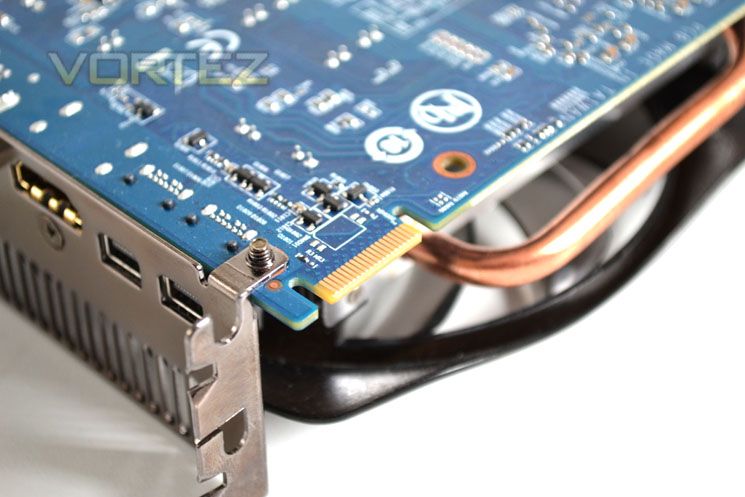
Crossfire Configuration
The HD7850 can be paired up with another card from the 7800 family of GPU’s but sadly that will be the limit of your Crossfire exploits as only one Crossfire tab is in-situ on the HD7850.
Let’s take a closer look at the cooler and card…
Closer Look
Heatsink Assembly
The GPU cooler is made up of a black translucent plastic shroud with twin 100mm fans. These sit atop of an aluminium finned heatsink with twin copper heatpipes which as you can see make direct contact with the GPU core. Our sample had a perfect contact surface and so if retail examples are replicated, there should be no requirement to replace the thermal interface material.
HD7850 OC Naked
The familiar GIGABYTE blue PCB is designed so the VRM module sits close to the I/O backplate vent. The core as you would expect is slightly off centre and framed by 8×256 GDDR5 modules which aside of the VRM placement is typical of today’s GPU designs.
Voltage Regulation
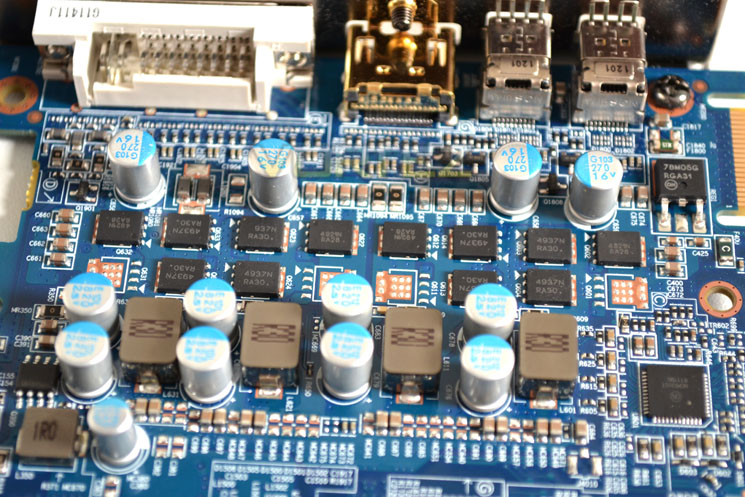
The VRM is a 4 phase design and makes use of GIGABYTE’s Ultra Durable 2 combination of Solid State Capacitors, Ferrite Core chokes and low RDS(on) MOSFETs.
HYNIX GDDR5
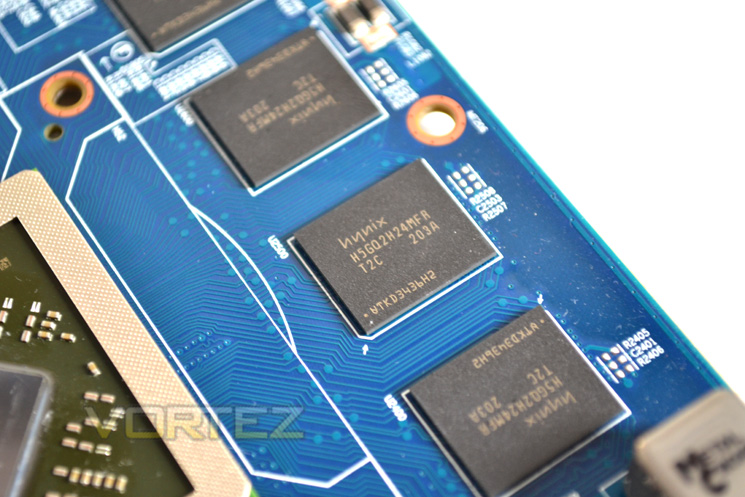
The GIGABYTE HD7850 OC features an identical configuration of 2GB GDDR5 found on the HD7870 which is made up of 8x256MB modules. The memory chips come courtesy of HYNIX and are labelled as H5GQ2H24MFA T2C. These chips are rated to run at 1250MHz (5GB/s effective) so we expect some good overclocking results on the memory.
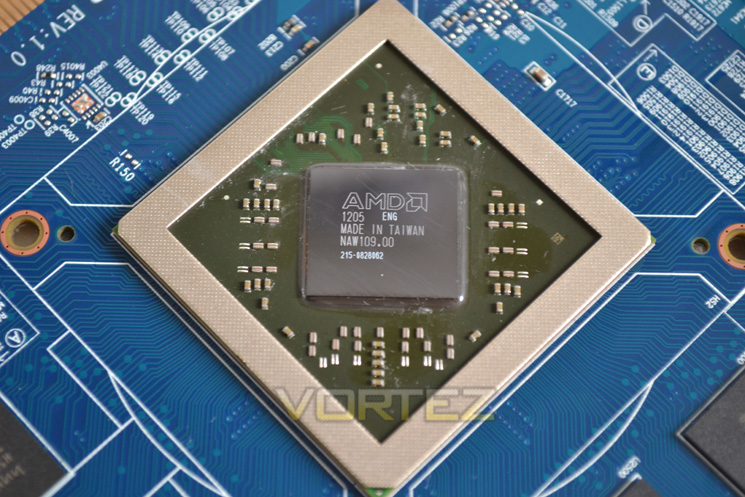
Pitcairn Core
Finally we arrive at the Pitcairn core. Like the whole 7000 family of processors, the Pitcairn is fully exposed with no IHS present to protect the delicate silicon. Although it has for GCU’s disabled, we still hope to see some good levels of performance being churned out.
Test Setup
With the latest Intel chipset release we decided to update our ageing X58 setup to the new X79 chipset. Not only that but we will be using the flagship Core i7-3960X Extreme Edition processor clocked to 4.5GHz to ensure we have no CPU bottlenecks. With 16GB of ram on board there should be minimal paging so the benchmarks we run today will hopefully give a true reflection of the graphics card’s performance.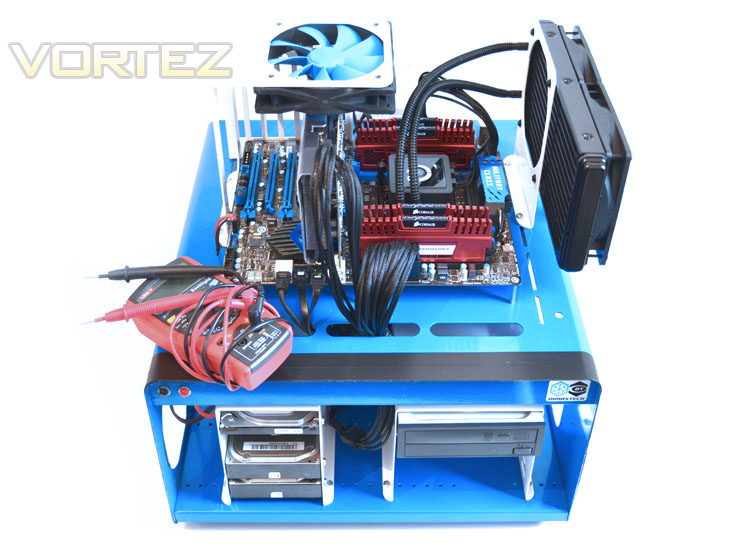
Some of the components for our test bench were kindly donated by CORSAIR who provided the majority of components without whom we would not have been able to bring you this review so a big thanks to them.
Graphics cards on test:
GIGABYTE HD7850 OC WindForce x2
ZOTAC GTX680 2GB GDDR5
AMD HD7870 2GB GDDR5
Zotac GTX580 AMP2! 3GB GDDR5
XFX R7970 Black Edition 3GB GDDR5
XFX R7770 Black Edition ‘S’ 1GB GDDR5
AMD HD7750 1GB GDDR5
AMD HD7770 1GB GDDR5
HIS HD7970 3GB GDDR5
XFX DD Radeon R7950 3072MB GDDR5
PowerColor PCS+ Radeon HD7950 3072MB GDDR5
AMD Radeon HD7950 3072MB GDDR5
AMD Radeon HD7970 3072MB GDDR5
ZOTAC GTX570 AMP! 1280MB GDDR5
NVIDIA GTX570 1280MB GDDR5
MSI GTX560Ti-448 Twin Frozr III 1280MB GDDR5
MSI GTX560Ti-384 Twin Frozr III 2GB GDDR5
AMD HD6990 4GB GDDR5
For this review we will be using the very latest CAT 12.4 drivers.
Motherboard: MSI X79 Big Bang X-Power II
CPU: Intel Core i7-3960X Extreme Edition @ 4.5GHz
RAM – 16GB (4x4GB) Corsair Vengeance (Red) DDR3 @ 1866MHz 9-10-9-27
Power Supply – ANTEC High Current Pro 1200W
Hard Drive – Hitachi SATA II 250GB
Samsung F3 1TB
Cooler – Corsair H100
Benchmarks
We have also updated our range of benchmarks to include the following games which will give the graphics cards a challenge and sort the wheat from the chaff. Each benchmark will be run at both stock and maximum overclock settings and utilise 1920×1080 and 2560×1600 resolutions along with AA at various levels (application dependent):
Battlefield 3
Crysis 2
Crysis Warhead
Metro 2033
Batman: Arkham City
Elder Scrolls: Skyrim
DiRT 3
Futuremark 3DMark 2011
Unigine: Heaven 2.5
Crysis 2
Crysis Warhead
Metro 2033
Batman: Arkham City
Elder Scrolls: Skyrim
DiRT 3
Futuremark 3DMark 2011
Unigine: Heaven 2.5
Let’s see how today’s cards performed…
Overclocking, Temperature & Power Consumption
The HD7850 arrives at a factory overclocked corespeed of 975MHz and a memory clockspeed of 1200MHz (4800MHz effective):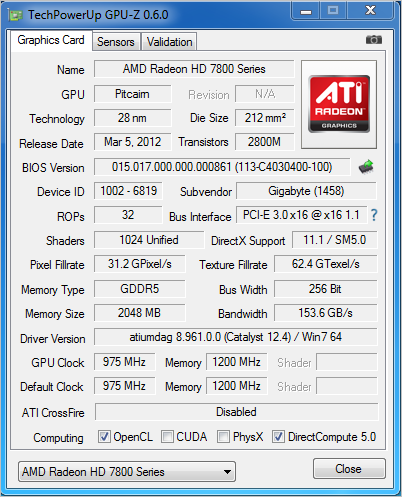
As we have seen with both the 7900 and 7700 graphics card families of AMD’s range, the latest range come highly clocked but with that there has been ample overclocking headroom. Adjusting Powertune to eradicate and power consumption interference we adjusted powertune to its maximum and set about overclocking.
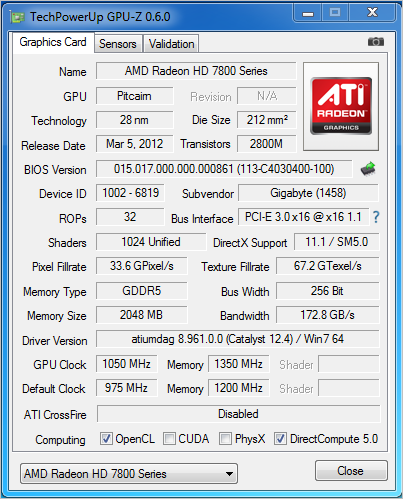
We managed to max out the slider on the core reaching an impressive 1050MHz. Sadly this is as far as AMD’s overclocking tool would allow us to go so we fired up fired up sapphires TRIXX utility but sadly this proved to be pretty much pointless due to the measly extra 35 Mmhz it afforded on the core. Memory overclocks were also good reaching 1350MHz (5400MHz effective).
While the overclocking results above are impressive it has to be said that the GIGABYTE cards was a very stubborn beast, locking up frequently and failing to recover which is less than impressive when you consider no such problems are encountered with reference varieties. I did sample CAT 12.1-12.4 and regardless of driver revision, the card exhibited the same behaviour which could be as a result of inadequate power regulation at the maximum overclocked speeds.
Power Consumption
To test for power consumption we do not use anything to technical, just a wall meter which measures the total system power draw minus the monitor.
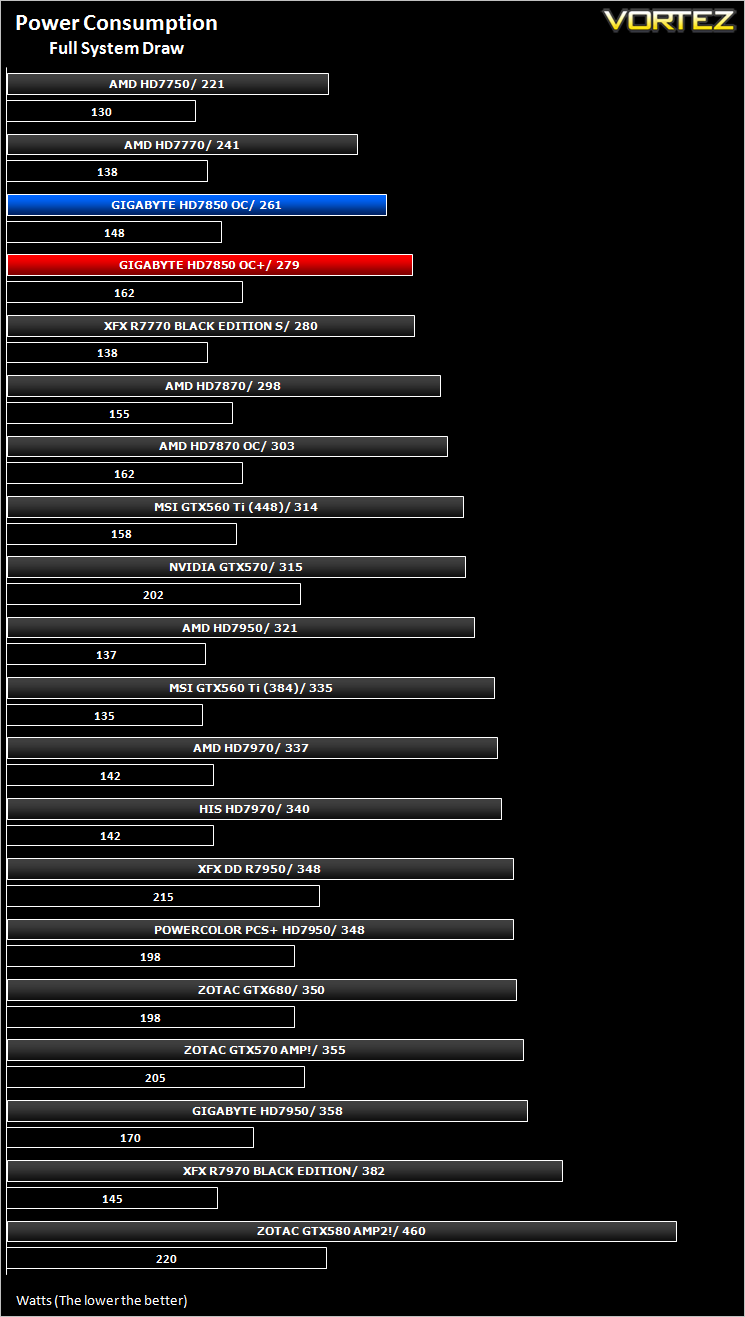
With no voltage adjustment available it came as little surprise that the card consumed little power. Even when overclocked to the maximum stable speed, the card drew little over AMD’s specified TDP of 130W with a full system draw measured at just 279W.
Temperature
To test temperatures we measured idle temperatures after booting windows, letting all applications finish loading and ran a few benchmarks. Once the benchmarks were complete we left the card to reach a cooling plateau where we then took the idle temperatures. For the load tests, we ran Furmark for 20 minutes, taking the absolute maximum temperature attained.
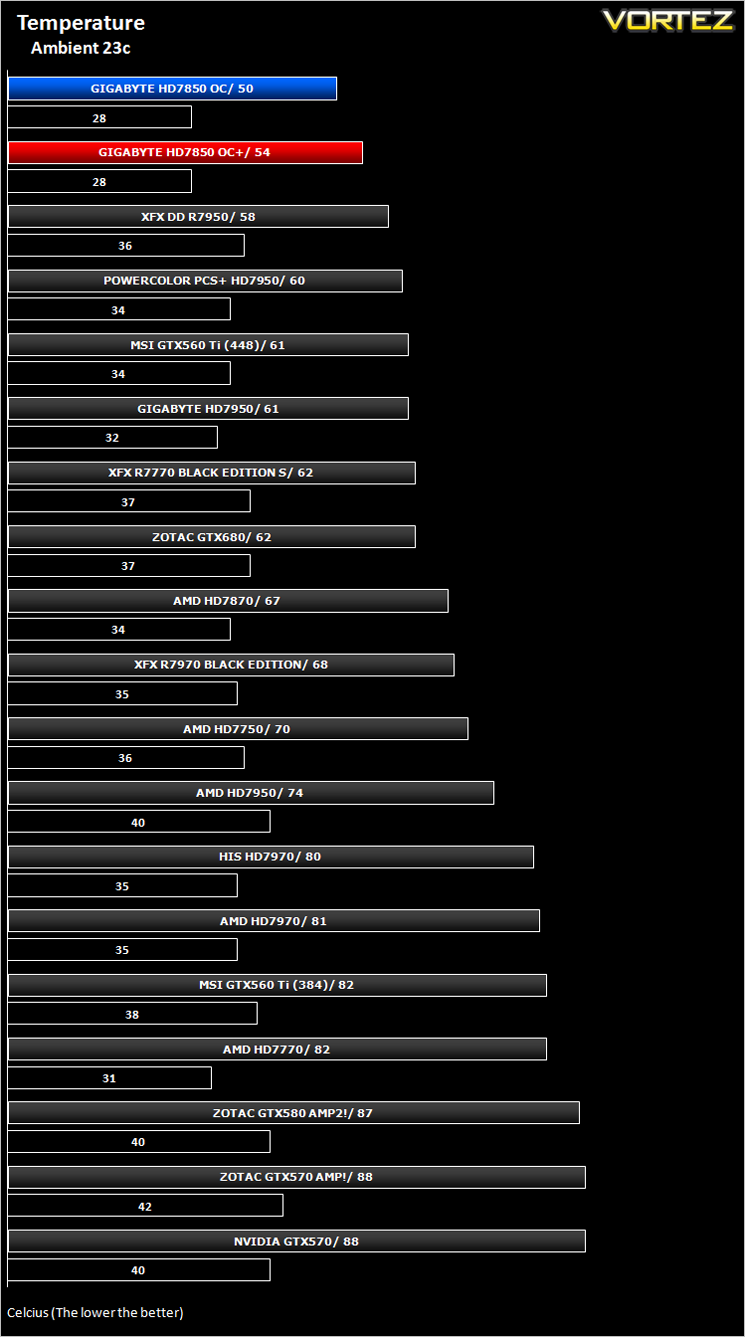
If graphics cards were T.V characters then the GIGABYTE HD7850 OC would be ‘The Fonz’ of Happy Days fame, it is that cool! The GIGABYTE card had temps just 27c above ambient at the factory overclocked speeds which is an amazing achievement and rightly deserves a place at the pinnacle of our chart. Even when overclocked, the Windforce cooler didn’t break a sweat with just an additional 4c measured.
Let’s move on to our suite of benchmarks…
Battlefield 3
Battlefield 3 leaps ahead of its time with the power of Frostbite™ 2, the next instalment of DICE’s cutting-edge game engine. This state-of-the-art technology is the foundation on which Battlefield 3 is built, delivering enhanced visual quality, a grand sense of scale, massive destruction, dynamic audio and incredibly lifelike character animations. As bullets whiz by, walls crumble, and explosions throw you to the ground, the battlefield feels more alive and interactive than ever before. In Battlefield 3, players step into the role of the elite U.S. Marines where they will experience heart-pounding missions across diverse locations including Paris, Tehran and New York.
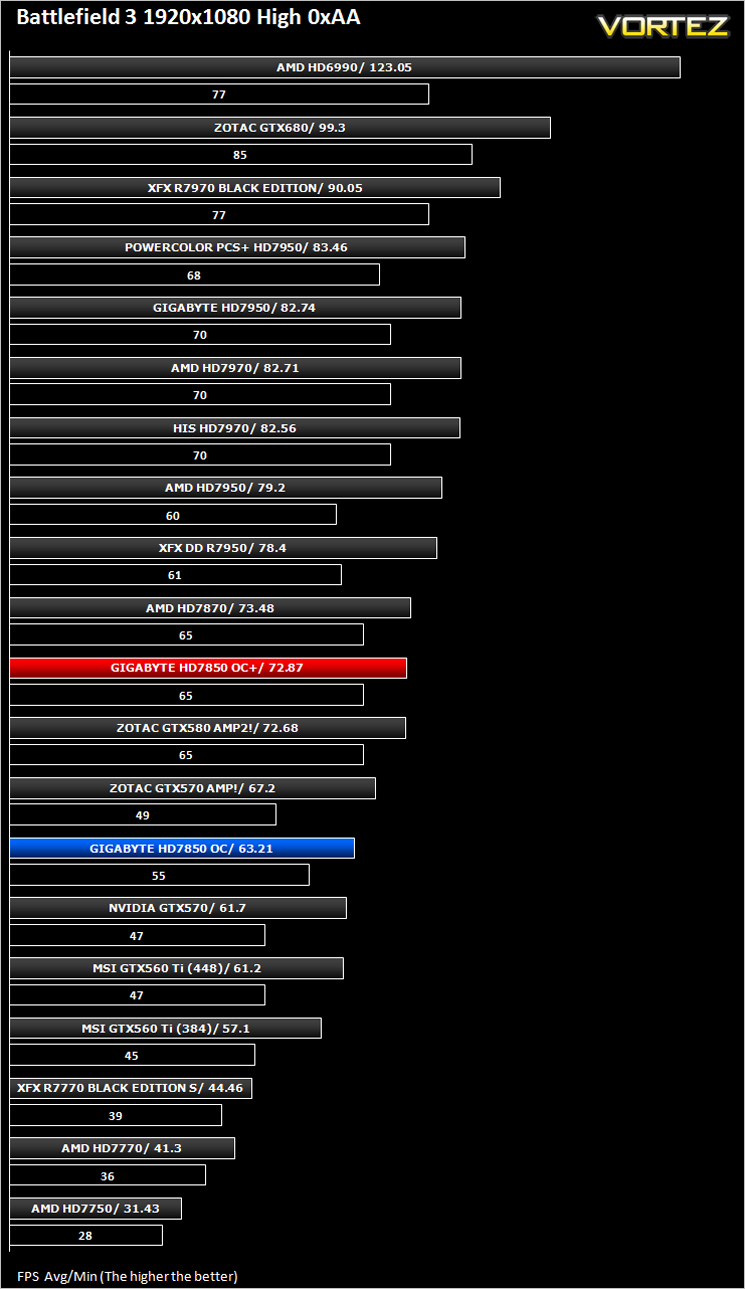
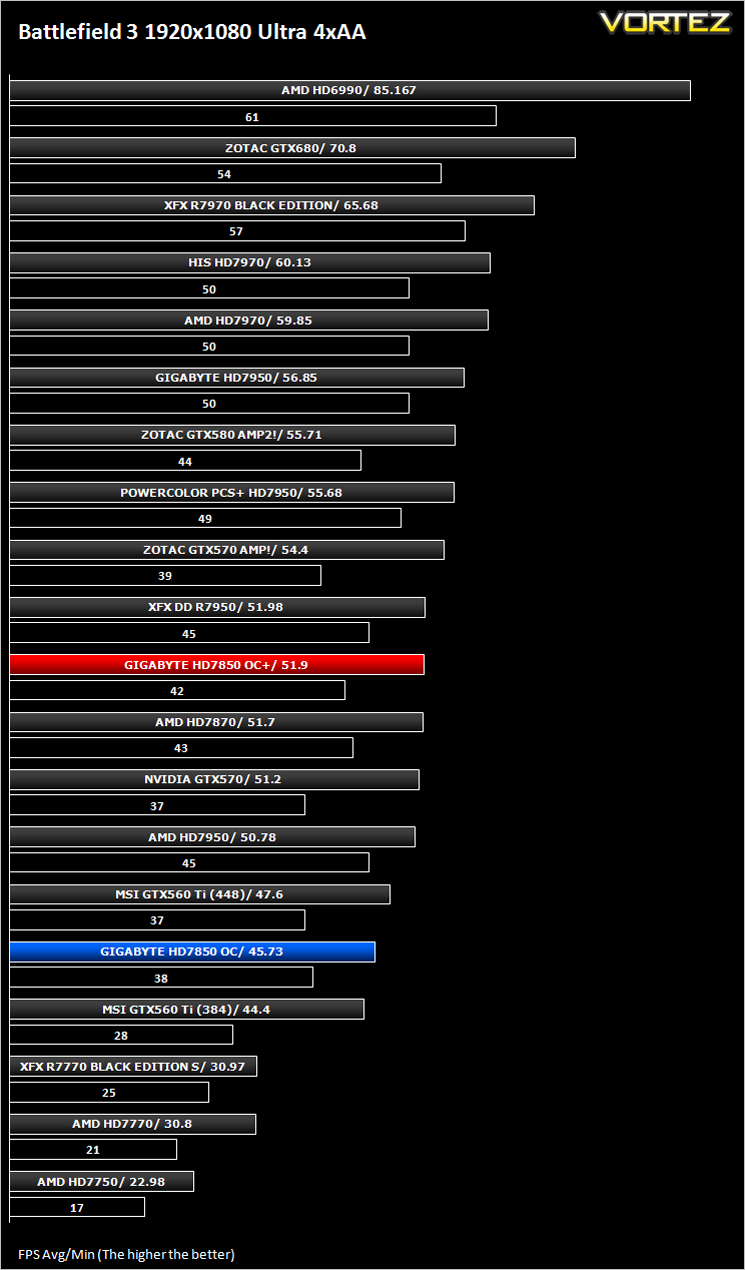
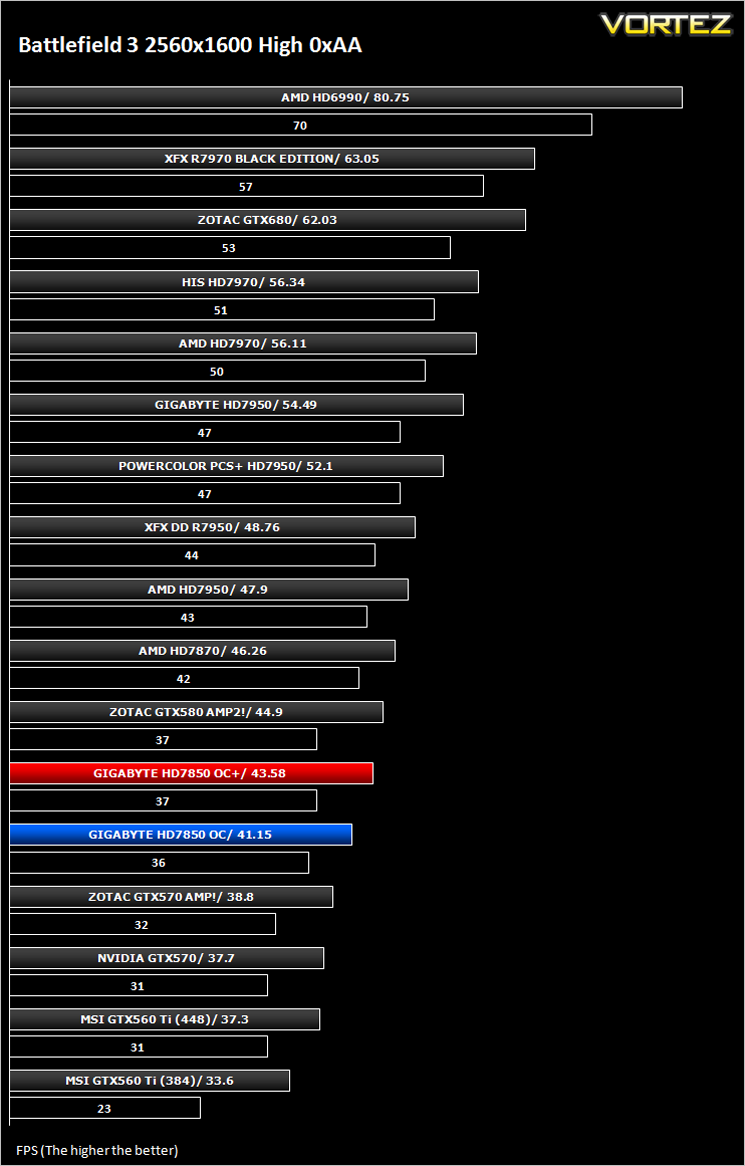
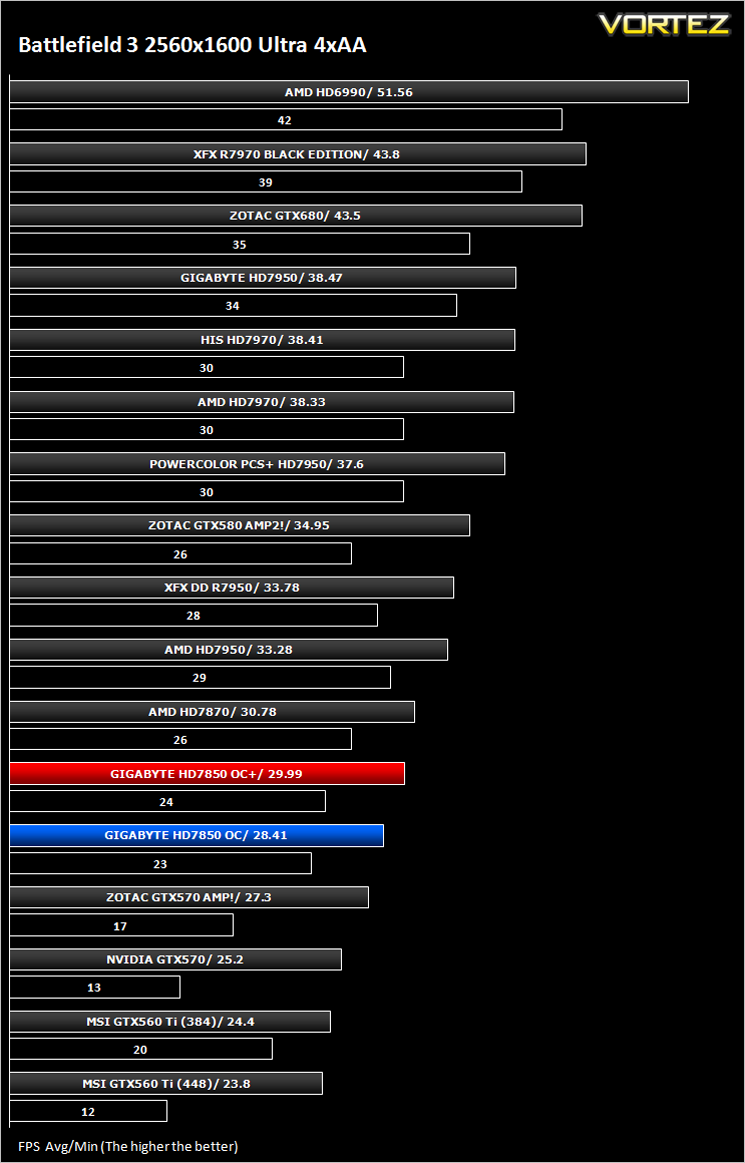
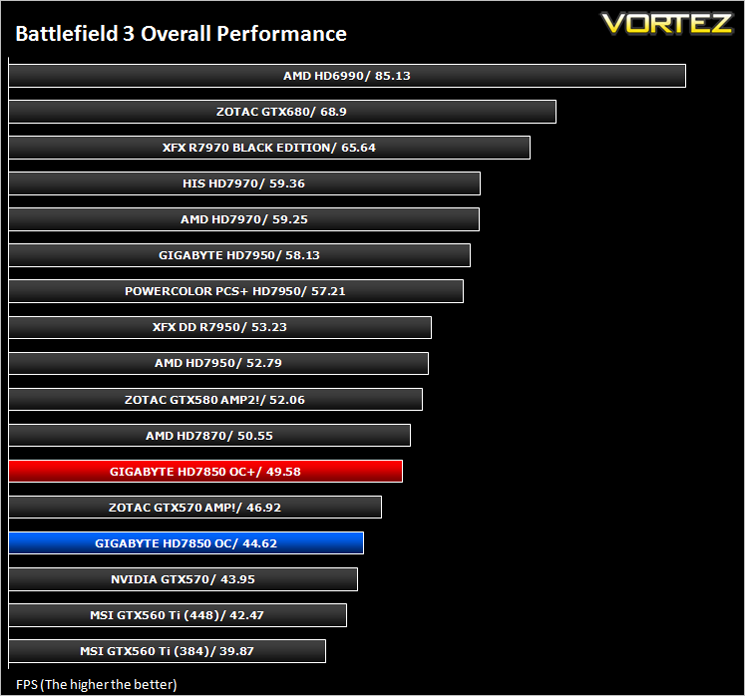
Average and minimum frames per second were measured using Fraps during the parking lot scene on Operation Sword Breaker. High and Ultra presets were loaded at both resolutions.
Crysis 2
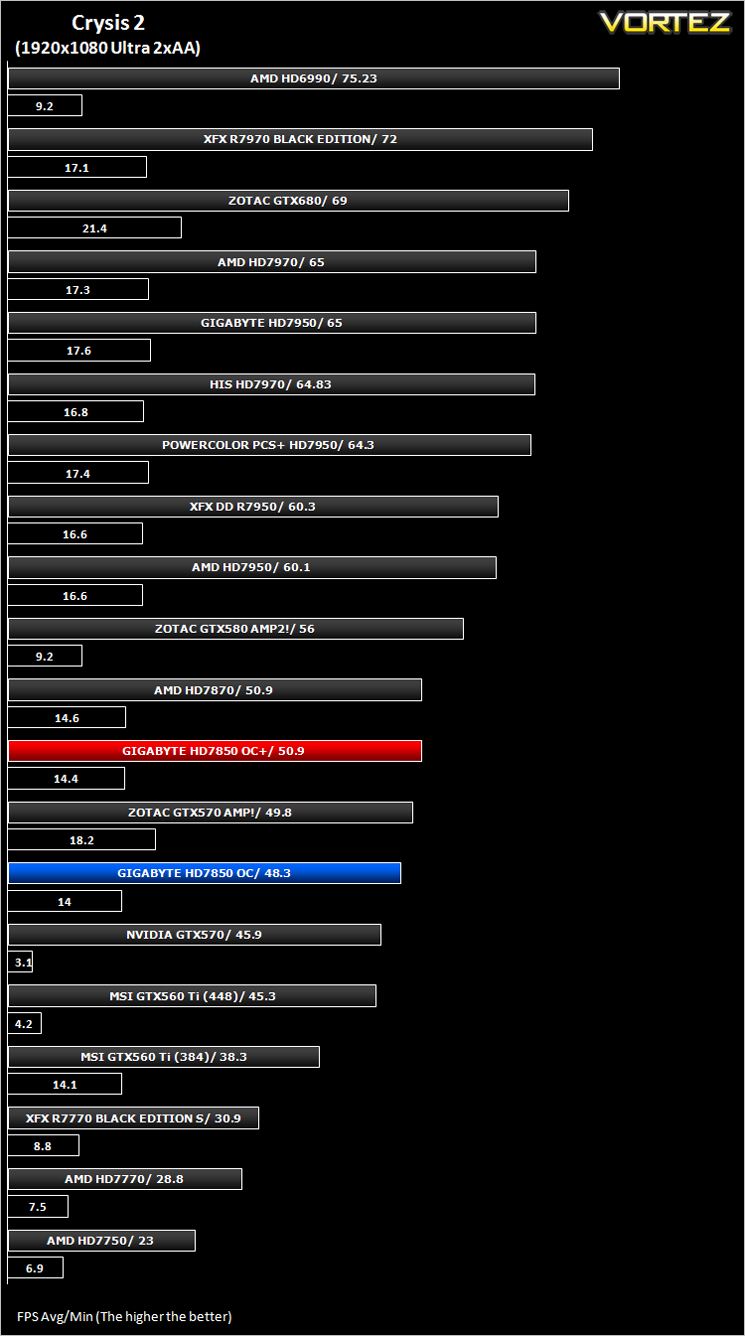
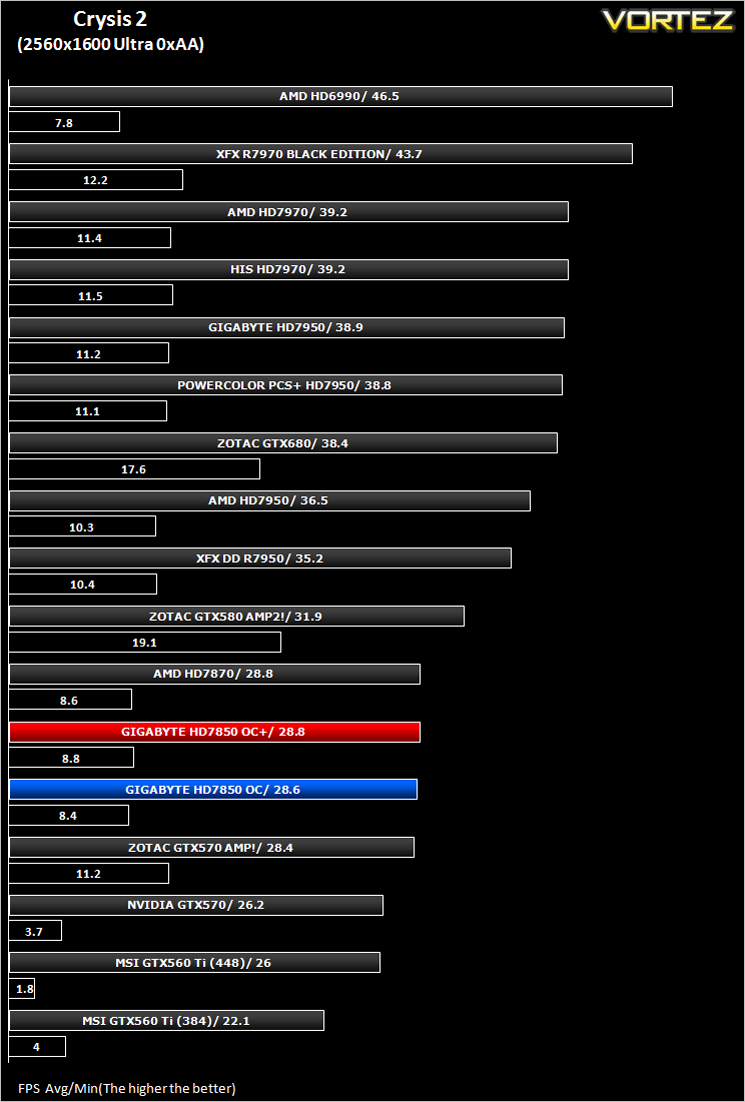
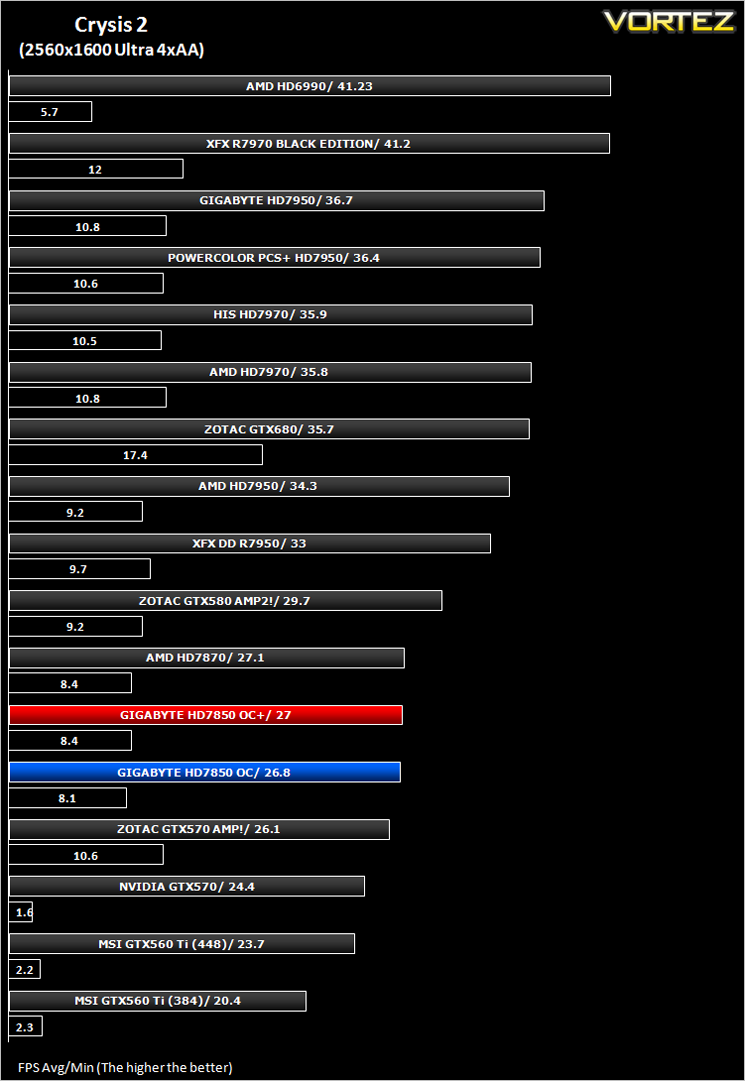
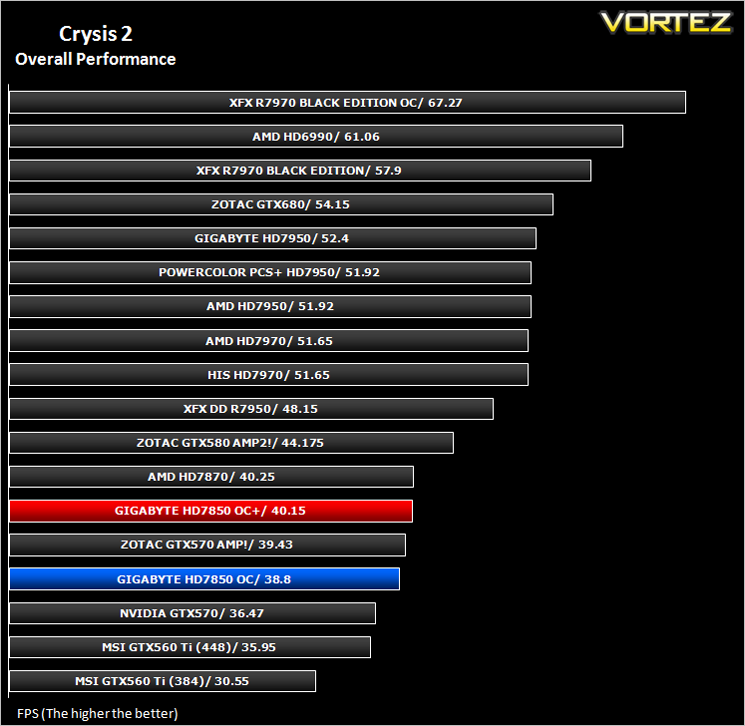
Crytek took an internet beating from its loyal fans due to the fact that they pandered to the console masses and dumbed down the graphics to DirectX 9. Fortunately, fans of the PC version of Crysis managed to force Cryteks hand and they have since developed a DX11 patch and have also enhanced the textures with added tesselation. It is for this reason that we have decided to include it in our suite of benchmarks.
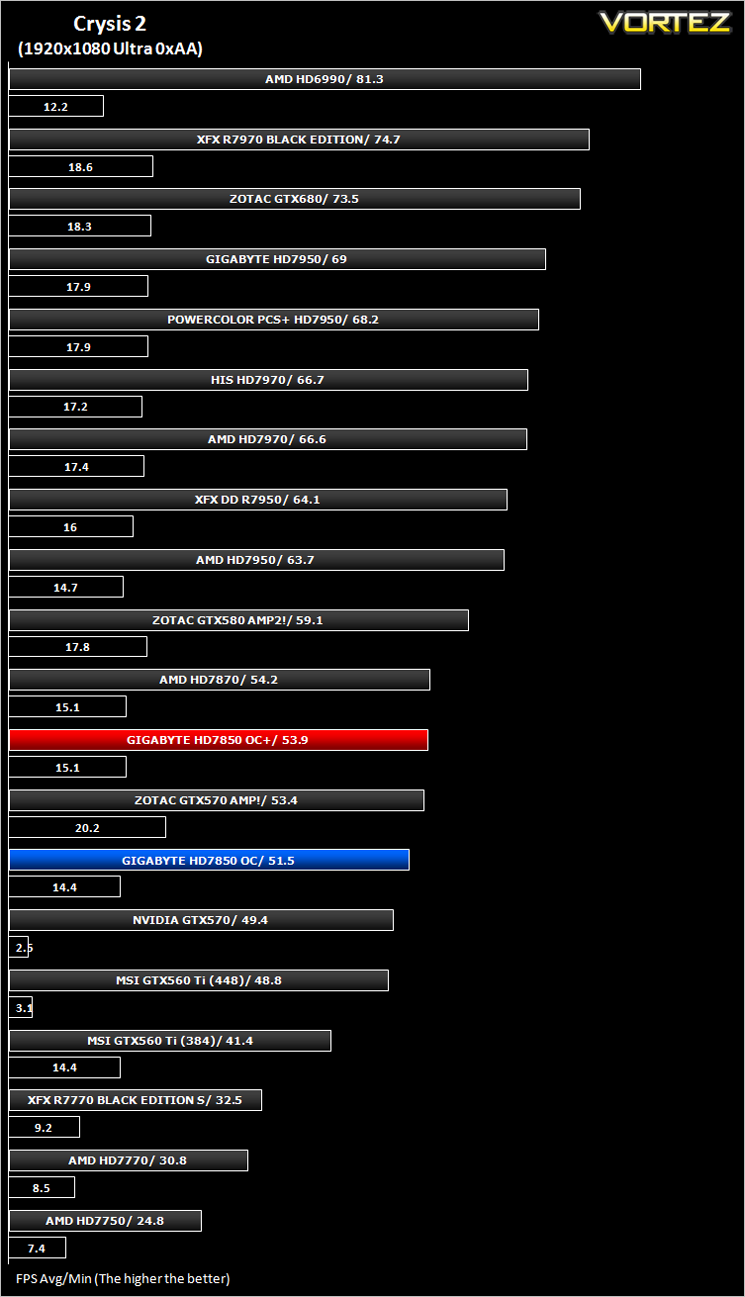
To test the cards we used the Crysis 2 benchmark courtesy of Adrenaline with both the 1.9 patch, DX11 update and Hi-res texture pack. Settings were manually placed to Ultra, DX11 and tessellation enabled with the Central Park map being run 3 times per resolution benchmark test.
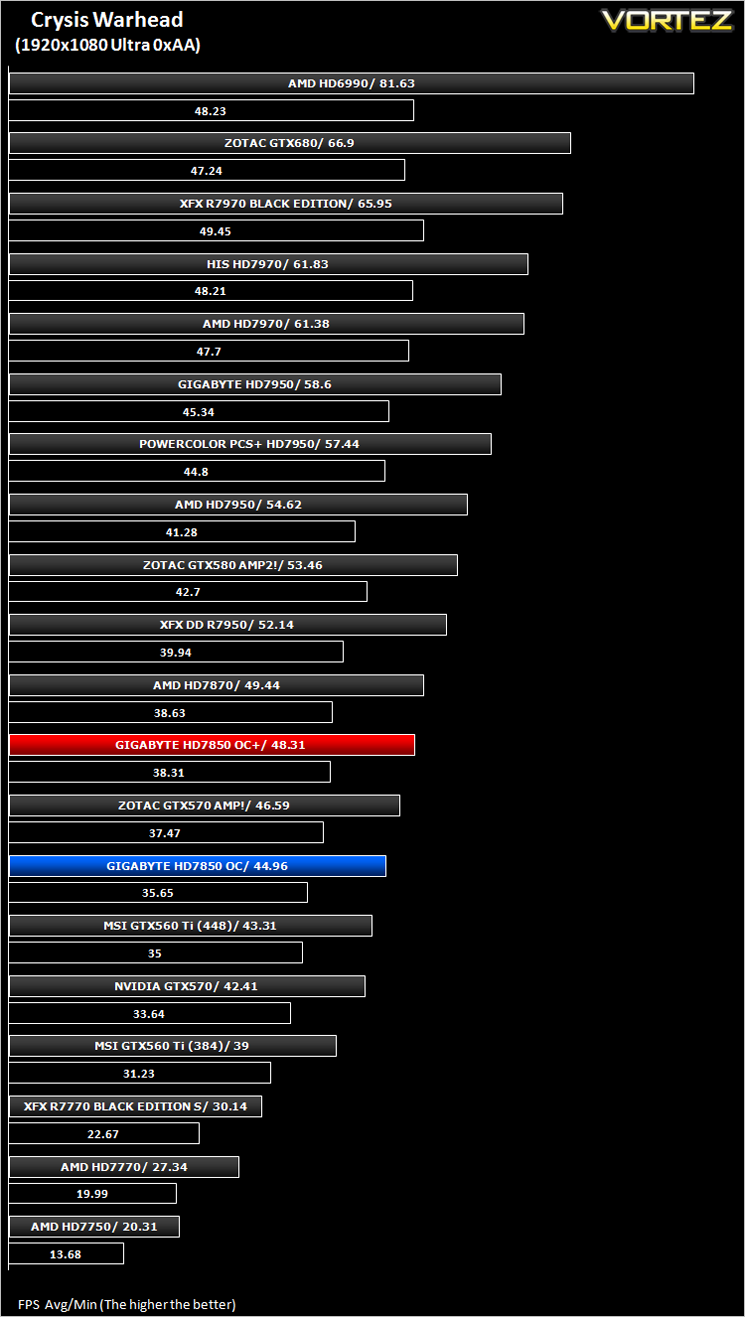
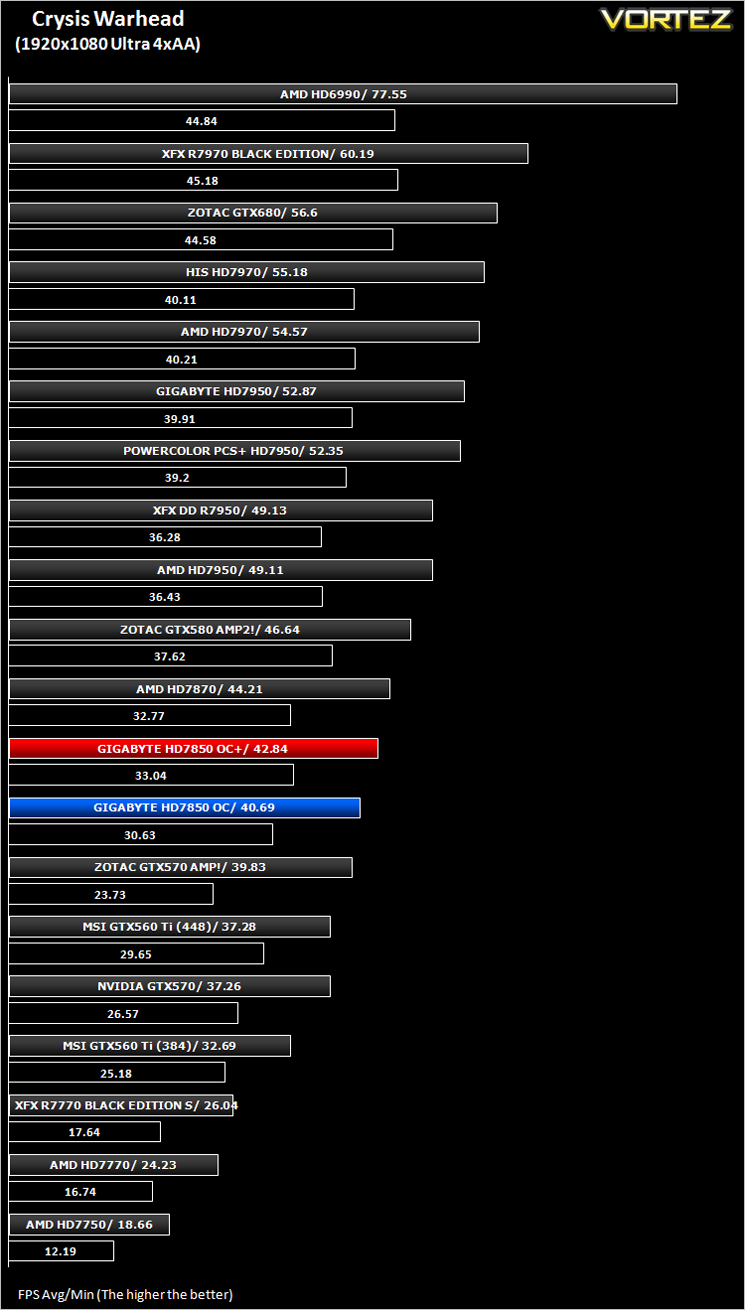
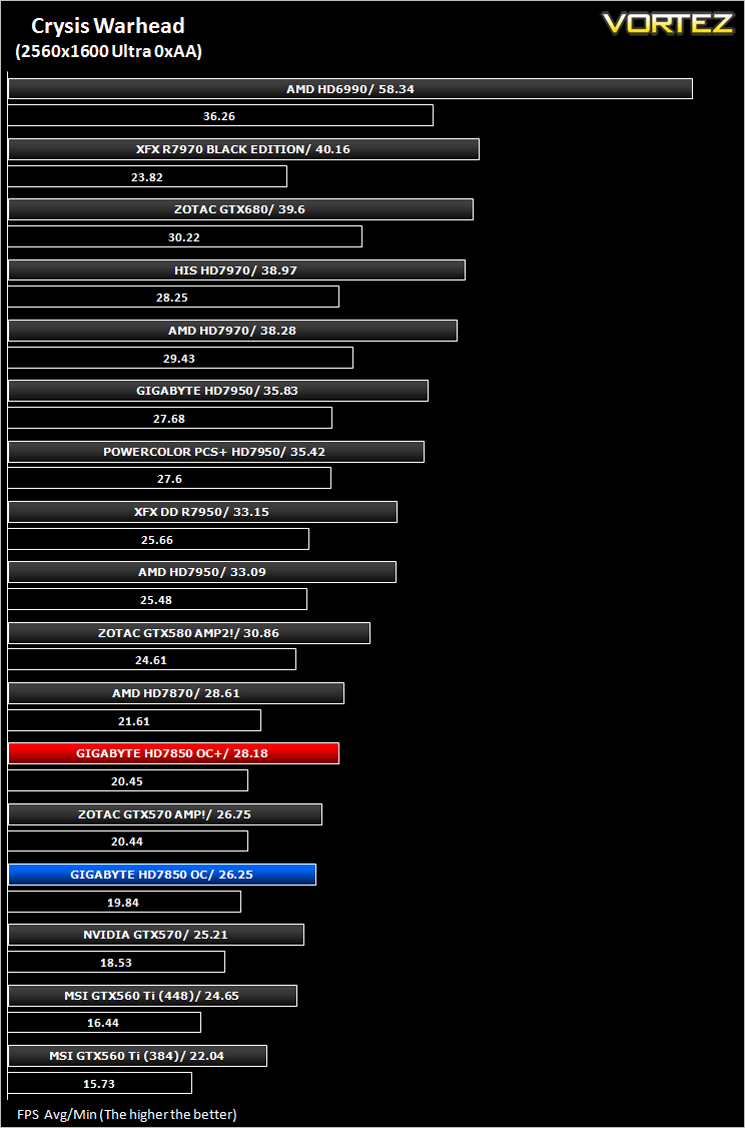
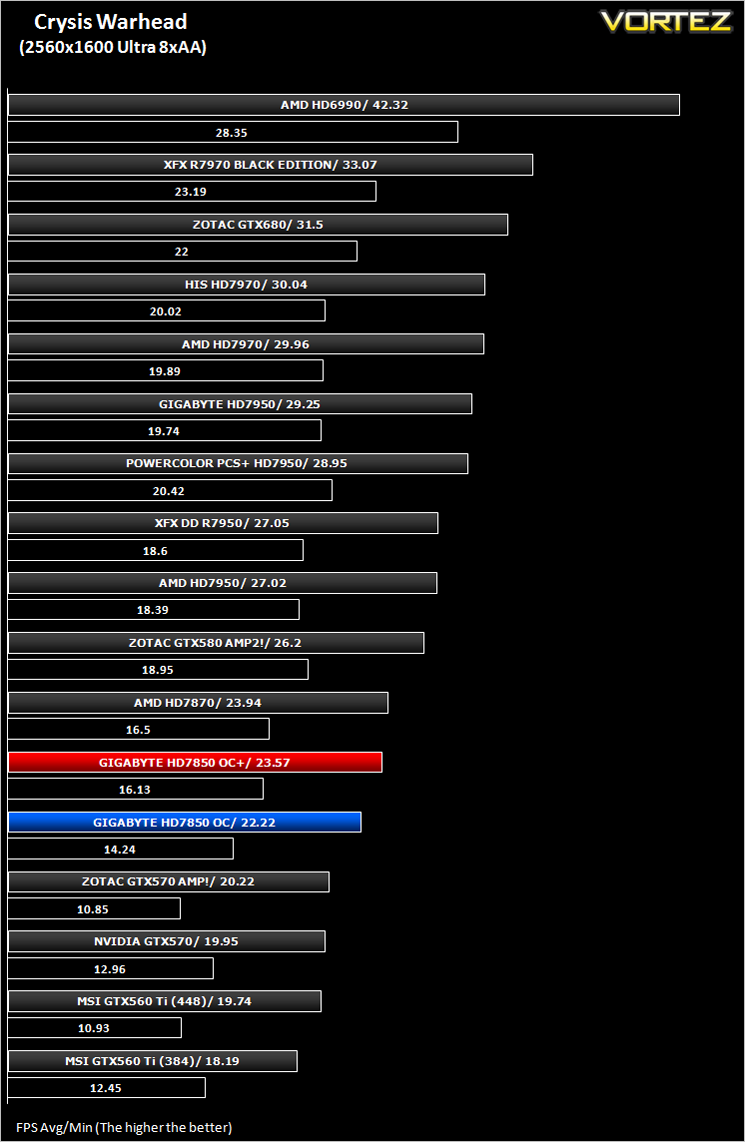
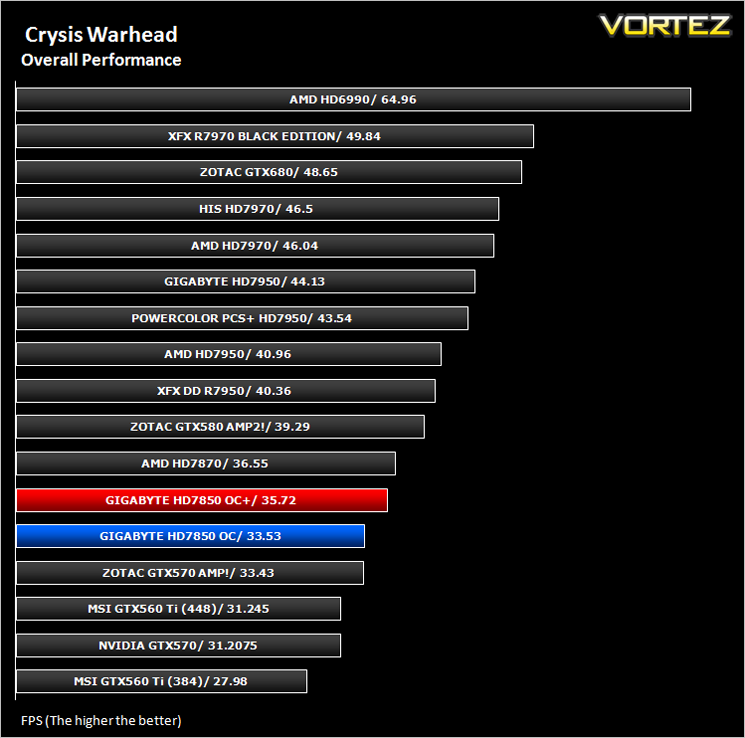
Crysis Warhead
Following the success of Crysis, the stand alone expansion “Warhead” was hotly anticipated to bring more game play, more weapons, improved visuals whilst maintaining better performance, the latter being what gamers wanted most. After all how many people upgraded their rigs just to play this game… In the game, you play as the upbeat Brit Sergeant “Psycho” Sykes, chasing down a Korean nuclear warhead. Throw in some ice shooting aliens and we’re bound to have a great game. It sure delivered.
Testing was done using Framebuffer’s Crysis Warhead benchmarking tool. The tests were configured to DirectX 10 at Enthusiast levels. Each test on the Ambush map was looped three times from which the average FPS was recorded.
Batman: Arkham City
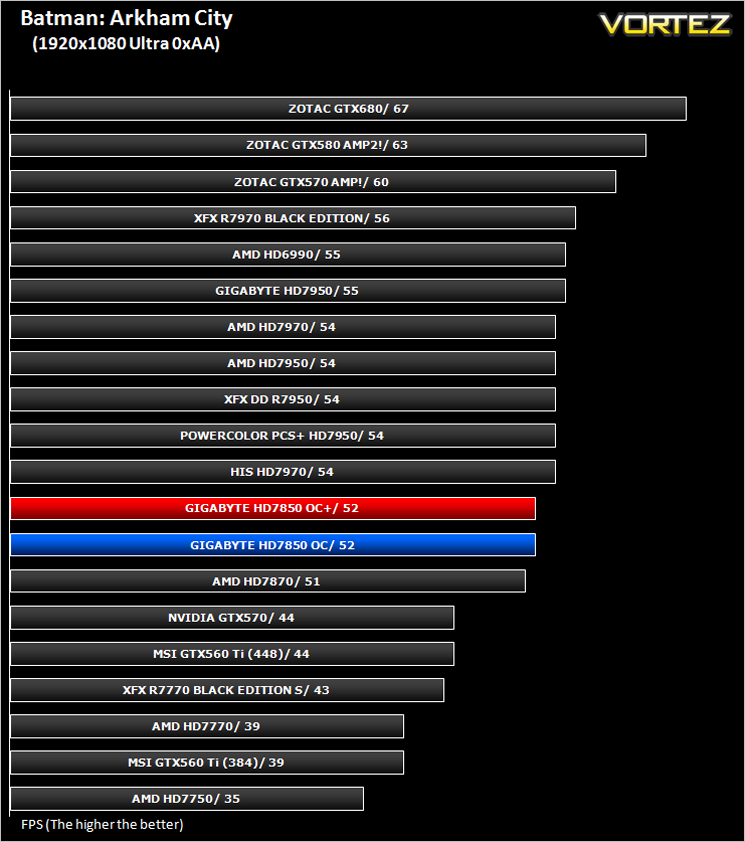
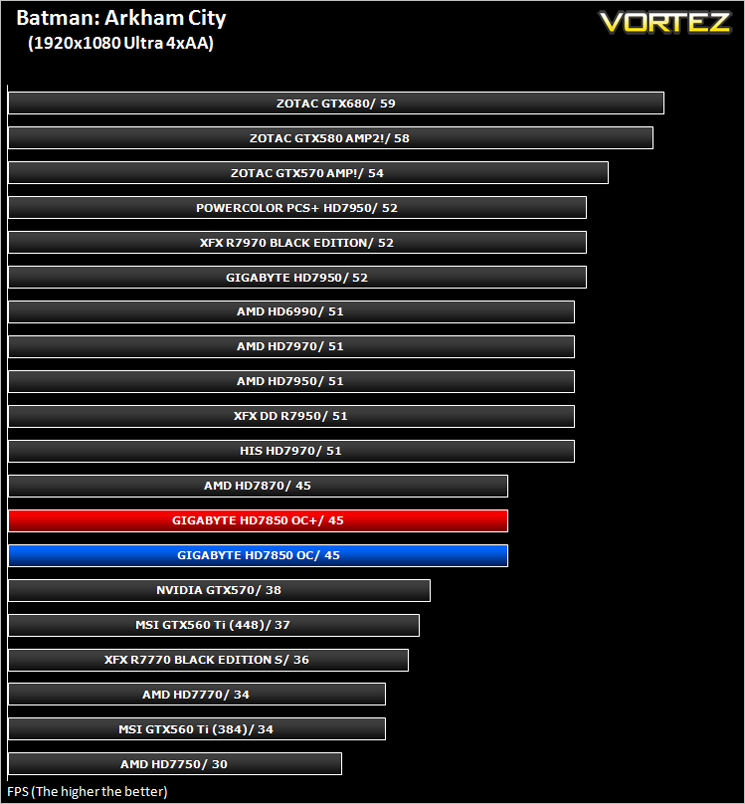
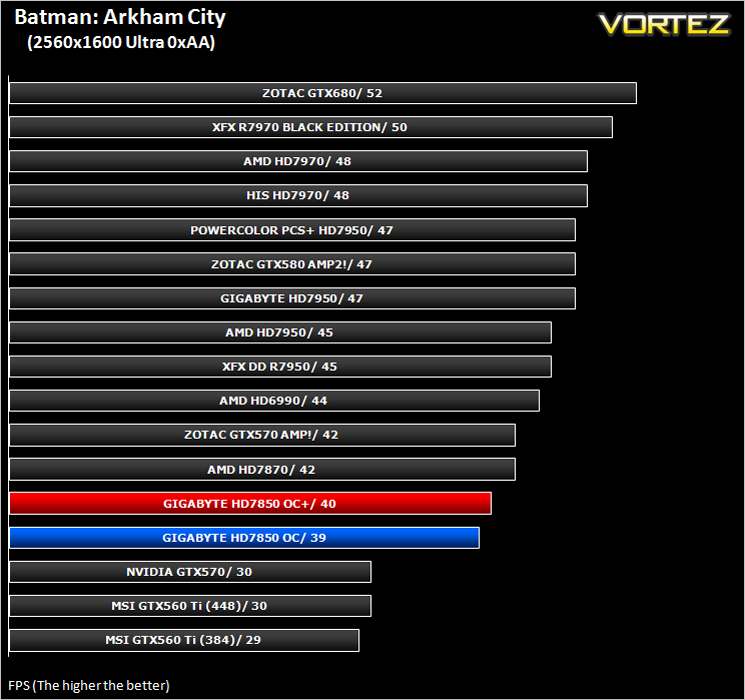
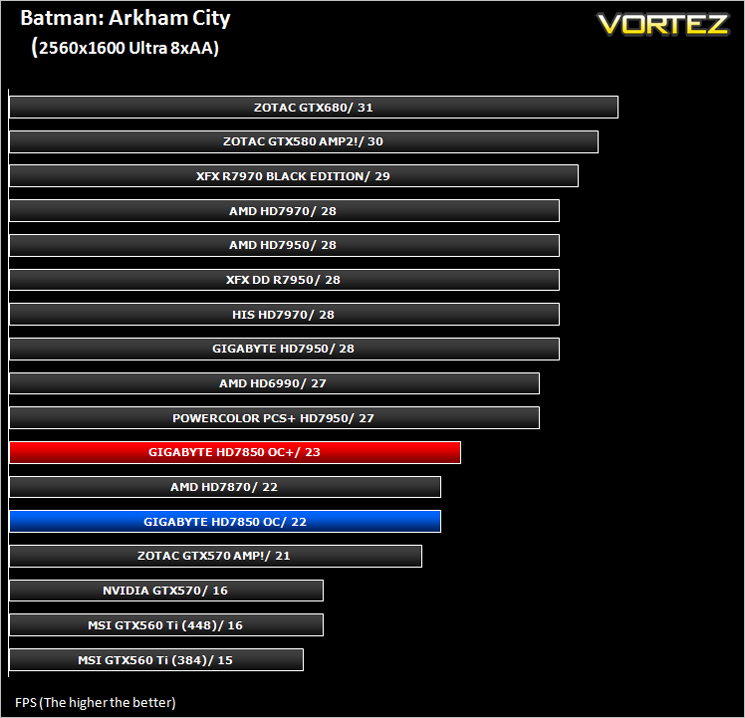
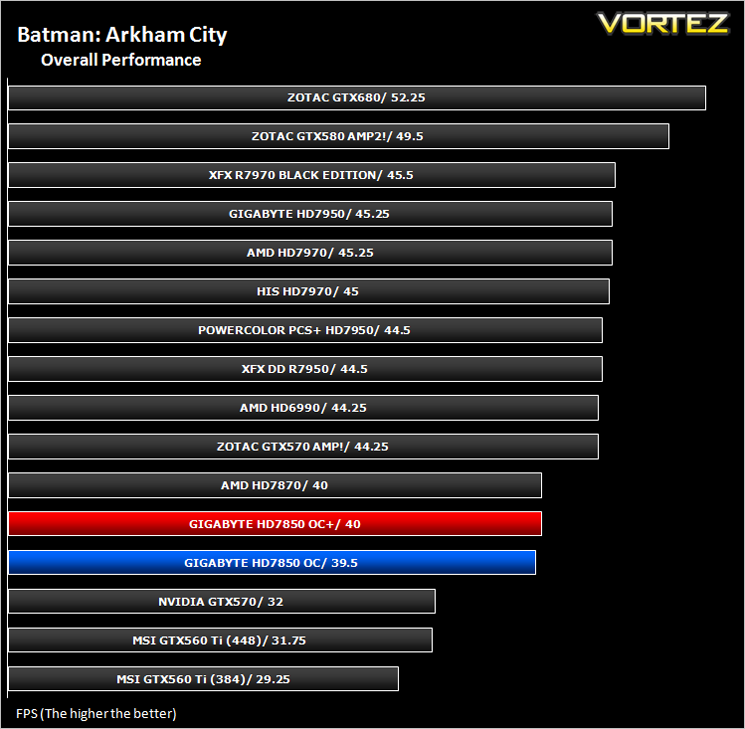
Batman: Arkham City builds upon the intense, atmospheric foundation of Batman: Arkham Asylum, sending players soaring into Arkham City, the new maximum security “home” for all of Gotham City’s thugs, gangsters and insane criminal masterminds. Set inside the heavily fortified walls of a sprawling district in the heart of Gotham City, this highly anticipated sequel introduces a brand-new story that draws together a new all-star cast of classic characters and murderous villains from the Batman universe, as well as a vast range of new and enhanced gameplay features to deliver the ultimate experience as the Dark Knight.
The results below were obtained from the builtin benchmark utility from the game. All the settings were set to
The Elder Scrolls V: Skyrim
Skyrim is not a direct successor to the very popular Oblivion. Instead it takes place 200 years after the events of Oblivion. The non-linear playing that made the Elder Scrolls such a popular series does however make a return along with the beautiful scenery the encompasses the world of Skyrim.
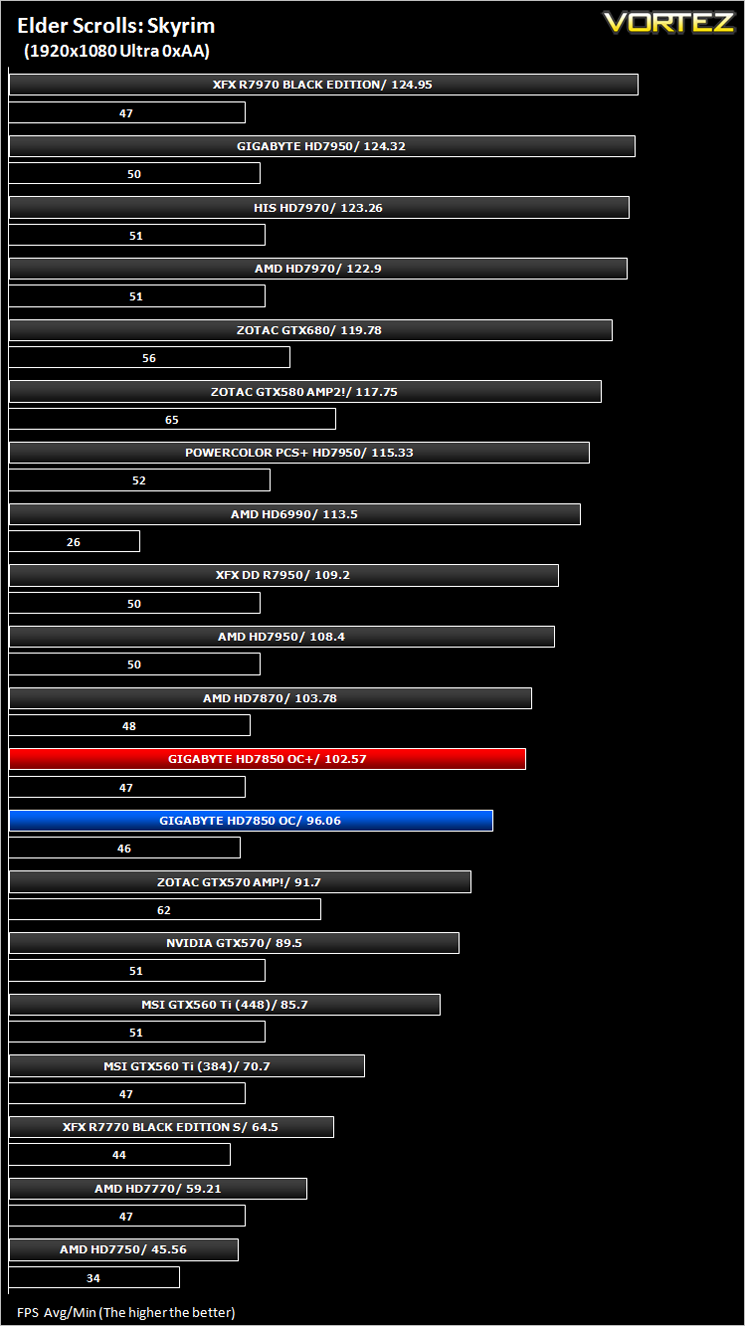
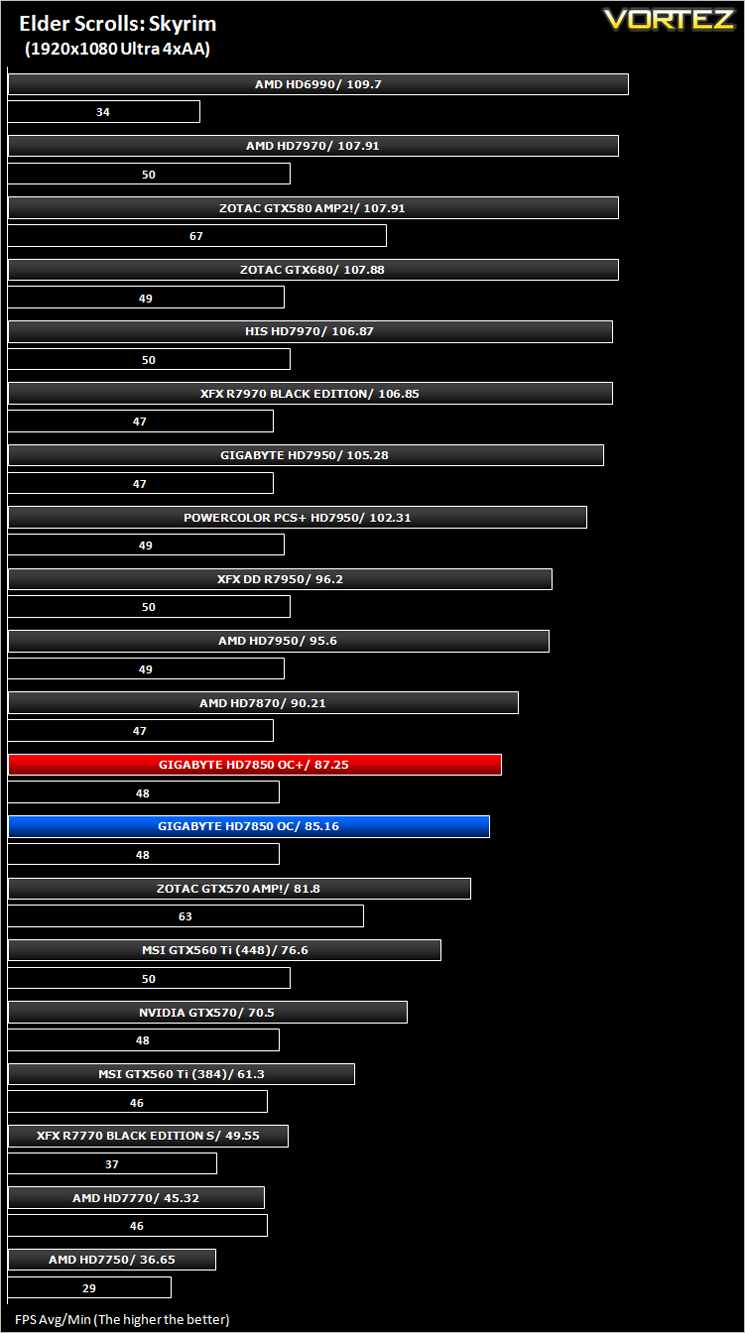
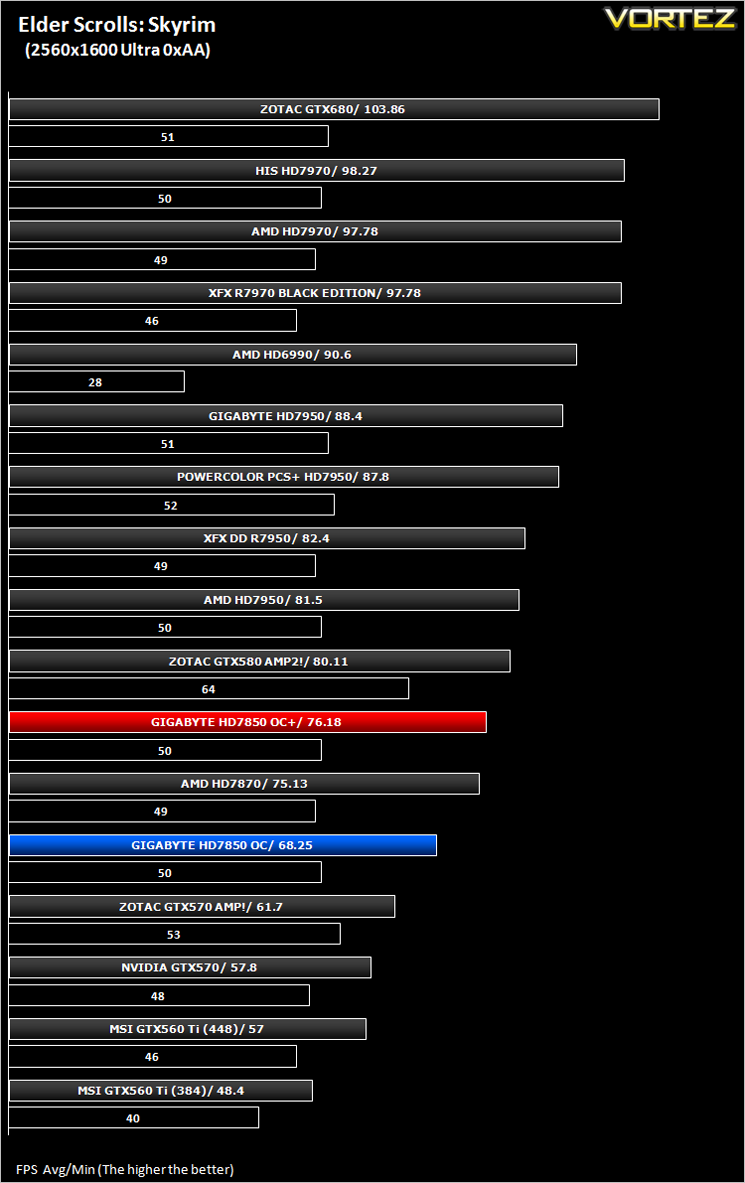
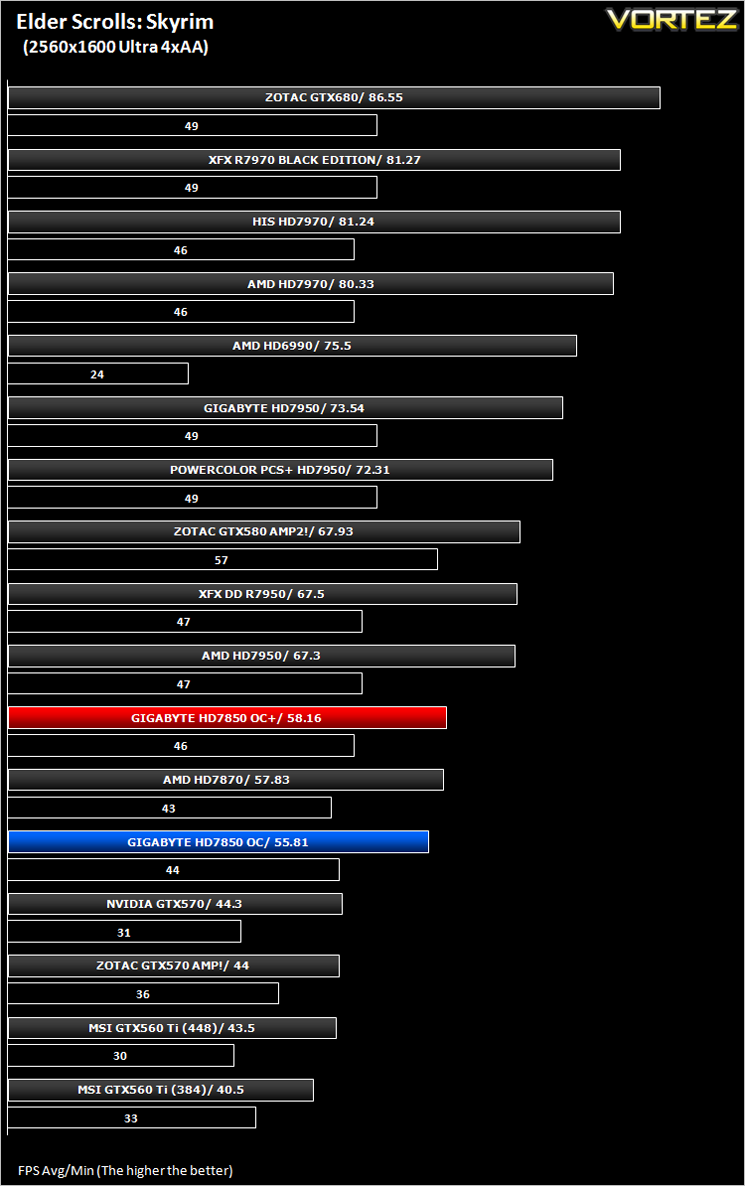
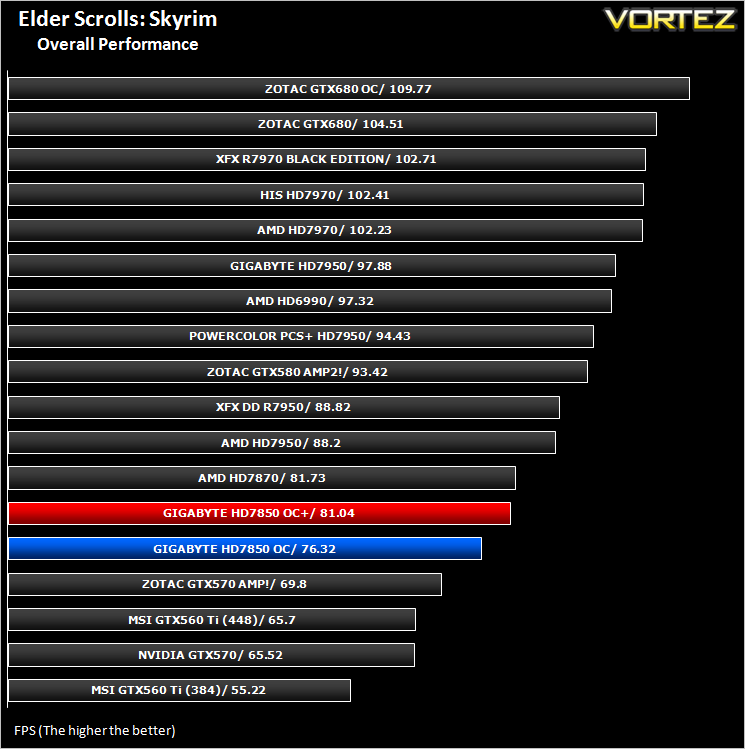
Average and minimum frames per second were measured using Fraps during the drop down passage to Riverwood. V-sync was disabled to allow fluctuating (higher the 60) FPS for these runs. It is however recommended that v-sync is left enabled during normal gameplay due to the games dynamics.
DiRT 3
As players race to elevate their global standing, DiRT 3 is back delivering mud, sweat and gears world over: from the intense weather-beaten rally stages of Europe, Africa and the US, to executing performance driving showcases and career challenges where car control is pushed to spectacular limits.
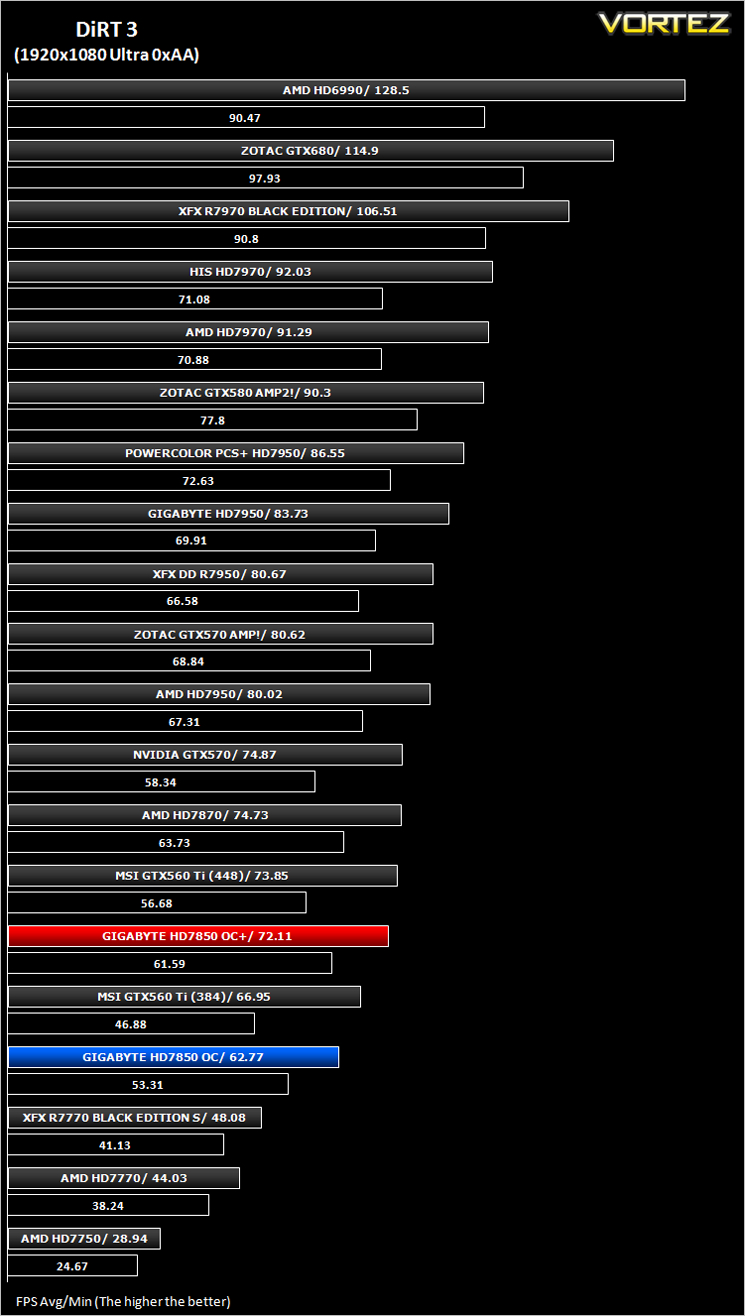
The in-game benchmarking tool was used to test performance. All the display settings were set to the maximum available and DirectX 11 was applied. The average FPS was recorded at the end.
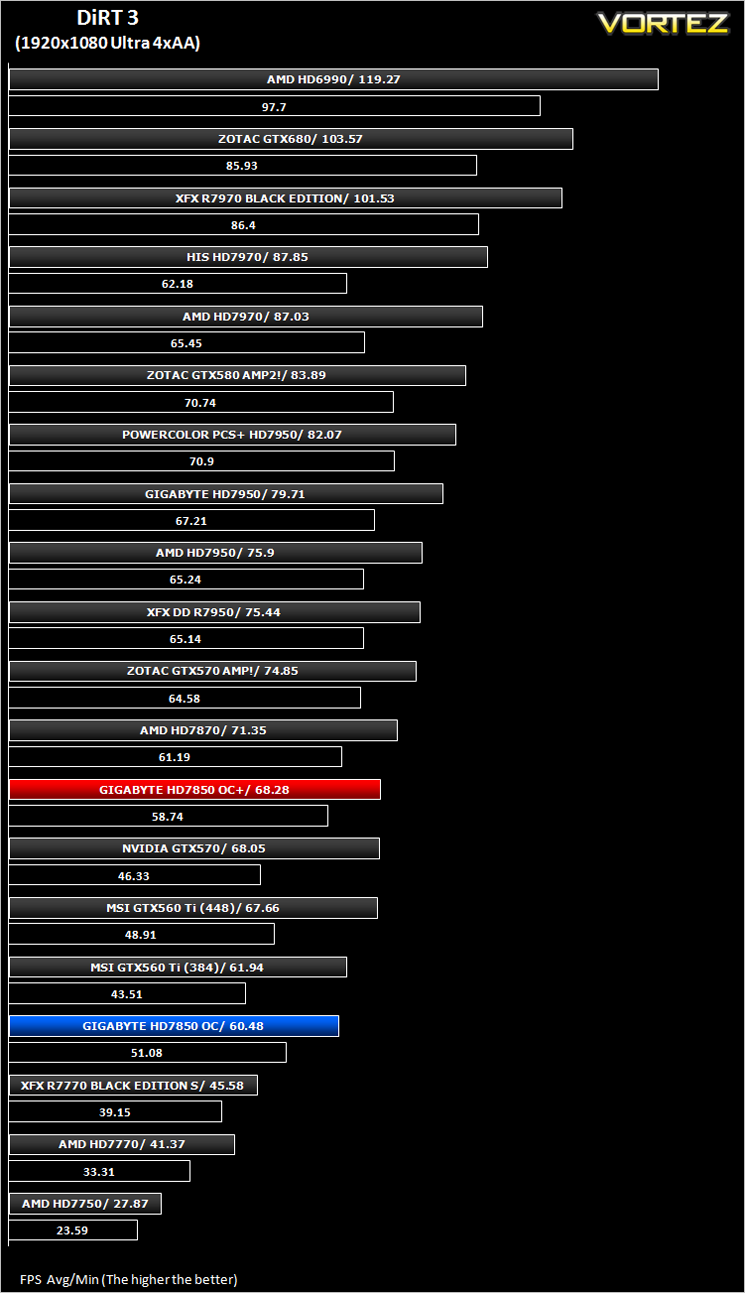
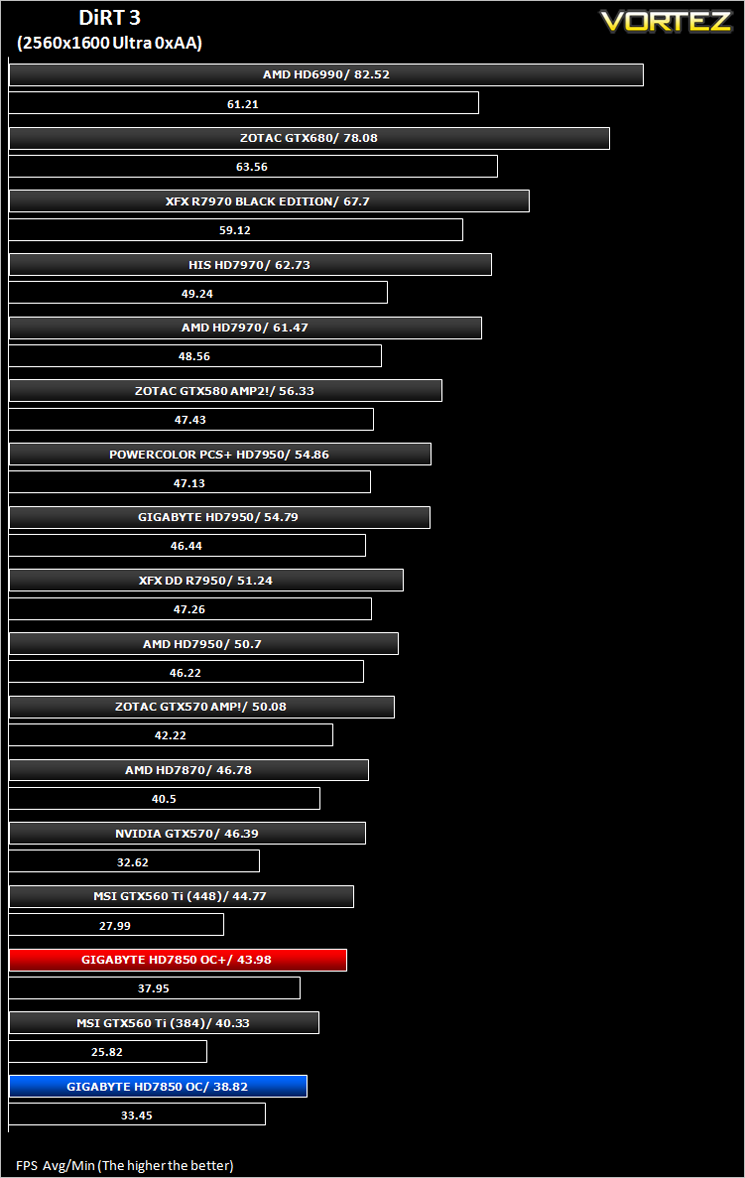
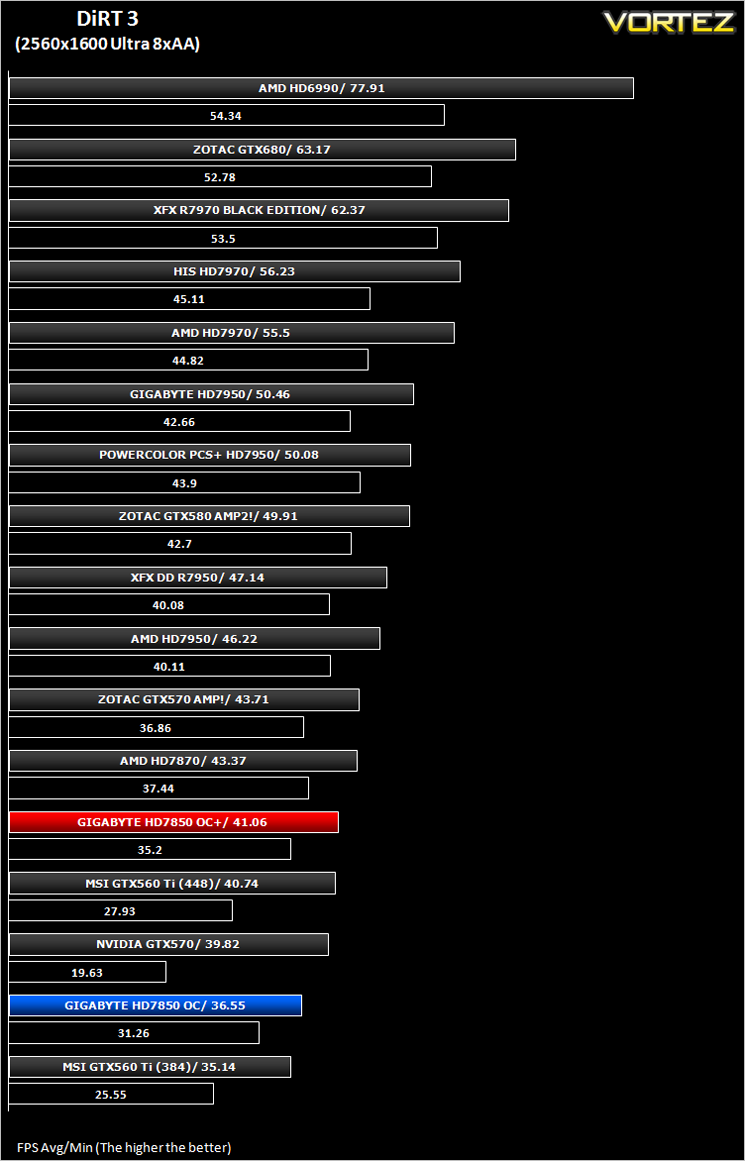
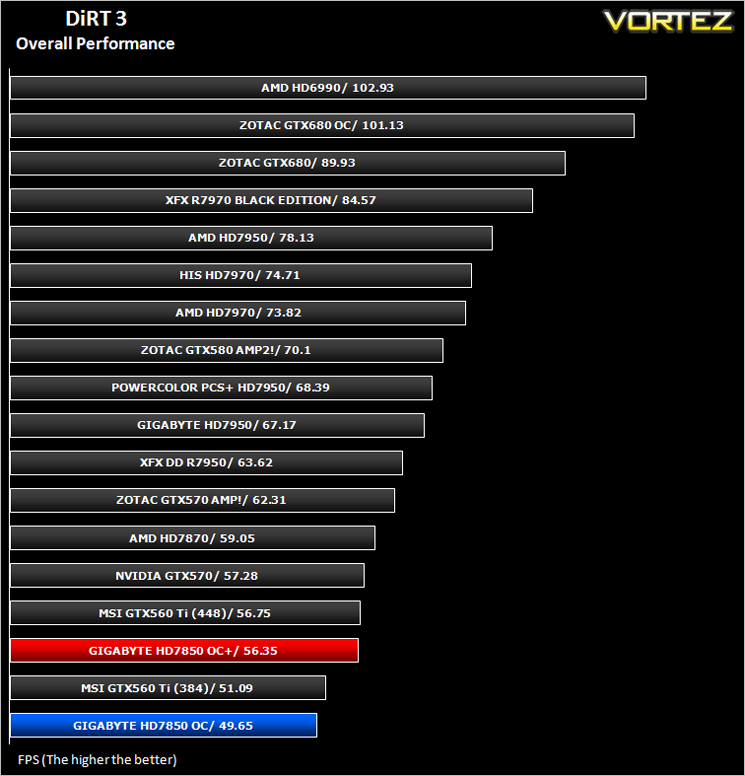
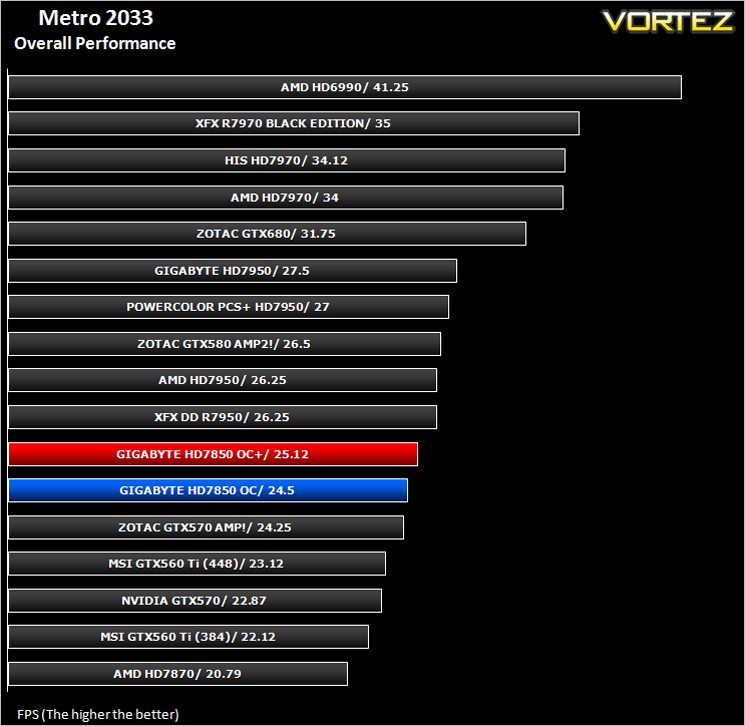
Metro 2033
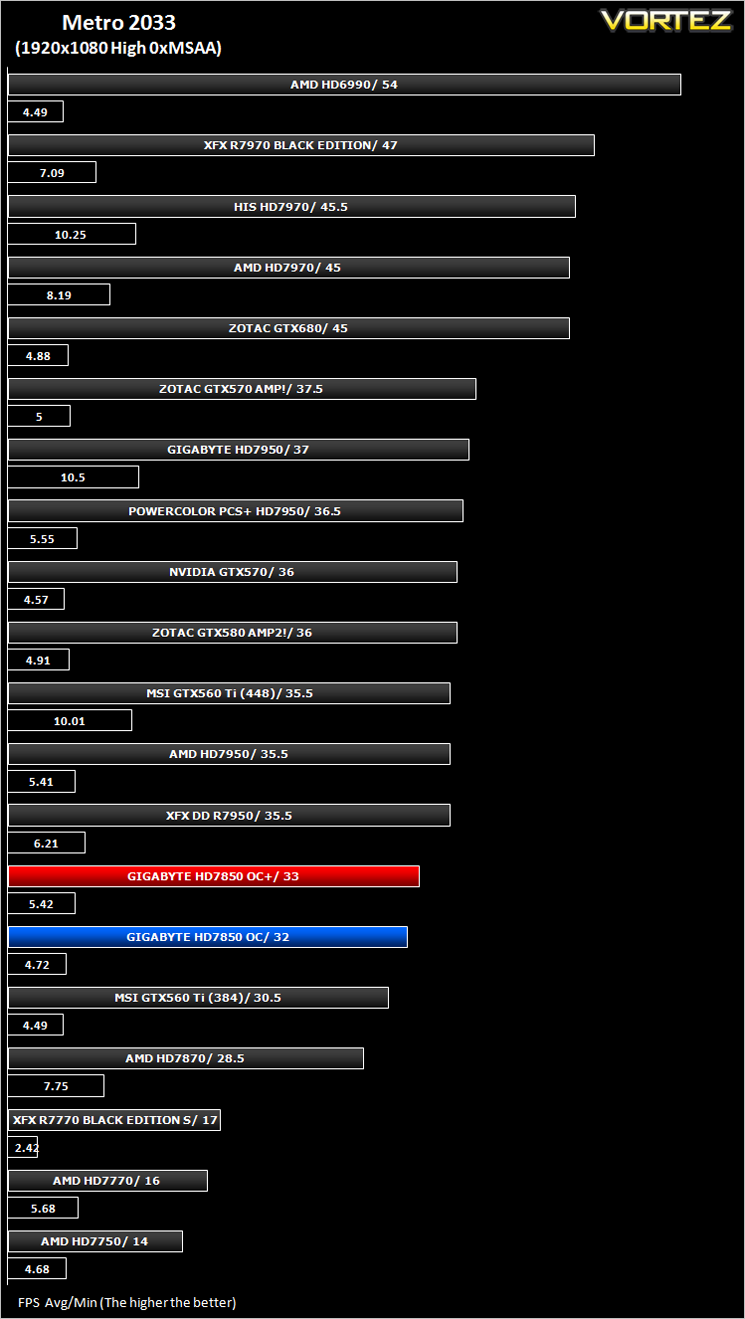
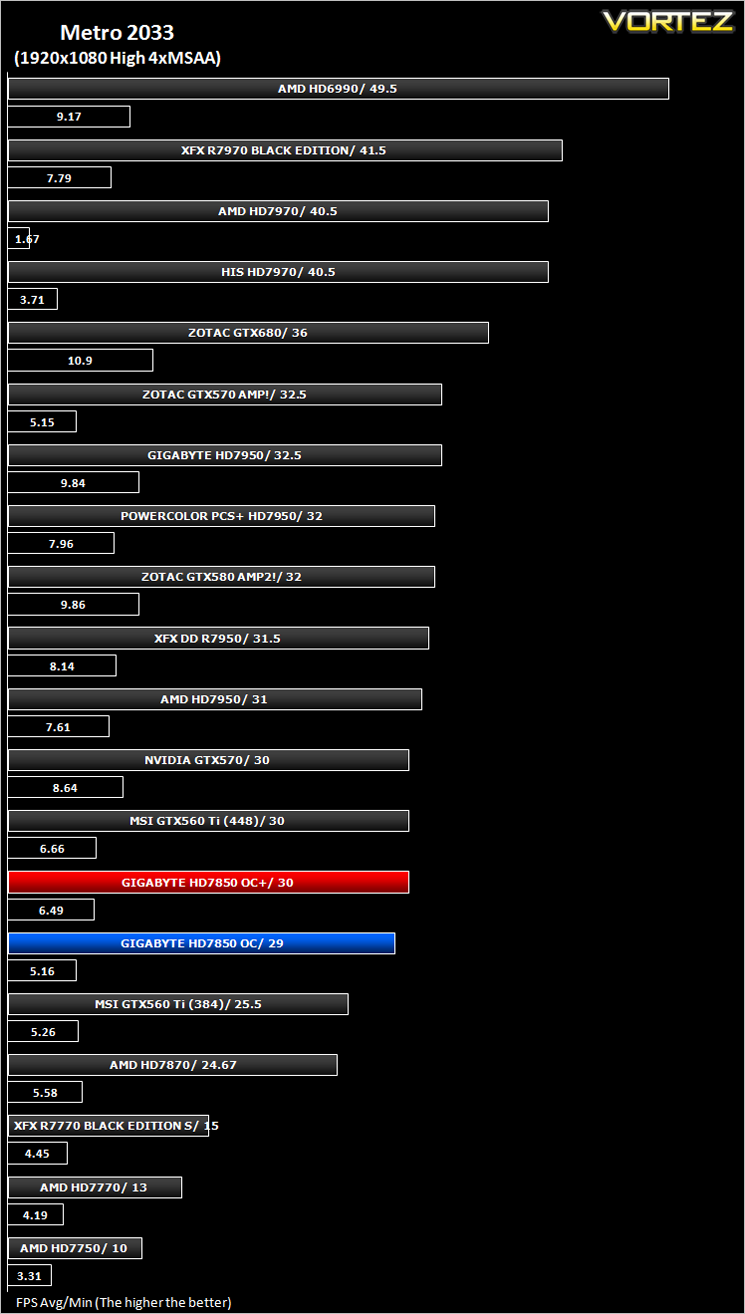
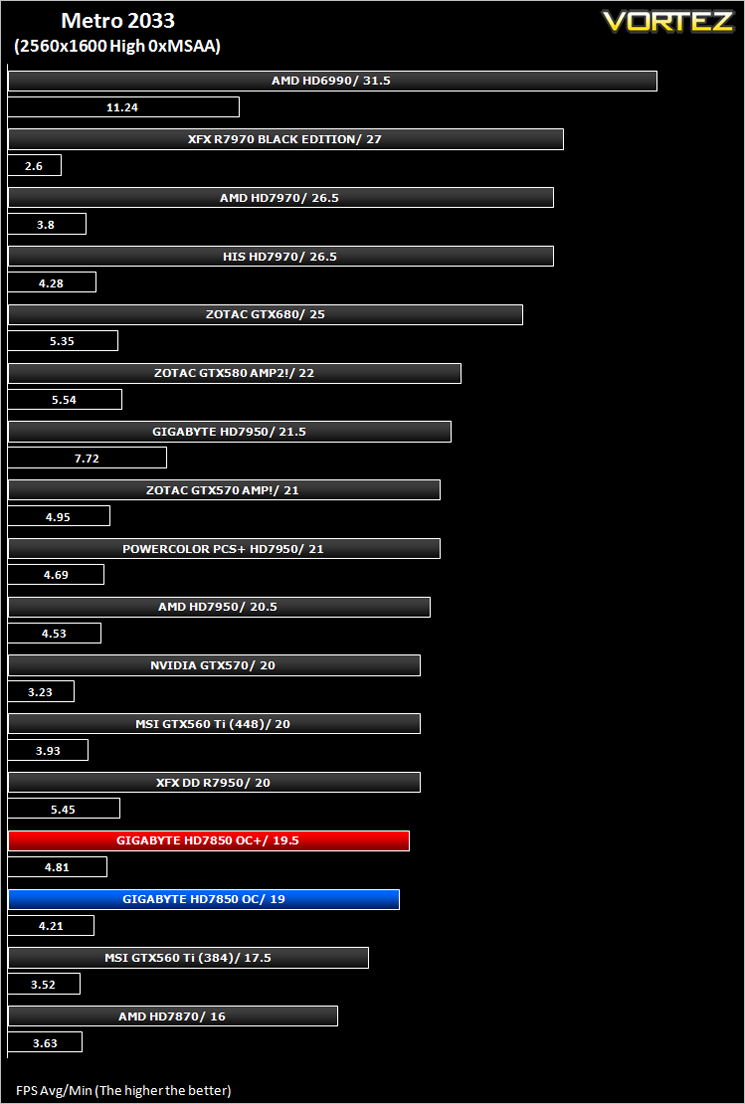
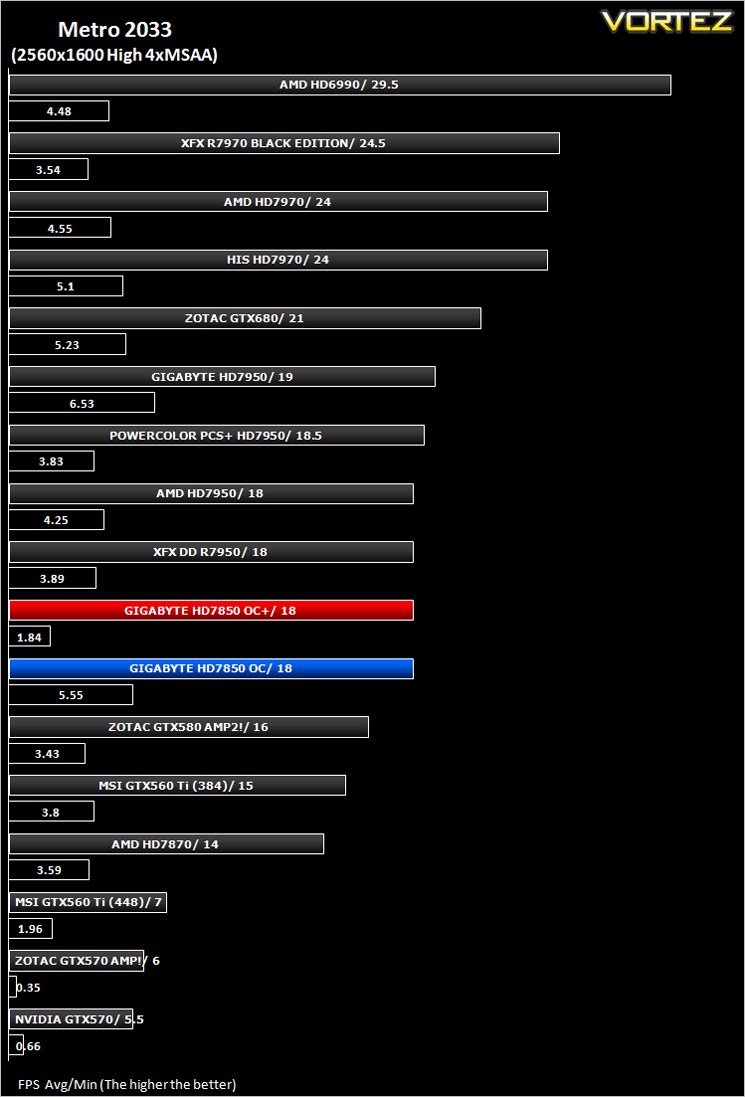
Based on the novel by the same name, Metro 2033 is a first person shooter with elements of survival horror. As Artyom, you trawl through the mutant infested metro systems of post-apocalyptic Moscow. The game delivers presents a grim ambience that reflects on the overall atmosphere of the underground setting. Metro 2033 uses the setting as a back drop to showcase some of the best visuals of any games out now, making it the ideal benchmark for those looking for the best graphics card.
The bundled benchmarking tool was used on Metro 2033, configuring the settings to High and making use of DirectX 11. The frontline scene was looped 3 times for each configuration. The average FPS was recorded at the end.
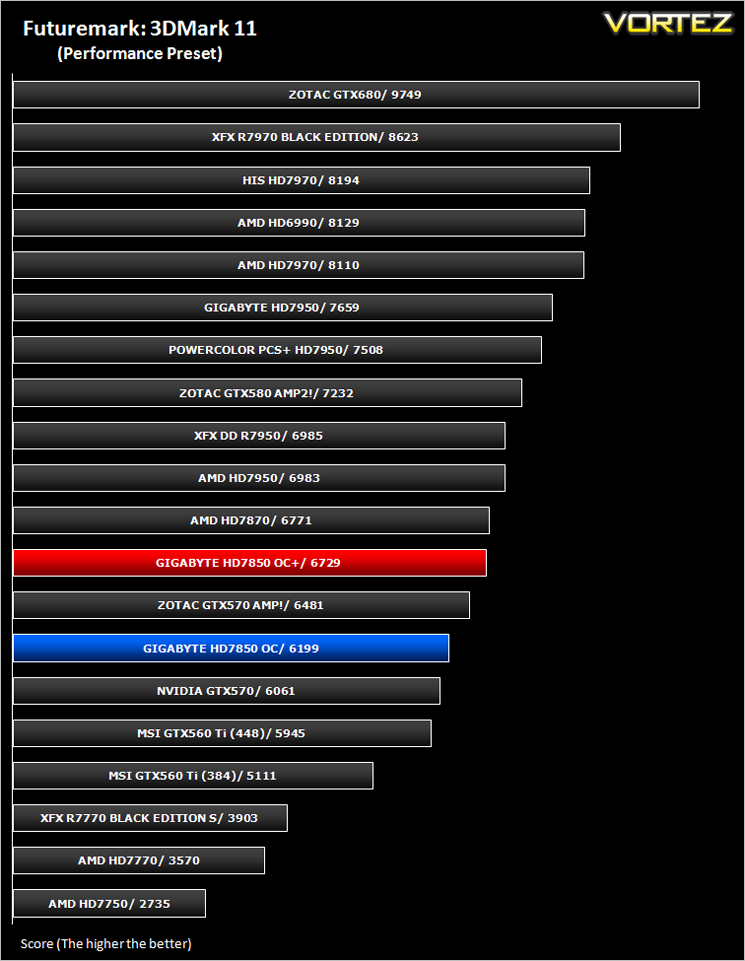
Futuremark 3DMark 2011
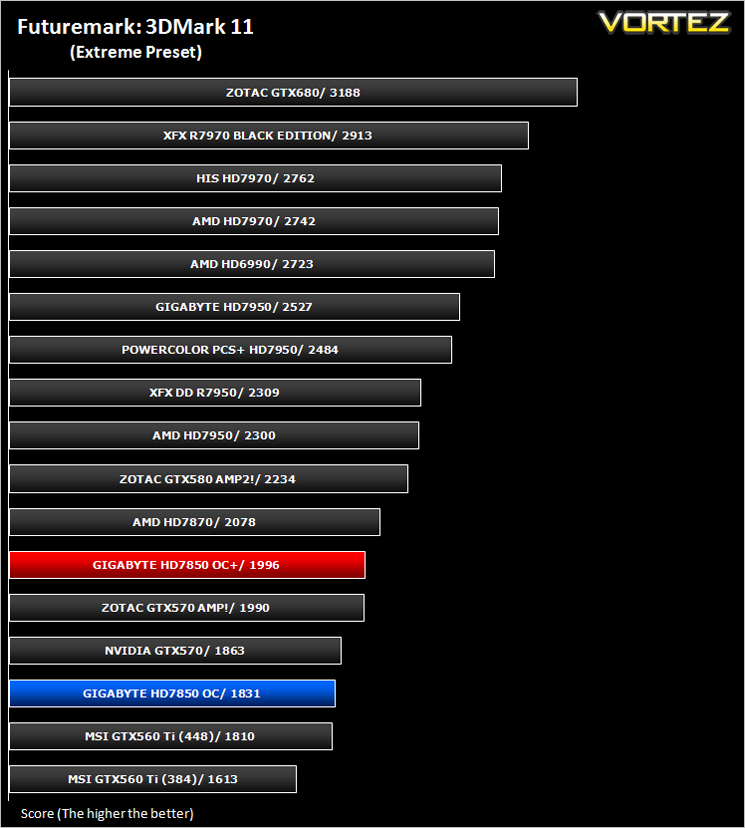
3DMark 11 is the latest version of the world’s most popular benchmark. Designed to measure your PC’s gaming performance 3DMark 11 makes extensive use of all the new features in DirectX 11 including tessellation, compute shaders and multi-threading. The benchmark was run in both Performance and Extreme presets.
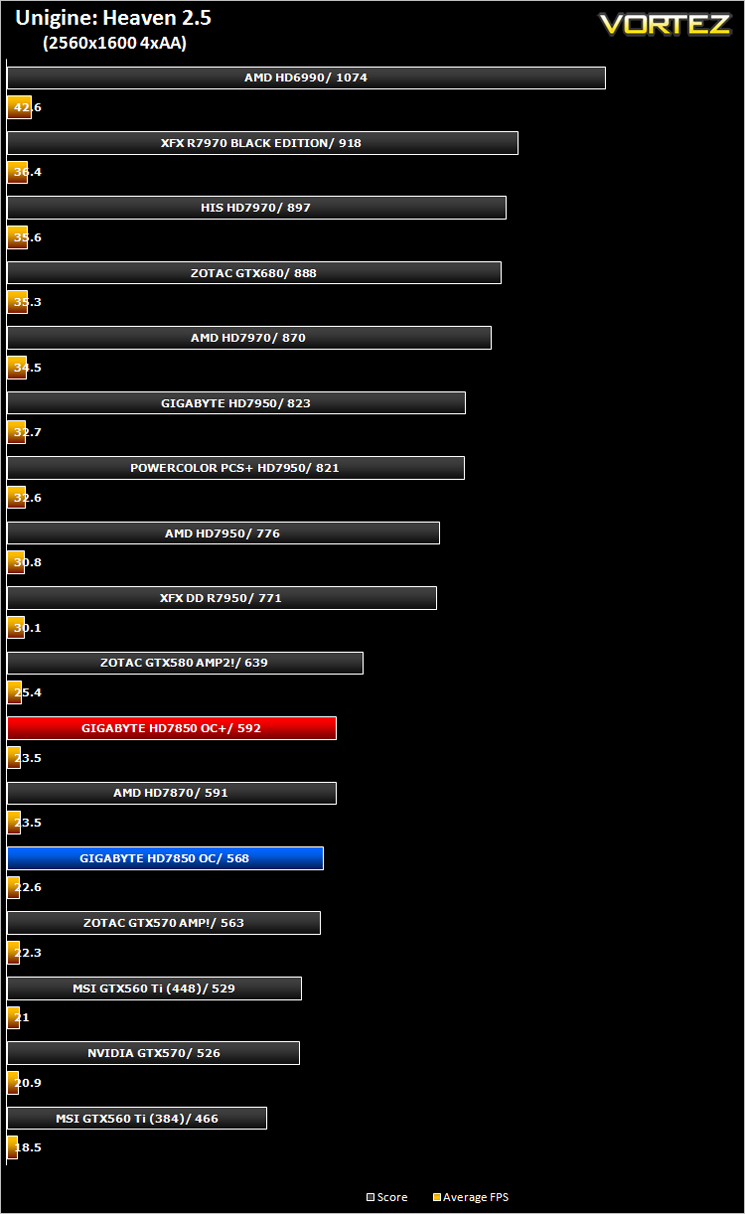
Unigine: Heaven 2.5
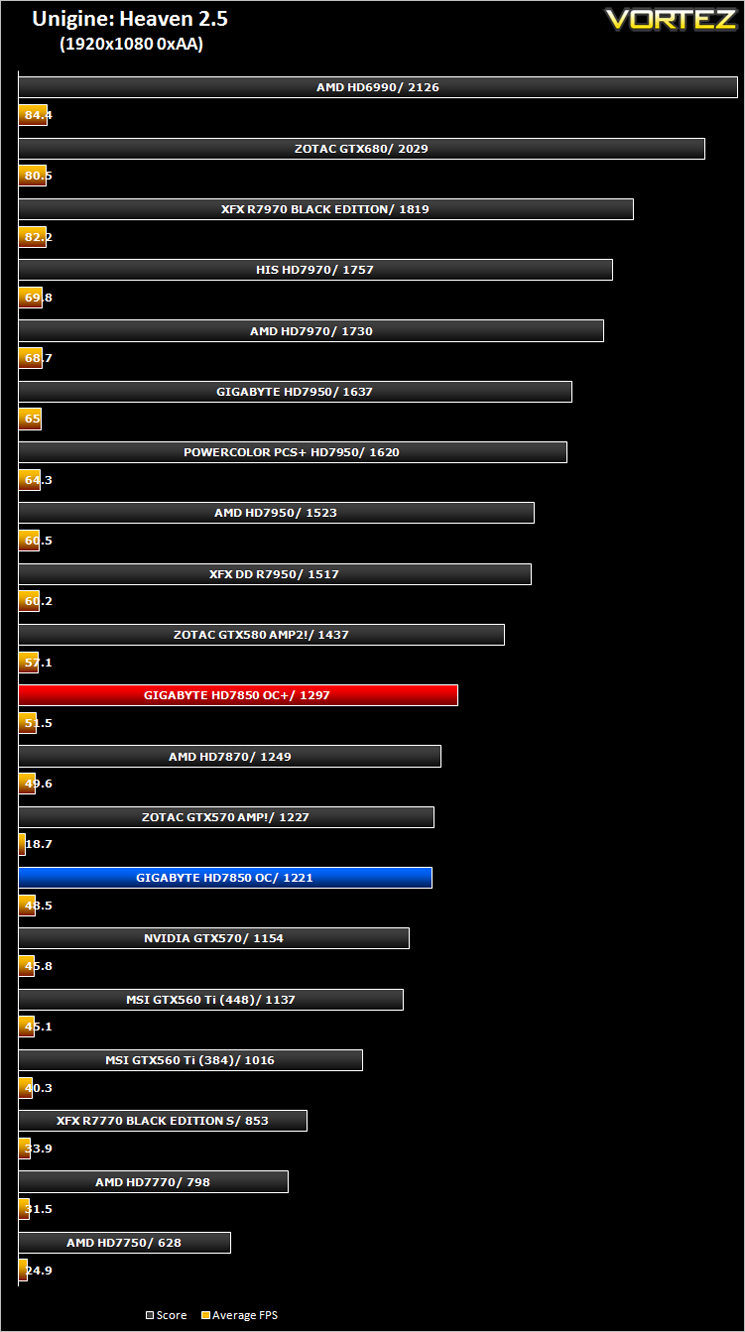
Heaven Benchmark is a DirectX 11 GPU benchmark based on advanced Unigine™ engine from Unigine Corp. It reveals the enchanting magic of floating islands with a tiny village hidden in the cloudy skies. Interactive mode provides emerging experience of exploring the intricate world of steampunk.
Conclusion
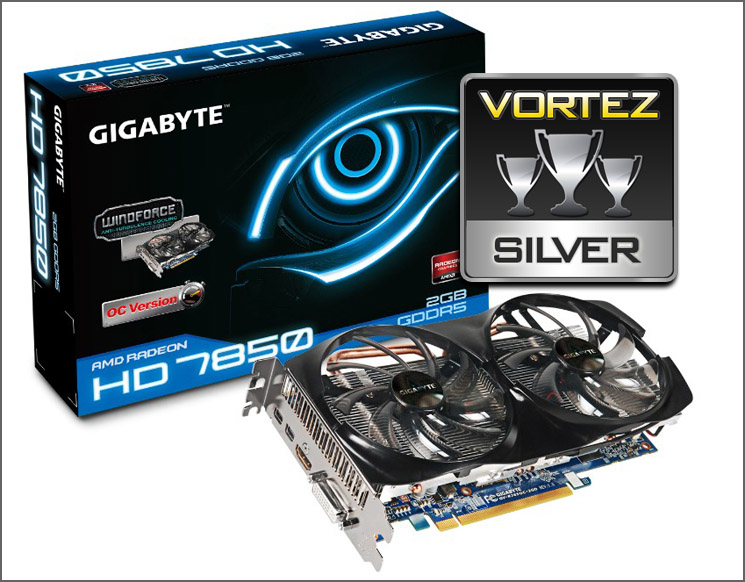
The GIGABYTE HD7850 OC’s remit was to compete with the GTX570 and for the most part, it completes this task. Throughout our suite of benchmarks the card either toppled the GTX570 or came very close to doing so which is a great result for the diminutive card. It does this while being the coolest card on test along with being one of the most power efficient and for the most part, it was also the quietest. I say the most part because while in ‘normal’ operation, the cooler was extremely quiet. Even when overclocked the cooler didn’t really go much over what can be best described as a murmur. However when the fan was set to 100% it was clear their were issues with the fans. They made a very loud ‘rattle’ which only subsided when the fans were set below the 70% threshold. While this may not affect most users, especially as the card runs so cool it is unlikely that the fans will need to reach such rpms, it is a design flaw which spoils an otherwise very impressive graphics card.
It could be argued that the Windforce cooler is overkill for the Pitcairn Pro core found on the HD7850 and in all honesty I would agree. The 7850 is a cool running card anyway and the only tangible benefit the Windforce cooler has over the reference design is it should be quieter. Again, for the most part this holds true save for the extreme end of the fan speed scale.
Aside from the fan noise, my major concern with the GIGABYTE HD7850 OC is the retail pricing. Costing a little over £215 it is priced about right against the immediate competition. However, to truly dominate the middle market, the price needs to drop below the £200 mark. Yes it is faster than the GTX570 however with recent NVIDIA price drops and AMD’s own price cuts on the 7900 range, the GIGABYTE HD7850 OC is left in a precarious position as for a little more you could have the cards more powerful brother, the HD7870. The inflated price can be partially justified because for your money you are getting a custom cooler and a card that comes pre-overclocked but I fear many will opt for the more powerful HD7870 regardless unless the price gap between the two cards is increased.
In short, what you have with the GIGABYTE HD7850 OC is a coo, efficient graphics card and because the fan speed never reaches high levels, it is also quiet. The card was able to hold it’s own with cards that are faster on paper so for that GIGABYTE deserve praise. The price however may be the major stumbling block GIGABYTE have to overcome if they are to dominate the middle market discerning consumers who demand power AND value but in all fairness, it is competitive against other manufacturers so while it may not stand head and shoulders above the competition, it is certainly a worthy proposition.
Pros:
– Coolest Graphics card on test
– Good Overclocking Performance
– Quiet
– Low Noise
– Power Efficient
Cons:
– No voltage adjustment
– Noisy fan when above 70%
– Blue PCB may not be to everyone’s tastes
– Coolest Graphics card on test
– Good Overclocking Performance
– Quiet
– Low Noise
– Power Efficient
Cons:
– No voltage adjustment
– Noisy fan when above 70%
– Blue PCB may not be to everyone’s tastes

Click here for an explanation of our awards at Vortez.net. Thanks to GIGABYTE for providing today’s review samples.


