







A fresh look for BIOSTAR’s Intel Z77 LGA1155 lineup. But how will the TZ77XE4 compare against other motherboard rivals with Intel Core i5-3570K?

Product on Review: TZ77XE4
Manufacturer and Sponsor: BIOSTAR
Street Price: £135inc. VAT (At time of review)
BIOSTAR has been manufacturing motherboards since the mid-80s, yet their focus has been in countries other than Europe and many enthusiasts will probably be unfamiliar with their products. Whilst they may not be deemed a top-tier motherboard manufacturer for the enthusiast market, their latest lineup of Intel Z77 motherboards did attract keen interest around the web. Redesigned and enthusiast driven, the new TZ77 motherboards are an eyeful to behold.
Today we will be taking a look at the TZ77XE4. BIOSTAR’s high-end Intel Z77 offering, boasting great overclocking potential and a plethora of features specifically for enthusiasts to take advantage of. Let’s begin our analysis of the new TZ77EX4.
About BIOSTAR
In 1980, the IT industry was growing at a phenomenal rate. With wide experience in buying and selling electronic parts as well as researching on future demands for mainboards and add-on cards, the founder of BIOSTAR GROUP, established BIOSTAR MICROTECH INTERNATIONAL CORP in 1986.
In the early years, BIOSTAR concentrated on the manufacture of mainboards built for XT form factor. To maintain steady business growth, BIOSTAR managed to keep a large portion of its capital and manpower invested on the design and development of new products, which at the same time has enabled it to stay competitive in the rapid evolution of the computer industry.
In the early years, BIOSTAR concentrated on the manufacture of mainboards built for XT form factor. To maintain steady business growth, BIOSTAR managed to keep a large portion of its capital and manpower invested on the design and development of new products, which at the same time has enabled it to stay competitive in the rapid evolution of the computer industry.
Technical Specifications
Chipset
Intel Z77
CPU SUPPORT
Intel® Core™ i7 LGA 1155 Processor
Intel® Core™ i5 LGA 1155 Processor
Intel® Core™ i3 LGA 1155 Processor
Intel® K-Series unlocked CPU supported
Maximum CPU TDP (Thermal Design Power) : 95Watt
MEMORY
Support Dual Channel DDR3 2600(OC)/2400(OC)/2133(OC)/1866(OC)/1600/1333/1066 MHz
4 x DDR3 DIMM Memory Slot
Max. Supports up to 32GB Memory
EXPANSION SLOT
2 x PCI-E x16 3.0 Slot (SLi / CFX x8)
1 x PCI-E x16 2.0 Slot (x4)
1 x PCI-E x1 2.0 Slot
2 x PCI Slots
STORAGE
4 x SATA2 3Gb/s Connector
1 x eSATA Connector
Support SATA RAID: 0,1,5,10
Support Intel Smart Response Technology
4 x SATA3 6Gb/s Connector
USB
2 x USB 3.0 Port
1 x USB 3.0 Header
4 x USB 2.0 Port
2 x USB 2.0 Header
Intel USB3.0 only support Win7 or later version
LAN
Realtek RTL8111E – 10/100/1000 Controller
MULTI GRAPHICS
AMD CrossFireX
NVIDIA SLI
INTEGRATED VIDEO
Supports DX11
Supports HDCP
CODEC
Realtek ALC898 8 Channel Blu-ray Audio
REAR I/O
1 x PS/2 Keyboard
1 x eSATA Connector
2 x USB 3.0 Port
4 x USB 2.0 Port
1 x HDMI Connector
1 x Display Port
1 x DVI Connector
1 x VGA Port
1 x RJ-45 Port
6 x Audio Connector
INTERNAL I/O
1 x USB 3.0 Header
2 x USB 2.0 Header
4 x SATA3 6Gb/s Connector
4 x SATA2 3Gb/s Connector
1 x Front Audio Header
1 x Front Panel Header
1 x S/PDIF-OUT Header
1 x CPU FAN Header
2 x System FAN Header
1 x Serial Header
1 x CIR Header
DIMENSION
ATX Form Factor Dimension: 30.5 cm x 24.4 cm ( W x L )
OS SUPPORT
Support Windows XP / Vista / 7
ACCESSORIES
4 x SATA Cable
1 x SLI Connector
1 x CrossFire Connector
1 x I/O Shield
1 x DVD Driver
1 x User Manual
FEATURES
Supports uEFI GUI Interface BIOS
Supports THX TruStudio Pro
Supports BIO-Remote2
Supports BIO-Remote
Windows 7 Compatible
Supports 100% Solid capacitor
Supports Rapid Switch2
Supports Rapid Debug3
Supports HDMI Audio Ready
Supports Toverclcoker OC software
Supports GPU
Supports Charger Booster
Supports BIOS Online Update
Intel Z77
CPU SUPPORT
Intel® Core™ i7 LGA 1155 Processor
Intel® Core™ i5 LGA 1155 Processor
Intel® Core™ i3 LGA 1155 Processor
Intel® K-Series unlocked CPU supported
Maximum CPU TDP (Thermal Design Power) : 95Watt
MEMORY
Support Dual Channel DDR3 2600(OC)/2400(OC)/2133(OC)/1866(OC)/1600/1333/1066 MHz
4 x DDR3 DIMM Memory Slot
Max. Supports up to 32GB Memory
EXPANSION SLOT
2 x PCI-E x16 3.0 Slot (SLi / CFX x8)
1 x PCI-E x16 2.0 Slot (x4)
1 x PCI-E x1 2.0 Slot
2 x PCI Slots
STORAGE
4 x SATA2 3Gb/s Connector
1 x eSATA Connector
Support SATA RAID: 0,1,5,10
Support Intel Smart Response Technology
4 x SATA3 6Gb/s Connector
USB
2 x USB 3.0 Port
1 x USB 3.0 Header
4 x USB 2.0 Port
2 x USB 2.0 Header
Intel USB3.0 only support Win7 or later version
LAN
Realtek RTL8111E – 10/100/1000 Controller
MULTI GRAPHICS
AMD CrossFireX
NVIDIA SLI
INTEGRATED VIDEO
Supports DX11
Supports HDCP
CODEC
Realtek ALC898 8 Channel Blu-ray Audio
REAR I/O
1 x PS/2 Keyboard
1 x eSATA Connector
2 x USB 3.0 Port
4 x USB 2.0 Port
1 x HDMI Connector
1 x Display Port
1 x DVI Connector
1 x VGA Port
1 x RJ-45 Port
6 x Audio Connector
INTERNAL I/O
1 x USB 3.0 Header
2 x USB 2.0 Header
4 x SATA3 6Gb/s Connector
4 x SATA2 3Gb/s Connector
1 x Front Audio Header
1 x Front Panel Header
1 x S/PDIF-OUT Header
1 x CPU FAN Header
2 x System FAN Header
1 x Serial Header
1 x CIR Header
DIMENSION
ATX Form Factor Dimension: 30.5 cm x 24.4 cm ( W x L )
OS SUPPORT
Support Windows XP / Vista / 7
ACCESSORIES
4 x SATA Cable
1 x SLI Connector
1 x CrossFire Connector
1 x I/O Shield
1 x DVD Driver
1 x User Manual
FEATURES
Supports uEFI GUI Interface BIOS
Supports THX TruStudio Pro
Supports BIO-Remote2
Supports BIO-Remote
Windows 7 Compatible
Supports 100% Solid capacitor
Supports Rapid Switch2
Supports Rapid Debug3
Supports HDMI Audio Ready
Supports Toverclcoker OC software
Supports GPU
Supports Charger Booster
Supports BIOS Online Update
Packaging & First Look
The TZ77EX4 is presented in a busy but eye-catching box. There are stamps for each of the features included on this motherboard and BIOSTAR are keen to push this TZ77XE4 as an advocate for overclocking. The reverse of the box has the critical specifications listed with the main features again.
Inside, there are a variety of items included within the accessories bundle including:
• 4 x SATA 3/6GB/s
• 1 x SLI (Rigid) Connector
• 1 x CrossFire (Flexible) Connector
• 1 x I/O Shield
• 1 x Software CD with drivers
• 1 x User Manual
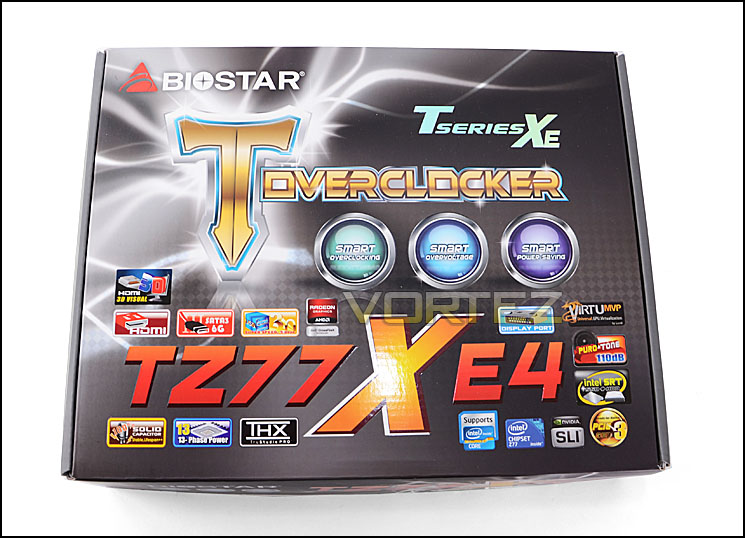
The packaging is lively
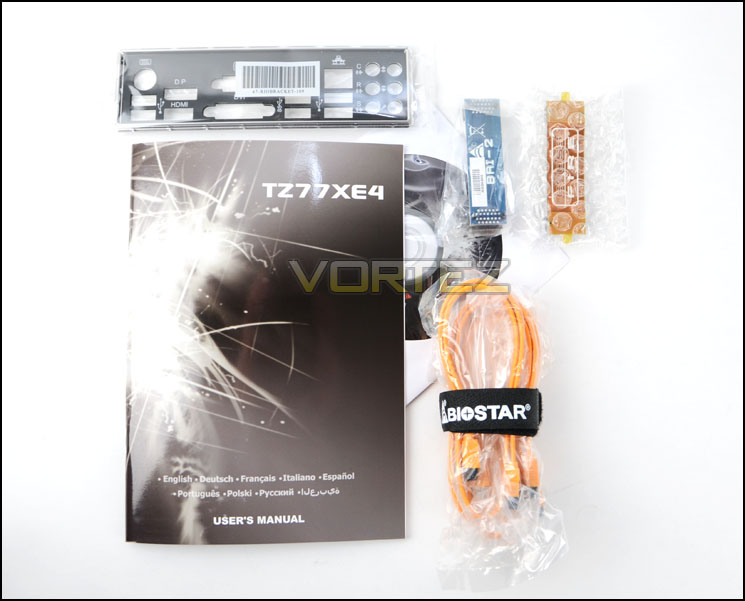
Accessories bundle with SLI and Crossfire bridges
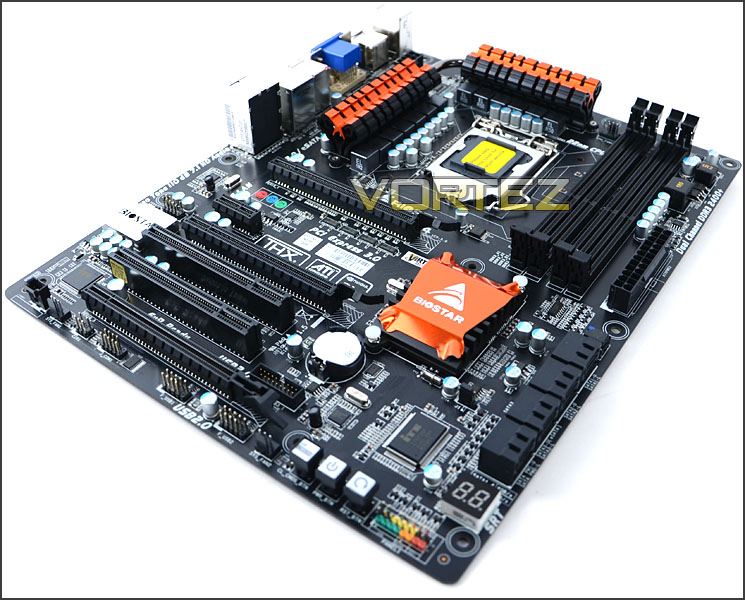
With the packaging out of the way we can finally take our first look at the TZ77XE4 and what a nice looking motherboard it is. It has a matt black finish to the PCB and so unlike some of the other motherboards we have seen it does not have a glossy surface. All ports and slots are black and BIOSTAR have given the Z77 chip and MOSFETs a metallic orange set of heatsinks that set this board off very well, the TZ77XE4 has the makings for one of the best looking motherboards out there!
The TZ77XE4 is a good looker – that’s for sure!
Over the page we will take a closer look at the TZ77XE4’s features and components.
Closer Look
Having the Intel Z77 chipset the TZ77XE4 is LGA1155 and has support for Intel’s 2nd and 3rd Generation Processors (Sandy Bridge and Ivy Bridge). BIOSTAR have given this motherboard a 13 phase power design and a dual heatsink design covers the MOSFETs – these heatsinks are joined via a single heatpipe. Pictured below just behind these heatsinks is the 8-pin CPU power connector.
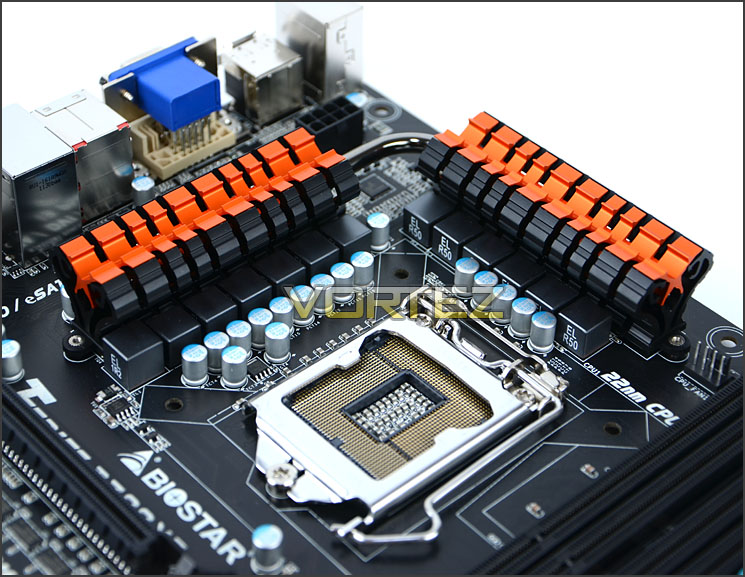
A vibrant heatsink design covers the MOSFETs
Turning our attention to the memory there is support for dual channel DDR3 from 1066MHz up to 2600 (OC) and maximum capacity of 32GB. Intel XMP profiling is also supported.
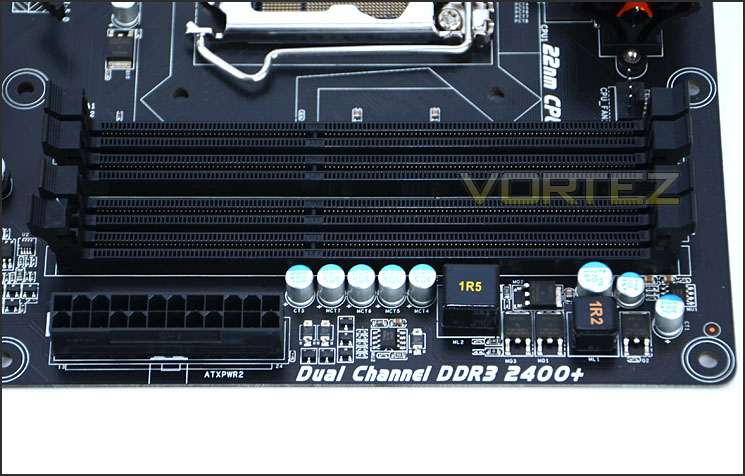
Support for up to 32GB DDR3
In terms of HDD storage, TZ77XE4 has a total of 8x SATA ports. There are 4x SATA ports for SATA 2 3GB/s and 4x SATA ports for SATA 3 6GB/s (via Intel Z77 and AS Media). Distinguishing between the ports is hard though because BIOSTAR have used black for the entire selection rather than using one colour for SATA 2 and another for SATA 3 for example.
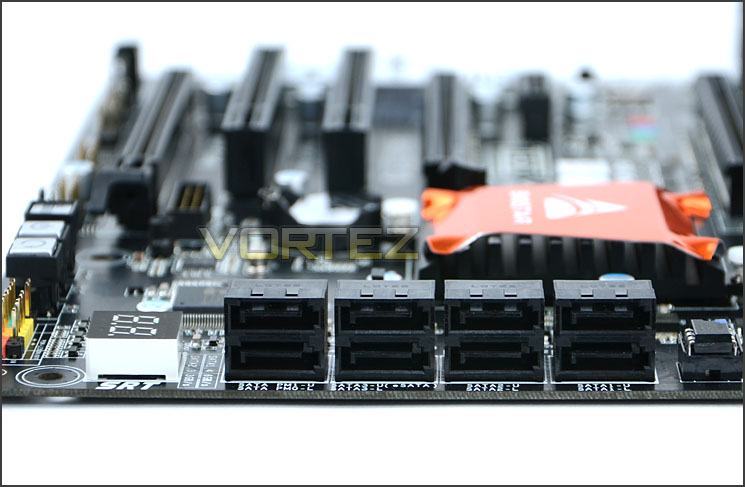
SATA 2 and SATA 3 support
In the bottom corner of the TZ77XE4 there are some onboard buttons for power/reset and clear CMOS. These buttons are extremely useful to those who use the motherboard outside of a compute chassis – on a test bench. This type of feature used to be only present on extremely high-end offerings but we are beginning to see this kind of feature filter down to casual enthusiast level.
Also at the bottom of the motherboard is an LED panel for LED debug. Again this is another feature that appears to be featured on a wide selection of motherboards nowadays – the idea with this feature is that upon POST various codes will cycle on the panel and if the system halts at a certain digit then you can refer to the user’s manual to identify a potential problem. So this is useful feature to have on a motherboard as it allows you to troubleshoot problematic bootups.
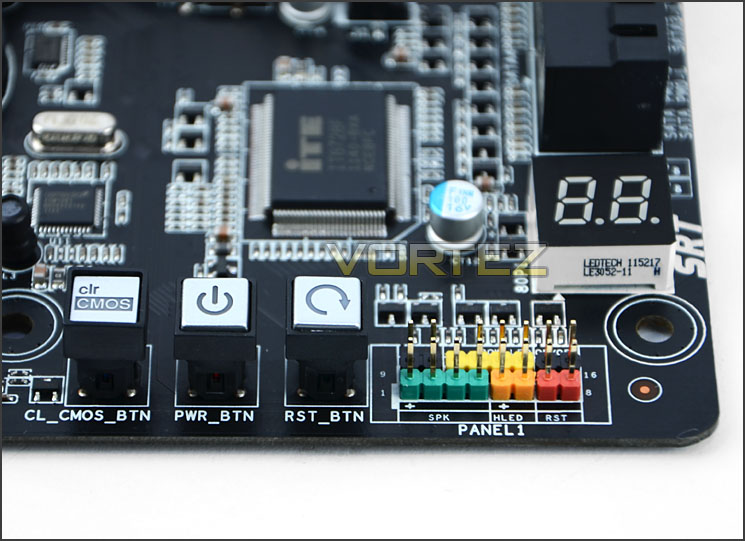
Onboard power/reset buttons with Clear CMOS and LED Debug too
Closer Look (Continued)
The Intel Z77 chip has been given a small heatsink with metallic orange cover to correspond to the other heatsinks on the TZ77XE4.
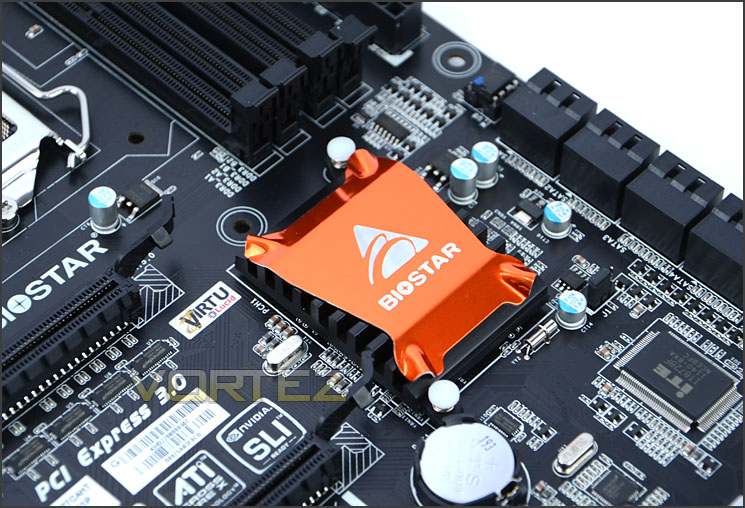
The Intel Z77 heatsink
The PCI-E slots are numerous and offer varied support. There are 2x PCI legacy slots for older devices and 2x PCI-E 3.0 slots that operate at x16 (top) x8 (middle) and a PCI-E 3.0 x4 (bottom). This paves the way for multi-GPU support with NVIDIA SLI and AMD CrossfireX. Those going for a single graphics card should use the top slot for best performance whilst using multi-GPU the speed will drop to x8 and x4 respectively. Beneath the top PCI-E 3.0 slot is a PCI-E 2.0 x1 slot. Typically this is at the top of the motherboard, as you can see from the picture that top PCI-E 3.0 slot is rather high up and there is a large gap between the two slots. A little later we will see how the installation goes and if having that top PCI-E so high, causes any incompatibility issues. To avoid clearance problems BIOSTAR should really have swapped the x1 and x16 around as most will be using that top slot for the graphics card.
Additional to this section there is a native USB 3.0 port right next to the bottom PCI-E 2.0 slot.
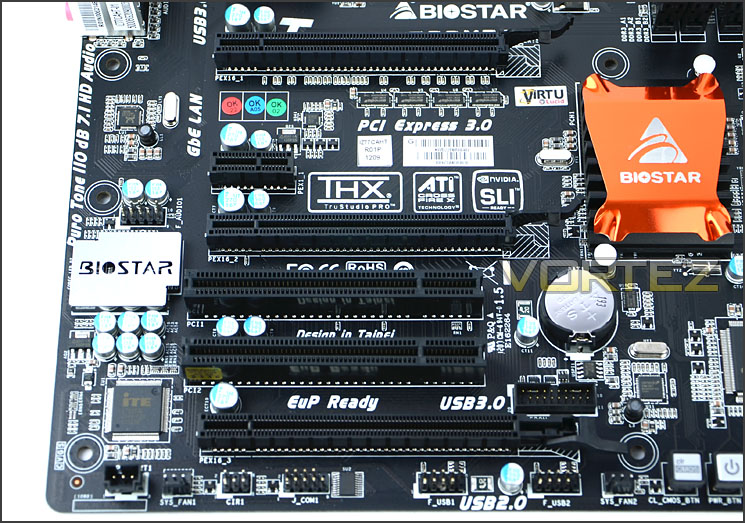
The PCI-E slots on TZ77XE4
Realtek deliver the audio functionality on TZ77XE4. The Realtek ALC898 chip sits under a metal cover and when powered up has a red LED to give the BIOSTAR text illumination.
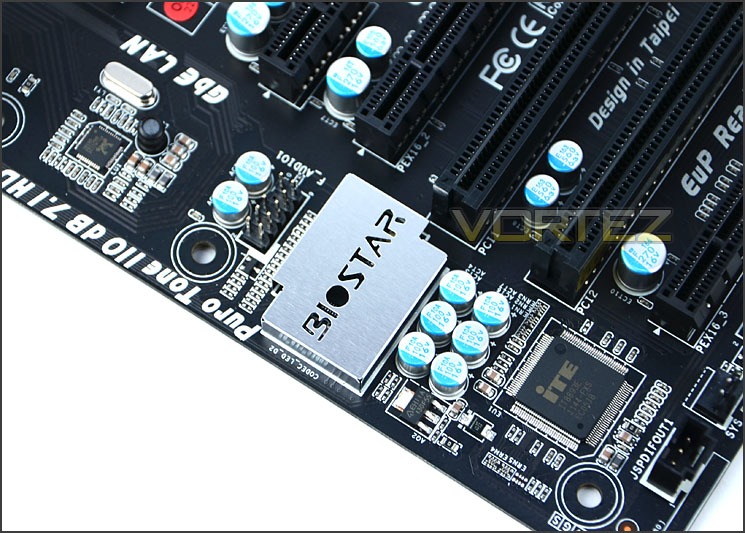
Realtek ALC898 with EMI shield
Finally we come to the rear IO ports. From left to right there is:
• PS2 keyboard port
• 2x USB 2.0 ports
• Display port/HDMI
• VGA/DVI ports
• eSATA 3GB/s
• 2x USB 3.0 ports
• Gigabit LAN (RJ45) port
• 2x USB 2.0 ports
• 8 Channel Audio via Realtek ALC898
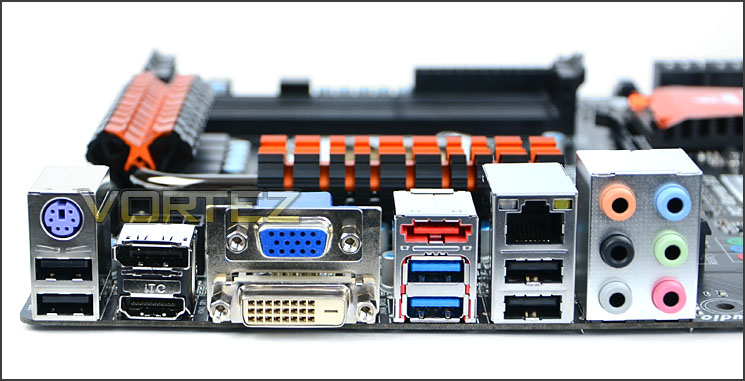
Realtek ALC898 with EMI shield
Test Setup & Overclocking
CPUs Intel Core i5 3570K (3.40GHz) Ivy Bridge
Cooling Alpenfohn K2 – Mount Doom
Motherboard BIOSTAR TZ77XE4
Memory Corsair Vengeance 8GB 2133MHz CL11 DDR
Graphics XFX R7970 Black Edition
Storage Kingston HyperX 240GB SSD
PSU OCZ Fatal1ty 750W
Cooling Alpenfohn K2 – Mount Doom
Motherboard BIOSTAR TZ77XE4
Memory Corsair Vengeance 8GB 2133MHz CL11 DDR
Graphics XFX R7970 Black Edition
Storage Kingston HyperX 240GB SSD
PSU OCZ Fatal1ty 750W
Benchmarks
Cinebench 11.5 – CPU Score
x264 HD 4.0 – 1st and 2nd pass encoding
SiSoftware SANDRA 2012 – CPU & Memory benchmarks
AIDA64 – CPU benchmarks
3DMark 11 – DX11 3D Performance and Extreme preset
Games – DIRT 3, Skyrim and Battlefield 3
Other Software
Core Temp
LinX stress Test
CPU-Z
Overclocking
As previously mentioned in our Intel Core i5 Sandy Bridge Roundup – overclocking with Ivy Bridge is identical to Sandy Bridge. It is achieved by altering the multiplier rather than the BCLK. So the BCLK stays at 100MHz and the multiplier is modified. So if we have 100MHz on the BCLK and 40 for the multiplier this will obviously output 4GHz.
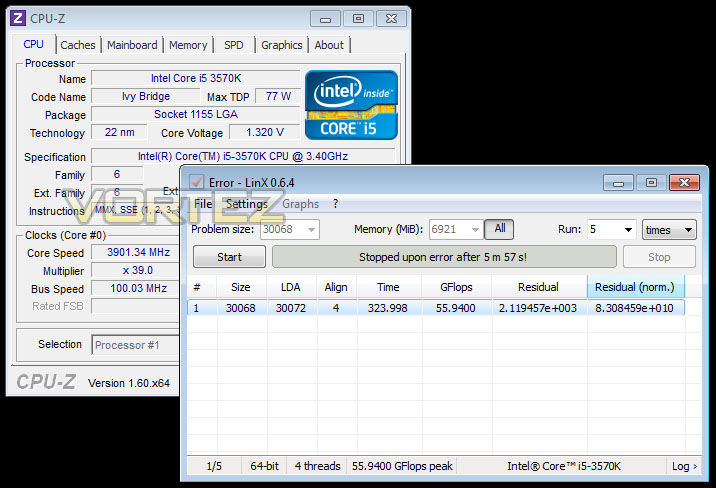
For this section of the review the maximum overclock was achieved by using the Intel Core i5 3750K and monolith CPU cooler – Alpenfohn K2 with 2x 120mm and 1x 140mm fans. Safety features were disabled in the BIOS and the multiplier for Core i5-3570K was nudged up to 45 (a frequency to which all current motherboards handled with ease) and the vcore was set to 1.38v to provide enough voltage and headroom to increase the frequency. The system booted into windows but within 5 minutes of stress testing with LinX the process halted and failed. So I then began working backwards, maintaining a high(er) vcore and decreasing the multiplier in BIOS and entering windows to test this. Each time it failed under stress until I eventually got to 39 (3.9GHz) and again this failed during stress. I even tried increasing the voltage to 1.4v modifying to different ranges but nothing would allow for a stable overclock. (Latest BIOS was used and PLL overvoltage was enabled).
This is rather disappointing as this motherboard is touted to be designed for the overclocker, I had hoped for some impressive results.
UPDATE – The problems with overclocking were due to one of the memory modules being pushed out slightly. After changing to low profile memory and testing an overclock the problem was resolved. Following on from this I pushed the vcore to over 1.4v and set the frequency to 48 (4.8GHz) and found instability so I worked backwards from this until reaching 46 (4.6GHz) which was stable. See screenshot below!
NOTE: Test system memory Corsair Vengeance has no compatibility problems with K2 CPU cooler on other motherboards only BIOSTAR. Memory slots/CPU socket are closer.
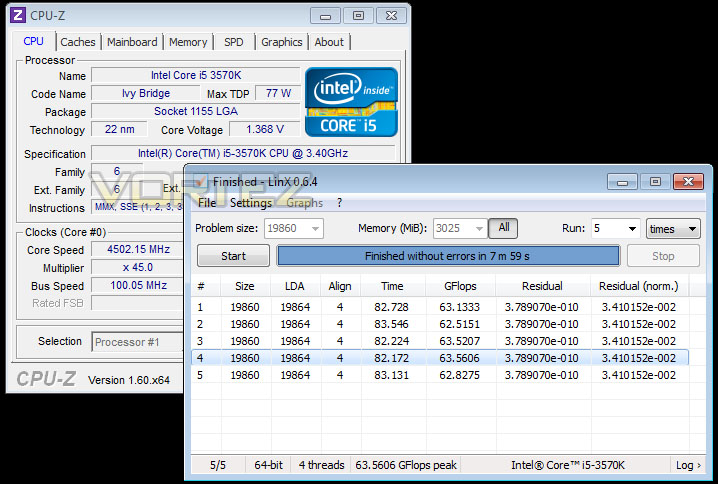
Due to overclock only being attainable by using different memory compared to other motherboards we have tested – the overclock results will not be benchmarked for this motherboard review.
Clearance – a tight squeeze!
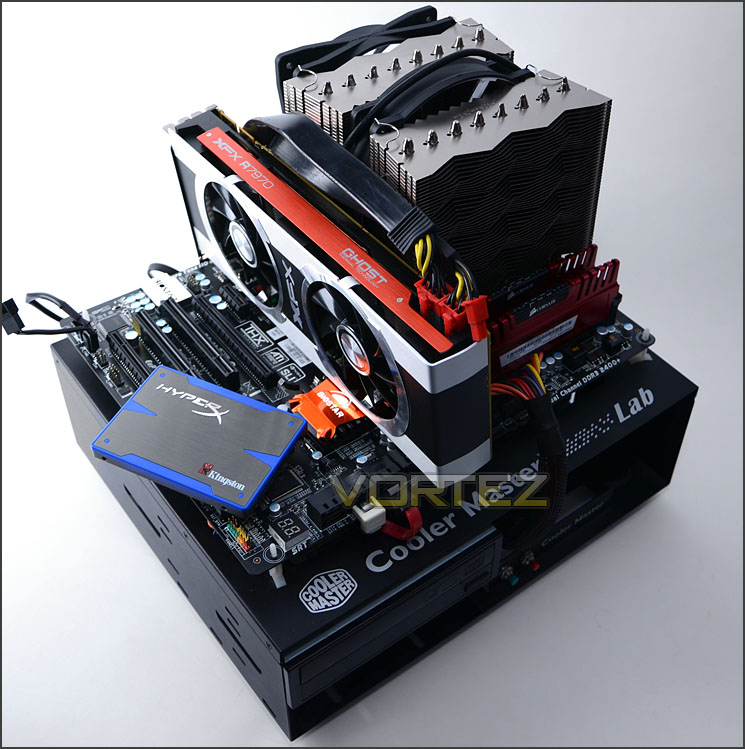
As mentioned previously during the inspection of the TZ77XE4, BIOSTAR have positioned the top PCI-E x16 slot rather close to the CPU socket for our liking. Other vendors usually position the x1 slot at the top of the lineup of PCI-E to avoid creating clearance issues for graphics cards and CPU coolers but BIOSTAR haven’t done this unfortunately.
As pictured below the graphics card is being pushed over slightly because both the heatsink and the fan on the heatsink of our test system are very close. The fan is actually touching the back of the PCB. As the top PCI-E slot provides the best bandwidth, its only common that all users will want to use this slot for their graphics card functionality.
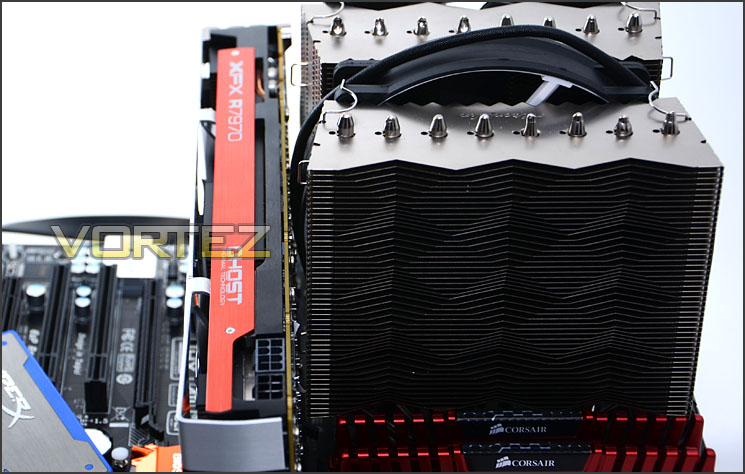
Graphics cards come very close to the CPU Cooler
Another aspect that is worth mentioning is the memory. For other Z77 motherboards we have reviewed the memory does come in close proximity to the CPU cooler but nothing as close as with the TZ77EX4. The cooler is actually pushing the nearside memory module down and outwards.
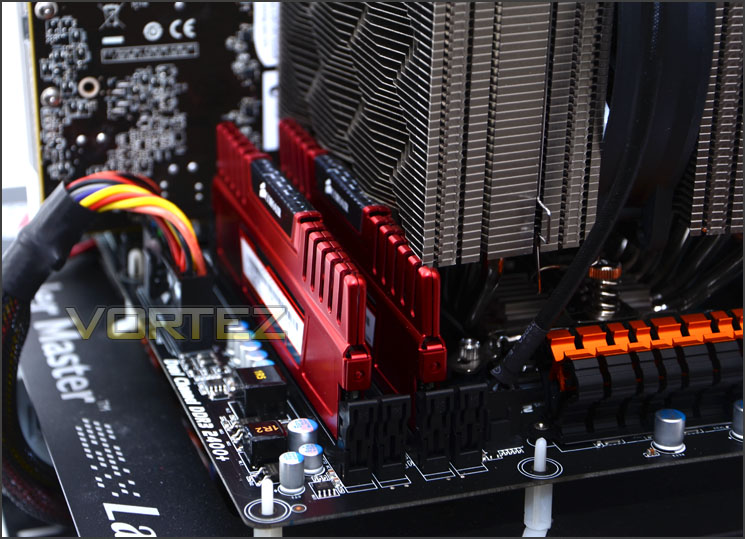
Memory is a close affair
BIOSTAR BIOS
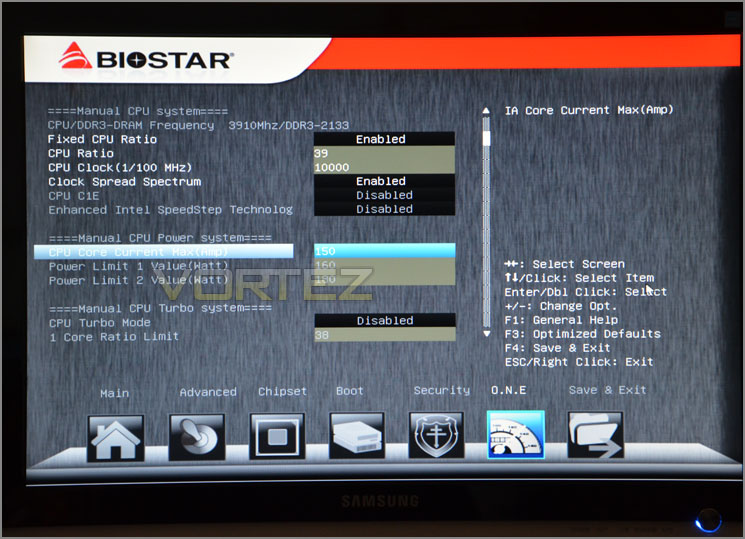
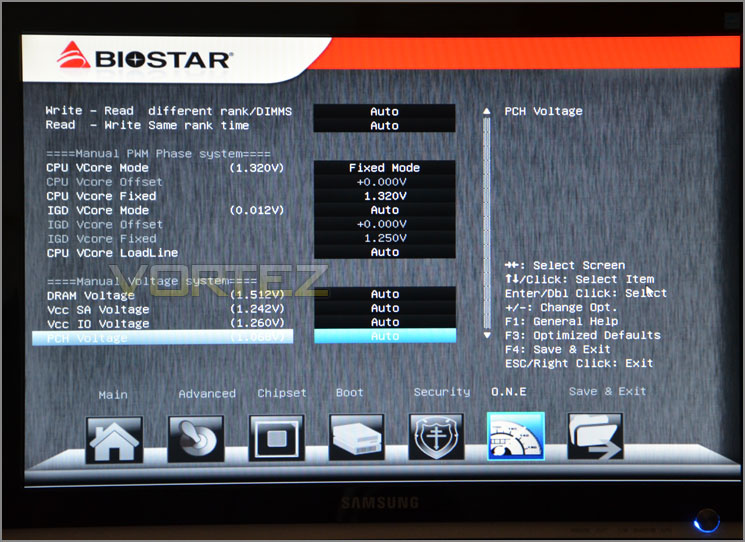
As with most vendors now, UEFI is the standard to adhere to for the BIOS. BIOSTAR have a subtle interface that allows you to take control of all settings including overclocking, memory configuration, HDD and all the usual options to expect.
It’s important to note that some mice will not working within BIOSTAR’s UEFI BIOS. For the Z77 test system I typically use a laser gaming mouse and this would not work – navigation presented unstable movement and it was nigh on impossible to use the mouse effectively.
The UEFI BIOS with the TZ77EX4 looks reasonable enough and for the most-part is ok to deal with if you aren’t using a laser mouse but tweaking the overclocking settings is cumbersome. Speedstep and Turbo Boost required a magic combination in order to disable one or the other.
Lucid VIRTU MVP
An interesting feature that first appeared on the desktop environment with the Sandy Bridge architecture was the integrated graphics on the CPU. This meant that regardless of if you had a discreet graphics solution you always had the ability to use “Built in” processing power to watch movies, view 3D content and take part in some casual gaming.
With Ivy Bridge, Intel have stepped up with new graphics architecture by delivering full DX11 functionality. With HD-4000 there is a significant increase in execution units which mean even greater performance enhancements when compared to HD 2000/3000 – found on Sandy Bridge CPUs. To the end user this should translate to being able to handle 1080p movies, more complex gaming titles and even more intense 3D renders.
This motherboard HDMI/VGA/DVI ports to allow connectivity to Intel’s IGP with support via Lucid VIRTU MVP. What VIRTU does is – it allows the user to utilise both discrete GPU and Intel’s IGP (built in graphics on the CPU) without the need to change hardware or switch the outputs.
VIRTU brings in many unique features, a great deal of them are associated with power management – relating to heat, fan speed, and other useful elements. There are two different modes to use when considering VIRTU:
i-Mode
This provides the user with Intel features and power saving options when not being used for 3D gaming. Display must be connected to video output on the motherboard to use this feature.
d-Mode
This mode allows gamers to enhance their 3D experience and performance – combining a discrete graphics solution and the iGPU. In this mode we can use VIRTU to assist with things like transcoding and media encoding in general. The overriding thought on this is that even entry level AMD and NVIDIA graphics cards have their own technologies for handling media encoding such as AMD Stream and NVIDIA CUDA – both of these technologies are deemed as being exceptional alternatives and don’t offer any real advantage over VIRTU using IGP for these types of task.
Display drivers for discreet graphics card must be installed prior to VIRTU drivers.
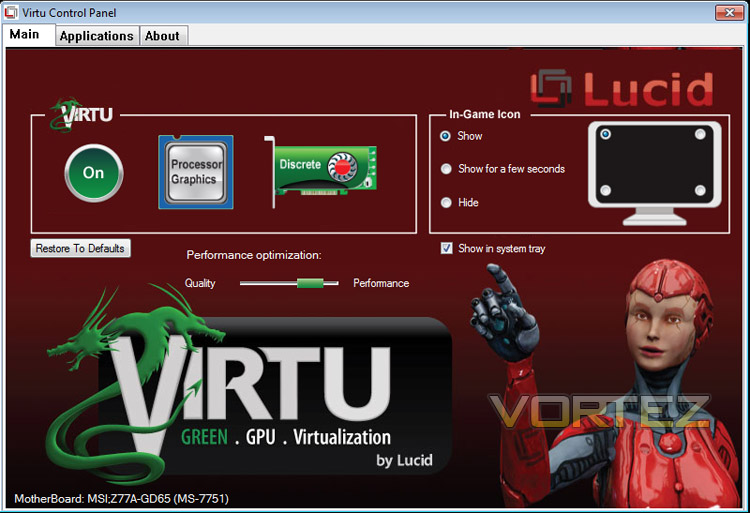
For more information on VIRTU please go to: Lucidlogix Virtu MVP
Power Consumption
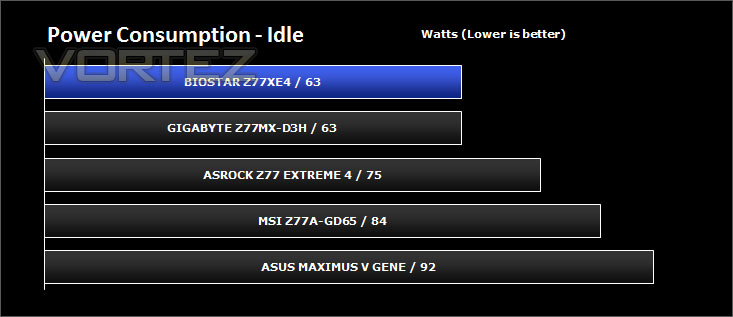
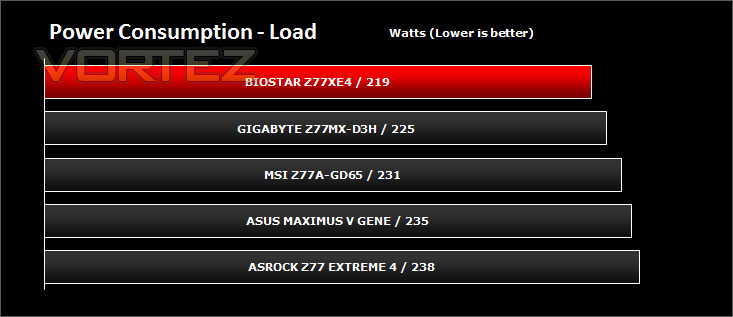
It’s interesting to note the power consumption across all motherboards. Although they are using P67 and Z68 chipsets, energy results can fluctuate between manufacturers due to the features and specifications that are integrated. First of all, for the idle tests the system is cold booted into Windows and no additional applications are executed – the watts are noted on the external energy monitor we use and then the system is loaded with 3DMark 11 – watts are again monitored for the duration of the test and the highest rated wattage result is then noted down. Below are the results of this energy test.
Encoding Performance – X264 HD
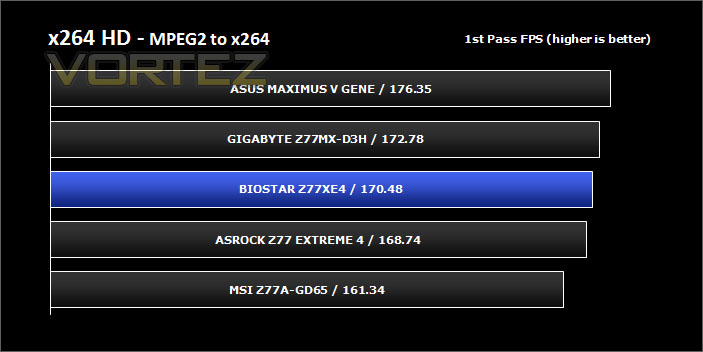
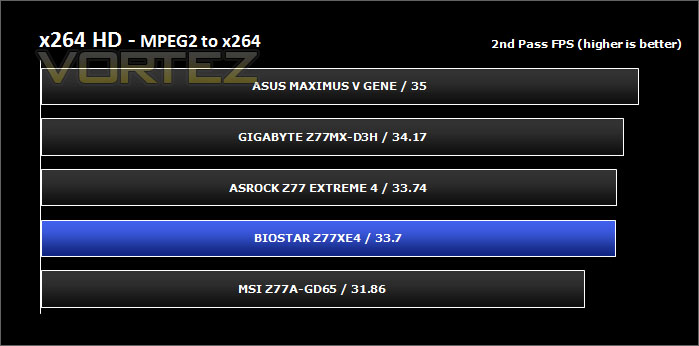
Simply put, this test measures how fast your machine can encode a short, DVD quality MPEG-2 video clip into a high-quality x264 video clip. What’s x264, you ask? It’s more or less the next-generation Xvid/DivX codec. I think it’s ideal for a benchmark because the application (x264.exe) reports fairly accurate compression results (in frames per second) for each pass of the video encoding process, and it uses multi-core processors very efficiently.
x264 HD gives results for 2 passes when compressing an MPEG-2 clip into x264. It presents 4 separate results for each pass giving a total of 8 – all results are given in FPS. For each pass I have averaged out the results.
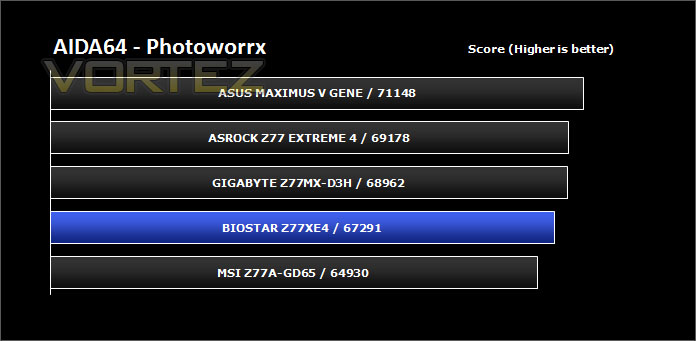
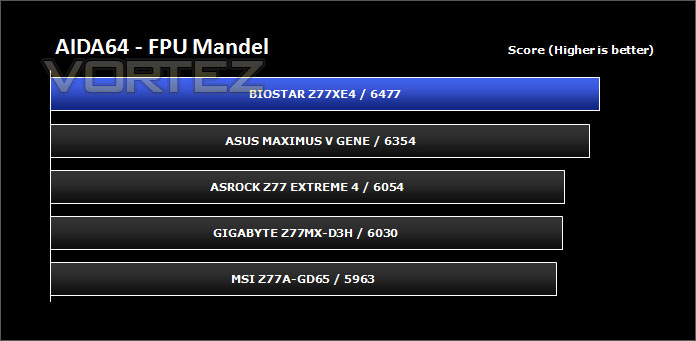
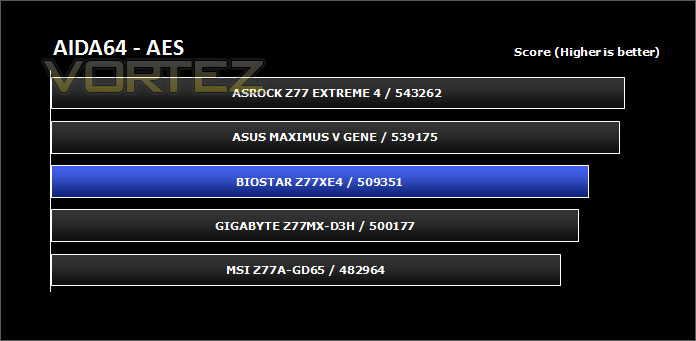
Processing Features Performance – AIDA64
Get your copy of AIDA64 here!
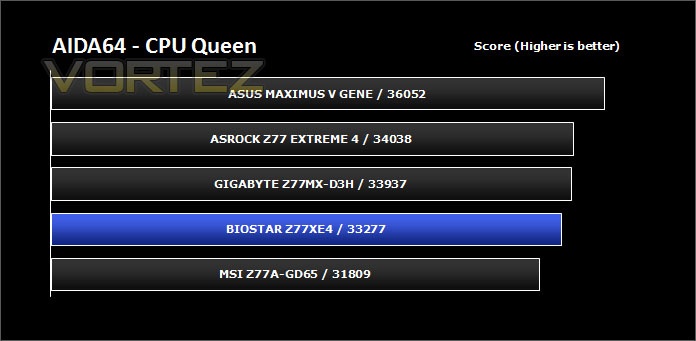
This simple integer benchmark focuses on the branch prediction capabilities and the misprediction penalties of the CPU. It finds the solutions for the classic “Queens problem” on a 10 by 10 sized chessboard. At the same clock speed theoretically the processor with the shorter pipeline and smaller misprediction penalties will attain higher benchmark scores. For example — with HyperThreading disabled — the Intel Northwood core processors get higher scores than the Intel Prescott core based ones due to the 20-step vs 31-step long pipeline. CPU Queen test uses integer MMX, SSE2 and SSSE3 optimizations.
Processing Power Performance – Cinebench
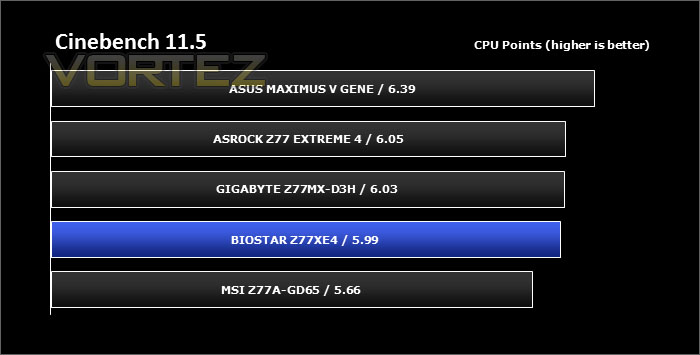
CINEBENCH can measure systems with up to 64 processor threads. This test scene contains approximately 2,000 objects which in turn contain more than 300,000 polygons in total, and uses sharp and blurred reflections, area lights, shadows, procedural shaders, antialiasing, and much more. The result is displayed in points (pts). The higher the number, the faster your processor.
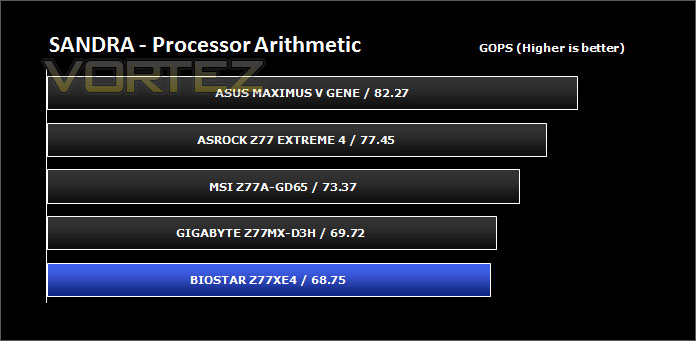
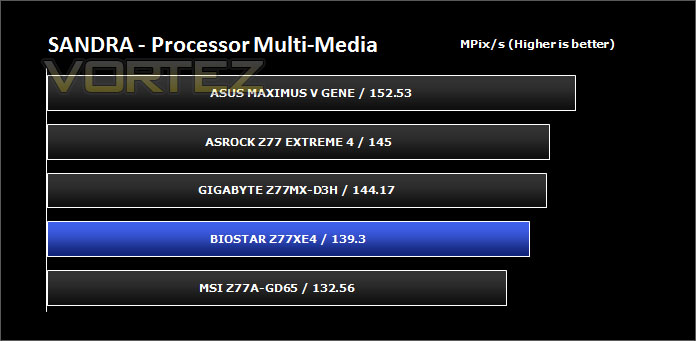
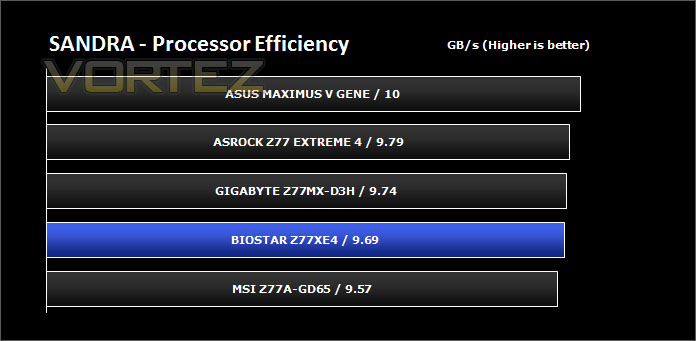
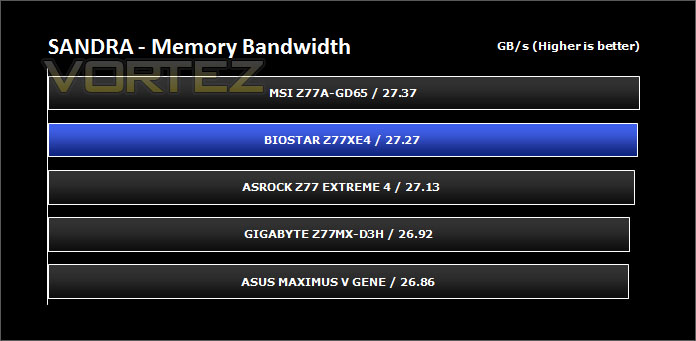
Bandwidth Performance – SiSoftware SANDRA
SANDRA isn’t always a benchmark that is included in hardware reviews but I believe it shouldn’t be ignored. SANDRA provides a vigorous package that tests your system in a rather large array of benchmarks. There are many aspects of benchmark that can be executed. We will be considering – CPU and memory tests.
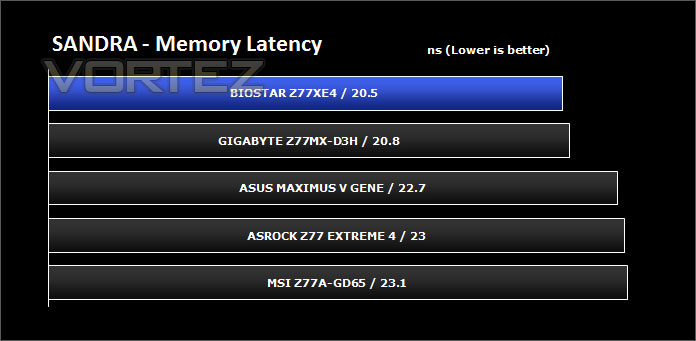
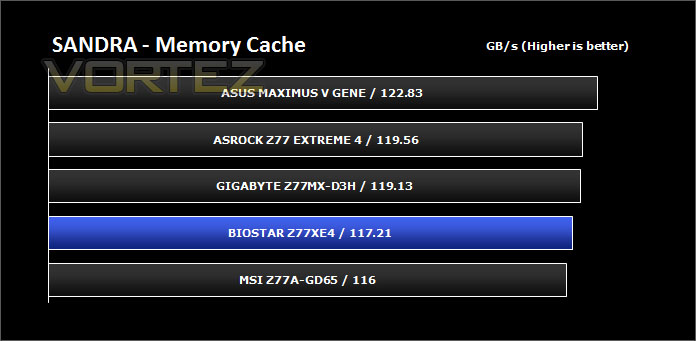
3D Performance – 3DMARK 11
Designed to measure your PC’s gaming performance 3DMark 11 makes extensive use of all the new features in DirectX 11 including tessellation, compute shaders and multi-threading. Trusted by gamers worldwide to give accurate and unbiased results, 3DMark 11 is the best way to consistently and reliably test DirectX 11 under game-like loads.
3DMark 11 is a very popular 3D performance benchmark suite and needs little introduction. For the test settings both Performance and Extreme presets are run with ‘benchmark only’ being selected. This provides good analysis. Many will only test the performance preset, using the extreme mode we can examine the board under much more severe stressing – at 720p and 1080p.
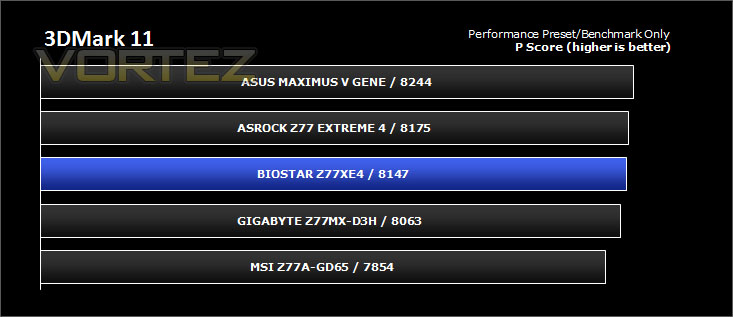
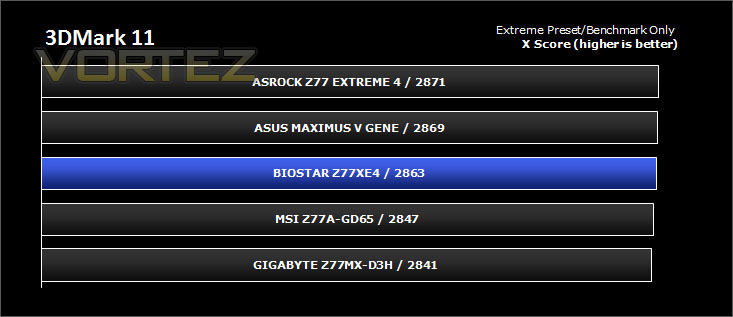
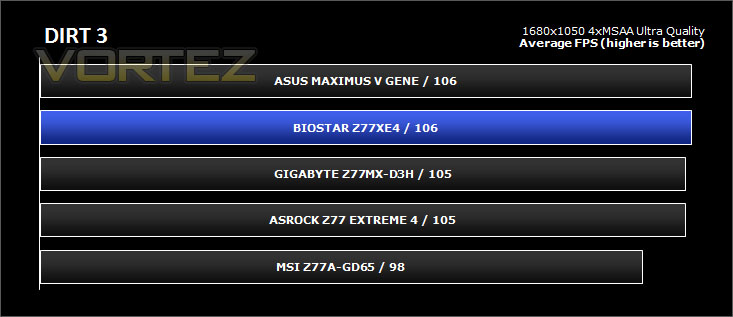
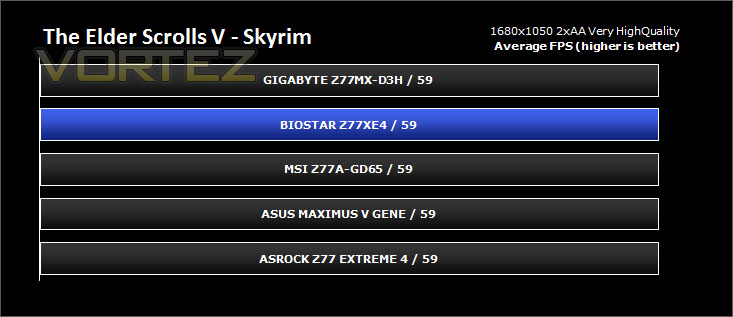
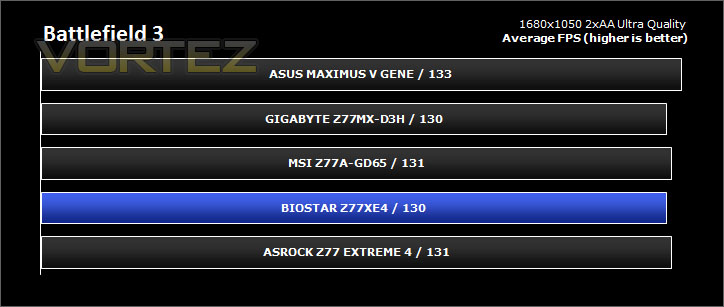
Gaming Performance – DIRT 3, Skyrim & Battlefield 3
It’s important for us to perform a number of game benchmarks as well as the synthetic tests because gamers will want to know if there are any significant benefits. So here we have a selection of popular gaming titles, critically acclaimed and action-packed.
Settings
DIRT 3
– 1680×1050 4xMSAA – Ultra Quality *Benchmark tool*
Skyrim
– 1680×1050 2xAA – Very High Quality *FRAPS – 1st episode*
Battlefield 3
– 1680×1050 2xAA – Ultra Quality *FRAPS – Sepur Fedelis*
The gaming titles selected demand GPU power over CPU power – in each test the difference is rather marginal.
Conclusion
After seeing BIOSTAR’s early renditions of the Intel Z77 lineup I was keen to get the TZ77EX4 motherboard onto our test bench and see how it fared against rival offerings.
Aesthetically the TZ77EX4 is a delight to overlook. A matt black PCB is something that most enthusiasts strive for and the orange heatsinks set the motherboard off very well. A quick glance over the features will highlight quite an assortment of characteristics, including a generous helping of SATA storage ports – more than you would get on your typical Z77 motherboard.
Performance with our Intel Core i5-3750K was reasonable, the TZ77EX4 matched the performance of the other models we have had in for review recently. Establishing an overclock meant that we had to install different memory onto the test system (as per overclocking section) because the CPU cooler was pushing the memory out of its slot and causing instability – something we have only experienced with this motherboard.

Though I don’t wish to dampen the mood, this wasn’t the only disappointing thing to report back on. The BIOS whilst reasonably pleasing to the eye lacked finesse and compatibility with laser mice. Trying to switch off Turbo Boost and Speedstep felt like a spate of Portal (but not as fun!) – guessing the right combination allowed access to disable or enable the options and establish the ability to overclock. The overall layout is another frustrating aspect of TZ77EX4 – the top PCI-E slot is very close to the CPU socket and as a result means that the graphics card can come very close (in some causes touch) the CPU cooler. BIOSTAR should have swapped the x1 slot for the x16 to avoid this.
So overall, the TZ77EX4 is a rather good looking example of what a motherboard should be – aesthetically, but it is let down by a troublesome layout. Thankfully BIOSTAR can tweak the BIOS to allow better mouse compatibility and fluid menu navigation.
Pros
+ Aesthetically very pleasing to the eye
+ Lots of SATA storage ports
+ Energy efficient
Cons
– Top PCI-E is too close to CPU socket (Clearance issues)
– BIOS is cumbersome
+ Aesthetically very pleasing to the eye
+ Lots of SATA storage ports
+ Energy efficient
Cons
– Top PCI-E is too close to CPU socket (Clearance issues)
– BIOS is cumbersome


