







The latest mechanical keyboard from Cooler Master’s gaming subsidiary is here, and it aims to be compact but without the usual drawbacks…

Product on Review: CM Storm Quick Fire TK
Manufacturer and Sponsor: CM Storm (Cooler Master)
Street Price: £62.95 inc. VAT
UPDATE: Note that this is an update to the original review posted on the 25th November 2012
We have been lucky enough in the past to have the opportunity to review a range of mechanical keyboards, and the CM Storm Trigger was certainly notable. Rich reviewed this attractively priced full size keyboard in June, and though outfitted with the stiff Cherry Black MX switches felt that overall it was an extremely high quality peripheral with one factor in mind: gamers and gaming.
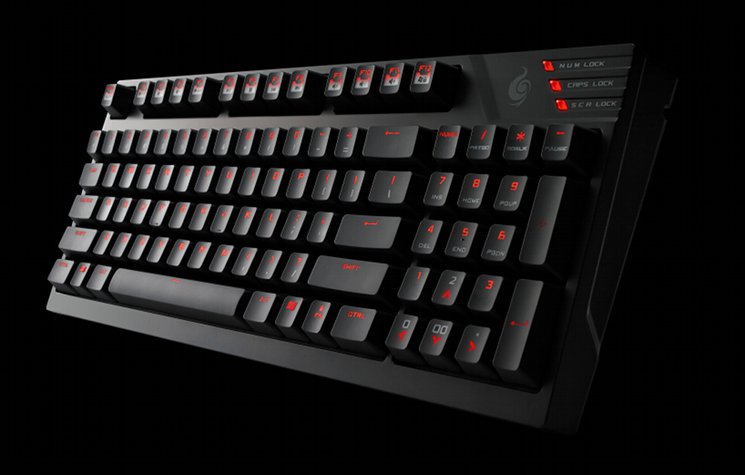
The Quick Fire TK is a compact mechanical keyboard based on the very successful full size Quick Fire Pro. In previous iterations, compact mechanical keyboards (for example the Quick Fire Rapid) utilised a tenkeyless layout, dispensing with the numberpad portion of full-size layout and retaining the central column of command & arrow keys. The Quick Fire TK however turns things on their head by incorporating the command keys into the numberpad to create a compact layout with loses as little as possible in functionality.
About the Quick Fire TK
You’re a gamer. You know that a mechanical keyboard means the difference between winning and losing. The original QuickFire Rapid gaming keyboard was embraced by gamers worldwide because it made the difference. Now the QuickFire TK takes the QuickFire Rapid and put it on steroids! Choose between 3 different Cherry MX switches. Each keycap is UV coated to make it durable. There’s full LED backlighting with 3 modes and 5 brightness levels. NKRO over USB means every single keystroke will be registered. An embedded steel plate give you maximum stability and durability. 7 easy-access multimedia shortcut keys save time. A complete numpad lets you get work done while not gaming. The slim and lightweight size gives you plenty of room for your mouse. Great for LAN parties.
At less than £65 including V.A.T., the Quick Fire TK is extremely competitively priced for a mechanical keyboard of any stripe, never mind backlit and with a 92-key layout featuring a Number Pad. By also presenting the choice of Red, Brown and Blue Cherry MX switches, CM Storm also offer options almost without precedent in the market. The question now is: how does it perform and can it bridge the functionality gap between compact and full-size keyboards?
Features And Specifications
Keyboard Features
N-Key Rollover over USB
N-Key Roll Over in USB mode means even the wildest key combos are registered perfectly.
Easy cable management
Detachable braided USB cable and cable routing groves at the underside of the keyboard. Easy cable management and better flexibility.
Full LED backlight, 3 modes and 5 brightness levels
Stylish and provides optimum visibility even in dark rooms. Different backlight modes highlight different key groups.
Compact layout with integrated Num pad block
The QuickFire TK’s unique NumPad block design merges both navigation and command keys. You get a compact gaming keyboard with a NumPad block.
N-Key Roll Over in USB mode means even the wildest key combos are registered perfectly.
Easy cable management
Detachable braided USB cable and cable routing groves at the underside of the keyboard. Easy cable management and better flexibility.
Full LED backlight, 3 modes and 5 brightness levels
Stylish and provides optimum visibility even in dark rooms. Different backlight modes highlight different key groups.
Compact layout with integrated Num pad block
The QuickFire TK’s unique NumPad block design merges both navigation and command keys. You get a compact gaming keyboard with a NumPad block.
Technical Specifications
Model Number
• SGK-4020-GKCR1(Red switch)
• SGK-4020-GKCM1(Brown switch)
• SGK-4020-GKCL1(Blue switch)
Key Switch
• Cherry MX Blue/ Brown/ Red
Keycaps
• ABS, grip coated, removable
Keycap Puller
• Yes, ring-puller
Backlight
• All keys, Red, 5 Levels, 3 Modes
Key Rollover
• NKRO (windows only)
Polling Rate
• 1000 Hz /1 ms
Interface
• USB 2.0 full speed
USB cable
• 1.8m, braided, gold plated, removable
Dimensions
• 377.5(L)*138(W)*33(H)mm
• 14.9(L)*5.4(W)*1.3(H)inch
Weight
• 544 g/1.2 lbs
• SGK-4020-GKCR1(Red switch)
• SGK-4020-GKCM1(Brown switch)
• SGK-4020-GKCL1(Blue switch)
Key Switch
• Cherry MX Blue/ Brown/ Red
Keycaps
• ABS, grip coated, removable
Keycap Puller
• Yes, ring-puller
Backlight
• All keys, Red, 5 Levels, 3 Modes
Key Rollover
• NKRO (windows only)
Polling Rate
• 1000 Hz /1 ms
Interface
• USB 2.0 full speed
USB cable
• 1.8m, braided, gold plated, removable
Dimensions
• 377.5(L)*138(W)*33(H)mm
• 14.9(L)*5.4(W)*1.3(H)inch
Weight
• 544 g/1.2 lbs
First Look
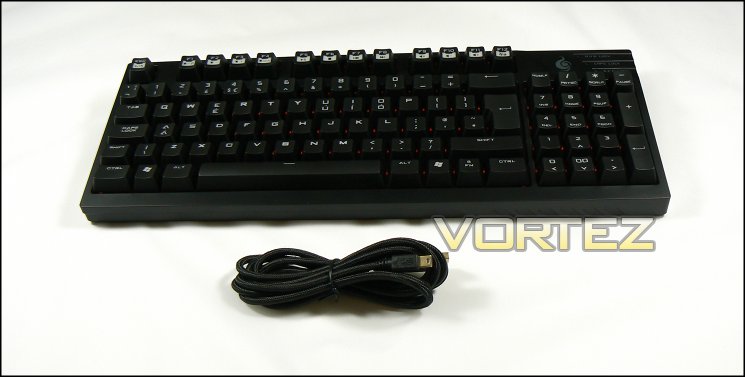
No packaging to take you through this time around – the CM Storm Quick Fire TK review sample we have received is a pre-release plain box with the accessories you’ll find in every retail pack. No problem though, lets carry on regardless.
A retail UK CM Storm Quick Fire TK will contain all that you see above: the keyboard itself, a thick 1.8m long braided USB 2.0 to mini-USB cable, and a key-cap remover. We should immediately note that CM Storm recommend only using the supplied cable for connecting the keyboard which is designed to carry more power than standard gauge USB cables. Those with motherboards which have particularly weak USB power delivery should also note that the entire supply needs to be through a single USB, rather than two as in some other LED-backlit keyboards.
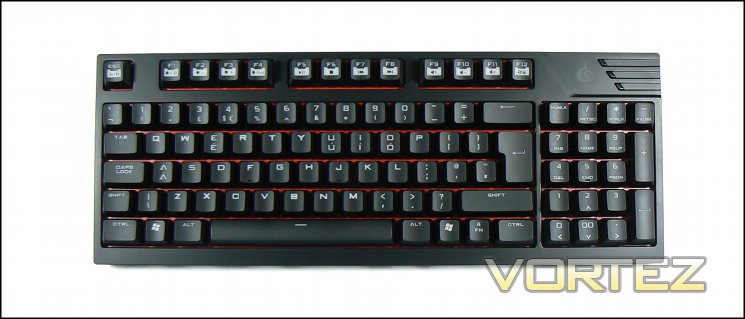
Measuring 378 x 143 x 33mm, the keyboard is angled at [TBD] degrees without the feet extended. With feet extended, the keyboard is 44mm tall and angles at [TBD] degrees. It’s slightly wider than most compact keyboards thanks to the extra column of keys, but amounting to an increase of 22.5mm.
The main portion of the keyboard adheres to a slightly modified UK layout with short left-shift, long right-shift, large return and large backspace; the single concession to the non-standard is the Function-Lock (FN) key in the bottom-right. F1-F11 keys also double as backlight control and media keys, with F12 acting as a toggle for enabling and disabling the Windows keys (a great boon in gameplay).
The Number Pad is where the Quick Fire TK differs most from traditional compact offerings. Most tend to be ‘tenkeyless’, eschewing the NumPad entirely as in the Quick Fire Rapid. Having a NumPad on a compact keyboard rather than command keys isn’t unheard of, but typically the arrow keys are integrated into the main section, below the Return. By contrast CM Storm splits the wide zero of a traditional NumPad and exploits the two-mode Num-Lock system to map command and arrow functions to number keys when Num-Lock is disabled.
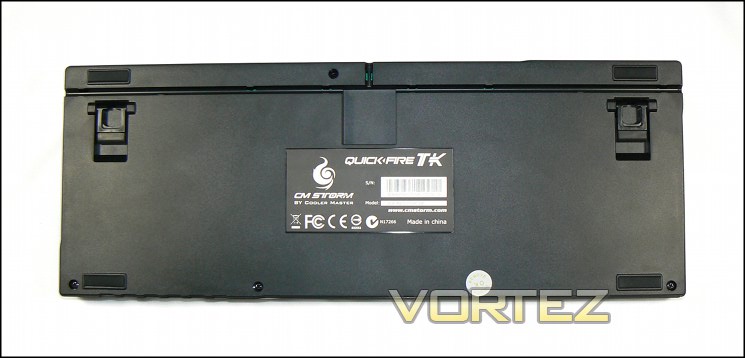
Even as floors go, the Quick Fire TK has a couple of interesting tweaks. Probably most noticeable is that the USB cabled isn’t integrated into the keyboard chassis, instead connecting up via a mini-USB port. The base plate has three channels cut into it for cable management, allowing you to keep your desk clutter-free by angling the cable to fit your own requirements – a neat LAN feature I think you’ll agree. Because of the channels, the board can sit flush with the desk even when the feet are not extended.
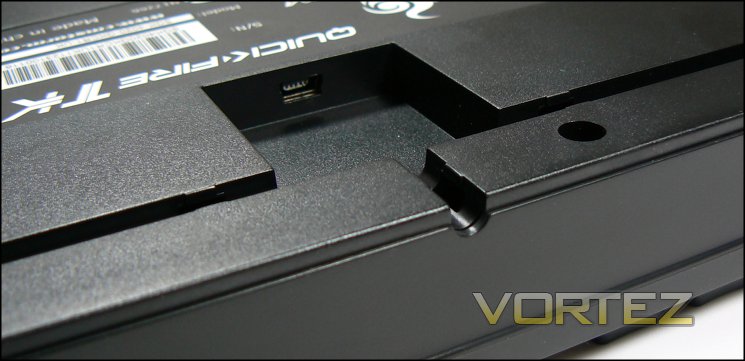
Speaking of feet, four rubber pads are integrated into the keyboard floor, with a further two on the extendible feet. These should prove to be effecting in keeping it firmly in place, even when hammering on the keys in a particular aggressive fashion.
Coming to the keycaps, each is made from semi-opaque ABS plastic with a matte-black anti slip coating. Alpha-numeric symbols have been etched out of the coating, allowing the LEDs underneath to shine through and illuminate the symbol when active. The resultant finish is only slightly uneven where the black layer has been but away, and doesn’t detract from the overall feel of the keys.
The keycap remover is suitable for all far the return key, which needs to be lifted off by hand. Initial experimentation didn’t indicate any scratching of marring of the keycaps when you do so, and having easily removable keys makes cleaning the board a doddle.
A Closer Look
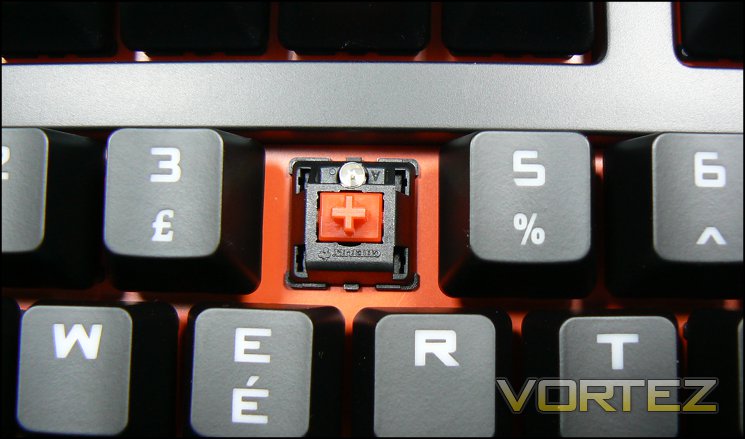
Upon lifting off a key we can see the switch assembly and backplate a little clearer. The Cherry MX Red switch of each key has a linear actuation with no tactile feedback or clicking sound; as with the Cherry MX Black types, these switches are generally the preference of gamers as they tend to bottom out on keystrokes. The Cherry MX Red requires a little less force to actuate than the Black, making them the perfect choice of those moving from membrane keyboards for the first time. Other options for the Quick Fire TK are Brown and Blue switches, the former of which has a tactile bump at the actuation point whilst the latter features the more audible ‘click’ we tend to associate with mechanical keyboards.
More detailed information on the Cherry MX range of switches can be found here.
In this particular sample the steel backplate is coloured red to match the LEDs; keyboards with other switch types not only have different coloured LEDs but also a variation on the backplate colour. This makes it easy to differentiate between models at a glance. Whichever model is chosen the backplate is steel, lending the keyboard an extremely durable construction with no flex.
Function-Lock (FN)
In order to access some of the inbuilt functionality of the Quick Fire TK the keyboard has a Function Lock button, labelled with a padlock and ‘FN’. Holding this key for 3 seconds enables the alternate input for the keys on the top row, denoted by the icon framed by white; between them these thirteen keys control the backlight, Windows keys and 6 or N-key roll over. The following describes the behaviour when FN-lock is active.
6-Key, N-Key Roll-over
Rollover defines the number of keys you can press and hold before additional keystrokes no longer become registered by the system. This is of particular value to gamers who often press multiple keys at the same time or in quick succession, and 6-key rollover is something of a benchmark to aim for. N-key roll over (NKRO), essentially denoting a high value but at least over 10, is extremely difficult to achieve through USB protocals; keyboards which have offered it generally utilise PS/2 connectivity.
With FN active, holding ‘n’ and tapping ESC will enable NKRO mode. Holding ‘6’ and tapping ESC will enable 6-key rollover mode. CM Storm warn that some systems will refuse to boot under NKRO mode.
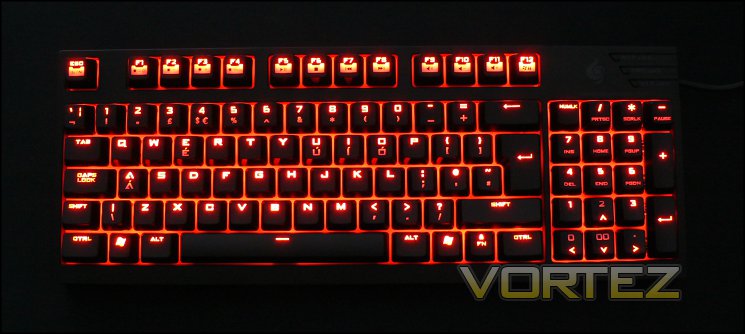
Lighting Options
F1 -> On/Off
This turns off or on the main LED lighting. When off, the only LEDs illuminated are the FN-Lock (when deactivated), Windows-key Lock/F12 (when deactivated) and arrow keys (when Num Lock isn’t active); these key will be at maximum brightness. When on, key illumination depends on mode and NumLock status.
F2/F3 -> LED Brightness
The keyboard has five discrete brightness levels, each of which is noticeably different. Level 1 is quite subtle, whereas 5 is very bright; those with strong prescription glasses may want avoid the highest brightness levels due to specular diffraction and glare.
F4 -> Lighting Modes
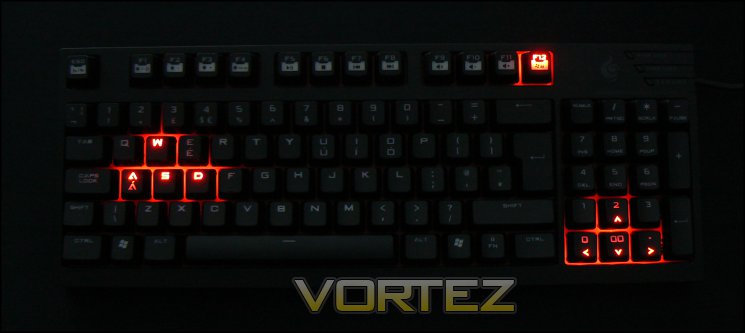
The keyboard has three lighting modes. The first is a constant illumination at the set brightness level. The second cycles between brightness levels 1 and 5 in a continuous fashion – a breathing dynamic. The third only illuminates the WASD keys, although arrow, F12 and FN keys will also be situationally illuminated.
Other FN Options
With FN-Lock key active, the remaining F-Keys revert to alternate functionality. Much as the media keys will be useful to some, the ability to disable the Windows Keys in hardware is surely the most significant and pretty much a requirement on modern gaming keyboards.
F5:- Media Play/Pause
F6:- Media Stop
F7:- Media Step-To Beginning
F8:- Media Step-To End
F9:- Windows Volume Mute
F10:- Windows Volume Down
F11:- Windows Volume Up
F12:- Disable Windows Key (illuminated when active)
F6:- Media Stop
F7:- Media Step-To Beginning
F8:- Media Step-To End
F9:- Windows Volume Mute
F10:- Windows Volume Down
F11:- Windows Volume Up
F12:- Disable Windows Key (illuminated when active)
—
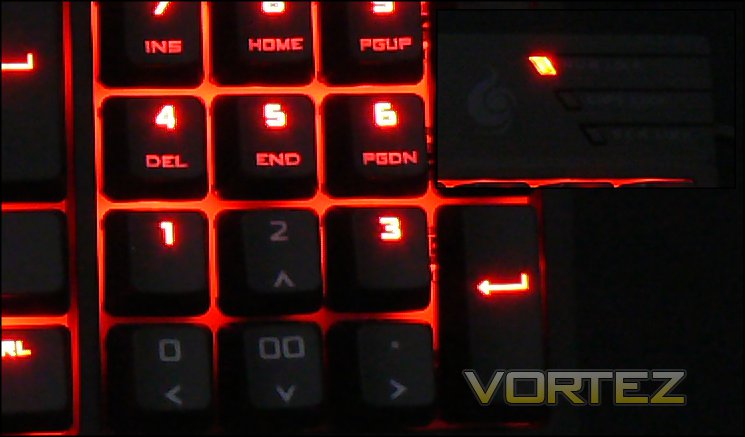
Arrow key lighting is independent of the rest of the backlighting, though still inherits the brightness level. When the NUM LOCK is disabled the arrow keys will always be illuminated, whatever the mode and despite general keyboard lighting being set to ‘off’. This can seem contrary to expectations at first, but it means that you can check the status of the arrow keys at a glance, and the relationship between status an illumination is consistent no matter the status of the rest of the keyboard’s illumination.
Performance Testing
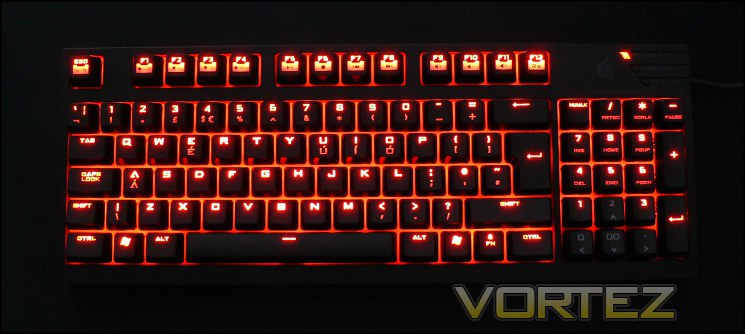
We’ve noted in the past that mechanical keyboards can take some getting used to, and the Quick Fire TK is no different in that. On the positive side our review sample is equipped with Cherry MX Red switches, more lightweight than the Blacks of the Trigger we reviewed in June but still linear of actuation and without a click. In many respects it’s the ideal first mechanical switch type for those coming from a membrane keyboard, with a switch designed for over 50 million keystrokes ensuring longevity that membrane designs cannot match.
The matte finish on the Quick Fire TK works well as a non-slip finish, but we can imagine some users finding the texture of the finish a little off-putting. It’s difficult to explain why, but just as some people don’t like the ‘feel’ of a blackboard, they might not like the feel of the TK’s keycaps; we must stress however than we found them fine.
Moving on to the compact layout, we should discuss the adapted Numberpad. In theory it should provide the best of both worlds: the small size of a compact keyboard for space-restricted desks and the full functionality of a full-sized keyboard; in practice it’s a little more difficult to use than that. Workloads where you’re inputting large quantities of numeric data in a tabulated form, such as a spreadsheet, typically require the use of both a NumPad and arrow keys at the same time. Similarly image editing where you’re editing numeric fields can be a little awkward. Although not impossible to adapt to, they do increase the learning curve somewhat.
It also felt a little awkward that when NumLock was disabled/arrow keys enabled the Pad’s + and Return keys were also disabled. Perhaps it’s where the particularly typing habits are exposed but we frequently found ourselves hitting the Return on the pad when using the arrow keys, and it felt awkward for them to do nothing. That said, if you’re a little sloppy with your finger work on the arrow keys there’s no risk of accidentally hitting the wrong key and it throwing you off.
By contrast, typing/word processing on the Quick Fire TK is a joy compared to most standard membrane keyboards. The keys feel responsive without requiring much force to actuate and the layout is logical whether using arrow + Command keys or the numbering. The keyboard remains rigid no matter the amount of force you use to type, and the keyboard itself stays firmly in place. Those who work in an office environment may also appreciate the lack of click on the actuation of these switches, but CM Storm offer alternative switches if they’re preferred. The only niggles we found were that the keys were a little sensitive, marring accuracy somewhat, and that the Return and Backspace keys were a little less even and responsive than other (including the space-bar).
One final note that shouldn’t be underestimated: this keyboard (and mechanical keyboards in general) makes it very easy to deal with accumulated dirt/detritus of a working week. Anyone who has tried to clean a membrane keyboard probably know what we’re talking about here. Furthermore, the keycaps and frame didn’t pick up sweat and grime as quickly as we might have anticipated given the choice of finish, and so the keys themselves retained their pleasant feel.
N-Key Rollover
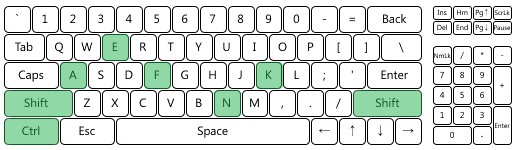
We need to make a quick note about 6-key/N-Key rollover here. In testing we detected no ghosting or similar issues up to 6-key rollover, having checked the main ‘gaming’ keys of and around ASDW. However whether in 6-key or n-key mode the maximum number of simultaneous keystrokes recognised here was only six (plus SHIFT and CTRL). We than double-check this using Aquakey and simple Notepad input, and neither contradicted our first finding. This somewhat flies in the face of NKRO over USB claims, and we’re digging deeper into the causes. The outcome was repeated under a separate WinXP system, which leads us to believe that it’s a driver or keyboard issue.
UPDATE: [31st December 2012]: The specific issue with NKRO was determined to be a problem on a small number of UK review samples which didn’t make their way into the retail supply chain. UK retail models don’t have this issue.
Gaming Performance
For all our talk of desktop workloads, lets get real for a moment: the Quick Fire TK is designed to be a gaming keyboard, and in this role it excels. Cherry MX Red switches are gaming all rounders, and whilst it does not feature macro keys unlike many gaming keyboards they’ve tended to go underutilised. Furthermore the key LEDs do an excellent job of illuminating the keyboard in low-light conditions, either fully or subtly in the WASD mode, which is great if you want some late-night MMO action or atmospheric FPS session.
We took a look at a trio of gaming titles, investing in quite a few hours over the two week testing window.
Team Fortress 2
The ubiquitous FPS of the masses didn’t pose a significant issue for the Quick Fire TK. Keys remained responsive throughout, with enough play to quickly tap keys where appropriate. The relatively short actuation length aided in keeping reaction times low, and the linear style shaves off just a little bit from response times. The standard layout meant that no key was an unexpected stretch, so migrating your personalised keybinds across shoudn’t pose any problems in terms of adaptation. The keys are a little light however, so those who prefer to rest their fingers on the keyboard may find the odd miss-press.
Starcraft & Torchlight
Both Starcraft and Torchlight, an RTS and Hack’n’slash respectively, benefit from fast successive key presses. As such, the firmer Black switches may be preferable to Cherry MX Reds simply because they spring back into place more quickly, making double-tap keystrokes much more rapid. Macro keys however are something that the Quick Fire TK can’t provide, which MMO-players may find a little limiting if moving from a well-customised set-up.
Due to the regular feel of the keys we found it much easier to get into a gameplay rhythm than which mechanical keyboards, which exhibit a much more spongy feel over time. It’s certainly possible that this is simply down to the newness of the keyboard and may degrade over time, but the proven long-term durability of mechanical switches make us doubt that.
At all times when gaming we found that 6-key rollover of the keyboard in default configuration to be ample for our needs. Very advanced/pro level gamers may still need NKRO, which those you buy through retail will be able to provide through USB rather than the usual limitation of PS/2. Other than the relatively minor niggle CM Storm cleared up for us, we have to say that the Quick Fire TK performed with aplomb in gaming.
Conclusion
Mechanical keyboards are starting to become a grail of sorts for gamers, but the cost trade-off is often prohibitive for those who spend much of their spare cash on new games or internal upgrades for their PC. With that in mind, what do you get for your hard earned £62.95 were you to purchase a CM Storm Quick Fire TK?
When lined up directly against other compact keyboards, it’s very hard to justify not going for the Quick Fire TK. The additional flexibility added by the combined NumPad/Command Key array shouldn’t be underestimated, the lighting is excellent, 6-key rollover is a given and build quality feels excellent. There are other compact mechanicals which integrate the arrow keys into the main section, and whilst that works very well they don’t mimic the layout of a full-sized board.
This price is competitive against other compact keyboards, which tend to sit in the £60-70 price bracket, and in that vein is the most affordable mechanical keyboard of any kind we have reviewed thus far. Very few of the keyboards in that bracket will also feature per-switch LED backlighting, a trump card which the Quick Fire TK (as with the Quick Fire Rapid) holds over many compact and full sized mechanical keyboards in the same ballpark in terms of price.
One specific cost compromise is the lack of a wrist-rest. For some, this will not be an issue; many others will want to pick up a 3rd party one. It’s certainly not a make or break factor when considering the keyboard, but something you should consider.
Those who combine gaming with a large amount of data entry (i.e. through a spreadsheet) should perhaps consider spending the extra on a full-size keyboard, but whilst not quite as functional as a full sized keyboard, the Quick Fire TK does save considerably on space. Combined with it’s extremely solid construction, the small-size/high feature nature of the board does make it extremely good for LANs were spare is at an absolute premium.
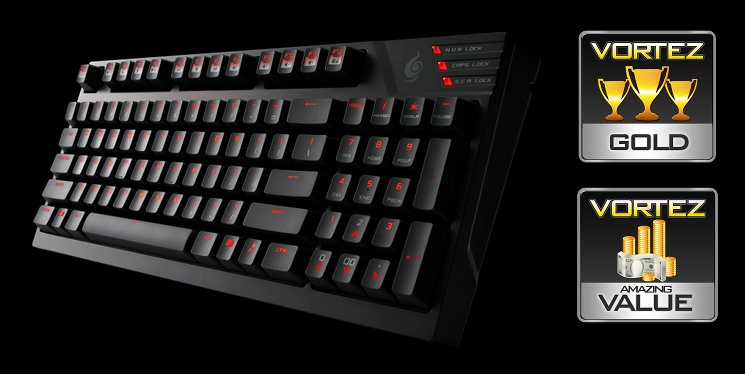
The keyboard was excellent without NKRO, but with our misgivings assuaged by CM Storm we feel that the keyboard can live up to it’s advertised claims and provide an excellent advanced gaming experience.
Overall the CM Storm Quick Fire TK is a high quality compact mechanical keyboard at the budget end of the segment. The adapted numberpad represents a strong compromise between the space-and-cost saving nature of compact designs and the functionality of a full-sized board. Coupling a solid construction with great backlighting and other design tweaks, the TK is hard to beat at the price. Most suited to heavy gaming, LAN or otherwise, the TK is slightly weaker in office tasks such as spreadsheet data entry where a full sized keyboard would be more suitable. All aspects considered, the Quick Fire TK is worthy of both our Gold and Amazing Value awards.
Pros
+ Bridges the gap between standard compact and full-size mechanical keyboards
+ Competitively priced
+ Backlighting
+ Durable Construction
+ 6-key/N-key roll over
Cons
– Not ideal for working with spreadsheets
– Still costly compared to membrane keyboards
Tips
= Those moving from a membrane keyboard may prefer lightweight Cherry MX Red switches over Black/Blue.
+ Bridges the gap between standard compact and full-size mechanical keyboards
+ Competitively priced
+ Backlighting
+ Durable Construction
+ 6-key/N-key roll over
Cons
– Not ideal for working with spreadsheets
– Still costly compared to membrane keyboards
Tips
= Those moving from a membrane keyboard may prefer lightweight Cherry MX Red switches over Black/Blue.

Click here for an explanation of our awards at Vortez.net.


