







We take a look at Compro’s Cloud Network Camera designed for home security, pet/baby/elderly monitoring. All viewable from smartphone and tablet with WiFi and micro SDHC features!

Product on Review: TN50W
Manufacturer and Sponsor: Compro
Street Price: Unknown (At time of review)
Compro have been around since 1988, bringing to market a variety of PC-TV, digital audio/video and security related products.
Back in February Compro announced their new TN50W – a home network IP camera with cloud functionality. In our first outing with Compro today, we will be taking a look at the all-new TN50W to see if it’s a worthy candidate for the home network. TN50W can be used for home security, looking after the elderly, pet/baby monitoring and other things too. Thanks to its PIR sensor, motion detection is a feature which comes as standard and there is a handy micro SDHC slot for recording pictures/videos. So let’s waste no further time and begin looking at the new TN50W.
Compro on their TN50W
The TN50 cloud network camera integrated the C4Home cloud service, you can login to the www.c4home.com web interface to watch and control your cameras. Or you can free download and install the C4Home app to your iPhone/iPad and Android phone/tablet. With C4Home app, you can watch the live video of your network camera on hand, snapshot and smartphone 2-way audio communication in anytime. For the web interface and Android phone/tablet, C4Home also provide 4 cameras live monitoring at the same.
Technical Specifications
Operating conditions
0° – 40°C
Power Supply
DC 5V/2A
Dimensions
64 x 74.7 x 110 mm (including bracket)
Image Sensor
1/7″ CMOS sensor
Lens
Focal Length: 2.0 mm
Max Aperture Ratio: F2.8
Fixed iris
Angle of View
40° horizontal
Zoom
10x digital zoom
Focusing Range
1m ~ INF
Min Illumination
Color Mode: 1.0 lux
Shutter Time
1/5 ~ 1/16000 sec
Video Compression
H.264 ( MPEG-4 Part 10)
Motion JPEG
Resolutions
160 x 120, 320 x 240, 640 x 480
Maximum Frame Rate (fps)
Up to 30 frames at 640 x 480
Support Dual Streams
Stream1: H.264
Stream2: H.264, MJPEG
Image Setting
Adjustable image size and quality
AGC, AWB, AES
Configurable brightness, saturation and sharpness
Audio Communication
Two-way audio with built-in Microphone and speaker
Audio Compression
G.711 PCM 64Kbit/sec
Networking / Security
User ID / Password Protection
WEP/WPA/WPA2 encryption (wireless network)
Supported Protocols
TCP/IP, HTTP, UDP, FTP, ICMP, ARP, DHCP, NTP, DNS, DDNS (iDDNS), DynDNS, PPPoE, UPnP, RTP, RTSP, RTCP, SMTP, IGMP, 3GPP, IPv4, 802.1x
Ethernet
10/100 Base-T, autosensing, RJ-45
0° – 40°C
Power Supply
DC 5V/2A
Dimensions
64 x 74.7 x 110 mm (including bracket)
Image Sensor
1/7″ CMOS sensor
Lens
Focal Length: 2.0 mm
Max Aperture Ratio: F2.8
Fixed iris
Angle of View
40° horizontal
Zoom
10x digital zoom
Focusing Range
1m ~ INF
Min Illumination
Color Mode: 1.0 lux
Shutter Time
1/5 ~ 1/16000 sec
Video Compression
H.264 ( MPEG-4 Part 10)
Motion JPEG
Resolutions
160 x 120, 320 x 240, 640 x 480
Maximum Frame Rate (fps)
Up to 30 frames at 640 x 480
Support Dual Streams
Stream1: H.264
Stream2: H.264, MJPEG
Image Setting
Adjustable image size and quality
AGC, AWB, AES
Configurable brightness, saturation and sharpness
Audio Communication
Two-way audio with built-in Microphone and speaker
Audio Compression
G.711 PCM 64Kbit/sec
Networking / Security
User ID / Password Protection
WEP/WPA/WPA2 encryption (wireless network)
Supported Protocols
TCP/IP, HTTP, UDP, FTP, ICMP, ARP, DHCP, NTP, DNS, DDNS (iDDNS), DynDNS, PPPoE, UPnP, RTP, RTSP, RTCP, SMTP, IGMP, 3GPP, IPv4, 802.1x
Ethernet
10/100 Base-T, autosensing, RJ-45
Packaging & Bundle
TN50W is presented in a small but attractive box. Compro are marketing this product as a “Cloud Network Cameara” and have listed some of the typical uses for TN50W – home monitoring, elderly care, pet monitoring and baby monitoring. The front of the box also gives a sneak preview of the camera through a transparent window, whilst the back continues to list some of the fundamental features.
The packaging for TN50W
Opening the box up, the camera is protected within a sealed plastic container. Also inside the box are series of items that make up the bundle. These include: instructions guide, software/driver CD, network cable (CAT5), mounting screws, wireless adapter and power plug.
The use of a WiFi dongle means this camera can be used in a remote location, there is no specific requirement to use a cable, though for setting the camera up its generally quite a useful thing to use.
The accessories bundle includes a network cable and WiFi dongle
Closer Look
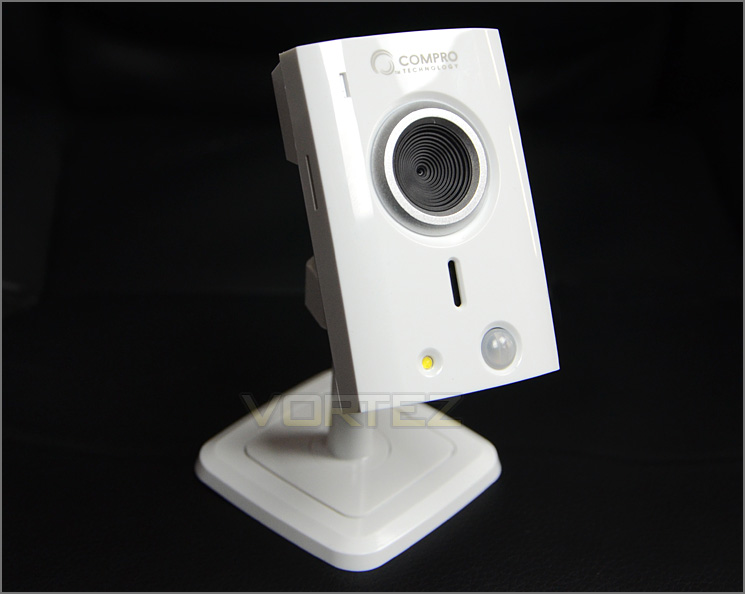
TN50W is quite small in stature and has a white, glossy plastic exterior. Although plastic has been used TN50W still maintains a good level of build quality and feels well designed. Its colour will bode well with most consumers since most furnishings and fitments within the home/office are generally white. The physical dimensions for TN50W: 64 x 74.7 x 110mm.
Observing the front of the camera, there is a status activity LED in the top left corner and immediately in the centre is the lens which has a 1/7″ CMOS sensor. The focal length is 2.0mm with a max aperture ratio of F2.8 and a fixed iris 10x digital zoom. Below the lens is a speaker – this enables the user to speak through the camera via their phone; a handy feature to have regardless of the intended use. At the very bottom of the camera face is a PIR sensor and illumination LED. Motion detection in dark surroundings is possible with TN50W due to these features and Compro even mention on their website that the LED torch can be used to surprise unwanted intruders since this light is very bright.
An overview of TN50W
The front of TN50W has numerous features
Taking a look at the back of the camera head, there are even more options. Compro have equipped TN50W with an Ethernet port for cabled network connectivity and a USB port on the top-side to work in conjunction with the provided WiFi dongle – so the choice is there between using a cable or having the unit cable free, though a power cable is required; this sits next to the Ethernet port. Compro have stuck a QR code on the camera for use with a smartphone – since the TN50W can be accessed with a phone remotely, using the scanner assists with locating the camera and applying certain settings. Also found on the back are the connection status indicators and the reset button (used for WiFi connectivity).
TN50W uses a ball joint in order to pivot at various angles. The only angle this camera struggles with is being faced in a downwards motion due to the plastic nut below it.
From this view the micro SD card slot can also be seen. This slot is compatible micro SDHC cards and allows data such as video and pictures to be stored.
The rear with even more options
Pivot
A ball joint allows different angles
A ball joint allows different angles
Finally, the underside of TN50W has four small rubber feet to prevent slipping and there are also two holes near the inside – these holes allow screw heads to fix the TN50W into place within a building.
The underside of the mounting bracket
Software UI
iWizard
Initially its necessary to run iWizard off the provided CD that comes accompanied with TN50W. Loading this application up allows you to locate the camera on your network, in the example below we have used an Ethernet cable to connect TN50W to our network. iWizard also allows you to create a Cloud4Home account and have the camera assigned to an account so that a smartphone can easily access the unit. This software also makes for others to access the camera because it provides the IP address and handles setting these basic connectivity features out without you having to do anything.
iWizard is used for initial setup
Inbuilt Software Interface
Once iWizard has been used, the camera can then be configured and accessed via its IP address in a web browser. Logging into the software interface gives a plethora of customisation from the framerate, image quality and resolution to the motion detection and recording history. The software is very extensive and also very user-friendly. Users with a basic understanding and needs are catered for and those with a more advanced set of requirements are also entertained too.
The inbuilt software is rather extensive
Many options, including motion detection configuration
Testing – Smartphone Usage & Image Quality
TN50W works in collaboration with C4Home. C4Home allows the user to monitor the camera from their smartphone. C4Home can be configured from the iWizard software – this helps to assign settings and enable the camera for use on this platform, the only other thing required is to download the app on a smartphone and input username/password. Below we demoed C4Home on an Android ready smartphone, it was easy to setup and offered great feedback. Furthermore, we were able to speak through the camera by simply pressing the screen and speaking.
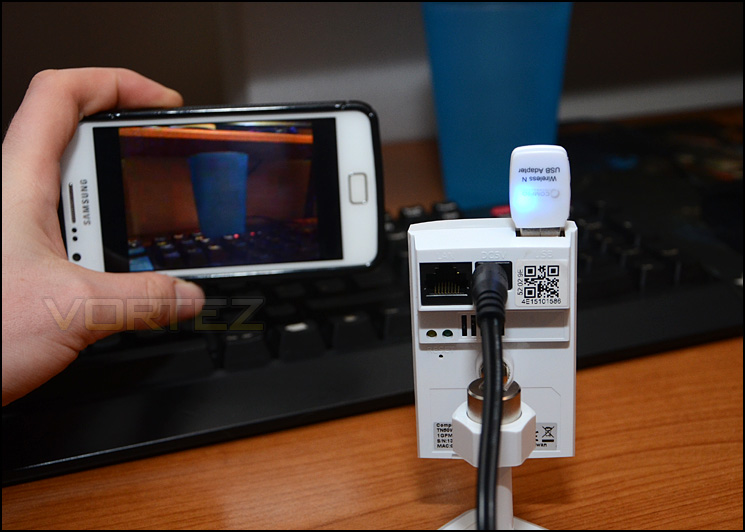
C4Home in action using an Android-ready smartphone
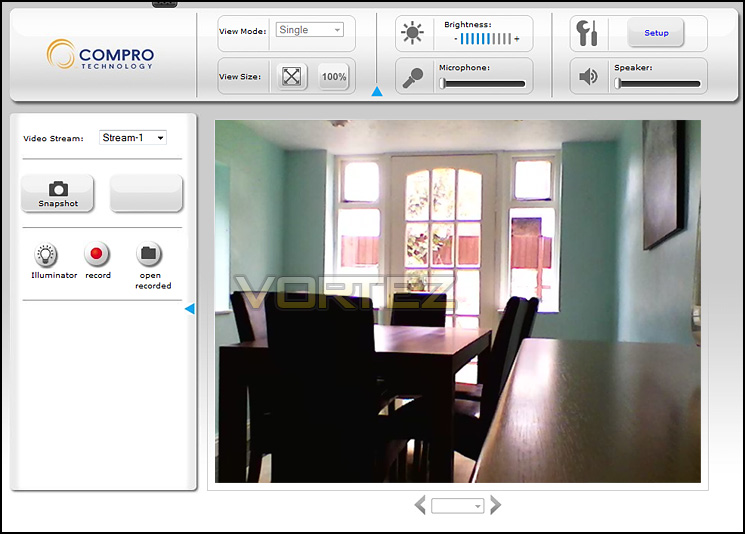
Viewing page for TN50W via web browser
Using iWizard, the port is automatically forwarded for you so that those externally can view the camera. User accounts can be set and given certain permissions to simply monitor or access settings.
TN50W gives plenty of flexibility for a multitude of different uses; recording footage can be done directly to a computer or to a micro SD card. Below, we have uploaded a sample of the camera footage with the following settings: VGA – 640×480 using H.264 codec which outputs a .mkv file. Footage is filmed at best quality 3Mbps and 30 frames per second. Footage is uploaded direct to YouTube without any additional compression. *recording footage direct to computer requires IE – does not work with other browsers*
As you can see from the video, TN50W offers a good balance between quality and smoothness. Most cameras in this class only offer 20fps so the additional 10 frames helps to make things more fluid.
Conclusion
This is our first outing with Compro and we have been pleased with the result. TN50W is an entry level IP camera with plenty to talk about.
There are many avenues when reviewing cameras and one of them which is fundamental to many consumers is ease of use and general setup. TN50W requires iWizard to be initially run which comes on the CD with the camera, this software locates the camera on the network, helps configure remote sharing and gives you access to the unit via IP address. Soon after, you can use any web browser to gain access to the settings of the camera and view it properly. Inside the UI, we found the software easy to use and quite extensive. We’ve used other software in the past with other products and it isn’t as intuitive as Compro’s offering so they are certainly to be commended for their efforts with this.
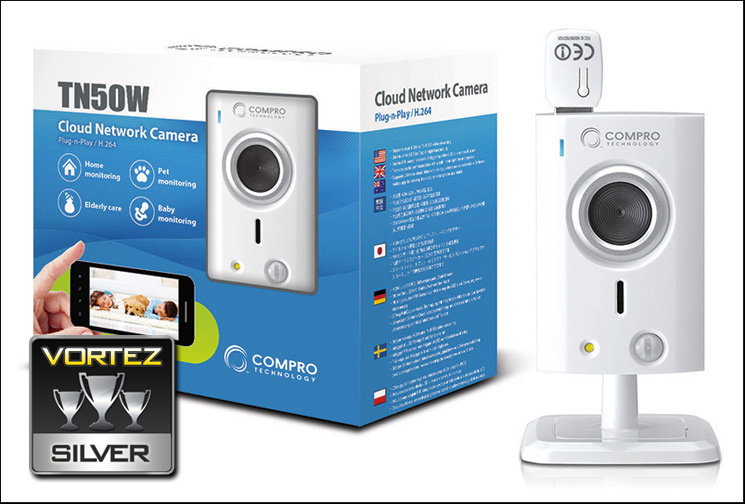
Software aside, the build quality and performance quality for video and audio is very good. We tested TN50W at its highest quality setting and with 30fps – the results were pleasing and hard to fault. The decent balance between good quality feedback and smoothness is something which most consumers will be hoping to achieve and TN50W confidently does this.
Thanks to its features, TN50W can be used for a multitude of different scenarios which include home security, elderly care, baby/pet monitoring and more. It has a handy two-way audio mic/speaker system and motion detection via PIR sensor. The only drawbacks we could foresee is the flickering from the WiFi dongle once its activated this can present a problem if for example the unit is used as a baby monitor during night time – the bright light can disturb and when used for security it can draw unwanted attention. The illuminator also brought a similar niggle in that it is rather bright and for some uses could be troublesome rather than helpful.
Compro’s new TN50W is ideal for home owners or even small offices. Those who aren’t tech savvy can easily setup and use this camera for a range of different scenarios. TN50W also boasts good build quality, video output and audio features, we found our overall experience to be a very pleasant one.
Pros
+ Very easy to use & setup
+ Good build quality
+ WiFi functionality
+ Multiple viewing options – smartphone ready
+ Smooth, good video/audio quality feedback
+ Two-way audio – can speak through camera
Cons
– WiFi dongle illuminates and flashes
– Illuminator isn’t inconspicuous
+ Very easy to use & setup
+ Good build quality
+ WiFi functionality
+ Multiple viewing options – smartphone ready
+ Smooth, good video/audio quality feedback
+ Two-way audio – can speak through camera
Cons
– WiFi dongle illuminates and flashes
– Illuminator isn’t inconspicuous

Click here for an explanation of our awards at Vortez.net.


