







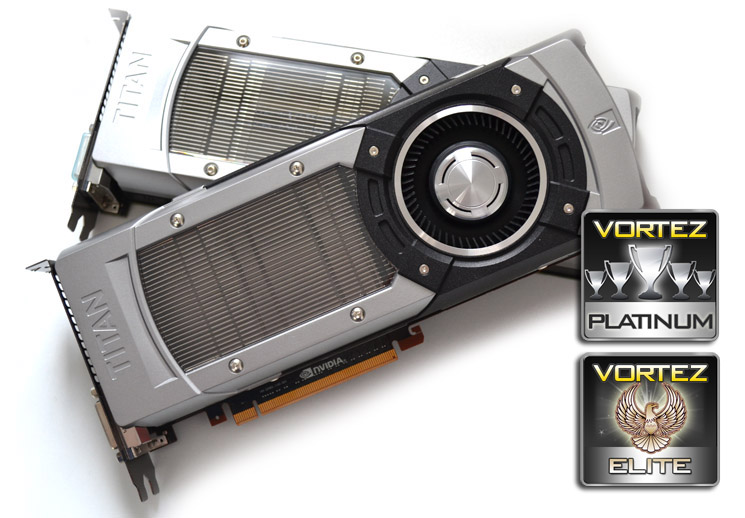
The NVIDIA GeForce GTX TITAN is the pinnacle of current GPU technology. We have a play with two in SLI, test it against the best single core GPU’s available and also look at Frame Time Latency …

Product on Review: NVIDIA GeForce GTX TITAN 6GB GDDR5
Manufacturer and Sponsor: NVIDIA
Price: MSRP of £851-1000 incl. VAT (each)
In an unusual move, NVIDIA have released their flagship card with no lower end cards to back it up. It is not part of the 6 series nor an introduction to the 7 series. Instead it stands alone as a an example of things to come from the green team.
You would be forgiven into believing the name ‘TITAN’ was as unoriginal as ‘Ultra’, ‘Overclock’ ‘Extreme’ or any other over hyped tag-line some manufacturers like to add on to their latest product. TITAN however was derived from the TITAN supercomputer at Oak Ridge National Laboratory. The computer was hailed as the worlds fastest supercomputer and is powered by 18,668 NVIDIA Tesla K20X GPU accelerators achieving a record 17.59 Petaflop/sec! So it was only natural the desktop variant of the Tesla K10X accelerator (both using the GK110 core) was aptly named ‘TITAN’.
We recently reviewed a system from Utopia Computers which featured an NVIDIA GTX Titan; the pint-sized powerhouse Pandora.
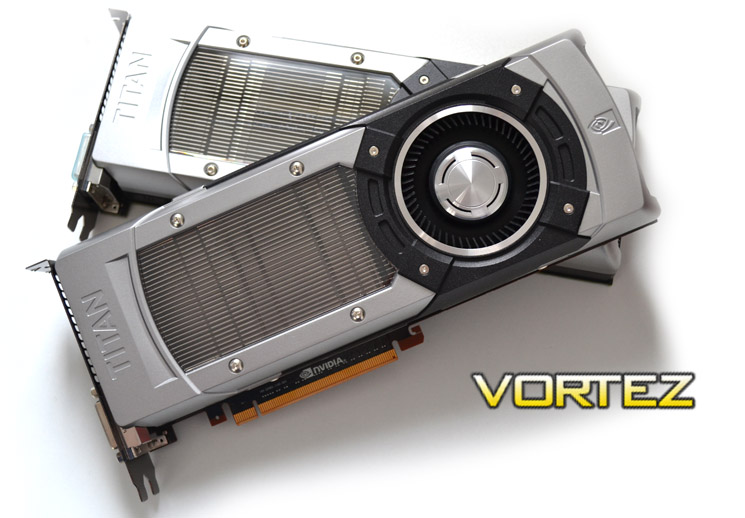
To put things into perspective, the GTX TITAN has over 3 times as many transistors as a 6 core Intel Core i7-3960X Extreme Edition CPU and 75% more cores (2688) than the current NVIDIA signle core flagship card, the GTX680. Couple this with a 6GB frame buffer, a 384-bit memory interface and GPU Boost 2.0 features and you can be assured that the NVIDIA GTX TITAN is a very serious piece of PC hardware indeed.
NVIDIA on the GeForce GTX TITAN
With the DNA of the world’s fastest supercomputer and the soul of NVIDIA® Kepler™ architecture, GeForce® GTX TITAN GPU is a revolution in PC gaming performance. GeForce GTX TITAN graphics card combines extraordinary power, advanced control features, and game-changing thermal and acoustic capability to provide an entirely new class of super-performance graphics card.
Architecture
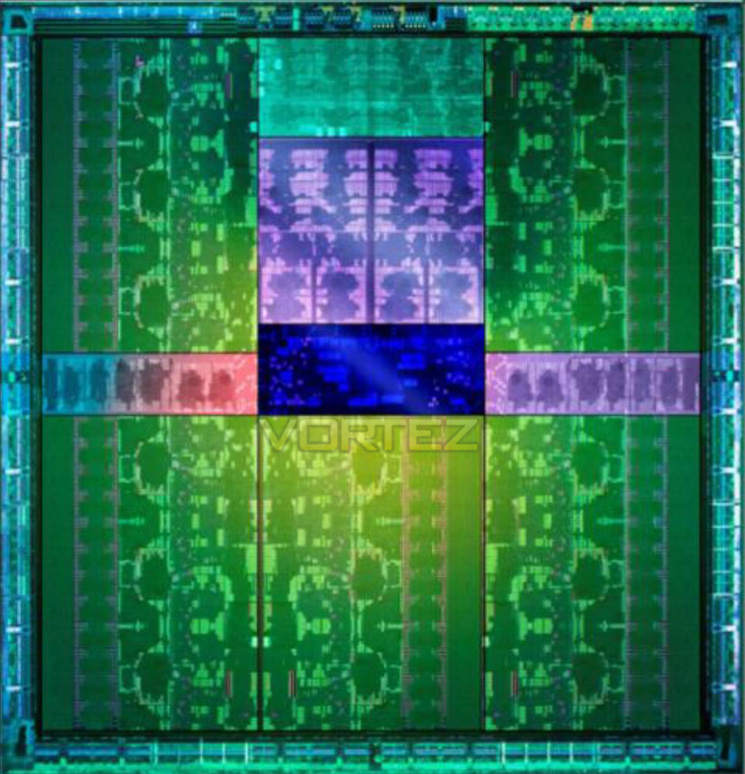
The architecture of the NVIDIA GTX TITAN core, the GK110 is an evolution of the GTX680’s GK104. Both cores are based on Kepler architecture and both are built upon the 28nm ASIC. However the GK110 features 7.1 billion transistors compared to the 3.54 billion found in the GTX680 and the 4.4 billion in the AMD HD7970. The CUDA core count has also been increased to 2688 from 1536 of the GTX680 equating to a 4500 Gigaflop/s count.
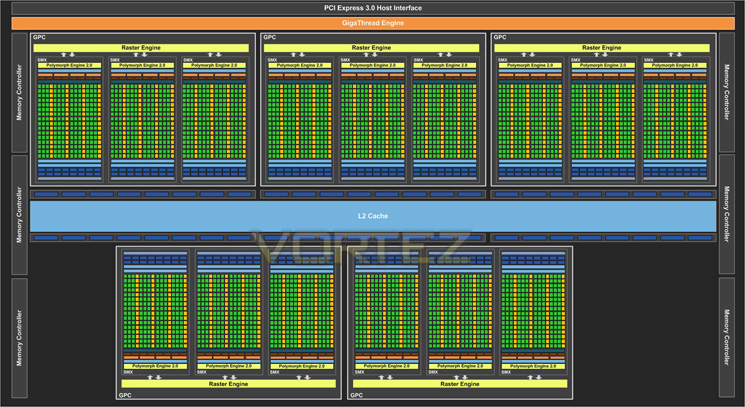
The GK110 has an additional GPC to the four found on the GK104 and also and additional SMX in each GPC making 15 compared to the GTX 680’s 8. There are 6 64-bit memory controllers (384bit) controlling the huge 6GB of GDDR5 which is yet another massive hike over the 256bit controller found on the GK104.
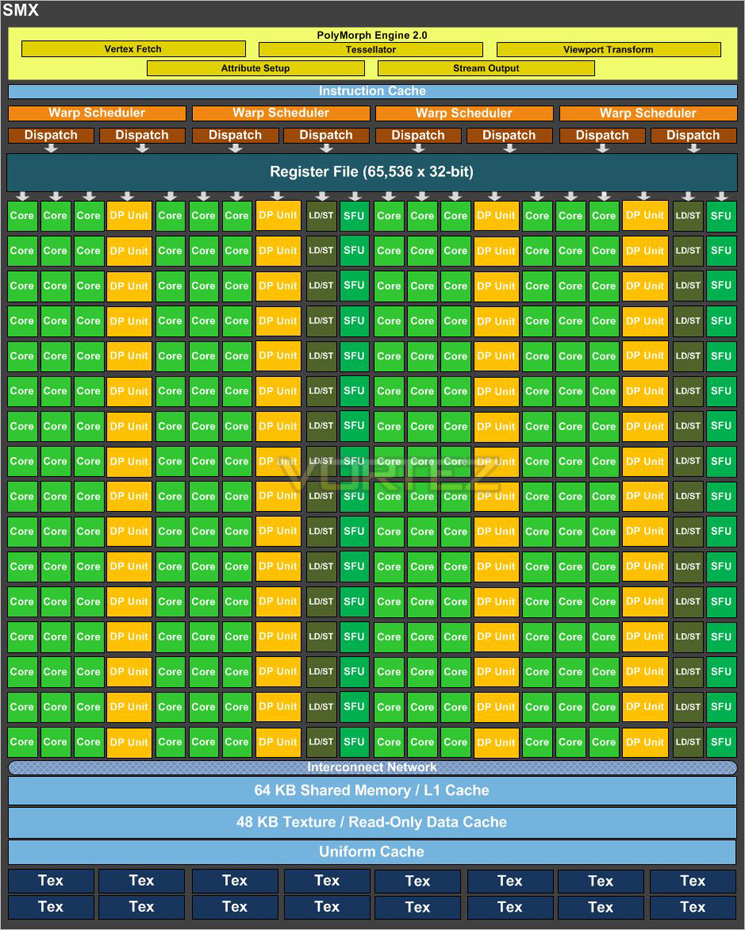
Above we can see a breakdown of an individual SMX.
NVIDIA’s CUDA core count on the GTX TITAN weighs in at an astonishing 2688 but with each of the 15 SMX’s carrying 192 (the same found on the GK104) that would equate to 2880. Take away 192 cores (a single SMX) and you are left with 2688 – the official CUDA core count so we can only surmise that one of the SMX cores is disabled which would no doubt help the manufacturing process by giving NVIDIA a greater yield count by allowing one ‘dud’ SMX per core.
We were very surprised that NVIDIA decided upon 6GB of GDDR5 as currently, even at our maximum benchmarking resolution of 2560×1600, 4GB is rarely tapped into so to grant the TITAN with 6GB seemed largely to be a bit of a waste. However, you have to consider two things here. One: It wasn’t so long ago that we were stating 2GB was more than enough – 2GB is now beginning to show it’s age. Two: Owners of GTX TITAN are unlikely to have a single 1920×1080 monitor and because of the Ultra high end enthusiast level it would be more likely to see owners of such a product having a single large monitor or indeed a multiple monitor setup. So, 6GB could be seen as an investment, especially as NVIDIA are keen to promote their delicious 3D vision surround to such people.
Specification
The basics
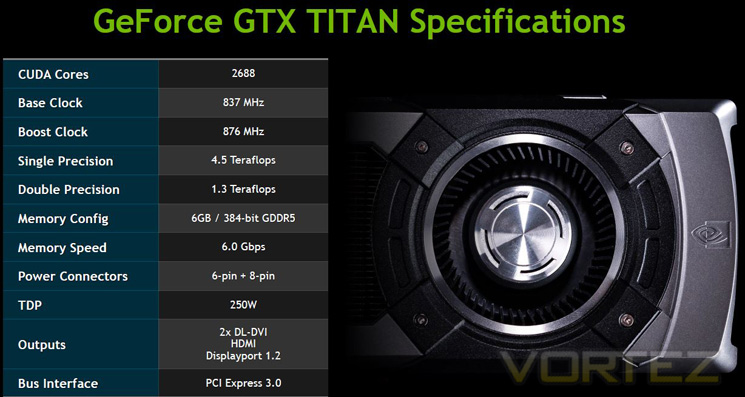
In Detail
Graphics Processing Clusters 5
Streaming Multiprocessors 14
CUDA Cores (single precision) 2688
CUDA Cores (double precision) 896
Texture Units 224
ROP Units 48
Base Clock 836 MHz
Boost Clock 876 MHz
Memory Clock (Data rate) 6008 MHz
L2 Cache Size 1536K
Total Video Memory 6144MB GDDR5
Memory Interface 384-bit
Total Memory Bandwidth 288.4 GB/s
Texture Filtering Rate (Bilinear) 187.5 GigaTexels/sec
Fabrication Process 28 nm
Transistor Count 7.1 Billion
Connectors 2 x Dual-Link DVI 1 x HDMI 1 x DisplayPort
Form Factor Dual Slot
Power Connectors One 8-pin and one 6-pin
Recommended Power Supply 600 Watts
Thermal Design Power (TDP) 250 Watts
Thermal Threshold 95° C
Streaming Multiprocessors 14
CUDA Cores (single precision) 2688
CUDA Cores (double precision) 896
Texture Units 224
ROP Units 48
Base Clock 836 MHz
Boost Clock 876 MHz
Memory Clock (Data rate) 6008 MHz
L2 Cache Size 1536K
Total Video Memory 6144MB GDDR5
Memory Interface 384-bit
Total Memory Bandwidth 288.4 GB/s
Texture Filtering Rate (Bilinear) 187.5 GigaTexels/sec
Fabrication Process 28 nm
Transistor Count 7.1 Billion
Connectors 2 x Dual-Link DVI 1 x HDMI 1 x DisplayPort
Form Factor Dual Slot
Power Connectors One 8-pin and one 6-pin
Recommended Power Supply 600 Watts
Thermal Design Power (TDP) 250 Watts
Thermal Threshold 95° C
Comparing it to it’s closest rival the GTX680, the GTX TITAN has a 45% higher Gigatexels/sec fillrate. It also boasts 50% more memory bandwidth than a GTX680. There is also a massive increase in texture units (224 vs 128) with ROPs also gaining a 25% increase from 32 to 48. The die size has however increased significantly to achieve this measuring 561 mm2 from a much smaller 294mm2 on the GTX680. TDP has also increased slightly from 195w to 250W with a 600W now the recommended PSU however I would very much doubt this will be of concern to the users who will be purchasing this card because at a retail price of anywhere between £850 and £1000, a 600W PSU is loose change in comparison.
GPU Boost 2.0
GPU Boost caused a bit of a stir when it was first introduced because it did away with the traditional ‘absolute’ method of dictating MHz. Rather it worked by overclocking the card by different means. To achieve an overclock using GPU Boost, one increased the MHz and Voltage as per usual however the card would then ‘Boost’ when placed under load. So rather than having a fixed clockpseed, the GPU adjusts the clockspeed depending on load, ensuring the power is there when you need it rather than it being full on all of the time, thus saving power consumption and heat production by having the card overclock dynamically.
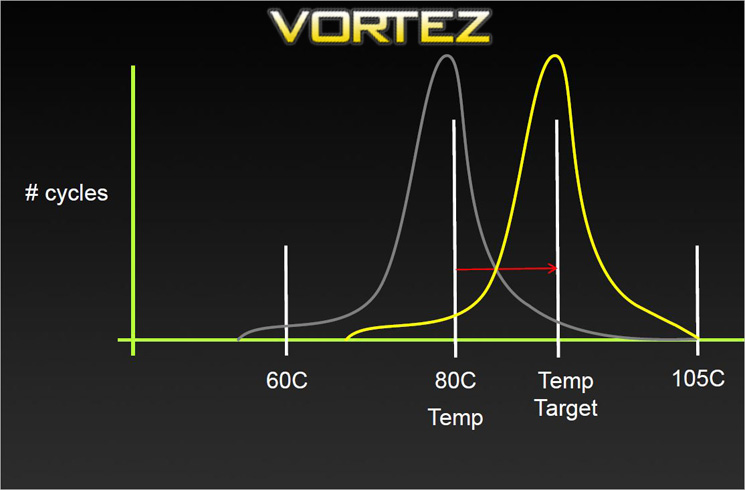
GPU Boost 2.0 is an evolution of this idea. The techs at NVIDIA have determined that GPU power was unnecessarily limiting performance when GPU temperatures was low. Instead of boosting GPU performance based on a power target, it is now based upon temperature with this temperature threshold being 80 degrees Celsius.
Because the boosting is now determined by temperature, noise levels are also reduced as NVIDIA claim the GTX TITAN delivers a better acoustic profile.
So to summarise, overclocking the card using GPU boost 2.0 means adjusting the temperature threshold, for example from 80c to 85c. The GPU clockspeed will then gradually increase until it reaches this new temperature and will be dynamically adjusted on-the-fly to stay within this threshold. Because of this it is much more difficult to claim one GPU is faster than another without having both working under precisely the same operating conditions.
It therefore should go without saying (but we will say it anyway) that the colder your card runs, the faster it should theoretically operate as a colder card allows overvolting and thus even higher clockspeeds.
GPU Boost 2.0 also features overvoltage control. NVIDIA make no bones that enabling this function will damage the long term operability of the graphics card and as with AMD’s overdrive, you have to acknowledge this fact before you can unlock the cards voltage control. We applaud NVIDIA for this because they have acknowledged that enthusiasts, like us here at Vortez, like to push hardware to the max and without voltage control, the whole process becomes so much more uninteresting and much more difficult.
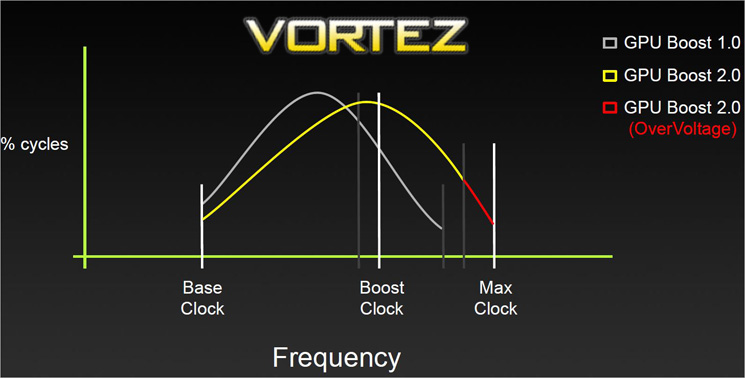
So, because TITAN’s boost clock and voltage level are now tied to the GPU’s temperature, the voltage can be dialled higher which in turn will allow the GPU to attain higher clockspeed values. Obviously, increasingly board voltage, as with most other products, will gradually degrade the GPU through electron migration causing a premature death of the GPU. Voltage support will be offered on a board partner by partner basis however, we would be extremely surprised if it wasn’t enabled in all TITAN VBIOS.
We will see how GPU Boost 2.0 performs in our overclocking section later in the review.
Computation Power
There’s some great news for the crunchers who buy a GPU solely based on its computational power. The GTX TITAN features full on double precision compute which when enabled will furnish the user with over 1 teraflop of double-precision performance on the desktops.
GeForce GTX TITAN is the first GeForce graphics card to ship with full performance double-precision compute. On prior GeForce products, fewer double-precision (DP) units were included in the GPU. For example, the GeForce GTX 680 SMX had 192 single-precision (SP) floating point CUDA Cores, and 8 double-precision (DP) CUDA cores. As a result, DP operations per clock ran at effectively 1/24 the SP rate. However for GTX TITAN, it includes a full 64 DP CUDA Cores per SMX (compared to 192 SP CUDA Cores), or 1/3rd the number of DP cores to SP for substantially more double-precision horsepower.
We’ve decided to enable full performance double-precision on TITAN in order to enable developers all over the world to take advantage of GPU-accelerated computing, giving students, researchers, and engineers over 1 teraflop of double-precision performance in their desktop PCs.
We believe that GeForce GTX TITAN will help increase the adoption of GPUs for accelerating applications, by allowing developers to design and optimize applications in an environment closely resembling deployments on teraflop-level (double precision), Tesla GPU accelerator-based clusters.
We’ve decided to enable full performance double-precision on TITAN in order to enable developers all over the world to take advantage of GPU-accelerated computing, giving students, researchers, and engineers over 1 teraflop of double-precision performance in their desktop PCs.
We believe that GeForce GTX TITAN will help increase the adoption of GPUs for accelerating applications, by allowing developers to design and optimize applications in an environment closely resembling deployments on teraflop-level (double precision), Tesla GPU accelerator-based clusters.
Unfortunately, the GPU cannot dynamically detect whether you need SP (better for gaming) or DP so users will have to manually configure the card to switch to DP performance via the control panel. Hardly difficult but it will no doubt raise a few ‘newbie’ questions in the forums as to why their GTX TITAN is so slow in 3D (because DP is enabled). Thankfully, by default it is disabled but should you need to enable it, the option is there.
First Look
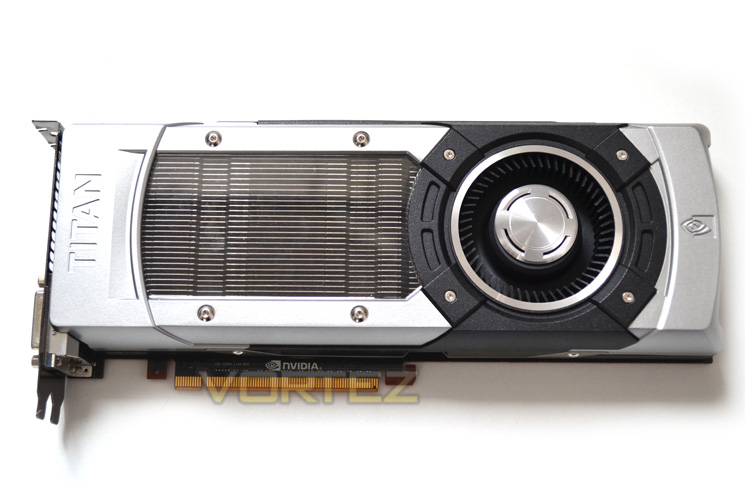
Perhaps the first thing that struck us was just how similar the card looked to the dual core NVIDIA GeForce GTX690 save for the fan being at the end of the cooler instead of being centralised. Still, we have absolutely no complaints because this has to be the best looking, fully enclosed cooling unit we have ever seen from a reference design. It has all the trademarks of a minimilist design (no gaudy colour scheme) yet also has touches of industrialism thanks to the Allen key screws.
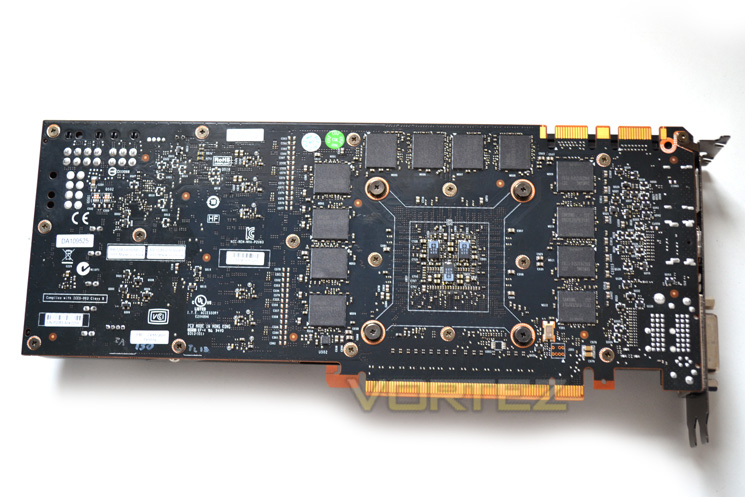
Sadly, the back of the card has no such protection with all of the components being exposed, including the massive array (3GB) of GDDR5 which we presume at this point to be double sided given the card has 6GB total.
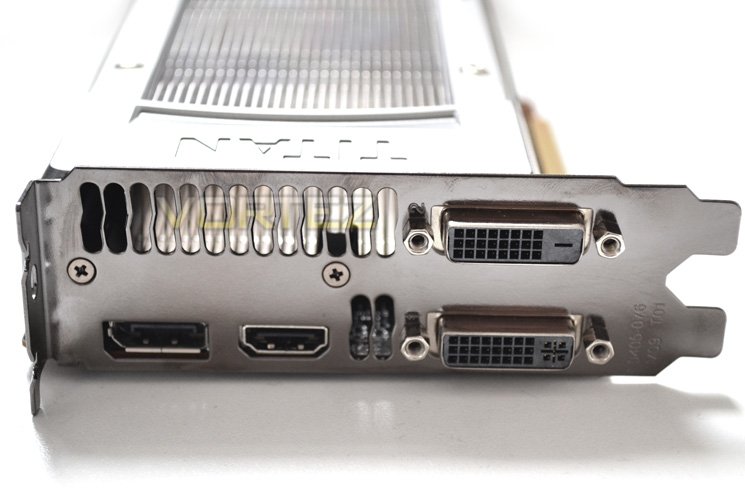
The I/O backplate furnishes us with 2 DVI (DVI-D and DVI-I) ports, a DisplayPort and HDMI port so nothing too ground breaking here.
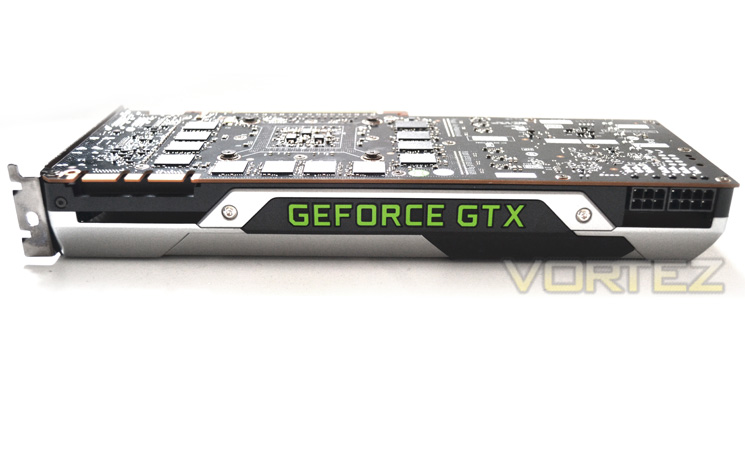
The card is a dual slot design which is surprising given the promoted power of the card. Measuring a little smaller than an AMD HD7970 and a touch longer than a GTX680 at 267x100x39, the GTX TITAN should fit in most modern PC enclosures.
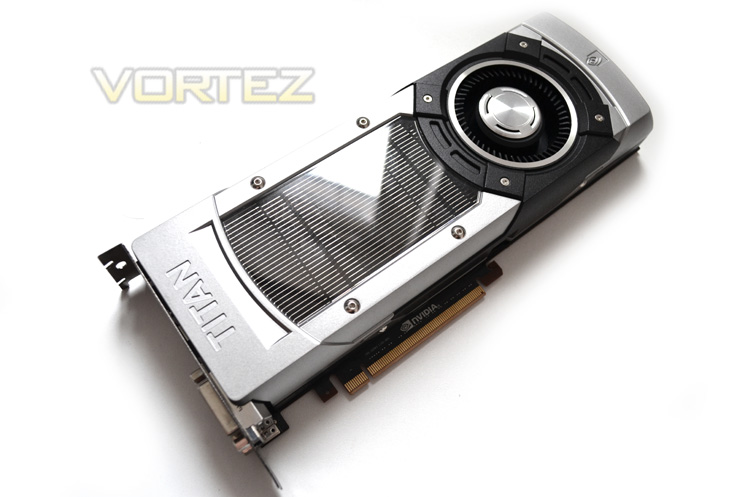 ]
]Overall, the card is a stunner there’s no two ways about it. The classic silver and black design looks very neat and tidy yet exudes elegance. My only concern is the embossed GeForce GTX moniker written along the profile of the card which somewhat spoils the overall design of the card, especially as it is the only thing you are likely to see once the card has been installed. There is however a caveat to this …
Closer Look
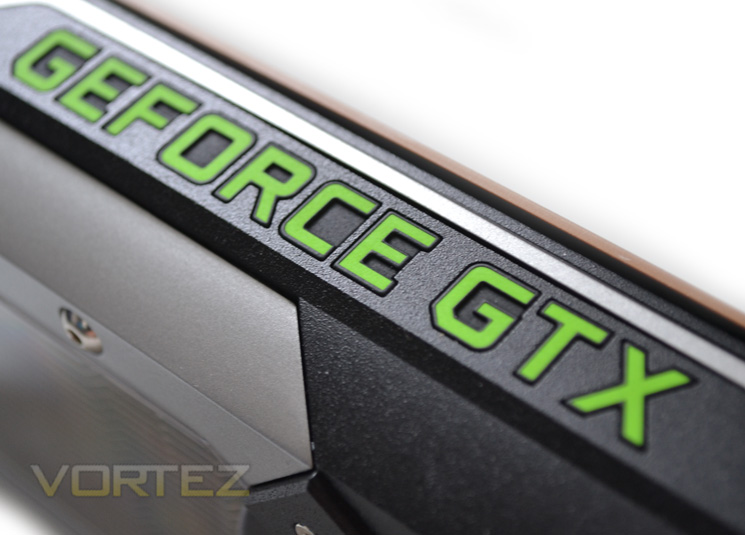
The ‘GEFORCE GTX’ lights up green when powered up and while there is no way to turn this off without modifying the card, it doesn’t look half bad when installed in a system and certainly draws attention to the fact that you have a GTX TITAN installed in your machine. I do however wonder how many people would want green light in a predominantly red lit case?
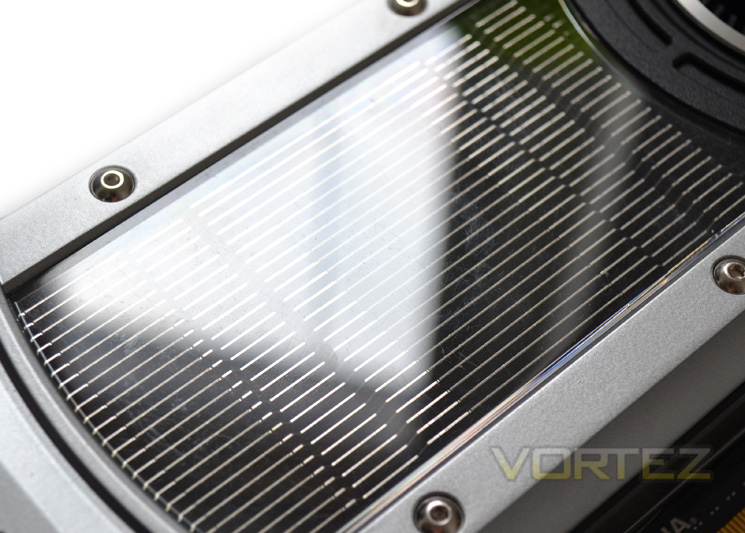
The perspex window which shows us the aluminium heatsink array is a real blessing because not only does it look immense, it should also give us an indaction of when the cooler could do with a clean. Sadly, doing so will mean taking the card to pieces which isn’t too difficult but a little nervy considering the price of the component.
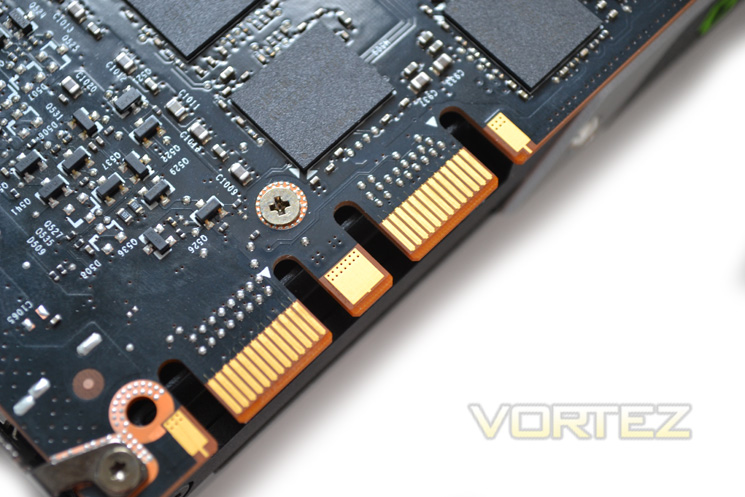
The GTX TITAN is fully SLI capable as shown wby having two gold tabs with which to match up to other GTX TITANS. IT is worth noting that at present, regardless of who you buy your card from, all GTX TITANs are the same reference design with no special/limited editions currently on the market nor likely to be due to the limited stocks available. It is also worth noting that 3 GTX TITANs considerably out perform a GTX690 QUAD (2x GTX690) SLI setup.
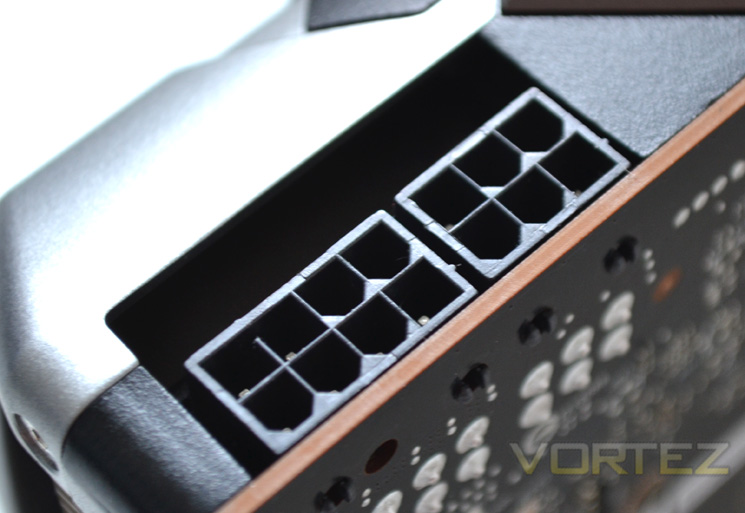
Surprisingly, the GTX TITAN only requires a 8+6 pin PCIe power setup. We fully expected a card of this magnitude to require 2×8 pin. With a recommended PSU of 600W and a TDP of 250W the TITAN is no less still a hungry beast although not as hungry as we expected.
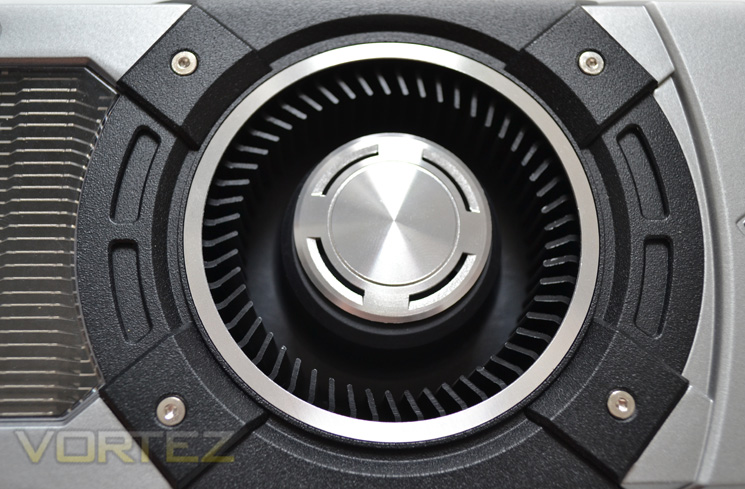
Keeping the card cool is a rather uninspiring fan which looks similar to the fan used on reference design GTX 670/80 models save for the aluminium centre cap.
Let’s take a look a closer, more detailed look at today’s review sample…
Detailed Look
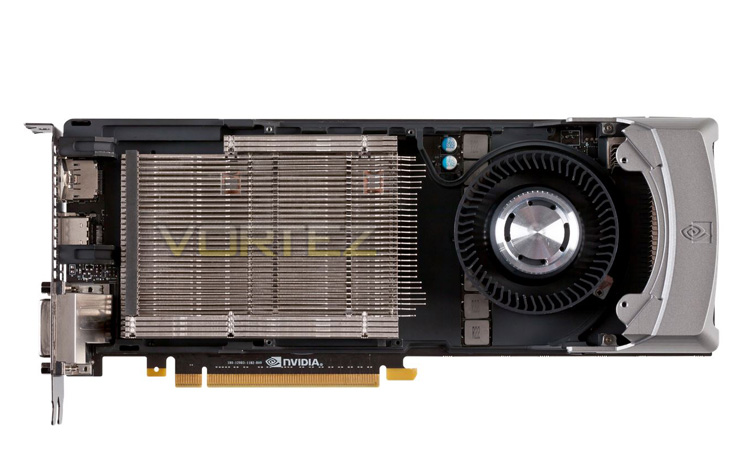
Removing the shroud required a small Allen key (and you will need a star key and Philips screwdriver to remove the cooler so be warned). Hidden beneath the shroud we get to see that NVIDIA have employed an aluminium fin array which is attached to the nickel coated vapor chamber. A fairly traditional design as far as high end GPU cooling goes but no less welcoming.
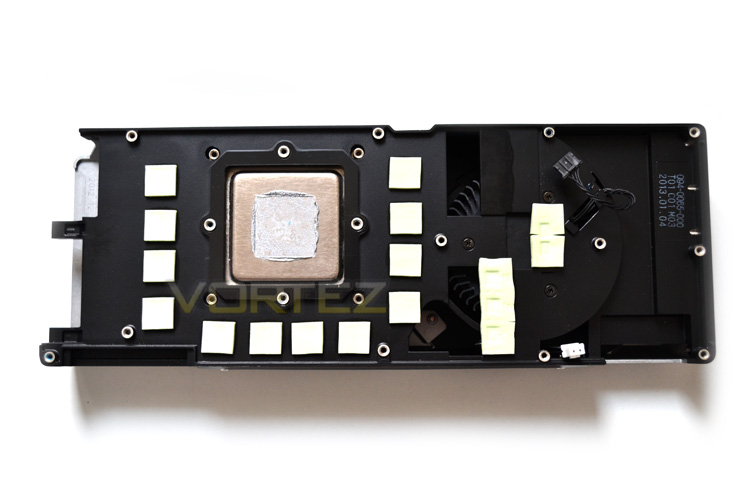
The underside of the cooler shows us that the 12 memory chips, voltage regulation and GPU core are all actively cooled. Note the two wired plugs: We normally only see one which will dynamically control the fan speed according to temperature. With two we can only assume the second plug also has the means of interrupting this profile due to the additional features of GPU Boost 2.0.
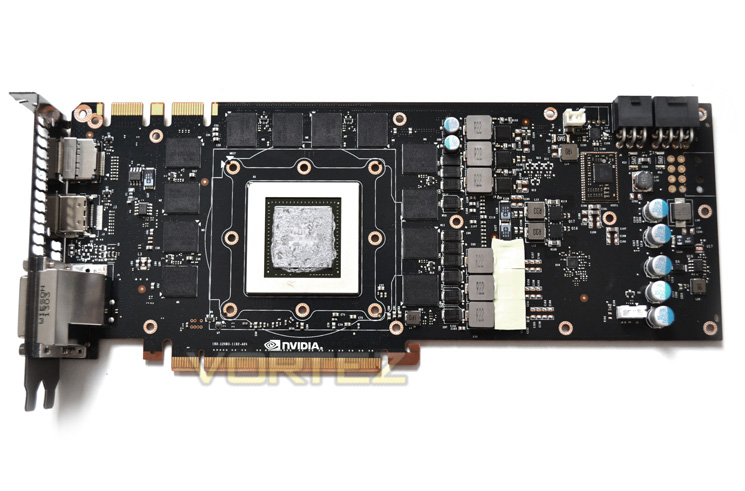
The PCB itself is of course black which we like here at Vortez. Everything is where you would expect to find it with the GPU core being framed by 12 memory chips and the VRM being closest to the power inputs. Interestingly there is a ‘spare’ 8pin power block which is redundant on this model but perhaps a sneak peak of what to expect with 7 series cards?
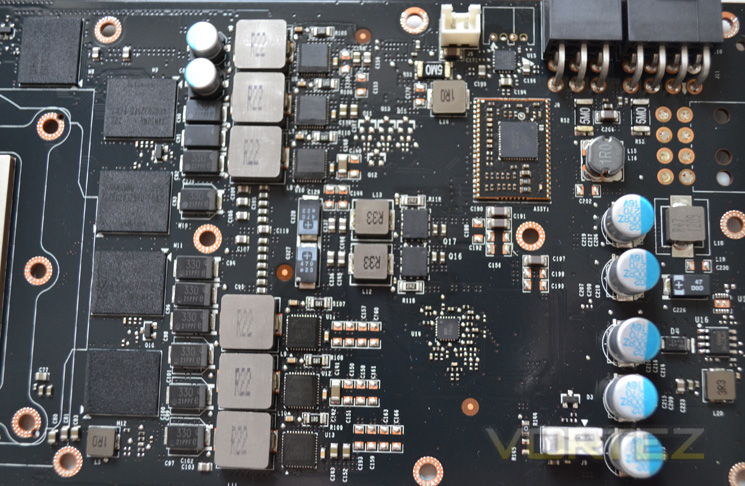
The VRM is a 6+1+1 design with the main phases dedicated to the GPU, 1 for the memory and the remaining phase for the PLL. The power phase is controlled by the ON Semiconductor NCP4206 controller which we have seen a few times previously on other GPU’s and uses the Texas Instruments INA3221 which is a three-channel, high-side current and bus voltage monitor with an I2C interface.
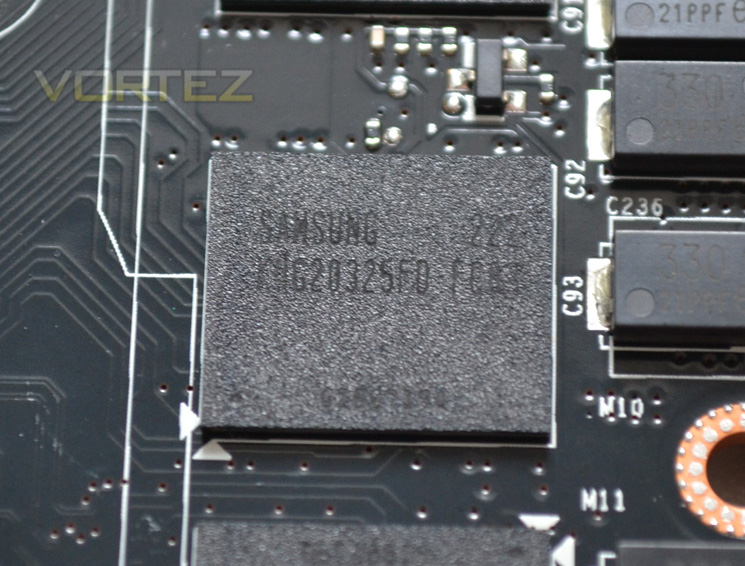
The memory IC’s carry the model number K4G20325F0-FC03 and hail from Samsung and are specified to run at 1500MHz (6000Mhz effective).
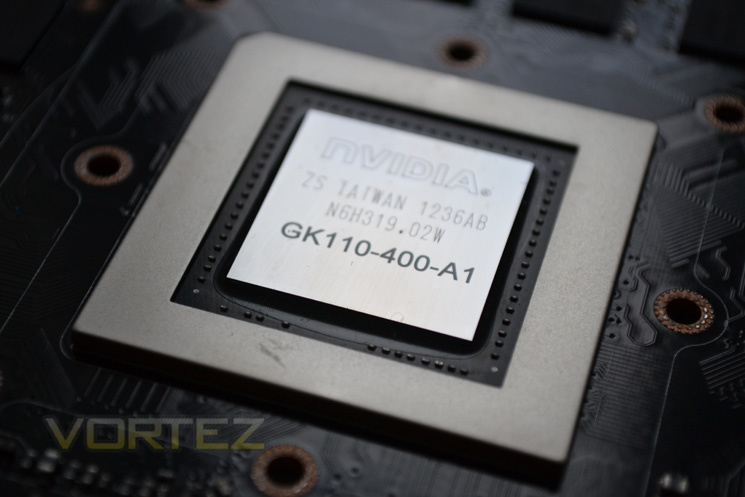
Finally, we reach the beating heart of the GTX TITAN, the GK110. Produced on a 28 nanometer process at TSMC, Taiwan, the GK110 was first introduced as Tesla but now NVIDIA have thankfully seen fit to incorporate this in their GeForce Line-up.
Test Setup
How we test graphics cards
Testing a graphics card is an extremely lengthy process. We sometimes see reviews where a graphic card has been tested using out of date equipment, out of date games and out of date drivers. While the latter can be excused due to the sheer amount of driver updates making a thorough review impossible we will however notify the reader when we have used a different driver to the normal for example a pre-release driver. For the most part however we will always use the same hardware and where possible the same drivers unless a newer driver rectifies an issue we have encountered or significantly improves performance to such an extent that continuing with an outdated driver is not feasible.
We have also seen the mergence of frame time analysis. We covered this in a separate article here: GPU Reviews: Why Frame Time Analysis is important so we won’t go into the reasoning again but to summarise, our testing comprises both FPS testing and perhaps arguably more importantly, frame time analysis. We also look at overall performance by equating averages across the games and finally before concluding our review we take a look at value for money.
HardwareWith the latest Intel chipset release we decided to update our ageing X58 setup to the new X79 chipset. Not only that but we will be using the flagship Core i7-3960X Extreme Edition processor clocked to 4.5GHz to ensure we have no CPU bottlenecks. With 16GB of ram on board there should be minimal paging so the benchmarks we run today will hopefully give a true reflection of the graphics card’s performance.
Graphics cards on test:
NVIDIA GeForce GTX TITAN 6GB GDDR5
(Forceware 314.22)NVIDIA GeForce GTX TITAN SLI 12GB(2x6GB) GDDR5
(Forceware 314.22)NVIDIA GTX680 2GB GDDR5 (Forceware 314.22)
AMD HD7970 3GB GDDR5 (AMD CAT 13.3 beta)
Motherboard: ASUS P9X79 Pro
CPU: Intel Core i7-3960X Extreme Edition @ 4.5GHz
RAM – 16GB (4x4GB) Corsair Vengeance (Red) DDR3 @ 1866MHz 9-10-9-27
Power Supply – ANTEC High Current Pro 1200W
Hard Drive – Kingston HyperX 240GB
Cooler – Corsair H100
CPU: Intel Core i7-3960X Extreme Edition @ 4.5GHz
RAM – 16GB (4x4GB) Corsair Vengeance (Red) DDR3 @ 1866MHz 9-10-9-27
Power Supply – ANTEC High Current Pro 1200W
Hard Drive – Kingston HyperX 240GB
Cooler – Corsair H100
Benchmarks
If you are a regular reader of our reviews you will know we like to test the latest hardware with the latest games and benchmarks on the market. Here are the games we have chosen:
Battlefield 3
Crysis 3
Far Cry 3
BioShock Infinite
DiRT: Showdown
The Elder Scrolls: Skyrim
Crysis 3
Far Cry 3
BioShock Infinite
DiRT: Showdown
The Elder Scrolls: Skyrim
We also take into consideration the benchmarkers out there so have included 3 of the more popular synthetic benchmarks available:
Unigine: Valley
Unigine: Heaven 4
Futuremark 3DMark Firestrike
Unigine: Heaven 4
Futuremark 3DMark Firestrike
Let’s see how today’s graphics card performed…
Temperature, Acoustics and Power Consumption
Power ConsumptionTo test for power consumption we use the included iPower Meter found with our Thortech PSU. As system load figures obviously differ from idle it is extremely difficult to get an accurate figure of system draw and then simply take this figure away from the overall amount because each game will generate varying levels of CPU and hard drive activity. Dynamic power adjustments which fluctuate in game will also affect accurate power figures thus rendering any such power consumption calculations redundant at worst and approximate at best.
We will therefore take our system readings averaged over a benchmark run of Tessmark (100% load) and after 20 minutes of being idle in Windows 7. These can then be used as a comparison to other graphics cards to determine how much more or less power you can expect a GPU to consume.
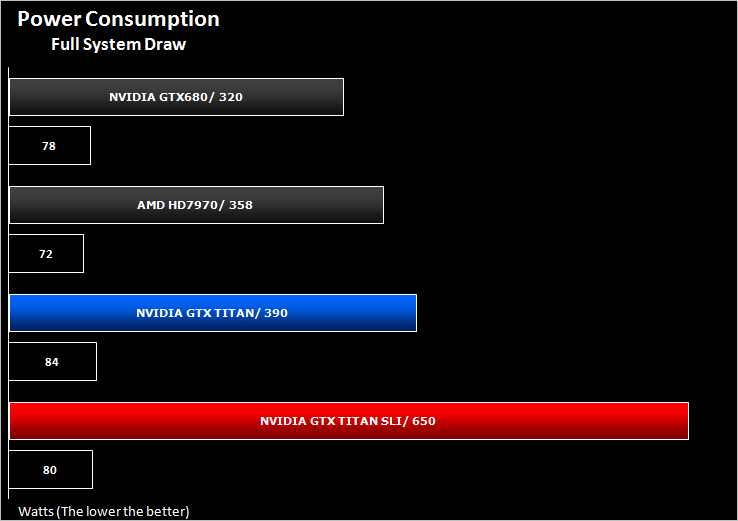
The NVIDIA GTX TITAN is a hungry beast consuming 390W on average. The good news however is that when idle, system power consumptions is minimal thanks to the dynamic 2D adjustment. SLI power consumptions was monumental hitting an average 650W but peaking occasionally to 720W so having a large PSU is a pre-requisite. We would recommend for a high end system taking two of these cards to be a minimum 1000W or higher to give you a little overhead, especially if you have a heavily overclocked machine.
Temperature
To test temperatures we measured idle temperatures after booting windows, letting all applications finish loading and ran a few benchmarks. Once the benchmarks were complete we left the card to reach a cooling plateau where we then took the idle temperatures. For the load tests, we would normally run Furmark for 20 minutes, taking the absolute maximum temperature attained however we found that this throttled the card and resulted in spurious results. So we set Heaven running continuously for 20 minutes and used this as a temperature result as the card did not throttle with this application.
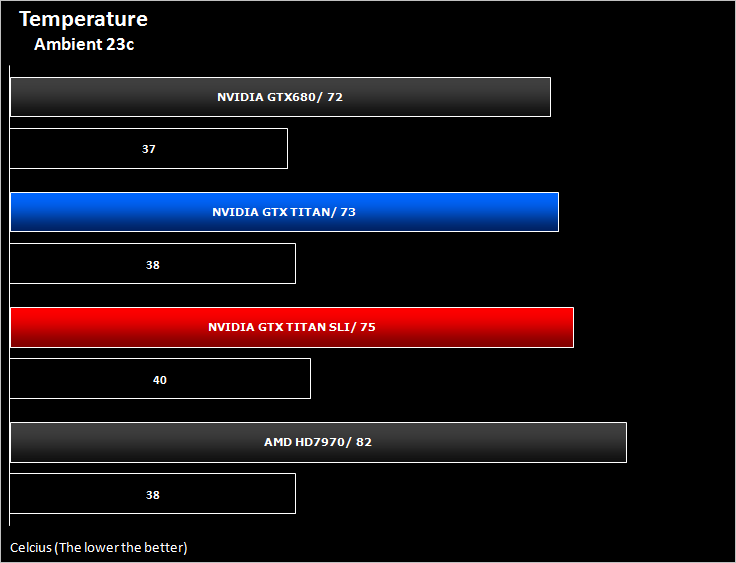
Temperatures for the GTX TITAN were very good. Even though we raised the threshold to 90c we didn’t hit anywhere near that which is testament to the great cooling provided by the reference design.
Acoustics
Reference design cooling solutions are rarely quiet however we found the exact opposite with the GTX TITAN. It was VERY quiet with the fan profiles set to default and thanks to the cooling properties we see no reason to adjust the profile unless you live in a hotter climate than the UK (which is probably 90% of the worlds population!). Our only complaint was the odd capacitor squeal we encountered during intensive operations. We first assumed it was the PSU but upon closer inspection it was certainly coming from the GPU. Testing the second GPU didn’t squeal quite as loud but there was definitely some noise. We test our GPU’s on a test bed so the noise is certainly higher than it would be in an enclosed system but it is still worth noting if you have sensitive hearing.
Overclocking
For overclocking our NVIDIA cards we will be using EVGA’s Precision too (ver 4.0) as this gives us all of the options we require.
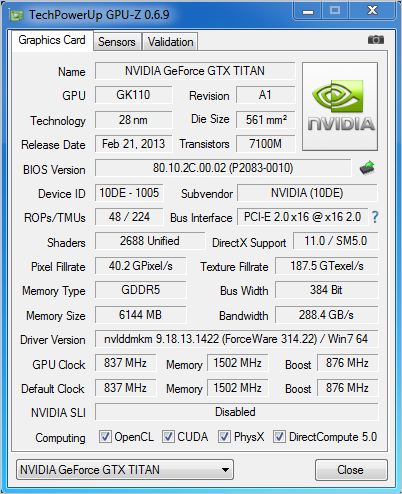
Above is a screenshot of GPU-Z showing the reference speeds and reference boost clocks
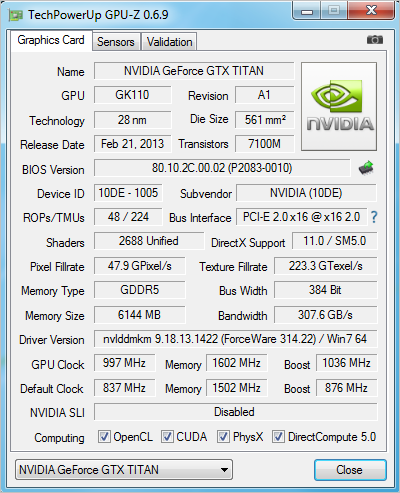
We were initially a little perturbed by the lack of overclocking of the GTX TITAN. We moved had maxxed out the voltage and added suitable offsets but for some reason GPU-Z was not recording the actual figures we were dialling in. We soon realised that due to GPU Boost 2.0, GPU-Z was not including the extra headroom afforded by the voltage increase.
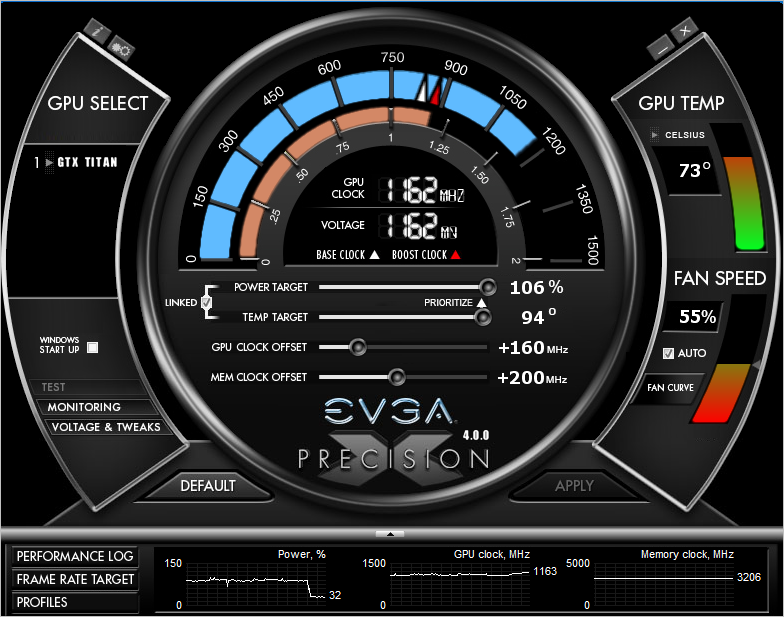
Above is a screenshot of the actual overclock we achieved via Precision. A none too shabby 160MHz increase resulting on an effective (and 100% stable) GPU Boost speed of 1162MHz. The memory also received a healthy 200MHz clock increase equating to an effective 6400Mhz GDDR5.
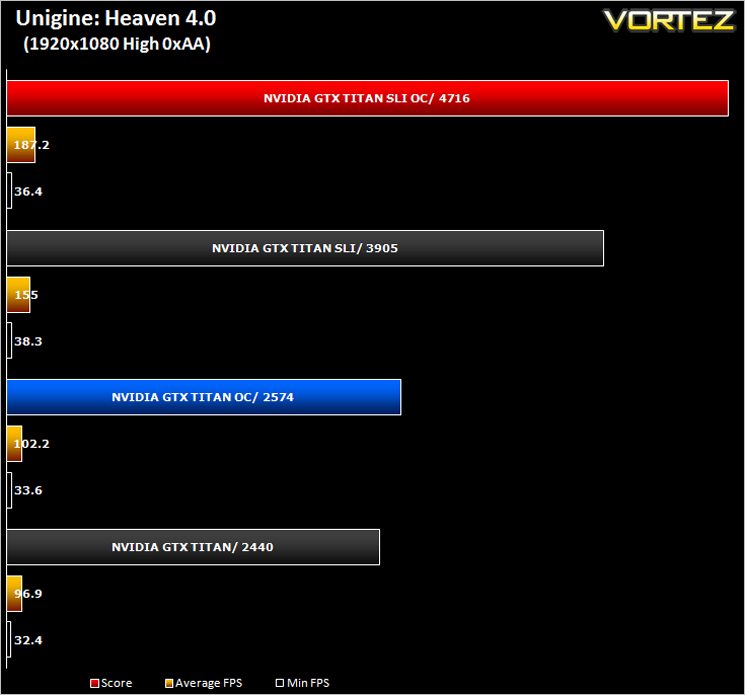
After settling on our stable clockspeed which was verified by multiple runs of Unigine Heaven and 3DMark we benchmarked the overclock and compared it to stock results with Unigine Heaven 4.0.
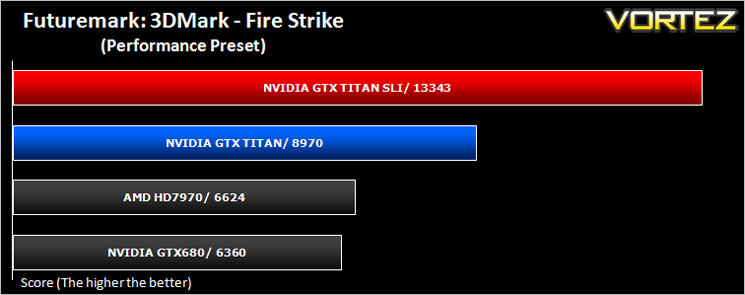
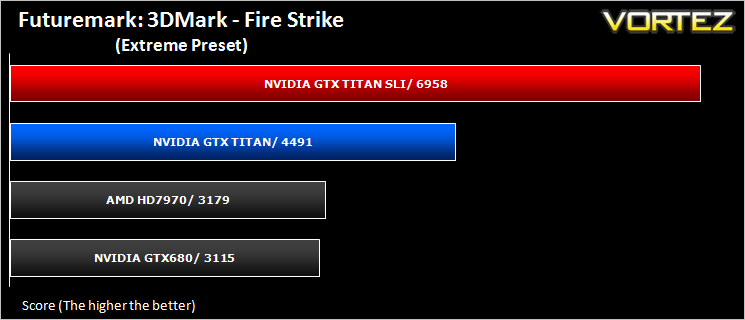
Futuremark 3DMark Fire Strike (Synthetic)
Fire Strike is the new showcase DirectX 11 benchmark designed for high-performance gaming PCs. It is Futuremark’s most ambitious and technical benchmark ever, featuring real-time graphics rendered with detail and complexity far beyond what is found in other benchmarks and games today.
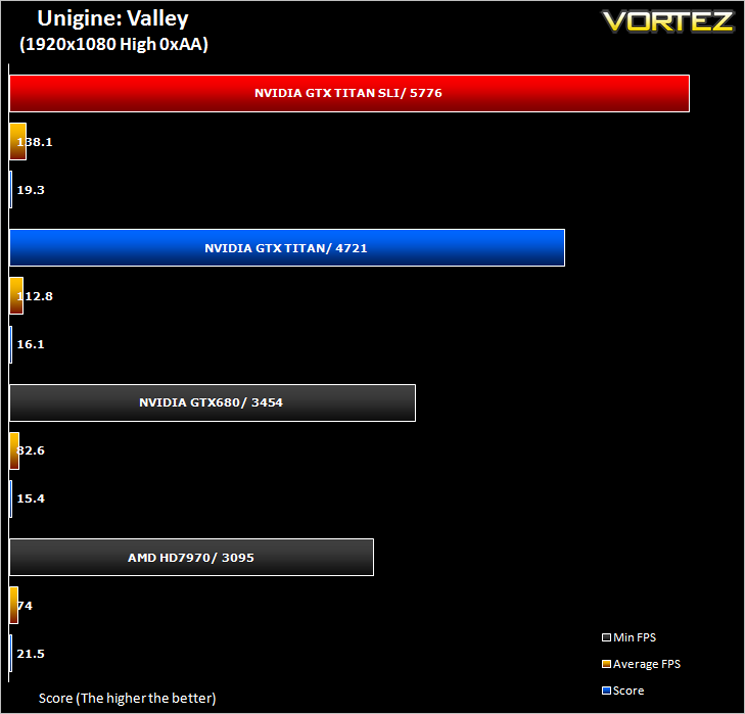
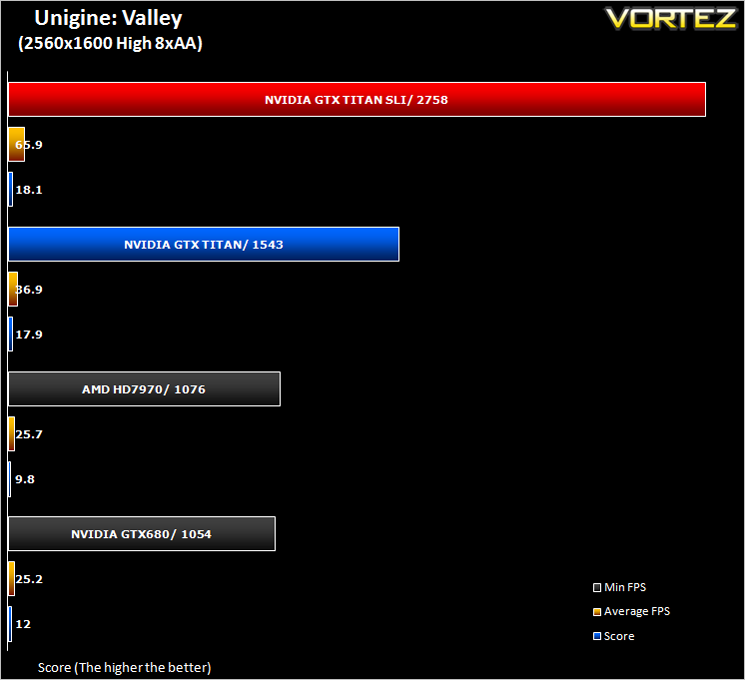
Unigine: Valley (Synthetic)
alley Benchmark is a new GPU stress-testing tool from the developers of the very popular and highly acclaimed Heaven Benchmark. The forest-covered valley surrounded by vast mountains amazes with its scale from a bird’s-eye view and is extremely detailed down to every leaf and flower petal. This non-synthetic benchmark powered by the state-of-the art UNIGINE Engine showcases a comprehensive set of cutting-edge graphics technologies with a dynamic environment and fully interactive modes available to the end user.
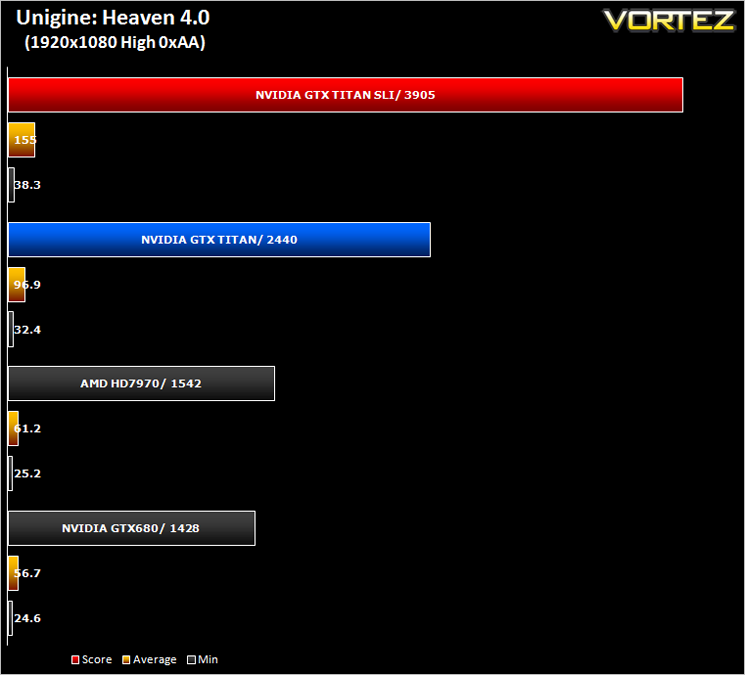
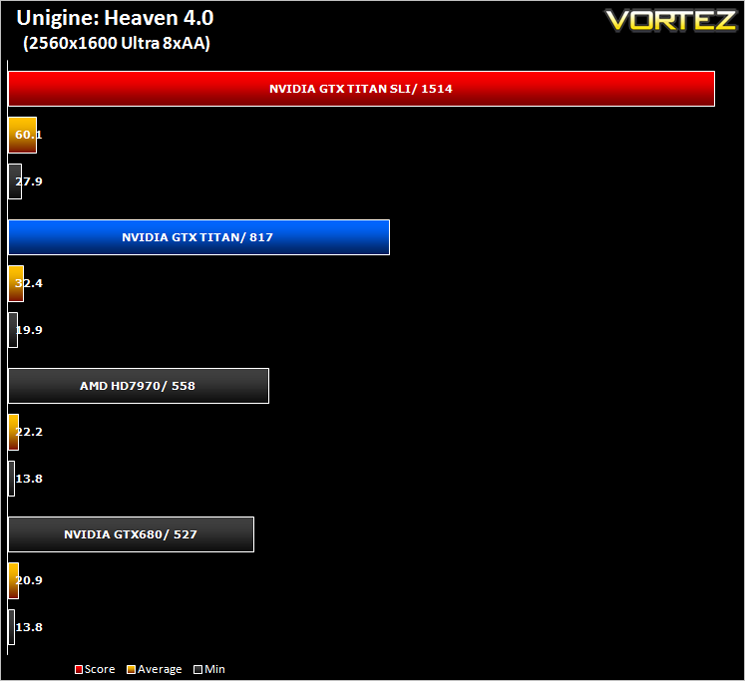
Unigine: Heaven 4 (Synthetic)
Heaven Benchmark with its current version 4.0 is a GPU-intensive benchmark that hammers graphics cards to the limits. This powerful tool can be effectively used to determine the stability of a GPU under extremely stressful conditions, as well as check the cooling system’s potential under maximum heat output. It provides completely unbiased results and generates true in-game rendering workloads across all platforms.
Gaming Experience (Frame Time Analysis)
Gaming experience is what we like to refer to as the Laymans term for Frame Time analysis. Frame time analysis is in its most basic sense how smooth your gameplay will be. Ever had a powerful card rendering at 100FPS with ease for it to stall for a split second before resuming? This is what Frame Time Analysis shows us: The peaks during an otherwise smooth gaming experience. This is presented to you in two ways, by showing you a line graph of a 60 second FTA capture using FRAPS and then by deducing the average and 99th percentile response times.
Some arena’s claim this should be the way games are tested and we won’t argue here because there is little point in having a card which churns out an average 100FPS if it has micro stutters lasting 50ms (GPU response time) which spoils the fluidity of the game.
Some arena’s claim this should be the way games are tested and we won’t argue here because there is little point in having a card which churns out an average 100FPS if it has micro stutters lasting 50ms (GPU response time) which spoils the fluidity of the game.
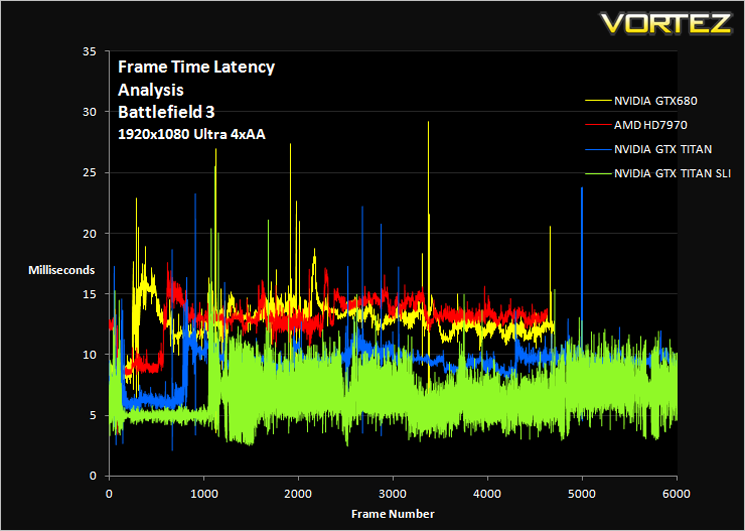
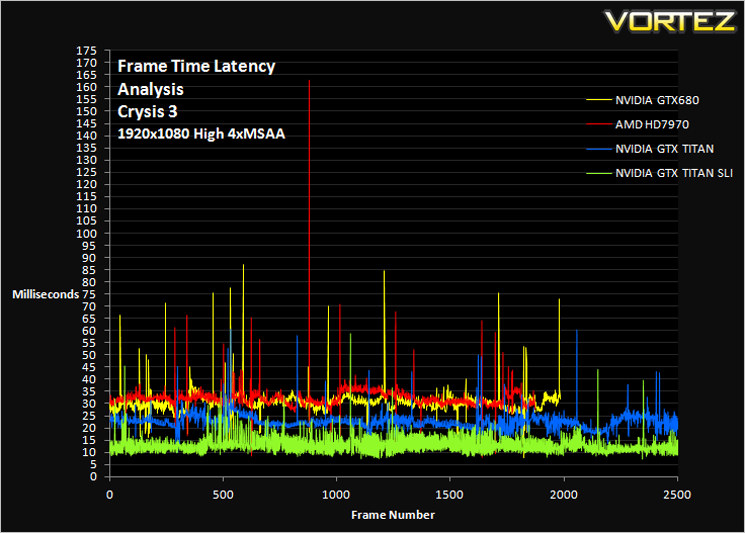
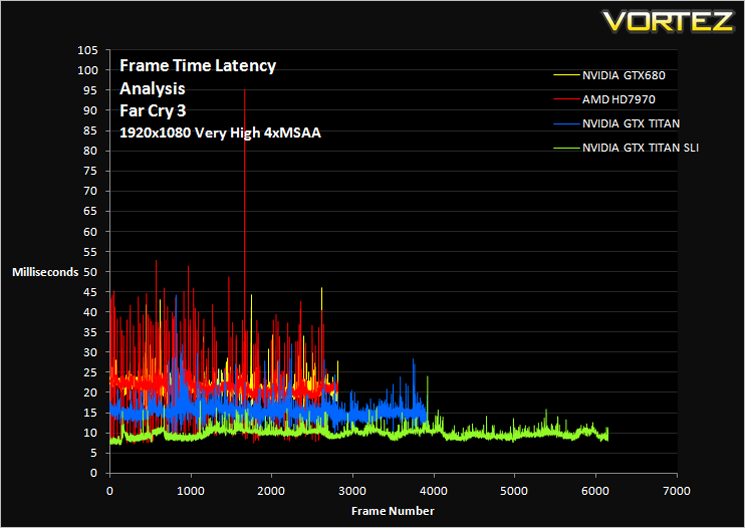
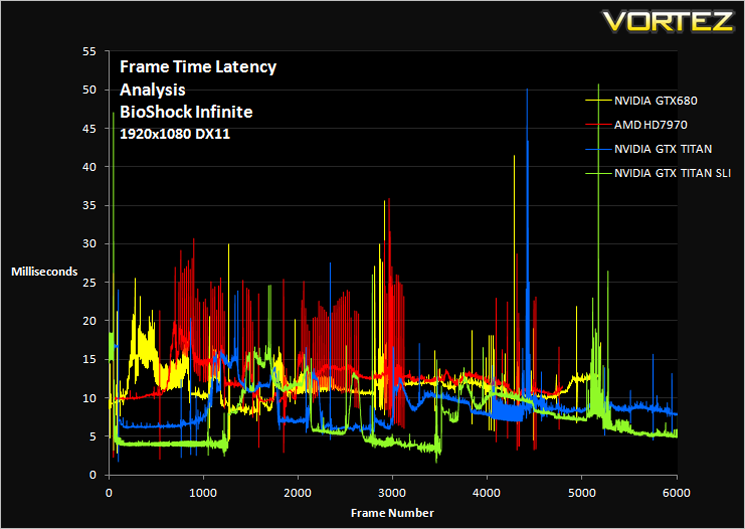
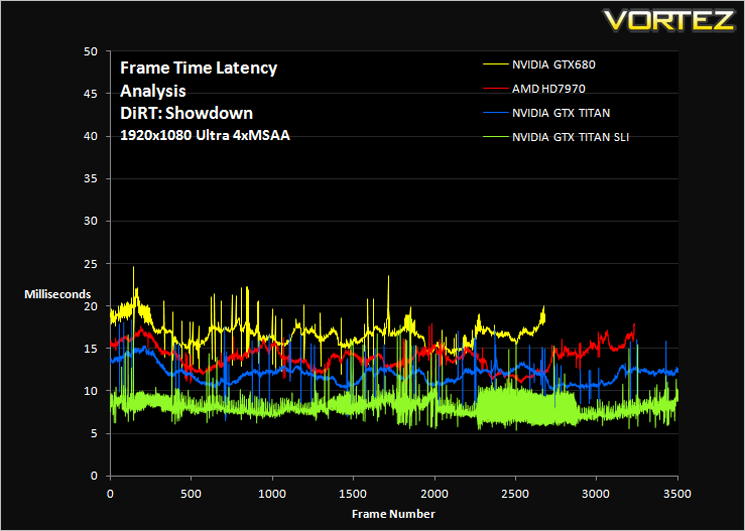
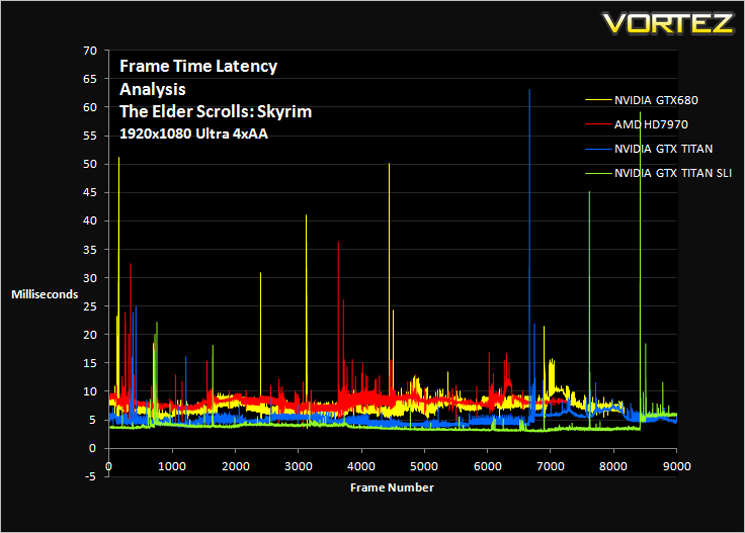
The graphs may look a little intimidating at first but when we dissect them a little can interpret what is actually going on. Ideally, we want to see a thin line with very little variation as low down as possible. Anything above 30ms could be noticed in game as a stutter while anything above 50ms will certainly be seen in game. There are however, especially in preset benchmarks such as BioShock Infinite, screen transitions which show a leap in frame time rendering response and should therefore be ignored.
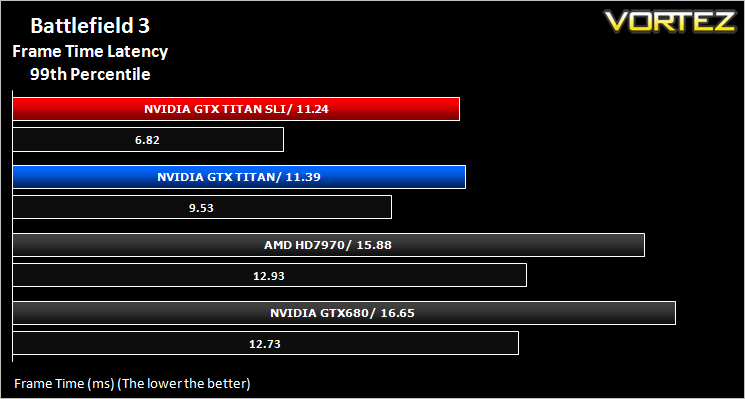
Starting with Battlefield 3 we can see that while the SLI setup has the fastest response times, those response times are staggered (signified by the ‘fuzzy’ green line). Were these lines above the 30ms mark, this would equate to poor stuttering gaming performance however, as the response times are so quick they are undetectable by the human eye and thus the end user will see a very smooth game.
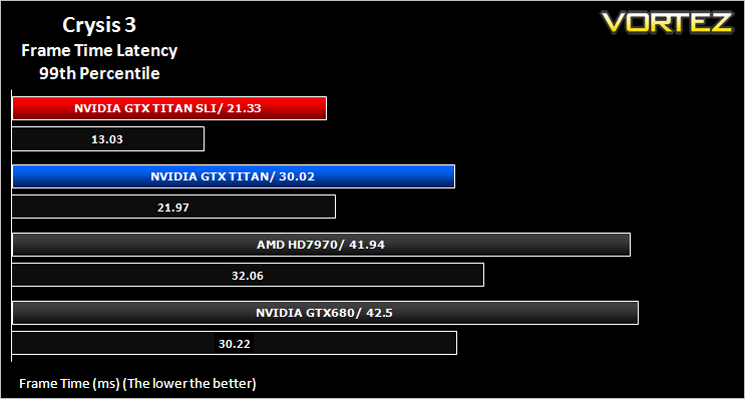
Crysis 3 is perhaps the most demanding game on test and this is borne out by the amount of stuttering noted. The GTX680 is perhaps the worst performer here, followed by the HD7970. The GTX TITAN also suffers from moderate stuttering, occasionally going above 30ms.
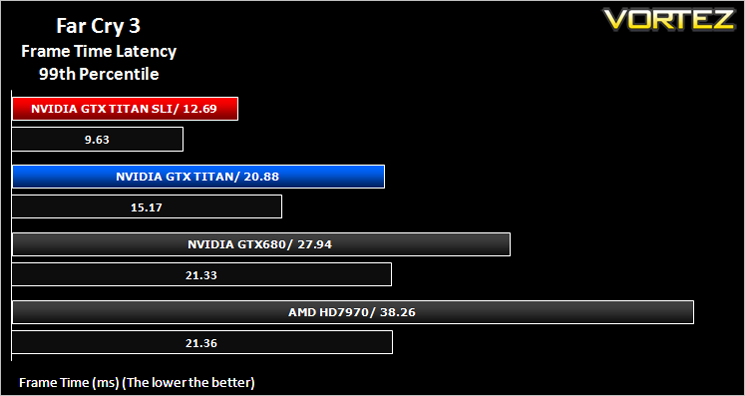
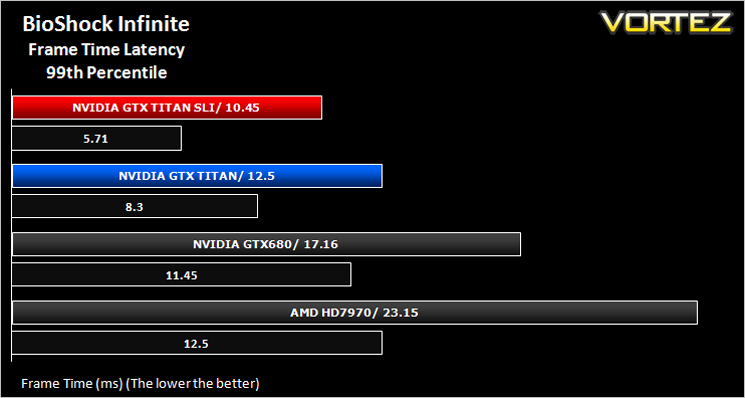
The HD7970 performed poorly in Far Cry 3 and the GTX 680 was little better however the TITAN and TITAN SLI rigs cut through the benchmark with little problem. Similar results were found with BioShock Infinite albeit to a lesser degree.
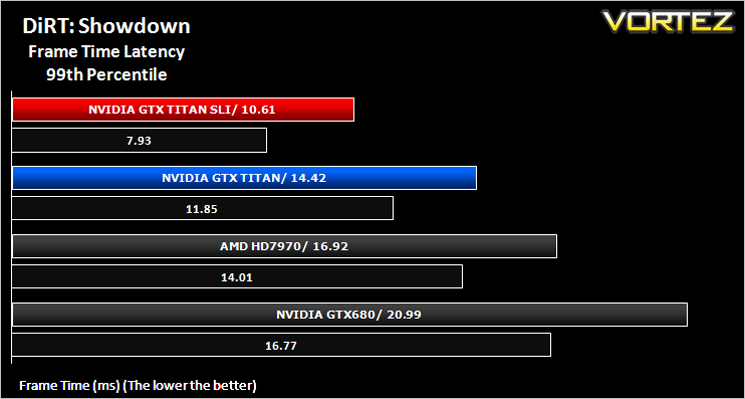
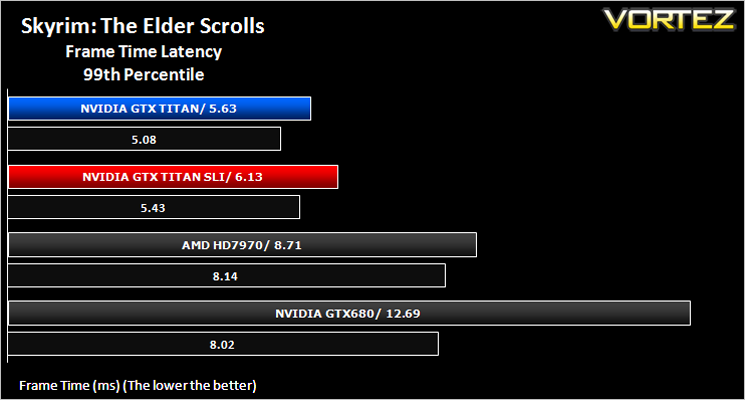
There were no issues for any of the cards in Dirt: Showdown while Skyrim only had a couple of noticeable stutters from all the cards on test.
Average and 99th Percentile response times (Frame Time Analysis)
Here we take a look at both average (black) and 99th Percentile (coloured) response times of the graphics cards. It is highly unlikely a user will notice any micro stutter (also incorrectly referred to as lag but the effect can be interpreted to be similar) at anything below 30ms but every gamers perception differs.
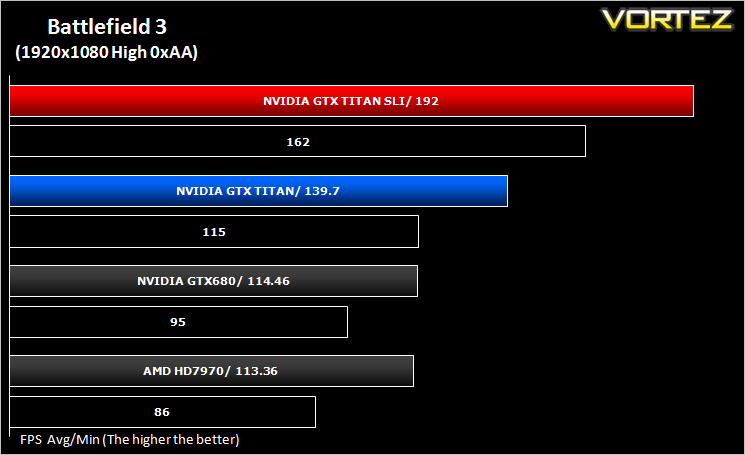
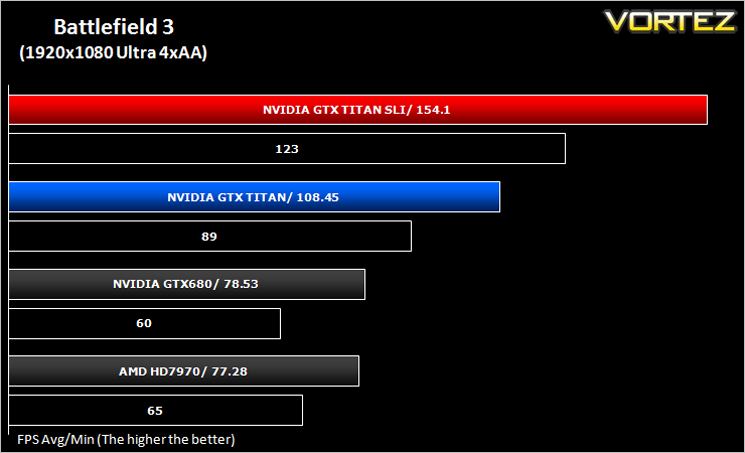
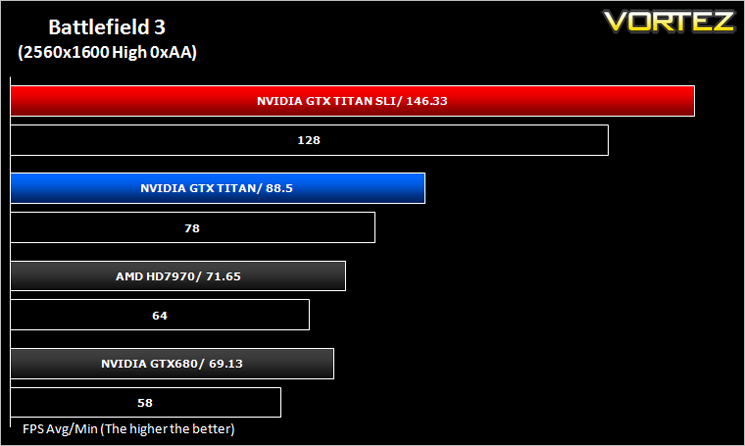
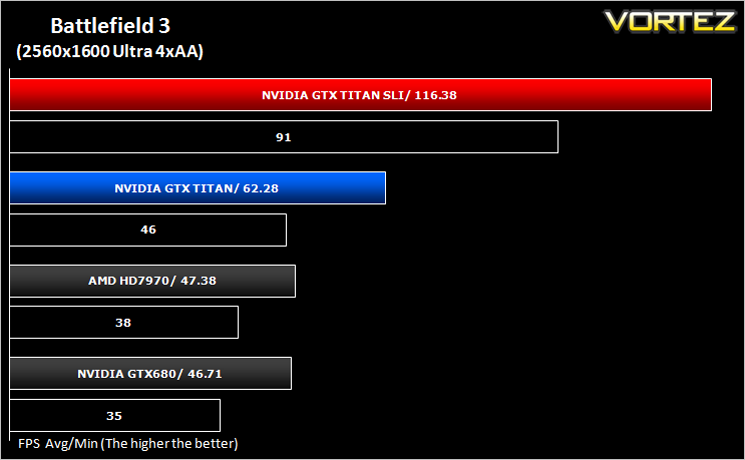
Battlefield 3 (FPS)
Battlefield 3 leaps ahead of its time with the power of Frostbite™ 2, the next installment of DICE’s cutting-edge game engine. This state-of-the-art technology is the foundation on which Battlefield 3 is built, delivering enhanced visual quality, a grand sense of scale, massive destruction, dynamic audio and incredibly lifelike character animations. As bullets whiz by, walls crumble, and explosions throw you to the ground, the battlefield feels more alive and interactive than ever before. In Battlefield 3, players step into the role of the elite U.S. Marines where they will experience heart-pounding missions across diverse locations including Paris, Tehran and New York.
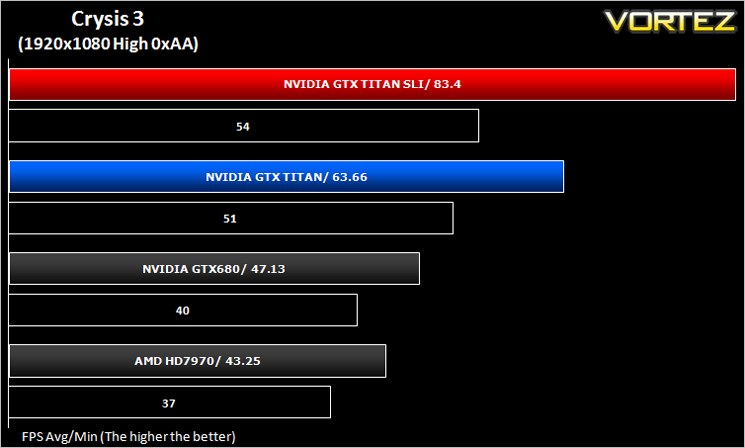
Average and minimum frames per second were measured using Fraps during the parking lot scene on Operation Sword Breaker. High and Ultra presets were loaded at both resolutions.
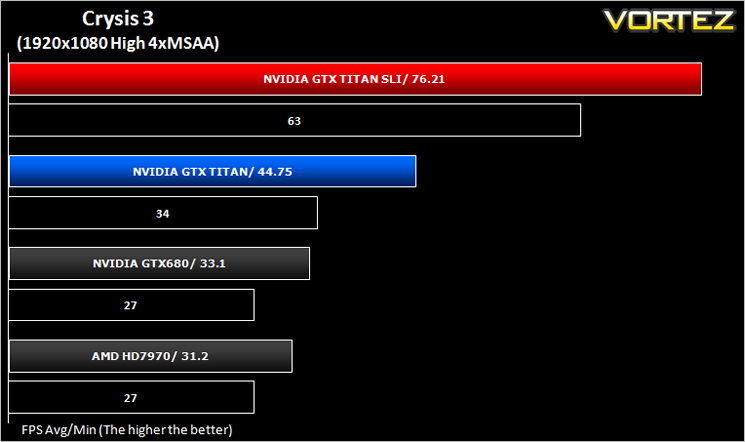
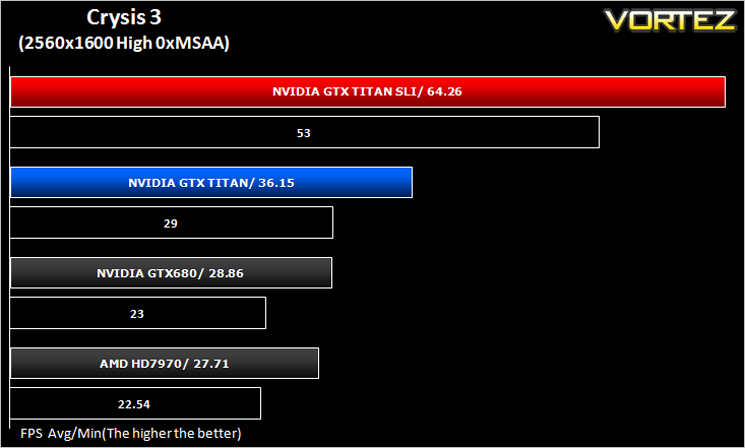
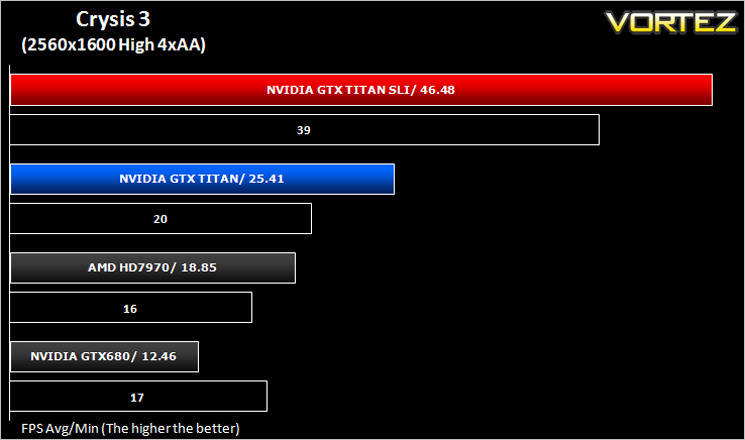
Crysis 3 (FPS)
Crysis 3 from Electronic Arts is the fourth instalment of the Crysis franchise and sequel to Crysis 2. It uses the CryEngine 3 gaming engine which is perhaps the most advanced gaming engine to date and therefore the most demanding. The meme ‘Can it run Crysis’ has never been so apparent…
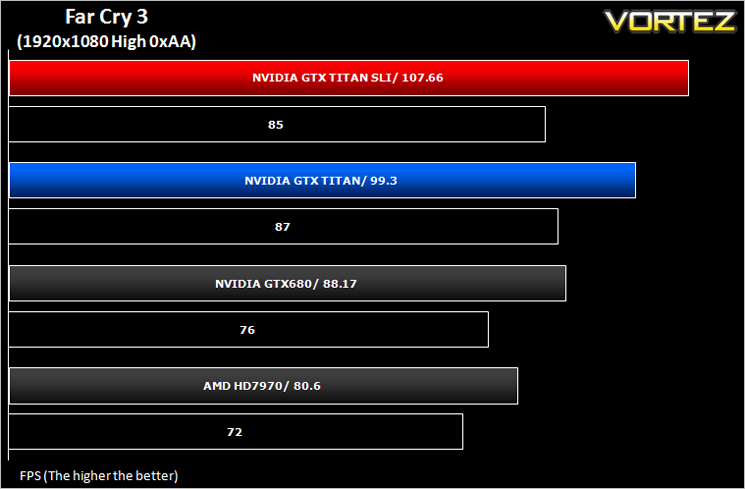
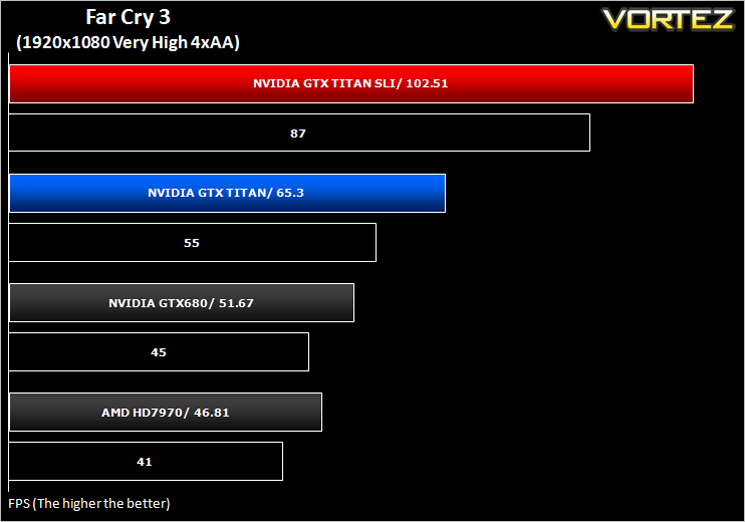
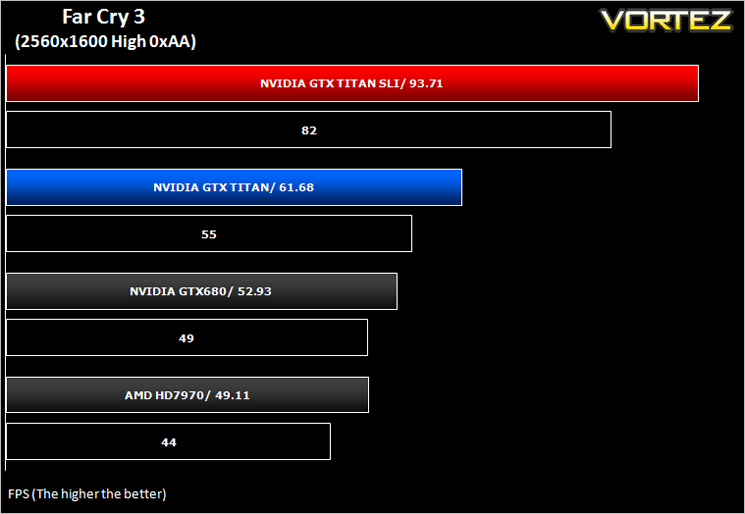
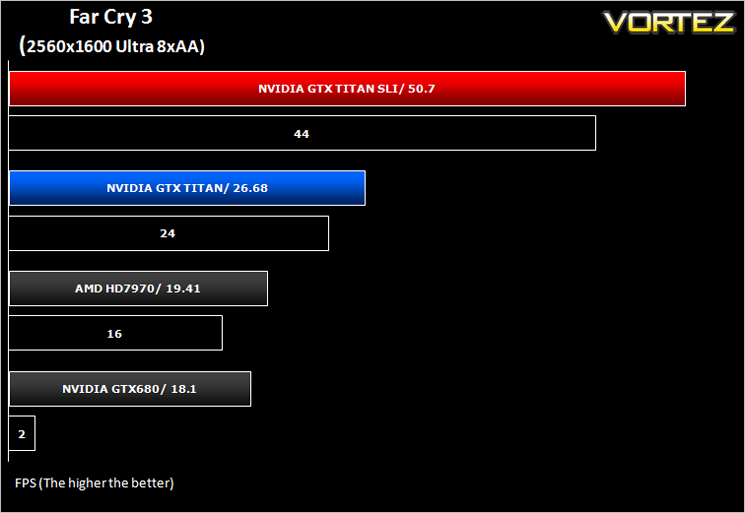
Far Cry 3 (FPS)
Far Cry 3 is a tropical survival shooter video game from Ubisoft Montreal and Massive studios. It’s open world design has similar traits to it’s forbear Far Cry 2 but it does it all so much better. With stunning visuals and settings to bring a PC to it’s knee’s, this game is so much more than the ‘just another console port’ it was reported to be.
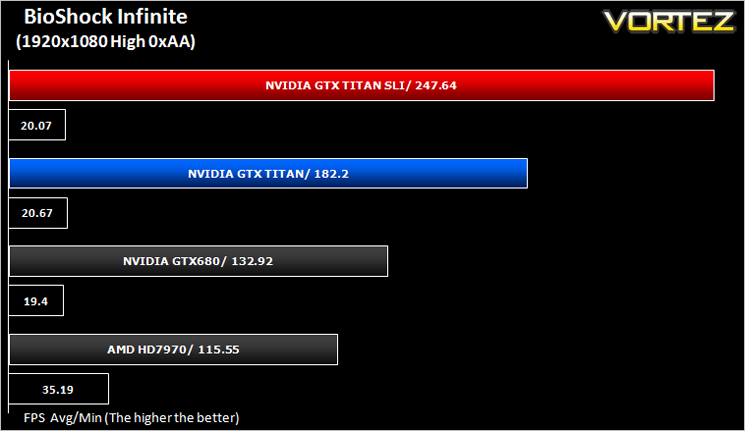
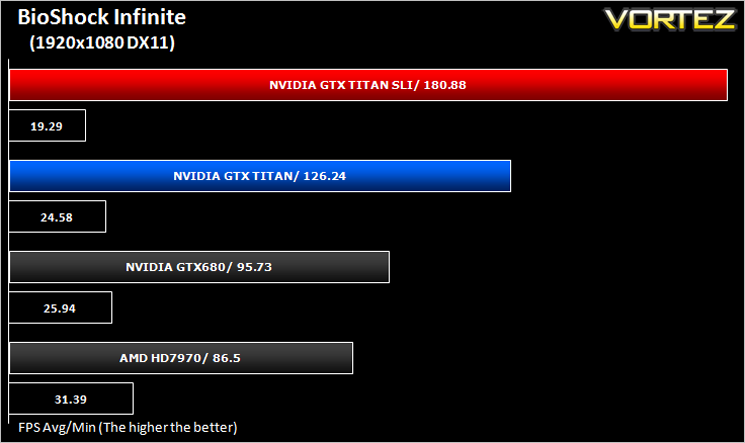
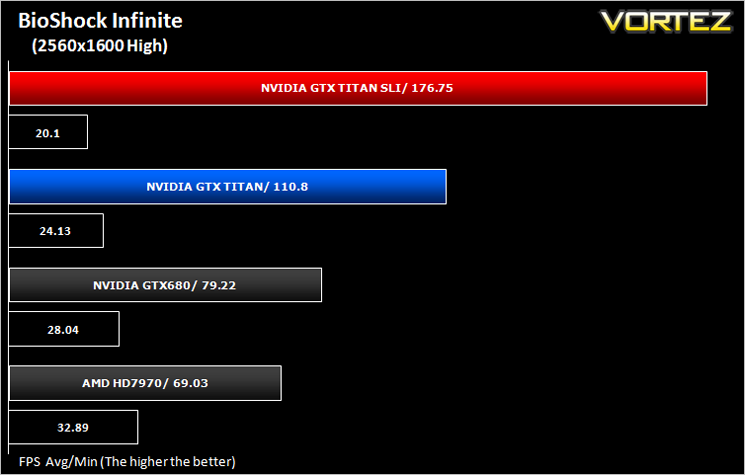
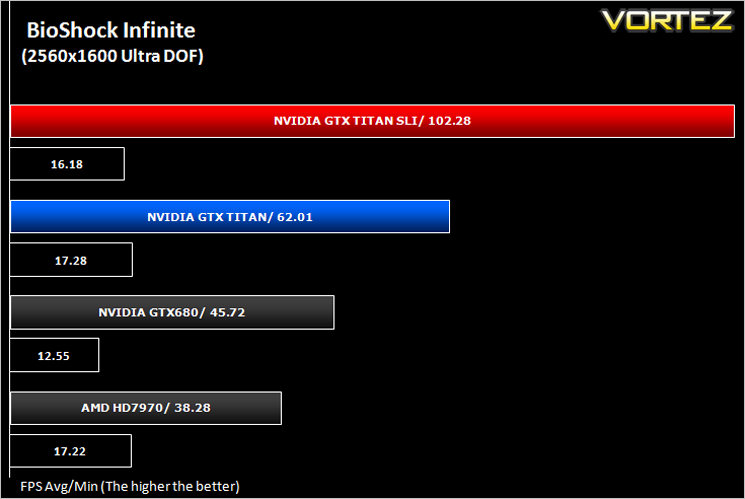
BioShock Infinite (FPS)
Set in 1912 during the growth of American exceptionalism, BioShock Infinite is a thrid person shooter developed by Irrational games and published by 2K Games. It is the third instalment of the BioShock franchise. the game utilises the Unreal Engine 3, modifying it with their own lighting engine to present a visually stunning experience like no other.
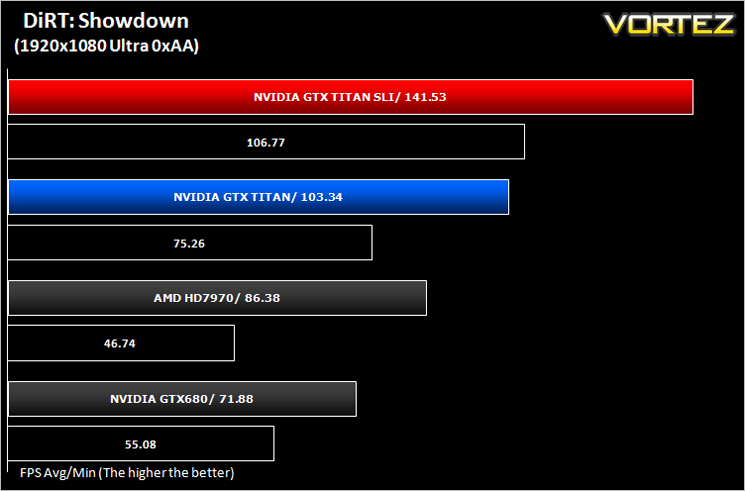
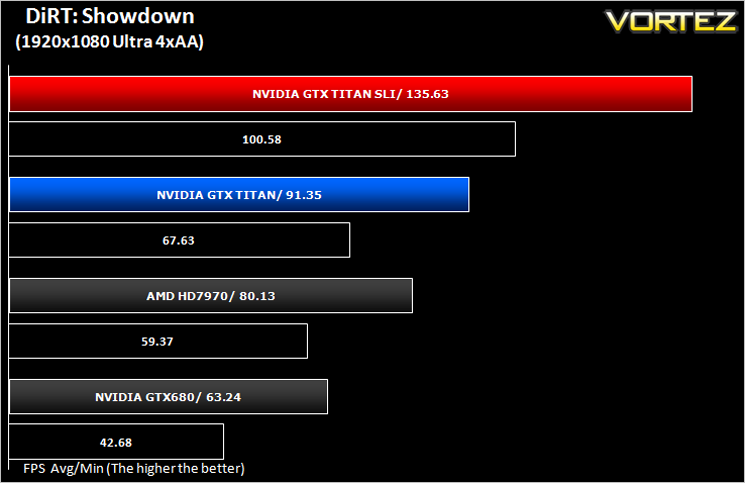
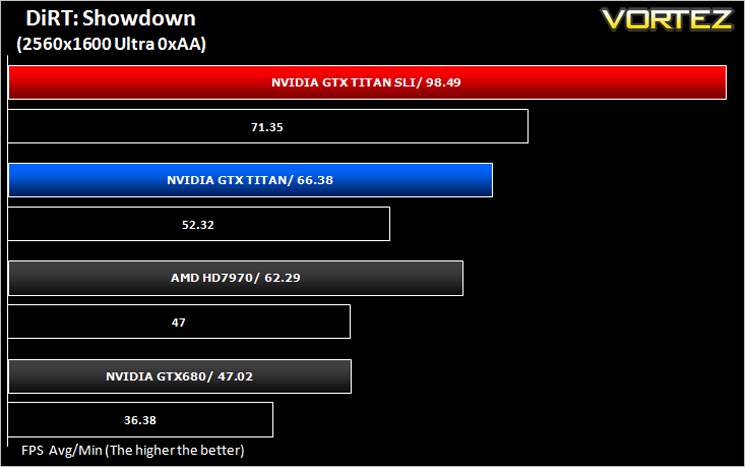
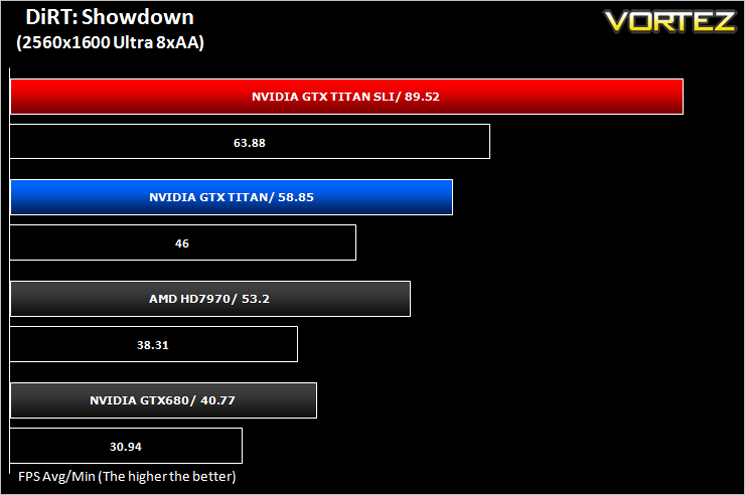
DiRT: Showdown (FPS)
DiRT Showdown is the new arcade racing game from the team that brought you the award-winning DiRT series, uncaged in 2012. Pick up and play controls combine with electrifying events, frenzied crowds and stunning graphics to deliver high octane, dive in and drive thrills from event one.
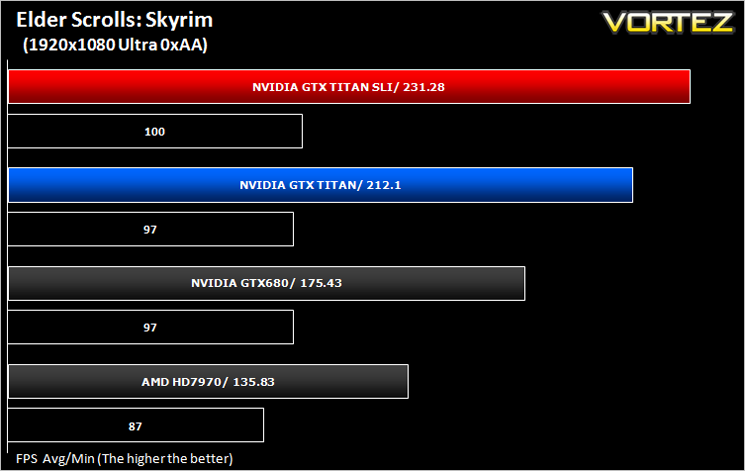
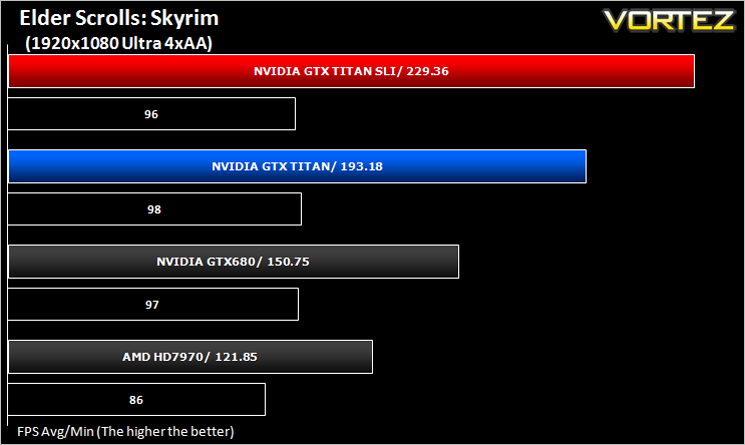
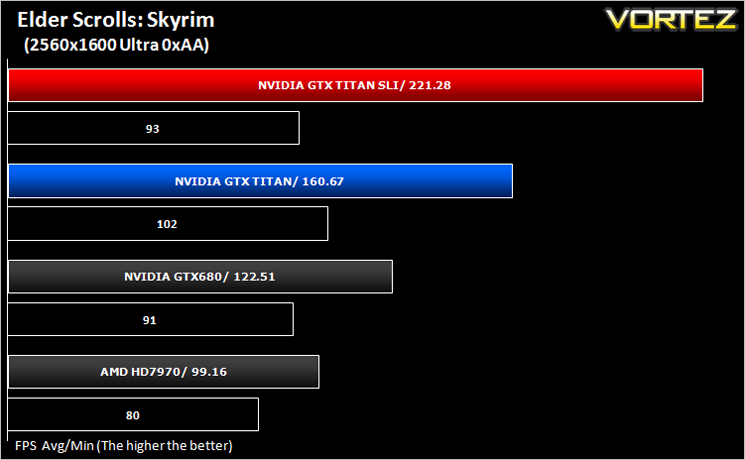
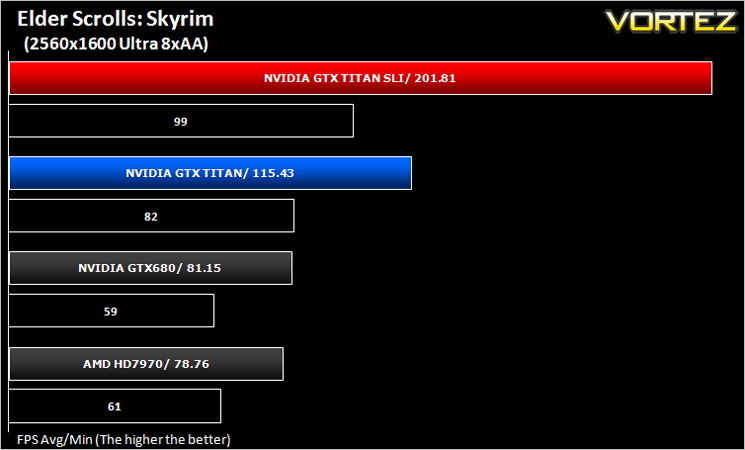
The Elder Scrolls: Skyrim (FPS)
Skyrim is not a direct successor to the very popular Oblivion. Instead it takes place 200 years after the events of Oblivion. The non-linear playing that made the Elder Scrolls such a popular series does however make a return along with the beautiful scenery the encompasses the world of Skyrim.
Average and minimum frames per second were measured using Fraps during the drop down passage to Riverwood. V-sync was disabled to allow fluctuating (higher the 60) FPS for these runs. It is however recommended that v-sync is left enabled during normal gameplay due to the games dynamics.
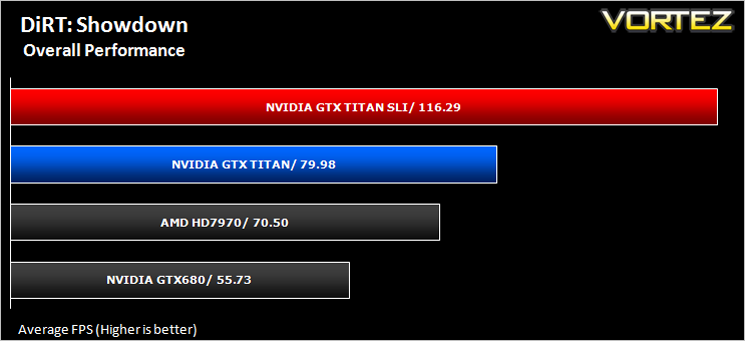
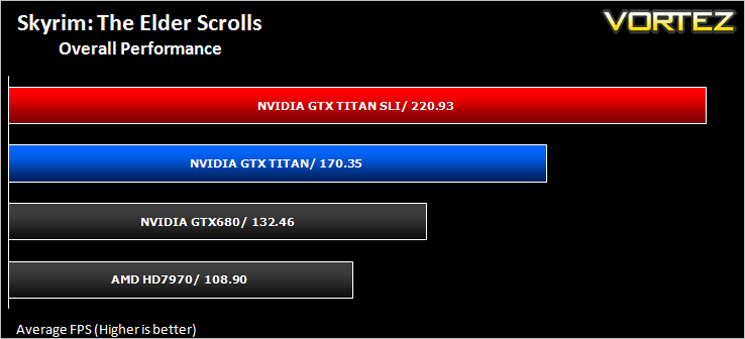
Overall Performance (FPS)
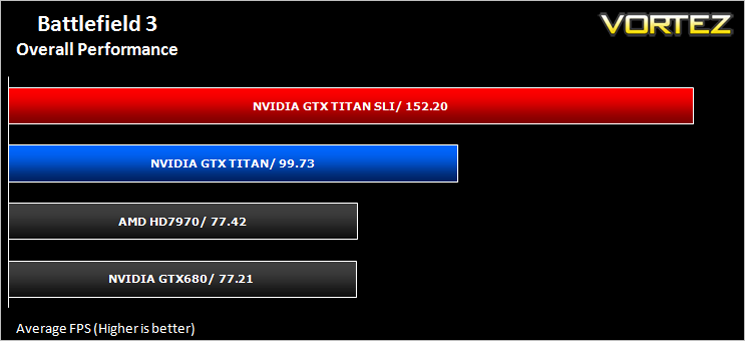
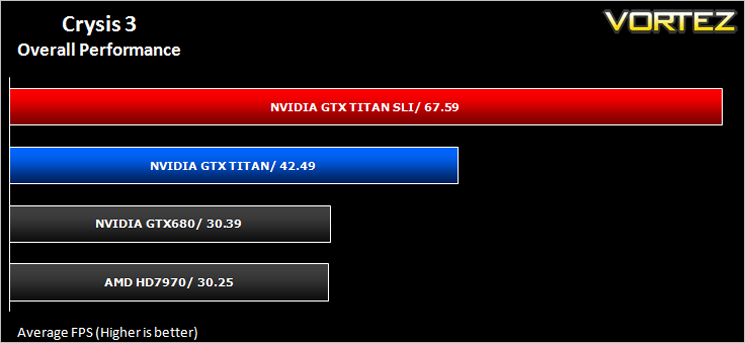
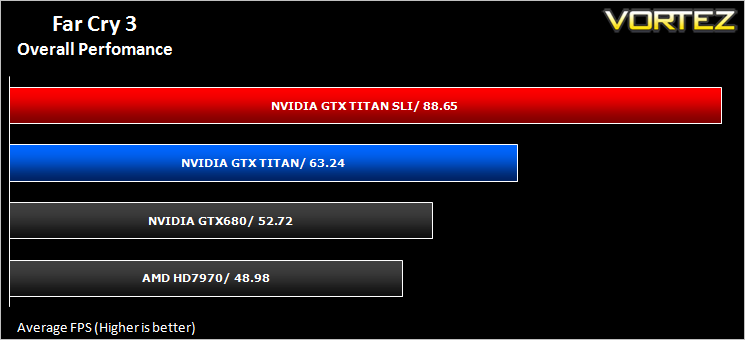
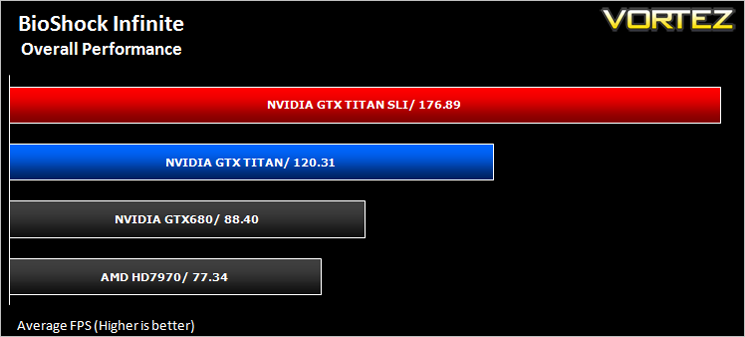
We make a simple calculation for this set of results. For each game we add all of the resulting FPS totals together and then divide by the four sets to give us an overall performance figure. While the figures alone do not give you an accurate picture of how the card will perform in any given scenario, they do tell you, when averaged, which GPU is the more capable across all of the benchmarks and settings tested.
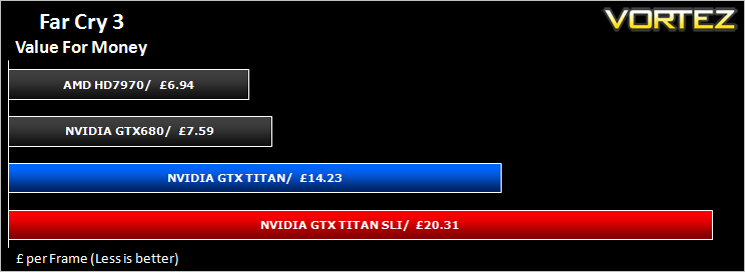
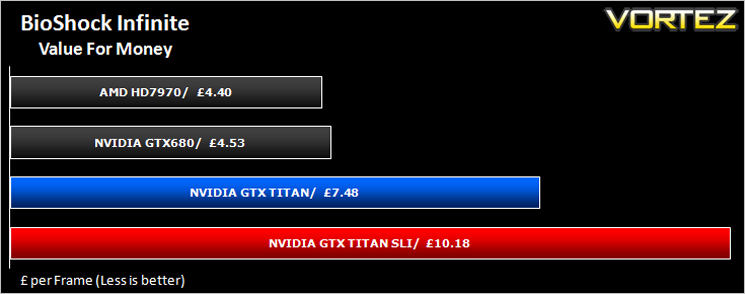
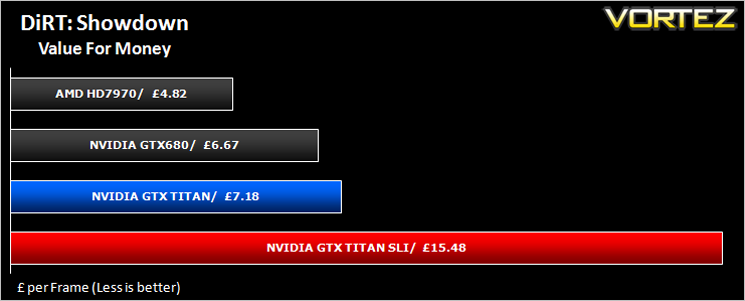
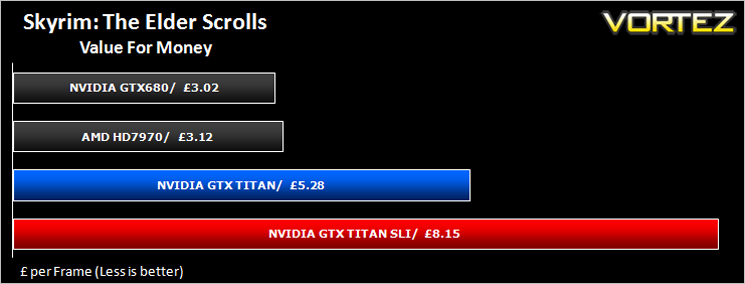
Value For Money
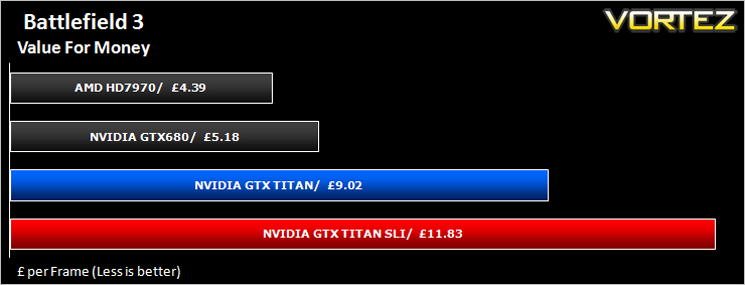
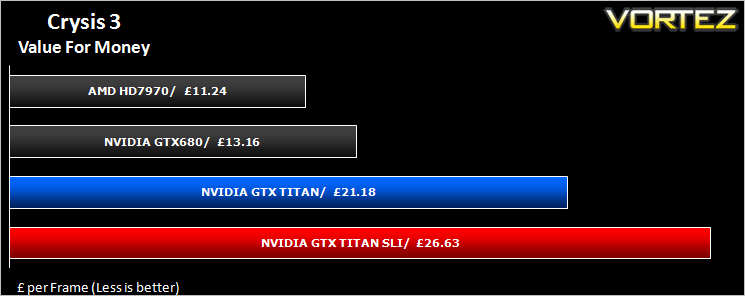
For those on a budget, this is perhaps the most important section of a graphics card review. For everyone else it will certainly make you think twice before calling the bank manager for an overdraft request. We calculate Value for money by taking the cost of the product and then dividing that figure by the overall performance figure which gives us a result in the guise of £ per frame – in effect how much every frame per second will cost you.
Conclusion
Firstly, let’s discuss the TITAN’s main stumbling block – the price. £800-£1000 could buy you a lot of things, not least a very powerful PC capable of playing all the modern games at a decent resolution so why would you want to spend the same amount on a single graphics card? It would be fair to assume NVIDIA had lost their minds when they slapped such a high price tag on the GTX TITAN which by the way just seems to be increasingly daily as stock levels dwindle. £1k for a GPU, NVIDIA you have to be kidding surely?
Well clearly they are not and with many enthusiasts willing to pay for such a prestigious item, it seems NVIDIA have got the price about right. You see, NVIDIA’s thinking is along the same as Bugatti’s. If you want an every day motor vehicle capable of getting you to work and back – go buy a Ford. If however, you want the very best there is (and this is indeed the very best single core GPU available by a long way) then price is secondary. NVIDIA are not forcing anyone’s hand to pay the price they are asking and for 99% of us we can only look on with envy. Much like we do when we see that lucky so and so who drives down the road in a Veyron.
For the 1% who can afford such luxuries then the GTX TITAN makes perfect sense. It is the ultimate sports car in the GPU world. Its outrageously fast and has sublime aesthetics. Yes, there are cheaper alternatives that work out quicker, a GTX 660Ti Boost SLI setup will beat it and cost less than half the price for example. However, if you want the best, if you want to top the benchmark charts, then budgeting goes out of the window because the GTX TITAN is the fastest single core GPU on the planet bar none.
We found it laughable that NVIDIA display a warning when unlocking the voltage control. To do so is like having Megan Fox upstairs waiting in bed while you opt to sleep on the sofa. You just don’t spend that much money on a graphics card to not make full use of it and by full use we mean to overclock the hind legs off it.
The speed of the GTX TITAN astounded us and if this is a hint of what’s to come with the GTX 7 series then AMD must be very worried because what NVIDIA have done here is not only push the envelope, they have moved the whole filing cabinet! So while AMD HD7970 may have the very slight advantage of the GTX680, the TITAN simply takes both of them apart – it really is that quick! Add a second card for SLI goodness and there will be very few desktop PC’s in the world which have more GPU grunt. Herein lays the appeal of the GTX TITAN. You are not just buying into speed – you are also buying into exclusivity.
To summarise:
The GTX TITAN is the fastest, most elegant graphics card available. If you happen to have robbed a bank, won the lottery or got lucky with the divorce settlement then we say go buy one because for the cost of a cheap holiday in the Mediterranean, you will get longer lasting smiles and satisfaction from this chunk of NVIDIA goodness without the nasty rash.
Pros
+ Fastest single core GPU available
+ Stunning looks
+ Low-noise
+ Bragging rights
Cons
– Selling a kidney to get one
+ Fastest single core GPU available
+ Stunning looks
+ Low-noise
+ Bragging rights
Cons
– Selling a kidney to get one

Click here for an explanation of our awards at Vortez.net.


