







Plugging the gap between the entry level HD7770 and the mid range HD7850, the HD7790 Turbo from HIS arrives overclocked and wearing a new suit.

Product on Review: HIS HD7790 iCooler Turbo 1GB GDDR5
Manufacturer and Sponsor: HIS
Street Price: £105.95 inc. VAT (GBP)
The AMD HD 7790 was greeted by mixed reviews upon release. The positives were it offered decent value for money and offered gamers an entry point to play games at 1920x1080p for around the £100 mark. Perhaps the biggest negative was that the HD7790 could not compete with the HD7850. To be fair to the HD7790, the HD7850 is more expensive and has been perhaps the best ‘bang-per-buck’ card on sale both this year and last, a card if we dare say could justify a higher price point than it is sold for. This however makes little difference to the facts we have before us, the prices are what they are and the criticisms are valid.
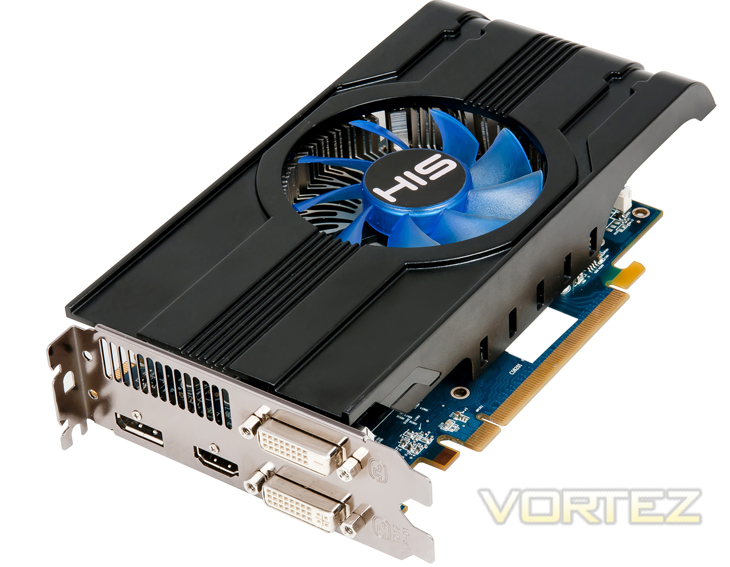
Today’s sample, the HIS HD7790 Turbo looks to close the gap on the HD7850 because it arrives in a factory overclocked state. From a reference speed of 1Ghz, the Turbo edition gives us an extra 75Mhz on the core. It has has significantly higher memory clockspeed of 6400MHz against a reference 6000MHz. HIS feel justified in asking an extra £10-20 for this luxury so while it is still £30 cheaper than an average 2GB HD7850, at £105 the price may be a little steep for an entry level 1GB graphics card. The proof is in the pudding so they say so we will reserve our judgement until the end of the review.
About HIS
HIS is proud to be AMD’s Authorized 1st Tier AIB Partner, Certified Partner and Launching Partner. Long term and favourable relationship with AMD, enable HIS to work closely with AMD to promote the HIS AMD Graphics Board; and to strive for best value on the marketing and sales of HIS AMD Product Line. In Sept 2003, HIS incorporated the state-of-the art Supreme Cooling Technology in the award winning HIS 9800Pro IceQ, which caught the attention of worldwide media. Since then, HIS IceQ series and the latest IceQ X series has been the limelight in the market for its outstanding performance and features over the other rivals. Today, HIS continues its avid commitment to quality product and service. HIS is certain to be Your Choice of Graphics Board Supplier.
Specification
The table below shows an ‘apples to apples’ comparison between the HD7750, HD7770 and HD7790 graphics cards currently available from AMD: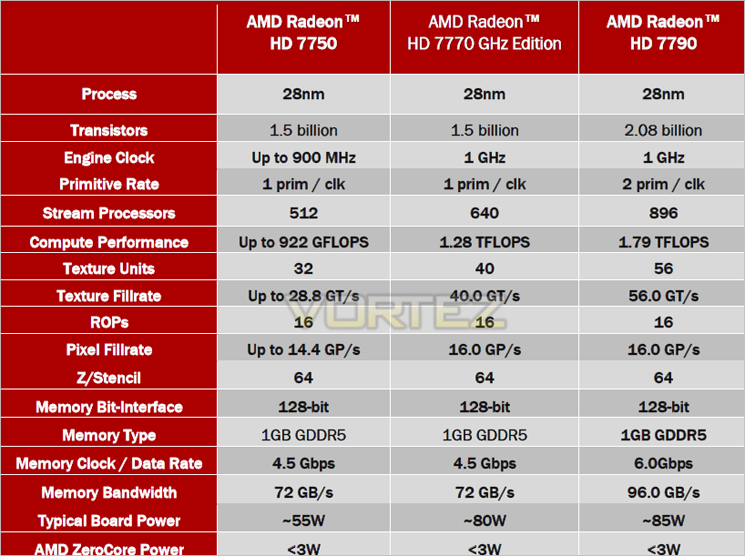
The new core compares favourably against it’s siblings by having a 25% increase in transistor count over both the HD7750 and HD7770 along with a 256 increase in stream processors over the HD7770. The result is a near 40% increase in compute performance (1.28 TFLOPS vs 1.78 TFLOPS). Memory clockspeed also sees a boost from 4.5Gbps to 6Gbps. All of this extra power will only cost you an extra 5w with the HD7790 typically consuming just 85W.
On paper at least there have been some significant improvements not least with the price which for all the enhancements this card provides, board partners retail the card at a touch under £100 mark, matching the current price of the HD7770 so expect to see some cuts to the lower end of the family.
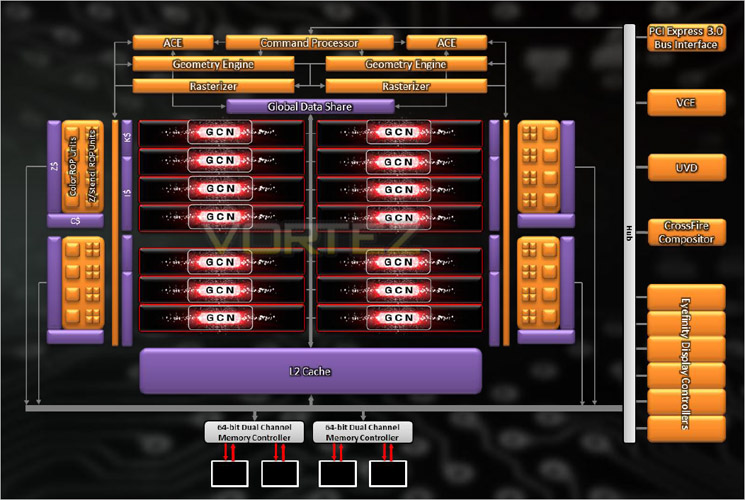
The AMD HD7790 continues to be based upon the GCN (Graphics Core Next) architecture which in this case comprises of twin geometry and tessellation engines. The 14 GCN units make up a count of 896 Stream Processors with 16 render output units.
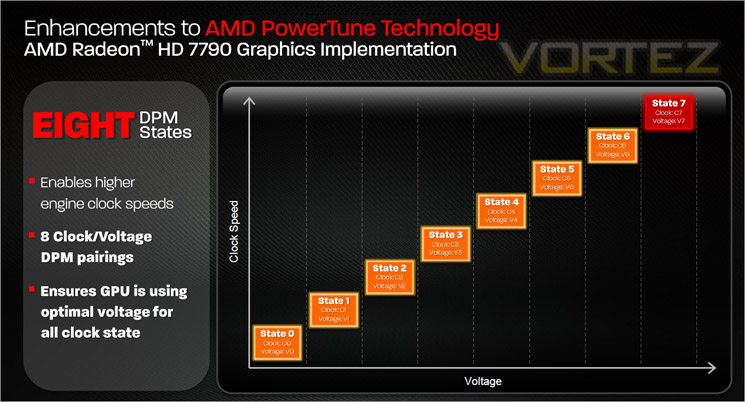
Another improvement is a 100% increase in the levels of DPM from 4 to 8. The 8 clock/voltage DPM pairings allow for higher engine clock speeds while maintaining optimum voltage levels.
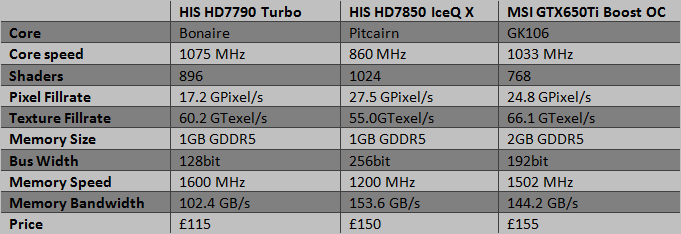
Compared to the cards it is pitched against today, the specifications are a mixed bag. On the one hand it has the fastest memory but it is let down by a slower 128bit memory interface. It does however have the fastest core speed but cannot compete with the NVIDIA card’s texture fillrate and falls further behind the pack with pixel fillrate results.
On paper the card is not that far behind the competition, how this will transpire in our own benchmarks we will see later in the review…
Features
AMD CrossFire™ Technology
The AMD Radeon™ HD 7700 GPU supports AMD CrossFire™ Technology and provides excellent multi GPU scaling. With the introduction of the AMD Radeon™ HD 6900 Series Graphics, AMD began delivering improved AMD CrossFire™ Technology scaling when using two GPUs. AMD is proud to continue to offer that amazing performance with its newest AMD Radeon™ HD 7000 series graphics products.
AMD Eyefinity Technology
AMD Eyefinity Technology provides advanced multiple monitor technology enabling an incredibly immersive graphic and computing experience with innovative display capabilities, supporting massive desktop workspaces and super-high resolution gaming environments. AMD Eyefinity technology with DisplayPort connectivity enables a single GPU to support up to six independent display outputs simultaneously, depending on the OEM implementation.
AMD Eyefinity technology works with games that support non-standard aspect ratios, which is required for panning across multiple displays. To enable more than two displays, one of two cases must be satisfied:
1) Additional panels with native DisplayPort™ connectors are used;
2) Certified DisplayPort™ adapters to convert your monitor’s native input to your cards
DisplayPort™ or Mini-DisplayPort™ connector(s) are used.
With the introduction and wide availability of DisplayPort™ to single-link DVI dongles, option 2 above is a low cost way to convert a set of already-owned monitors into an AMD Eyefinity technology ready display configuration.
Unlike a similar multi monitor gaming solution offered by NVIDIA, AMD Eyefinity technology does not require two graphics cards to work. Therefore, AMD offers a multi monitor gaming solution with potential for a lower setup cost.
Improved Tessellation
The latest iteration of architecture in the AMD Radeon™ HD 7770 GPU features a brand new Generation of Tesselator (Gen 9) in its Geometry Engine. This features optimizations such as; Increased vertex re-use, Off-chip buffering improvements and larger parameter caches. This helps Improve performance at all tessellation factors at up to 4x the throughput of AMD Radeon™ HD 6900 series graphics (Gen 8 ).
AMD HD3D Technology
AMD HD3D Technology is supported by an advanced and open ecosystem that, in conjunction with specific AMD hardware and software technologies, enables 3D display capabilities for many PC applications and experiences.
Your PC has evolved, offering unprecedented amount of games, photos and movies for you to play, watch, design, create, share and download in 3D. With the arrival of the latest in 3D technology you can now enjoy an enhanced visual experience on Stereo 3D-capable desktops and notebooks powered by AMD HD3D Technology.
HDMI 1.4a
More bandwith than standard HDMI allows full implementation of 60Hz Stereo 3D. Standard HDMI ports do not have adequate bandwidth for more than 3D 1080p at 24fps.
Ultra-high resolution (4k Panels)
– Current implementations currently use 4*DVI or 2*DP 1.1, which is expensive and unwieldy.
– AMD will move to a single-connector output for 4k via DP 1.2 HBR2 and HDMI 1.4a 3GHz mode.
AMD Quad Buffer SDK
– Native 3D support for Developers.
– functions with Dx9, 10 and 11
– Native support scheduled for Windows 8
Nearly 600 games support AMD’s implementation of 3D either natively or through middleware partners. Also support for many 3D displays already on the market including Samsung and LG’s proprietry implementation.
Quieter
The card is equipped with the widely acclaimed HIS iCooler – certified by HIS that the card is quiet with noise level below 28dB when watching movies, surfing Facebook, working. . HIS iCooler provides an outstanding cooling performance and quiet environment. With HIS iCooler, the life span of the card is maximized while the noise level is minimized! You feel the quietness when viewing photos, browsing webs and checking your email.
Long Lasting Design: Safer, Last Longer!
Enhances stability in critical gaming situations!
HIS cards are engineered with the highest standard of safety, preventing them any potential damages. Full Solid State Capacitors ensures the best power quality and enhances the card’s stability in critical gaming situations!
Built for Crossfire
CrossFireX Ready!
The card’s is armed with Crossfire Connector, ready for CrossFire & strengthened performance!
New Design, New Experiences
GCN
With AMD GCN technology, the card optimizes DirectX® 11.1 gaming performance automatically up to 2.5 times faster! It also offers up to 4.5x compute performance and up to 95% lower GPU Idle Power Consumption!
Apps Faster & Smoother!
The card enables a “quality graphics” experience on everyday applications, giving huge performance boosts on image processing, file compression, media converter apps, and a lot more!
• Adobe photoshop CS6
• Corel Winzip 16.5
• Musemage
• Handbrake
• MotionDSP Vreveal
• GIMP
• Cyberlink Power Director
• ArcSoft Media Converter
PCI-e 3.0 Support
Armed with the latest PCI-e 3.0 bus design maximizes performance by delivering double bandwidth per lane of PCI-e 2.x. Paired the card with the latest platforms and get the ultimate performance!
Game Better & Faster
Game Better & Faster
With full Microsoft DirectX® 11.1 support, the card is ready for next generation DirectX games. Equipped with AMD HD3D technology, you can enjoy a stereo 3D experience in the latest 3D games. The card also offers up to 2x faster tessellation and faster DirectCompute over earlier cards. Gamers will be pleased to enjoy the life-like graphics!
List of approved monitors for AMD HD3D Technology:
• Samsung SA700
• Samsung SA750
• Samsung TA950
• Samsung SA950
• Samsung TA 750
• LG D2342P
• LG D237IPS
Sounds Better
Output protected high bit rate 7.1 channel surround sound over HDMI with no additional cables required, heightening the sense of reality!
See Better, Enjoy Better
The card supports 30” LCD monitor and any large size TV up to 80″ feature with 16:9 ratio in amazing 4096 by 2160 resolution. Up-scaling your computer into a multimedia center with the biggest display!
Enjoy HD Beauty
With Full HD 1080p support, the card delivers high quality 1920X1080 graphics, enabling seamless full-screen video playback. See HD, hear HD and feel HD – Enjoy the beautiful graphics now with the card!
Enjoy Copy Protected Movies
The card is HDCP complaint, enabling users to play copy-protected content, such as commercial DVD movies.
Enjoy True to Life Graphics
Quad HD videos have resolution four times that of current HD videos, meaning images too clear that may deceive your eyes! With the card, you are set for getting the movie theater experience to your home. You may be able to watch a video shooting the Eiffel tower and zoom it in to see your friend’s face clearly from the top! Get your eyes impressed and enjoy mind-blowing graphics with extreme clarity, depth and texture!
View More, Work Better
Having one dedicated screen just for Twitter or Facebook and a second for outlook is not a dream anymore. You can easily connect to two displays. The dual-link DVI port allows you connect to a 30” DVI display up to 2560×1600. Resolution can even reach 4096×2160 with HDMI® , good for TV up to 80″!
The card is an ideal solution for all those who rely on having several applications visible simultaneously for extra productivity. Multi-tasking just got a lot simpler! Make your computer a multi-display workstation!
Hear Better in Video Conference
Most GPUs today support only one audio stream at a time. The card, however, has DDM Audio(Discrete Digital Multi-Point Audio) which adds supports for up to 6 simultaneous independent audio streams. Audio seamlessly follows the video, providing affordable multi-display, multi-audio conferencing for consumers!
AMD Zerocore Power
When a discrete GPU is in a static screen state it works to minimize idle power by enabling a host of active power saving functions including (but not limited to); clock gating, power gating, memory compression, and a host of other features. However, GPUs with AMD’s exclusive ZeroCore Power technology can take energy savings to entirely new heights by completely powering down the core GPU while the rest of the system remains active.
Nearly all PCs can be configured to turn off their displays after a long period of inactivity. This is known as the long idle state; where the screen is blanked but the rest of the system remains in an active and working power state (ACPI G0/S0). As soon as the system goes into long idle state and applications are not actively changing the screen contents, the GPU enters the ZeroCore power state. In the ZeroCore power state, the GPU core (including the 3D engine / compute units, multimedia and audio engines, displays, memory interfaces, etc.) is completely powered down.
However, one cannot simply remove the GPU and its associated device context completely; particularly when it is the only GPU in the system as is the case in many enthusiast platforms. The operating system and SBIOS must still be aware that a GPU is still present in the system. For this reason, the ZeroCore Power state maintains a very small bus control block to ensure that GPU context is still visible to the operating system and SBIOS. The ZeroCore power state also manages the power sequencing of the GPU to ensure that the power up/down mechanism is self-contained and independent of the rest of the system.
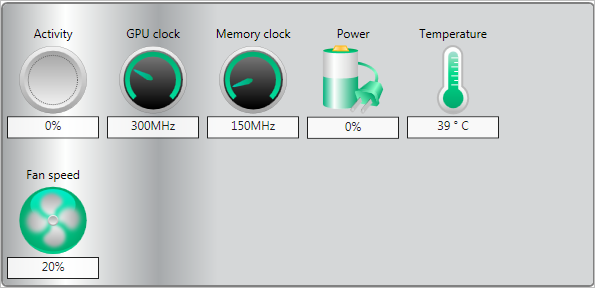
The enablement of the ZeroCore Power feature is controlled by the driver. The driver monitors the display contents and allows the GPU to enter the ZeroCore Power in the condition that the GPU enters long idle and subsequent work requests are no longer being submitted to the engine. If any applications update the screen contents, ZeroCore Power technology can periodically wake the GPU to update the framebuffer contents and put the GPU back into the ZeroCore Power state. Furthermore, applications such as Windows 7 desktop gadgets are architected to minimize activity and save power in the long idle state. These applications are active during screen-on mode to display dynamic content such as weather, RSS feeds, stock symbols, system status, etc. but also have the intelligence to suspend any updates and activity when the system enters long idle. These applications will not wake the GPU from the ZeroCore Power state in long idle.
AMD ZeroCore Power technology delivers tremendous energy savings. Many PCs remain in the long idle state for a variety of use cases that are highly relevant to everyday consumers, enthusiasts and professionals. In ZeroCore Power mode, users can still enjoy non-graphics activities such as file serving/streaming, motherboard audio and music, and remote access while the GPU core is essentially powered off.
ZeroCore Power technology also scales with AMD CrossFire™ technology. With an AMD CrossFire platform, all non-primary GPUs are in the ZeroCore Power state when not in use. For AMD CrossFire workloads, the driver will engage the non-primary GPUs to deliver full performance on-demand. The primary GPU can also enter the ZeroCore Power state during long idle as well. This delivers scalable benefits for the enthusiast. First, it effectively removes the power increase for users of AMD CrossFire under idle and light (single GPU) workloads. Second, it removes the noise penalty multiGPU users have always had to endure since the GPU fans are off in ZeroCore Power mode.
Nearly all PCs can be configured to turn off their displays after a long period of inactivity. This is known as the long idle state; where the screen is blanked but the rest of the system remains in an active and working power state (ACPI G0/S0). As soon as the system goes into long idle state and applications are not actively changing the screen contents, the GPU enters the ZeroCore power state. In the ZeroCore power state, the GPU core (including the 3D engine / compute units, multimedia and audio engines, displays, memory interfaces, etc.) is completely powered down.
However, one cannot simply remove the GPU and its associated device context completely; particularly when it is the only GPU in the system as is the case in many enthusiast platforms. The operating system and SBIOS must still be aware that a GPU is still present in the system. For this reason, the ZeroCore Power state maintains a very small bus control block to ensure that GPU context is still visible to the operating system and SBIOS. The ZeroCore power state also manages the power sequencing of the GPU to ensure that the power up/down mechanism is self-contained and independent of the rest of the system.
The enablement of the ZeroCore Power feature is controlled by the driver. The driver monitors the display contents and allows the GPU to enter the ZeroCore Power in the condition that the GPU enters long idle and subsequent work requests are no longer being submitted to the engine. If any applications update the screen contents, ZeroCore Power technology can periodically wake the GPU to update the framebuffer contents and put the GPU back into the ZeroCore Power state. Furthermore, applications such as Windows 7 desktop gadgets are architected to minimize activity and save power in the long idle state. These applications are active during screen-on mode to display dynamic content such as weather, RSS feeds, stock symbols, system status, etc. but also have the intelligence to suspend any updates and activity when the system enters long idle. These applications will not wake the GPU from the ZeroCore Power state in long idle.
AMD ZeroCore Power technology delivers tremendous energy savings. Many PCs remain in the long idle state for a variety of use cases that are highly relevant to everyday consumers, enthusiasts and professionals. In ZeroCore Power mode, users can still enjoy non-graphics activities such as file serving/streaming, motherboard audio and music, and remote access while the GPU core is essentially powered off.
ZeroCore Power technology also scales with AMD CrossFire™ technology. With an AMD CrossFire platform, all non-primary GPUs are in the ZeroCore Power state when not in use. For AMD CrossFire workloads, the driver will engage the non-primary GPUs to deliver full performance on-demand. The primary GPU can also enter the ZeroCore Power state during long idle as well. This delivers scalable benefits for the enthusiast. First, it effectively removes the power increase for users of AMD CrossFire under idle and light (single GPU) workloads. Second, it removes the noise penalty multiGPU users have always had to endure since the GPU fans are off in ZeroCore Power mode.
Packaging & Accessories
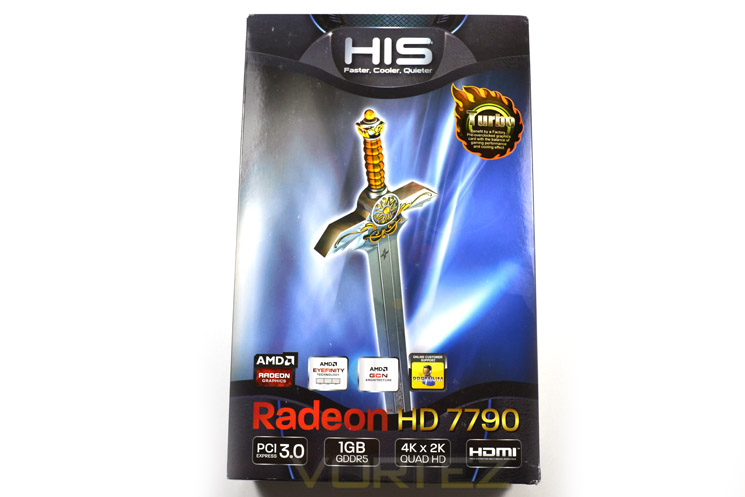
The exterior packaging is a change from the IceQ packaging we are familiar with. The double edged sword is however familiar with many HIS packaging designs carrying this logo. Below this sword we find the basic specifications of the card which briefly comprise of PCIe 3.0, 1GB GDDR5, 4k x 2k and HDMI capability.
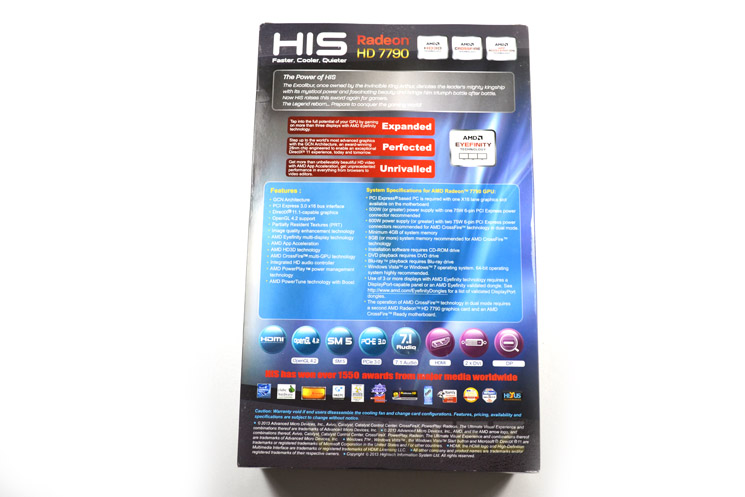
the rear of the box goes into greater details regarding the boards features and also includes a good breakdown of the graphics card’s system requirements.
 /center]
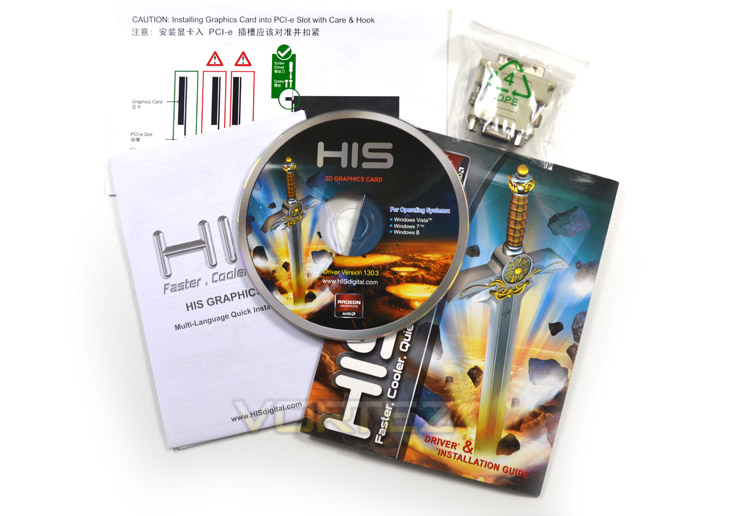
The accessories are adequate and feature an installation manual, a quick guide, driver CD and a VGA-DVI adaptor. Notable by it’s absence was a Molex-6Pin adaptor. Aside from that omission, you will have the basics needed to get the card installed and up and running.
First Look
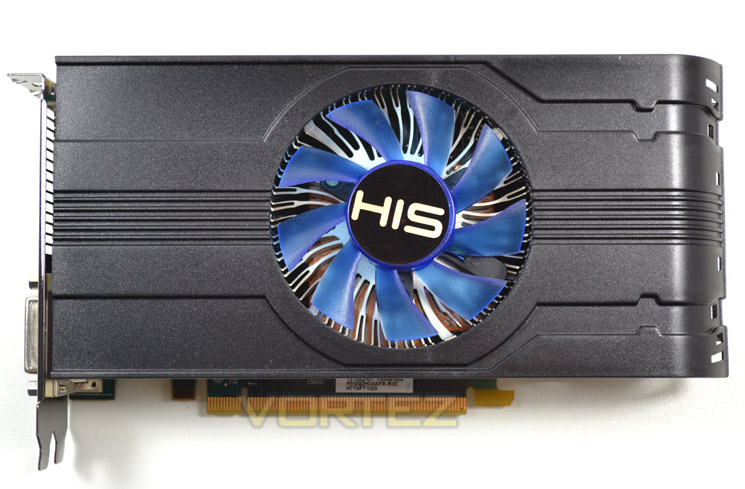
The HIS HD7790 comes in two flavours, the standard iCooler with reference clockspeeds or the iCooler Turbo which we see above. Both cards however feature the same iCooler cooling design which dominates the top side of the card.
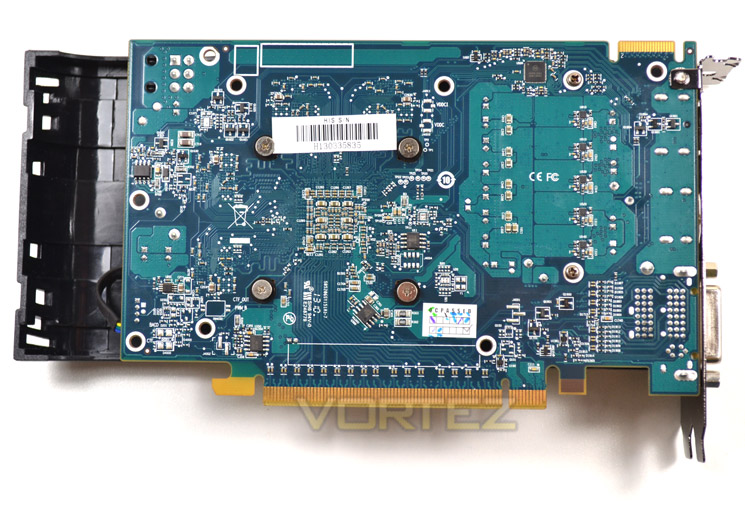
At the rear of the card we find the trademark HIS blue PCB in use. You may also notice that the heatsink shroud overhangs the PCB by quite a margin.
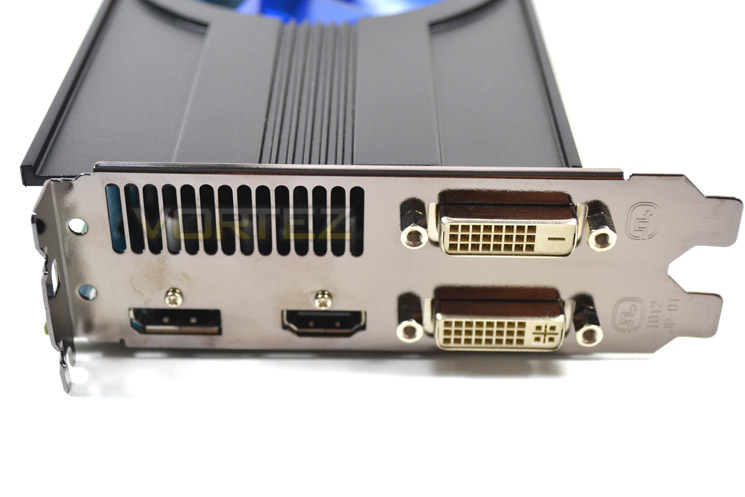
The input/output area features DVI-D and DVI-I ports along with a HDMI 1.4a and DisplayPort. As the card is an enclosed design, hot air is exhausted out of the rear vent.
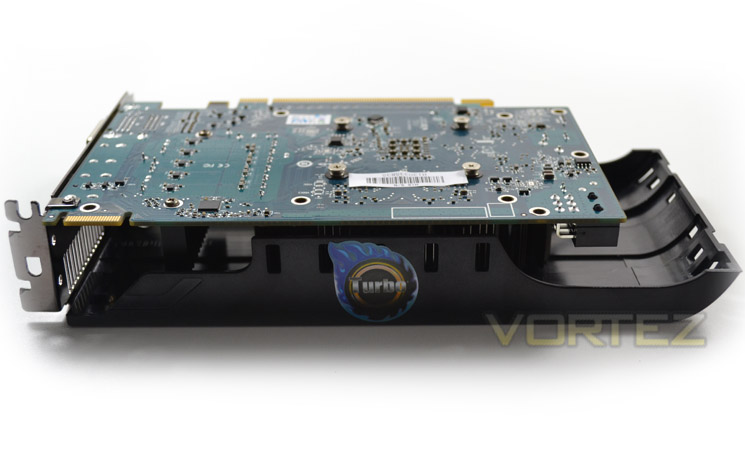 ]
]From this angle we can see just how far the shroud overhangs the PCB. I am at a loss regarding this design as it seems to add length to the card when none is necessary. We would have thought potential purchasers of a card of this nature are more likely to prefer a smaller profile rather than HIS adding length for no apparent reason other than aesthetic appeal.
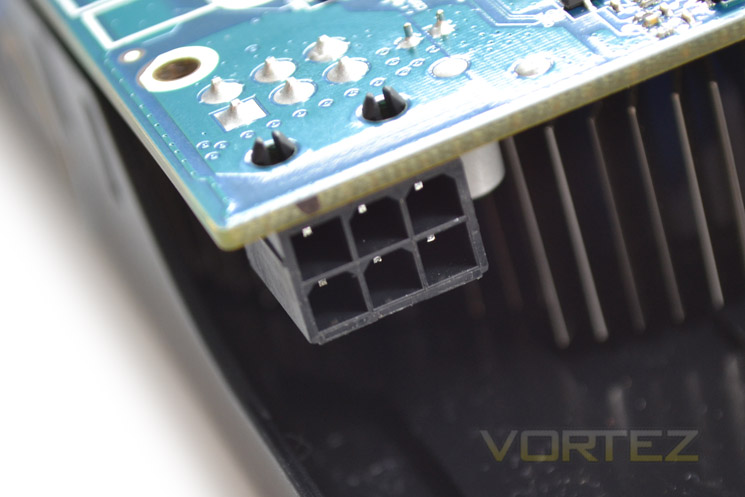
A single 6pin power port is to be found towards the end of the card which provides up to 75W of power. This however shouldn’t all be drawn from this port given that under normal gaming conditions the card will pull just around 85-90W so the majority would be provided by the PCIe slot.
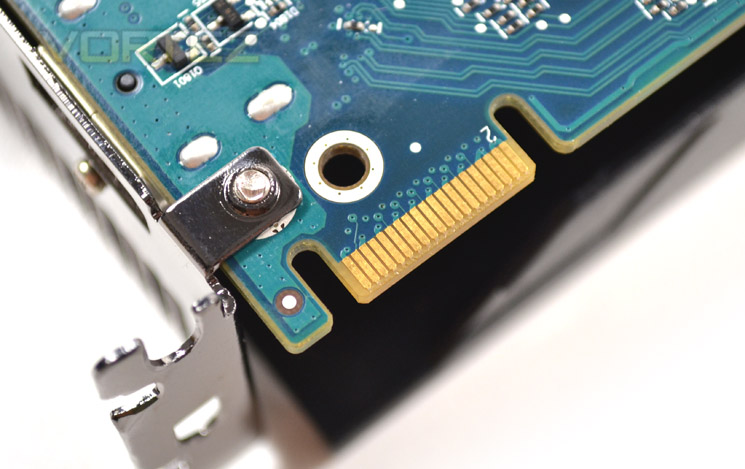
For those looking for a cheap upgrade path in the future, AMD and GIGABYTE have seen fit to add a Crossfire tab meaning this card can be linked up with another GPU from the same family to add some extra performance should you feel one card is not enough.
Let’s take a closer look at the card without the cooler…
Closer Look
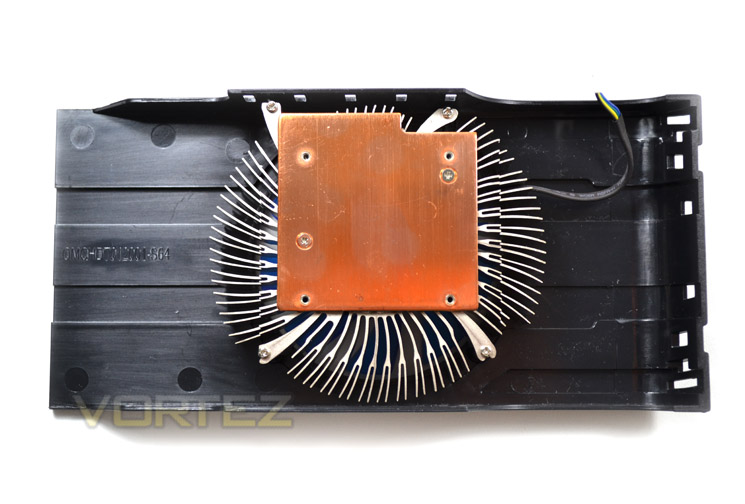
As you can see, there is simply no need for such a large shroud. One could argue that the shroud will direct hot air thanks to the curved nature of the shroud opposite the I/O end of the card. This however does not make any sense as this hot air will simply be forced onto the motherboard PCB which is exactly what you don’t want!
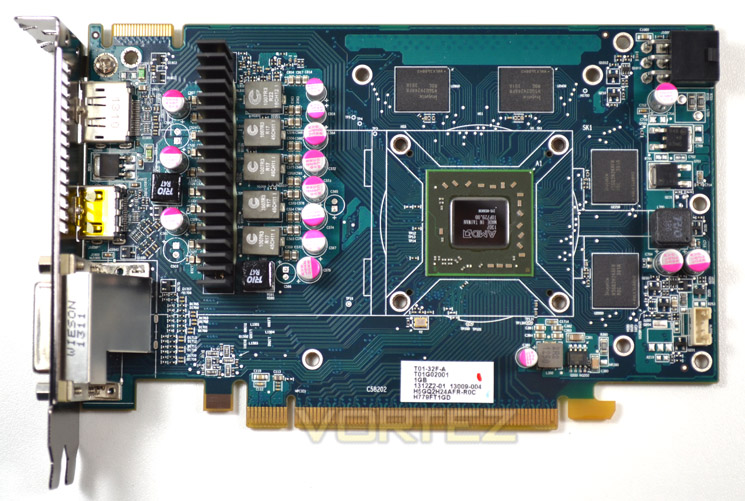
With the heatsink removed, we can see that there are 4×256 memory modules framing the Bonaire GPU. To the left is the VRM with a separate direct contact heatsink covering the MOSFETs.
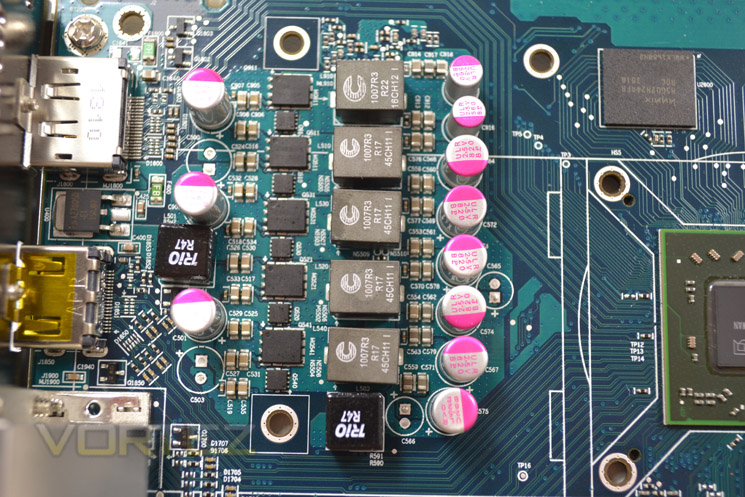
The HIS HD7790 iCooler Turbo is a 5+1 phase power design utilising solid caps throughout.
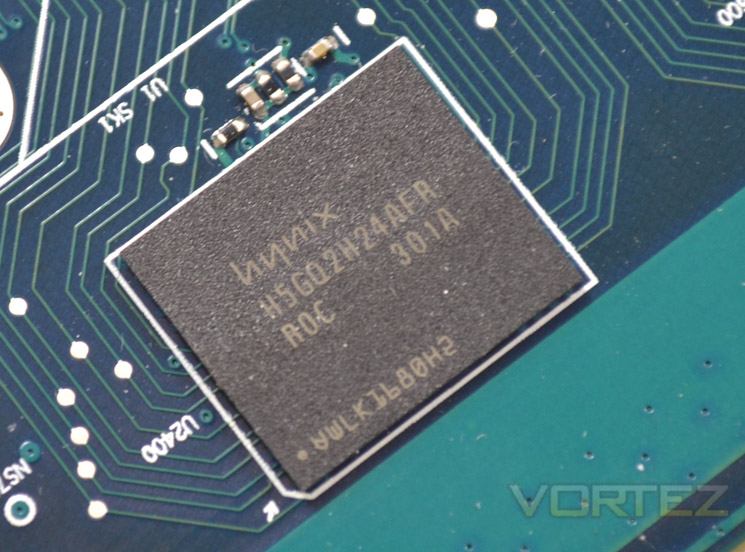
The memory chips are produced by Hynix and carry a tag line of H5GQ2H24AFR R0C which is clocked to 6400MHz (effective) from a reference 6Gbps.
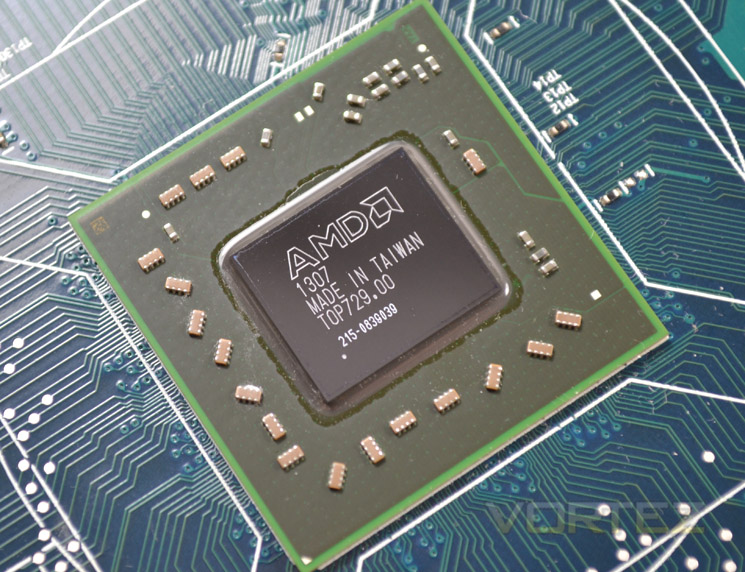
Finally we arrive at the core of the card, codenamed Bonaire. The new core is built on the 28nm process and features 2.08 billion transistors. In addition to the extra transistors, steam processors and the increase in memory clockspeed over it’s brethren, the primitive clock rate has doubled to 2 prim / CLK. With these enhancements the new specifications state that this card in particular is capable of 60.2 G Texel/s texture fillrate along with a 17.2 GPixel/s Pixel fillrate. How this translates to real world performance we are about to find out…
Test Setup
How we test graphics cards
Testing a graphics card is an extremely lengthy process. We sometimes see reviews where a graphic card has been tested using out of date equipment, out of date games and out of date drivers. While the latter can be excused due to the sheer amount of driver updates making a thorough review impossible we will however notify the reader when we have used a different driver to the normal for example a pre-release driver. For the most part however we will always use the same hardware and where possible the same drivers unless a newer driver rectifies an issue we have encountered or significantly improves performance to such an extent that continuing with an outdated driver is not feasible.
We have also seen the emergence of frame time analysis. We covered this in a separate article here: GPU Reviews: Why Frame Time Analysis is important so we won’t go into the reasoning again but to summarise, our testing comprises both FPS testing and perhaps arguably more importantly, frame time analysis. We also look at overall performance by equating averages across the games and finally before concluding our review we take a look at value for money.
HardwareWith the latest Intel chipset release we decided to update our ageing X58 setup to the new X79 chipset. Not only that but we will be using the flagship Core i7-3960X Extreme Edition processor clocked to 4.5GHz to ensure we have no CPU bottlenecks. With 16GB of ram on board there should be minimal paging so the benchmarks we run today will hopefully give a true reflection of the graphics card’s performance.
High End Graphics cards on test:
HIS HD7790 IceQ Turbo 1GB GDDR5
(AMD CAT 13.3 beta)HIS HD7850 IceQ X 1GB GDDR5
(AMD CAT 13.3 beta)MSI GeForce GTX 650Ti BOOST OC 2GB GDDR5
(Forceware 314.22)Motherboard: ASUS P9X79 Pro
CPU: Intel Core i7-3960X Extreme Edition @ 4.5GHz
RAM – 16GB (4x4GB) Corsair Vengeance (Red) DDR3 @ 1866MHz 9-10-9-27
Power Supply – Thortech Thunderbolt Plus 1200W
Hard Drive – Kingston HyperX 240GB
Cooler – Corsair H100
CPU: Intel Core i7-3960X Extreme Edition @ 4.5GHz
RAM – 16GB (4x4GB) Corsair Vengeance (Red) DDR3 @ 1866MHz 9-10-9-27
Power Supply – Thortech Thunderbolt Plus 1200W
Hard Drive – Kingston HyperX 240GB
Cooler – Corsair H100
Benchmarks
If you are a regular reader of our reviews you will know we like to test the latest hardware with the latest games and benchmarks on the market. Here are the games we have chosen:
Battlefield 3
Crysis 3
Far Cry 3
BioShock Infinite
DiRT: Showdown
The Elder Scrolls: Skyrim
Crysis 3
Far Cry 3
BioShock Infinite
DiRT: Showdown
The Elder Scrolls: Skyrim
We also take into consideration the benchmarkers out there so have included 3 of the more popular synthetic benchmarks available:
Unigine: Valley
Unigine: Heaven 4
Futuremark 3DMark Firestrike
Unigine: Heaven 4
Futuremark 3DMark Firestrike
Let’s see how today’s graphics card performed…
Temperature, Acoustics and Power Consumption
Power Consumption
To test for power consumption we use the included iPower Meter found with our Thortech PSU. As system load figures obviously differ from idle it is extremely difficult to get an accurate figure of system draw and then simply take this figure away from the overall amount because each game will generate varying levels of CPU and hard drive activity. Dynamic power adjustments which fluctuate in game will also affect accurate power figures thus rendering any such power consumption calculations redundant at worst and approximate at best.
We will therefore take our system readings averaged over a benchmark run of Tessmark (100% load) and after 20 minutes of being idle in Windows 7. These can then be used as a comparison to other graphics cards to determine how much more or less power you can expect a GPU to consume.
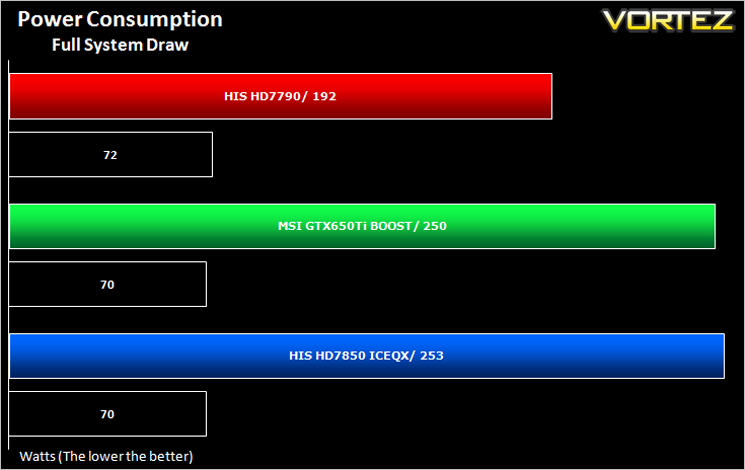
The HIS HD7790 Turbo consumed by far the least power. Under full load it pulled just 192W so I would expect the card to pull slightly less under ‘normal’ gaming scenarios as Tessmark stresses a card thus drawing more power than a game ever would.
Temperature
To test temperatures we measured idle temperatures after booting windows, letting all applications finish loading and ran a few benchmarks. Once the benchmarks were complete we left the card to reach a cooling plateau where we then took the idle temperatures. For the load tests, we would normally run Furmark for 20 minutes, taking the absolute maximum temperature attained however we found that this throttled the card and resulted in spurious results. So we set Heaven running continuously for 20 minutes and used this as a temperature result as the card did not throttle with this application.
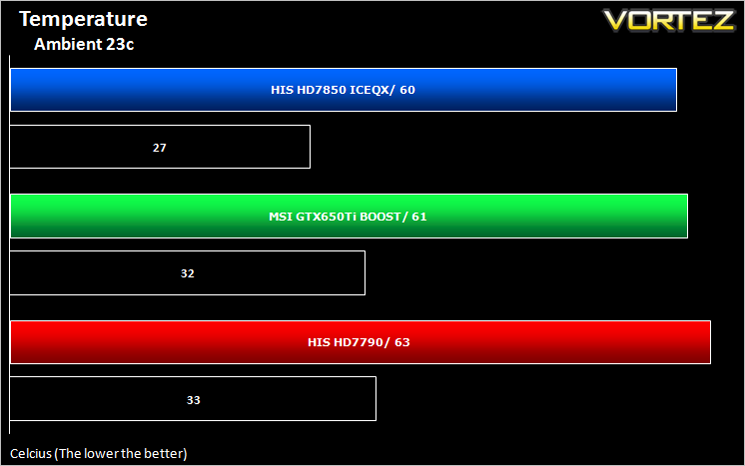
Surprisingly, the HIS HD7790 was the hottest card on test. In fairness 63c is hardly anything to worry about and will neither hold back overclocking nor cause any damage to the card. When you consider that high end cards draw 80c+, 63c is very cool by comparison.
Acoustics
The card was neither loud nor quiet. In idle conditions it was barely noticeable and only became ever so slightly ‘whiny’ after an hour looping Unigine’s Heaven 4.0 during our overclocking stability tests.
Futuremark 3DMark Fire Strike (Synthetic)
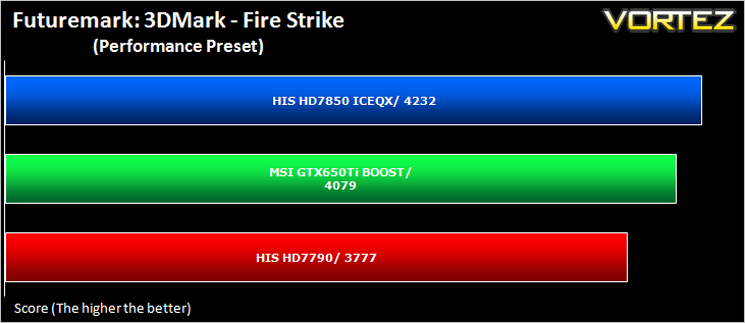
Fire Strike is the new showcase DirectX 11 benchmark designed for high-performance gaming PCs. It is Futuremark’s most ambitious and technical benchmark ever, featuring real-time graphics rendered with detail and complexity far beyond what is found in other benchmarks and games today.
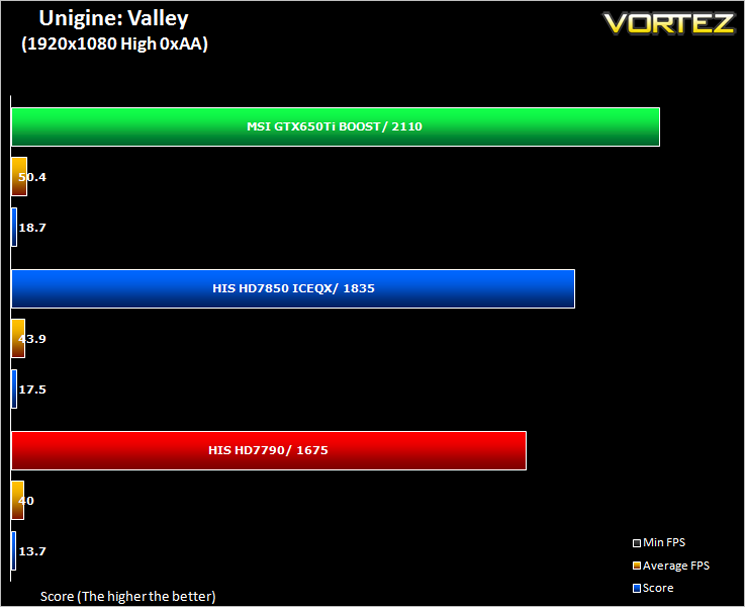
Unigine: Valley
Valley Benchmark is a new GPU stress-testing tool from the developers of the very popular and highly acclaimed Heaven Benchmark. The forest-covered valley surrounded by vast mountains amazes with its scale from a bird’s-eye view and is extremely detailed down to every leaf and flower petal. This non-synthetic benchmark powered by the state-of-the art UNIGINE Engine showcases a comprehensive set of cutting-edge graphics technologies with a dynamic environment and fully interactive modes available to the end user.
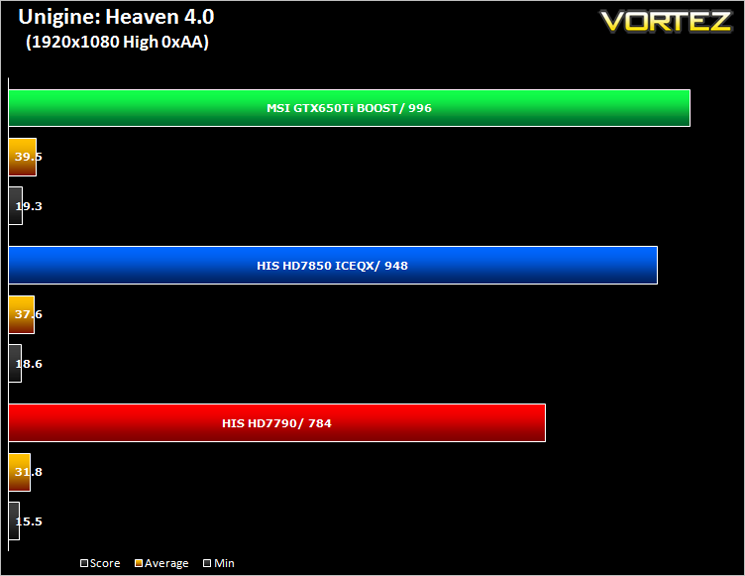
Unigine: Heaven 4 (Synthetic)
Heaven Benchmark with its current version 4.0 is a GPU-intensive benchmark that hammers graphics cards to the limits. This powerful tool can be effectively used to determine the stability of a GPU under extremely stressful conditions, as well as check the cooling system’s potential under maximum heat output. It provides completely unbiased results and generates true in-game rendering workloads across all platforms.
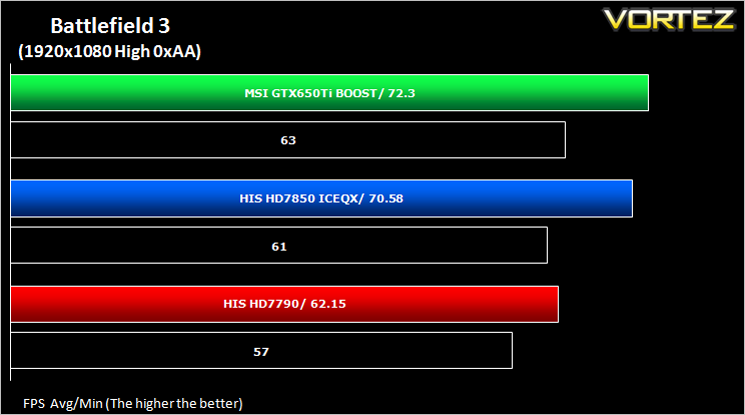
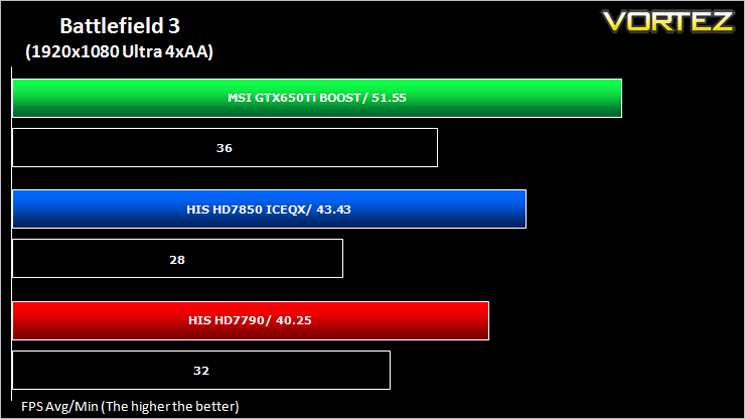
Battlefield 3 (FPS)
Battlefield 3 leaps ahead of its time with the power of Frostbite™ 2, the next instalment of DICE’s cutting-edge game engine. This state-of-the-art technology is the foundation on which Battlefield 3 is built, delivering enhanced visual quality, a grand sense of scale, massive destruction, dynamic audio and incredibly lifelike character animations. As bullets whiz by, walls crumble, and explosions throw you to the ground, the battlefield feels more alive and interactive than ever before. In Battlefield 3, players step into the role of the elite U.S. Marines where they will experience heart-pounding missions across diverse locations including Paris, Tehran and New York.
Average and minimum frames per second were measured using Fraps during the parking lot scene on Operation Sword Breaker. High and Ultra presets were loaded at both resolutions.
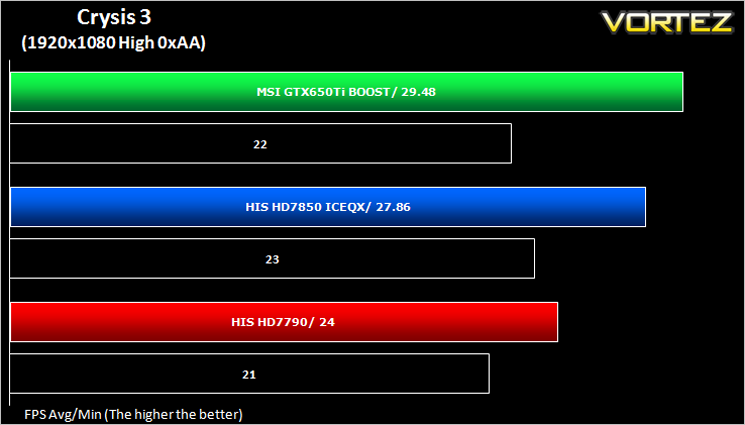
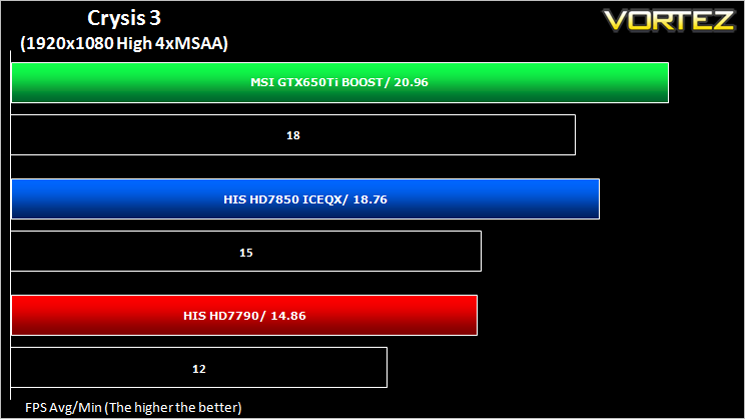
Crysis 3 (FPS)
Crysis 3 from Electronic Arts is the fourth instalment of the Crysis franchise and sequel to Crysis 2. It uses the CryEngine 3 gaming engine which is perhaps the most advanced gaming engine to date and therefore the most demanding. The meme ‘Can it run Crysis’ has never been so apparent…
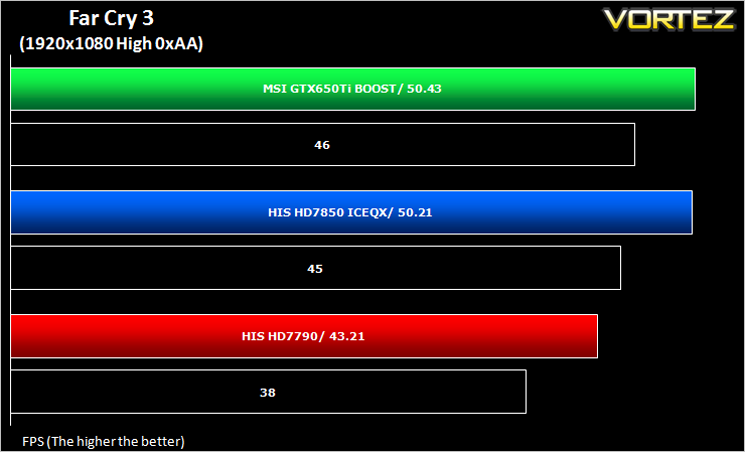
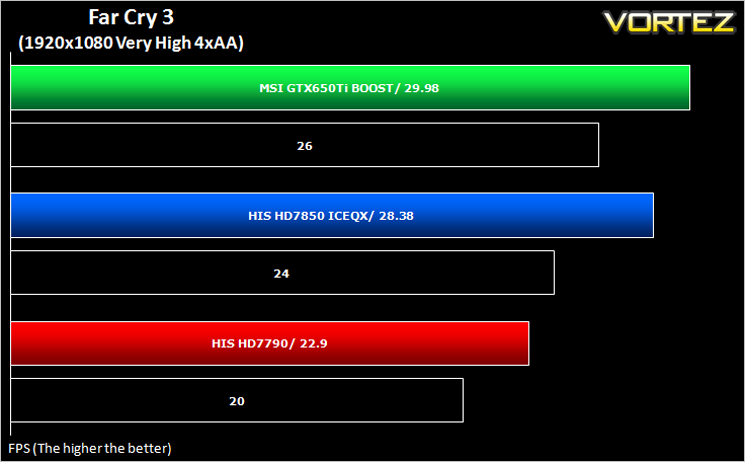
Far Cry 3 (FPS)
Far Cry 3 is a tropical survival shooter video game from Ubisoft Montreal and Massive studios. It’s open world design has similar traits to it’s forbear Far Cry 2 but it does it all so much better. With stunning visuals and settings to bring a PC to it’s knee’s, this game is so much more than the ‘just another console port’ it was reported to be.
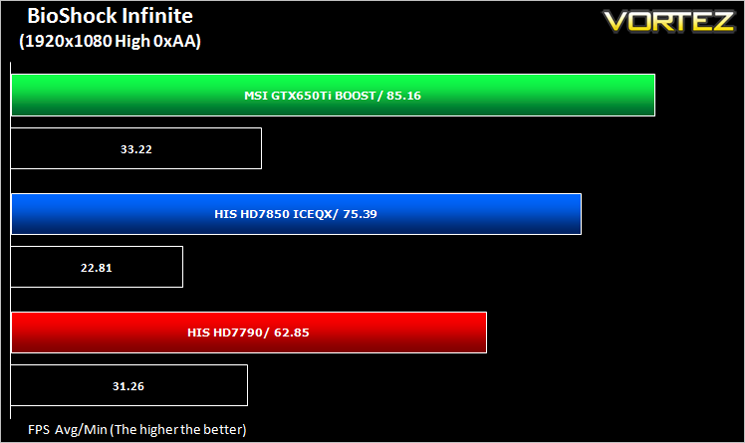
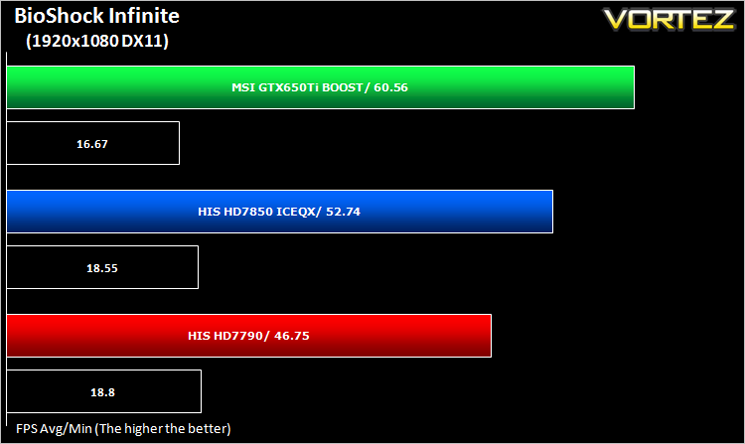
BioShock Infinite (FPS)
Set in 1912 during the growth of American exceptionalism, BioShock Infinite is a thrid person shooter developed by Irrational games and published by 2K Games. It is the third instalment of the BioShock franchise. the game utilises the Unreal Engine 3, modifying it with their own lighting engine to present a visually stunning experience like no other.
DiRT: Showdown (FPS)
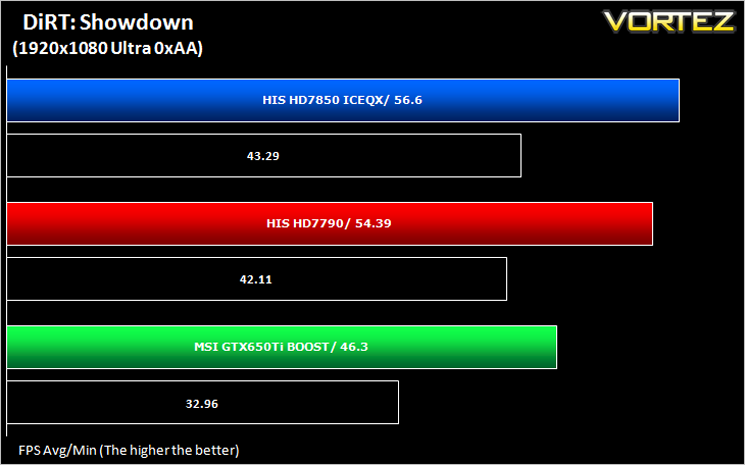
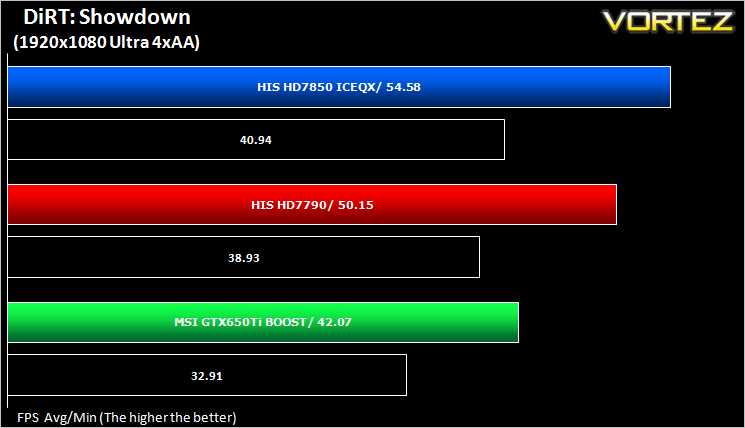
DiRT Showdown is the new arcade racing game from the team that brought you the award-winning DiRT series, uncaged in 2012. Pick up and play controls combine with electrifying events, frenzied crowds and stunning graphics to deliver high octane, dive in and drive thrills from event one.
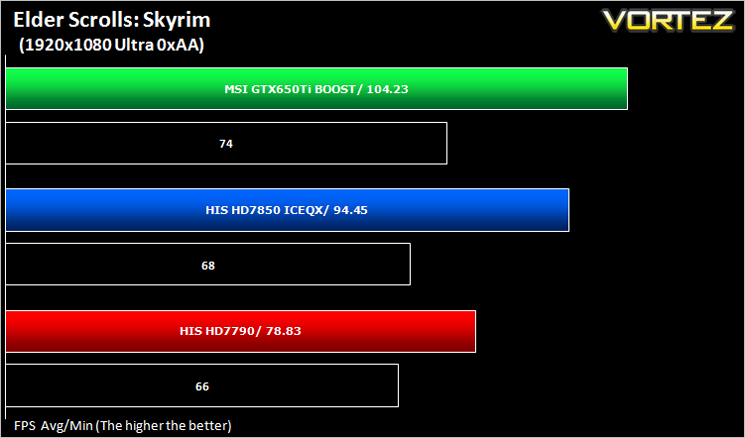
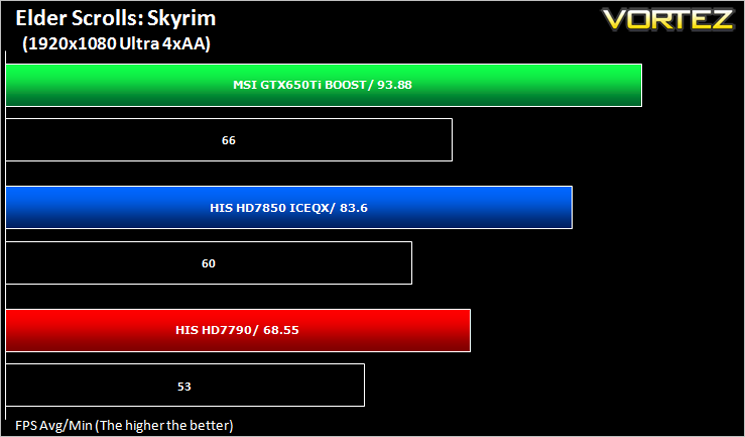
The Elder Scrolls: Skyrim (FPS)
Skyrim is not a direct successor to the very popular Oblivion. Instead it takes place 200 years after the events of Oblivion. The non-linear playing that made the Elder Scrolls such a popular series does however make a return along with the beautiful scenery the encompasses the world of Skyrim.
Average and minimum frames per second were measured using Fraps during the drop down passage to Riverwood. V-sync was disabled to allow fluctuating (higher the 60) FPS for these runs. It is however recommended that v-sync is left enabled during normal gameplay due to the games dynamics.
Value For Money
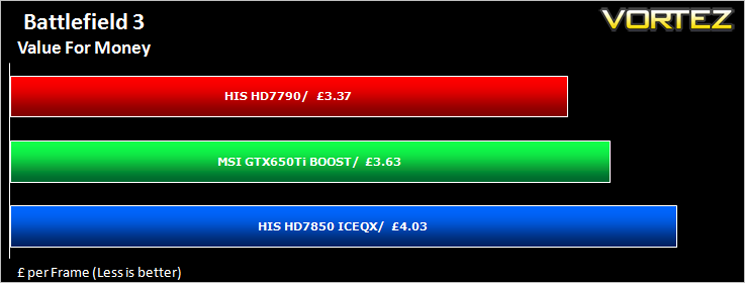
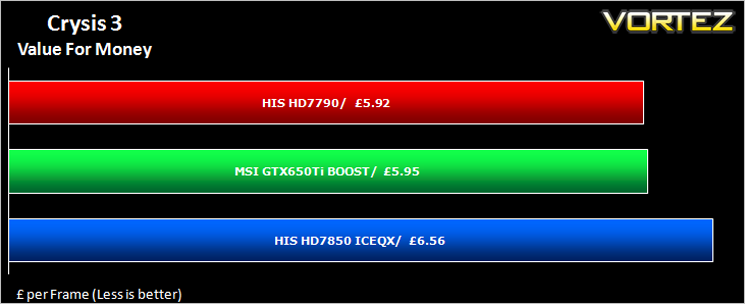
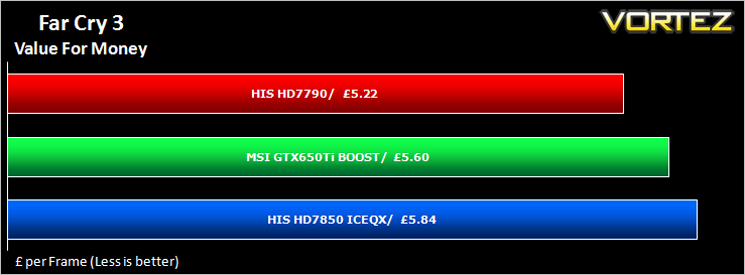
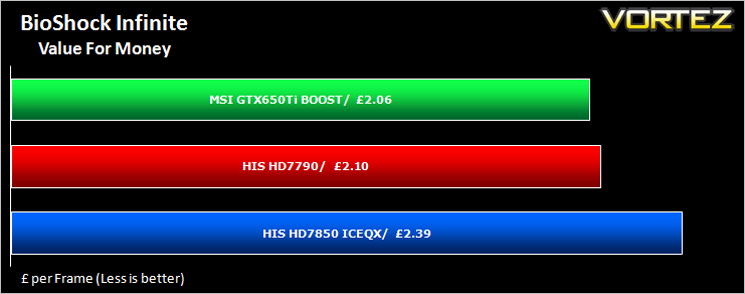
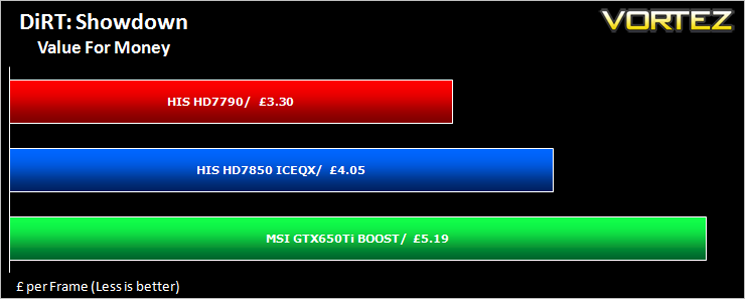
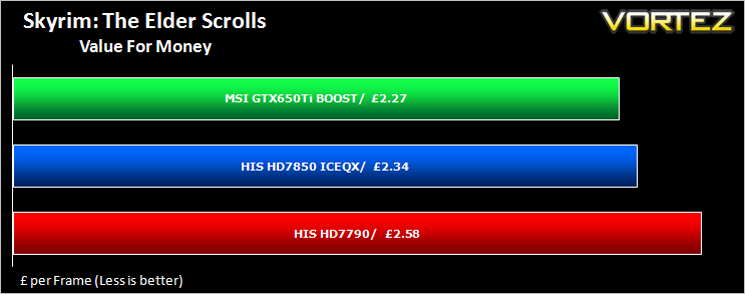
For those on a budget, this is perhaps the most important section of a graphics card review. For everyone else it will certainly make you think twice before calling the bank manager for an overdraft request. We calculate Value for money by taking the cost of the product and then dividing that figure by the overall performance figure which gives us a result in the guise of £ per frame – in effect how much every frame per second will cost you.
Gaming Experience (Frame Time Analysis)
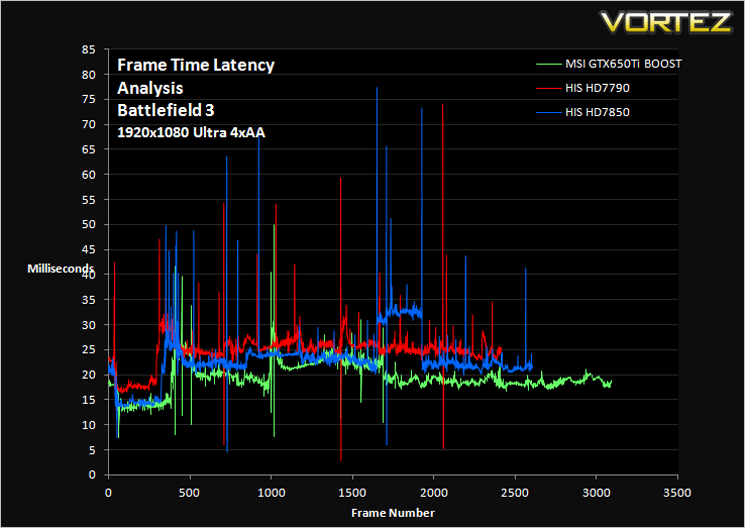
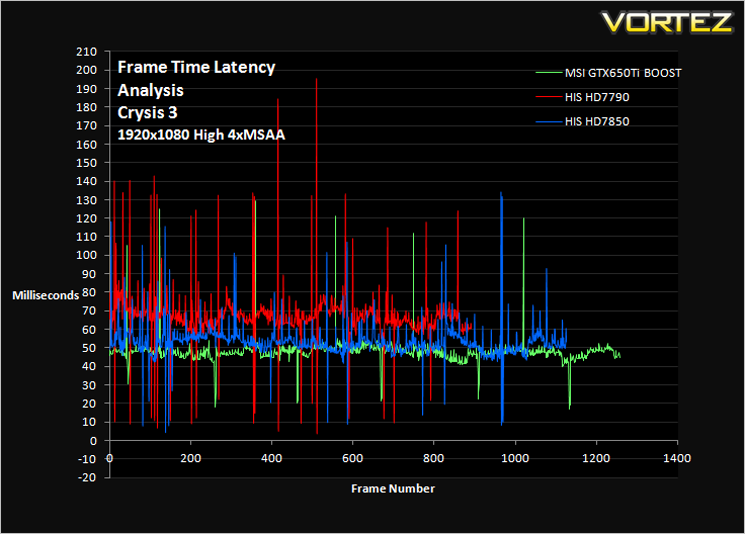
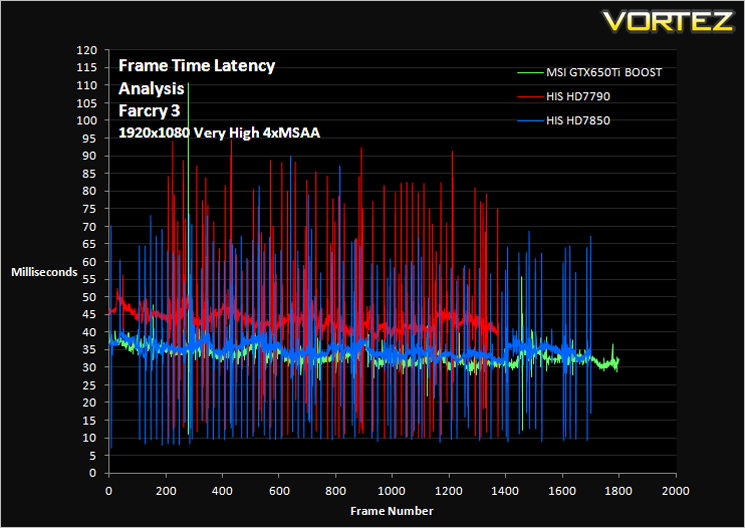
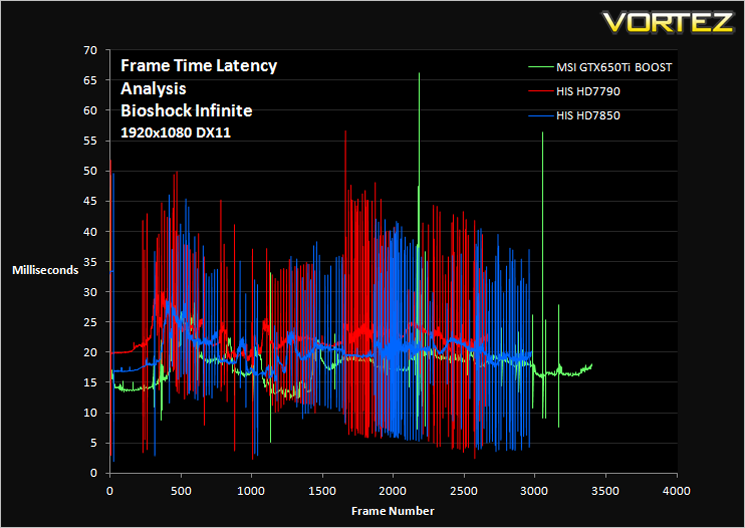
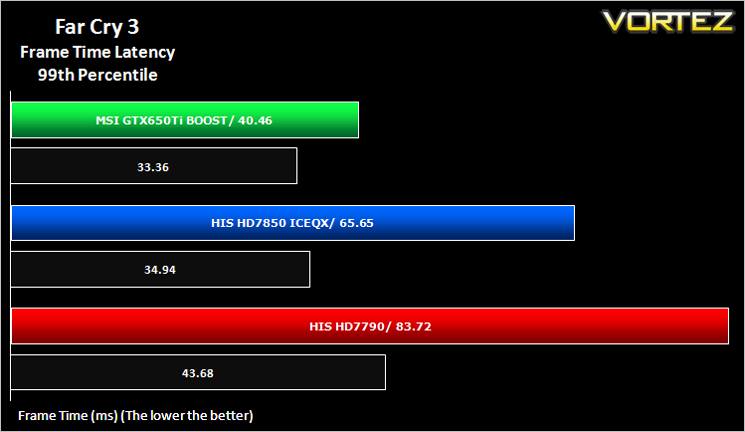
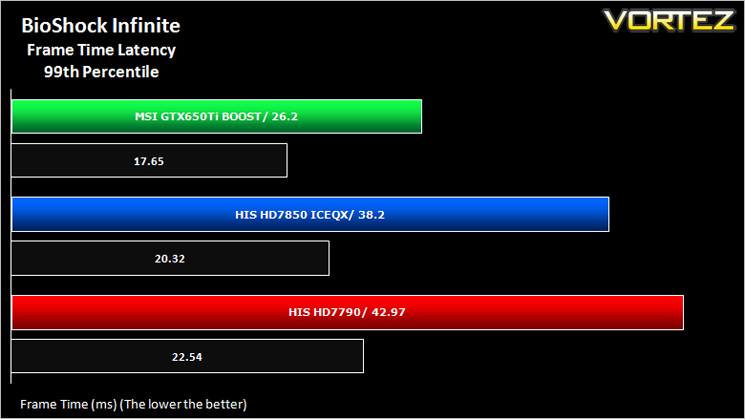
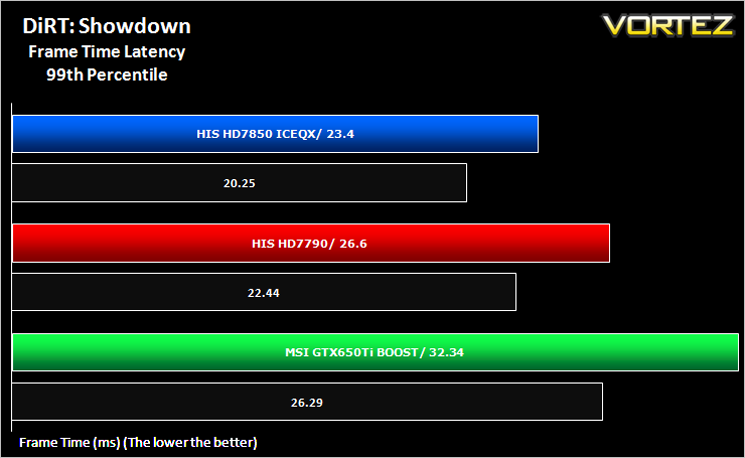
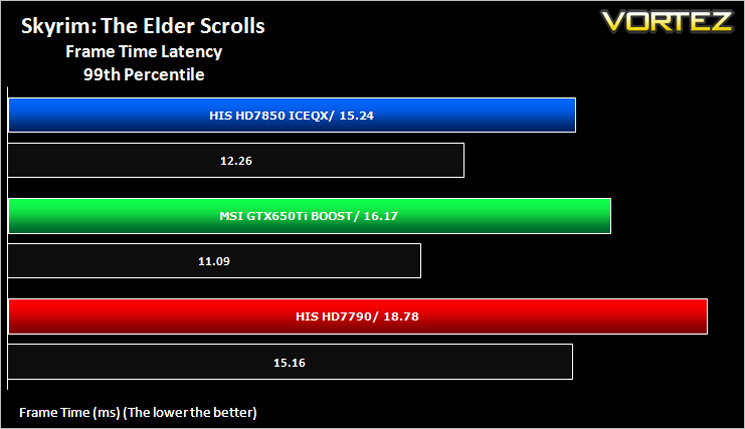
Gaming experience is what we like to refer to as the Laymans term for Frame Time analysis. Frame time analysis is in its most basic sense how smooth your gameplay will be. Ever had a powerful card rendering at 100FPS with ease for it to stall for a split second before resuming? This is what Frame Time Analysis shows us: The peaks during an otherwise smooth gaming experience. This is presented to you in two ways, by showing you a line graph of a 60 second FTA capture using FRAPS and then by deducing the average and 99th percentile response times.
Some claim this should be the way graphics cards are tested and we won’t argue here because there is little point in having a card which churns out an average 100FPS if it has micro stutters lasting 50ms (GPU response time) which spoils the fluidity of the game.
Some claim this should be the way graphics cards are tested and we won’t argue here because there is little point in having a card which churns out an average 100FPS if it has micro stutters lasting 50ms (GPU response time) which spoils the fluidity of the game.
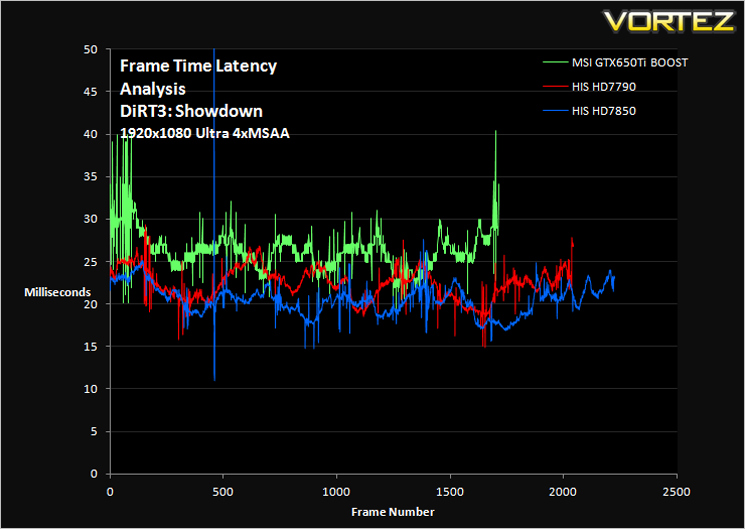
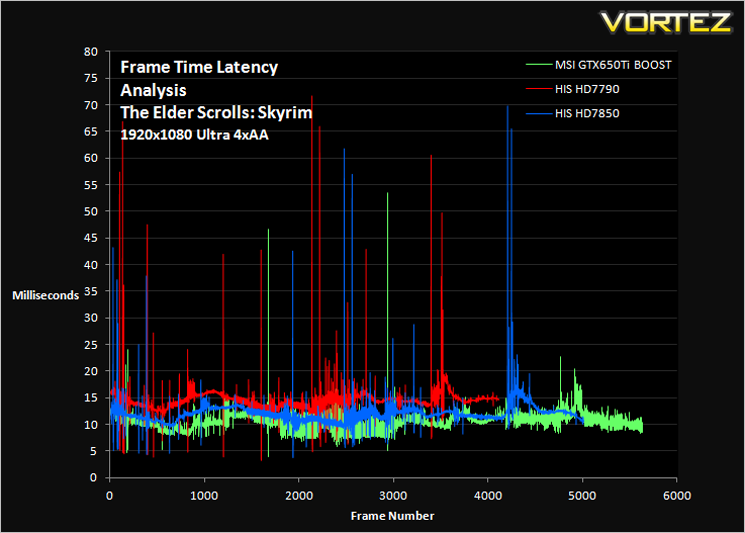
Comment
The graphs above may appear very daunting however, what you want to see is a smooth line (not fuzzy) with very few peaks and troughs. While you are unlikely to notice peaks and troughs below 30ms, any peak above 30ms may be seen as a stutter during gameplay. This will however depend greatly on your own perceptions.
Average and 99th Percentile response times (Frame Time Analysis)
Here we take a look at both average (black) and 99th Percentile (coloured) response times of the graphics cards. It is highly unlikely a user will notice any micro stutter (also incorrectly referred to as lag but the effect can be interpreted to be similar) at anything below 30ms but every gamers perception differs.
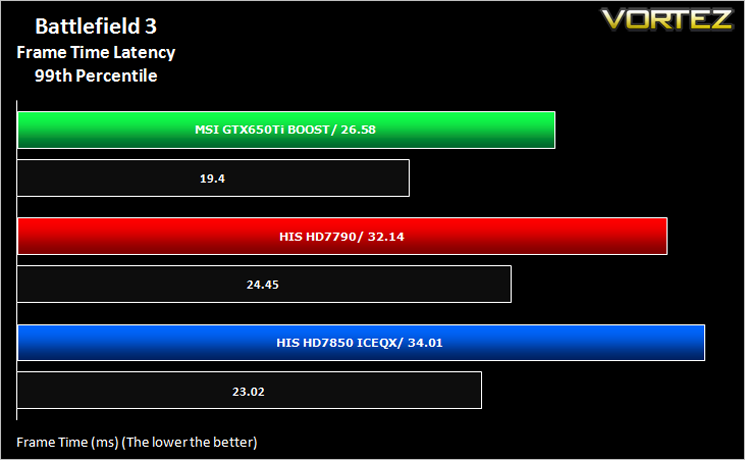
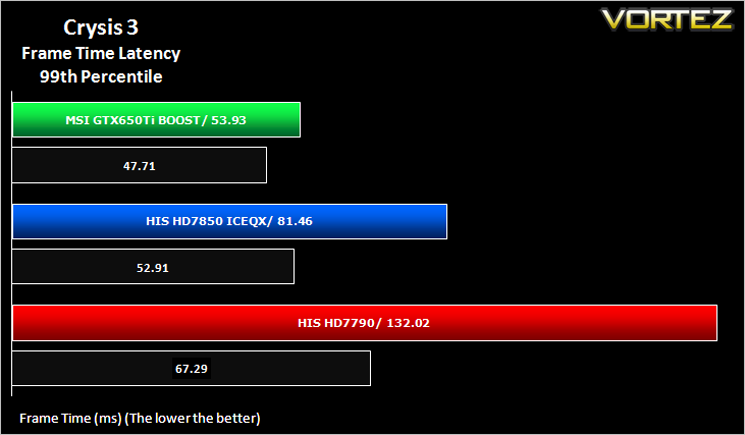
Overclocking
For overclocking our AMD cards we will be using MSI Afterburner as this gives us all of the options we require.
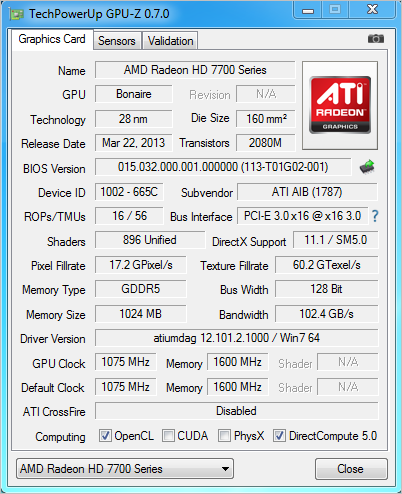
Above is a screenshot of GPU-Z showing the reference speeds.
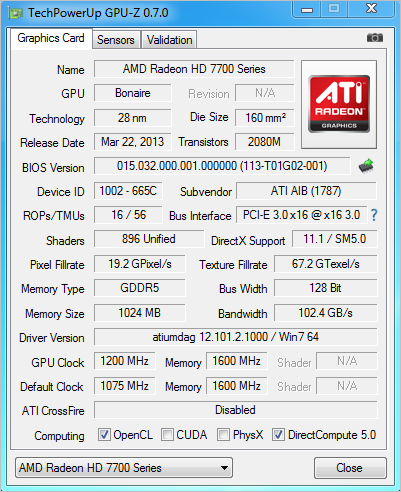
The core overclocked fairly well with us managed a respectable 125Mhz increase by maxing out the sliders. Sadly, due to this restriction we could not unleash the true overclocking potential of the card as we are sure there is much more left in the core.
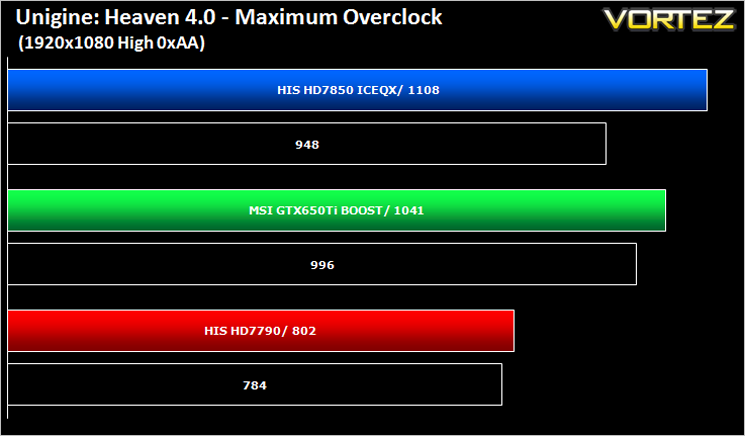
Above we see how our overclocking efforts affect the Heaven 4.0 score.
Just a further 18 points for a 125Mhz overclock is disappointing to say the least. That said at this level of the market, the gains are not going to be massive so in fairness, any increase over the factory overclock is welcomed.
Conclusion
We never expected the HIS HD7790 iCooler Turbo to surpass the HD7850 in terms of performance but it should in theory close the gap to the HD7850. Sadly, it falls short of this and by some margin. While it can play some games at 1920×1080 adequately, games such as Crysis 3 bring the card to a stuttering halt, especially with extra filters added. In fairness none of the cards produced smooth game play with 4xAA added but it was especially noticeable with the HIS HD7790 Turbo despite it’s factory overclock.
As an entry level card it is priced fairly well, costing some £40 less than the HD7850 however, the 2GB of Vram available on the HD7850 and GTX650Ti BOOST make those cards a more attractive proposition, if somewhat more expensive. Because of this the card should result in better value for money however, in certain games where the HD7790 struggles most, the more expensive GPU’s prove to be the better buy which is unforgivable for a budget gaming GPU.
On the flipside it successfully plugs the gap between the HD7770 and HD7850 and the factory overclock may prove more appealing, especially to those not versed in the dark art. The card overclocks further than the factory settings but the resulting overclocks do not have much bearing on real world performance. Things get no better when we consider temperatures where the other cards both ran cooler. For a card costing over £100 we would expect better in terms of performance yet because of this performance and price ratio, it also does not offer great value for money either. This leaves us in the quandary of whether to recommend the card or not.
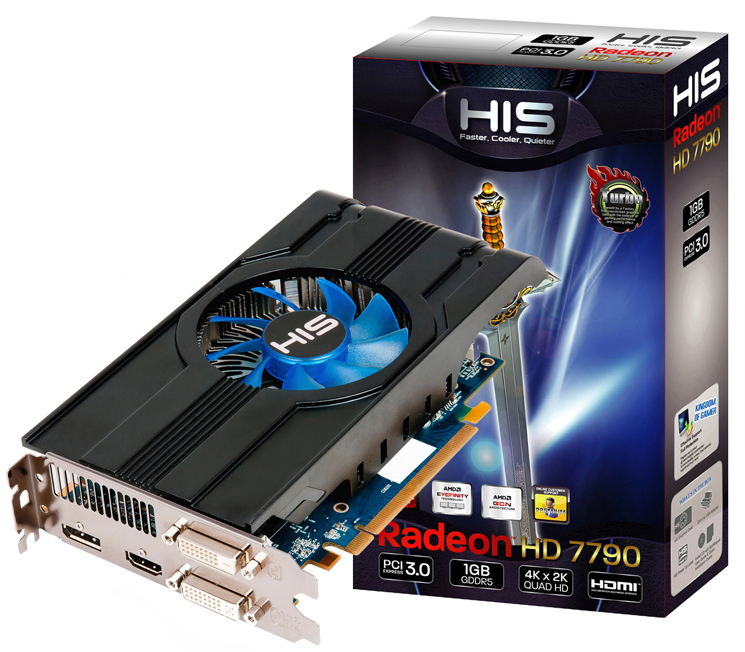
By today’s results we would resist in recommending this card to anyone but the most miserly of gamers. Our advise would be to save that little bit extra and opt for the HIS HD7850 or if you prefer the green team, the NVIDIA GTX650Ti BOOST. If you have your heart set on the HD7790 and we cannot dissuade you then the HIS HD7790 Turbo is a valid option if you do not know how to overclock a GPU as it is one of the fastest factory overclocked versions available. If you do know how to overclock however, and let’s face it, it is not difficult then we would suggest you buy the cheapest model you can and overclock it yourself because every HD7790 will overclock the same thanks to the restrictive limits in place by AMD.
To summarise:
The HIS HD7790 Turbo boasts value, entry level gaming yet accomplishes neither in any great measure. Overall, a mediocre card that is a victim of stiff competition and recent AMD price drops.
Pros
+ Good Overclocking
+ Low-noise
Cons
– Only 1GB GDDR5
– Barely playable frame rates at 1920×1080 in today’s demanding games
+ Good Overclocking
+ Low-noise
Cons
– Only 1GB GDDR5
– Barely playable frame rates at 1920×1080 in today’s demanding games

Click here for an explanation of our awards at Vortez.net.


