







FPS has been the chosen method for assessing a graphics card’s performance for years. There’s now a new method which may see the demise of FPS measurement.
Analysing a graphics card’s performance has been debated for years. In fan boy threads across the world wide web, debates have continually thrown up the question – which is best?
How do you measure what is ‘best’? Image quality? Driver support? Price? The one area which is generally agreed that can separate two graphics cards is Frames Per Second. This method has been used for years and for the most part is/was the accepted method to measure graphics card performance. Indeed, we use this method ourselves currently. There is however a change afoot whereby FPS is no longer the sole method for measuring how good a GPU is.
The problem with FPS
While frames per second measurement may well be very good at measuring how fast a GPU is, it can as we shall see, give a false representation of gaming experience. Measuring FPS is done by counting the number of frames rendered within a second. Obviously, we are not quick enough to do this ourselves so we commonly will use some form of benchmarking tool, FRAPS for example. This tool will then be used over a length of time for example 60 seconds. Each second’s total frame count is then averaged over the 60 second period to give us our average FPS measurement. What the frames per second method of measurement will not show us though is what is commonly referred to as ‘micro stutter’.
Micro Stutter
I think it is safe to assume most gamers will have encountered micro stutter at one time or another, especially those who use a multi-GPU setup. Micro stutter is a term used to describe a situation when smooth gameplay, with regular FPS rendering being suddenly interrupted in a large drop in FPS then immediately returned to normal, then back down and back up again. This ‘stuttering’ can happen over milliseconds and is more often ‘felt’ by the gamer rather than directly witnessed due to the minute time scales involved. This micro stuttering will ruin gaming experience.
Imagine the latest graphics card produces an ‘average’ 100 FPS in your favourite game. You would be thrilled at this new card and after reading the latest reviews you rush out to buy it. Upon playing this game with your new hardware though you are left a little disgruntled. Upon your own testing you confirm that it does indeed grant 100FPS however the gameplay feels ‘choppy’ compared to your previous card which only churned out 60 FPS. Why is this? Simply put, you may well be encountering micro stuttering.
It is all very well having a GPU that churns out a high average FPS but if that average FPS figure is masking occasional huge drops in FPS then the gaming experience is likely to be less satisfying than a GPU which is capable of rendering frames in a more consistent manner, albeit slower on average. By that I mean having a lower ‘overall’ FPS average reading.
To put things at the extreme end, say you have a GPU capable of churning out 100FPS. For 59 seconds of a 60 second benchmark, a very low frame time is recorded of 10ms. This means for 59 seconds, your game experience will be like a knife the butter. However for one frame the GPU stalls and creates a massive hike in frametime to 999 milliseconds. In an FPS measurement, this would hardly make a difference in the average FPS measurement as it would be masked by the excellent FPS count however, with frame time measurement it would be immediately noticeable.
Micro stuttering should not be confused with inevitable troughs and peaks in gaming performance by FPS rendering ability. Some scenes, especially in graphical intensive games such as Crysis 3 are more demanding and therefore a drop in FPS will occur. If that drop is significant enough it will be witnessed on screen and can sometimes ‘feel’ like micro stuttering whereby frame rates are so low that the game ‘feels’ choppy. This is simply a performance issue and can be resolved by lowering the graphics settings.
Micro stuttering is not a new phenomenon. Like FPS measurement, it is a subject that has been debated for years and is a certainly a common problem with multi – GPU setups such as Crossfire (AMD) and SLI (NVIDIA). Multi GPU setups suffer terribly from micro stuttering simply because of the way graphics are rendered which amplifies an already inherent problem. That isn’t to say the problem is also encountered with single GPU solutions for as we will see, regardless of how many graphics cards you have in your PC system, micro stuttering is a problem for everyone to consider.
Frame time analysis is not a new concept either, although few review sites have employed this as a method of measuring GPU performance up until recently. The fantastic work by Scott Wasson at The Tech Report, of whom much of the credit has to be given has however showed us that Frame Time Analysis is just as important as outright FPS performance, if not more so and thus deserves credit for bringing this phenomena back to the forefront of assessing a GPU’s performance.
Measuring 'Gaming Experience'
As we have discussed, the micro stutter problem can affect gaming performance. This isn’t true of all circumstances though because we all have varying levels of perception.
Our perception of frames per second varies from one person to the next. On a personal level, I would struggle to visually notice a difference at anything above 50 FPS. You may have a visual threshold of higher than this or indeed lower. Each of our perceptions are purely personal and cannot be attributed to a ‘one size fits all’ measurement. Ask on any enthusiast forum and people will claim they can tell which card is faster simply by playing the game it is being tested on, even if the rendering speed is so huge the human eye cannot keep up with the frames being produced. So having a GPU that is capable of rendering frames at twice this perceived speed may seem like overkill however this is not the case. The more frames that are rendered consistently the more fluid the game will feel. The key word being consistently. So having a high frame rate still holds it’s worth and we are not for one minute saying you should simply enable vsync and be done with it, not only because vsync has its own problems (an article for another day) but because as we will see, vsync is not the solution.
So how do we measure micro stutter? There are numerous ways to measure this, the first is by the ‘feel’ of the game. Clearly though this cannot be conveyed to you, the reader of a review. What we need is some sort of graphical representation.
This leaves us with two methods. Perhaps the most accurate method would be to have a dedicated video capture card in a totally separate unit with multiple, high capacity SSD’s to capture the gaming sequence with minimal interruption either by software or hardware with which to capture and analyse each frame produced. This software can then be analysed and used to present the information via a set of graphs. Or we could use FRAPS in combination with FRAFS, a simple software tool to take the frametimes recorded by FRAPS and transfer it into a simple line graph.
For the purposes of simplicity we will be using the FRAPS method. We readily concede that this method is not the definitive method with which to analyse frame times, the capture card method being preferred. It is however a method which anybody can use to replicate our results with no dedicated hardware required. With FRAPS, the frametimes are recorded at the software level rather than the hardware level so while there may be some issues amplified by the hardware level or some issues that may not be picked up by FRAPS, we believe FRAPS is accurate enough to analyse if there are any major issues, certainly ones which will be noticed by the end user of the GPU which is what should concern you, the potential buyer the most.
Frame Time Analysis
Using FRAPS to measure frame times is easy enough. Simply set FRAPS to measure ‘Frametimes’ (tick box) and drag and drop the resulting excel file into FRAFS Benchmark Viewer. In Blue Peter fashion; here are some we made earlier:
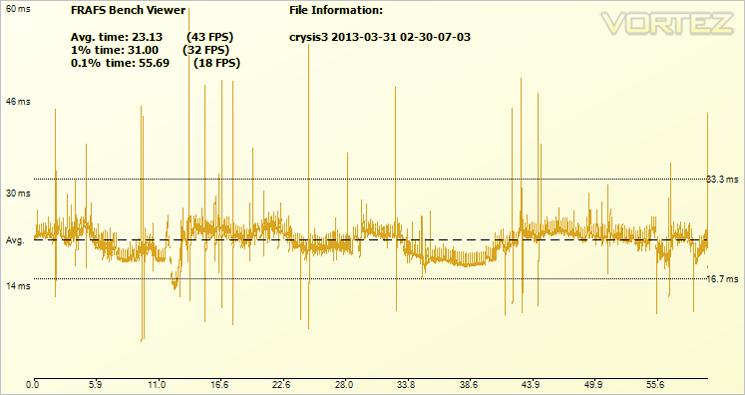
The above graph was taken during a short stint playing Crysis 3 at 1920×1080 with 4xMSAA on ‘high’ settings. In an ideal world what we want to see is a nice slim ‘fuzzy’ line stretching from one end on the chart to the other. What we do not want to see are ‘spikes’. This spikes are delays in frame time rendering and are where stuttering will occur if they go above a given threshold. This brings us back to what you can and cannot perceive. Anything below 30ms I would doubt anyone could detect, go above this time and gaming experience may be affected, depending on your own perception. On a personal level, I cannot notice anything below 50ms so when interpreting results, I can only go by this figure as what is and isn’t noticeable so it should be considered that my own perceptions may not match that of others. Only you, yourself can decide what is and isn’t perceptible.
Random, thin spikes are not too much of an issue however should there be a block of spikes in close proximity to one another, especially if these spike jump quite high will likely be noticeable and interpreted as ‘stutter’.
The 99th Percentile
To best explain what the 99th Percentile is imagine you have taken a Math test. You score 80 out of 100 (80 percent). You are however in the 99th percentile as only 1% of other people who took this test scored above your mark. The percentile does not look at the result itself but compares your result with others from the group who have taken the same test.
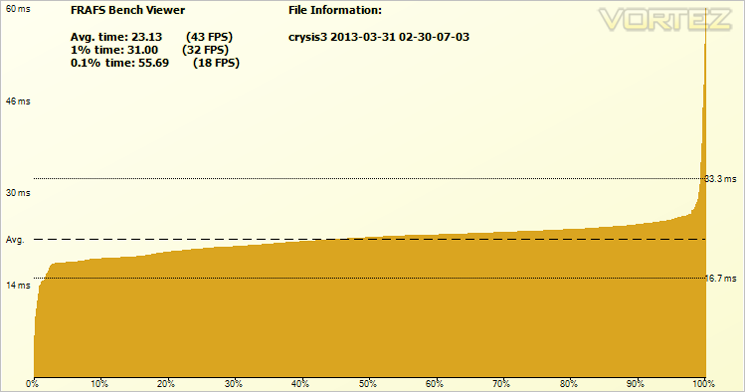
From the graph above we can see that the 99th Percentile is 31ms. This means the lowest frame time you can expect for 99% of the time or the measurement below which 99% of frames are rendered. This measurement omits the runts / oddities, giving us a more accurate picture of what is going on without the random spikes in frame latency. So in the case above 99% of the time, you can expect the graphics card to render frames faster than 31ms.
A sample comparison
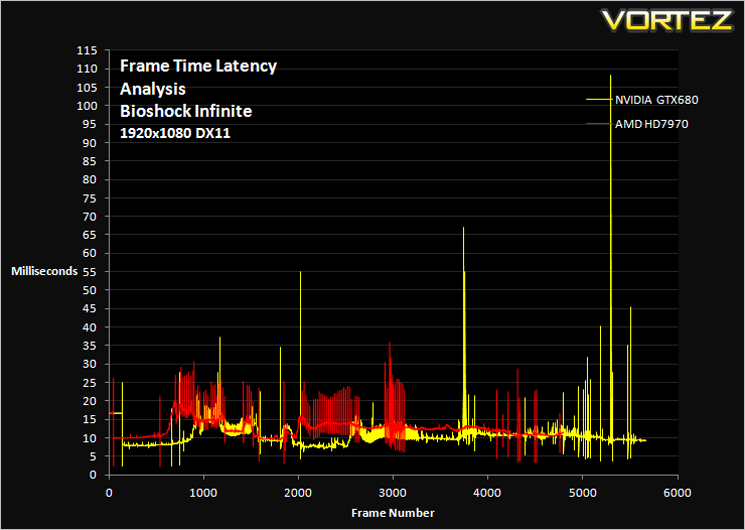
Frame time data was collected from Fraps for both an NVIDIA GTX680 and AMD HD7970 for an identical run of Bioshock Infinite. It was then transferred to excel and using calculations made into the graph you see above.
The astute among you may notice that the NVIDIA graph is longer (more frames) than the AMD one. This is simply because the NVIDIA card produced more frames over the 60 second time period (higher FPS). What interests us most are the troughs and peaks, particularly those packed closely together. At first glance it would appear the NVIDIA card is poor due to the huge spikes however these are simply scene transitions and are of no concern to overall performance. What is disconcerting are the close knit spikes (amplitude) the AMD card produces.
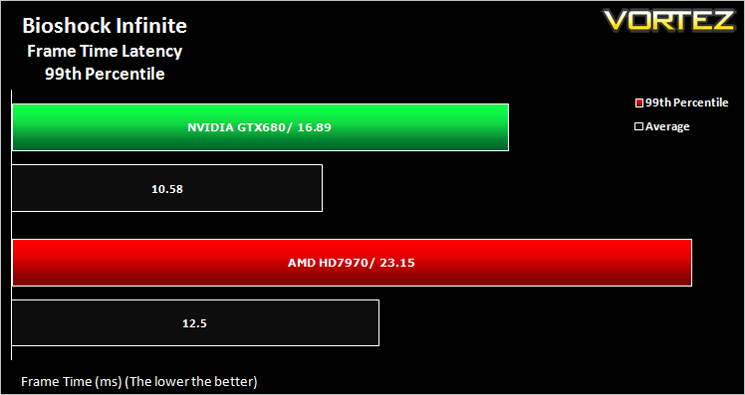
Here we can see the 99th percentile measurements. Our measurements show that you can expect the NVIDIA card to render its frames faster than 16.89 milliseconds for 99% of the time whereas the AMD card measures 23.15ms. So with the NVIDIA card you will witness smoother gameplay. Of course this should also be taken into consideration with your own perception. Remember that I said you would unlikely notice frame time loss below 30ms? Well both cards are well below that threshold for 99% of the time so we do not believe either card, will present a problem but if we are being extra ‘geeky’ about such matters, the NVIDIA card is the better choice for this particular game engine.
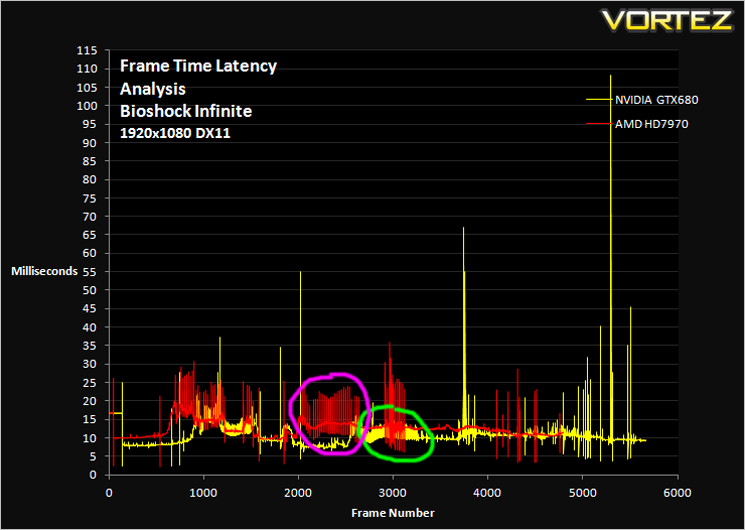
The pink (AMD) and green (NVIDIA) highlight the same section of benchmark. Note the amplitude difference, clearly showing that the AMD card has a bigger variation (3 times larger) in frame rendering time between each frame. If these jumps were above your perception threshold and amplified further (doubled) to 30ms drops instead of the 15ms we saw, the AMD card would appear to be more choppy than the NVIDIA card.
Conclusion
Using Frame Time Analysis as a means of measuring GPU performance is clearly a valuable tool. So much so that some would say it should replace the frames per second method of measuring performance. We would tend to agree because as previously stated, it is little point in having a GPU that can produce stupidly high framerates if the end product results in choppy gameplay. For gamers, frame time latency is clearly the better measurement as it is what ‘gaming experience can be measured upon’.
Frame time latency, as we have already discussed, can be measured in numerous ways, with a variety of equipment and software. There are arguments for and against the use of Fraps as a means measuring frame time latency. Others suggest the only true way to measure is by the use of specialised hardware. What we can all agree on though is that some measurement is better than none at all. With this in mind, we plan on incorporating frametime analysis into our future reviews and will use FRAPS as a collating tool, not least because the results can be replicated and thus verified for the most part by the reader at home.
We do however also believe that frames per second as a form of measurement still has its uses. If two graphics cards are equally matched in frame time rendering then how else do we separate the performance? Sure, a frametime graph can show you which is the faster card simply by it’s length and thus the number of frames rendered over a given period but to get an accurate figure you would also have to calculate this yourself to gain an accurate, by the second average FPS figure. It’s no good saying an entry level card has excellent frame time latency and then comparing it to a much faster (FPS) card which has a slower latency. IF both cards are below your own perceived level then you would obviously go with the faster card.
At Vortez, we want to give the reader the choice of what they want to see. Some folk will inevitably be confused by the frametime measurements and so rather than making the switch fulltime to frame time latency, we will also continue to use frames per second as a means of measuring GPU performance, if nothing else but to satisfy the benchmarkers out there who hang on raw FPS figures for their HWBOT positioning. Clearly, we are a crossroads in GPU analysis so rather than walking blindly down one road and asking our readers to follow, we will just give you a map and you can make the decision yourself!
We hope you have enjoyed reading this article. While it is certainly not as complex or in-depth as the excellent article written by Scott Wasson over at The Tech Report, it will hopefully give you an insight into frame time latency, its importance and why we will be using it to measure graphics card testing in the future.


