







Featuring Hybrid CrossChill, ROG Armor, SupremeFX and much more, the Maximus VI Formula delivers a slice of high-end action to Intel Z87.

Product on Review: Maximus VI Formula
Manufacturer and Sponsor: ASUS
Street Price: £247 (At time of review)
Since Intel Z87 and Haswell’s inauguration over two months ago now, ASUS advocates have been itching to get their hands on the Republic of Gamers (ROG) Maximus VI Formula. Early pre-production depictions of the motherboard have been circulating around the web and the board even made an appearance at this year’s Computex show but it wasn’t until the tail-end of last month that Formula was finally unveiled.
So why is there so much hype surrounding the ASUS Maximus VI Formula? Well, this is the first time ASUS have implemented their CrossChill feature on a motherboard. With this feature water or air can be used to cool the MOSFETs – so regardless of whether you are an extreme overclocking or not the options are all there for whichever pathway you take. Furthermore, the Formula adopts a design which takes advantage of ROG Armor – a unique protective steel shield on the front and back side that helps with temperature control and longevity of components. Referencing these two particular features we are only scratching the surface, there are many more aspects of Formula to explore, so let’s begin our review!
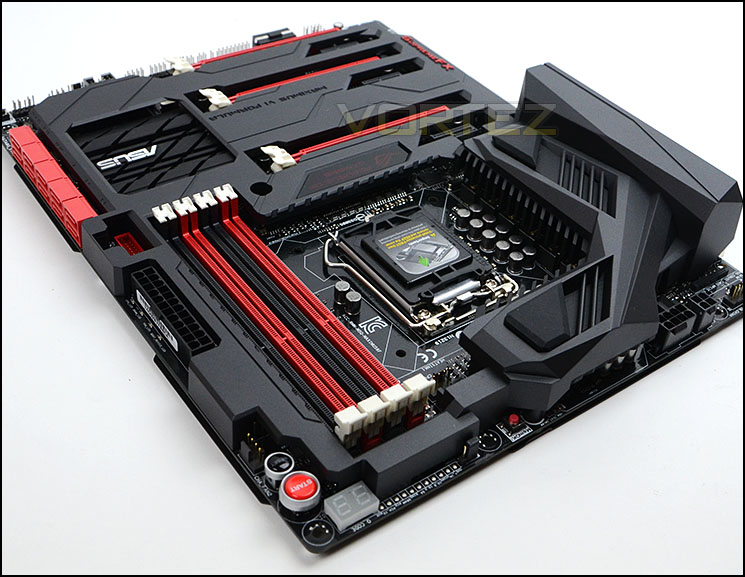
ASUS on their Maximus VI Formula
Maximus VI Formula series is the ultimate ATX gaming motherboard. Why? Just count the reasons. ROG’s sixth-generation Formula packs even greater cooling performance, the very best onboard audio, incredible strength, amazing heat dissipation and advanced shielding technology. With ultrafast Intel® Ethernet plus attention to design that goes right down to the level of audio capacitors and amplifiers, the Maximus VI Formula arms you with gaming-dominating advantages that other motherboards just can’t match — that’s why it’s the winning formula.
Technical Specifications
CPU
Intel® Socket 1150 for 4th Generation Core™ i7/Core™ i5/Core™ i3/Pentium®/Celeron® Processors
Supports Intel® 22 nm CPU
Supports Intel® Turbo Boost Technology 2.0
Chipset
Intel® Z87
Memory
4 x DIMM, Max. 32GB, DDR3 3100(O.C)/3000(O.C.)/2933(O.C.)/2800(O.C.)/2666(O.C.)/
2600(O.C.)/2500(O.C.)/2400(O.C.)/2200(O.C.)/2133(O.C.)/2000(O.C.)/1866(O.C.)/
1800(O.C.)/1600/1333 MHz Non-ECC, Un-buffered Memory
Dual Channel Memory Architecture
Supports Intel® Extreme Memory Profile (XMP)
Graphic
Integrated Graphics Processor
Multi-VGA output support : HDMI/DisplayPort ports
– Supports HDMI with max. resolution 4096 x 2160 @ 24 Hz / 2560 x 1600 @ 60 Hz
– Supports DisplayPort with max. resolution 4096 x 2160 @ 24 Hz / 3840 x 2160 @ 60 Hz
Supports Intel® InTru™ 3D, Quick Sync Video, Clear Video HD Technology, Insider™
Multi-GPU Support
Supports NVIDIA® Quad-GPU SLI™ Technology
Supports AMD 3-Way CrossFireX™ Technology
Expansion Slots
3 x PCIe 3.0/2.0 x16 (x16 or dual x8 or x8/x4/x4) *1
1 x mini-PCIe 2.0 x1 *2
3 x PCIe 2.0 x1
Storage
Intel® Z87 chipset : *3
6 x SATA 6Gb/s port(s), red
Support Raid 0, 1, 5, 10
Supports Intel® Smart Response Technology, Intel® Rapid Start Technology, Intel® Smart Connect Technology *4
Intel® Z87 chipset :
1 x M.2 (NGFF) Socket 2 on mPCIe Combo II expansion card(s), black
Support M.2 (NGFF) Type 2242 SSD card (22mm x 42mm), Support PCI express 2.0 x1 and SATA 6Gb/s standards
ASMedia® ASM1061 controller : *5
4 x SATA 6Gb/s port(s), red
LAN
Intel® I217V, 1 x Gigabit LAN Controller(s)
Wireless Data Network
Wi-Fi 802.11a/b/g/n/ac*6
Supports dual band frequency 2.4/5 GHz
Bluetooth
Bluetooth V4.0
Bluetooth V3.0+HS
Audio
ROG SupremeFX Formula 8-Channel High Definition Audio CODEC
– Supports : Jack-detection, Multi-streaming
– SupremeFX Shielding Technology
– Cirrus Logic® CS4398 DAC: 120 dB SNR, -107 dB THD+N (Max. 192 kHz/ 24 -bit)
– TI 6120A2 high fidelity headphone amplifier
– WIMA® film capacitors
– ELNA® premium audio capacitors
– High-fidelity audio OP AMP(s)
– Differential circuit design
Audio Feature :
– Blu-ray audio layer Content Protection
– Sonic Radar
– DTS Connect
– Optical S/PDIF out port(s) at back panel
USB Ports
Intel® Z87 chipset : *7
4 x USB 3.0 port(s) (2 at back panel, blue, 2 at mid-board)
Intel® Z87 chipset : *8
8 x USB 2.0 port(s) (4 at back panel, black, 4 at mid-board)
ASMedia® USB 3.0 controller :
4 x USB 3.0 port(s) (4 at back panel, blue)
Back I/O Ports
1 x DisplayPort
1 x HDMI
1 x LAN (RJ45) port(s)
6 x USB 3.0 (blue)
4 x USB 2.0
1 x Optical S/PDIF out
6 x Audio jack(s)
1 x Clear CMOS button(s)
1 x ROG Connect On/ Off switch(es)
Internal I/O
1 x USB 3.0 connector(s) support(s) additional 2 USB 3.0 port(s)
2 x USB 2.0 connector(s) support(s) additional 4 USB 2.0 port(s)
1 x TPM connector(s)
10 x SATA 6Gb/s connector(s)
1 x CPU Fan connector(s)
1 x CPU OPT Fan connector(s)
3 x Chassis Fan connector(s)
3 x Optional Fan connector(s)
1 x S/PDIF out header(s)
1 x 24-pin EATX Power connector(s)
1 x 8-pin ATX 12V Power connector(s)
1 x 4-pin ATX 12V Power connector(s)
1 x Front panel audio connector(s) (AAFP)
1 x System panel(s)
1 x DirectKey Button(s)
1 x DRCT header(s)
1 x MemOK! button(s)
10 x ProbeIt Measurement Points
3 x Thermal sensor connector(s)
1 x Power-on button(s)
1 x Reset button(s)
1 x FastBoot switch(es)
1 x ROG extension (ROG_EXT) header(s)
1 x mPCIe Combo II connector(s)
Accessories
User’s manual
I/O Shield
8 x SATA 6Gb/s cable(s)
1 x ASUS 2T2R dual band Wi-Fi moving antennas (Wi-Fi 802.11a/b/g/n/ac compliant)
1 x SLI bridge(s)
1 x Q-connector(s) (2 in 1)
1 x 12 in 1 ROG Cable Label(s)
1 x mPCIe Combo II card(s) with dual-band WiFi 802.11 a/b/g/n/ac + Bluetooth v4.0/3.0+HS module
1 x ROG Door Hanger(s)
BIOS
64Mb UEFI AMI BIOS, PnP, DMI2.7, WfM2.0, SM BIOS 2.7, ACPI5.0a Multi-Language BIOS
Manageability
WfM 2.0, DMI 2.7, WOL by PME, PXE
Support Disc
Drivers
ROG GAMEFIRST II
ROG RAMDisk
ROG CPU-Z
ROG Mem TweakIt
Kaspersky® Anti-Virus
DAEMON Tools Pro Standard
ASUS WebStorage
ASUS Utilities
Form Factor
ATX Form Factor
12 inch x 9.6 inch ( 30.5 cm x 24.4 cm )
Intel® Socket 1150 for 4th Generation Core™ i7/Core™ i5/Core™ i3/Pentium®/Celeron® Processors
Supports Intel® 22 nm CPU
Supports Intel® Turbo Boost Technology 2.0
Chipset
Intel® Z87
Memory
4 x DIMM, Max. 32GB, DDR3 3100(O.C)/3000(O.C.)/2933(O.C.)/2800(O.C.)/2666(O.C.)/
2600(O.C.)/2500(O.C.)/2400(O.C.)/2200(O.C.)/2133(O.C.)/2000(O.C.)/1866(O.C.)/
1800(O.C.)/1600/1333 MHz Non-ECC, Un-buffered Memory
Dual Channel Memory Architecture
Supports Intel® Extreme Memory Profile (XMP)
Graphic
Integrated Graphics Processor
Multi-VGA output support : HDMI/DisplayPort ports
– Supports HDMI with max. resolution 4096 x 2160 @ 24 Hz / 2560 x 1600 @ 60 Hz
– Supports DisplayPort with max. resolution 4096 x 2160 @ 24 Hz / 3840 x 2160 @ 60 Hz
Supports Intel® InTru™ 3D, Quick Sync Video, Clear Video HD Technology, Insider™
Multi-GPU Support
Supports NVIDIA® Quad-GPU SLI™ Technology
Supports AMD 3-Way CrossFireX™ Technology
Expansion Slots
3 x PCIe 3.0/2.0 x16 (x16 or dual x8 or x8/x4/x4) *1
1 x mini-PCIe 2.0 x1 *2
3 x PCIe 2.0 x1
Storage
Intel® Z87 chipset : *3
6 x SATA 6Gb/s port(s), red
Support Raid 0, 1, 5, 10
Supports Intel® Smart Response Technology, Intel® Rapid Start Technology, Intel® Smart Connect Technology *4
Intel® Z87 chipset :
1 x M.2 (NGFF) Socket 2 on mPCIe Combo II expansion card(s), black
Support M.2 (NGFF) Type 2242 SSD card (22mm x 42mm), Support PCI express 2.0 x1 and SATA 6Gb/s standards
ASMedia® ASM1061 controller : *5
4 x SATA 6Gb/s port(s), red
LAN
Intel® I217V, 1 x Gigabit LAN Controller(s)
Wireless Data Network
Wi-Fi 802.11a/b/g/n/ac*6
Supports dual band frequency 2.4/5 GHz
Bluetooth
Bluetooth V4.0
Bluetooth V3.0+HS
Audio
ROG SupremeFX Formula 8-Channel High Definition Audio CODEC
– Supports : Jack-detection, Multi-streaming
– SupremeFX Shielding Technology
– Cirrus Logic® CS4398 DAC: 120 dB SNR, -107 dB THD+N (Max. 192 kHz/ 24 -bit)
– TI 6120A2 high fidelity headphone amplifier
– WIMA® film capacitors
– ELNA® premium audio capacitors
– High-fidelity audio OP AMP(s)
– Differential circuit design
Audio Feature :
– Blu-ray audio layer Content Protection
– Sonic Radar
– DTS Connect
– Optical S/PDIF out port(s) at back panel
USB Ports
Intel® Z87 chipset : *7
4 x USB 3.0 port(s) (2 at back panel, blue, 2 at mid-board)
Intel® Z87 chipset : *8
8 x USB 2.0 port(s) (4 at back panel, black, 4 at mid-board)
ASMedia® USB 3.0 controller :
4 x USB 3.0 port(s) (4 at back panel, blue)
Back I/O Ports
1 x DisplayPort
1 x HDMI
1 x LAN (RJ45) port(s)
6 x USB 3.0 (blue)
4 x USB 2.0
1 x Optical S/PDIF out
6 x Audio jack(s)
1 x Clear CMOS button(s)
1 x ROG Connect On/ Off switch(es)
Internal I/O
1 x USB 3.0 connector(s) support(s) additional 2 USB 3.0 port(s)
2 x USB 2.0 connector(s) support(s) additional 4 USB 2.0 port(s)
1 x TPM connector(s)
10 x SATA 6Gb/s connector(s)
1 x CPU Fan connector(s)
1 x CPU OPT Fan connector(s)
3 x Chassis Fan connector(s)
3 x Optional Fan connector(s)
1 x S/PDIF out header(s)
1 x 24-pin EATX Power connector(s)
1 x 8-pin ATX 12V Power connector(s)
1 x 4-pin ATX 12V Power connector(s)
1 x Front panel audio connector(s) (AAFP)
1 x System panel(s)
1 x DirectKey Button(s)
1 x DRCT header(s)
1 x MemOK! button(s)
10 x ProbeIt Measurement Points
3 x Thermal sensor connector(s)
1 x Power-on button(s)
1 x Reset button(s)
1 x FastBoot switch(es)
1 x ROG extension (ROG_EXT) header(s)
1 x mPCIe Combo II connector(s)
Accessories
User’s manual
I/O Shield
8 x SATA 6Gb/s cable(s)
1 x ASUS 2T2R dual band Wi-Fi moving antennas (Wi-Fi 802.11a/b/g/n/ac compliant)
1 x SLI bridge(s)
1 x Q-connector(s) (2 in 1)
1 x 12 in 1 ROG Cable Label(s)
1 x mPCIe Combo II card(s) with dual-band WiFi 802.11 a/b/g/n/ac + Bluetooth v4.0/3.0+HS module
1 x ROG Door Hanger(s)
BIOS
64Mb UEFI AMI BIOS, PnP, DMI2.7, WfM2.0, SM BIOS 2.7, ACPI5.0a Multi-Language BIOS
Manageability
WfM 2.0, DMI 2.7, WOL by PME, PXE
Support Disc
Drivers
ROG GAMEFIRST II
ROG RAMDisk
ROG CPU-Z
ROG Mem TweakIt
Kaspersky® Anti-Virus
DAEMON Tools Pro Standard
ASUS WebStorage
ASUS Utilities
Form Factor
ATX Form Factor
12 inch x 9.6 inch ( 30.5 cm x 24.4 cm )
Packaging & Bundle
In true ASUS ROG tradition, the Maximus VI Formula arrives in a large red box which has a folding cover giving a sneak preview of the motherboard and extra detail on significant features. Since the ROG series is ASUS premium product line, they have gone to extra lengths even with the packaging.
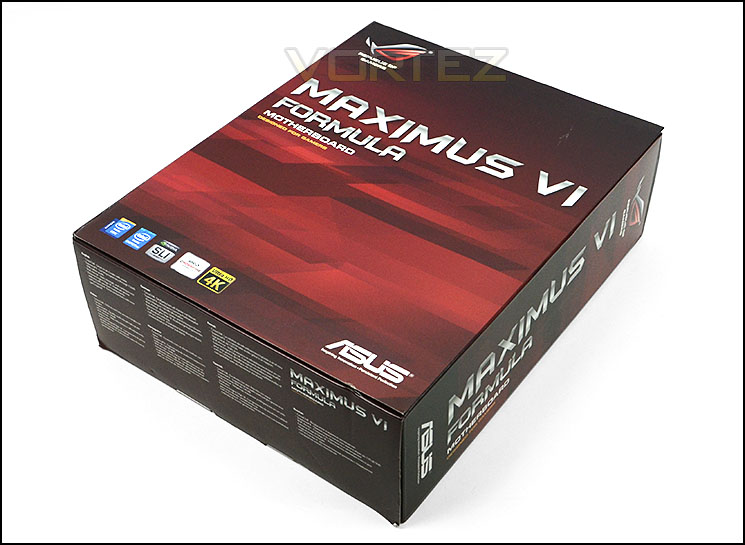
Packaging for Maximus VI Formula
Combined with the packaging the bundle also features additional items compared to the standard motherboard. In fact, Maximus VI Formula and its bundle are rather extensive, covering almost every conceivable avenue. The included items within the bundle are as follows:
• User’s manual
• I/O Shield
• 8 x SATA 6Gb/s cable(s)
• 1 x ASUS 2T2R dual band Wi-Fi moving antennas (Wi-Fi 802.11a/b/g/n/ac compliant)
• 1 x SLI bridge(s)
• 1 x Q-connector(s) (2 in 1)
• 1 x 12 in 1 ROG Cable Label(s)
• 1 x mPCIe Combo II card(s) with dual-band WiFi 802.11 a/b/g/n/ac + Bluetooth v4.0/3.0+HS module
• 1 x ROG Door Hanger(s)
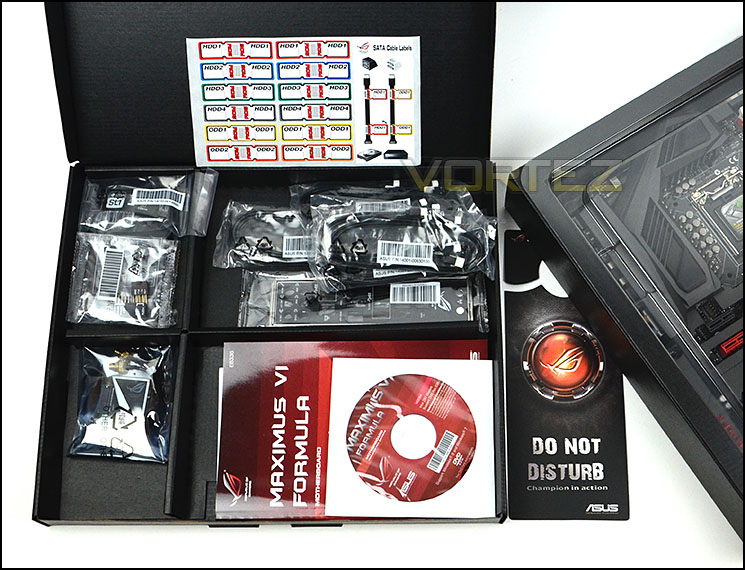
Many items included within the bundle
The motherboard itself sits in a large cardboard tray with transparent plastic cover. This has a dual purpose of giving protection during transit and also allows the motherboard to be previewed from the packaging lid.
Unveiling Maximus VI Formula we are met with an attractive and robust looking motherboard. We would go as far as to say that this offering is probably one of the best looking Z87 motherboards currently gracing the market. The ROG armor which covers the majority of the motherboard acts as a two-way feature – ASUS have furnished Formula with this protective shield in order to block unnecessary heat from the graphics card and the robust double sided steel construction strengthens the motherboard preventing it from bending. It also looks really neat too!
Maximus VI Formula conforms to ATX standard measuring: 12 inch x 9.6 inch ( 30.5 cm x 24.4 cm ).
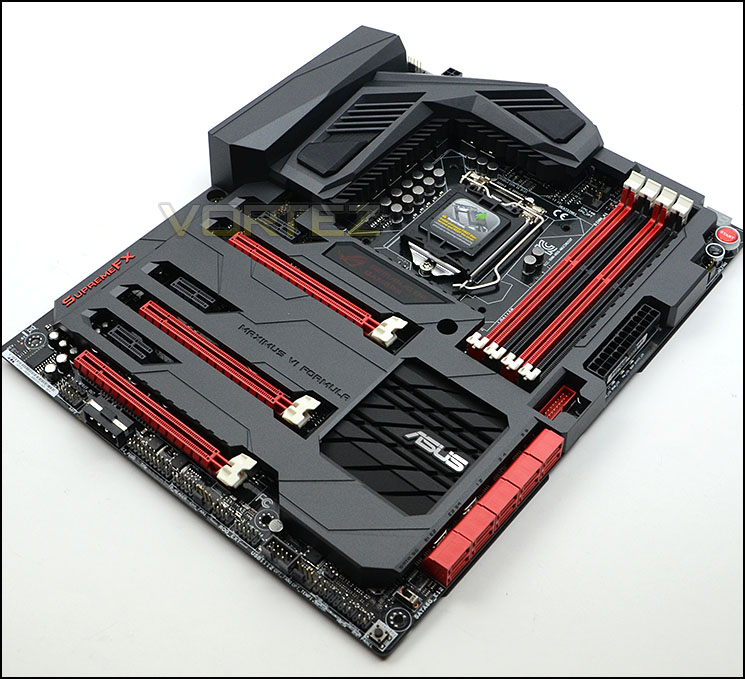
Maximus VI Formula in all its glory
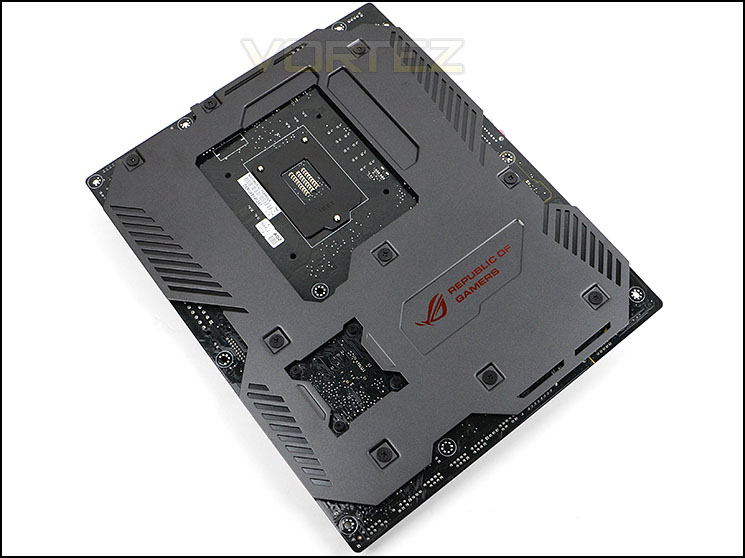
The underside also features ROG Armor
Closer Look
This motherboard is of course designed to work with Intel’s 4th Generation of processors – Haswell. The socket is LGA1150 but has the mounting holes for LGA115X so if you have a cooler that has been used on another socket such as LGA1155 then it will work fine here too. ASUS have actually included dual fan headers for the CPU cooler just behind the top heatsink which we are pleased to see.
Formula utilises Extreme Engine Digi+ III which include a selection of exclusive hardware upgrades used throughout the motherboard. The MOSFETS are NexFET handle up to 90% efficiency under normal load and offer enhanced stability compared to standard MOSFETs, and at half the size which is rather impressive. The other components that make an appearance are the BlackWing chokes which have been given some gold ‘bling’ – these chokes can sustain 60A per unit and up to 125C. Japanese 10K black solid CAPs are used throughout the motherboard for long-life and are generally able to tolerate higher temperatures compared to standard solid CAPs.
Covering the MOSFETs are two rather substantial heatsinks. ASUS have equipped Formula with a CrossChill hybrid thermal design which can utilise air of water cooling. This is what ASUS have to say on this particular feature:
Choose between air or water cooling: it works with both! Unlike competing hybrid thermal solution, CrossChill requires no fan, so there’s no noise or dust build-up. For those who do venture into water cooling, you can achieve up to 23˚C lower MOSFET temperatures for more stable overclocking! Internally the water channel fins help to maximize the surface area for heat transfer, and thanks to its G1/4 threaded fittings, CrossChill even fits into any existing setup! Don’t settle for a second-best solution.
Behind the heatsinks is combination of 8-pin EPS and 4-pin for additional juice when overclocking.
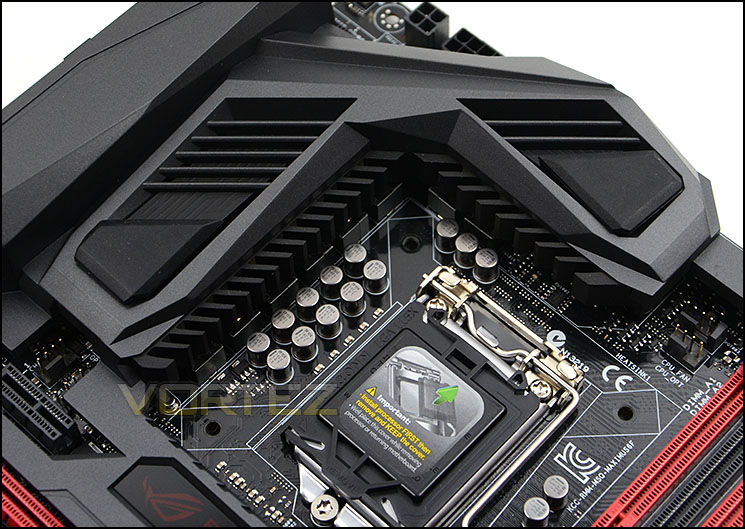
The socket area for Formula
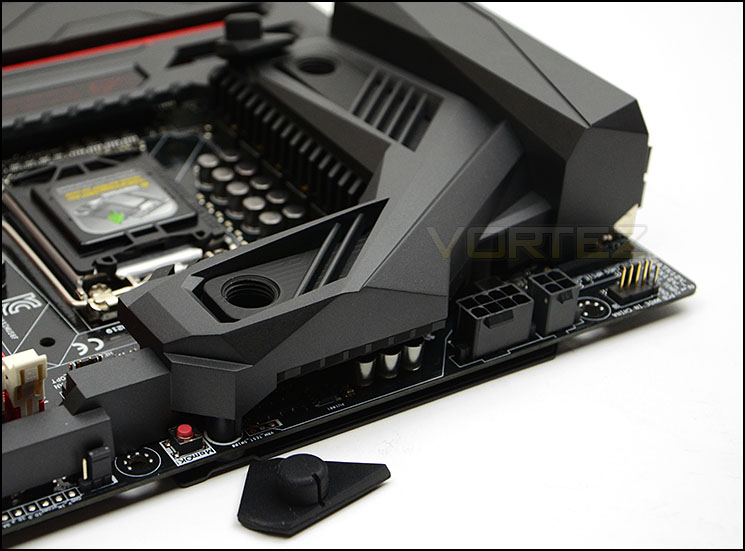
CrossChill hybrid thermal design
The ROG armor even extends round to the edge of the memory region. The memory slots support dual channel DDR up to 3000MHz (OC) kits. As with other ASUS motherboards, the memory slots are single latch from the right-side.
Also in the memory area are onboard power and reset buttons, LED debug and MemOK! These features deliver extra functionality for trouble shooting and come in extremely useful. Over by the 24-pin ATX socket is a single USB 3.0 port for connecting to the USB 3.0 on the front panel of the computer chassis.
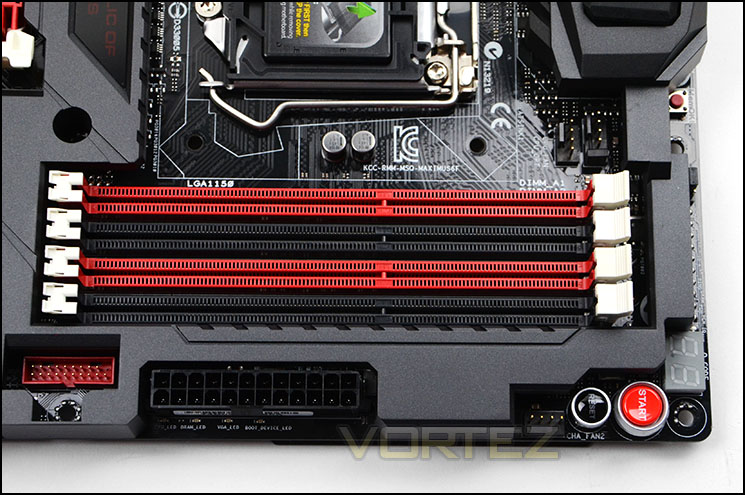
Dual channel DDR3 up to 3000MHz and additional features
Over on the next page we will continue with our closer look at the Formula motherboard.
Closer Look (Continued)
Moving along the edge of the motherboard are a plethora of SATA ports, all ten of these SATA ports are SATA 3 (6GB/s) and delivered via the Intel Z87 chipset. Such a generous amount of storage options will be a delight to users who have a combination of optical and hard drives.
Also beside the SATA ports is a fast boot switch – by default this is switched on. As you can well imagine, this button does exactly what it says on the tin – enables a fast boot to bypass some of the BIOS POST processes.
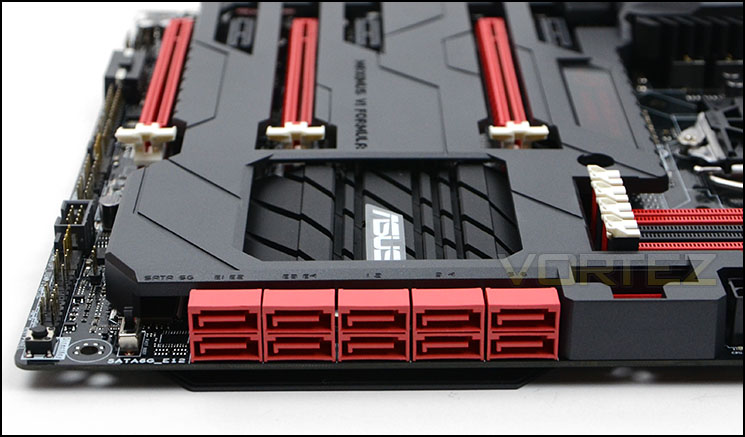
Plenty of options for storage
Behind the storage ports resides the large heatsink covering the Intel Z87 chip. Along the edge of Formula we again have more features to take advantage of. There is a ROG EXT connector and Direct Key – pressing this button reboots the system and boosts immediately into the BIOS without the need for a keyboard.
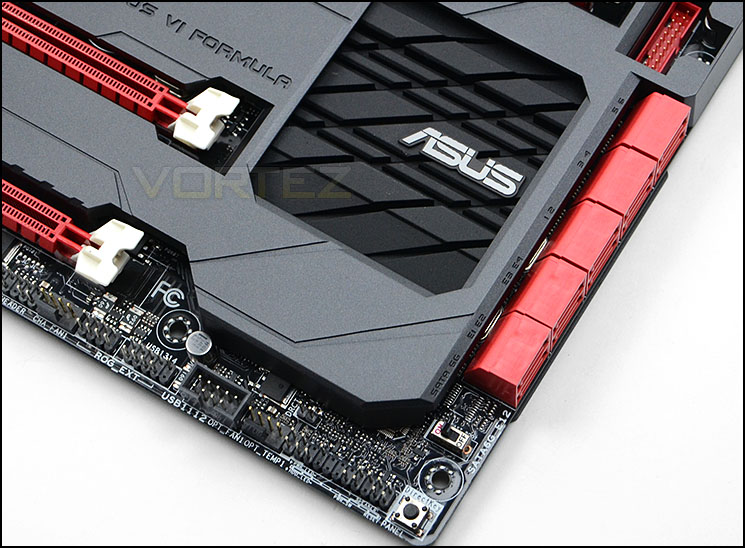
The Intel Z87 heatsink and more features
Turning our attention to the expansion slot area of the motherboard we see that Formula has support for NVIDIA® Quad-GPU SLI™ Technology as well as AMD 3-Way CrossFireX™ Technology. The actual slots comprise of:
• 3 x PCI-E 3.0/2.0 x16 (x16 or dual x8 or x8/x4/x4)
• 1 x mini-PCIe 2.0 x1 *2
• 3 x PCIe 2.0 x1
Underneath the lower PCI-E 3.0 slot is an auxiliary Molex power connector for providing additional power for power hungry configurations.
Running parallel to the graphics region is SupremeFX which is now an essential feature for ROG motherboards. Underneath the ROG armor is a chip and a number of components which deliver high-end audio to the end user. The following is what ASUS have to say about their implementation of SupremeFX on Formula:
SupremeFX Formula delivers premium sound card quality. Combining SupremeFX Shielding technology through physical PCB isolation, grounding separation and EMI cover shielding, while premium components such as ELNA® audio capacitors and German-made WIMA® film capacitors deliver audiophile grade performance. Lossless audio quality is ensured thanks to differential circuit design with high-fidelity operational amplifiers (op-amps) and Cirrus Logic® CS4398 headphone digital/analog converter (DAC) delivering a brilliant 120dB signal-to-noise ratio (SNR). Finally the Texas Instruments® TPA6120A2 600ohm headphone amplifier is able to boost every sound detail.
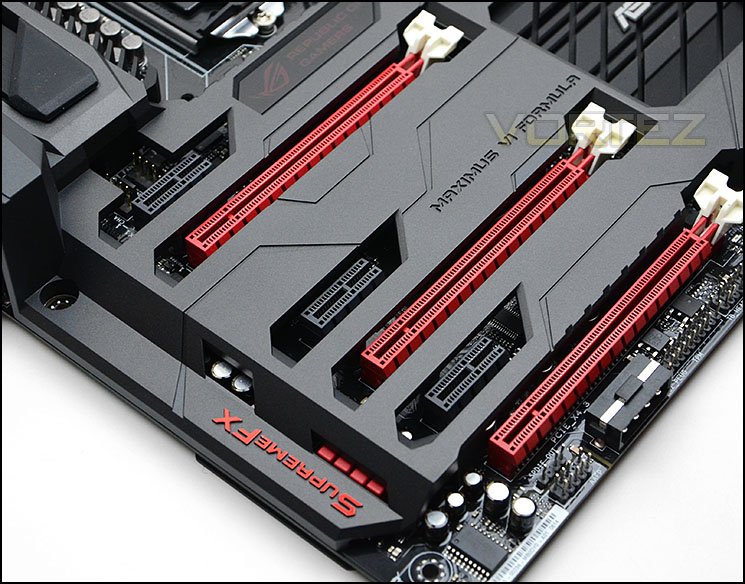
Multi-GPU options for NVIDIA and AMD configurations
Lastly we come to the rear IO which consists of the following:
• 1 x DisplayPort
• 1 x HDMI
• 1 x LAN (RJ45) port(s)
• 6 x USB 3.0 (blue)
• 4 x USB 2.0
• 1 x Optical S/PDIF out
• 6 x Audio jack(s)
• 1 x Clear CMOS button(s)
• 1 x ROG Connect On/ Off switch
On the left side there is a gap for the mPCIe Combo II port and card to reside. ASUS provide a mini PCI Express 2.0 card which delivers Bluetooth 4.0 and WiFi functionality via 802.11ac. This brings WiFi and Bluetooth functionality without having to sacrifice a PCI-E slot. The card also works with M.2 SSDs and has a dedicated socket specifically for this purpose.
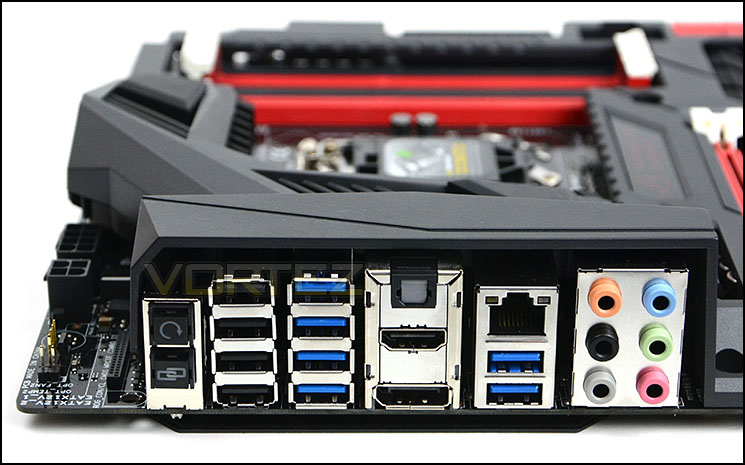
The rear IO options
ASUS ROG UEFI BIOS
The UEFI BIOS which comes with Maximus VI Formula is amongst other things, very easy to use. We really like what ASUS have done with their design choices. Rather than opt for flashy interactions and overcomplicate things they have designed something which is just simple and that just works and this is paramount for advanced tweakers and more particularly, Overclockers. They want to be in and out of the BIOS without having to navigate through countless menu systems, and with ASUS UEFI this is possible.
Those who aren’t advanced users will find the UEFI BIOS a dream to work with since each option that can be tweaked has a full explanation to the right side – not just a brief note but an explanation of what enabling/disabling a particular option will do and its benefits.
One notable aspect which is especially nice is the change log summary which pops up when saving settings to exit – this prompt gives you a quick summary of the options that have been adjusted to ensure you are certain nothing untoward has been altered – however small this feature is, it’s extremely useful.
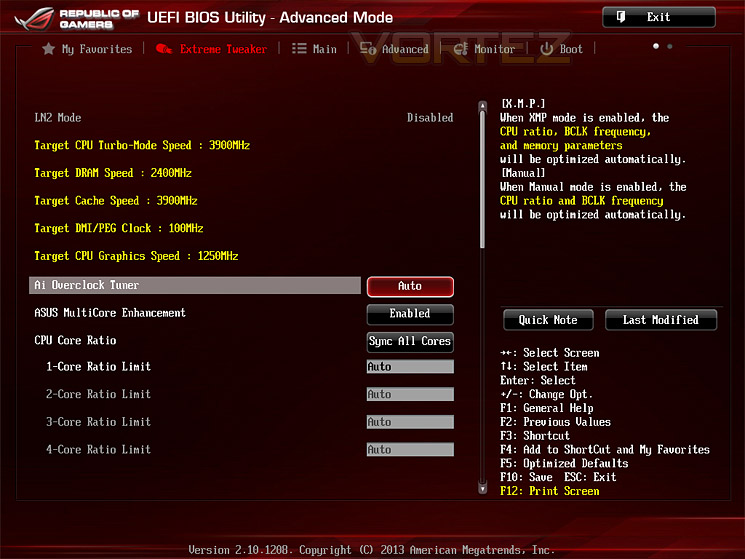
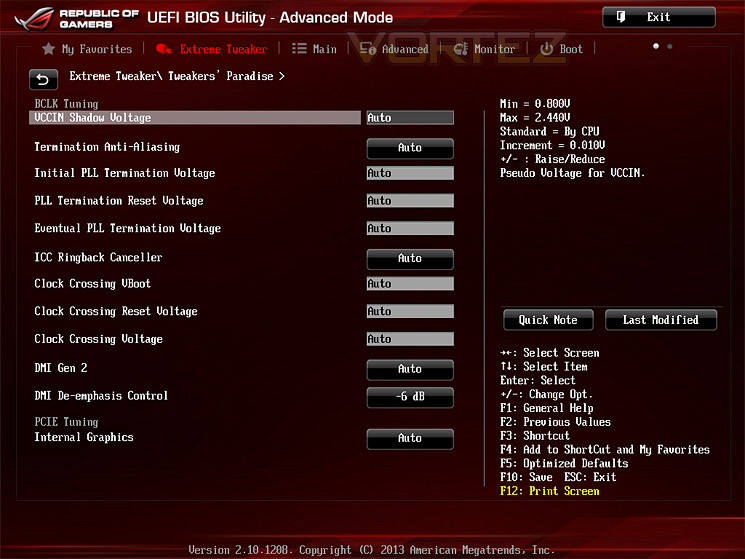
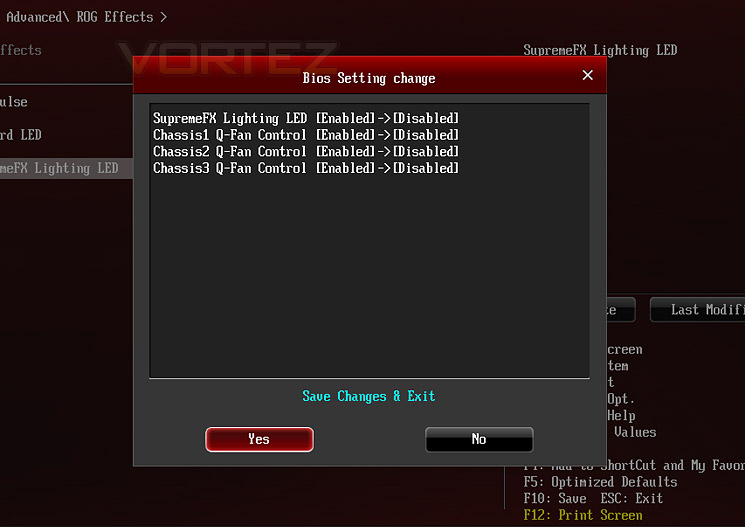
Test Setup & Overclocking
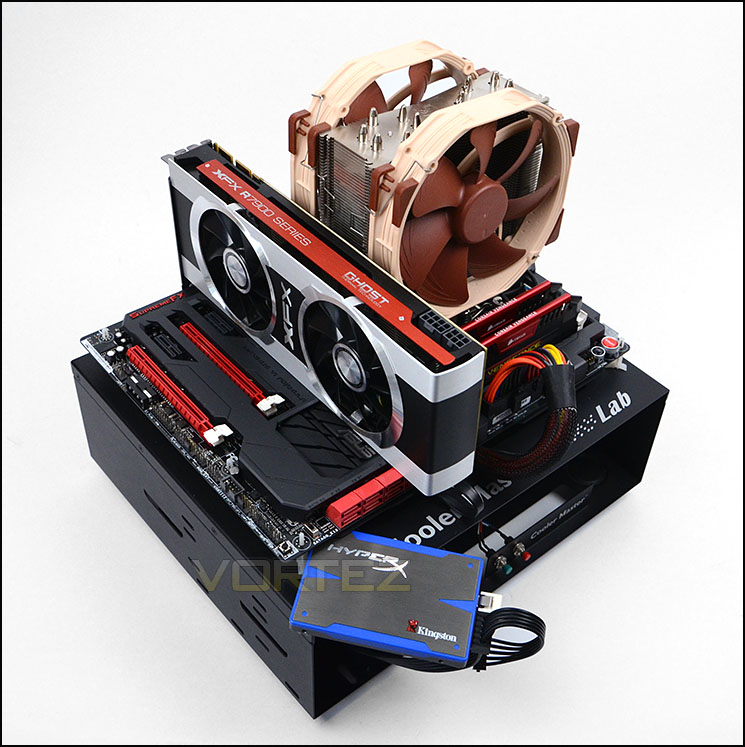
Test Setup
CPU Intel Core i7 4770K (Haswell) 3.50GHz
Cooling Noctua NH-U14
Motherboard ASUS Maximus VI Formula
Memory 16GB Corsair Vengeance Pro 2400MHz CL10 DDR3
Graphics XFX R7970 Black Edition
Storage Kingston HyperX 240GB SSD
PSU Corsair HX1050 80 Plus Gold Certified PSU
Cooling Noctua NH-U14
Motherboard ASUS Maximus VI Formula
Memory 16GB Corsair Vengeance Pro 2400MHz CL10 DDR3
Graphics XFX R7970 Black Edition
Storage Kingston HyperX 240GB SSD
PSU Corsair HX1050 80 Plus Gold Certified PSU
Benchmarks
Cinebench 11.5 – CPU Score
x264 HD 4.0 – 1st and 2nd pass encoding
SiSoftware SANDRA 2013 – CPU & Memory benchmarks
AIDA64 – CPU benchmarks
3DMark FireStrike – DX11 3D Benchmark
3DMark 11 – DX11 3D Performance and Extreme preset
Games – Tomb Raider, Crysis 3, Metro Last Light
x264 HD 4.0 – 1st and 2nd pass encoding
SiSoftware SANDRA 2013 – CPU & Memory benchmarks
AIDA64 – CPU benchmarks
3DMark FireStrike – DX11 3D Benchmark
3DMark 11 – DX11 3D Performance and Extreme preset
Games – Tomb Raider, Crysis 3, Metro Last Light
Other Software
Temperature Analysis: Core Temp
Stress Testing Software: LinX
CPU Specification Monitoring: CPU-Z
Stress Testing Software: LinX
CPU Specification Monitoring: CPU-Z
Overclocking
The introduction of Z87 brings a return to BCLK overclocking. This will in turn deliver more flexibility for Overclockers compared to previous generations where the BCLK was locked to 100MHz and only the ratio could be adjusted. As many of you will know, Haswell CPUs get very hot with little voltage increase therefore the flexibility and headroom for overclocking can be limited.
We managed to squeeze 4.6GHz out of the 4770K with Maximus VI Formula. We also managed to get 4.7/8GHz to boot but sadly under LinX stress test it failed after a short period of time, even with 1.4v. we tried to push for 4.7GHz which is the current stable limitation for the chip we are using but in order to maintain stability we required 1.4v which pushed the temperatures beyond 95C which we were not prepared to withstand since it can degrade the longevity of the chip. Therefore we moved to 4.6GHz, but interestingly we didn’t require as much voltage as we usually do and the minimum necessary for 4.6GHz was just 1.32v. This in return means lower temperatures when under maximum load, usually our 4.6GHz milestone will exceed 90C but not with Formula.
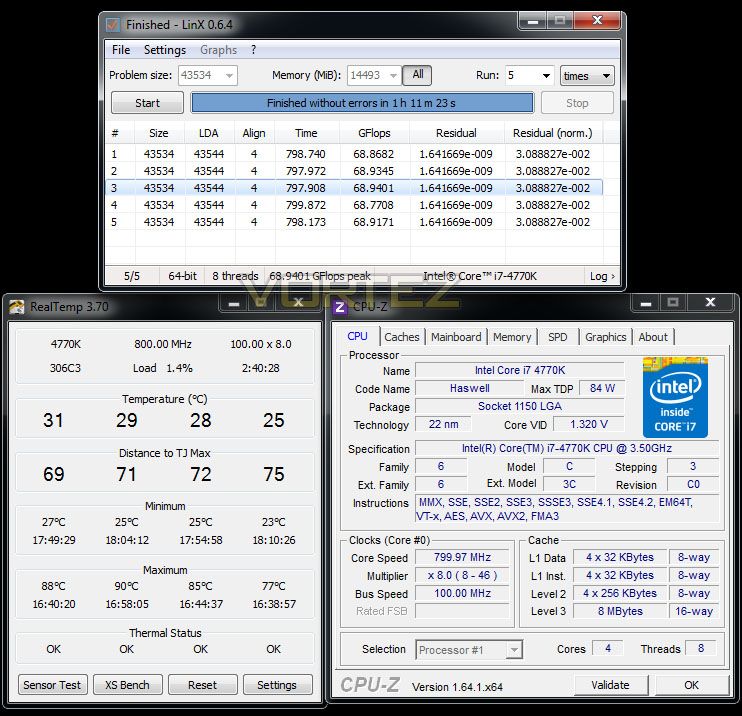
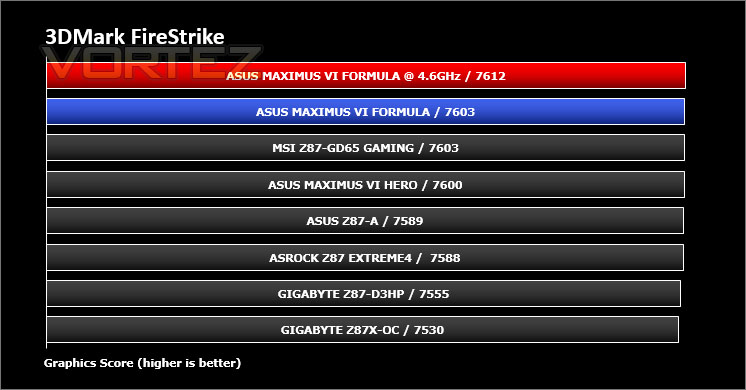
With the 4.6GHz overclock being our best, we will take this into our benchmark suite and test both stock and overclocked results on the subsequent pages. Our comparison results will obviously grow in the forthcoming weeks as we review more and more Z87 motherboards.
Power Consumption
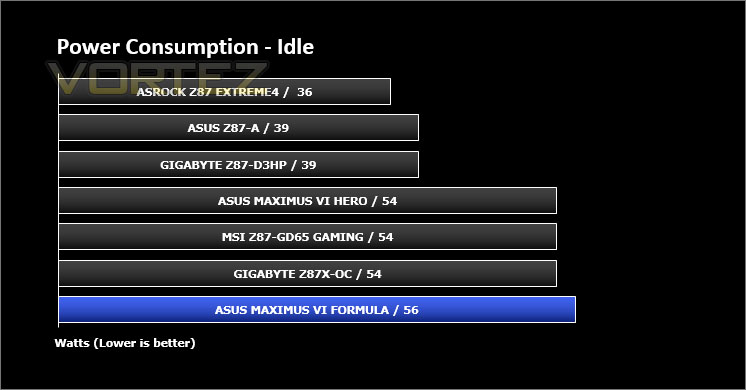
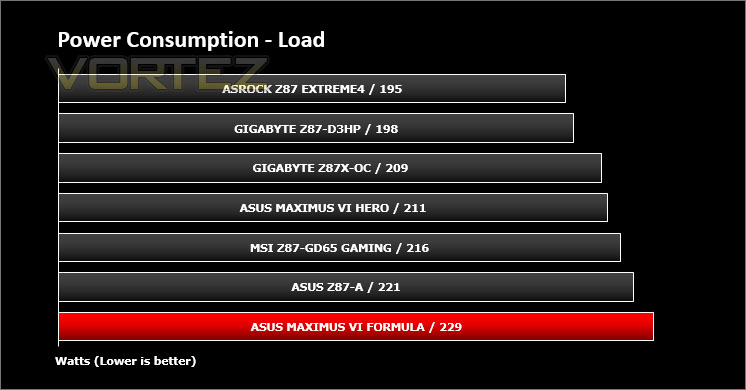
It’s interesting to note the power consumption across all motherboards. Although they are using Z87 chipsets, energy results can fluctuate between manufacturers due to the features and specifications that are integrated. First of all, for the idle tests the system is cold booted into Windows and no additional applications are executed – the watts are noted on the external energy monitor we use and then the system is loaded with 3DMark FireStrike – watts are again monitored for the duration of the test and the highest rated wattage result is then noted down. Below are the results of this energy test.
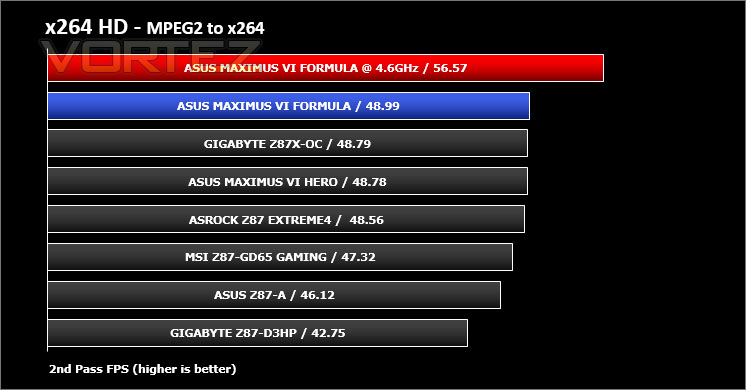
Benchmarks: X264 HD
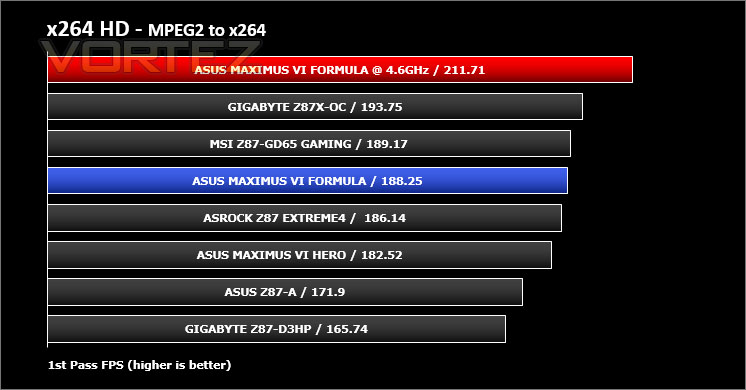
Simply put, this test measures how fast your machine can encode a short, DVD quality MPEG-2 video clip into a high-quality x264 video clip. What’s x264, you ask? It’s more or less the next-generation Xvid/DivX codec. I think it’s ideal for a benchmark because the application (x264.exe) reports fairly accurate compression results (in frames per second) for each pass of the video encoding process, and it uses multi-core processors very efficiently.
Benchmarks: AIDA64
AIDA64 Product PageThis simple integer benchmark focuses on the branch prediction capabilities and the misprediction penalties of the CPU. It finds the solutions for the classic “Queens problem” on a 10 by 10 sized chessboard. At the same clock speed theoretically the processor with the shorter pipeline and smaller misprediction penalties will attain higher benchmark scores. For example — with HyperThreading disabled — the Intel Northwood core processors get higher scores than the Intel Prescott core based ones due to the 20-step vs 31-step long pipeline. CPU Queen test uses integer MMX, SSE2 and SSSE3 optimizations.


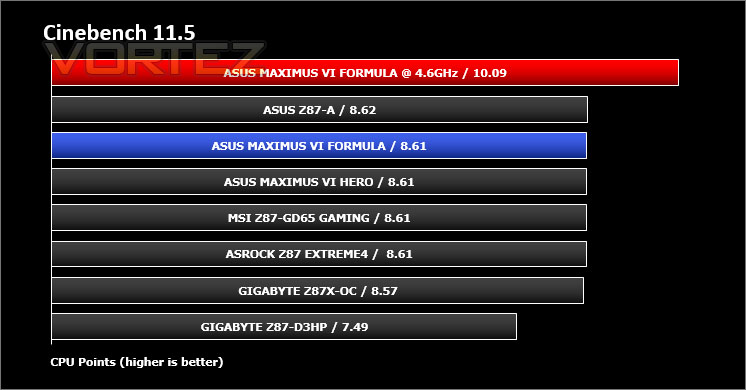
Benchmarks: Cinebench
CINEBENCH can measure systems with up to 64 processor threads. This test scene contains approximately 2,000 objects which in turn contain more than 300,000 polygons in total, and uses sharp and blurred reflections, area lights, shadows, procedural shaders, antialiasing, and much more. The result is displayed in points (pts). The higher the number, the faster your processor.
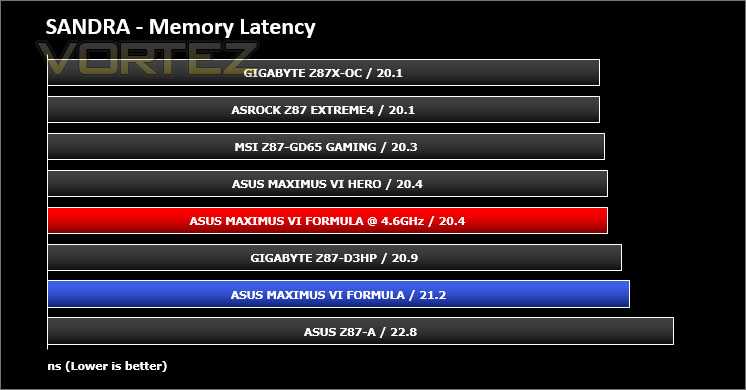
Benchmarks: SiSoftware SANDRA
3DMark 11 Product PageSANDRA isn’t always a benchmark that is included in hardware reviews but I believe it shouldn’t be ignored. SANDRA provides a vigorous package that tests your system in a rather large array of benchmarks. There are many aspects of benchmark that can be executed. We will be considering – CPU and memory tests.



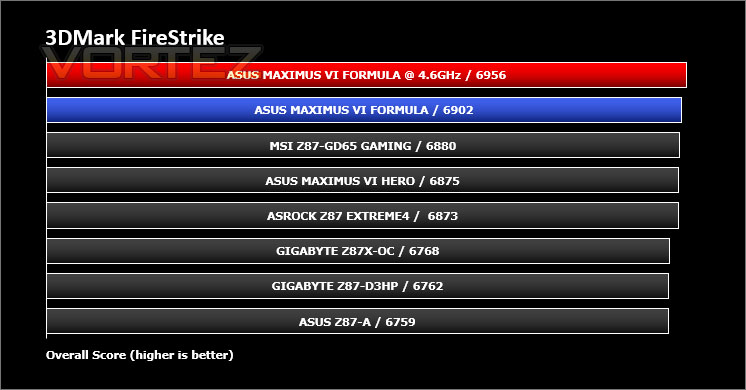
Benchmarks: 3DMARK FireStrike
3DMark FireStrike Product PageFire Strike is our new showcase DirectX 11 benchmark designed for high-performance gaming PCs. It is our most ambitious and technical benchmark ever, featuring real-time graphics rendered with detail and complexity far beyond what is found in other benchmarks and games today. Fire Strike will only be available in the Windows editions of 3DMark initially.
Benchmarks: 3DMARK 11
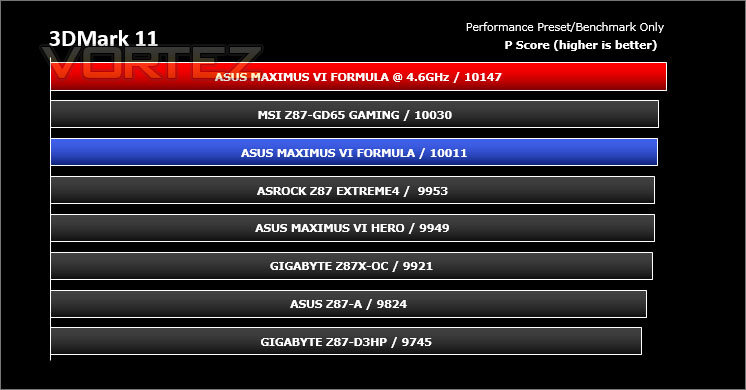
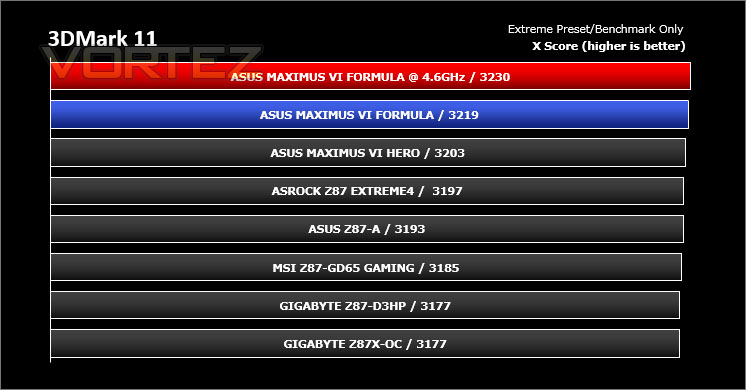
]Designed to measure your PC’s gaming performance 3DMark 11 makes extensive use of all the new features in DirectX 11 including tessellation, compute shaders and multi-threading. Trusted by gamers worldwide to give accurate and unbiased results, 3DMark 11 is the best way to consistently and reliably test DirectX 11 under game-like loads.
3DMark 11 is a very popular 3D performance benchmark suite and needs little introduction. For the test settings both Performance and Extreme presets are run with ‘benchmark only’ being selected. This provides good analysis. Many will only test the performance preset, using the extreme mode we can examine the board under much more severe stressing – at 720p and 1080p.
Benchmarks: Tomb Raider, Crysis 3, Metro Last Light
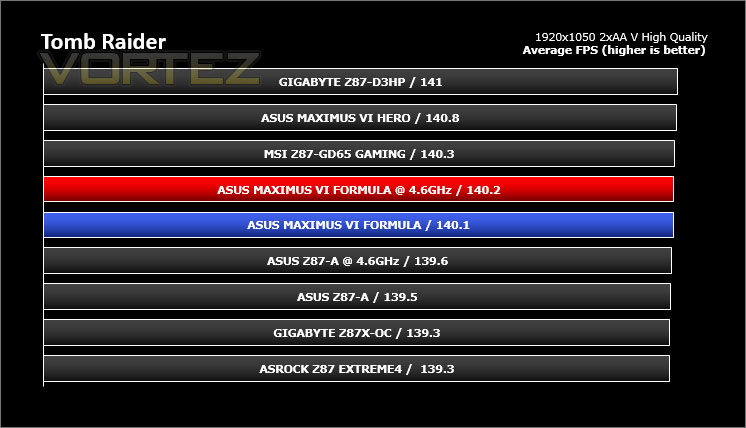
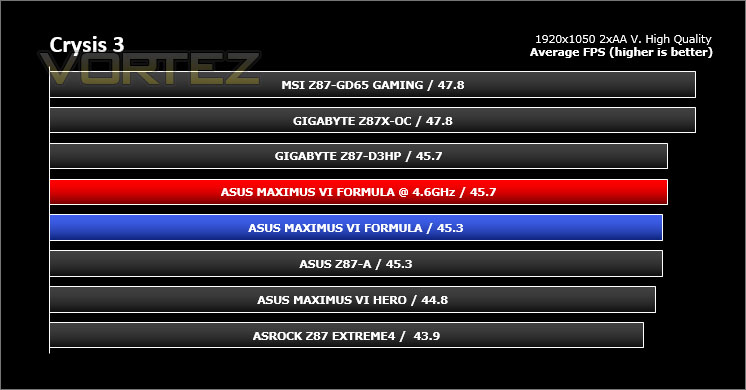
It’s important for us to perform a number of game benchmarks as well as the synthetic tests because gamers will want to know if there are any significant benefits. So here we have a selection of popular gaming titles, critically acclaimed and action-packed.
Settings
Tomb Raider
– 1920×1050 2xAA – Very High Quality *Benchmark tool*
Crysis 3
– 1920×1050 2xAA – Very High Quality *FRAPS – 1st scene/gameplay*
Metro Last Light
– 1920×1050 16xAF – Very High Quality *FRAPS – 1st scene/gameplay*
The gaming titles selected demand GPU power over CPU power – in each test the difference is rather marginal. VSync is disabled in all titles.

Conclusion
Being a step-down from the Extreme, Formula model is usually a popular choice since it adopts similar characteristics but at a lower price-tag.
The new Maximus VI Formula is an innovative and feature-packed motherboard. Those who demand all the bells and whistles on their kit should certainly consider this offering as it is jam packed with features.
An initial look over the motherboard will have generate discussion due to the distinct out of the order but stunning ROG Armor. ASUS have furnished Formula with a protective cover on both the front and back side of the board in a bid to encourage better temperature control and to add protection. The ROG Armor actually holds the graphics card more upright because the floor of the board is raise, thus preventing it from leaning.
Throughout our testing we found the Formula to be a top-performer. It lead the way in benchmarks and consistently proved itself as a shining example. We also managed to attain great results when overclocking our Intel Core i7-4770K reaching 4.6GHz at 1.32v – usually we need more voltage for such a result. To achieve these results be used the UEFI BIOS which is one of our favourites out of the various choices offered by vendors. It’s easy to use and has options for casual or avid users.
The Formula motherboard has a feature-rich layout bringing support for up to 3000MHz DDR3 memory and helpful tools like Direct Key, LED Debug and Fast Boot to name but a few. Furthermore ASUS have equipped this motherboard with a mPCIe Bluetooth/WiFi module and connector which sits beside the rear IO ports so that the PCI slots can remain free to use.
We haven’t even mentioned the CrossChill at this point either and this particular feature is something which will diversify Formula as a top-pick within the Intel Z87 segment. By implementing such a feature on this motherboard, ASUS have given consumers the opportunity to go with water or air cooling later down the line because it has Hybrid functionality.
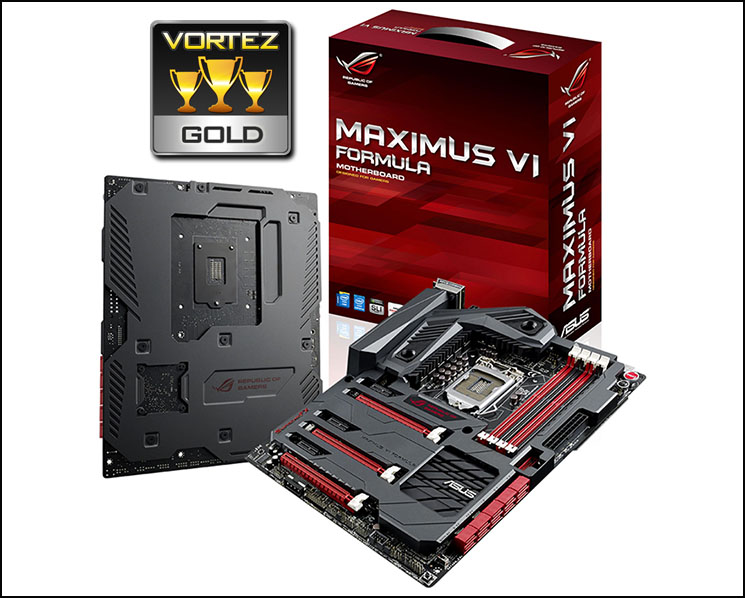
Priced at £247 the Maximus VI Formula is a step-up in price from the commonly selected mid-high end Z87 motherboards but is also a step-up in performance and feature-set. The added cost is justified due to the sheer features and quality at the consumer’s disposal.
ASUS push the boat out with the Maximus VI Formula. Every conceivable feature finds its way to a truly stunning masterpiece. Formula triumphed in our benchmark tests, demonstrating that it is a contender for the Z87 crown.
Pros
+ Looks stunning
+ Consistently great results
+ Easy to overclock
+ Advanced overclocking features
+ Hybrid CrossChill for water and air
+ ROG Armor offers protection and cooling
+ Smooth and feature rich UEFI BIOS
+ Numerous storage options
+ Equipped with premium audio solution
+ mPCIe Bluetooth/WiFi module
Cons
– Heavy
+ Looks stunning
+ Consistently great results
+ Easy to overclock
+ Advanced overclocking features
+ Hybrid CrossChill for water and air
+ ROG Armor offers protection and cooling
+ Smooth and feature rich UEFI BIOS
+ Numerous storage options
+ Equipped with premium audio solution
+ mPCIe Bluetooth/WiFi module
Cons
– Heavy

Click here for an explanation of our awards at Vortez.net.


