







Adding another computer chassis to the Obsidian Series, Corsair provide support for dedicated Mini-ITX with the 250D computer case.

Product On Review: Corsair Obsidian 250D
Manufacturer and Sponsor: Corsair
Street Price: £70 GBP / $89 USD
Building on the success of the Obsidian Series which is now a household name for Corsair, they are back yet again with a new addition to the family. Inside the portfolio there are now seven models to choose from, giving plenty of variation and choice to the end user but the one piece missing from the puzzle is a dedicated Mini-ITX chassis.
Today we are to cast our critical eye over Corsair’s new 250D. Embracing the characteristics many have come to love, this new case delivers Mini-ITX support for those demanding a small form factor and condensed layout.
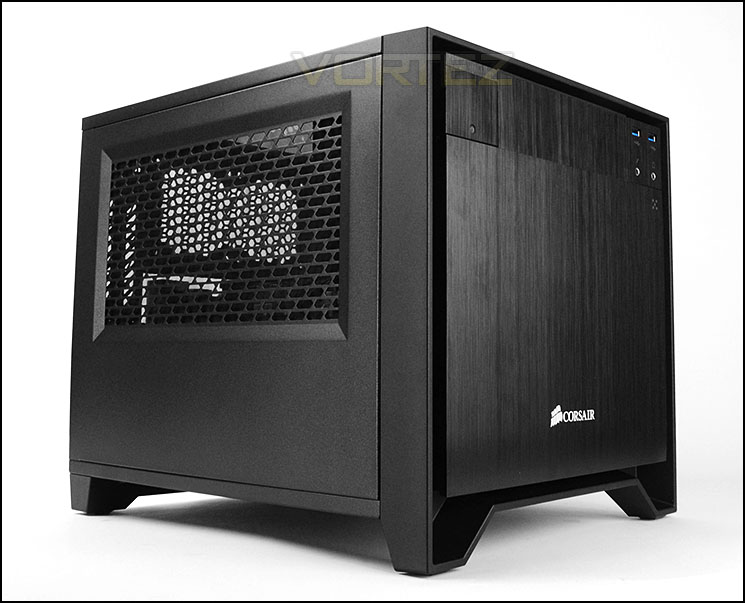
Corsair on their 250D
If you want to build a Mini ITX system without sacrificing expansion, flexibility, or performance, the Obsidian Series 250D is your answer. Though it’s small on the outside, the 250D has room for standard components like a full-size 5.25” optical drive, a full-length GPU, a 240mm radiator, and even a full-size ATX power supply.
The sleek aluminum front fascia provides the striking yet subtle design that Obsidian Series cases are known for, and a top window gives you a close-up view of your high-performance components. The 250D is a great choice if you want full size performance in a small space
The sleek aluminum front fascia provides the striking yet subtle design that Obsidian Series cases are known for, and a top window gives you a close-up view of your high-performance components. The 250D is a great choice if you want full size performance in a small space
Technical Specifications
Warranty
Two years
Dimension
13.8 x 10.9 x 11.4 inches
MB Support
Mini ITX
Expansion Slots
2
Form Factor
Mini ITX
Material
Black steel and anodized
black aluminum front fascia
Drive Bays
(2) 3.5”/2.5” drive bays
(2) 2.5” drive bays
(1) 5.25” optical drive bay
Cooling
Front: 200mm, 140mm (140mm included)
Side: Dual 120mm (single 120mm included)
Rear: Dual 80mm (optional)
Front I/O
(2) USB 3.0 (1) Headphone (1) Microphone
Power Supply
ATX (Not Included)
Two years
Dimension
13.8 x 10.9 x 11.4 inches
MB Support
Mini ITX
Expansion Slots
2
Form Factor
Mini ITX
Material
Black steel and anodized
black aluminum front fascia
Drive Bays
(2) 3.5”/2.5” drive bays
(2) 2.5” drive bays
(1) 5.25” optical drive bay
Cooling
Front: 200mm, 140mm (140mm included)
Side: Dual 120mm (single 120mm included)
Rear: Dual 80mm (optional)
Front I/O
(2) USB 3.0 (1) Headphone (1) Microphone
Power Supply
ATX (Not Included)
Packaging & First Look
Arriving in a small cardboard box, Corsair has given 250D the eco-friendly approach so that the box can be recycled when it is discarded. There are illustrations of the case on the front and back as well as technical details for those interested.
Inside, the case is covered in a clear plastic sheet and well-padded with polystyrene to help encourage a safe arrival during transit.
Packaging for 250D
Unveiling the case from its packaging, we are met with a sleek aesthetic which has been seen on previous Obsidian models. 250D has key similarities to bigger cases within the series such as the 550D, 650D and so on, the major difference is the dedicated Mini-ITX support.
Many have been waiting for such a case to arrive from Corsair since smaller form factor motherboards and systems are now readily available.
Both sides of 250D have ventilation which consists of perforated mesh with dust filter. Both side panels are fixed onto the chassis via two thumbscrews.
Sleek and professional aesthetics
Ventilation on either side
Exterior
At the front of 250D the professional styling continues with a brushed aluminium front fascia which is detachable. The Corsair emblem can be seen in the lower region and in the upper region is a detachable 5.25” cover and front panel connectivity.
Around the back, at the bottom there is an opening for mounting the PSU on the right side whilst on the left there is a ventilation mesh for the HDD cage area. Above this there is an opening for the rear IO of the motherboard and two PCI expansion slot covers which both feature ventilation and thumbscrews for easy removal. In the top region of the case there are two placements for adding in optional 80mm cooling fans.
The front and back of 250D
The front panel connectivity on 250D consists of just two USB 3.0 ports (connect via USB 3.0 header), headphone and microphone jacks and a power button on the far left.
Front panel connectivity
To remove the front panel on 250D the two areas at the top of the panel need to be pressed in. Upon removing this panel there is a large removable dust filter covering a front mounting 140mm intake cooling fan. There is sufficient space and allocation to mount a 200mm fan here too.
Removable front panel with dust filter and 140mm fan
Corsair has given the 250D a removable top panel too. Two thumbscrews secure this panel into place and it features a useful Perspex window, allowing a preview inside the configured system.
The top panel is removable and features a Perspex window
The underside of 250D features four rubber pads to prevent the case from slipping on smooth surfaces. Also apparent from this view is the inclusion of a dust filter for the cooling fan on the PSU. This is removable and the case doesn’t not need to be rotated onto its side to detach this filter due to the clearance and filter lip.
The underside of 250D
Interior
Removing the side panels on 250D we have a fairly conventional Mini-ITX layout. The motherboard tray sits on top of the PSU cage and there are cooling fans in significant spots. The entire inside of 250D is powder coated black and is of steel construction. As with many cases using this form factor, there are limited areas to feed cabling so you may need to get creative.
Corsair has given 250D a bracket which has a 120mm cooling fan (AF120L) attached to it, this is configured to be an exhaust. There is space to add in another 120mm fan. This also provides support for a 240mm radiator.
A look at the inside
Customary layout for Mini-ITX
Moving inside for a closer look at the various elements of 250D we come to the PSU/motherboard area to start with. As can be expected, this case is designed for Mini-ITX and thus it only has support for this form factor. Four standoff screws have been placed onto the PSU cage. This cage can house full sized ATX PSUs but unfortunately has no anti-vibration padding.
Cage doubles up as motherboard tray and PSU seating
Next to this is another cage which is smaller in size and contains accommodation for HDD storage. This cage has a metal plate which fixes over the cage and has four thumbscrews for easy removal. Here there is support for 2x 2.5” and 2x 3.5” drives.
2.5” and 3.5” HDD support
Up at the top of 250D there is a bay for mounting a single 5.25” drive, Corsair has equipped this bay with a tool-free mechanism for attaching a drive, this consists of a plastic clip and two pins which slot into the drives mounting holes.
Allocation for one optical drive
At the front of 250D Corsair has mounted a 140mm intake cooling fan which is infact AF140L. This fan is responsible for bringing in cool air and pushing it across the system. There is a filter on the front side which is removable.
AF140L mounted at the front
Installation
Adding our Mini-ITX system to 250D presented no problems whatsoever. There is plenty of space inside the chassis to easily install components and get things setup – the only aspect we would mention as a slight drawback is the ability to easily feed tuck cables away and out of sight. There is limited space – we’d have liked to see a concealment box in the lower region underneath the front cooling fan. This would help hide unwanted cables and make good use of space.
Our mini-ITX system installed within 250D
Cables have to be fed into the tight space underneath motherboard
In order to install HDDs into 250D its very simple, you just need to slot the drive into one of the provided trays. The pins on the sides fit perfectly into the mounting holes on the drive and then the tray slides back into the cage.
We’re pleased to see the inclusion of this method for 2.5” drives – usually manufacturers just make use of a 3.5” tray and you have to attach screws on the underside, this tool-free method for the smaller form factor is appreciated because it’s much more efficient.
2.5” and 3.5” drives are installed within HDD trays
Clearance – CPU Cooler, GPU, WC
Space inside a chassis is essential for system builders as it highlights what components can fit inside and what cannot.
CPU Cooler
In terms of space for the CPU cooler, 250D can accommodate solutions which are up to 140mm in height. Anything beyond this will touch the top panel. Our ZOTAC motherboard comes with a low-profile Cooler Master heatsink.
Good clearance for CPU coolers
Graphics Card
Cases of this calibre can struggle to house high-end graphics cards but 250D can house options which are up to 12” in length (305mm). The great thing about this case is that the card will not have difficulty with the front cooling fan because it is further back inside 250D.
Enough space for high-end graphics cards
Water Cooling
There is allocation for a single 240mm radiator inside 250D, the 120mm fan will need to be removed in order to achieve this. Such specification means that various closed loop liquid CPU coolers can be installed within the case.
Thermal Performance Testing
Inside Obsidian 250D there are two cooling fans; a 120mm side exhaust and a 140mm front intake.
To discover the thermal performance of the 250D we will record idle temperatures after 20 minutes from a cold boot. We will then stress the system and temperatures will again be monitored after 30 minutes have elapsed.
For the purpose of accurate analysis the idle and load temperatures for CPU and motherboard will be recorded and the range between idle and load will be calculated to determine how efficient cooling is.
NOTE: Ambient temperature is 20C
System Components
CPU Intel Core i5 3570K
CPU Cooler Noctua NH-L12
Motherboard GIGABYTE G1 Sniper M3
Graphics XFX HD7970 Black Edition
Memory 4GB Kingston HyperX 1600MHz
HDD Kingston HyperX 240GB
PSU FSP Aurum 650M
CPU Cooler Noctua NH-L12
Motherboard GIGABYTE G1 Sniper M3
Graphics XFX HD7970 Black Edition
Memory 4GB Kingston HyperX 1600MHz
HDD Kingston HyperX 240GB
PSU FSP Aurum 650M
Noise
After prolonged use, the noise levels from both cooling fans inside 250D do not present any real problems – the noise is noticeable but by no means disruptive.
Conclusion
The Obsidian family has gathered lots of appeal over the years and rightly so, the models within this range are professional, elegant and aesthetically pleasing. The only piece missing from the puzzle is the inclusion of a Mini-ITX option, which is where our review sample fits in today.
250D follows the traits set down by other models within the series by having clean styling which is fairly minimalist. As can be expected, build quality is good. All panels are solid and the finish is…. .
Flexibility is key for Mini-ITX cases and 250D maintains this. Inside, high-end graphics cards are supported as well as 240mm radiators thanks to the cooling fan bracket. Corsair has also furnished 250D with plenty of locations for attaching cooling fans and even include two which as our testing revealed, are quite capable at delivering good performance.
For HDD storage we’re pleased to see that only do the 3.5” drives receive tool-free treatment but the 2.5” drives do too. Having the choice of up to four drives inside such a condensed computer chassis is definitely a bonus.
The only aspect we found as a slight niggle was the absence of any dedicated cable management features. There is a large area beneath the front cooling fan which could be easily used as a basis for controlling cable management. We understand that this clearance will accommodate longer PSUs but Corsair could have utilised this space better.
Being priced at £70 GBP / $89 USD, the 250D enters ambitious territory where the competition is extremely fierce. Around this price there are popular options and some cheaper routes which incorporate all-aluminium construction as a focal selling point. Corsair may have a few battles on their hands to stay ahead of the game.
Upholding integrity, Corsair present the 250D which embodies exactly what the Obsidian series is all about. This new Mini-ITX case oozes style and elegance and should be a top-pick for any system builder looking to down-size to this small form factor.
VIDEO REVIEW – VORTEZ TV
Pros
+ Professional aesthetics
+ Good build quality
+ Good cooling performance
+ Can house high-end graphics cards
+ Plenty of fan options
+ Allocation for 240mm radiator
+ 2.5” and 3.5” drive support
Cons
– Cable management is tricky
– Some space not utilised
+ Professional aesthetics
+ Good build quality
+ Good cooling performance
+ Can house high-end graphics cards
+ Plenty of fan options
+ Allocation for 240mm radiator
+ 2.5” and 3.5” drive support
Cons
– Cable management is tricky
– Some space not utilised

Click here for an explanation of our awards at Vortez.net.


