







Today we look at GIGABYTE’s latest NVIDIA graphics card, the GTX 750 Ti OC which arrives complete with Windforce cooling and an even bigger factory overclock…

Product on Review: GV-N75TWF2OC-2GI
Manufacturer and Sponsor: GIGABYTE
Street Price: tbc. Lower clocked version = £120
With the ultra high end graphics cards fast approaching the £1000 mark it is easy to overlook the cards at the entry level costing a little more than a 10th of this price. While the red and green team fight for the top performance spot, there are equally fought battles further down the performance league. The NVIDIA GTX750 Ti which we reviewed, impressed with its cost vs. performance figures and of course having the hugely anticipated Maxwell processor on-board it was a very cool performer while also appealing to Greenpeace due to the low power consumption. Those two features, heat output and power consumption were what the card gained awards for so the question has to be asked then why GIGABYTE thought it would be a good idea to increase cooling performance of an already cool running card and allow more power to be pumped through the Maxwell core? We suspect that GIGABYTE were not satisfied with the overclock of the reference design and believe there is more performance to be gained from this GPU through overclocking.
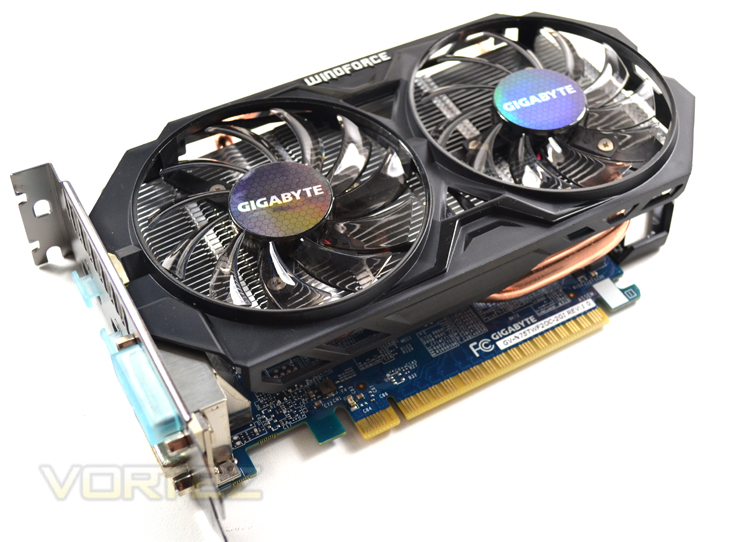
With an impressive factory overclock, we see that GIGABYTE have indeed increased the clockspeed from 1020MHz to a very healthy 1215MHz. The standard OC version rates at a mild 1033MHz so the overclock applied to this model is insane in comparison! The memory clockspeed remains the same however at 1350MHz so we expect further overclocks to be attained from at least the memory but also hopefully the core too. With the additional cooling provided by the now renowned Windforce design and a little extra power available, we expect this card to be quite a pocket rocket.
About GIGABYTE
Archetecture
Maxwell is the next step along the NVIDIA roadmap after Kepler. The focus with Maxwell is to improve performance per watt, in short improve GPU efficiency. To do this NVIDIA have created a new Streaming Multiprocessor (SM) that improves performance per watt. There are a variety of efficiencies that the new SM performs, including but not limited to logic partitioning, workload balancing, clock-gating granularity, compiler-based scheduling and increasing the number of instructions issued per clock cycle. These efficiencies have allowed NVIDIA to increase the number of SMs to 5 in the new GM107 core. This compares favourably to the two found within the GK107 core. Despite more than doubling the number of SMs, the die size only sees a 25% increase!
Above we can see a block diagram of the GM107 (GTX 750 Ti).
Each of the five SM includes a Polymorph engine and Texture units with the GPC having utilising the raster engine. The huge L2 cache and memory controllers are aligned to the ROPs with all of the above units redesigned and optimised to afford greater power efficiency.
A massive boost in L2 cache from 256KB found in GK107 to 2048KB on GM107 which means that fewer requests to the GPU DRAM are required, once again improving efficiency thus lowering the cards overall power draw. With a few more tweaks at transistor level, the end result means that Maxwell is capable of delivering twice the performance per watt of Kepler but still uses the same 28nm manufacturing process.
Above we can see a comparison between equivalent GM107 and GK107 architectures. Clearly GM107 appears to be more powerful, on paper at least with NVIDIA claiming an average increase of 1.7 X performance. Perhaps the greatest story here though is that this performance gain, with the GM107 based GTX 750 Ti, has a miniscule TDP of just 60W!
While it remains to be seen just how powerful the new Maxwell architecture is, if NVIDIA’s claims regarding the power efficiencies are to be believed they may well have a winner on their hands.
Specification
Memory Clock 5400 MHz
Process Technology 28 nm
Memory Size 2048MB
Memory Bus 128 bit
Core Clock Base:1033MHz Boost:1111MHz (Standard- Base:1020MHz Boost:1085MHz)
Card Bus PCI-E 3.0
Memory Type GDDR5
DirectX 11.2
OpenGL 4.4
PCB Form ATX
Digital max resolution 4096 X 2160(via 2 HDMI)
Analog max resolution 2048 x 1536
Multi-view 4
I/O Dual-link DVI-I*1/DVI-D*1/HDMI*2
Card size L=204mm , W=144 mm, H=42mm
Power requirement 400W
Features
G-SYNC
NVIDIA G-SYNC is groundbreaking new display technology that delivers the smoothest and fastest gaming experience ever. G-SYNC’s revolutionary performance is achieved by synchronizing display refresh rates to the GPU in your GeForce GTX-powered PC, eliminating screen tearing and minimizing display stutter and input lag. The result: scenes appear instantly, objects look sharper, and gameplay is super smooth, giving you a stunning visual experience and a serious competitive edge.
NVIDIA GPU Boost 2.0
This innovative technology allows gamers to push PC performance to the maximum with precise controls. GPU Boost 2.0 intelligently monitors work with even more advanced controls like GPU temperature target, overclocking, and overvoltage to ensure that the GPU works at peak performance.
GeForce Experience™
The easiest way to optimize your games and keep your drivers up to date, the GeForce Experience application automatically notifies you of new driver releases from NVIDIA. With a single click, you’ll be able to update the driver directly, without leaving your desktop. Plus, it offers exciting features like GeForce ShadowPlay™ that lets you capture and share your greatest gaming moments, automatically.
Two New Anti-aliasing Modes: NVIDIA FXAA™ and TXAA™
Anti-aliasing smooths out “jaggies” (jagged edges) but can be demanding on frame rates. Fast Approximate Anti-Aliasing (FXAA) is a new antialiasing technology that produces beautiful, smooth lines with minimal performance impact. And with Kepler™-based GPUs, you can enable FXAA in hundreds of game titles through the NVIDIA Control Panel.
The second mode, Temporal Anti-Aliasing (TXAA), is an in-game option that combines Multisample Anti-Aliasing (MSAA), temporal filtering, and post processing for even higher visual fidelity.
NVIDIA PhysX® Technology
Full support for NVIDIA PhysX technology enables a totally new class of physical gaming interaction for a more dynamic and realistic experience with GeForce.
NVIDIA 3D Vision-Ready
NVIDIA 3D Vision brings a fully immersive, stereoscopic 3D experience to the PC. A combination of high-tech wireless glasses and advanced software, 3D Vision transforms hundreds of PC games into full stereoscopic 3D. Get up to 2x monitor and keyboard brightness with NVIDIA 3D LightBoost technology. In addition, you can enjoy 3D movies and 3D digital photographs from 3DVisionLive.com in eye-popping, crystal-clear quality.
NVIDIA Surround with Up To Three Monitors
Nothing is as breathtaking as playing your favorite games across three monitors. At 5760 x 1080, the expanded field of view fully engages peripheral vision and provides for the most immersive experience in racing and flight simulators. Add in a fourth display to keep tabs on chat, email, or web while you’re gaming.
NVIDIA Adaptive Vertical Sync
Nothing is more distracting than framerate stuttering and screen tearing. The first tends to occur when framerates are low, the second when framerates are high. Adaptive V-Sync is a smarter way to render frames. At high framerates, VSync is enabled to eliminate tearing. At low frame rates, it’s disabled to minimize stuttering.
NVIDIA GameStream
NVIDIA GameStream™ is an innovative new technology designed to give you over-the-air access to PC games using a wireless device. GameStream delivers super-smooth, low-latency gaming from a GeForce® GTX™ PC or an NVIDIA GRID™ cloud gaming system to your portable device.
Packaging & First Look
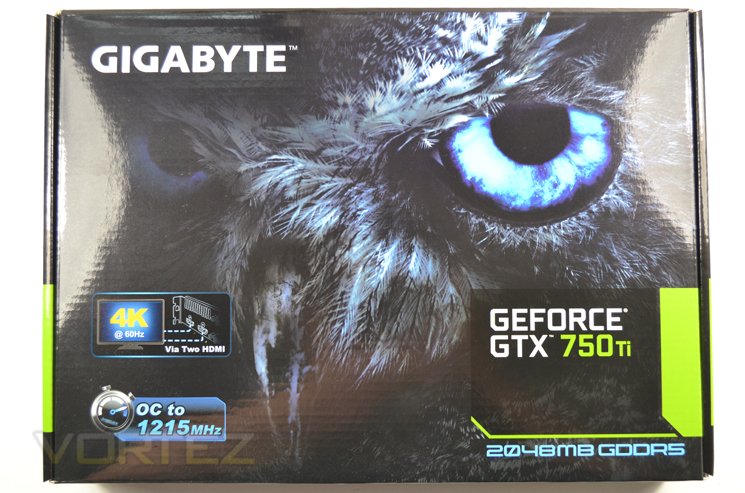
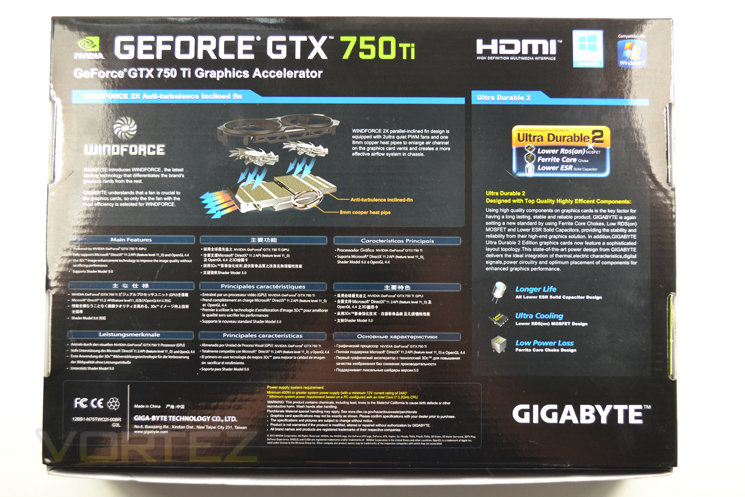
The packaging features familiar GIGABYTE styling with a neon blue lettering with glossy black background. The front of the box shows us two key features such as 4k capability (via 2x HDMI cables) and of course that this card is overclocked. To the rear of the package we see a breakdown of the Windforce cooler and an explanation of Ultra Durable 2 which is basically enhanced components providing longer life and greater efficiencies that the reference power design.
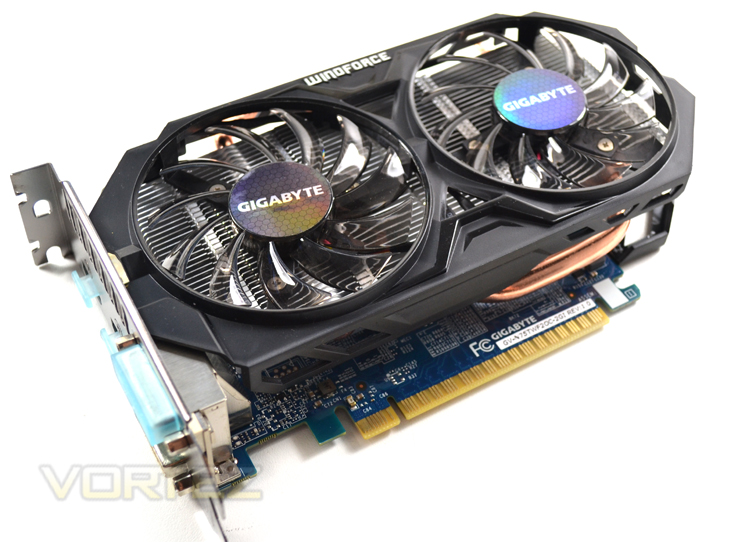
The card itself again, looks very familiar due to the now well recognised Windforce design. This example uses an updated version of the Windforce cooler which in our opinion is much better quality and less lone the break due the more rigid, steel rather than plastic shroud.
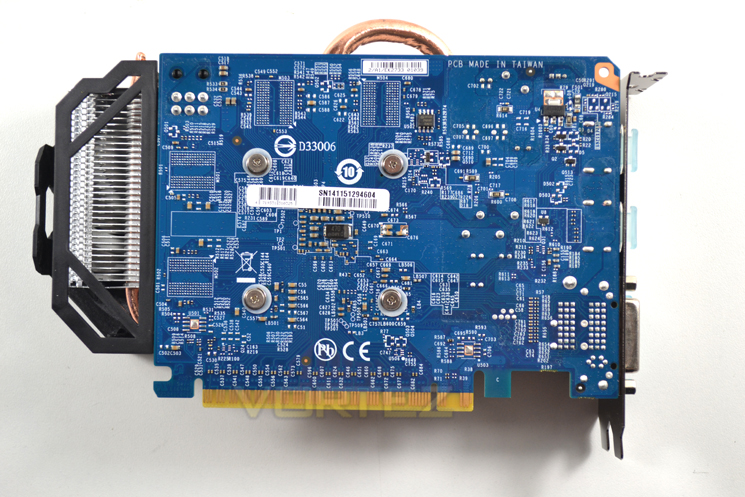
Sadly, the updated Windforce design is met with the older blue silk-screening process for the PCB. While we are not averse to blue, we feel black would be a much more amiable colour to use. We can also see that the cards PCB is overhung by the Windforce cooler by a fair margin which is a shame as the card’s size is one of the many features that appeals to gamers who may be short on space.
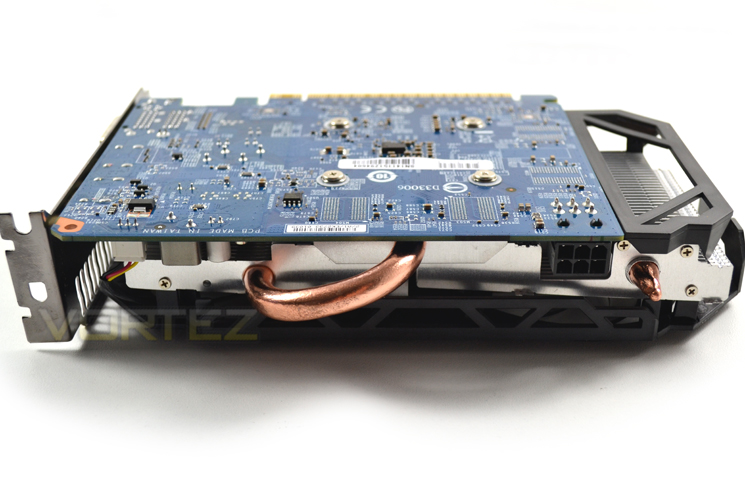
A single copper heatpipe springs out from the heatsink hinting at the cooling prowess of the Windforce design. You may also notice that the GIGABYTE GTX750 Ti OC has a 6pin power socket where the reference has none. Interesting!
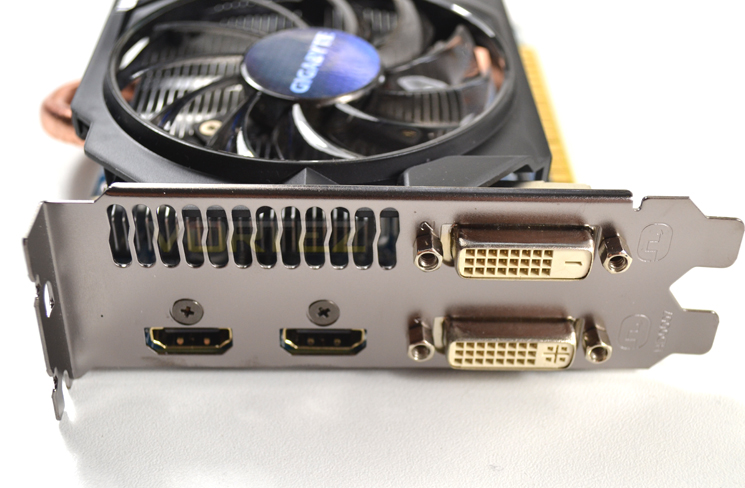
The IO area is interesting in that there are no DisplayPorts. Instead we see NVIDIA have included twin HDMI ports (ideal for 4K @60Hz), a DVI-D and DVI-I port.
Let’s take a closer look…
Closer Look
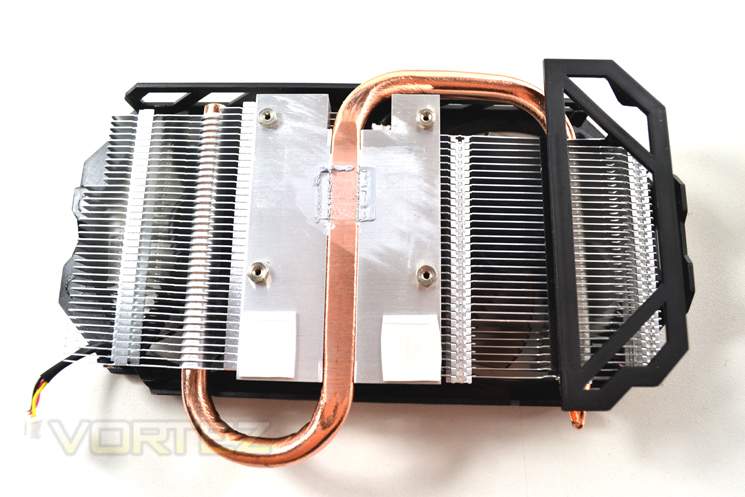
The heatsink is made up of the Windforce Twin PWM fans that are parallel inclined to match the parallel inclined aluminium finned heatsink below. There is a further aluminium block through which twists a single, flattened 8mm copper pipe. This heatpipe assistS with heat dissipation across both sections of the finned heatsink array.
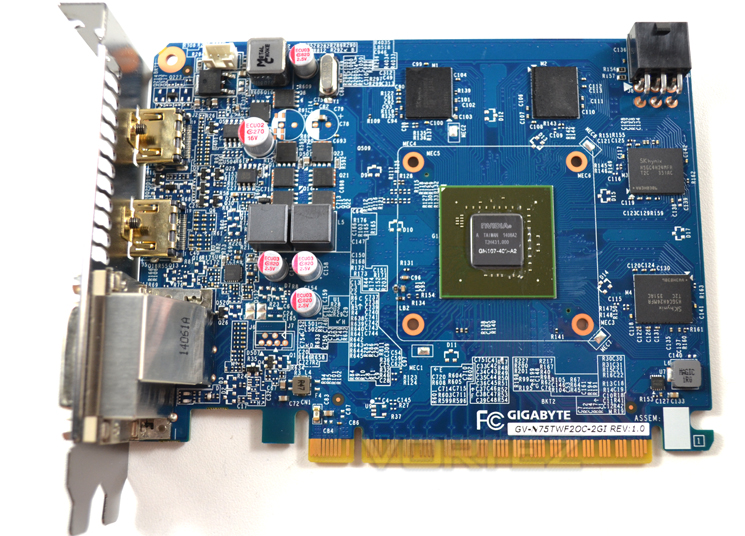
With the heatsink removed we find a similar PCB to reference with a 2+1 phase design and 4x512MB memory chips framing the main processing unit. The GIGABYTE card however features beefed up chokes and an extra capacitor to assist with the extra power delivery available to this component.
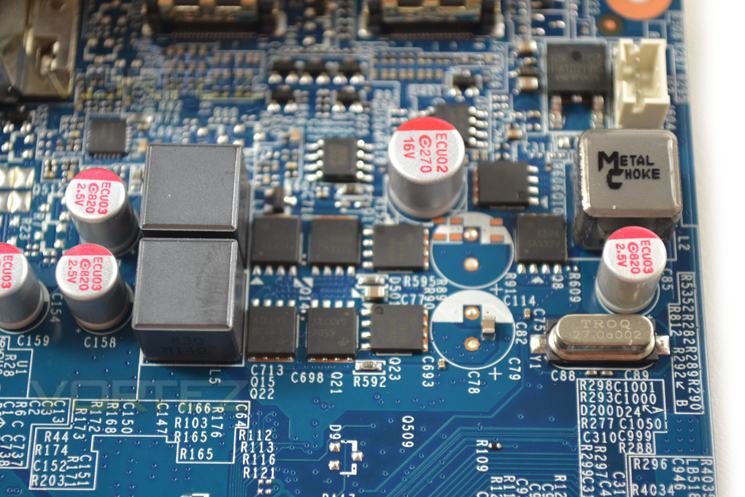
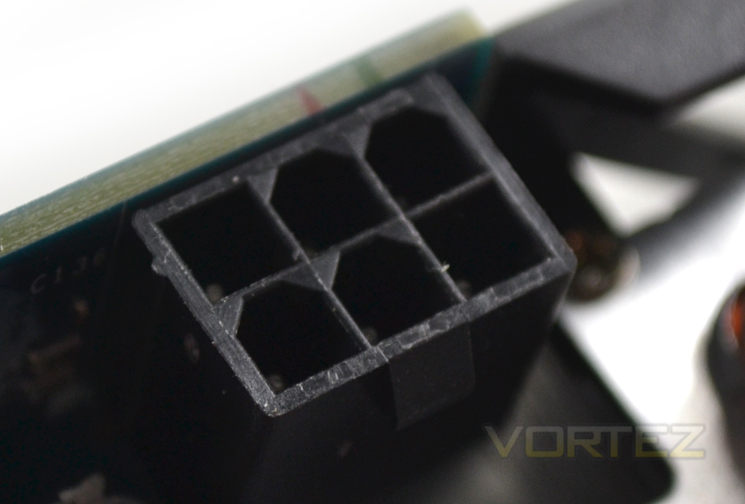
Speaking over power, above is the main VRM of the card along with a shot of the 6pin power socket. This allows the card to draw on double the available power of the reference design (150W vs. 75W). The reference design can only draw its power from the PCIe socket where the GIGABYTE design has both PCIe and direct PSU power available.
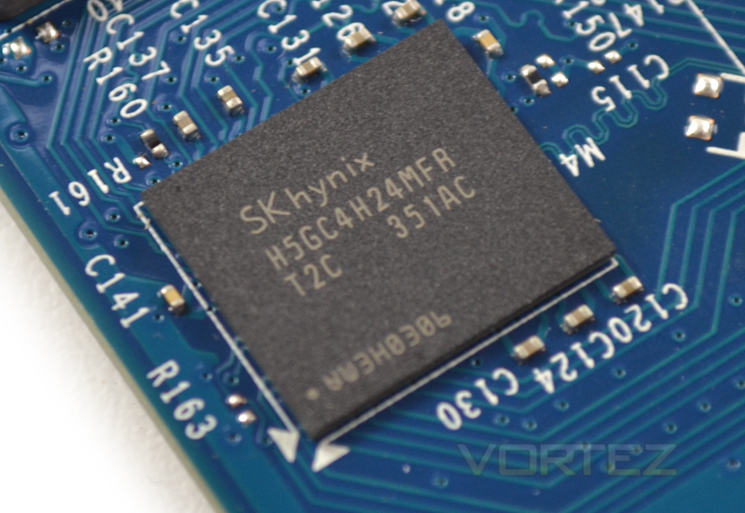
The memory available on the card comes in the form of 4x512MB GDDR5 chips courtesy of SKHyinx carrying the product code of H5GC4H24MFR T2C so should be good for some high memory overclocks.
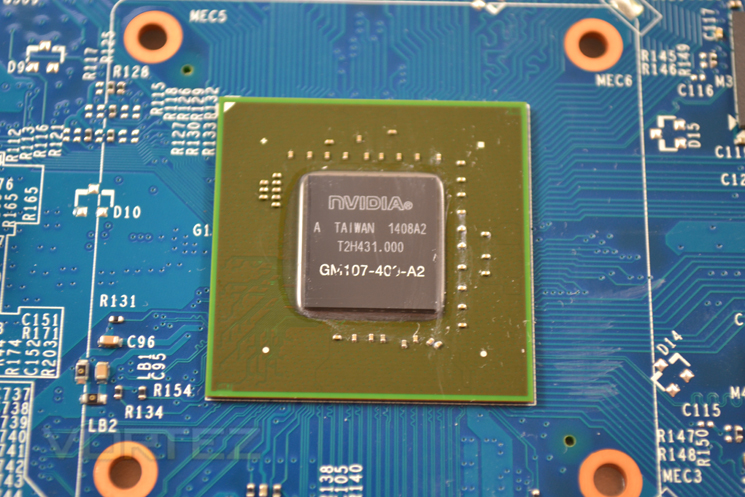
At the heart of the card we find the first example of NVIDIA’s Maxwell core. This sliver of silicon promises much for the future of NVIDIA and while this is only a low-end example, a full blown Maxwell core is expected to be the cream of the crop come release time.
Test Setup & Methodology
How we test graphics cards
Testing a graphics card is an extremely lengthy process. We sometimes see reviews where a graphic card has been tested using out of date equipment, out of date games and out of date drivers. While the latter can be excused due to the sheer amount of driver updates making a thorough review impossible we will however notify the reader when we have used a different driver to the normal for example a pre-release driver. For the most part however we will always use the same hardware and where possible the same drivers unless a newer driver rectifies an issue we have encountered or significantly improves performance to such an extent that continuing with an outdated driver is not feasible.
Frame Time Analysis
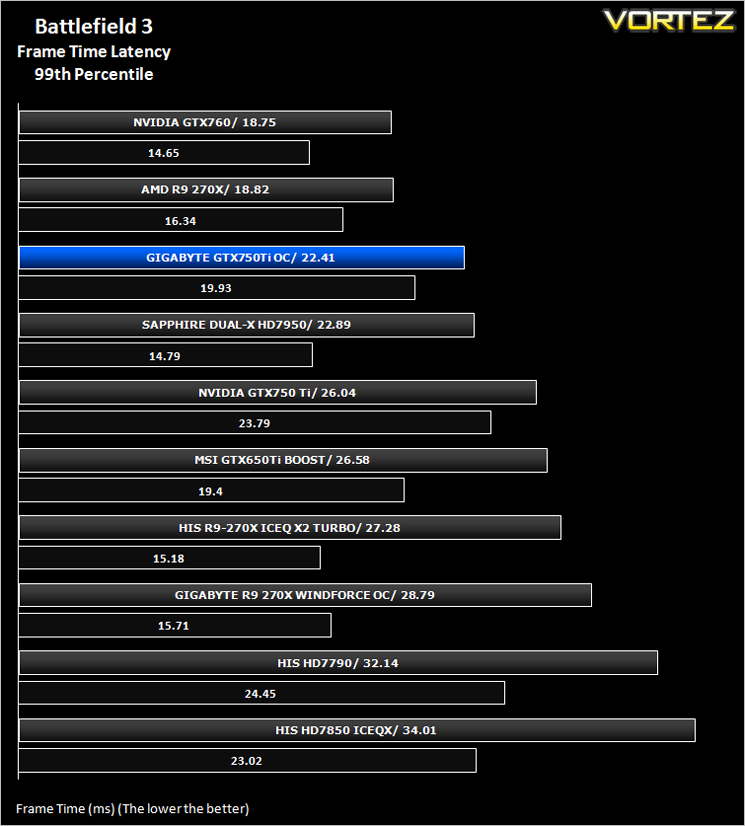
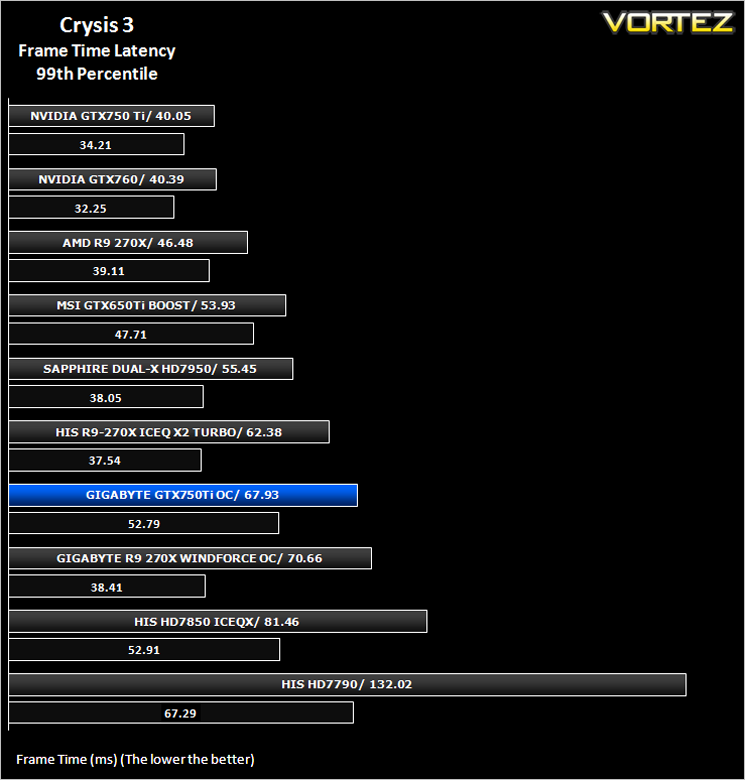
We have also seen the emergence of frame time analysis. We covered this in a separate article here: GPU Reviews: Why Frame Time Analysis is important so we won’t go into the reasoning again but to summarise, our testing comprises both FPS testing and perhaps arguably more importantly, frame time analysis. We also look at overall performance by equating averages across the games and finally before concluding our review we take a look at value for money.
HardwareWith the latest Intel chipset release we decided to update our ageing X58 setup to the new X79 chipset. Not only that but we will be using the flagship Core i7-3960X Extreme Edition processor clocked to 4.5GHz to ensure we have no CPU bottlenecks. With 16GB of ram on board there should be minimal paging so the benchmarks we run today will hopefully give a true reflection of the graphics card’s performance.
Mid-Range Graphics cards on test:
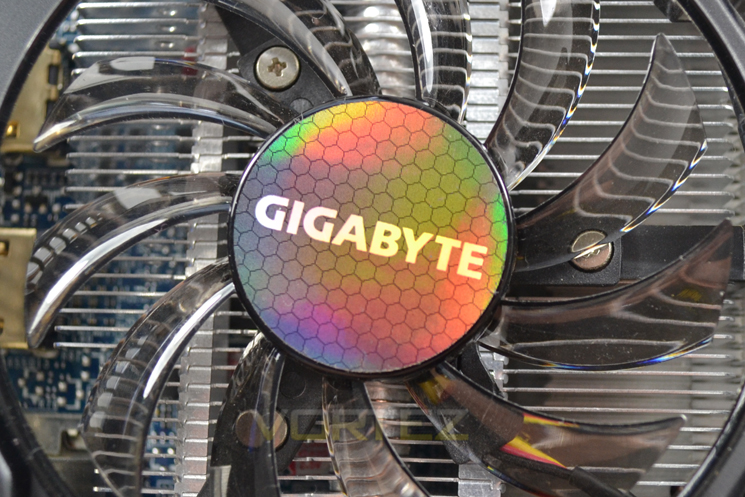
NVIDIA GTX 750 Ti 2GB GDDR5 (Forceware 334.69)
HIS R9 270X ICEQ X2 TURBO2GB GDDR5(AMD CAT 13.11 beta 9.2)
GIGABYTE Windforce OC R9 270X 2GB GDDR5(AMD CAT 13.11 beta 9.2)
AMD R9 270X 2GB GDDR5(AMD CAT 13.11 beta 5)
NVIDIA GTX760 2GB GDDR5(Forceware 320.39)
SAPPHIRE HD7950 3GB GDDR5(AMD CAT 13.3 beta)
HIS HD7850 IceQ X 1GB GDDR5(AMD CAT 13.3 beta)
HIS HD7790 IceQ Turbo 1GB GDDR5 (AMD CAT 13.3 beta)
MSI GeForce GTX 650Ti BOOST OC 2GB GDDR5 (Forceware 314.22)
CPU: Intel Core i7-3960X Extreme Edition @ 4.5GHz
RAM – 16GB (4x4GB) Corsair Vengeance (Red) DDR3 @ 1866MHz 9-10-9-27
Power Supply – Thortech Thunderbolt Plus 1200W
Hard Drive – Kingston HyperX 240GB
Cooler – Corsair H100
Benchmarks
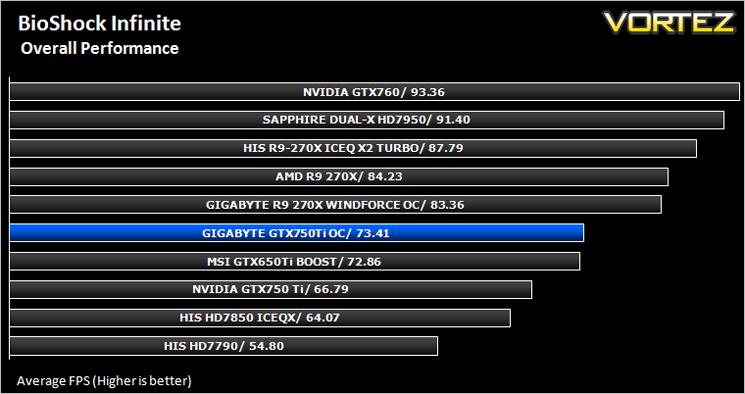
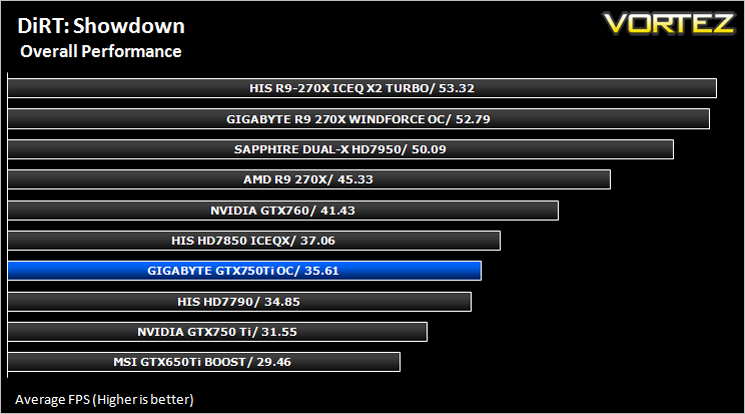
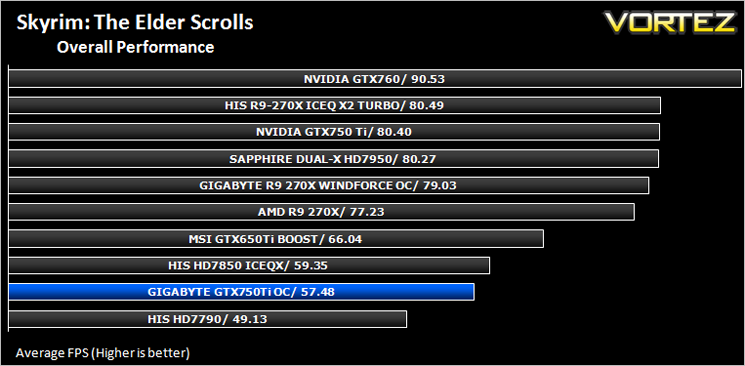
If you are a regular reader of our reviews you will know we like to test the latest hardware with the latest games and benchmarks on the market. Here are the games we have chosen:
Crysis 3
Far Cry 3
BioShock Infinite
DiRT: Showdown
The Elder Scrolls: Skyrim
We also take into consideration the benchmarkers out there so have included 3 of the more popular synthetic benchmarks available:
Unigine: Heaven 4
Futuremark 3DMark Firestrike
Let’s see how today’s graphics card performed…
Temperature, Acoustics and Power Consumption
Power Consumption
To test for power consumption we use the included iPower Meter found with our Thortech PSU. As system load figures obviously differ from idle it is extremely difficult to get an accurate figure of system draw and then simply take this figure away from the overall amount because each game will generate varying levels of CPU and hard drive activity. Dynamic power adjustments which fluctuate in game will also affect accurate power figures thus rendering any such power consumption calculations redundant at worst and approximate at best.
We will therefore take our system readings averaged over a benchmark run of Tessmark (100% load) and after 20 minutes of being idle in Windows 7. These can then be used as a comparison to other graphics cards to determine how much more or less power you can expect a GPU to consume.
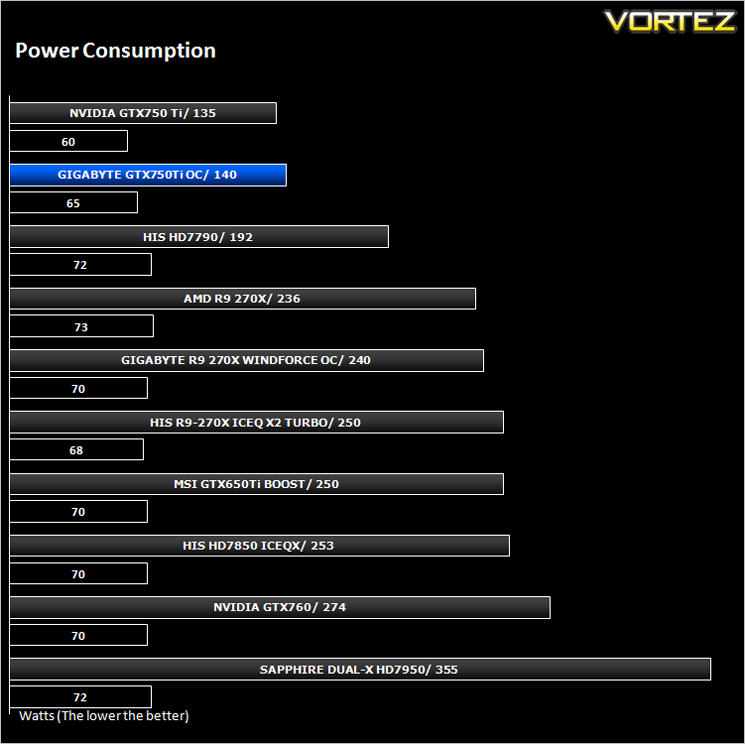
Consuming just a little more than the reference design this is quite a good result from GIGABYTE considering the extra power port.
Temperature
To test temperatures we measured idle temperatures after booting windows, letting all applications finish loading and ran a few benchmarks. Once the benchmarks were complete we left the card to reach a cooling plateau where we then took the idle temperatures. For the load tests, we would normally run Furmark for 20 minutes, taking the absolute maximum temperature attained however we found that this throttled the card and resulted in spurious results. So we set Heaven running continuously for 20 minutes and used this as a temperature result as the card did not throttle with this application.
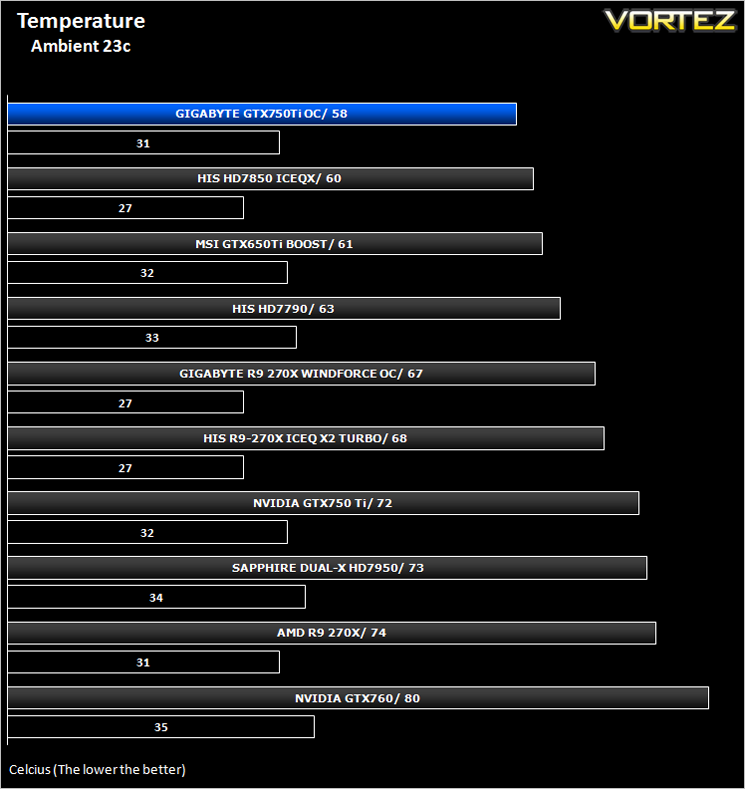
As we previously wrote, the NVIDIA GTX750 Ti would be a seriously cool running card with additional cooling and as you can see above that despite the extra clockspeed and power pumping through the core, the Windforce design coupled with Maxwell technology proved to be a very cool runner.
Acoustics
Silent. That is pretty much the only word to describe the card under normal operating conditions. We certainly couldn’t hear it over good case fans. While there was some noise when manually setting the fans to 100%, there is really no need to do this as the card is cool enough without manually raising the fan speed profile.
Gaming Experience (Frame Time Analysis)
Some claim this should be the way graphics cards are tested and we won’t argue here because there is little point in having a card which churns out an average 100FPS if it has micro stutters lasting 50ms (GPU response time) which spoils the fluidity of the game.
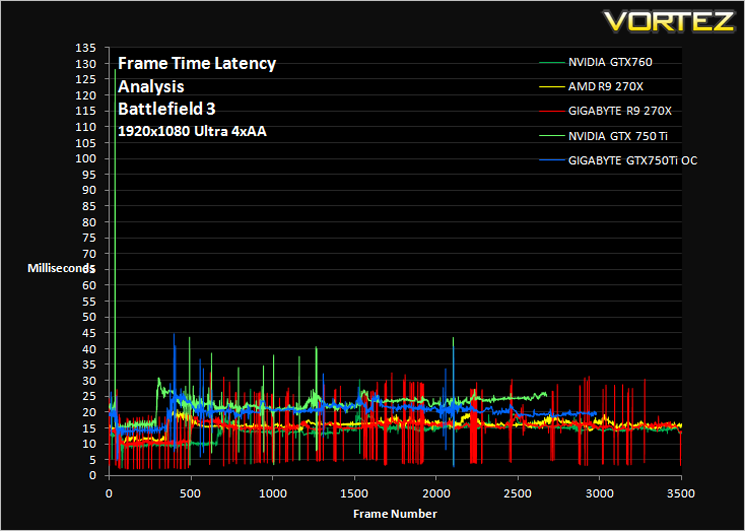
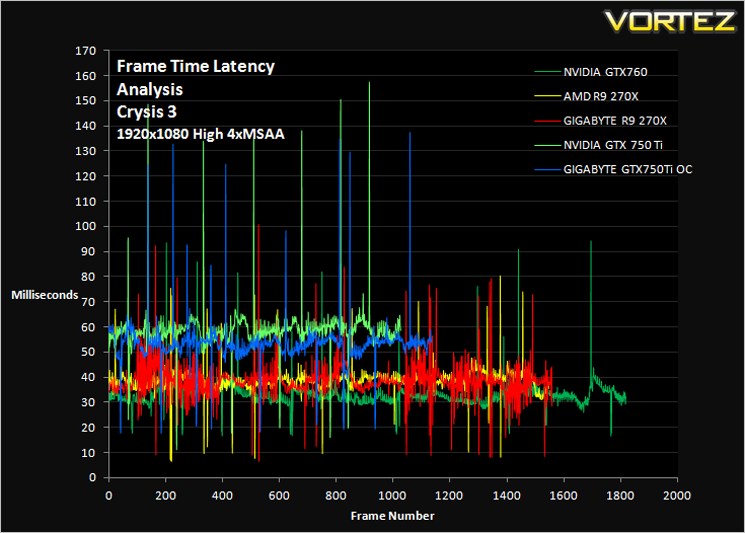
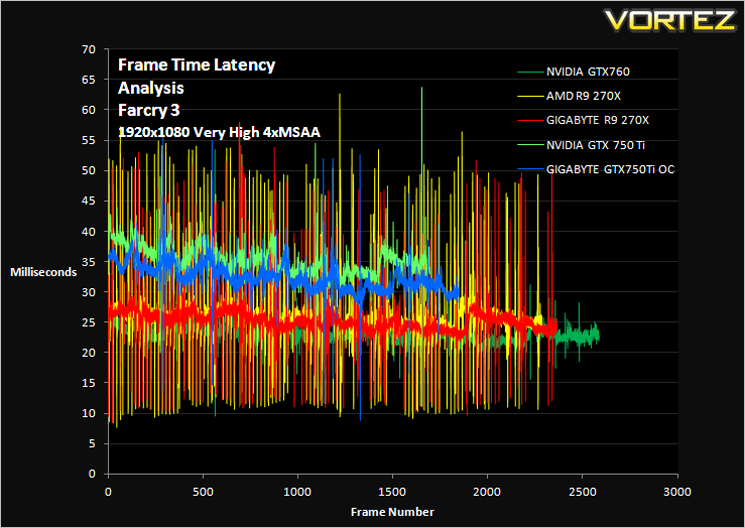
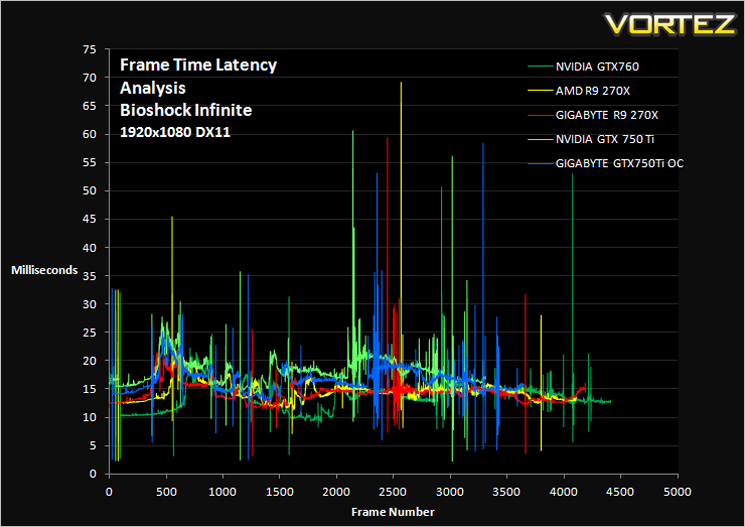
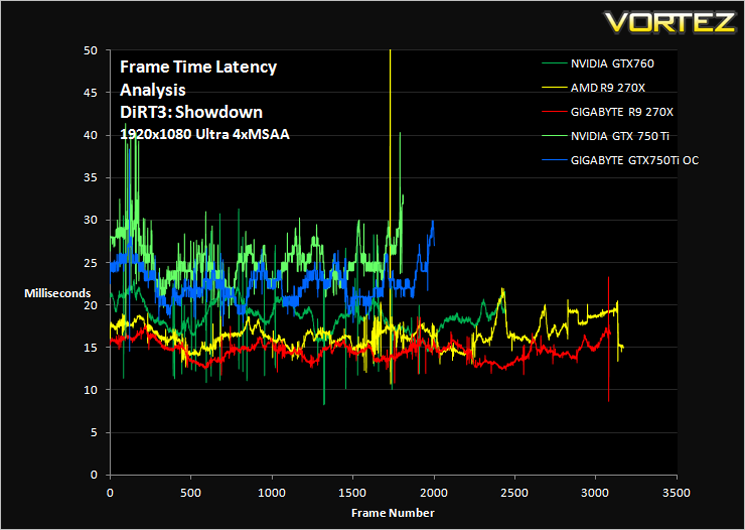
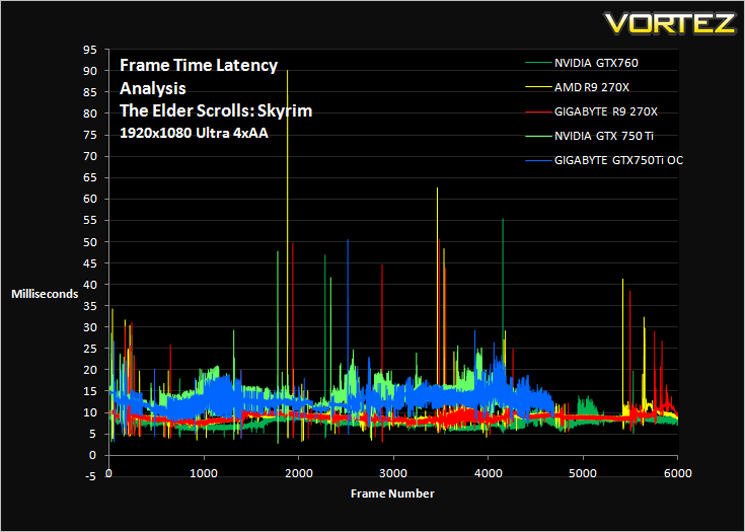
Comment
Average and 99th Percentile response times (Frame Time Analysis)
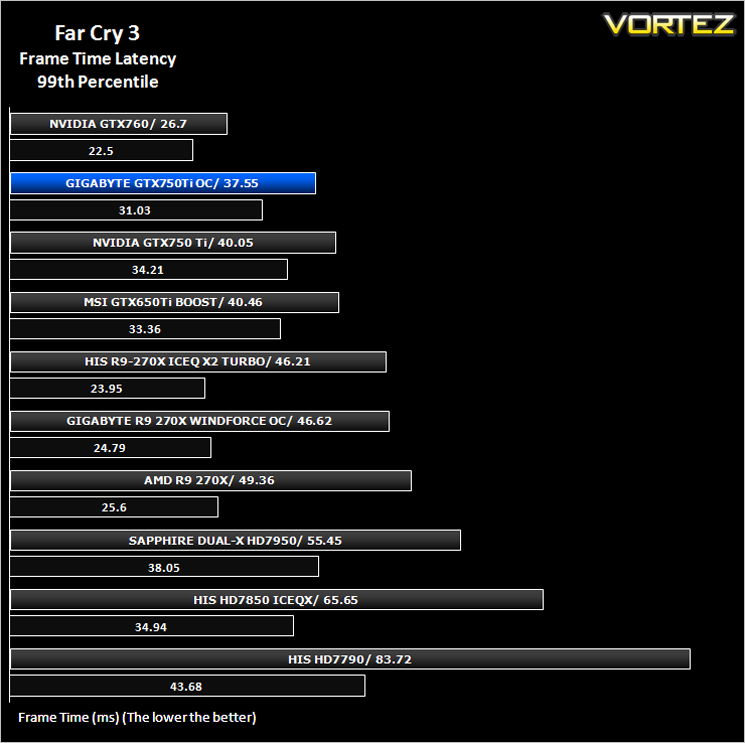
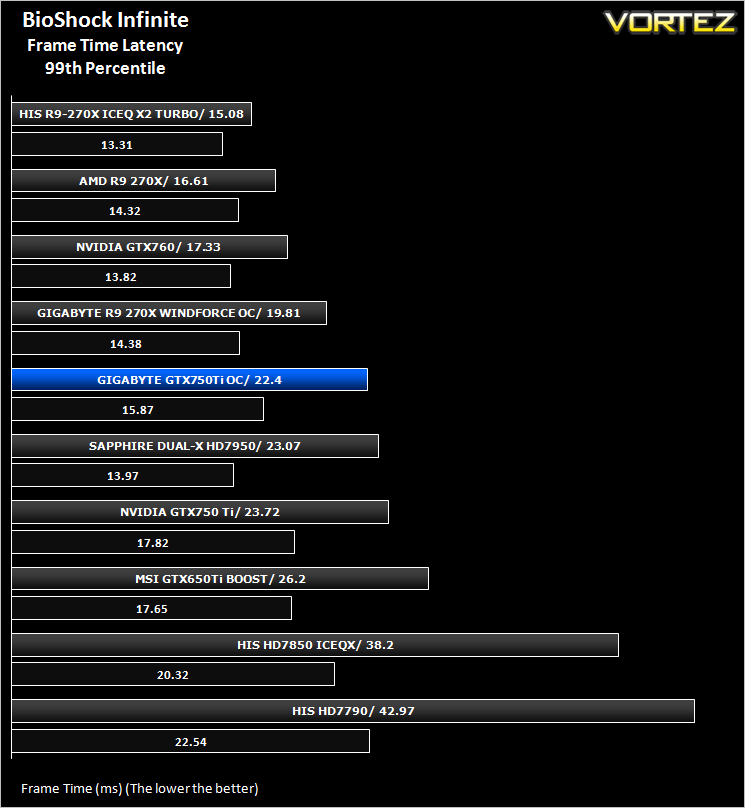
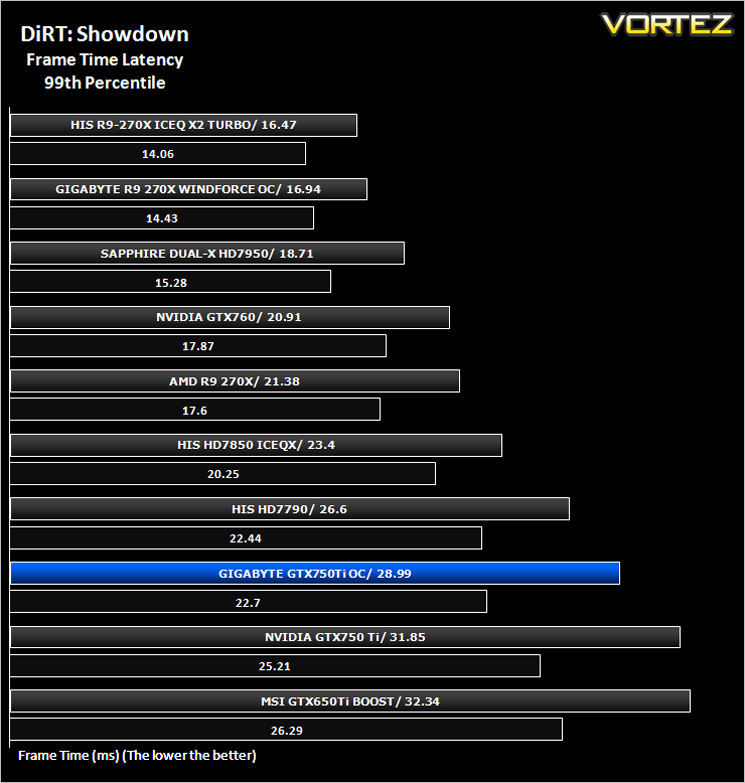
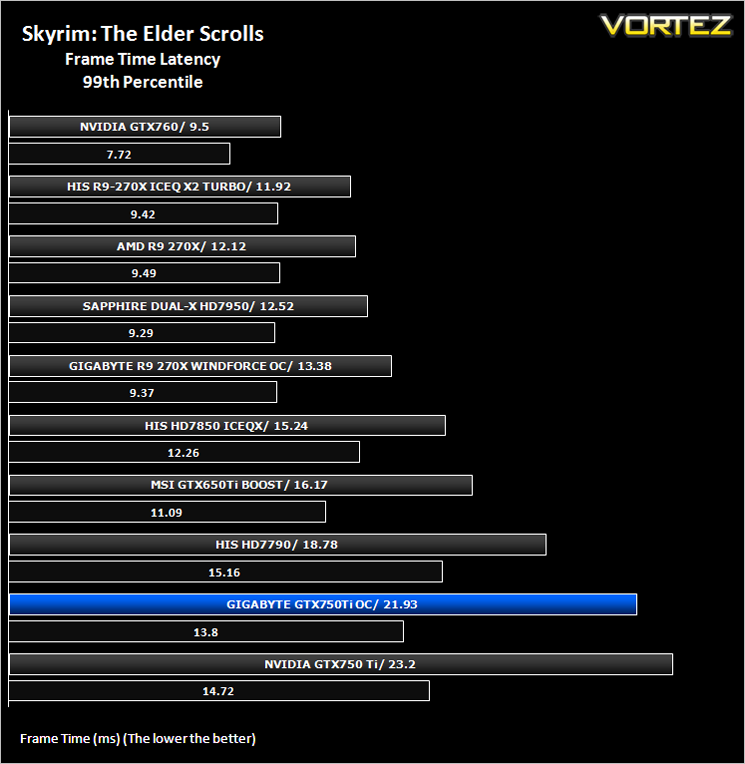
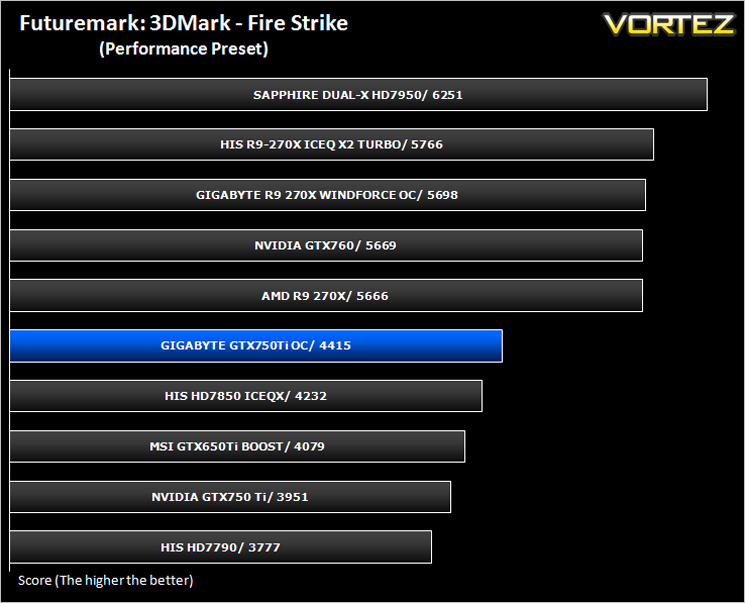
Futuremark 3DMark Fire Strike (Synthetic)
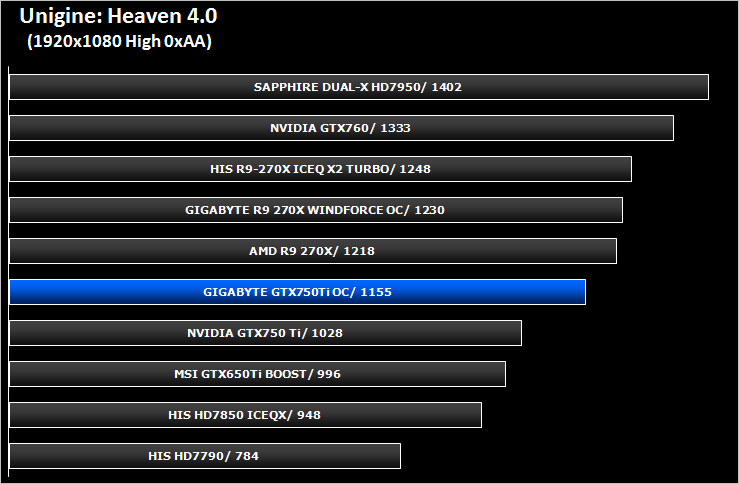
Unigine: Heaven 4 (Synthetic)
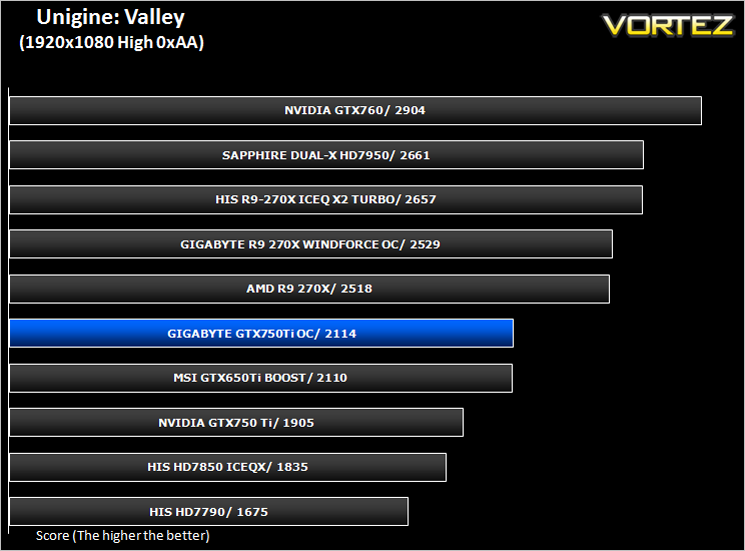
Unigine: Valley (Synthetic)
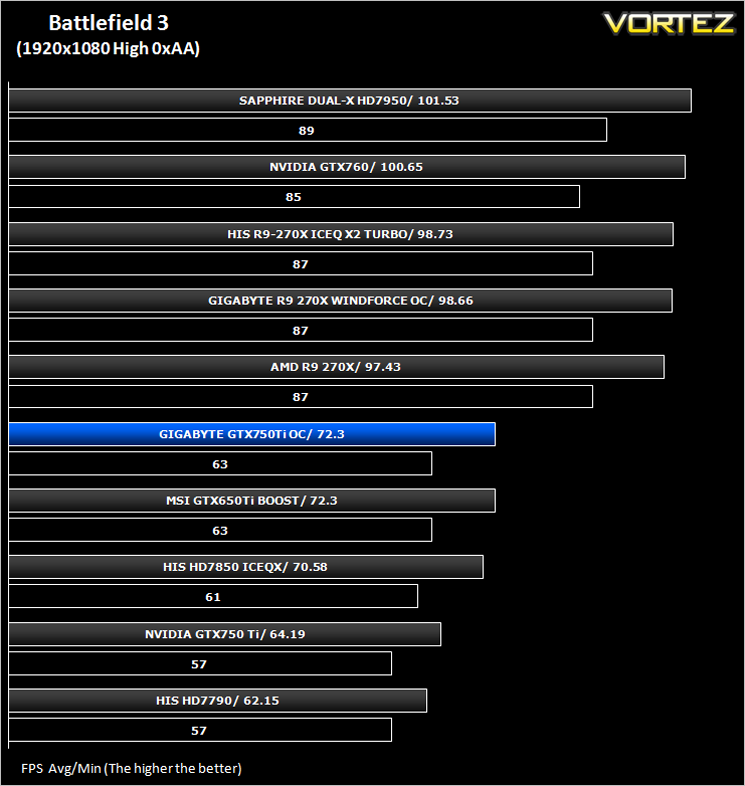
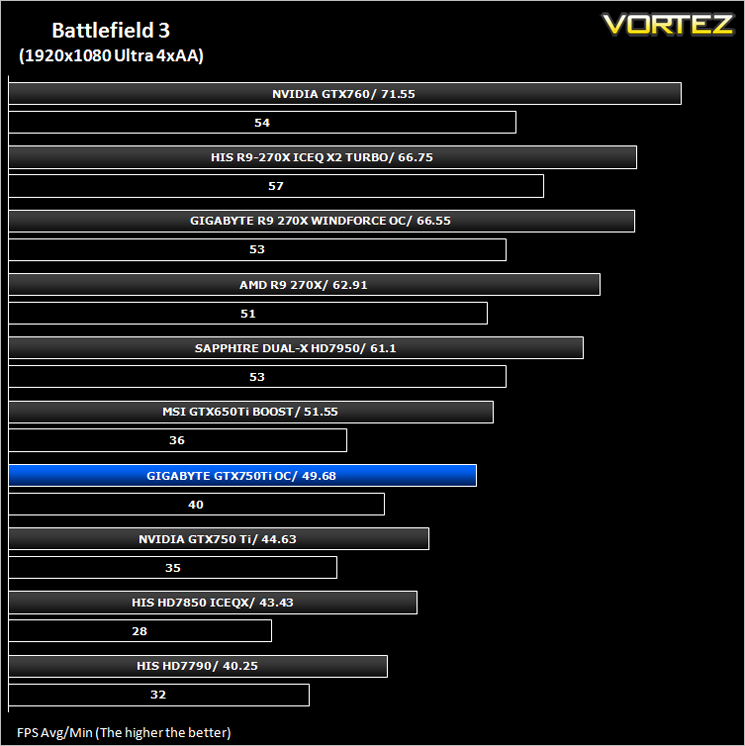
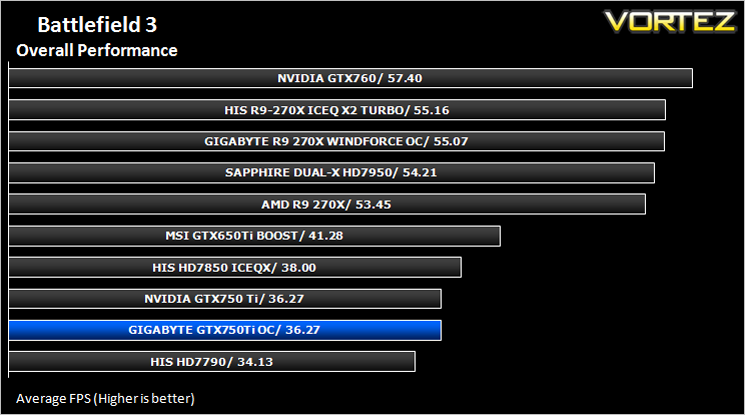
Battlefield 3 (FPS)
Average and minimum frames per second were measured using Fraps during the parking lot scene on Operation Sword Breaker. High and Ultra presets were loaded at both resolutions.
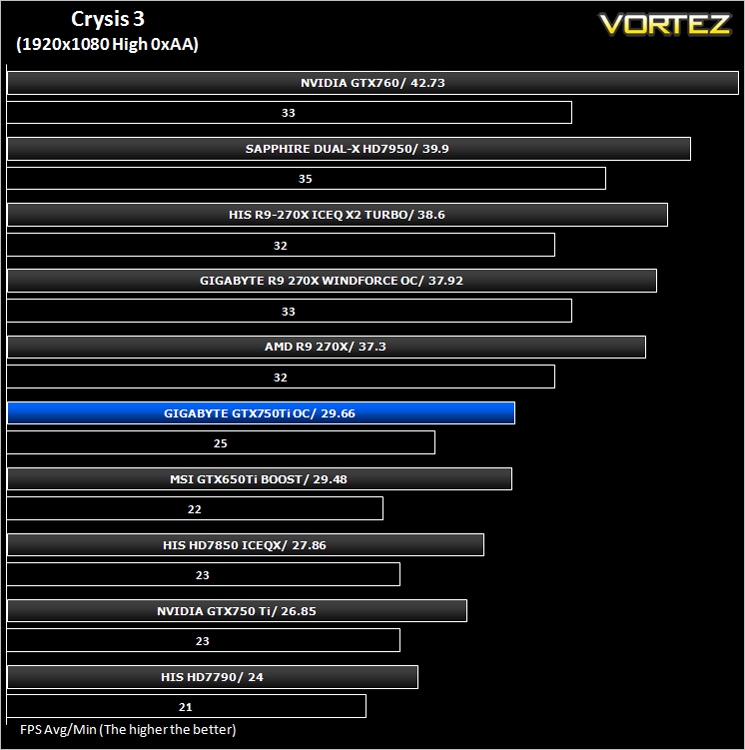
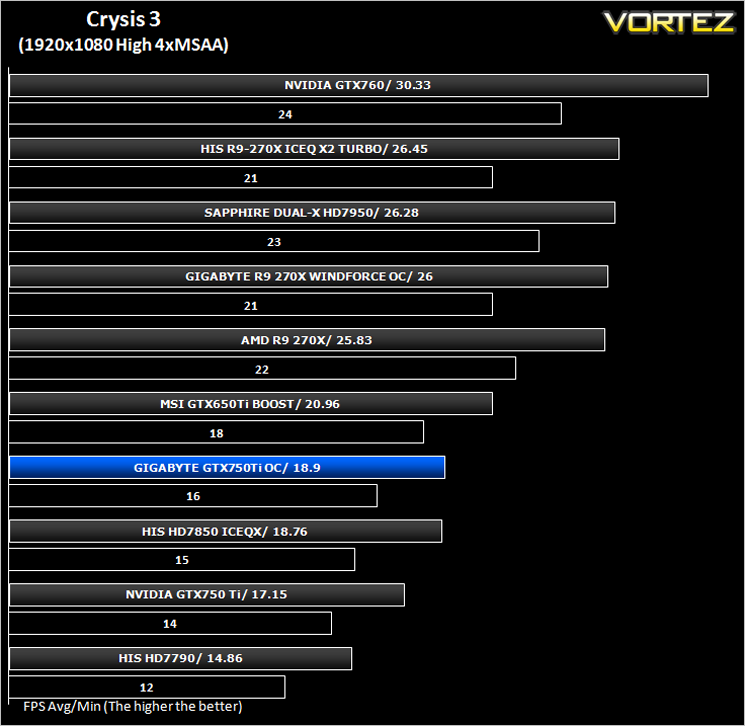
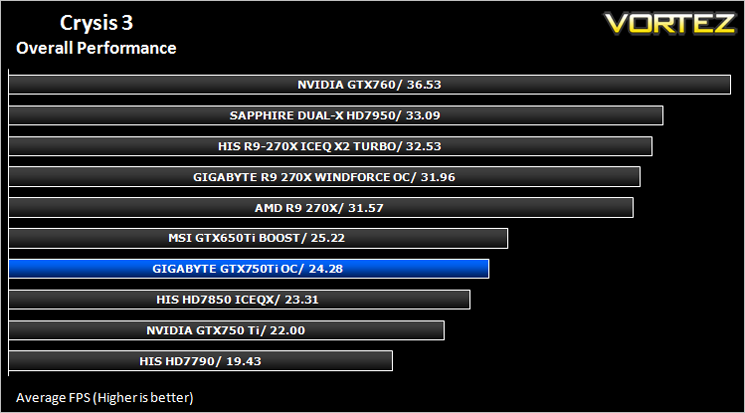
Crysis 3 (FPS)
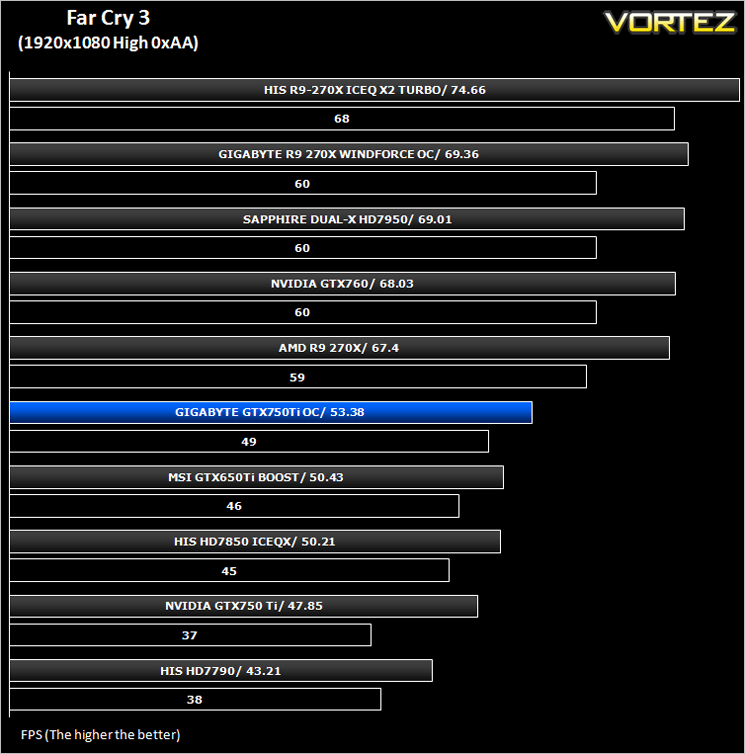
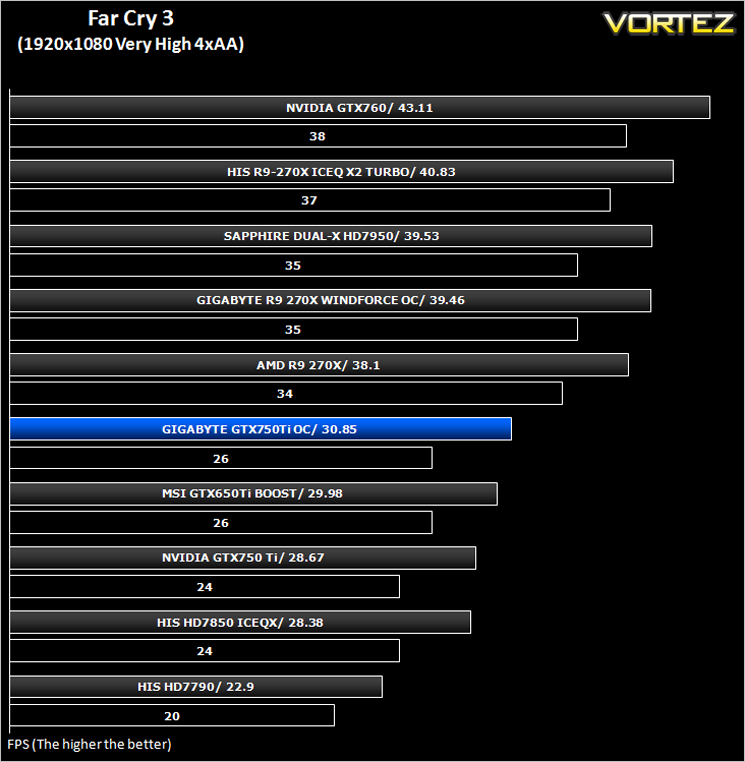
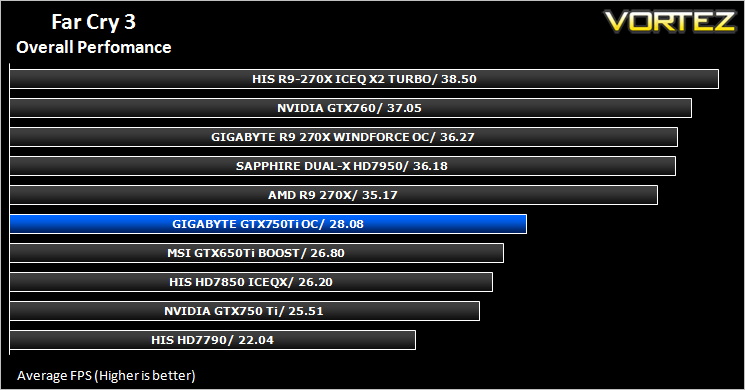
Far Cry 3 (FPS)
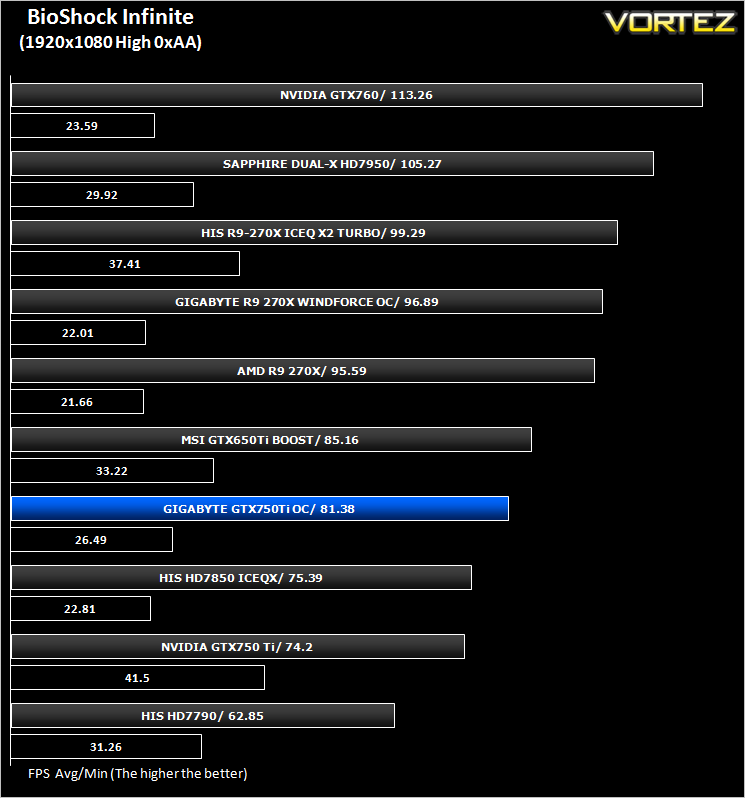
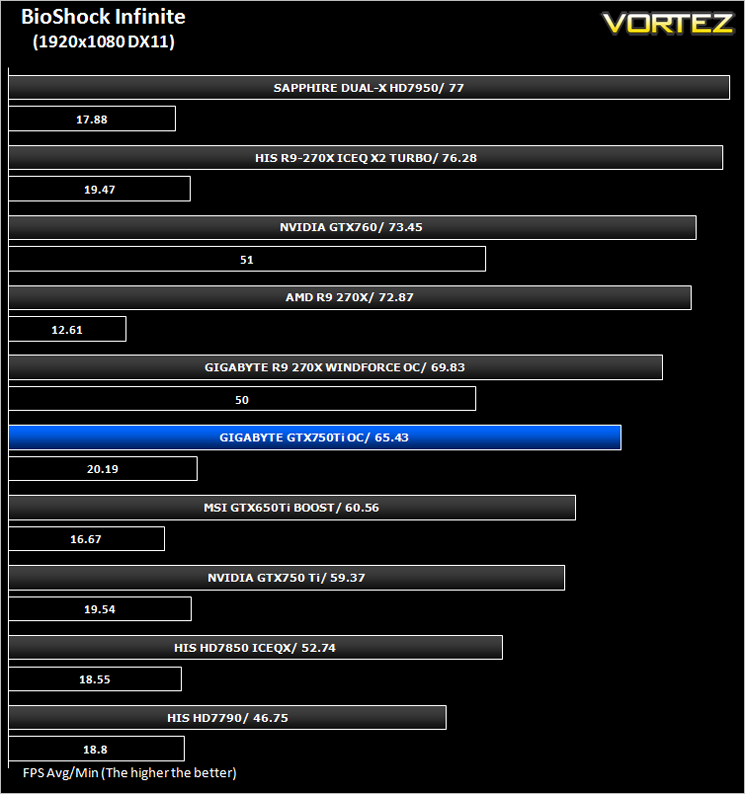
BioShock Infinite (FPS)
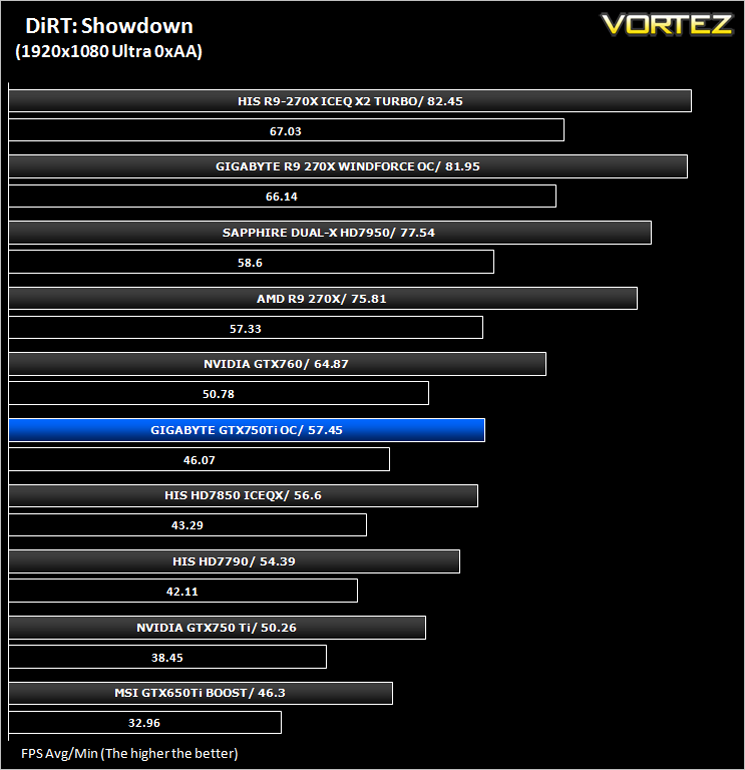
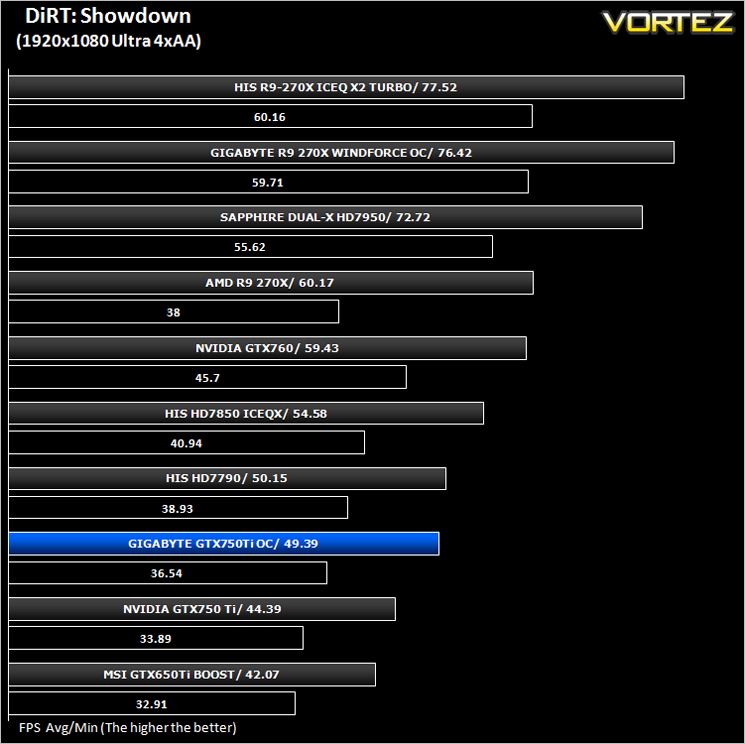
DiRT: Showdown (FPS)
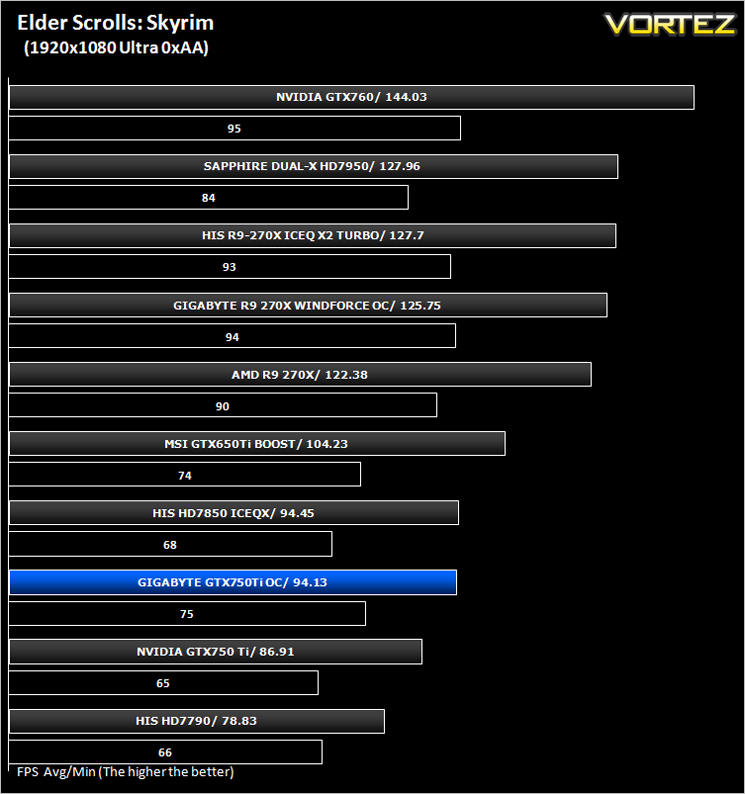
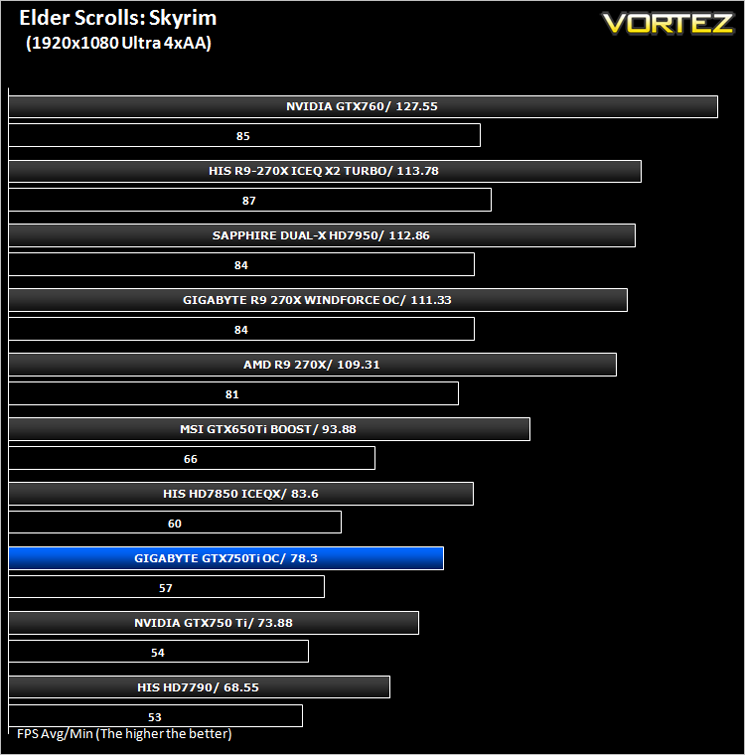
The Elder Scrolls: Skyrim (FPS)
Average and minimum frames per second were measured using Fraps during the drop down passage to Riverwood. V-sync was disabled to allow fluctuating (higher the 60) FPS for these runs. It is however recommended that v-sync is left enabled during normal gameplay due to the games dynamics.
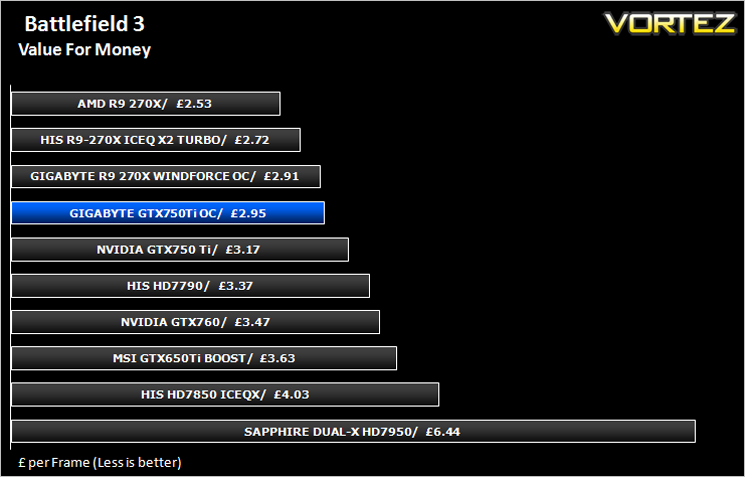
Value For Money
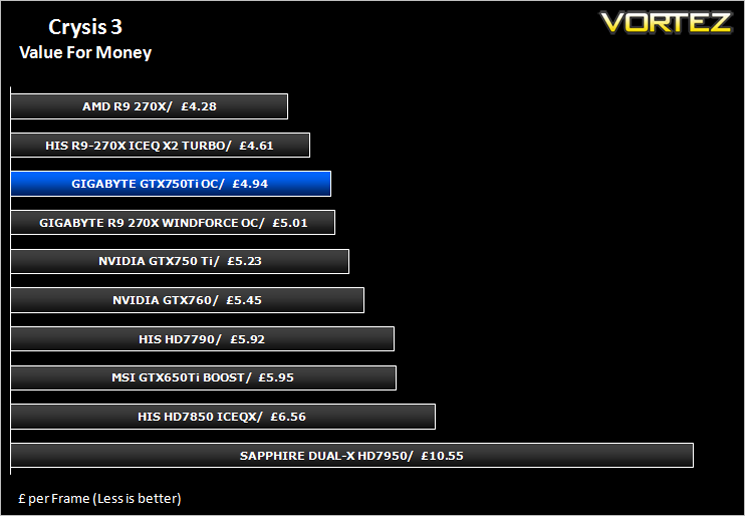
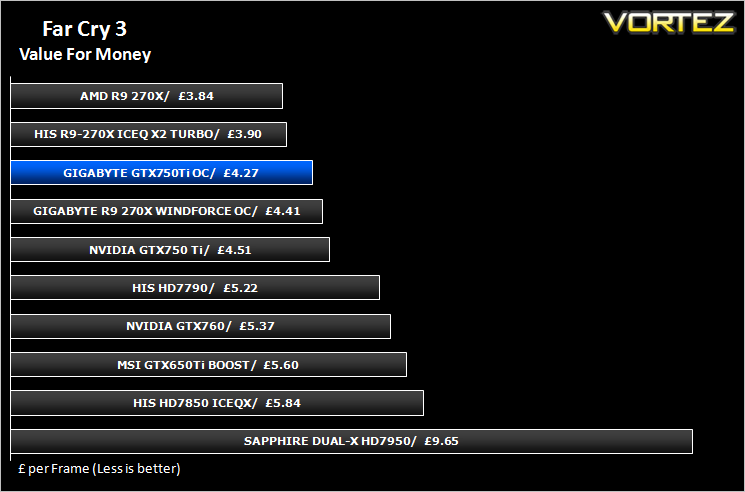
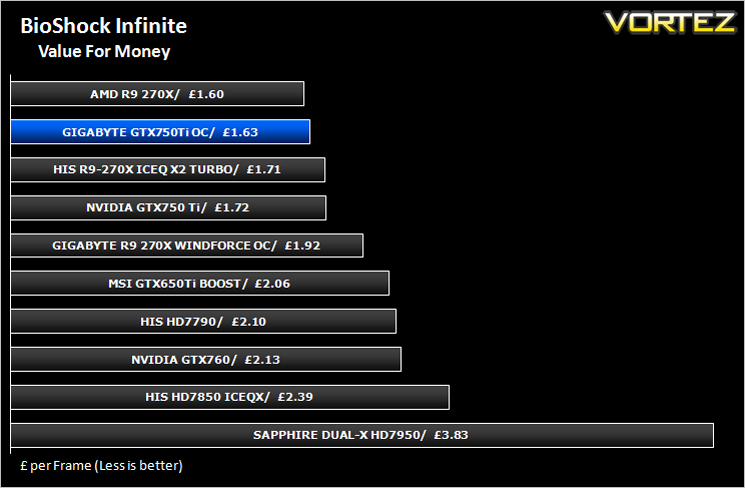
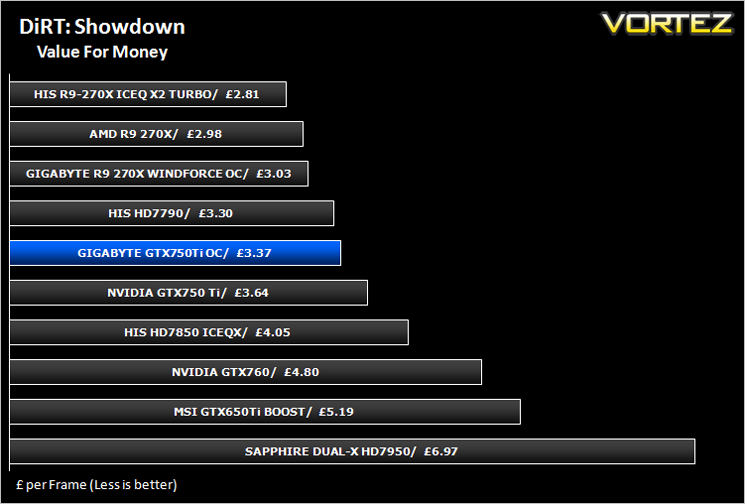
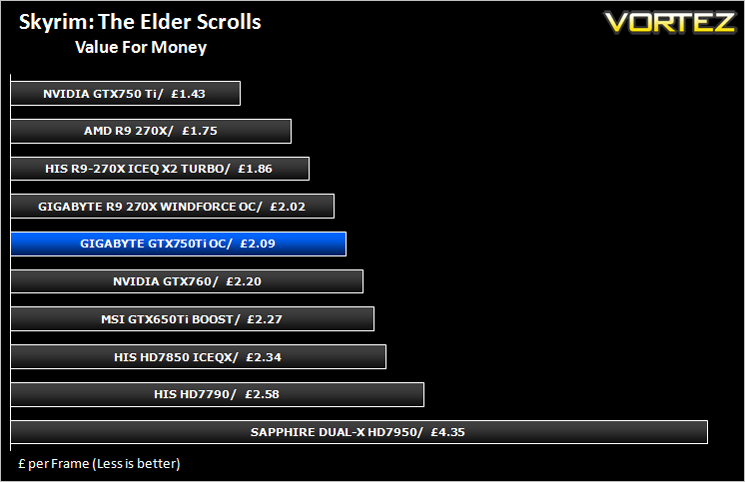
Overall Performance
Overclocking
For overclocking the NVIDIA card we will be using the latest version of GIGABYTE OC GURU as this gives us all of the options we require.
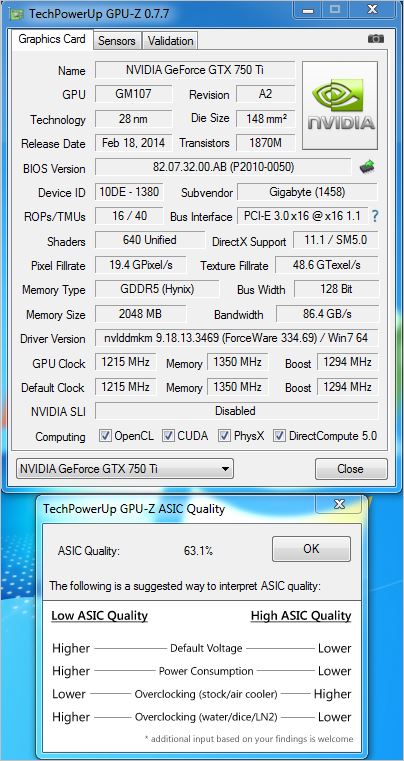
Above is a screenshot of GPU-Z showing the factory overclock of our sample.
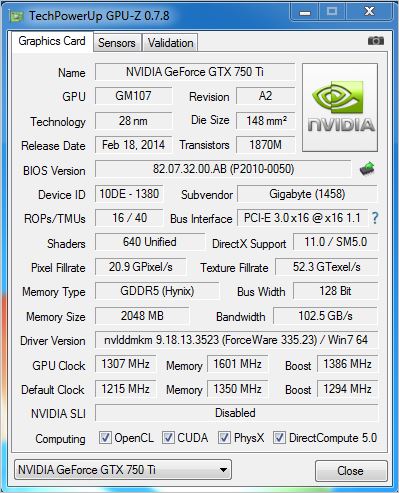
We hit 1284MHz with the reference design which we thought was exceptional. The GIGABYTE card surpassed this breaking the 1300MHz barrier which is no mean feat when you consider the baseclock on this model was already 1215MHz. Bizarrely, the card did not lock up past this however it massively reduced performance, reducing the on-screen display to little more than single figure stutters. Nevertheless, 1300MHz is quite astonishing and raises the performance of the card to that of cards a more expensive ilk.
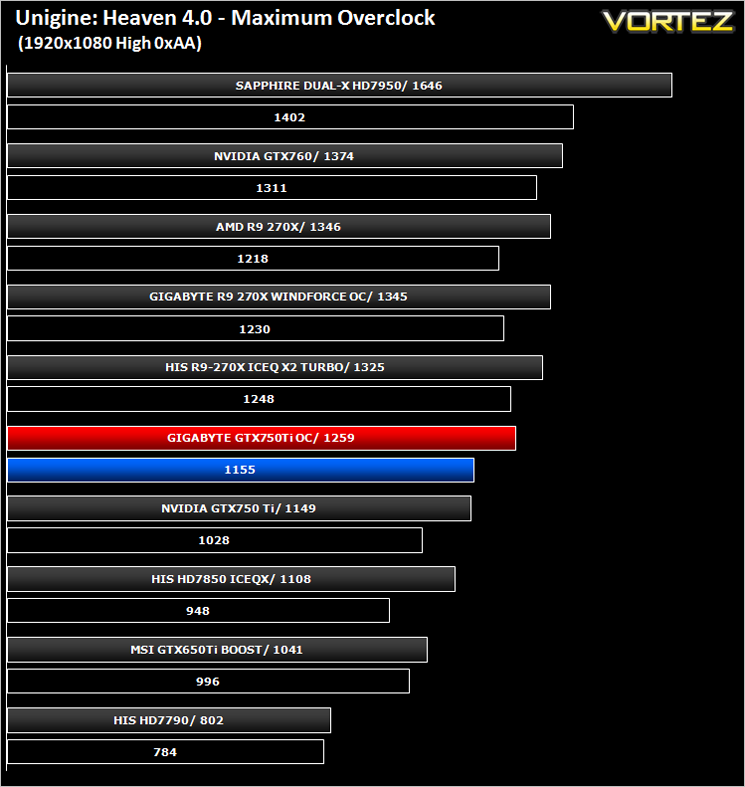
Above you can see the effects the overclock (red) had on the stock score (blue).
Conclusion
We are huge fans of GIGABYTE here at VORTEZ and this is yet another example of why. They make good products better. The NVIDIA GeForce GTX 750Ti was never meant to be the fastest card out of the blocks but the features it does possess impress. It is requires very little power to churn out respectable FPS making entry level gaming on a 1920x1080p display feasible. GIGABYTE added to this performance by increasing the core clockspeed and if that were not enough then they also had the foresight to appease overclockers by leaving a good amount of headroom for us to play with. Of course, there are faster graphics cards on the market. The AMD 270X beats it squarely however it also costs considerably more.
For £120, today’s example seems to be a fair price. Just a power adaptor and instruction booklet were included with the sample which is forgivable as this will keep costs down. Perhaps our only complaint, and it is just a small one, is that coloured PCBs should be banished along with the Beige PC enclosures of yesteryear.
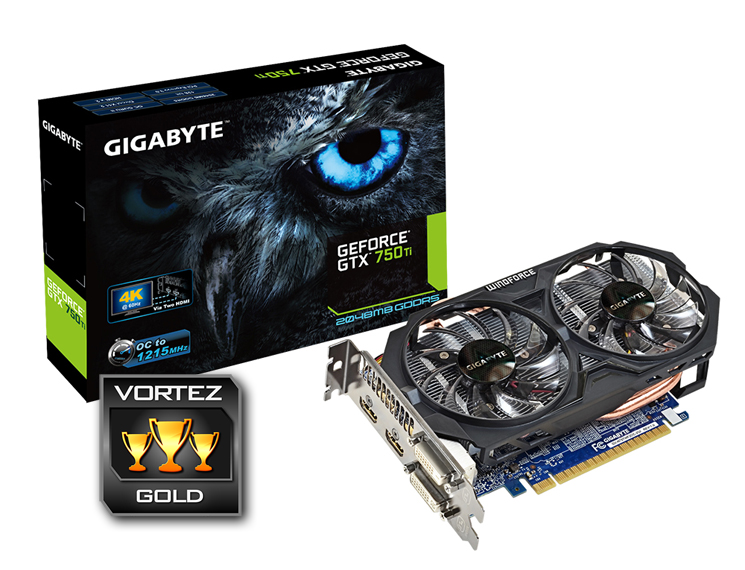
The card is quiet, performs well at all levels and is a reasonable price. The factory overclock of 1215 on our sample over 1033MHz is the feature that separates this card from the vast majority of GTX 750Ti’s Couple this with exceptional Windforce cooling leaves us to no choice but to thoroughly recommend the GIGABYTE GTX 750Ti OC.
To summarise:
The already good GTX750Ti just got better thanks to a sprinkling of GIGABYTE magic.
+ Huge factory overclock
+ Cool
+ Quiet
+ Reasonably priced
Cons
– No DisplayPort
– Extra 6pin power required


