







The new successor to the critically acclaimed NH-D14 is here. Can NH-D15 top the CPU cooler charts? How will it perform under a substantial overclock?

Product on Review: NH-D15
Manufacturer and Sponsor: Noctua
Street Price: £77.95 GBP / $99 USD
Over 4 years ago Noctua introduced a CPU cooler which changed the face of the cooling industry. Their NH-D14, even today is held in high reputation due to its excellent balance of performance and noise. Since then, many have attempted to match the D14’s design and battle their way to the top of the cooling league, and some have managed to succeed. Thankfully, Noctua haven’t been idle, they have been carefully designing a new successor and today, which much anticipation we are to give you our verdict on this new offering.
NH-D15 is set to replace the renowned NH-D14. It utilises a twin-tower design which promises to be bigger and better. Noctua has engineered D15 to have excellent compatibility with tall memory modules – a particular concern for many enthusiasts and system builders. Is D15 a worthy successor to the award-winning D14? Let’s find out.
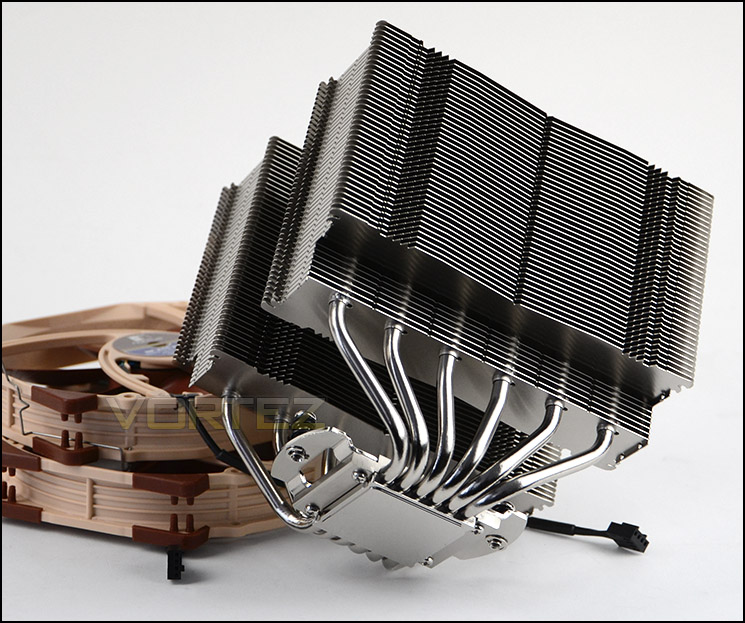
Noctua on their NH-D15
Built on the basis of the legendary NH-D14 and carrying on its quest for ultimate quiet cooling performance, Noctua’s flagship model NH-D15 is an elite-class dual tower cooler for the highest demands. Its expanded heatpipe layout and two premium grade NF-A15 140mm fans with PWM support for automatic speed control allow it to further improve the NH-D14’s award-winning efficiency. Topped off with the trusted, pro-grade SecuFirm2™ multi-socket mounting system, Noctua’s proven NT-H1 thermal compound and full 6 years manufacturer’s warranty, the NH-D15 forms a complete premium quality solution that represents a deluxe choice for overclockers and silent-enthusiasts alike.
Technical Specifications
Socket compatibility
Intel LGA2011 (Square ILM), LGA1156, LGA1155, LGA1150
AMD AM2, AM2+, AM3, AM3+, FM1, FM2, FM2+ (backplate required)
Height (without fan)
165 mm
Width (without fan)
150 mm
Depth (without fan)
135 mm
Height (with fan)
165 mm
Width (with fan)
150 mm
Depth (with fan)
161 mm
Weight (without fan)
1000 g
Weight (with fan)
1320 g
Material
Copper (base and heat-pipes), aluminium (cooling fins), soldered joints & nickel plating
Fan compatibility
140x150x25 (with 120mm mounting holes)
140x140x25 (with 120mm mounting holes)
120x120x25
Scope of Delivery
2x NF-A15 PWM premium fan
2x Low-Noise Adaptor (L.N.A.)
Y-cable
NT-H1 high-grade thermal compound
SecuFirm2™ Mounting Kit
Noctua Metal Case-Badge
Warranty
6 Years
Intel LGA2011 (Square ILM), LGA1156, LGA1155, LGA1150
AMD AM2, AM2+, AM3, AM3+, FM1, FM2, FM2+ (backplate required)
Height (without fan)
165 mm
Width (without fan)
150 mm
Depth (without fan)
135 mm
Height (with fan)
165 mm
Width (with fan)
150 mm
Depth (with fan)
161 mm
Weight (without fan)
1000 g
Weight (with fan)
1320 g
Material
Copper (base and heat-pipes), aluminium (cooling fins), soldered joints & nickel plating
Fan compatibility
140x150x25 (with 120mm mounting holes)
140x140x25 (with 120mm mounting holes)
120x120x25
Scope of Delivery
2x NF-A15 PWM premium fan
2x Low-Noise Adaptor (L.N.A.)
Y-cable
NT-H1 high-grade thermal compound
SecuFirm2™ Mounting Kit
Noctua Metal Case-Badge
Warranty
6 Years
Packaging, Bundle & Fans
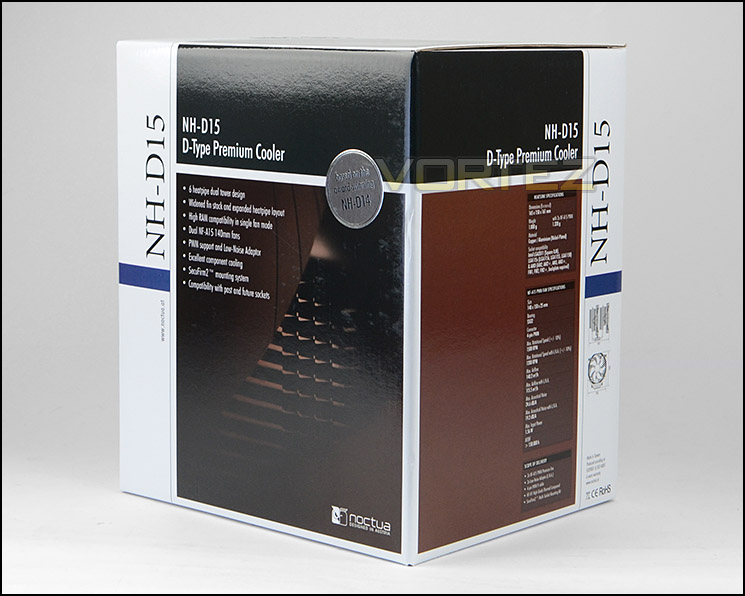
Packaging for NH-D15 is professional and easy on the eye
Noctua’s NH-D15 arrives in a monolithic box which alludes to the stature of what’s found within. In true Noctua fashion, the packaging is professional and lists the key benefits to using D15 along with specifications for those who wish to know the technical details surrounding this cooler.
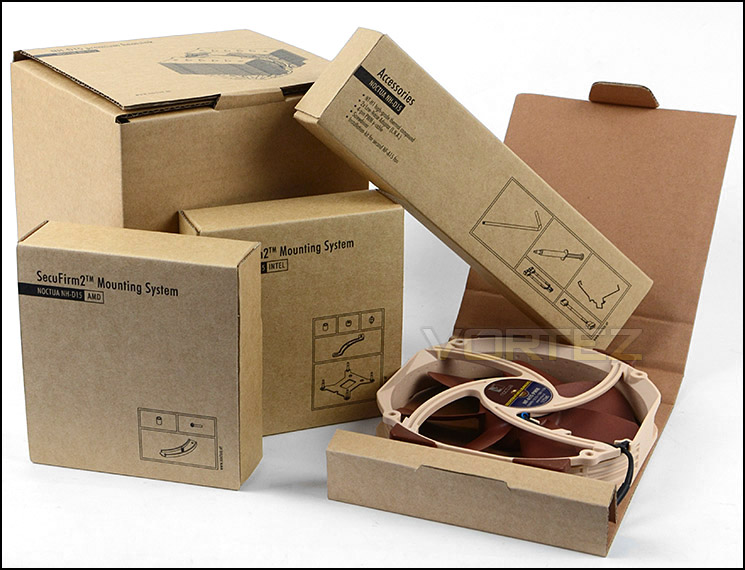
Bundled parts come packaged within individual boxes
We’re very familiar with Noctua’s care when it comes to packaging and this is keenly demonstrated with the packaging system used for NH-D15. Opening the box up, we find a series of individual boxes for specific mounting kit, accessories, cooling fans and even the heatsink itself. NH-D15 comes with both AMD and Intel mounting kits to support a variety of different sockets including: Intel LGA2011, LGA1156, LGA1155, LGA1150 and AMD AM2, AM2+, AM3, AM3+, FM1, FM2, FM2+.
Within these smaller boxes, there are a number of items including:
• 2X NF-A15 PWM premium fan
• 2X Low-Noise Adaptor (L.N.A.)
• Y-cable
• NT-H1 high-grade thermal compound
• SecuFirm2™ Mounting Kit
• Noctua Metal Case-Badge
So you’re left in no doubt that you’re getting a premium piece of kit with the NH-D15 and Noctua’s attention to detail is clearly evident.
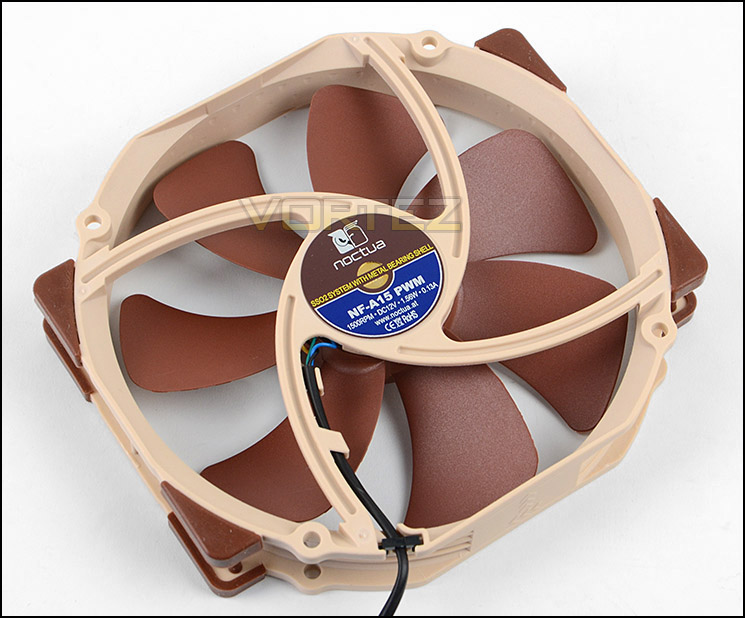
NH-D15 comes bundled with two NF-A15 PWM cooling fans
Bundled with NH-D15 are two NF-A15 PWM cooling fans which offer up to 1500RPM at an impressive 24,6 dB(A). These fans use a seven-blade design and have an insulated 4-pin PWM connector. Noctua bundle a Y-cable so that you can run both cooling fans off one header and two low-noise adapters to assist in reducing the fan speed and thus lowering noise levels.
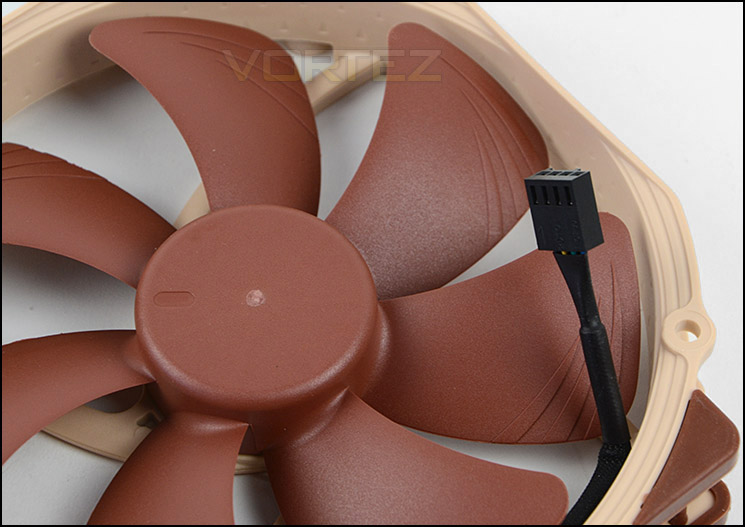
4-pin PWM connector
Closer Look
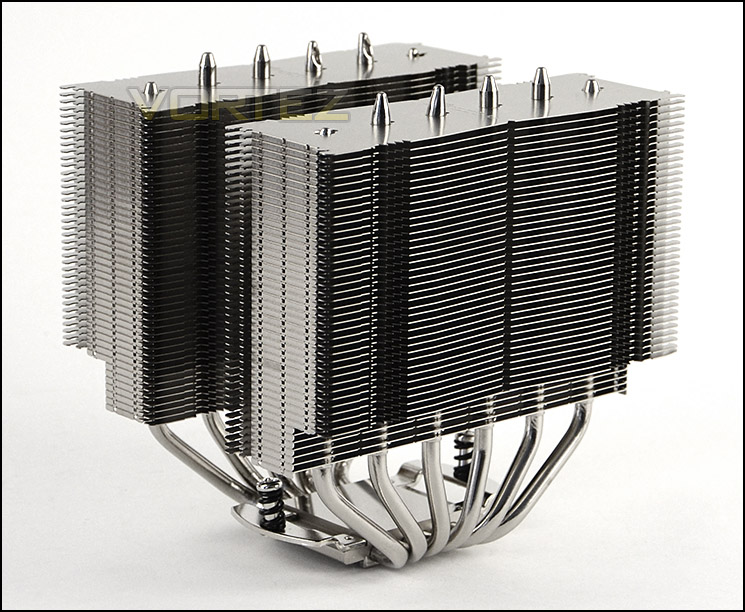
NH-D15 in all its glory
The NH-D15 uses a dual-heatsink design and the heatsink itself has been given colossal dimensions which measure: 165 mm (Height) x 150 mm (Width) x 135 mm (Depth). The enormity of this heatsink is only really appreciated once it’s installed on the motherboard (on the next page). Even though D15 is large, it still retains that all-important 165mm of height so that it can fit inside a selection of computer cases.
D15 weighs exactly 1000g and utilises a copper base and heat-pipes with aluminium fins which use soldered joints and nickel plating.
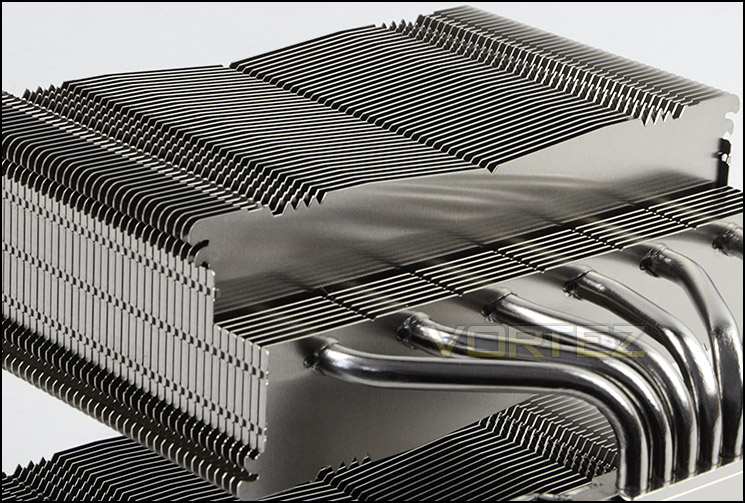
Six copper heatpipes pass through aluminium fins
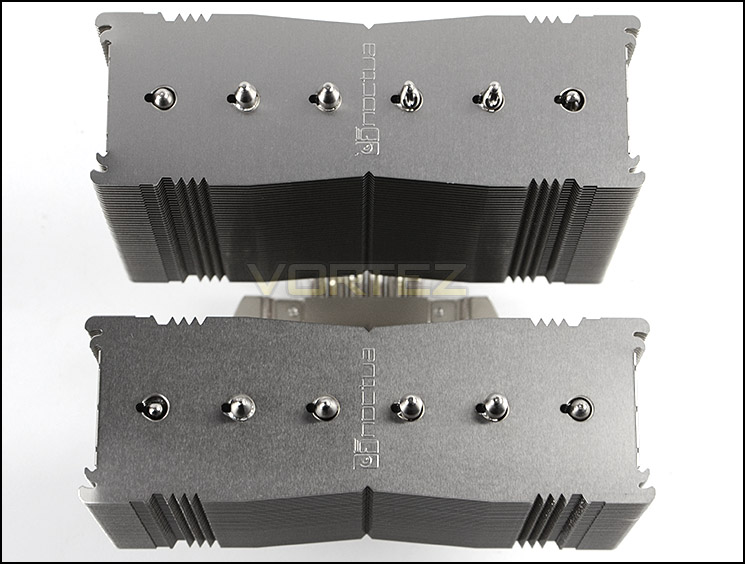
An aerial view of D15
Noctua has given D15 recessed fins in the lower regions of each side to extend compatibility for memory kits which have tall heatspreaders. The profile of the fins follows a slight concave design.
D15 features six copper heatpipes which are responsible for transferring the heat from the base and out through the aluminium fins.
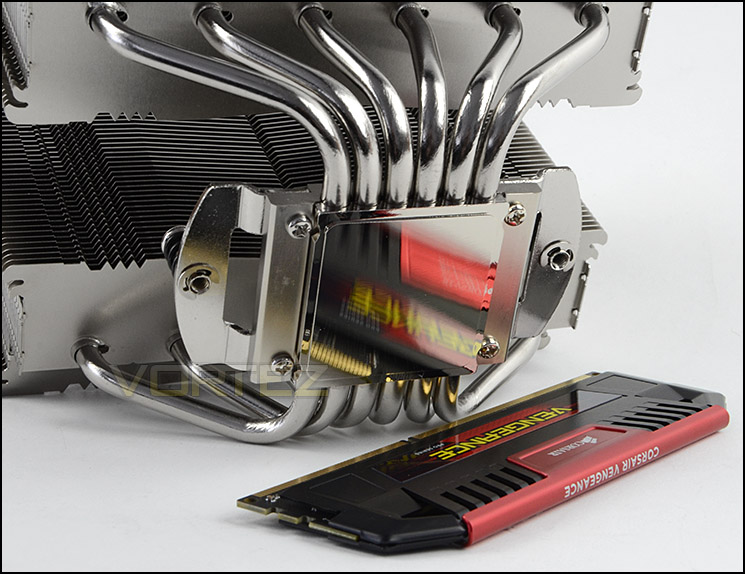
Copper baseplate with pre-attached mounting
At the bottom of D15, there is a copper baseplate which is semi-transparent. On the topside of this base plate there is a mounting bridge – this bridge also has pre-attached screws with retention springs.
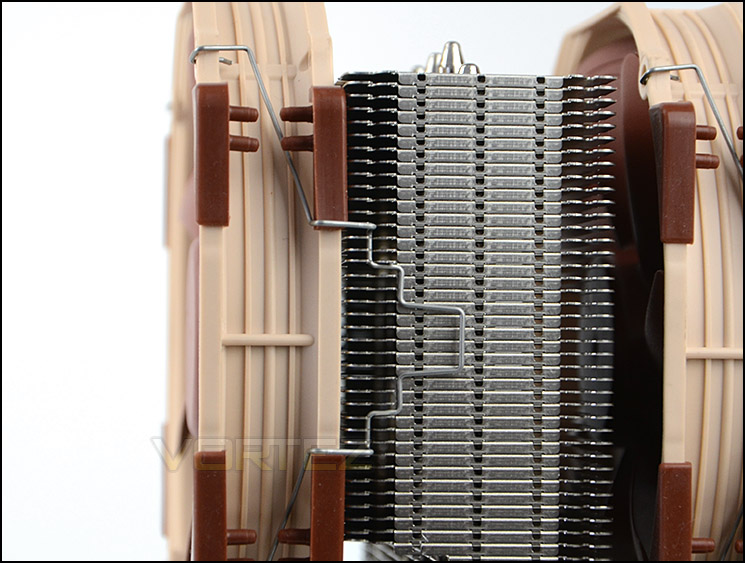
Fans can be clipped to either side of towers
D15 comes with two NF-A15 PWM cooling fans which can be attached to either side of the dual-towers. Attaching a fan is very simple thanks to the metal clips which are bundled with the cooler, not only are they easy to fasten into place but they offer a secure fitment too.
Installation
In order to demonstrate the installation process for NH-D15 we are installing the cooler on the Intel LGA2011 socket.
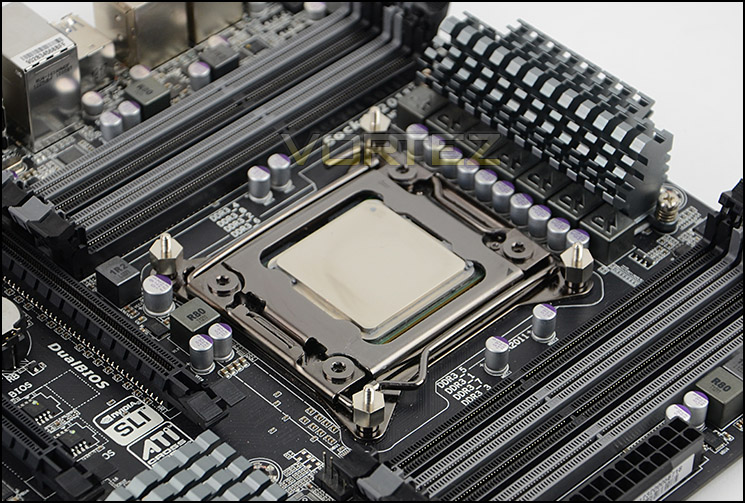
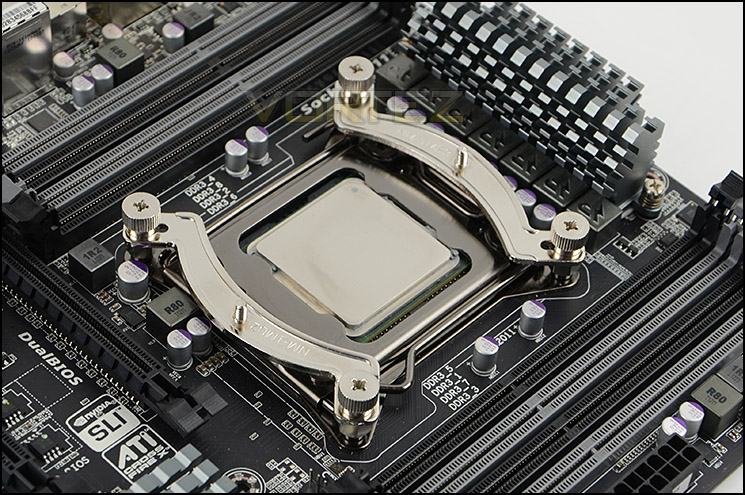
D15 makes use of the renowned SecuFirm 2 mounting kit. The first step for our socket type is to apply four standoff screws to the four corners of the socket plate. Once these are attached, we then have to place the brackets onto the standoffs and apply four thumbscrews – in order to achieve the traditional orientation of having the heatsink and fans line up with the rear exhaust fan in a computer case, the brackets need to be configured horizontally as pictured below. The last step is to apply thermal paste and tighten the two coiled-screws which are attached to the baseplate. It’s important to ensure even pressure when tightening these screws.
SecuFirm 2 is a proven method for installing CPU coolers and in fact many other brands have copied its design because it is so reliable. In very little time, we are able to get up and running with any hitches.
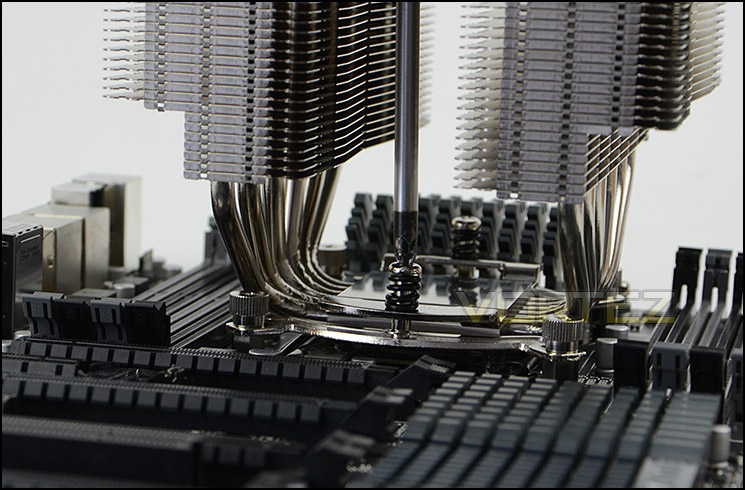
Installed – Memory Clearance
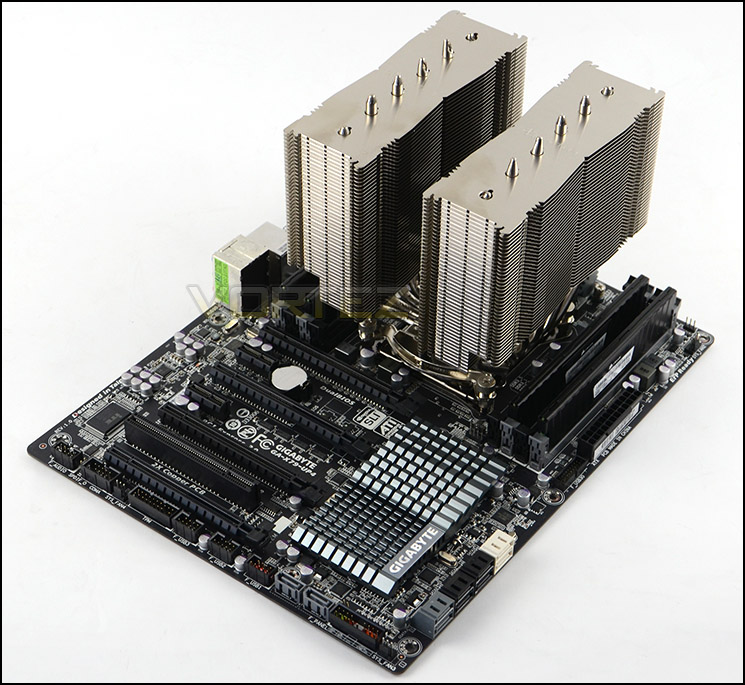
D15 installed, without cooling fans attached
Memory clearance is something which many system builders and enthusiasts are eager to discover since this will ascertain whether a memory kit will be compatible with the CPU cooler or not. To demonstrate this, a low profile memory kit is used.
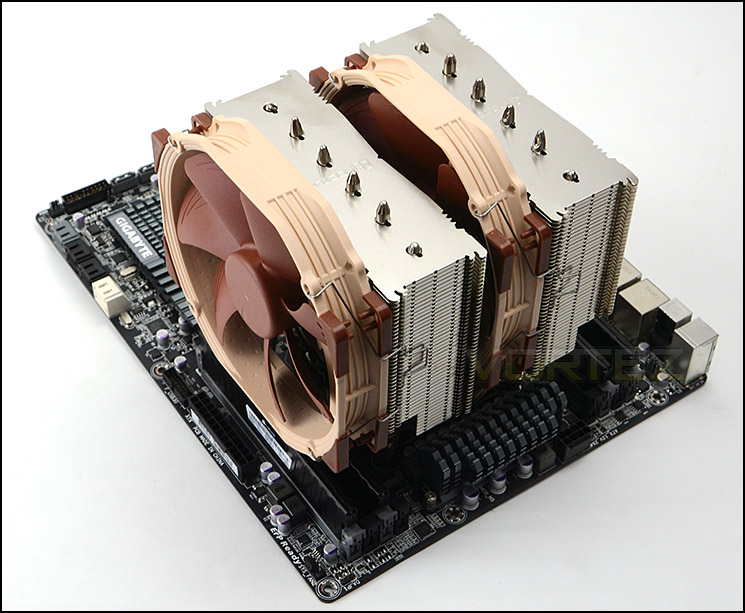
D15 swamps the motherboard
Thanks to its unique design of having recessed fins in the lower section of the heatsink, D15 can accommodate memory modules which have tall heatspreaders. Furthermore, the cooling fan which attaches to the heatsink can be shifted in an upwards movement to allow this memory to be installed.
Measuring the area, the heatsink allows up to 7cm of clearance for tall memory kits.
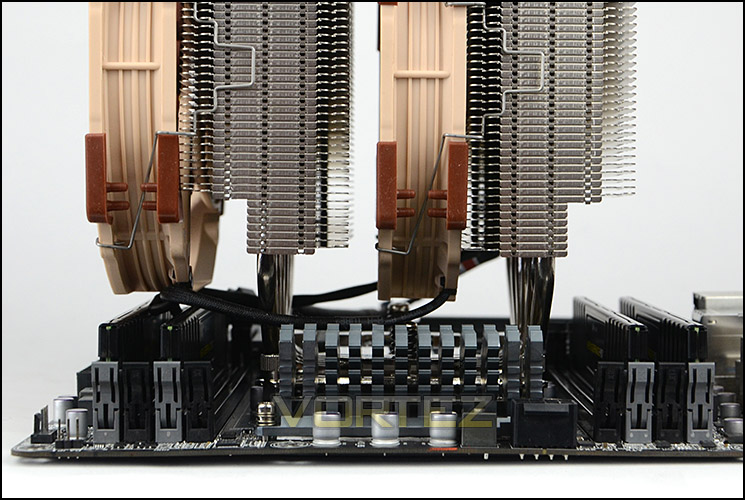
Recessed fins allow tall memory
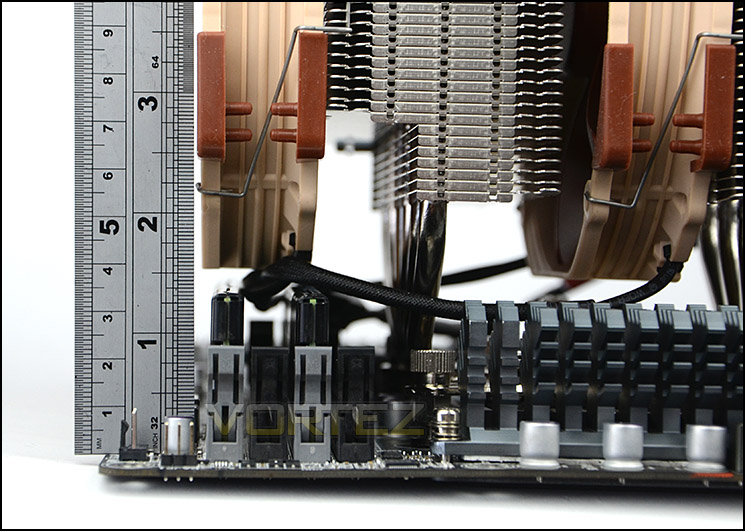
Generous compatibility for memory
Test Setup & Methodology
Test System
CPU – Intel Core i7-3930K (3.6GHz)
Motherboard – GIGABYTE X79-UP4
Memory – 8GB Corsair Vengeance LP 1600MHz CL9
Graphics – Sapphire Radeon HD 6850 1GB
PSU – NZXT Hale90 650W
Hard Drive – Kingston HyperX 240GB SATA III SSD
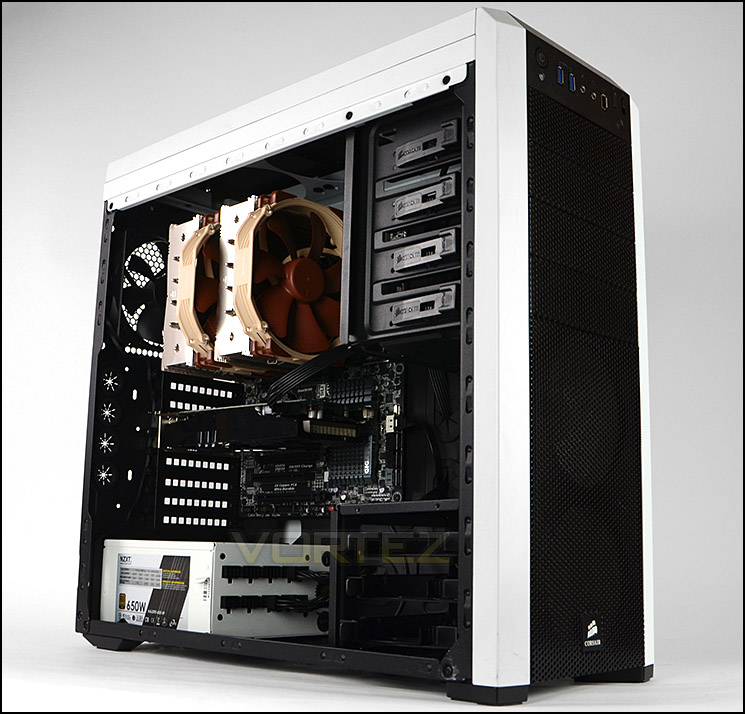
Case – Corsair Carbide 500R White
Motherboard – GIGABYTE X79-UP4
Memory – 8GB Corsair Vengeance LP 1600MHz CL9
Graphics – Sapphire Radeon HD 6850 1GB
PSU – NZXT Hale90 650W
Hard Drive – Kingston HyperX 240GB SATA III SSD
Case – Corsair Carbide 500R White
CPU Coolers
Alpenföhn Matterhorn Pure(120mm Wingboost: 300-1200RPM)
Alpenföhn K2 (120mm Wingboost: 500-1500RPM, 140mm Wingboost: 300-1100RPM)
Alpenföhn Gotthard (140mm Wingboost: 300-1100RPM)
Noctua NH-D14 (120mm NF-P12 PWM + 140mm NF-P14 PWM: up to 1200RPM)
Thermalright SilverArrow SB-E Extreme (Dual TY-143 fans – 600-2500RPM)
Corsair Hydro H100 (Dual 120mm fans – low: 1300RPM, mid: 2000RPM, high: 2600RPM Push Config)
SilverStone HE01 (140mm PWM fan – 500RPM-1200RPM – 500RPM-2000RPM)
be quiet! Dark Rock Pro 2 (135mm + 120mm PWM Fans – up to 1500RPM and 1700RPM)
Thermaltake Water 2.0 Pro (Dual 120mm PWM fans – up to 2000RPM)
Corsair Hydro Series H100i (Dual 120mm fans – up to 2700RPM Push Config)
Be Quiet! Shadow Rock TopFlow(1x 135mm PWM fan – up to 1500RPM)
SilverStone HE02 (Passive – optional fan used: Noctua NF-F12 120mm PWM)
Corsair H55 (Single 120mm fan – 1700RPM Exhaust Push)
Cooler Master Seidon 120M (Single 120mm fan – Up to 2500RPM Exhaust Push)
Zalman CNPS11X Extreme (Single 120mm fan – Up to 1950RPM)
Phanteks PH-TC12DX (Dual 120mm fans – 600-1800RPM)
Noctua NH-U14S (Single 140mm cooling fan – 300-1500RPM)
SilverStone TD03 (Dual 120mm fans – 1500-2500RPM)
Thermaltake]Thermaltake NiC C5 (Dual 120mm fans – 1000RPM – 2000RPM)
Raijintek EreBoss (Single 140mm fan – 1100RPM – 1600RPM)
GamerStorm Lucifer (Single 140mm fan – 800-1500RPM)
Cooler Master V8 GTS (Dual 140mm fans – 600-1600RPM)
Antec KUHLER H2O 1250 (Dual 120mm cooling fans – 600-2400RPM)
Corsair H75 (Dual 120mm cooling fans – 600-2000RPM)
CRYORIG R1 Ultimate (Dual 140mm cooling fans – 700-1400RPM)
Corsair Hydro Series H105 – (Dual 120mm fans – up to 2700RPM Push Config)
Noctua NH-D15 (Dual 140mm cooling fans – 300-1500RPM)
Program Suite
Real Temp – Maximum temperature analysis
LinX 0.6.4 – Applies thorough stress test to CPU
CPU-Z – Confirmation of CPU frequency/voltage
AIDA64 Extreme Edition – Confirmation of temperatures/fan speeds
Testing methodology
Testing will be based on temperatures recorded by Real Temp after 20 passes of LinX stress test. The maximum absolute temperatures will be recorded after the test and averaged over the 6 cores. The delta is then calculated by subtracting the temperature recorded near the intake fans from the average temperature calculated. Tests are conducted with the Intel i7 3930K at its default 3.6GHz stock speed and overclocked to 4.6GHz @ 1.42V. The tests are done inside the Corsair Carbide 500R chassis to simulate real world conditions. To keep the tests standardised we are using Noctua’s NT-H1 thermal paste on all coolers.
CPU coolers are reviewed as they come out of the box – with their factory cooling fans, as the manufacturer intended and as the consumer expects.
Additional tests include a passive test where the cooling fans are taken away from the heatsink and a comparison between the cooler used with stock thermal paste against our Noctua NT-H1 paste. Note: This test will be omitted from this review since the D15 already comes with Noctua NT-H1
A kind thank you to Noctua for supplying us with NT-H1 thermal compound.
Results – Stock Performance
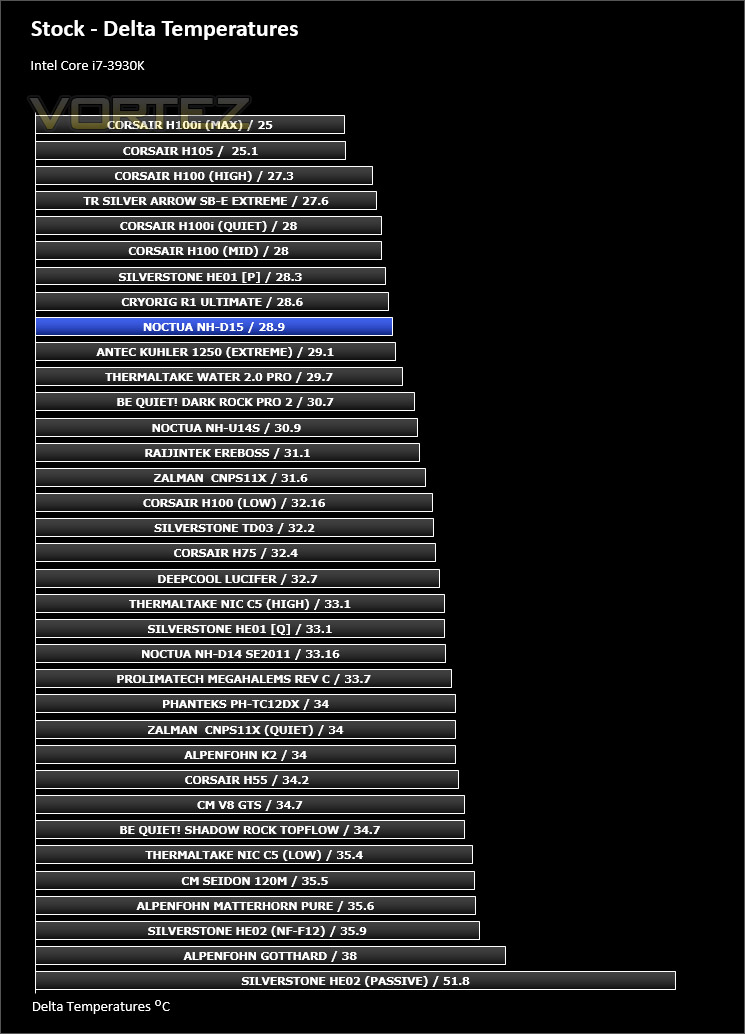
With the CPU at stock settings the D15 handles our Core i7-3930K very well indeed. Almost matching that of the high end liquid coolers. What’s more is the fan speed is reasonably low and therefore noise levels are also low.
Fan Speed: Remained at 1145RPM throughout stock testing – barely audible
Results – Overclocked Performance
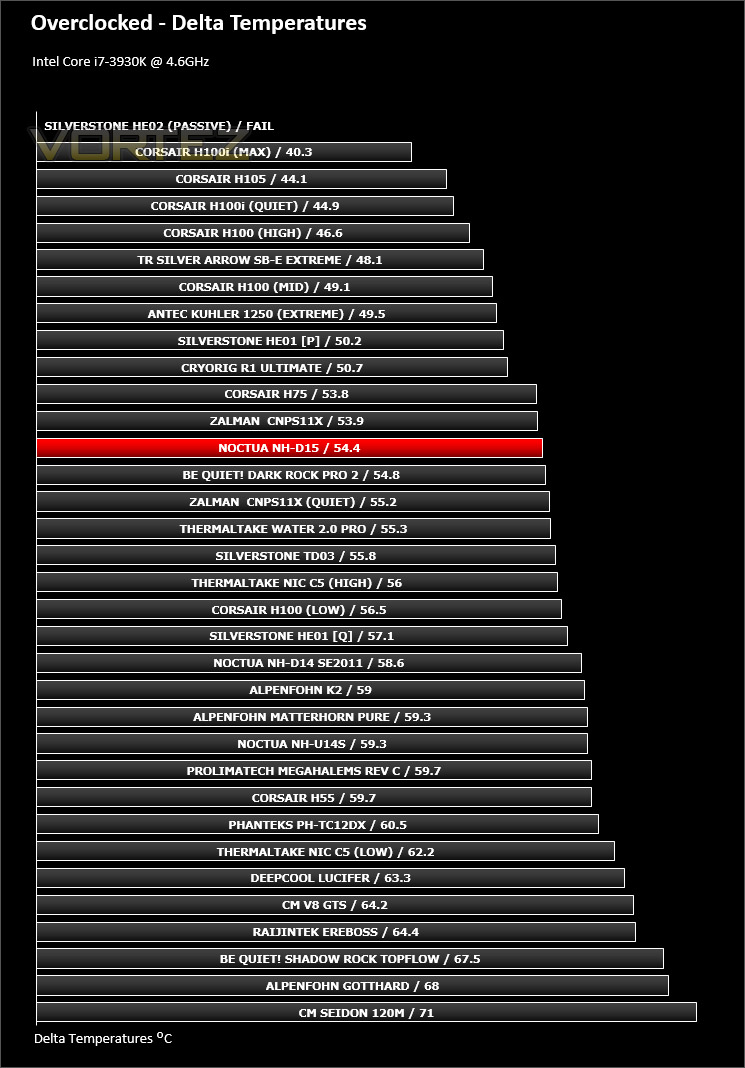
Applying a substantial overclock to the CPU, things are intensified. Whilst D15 appears to fall a few places down the chart in this particular test, we need to appreciate that the fan speeds of other cooling solutions which are above D15 are using increased RPM and therefore have to push harder to bring down the temperatures and this in turn results in higher noise levels. So with this in mind, D15 actually does a great job at just 1500RPM.
Fan Speed: Remained at 1500RPM throughout overclocked testing – noticeable but not disruptive.
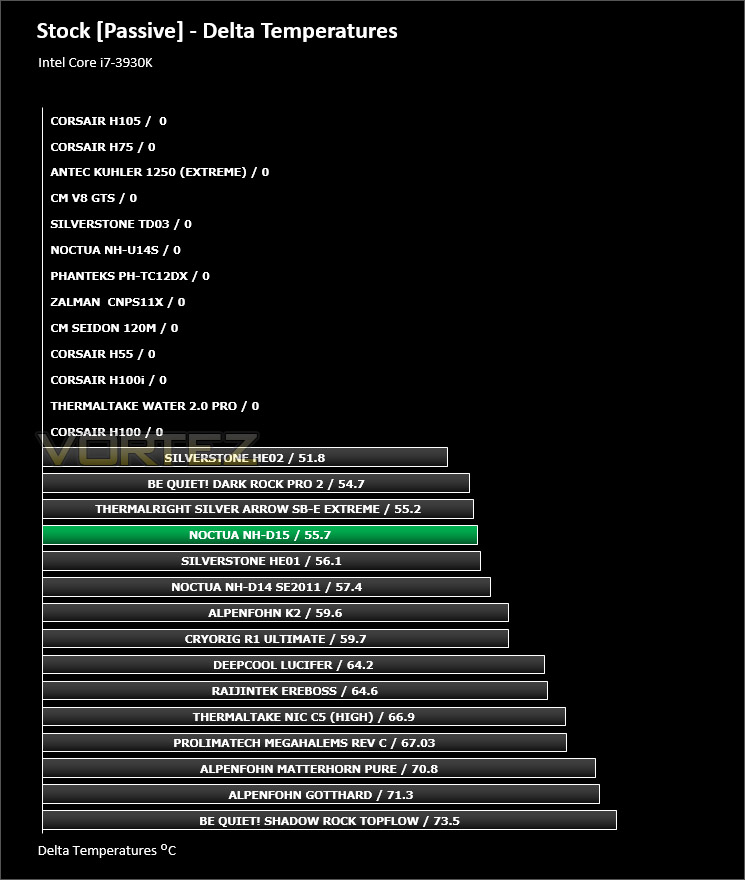
Results – Passive Performance
The passive test is an interesting one as it relies heavily upon heatsink design and airflow within the computer chassis. The D15 handles this test very well indeed and manages to give some of the best results we have had compared to other twin-tower designs.
Conclusion
The NH-D14 has stood the test of time and remained a prolific cooling solution for many years and so today has been very intriguing – not least to see how Noctua can improve on such a steadfast product. So how does this new flagship fare?
We’re no stranger to Noctua products and we’ve often mentioned how thoughtful they are when it comes to packaging. With NH-D15, they’ve turned it up a notch further by presenting each of the mounting kits, accessories, cooling fans and even the heatsink with a separate box – these finishing touches and the handy instructions manual deliver an insight into their design philosophy.
D15 itself is a beast to be tamed. Its twin-tower design will dwarf a standard ATX motherboard but we don’t mind that at all because this cooler is aesthetically very pleasing to the eye. Noctua has been designing D15 for considerable time now and this is evident by the engineering decisions and quality – the recessed lower fins are cleverly integrated to allow compatibility for taller memory.
The performance of a cooler is often the overriding factor when it comes to making a decision whether to invest or not and we can safely say that the D15 is a big improvement over the highly revered D14 and is worthy of the flagship moniker. In all our tests this cooler demonstrated consistent thermal prowess, even matching the performance of some leading liquid cooling solutions. D15 may not have topped the charts but an important factor needs to be noted, other coolers required significantly more RPM in order to achieve the result but D15 attained its milestone by using lower RPM and thus emitted less noise. Therein lies the fundamental principle to which Noctua operate – striking the balance between performance and noise.
At a cost of £77.95 GBP / $99 USD, the NH-D15 isn’t cheap, but neither is the quality of this cooler, or the entire bundle. The inclusion of two 140mm cooling fans is a particular highlight, and one which rivals don’t usually offer. Each fan has a value of £19 / $28 just on their own – when this is put into the equation, D15 is actually quite an attractive investment.
Noctua’s new flagship CPU cooler is a worthy successor to the highly revered NH-D14. In all our tests, we found NH-D15 to be very capable indeed. It achieves great results with very little noise. Noctua has clearly spent significant time designing this new cooler, it simply oozes quality on many levels and we’d gladly add it to our cooling arsenal.
VIDEO REVIEW – VORTEZ TV
Pros
+ Excellent packaging
+ Pleasing to the eye
+ Great performance
+ Brilliant memory clearance
+ Low-noise operation
+ Generous bundle including 2X140mm fans
Cons
– Big cost
+ Excellent packaging
+ Pleasing to the eye
+ Great performance
+ Brilliant memory clearance
+ Low-noise operation
+ Generous bundle including 2X140mm fans
Cons
– Big cost

Click here for an explanation of our awards at Vortez.net.


