In a follow-up to an earlier article we’re now taking a look at NVIDIA’s latest driver and assessing just how much new performance has been unlocked for the GTX 970.
It’s no surprise, that with the pace slowing for new graphics hardware releases as we enter the holiday season, both NVIDIA and AMD are once again touting their software and drivers as a major selling point that complements their performance hardware. Just last week AMD announced the transition to a new software release – Radeon Software Crimson Edition – and NVIDIA recently introduced a new Beta program for their GeForce Experience software package. Both companies have a lot to prove ahead of 2016, where everything is likely to be shaken up by new Virtual Reality applications and mainstream DirectX12 titles.
In the not so distant past NVIDIA drivers were stand-alone packages, just the sort of software you install and then forget about. In 2013 however they unveiled GeForce Experience, a desktop application which not only kept all NVIDIA product drivers up to date, but also served as a platform for delivering new technologies and quality of life improvements.
Last February we were able to take a look at NVIDIA’s 347.52 driver package, comparing it to the Maxwell launch drivers released in Q4 2014. It showed NVIDIA’s quick progress in improving the drivers for new hardware when under pressure due to the GTX 970 3.5GB/4GB memory debacle. Now we’re able to see how far they’ve progressed over the course of a year, and allow us to see is any more performance can be squeezed from the GeForce GTX 970.
NVIDIA are well known for an extremely fast turnaround time for new drivers, even WHQL-certified drivers. Game Ready drivers – including the GeForce 358.91 WHQL package, their latest – are issued on the day of every major game release and a major source of pride for the guys and gals in green. AMD by contrast tend to rely on progressive beta candidates before rolling in changes to a major update later in the month. By working closely with game developers NVIDIA have access to game release candidates early on, allowing their driver team some lead time prior to release to smooth out any problems.
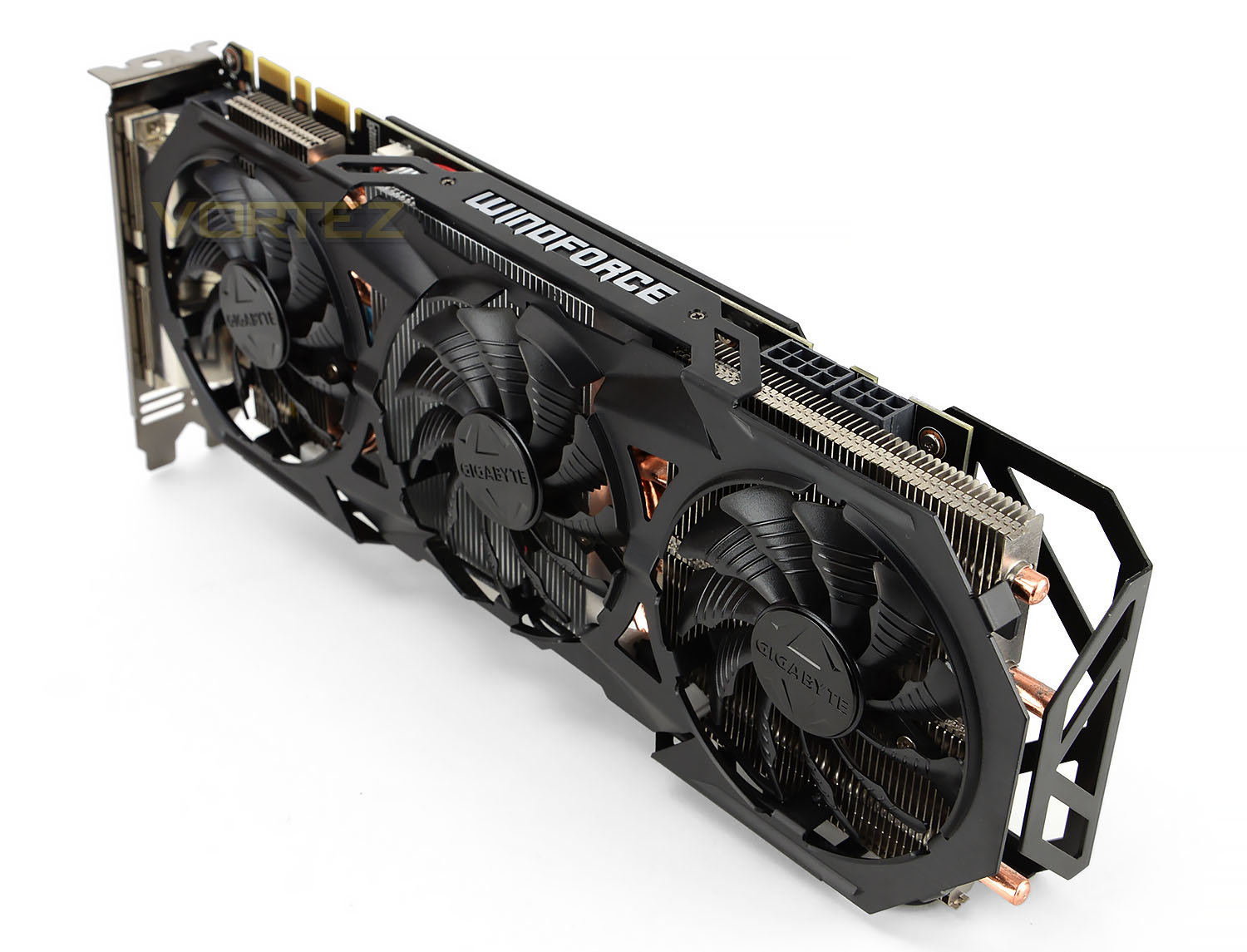
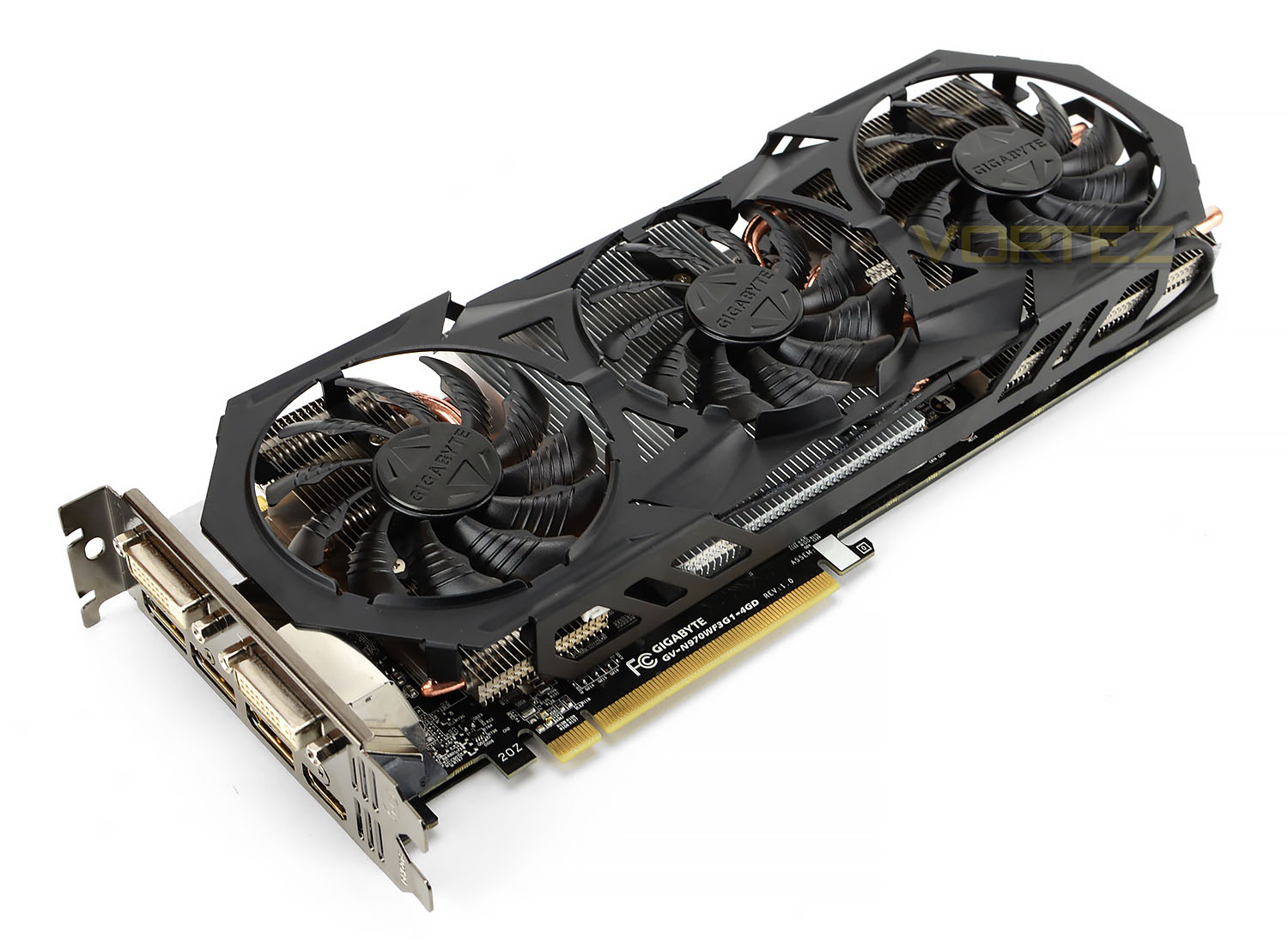
The humble GIGABYTE GTX 970 G1 GAMING, back for more
The importance of GFE has taken a major step forward in the past few months thanks to two developments: the EU release of the SHIELD TV Console, and NVIDIA’s intention to place all new Game Ready Drivers behind a registration wall. GFE is now critical to fully leveraging NVIDIA’s hardware range, and will no doubt have further ramifications as 2016 introduces new technologies with their own hardware-specific implementations.
GeForce Experience is not critical to most users however; anyone can still opt to download a stand-alone driver package for installation even if it isn’t a true Game Ready driver. Even those who choose not to install the GeForce Experience application can take advantage of the NVIDIA-exclusive DSR and MFAA technologies via the driver Control Panel, whilst an advanced user can make fine setting tweaks and adjust application profiles. NVIDIA’s software can thus be considered a great jack-of-all-trades, whilst still having key areas of improvement left open in which additional functionality can be incorporated.
Today we’ll be looking at two key factors for NVIDIA’s latest 358.91 driver software: general performance improvements and high-resolution DSR improvements.
Are You Experienced – New Features In GFE
Both major GPU manufacturers have in recent years been pushing their own driver utilities, both as a means of leveraging hardware and aid in tailoring graphics settings to individualised system configurations. NVIDIA began the process with GeForce Experience in 2013, keeping the software in-house much as they’ve done with other projects in the past and taking advantage of their massive hardware install base. AMD by contrast rely on Raptr, a third-party client, to perform very similar tasks.
GFE and game profile updates now are now often released in tandem with Game Ready Drivers for all the latest triple-A titles, and over time new functionality is being added to really push the limits of bundled feature sets. Once the province of 3rd party applications, tools such as Shadowplay (now GeForce Share) and GameStream have brought internet streaming, Youtube gameplay uploads and living-room gaming to the very entry-level of PC gaming.
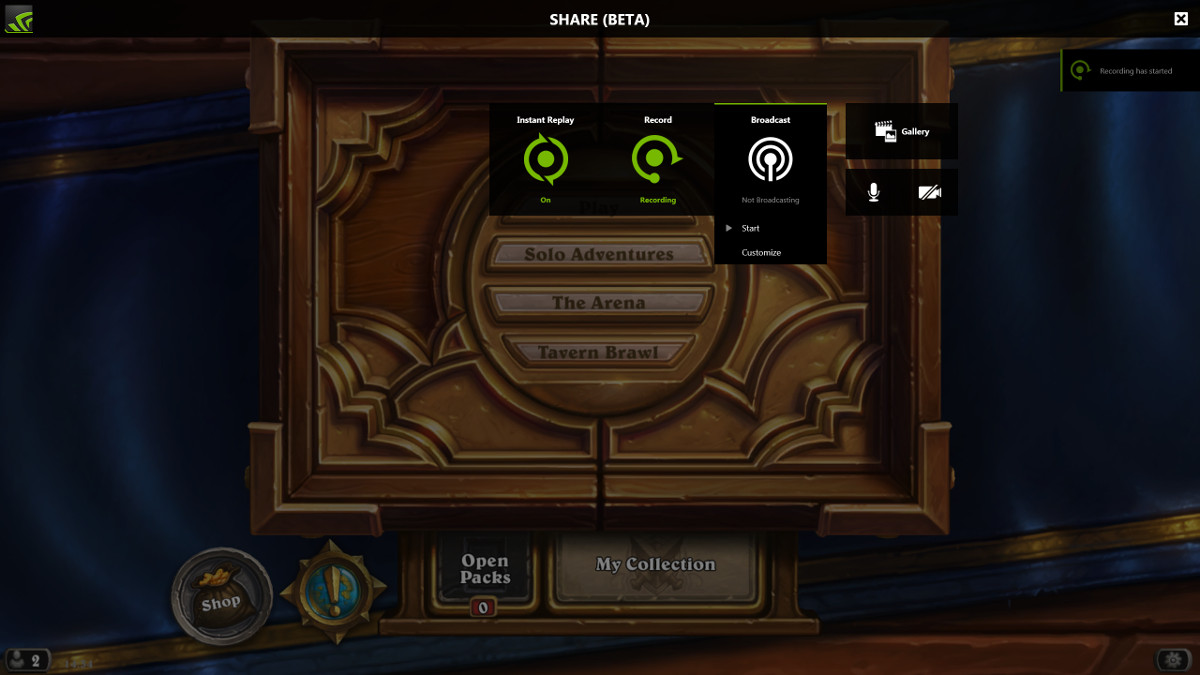
GeForce Experience Share, which entered beta last month, added an additional dimension to Shadowplay functionality. Through the use of a convenient overlay, gameplay moments can be immediately shared with the world, either on stream or uploaded directly to Youtube. Basic video clip trimming tools in the form of an Instant Replay feature have been added which bring more flexibility whilst not side-lining the value of more powerful editing software.
One criticism of Shadowplay however has been the relatively sparse streaming options, most notably the lack of 1080p streaming. In the most recent update NVIDIA announced 1080p streaming capability at 60fps, the highest quality setting Twitch currently allows. To ensure that image quality isn’t adversely affected the maximum possible upstream bit rate has been increased from 5 Mbps to 9 Mbps, although you’ll need a suitably meaty internet connection to support this quality setting.
Gameplay at 1080p60 is considerably smoother and more enjoyable than similar 30fps video, whilst increasing the resolution to 1080p will make broadcast images all the more smoother. If you’re planning to use GeForce Share to stream any of the new games this Autumn you should certainly be taking note.
Furthermore NVIDIA have now integrated support for Youtube Live, Youtube’s competing streaming service. Selecting between the two is simple, just as we’ve come to expect from GeForce Experience.
GameStream

Part of the SHIELD complementary tools, GameStream allows you to stream your gameplay from your PC to a SHIELD device and play using peripherals connected to that device. With the advent of the SHIELD Android TV Console this month GameStream moves from a cool ancillary feature to one that is core to the way you can consume games, leveraging the power of your PC to play on a big-screen TV without dealing the hassle.
Due to the new hardware options available to them (esp. HDMI 2.0 output and Maxwell 2’s more powerful NVENC) NVIDIA have unlocked a 60fps GameStream option to the SHIELD Console at a full 4K resolution with 5.1 surround audio. Obviously you’ll need a particularly powerful system to support rendering at these sorts of resolutions and frame rates, but it should also be noted that the bandwidth requirements are also enormous by comparison to 1080p60. Although specific figures haven’t been provided NVIDIA recommends that 4K60 streaming is only performed over a cabled Ethernet connection.
GameStream at 4K resolution and 60fps will be possible with GPUs that support NVIDIA’s 3rd Generation NVENC, i.e. 2nd generation Maxwell. In terms of SKUs this means that the 900-series and Titan X are the only ones capable of the feature; older 600 and 700-series cards will continue to operate at the previous limits.
Whilst GameStream to SHIELD devices has become more flexible and powerful NVIDIA have added an additional dimension to the feature that they’re calling GameStream Co-op. By utilising similar techniques, GameStream Co-op allows a server to become slave to a remote PC when gaming, allowing a remote viewer control over in-game actions. This could be used to call in a friend for aid in clearing a hurdle in a particular single-player game, or in a home setup to play games in the living room whilst running a louder and more powerful server elsewhere.
Performance and Feature Testing
There are two aspects of driver performance we need to analyse for this article: in-game performance improvements against previous patches, and the performance impact of gradually higher levels of DSR in comparison to previous tests. The former will allow us to assess whether GPU performance boost are system-wide with the latest NVIDIA drivers or game-specific, and the latter gives us some indication of whether DSR and high-resolution gaming has been impacted by the new drivers.
Our baseline is NVIDIA’s GeForce GTX 970 launch drivers – codename 344.11 – released in October 2014 for Maxwell performance parts. The second data point is February’s 347.52 release, tested in our DSR introduction driver article. Third is August’s 355.82 package, launched to coincide with the entry-level GeForce GTX 950, which we’ll use for comparison at 1080p. Finally there’s the 358.91 Game Ready Driver for Fallout 4, NVIDIA’s most recent GeForce driver package.
Initial tests looked at the performance difference in a range of games and synthetic benchmarks to assess how well the new drivers had incorporated application-specific improvements and if across the board performance had been unlocked by subsequent driver releases. Follow-up tests analysed NVIDIA Dynamic Super Resolution performance, looking at not only performance but also qualitative impact on the experience.
Test System
CPU: Intel Core i7-5930K @ 3.5GHz
RAM: 8GB Corsair Vengerance LPX DDR4 (4 x 2GB)
Motherboard: GIGABYTE GA-X99-Gaming 5
Storage: Corsair Force LX 256GB SSD
PSU: Corsair CX600M Modular PSU
GPU: GIGABYTE GTX 970 4GB
OS: Windows 8.1
RAM: 8GB Corsair Vengerance LPX DDR4 (4 x 2GB)
Motherboard: GIGABYTE GA-X99-Gaming 5
Storage: Corsair Force LX 256GB SSD
PSU: Corsair CX600M Modular PSU
GPU: GIGABYTE GTX 970 4GB
OS: Windows 8.1
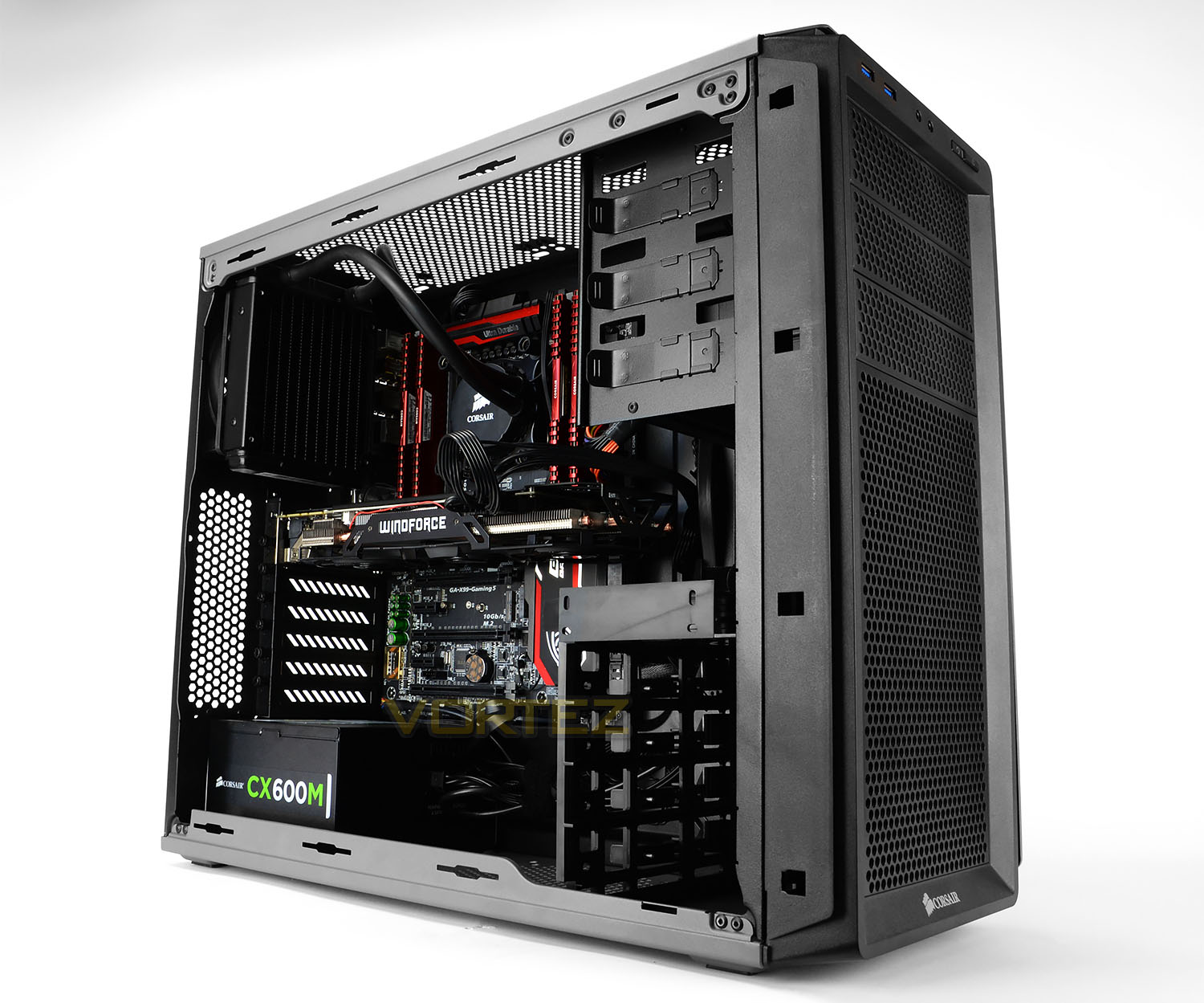
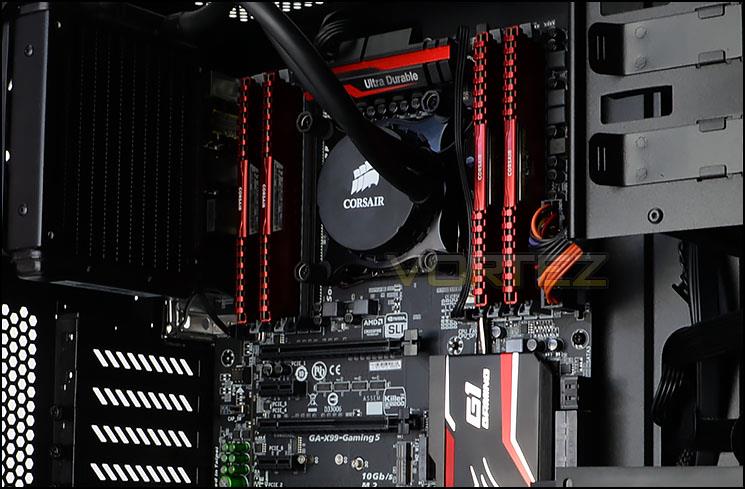
Our test system – featuring Haswell-E technology from Intel, X99 gaming motherboard from GIGABYTE, and additional critical components from Corsair – allows the NVIDIA GPU to operate unencumbered by the usual bottlenecks when gaming. On the other hand this system doesn’t necessarily reflect benefits from reductions in CPU load, which disproportionately favours less muscular CPUs. Furthermore it’s not the sort of everyday system which the general populace would have access too. This underlines the fact that the performance figures shown in this article are intended to show relative performance rather than expected performance in mainstream systems, i.e. how much has performance improved for NVIDIA Maxwell-based hardware since launch, purely due to the drivers.
NVIDIA Dynamic Super Resolution is the second aspect of NVIDIA’s driver package we want to test. The specific card chosen is an excellent example of the GTX 970 range, featuring top of the line GIGABYTE WINDFORCE 3X non-reference cooling that enables a factory overclocks to 1150MHz base and over 1.3GHz on the boost clock; no further overclocking was performed either on it or the CPU.
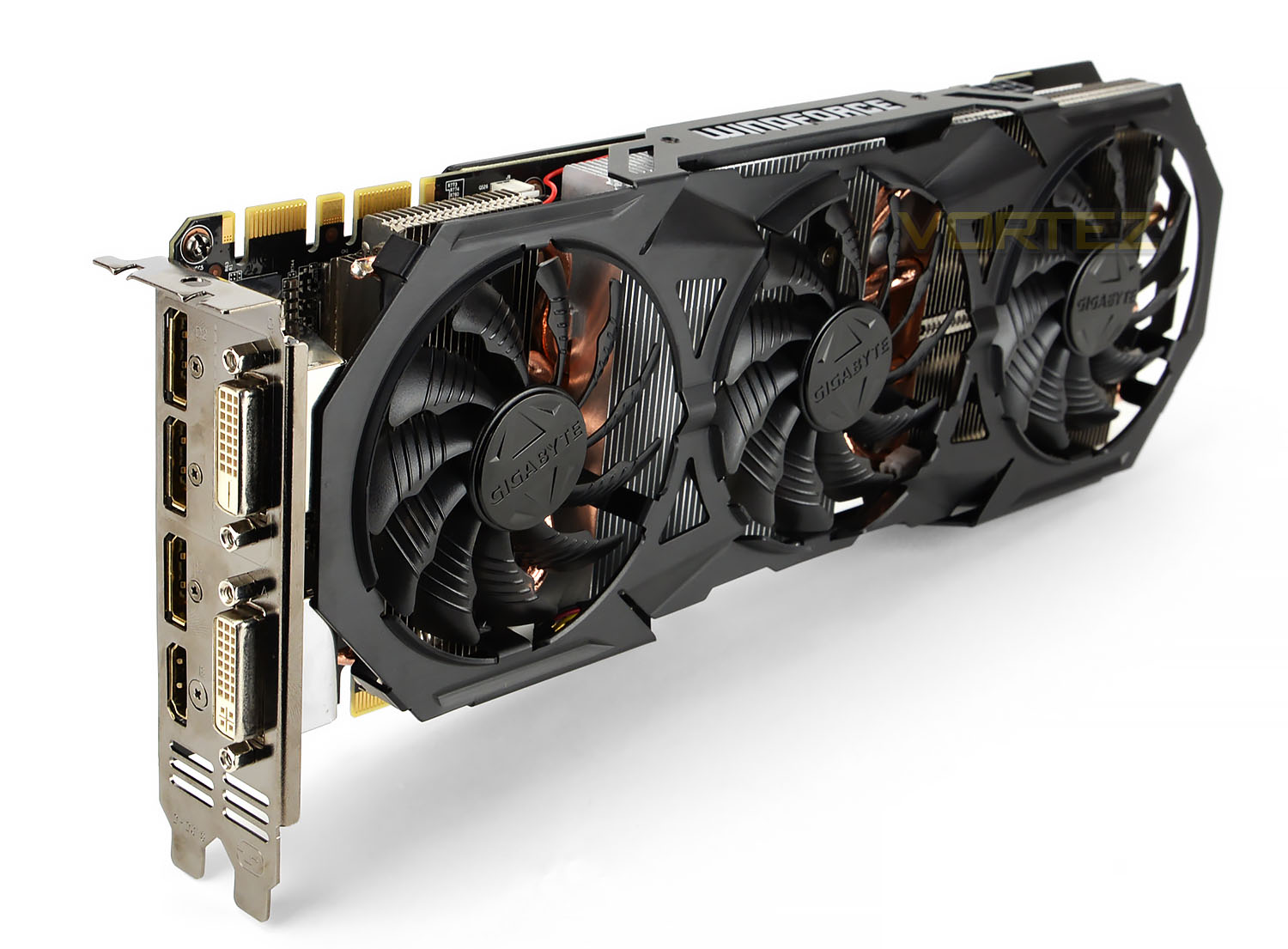
The GIGABYTE GTX 970 G1 GAMING 4GB video memory clocks in at 7Gbps (GDDR5) and a 256-bit wide memory bus which also takes advantage of Third Generation Delta Colour Compression. This lossless algorithm allows better use of the memory bandwidth available, which is essential for higher resolution rendering, texture sizes and IQ settings. Benefits realised by using this algorithm largely depend on the scene but internally NVIDIA estimate that the GTX 980 has between 17 and 25% more effective use of memory bandwidth than the GTX 680.
Every GeForce GTX 970 exhibits a 3.5/0.5GB memory partition, which will limit performance at very high texture qualities and rendering resolutions. This would impact predominantly Dynamic Super Resolution in our testing, but since this issue was uncovered problems have generally appeared only in multi-GPU configurations looking to take image quality settings steps further still. At the time of our first round of testing in February this issue had only just been uncovered, and at the time NVIDIA pledged to address concerns with subsequent driver updates; it will be interesting to see if there is any evidence of this.
Only a few GPU models are more capable at high resolution gaming than this card, making it ideal not only for testing NVIDIA DSR but also just the sort of card on the cusp of 4K-capable horsepower. In the future the GTX 970 is also likely to be the baseline for VR-based gaming on NVIDIA hardware, making high-resolution performance increasingly more important.
Testing Tools
NVIDIA GeForce 344.11 Drivers
NVIDIA GeForce 347.52 drivers
NVIDIA GeForce 355.82 drivers
NVIDIA GeForce 358.91 drivers
NVIDIA GeForce Experience & GFE Share Beta
3DMark Firestrike
Cinebench R15
Thief 4
Assassins Creed Unity
Far Cry 4
NVIDIA GeForce 347.52 drivers
NVIDIA GeForce 355.82 drivers
NVIDIA GeForce 358.91 drivers
NVIDIA GeForce Experience & GFE Share Beta
3DMark Firestrike
Cinebench R15
Thief 4
Assassins Creed Unity
Far Cry 4
The above applications provide us with a modest spread of synthetic and real-world datapoints from which we can assess performance changes over the past year.
Benchmarks: Far Cry 4, Assassins Creed Unity & More
Whilst synthetic benchmarking tools and Square Enix’s Thief 4 have canned benchmarks neither Far Cry 4 nor Assassins Creed Unity offer the same luxury. In order to generate repeatable results we navigated to positions in-game where reliably repeatable 2-minute snippets of gameplay were possible. After five independent runs frame per second results were then averaged, providing us with an overall result for that title.
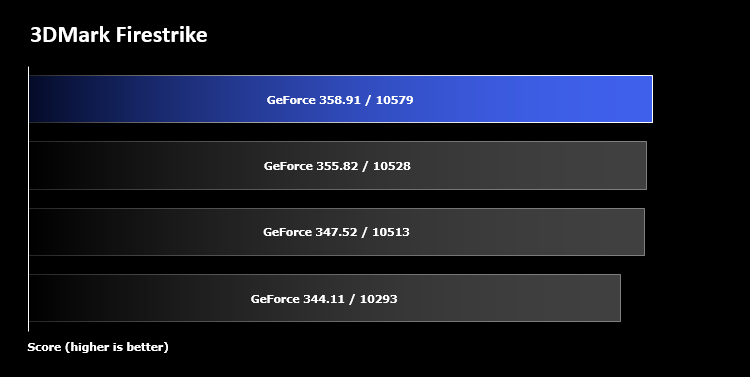
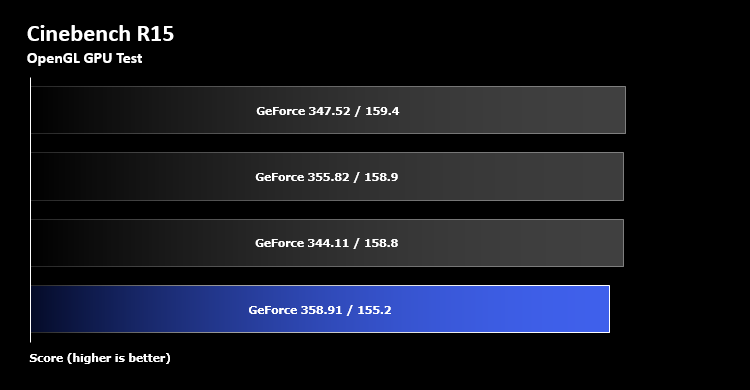
Both 3DMark Firestrike and Cinebench RC15 results saw a small improvement in the transition from 344.11 to 347.52, and FireStrike has remained consistent (i.e. within ~1%) since then. Surprisingly Cinebench has seen a small dip since the release of the 355.82 drivers in August, but we should stress that Cinebench result variance is relatively high.
Firestrike is a DirectX 11 benchmark, and so the result tends to indicate that the NVIDIA drivers became a little more efficient at DirectX 11 API calls in the first few months following release of GPUs with Maxwell 2 architecture. Cinebench RC15 makes use of OpenGL, a separate API without quite so much widespread use in desktop gaming, and so perhaps isn’t as much of a focus.
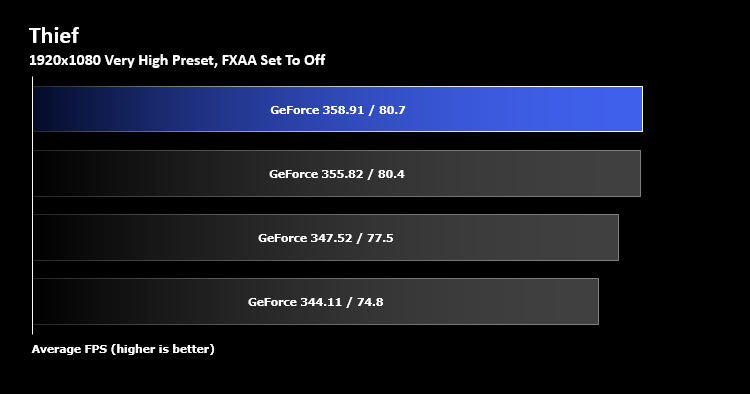
In a surprising turn of events 2014’s Thief 4 sees yet more improvements, garnering another ~3% boost from 347.52 to 358.91. Minimum frame rates have also seen equivalent improvements, which in most systems (and especially frame-synced configurations) would result in a much better gaming experience.
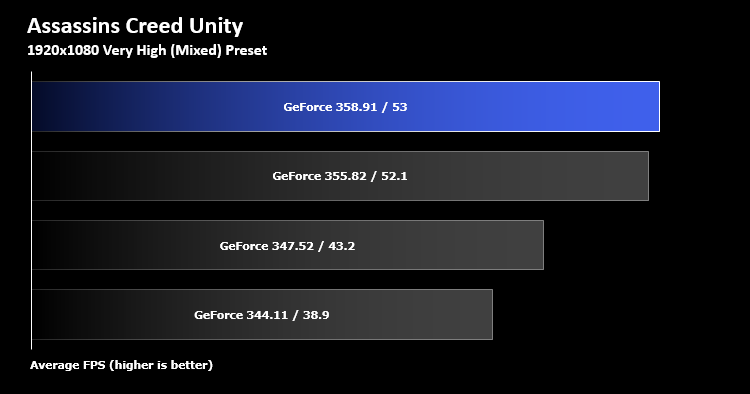
Once again, Assassins Creed at 1080p (Very High graphics preset) saw the largest improvement over the intervening months, echoing improvements over the first four months of the Maxwell-era drivers. Frame rate increases exceeded double-digits percentages, which would make a significant difference when gaming.
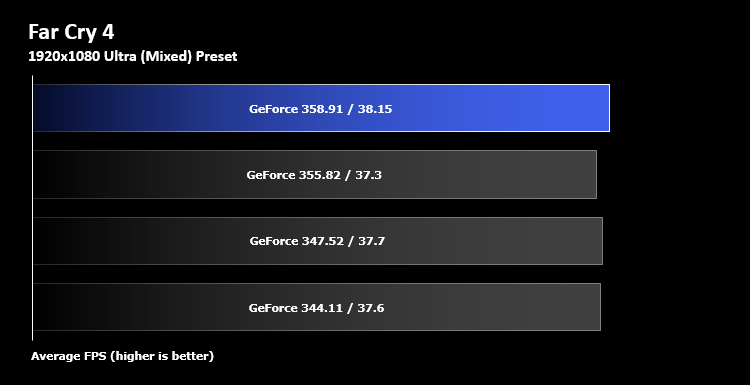
In our most challenging 1080p test – Far Cry 4 at 1080p, Ultra 8xMSAA – there has been no change in performance since the GTX 970’s launch drivers, pointing to few game-specific optimisations being put into place for this title in particular. As a game which made extensive use of NVIDIA GameWorks technology and where PC was the lead platform (as opposed to Assassins Creed, where PC took a back seat) it’s perhaps least surprisingly that there’d be the least amount of ‘spare’ performance to gain, at least at 1080p.
The results indicate that the pace of change isn’t by any means equal across all scenarios, especially when it comes to real-world benchmarks. Despite having the same publisher Far Cry 4 and Assassins Creed exhibited starkly different results, whilst even the now venerable Thief 4 shows some small improvement since February.
Benchmarks: DSR Performance Cost
Click Here To Find Out How To Enable DSR.
During NVIDIA Dynamic Super Resolution testing we incrementally change the in-game rendering resolution, beginning at 1080p and then increasing to 1440p and 4K respectively. MSAA settings for Far Cry 4 and Assassins Creed 4 were adjusted downwards to more realistically simulate a relevant use-case, rather than re-purposing previous results which would have been unhelpful at higher resolutions. Similarly we tweaked our Thief 4 AA settings downward in order to represent a situation where DSR was being used as a substitute anti-aliasing technique, rather than complementary one.
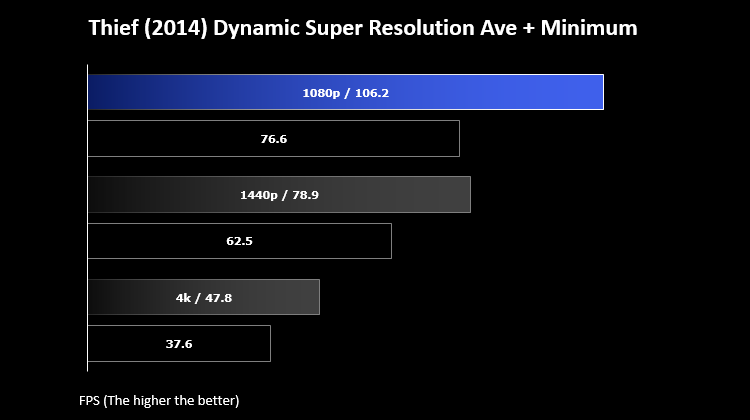
Once again GIGABYTE’s GTX 970 G1 GAMING holds up remarkably well under the pressure of higher resolutions, something that this range of GPUs will certainly need to do when the high resolution and frame rate requirements of Virtual Reality come to the fore in 2016. Once again showing that 1440p is an ideal target resolution to have in mind for this graphics card, it was able to show off immensely playable frame rates in all three titles; but that’s not the whole story here.
Our Thief 4 results were solid, showing >60fps values in the canned benchmark at all times at both 1080p and now 1440p for the first time. Average frame rates for both resolutions didn’t change all that much, emphasising that the benefits seen are about an improved experience rather than inflating high-end frame rates for no really benefit. The most eye-opening improvement was in the 4K resolution zone, where for the first time the game reached what we’d consider ‘Playable’ average frame rates over 40fps. That’s a huge improvement over the ~25fps we saw with the 347.52 drivers back in February.
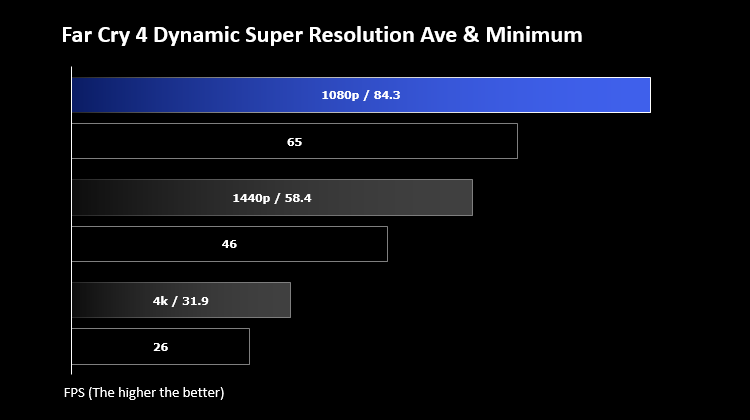
Switching over the Far Cry 4 we again somewhat surprisingly see playable frame rates across the board, with much improved minimums and averages. Comparing the results to that for the 1080p testing alone it becomes clear that the 8xMSAA anti-aliasing implementation for FC4 is quite expensive, i.e. the frame rate gains with it disabled are far greater than we would expect. It’s also possible that there’s more going on here than we’re aware of.
Combining both Far Cry 4 and Thief 4 results you have to come to the conclusion that the newest drivers are far superior to the older 347.52 at higher resolutions specifically, with particular attention drawn to the 1440p ‘sweet-spot’.
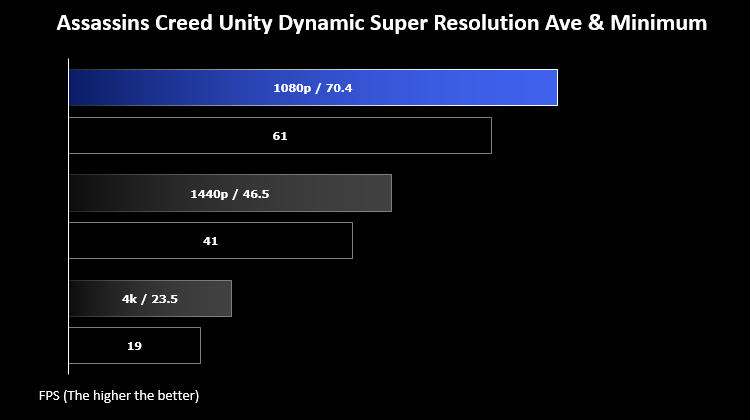
The Assassins Creed Unity results by contrast are something of a concern. The average frame rate has fallen between February and today at both 1440p and 4k resolutions, but minimums are up. This implies that a bottleneck has been alleviated somewhere, but also that the game engine is now stressing the card more than previously. Anecdotally, although texture pop-in remains a problem in ACU, it’s less noticeable with the newer drivers; perhaps the underlying parameters for rendering objects on-screen have changed.
Conclusion: Keep Updating, But Don't Ignore Optimisations
NVIDIA continue to impress with the pace of driver updates, but at times that makes keeping up with the latest release quite a tough task in of itself. GeForce Experience is a welcome utility when it comes to managing the task, even if the soon-to-be implemented policy of locking Game Ready Drivers behind a registration wall rankles. The question we wish to ponder however is how much driver updates over the past year add to overall performance, and that’s certainly difficult to assess. What we now have is an indication of the baked-in benefits over 12 months (since the release of the GeForce GTX 970) to a static system config, and the results are mixed.
At standard gaming resolutions and quality levels the improvement over time in just our small sub-set of benchmarks is significant, although not even across all titles. Whilst gaming at 1080p with the GTX 970 appears to be boosted to a significant degree – especially in Assassins Creed, where over 12 months the improvement has been nothing short of staggering – synthetic benchmarks have remained relatively consistent. 3DMark Firestrike results for instance took a step forward early after the GPUs release, but haven’t budged since then. That indicates that NVIDIA have become more adept at tailoring drivers to specific games, rather than monolithic ‘one-size fits all’ solutions.
A more marked change could be seen at higher resolutions utilising NVIDIA’s Dynamic Super Resolution, where in comparison to the results gathered in February performance in both Far Cry 4 and Thief at 1440p and 4K took a major step forward. This doesn’t indicate necessarily that either game is comfortably playable at the highest resolutions in this hardware configuration, a far more in-depth analysis would need to be performed to assess that notion, but it certainly indicates that NVIDIA have taken major strides forward for games and situations that are memory intensive.
By comparison our DSR results for Assassins Creed Unity are confusing. Average frame rates at 1440p and 4K drop markedly but minimums are up, indicating an overall more consistent experience. Although we’d love to make a grand statement about what this means for the drivers it would be irresponsible to do so; all we can say is that it warrants further investigation. Anecdotally we can comment that the rate of texture pop-in appears to differ between the drivers, and that might be due to underlying differences in the way the game engine is behaving.
So, from all that, what general statements are possible? Well, it’s certainly true that GPUs gain a major boost over their expected lifetime purely from drivers, but that boost isn’t even across the board and will differ based on the test scenario. You can’t for instance look at a benchmark suite from 12 months ago and blindly offset all results by a percentage to get even slightly accurate values, all you can do is re-test with the up-to-date drivers or make it clear how out-of-date older tests are. When you think about it that makes a lot of sense – not all test cases will use every capability the driver has, so when some aspect of the driver’s operation becomes more efficient only certain test cases will see a benefit.
What does that mean for the user? In general, ‘Stay up to Date’ remains the mantra, but even the small sub-set of scenarios looked at here show that tweaking settings plays as important a role in getting a good in-game experience as paying top dollar for a new GPU. Don’t be afraid to tweak those settings or make use of NVIDIA’s GeForce Experience game profile recommendations as it will in most cases be worth the effort.
As for Game Ready Drivers, we remain on the fence as to their efficacy. Undoubtedly of value when the quality of the PC version is better than average, i.e. The Witcher III and Metal Gear Solid V, they’re still not a magic bullet. They cannot fix a broken launch, and improvements are often more significant many weeks later when games have gone through a number of patches and is in a relatively stable state.
And finally, GIGABYTE’s GTX 970 G1 GAMING 4G once again proved its mettle and continued to stake a claim as the best ‘bang for you buck’ card available. Obviously paired with a somewhat over the top Intel CPU in this instance, it would be a great match for Intel’s new Skylake Core i5 or i7 CPUs and monitors or up to 1440p resolution.
NVIDIA set the standard in their commitment to Game Ready Drivers, and over the past 10 months have even continue to boost performance in titles which no longer sit in release spotlight. Over the course of a year the GTX 970 has been boosted in performance by as much as 20% in selected benchmarks where frame rates were already at playable levels, representing substantial value that shouldn’t be ignored. Updating your drivers rarely has a downside today unlike yesteryear, and by ignoring new releases you will be leaving performance on the table.
—
Our thanks to Intel, Corsair and GIGABYTE for providing some of the hardware necessary for this article.