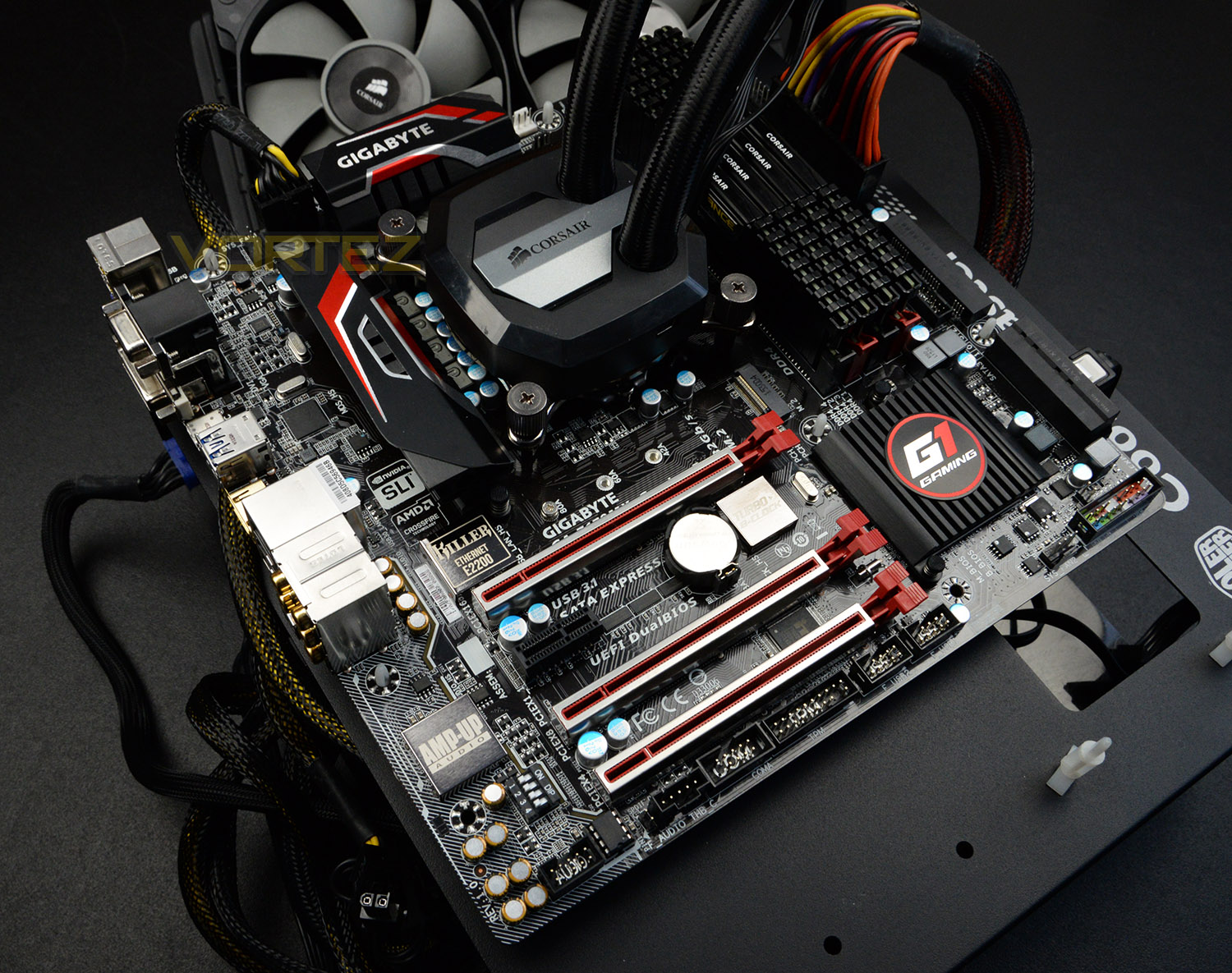
In the spotlight today is the GA-Z170MX-Gaming 5; a Micro-ATX motherboard which uses the Intel Z170 chipset and is packed with useful features.

Product on Review: GA-Z170MX-Gaming 5
Manufacturer & Sponsor: GIGABYTE
Street Price: £140 GBP / $145 USD
On our Intel Z170 journey we’ve so far not encountered a Micro-ATX option. In fact, Micro-ATX motherboards using the Intel Z170 chipset are fairly scarce and yet the demand for downsizing is very much a popular venture for system builders who require a compact configuration for portability or to simply make way for more space in that man-cave (or woman-cave!).
Today we’re to look at what GIGABYTE has to offer in the Z170MX-Gaming 5. This condensed motherboard shares some key similarities with its larger siblings which make use of the ATX form factor. Throughout there is an eye-catching design which carries with it a strong feature-set, with extra emphasis on audio performance.
About GIGABYTE
Founded in 1986, GIGABYTE is committed to providing top-notch solutions that “upgrade your life”. We are regarded as a pioneer in innovation with groundbreaking excitements such as Ultra Durable™ — a revolutionary technology that redefines the industry, WINDFORCE™ — exclusive heat dissipation design that builds for extreme performance, G1™ Gaming series—the perfect solutions for gamers and enthusiasts, P series — a powerful gaming laptop less than an inch thick, and BRIX series—a versatile mini-PC in the palm of your hand. GIGABYTE has continuously brought unique new ways of digital world and created marvelous products that empower you with meaningful and charming experiences.
Technical Specifications
Below are the technical specifications concerning the Z170MX-Gaming 5, taken directly from the GIGABYTE website:
CPU
Support for Intel® Core™ i7 processors/Intel® Core™ i5 processors/ Intel® Core™ i3 processors/Intel® Pentium® processors/ Intel® Celeron® processors in the LGA1151 package
L3 cache varies with CPU
Chipset
Intel® Z170 Express Chipset
Memory
4 x DDR4 DIMM sockets supporting up to 64 GB of system memory
Dual channel memory architecture
Support for DDR4 3466(O.C.) /3400(O.C.) /3333(O.C.) /3300(O.C.) /3200(O.C.) /
3000(O.C.) /2800(O.C.) /2666(O.C.) /2400(O.C.) /2133 MHz memory modules
Support for ECC UDIMM 1Rx8/2Rx8 memory modules (operate in non-ECC mode)
Support for non-ECC UDIMM 1Rx8/2Rx8/1Rx16 memory modules
Support for Extreme Memory Profile (XMP) memory modules
Onboard Graphics
Integrated Graphics Processor-Intel® HD Graphics support
1 x D-Sub port, supporting a maximum resolution of 1920×1200@60 Hz
1 x DVI-D port, supporting a maximum resolution of 1920×1200@60 Hz
* The DVI-D port does not support D-Sub connection by adapter.
1 x HDMI port, supporting a maximum resolution of 4096×2160@24 Hz
* Support for HDMI 1.4 version.
Support for up to 3 displays at the same time
Maximum shared memory of 512 MB
Audio
Realtek® ALC1150 codec
TI Burr Brown® OPA2134 operational amplifier
Support for Sound Blaster X-Fi MB3
High Definition Audio
2/4/5.1/7.1-channel
Support for S/PDIF Out
LAN
Killer E2201 LAN chip (10/100/1000 Mbit)
Expansion Slots
1 x PCI Express x16 slot, running at x16 (PCIEX16)
* For optimum performance, if only one PCI Express graphics card is to be installed, be sure to install it in the PCIEX16 slot.
1 x PCI Express x16 slot, running at x8 (PCIEX8)
* The PCIEX8 slot shares bandwidth with the PCIEX16 slot. When the PCIEX8 slot is populated, the PCIEX16 slot will operate at up to x8 mode.
1 x PCI Express x16 slot, running at x4 (PCIEX4)
1 x PCI Express x1 slot
(All of the PCI Express slots conform to PCI Express 3.0 standard.)
Multi-Graphics Technology
Support for NVIDIA® Quad-GPU SLI™ and 2-Way NVIDIA® SLI™ technologies
Support for AMD Quad-GPU CrossFireX™ and 3-Way/2-Way AMD CrossFire™ technologies
Storage Interface
Chipset:
1 x M.2 Socket 3 connector (Socket 3, M key, type 2242/2260/2280 SATA & PCIe x4/x2/x1 SSD support)
3 x SATA Express connectors
6 x SATA 6Gb/s connectors
Support for RAID 0, RAID 1, RAID 5, and RAID 10
* Refer to “1-9 Internal Connectors,” for the supported configurations with the M.2, SATA Express, and SATA connectors.
USB
Chipset:
7 x USB 3.0/2.0 ports (3 ports on the back panel, 4 ports available through the internal USB headers)
6 x USB 2.0/1.1 ports (2 ports on the back panel, 4 ports available through the internal USB headers)
Chipset+Intel® USB 3.1 Controller:
1 x USB Type-C™ port on the back panel, with USB 3.1 support
1 x USB 3.1 Type-A port (red) on the back panel
Internal I/O Connectors
1 x 24-pin ATX main power connector
1 x 8-pin ATX 12V power connector
1 x M.2 Socket 3 connector
3 x SATA Express connectors
6 x SATA 6Gb/s connectors
1 x CPU fan header
1 x water cooling fan header (CPU_OPT)
3 x system fan headers
1 x front panel header
1 x front panel audio header
1 x S/PDIF Out header
2 x USB 3.0/2.0 headers
2 x USB 2.0/1.1 headers
1 x Trusted Platform Module (TPM) header
1 x Thunderbolt™ add-in card connector
1 x serial port header
1 x Clear CMOS jumper
1 x audio gain control switch
Back Panel Connectors
1 x PS/2 keyboard/mouse port
1 x D-Sub port
1 x DVI-D port
1 x HDMI port
1 x USB Type-C™ port, with USB 3.1 support
1 x USB 3.1 Type-A port (red)
3 x USB 3.0/2.0 ports
2 x USB 2.0/1.1 ports
1 x RJ-45 port
1 x optical S/PDIF Out connector
5 x audio jacks (Center/Subwoofer Speaker Out, Rear Speaker Out, Line In, Line Out, Mic In)
I/O Controller
iTE® I/O Controller Chip
H/W Monitoring
System voltage detection
CPU/System temperature detection
CPU/CPU OPT/System fan speed detection
CPU/System overheating warning
CPU/CPU OPT/System fan fail warning
CPU/CPU OPT/System fan speed control
* Whether the fan speed control function is supported will depend on the cooler you install.
BIOS
2 x 128 Mbit flash
Use of licensed AMI UEFI BIOS
Support for DualBIOS™
PnP 1.0a, DMI 2.7, WfM 2.0, SM BIOS 2.7, ACPI 5.0
Unique Features
Support for APP Center
* Available applications in APP Center may vary by motherboard model. Supported functions of each application may also vary depending on motherboard specifications.
3D OSD
@BIOS
Ambient LED
AutoGreen
Cloud Station
EasyTune
Easy RAID
Fast Boot
Smart TimeLock
Smart Keyboard
Smart Backup
System Information Viewer
USB Blocker
Support for Q-Flash
Support for Smart Switch
Support for Xpress Install
Bundle Software
Norton® Internet Security (OEM version)
Intel® Smart Response Technology
Operating System
Support for Windows 10/8.1 64-bit
Support for Windows 7 32-bit/64-bit
* Please download the “Windows USB Installation Tool” from GIGABYTE’s website and install it before installing Windows 7.
Form Factor
Micro ATX Form Factor; 24.4cm x 24.4cm
Box Contents
GA-Z170MX-Gaming 5 motherboard
Four SATA cables
Motherboard driver disk
I/O Shield
User’s Manual
One 2-Way SLI bridge connector
Quick Installation Guide
One G Connector
Support for Intel® Core™ i7 processors/Intel® Core™ i5 processors/ Intel® Core™ i3 processors/Intel® Pentium® processors/ Intel® Celeron® processors in the LGA1151 package
L3 cache varies with CPU
Chipset
Intel® Z170 Express Chipset
Memory
4 x DDR4 DIMM sockets supporting up to 64 GB of system memory
Dual channel memory architecture
Support for DDR4 3466(O.C.) /3400(O.C.) /3333(O.C.) /3300(O.C.) /3200(O.C.) /
3000(O.C.) /2800(O.C.) /2666(O.C.) /2400(O.C.) /2133 MHz memory modules
Support for ECC UDIMM 1Rx8/2Rx8 memory modules (operate in non-ECC mode)
Support for non-ECC UDIMM 1Rx8/2Rx8/1Rx16 memory modules
Support for Extreme Memory Profile (XMP) memory modules
Onboard Graphics
Integrated Graphics Processor-Intel® HD Graphics support
1 x D-Sub port, supporting a maximum resolution of 1920×1200@60 Hz
1 x DVI-D port, supporting a maximum resolution of 1920×1200@60 Hz
* The DVI-D port does not support D-Sub connection by adapter.
1 x HDMI port, supporting a maximum resolution of 4096×2160@24 Hz
* Support for HDMI 1.4 version.
Support for up to 3 displays at the same time
Maximum shared memory of 512 MB
Audio
Realtek® ALC1150 codec
TI Burr Brown® OPA2134 operational amplifier
Support for Sound Blaster X-Fi MB3
High Definition Audio
2/4/5.1/7.1-channel
Support for S/PDIF Out
LAN
Killer E2201 LAN chip (10/100/1000 Mbit)
Expansion Slots
1 x PCI Express x16 slot, running at x16 (PCIEX16)
* For optimum performance, if only one PCI Express graphics card is to be installed, be sure to install it in the PCIEX16 slot.
1 x PCI Express x16 slot, running at x8 (PCIEX8)
* The PCIEX8 slot shares bandwidth with the PCIEX16 slot. When the PCIEX8 slot is populated, the PCIEX16 slot will operate at up to x8 mode.
1 x PCI Express x16 slot, running at x4 (PCIEX4)
1 x PCI Express x1 slot
(All of the PCI Express slots conform to PCI Express 3.0 standard.)
Multi-Graphics Technology
Support for NVIDIA® Quad-GPU SLI™ and 2-Way NVIDIA® SLI™ technologies
Support for AMD Quad-GPU CrossFireX™ and 3-Way/2-Way AMD CrossFire™ technologies
Storage Interface
Chipset:
1 x M.2 Socket 3 connector (Socket 3, M key, type 2242/2260/2280 SATA & PCIe x4/x2/x1 SSD support)
3 x SATA Express connectors
6 x SATA 6Gb/s connectors
Support for RAID 0, RAID 1, RAID 5, and RAID 10
* Refer to “1-9 Internal Connectors,” for the supported configurations with the M.2, SATA Express, and SATA connectors.
USB
Chipset:
7 x USB 3.0/2.0 ports (3 ports on the back panel, 4 ports available through the internal USB headers)
6 x USB 2.0/1.1 ports (2 ports on the back panel, 4 ports available through the internal USB headers)
Chipset+Intel® USB 3.1 Controller:
1 x USB Type-C™ port on the back panel, with USB 3.1 support
1 x USB 3.1 Type-A port (red) on the back panel
Internal I/O Connectors
1 x 24-pin ATX main power connector
1 x 8-pin ATX 12V power connector
1 x M.2 Socket 3 connector
3 x SATA Express connectors
6 x SATA 6Gb/s connectors
1 x CPU fan header
1 x water cooling fan header (CPU_OPT)
3 x system fan headers
1 x front panel header
1 x front panel audio header
1 x S/PDIF Out header
2 x USB 3.0/2.0 headers
2 x USB 2.0/1.1 headers
1 x Trusted Platform Module (TPM) header
1 x Thunderbolt™ add-in card connector
1 x serial port header
1 x Clear CMOS jumper
1 x audio gain control switch
Back Panel Connectors
1 x PS/2 keyboard/mouse port
1 x D-Sub port
1 x DVI-D port
1 x HDMI port
1 x USB Type-C™ port, with USB 3.1 support
1 x USB 3.1 Type-A port (red)
3 x USB 3.0/2.0 ports
2 x USB 2.0/1.1 ports
1 x RJ-45 port
1 x optical S/PDIF Out connector
5 x audio jacks (Center/Subwoofer Speaker Out, Rear Speaker Out, Line In, Line Out, Mic In)
I/O Controller
iTE® I/O Controller Chip
H/W Monitoring
System voltage detection
CPU/System temperature detection
CPU/CPU OPT/System fan speed detection
CPU/System overheating warning
CPU/CPU OPT/System fan fail warning
CPU/CPU OPT/System fan speed control
* Whether the fan speed control function is supported will depend on the cooler you install.
BIOS
2 x 128 Mbit flash
Use of licensed AMI UEFI BIOS
Support for DualBIOS™
PnP 1.0a, DMI 2.7, WfM 2.0, SM BIOS 2.7, ACPI 5.0
Unique Features
Support for APP Center
* Available applications in APP Center may vary by motherboard model. Supported functions of each application may also vary depending on motherboard specifications.
3D OSD
@BIOS
Ambient LED
AutoGreen
Cloud Station
EasyTune
Easy RAID
Fast Boot
Smart TimeLock
Smart Keyboard
Smart Backup
System Information Viewer
USB Blocker
Support for Q-Flash
Support for Smart Switch
Support for Xpress Install
Bundle Software
Norton® Internet Security (OEM version)
Intel® Smart Response Technology
Operating System
Support for Windows 10/8.1 64-bit
Support for Windows 7 32-bit/64-bit
* Please download the “Windows USB Installation Tool” from GIGABYTE’s website and install it before installing Windows 7.
Form Factor
Micro ATX Form Factor; 24.4cm x 24.4cm
Box Contents
GA-Z170MX-Gaming 5 motherboard
Four SATA cables
Motherboard driver disk
I/O Shield
User’s Manual
One 2-Way SLI bridge connector
Quick Installation Guide
One G Connector
Unboxing & Closer Look
For this review we’ve produced a video which reveals the packaging, bundle and a close, detailed overview of the motherboard. Please check out the video below for a comprehensive look at the feature-set:
Intel Z170 Features
Intel’s initial release schedule for Skylake was planned well in advance, long before Microsoft officially announced the launch date of Windows 10. Most of August was set aside for conferences and seminars including the Intel Developers Forum in San Francisco, all with the aim of taking the wraps off and going deep into the technology within this new CPU architecture. Unfortunately bringing forward the release date of ‘K-series’ SKUs has meant that they’re unable to furnish detailed technical info to reviewers and members of the press, and won’t be releasing this information until IDF. The following is information which has been released thus far.
Developed under the codename Sunrise Point, Intel’s 100-series chipset is designed to operate hand-in-hand with an Intel ‘Skylake’ 6th Generation core processor. It utilises an LGA 1151 socket, underscoring the fact that neither CPU nor motherboard are backwards compatible with any of the previous generation hardware. As a result Sunrise Point is free to add additional features not present in x90-series and earlier chipsets.
Memory and Overclocking
Most notably from a consumer perspective Sunrise Point is the first Intel mainstream computing platform to be compatible with DDR4, and most Z170 and H170 designs are indeed likely to feature this memory technology rather than continue with DDR3L (a memory spec which Skylake CPUs can also handle). Default support is at DDR4-2133, however speeds above this are possible if a Z170 motherboard and K-Series CPU are used in tandem. One year on from the release of Haswell-E DDR4 pricing is quickly becoming more bearable, and so whilst it’s an additional expense to swallow compared with Haswell/Z97 it may not be quite the price premium you expect.
With Skylake Intel are, for the first time in many generations of Core architectures, once again re-enabling fine grade overclocking of memory at the Base Clock (BCLK) level. The PCI subsystem clock is now independent of BCLK, allowing for robust overclocking support which dispenses with coarse ratios in favour of a MHz by MHz stepping to far higher levels. Pre-launch testing by board partners have ascertained that stable BCLK’s of up to 400MHz are possible (with a stepping down of CPU multiplier), a far cry from even last year’s Haswell Refresh.
It should be noted that overclocking support has also been improved through greater control over individual CPU voltage inputs. Haswell made use of a Fully Integrated Voltage Regulator on the CPU itself; in essence, the motherboard supplied one input voltage and the FIVR divided this into individual on-board component inputs. With Skylake/Z170 the motherboard chipset controls each of these voltages individually, allowing direct adjustment for greater stability where necessary. This could theoretically be a great boon to enthusiast overclockers eager to get every last smidgen of performance out of a system.
Chipset and PCH Features
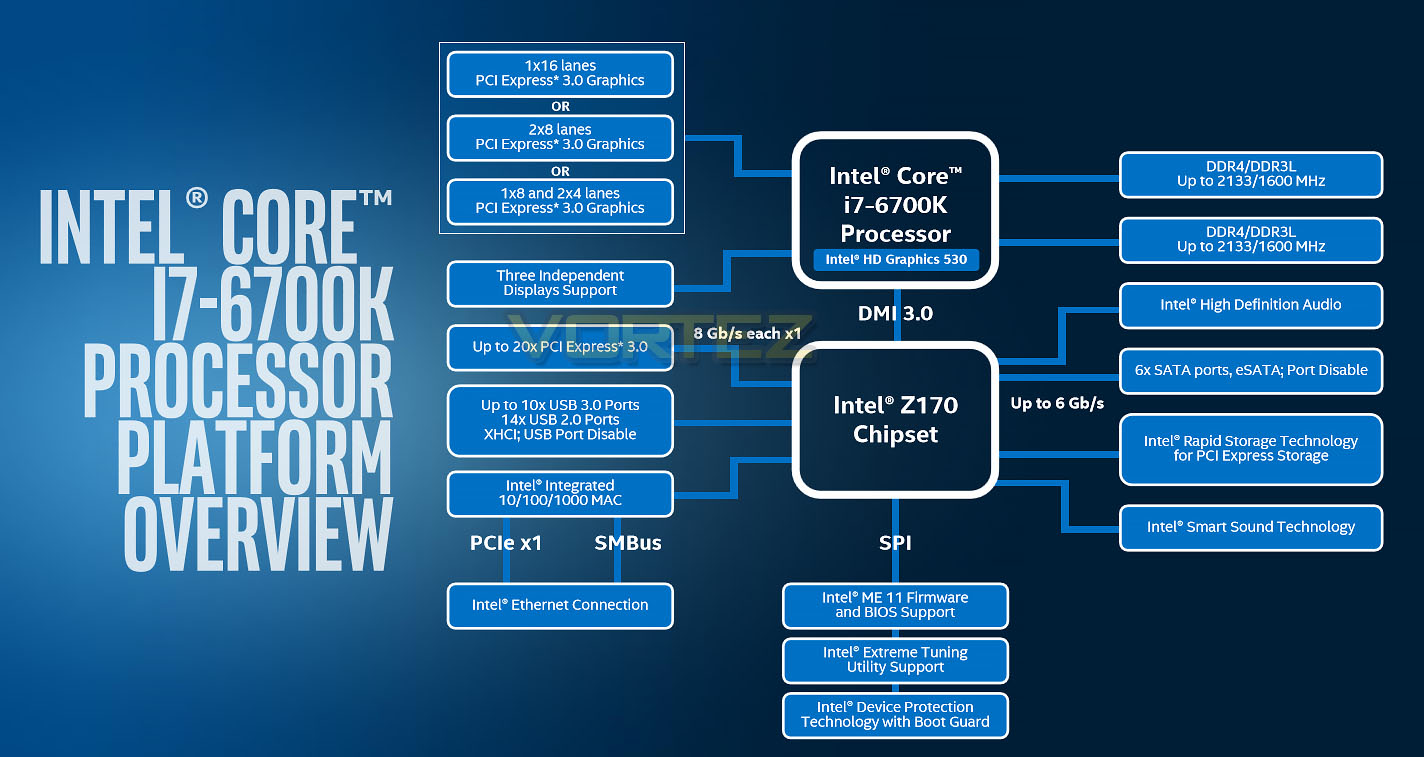
As we noted in our review of the two launched Skylake CPUs, up to 16 PCI-Express 3.0 lanes exist as a direct low-latency connection between CPU and 3rd party hardware such as graphics cards. These can operate in a 1×16 lane, 2×8 lane or 1×8 lane and 2×4 lane setup for multi-GPU configurations depending on the hardware implementation chosen by the board partners, but aren’t sufficient alone to support additional hardware options such as PCI-Express storage. The Platform Controller Hub therefore provides additional PCI-Express lanes to peripheral controllers.
In contrast to Intel’s 9-series motherboards Sunrise Point can supply up to an additional 20 PCI-Express 3.0 lanes, potentially resulting in double the bandwidth compared with the 20 PCIe 2.0 lanes of the previous generation. These new lanes augment the chipset storage options, most notably in respect to PCIe storage with many designs now featuring multiple next-generation storage options rather than a singular M.2 or SATA-Express port. Whilst not the low-latency connection you require for effective graphics processing, they will be more than suitable for new high-speed storage options including RAID for PCI-Express thanks to an upgraded DMI connection between PCH and CPU.
Further augmenting the platform’s storage capabilities is the adoption of new Intel Rapid Storage Technology protocols allowing PCI-Express storage to be used as caching drives for slower media. Potentially still a niche technology, the stark benefits of next-generation SSDs over mechanical drives as well as future SSDs could be just the breakthrough Intel RST needs to capture mainstream adoption.
In an additional change from the 9-series motherboards support has been added for up to 10 native USB 3.0 ports and 14 USB 2.0 ports, with a maximum of 16 ports in some combination thereof. It should be noted that so far as we can tell USB 3.1 isn’t actually native to the Sunrise Point chipset. Implementation is up to motherboard vendors through 3rd party controllers, and it’s to their credit that many have adopted the new high-speed standard without any fuss. For some both USB 3.1 Type-A and Type-C connectors are available, with Type-C the most common otherwise.
Those who make use of on-board CPU graphics can now enjoy support for up to three digital display outputs, or make use of the Intel 530 Graphics capabilities in tandem with discrete graphics. Microsoft Windows 10 (via DirectX 12) includes new options which allow disparate graphics hardware to be used in tandem, making best use of processing power where possible. Even without this, the transcoding capabilities of Intel QuickSync make it a tempting proposition for fast and efficient h.265 encoding and decoding, even if your discrete graphics hardware is formidable.
With unchanged support for six conventional SATA III storage ports, Intel 10/100/1000Mbps Ethernet, Intel Audio options and comprehensive UEFI BIOS options, Sunrise Point (and by extension all Z170 motherboards) are choc-full of features. That’s not to say that there aren’t some omissions – lack of native USB 3.1 support being the most obvious, whilst native U.2 connectors are a premium feature supplied by board partners – but as a whole the platform is a significant step forward overall.
Test Setup, Methodology & Overclocking
Test SetupCPU Intel Core i7-6700K
Cooling Corsair H100i GTX
Motherboard GIGABYTE GA-Z170MX-Gaming 5
Memory 16GB Corsair Vengeance LPX 3200MHz
Graphics XFX R7970 Black Edition
Storage OCZ Vector 180
PSU Corsair HX1050 80 Plus Gold Certified PSU
Cooling Corsair H100i GTX
Motherboard GIGABYTE GA-Z170MX-Gaming 5
Memory 16GB Corsair Vengeance LPX 3200MHz
Graphics XFX R7970 Black Edition
Storage OCZ Vector 180
PSU Corsair HX1050 80 Plus Gold Certified PSU
Benchmarks
Cinebench R15 – CPU/OpenGL Score
x264 HD 4.0 – 1st and 2nd pass encoding
SiSoftware SANDRA 2014 – CPU & Memory benchmarks
AIDA64 – CPU benchmarks
PCMark 8 – Home Suite
3DMark FireStrike – DX11 3D Benchmark
Games – Tomb Raider, THIEF
x264 HD 4.0 – 1st and 2nd pass encoding
SiSoftware SANDRA 2014 – CPU & Memory benchmarks
AIDA64 – CPU benchmarks
PCMark 8 – Home Suite
3DMark FireStrike – DX11 3D Benchmark
Games – Tomb Raider, THIEF
Other Software
Temperature Analysis: Real Temp
Stress Testing Software: AIDA64 Stability Test
CPU Specification Monitoring: CPU-Z
Stress Testing Software: AIDA64 Stability Test
CPU Specification Monitoring: CPU-Z
Overclocking
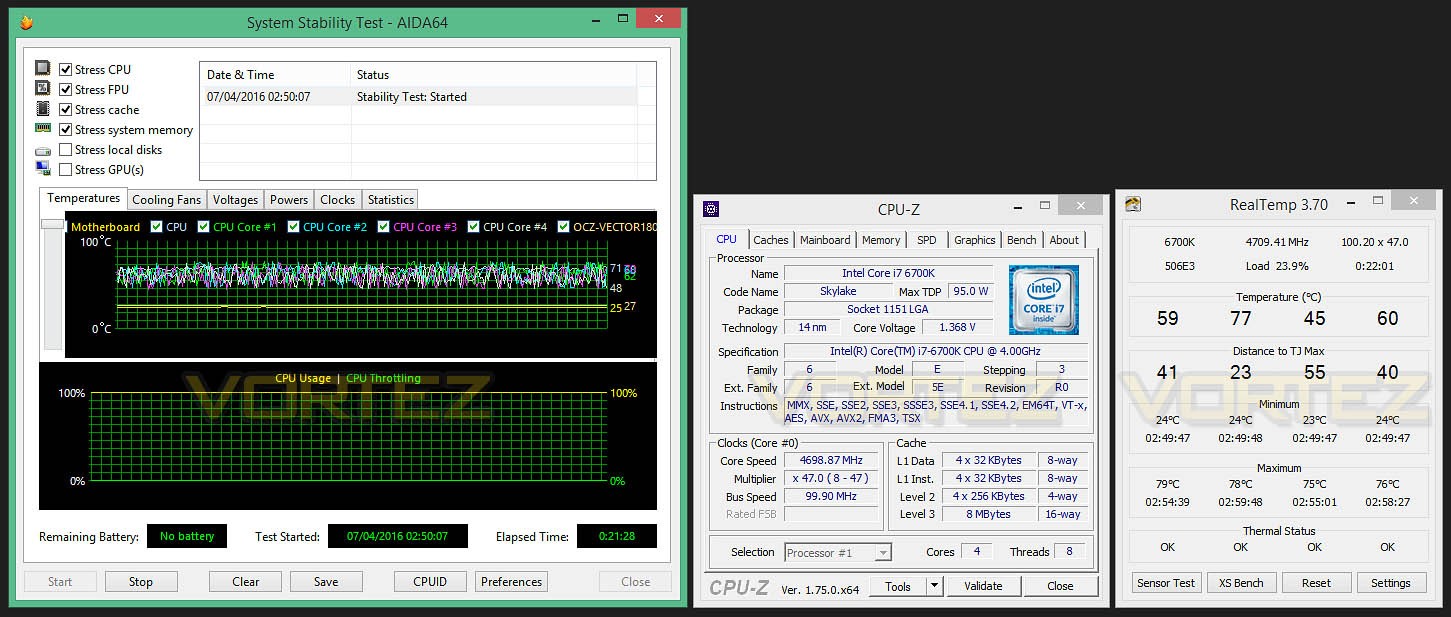
Overclocking with Skylake is now fully flexible since we can adjust many variables including BCLK and ratio/multiplier.
Our current milestone is 4.8GHz with the Intel Core i7-6700K – sadly, the Gaming 5 wasn’t able to attain this frequency. Instead, we managed to achieve 4.7GHz; which isn’t too shabby at all. At 4.7GHz (100×47) we required a CPU core voltage of 1.37v.
Reaching this mark was easy thanks to the feature-packed UEFI BIOS – where there are plenty of advanced options for overclockers.
Benchmarks: Power Consumption
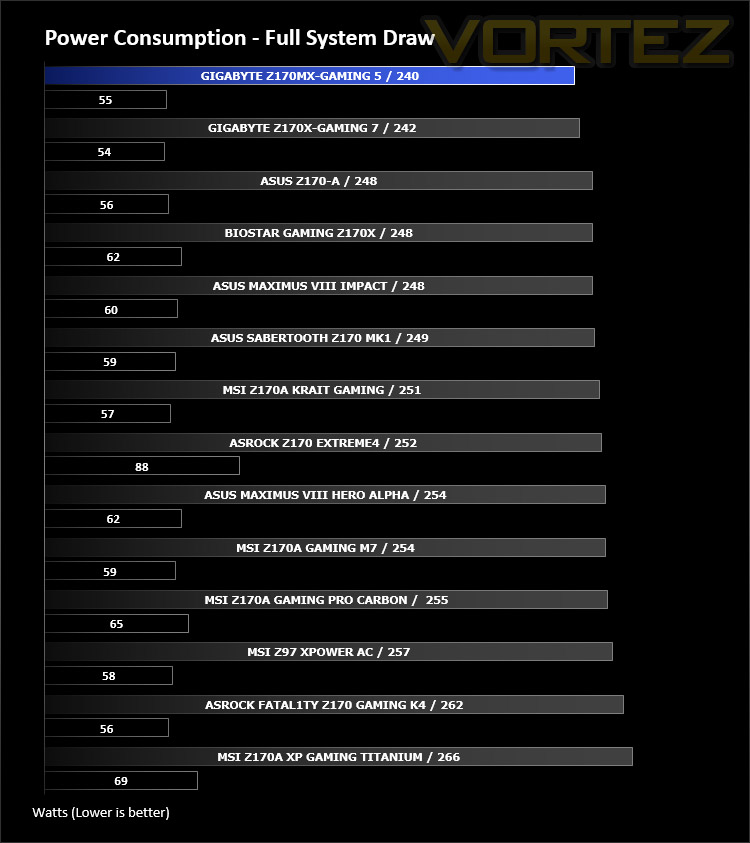
It’s interesting to note the power consumption across all motherboards. Although they are using the Z170 chipset, energy results can fluctuate between manufacturers due to the features and specifications that are integrated. First of all, for the idle tests the system is cold booted into Windows and no additional applications are executed – the watts are noted on the external energy monitor we use and then the system is loaded with 3DMark FireStrike – watts are again monitored for the duration of the test and the highest rated wattage result is then noted down. Below are the results of this energy test.
Benchmarks: X264 HD
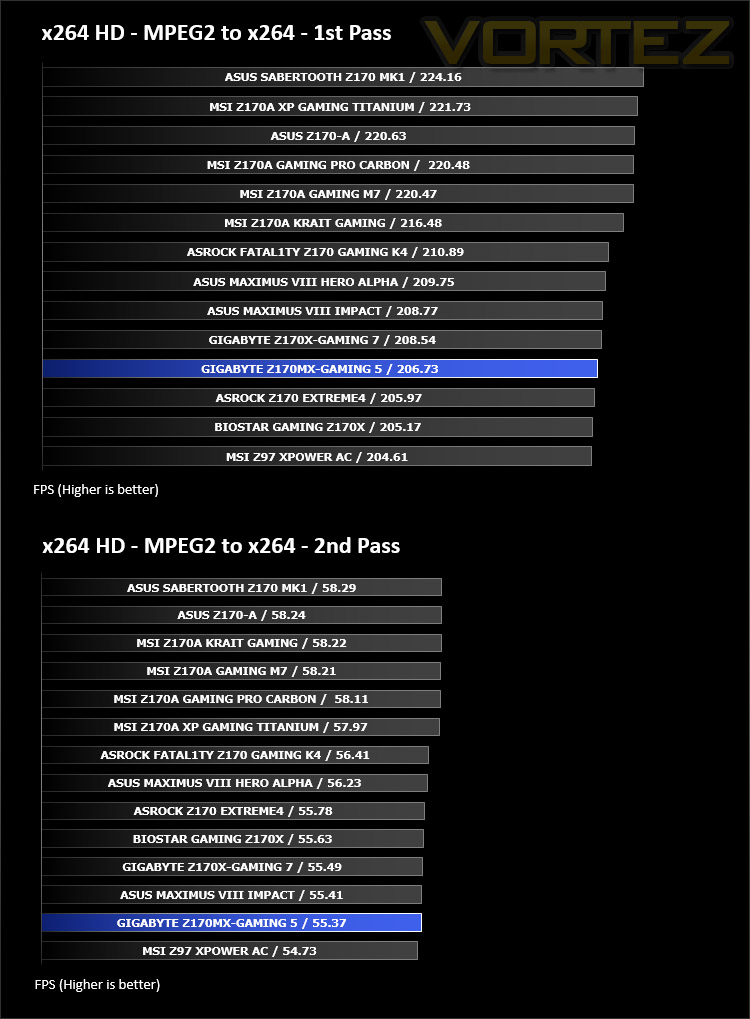
Simply put, this test measures how fast your machine can encode a short, DVD quality MPEG-2 video clip into a high-quality x264 video clip. What’s x264, you ask? It’s more or less the next-generation Xvid/DivX codec. I think it’s ideal for a benchmark because the application (x264.exe) reports fairly accurate compression results (in frames per second) for each pass of the video encoding process, and it uses multi-core processors very efficiently.
Benchmarks: AIDA64
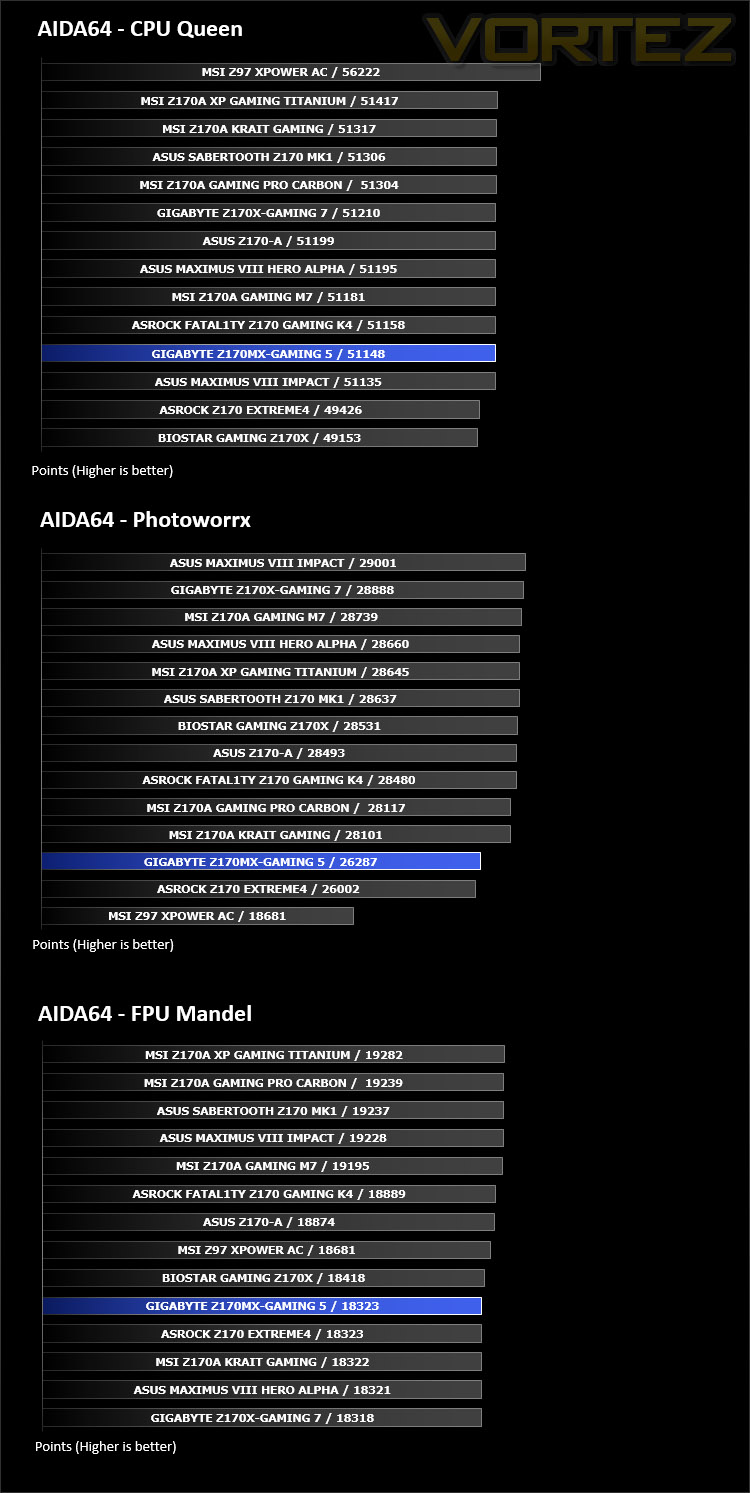
AIDA64 Product PageThis simple integer benchmark focuses on the branch prediction capabilities and the misprediction penalties of the CPU. It finds the solutions for the classic “Queens problem” on a 10 by 10 sized chessboard. At the same clock speed theoretically the processor with the shorter pipeline and smaller misprediction penalties will attain higher benchmark scores. For example — with HyperThreading disabled — the Intel Northwood core processors get higher scores than the Intel Prescott core based ones due to the 20-step vs 31-step long pipeline. CPU Queen test uses integer MMX, SSE2 and SSSE3 optimizations.
Benchmarks: Cinebench R15
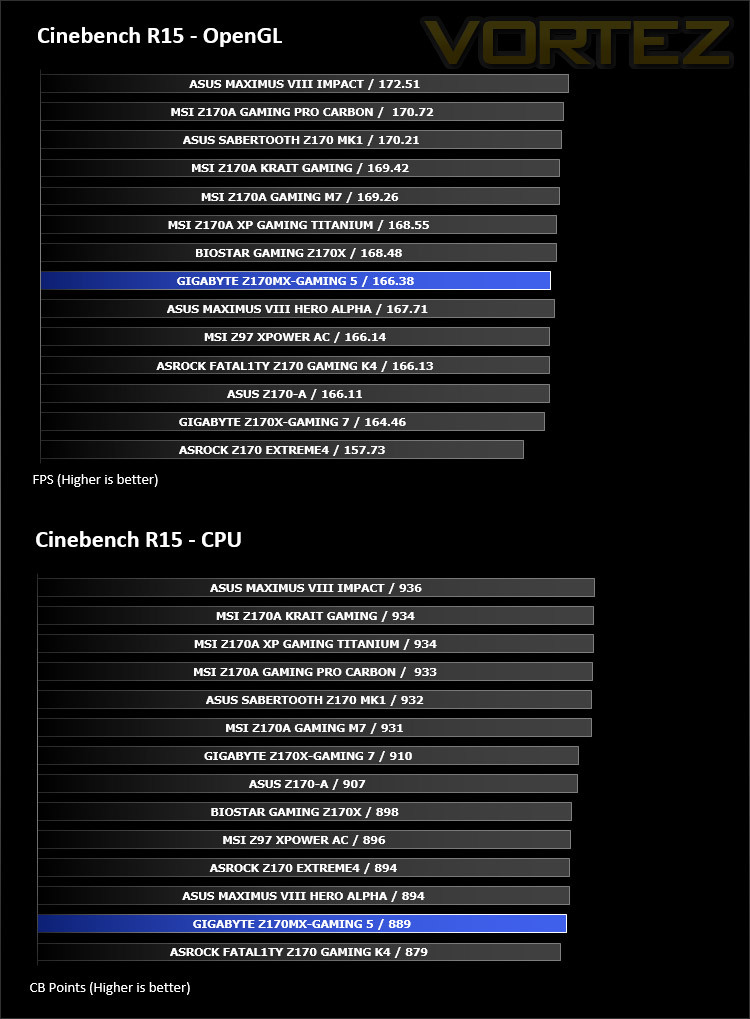
CINEBENCH is a real-world cross platform test suite that evaluates your computer’s performance capabilities. CINEBENCH is based on MAXON’s award-winning animation software CINEMA 4D, which is used extensively by studios and production houses worldwide for 3D content creation. MAXON software has been used in blockbuster movies such as Iron Man 3, Oblivion, Life of Pi or Prometheus and many more.
Benchmarks: SiSoftware SANDRA
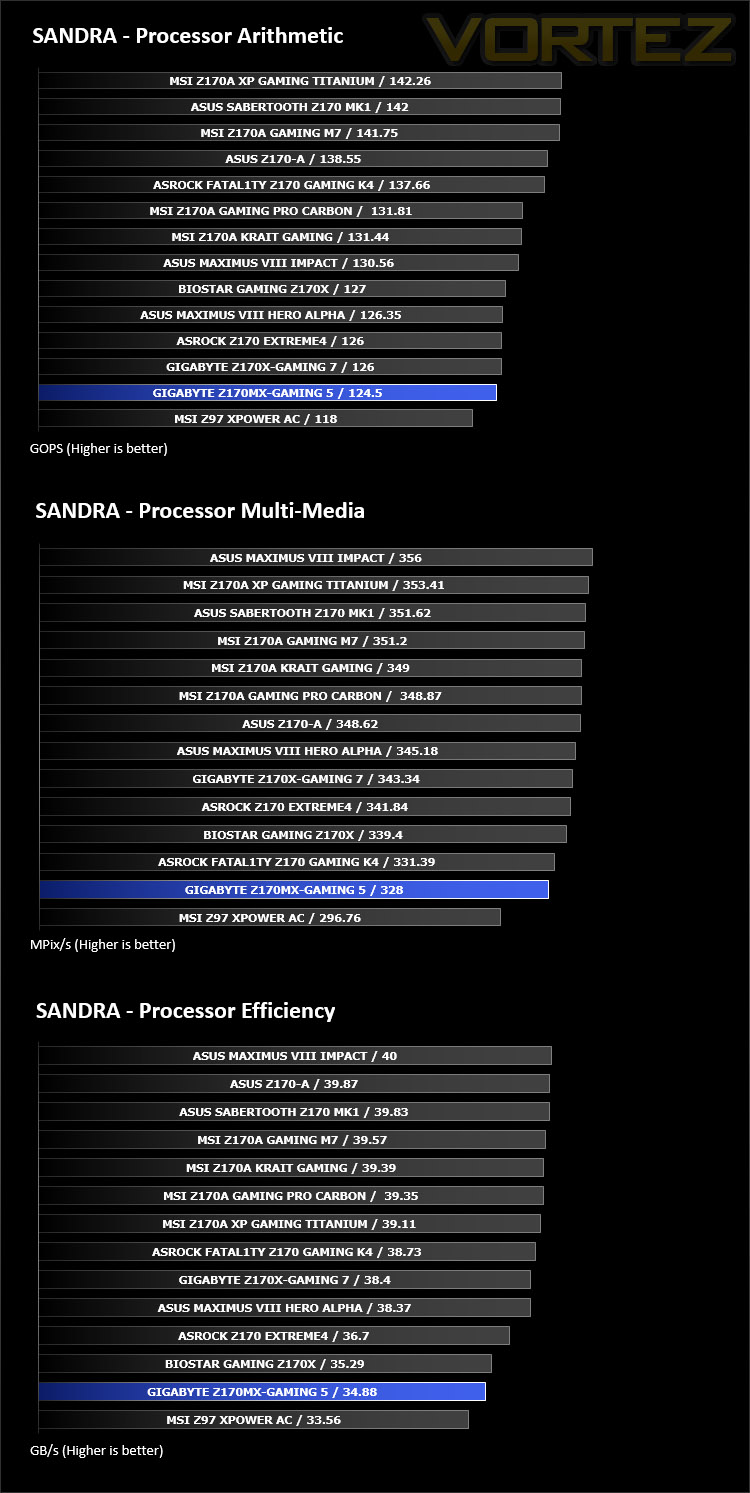
SANDRA isn’t always a benchmark that is included in hardware reviews but we believe it shouldn’t be ignored. SANDRA provides a vigorous package that tests your system in a rather large array of benchmarks. There are many aspects of benchmark that can be executed. We will be considering – CPU and memory tests.
Benchmarks: 3DMark
3DMark FireStrike Product PageFire Strike is our new showcase DirectX 11 benchmark designed for high-performance gaming PCs. It is our most ambitious and technical benchmark ever, featuring real-time graphics rendered with detail and complexity far beyond what is found in other benchmarks and games today. Fire Strike will only be available in the Windows editions of 3DMark initially.
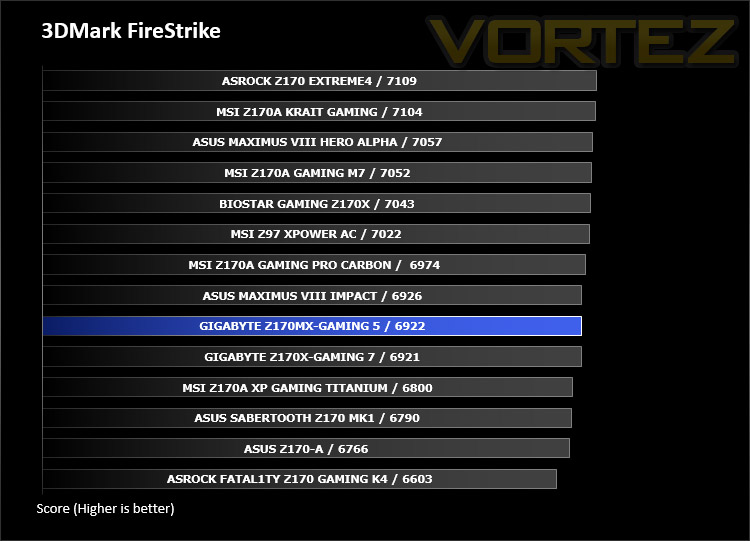
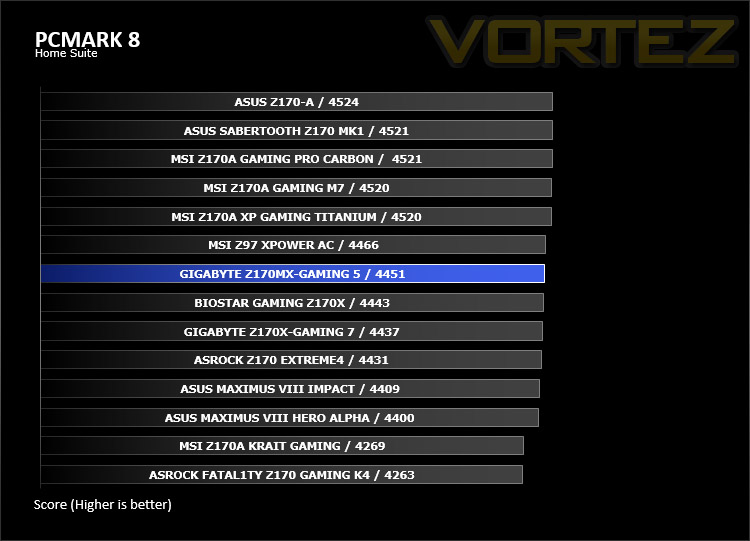
Benchmarks: PCMark 8
PCMark 8 combines performance benchmarking with battery life measurement and includes tests based on popular Adobe and Microsoft applications. Whether you are looking for long battery life, or maximum power, PCMark 8 will help you find the devices that offer the perfect combination of efficiency and performance for your needs. It’s the complete PC performance benchmark for home and business.
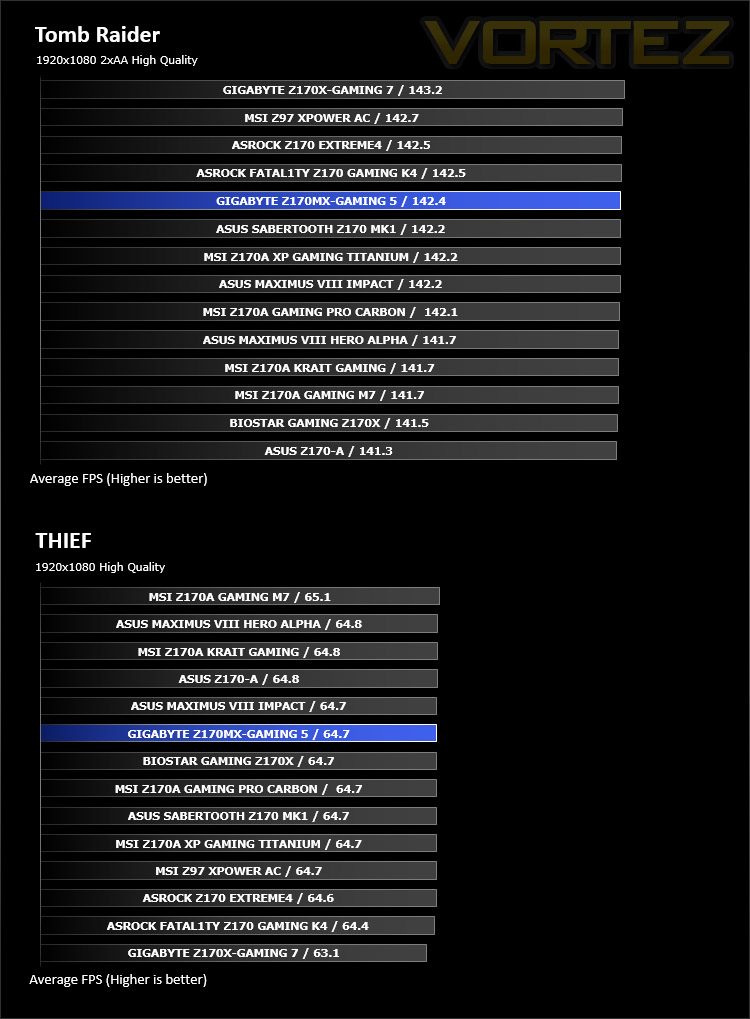
Benchmarks: Tomb Raider & THIEF
It’s important for us to perform a number of game benchmarks as well as the synthetic tests because gamers will want to know if there are any significant benefits. So here we have two popular and recent gaming titles which feature a dedicated benchmark tool within them to display results.
Conclusion
Downsizing is a popular pursuit for system builders who prefer a configuration which is compact, especially if space is a concern in the office workspace. There are two options for those wanting to use a small form factor – Mini-ITX or Micro-ATX. Both have specific product lines and enclusures solely designed for a condensed rig. For those wanting something not quite as small as Mini-ITX but not quite as big as ATX, Micro-ATX is the obvious choice and this is where our review subject comes in today.
GIGABYTE has made good use of the space they’re allocated with the Micro-ATX form factor on the Z170MX-Gaming 5. This motherboard offers a good balance of features – adopting many of the trademark GIGABYTE tools and options found on the larger offerings with their Intel Z170 range.
The theme of Z170MX-Gaming 5 also resembles that of the other Intel Z170 motherboards from GIGABYTE – throughout we have black, silver and red. This design will work well with other system components but is likely to pair up better with products which use red.
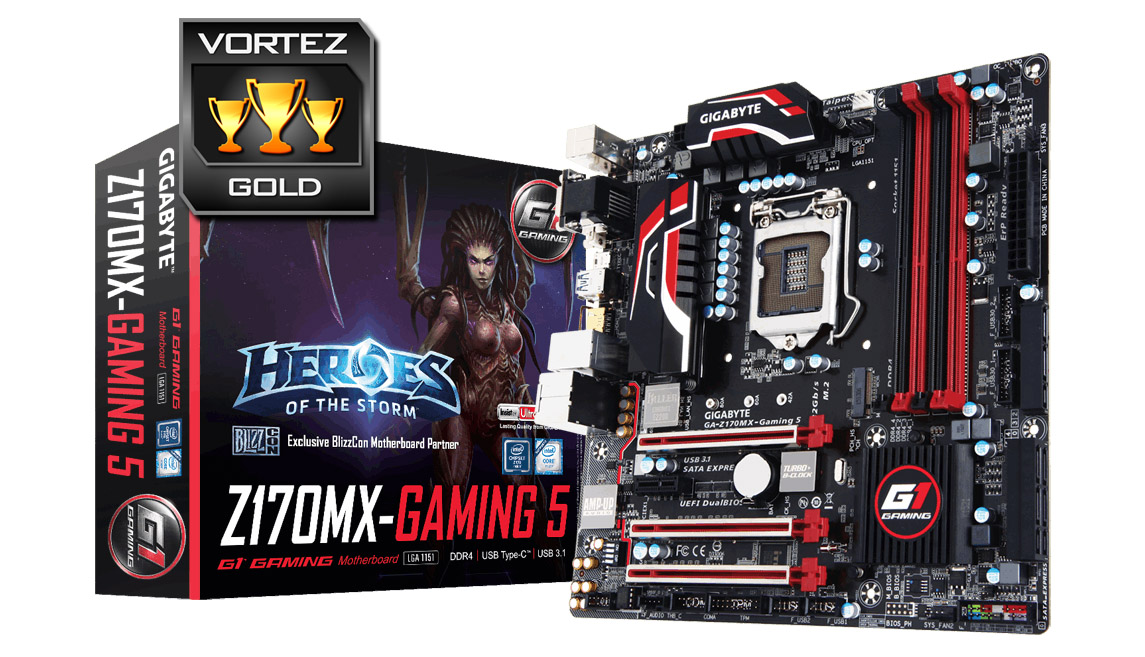
We’re pleased to see that GIGABYTE has chosen to place the M.2 slot on this motherboard in an unobstructed location – other vendors have fallen foul to implementing such a slot underneath the graphics card which is a foolish decision for obvious reasons.
There are other handy features which have been included also. There are dual-USB 3.0 headers which aren’t all that common but come in especially useful, as well as the G Connect adapter which allows chassis power/LED cables to be easily attached to the motherboard without any fuss.
Throughout the testing phase of our review the Z170MX-Gaming 5 realised some good results – though certainly not the best we’ve experienced on our Z170 quest. One particular aspect which was pleasing to see, was this motherboards ability to overclock our Intel Core i7-6700K to 4.7GHz. Modifying settings in the BIOS was easy and while 4.7GHz isn’t our outright best result on this platform, it is only 100MHz below the milestone. Z170MX-Gaming 5 is therefore an especially capable motherboard when it comes to pushing the limits.
Arriving with a price-tag of £140 GBP / $145 USD, American system builders will be at a distinct advantage here. Against the features and overall design, Z170MX-Gaming 5 is a good value offering.
There may not be many Intel Z170 Micro-ATX options out there in the marketplace but Z170MX-Gaming 5 should be on the shortlist. This motherboard packs in a number of useful features allows great overclocks.
VIDEO REVIEW – VORTEZ TV
Pros
+ Attractive design
+ Good use of space
+ Useful features throughout
+ Overclocks very well
+ Easy to use UEFI BIOS
+ Strong audio solution
Cons
– Killer LAN
– Brown PCB
+ Attractive design
+ Good use of space
+ Useful features throughout
+ Overclocks very well
+ Easy to use UEFI BIOS
+ Strong audio solution
Cons
– Killer LAN
– Brown PCB
Click here for an explanation of our awards at Vortez.net.