Bearing the new Intel Z370 chipset, we check out the ROG STRIX Z370-F Gaming to see how it handles the 6-core 8700K.

Product on Review: ROG STRIX Z370-F Gaming
Manufacturer & Sponsor: ASUS
Street Price: £189 GBP / $200 USD
In part, today’s Intel Coffee Lake launch with the Intel Z370 chipset has been somewhat underwhelming in terms of tangible feature improvements over the previous generation and yet at the same time we’ve been provided with a superb CPU in the new 6-core 8700K.
Among the various motherboard partners, ASUS has been on-hand with this new release, to unveil a total of ten options for enthusiasts and gamers to choose from. While under the AMD X370 chipset they only announced six. So, It’s quite obvious how much confidence has been placed on Intel to deliver something truly competitive. Today we turn to ASUS and their renowned ROG team for a detailed look at what the Z370-F Gaming has to offer.
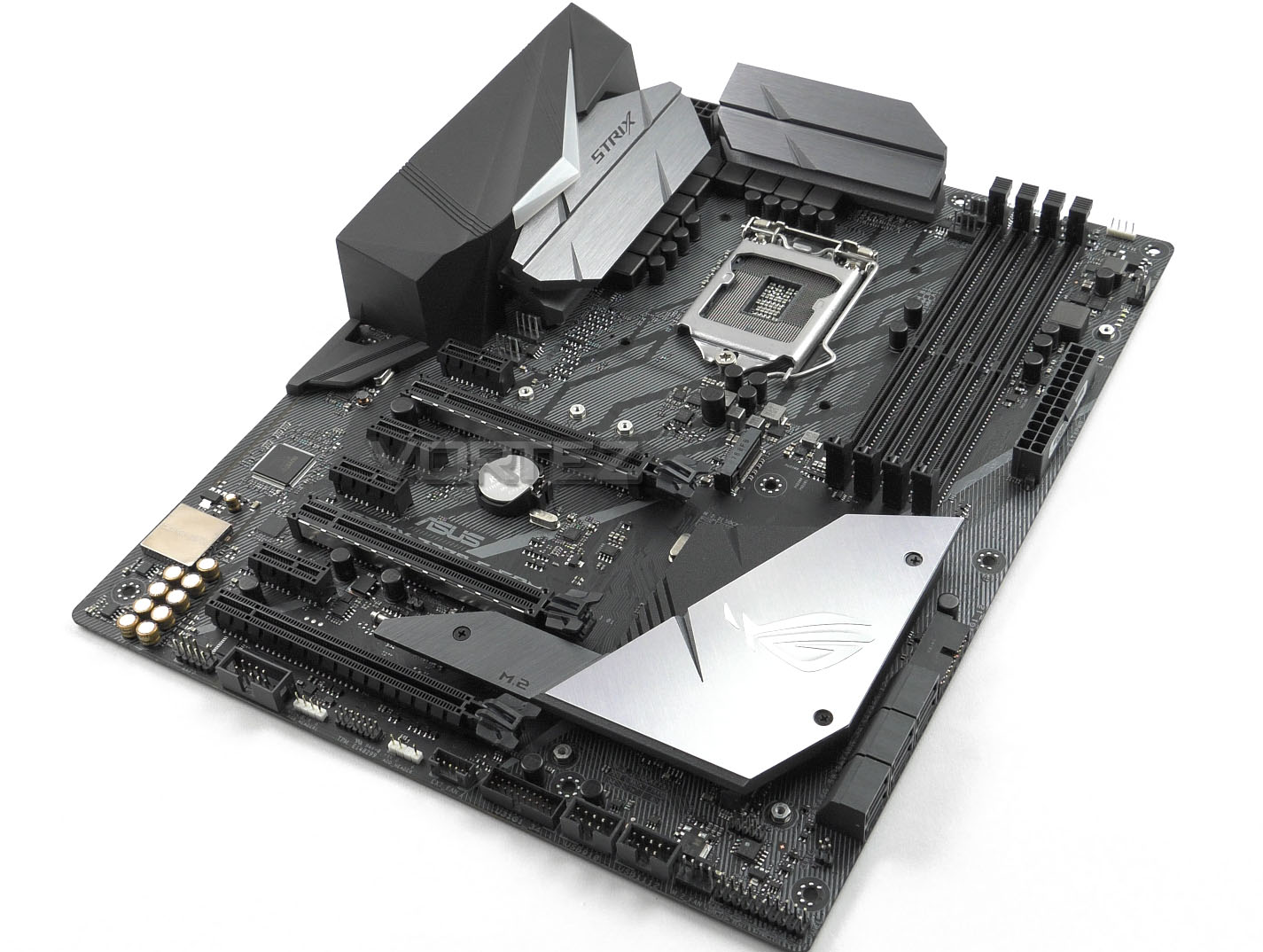
Utilising the new Z370 chipset, the Z370-F Gaming hits the mid-range with a distinct yet unassuming monochrome theme. Across this motherboard, we have stunning aesthetics and a good variety of features which include support for up to 4000MHz DDR4, twin M.2 slots with heatsink and trademark ROG features like 5-Way Optimization with Auto-Tuning and FanXpert 4.
ROG on their STRIX Z370-F
With aesthetics inspired by the sharpest blades and premium colorways to match any mood, the all-new ROG Strix Z370 motherboards are ready to do battle — and infused with all the essential ROG engineering needed to push performance as far as you dare. Ready for the latest 8th Generation Intel® Core™ processors, ROG Strix Z370-F Gaming is loaded with overclocking and cooling innovations to keep your gaming rig’s thermals in check as you turn up the clock. Factor in custom Aura RGB illumination and superior SupremeFX audio and you’ll know that ROG Strix Z370-F Gaming looks great and sounds amazing — and outperforms every expectation to dominate your game!.
Technical Specifications
Below are the technical specifications concerning the ROG STRIX Z370-F:
CPU
• Supports 8th Gen Intel® Core™ i3/i5/i7 processors for Socket LGA1151
Chipset
• Intel® Z370 Chipset
Main Memory
• 4 x DDR4 memory slots, support up to 64GB
– Supports DDR4 Up to 4000MHz
• Dual channel memory architecture
• Supports ECC, un-buffered memory
– ECC UDIMM memory (non-ECC mode)
• Supports Intel® Extreme Memory Profile (XMP)
Slots
• 3 x PCIe 3.0 x16 slots (Modes: 16, 8, 4)
• 4 x PCIe 3.0 x1 slot
Onboard Graphics
• 1 x HDMI™ port (1.4b)
• 1 x Displayport™ port (1.2)
• 1 x DVI-D
Multi-GPU
• Supports 3-Way AMD® CrossFire™ Technology
• Supports 2-Way NVIDIA® SLI™ Technology
Storage
• Intel® Z370 Chipset
• 6 x SATA 6Gb/s ports
• 2 x M.2 slots (Supports Intel Optane Memory – 8th Gen Processor required)
RAID
• Intel® Z370 Chipset
– Supports RAID 0, RAID1, RAID 5 and RAID 10 for SATA storage devices
Audio
• SupremeFX (Using Realtek ALC 1220)
– 7.1-Channel High Definition Audio
– Supports S/PDIF output
LAN
• 1 x Intel i219 Gigabit LAN controller
Back Panel I/O Ports
1 x DVI-D
1 x DisplayPort
1 x HDMI
1 x LAN (RJ45) port(s)
2 x USB 3.1 Gen 2 Type-A + USB Type-CTM
2 x USB 3.1 Gen 1 (blue)
2 x USB 2.0
1 x Optical S/PDIF out
5 x Audio jack(s)
Dimension
• 12 inch x 9.6 inch ( 30.5 cm x 24.4 cm )
• ATX Form Factor
• Supports 8th Gen Intel® Core™ i3/i5/i7 processors for Socket LGA1151
Chipset
• Intel® Z370 Chipset
Main Memory
• 4 x DDR4 memory slots, support up to 64GB
– Supports DDR4 Up to 4000MHz
• Dual channel memory architecture
• Supports ECC, un-buffered memory
– ECC UDIMM memory (non-ECC mode)
• Supports Intel® Extreme Memory Profile (XMP)
Slots
• 3 x PCIe 3.0 x16 slots (Modes: 16, 8, 4)
• 4 x PCIe 3.0 x1 slot
Onboard Graphics
• 1 x HDMI™ port (1.4b)
• 1 x Displayport™ port (1.2)
• 1 x DVI-D
Multi-GPU
• Supports 3-Way AMD® CrossFire™ Technology
• Supports 2-Way NVIDIA® SLI™ Technology
Storage
• Intel® Z370 Chipset
• 6 x SATA 6Gb/s ports
• 2 x M.2 slots (Supports Intel Optane Memory – 8th Gen Processor required)
RAID
• Intel® Z370 Chipset
– Supports RAID 0, RAID1, RAID 5 and RAID 10 for SATA storage devices
Audio
• SupremeFX (Using Realtek ALC 1220)
– 7.1-Channel High Definition Audio
– Supports S/PDIF output
LAN
• 1 x Intel i219 Gigabit LAN controller
Back Panel I/O Ports
1 x DVI-D
1 x DisplayPort
1 x HDMI
1 x LAN (RJ45) port(s)
2 x USB 3.1 Gen 2 Type-A + USB Type-CTM
2 x USB 3.1 Gen 1 (blue)
2 x USB 2.0
1 x Optical S/PDIF out
5 x Audio jack(s)
Dimension
• 12 inch x 9.6 inch ( 30.5 cm x 24.4 cm )
• ATX Form Factor
Unboxing & Video Review
For this review we’ve produced a video showcasing the items included in the box and a detailed rundown of the included features on this motherboard. Please click on this link or watch the video below:
Test Setup, Methodology & Overclock
Test Setup
CPU Intel Core i7-8700K
Cooling Corsair H100i GTX
Motherboard ASUS ROG STRIX Z370-F Gaming
Memory 16GB Corsair Vengeance LPX 3000MHz
Graphics GIGABYTE GTX 1080 G1 Gaming
Storage OCZ Vector 180 240GB SSD
PSU Corsair HX1050 80 Plus Gold Certified PSU
Monitor AOC U2879VF
Capture Device Epiphan AV.iO 4K
Cooling Corsair H100i GTX
Motherboard ASUS ROG STRIX Z370-F Gaming
Memory 16GB Corsair Vengeance LPX 3000MHz
Graphics GIGABYTE GTX 1080 G1 Gaming
Storage OCZ Vector 180 240GB SSD
PSU Corsair HX1050 80 Plus Gold Certified PSU
Monitor AOC U2879VF
Capture Device Epiphan AV.iO 4K
Benchmarks
Cinebench R15 – CPU/OpenGL Score
x264 HD 4.0 – 1st and 2nd pass encoding
SiSoftware SANDRA – CPU & Memory benchmarks
POV-RAY – CPU benchmarks
TrueCrypt – CPU benchmarks
AIDA64 – CPU benchmarks & Memory
PCMark 8 – Home Suite & Photoshop
3DMark FireStrike – 3D Benchmark
Games – Civilization IV & Total War: WARHAMMER
x264 HD 4.0 – 1st and 2nd pass encoding
SiSoftware SANDRA – CPU & Memory benchmarks
POV-RAY – CPU benchmarks
TrueCrypt – CPU benchmarks
AIDA64 – CPU benchmarks & Memory
PCMark 8 – Home Suite & Photoshop
3DMark FireStrike – 3D Benchmark
Games – Civilization IV & Total War: WARHAMMER
Other Software
Temperature Analysis: Real Temp
Stress Testing Software: AIDA64 Stability Test
CPU Specification Monitoring: CPU-Z
Stress Testing Software: AIDA64 Stability Test
CPU Specification Monitoring: CPU-Z
Overclocking
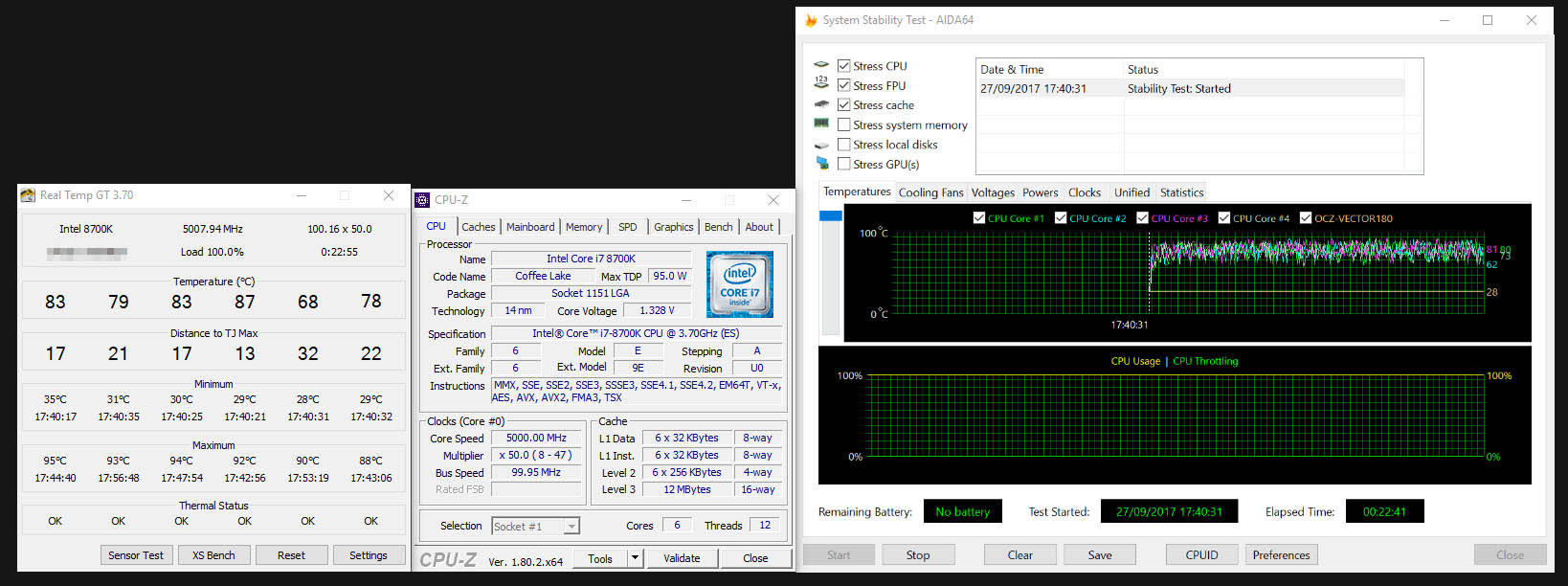
Like previous generations, the Intel Core i7-8700K is unlocked and also has flexible attributes in terms of the BCLK and ratio/multiplier. This makes the job of overclocking much easier.
We managed to nudge the 8700K up to the current milestone of 5GHz. This required some 1.39v applied to the vcore. Unfortunately, we couldn’t drop the voltage any lower at the given frequency due to stability issues, but this is still an admirable result and something to be pleased about!
Benchmarks: Power Consumption
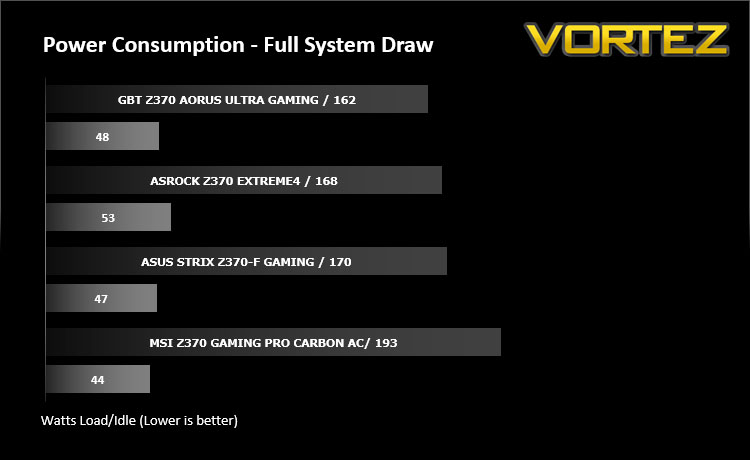
It’s interesting to note the power consumption across all motherboards. Although they are using the Z370 chipset, energy results can fluctuate between manufacturers due to the features and specifications that are integrated. First of all, for the idle tests the system is cold booted into Windows and no additional applications are executed – the watts are noted on the external energy monitor we use and then the system is loaded with 3DMark FireStrike – watts are again monitored for the duration of the test and the highest rated wattage result is then noted down. Below are the results of this energy test.
Benchmarks: Cinebench R15
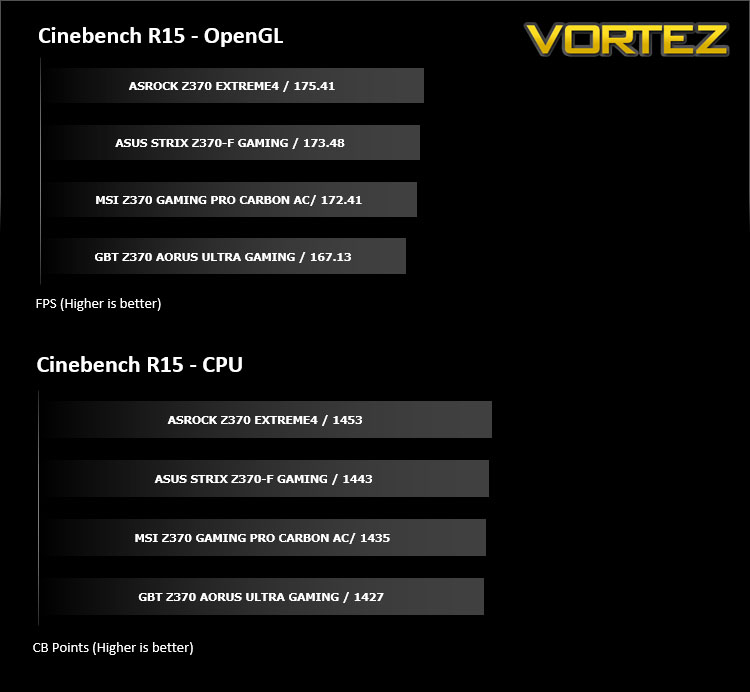
CINEBENCH is a real-world cross platform test suite that evaluates your computer’s performance capabilities. CINEBENCH is based on MAXON’s award-winning animation software CINEMA 4D, which is used extensively by studios and production houses worldwide for 3D content creation. MAXON software has been used in blockbuster movies such as Iron Man 3, Oblivion, Life of Pi or Prometheus and many more.
Benchmarks: X264 HD
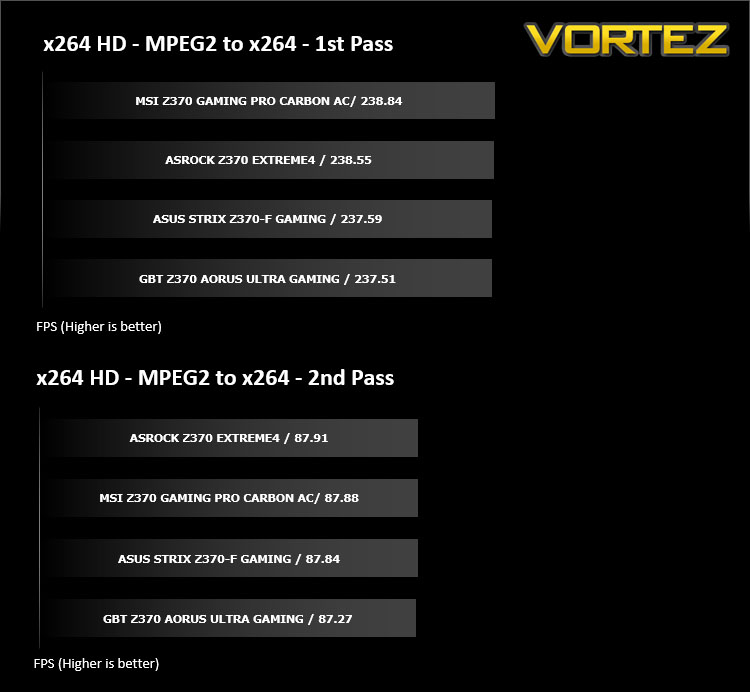
Simply put, this test measures how fast your machine can encode a short, DVD quality MPEG-2 video clip into a high-quality x264 video clip. What’s x264, you ask? It’s more or less the next-generation Xvid/DivX codec. I think it’s ideal for a benchmark because the application (x264.exe) reports fairly accurate compression results (in frames per second) for each pass of the video encoding process, and it uses multi-core processors very efficiently.
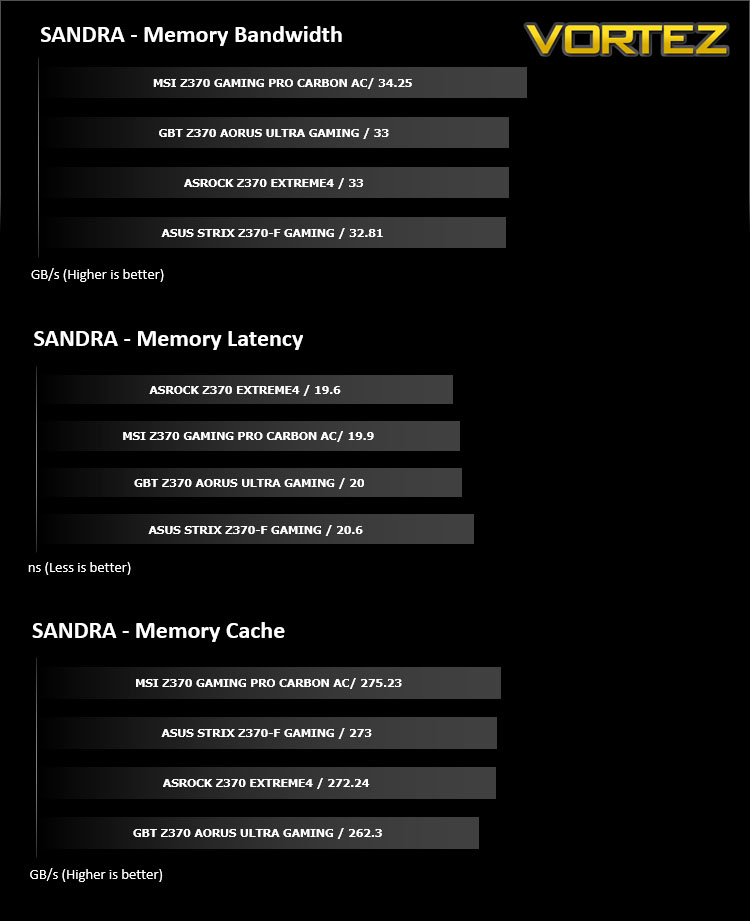
Benchmarks: SiSoftware SANDRA
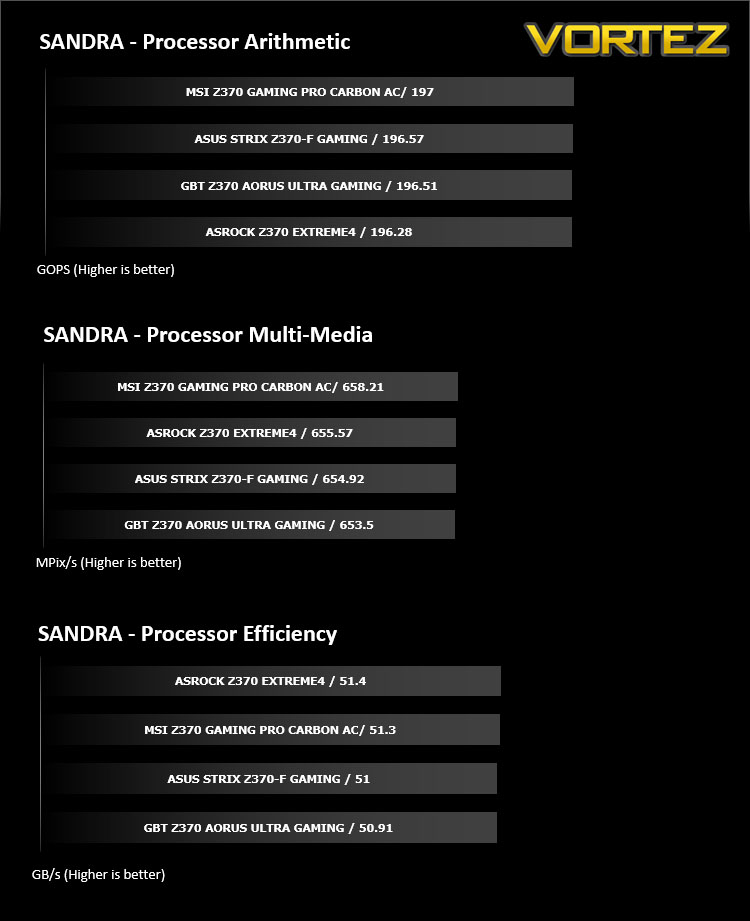
SANDRA isn’t always a benchmark that is included in hardware reviews but we believe it shouldn’t be ignored. SANDRA provides a vigorous package that tests your system in a rather large array of benchmarks. There are many aspects of benchmark that can be executed. We will be considering – CPU and memory tests.
Benchmarks: POV-RAY
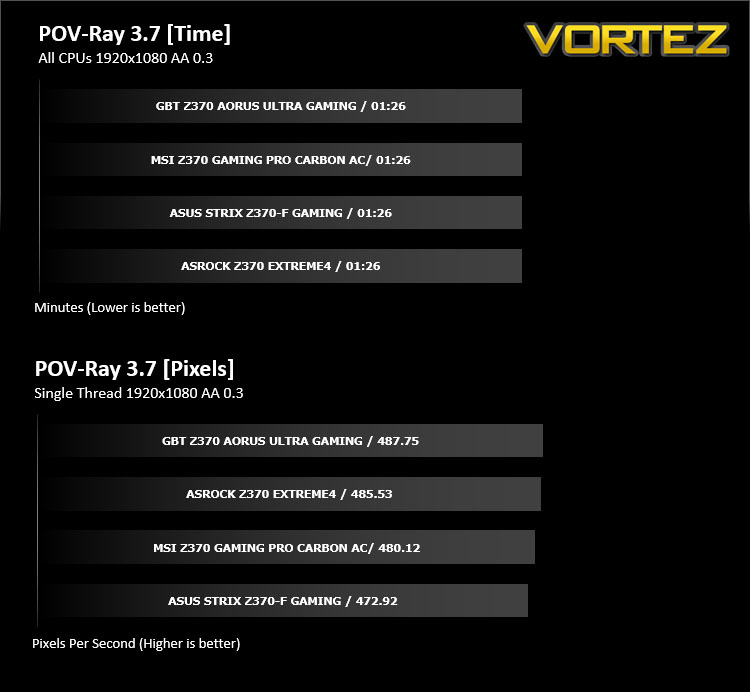
Persistence of Vision Raytracer’s PovRay is a free and open source 3D animator application with versions for computers with different operating systems.
This product allows users to build their custom 3D worlds with excellent quality despite their computer’s hardware. It has adjustable options for levels of radiance, refraction, and reflection. Calculation time may vary depending on the computer model, but PovRay can adapt to many computer builds, and is supported by the open source community.
This product allows users to build their custom 3D worlds with excellent quality despite their computer’s hardware. It has adjustable options for levels of radiance, refraction, and reflection. Calculation time may vary depending on the computer model, but PovRay can adapt to many computer builds, and is supported by the open source community.
Benchmarks: TrueCrypt
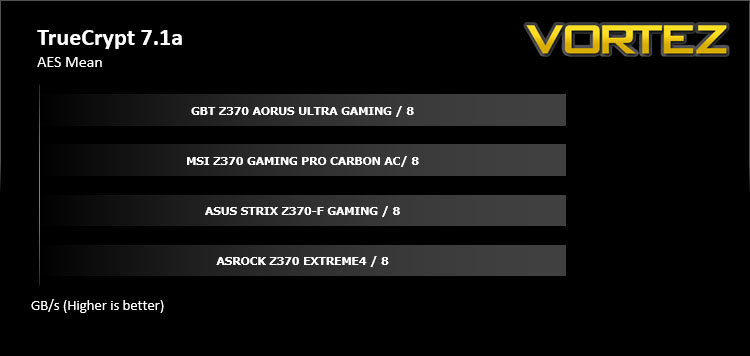
TrueCrypt is a discontinued source-available freeware utility used for on-the-fly encryption (OTFE). It can create a virtual encrypted disk within a file or encrypt a partition or (under Microsoft Windows except Windows 8 with GPT) the entire storage device (pre-boot authentication).
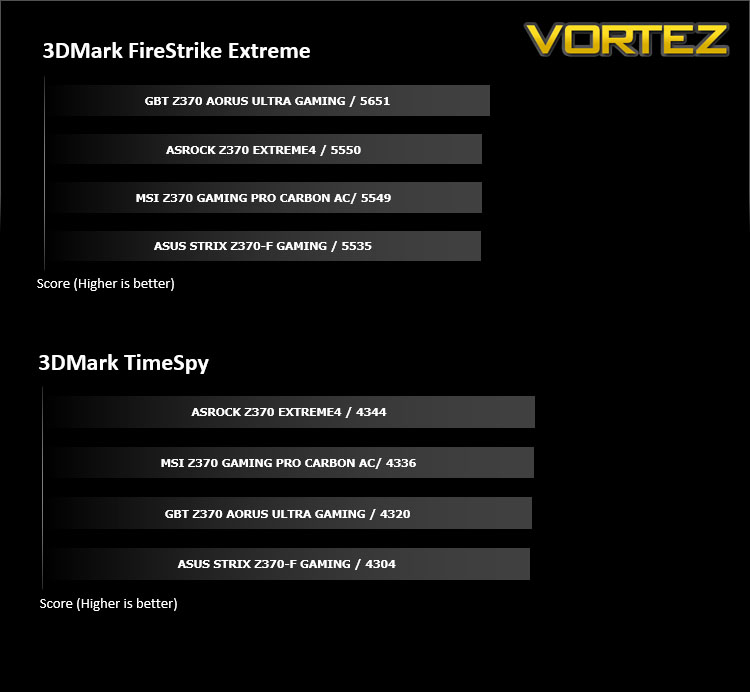
Benchmarks: AIDA64
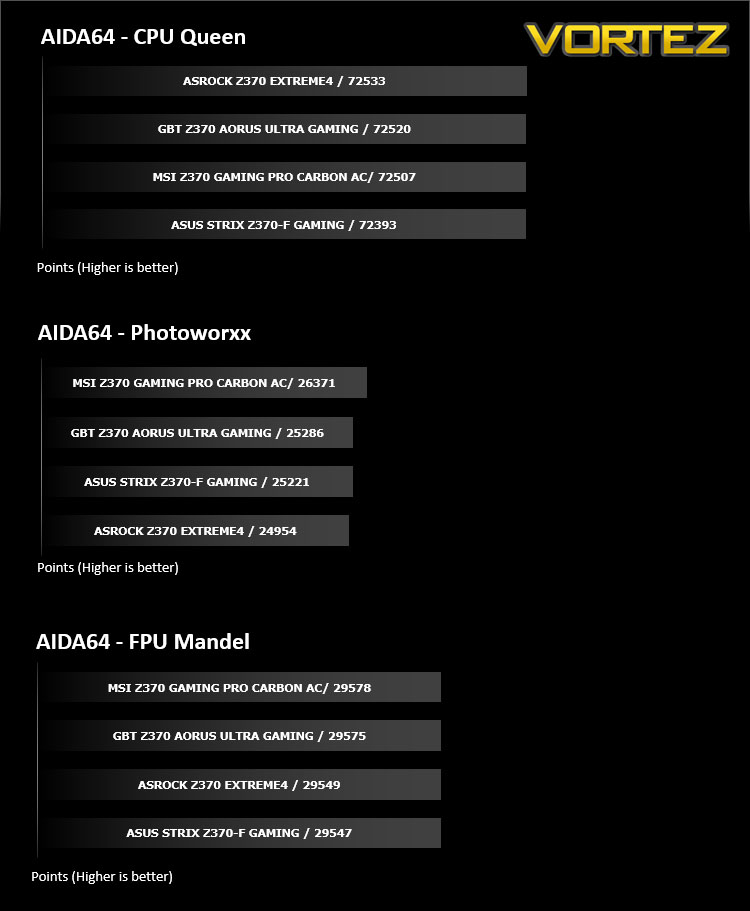
AIDA64 Product PageThis simple integer benchmark focuses on the branch prediction capabilities and the misprediction penalties of the CPU. It finds the solutions for the classic “Queens problem” on a 10 by 10 sized chessboard. At the same clock speed theoretically the processor with the shorter pipeline and smaller misprediction penalties will attain higher benchmark scores. For example — with HyperThreading disabled — the Intel Northwood core processors get higher scores than the Intel Prescott core based ones due to the 20-step vs 31-step long pipeline. CPU Queen test uses integer MMX, SSE2 and SSSE3 optimizations.
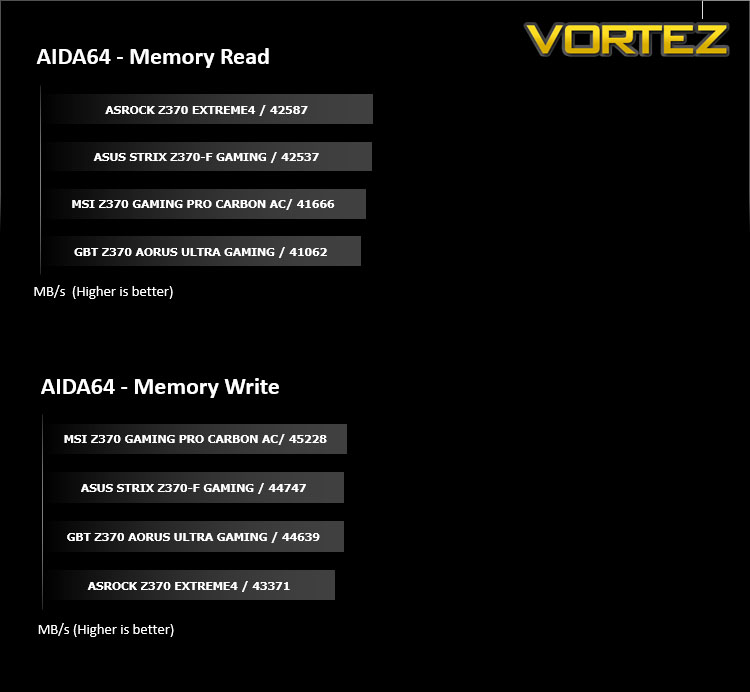
Benchmarks: PCMark 8 & PCMark 10
PCMark 8 combines performance benchmarking with battery life measurement and includes tests based on popular Adobe and Microsoft applications. Whether you are looking for long battery life, or maximum power, PCMark 8 will help you find the devices that offer the perfect combination of efficiency and performance for your needs. It’s the complete PC performance benchmark for home and business.
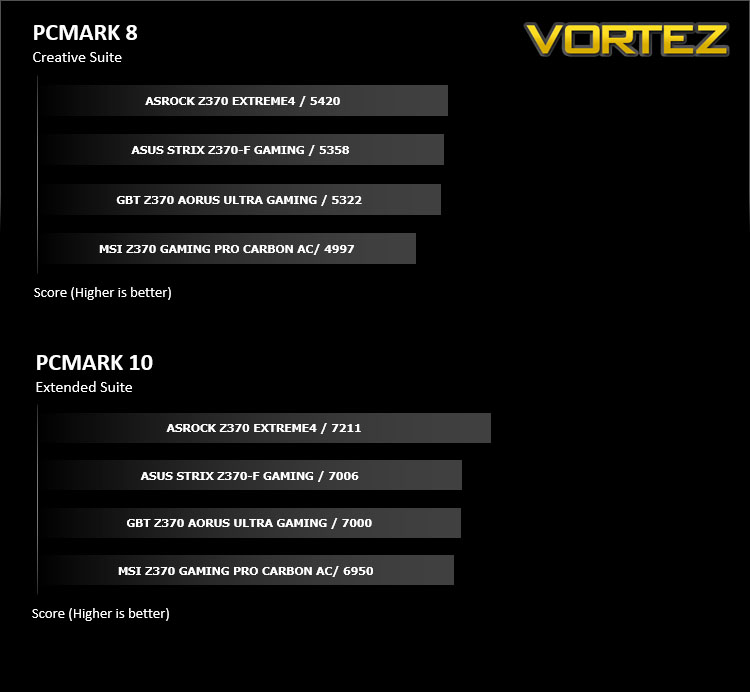
Benchmarks: PCMark 8 Photoshop
The PCMark 8 Applications benchmark measures system performance using popular applications from the Adobe Creative Suite and Microsoft Office. You can choose which tests to run based on the applications installed on your system. Each test automatically steps through a series of actions such as opening, editing and saving a file. The results are used to calculate the PCMark 8 Applications scores for the system.
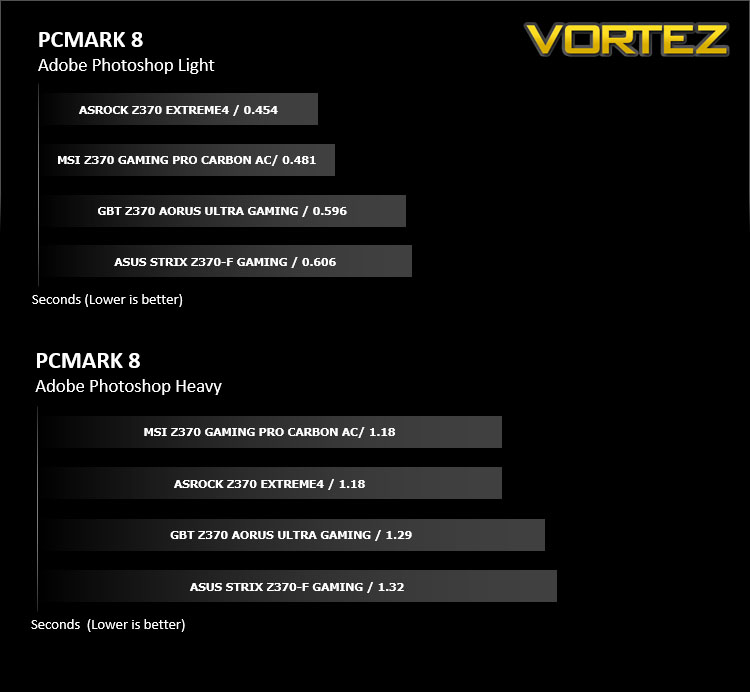
Benchmarks: 3DMark FireStrike & TimeSpy
3DMark FireStrike Product PageFire Strike is our new showcase DirectX 11 benchmark designed for high-performance gaming PCs. It is our most ambitious and technical benchmark ever, featuring real-time graphics rendered with detail and complexity far beyond what is found in other benchmarks and games today. Fire Strike will only be available in the Windows editions of 3DMark initially.
Benchmarks: ROT Tomb Raider & Total War: WARHAMMER
It’s important for us to perform a number of game benchmarks as well as the synthetic tests because gamers will want to know if there are any significant benefits. So here we have two recent gaming titles.

Conclusion
Prior to the release of today’s Z370-F Gaming, ASUS re-adjusted their motherboard lineup, highlighting that there would now be two tiers within the ROG portfolio. The Z370-F Gaming slots into the lower of the two tiers, but does not shy away from delivering up some of the features which avid ROG fans have been accustomed to in the past.
Taking Z370-F purely on the appearance, we are met by a visual masterpiece. Of the Intel Z370 motherboards we’ve seen so far, this one here ranks as the best looking. ROG has refined the overall theme by adopting a monochrome style which is simple but effective. Due to the razer sharp aesthetics, we’re able to match up other hardware like graphics cards and memory easily. Where other brands have fully indulged in the current RGB craze, ROG has steered clear by opting for just a single lighting strip on the rear IO and headers on the board and it works well.
As we’ll be seeing with many Intel Z370 motherboards, the Z370-F utilises dual-M.2 slots, however ROG has cleverly designed a handy heatsink towards the bottom of the board. Blending into the Intel Z370 heatsink design, this thermal tool is designed to bring down the temperatures of M.2 drives which do not have their own heatspreaders. Of the solutions we’ve seen which offer M.2 cooling, this one appears to be the most carefully crafted – it even supports drives which are 42mm, 60mm and 80mm.
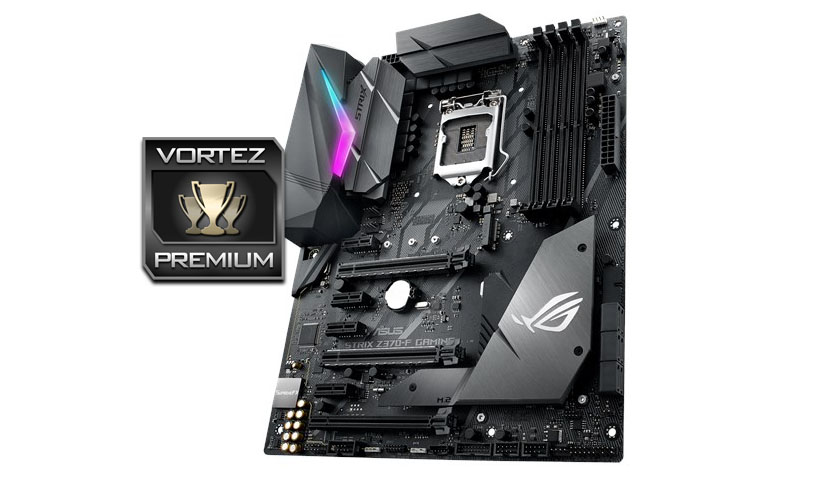
ASUS’ 5-way optimization continues with the Z370-F, blending together tools which are able to enhance the overclocking experience. Those who are wanting to manually tweak the performance of their system can do so easily thanks to the intuitive UEFI BIOS – where you can fine rune a wide array of options including fan profiles.
Moving onto the performance, we experienced a strong offering in the Z370-F. Throughout the range of tests we ran, this motherboard performed consistently well. Our efforts in the overclocking department were not disappointing either. Z370-F managed to shift up to 5GHz which is our current milestone with the 8700K.
Audio is another strongpoint for this ROG motherboard as it arrives with SupremeFX. In the past we’ve praised ROG’s labours in the sound department and once again we aren’t left discontented. All of the included components fused together to create a solid audio solution with little need for an independent sound card. So, for those wanting to upgrade to Intel’s 8th Generation should regard the ROG STRIX Z270-F as an ideal candidate to base a system around.
ROG STRIX Z370-F sits a £189 GBP / $200 USD. Though this is a mid-range offering, we’re almost stretching into the realms of the high-end at such a cost. With some ROG features omitted, no USB 3.1 header, this motherboard should be somewhat cheaper.
The ROG STRIX Z370-F is another visual masterpiece and thankfully it isn’t just style over substance either. Throughout this board we have a solid lineup of enthusiast-grade features which mark this solution out as a great choice.
Pros
+ Desirable monochrome theme
+ Features twin RGB headers
+ Excellent performance
+ Excellent for overclocking
+ Uses strengthened PCI Express slots
+ Plenty of fan headers
+ Features dual-M.2
+ Capable audio solution
Cons
– Cost
– No USB 3.1 header
+ Desirable monochrome theme
+ Features twin RGB headers
+ Excellent performance
+ Excellent for overclocking
+ Uses strengthened PCI Express slots
+ Plenty of fan headers
+ Features dual-M.2
+ Capable audio solution
Cons
– Cost
– No USB 3.1 header
Click here for an explanation of our awards at Vortez.net.
Stay connected with Vortez social media pages: