Looking for an alternative flagship gaming motherboard to pair with your Ryzen CPU? Featuring the cutting edge Killer Wireless-AC 1535 for unparalleled WIFI connection, 2x M.2 slots, and of course RGB lighting, maybe MSI have the answer?

Product on Review: MSI X370 GAMING M7 ACK
Manufacturer & Sponsor: MSI
Street Price: £219.99 GBP / $239 USD
MSI took a little while to get in with their flagship gaming X370 motherboard, but now the wait is finally over and those considering Team Ryzen will have another option to consider. You will find a whole array of flashy RGB lighting beyond just the Rear IO and the PCH as MSI have included a row of PCIe RGBs also, and to help sync things up, there is an internal RGB LED header along with an included extension cable to power up to 3Amp/12V 5050 RGB LED strips of up to 2m long. Of course you will find the various steel reinforced retention on the primary and secondary PCIe x16 slots, and on the memory slots, various LED debug indicators, high-grade isolated audio circuitry based on the Realtek ALC 1220 codec, NVMe U.2 port, and a front panel USB 3.1 G2 header.
MSI have included some very welcome additions on this X370 motherboard, including an additional M.2 slot, along with a custom designed heatsink ‘M.2 SHIELD FROZR’, to reduce the chance of your M.2 drive throttling. However, the party piece of the X370 GAMING M7 ACK is revealed in its name, ‘AC’ ‘Killer’. MSI have implement the Killer Doubleshot Pro technology which allows the Killer E2500 LAN to work together with the Killer Wireless AC 1535 to optimise network traffic to ensure low latency while gaming.
Overview by MSI
The X370 GAMING M7 ACK is a prime example of why MSI leads the gaming industry in both innovation and performance. Gamers know and trust MSI because MSI always delivers the hardware they need to stay on top of their games. Providing the best networking experience is critical and by including the Killer Ethernet E2500 and Killer Wireless 1535 on the X370 GAMING M7 ACK motherboard, MSI ensures that their customers will have the best possible online gaming experience.
Technical Specifications
CPU
• Supports AMD® RYZEN series processors and 7th Gen A-series/ Athlon™ processors for Socket AM4
Chipset
• AMD® X370 Chipset
Main Memory
• 4 x DDR4 memory slots, support up to 64GB
– Supports DDR4 1866/ 2133/ 2400/ 2667(OC)/ 2933(OC)/ 3200(OC)+ Mhz *
• Dual channel memory architecture
• Supports non-ECC UDIMM memory
• Supports ECC UDIMM memory (non-ECC mode)
* 7th Gen A-series/ Athlon ™ processors support a maximum of 2400 MHz.
Please refer www.msi.com for more information on compatible memory
Slots
• 2 x PCIe 3.0 x16 slots (PCIE_2, PCIE_4)
– RYZEN series processors support x16/x0, x8/x8 mode
– 7th Gen A-series/ Athlon™ processors support x8/x0 mode
• 1 x PCIe 2.0 x16 slot (PCIE_6, supports x4 mode)
• 3 x PCIe 2.0 x1 slots
* PCI_E6 slot will be unavailable when installing M.2 PCIe SSD in M2_2 slot.
Multi-GPU
• RYZEN series processor
– Supports 2-Way NVIDIA® SLI™ Technology
– Supports 3-Way AMD® CrossFire™ Technology
• 7th Gen A-series/ Athlon™ processor
– Supports 2-Way AMD® CrossFire™ Technology
Storage
• AMD® X370 Chipset
• 6 x SATA 6Gb/s ports*
• 2 x M.2 ports (Key M)
– M2_1 slot supports PCIe 3.0 x4 (RYZEN series processor) or PCIe 3.0 x2 (7th Gen A-series/ Athlon™ processors) and SATA 6Gb/s 2242/ 2260 /2280/ 22110 storage devices
– M2_2 slot supports PCIe 2.0 x4 and SATA 6Gb/s 2242/ 2260 /2280 storage devices
• 1 x U.2 port
– Supports PCIe 3.0 x4 (RYZEN series processor) or PCIe 3.0 x2 (7th Gen A-series/ Athlon™ processors) NVMe storage
* Maximum support 2x M.2 PCIe SSDs + 6x SATA HDDs or 2x M.2 SATA SSDs + 4x SATA HDDs.
RAID
• AMD® X370 Chipset
• Supports RAID 0, RAID 1 and RAID 10 for SATA storage devices
USB
• ASMedia® ASM2142 Chipset
– 1 x USB 3.1 Gen2 (SuperSpeed USB 10Gbps) Type-C port on the back panel
– 1 x USB 3.1 Gen2 (SuperSpeed USB 10Gbps) Type-A port on the back panel
• AMD® X370 Chipset
– 1 x USB 3.1 Gen2 (SuperSpeed USB 10Gbps) Type-C port through the internal USB connector
– 6 x USB3.1 Gen1(SuperSpeed USB) ports (2 ports on the back panel, 4ports available through the internal USB connectors)
– 7 x USB 2.0 (High-speed USB) ports (3 Type-A ports on the back panel, 4 ports available through the internal USB connectors)
• AMD® CPU
– 4 x USB 3.1 Gen1 (SuperSpeed USB) Type-A ports on the back panel
Audio
• Realtek® ALC1220 Codec
– 7.1-Channel High Definition Audio
– Supports S/PDIF output
Wirsless LAN & Bluetooth®
• Killer™ Wireless-AC 1535 module
– Supports Wi-Fi 802.11 a/b/g/n/ac, dual band (2.4GHz, 5GHz) up to 867 Mbps speed.
– Supports Bluetooth® 4.1
LAN
• 1 x Killer™ E2500 Gigabit LAN controller
Internal I/O Connectors
– 1 x 24-pin ATX 12V power connector
– 1 x 8-pin ATX 12V power connector
– 6 x SATA 6Gb/s connectors
– 2 x USB 2.0 connectors (support additional 4 USB 2.0 ports)
– 2 x USB 3.1 Gen1 connectors (support additional 4 USB 3.1 Gen1 ports)
– 1 x USB 3.1 Gen2 connector (supports additional 1 USB 3.1 Gen2 Type C port)
– 1 x 4-pin CPU fan connector
– 1 x 4-pin PUMP fan connector (supports up to 2A)
– 4 x 4-pin system fan connectors
– 1 x RGB LED connector
– 1 x TPM module connector
– 1 x Front panel audio connector
– 2 x System panel connectors
– 1 x Chassis Intrusion connector
– 1 x Serial port connector
– 1 x Flash BIOS button
– 1 x Clear CMOS jumper
– 1 x 2-Digit Debug Code LED
Back Panel I/O Ports
– 1 x PS/2 keyboard/ mouse combo port
– 1 x Clear CMOS button
– 3 x USB 2.0 Type-A ports
– 1 x LAN (RJ45) port
– 6 x USB 3.1 Gen1 Type-A ports
– 1 x USB 3.1 Gen2 Type-A port
– 1 x USB 3.1 Gen2 Type-C port
– 5 x OFC audio jacks
– 1 x Optical S/PDIF OUT connector
Dimension
• 12 in. x 9.6 in. (30.4 cm x 24.3 cm)
• ATX Form Factor
• Supports AMD® RYZEN series processors and 7th Gen A-series/ Athlon™ processors for Socket AM4
Chipset
• AMD® X370 Chipset
Main Memory
• 4 x DDR4 memory slots, support up to 64GB
– Supports DDR4 1866/ 2133/ 2400/ 2667(OC)/ 2933(OC)/ 3200(OC)+ Mhz *
• Dual channel memory architecture
• Supports non-ECC UDIMM memory
• Supports ECC UDIMM memory (non-ECC mode)
* 7th Gen A-series/ Athlon ™ processors support a maximum of 2400 MHz.
Please refer www.msi.com for more information on compatible memory
Slots
• 2 x PCIe 3.0 x16 slots (PCIE_2, PCIE_4)
– RYZEN series processors support x16/x0, x8/x8 mode
– 7th Gen A-series/ Athlon™ processors support x8/x0 mode
• 1 x PCIe 2.0 x16 slot (PCIE_6, supports x4 mode)
• 3 x PCIe 2.0 x1 slots
* PCI_E6 slot will be unavailable when installing M.2 PCIe SSD in M2_2 slot.
Multi-GPU
• RYZEN series processor
– Supports 2-Way NVIDIA® SLI™ Technology
– Supports 3-Way AMD® CrossFire™ Technology
• 7th Gen A-series/ Athlon™ processor
– Supports 2-Way AMD® CrossFire™ Technology
Storage
• AMD® X370 Chipset
• 6 x SATA 6Gb/s ports*
• 2 x M.2 ports (Key M)
– M2_1 slot supports PCIe 3.0 x4 (RYZEN series processor) or PCIe 3.0 x2 (7th Gen A-series/ Athlon™ processors) and SATA 6Gb/s 2242/ 2260 /2280/ 22110 storage devices
– M2_2 slot supports PCIe 2.0 x4 and SATA 6Gb/s 2242/ 2260 /2280 storage devices
• 1 x U.2 port
– Supports PCIe 3.0 x4 (RYZEN series processor) or PCIe 3.0 x2 (7th Gen A-series/ Athlon™ processors) NVMe storage
* Maximum support 2x M.2 PCIe SSDs + 6x SATA HDDs or 2x M.2 SATA SSDs + 4x SATA HDDs.
RAID
• AMD® X370 Chipset
• Supports RAID 0, RAID 1 and RAID 10 for SATA storage devices
USB
• ASMedia® ASM2142 Chipset
– 1 x USB 3.1 Gen2 (SuperSpeed USB 10Gbps) Type-C port on the back panel
– 1 x USB 3.1 Gen2 (SuperSpeed USB 10Gbps) Type-A port on the back panel
• AMD® X370 Chipset
– 1 x USB 3.1 Gen2 (SuperSpeed USB 10Gbps) Type-C port through the internal USB connector
– 6 x USB3.1 Gen1(SuperSpeed USB) ports (2 ports on the back panel, 4ports available through the internal USB connectors)
– 7 x USB 2.0 (High-speed USB) ports (3 Type-A ports on the back panel, 4 ports available through the internal USB connectors)
• AMD® CPU
– 4 x USB 3.1 Gen1 (SuperSpeed USB) Type-A ports on the back panel
Audio
• Realtek® ALC1220 Codec
– 7.1-Channel High Definition Audio
– Supports S/PDIF output
Wirsless LAN & Bluetooth®
• Killer™ Wireless-AC 1535 module
– Supports Wi-Fi 802.11 a/b/g/n/ac, dual band (2.4GHz, 5GHz) up to 867 Mbps speed.
– Supports Bluetooth® 4.1
LAN
• 1 x Killer™ E2500 Gigabit LAN controller
Internal I/O Connectors
– 1 x 24-pin ATX 12V power connector
– 1 x 8-pin ATX 12V power connector
– 6 x SATA 6Gb/s connectors
– 2 x USB 2.0 connectors (support additional 4 USB 2.0 ports)
– 2 x USB 3.1 Gen1 connectors (support additional 4 USB 3.1 Gen1 ports)
– 1 x USB 3.1 Gen2 connector (supports additional 1 USB 3.1 Gen2 Type C port)
– 1 x 4-pin CPU fan connector
– 1 x 4-pin PUMP fan connector (supports up to 2A)
– 4 x 4-pin system fan connectors
– 1 x RGB LED connector
– 1 x TPM module connector
– 1 x Front panel audio connector
– 2 x System panel connectors
– 1 x Chassis Intrusion connector
– 1 x Serial port connector
– 1 x Flash BIOS button
– 1 x Clear CMOS jumper
– 1 x 2-Digit Debug Code LED
Back Panel I/O Ports
– 1 x PS/2 keyboard/ mouse combo port
– 1 x Clear CMOS button
– 3 x USB 2.0 Type-A ports
– 1 x LAN (RJ45) port
– 6 x USB 3.1 Gen1 Type-A ports
– 1 x USB 3.1 Gen2 Type-A port
– 1 x USB 3.1 Gen2 Type-C port
– 5 x OFC audio jacks
– 1 x Optical S/PDIF OUT connector
Dimension
• 12 in. x 9.6 in. (30.4 cm x 24.3 cm)
• ATX Form Factor
Packaging & First Look
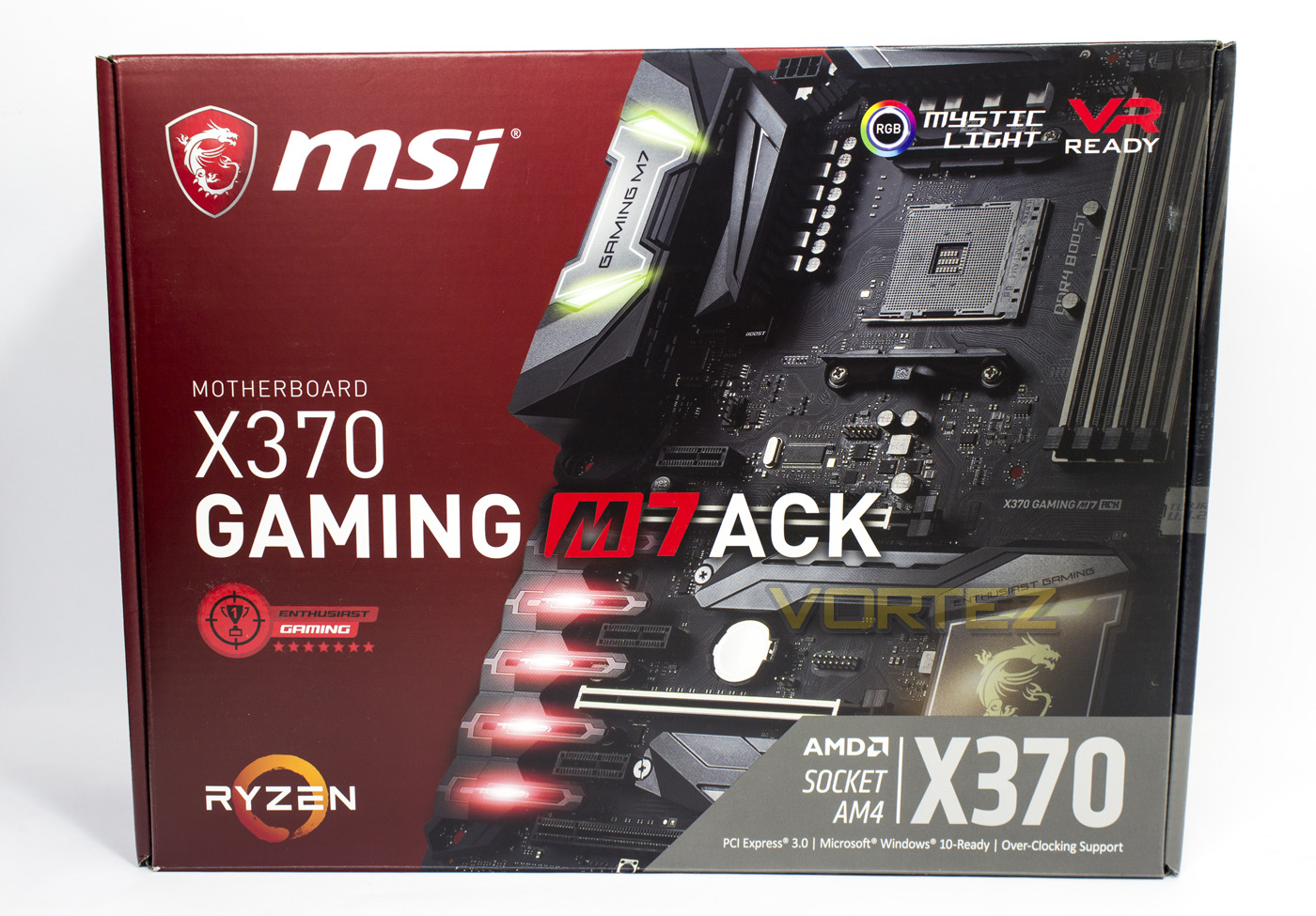
MSI ship the motherboard in a sleek, good quality box which features various visual indicators as to its features and compatibility, and almost passed without any gaming jargon were it not for the self-certified ‘enthusiast gaming’ logo.
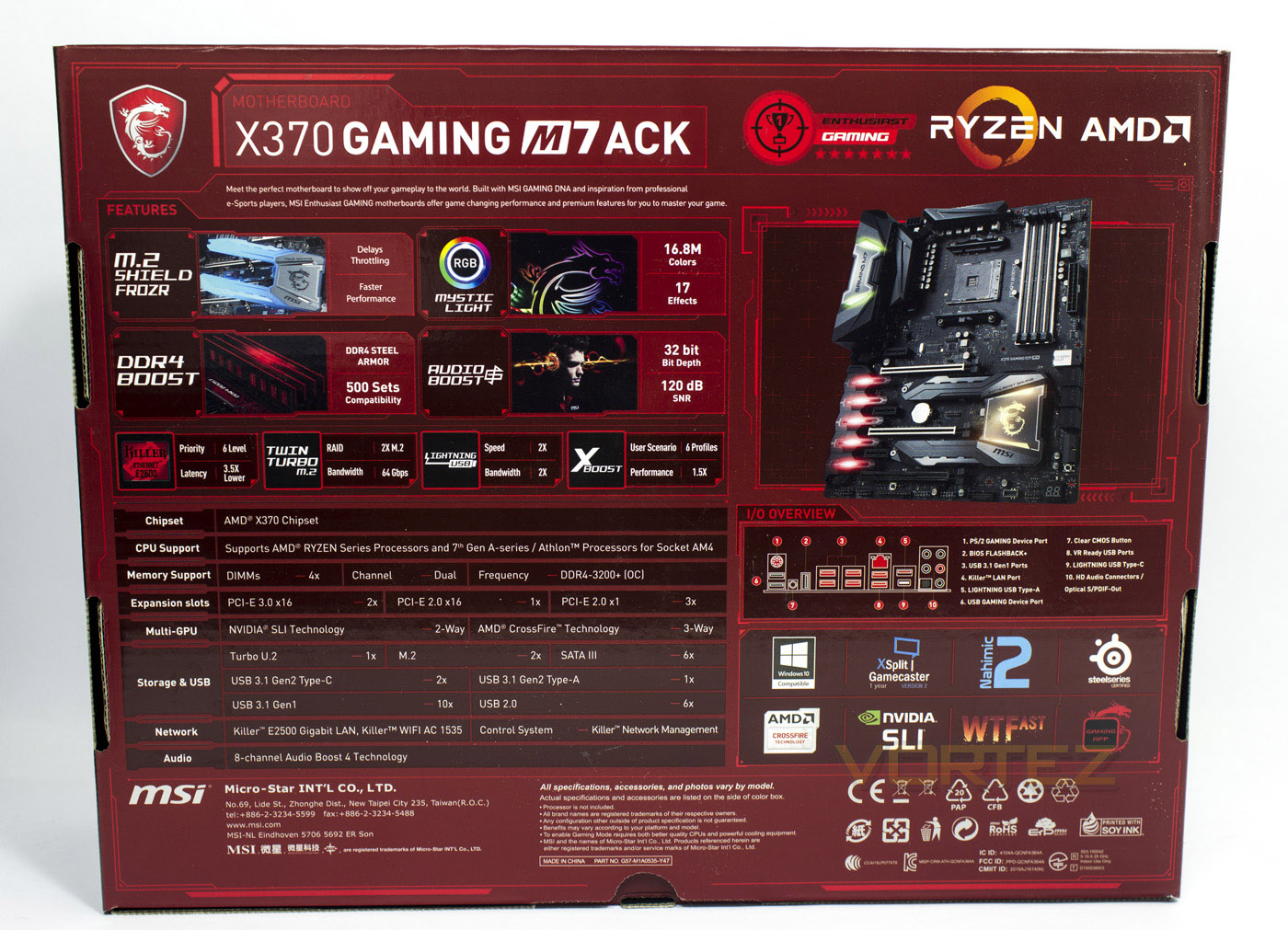
The back of the box gives a clear breakdown of key features, hardware support, and specifications. It also includes a full image of the motherboard a diagram of the rear IO.
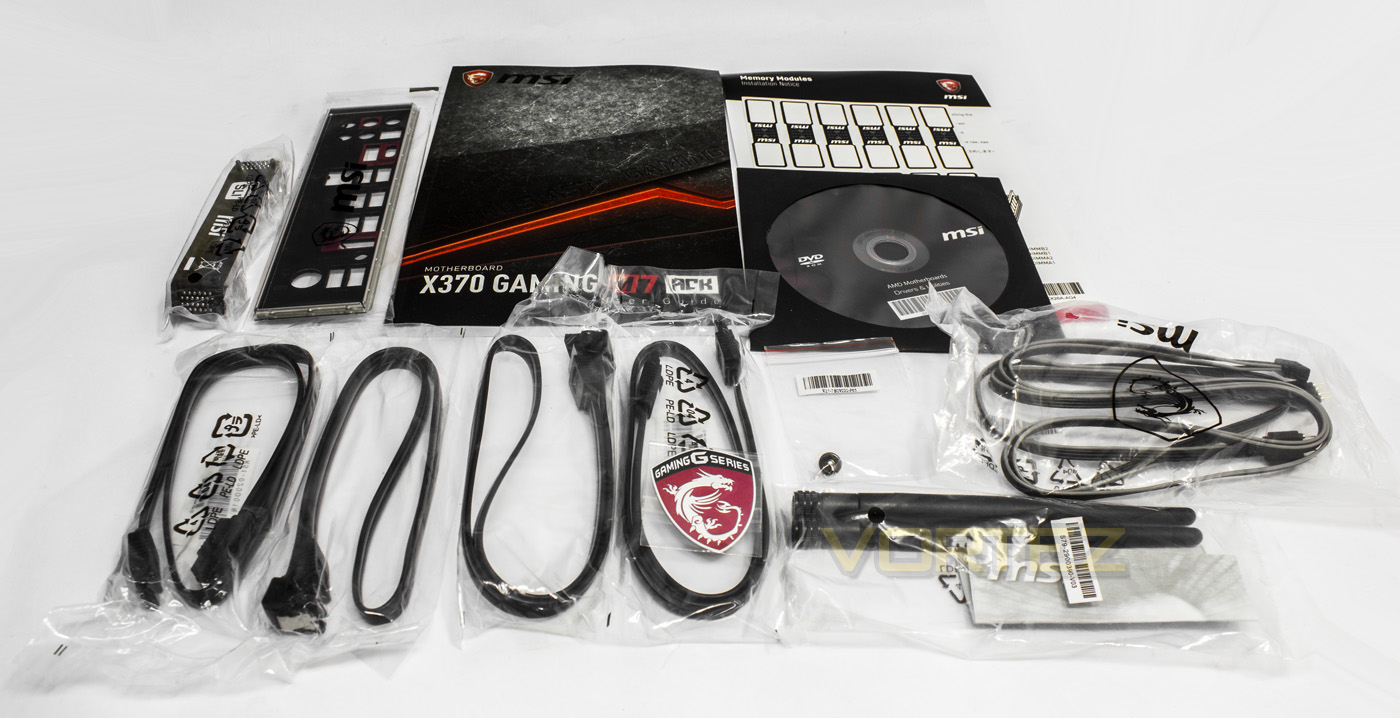
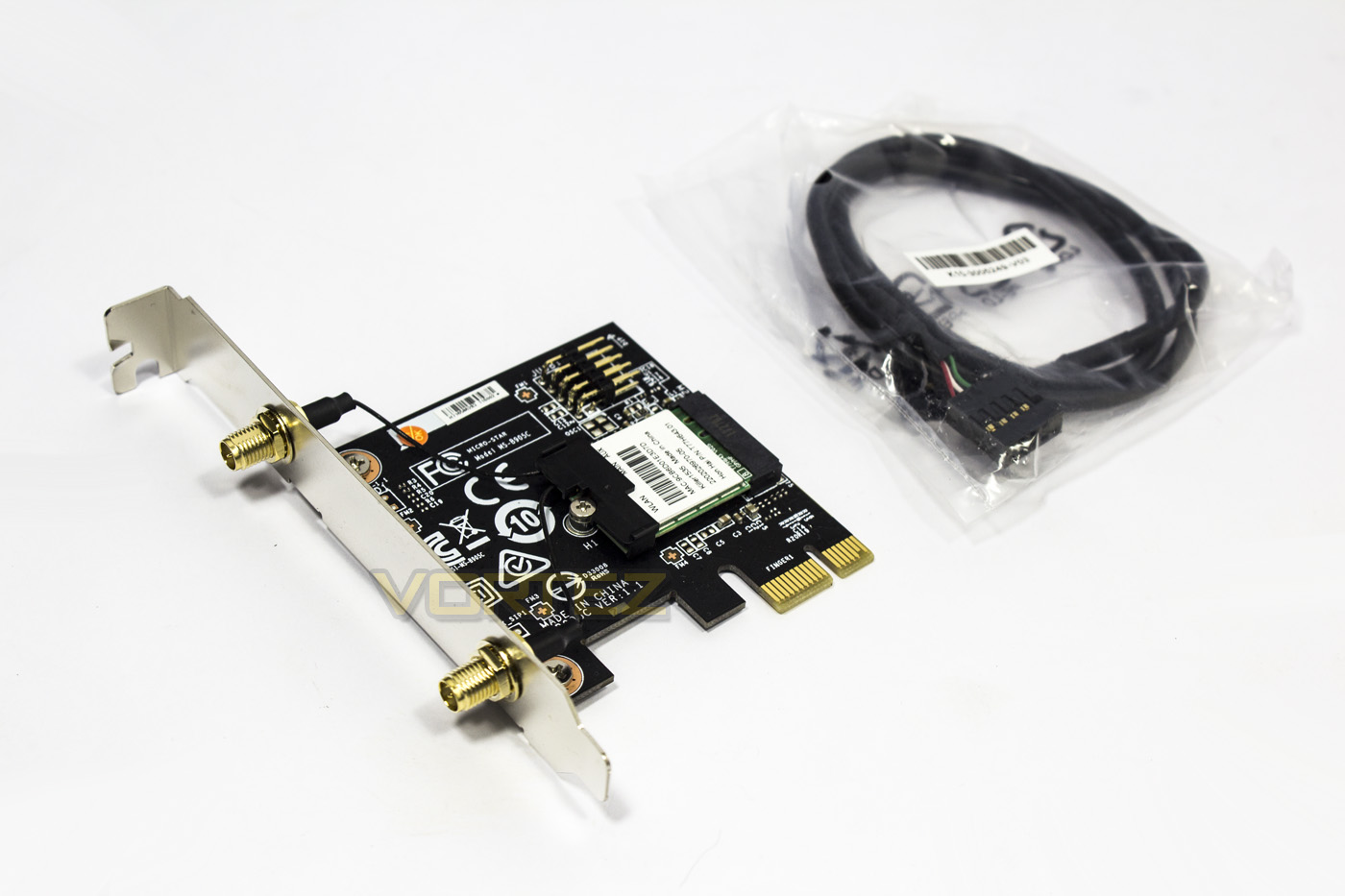
MSI have included a whole array of accessories, including: 4x SATA cables, Killer Wireless AC PCIe card with 2x antennae and screw, LED extension/splitter, case badge, manual, driver disc, cable labels, and an SLI bridge.
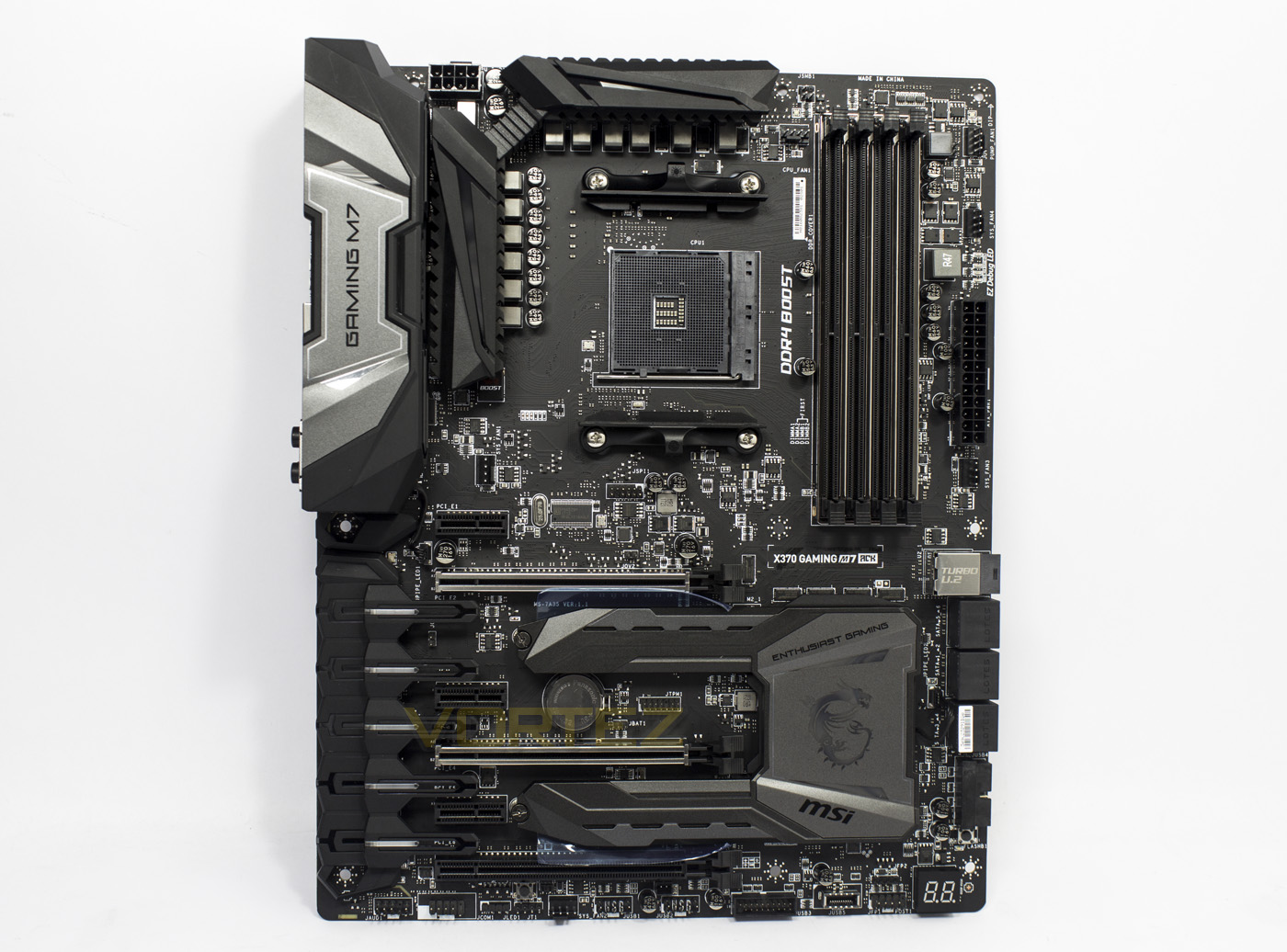
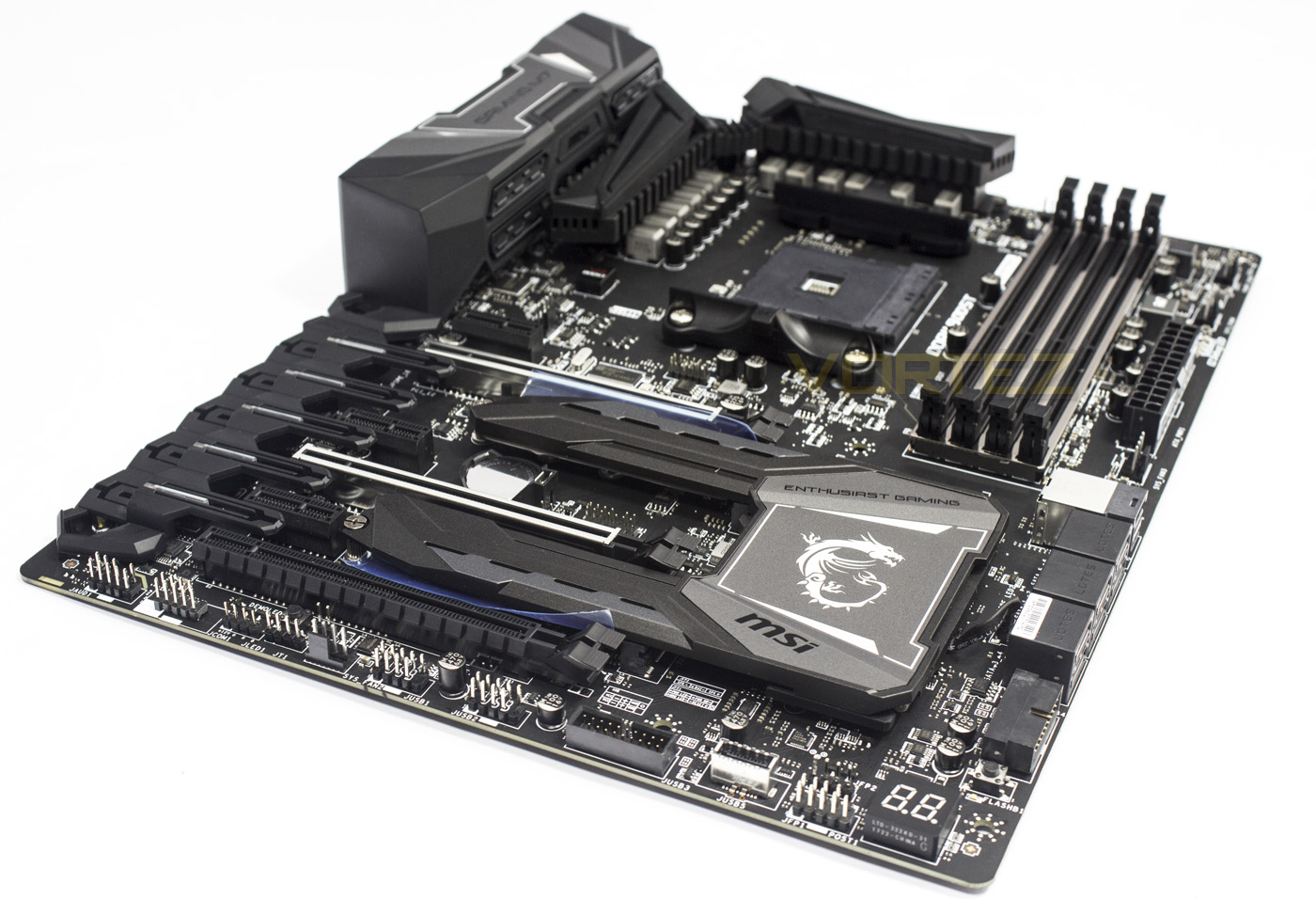
Out the box we see some beefy heatsinks, steel reinforced PCIe lanes and memory slots as well as an interesting audio shroud which features additional LED lighting.
Closer Look
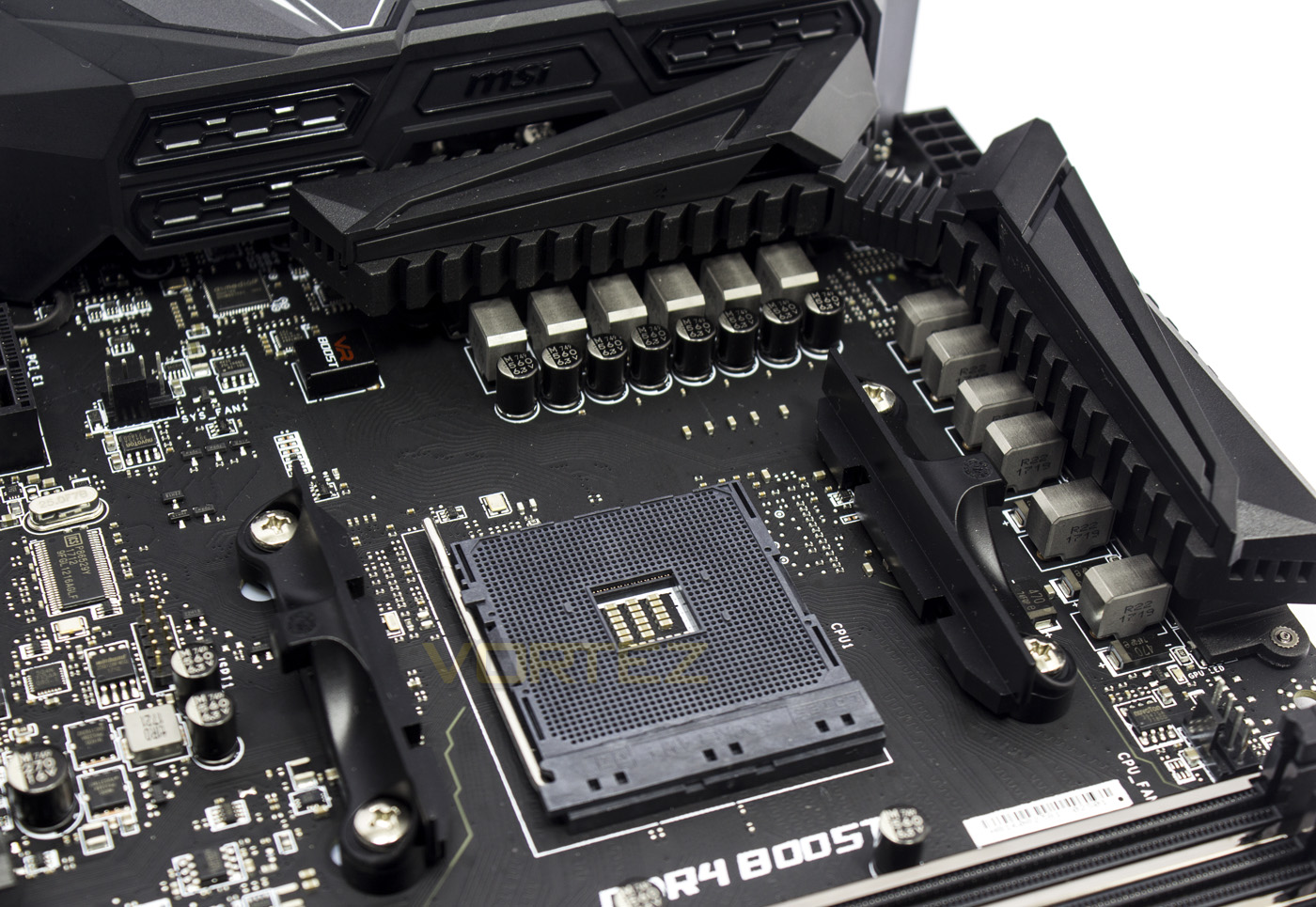
Around the socket, you will find that the X370 GAMING M7 ACK features a 10+2 phase power delivery system for your Ryzen CPU. Towards the rear you will see a 4pin fan header, while on the right there is another 4pin fan header for the CPU, it would have been nice to have seen an additional fan header for dual fan coolers, but its not essential.
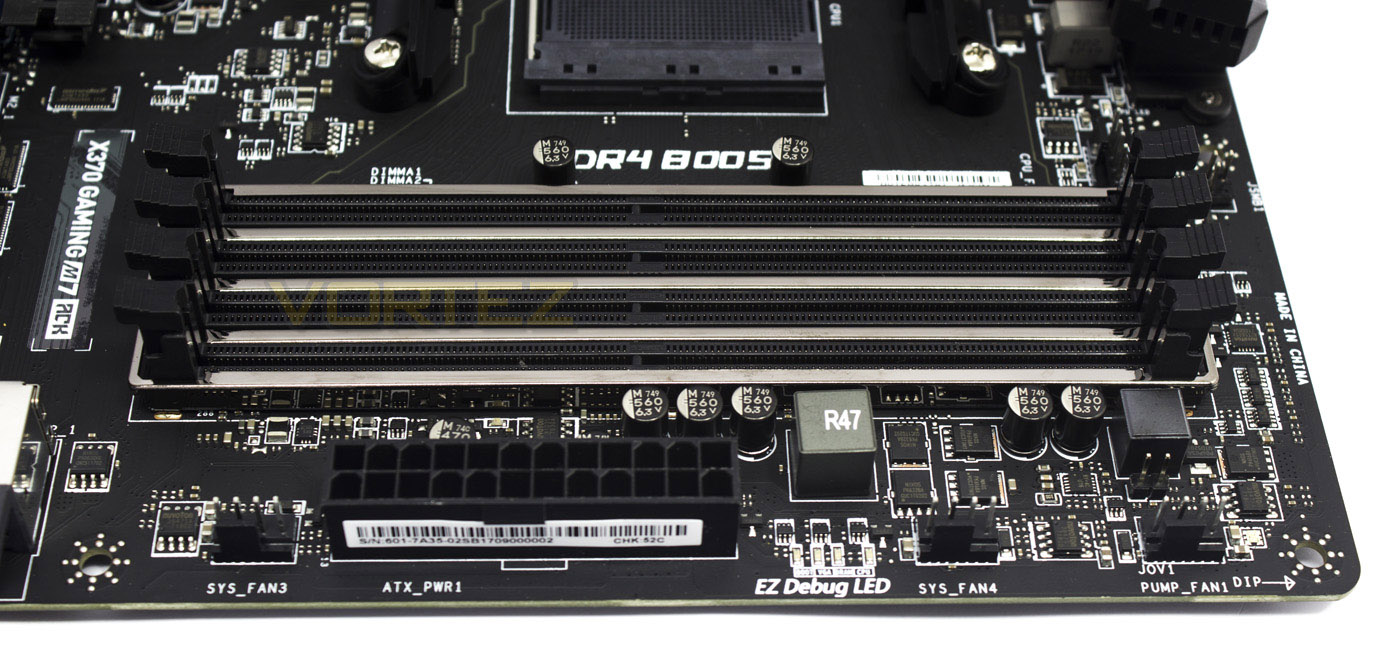
The memory slots feature DDR4 boost, which is MSI’s term for their optimised and isolated memory circuitry to provide a more reliable communication between the CPU and memory. The outside edge here is also home to three more 4pin fan headers, one of which has a 2A output for pumps.
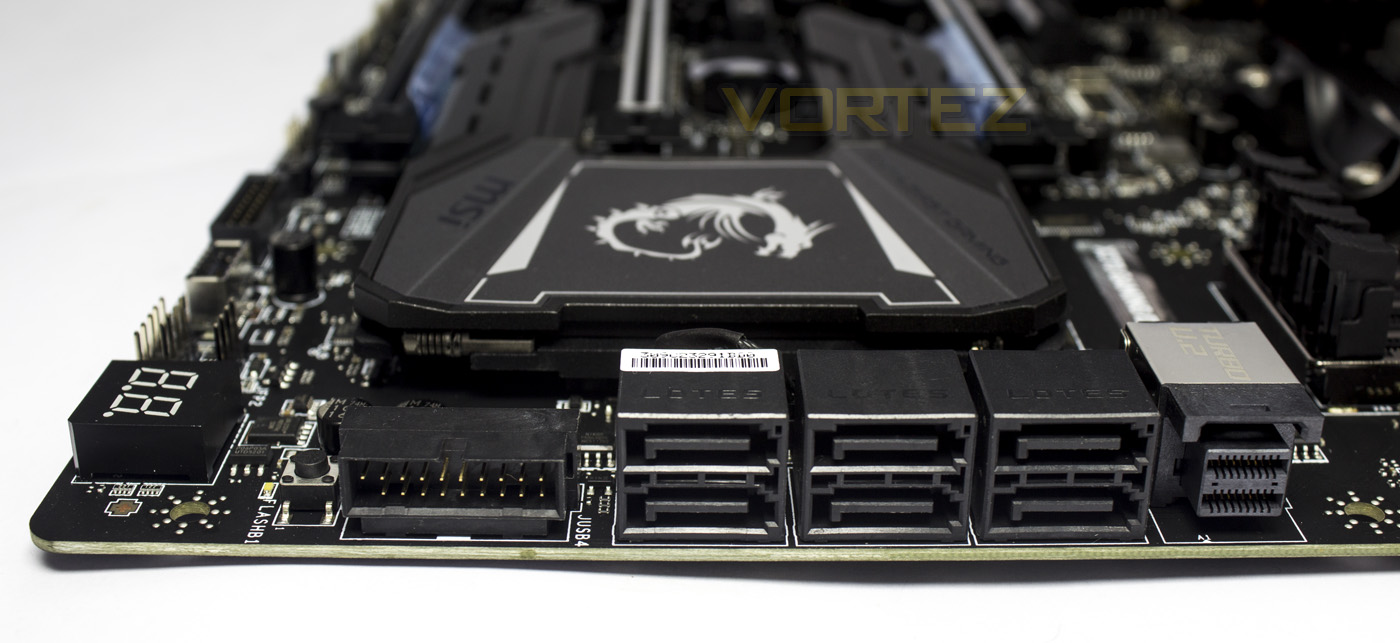
Here we find several right angled ports, starting with a USB 3.1 G1 header, 6x SATA ports, and a NVMe U.2 port. It is worth noting that the bandwidth of some of the ports are shared with the M.2 slots. M.2_1 shares its PCIe lanes with the NVMe U.2 port, and its SATA channel with SATA 6 (bottom right), while M.2_2 shares its PCIe lanes with the PCIe_6 slot, and its SATA channel with SATA_2 (bottom left). What this means is, you can install a various combination of storage drives using the given options, however, the M.2 slots will take precedence over the corresponding SATA ports, making them unavailable if you install a SATA based M.2 drive, while the NVMe U.2 port has precedence over the M.2_1 slot, and the M.2_2 slot has precedence over PCIe_6. For more details on configurations, there is a list of illustrated examples inside the manual.
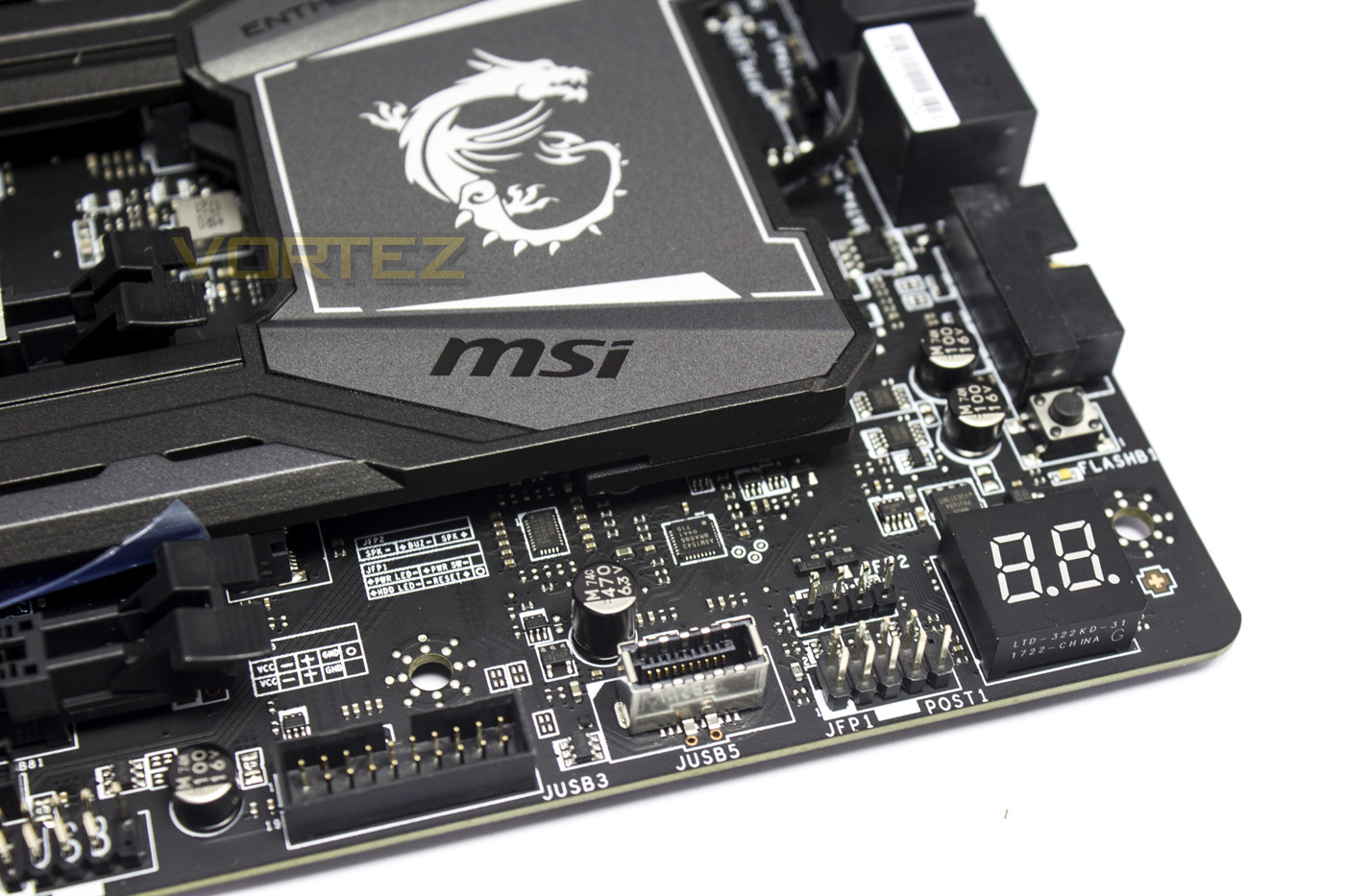
In the bottom right corner, usually reserved for just the front panel headers for the chassis, we also find an additional USB 3.1 G1 header, a USB 3.1 G2 header, the front panel connector pins, a BIOS code LED display, and a BIOS flashback button enabling easy BIOS updates without the need for additional hardware.
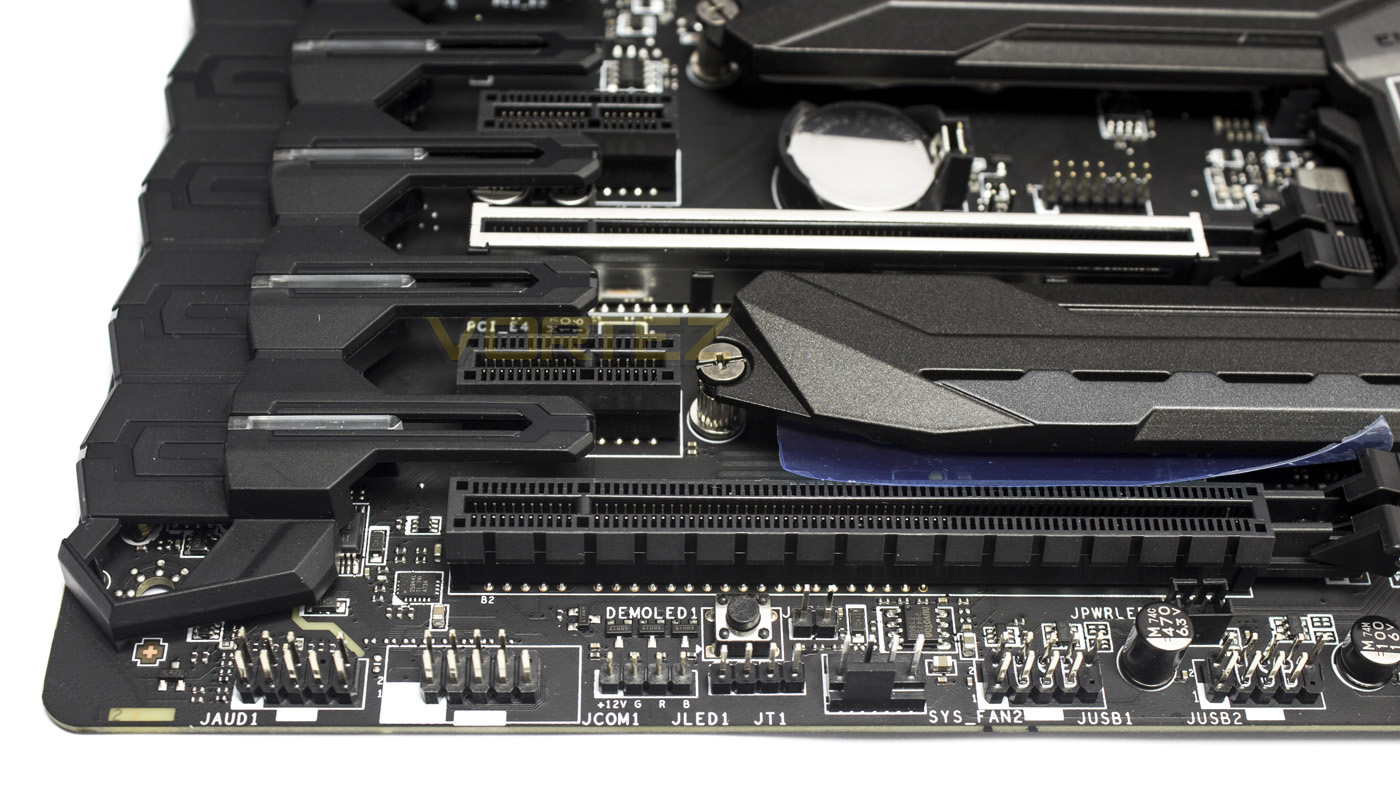
The audio circuitry is tucked behind the plastic shroud, though along the bottom edge we find the header for the front panel audio, COM, RGB LED headers, an additional 4pin fan header, and finally 2x USB 2.0 headers.
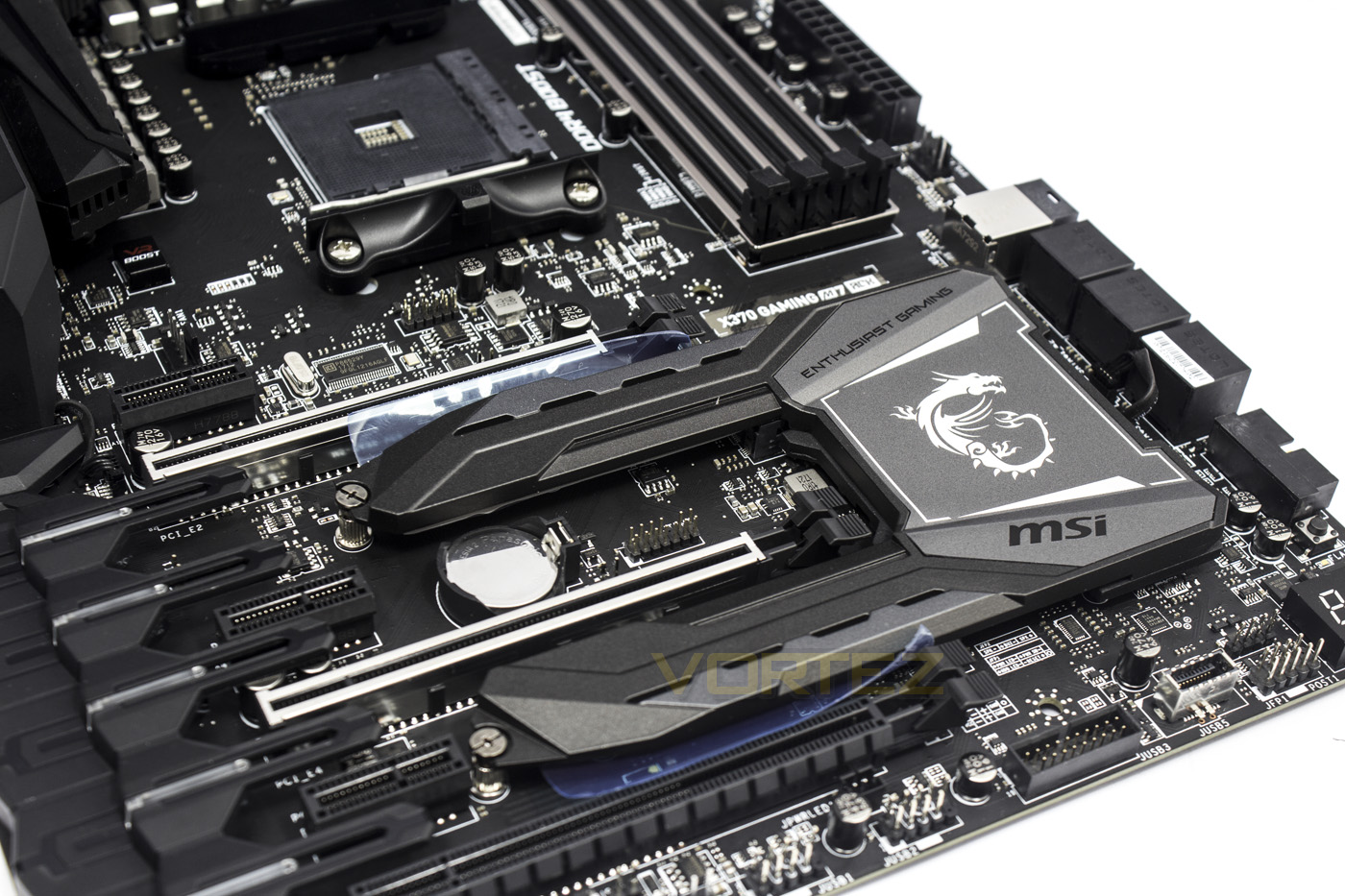
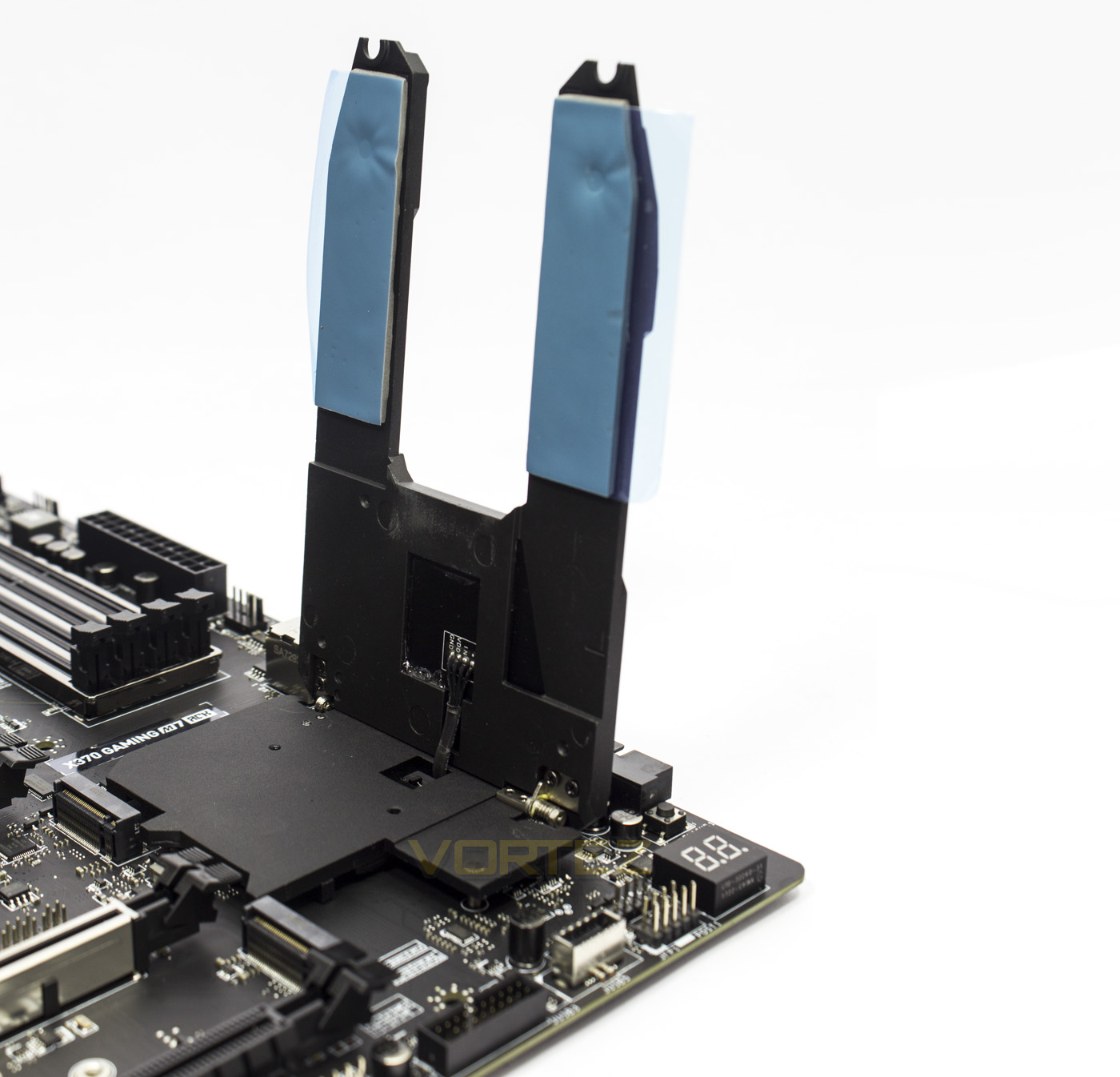
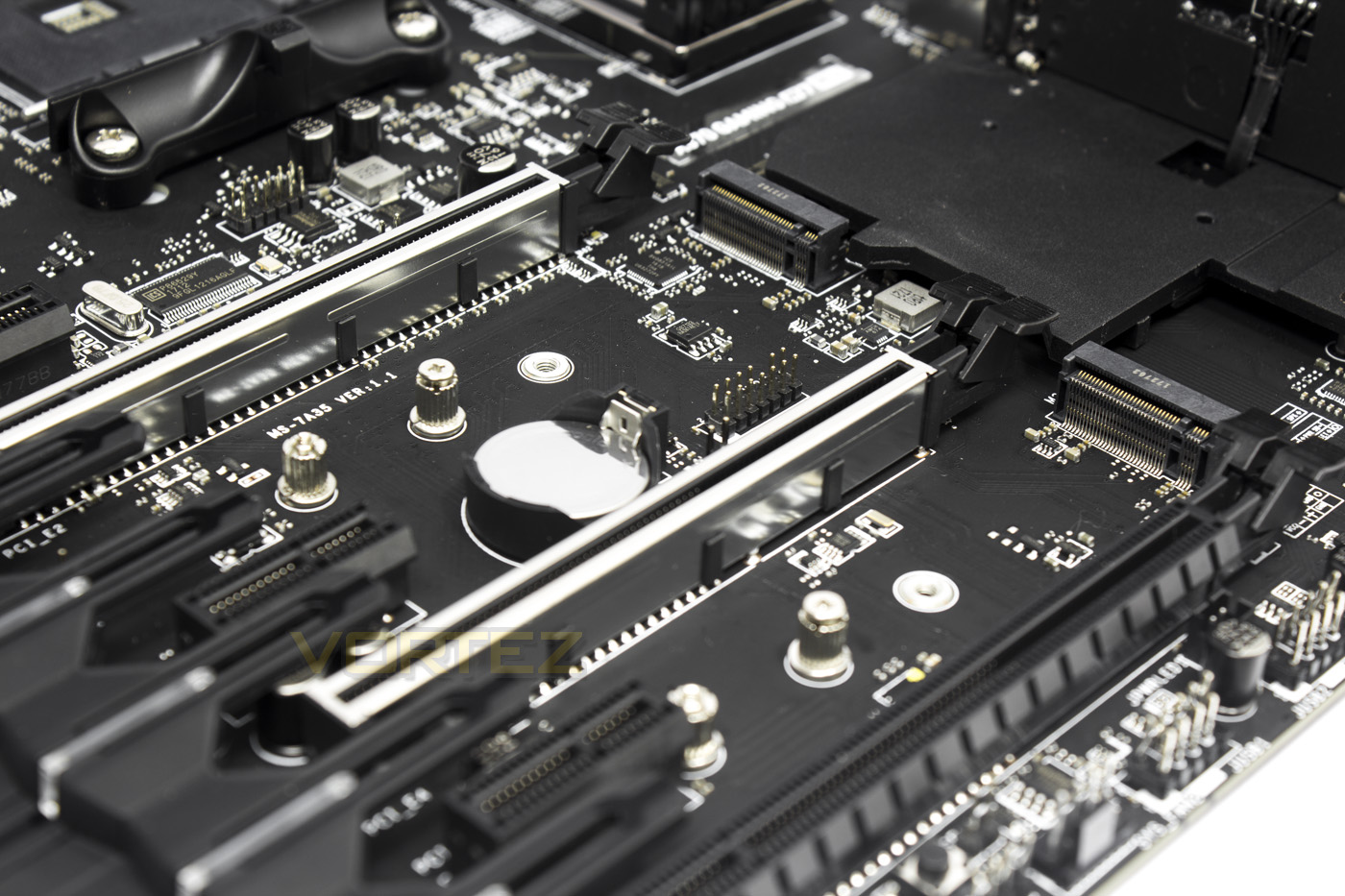
MSI have implemented an interesting heatsink design on the PCH which stretches out and covers the two M.2 slots, this is the M.2 FROZR. It is a large dual heatsink which has a hinge to allow it to open/close, allowing you to provide additional cooling for the M.2 drives which can get a little toasty during extended usage. Of course, it also contains RGB LED lighting.
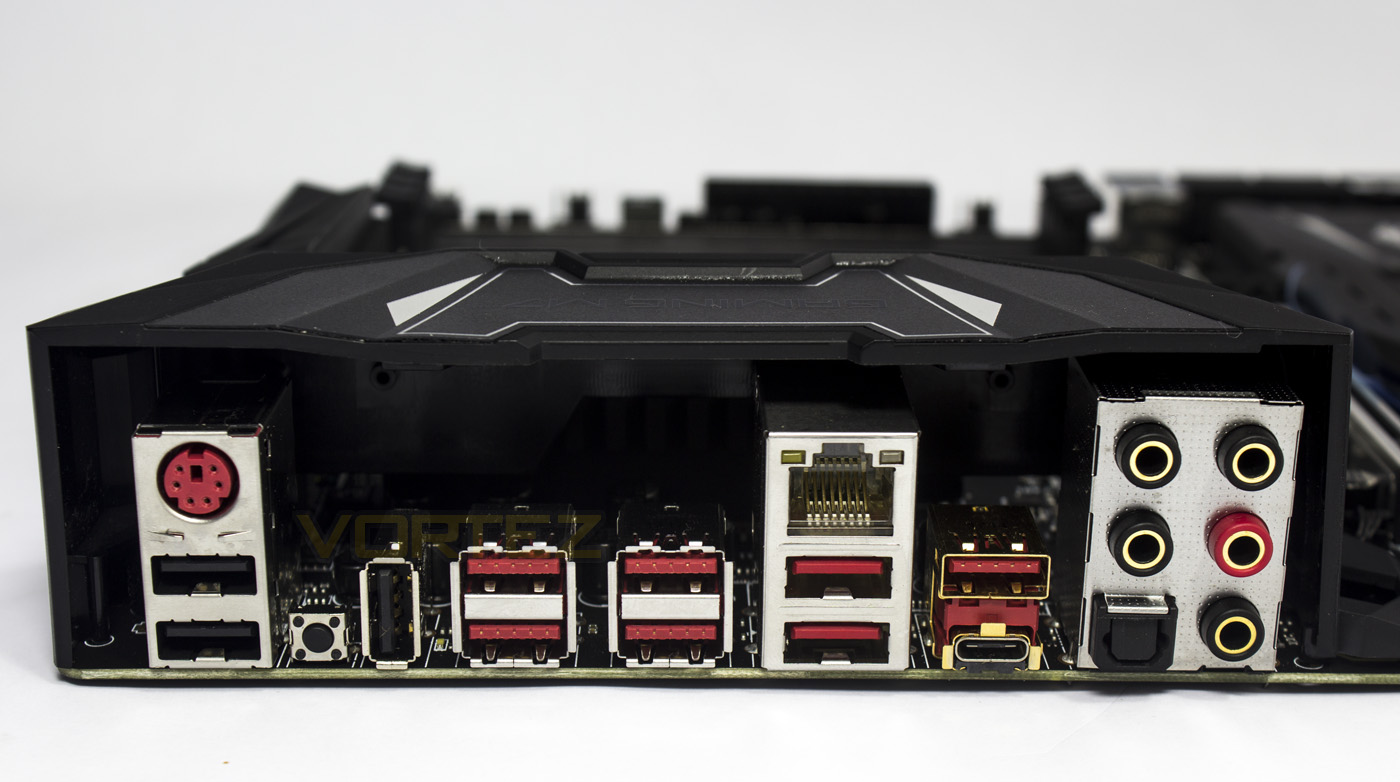
The rear IO, in order, features: a universal PS/2 port, 2x USB 2.0, Clear CMOS button, an additional USB 2.0 (also used for BIOS Flashback), 6x USB 3.1 G1, Gigabit LAN, 1x USB 3.1 G2 Type A, 1x USB 3.1 G2 Type C, 5x gold plated audio ports and an optical S/PDIF OUT.
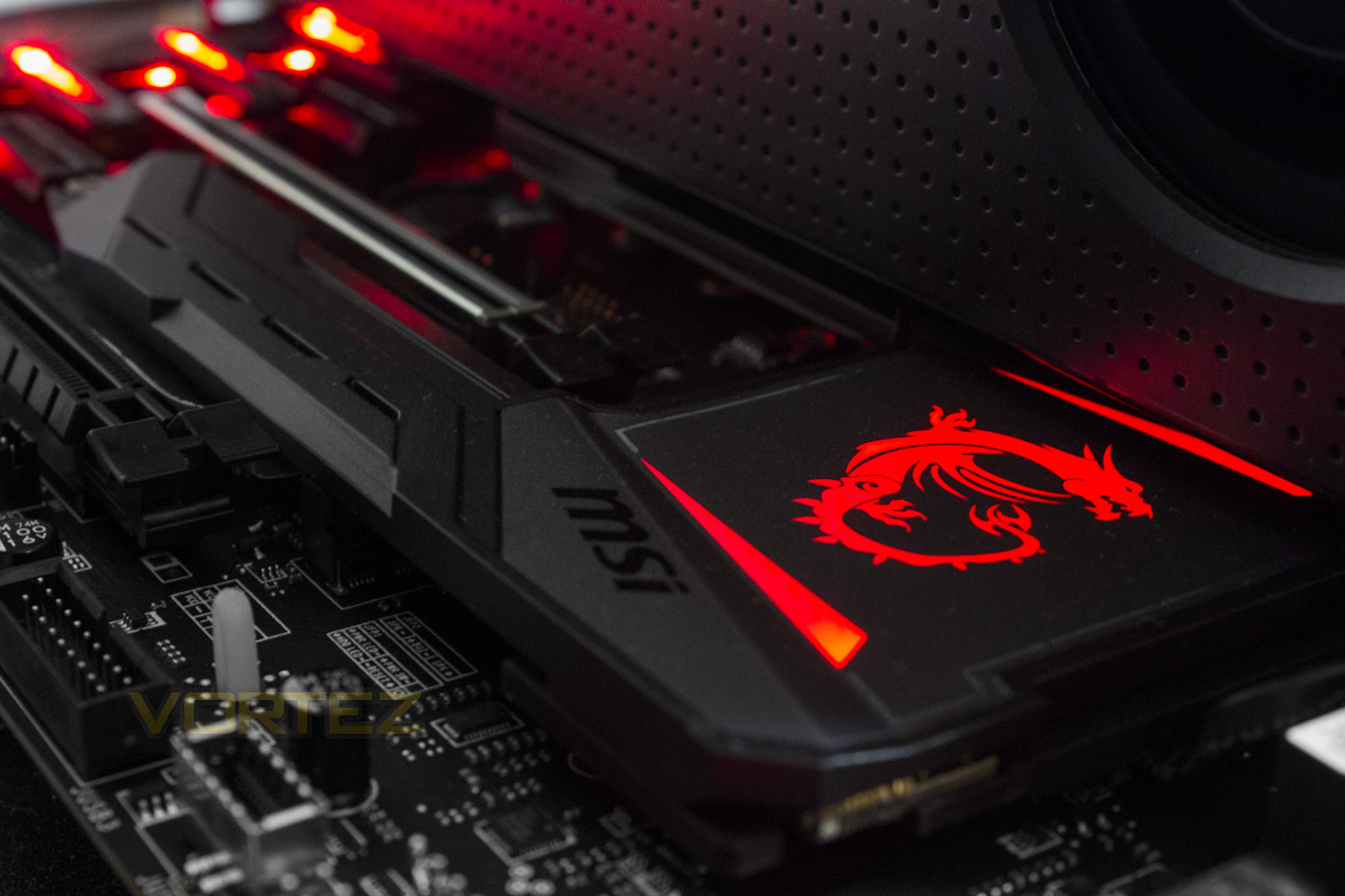
The motherboard features RGB lighting that is customisable with the provided software from MSI, and it is bright and vibrant, but isn’t excessive and so you can create an attractive theme to suit your preference.
Test Setup & Overclocking
Test SetupCPU AMD Ryzen 7 1800X
Cooling Noctua NH-U12S-SE-AM4
Motherboard MSI X370 GAMING M7 ACK
Memory 16GB Corsair Vengeance LPX 3200MHz @ 2666MHz @ 16-16-16-36-62
Graphics AMD Radeon RX 480 8GB
Storage Corsair Force LE 480GB
PSU Corsair RM750X 80 Plus Gold Certified PSU
Cooling Noctua NH-U12S-SE-AM4
Motherboard MSI X370 GAMING M7 ACK
Memory 16GB Corsair Vengeance LPX 3200MHz @ 2666MHz @ 16-16-16-36-62
Graphics AMD Radeon RX 480 8GB
Storage Corsair Force LE 480GB
PSU Corsair RM750X 80 Plus Gold Certified PSU
Benchmarks
Cinebench R15 – CPU/OpenGL Score
x264 HD 4.0 – 1st and 2nd pass encoding
SiSoftware SANDRA – CPU & Memory benchmarks
POV-RAY – CPU benchmarks
TrueCrypt – CPU benchmarks
AIDA64 – CPU benchmarks & Memory
PCMark 8 – Home Suite & Photoshop
3DMark FireStrike – 3D Benchmark
Games – Rise of the Tomb Raider & Total War: WARHAMMER
x264 HD 4.0 – 1st and 2nd pass encoding
SiSoftware SANDRA – CPU & Memory benchmarks
POV-RAY – CPU benchmarks
TrueCrypt – CPU benchmarks
AIDA64 – CPU benchmarks & Memory
PCMark 8 – Home Suite & Photoshop
3DMark FireStrike – 3D Benchmark
Games – Rise of the Tomb Raider & Total War: WARHAMMER
Other Software
Temperature Analysis: Aida64 & Ryzen Master
Stress Testing Software: AIDA64 Stability Test
CPU Specification Monitoring: CPU-Z
Performance Monitoring: MSI Afterburner
Stress Testing Software: AIDA64 Stability Test
CPU Specification Monitoring: CPU-Z
Performance Monitoring: MSI Afterburner
Software
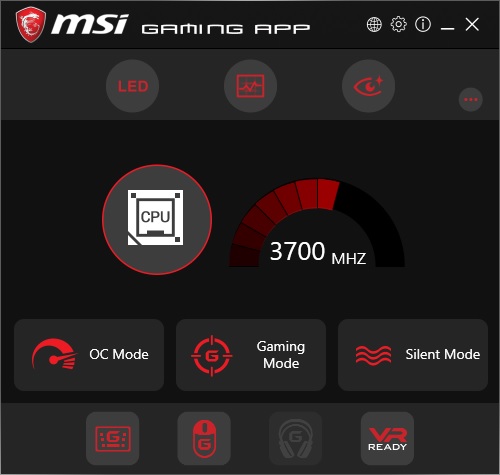
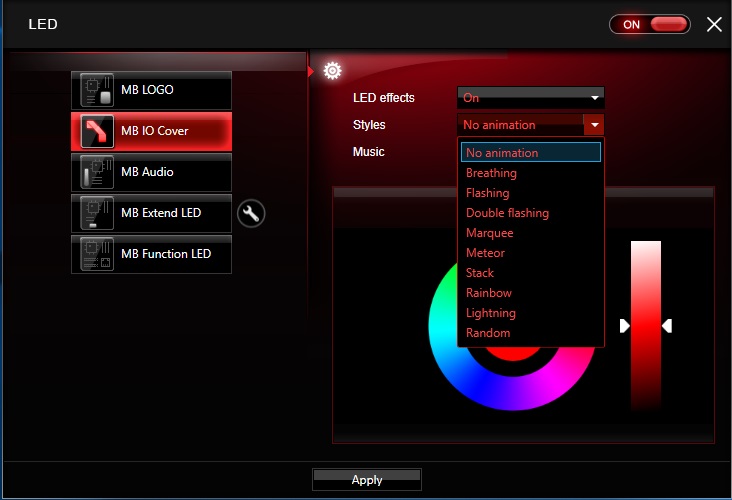
MSI’s gaming app is a unified app featuring all of the features you could want, including the RGB LED lighting customisation. It is easy to use and is nonintrusive thus worth installing.
BIOS
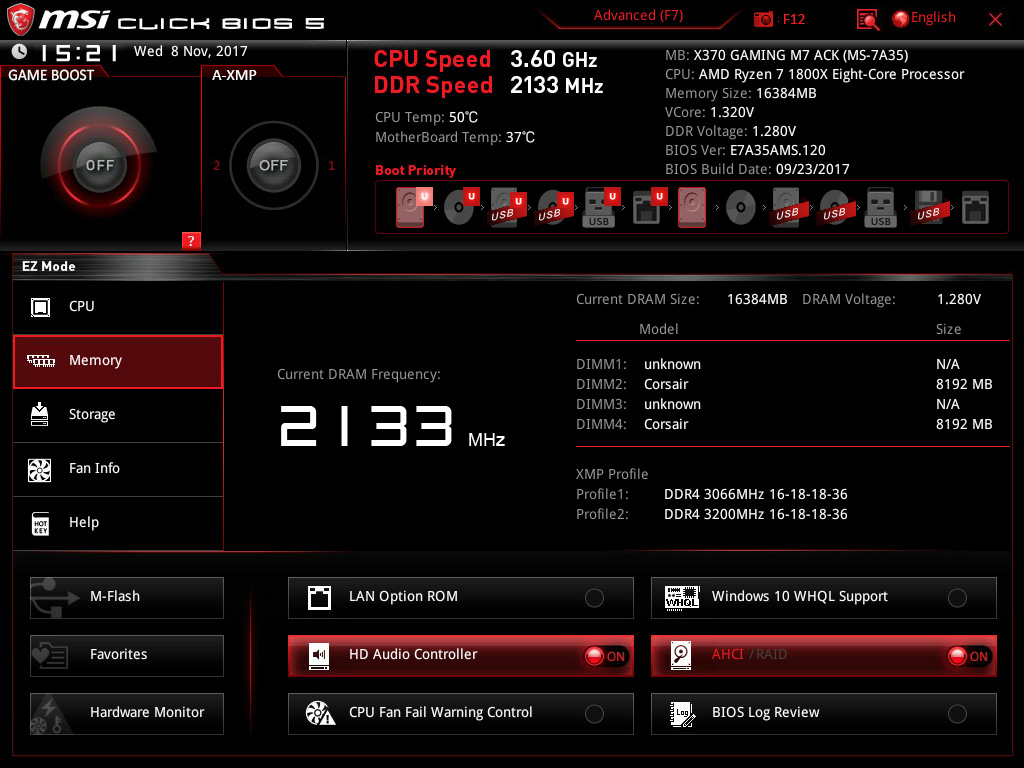
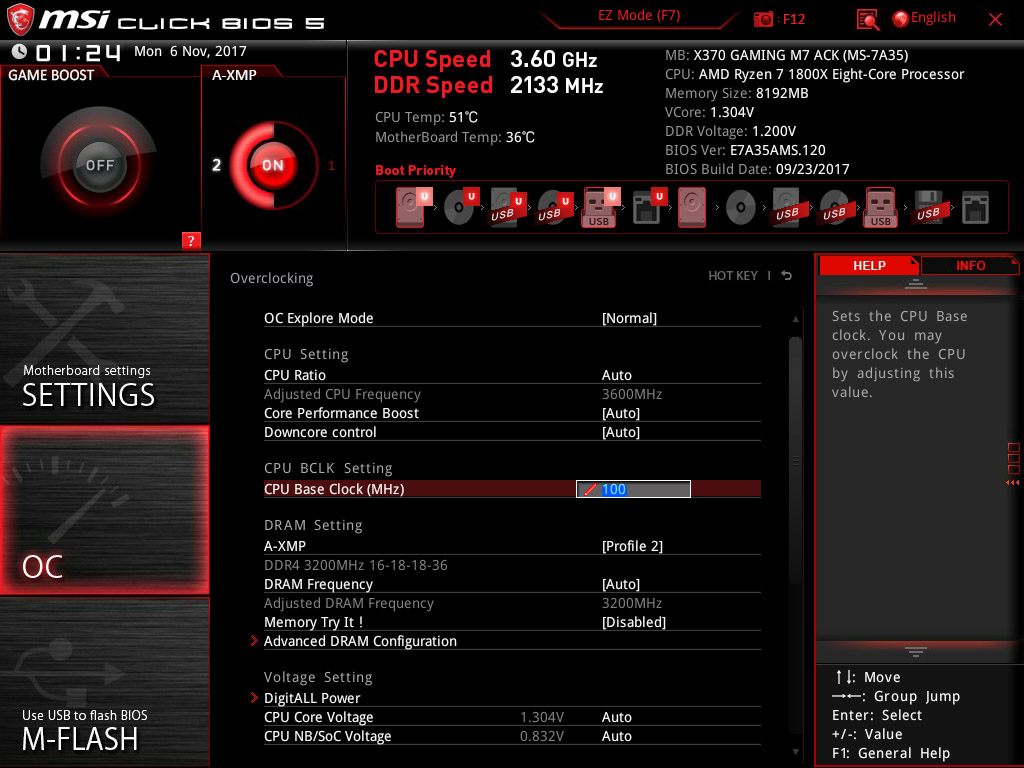
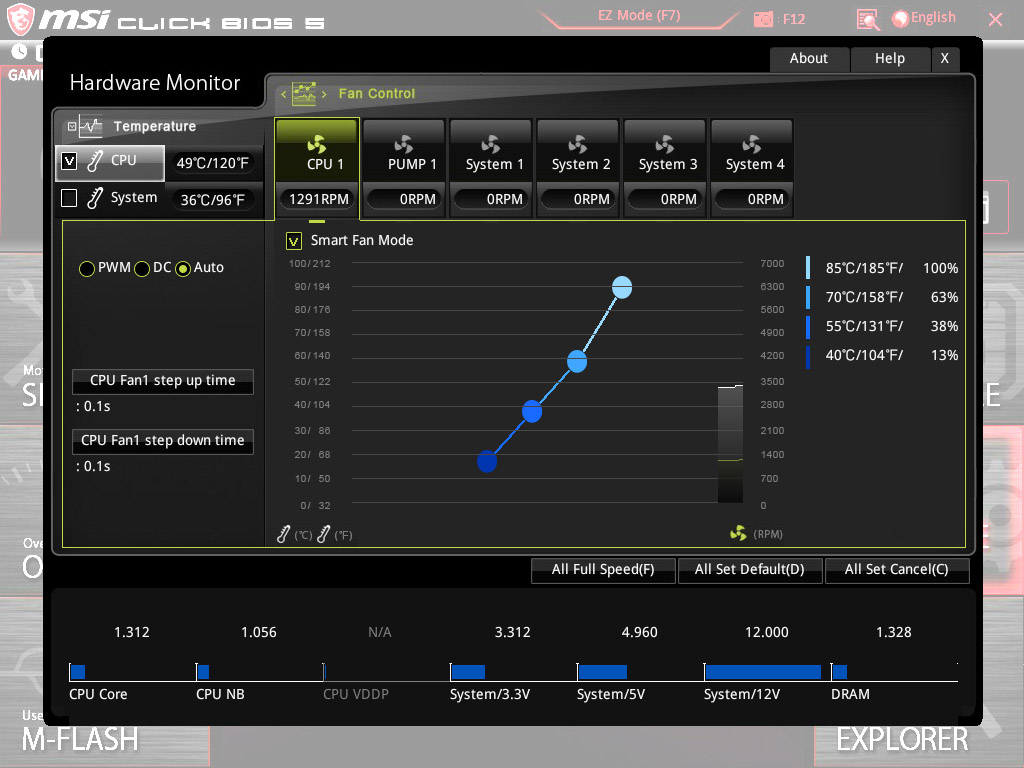
MSI BIOS interface is arguably one of the more user friendly designs, it is smooth, responsive, and easy to navigate.
Overclocking
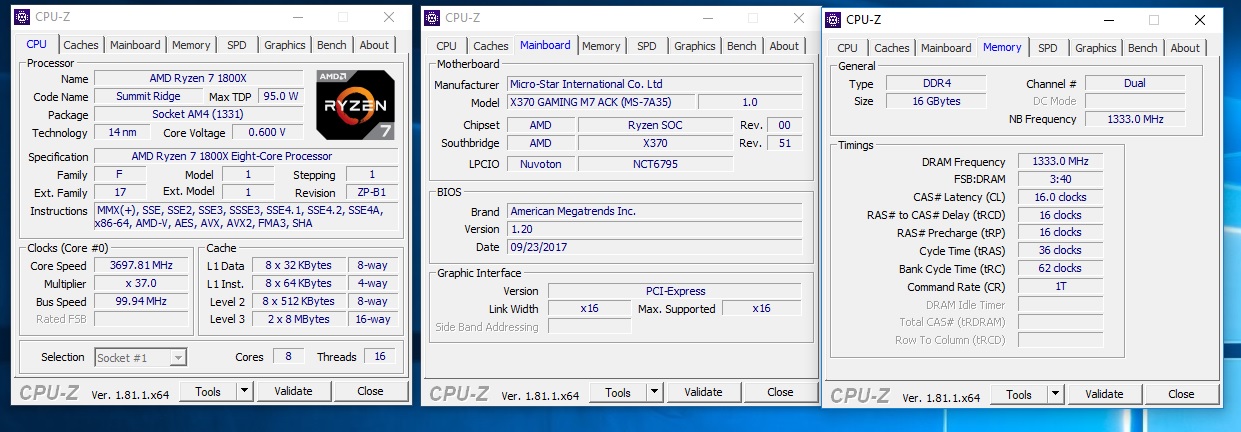
Overclocking at first, proved to be a bit troublesome, but we discovered that we encountered a lingering issue with the Ryzen platform. To solve our memory issue, and in case you encounter an issue like it, it is worth starting up your system with a single memory module installed in one memory channel, then start again after moving the single stick to the second memory channel. Using 1.42V we managed to find relative stability for our R9 1800X at 4GHz, however considering the issue we had with memory we felt that it would be a good idea to update the BIOS to latest (at time of writing 1.2) and test out the memory, to which we easily attained the test standard of 2666MHz. After the BIOS update we could easily attain 3200MHz.
Benchmarks: Power Consumption
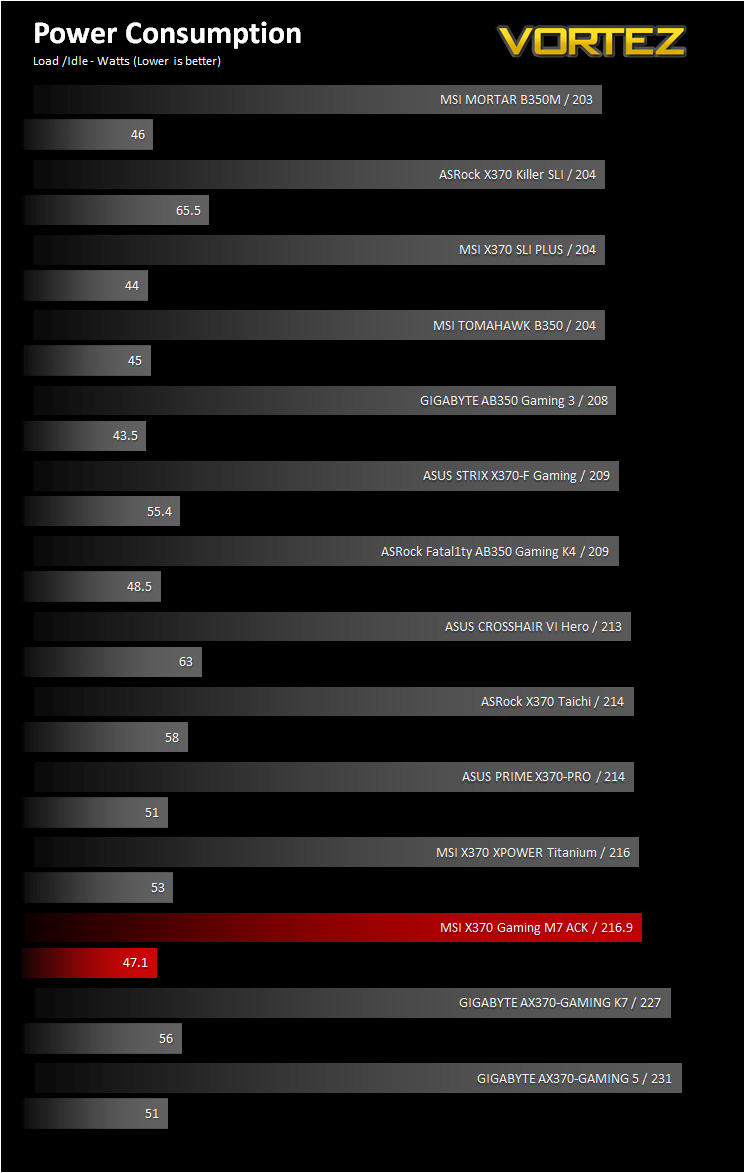
It’s interesting to note the power consumption across all motherboards. Although they are using the Z270 chipset, energy results can fluctuate between manufacturers due to the features and specifications that are integrated. First of all, for the idle tests the system is cold booted into Windows and no additional applications are executed – the watts are noted on the external energy monitor we use and then the system is loaded with 3DMark FireStrike – watts are again monitored for the duration of the test and the highest rated wattage result is then noted down. Below are the results of this energy test.
Benchmarks: Cinebench R15
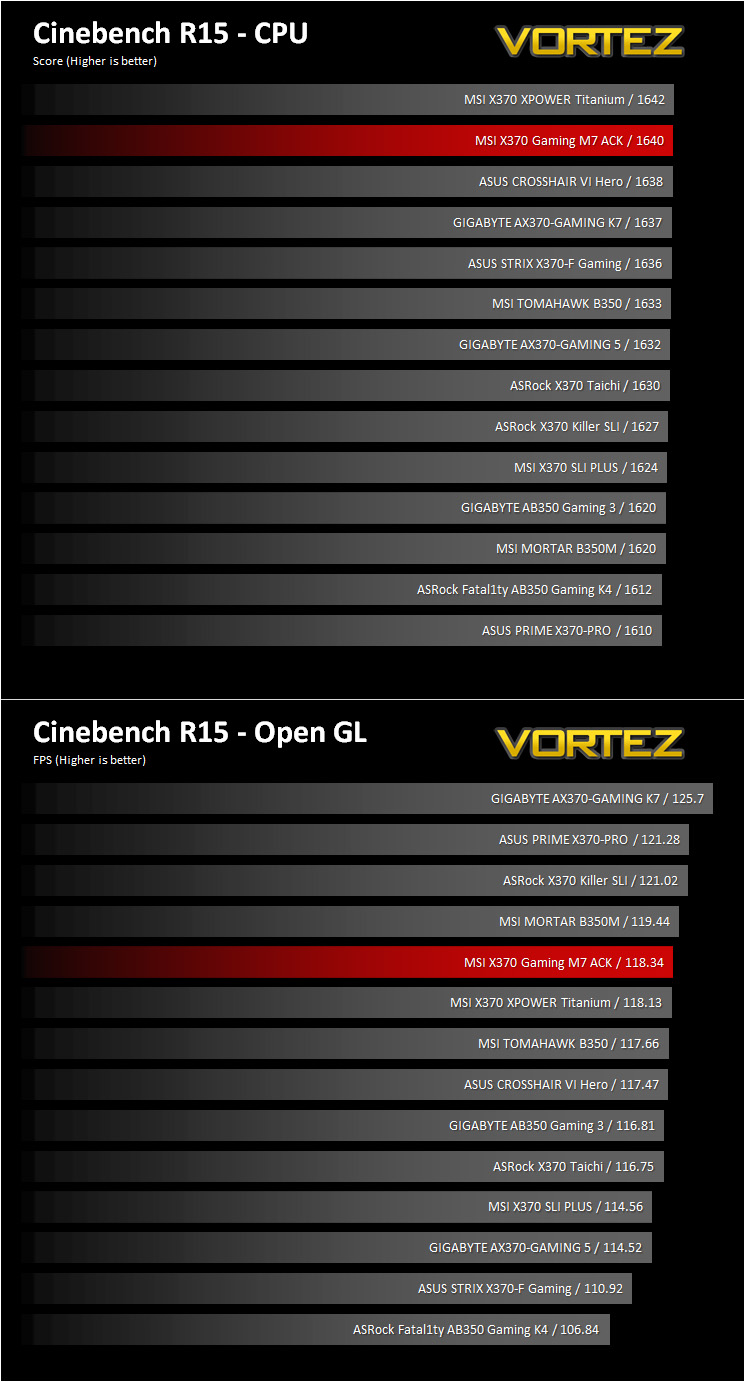
CINEBENCH is a real-world cross platform test suite that evaluates your computer’s performance capabilities. CINEBENCH is based on MAXON’s award-winning animation software CINEMA 4D, which is used extensively by studios and production houses worldwide for 3D content creation. MAXON software has been used in blockbuster movies such as Iron Man 3, Oblivion, Life of Pi or Prometheus and many more.
Benchmarks: X264 HD
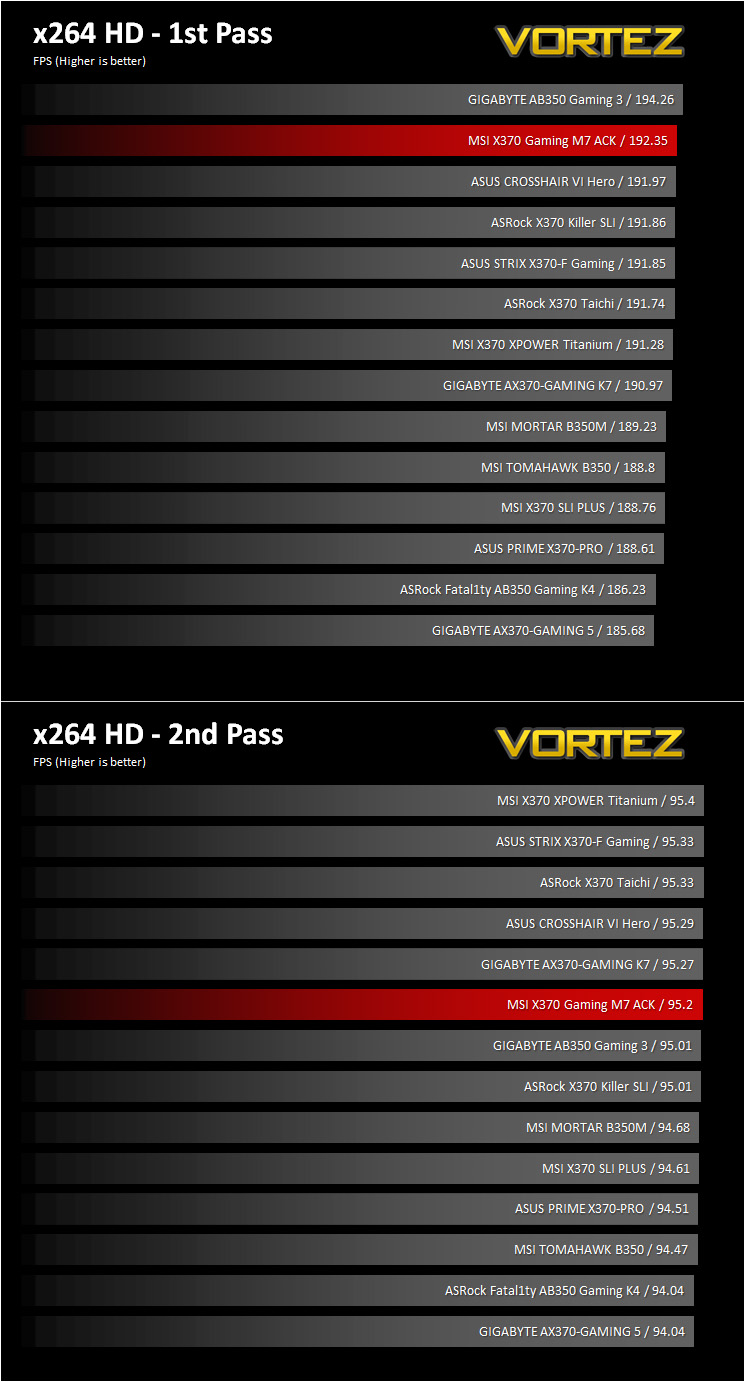
Simply put, this test measures how fast your machine can encode a short, DVD quality MPEG-2 video clip into a high-quality x264 video clip. What’s x264, you ask? It’s more or less the next-generation Xvid/DivX codec. I think it’s ideal for a benchmark because the application (x264.exe) reports fairly accurate compression results (in frames per second) for each pass of the video encoding process, and it uses multi-core processors very efficiently.
Benchmarks: SiSoftware SANDRA
SANDRA isn’t always a benchmark that is included in hardware reviews but we believe it shouldn’t be ignored. SANDRA provides a vigorous package that tests your system in a rather large array of benchmarks. There are many aspects of benchmark that can be executed. We will be considering – CPU and memory tests.

Benchmarks: POV-RAY
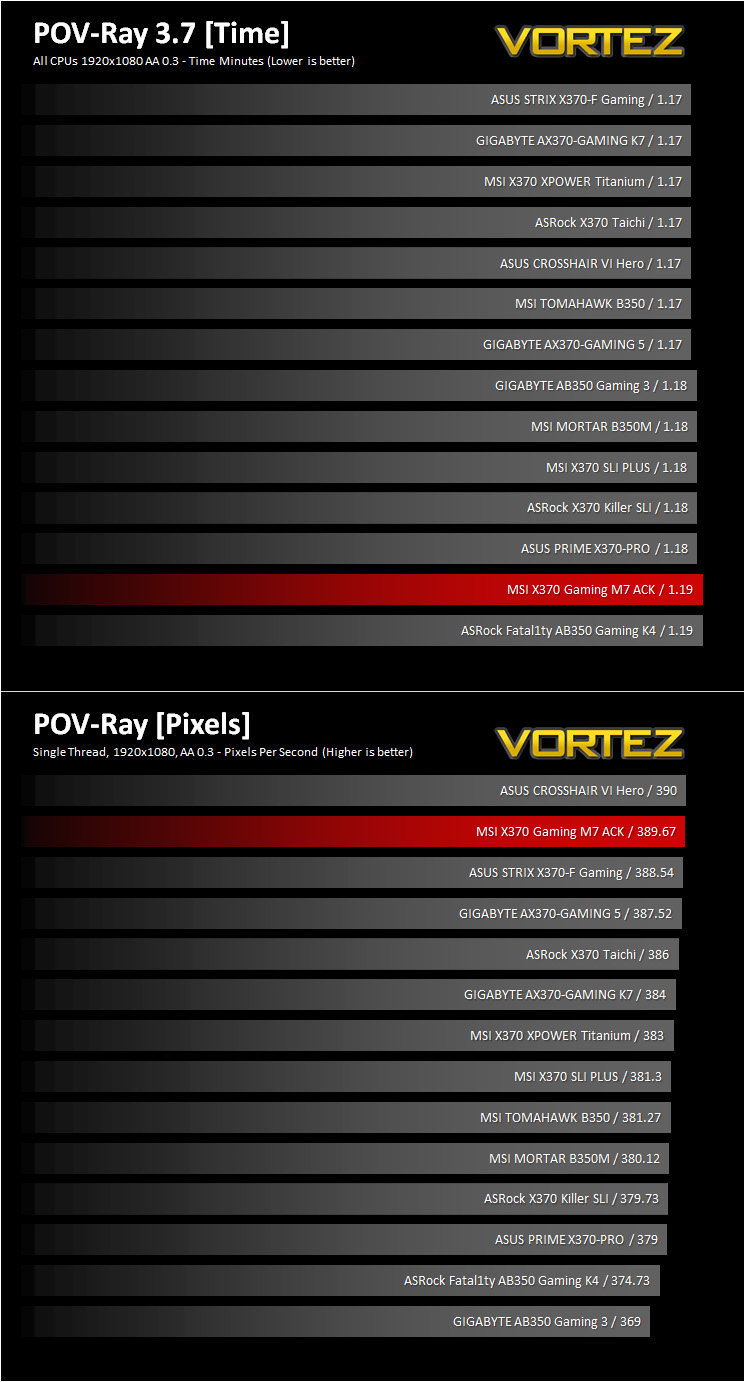
Persistence of Vision Raytracer’s PovRay is a free and open source 3D animator application with versions for computers with different operating systems.
This product allows users to build their custom 3D worlds with excellent quality despite their computer’s hardware. It has adjustable options for levels of radiance, refraction, and reflection. Calculation time may vary depending on the computer model, but PovRay can adapt to many computer builds, and is supported by the open source community.
This product allows users to build their custom 3D worlds with excellent quality despite their computer’s hardware. It has adjustable options for levels of radiance, refraction, and reflection. Calculation time may vary depending on the computer model, but PovRay can adapt to many computer builds, and is supported by the open source community.
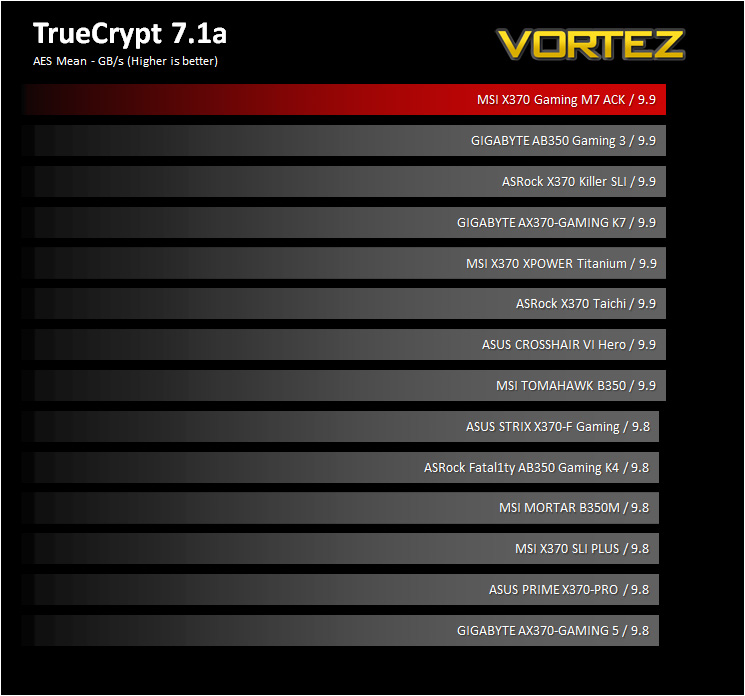
Benchmarks: TrueCrypt
TrueCrypt is a discontinued source-available freeware utility used for on-the-fly encryption (OTFE). It can create a virtual encrypted disk within a file or encrypt a partition or (under Microsoft Windows except Windows 8 with GPT) the entire storage device (pre-boot authentication).
 [/center37905]
Benchmarks: AIDA64
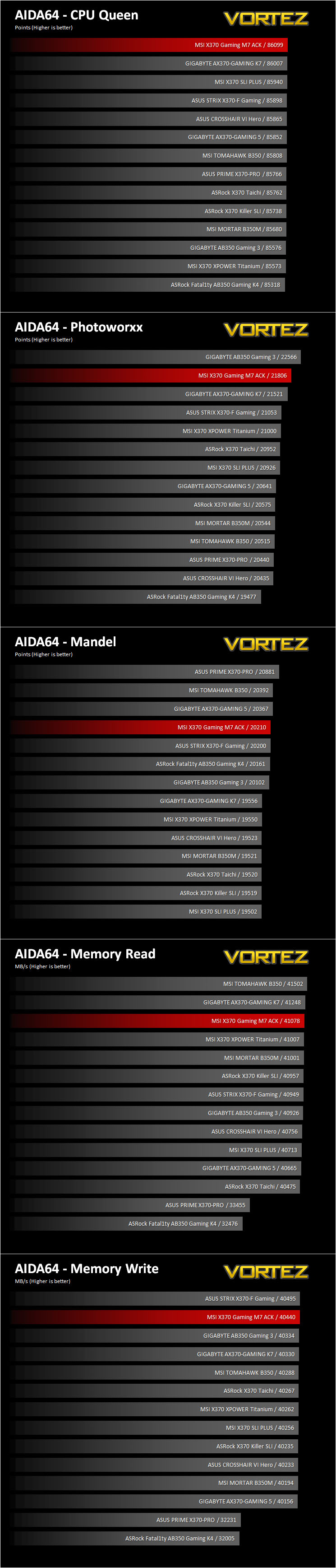
AIDA64 Product PageThis simple integer benchmark focuses on the branch prediction capabilities and the misprediction penalties of the CPU. It finds the solutions for the classic “Queens problem” on a 10 by 10 sized chessboard. At the same clock speed theoretically the processor with the shorter pipeline and smaller misprediction penalties will attain higher benchmark scores. For example — with HyperThreading disabled — the Intel Northwood core processors get higher scores than the Intel Prescott core based ones due to the 20-step vs 31-step long pipeline. CPU Queen test uses integer MMX, SSE2 and SSSE3 optimizations.
Benchmarks: PCMark 8 & PCMark 10
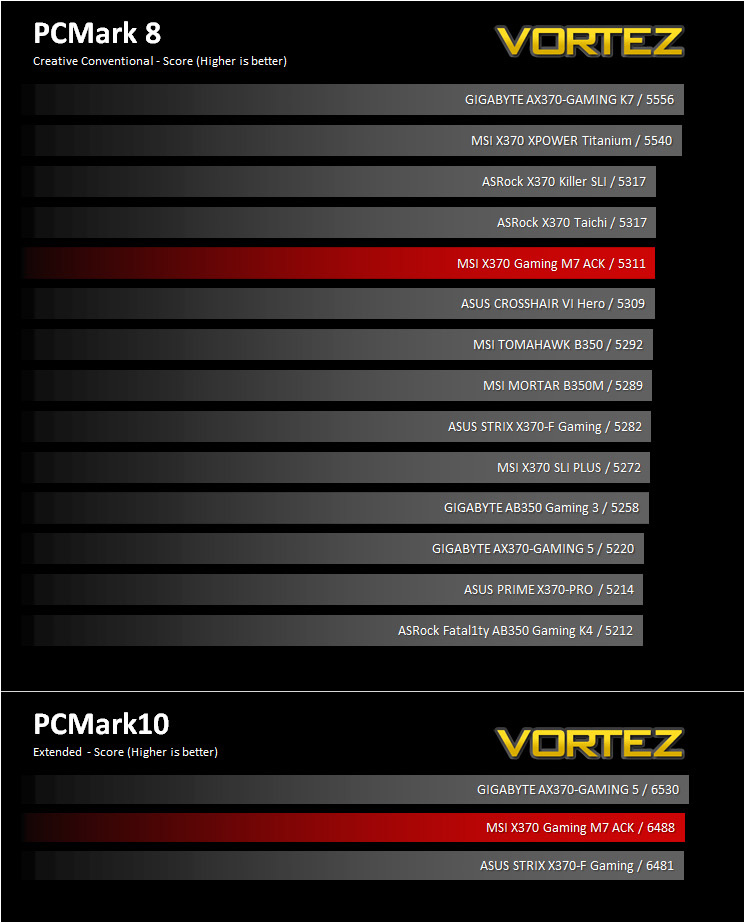
PCMark 8 combines performance benchmarking with battery life measurement and includes tests based on popular Adobe and Microsoft applications. Whether you are looking for long battery life, or maximum power, PCMark 8 will help you find the devices that offer the perfect combination of efficiency and performance for your needs. It’s the complete PC performance benchmark for home and business.
PCMark 10 is the latest in our series of industry standard PC benchmarks. Updated for Windows 10 with new and improved workloads, PCMark 10 is also faster and easier to use.
PCMark 10 is the latest in our series of industry standard PC benchmarks. Updated for Windows 10 with new and improved workloads, PCMark 10 is also faster and easier to use.
Benchmarks: PCMark 8 Photoshop
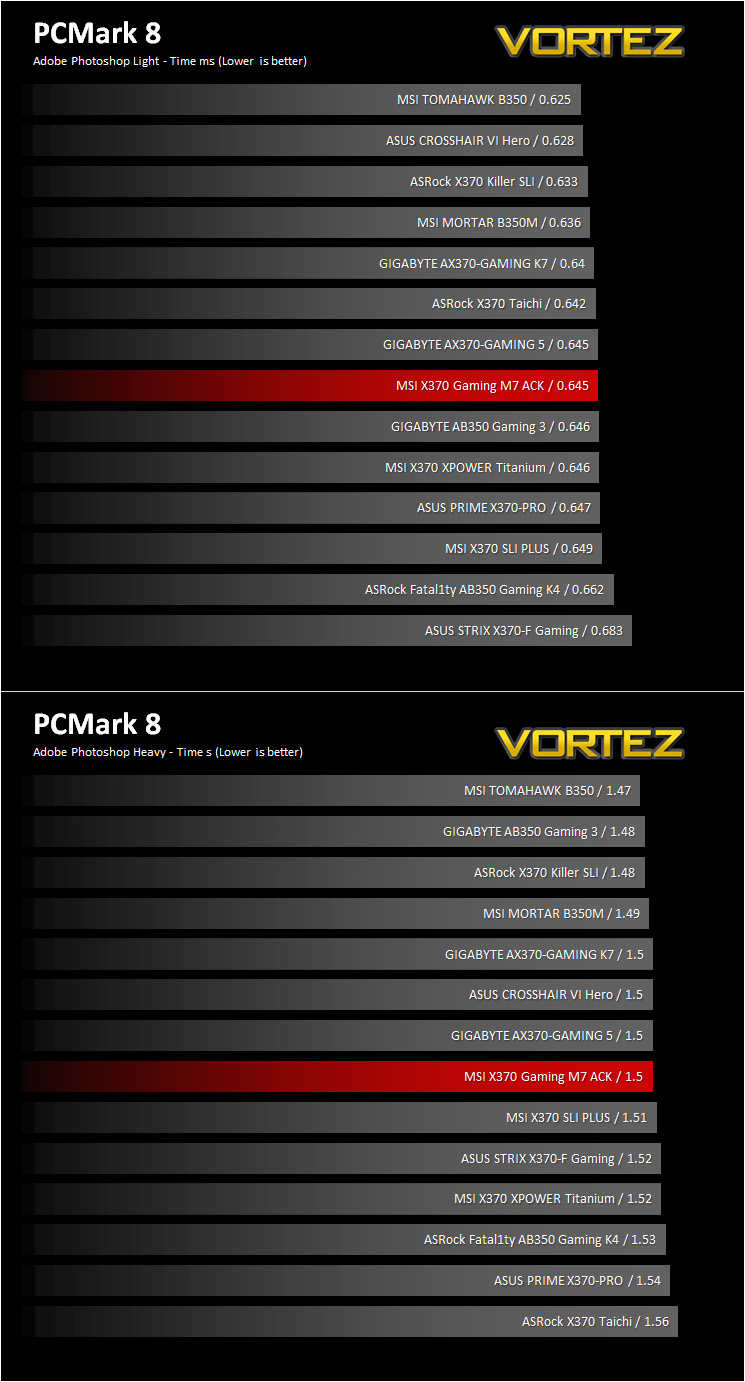
The PCMark 8 Applications benchmark measures system performance using popular applications from the Adobe Creative Suite and Microsoft Office. You can choose which tests to run based on the applications installed on your system. Each test automatically steps through a series of actions such as opening, editing and saving a file. The results are used to calculate the PCMark 8 Applications scores for the system.
Benchmarks: 3DMark
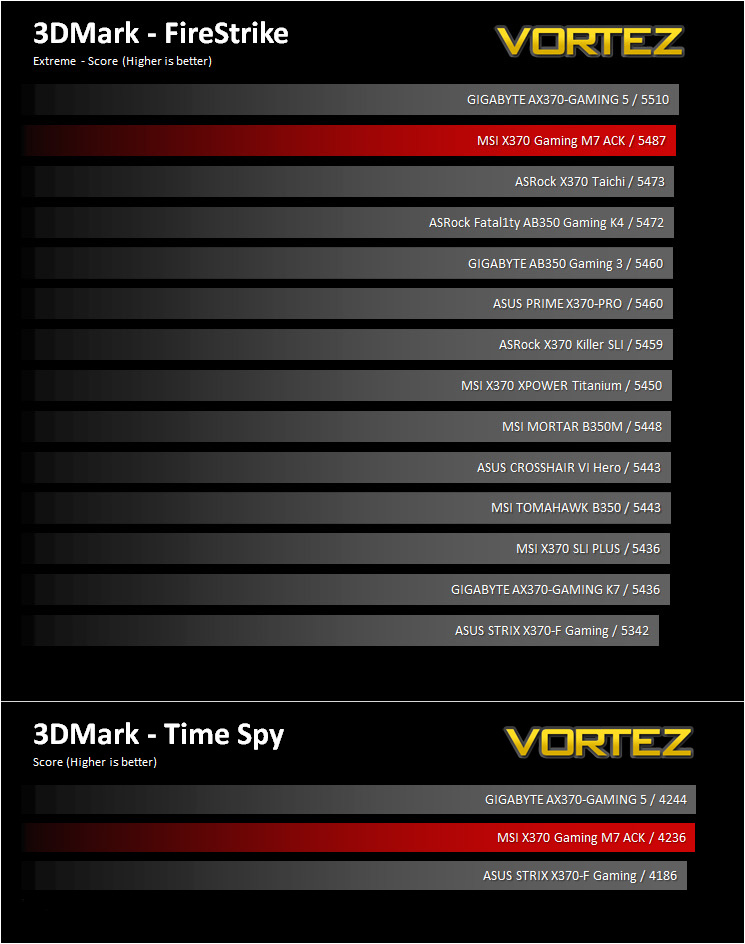
3DMark FireStrike Product PageFire Strike is our new showcase DirectX 11 benchmark designed for high-performance gaming PCs. It is our most ambitious and technical benchmark ever, featuring real-time graphics rendered with detail and complexity far beyond what is found in other benchmarks and games today. Fire Strike will only be available in the Windows editions of 3DMark initially.
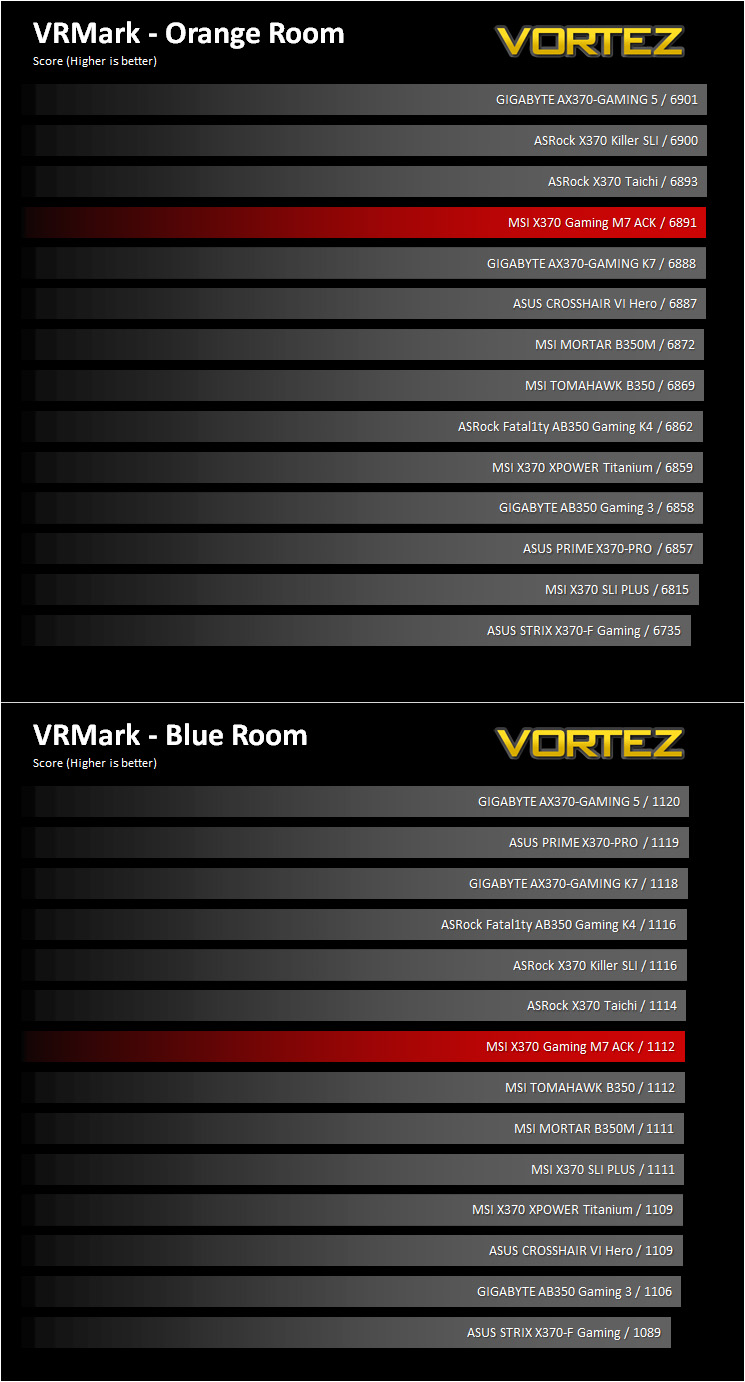
VR Performance – VRMark
VRMark Product PageVRMark includes two VR benchmark tests that run on your monitor, no headset required, or on a connected HMD. At the end of each test, you’ll see whether your PC is VR ready, and if not, how far it falls short.
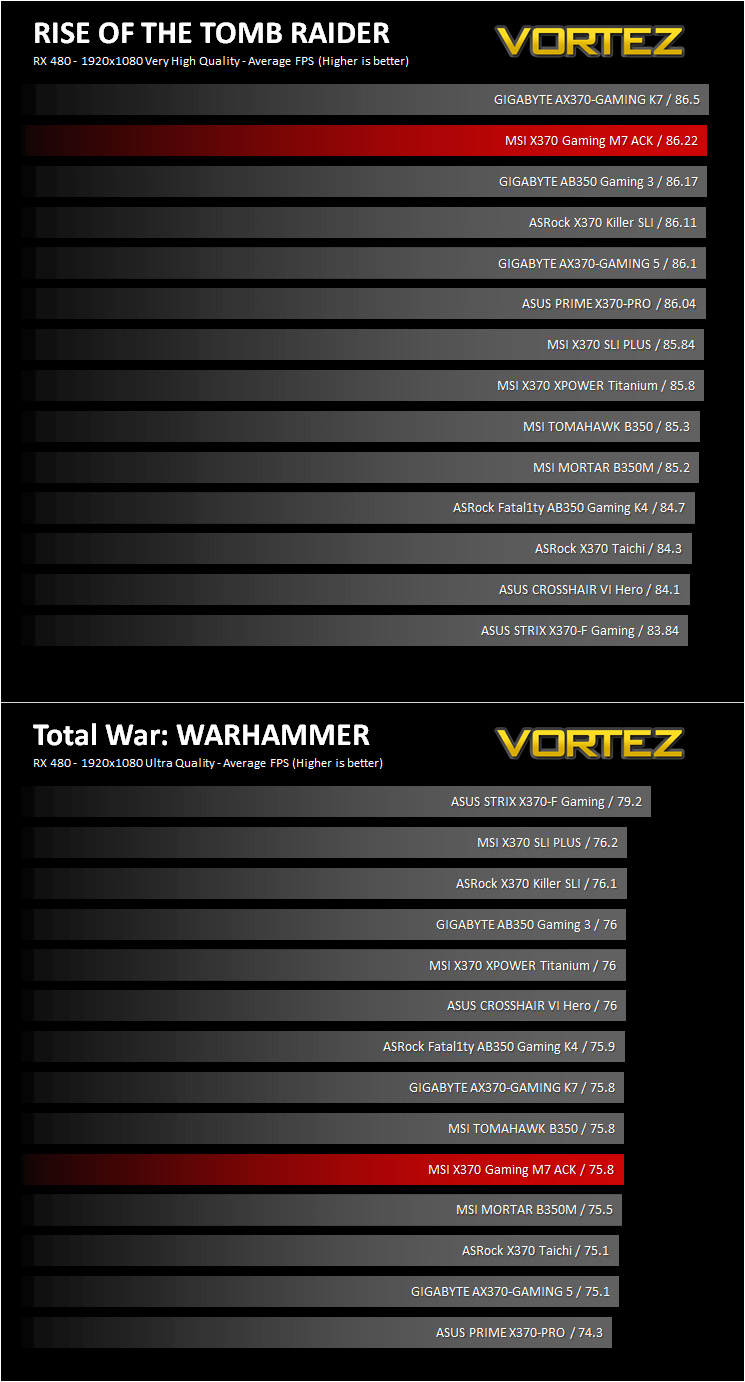
Gaming Performance – Rise of the Tomb Raider & Total War: WARHAMMER
It’s important for us to perform a number of game benchmarks as well as the synthetic tests because gamers will want to know if there are any significant benefits. So here we have two recent gaming titles.
Conclusion
Before rounding up our thoughts, now would be a good time to call out the arguably irresponsible, and almost tiresome use of military inspired nomenclature used by a significant proportion of tech companies out there. As we approach Remembrance Day, let us recognise that war is not cool, it is not a sport, nor is it fun. Games often run with stories and situations of war as a central axis to create drama and excitement. Though for some, that ‘war is fun’ line can sometimes get blurred, especially with younger gamers. Whether games are sending a positive or negative message on violence is a discussion for another day, and for most sensible people, there is no real problem with their moral compass. Regardless, surely it is worth asking whether or not it is sensible to do without the glorification of destructive weapons from the technology which we own and choose to buy? Do we have a responsibility to prevent a ‘war sells technology’ scenario in the same immoral sense that ‘sex sells’? We are not singling any manufacturers out here, and in this instance we understand that it would be difficult to completely stray from this this trend when you consider that this particular motherboard has incorporated technology from a brand named ‘Killer’. Still we are happy to see that MSI went with ‘X370 GAMING M7 ACK’, over something like ‘X370 GAMING BRUTAL MURDER WAR SARIN DEATH ULTRA KILL’.MSI have dished out some excellent motherboards for the AM4 platform so far, and each of them has give some incredibly competitive features for their price range. The X370 GAMING M7 ACK certainly follows this lead with a few additional tricks up its sleeve. The Killer Doubleshot Pro will make many gamers happy, especially if their situation restricts them to a wireless connection, however it is also good to see that you can benefit from being connected both wirelessly and wired. Additionally, we love the inclusion of an extra M.2 slot because they are certainly growing in popularity for various reasons ranging from performance, to being able to make life a little easier in regards to system setup. On top of this, the M.2 FROZR is a brilliant idea. By expanding the chipset heatsink to cover the M.2 drives to help prevent throttling after long periods of use.
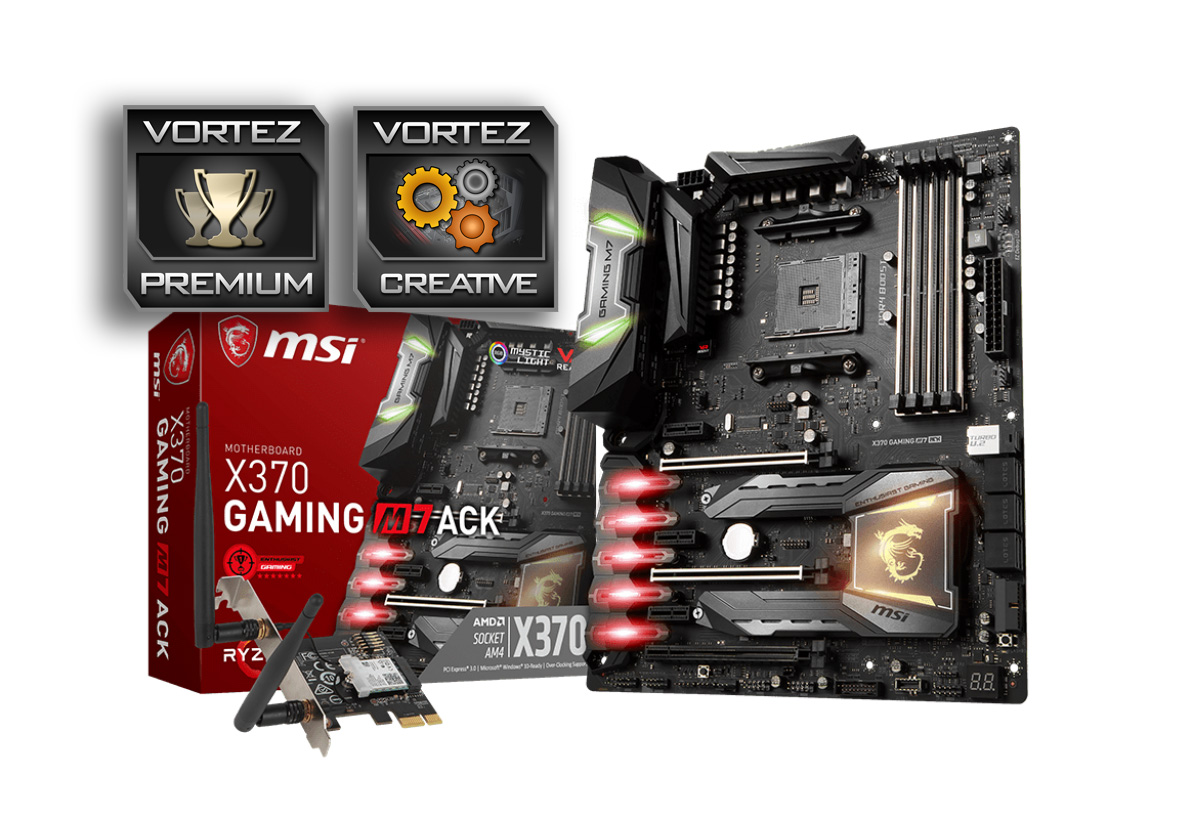
There are few drawbacks to the X370 GAMING M7 ACK, most of which can easily be overlooked but is worth discussing regardless. A question we thought about for a while was about what its market intention is in comparison to the X370 XPOWER GAMING TITANIUM a fantastic motherboard in its own right. The X370 Titanium had some features orientated for enthusiast overclocking but missed out many others including something as vital as a baseclock generator. While the X370 GAMING M7 ACK features a baseclock generator, but pretty much doesn’t feature anything for enthusiast overclockers or water coolers (unless you want to count a single 2A 4pin fan header), not even an onboard power button. Again, it appears that MSI have completely ignored AMD’s RGB cooler design and have not included an RGB header nearby the CPU fan header (of which is rocking solo without an additional ‘optional’ CPU fan header). We could argue that ‘Gaming’ doesn’t imply ‘top end/enthusiast’, but this is the kind of language manufacturers use to present their product, and without a clear market definition of these terms, the use of this language is something that maybe we should start addressing, especially when something is self-certified as ‘enthusiast’.
Of the few real downsides we discovered in our time with this motherboard, some can be directly credited to the fact that there are still some teething issues surrounding AMD Ryzen, but the one thing we can credit to MSI is that there is NO video out. This means that it will be a rather pointless choice if you plan on taking advantage of any APUs released by AMD in future.
Aside from the above notes, MSI deserve commendation on the awesome specification and features that they have packed into this motherboard. Solid performance, high-grade components, class leading technologies that are all supported by easy to use software and BIOS. The result is that that you can be sure that you will get a first class experience from your AMD Ryzen CPU. In short, this is an incredible gaming motherboard that stands out enough to warrant sticking its tongue out at its competitors.
If you are looking for an X370 motherboard and are carefully considering your needs, many people may very well find that the X370 GAMING M7 ACK will come out on top.
Pros
+ Beautiful design
+ Killer DoubleShot PRO (Industry leading WiFi/BT and Ethernet)
+ High-grade audio solution
+ 2x M.2 Slots
+ M.2 FROZR to help cool M.2 drives
+ Features a right angled USB 3.1 G1 header
+ NVMe U.2 port
+ USB 3.1 G2 front panel connector
+ Baseclock Generator for precise overclocking
+ Attractive RGB LED lighting
+ Easy to use BIOS
+ Competitive pricing
Cons
– No Video out
+ Beautiful design
+ Killer DoubleShot PRO (Industry leading WiFi/BT and Ethernet)
+ High-grade audio solution
+ 2x M.2 Slots
+ M.2 FROZR to help cool M.2 drives
+ Features a right angled USB 3.1 G1 header
+ NVMe U.2 port
+ USB 3.1 G2 front panel connector
+ Baseclock Generator for precise overclocking
+ Attractive RGB LED lighting
+ Easy to use BIOS
+ Competitive pricing
Cons
– No Video out
Click here for an explanation of our awards at Vortez.net.