NVIDIA’s GeForce RTX 2070 is perhaps one of the more popular choices in the RTX family. Can GIGABYTE’s GAMING OC (GV-N2070GAMING OC-8GC) impress with its WINDFORCE cooler and factory overclock?

Product on Review: RTX 2070 GAMING OC
Manufacturer & Sponsor: GIGABYTE
Street Price: £554 GBP – $529 USD – $899 AUD
In 2019, gamers who are in the market for a new graphics card have an interesting array of options to choose from. For cutting-edge technology and the latest innovation, the GeForce RTX family of graphics cards are an intriguing proposition – each of the models now having proved their competence in the gaming arena. The RTX 2070 is positioned as offering a good blend of performance while still commanding a palatable price-tag.
Today, we have in our hands no ordinary RTX 2070; enter the GIGABYTE RTX 2070 GAMING OC, a graphics card which combines the success of the WINDFORCE cooling solution with a factory overclock. This custom design may not be as spectacular as something like the AORUS XTREME (the performance tier of GIGABYTE) but it should hopefully still deliver a low-noise, low-temperature pathway to next-generation features like Real-Time Raytracing and Deep Learning Super Sampling.
Are you upgrading from older hardware and considering the RTX 2070? This GPU may well be worth your consideration!
About GIGABYTE
A global leader in the PC industry, GIGABYTE offers a comprehensive product lineup that aims to “Upgrade Your Life.” With expertise encompassing consumer, business, gaming, and cloud systems, GIGABYTE uses research and innovation to consistently meet user needs. GIGABYTE is renowned for award-winning products including motherboards, graphics cards, laptops, mini PCs, and other PC components and accessories, and has revolutionized the PC industry with patented DualBIOS™ and Ultra Durable™ technologies. As an expert in PC technology, GIGABYTE is poised to extend our scope in business servers and cloud systems with hardware and software solutions that integrate AI and AloT applications to develop the ideal infrastructure for future prospects in 5G.
Technical Specifications
Below are the technical specifications surrounding RTX 2070 GAMING OC supplied directly by GIGABYTE:
GPU
RTX 2070 (TU106)
Stream Processor
2304
Video Memory
8GB GDDR6
Memory Bus
256-bit
GPU Clock Boost
OC Mode: 1740MHz
Game Mode: 1725MHz
Memory Clock
1750MHz – 14000MHz Effective
PCI Express
3.0
Display Outputs
3x DisplayPort 1.4
1x HDMI 2.0b
1x USB-C
Recommended Power Supply
550W
DirectX
12 API feature level 12_1
OpenGL
4.6
Cooling
Triple-fan solution
Slot Size
2
Supported OS
Windows 10
Card Length
280 x 116 x 40 mm
RTX 2070 (TU106)
Stream Processor
2304
Video Memory
8GB GDDR6
Memory Bus
256-bit
GPU Clock Boost
OC Mode: 1740MHz
Game Mode: 1725MHz
Memory Clock
1750MHz – 14000MHz Effective
PCI Express
3.0
Display Outputs
3x DisplayPort 1.4
1x HDMI 2.0b
1x USB-C
Recommended Power Supply
550W
DirectX
12 API feature level 12_1
OpenGL
4.6
Cooling
Triple-fan solution
Slot Size
2
Supported OS
Windows 10
Card Length
280 x 116 x 40 mm
Additional Improvements
UPDATED CACHE & SHARED MEMORY ARCHITECTURE
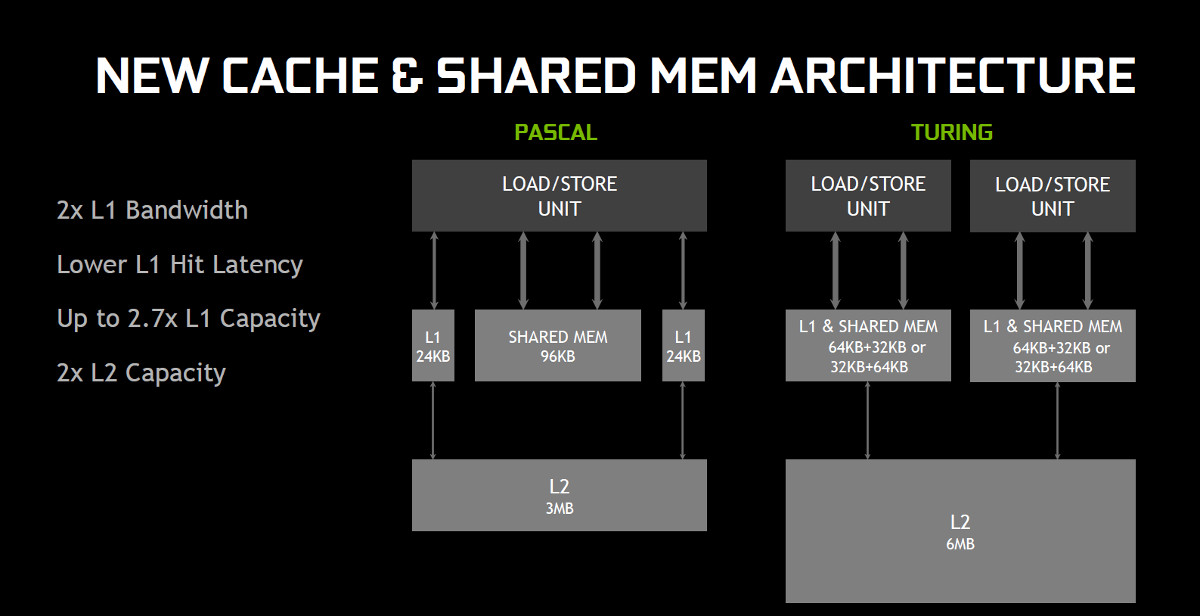
Turing implements further optimisations to the cache and share memory system, probably partly as a consequence of making more data available to these new processor components.
Due in part to this NVIDIA claim ~50% improved performance per core when shading, although not all that improvement will be immediately reflected in final frame rates.
NEXT-GEN MEMORY
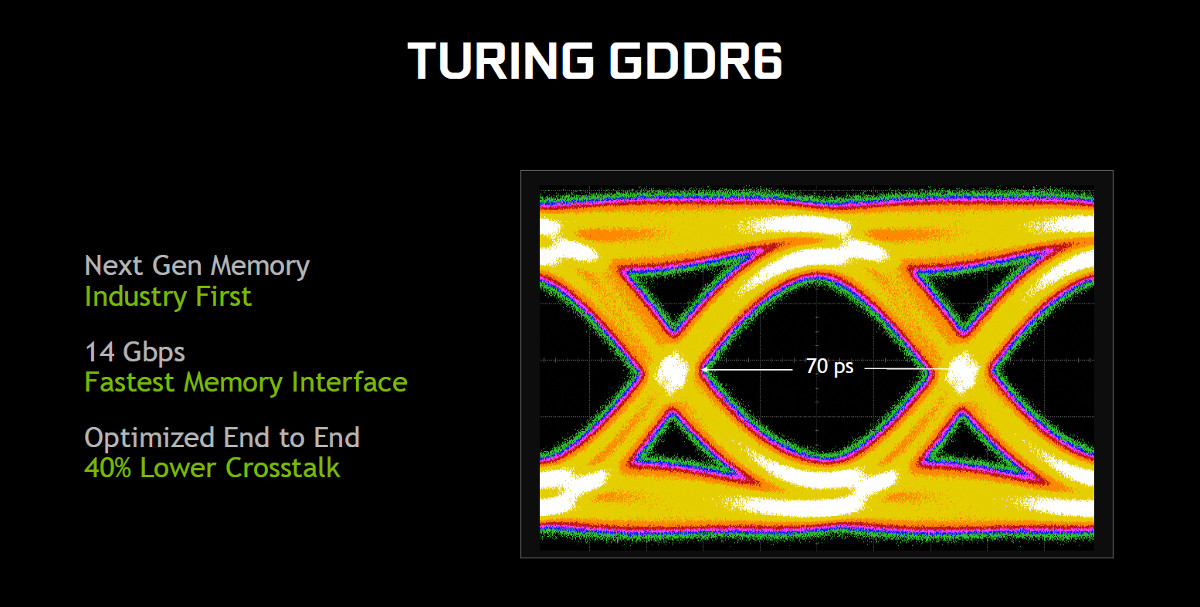
In another industry first Turing debuts GDDR6 support, replacing GDDR5X VRAM seen on the high-end Pascal cards. This memory interface is considerably faster than GDDR5 and GDDR5X, rivalling HBM memory in the amount of bandwidth is supplies to the GPU. End-to-end optimization also lowers crosstalk, improving stability.
The higher effective memory bandwidth available to Turing GPUs – measured by NVIDIA to be on the order of 50% – will be particularly useful at higher resolutions and image quality settings. The GTX 1080 Ti was always a solid 4K gaming GPU with moderate image quality settings; just how far can the RTX 2080 Ti go?
VIRTUALLINK
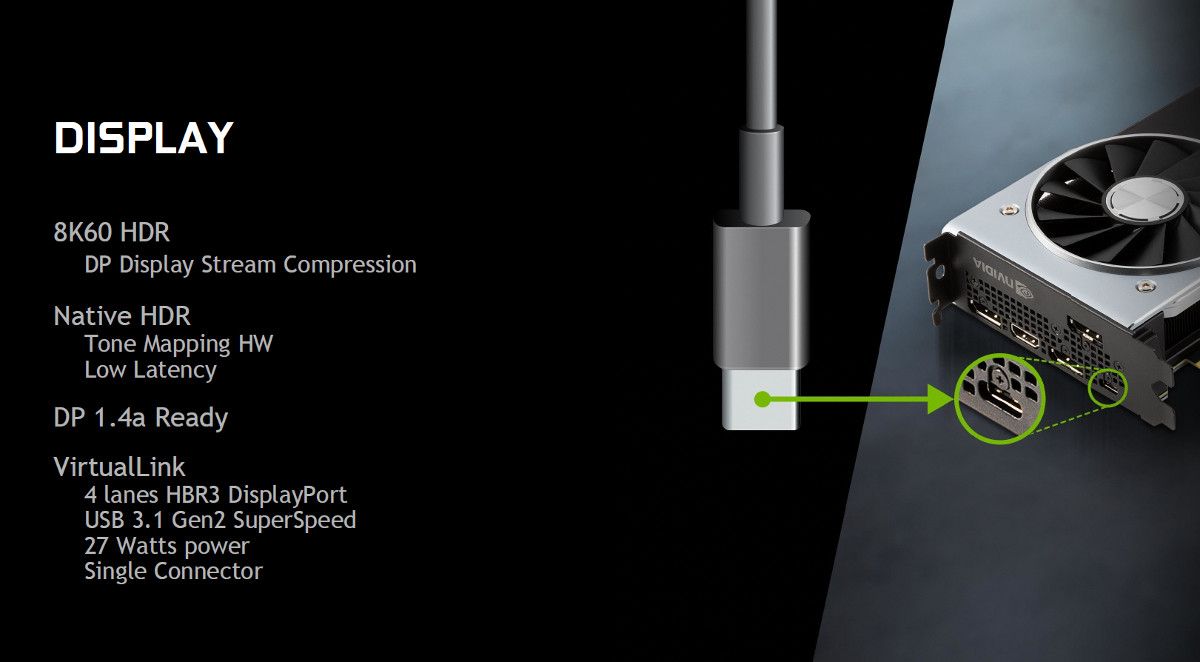
Unveiled earlier this year by a consortium of stakeholders in the VR industry, VirtualLink is a new standard for single-cable connections to VR Head-Mounted Displays. In incorporates data, power and display lines into a single compact connector that’s a slight twist on the USB Type-C specification.
As well as USB 3.1 Gen2 data lines, the VirtualLink standard supports four lanes of HBR3 DisplayPort and can supply up to 27 Watts of power. It will reduce the number of trailing cables between PC and HMD to one, and should also reduce cost over time.
The GeForce RTX 20-Series graphics cards are the first in the market to support the VirtualLink standard, well ahead of HMDs that are compliant with it. That’s certainly going above and beyond to future-proof the card, but we wonder if a header and front-panel-connector approach may not be the final iteration of this emerging standard.
You can read more about VirtualLink at https://sites.google.com/view/virtuallink-consortium/home
Features – DLSS
WHAT IS RTX?
Lets be clear: RTX does not mean ‘Real-time Raytracing’. This misunderstanding has been bubbling underneath the surface since Jensen’s original reveal of the new GPU architecture at Gamescom, and needs to be dispelled. RTX is in fact an umbrella term of a raft of new rendering techniques – some announced, some still in the pipeline – which rely on NVIDIA RTX-class hardware to execute. Think of it as being a bit like GameWorks, only the hardware it can be run on is even more restrictive.To their credit, by making RTX part of the graphics card branding the end-user should be in an excellent position to know whether a particular feature will run on their hardware. At a time when we’re often critical of hardware manufacturers using opaque terminology and naming schema that can potentially confuse consumers, it’s really a breath of fresh air to see NVIDIA take this step.
NVIDIA’s Raytracing and Deep Learning Super-Sampling (DLSS) are two of the techniques that sit under the RTX umbrella. These leverage RT Cores and Tensor Cores which together are hardware components currently unique to the Turing architecture.
DEEP LEARNING SUPER-SAMPLING
In today’s games a rendered frame usually isn’t the final image that you see on screen. This frame also undergoes post-processing to remove artefacts generated by the rendering process, the most well-understood of which is the jagged edges brought about by aliasing. These post-processing techniques, including anti-aliasing, are quite expensive computationally but cheaper than rendering at a higher than needed higher resolution and averaging the pixels down.But how about instead leveraging the enormous power of Neural Networks to sharpen the image, perhaps even side-stepping many of the known weaknesses of traditional anti-aliasing techniques? Deep Learning Super-Sampling is just such a technique.
As it turns out image processing has been one of the early success stories for Neural Network development, a field that NVIDIA has lead with continued improvements to their hardware architecture and developer tools. Deep Learning Super-Sampling, or DLSS for short, begins before players even load up the game. The game developer supplies NVIDIA with a beta build of the game – it doesn’t need to be 100% bug-free, but should be able to render frames representative of the final in-game experience. NVIDIA use this to generate thousands of reference images, rendered at the ‘gold standard’ image quality of 64x supersampling.
“64x supersampling means that instead of shading each pixel once, we shade at 64 different offsets within the pixel, and then combine the outputs, producing a resulting image with ideal detail and anti-aliasing quality.”
These reference frames are used alongside raw captured images rendered at the same time to train a DLSS neural network which, when presented with a raw captured image, can generate an output that matches the 64x supersampled reference. The process of training the neural network is iterative, and utilises a technique known as back-propagation to adjust weights in the network with each iteration.
The final DLSS network is one that has learned to produce images which closely approximate the 64x supersampled reference, which is good. However it also sidesteps the problems of traditional anti-aliasing such as issues with transparencies and blurring, which is even better.
So that’s the hard part done, and it has only required the power of super-computer to do it. If you think super-sampling is hard, it’s got nothing on training a neural network. But the powerful aspect of DLSS is that this trained neural network can be shared and run on inferencing hardware, i.e. a GPU. You’re not training any more, and inferencing is much quicker.
So the DLSS network, trained for scenes in one or a narrow selection of games, is supplied to GPUs via the driver download system. When running the game the GPU takes each rendered frame and runs it through the DLSS network with a single input image as reference, outputting a finished image that’s far higher quality than the rendered frame. Plus, with NVIDIA RTX inferencing with the network is actually exceptionally fast as it leverages the Tensor cores of the Turing GPU.
Unlike some post-processing techniques DLSS needs a few tweaks to the game prior to implementation, and of course the DLSS neural network needs to have been generated by NVIDIA. At present there are two means to see it in action – the Epic Infiltrator demo, and a Final Fantasy DLSS demo. So far it’s been announced that developers from a multitude of studios are working to integrate it into 25 games:
– Ark: Survival Evolved from Studio Wildcard
– Atomic Heart from Mundfish
– Dauntless from Phoenix Labs
– Fractured Lands from Unbroken Studios
– Final Fantasy XV from Square Enix
– Hitman 2 from IO Interactive / Warner Bros.
– Islands of Nyne from Define Human Studios
– Justice from NetEase
– JX3 from Kingsoft
– MechWarrior 5: Mercenaries from Piranha Games
– PlayerUnknown’s Battlegrounds from PUBG Corp.
– Remnant: From the Ashes from Arc Games
– Serious Sam 4: Planet Badass from Croteam / Devolver Digital
– Shadow of the Tomb Raider from Square Enix/Eidos-Montréal/Crystal Dynamics/Nixxes
– The Forge Arena from Freezing Raccoon Studios
– We Happy Few from Compulsion Games / Gearbox
– Darksiders 3 by Gunfire Games / THQ Nordic
– Deliver Us The Moon: Fortuna by KeokeN Interactive
– Fear the Wolves by Vostok Games / Focus Home Interactive
– Hellblade: Senua’s Sacrifice by Ninja Theory
– KINETIK by Hero Machine Studios
– Outpost Zero by Symmetric Games / tinyBuild Games
– Overkill’s The Walking Dead by Overkill Software / Starbreeze Studios
– SCUM by Gamepires / Devolver Digital
– Stormdivers by Housemarque
– Atomic Heart from Mundfish
– Dauntless from Phoenix Labs
– Fractured Lands from Unbroken Studios
– Final Fantasy XV from Square Enix
– Hitman 2 from IO Interactive / Warner Bros.
– Islands of Nyne from Define Human Studios
– Justice from NetEase
– JX3 from Kingsoft
– MechWarrior 5: Mercenaries from Piranha Games
– PlayerUnknown’s Battlegrounds from PUBG Corp.
– Remnant: From the Ashes from Arc Games
– Serious Sam 4: Planet Badass from Croteam / Devolver Digital
– Shadow of the Tomb Raider from Square Enix/Eidos-Montréal/Crystal Dynamics/Nixxes
– The Forge Arena from Freezing Raccoon Studios
– We Happy Few from Compulsion Games / Gearbox
– Darksiders 3 by Gunfire Games / THQ Nordic
– Deliver Us The Moon: Fortuna by KeokeN Interactive
– Fear the Wolves by Vostok Games / Focus Home Interactive
– Hellblade: Senua’s Sacrifice by Ninja Theory
– KINETIK by Hero Machine Studios
– Outpost Zero by Symmetric Games / tinyBuild Games
– Overkill’s The Walking Dead by Overkill Software / Starbreeze Studios
– SCUM by Gamepires / Devolver Digital
– Stormdivers by Housemarque
Features – Real-Time Raytracing
It’s no exaggeration to say that real-time raytracing is the holy grail of graphics rendering, but has been considered to be years, perhaps decades away from being realised. The issue is that it’s inordinately complicated and computationally expensive, to the extent that movie and animation studios dedicate years and whole supercomputers to just rendering high-fidelity raytraced images. Games instead rely on rasterization and post-processing techniques to do their best approximation of a raytraced scene simply in order to generate frames in real-time.
“Reflections”, A Star Wars UE4 Demo Featuring Real-time Raytracing
For all its speed, rasterization has a number of weaknesses. Chief among these are dynamic reflections and shadows, both of which require simplifications and algorithmic tweaks to look anything like realistic, and only tend to incorporate objects within the scene. And as you’ve probably noticed, improving the rendered quality of these aspects of a scene still tends to tank frame rates. If only ray-tracing could be performed at real-time, even operating on only a few elements of a scene, realism could be improved substantially.
NVIDIA have plenty of background in GPU-accelerated raytracing, and through NVIDIA Iray plugins and the Optix engine have for years been providing tools to industries that aid in the swift generation of realistic imagery. A breakthrough allowed Volta hardware to process a realistic raytraced scene in real-time, culminating in the first public debut of the now-famous Star Wars Reflections demo running on four Volta GPUs. But even this is a far cry from operating at 60+fps on a single GPU, as expected in modern gaming applications.
NVIDIA’s Turing architecture, as it happens, advances development further through the incorporation of new many hardware-based raytracing acceleration engines known as RT Cores. An RT core is present in each Turing Shader Module module, implicitly making it a scalable technology as the GPU increases in size from the TU106 to the huge 775mm^2 TU102. But the real trick is the use of Hybrid Rendering.
” RT Cores work together with advanced denoising filtering, a highly-efficient Bounding Volume Hierarchy (BVH) acceleration structure developed by NVIDIA Research, and RTX compatible APIs to achieve real time ray tracing on single Turing GPU. RT Cores traverse the BVH autonomously, and by accelerating traversal and ray/triangle intersection tests, they offload the SM, allowing it to handle other vertex, pixel, and compute shading work. Functions such as BVH building and refitting are handled by the driver, and ray generation and shading is managed by the application through new types of shaders.”
Hybrid Rendering is a combination of both rasterization and real-time raytracing, the former used where it is optimal while the latter is used selectively where it would make the most visual impact. These could be reflections, shadows, refractions or other core elements that game developers feel is important to their game world; Battlefield 5 for instance utilises real-time raytracing to process reflections, while Shadow of the Tomb Raider apply the technology to shadows.
A critical aspect of Hybrid Rendering is that both rasterization and real-time raytracing pipelines operate in parallel rather than sequentially. Furthermore raytracing, just like rasterization, can have its complexity dialled back based on utilisation and available GPU horsepower. NVIDIA have developed de-noising filters (known as the NVIDIA Real-Time Ray Tracing Denoiser modules) which can greatly reduce the number of rays required per pixel to generate the desired visual impact, thus improving computational efficiency.
Microsoft have built raytracing into their DirectX Raytracing (DXR) extension of the DX12 API, and game engines will use these hooks to tap into NVIDIA’s hardware acceleration for raytracing. In theory it’s possible to use older GPUs for this application, but without RT cores rendering each frame would take an age; the RTX 2080 Ti is capable of processing rays 10 times faster than an GTX 1080 Ti. DXR is scheduled to roll out with the Windows Fall 2018 Update, after which games can implement the technology and NVIDIA can begin to unlock the functionality at the driver level.
So far eleven games have been announced to be incorporating elements of raytracing through DXR and NVIDIA RTX technologies:
– Assetto Corsa Competizione from Kunos Simulazioni / 505 Games
– Atomic Heart by Mundfish
– Battlefield V from DICE
– Control from Remedy Entertainment / 505 Games
– Enlisted by Gaijin Entertainment/Darkflow Software
– Justice from NetEase
– JX3 from Kingsoft
– MechWarrior 5: Mercenaries from Piranha Games
– Metro Exodus from 4A Games
– ProjectDH from Nexon’s devCAT Studio.
– Shadow of the Tomb Raider from Square Enix/Eidos-Montréal/Crystal Dynamics/Nixxes
– Atomic Heart by Mundfish
– Battlefield V from DICE
– Control from Remedy Entertainment / 505 Games
– Enlisted by Gaijin Entertainment/Darkflow Software
– Justice from NetEase
– JX3 from Kingsoft
– MechWarrior 5: Mercenaries from Piranha Games
– Metro Exodus from 4A Games
– ProjectDH from Nexon’s devCAT Studio.
– Shadow of the Tomb Raider from Square Enix/Eidos-Montréal/Crystal Dynamics/Nixxes
Actual implementation into the finished game may not be immediate or on launch, but NVIDIA have been forthright in the opinion that developers are extremely excited by the scope of the technology. Also, implementation might be relatively straightforward in the grand scheme of things; the Shadow of the Tomb Raider developers apparently had only a few weeks to prepare their demo for Gamescom.
Of course, this only just skims the surface of NVIDIA’s new real-time raytracing technologies. NVIDIA have additional resources available if you’re keen on delving deeper.
Closer Look
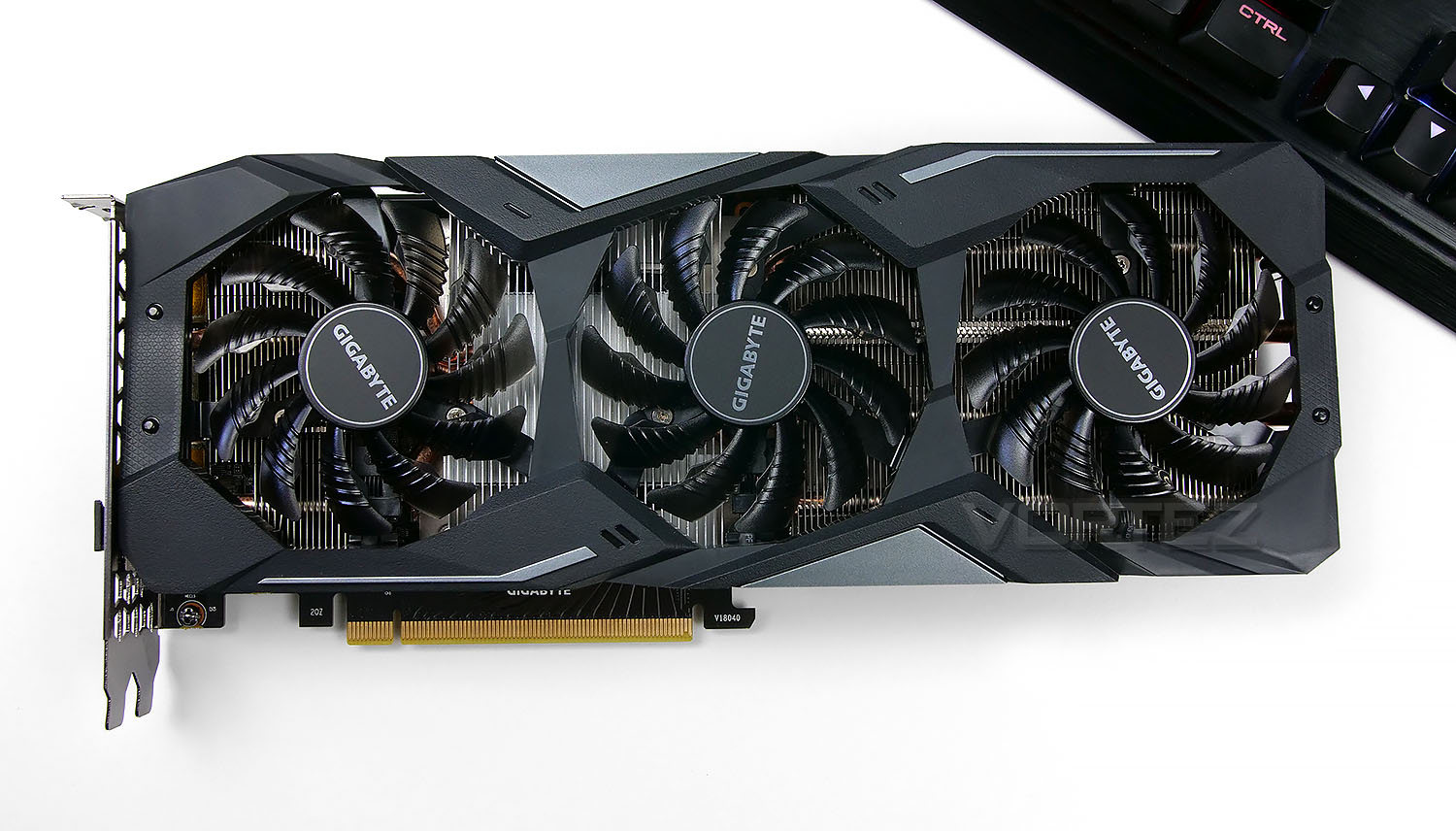
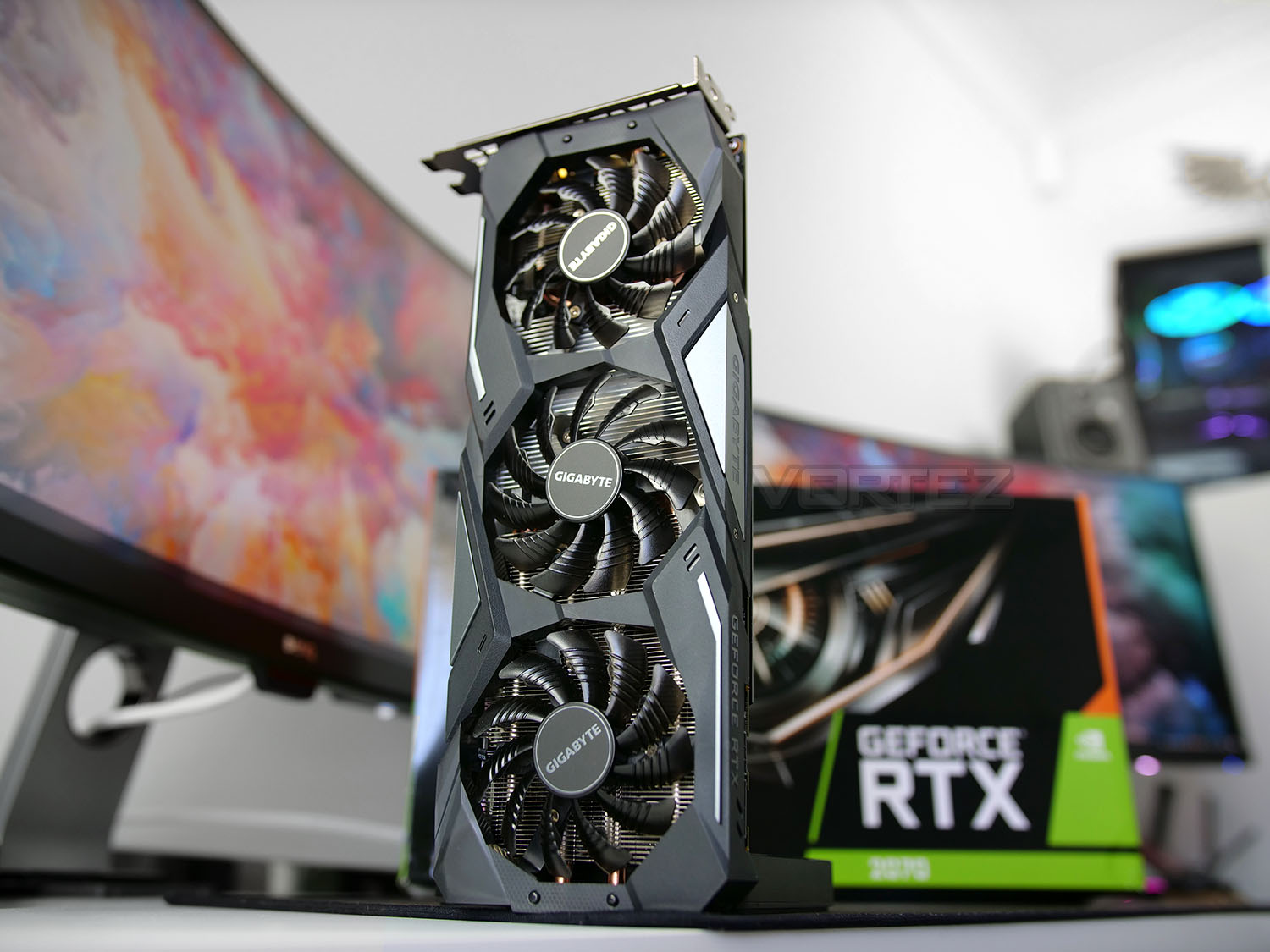
The WINDFORCE 3X cooler is the first thing which comes into view when looking at the GAMING OC. This thermal design has been a permanent fixture for GIGABYTE for many years – it uses triple 80mm cooling fans, four composite copper heatpipes and a large triple heatsink. The middle cooling fan spins in the alternate direction which has been implemented to reduce turbulence and increase airflow performance.
This cooler sits on the TU106 GPU which has a mild factory overclocked applied to it. Reference settings have the GPU clock set at 1620MHz, GIGABYTE has nudged this up to 1740MHz. The fastest clocked RTX 2070 on the market reaches 1860MHz.
The outer shroud is plastic and features a two tone style – coordinating well with other hardware.
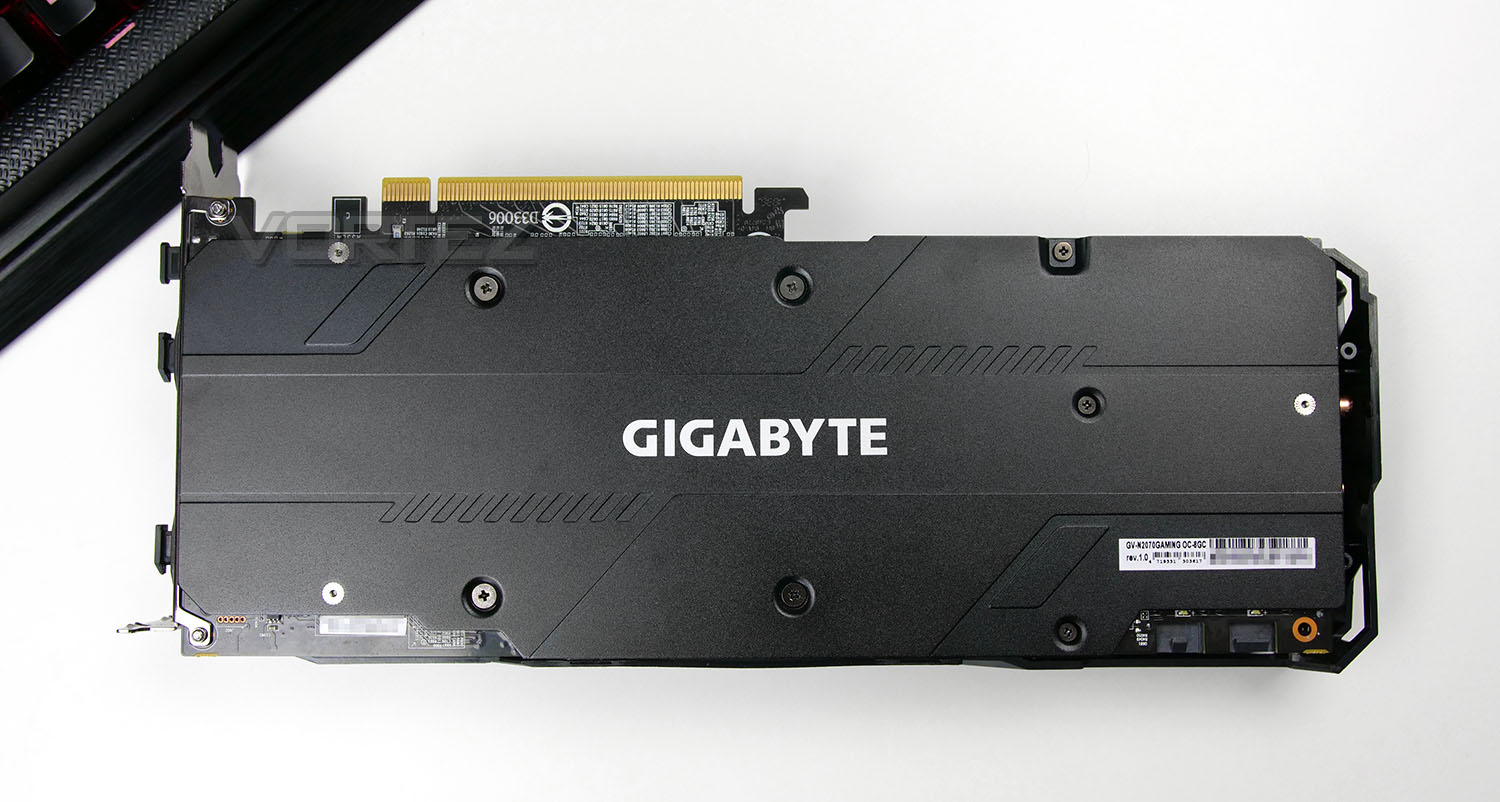
On the backside of the graphics card there is a large metal blackplate which prevents the PCB from getting flexed or damaged.
The overall dimensions for GAMING OC are: 280 x 116 x 40 mm, meaning it’s quite thin and long. This should be taken into account for installing into your chassis.
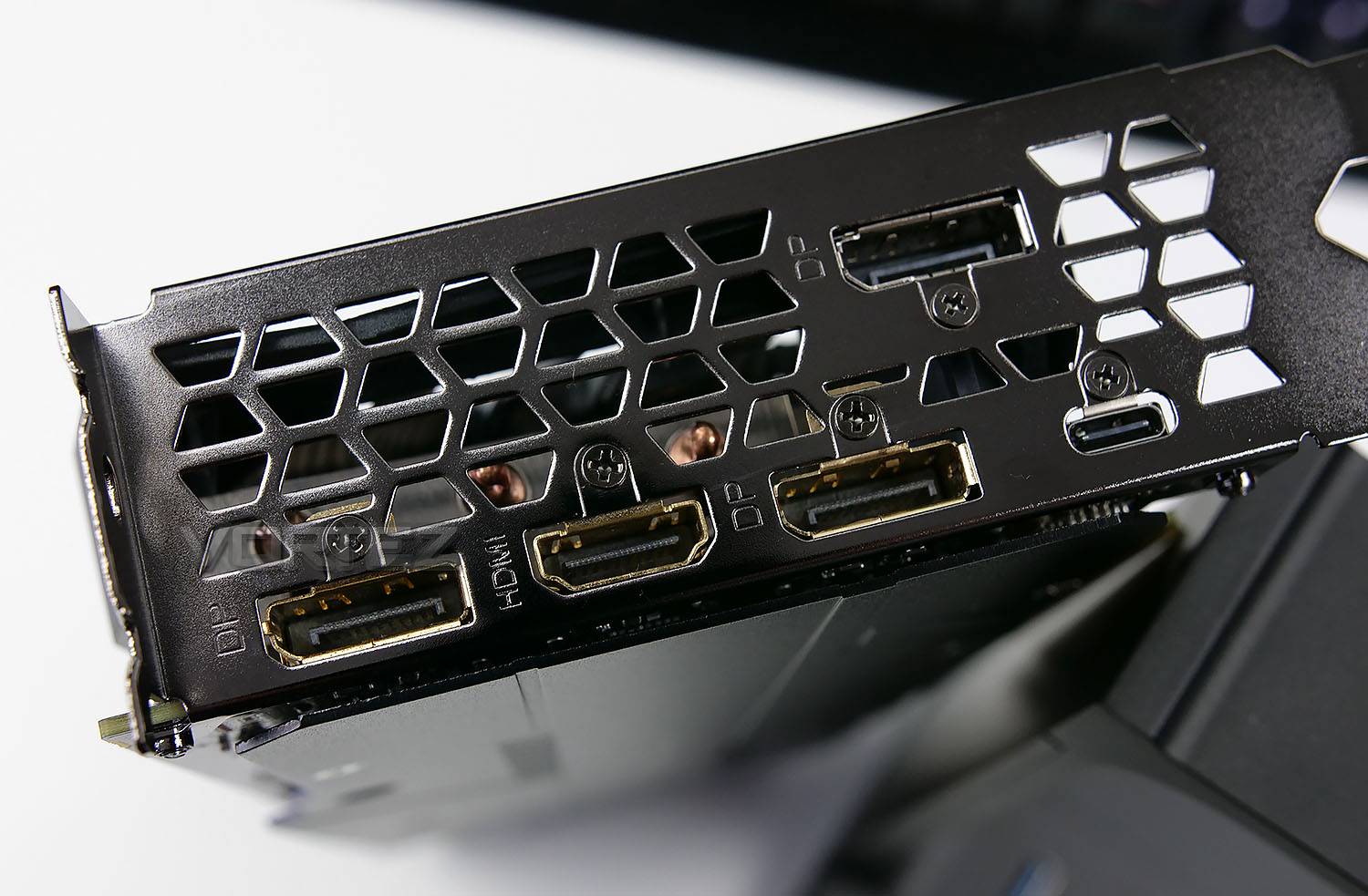
GAMING OC favours DisplayPort over any other video out but there are still a good assortment of options available on the rear IO. These include:
• 3x DisplayPort 1.4
• 1x HDMI 2.0b
• 1x USB-C
USB-C makes an appearance on other RTX graphics cards and is included to work in conjunction with next-generation VR headsets.
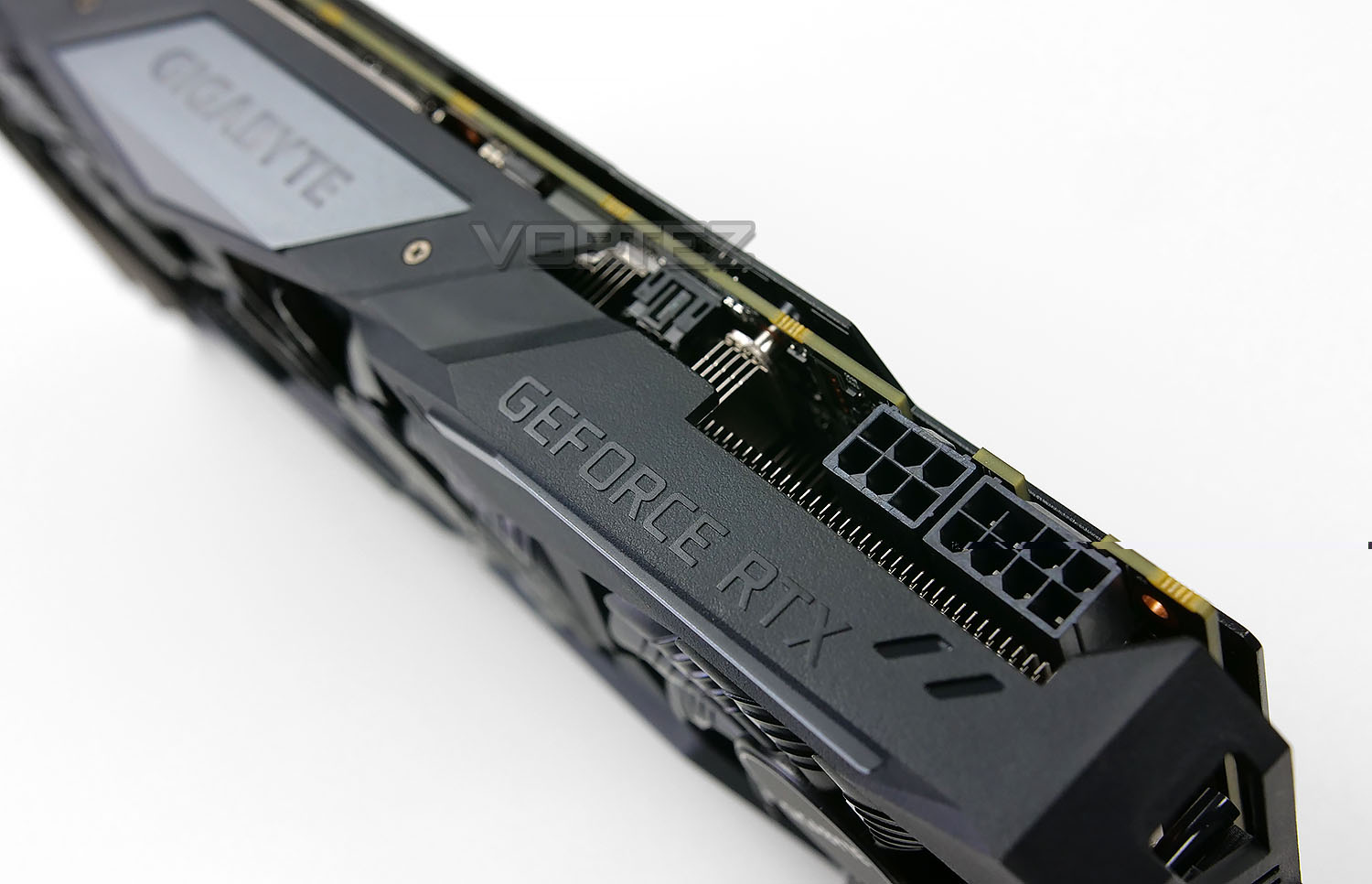
To effectively power GAMING OC a 550W is recommended and 8+6pin PCI-e connections are required. The connectors sit on the top edge of the card which should make installing into a smaller chassis much easier.
Along the edge there is an LED lit GIGABYTE logo which can have its colour modified via the RGB Fusion software – this is the only LED lighting available on the card.
Test Setup & Methodology
HOW WE TEST GRAPHICS CARDS
Testing a graphics card is an extremely lengthy process. We sometimes see reviews where a graphics card has been tested using out of date equipment, out of date games and even out of date drivers. While the latter can be excused due to the sheer amount of driver updates making a thorough review impossible we will however notify the reader when we have used a different driver to the normal for example a pre-release driver. For the most part however we will always use the same hardware and latest drivers so this does certainly need to be taken into consideration when viewing our testing results. Each game and benchmark is tested times with the lowest and highest scores omitted out of the 5 results and the average then taken from the three remaining to give us our final result for each resolution and setting used.HARDWARE
Taking Intel’s High-End Desktop platform, our hardware utilises the Intel X99 chipset. Combined with this we use the Intel Core i7-5960X Extreme Edition processor clocked to a realistic and achievable 4GHz to ensure we have no CPU bottlenecks. With 16GB (4x4GB) of DDR4 at 2666MHz and a 750GB SSD there should be minimal paging so the benchmarks we run today will hopefully give a true reflection of the graphics card’s performance.Graphics Cards on test:
ASUS ROG STRIX RTX 2060 Gaming
NVIDIA RTX 2060
AORUS RTX 2080 XTREME
GIGABYTE RTX 2070 GMAING OC
ASUS ROG STRIX RTX 2070 OC
MSI RTX 2080 Ti Gaming X Trio
ASUS ROG STRIX RTX 2080 Ti OC
ZOTAC GAMING RTX 2080 Ti AMP
NVIDIA GTX 1080 Ti
NVIDIA GTX 1080
NVIDIA GTX 1070
AMD Radeon RX Vega 56
Special thanks go to Acermedia, Intel, Corsair, MSI and AOC for providing the extreme spec components used for our test bench:
Motherboard: MSI X99A Workstation
CPU: Intel Core i7-5960X Extreme Edition @ 4GHz
RAM – 16GB (4x4GB) Corsair LPX Vengeance (Red) DDR3 @ 2666MHz 16-17-17-35 C1
Power Supply – CORSAIR HX1050
Hard Drive – Samsung 840 EVO 750GB
Cooler – CORSAIR Hydro Series™ H150i Pro 360mm Extreme Performance Liquid CPU Cooler
Monitor – AOC 28″ 4K U2879VF
Capture Card – Avermedia Live Gamer Extreme 2
CPU: Intel Core i7-5960X Extreme Edition @ 4GHz
RAM – 16GB (4x4GB) Corsair LPX Vengeance (Red) DDR3 @ 2666MHz 16-17-17-35 C1
Power Supply – CORSAIR HX1050
Hard Drive – Samsung 840 EVO 750GB
Cooler – CORSAIR Hydro Series™ H150i Pro 360mm Extreme Performance Liquid CPU Cooler
Monitor – AOC 28″ 4K U2879VF
Capture Card – Avermedia Live Gamer Extreme 2
BENCHMARKS
If you are a regular reader of our reviews you will know we like to test the latest hardware with the latest games and benchmarks on the market. Here are the games we’ve chosen:Fortnite
Middle Earth: Shadow of War
Kingdom Come: Deliverance
Shadow of the Tomb Raider
F1 2018
Middle Earth: Shadow of War
Kingdom Come: Deliverance
Shadow of the Tomb Raider
F1 2018
To capture framerates we use a combination of in-game benchmark tools and FRAPS.
We also take into consideration the benchmarkers out there so have included three of the more popular synthetic benchmarks available:
Let’s see how today’s graphics card performed…
Power, Temperatures, Acoustics
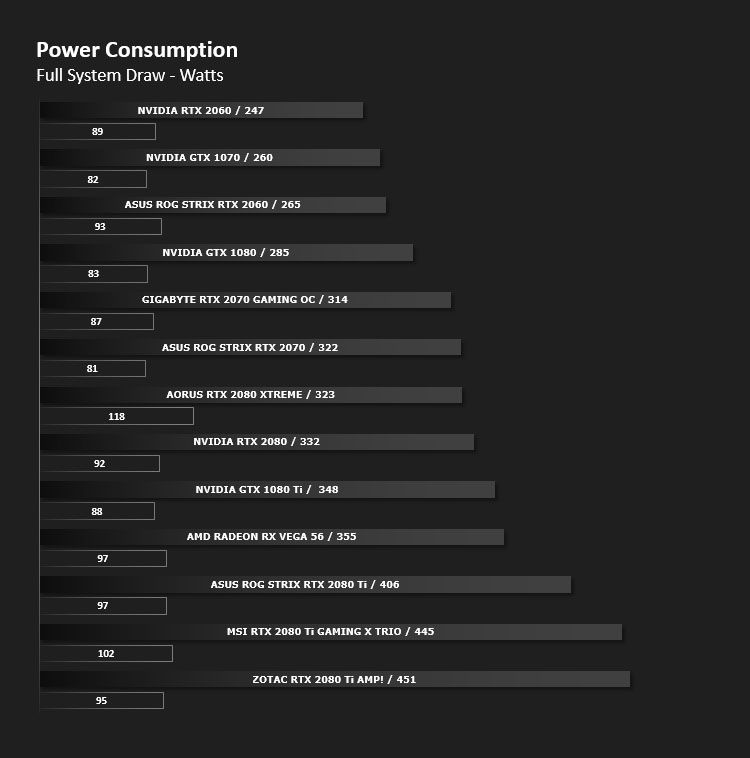
To test for power consumption, we take a measurement from the plug socket. It is important to note that the figures below represent total system power use and not just the GPU. The CPU was always in a fixed state (4GHz overclock) so did not affect the additional power load when the GPU was placed under 100% load using Heaven 4.0 which was ran for 20 minutes at which point a load reading was taken. Idle readings were taken 5 minutes after system boot to ensure any background services and applications had loaded.
TEMPERATURE
To test temperatures we measured idle temperatures after booting windows, letting all applications finish loading and ran a few benchmarks. Once the benchmarks were complete we left the card to reach a cooling plateau where we then took the idle temperatures. For the load tests we set Heaven 4.0 running continuously for ~30 minutes recorded the peak/maximum GPU temperature.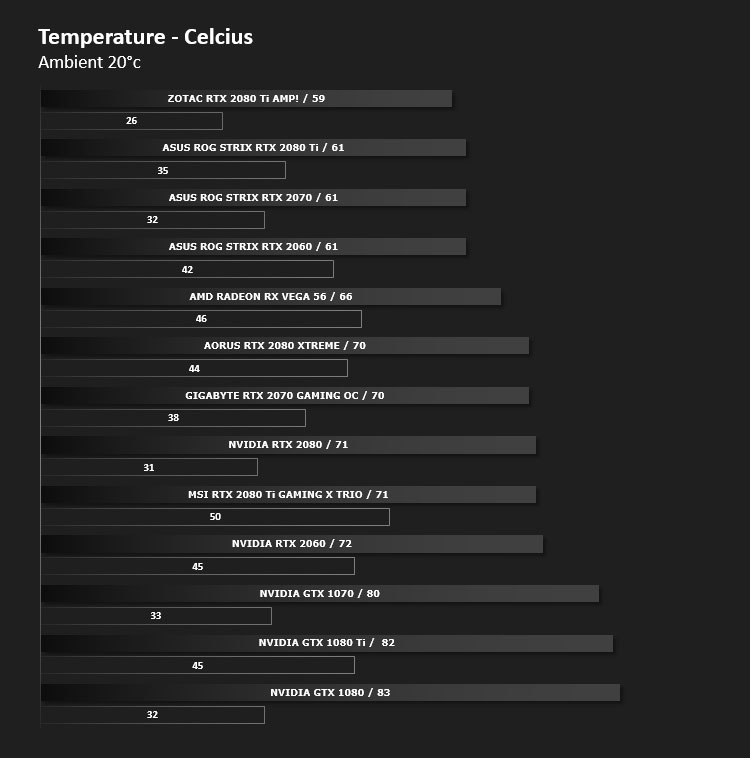
ACOUSTICS
The WINDFORCE 3X cooler is very quiet – even under full load. We encountered no disturbance throughout testing which would cause us to deem this card ‘noisy’.Overclocking
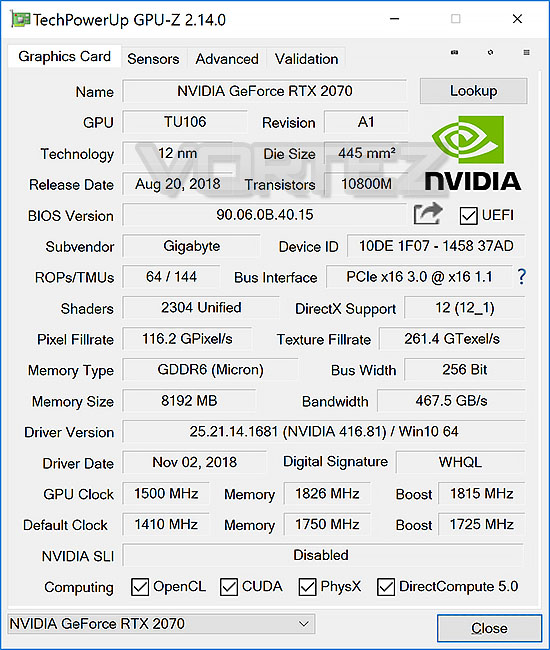
To overclock our RTX 2070 GAMING OC we used the latest version of MSI Afterburner.
GIGABYTE has already applied a factory overclock to this graphics card as the name denotes. The GPU clock speed is the only modification, memory has been left at stock.
In our manual overclock we managed to push the card further with the following achievements:
GPU Boost: 1815MHz (Up from 1740MHz)
Memory clock: 1826MHz (Up from 1750MHz)
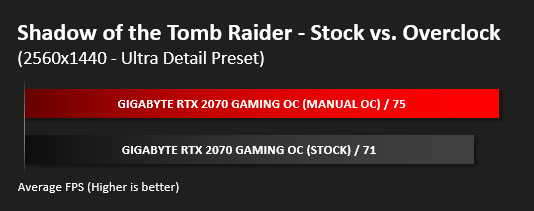
So, unfortunately there isn’t that much headroom left beyond the factory overclock – these modifications translate to the following performance increase below:
DX12: 3DMark Time Spy
Download your copy now
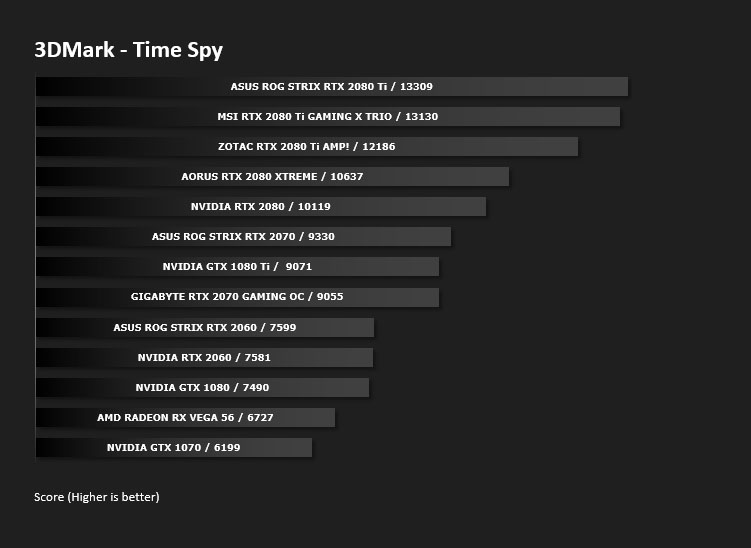
With its pure DirectX 12 engine, which supports new API features like asynchronous compute, explicit multi-adapter, and multi-threading, 3DMark Time Spy is the ideal benchmark for testing the DirectX 12 performance of the latest graphics cards.
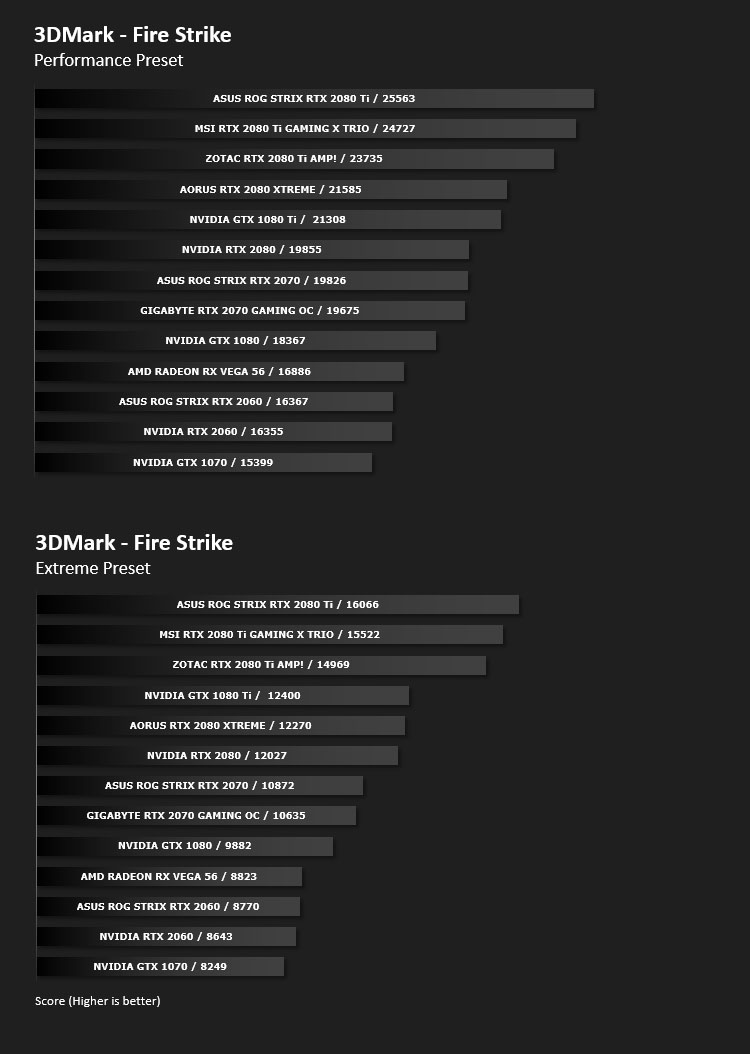
DX11: 3DMark FireStrike
Download your copy now
Fire Strike is the new showcase DirectX 11 benchmark designed for high-performance gaming PCs. It is UL’s most ambitious and technical benchmark ever, featuring real-time graphics rendered with detail and complexity far beyond what is found in other benchmarks and games today.
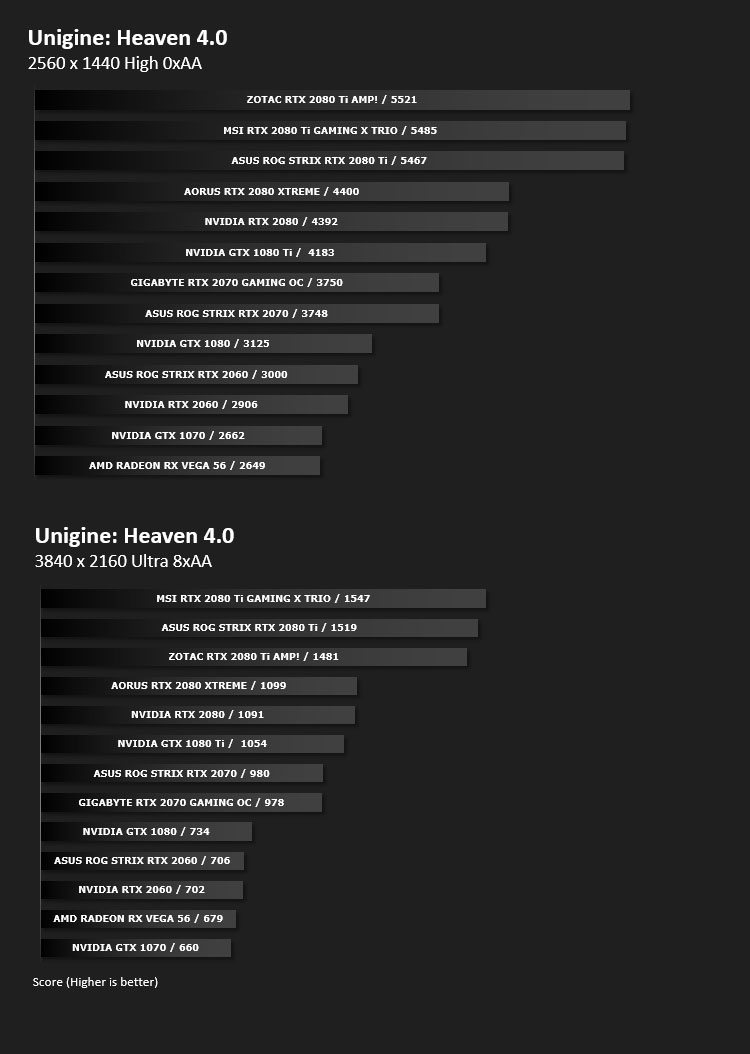
DX11: Unigine Heaven 4.0
Heaven Benchmark with its current version 4.0 is a GPU-intensive benchmark that hammers graphics cards to the limits. This powerful tool can be effectively used to determine the stability of a GPU under extremely stressful conditions, as well as check the cooling system’s potential under maximum heat output. It provides completely unbiased results and generates true in-game rendering workloads across all platforms.
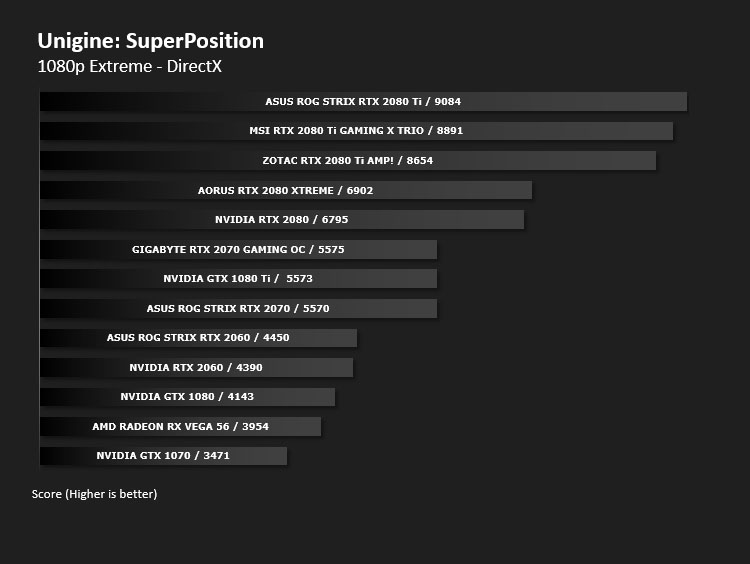
DX11: Unigine SuperPosition
Superposition is a new-generation benchmark tailored for testing reliability and performance of the latest GPUs. Top-notch visuals, support for VR-devices and an interactive mode with mini-games — the list of features built into Superposition could go on and on.
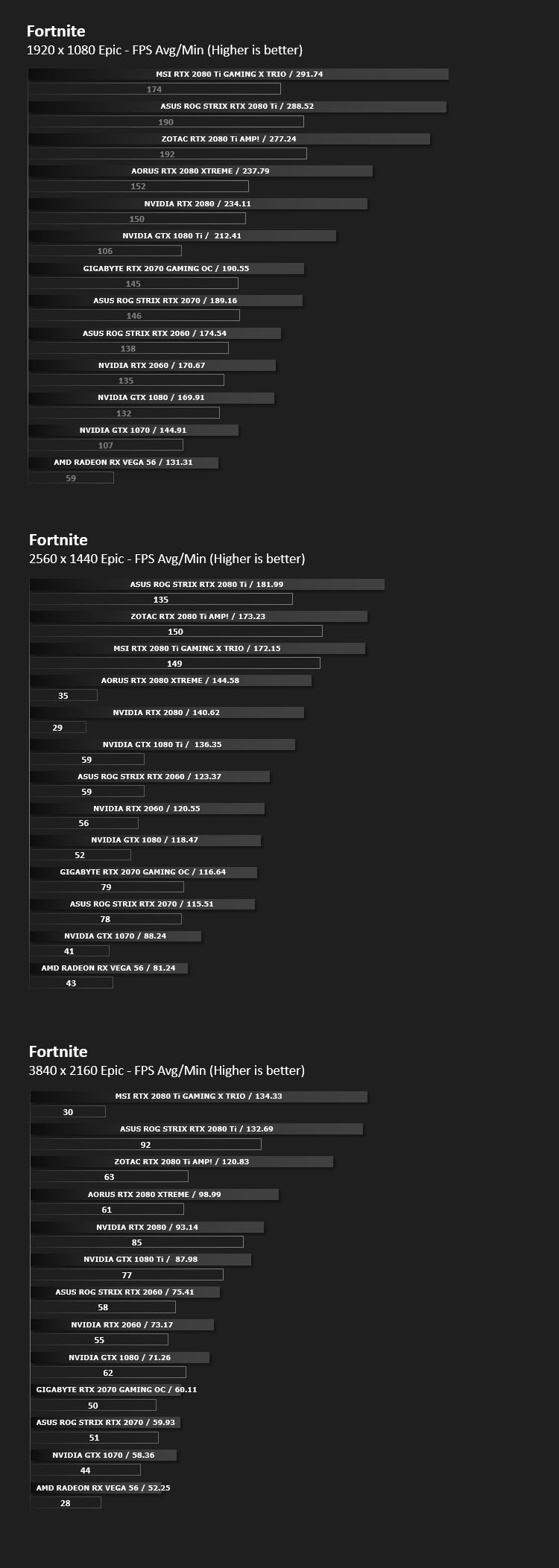
DX11: Fortnite
Fortnite Battle Royale is the FREE 100-player PvP mode in Fortnite. One giant map. A battle bus. Fortnite building skills and destructible environments combined with intense PvP combat. The last one standing wins.

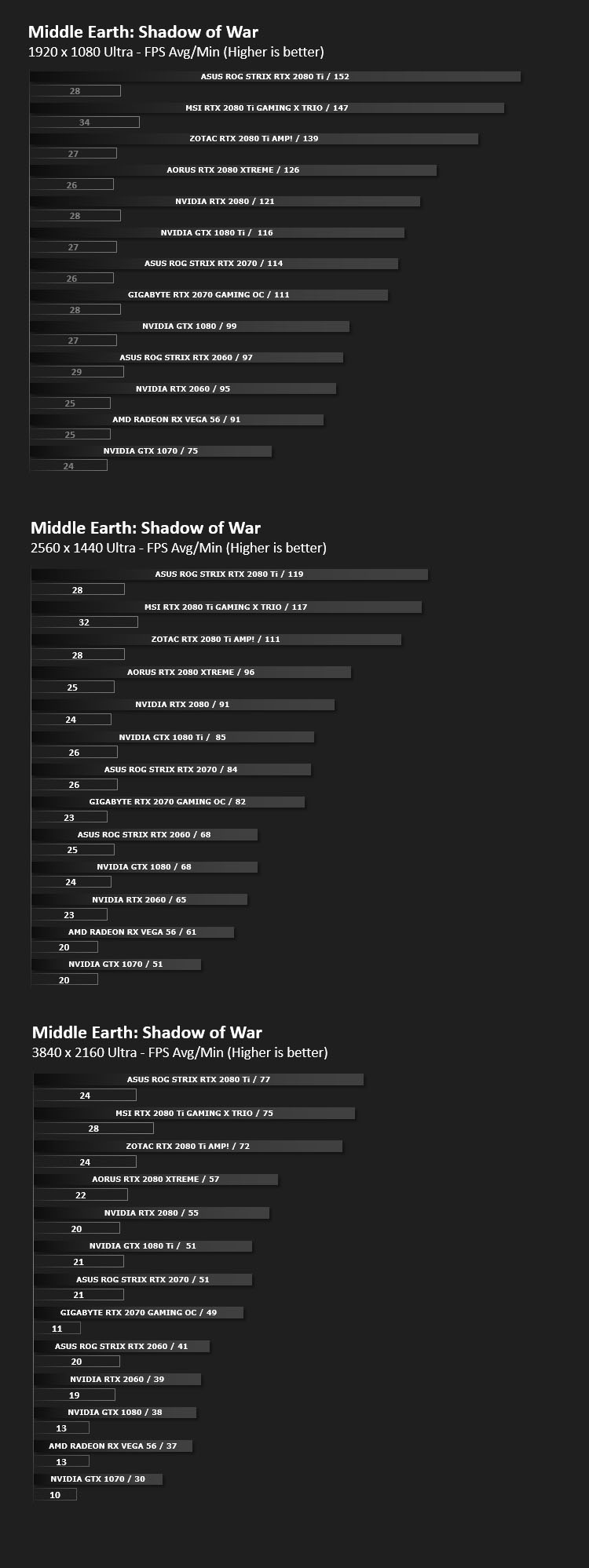
DX11: Middle Earth: Shadow of War
Middle-earth: Shadow of War is an action role-playing video game developed by Monolith Productions and published by Warner Bros. Interactive Entertainment. It is the sequel to 2014’s Middle-earth: Shadow of Mordor.

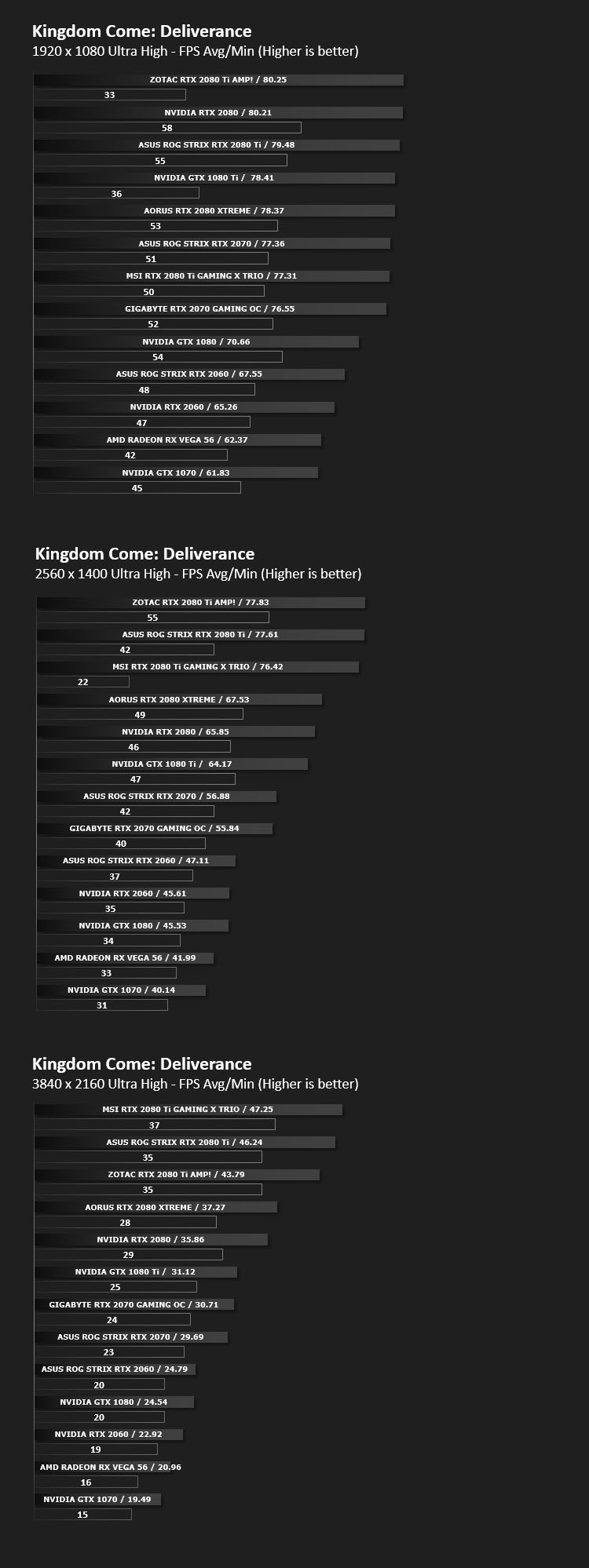
DX11: Kingdom Come: Deliverance
Kingdom Come: Deliverance is a story-driven open-world RPG that immerses you in an epic adventure in the Holy Roman Empire. Avenge your parents’ death as you battle invading forces, go on game-changing quests, and make influential choices.

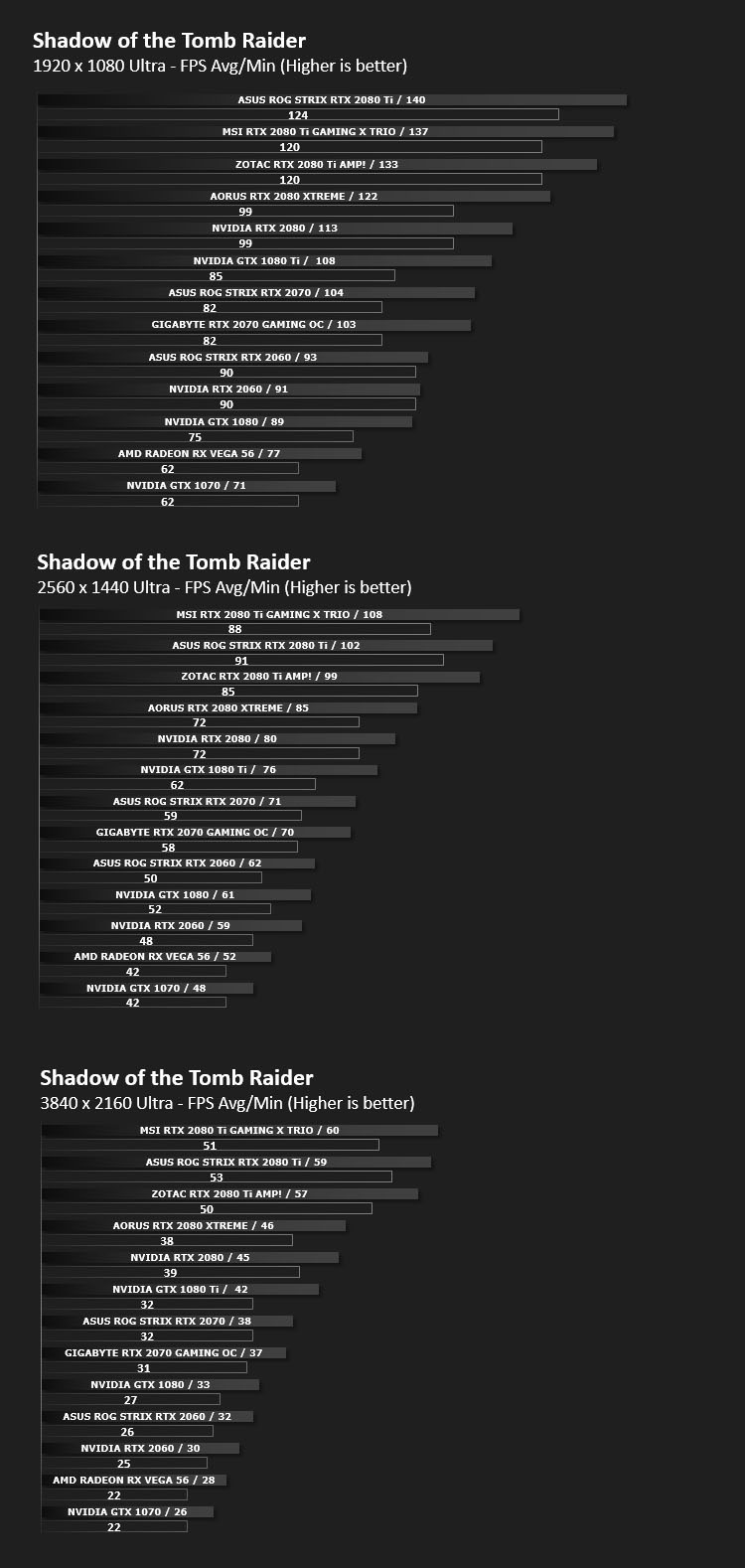
DX12: Shadow of the Tomb Raider
Shadow of the Tomb Raider is an action-adventure video game developed by Eidos Montréal in conjunction with Crystal Dynamics and published by Square Enix. It continues the narrative from the 2013 game Tomb Raider and its sequel Rise of the Tomb Raider, and is the twelfth mainline entry in the Tomb Raider series.

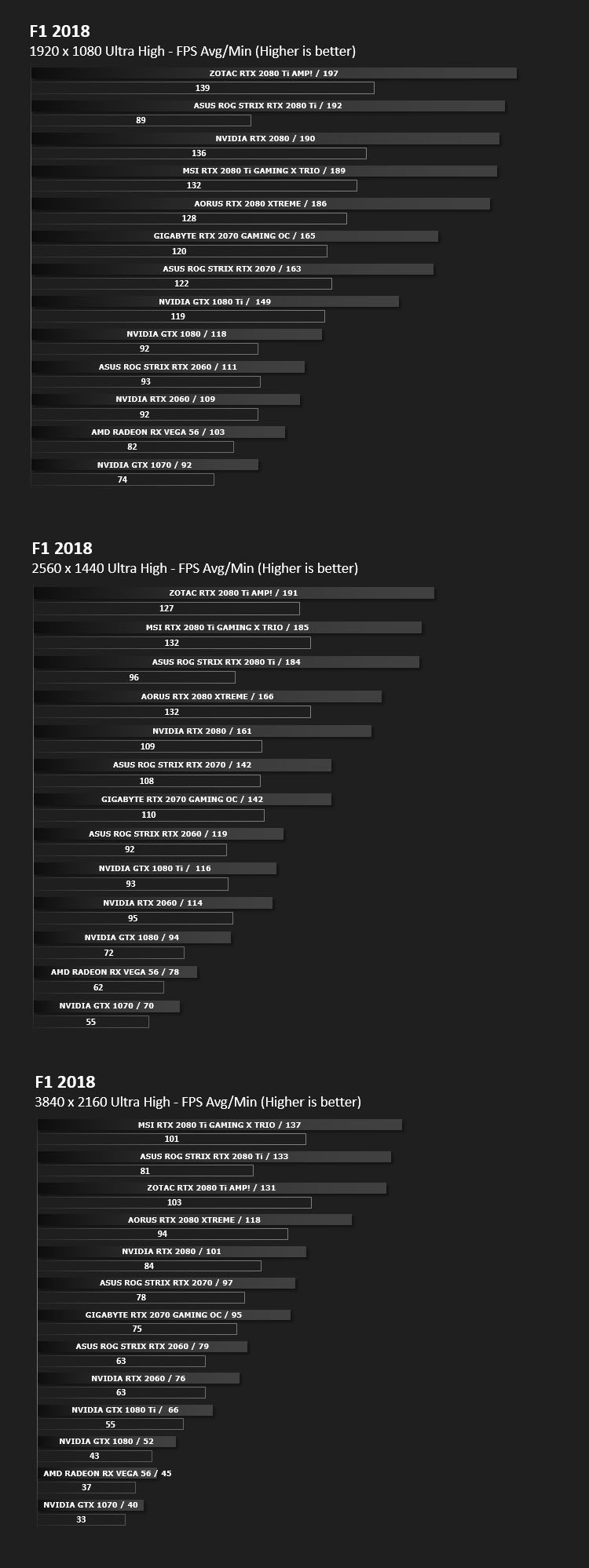
DX11: F1 2018
F1 2018 is a racing video game and the tenth instalment in the Formula One video game franchise developed and published by Codemasters. The game is based on the 2018 Formula One World Championship and includes all twenty-one circuits from the calendar and all twenty drivers and ten teams competing in the season.

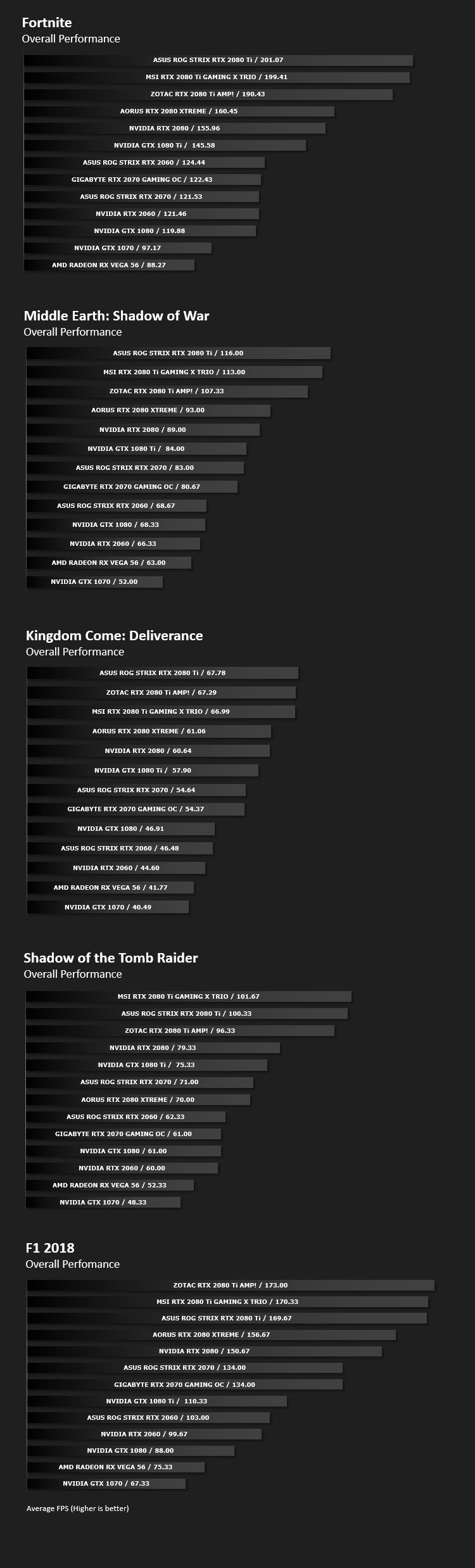
Overall Performance
Here we take a look at the overall performance of the graphics card. This figure is determined by finding the average FPS across all of the settings used in a particular benchmark(game) to give us an overall value.
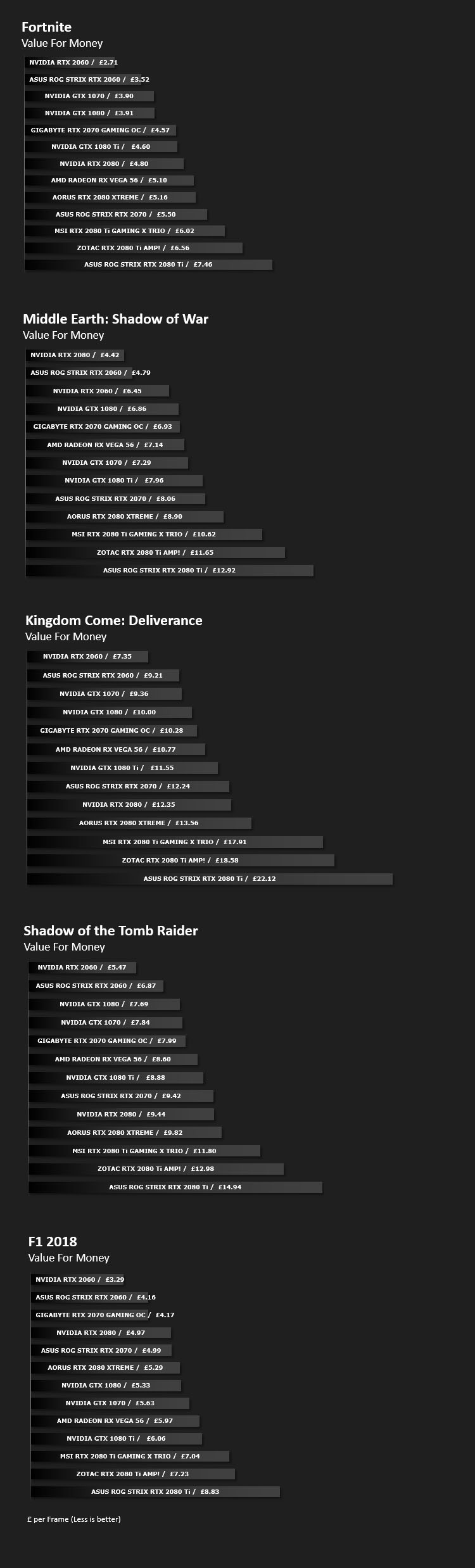
Value For Money
We make a simple calculation for this set of results. For each game we add all of the resulting FPS totals together and then divide by the four sets to give us an overall performance figure. While the figures alone do not give you an accurate picture of how the card will perform in any given scenario, they do tell you, when averaged, which GPU is the more capable across all of the benchmarks and settings tested.
Please note: we’ve used GBP for currency but since this is relative – regardless of which currency you use, this will give you a good indication of value for money.
Conclusion
Moving from the GTX series over to the RTX series as far as GIGABYTE’s graphics cards are concerned, very little has changed for the styling and cooling implementation. The WINDFORCE 3X thermal design has a proven track record and it has no qualms in tackling the demand of a TU106 GPU. What we like especially about this graphics card is that it maintains reasonable load temperatures and does so while emitting very little noise.
GAMING OC’s sweetspot is 1440p – gamers can enjoy framerates which climb above 60, even exceeding 100 at times (depending on the title). For those gaming at 1080p, this card wouldn’t be a bad choice either since in the more demanding triple A titles, higher resolutions may begin to cripple performance with ultra-detail preset.
In the manual overclocking phase of our review we expected GAMING OC to do better since we have an impressive 8+2 digital power design but we only managed to squeeze out less than 100MHz on both GPU and memory clocks. So, unfortunately there isn’t a lot of headroom to apply further modifications to this card.
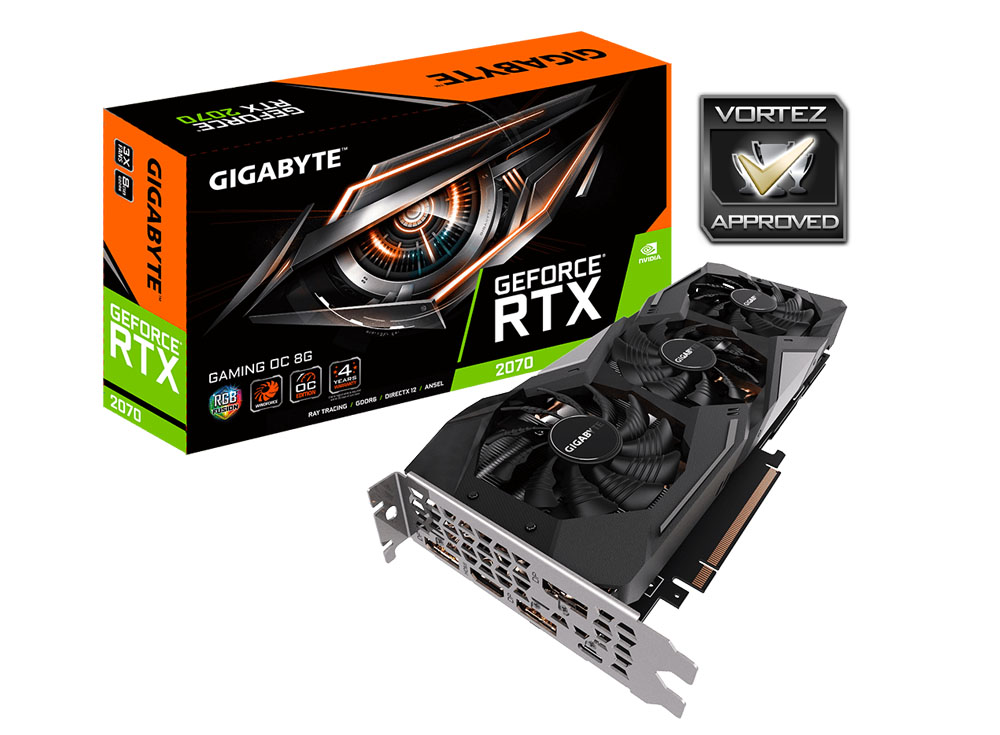
So far as additional features go, we of course can benefit from the WINDFORCE cooler as we’ve already mentioned but there is also little extras such as power indicators for the PCI-e connections, a sturdy metal backplate, subtle LED lighting and a whopping 4-years warranty. Most partners offer 1-2 years, so 4 is a bonus which could sweeten the deal.
In terms of pricing, GAMING OC is neither the cheapest or most expensive RTX 2070 available. It sits right in the middle of the stack, costing: £554 GBP – $529 USD – $899 AUD. We think it’s a good buy and would have no reservations in recommending it!
The GIGABYTE RTX 2070 GAMING OC is a great representation of a competent graphics card, it delivers strong numbers in the gaming arena and achieves this without piercing your eardrums.
Pros
+ Easy on the eye
+ Effective WINDFORCE cooler
+ Good selection of ports on rear IO
+ Subtle LED lighting
+ Ultra durable component set
+ Massive 4-years warranty
Mediocre
+- Plastic shroud
+- Mild factory overclock
Cons
+ Easy on the eye
+ Effective WINDFORCE cooler
+ Good selection of ports on rear IO
+ Subtle LED lighting
+ Ultra durable component set
+ Massive 4-years warranty
Mediocre
+- Plastic shroud
+- Mild factory overclock
Cons
Click here for an explanation of our awards at Vortez.net.
Stay connected with the Vortez Social Media pages:
Join in with the discussions on Discord