







The latest High End Desktop platform, Intel’s successor to Ivy Bridge-E, is here. And it’s an awesome beast indeed.

Product On Review: Core i7-5960X Extreme Edition
Manufacturer & Sponsor: Intel
MSRP: $999
The appeal of Intel‘s high end desktop/workstation platform has waxed and waned over the years. Strong in the X58 era, it recieved a new lease of life three years ago with the release of Sandy Bridge-E and X79, which as a platform was just as impressive as the mainstream Sandy Bridge/P67 earlier that year. Performance was excellent, overclocking was easy, life was good.
Perhaps unsurprisingly in retrospect IvyBridge-E failed to make a significant impression. Benefits over SandyBridge-E were marginal, as you would expect from a ‘tick’ revision in Intel’s roadmap, but repurposing X79 also meant that few features were added to complement the release. Whilst excellent in isolation, as a progression the die-shrink to 22nm never set the world on fire. Lucky for Intel that little competition in this arena has been sparse for some time.
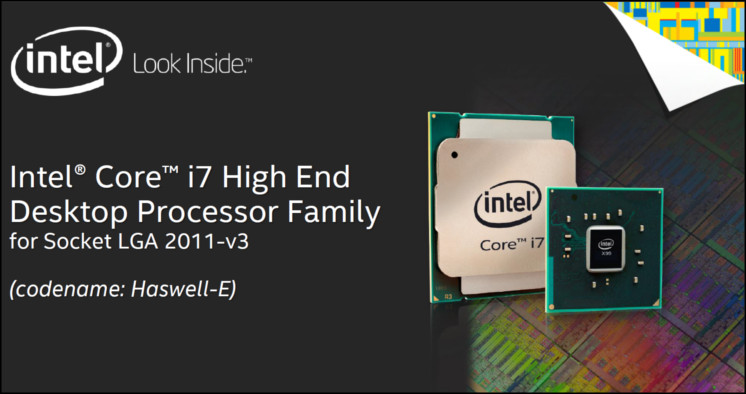
Today however we can put all that behind us as Intel are releasing their latest High End Desktop platform. Featuring an all new CPU architecture and motherboard chipset, Haswell-E and X99 looks set to bring a new era to the high end market. And in our first review we’re bringing you the cream of the crop: Intel’s flagship Core i7-5960X Extreme Edition.
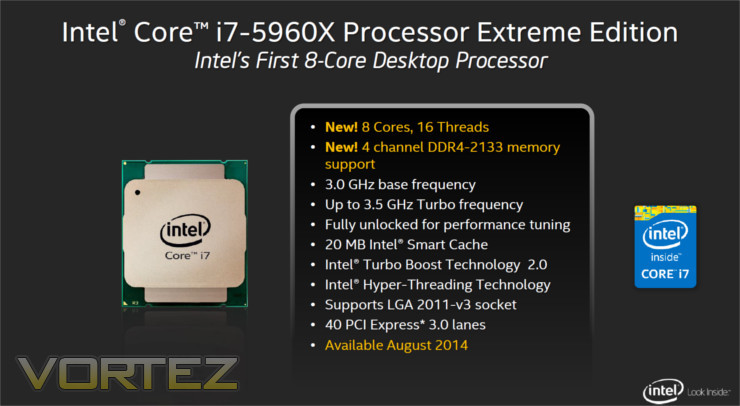
For the first time with Intel’s High End Desktop platform you’re getting eight (yes, eight) physical cores each supporting hyperthreading in a package which is fully unlocked for overclocking (with few limits on multiplier and BCLK adjustment). In order to retain a sensible 140W TDP envolope Intel’s Base clocks for the i7-5960X are relatively conservative at 3 GHz, but an aggressive Turbo mode allows it to clock up to 3.5GHz by selectively ramping up a limited number of cores. Even so, enthusiasts will of course be looking forward to really pushing the new CPU as far as it can.
Just as noteworthy as the increased core count is the debut of quad-channel DDR4 support on any desktop platform. The new RAM specification allows for a more dense package, lower operating voltages and higher overall bandwidth than DDR3 i.e. more efficient and higher performance computing. The DIMMs are of course debuting with this release so you have to factor the price into your overall purchase. Thankfully the CPU cooler mounting system is identical; presupposing an existing high-end solution there’s no need to invest still further in this regard.
The Core i7-5960X EE is the halo product, but we should also note that two additional CPUs are rounding out the Haswell-E launch. The Core i7-5930K has two fewer CPU cores, less L3 Cache and relatively high base and Turbo clocks to compensate. An entry-level Core i7-5820K by contrast retains six cores/12 threads but supplies only 28 PCI Express 3.0 lanes. Unlike previous Intel HED therefore there’s plenty of differentiation between the SKUs as well as a $600 gap in price.
So there are the basics of the Core i7-5960X Extreme Edition, but we have deeper to delve before we move on to testing.
Specification, Features & Architecture
Haswell-E is a Tock revision in Intel’s roadmap, meaning that it a major architecture revision on an unchanged lithography. Major criticisms of Ivy Bridge-E were down to that platforms status as a Tock revision, making it essentially a die shrink and cleanup of Sandy Bridge-E but with few new features and in this case no new accompanying chipset.
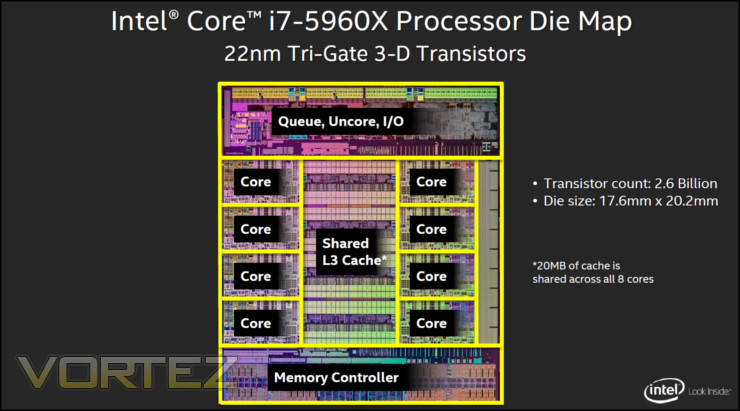
The new CPU features significantly more transistors than both IvyBridge-E and the behemoth SandyBridge-E of the past – 2.6bn compared with 1.86bn and 2.2bn respectively. The die size is also commensurately larger – 355.52mm^2 against only 256.6mm^2 for Ivy Bridge-E. Nonetheless Intel still eschew an integrated GPU on this part, determining that such solutions are unnecessary for the HED market.
The i7-5960X Extreme Edition is unique in the Haswell-E range in that is incorporates a full 20MB L3 Cache, shared between the eight CPU cores. Even were it not for the two additional cores this would have a tangible benefit in a wide variety of repetitive and threaded tasks, whilst the cores themselves put the CPU further over the top. It appears that Intel have had to rein in the CPU a little in fact, making use of only modest 3GHz base clocks; however you can be sure that enthusiasts will find pushing those limits immediately. By comparison the Tubro Mode is quite aggressive, hitting 3.5GHz under optimum conditions.
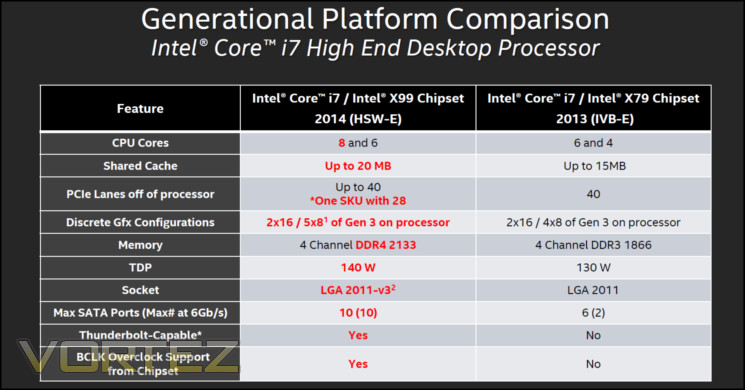
Headline features therefore are a large step above the IvyBridge Core i7-4960X, but it’s worth noting that the features listed above are only part of the equation. Thanks to a chipset revision the Haswell-E platform brings with it more benefits than simply two more cores and DDR4 RAM; compatible X99 motherboards also bring support for Thunderbolt 2.0, up to five discrete GPUs in 5 x 8 lane Gen 3 PCIe 3.0 configuration, and 10 SATA3 6Gbps ports.
Motherboard manufacturers have also striven to keep their X99 designs in pace with the recent Z97 updates. By this we mean that many have included support for next generation storage interfaces either through M.2, SATA Express, or both. It’s our understanding that this isn’t a core feature of the chipset, but nonetheless it’s a welcome addition and will hopefully encourage designers of these devices to increase the pace of release.
The specs of each CPU in Intel’s professional/enthusiast-grade product stack make it clear where they each line up.
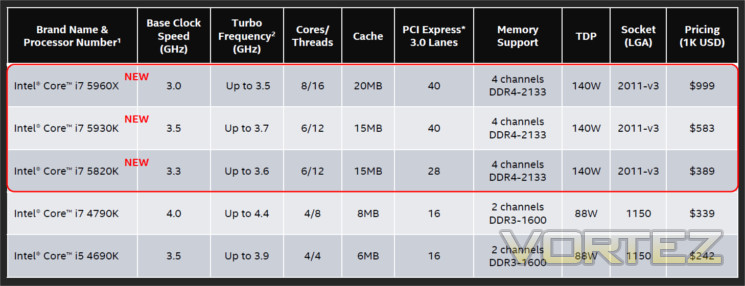
Intel suggest that this CPU improves performance in suitable tasks by as much as 32% versus the previous Extreme Edition. To place that into some sort of context the leap from Nehelem (X58) to Sandy Bridge-E was of this order of magnitude and hailed as a monumental leap forward. We shall see if Intel’s claims bear up to scrutiny.
Product Snapshot

Covered by the heatspreader you’d have to say that superficially the Core i7-5960X is nigh on indistinguishable from its Ivy Bridge counterpart, and that’s not surprising. The footprint of both is near identical, cooler compatibility is identical down to much the same stock cooler being used for both, and the sockets differ only slightly. In fact Intel are once again urging overclockers and enthusiast users towards their TS13X liquid cooling solution, speaking to how similar they are in TDP and physical dimensions. It’s only below that you get to see a more stark contrast.

Sandy Bridge E is on the left, Ivy Bridge E is central and Haswell-E is rightmost. As you can see there is very little difference between Ivy and Sandy pad layout, although the component layout differs greatly. Haswell-E however has many more exposed contact points in addition to different notch key locations, indicating a much greater architectural complexity and reinforcing that these CPUs are not compatible with X79.
At this stage little is known of the Thermal Interface Material bonding the CPU die to the heatspreader. Much was made (and justifiably so) of the TIM improvements for Devils Canyon recently, and it’s likely that Intel have retained a high quality TIM for these new power HED CPUs.

This is a tighter side-by-side comparison of Haswell-E and Ivy Bridge-E. Again you can see the number of exposed pads for the LGA2011v3 socket outnumbers those for LGA2011. Some manufacturers are claiming to have their own socket variants which leverages signalling from these additional locations to unlock greater and more subtle control over the CPU settings. For example the ASUS OC Socket solution can control each CPU voltage rail individually and better manage voltage droop, in addition to being able to individually disable each core. We’ll be taking a closer look at partner innovations in each of our motherboard reviews.
Fitting the CPU is as complex as other LGA2011 CPUs – four notches are a little trickier to deal with than two, and the two retention bars require a little more coordination than usual. If you’ve installed a bunch of LGA2011 CPUs in the past it wont pose any difficulty, whereas those used to mainstream CPUs will take more care than usual.
Test Setup & Methodology
Motherboard MSI X99S GAMING 9 AC
Memory: 16GB Corsair Vengeance LPX DDR4 @ 2666MHz 16-17-17-35 (CMK16GX4M4A2666C15R)
Graphics: NVIDIA GTX 760
Power Supply: Corsair RM Series RM1000
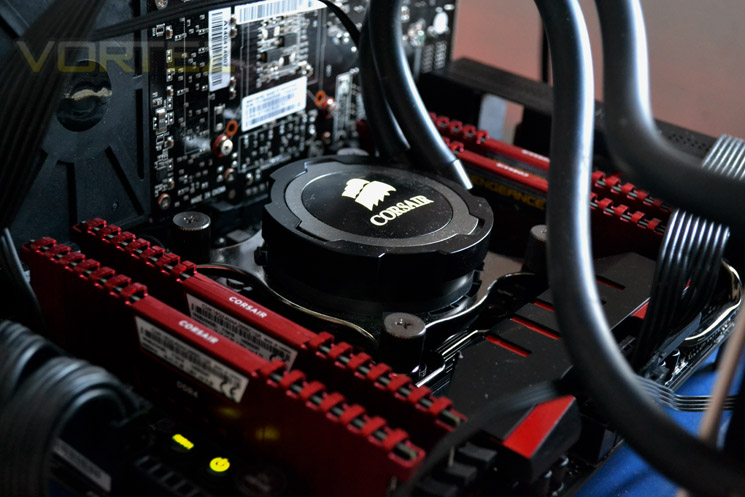
Cooler: Corsair Hydro Series H105
Memory: 16GB Corsair Vengeance LPX DDR4 @ 2666MHz 16-17-17-35 (CMK16GX4M4A2666C15R)
Graphics: NVIDIA GTX 760
Power Supply: Corsair RM Series RM1000
Cooler: Corsair Hydro Series H105
CPUs
X99:-
Intel Core i7 5960X (3.0/4.7GHz – Turbo Boost Enabled) Haswell E
Intel Core i7 5960X (3.0/3.5GHz – Turbo Boost Enabled) Haswell E
X79:-
Intel Core i7 4960X (3.6/4.0GHz – Turbo boost enabled) Ivy Bridge E
Intel Core i7 3960X (3.3/3.9GHz – Turbo boost enabled) Sandy Bridge E
X99:-
Intel Core i7 5960X (3.0/4.7GHz – Turbo Boost Enabled) Haswell E
Intel Core i7 5960X (3.0/3.5GHz – Turbo Boost Enabled) Haswell E
X79:-
Intel Core i7 4960X (3.6/4.0GHz – Turbo boost enabled) Ivy Bridge E
Intel Core i7 3960X (3.3/3.9GHz – Turbo boost enabled) Sandy Bridge E
Benchmarks
AIDA 64 – CPU & Memory/Cache Performance
SiSoft Sandra – Compute & Memory Performance
HandBrake – Encoding Performance
Pov-Ray – 3D Image processing Performance
Cinebench R15 – Image processing Performance
AS SSD SATA Performance
Futuremark 3DMark (Firestrike) – Graphical Performance
Futuremark PCMark 8 – Overall PC Performance
Battlefield 4, THIEF, Company Of Heroes 2 & GRID:2 – Gaming Performance
AIDA 64 – CPU & Memory/Cache Performance
SiSoft Sandra – Compute & Memory Performance
HandBrake – Encoding Performance
Pov-Ray – 3D Image processing Performance
Cinebench R15 – Image processing Performance
AS SSD SATA Performance
Futuremark 3DMark (Firestrike) – Graphical Performance
Futuremark PCMark 8 – Overall PC Performance
Battlefield 4, THIEF, Company Of Heroes 2 & GRID:2 – Gaming Performance
Temperatures and Overclocking
Extreme Edition overclocking changed significantly between Sandy Bridge-E and Ivy Bridge-E, unlocking both BCLK and CPU strap changes. Haswell E changes very slightly again, melding some of the techniques of Ivy Bridge-E and Haswell thanks to a fully integrated voltage controller (FIVR) which splits the input into the required rails. Motherboard partners are implementing broader overclocking features and these look set to be key differentiators in the battle for X99 market share, and we’ll take a closer look at each during detailed motherboard reviews. For now we’re concerned merely with baseline functionality.
Our test system is being cooled by the high quality Corsair Hydro H105, a LCS cooler with 240mm radiator that’s approximate to a high end air cooler such as the NH-D15 or entry level water cooling.
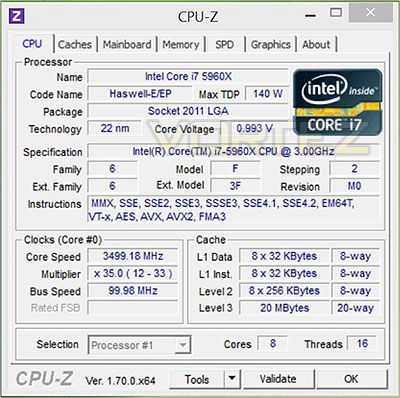
The starting point to work from is an idle speed at @ 1200MHz, base clock of 3000MHz and Turbo of 3.5GHz (shown). The downclocking isn’t quite as aggressive as Haswell (which will idle at 800MHz), but should still provide a decent level of power saving in the long run. Default voltage was 0.993, memory at 2666MHz (DDR4).
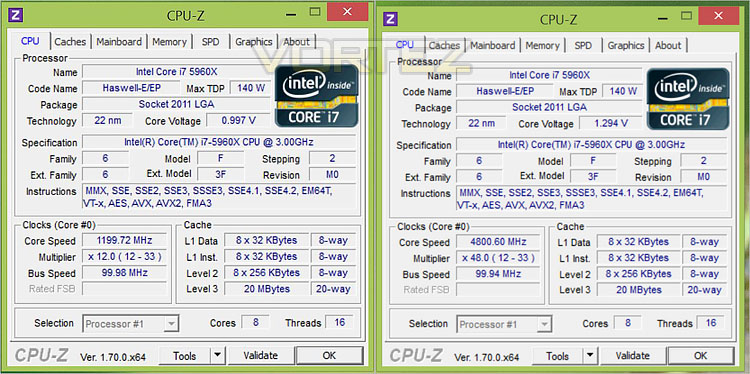
Due to a limited time frame we concentrated on pushing the CPU multiplier rather than significantly adjusting the BCLK and CPU strap. This allowed us to boot the system at a relatively unstable 4.8GHz quite easily, with 4.7GHz @ 1.4V being a stable overclock that we were comfortable benching at.
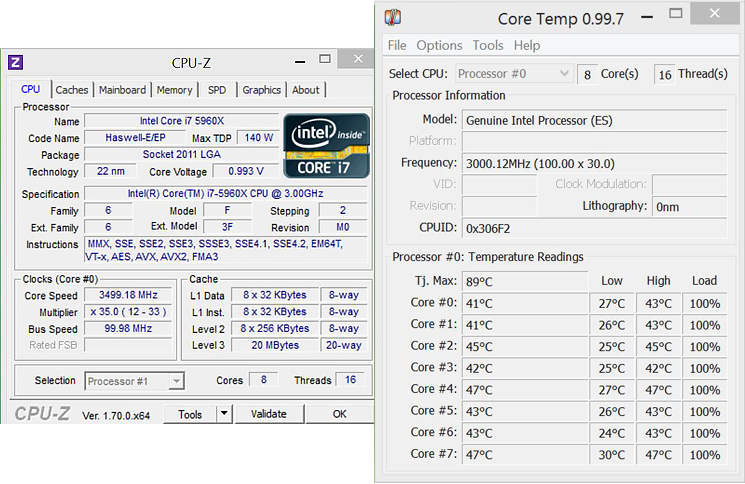
Stock load temperatures reached a core maximum of 47C under long term benchmarking, easily within the acceptable level with adequate cooling. From this we can assume that there’s plenty of scope for overclocking purely on a temperature basis.
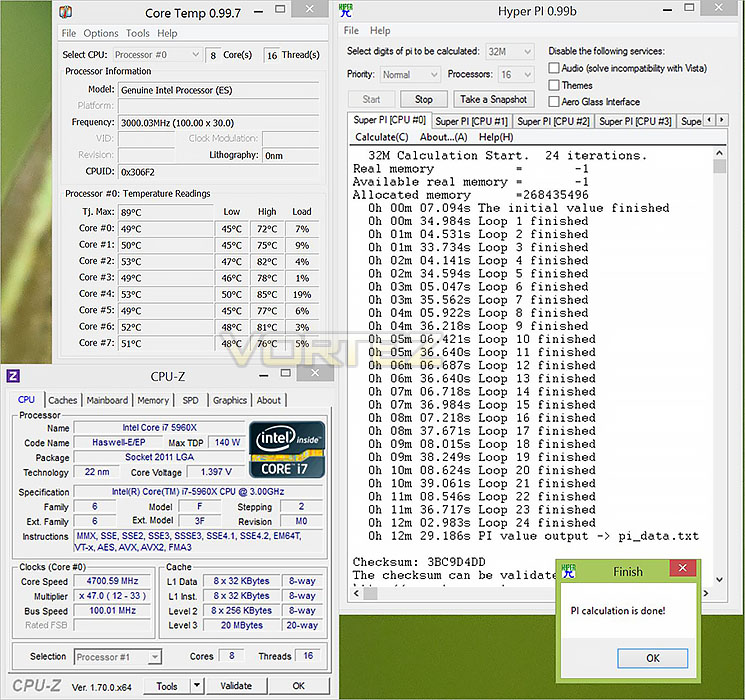
Temperatures under overclock voltages and speeds reached a toasty 85C, compared to a chill 71C for a similarly heavily overclocked Core i7-4960X. Hitting 5GHz under sub-zero temperatures will certainly be possible, but pushing out engineering sample further under conventional cooling requires much more tweaking (which we will engage during motherboard reviews).
Benchmarks: Power Consumption
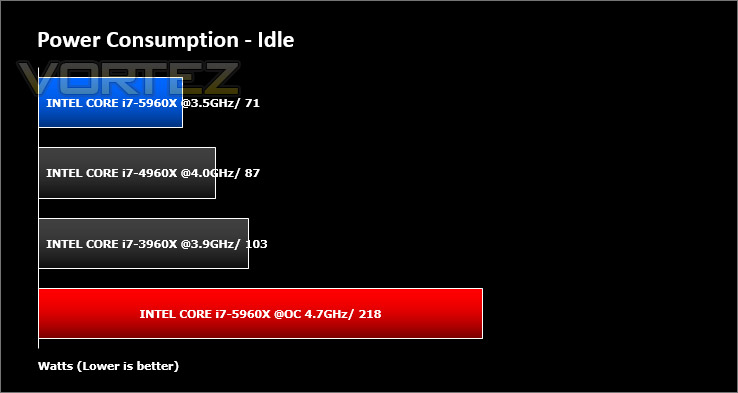
Energy consumption between different CPU models started to be a key point of interest in the Sandy Bridge era due to enormous gains in the perf/Watt metrics which were normally the province of GPUs along. We analyse two crucial figures: first of all idle tests where the system is cold booted into Windows and no additional applications are executed – the watts are noted on the external energy monitor we use; second the system is loaded with 3DMark FireStrike – watts are again monitored for the duration of the test and the highest rated wattage result is then noted down. Below are the results of this energy test.
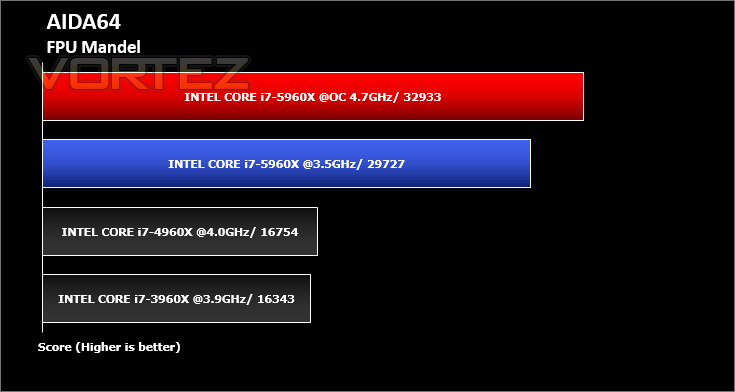
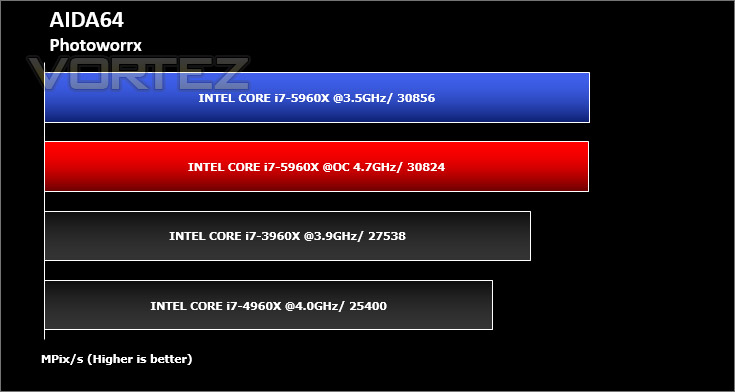
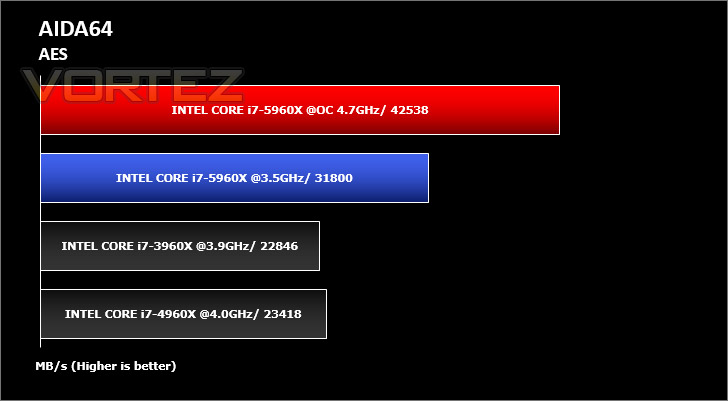
Benchmarks: AIDA64 – CPU
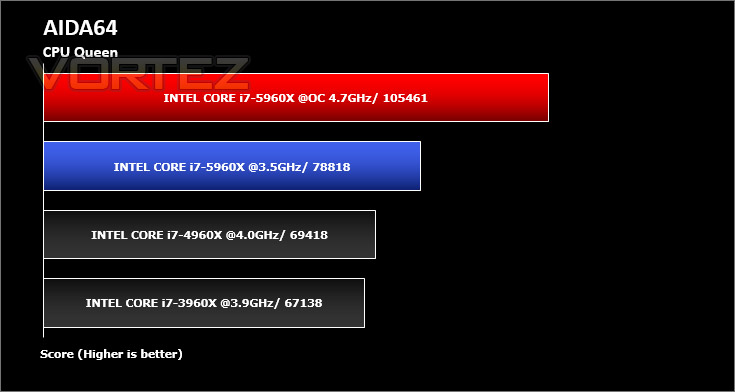
This simple integer benchmark focuses on the branch prediction capabilities and the misprediction penalties of the CPU. It finds the solutions for the classic “Queens problem” on a 10 by 10 sized chessboard. At the same clock speed theoretically the processor with the shorter pipeline and smaller misprediction penalties will attain higher benchmark scores. For example — with HyperThreading disabled — the Intel Northwood core processors get higher scores than the Intel Prescott core based ones due to the 20-step vs 31-step long pipeline. CPU Queen test uses integer MMX, SSE2 and SSSE3 optimizations.
Benchmarks: AIDA64 – Memory
AIDA64 implements a set of 64-bit benchmarks to measure how fast the computer performs various data processing tasks and mathematical calculations. Memory and cache benchmarks are available to analyze system RAM bandwidth and latency.


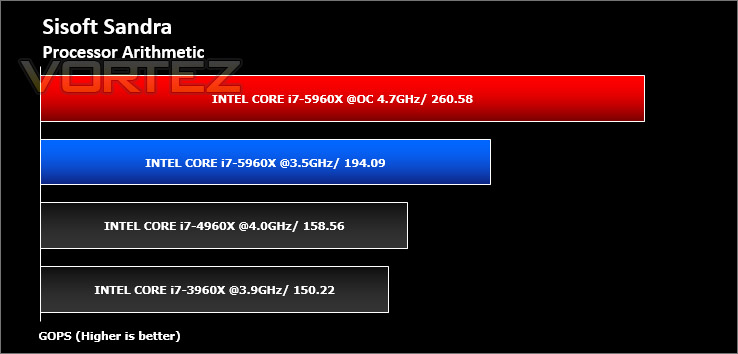
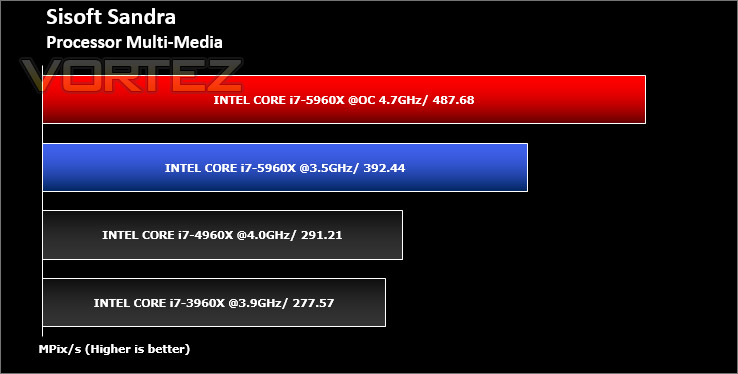
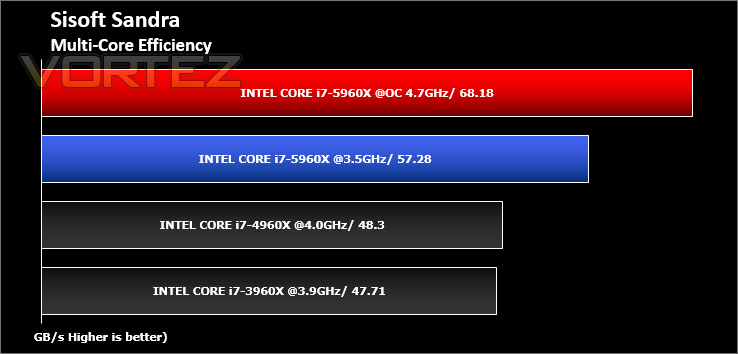
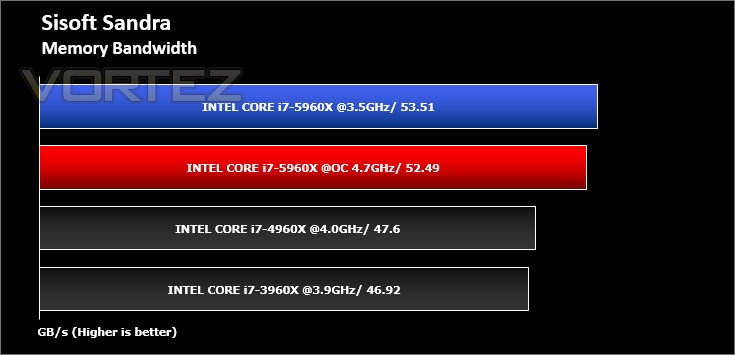
Benchmarks: SiSoft SANDRA
SANDRA isn’t always a benchmark that is included in hardware reviews but I believe it shouldn’t be ignored. SANDRA provides a vigorous package that tests your system in a rather large array of benchmarks. There are many aspects of benchmark that can be executed. We will be considering – CPU and memory tests.
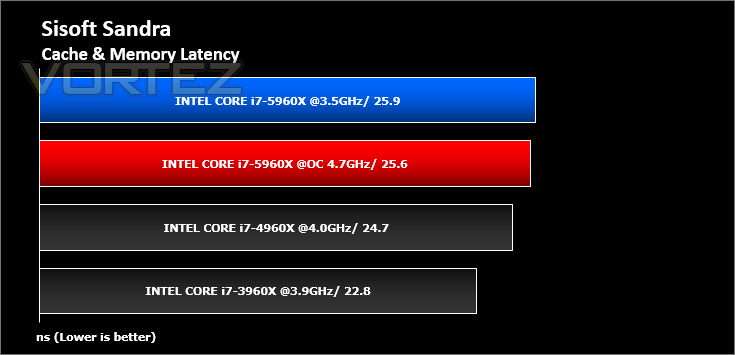
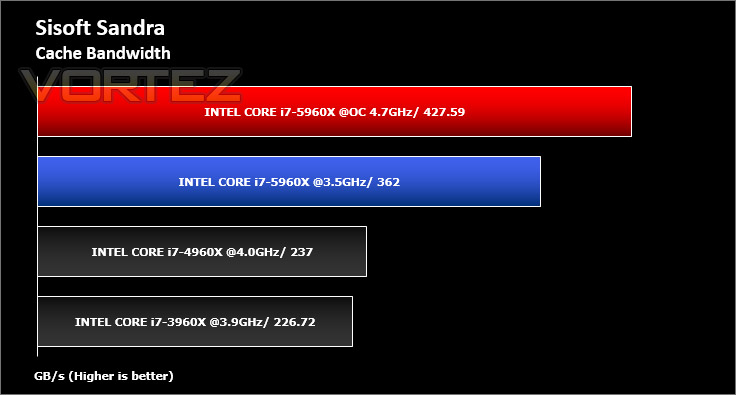
Benchmarks: Cinebench R15
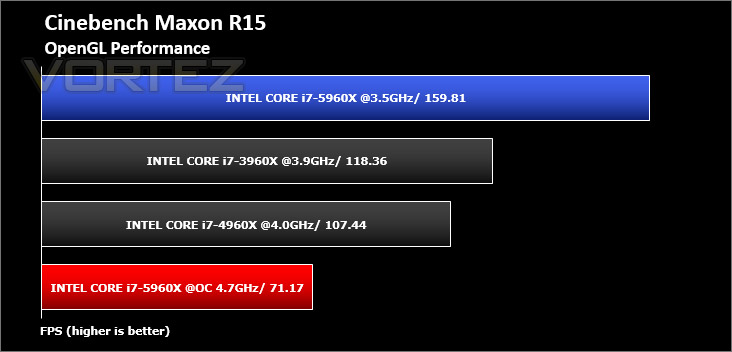
CINEBENCH can measure systems with up to 64 processor threads. This test scene contains approximately 2,000 objects which in turn contain more than 300,000 polygons in total, and uses sharp and blurred reflections, area lights, shadows, procedural shaders, antialiasing, and much more. The result is displayed in points (pts). The higher the number, the faster your processor.
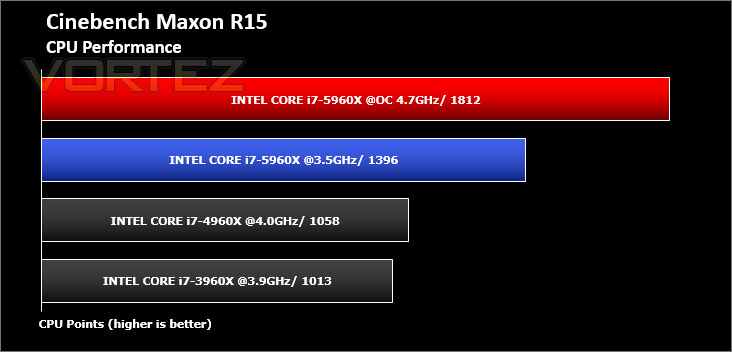
Benchmarks: POV-Ray
The Persistence of Vision Raytracer, or POV-Ray, is a ray tracing program which generates images from a text-based scene description, and is available for a variety of computer platforms. It was originally based on DKBTrace, written by David Kirk Buck and Aaron A. Collins for the Amiga computers.

Benchmarks: Handbrake 0.9.9.1
HandBrake is an open source trancoding tool for converting video from nearly any format to a selection of modern, widely supported codecs. Strong multi-threading support tends to favour high core counts and hyperthreading support.
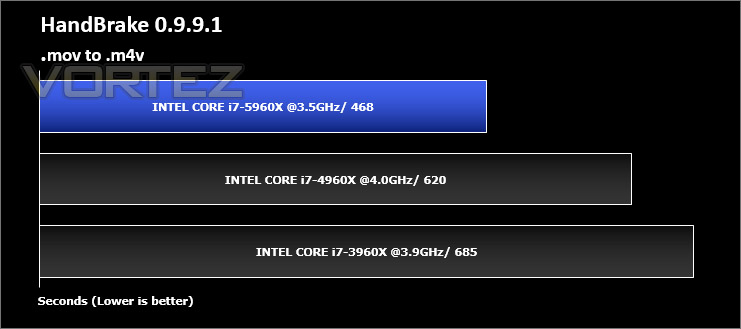
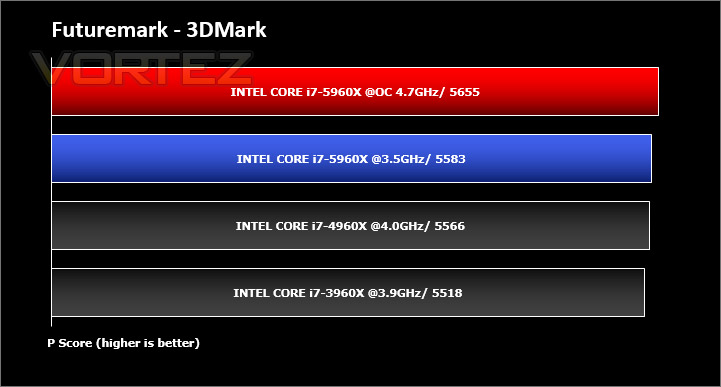
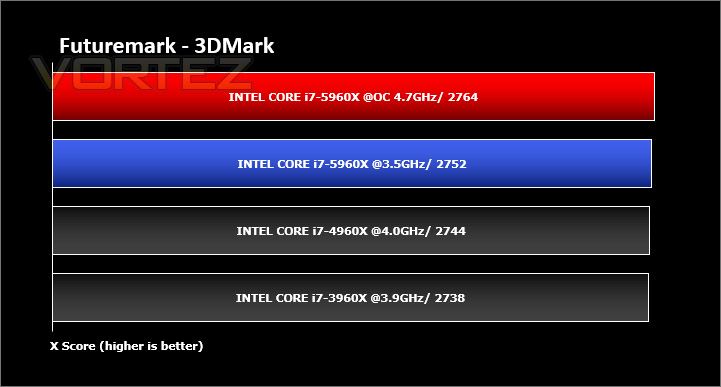
Benchmarks: Futuremark 3DMark Fire Strike
3DMark FireStrike Product PageFire Strike is our new showcase DirectX 11 benchmark designed for high-performance gaming PCs. It is our most ambitious and technical benchmark ever, featuring real-time graphics rendered with detail and complexity far beyond what is found in other benchmarks and games today. Fire Strike will only be available in the Windows editions of 3DMark initially.
Benchmarks: PCMark 8
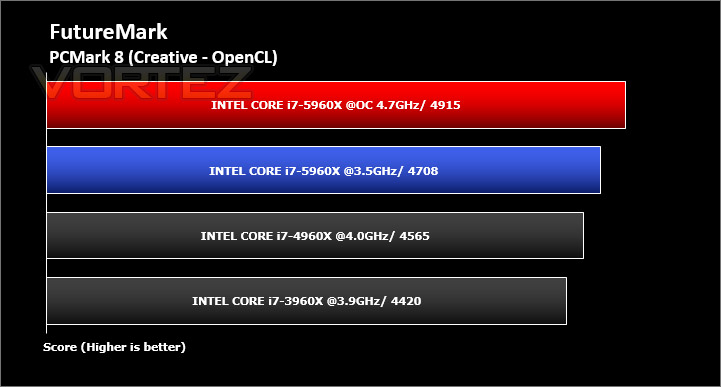
PCMark 8 combines performance benchmarking with battery life measurement and includes tests based on popular Adobe and Microsoft applications. Whether you are looking for long battery life, or maximum power, PCMark 8 will help you find the devices that offer the perfect combination of efficiency and performance for your needs. It’s the complete PC performance benchmark for home and business.
Benchmarks: AS SSD
AS SSD Benchmark is a straightforward tool for measuring the speed of your SSD drive.
Simply launch the program, choose your drive, click Start, and it’ll test your SSD’s read and write speed in a variety of ways, delivering a score for each when it’s done. And if that’s not enough, there are also additional file copy and compression-related benchmarks available from the Tools menu. (The author’s support page is German only, but if you need further English explanations then there’s a thread on the program at the OCZ Technology forum.).
Simply launch the program, choose your drive, click Start, and it’ll test your SSD’s read and write speed in a variety of ways, delivering a score for each when it’s done. And if that’s not enough, there are also additional file copy and compression-related benchmarks available from the Tools menu. (The author’s support page is German only, but if you need further English explanations then there’s a thread on the program at the OCZ Technology forum.).


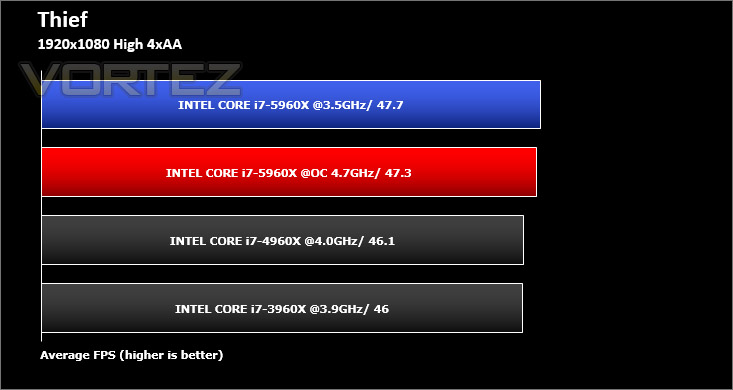
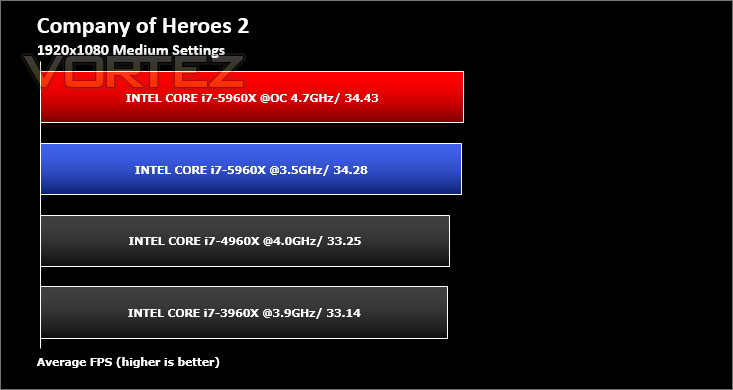
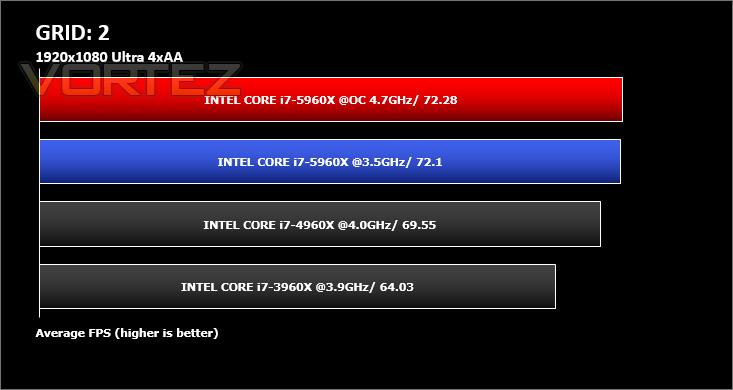
Benchmarks: Battlefield 4, THIEF, Company of Heroes 2, GRID 2
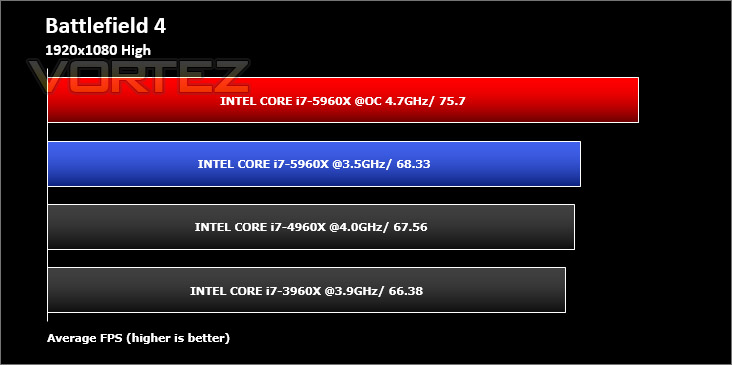
It’s important for us to perform a number of game benchmarks as well as the synthetic tests because gamers will want to know if there are any significant benefits. So here we have a selection of popular gaming titles, critically acclaimed and action-packed.
Conclusion
There’s no doubting the awesome power of the high end Haswell-E, and you have no idea what a relief it is to say that. Marginal improvements across generations are fine, but nothing gets us as enthused as the sorts of huge leaps forward we see on display with the Core i7-5960X Extreme Edition. In ideal workloads a 30% improvement in performance is very much on the cards, despite the MSRP being near identical to its Ivy Bridge E predecessor. What more can you ask.
As with every high end desktop solution we still need to be mindful of just who is going to benefit from the platform, and once again it isn’t gamers. Not only would your budget need to be astronomically higher than you should ever spend on a pure gaming system, PC games simply don’t use multiple cores well enough to exploit the power of having eight available. Most are optimised for two, some for four, but eight is very much off their radar. Sixteen logical cores via hyperthreading? Forget about it.
That said, expand your workload and suddenly Haswell-E makes a whole lot of sense. This new CPU crunches through video editing and rendering like nothing else, greatly reducing turnaround times for edited video content. If your personal interests or professional life are in this arena, especially if render times are critical to your turnover, this CPU should be immediately on your radar.
One question we cannot currently answer is if eight cores are fundamental to the performance leap of the i7-5960X, and how that would reflect in other members of the range. We’re looking forward to putting both the i7-5930K and i7-5820K through their paces in the near future to see if they are just as big a step forward over Ivy Bridge E as a whole.
When it comes to overclocking Haswell-E shouldn’t leave you wanting. Complexity is a combination of X79 and Z97… easy to learn for large gains, hard to master but rewarding for those at the truly bleeding else. Professional overclockers will likely have a field-day. With fairly conventional high-end cooling (a Corsair H105) we were able to reach 4.7GHz without trouble; water-cooled setups should be able to reach greater heights as our 85C peak temperature indicated to us that heat was an issue.
Intel’s Core i7-5960X Extreme Edition is not only an out and out performance leader, it is a huge step forward over its predecessors. Suitable workloads see major performance gains thanks in part to its 8-core architecture, whilst the platform as a whole has a major feature revamp over Ivy Bridge-E configurations including Thunderbolt 2.0, next generation storage and DDR4 support. Cost is a factor, but investing in the latest Extreme Edition will give you the fastest system possible, guaranteed.
Pros
+ Major performance improvements over the previous Extreme Edition
+ Significant overclocking potential
+ Overclocking rewards for both novices and experts
+ Improved feature set through the X99 Chipset
+ Same cooler mounting system as X79
+ Absolutely the fast CPU available
Cons
– Platform Price
Tips
= Overclockers will see a benefit from premium cooling due to relatively high temperatures.
+ Major performance improvements over the previous Extreme Edition
+ Significant overclocking potential
+ Overclocking rewards for both novices and experts
+ Improved feature set through the X99 Chipset
+ Same cooler mounting system as X79
+ Absolutely the fast CPU available
Cons
– Platform Price
Tips
= Overclockers will see a benefit from premium cooling due to relatively high temperatures.

Click here for an explanation of our awards at Vortez.net.
Our thanks to MSI, Corsair and Intel for providing some of the components crucial to this review
Our thanks to MSI, Corsair and Intel for providing some of the components crucial to this review


