







In our first X99 Motherboard review, we sample MSI’s X99S GAMING 9 AC, taking an in-depth look at the new chipset with the Intel 5960X and compare it against an X79 / 4960X combo..

Product on Review MSI X99S GAMING 9 AC
Manufacturer & Sponsor: MSI
Street Price: Tbc
After so much speculation we can today reveal Intel’s X99 chipset, more specifically, the X99S Gaming 9 AC motherboard from MSI. MSI are widely regarded as one of the most overclocking friendly manufacturers and so our review will focus heavily on this area. While the Gaming 9 is not the flagship motherboard or even the flagship ‘series’ (this tag goes to the XPower range – soon to be reviewed by us), a motherboard’s prowess is quite often judged not just by the abundance of features but by its ability to take your components to the edge without falling over in a smouldering mound of silicon and plastic.
There is a wealth of information to get through today as at Vortez we feel the end user deserves a thorough appraisal of the component reviewed rather than a basic – ‘how fast can it go’ overview. To this end, we hope you find this review both informative and enjoyable should you be dreaming of your next upgrade or indeed in the market for such components.
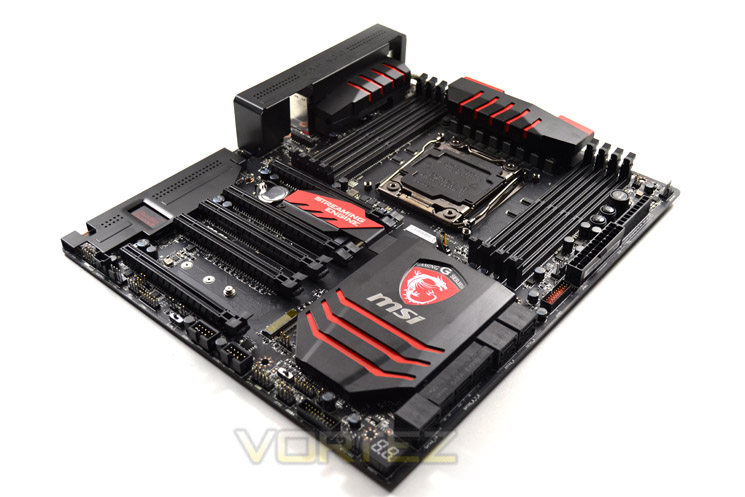
If you haven’t already done so then please check out our Intel Haswell-E review of which this motherboard was the foundation and proved to be a very worthy test best for Intel’s finest. However, before we give too much away, let’s take a look at the new X99 Chipset features which will give you an indication of the performance you can expect from Intel’s flagship ‘Enthusiast’ product.
About MSI
Micro-Star International Co., Ltd (MSI) was established in August 1986 by 5 founders, one of the world’s largest information technology manufacturers.
MSI started from the motherboard and graphics card industries and extended into consumer and commercial electronics including notebooks, All-in-One PCs, servers, workstations, industrial PCs, household appliances, car infotainment products, barebone systems, multimedia, communication devices, and others.
MSI holds itself responsible not only to its clients, employees and stockholders, but also to the society and environment as a whole to consistently fulfill its corporate commitment.
With innovation and style as its core value, customer satisfaction and premium service as its goal, MSI will definitely be the most brilliant star in the global brands!
MSI started from the motherboard and graphics card industries and extended into consumer and commercial electronics including notebooks, All-in-One PCs, servers, workstations, industrial PCs, household appliances, car infotainment products, barebone systems, multimedia, communication devices, and others.
MSI holds itself responsible not only to its clients, employees and stockholders, but also to the society and environment as a whole to consistently fulfill its corporate commitment.
With innovation and style as its core value, customer satisfaction and premium service as its goal, MSI will definitely be the most brilliant star in the global brands!
x99 Chipset
First and foremost, Intel’s latest chipset is aimed at the home ‘power’ user, be this performance enthusiast (read overclocker), extreme gamer or indeed for those who require the ultimate media encoding platform. So whatever your vice, Intel have all the bases covered with their latest chipset. This isn’t, of course, to say the Z97 based chipset is poor by comparison, it is not but if you want the ultimate – the very best of the best supporting Intel’s 8 core processor (5960X) then X99 is the only option.
So what’s new with X99?
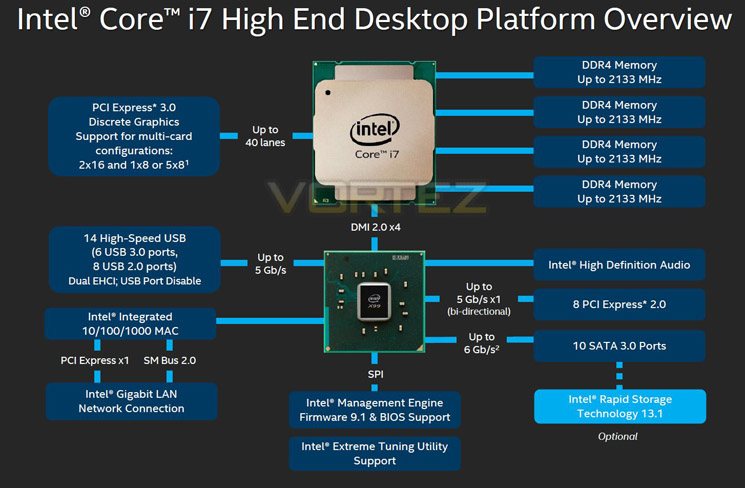
DDR4 Quad Channel Memory
The above block diagram shows us that DDR4 is natively supported. Note that DDR3 is NOT supported (more on this later). While the block diagram shows a rated speed of up to 2133MHz, our test bench happily ran 16GB (4x4GB) Quad channel Corsair Vengeance LPX at 2666MHz, with speeds rumoured to exceed 4GHz in the future.
40 x PCI Express (PCIe) Lanes
Depending on CPU choice, the X99 chipset can support up to 40 lanes of PCIe in combinations of 2×16, 1×8 or 5×8. We also expect this figure to increase on some motherboards with the addition of PLX chips. All of the PCIe lanes are now PCIe 3.0 standard and while current generation GPU’s rarely saturate PCIe 2.0, it is nice to have that future proofing available, especially for SLI/Crossfire configurations.
USB 3.0
One of the heaviest criticisms of X79 was the lack of natively support USB 3.0 ports, especially when compared to its Z87/97 brethren. We are now happy to report that X99 will support 6 USB 3.0 ports along with 8 USB 2.0 ports. OF course, most motherboard manufacturers will also add the usual ‘aftermarket’ USB 3.0 support from components such as ASMedia and Marvel so transfer speeds of up to 5GB/s can theoretically be achieved.
SATA 3.0
Yet another criticism of X79 was the lack of native SATA 3.0 ports. Despite having huge computational benefits, X79 was crippled by the lack of high speed SATA ports. This has been rectified with the X99 chipset supporting 10 x SATA 3.0 ports attaining a theoretical speed of 6GB/s which can be enhanced using the latest Intel Rapid Storage driver to speeds of 10 GB/s!
We must say that Intel have pulled out all the stops here. Clearly they have taken on board user feedback regarding the deficiencies of X79 by incorporating more modern SATA and USB ports. No longer is the Enthusiast flagship the poor I/O brother to Z87/97. Perhaps the biggest draw though is the introduction of DDR4. This will see huge speed gains in almost every aspect of personal computing. With 8x8GB Dimms supported a mammoth 64GB of DDR4 will make the X99 chipset massively future proofed.
We will cover the overclocking capabilities of the new chipset and each motherboard specifically in the overclocking section but this area failed to disappoint too.
Overall, there is little to criticise here. While we would have liked 40 PCIe lanes regardless of CPU, we understand there has to be some compromise to keep costs down for the budget conscious so how many PCIe lanes you have available will be dictated by CPU choice and not the motherboard. The entry level 6 core i7-5820 will have 28 PCIe lanes at a cost of £299 (At the time of release), while the flagship 8 core i7-5960X will have the full blown 40 lanes available. Aside from lanes, cores cache and clockspeed, all of the X99 features will be available regardless of CPU choice and to this end we are grateful. We suspect that future additions to the CPU range will hit the middle ground while the 5960X will receive a speed bump although this is pure speculation at this point.
Which chip would we go for? Obviously if money was no object then the i7-5960X is the way to go, not only does it have the full 40 lanes available but it is a true 8 core (16 threads) CPU. The 5930K would be the obvious choice for the consumer and the CPU that we think will prove most popular due to the balance of speed vs. cost.
Whichever CPU you opt for though, you can be assured that the X99 chipset offers the very best available. It is powerful, feature packed and as you will see, the unrivalled component of choice for enthusiast users.
Specification
CPU
• Supports New Intel® Core™ i7 Processor Extreme Edition for LGA2011-3 Socket
Please refer to CPU Support for compatible CPU; the above description is for reference only.
Chipset
• Intel® X99 Express Chipset
Main Memory
• Support eight DDR4 2133/2200(OC)/2400(OC)/2600(OC)/2666(OC)/2750(OC)/3000(OC)/3110(OC)/3333(OC) MHz DRAM, 128GB Max
– Quad channel memory architecture
– Supports non-ECC, un-buffered memory
Slots
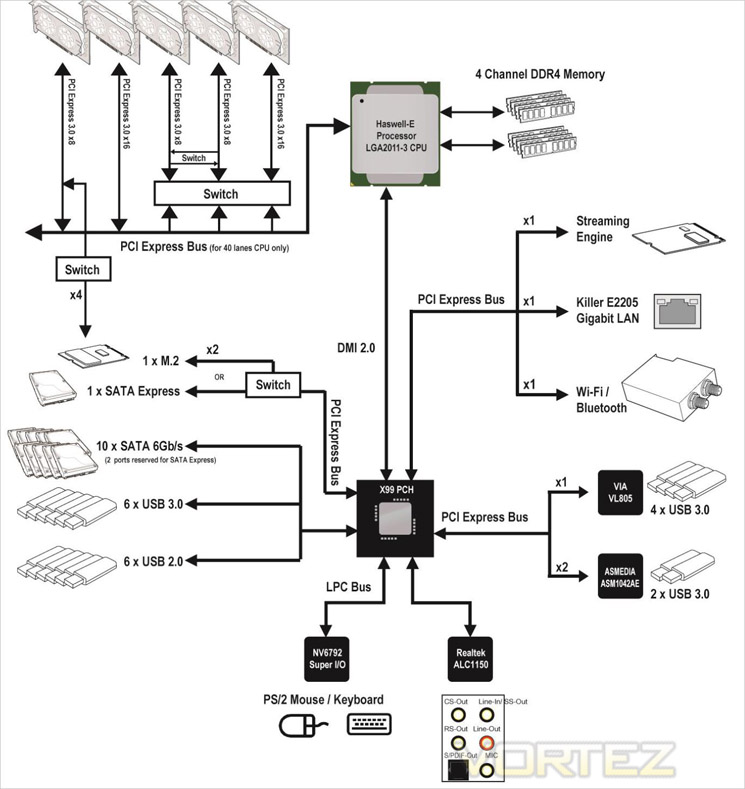
• 5 x PCIe 3.0 x16 slots, support up to 4-way mode
– 1-way mode: x16/ x0/ x0/ x0/ x0
– 2-way mode: x16/ x0/ x0/ x16/ x0*, 16/ x0/ x0/ x8/ x0**
– 3-way mode: x16/ x0/ x0/ x16/ x8*, x8/ x8/ x0/ x8/ x0**
– 4-way mode: x8/ x8/ x0/ x16/ x8*, x8/ x8/ x0/ x8/ x4**
* For the CPU that supports 40 PCIe lanes
** For the CPU that supports 28 PCIe lanes
Streaming Engine
• Supports H.264 hardware video/ audio encoding up to 1920×1080@ (24p/25p/30p)
Multi-GPU Support
• Supports 4-Way AMD® CrossFireTM Technology*
• Supports 4-Way NVIDIA® SLI™ Technology (For the CPU that supports 40 PCIe lanes)
• Supports 3-Way NVIDIA® SLI™ Technology (For the CPU that supports 28 PCIe lanes)
* Supports Windows 7 and Windows 8/ 8.1
Storage
• Intel X99 Express Chipset
• 10 x SATA 6Gb/s ports (2 ports reserved for SATA Express port)*
– SATA1~6 support RAID 0, RAID 1, RAID 5 and RAID 10
– SATA7~10 ports only support IDE mode and AHCI mode.
– Supports Intel® Smart Response Technology (Windows 7/ 8/ 8.1)
• 1 x SATA Express port*
• 1 x M.2 port, supports up to 32Gb/s speed**
– M.2 port supports M.2 SATA 6Gb/s module
– M.2 PCIe interface does not support RAID 0, RAID1, RAID 5 and RAID 10.
*The SATA Express port or SATA5~6 ports will be unavailable when installing the M.2 SATA interface module in the M.2 port.
** Intel RST does not support PCIe M.2 SSD with Legacy ROM.
USB
• Intel® X99 Express Chipset
– 6x USB 3.0 ports (2 ports on the back panel, 4 ports available through the internal USB 3.0 connectors*)
– 6x USB 2.0 ports (2 ports on the back panel, 4 ports available through the internal USB 2.0 connectors)
• AsMedia ASM1042AE
– 2 x USB 3.0 ports on the back panel
• VIA VL805
– 4x USB 3.0 ports on the back panel
* Internal JUSB3 connector supports MSI Super Charger.
Audio
• Realtek® ALC1150 Codec
– 7.1-Channel High Definition Audio
– Supports S/PDIF output
LAN
• 1 x Killer E2205 Gigabit LAN controller*
*The Killer Network Manager is only available for Windows 7/ 8/ 8.1 currently. The supported drivers for other operating systems would be available on the website if provided by vender.
Wireless LAN
• Wi-Fi/Bluetooth expansion module with Intel Dual Band Wireless-AC 7260 chip.
– Supports Wi-Fi 802.11 a/b/g/n/ac, dual band (2.4GHz, 5GHz) up to 867 Mbps speed.
Bluetooth
• Wi-Fi/Bluetooth expansion module with Intel Dual Band Wireless-AC 7260 chip.
– Supports Bluetooth v4.0 (includes BLE* and Bluetooth 3.0+HS)
* BLE: Bluetooth Low Energy
Internal I/O Connectors
– 1 x 24-pin ATX main power connector
– 1 x 8-pin ATX 12V power connector
– 1 x 4-pin ATX 12V power connector
– 10 x SATA 6Gb/s connectors
– 1 x M.2 connector
– 1 x SATA Express connector
– 2 x USB 2.0 connectors (supports additional 4 USB 2.0 ports)
– 2 x USB 3.0 connectors (supports additional 4 USB 3.0 ports)
– 2 x 4-pin CPU fan connectors
– 3 x 4-pin system fan connectors
– 1 x Front panel audio connector
– 2 x System panel connectors
– 1 x TPM module connector
– 1 x Chassis Intrusion connector
– 9 x V-Check connectorsts
– 1 x Clear CMOS jumper
– 1 x Power button
– 1 x Reset button
– 1 x OC Genie button
– 1 x Multi-BIOS switch
– 1 x OC Genie mode switch
– 1 x Audio power switch
– 1 x Slow mode booting switch
– 1 x 2-Digit Debug Code LED
– 1 x Wi-Fi/Bluetooth module connector
Back Panel I/O Ports
– 1 x PS/2 keyboard/ mouse combo port
– 2 x USB 2.0 ports
– 1 x Clear CMOS button
– 8 x USB 3.0 ports
– 1 x LAN (RJ45) port
– 1 x Optical S/PDIF OUT connector
– 5 x OFC audio jacks
BIOS
• The motherboard BIOS provides “Plug & Play” BIOS which detects the peripheral devices and expansion cards of the board automatically.
• The motherboard provides a Desktop Management Interface(DMI) function which records your motherboard specifications.
Dimension
• 12 in. x 10.4 in. (30.5 cm x 26.4 cm) EATX Form Factor
Mounting
• 9 mounting holes.
Packaging & Accessories
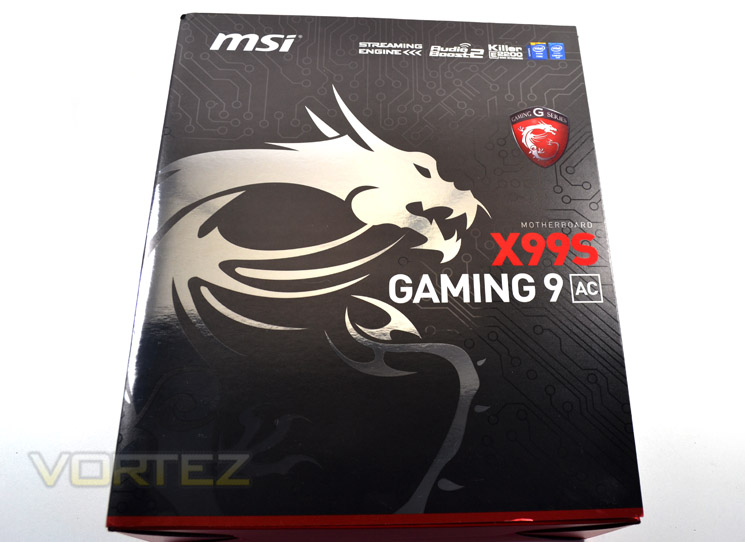
The exterior packaging of the MSI X99s Gaming 9 AC is excellent. Firstly, it is very robust without being excessively big. A handy carry handle is included to making transportation very easy.
The design is sublime with MSI’s red and black Gaming theme carried very well throughout the packaging. The mat black surface has contrasting glossy traces with metallic red sections and chromed Dragon logos enhancing the products visuals.
The front of the package is well laid out and attractive to the eye. There a basic features uppermost with the product title on the boxes midriff.
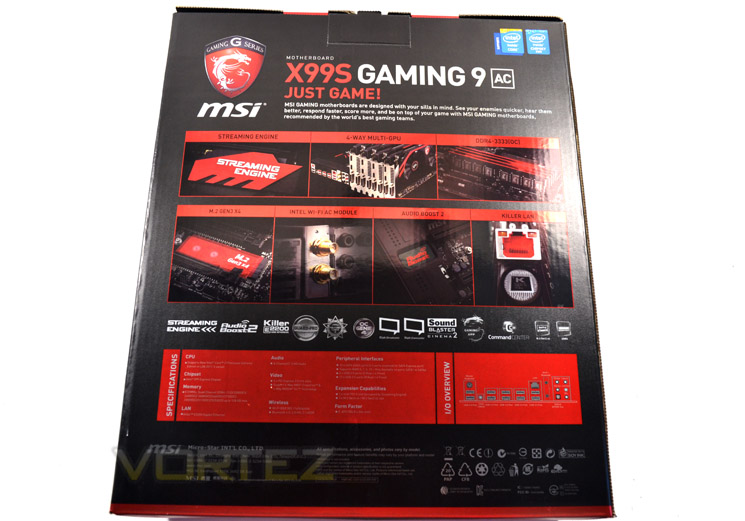
The rear of the package goes into great detail, showing off the main extra features of the Gaming 9 AC model such as Killer LAN, Wi-Fi, Streaming engine and m.2 Gen3 x4 to name a few.
Below this are the main specifications of the product while opening the flip lid which is secured by Velcro goes into even greater detail regarding the motherboards features.
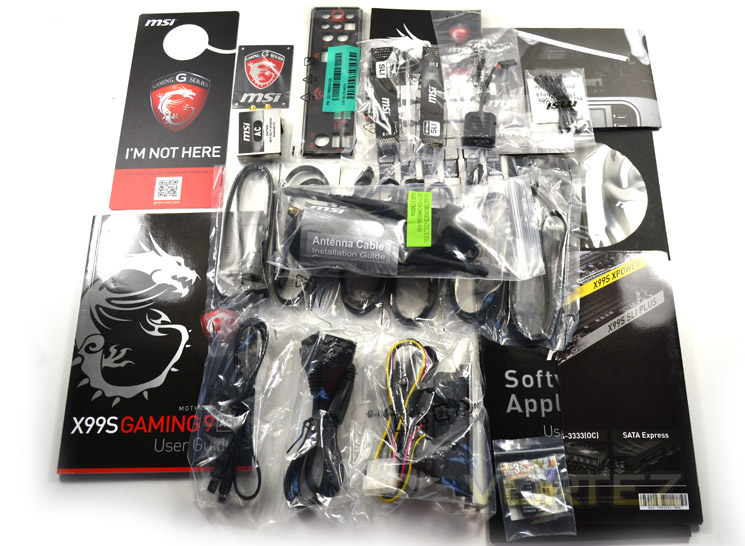
Excessive is an understatement here. Most motherboards will come with a wealth of cables and manuals but the Gaming 9S AC takes this to a whole new level. As you can see, most of the accessories are sealed in clear plastic bags so should reach you in perfect condition, especially when you consider that the accessories are kept separate from the mainboard in a compartmentalised package. There really is everything you could want from a motherboard accessory package here. MSI have even gone to such extremes as colour-coding the I/O back plate red and black so not to spoil the look of your colour co-ordinated PC case. Excellent!
First Look
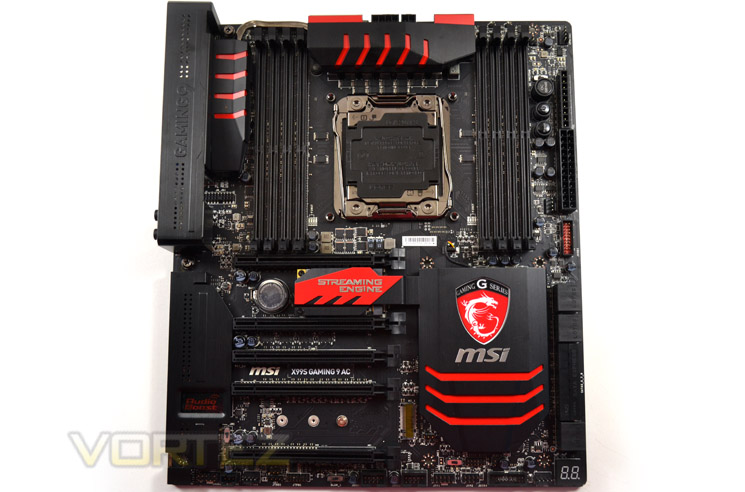
If red and black is your thing then this is a motherboard which will suit your requirements. The PCB is a matt black and has contrasting red trim throughout which is neither overdone nor over stated – ‘just right’ as Goldilocks would say.
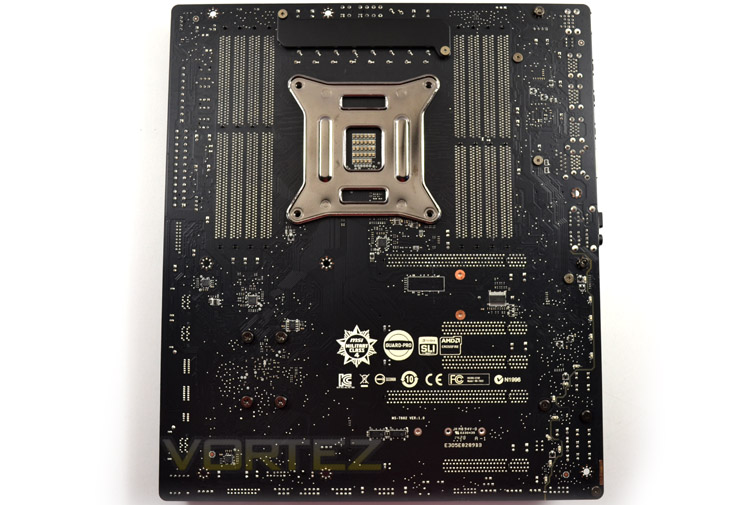
The rear of the motherboard is clutter free save for the CPU and VRM back plates with very few other exposed components.
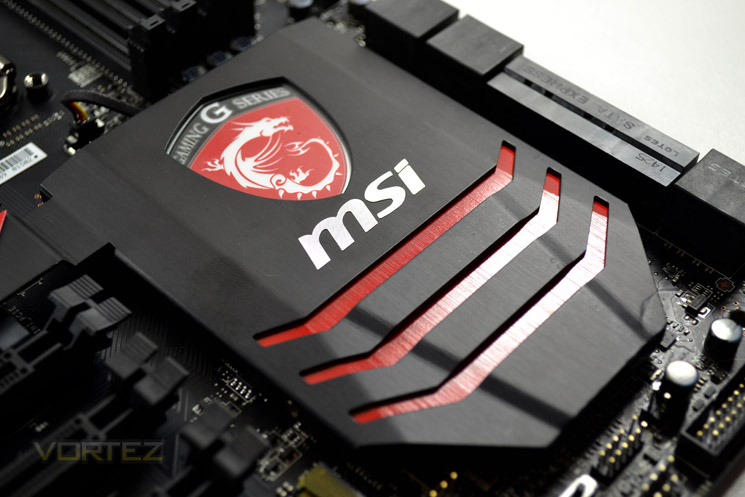
The MSI Gaming Shield takes pride of place, covering and cooling the X99 chipset. Strangely our example has a small dent which we hope is just a one-off as we cannot see this occurring during transit due to the excellent protection afforded by the packaging.
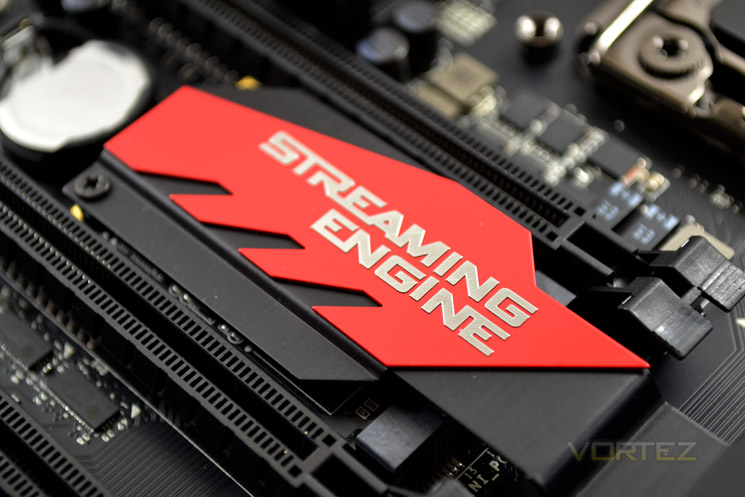
The red and black theme spreads to both the VRM cooling and the streaming engine cover plate. Even the I/O area receives a metal cover although this did not receive the same red/black louvre detailing and appeared to be more of an afterthought than serving any useful or even aesthetic purpose.
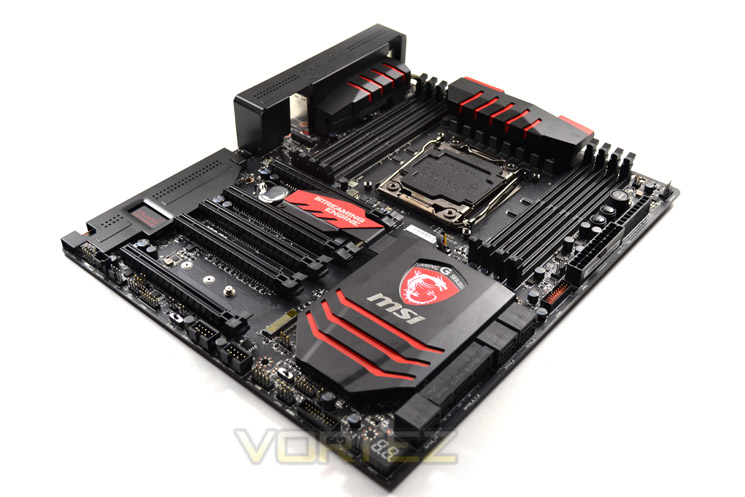
Overall, the MSI X99S Gaming 9 AC is a very attractive motherboard which is both aesthetically pleasing while remaining well laid out. Our only criticism would be the I/O cover which is attached through the same screw holes required to mount the motherboard to a case. While it is a simple affair to remove the plate and replace using case screws it is something we shouldn’t really have to do.
Closer Look (Socket Area)
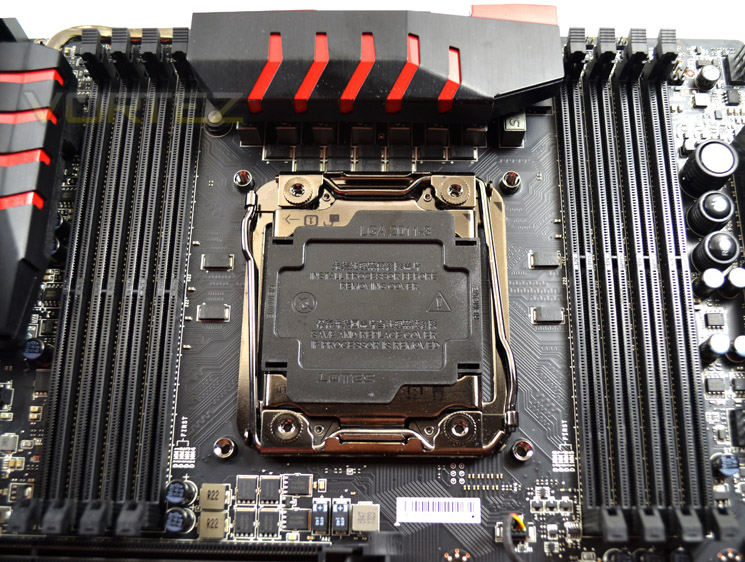
The CPU socket area is very clean with no solid caps in sight which will please the extreme cooling aficionados. The large VRM heatsink should not be high enough to pose too many problems for those looking to air cool although we would advise users of this platform looking to obtain high overclocks would do well to consider basic watercooling as a minimum due to the heat generated by these CPUs.
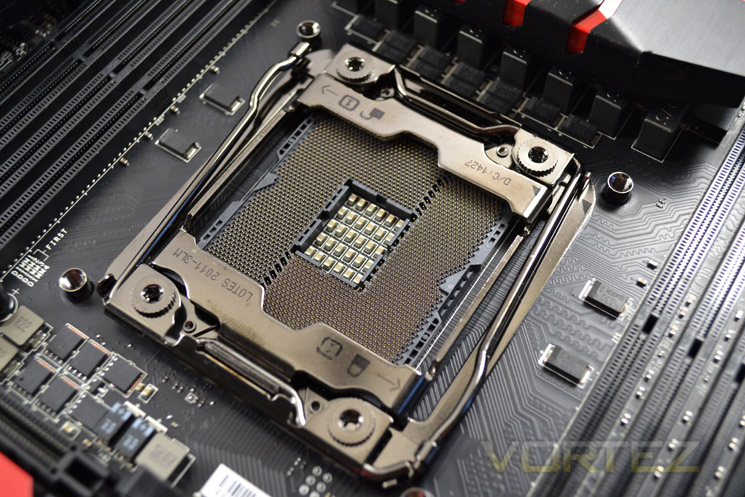
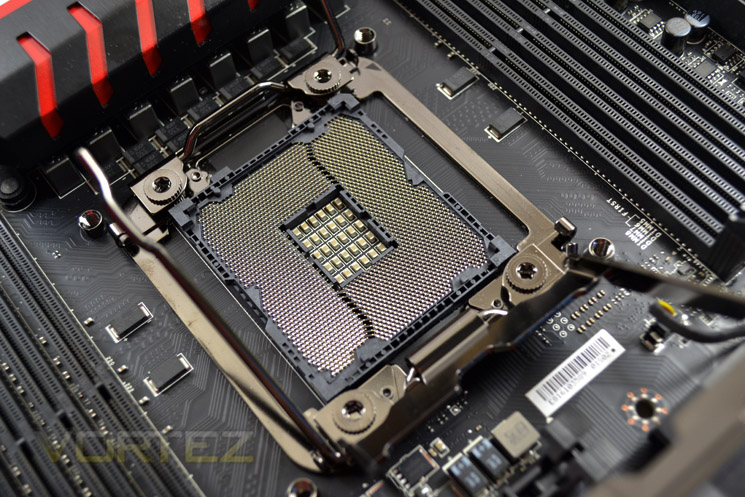
The new LGA2011 v.3 socket is near identical to prior sockets. The twin levers on the v.3 are angled slightly which may look a little odd but helps upon CPU installation. If you are familiar with this type of socket it should pose no problems however those new to Intel’s enthusiast platform would do well to peruse the manual beforehand to prevent bent pins and broken sockets as there is a lot of clamping force going on here.
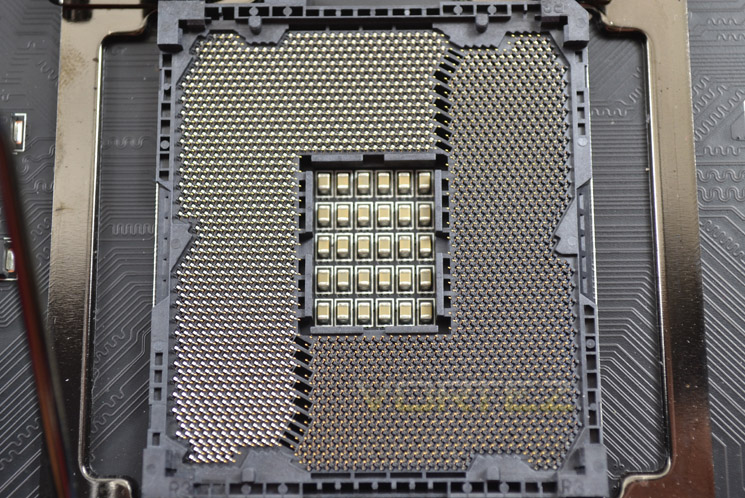
Above is a close-up of the new pin layout. Note that previous generation CPU’s will not work in the new socket. Aside from the redesigned pin layout, the CPU notches are aligned differently.
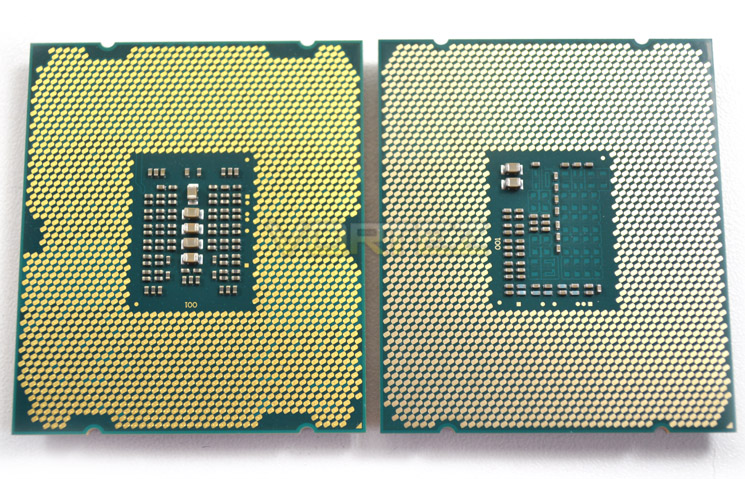
Pin out comparison of 4960X vs. 5960X
Closer Look (DDR4)
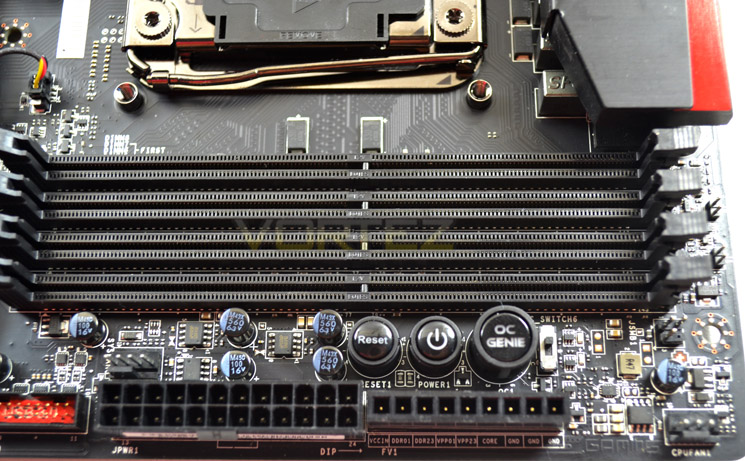
As with X79, Quad channel support is native to X99. The key difference here is that X99 support DDR4, a first for consumer motherboards. The bad news though is that these sockets are not backwards compatible with DDR3 sticks rendering your old kit useless for X99.
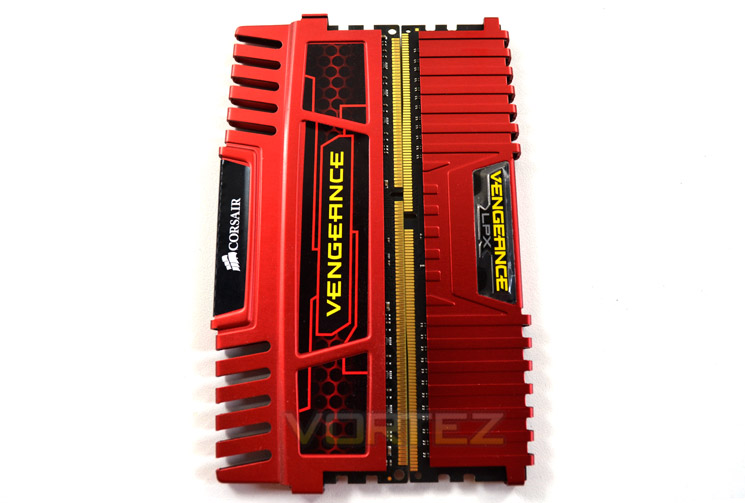
You can see above the difference in pins and notch configuration.
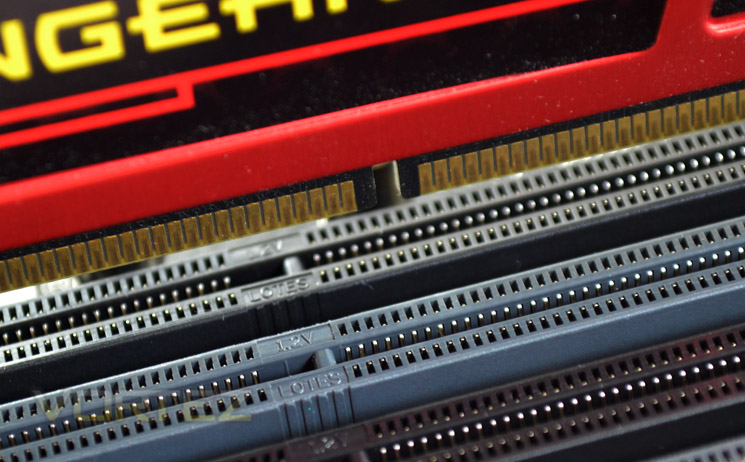
…Which is translated onto the motherboard memory slots (above).
Intel X99 officially supports 8GB sticks so a theoretical 64GB could be put together in a 8×8 configuration for 2x quad channels. We have just been informed that there are some manufacturers developing 16GB DDR4 sticks for x99 though so this means a whopping 128GB may soon be available to use which quite frankly is crazy! Add to this speeds surpassing 3GHz currently available and 4GHz in the works and there is little to compete with X99 as far as memory bandwidth, capacity and performance goes.
Closer Look (Motherboard Features)
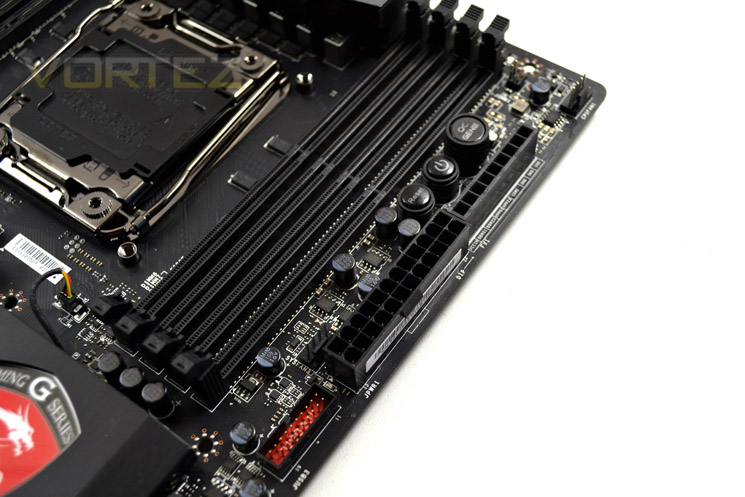
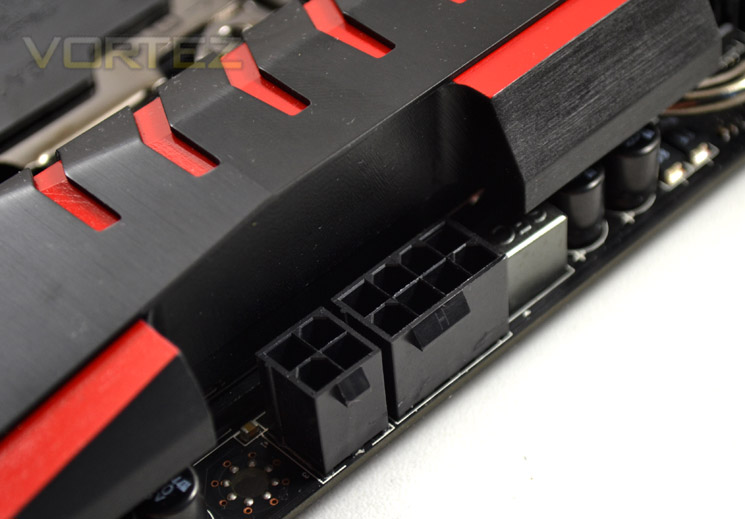
The MSI board features the usual 24 pin ATX power pin out to the right of the motherboard. We would have liked to have seen a side facing port here as this would assist in cable tidying. What we did find strange though was the addition of a four pin power socket to the traditional 8-pin CPU power. While the board will function readily on just the 8pin port (despite no notification in the manual stating this!), the additional 4 pin power may serve to grant better overclocking however, in our tests it did not affect overclocking performance at all. Perhaps extreme overclockers would benefit?
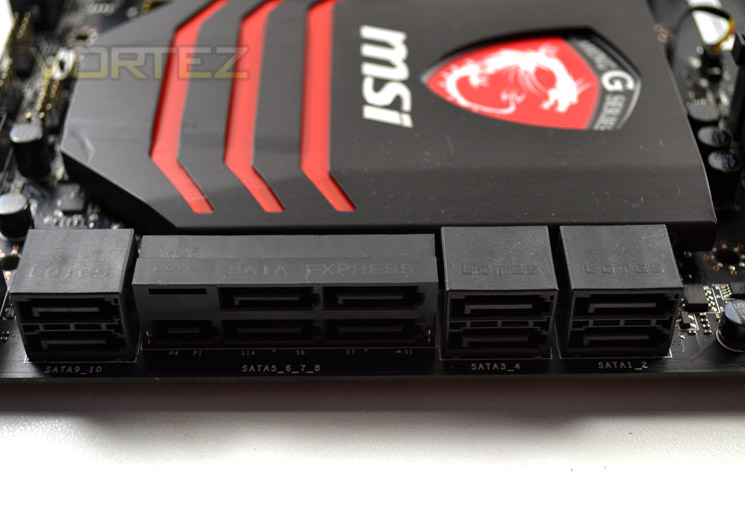
10 SATA 3.0 ports are available for use on this motherboard. One of which is SATA Express which works through PCIe. While there are currently no SATA drives fast enough to take advantage of this feature however, future proofing is what it is all about here. Raid 0,1,5 and 10 are supported on the 6 standard ports with the remainder supporting only IDE or AHCI.
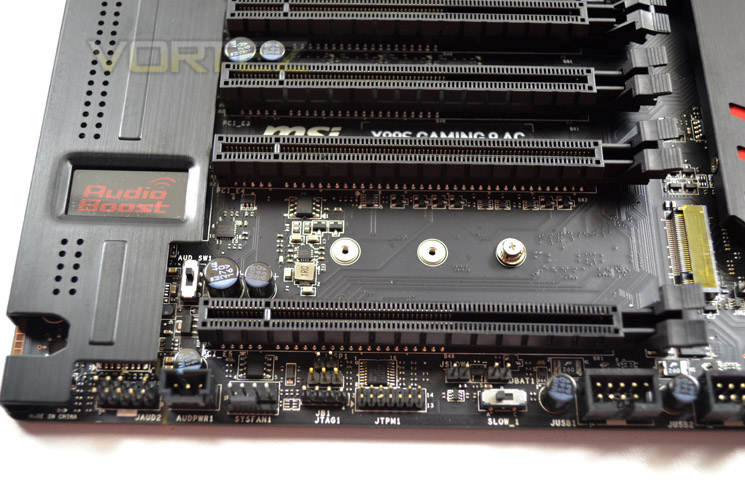
Additional storage is also afforded through the new M.2 Gen3 x4 which will allow throughput of up to 32GB/s which is 3 times as much bandwidth as Gen2 editions.
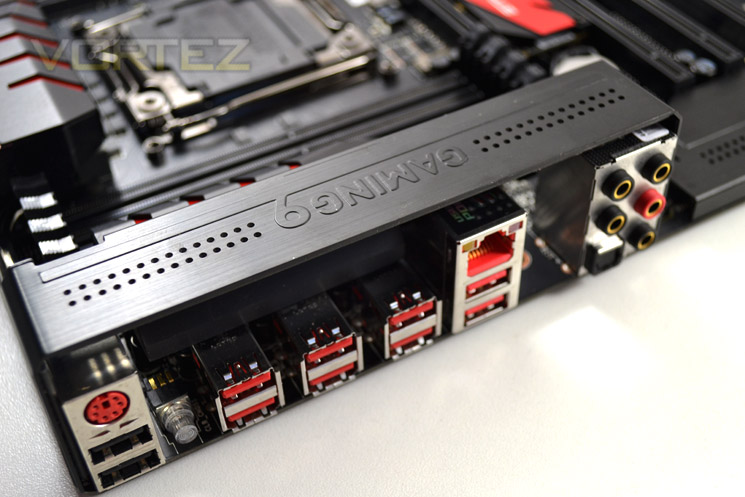
The I/O area is fairly busy providing:
– 1 x PS/2 keyboard/ mouse combo port
– 2 x USB 2.0 ports
– 1 x Clear CMOS button
– 8 x USB 3.0 ports
– 1 x LAN (RJ45) port
– 1 x Optical S/PDIF OUT connector
– 5 x OFC audio jacks
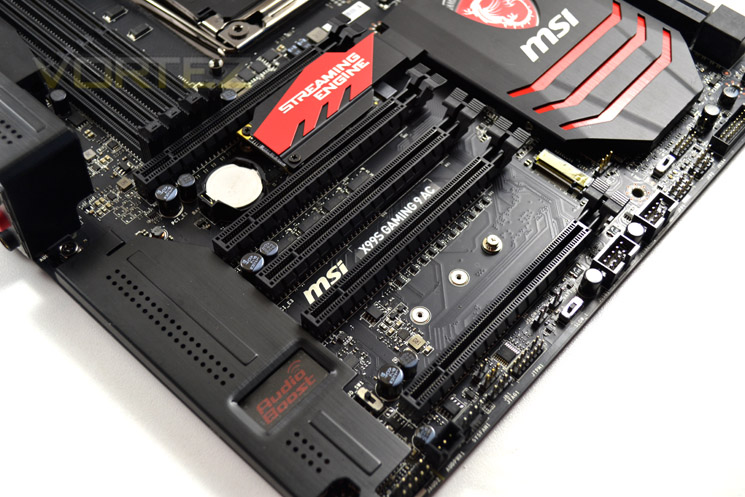
The on-board audio has a nice ‘Audio Boost 2 feature which when enabled and hooked up to an additional power source all but eliminates interference when using a USB audio device such as a USB headset. The reason for interference (amongst others) is the potential power drop to around 4.6v. The additional power provided by Audio Boost 2 ensures that 5v is consistently provided for clear, static free on-board audio.
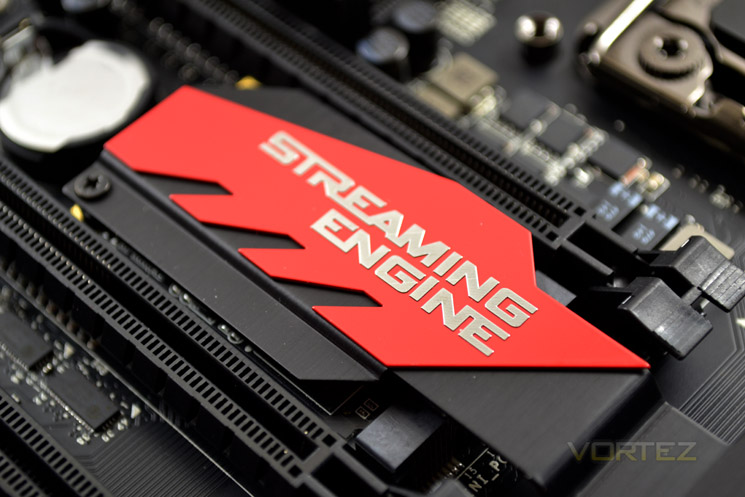
Lastly we come to a unique feature: MSI Streaming. X99, due to no on-board GPU and lack of Intel Quick Sync means that streaming your game while in game will be jittery at best. Thankfully for those who enjoy this valuable feature from other chipset, MSI have added a streaming engine, a dedicated piece of hardware to smooth out this performance, which perhaps most significantly does not affect your FPS in-game while competing product can lose up to 15% performance.
Detailed Look
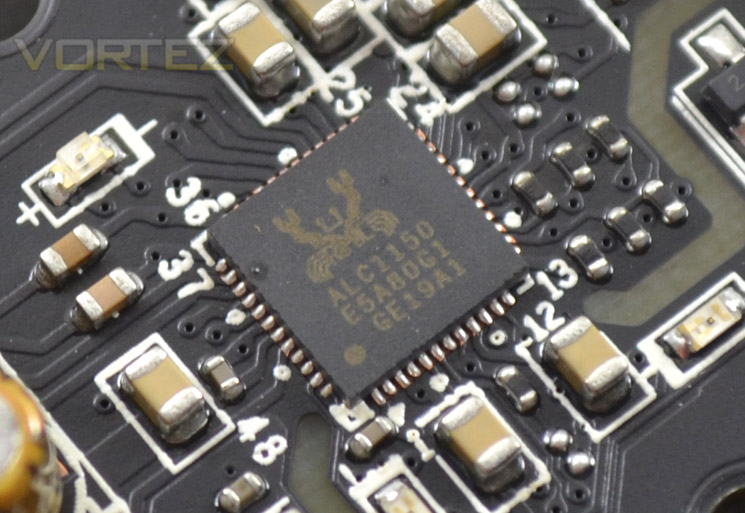
Audio comes courtesy of the Realtec ALC1150 codec coupled with the Creative Soundblaster Cinema 2. This in conjunction with the Audio Boost 2 hardware make this motherboard an excellent choice thanks to EMI Shielding, Dual AMPs, Nichicon Audio Capacitors and Golden Audio Connectors should you not have a separate sound card. Even if you do have a separate sound card we recommend you give the on-board a try out as you may very well be surprised at the quality.
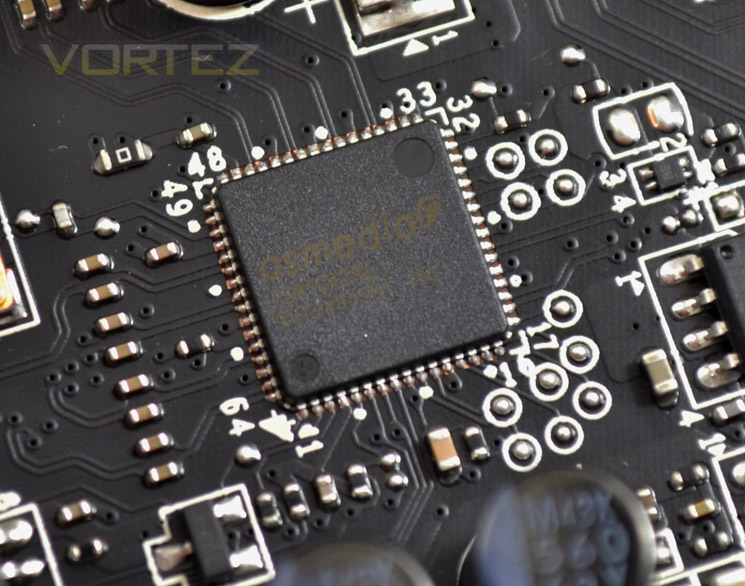
There are a smattering of ASMedia 1042 chips to be found on the motherboard which control some of the add-on USB 3.0 expansion ports.
Another USB host controller is the VLI805 chip.
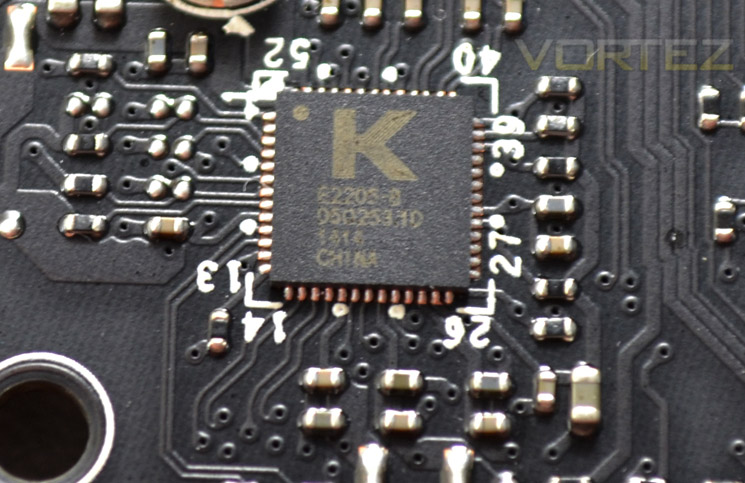
No prizes for what this little bad boy controls. The Killer E2205-B automatically detects and accelerates game traffic ahead of other network traffic which results in smoother, lag free gaming – crucial especially for gaming genres such as FPS.
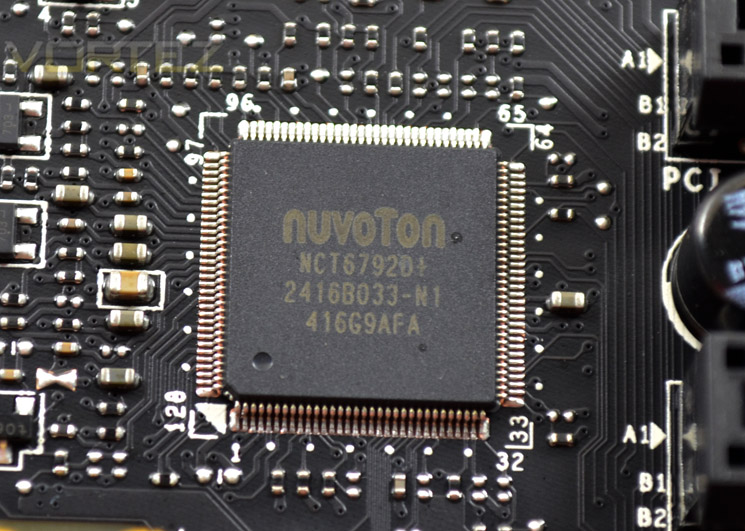
Above is the Super IO chip used on this mainboard, the Nuvoton NCT6792.
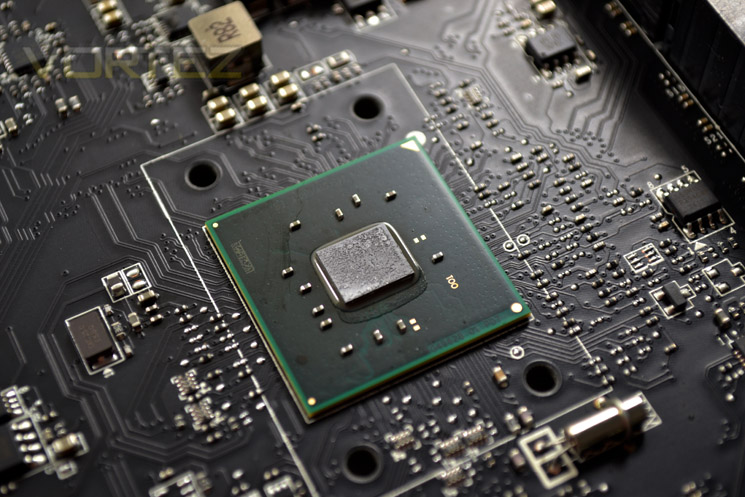
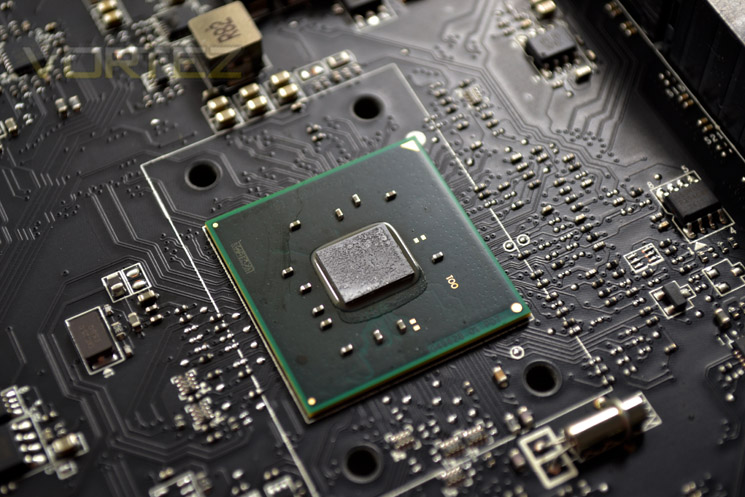
Perhaps the most important chip on the mainboard is the actual X99 chipset core. The example shown above had good contact to the heatsink. We were however, initially a little disappointed to find that the heatsink did not have any heatpipes attached to assist in heat dissipation. During testing however we found that this was not really necessary as the chipset did not get too hot.
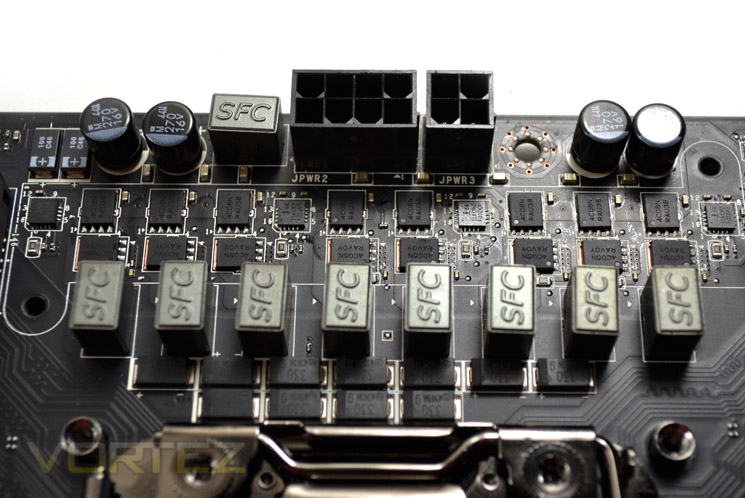
Finally, we come to the power circuitry of the mainboard. Full digital power delivery is the order of the day here served up for your pleasure. While far from the most complex power circuitry we have seen on a motherboard, core voltages were kept fairly constant allowing for stable overclocks. No doubt we will be testing more complex versions in the future but the heatsink didn’t get too hot during testing, thanks in part to the connect heatpipe to a further heatsink backing onto the I/O area.
Test Setup & Methodology
Motherboard: MSI X99S GAMING 9 AC
RAM: 16GB Corsair Vengeance LPX DDR4 @ 2666MHz 16-17-17-35 (CMK16GX4M4A2666C15R)
GPU: NVIDIA GTX 760
Power Supply: Corsair RM1000
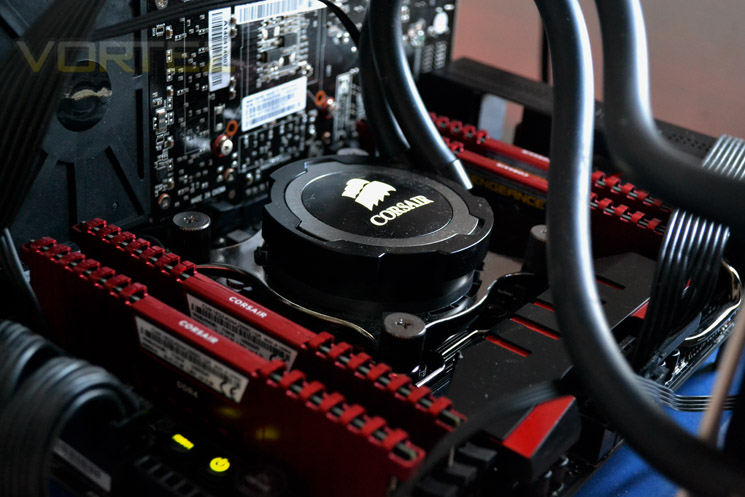
Cooler: Corsair H105
RAM: 16GB Corsair Vengeance LPX DDR4 @ 2666MHz 16-17-17-35 (CMK16GX4M4A2666C15R)
GPU: NVIDIA GTX 760
Power Supply: Corsair RM1000
Cooler: Corsair H105
Motherboards
As this is our first X99 review, the only comparison we can make is against our old X79 setup using both 4960X and 3960X processors. The motherboard for that test bench was the ASUS P9X79 and the clockspeeds are rated as per below:
X99:-
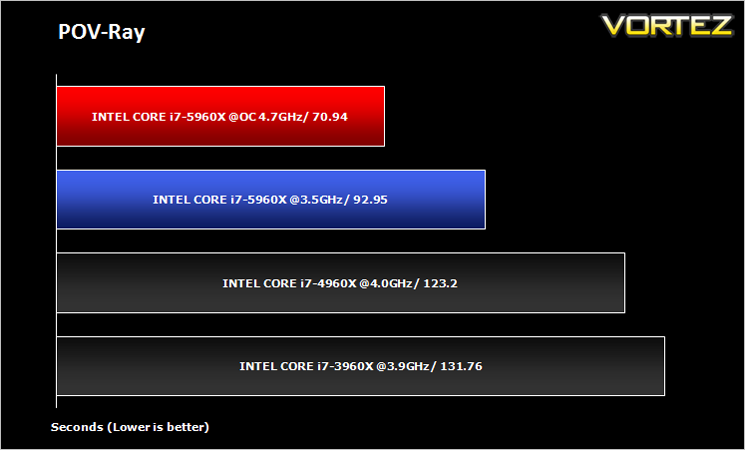
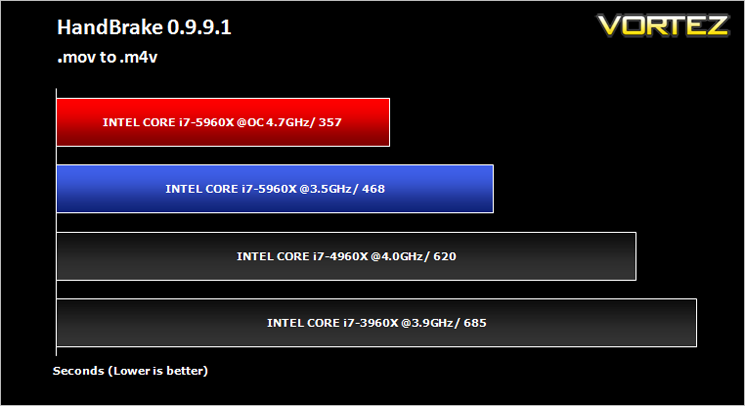
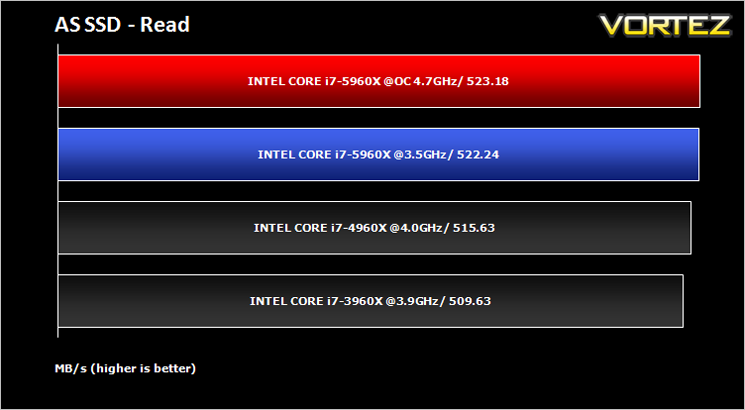
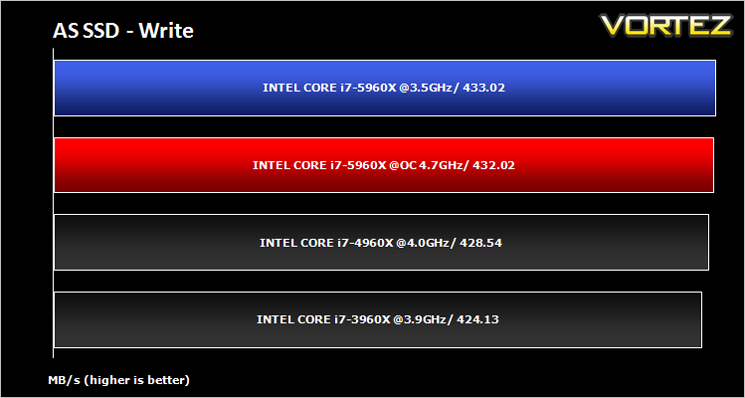
Intel Core i7 5960X (3.0/4.7GHz – Turbo Boost Enabled) Haswell E
Intel Core i7 5960X (3.0/3.5GHz – Turbo Boost Enabled) Haswell E
X79:-
Intel Core i7 4960X (3.6/4.0GHz – Turbo boost enabled) Ivy Bridge E
Intel Core i7 3960X (3.3/3.9GHz – Turbo boost enabled) Sandy Bridge E
As this is our first X99 review, the only comparison we can make is against our old X79 setup using both 4960X and 3960X processors. The motherboard for that test bench was the ASUS P9X79 and the clockspeeds are rated as per below:
X99:-
Intel Core i7 5960X (3.0/4.7GHz – Turbo Boost Enabled) Haswell E
Intel Core i7 5960X (3.0/3.5GHz – Turbo Boost Enabled) Haswell E
X79:-
Intel Core i7 4960X (3.6/4.0GHz – Turbo boost enabled) Ivy Bridge E
Intel Core i7 3960X (3.3/3.9GHz – Turbo boost enabled) Sandy Bridge E
Benchmarks
AIDA 64 – CPU & Memory/Cache Performance
SiSoft Sandra – Compute & Memory Performance
HandBrake – Encoding Performance
Pov-Ray – 3D Image processing Performance
Cinebench R15 – Image processing Performance
AS SSD SATA Performance
Futuremark 3DMark (Firestrike) – Graphical Performance
Futuremark PCMark 8 – Overall PC Performance
Battlefield 4, THIEF, Company Of Heroes 2 & GRID:2 – Gaming Performance
AIDA 64 – CPU & Memory/Cache Performance
SiSoft Sandra – Compute & Memory Performance
HandBrake – Encoding Performance
Pov-Ray – 3D Image processing Performance
Cinebench R15 – Image processing Performance
AS SSD SATA Performance
Futuremark 3DMark (Firestrike) – Graphical Performance
Futuremark PCMark 8 – Overall PC Performance
Battlefield 4, THIEF, Company Of Heroes 2 & GRID:2 – Gaming Performance
BIOS Exploration
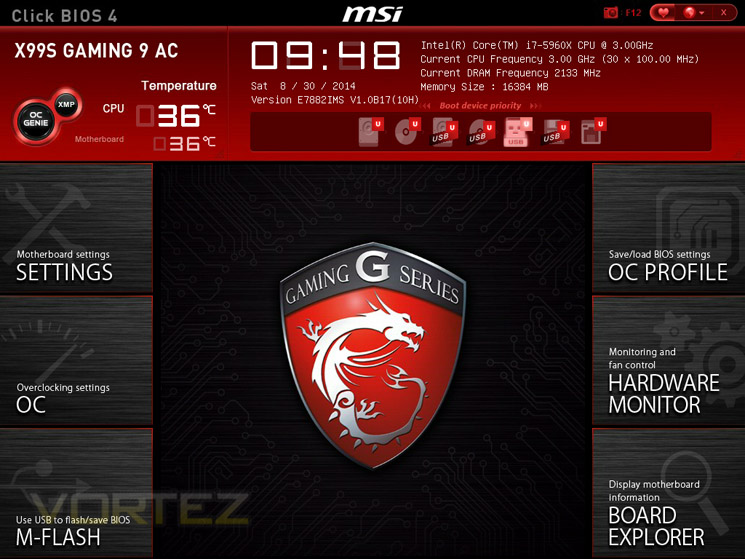
Below are some shots of the UEFI BIOS which if you have used an MSI UEFI BIOS before will be very familiar.
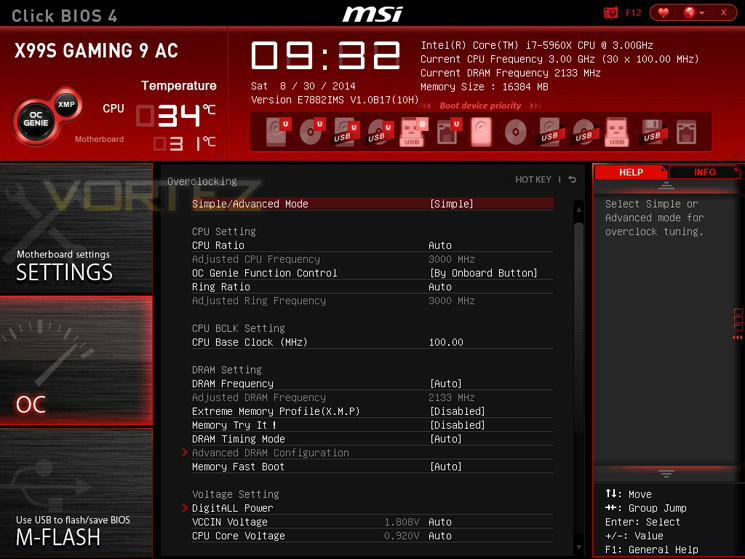
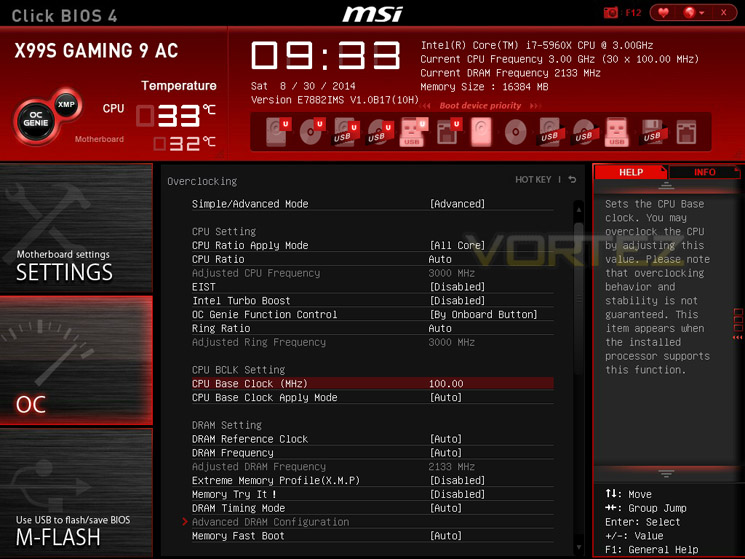
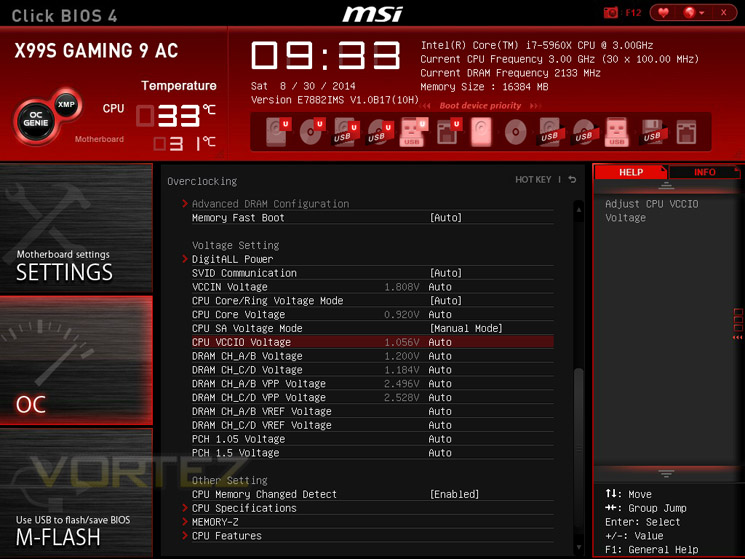
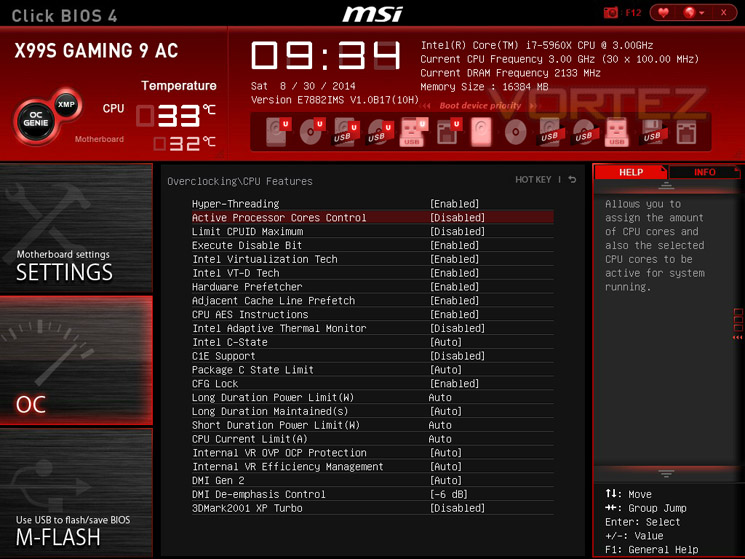
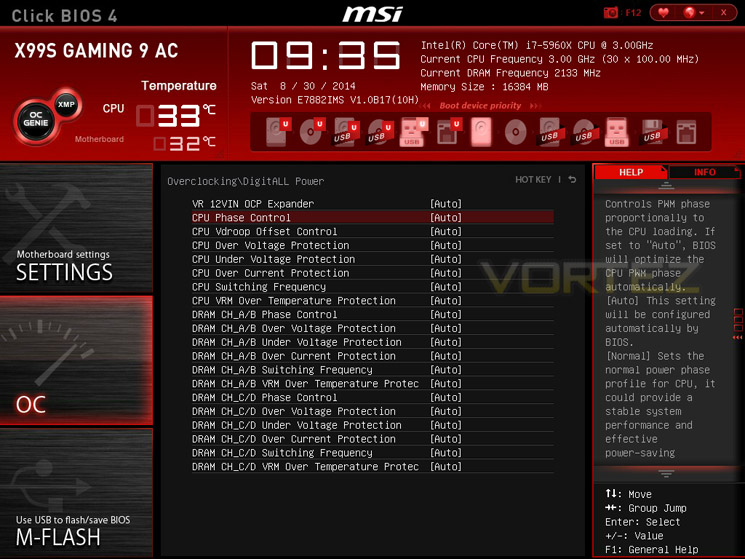
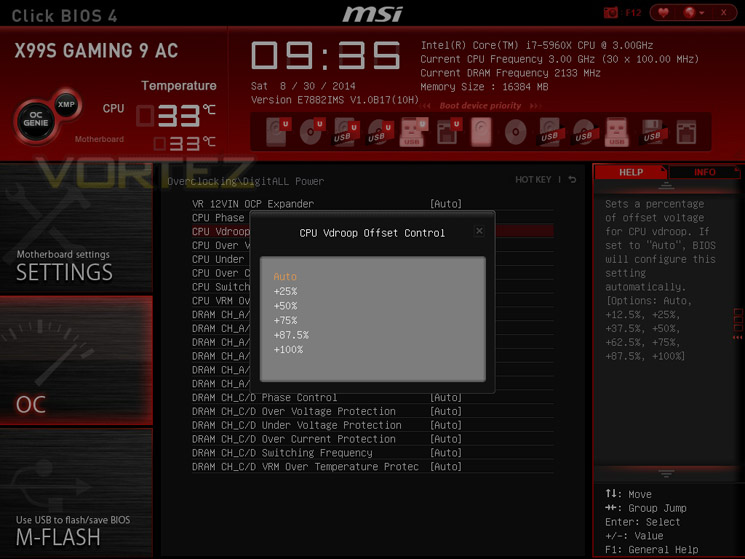
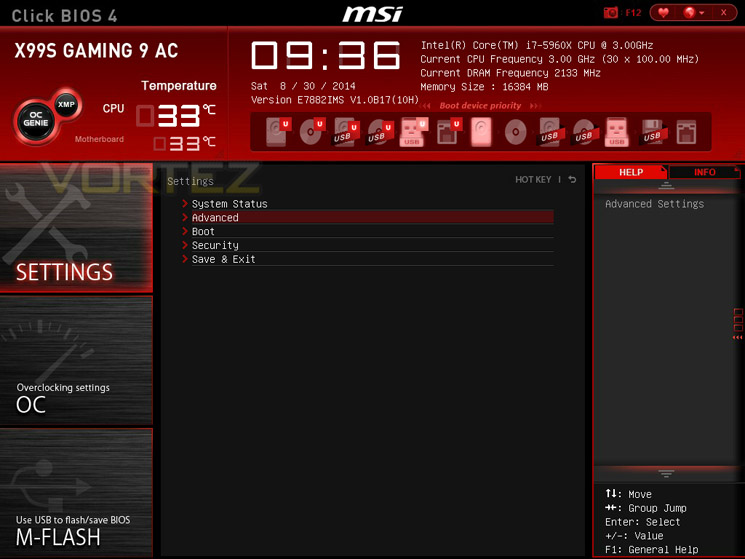
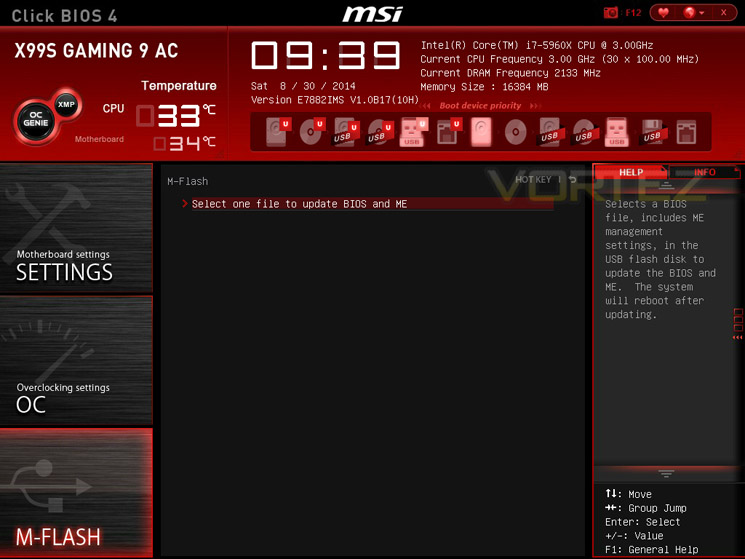
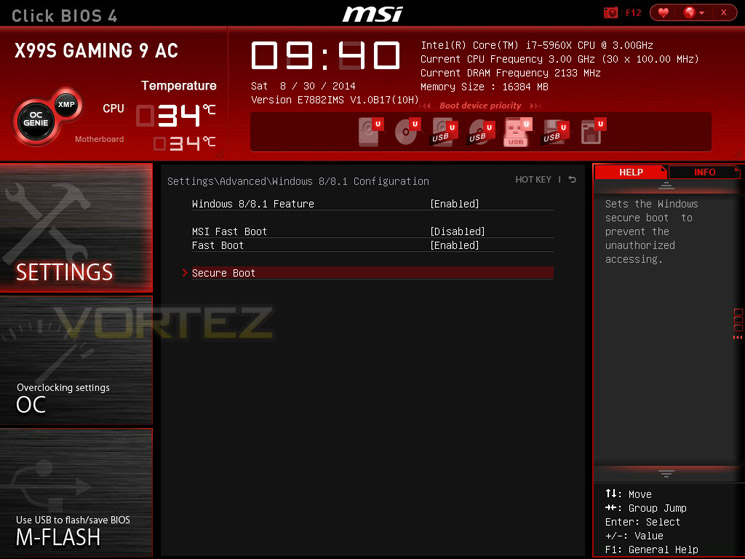
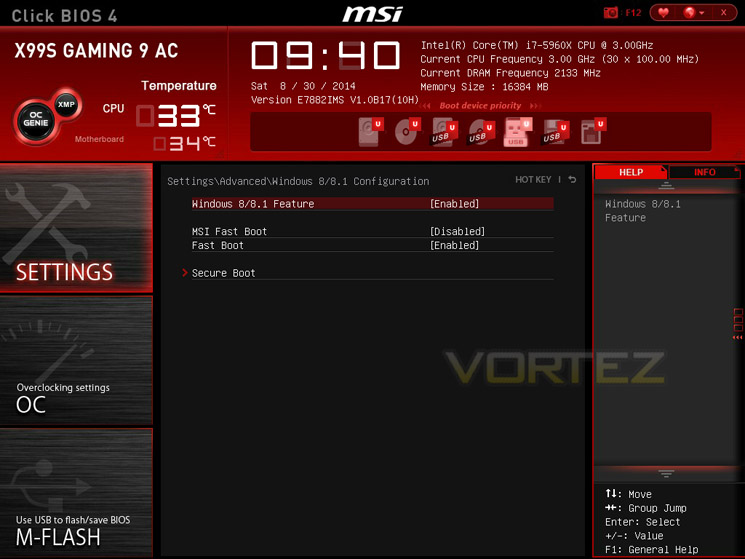
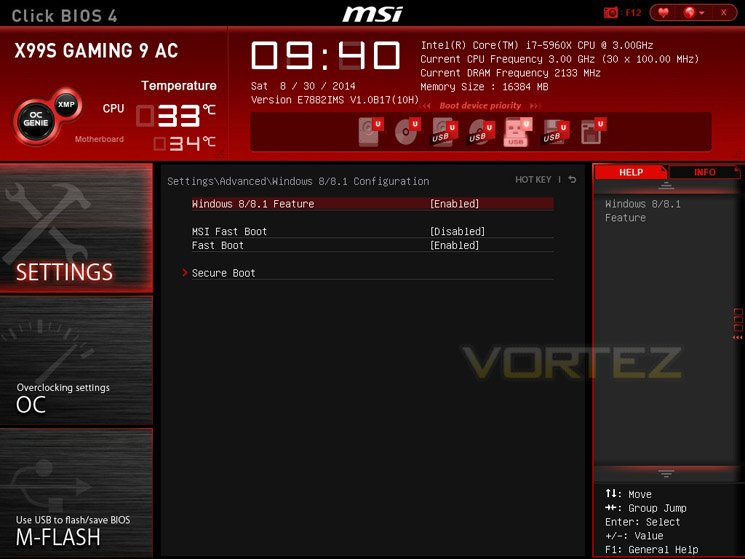
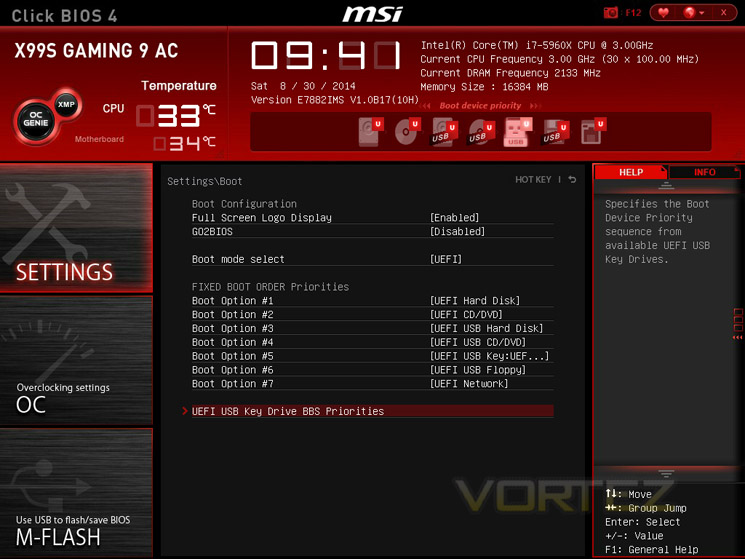
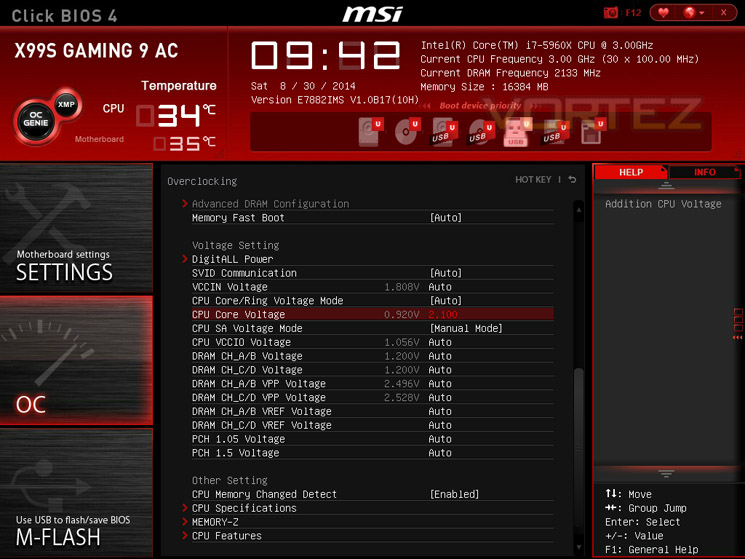
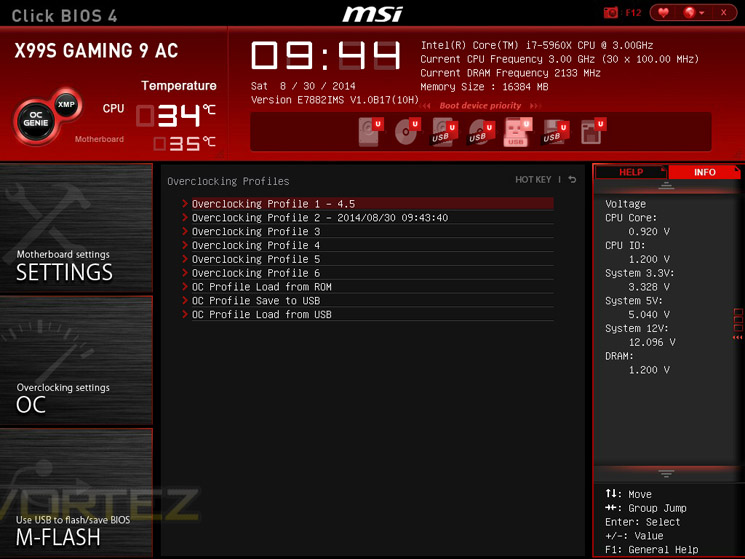
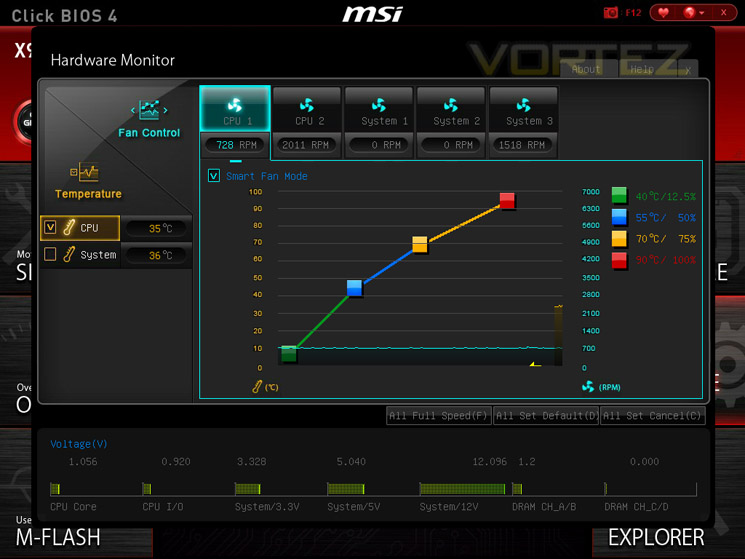
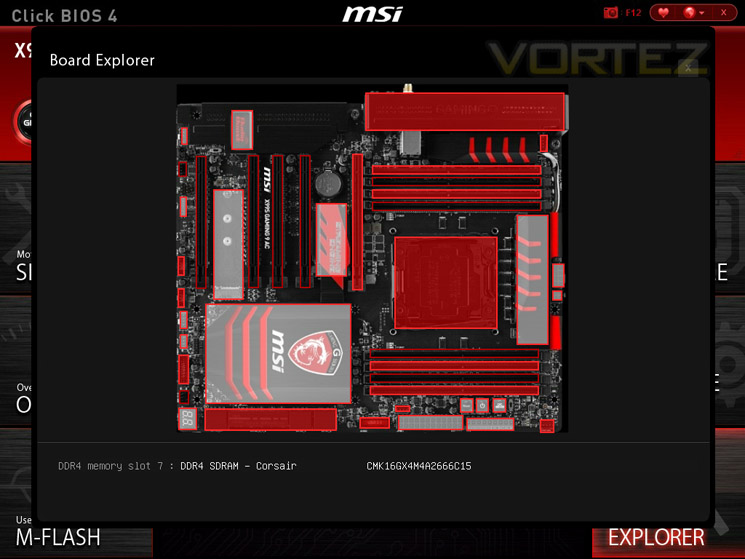
As you can see above there is a wealth of options available whether you are a novice overclocker or an accomplished expert. We liked the digital power options albeit a little nervous using the options for fear of damaging our components. Given time and experience of what is and isn’t safe we are sure this will help eek as much MHz out of our kit as possible. MSI do give you gentle warning signs for example, the voltage will turn red, if you go over spec. We would have preferred a more staggered colour scheme though say green, yellow, orange then red depending on the value set which would give the end user of just how dangerous the settings they are applying are rather than the safe/danger approach of just grey and then red.
With this BIOS, the overclockers amongst us were clearly at the forefront of the MSI technician’s minds. While not quite as in-depth as some of MSI’s competitors, there is a huge array of options available. We liked this approach as the BIOS not felt overwhelming or intimidating which a screen full of options you know nothing about can tend to do. Instead what MSI have done is present a well laid out, clear to follow (thanks to the comments box to the right) BIOS which should be easy enough for most to follow.
However, as with all motherboards we have ever reviewed, there are options to be found that can only be judged by experimentation as the description both in the motherboard manual and the BIOS itself is basic at best giving little clue as to what the setting actually does! Tip: If it is a voltage setting – do not increase unless you know what you are doing!
We liked the monitoring section which allowed us to set fan speed dependant on temperature or all of our fans to maximum at just one click of the mouse.
Overall, the BIOS was very well laid out and easy or as difficult to use as you want it to be. There have certainly been some improvements made with MSI’s UEFI implementation over the previous Gen X79 which was a little cumbersome at times to use. This time around, it is fluid both with keyboard input or mouse.
Another neat little feature is the ‘Board Explorer’. This basic but useful screen will tell you what devices, including basic info, you’ve plugged into the board which will help you if you are diagnosing a particular issue.
Overall, a very well laid out and impressive BIOS.
Overclocking & Temperatures
Extreme Edition overclocking changed significantly between Sandy Bridge-E and Ivy Bridge-E, unlocking both BCLK and CPU strap changes. Haswell E changes very slightly again, melding some of the techniques of Ivy Bridge-E and Haswell thanks to a fully integrated voltage controller (FIVR) which splits the input into the required rails. Motherboard partners are implementing broader overclocking features and these look set to be key differentiators in the battle for X99 market share, and we’ll take a closer look at each during detailed motherboard reviews. For now we’re concerned merely with baseline functionality.
Our test system is being cooled by the high quality Corsair Hydro H105, a LCS cooler with 240mm radiator that’s approximate to a high end air cooler such as the NH-D15 or entry level water cooling.
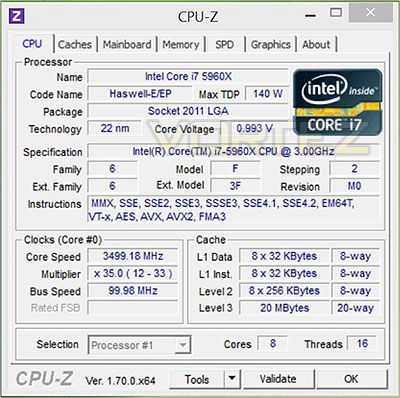
The starting point to work from is an idle speed at @ 1200MHz, base clock of 3000MHz and Turbo of 3.5GHz (shown). The down clocking isn’t quite as aggressive as Haswell (which will idle at 800MHz), but should still provide a decent level of power saving in the long run. Default voltage was 0.993, memory at 2666MHz (DDR4).
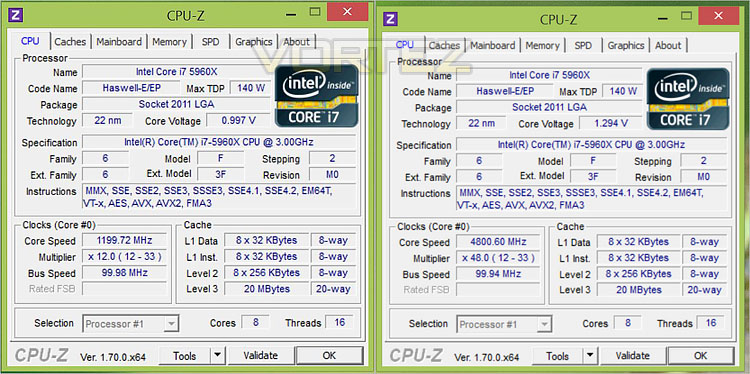
Due to a limited time frame we concentrated on pushing the CPU multiplier rather than significantly adjusting the BCLK and CPU strap. This allowed us to boot the system at a relatively unstable 4.8GHz quite easily, with 4.7GHz @ 1.4V being a stable overclock that we were comfortable benching at. Small incremental adjustments were made via base clock frequencies however, large jumps made the system unstable as with X79 so overclocking success tended to be via multiplier adjustments alone.
There are a host of digi-power options to tweak along with the CPU/Overclocking features but again due to time constraints we were reluctant to delve deeply into. We did fiddle around with a few of the better known features which gave us enhanced stability so given more time we are certain that these features will become really useful in attaining the very highest overclocks.
A very neat feature in the BIOS is the BIOS GO function. This allows us to boot straight back into BIOS rather than manually entering via repeatedly smashing the.del key.
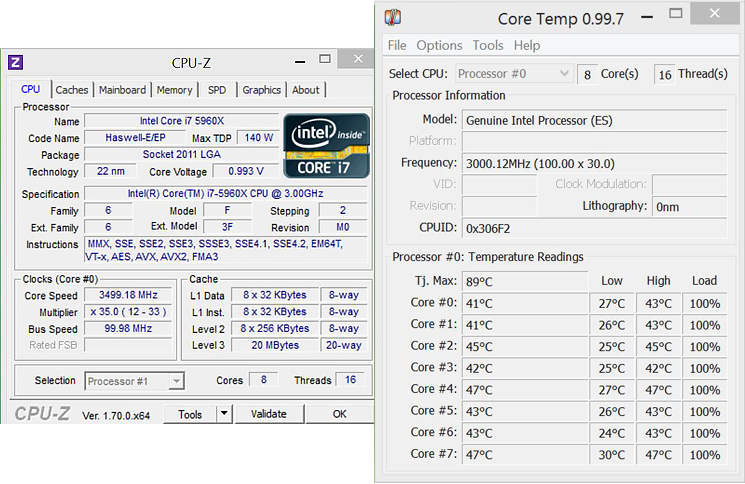
Stock load temperatures reached a core maximum of 47C under long term benchmarking, easily within the acceptable level with adequate cooling. From this we can assume that there’s plenty of scope for overclocking purely on a temperature basis.
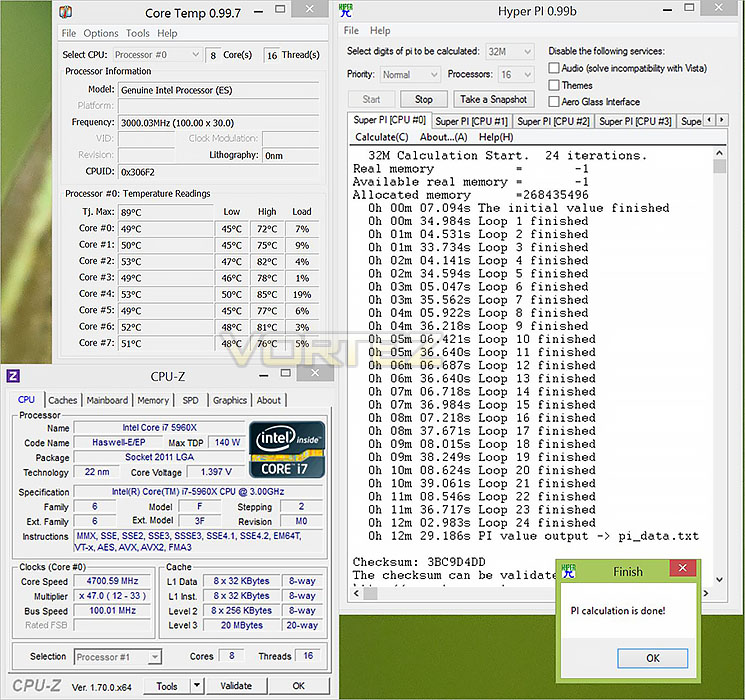
Temperatures under overclock voltages and speeds reached a toasty 85C, compared to a chill 71C for a similarly heavily overclocked Core i7-4960X.
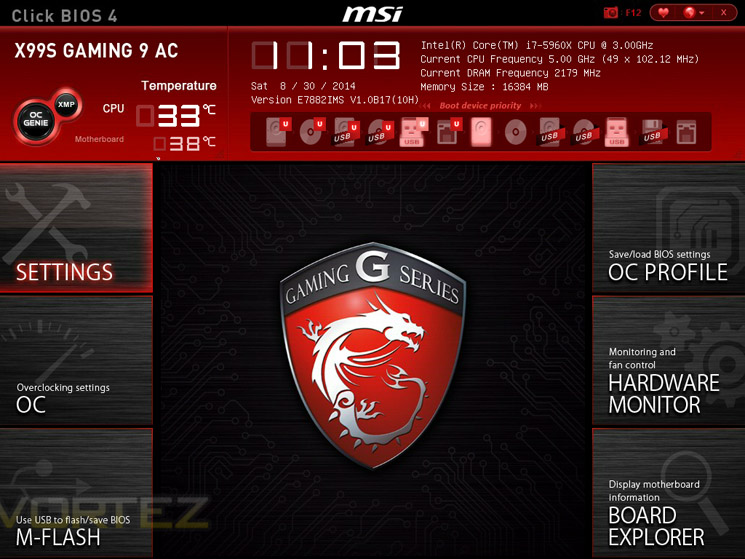
We did manage to hit 5GHz, well sort of. We managed to boot into a BIOS environment but attempting to grab a screen shot in Windows at this speed was unattainable I’m afraid, at least at our pre-defined max vCore of 1.4v. We have seen reports of clockspeeds over 6GHz with a CPU killing 1.7v and extreme cooling however, we were pretty much at our thermal threshold using our current cooling so regardless if we pushed more vCore through the chip, we believe throttling would certainly have become an issue and thus claiming a 5GHz clockspeed would not be entirely honest if the CPU is throttling.
Overall, Overclocking with the MSI X99S Gaming 9 AC was a pleasure. BIOS recovery was excellent with bootable states returning almost every single time should we become too ambitious. The one occasion it didn’t (due to base clock adjustments), a simple push of the CMOS clear button on the I/O panel allowed use to get the system back up and running in no time and thanks to the OC profiles stored, we could pre-load our last good settings.
Windows overclocking software & monitoring
We don’t normally recommend overclocking while within an Windows operating system environment because it could potentially corrupt your install and more often than not is simply not as efficient as using the BIOS. It is to this end we would recommend most users to familiarise themselves with the BIOS as it is still our belief that this method is still the best way to overclock a motherboard.There are however occasions when overclocking in windows is useful. We call this ‘dirty overclocking’. Why dirty? Well loading an operating system is stressful in itself and after surpassing the initial boot stage would be our second level in assessing a stable overclock. After all, unless you intend on keeping your PC on 24/7, any overclock is useless if the PC won’t even boot right?
Once in windows however you can usually push an overclock further for that CPU-Z validation shot or simply to try out a few settings.
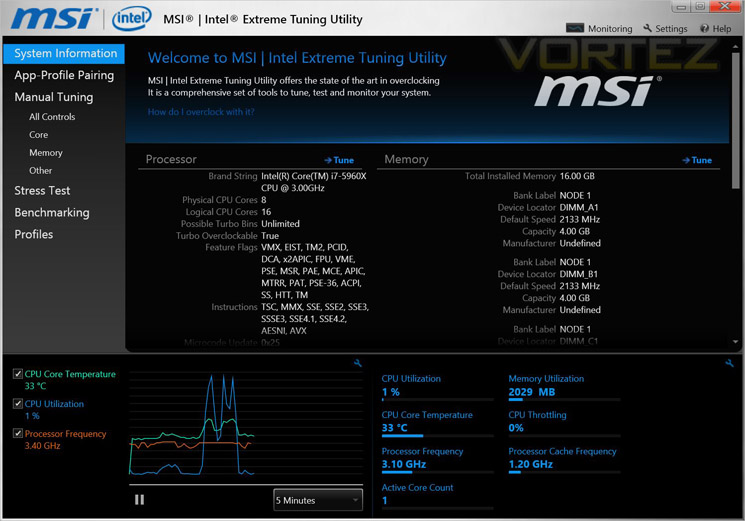
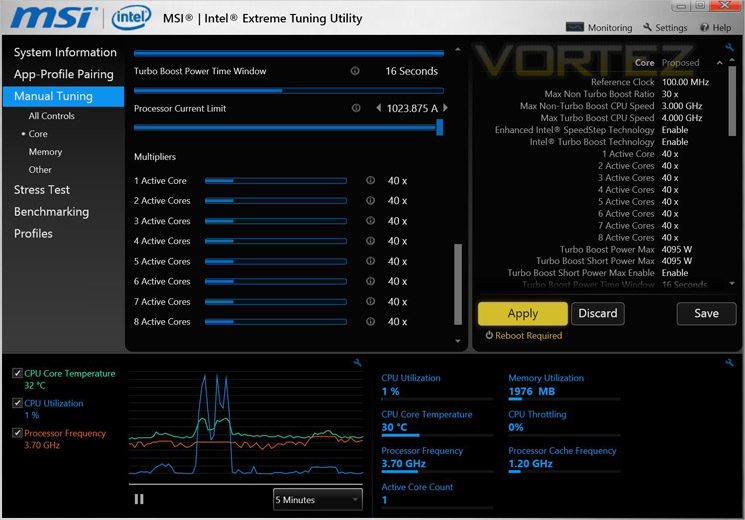
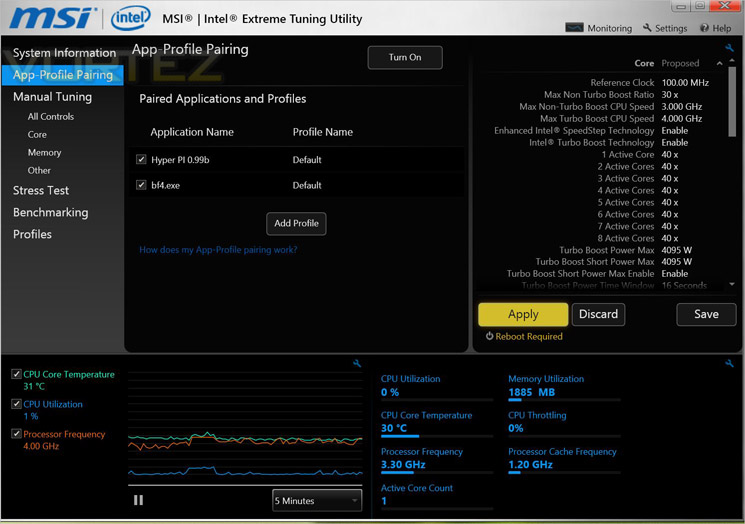
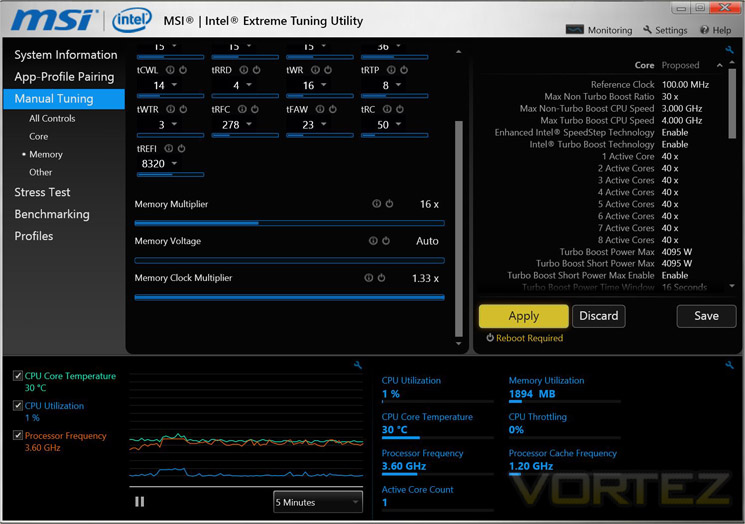
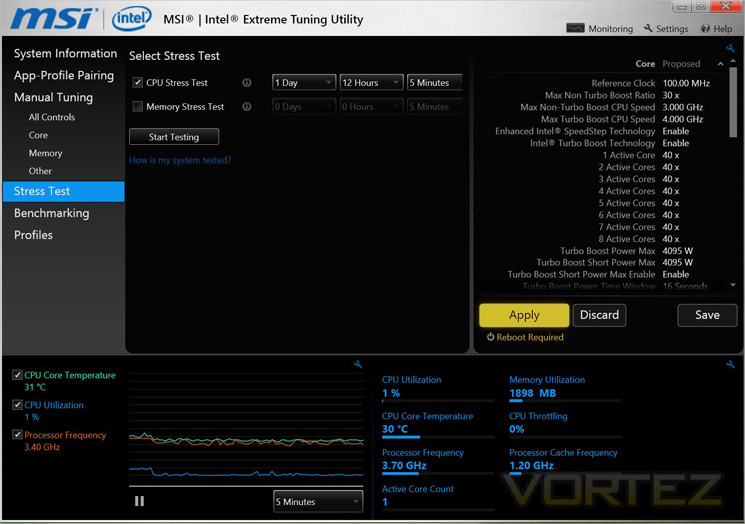
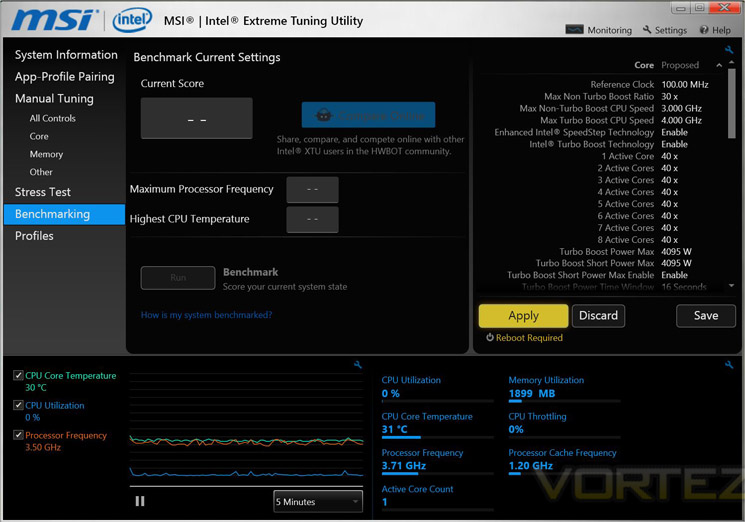
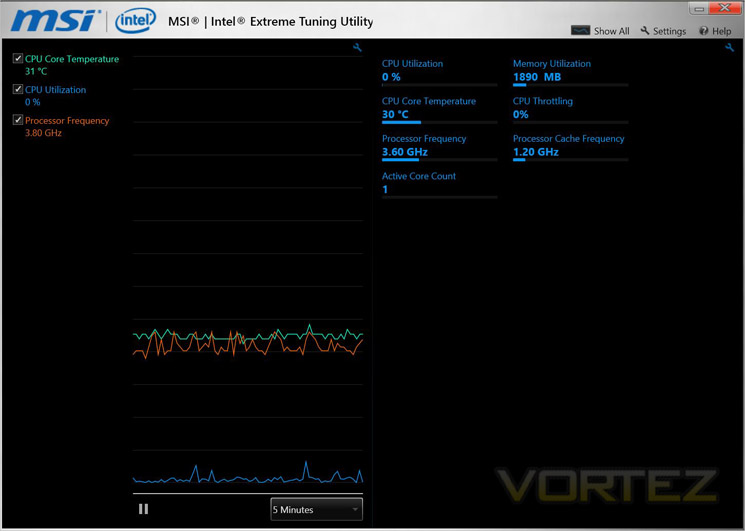
The MSI Intel Extreme Tuning Utility allows the end user to play with many of the more basic overclocking settings found in the BIOS. Better still, some of these settings will ‘latch’ within a windows environment such as CPU multiplier. Other settings will however require a reboot which negates the usefulness of such software in our opinion. To make amends though we liked the addition of Prime95 as a stress test which you can also set to run for a specific time to match your own interpretation of what length of time is required before classing your overclock as truly stable. For us, an overclock is stable if it will run the applications YOU use without crashing or corrupting files. Simply put what is stable for one person will not be stable for another but it is nice to have this option to prove the naysayers wrong regardless.
Once you have a stable overclock, you can then benchmark this overclock and pitch and compare it against other users of Intel’s XTU online.
Benchmarks: Power Consumption
To complete our power consumption tests we enabled all of the key features on the mainboard and let the system rest for 10 minutes within a windows environement before taking a reading from the plug to the PSU. This gives us our system idle reading. to obtain our load results we ran HyperPI (32m) on all cores taking a reading after 5 minutes with all CPU cores loaded to 100%
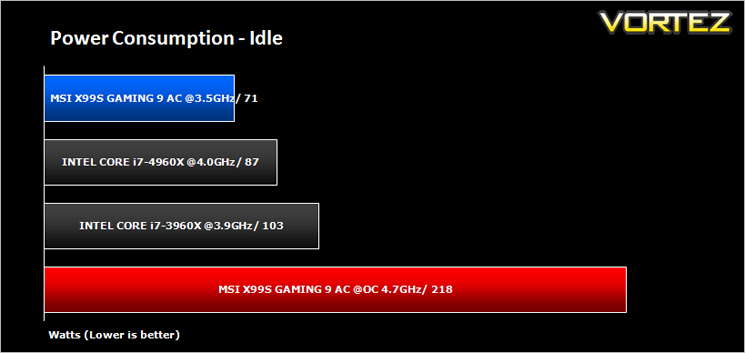
Note: For overclocked conditions CPU multiplier was set to fixed hence much higher idle consumption.
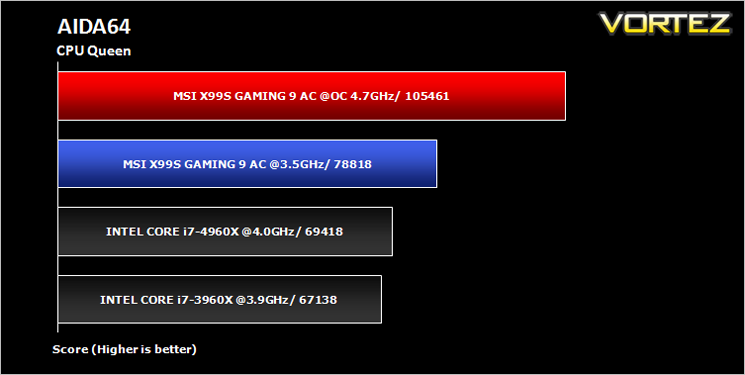
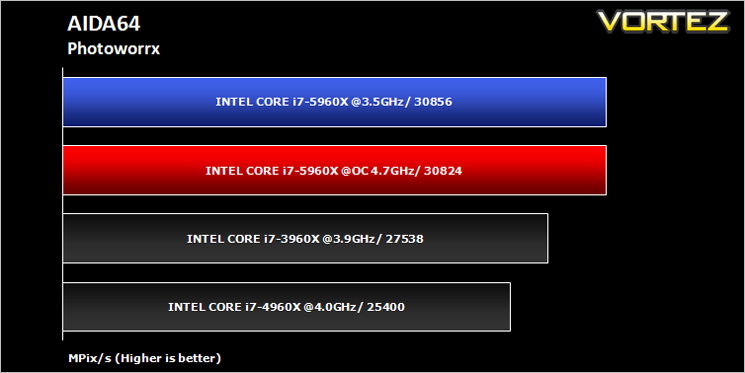
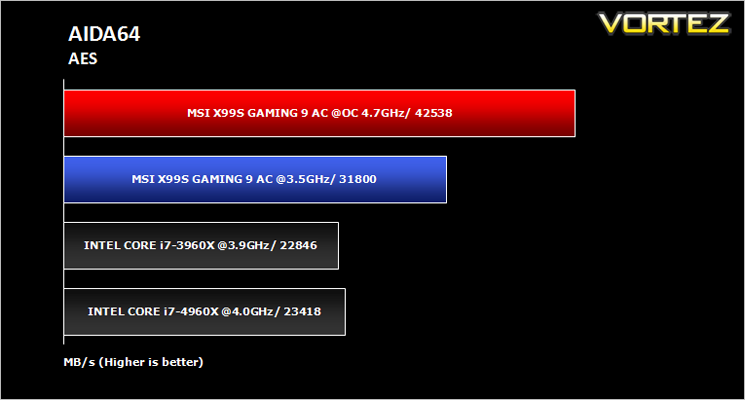
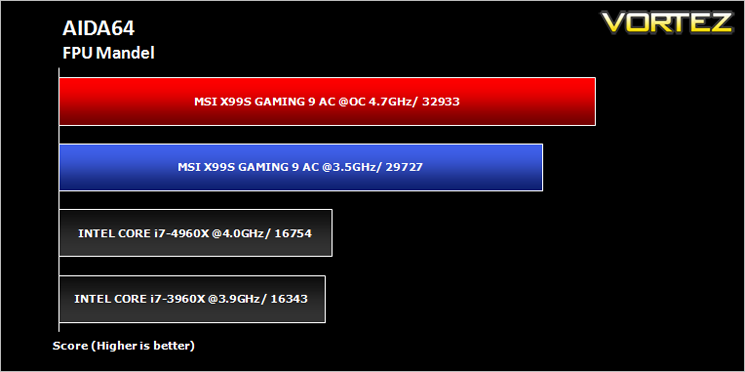
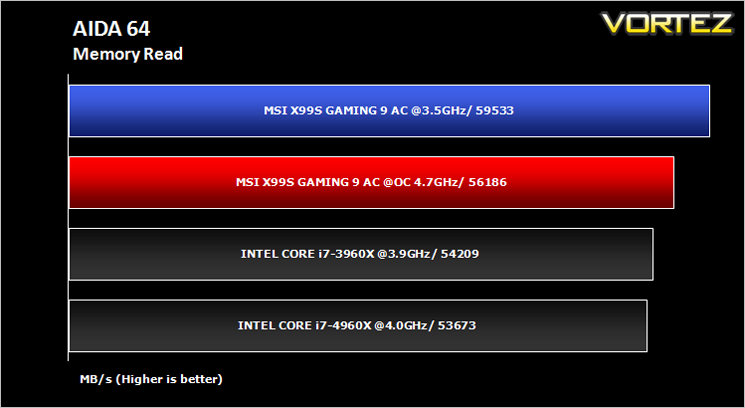
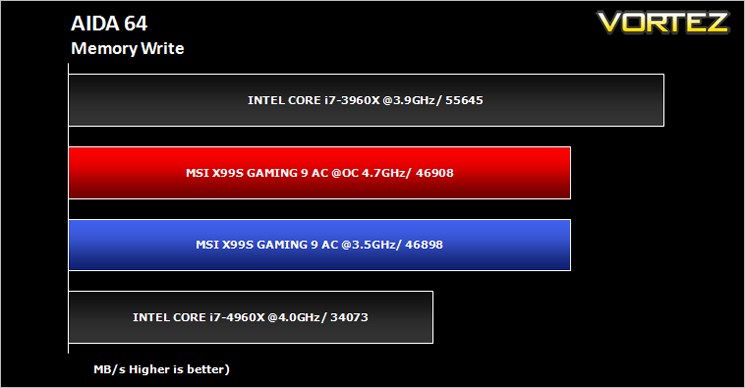
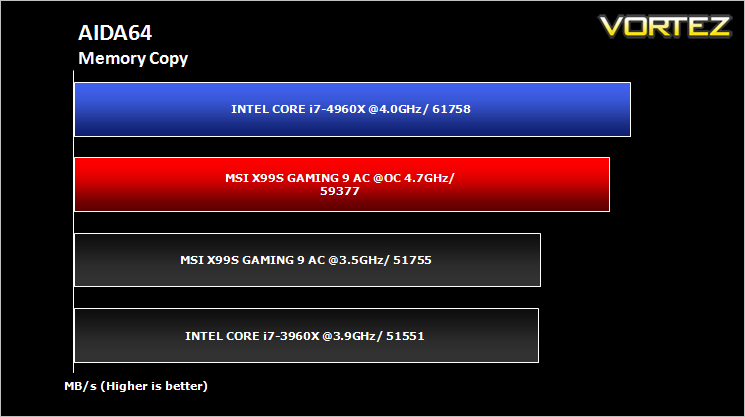
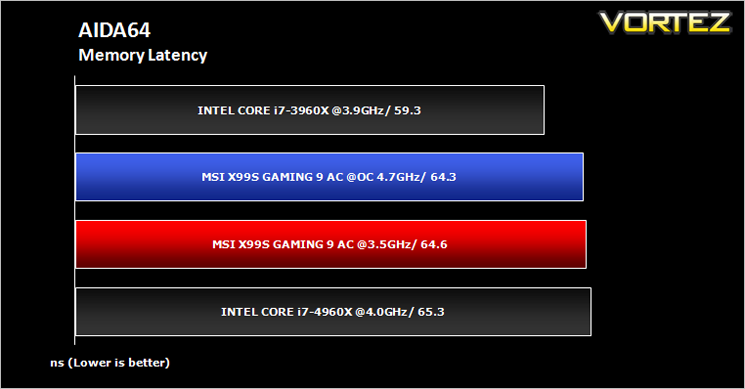
Benchmarks: AIDA64 CPU & Memory
This simple integer benchmark focuses on the branch prediction capabilities and the misprediction penalties of the CPU. It finds the solutions for the classic “Queens problem” on a 10 by 10 sized chessboard. At the same clock speed theoretically the processor with the shorter pipeline and smaller misprediction penalties will attain higher benchmark scores. For example — with HyperThreading disabled — the Intel Northwood core processors get higher scores than the Intel Prescott core based ones due to the 20-step vs 31-step long pipeline. CPU Queen test uses integer MMX, SSE2 and SSSE3 optimizations.
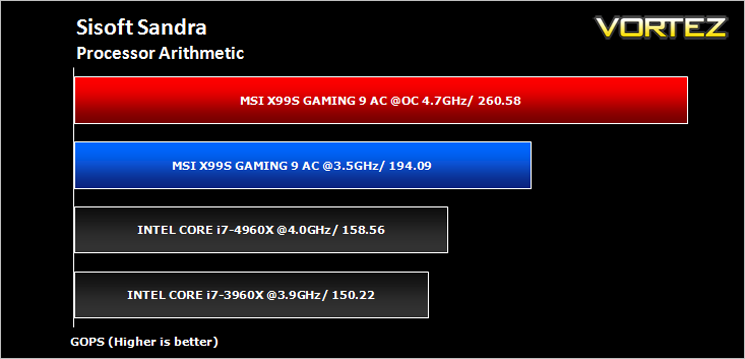
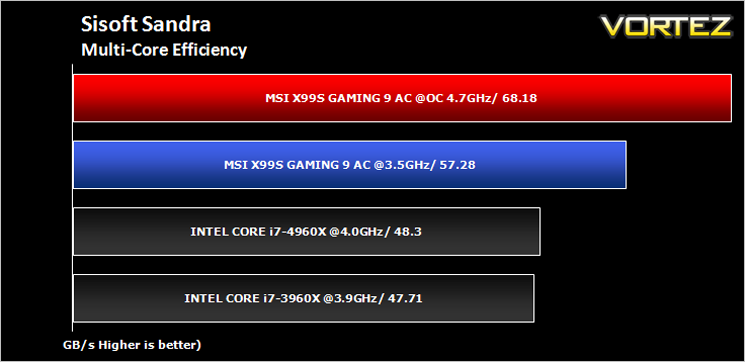
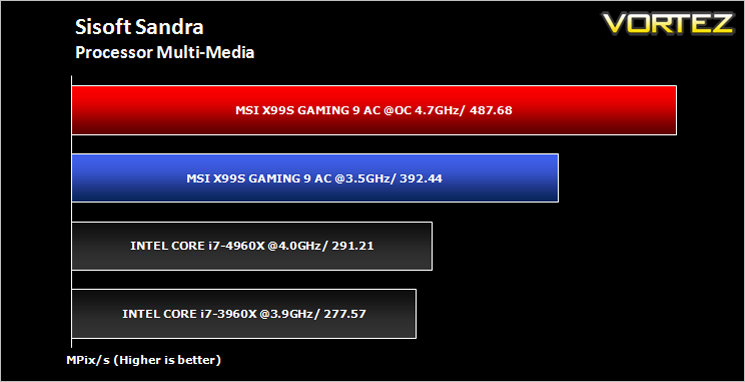
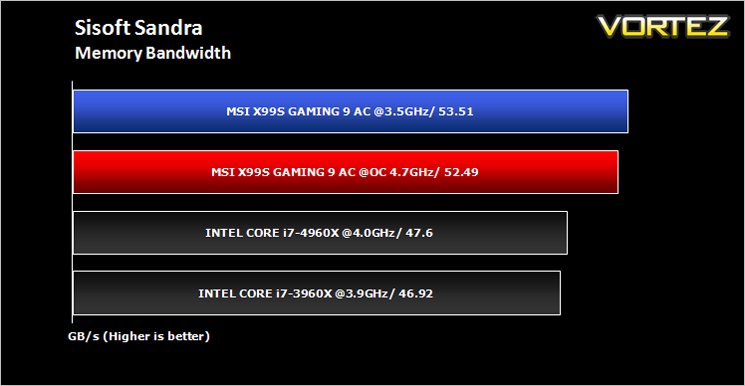
Benchmarks: SiSoft Sandra: CPU and Memory
SANDRA isn’t always a benchmark that is included in hardware reviews but I believe it shouldn’t be ignored. SANDRA provides a vigorous package that tests your system in a rather large array of benchmarks. There are many aspects of benchmark that can be executed. We will be considering – CPU and memory tests.
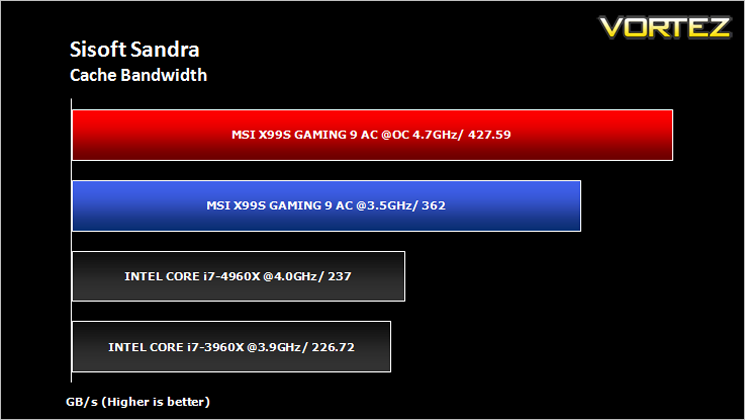
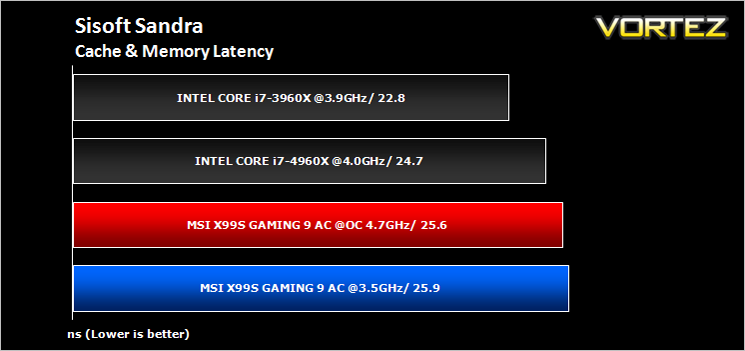
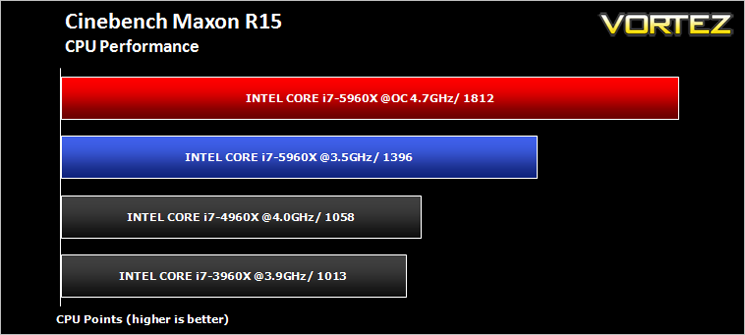
Benchmarks: Cinebench R15
CINEBENCH can measure systems with up to 64 processor threads. This test scene contains approximately 2,000 objects which in turn contain more than 300,000 polygons in total, and uses sharp and blurred reflections, area lights, shadows, procedural shaders, antialiasing, and much more. The result is displayed in points (pts). The higher the number, the faster your processor.
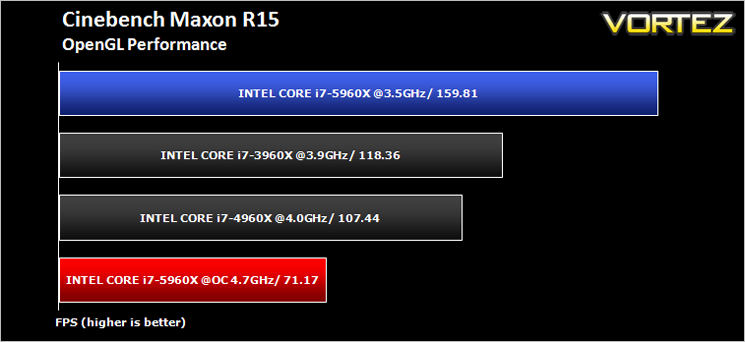
Benchmarks: Pov-Ray
The Persistence of Vision Raytracer, or POV-Ray, is a ray tracing program which generates images from a text-based scene description, and is available for a variety of computer platforms. It was originally based on DKBTrace, written by David Kirk Buck and Aaron A. Collins for the Amiga computers.
Benchmarks: Handbrake 0.9.9.1
HandBrake is an open source trancoding tool for converting video from nearly any format to a selection of modern, widely supported codecs. Strong multi-threading support tends to favour high core counts and hyperthreading support.
Benchmarks: AS SSD
AS SSD Benchmark is a straightforward tool for measuring the speed of your SSD drive.
Simply launch the program, choose your drive, click Start, and it’ll test your SSD’s read and write speed in a variety of ways, delivering a score for each when it’s done. And if that’s not enough, there are also additional file copy and compression-related benchmarks available from the Tools menu. (The author’s support page is German only, but if you need further English explanations then there’s a thread on the program at the OCZ Technology forum.).
Simply launch the program, choose your drive, click Start, and it’ll test your SSD’s read and write speed in a variety of ways, delivering a score for each when it’s done. And if that’s not enough, there are also additional file copy and compression-related benchmarks available from the Tools menu. (The author’s support page is German only, but if you need further English explanations then there’s a thread on the program at the OCZ Technology forum.).
Benchmarks: Futuremark 3DMark Fire Strike
3DMark FireStrike Product PageFire Strike is our new showcase DirectX 11 benchmark designed for high-performance gaming PCs. It is our most ambitious and technical benchmark ever, featuring real-time graphics rendered with detail and complexity far beyond what is found in other benchmarks and games today. Fire Strike will only be available in the Windows editions of 3DMark initially.
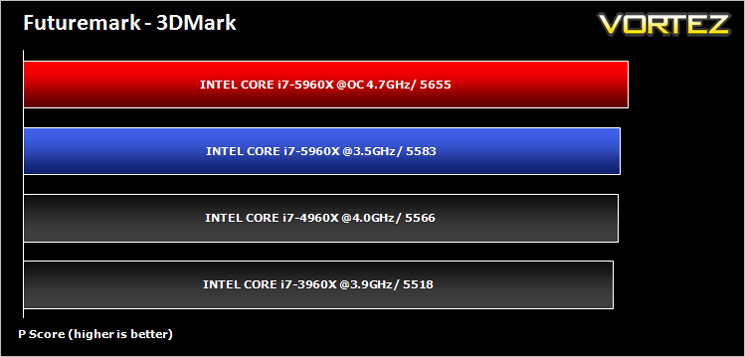
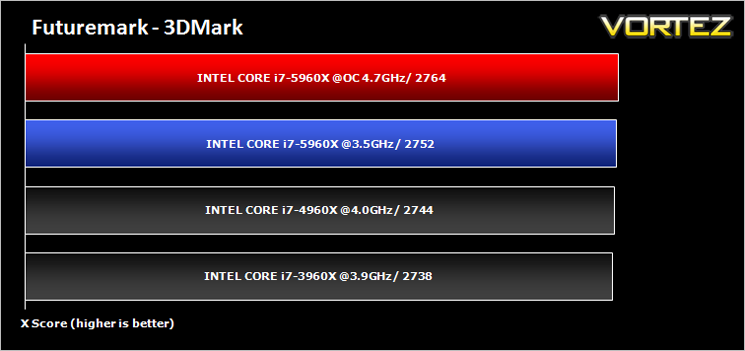
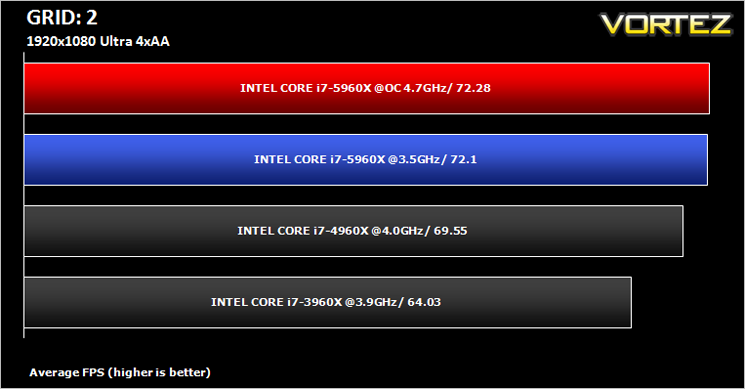
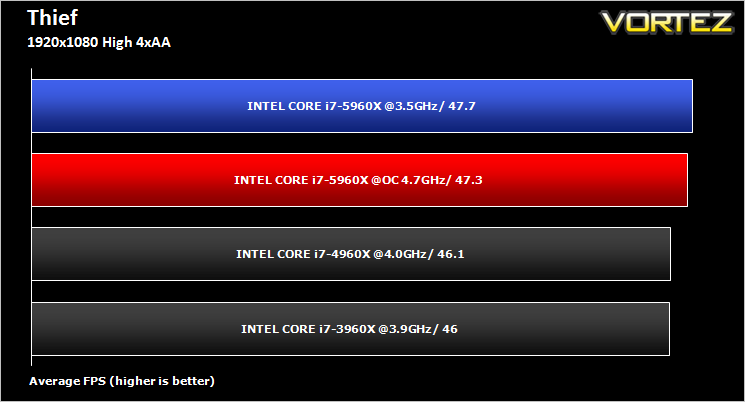
Benchmarks: Battlefield 4, THIEF, Company of Heroes 2, GRID 2
It’s important for us to perform a number of game benchmarks as well as the synthetic tests because gamers will want to know if there are any significant benefits. So here we have a selection of popular gaming titles, critically acclaimed and action-packed.
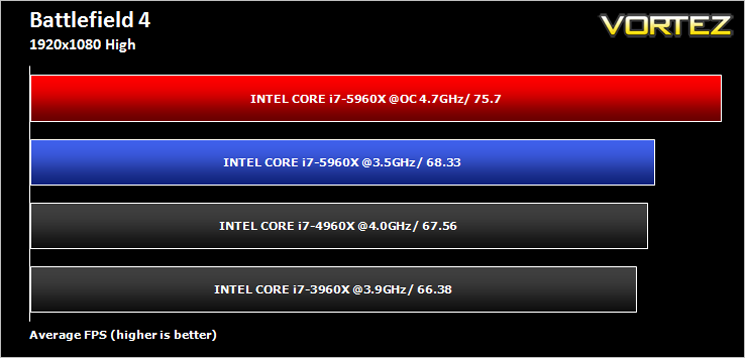
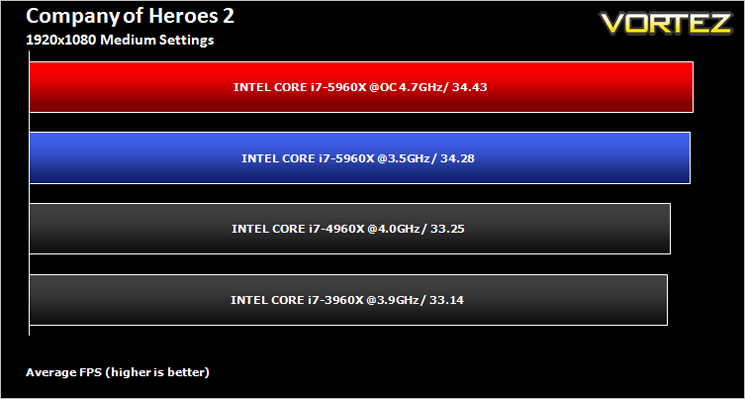
Conclusion
It is a strange feeling reviewing the first motherboard on a new chipset with a new CPU and new memory on a new test bench. While we, like you, eagerly await shiny new hardware, we do so with trepidation because more often than not, time scales are changed and limit the amount of time available for testing making a review all the more difficult. Add to this the fact we often receive products under NDA that are unfinished or at best rushed out of the factory in-time to get to the media for release so require BIOS update after BIOS update making us feel like lab rats. This wasn’t the case with the MSI X99S Gaming AC.
While it is true we received the board the day before release, we have not had to update the BIOS, seek additional advice from the manufacturer or encountered any configuration problems whatsoever. It worked straight from the word go. This is rare for a motherboard test. Moreover it not only worked but did so in extra ordinary fashion. We normally find some bugs, glitches that we can forgive due to short time scales involved on a pre-release product but the MSI felt so…complete is the only work for it. Akin to a motherboard that had been rigorously tested or had undergone a few revisions, not a brand new fresh of the production line model. We really do appreciate this, as will you. No doubt there will be BIOS updates to enhance your experience but for now, in its current state, we can safely say you shouldn’t encounter too many problems.
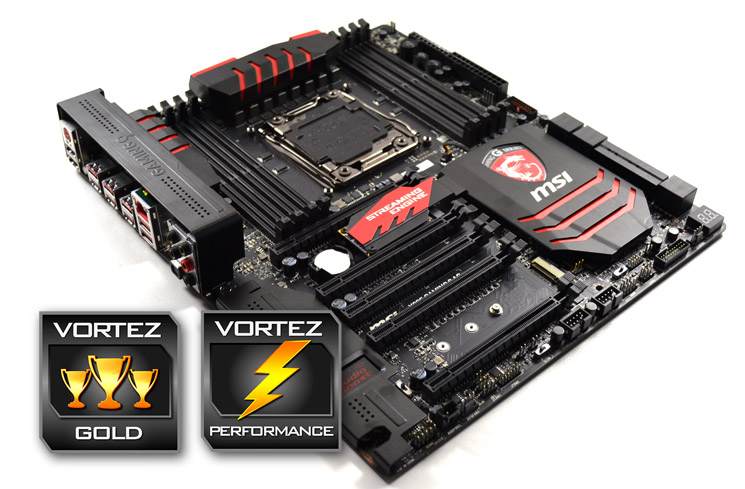
Yes there are a few minor niggles such as the I/O cover but for the most part it is very hard to criticise this motherboard. It is a stunner to look at, overclocks extremely well (yet surprisingly easy) and arrives with everything you should need and then some. The on-board features are what we would expect from a larger motherboard platform (EATX) but somehow MSI have managed to cram it all into a standard ATX size. Add to this some very neat detailing touches like ‘gaming’ worked into the copper traces and the MSI X99S Gaming 9 AC has set the bar very high. For this reason we are happy to grant this motherboard our prestigious Gold and Performance awards.
Whether you are an extreme overclocker or avid gamer, the MSI X99S Gaming 9 AC has it all. Buy it – you will not be disappointed.
Pros
+ Great design
+ Masses of Overclocking Options
+ Friendly BIOS
+ Streaming Engine
+ Audio Boost 2
+ Killer NIC
Cons
– Nothing worth mentioning
+ Great design
+ Masses of Overclocking Options
+ Friendly BIOS
+ Streaming Engine
+ Audio Boost 2
+ Killer NIC
Cons
– Nothing worth mentioning

Click here for an explanation of our awards at Vortez.net.
Our thanks to MSI, Corsair and Intel for providing some of the components crucial to this review
Our thanks to MSI, Corsair and Intel for providing some of the components crucial to this review


