







Destined for Mini-ITX enthusiasts, Corsair add another chassis to the Graphite Series which comes with LED lighting and support for a 240mm radiator.

Product On Review: Graphite 380T
Manufacturer & Sponsor: Corsair
Street Price: £109 GBP / $120 USD
Corsair has been dominating different markets in the last few months with an onslaught of product releases and they are yet to continue into September. Today, the memory giant is releasing yet another computer chassis under the Graphite Series.
380T is Corsair’s latest computer chassis to offer dedicated Mini-ITX support. This dainty computer case is packed with useful features such as a three-speed fan controller, integrated carry handle, and support for high-performance graphics cards and a 240mm radiator. It doesn’t end there either, Corsair supply this new offering in a choice of three colours – black, white or yellow.
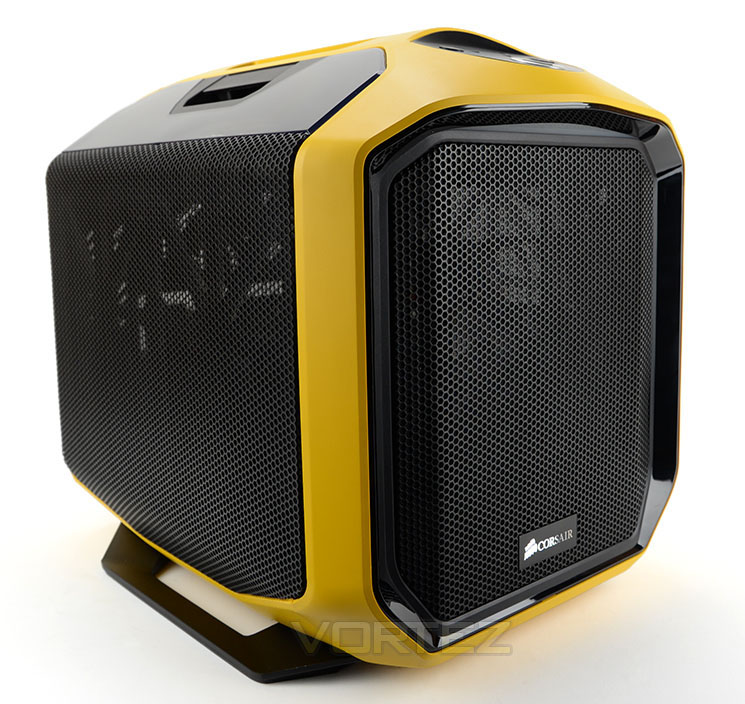
Corsair on their 380T
The portable Graphite Series 380T, complete with integrated carry handle and multiple color options, gives mini-ITX enthusiasts everything they could want in a PC case. The sleek design starts with rounded corners and a windowed side panel that reveals plenty of space within. The 380T accommodates up to four 3.5in/2.5in drives and a full-length graphics card with ease. There’s also a host of cooling options that belie the 380T’s small size; fit up to five fans or a 240mm watercooling radiator such as Corsair’s H100i. A Corsair AF-140 140mm and AF120 120mm fan are included to ensure you get great cooling straight out of the box. As with the 780T, an integrated three-speed fan controller allows you to set your own the priority between cooling and silence. With full-tower features in a mini-ITX package, the Graphite Series 380T means there’s no need for compromise when building a portable PC.
Technical Specifications
Form Factor
Mini-ITX
Dimensions
(H x W x D) 356 x 292 x 393mm
Drive Bays
Front
– Internal 2x 2.5”/3.5” in removable drive cage 2x 2.5” in internal tool-free drive cage
Cooling
Front
1x 140mm AF140L LED fan (supports 1x 200mm or 2x 120mm)
Rear
1x 120mm AF120L fan
Side
Supports 2x 120mm fans
Radiator Support
Rear
120mm
Side
Up to 240mm (55 mm clearance)
Expansion Slots
2 I/O Port 2x USB 3.0 Headphone and Mic Three-Mode Fan Control
Power Supply
Standard ATX (not included)
Clearances
Heatsink 150mm
PSU 160mm
Graphics 290mm
Mini-ITX
Dimensions
(H x W x D) 356 x 292 x 393mm
Drive Bays
Front
– Internal 2x 2.5”/3.5” in removable drive cage 2x 2.5” in internal tool-free drive cage
Cooling
Front
1x 140mm AF140L LED fan (supports 1x 200mm or 2x 120mm)
Rear
1x 120mm AF120L fan
Side
Supports 2x 120mm fans
Radiator Support
Rear
120mm
Side
Up to 240mm (55 mm clearance)
Expansion Slots
2 I/O Port 2x USB 3.0 Headphone and Mic Three-Mode Fan Control
Power Supply
Standard ATX (not included)
Clearances
Heatsink 150mm
PSU 160mm
Graphics 290mm
Packaging & First Look
As is common nowadays, 380T is presented in an eco-friendly box showing a depiction of the case on the front with a listing of the significant features. Over on the reverse, there is a schematic breakdown of the features for those wanting more information.
Inside, the case is concealed within a plastic sheet and two polystyrene blocks help to protect the case while it’s in transit.
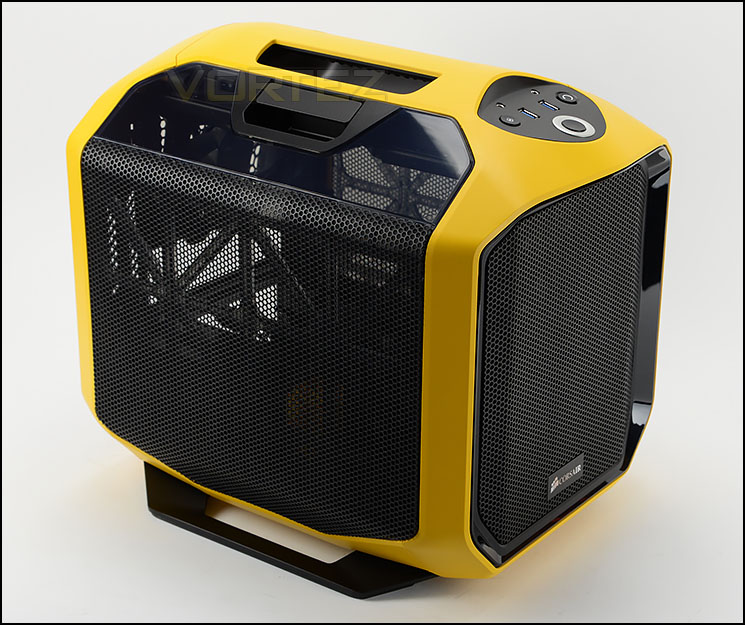
Portable and unique
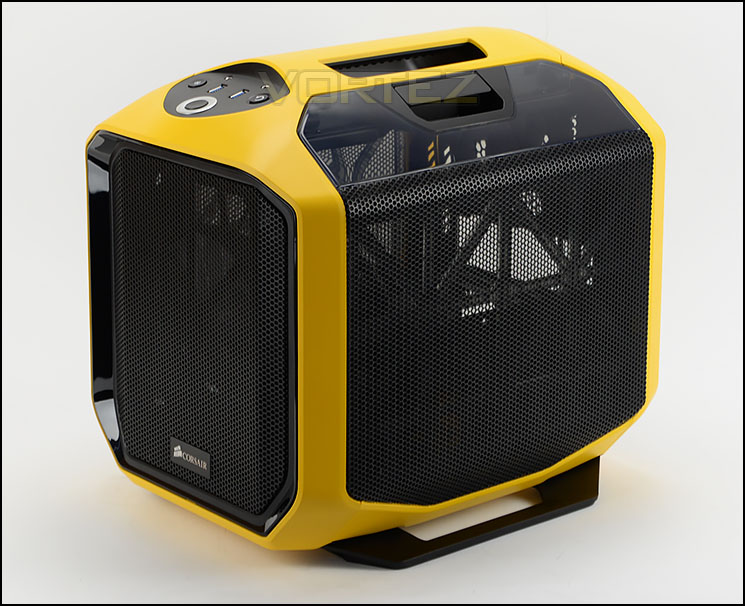
Both sides are identical
380T is designed to be a mobile gaming enclosure. By its very shape and size, it achieves this with ease. Corsair has made significant efforts in designing this case with unique aesthetics but still retaining the styling which has passed through each of the cases from the Graphite series.
Both side panels are identical in their appearance – both are heavily perforated and feature a latch type mechanism for removal.
As you can see, we’re testing the yellow variant today but this case is also available in black and white too. Overall, we’re very happy with how this case looks, the quality of the finish on the exterior is of a high-standard.
Exterior

The front and back of 380T
At the front of 380T there is a perforated mesh panel which is detachable by pressing the upper area on the left and right sides. Behind this panel sits an AF140L LED 140mm cooling fan – this fan brings cool air into the chassis. This front section can also entertain 1x 200mm or 2x 120mm fans. Due to the limitations of space inside this condensed case, Corsair has omitted any 5.25” drive support and we think this is a sensible decision, especially since a vast majority of enthusiasts have no need for such a device nowadays.
Around the back there is an opening for the PSU at the very bottom and then directly above this there is space for the rear IO panel, this is horizontally aligned as the motherboard tray will sit in this orientation too. To the immediate right there are two PCI expansion slot covers which are ventilated and use a single thumbscrew to secure them into place. Towards the middle there is an AF120L – 120mm rear exhaust cooling fan.
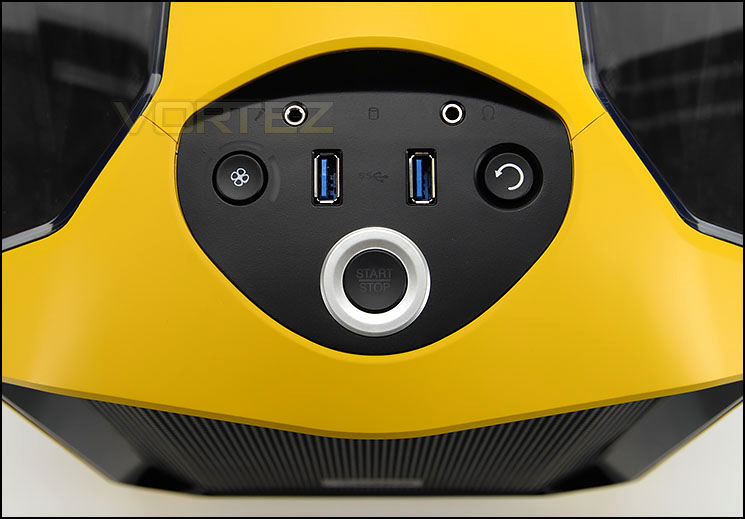
Fan controller and USB 3.0
Up at the top of 380T there is a small panel designated for the front panel connectivity. Care has been taken so that the styling of these buttons coordinate perfectly with the overall aesthetic of the case. Included in this area are the following:
• 2x USB 3.0 ports
• Headphone and microphone jacks
• Power and reset buttons
• Three speed fan controller
The fan controller allows up to three cooling fans to be connected and can adjust the speed of fans to three different settings – 50%, 75% and 100% – there is an LED indicator to establish which setting is currently being used.
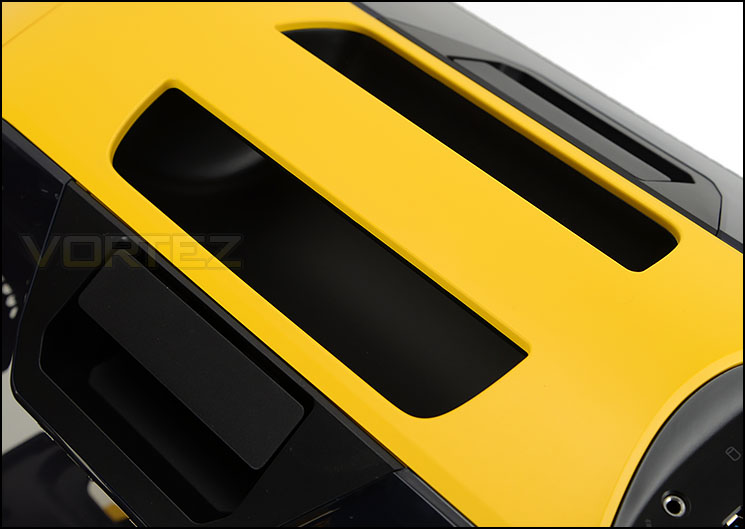
Integrated carry handle for transportation
Located at the top of 380T there is an integrated carry handle. Rather than looking out of place and protruding out of the case, Corsair has carved this out of the top section and it blends into the overall design very well.
We can see this case being popular for LAN parties, so having a useful handle like this will prove invaluable for transportation.
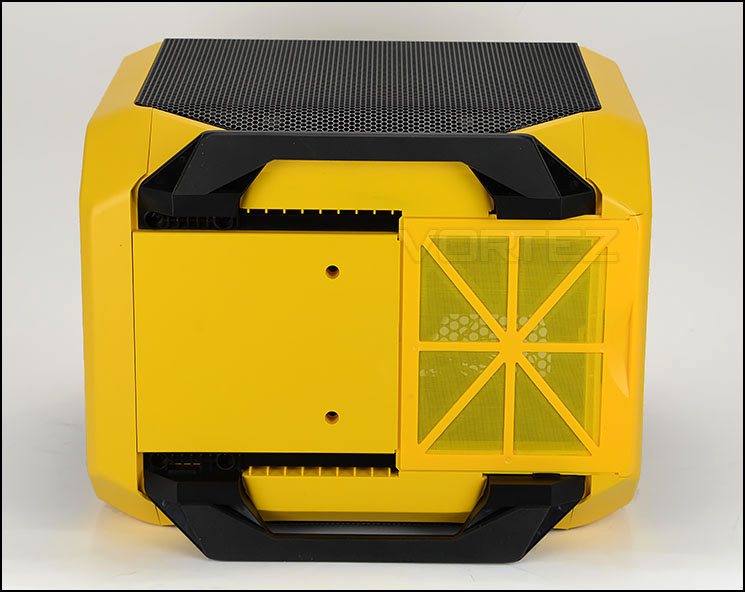
The underneath of 380T
Flipping the case over onto its side we can see there are two plastic beams which extend out to provide equal balance for the chassis. Rubber strips help to prevent the case from slipping on smooth surfaces.
Corsair has given 380T a detachable dust filter directly underneath the PSU cooling fan, this filter has been coated in the same tone as the rest of the case and it’s a very good colour match.
On the next page we’ll move inside the case for a look at the layout and features.
Interior

Inside 380T from the prominent side

Detachable supports for mounting fans/radiator
380T is primarily designed for Mini-ITX and removing the side panels from this case highlights the reasons for this, the internal dimensions and layout is rather condensed. Inside there are a variety of tool-free options for installing kit and two support plates span the depth of the chassis to allow dual 120mm fans or a 240mm radiator to be installed.
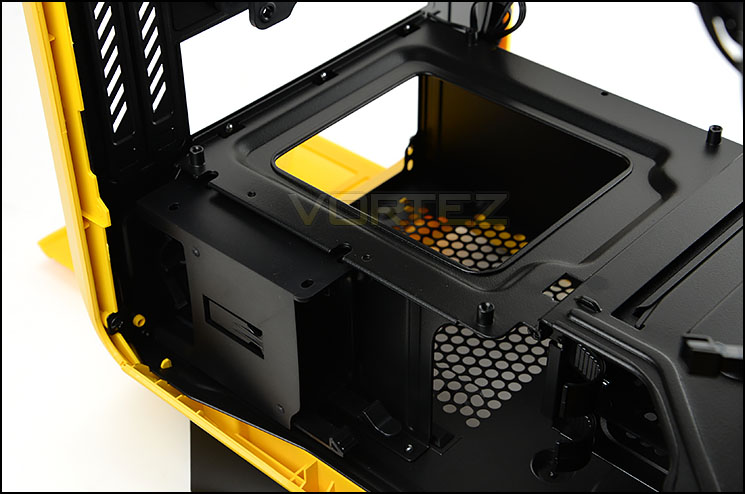
PSU cage and motherboard tray
At the bottom of the case there is a PSU cage which can accommodate units up to 160mm in length. Underneath the PSU there is a detachable dust filter which can be easily removed without having to flip the case over, onto its side.
Next to this cage there is a tool-less docking unit for attaching 2x 2.5” drives.
Sitting on the roof of the PSU cage there is a series of four stand-offs – the top acts as the motherboard tray and as already mentioned can only support Mini-ITX motherboards.

120mm rear exhaust cooling fan

LED switch
Further up from this there are two PCI expansion slot covers which provide the option to install a discreet graphics card if desired. Next to this there is a 120mm rear exhaust fan (AF120L) which is responsible for pushing unwanted heat out of the case. In our picture above, just beside the fan there is a single white LED. This LED can be switched on or off and casts a spotlight on the hardware inside the system. The LED switch is just above the fan, inside a recess.
Interior (Continued)
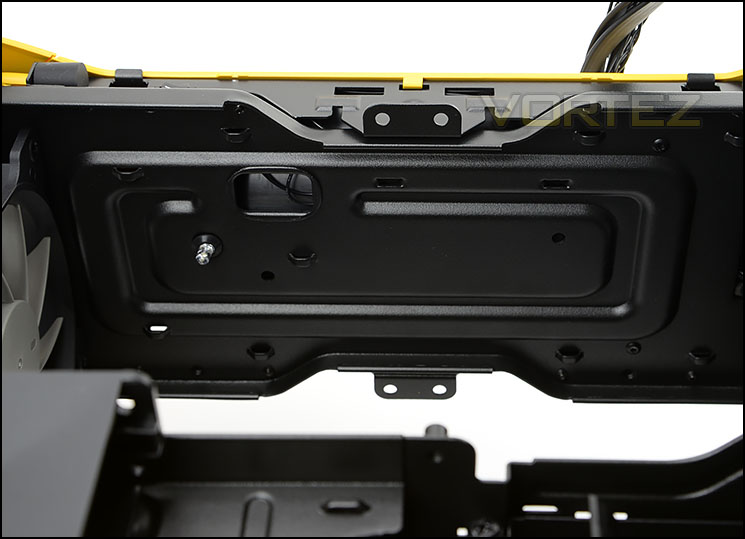
The top section, inside 380T
Although the top of the chassis does not support any cooling fans there are various hooks and areas to ensure that good cable management is practised within 380T. Having such features inside a fairly open case helps de-clutter different locations and prevents any obstruction for the airflow.

AF140L cooling fan with white LED
Positioned at the front of 380T, there is an AF140L LED cooling fan. This fan emits a white glow once the system is powered up. As mentioned already, there is also the option to install 2x 120mm fans or a single 200mm instead.
While the primary HDD storage is already covered by Corsair (next to the PSU cage) there is still some allocation for larger drives, of the 3.5” type. In front of the cooling fan there is a cage which can house up to 2x 2.5” or 3.5” drives via a tool-less tray. The top of this cage also has the cable management hooks, again to maintain absolute neatness inside the chassis. This cage can be completely removed if desired – there are thumbscrews securing it into place.
Installation

Mini-ITX test system installed

Easy to present a clean, tidy configuration
Since 380T can only accommodate Mini-ITX, this is the configuration we have installed inside the case and as you can see, the system fits inside the chassis very well and it’s easy to create a clean and tidy environment – free from clutter, free from hanging cables.
Due to the condensed layout it’s necessary to install components in a specific order to allow more space to manoeuvre. We installed the PSU first and routed the cables through. Over on the far side of the PSU cage there is a nice cavity for storing redundant cables and this really helps to de-clutter the inside.
The cable management hooks were extremely useful, especially the group which are placed on the roof of the chassis.

SSDs slot into the tool-free device

Larger drives fit into trays
For the storage installation there are two options, the 2.5” box next to the PSU cage or the 3.5” cage at the front of the case. SSDs and 2.5” drives slot into the tool-free box next to the PSU cage with ease, clicking into place with a soft push.
To install a larger drive such as a 3.5”, the drive just slots into one of the provided trays – there are no screws required. These trays also house 2.5” drives, four screws need to be attached on the underside for this form factor.
Clearance – CPU Cooler, GPU, WC, Cable Management
Understanding the clearance limitations inside a chassis is essential for system builders who want to know of any restrictions for component installation. In this section we’ll be looking at what you can get away with inside 380T.
CPU Cooler

150mm of clearance for CPU coolers
For the CPU cooler clearance there is approximately 150mm of clearance from the board to the top of the chassis. For air cooling this does have some limitations on the size – flagship models are usually over the 160mm mark. But even so, there are still a wide selection of coolers which can fit inside this case and there is also the option to install an ALC.
Graphics Card

Space for high-end graphics
For those wanting to drop in a discrete graphics card into 380T there is enough room for choosing a high-end option because there is approximately 11.5” / 290mm of clearance before the card touches the front of the chassis. Pictured is XFX HD 7970 DD which is 10.5” long.
Water Cooling

The option to install liquid cooling inside

Corsair Hydro Series H100i installed
On the far side of 380T, Corsair provide two support brackets which allow dual 120mm fans or a 240mm radiator to be fitted. Having installed the Hydro Series H100i into 380T, we can confirm there is sufficient space and allocation to attach such a cooler. Being able to use an all-in-one liquid cooler inside this case is a major bonus and one that is more than likely to please enthusiasts.
Cable Management

Loads of space next to PSU for storing cables
Directly next to the PSU cage there is a cavity. Since this area is generally hidden it will be used by many for storing any redundant cables and we’re pleased to say there is over 4cm / 1.5” of space here to hide these unwanted cables. This means you can keep the inside looking clean with minimum effort.
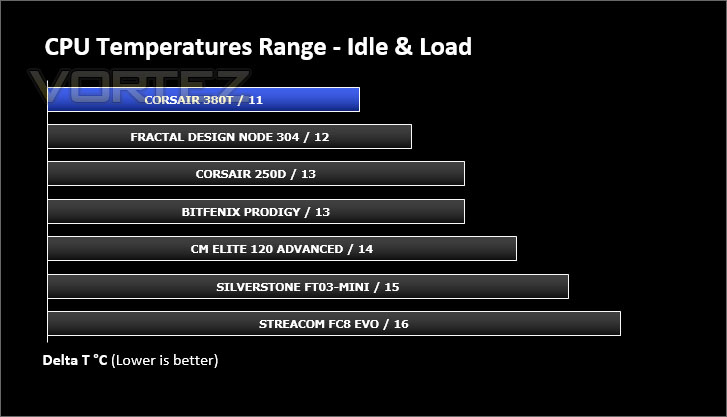
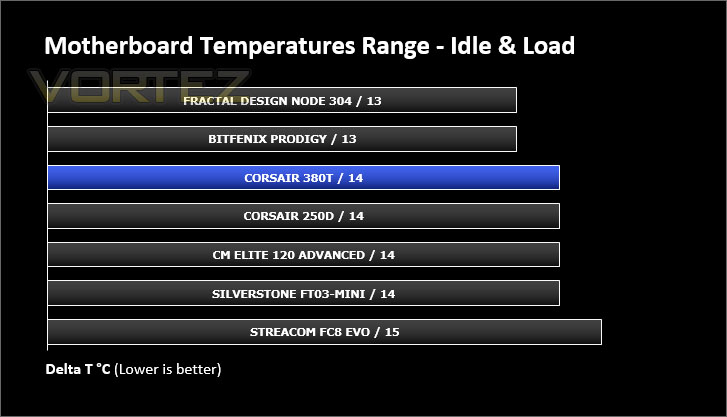
Thermal Performance Testing
Inside 380T there are two cooling fans pre-installed. A 140mm fan sits at the front as an intake and there is a 120mm rear exhaust towards the back of the chassis. In the past this arrangement has proven to be successful, so we are optimistic of the result.
To discover the thermal performance of 380T we will record idle temperatures after 20 minutes from a cold boot. I will then stress the system and temperatures will again be monitored after 30 minutes have elapsed.
For the purpose of accurate analysis the idle and load temperatures for CPU and motherboard will be recorded and the range between idle and load will be calculated to determine how efficient cooling is.
All fans will be connected to the fan controller and set to ‘high’.
NOTE: Ambient temperature is 20C
System Components
CPU AMD E-350 APU
Motherboard ZOTAC ZOTAC E350-ITX WiFi
Graphics Integrated (AMD Radeon™ HD 6310)
Memory 4GB 1066MHz SODIMM DDR3
HDD Kingston HyperX 240GB
PSU Streacom NanoPSU
Motherboard ZOTAC ZOTAC E350-ITX WiFi
Graphics Integrated (AMD Radeon™ HD 6310)
Memory 4GB 1066MHz SODIMM DDR3
HDD Kingston HyperX 240GB
PSU Streacom NanoPSU
Noise
Having a fan controller is a handy tool in managing the noise levels from 380T. At low, the fans are barely audible, medium is very similar to low and then high setting results in evident noise – but this isn’t disruptive by any means.
Conclusion
The latched side panels on the much loved 600T wowed the industry back in 2010 and we’ve been eagerly awaiting more of the same. The 380T utilises a similar design ethos and although it’s locked down to Mini-ITX only we still really love it.
Corsair has produced a unique and exciting chassis in the 380T. It arrives as a fun and quirky design which is primarily designed for gamers attending such events as LAN parties. Having a reinforced carry handle makes the job of transporting this case to events such as this or a friend’s house easy.
Functionality is a word which describes 380T very well. Not only are the side panels easy to remove but inside, there are tool-free mechanisms for installing kit, plenty of hooks and space for ensuring excellent cable management and a handy three-speed fan controller for adjusting the noise/airflow within the chassis.
Although we are dealing with tight dimensions, 380T can still accommodate high-end components such as long graphics cards and 240mm radiators. Adding this compatibility makes it possible to drop in high-performance parts, which in turn gives the potential to build a mini-powerhouse.
380T can be purchased for just over the £100 mark ($120) which on the face of it may not sit well with Mini-ITX system builders but the cost is justified by the sheer volume of features that are on offer – even the included fans alone would cost £30-40. So it’s quite a fair buy!
380T is one of the best Mini-ITX cases we have had the pleasure of testing. This dainty little number is packed with features which project it forward as a high-performance chassis.
VIDEO REVIEW – VORTEZ TV
Pros
+ Fun, quirky design
+ Portable, easy to transport
+ Available in black, white or yellow
+ Three-speed fan controller
+ Easy access side panels
+ LED spotlight
+ Excellent cable management
+ Great cooling
+ Can house 240mm radiators
Cons
– None!
+ Fun, quirky design
+ Portable, easy to transport
+ Available in black, white or yellow
+ Three-speed fan controller
+ Easy access side panels
+ LED spotlight
+ Excellent cable management
+ Great cooling
+ Can house 240mm radiators
Cons
– None!

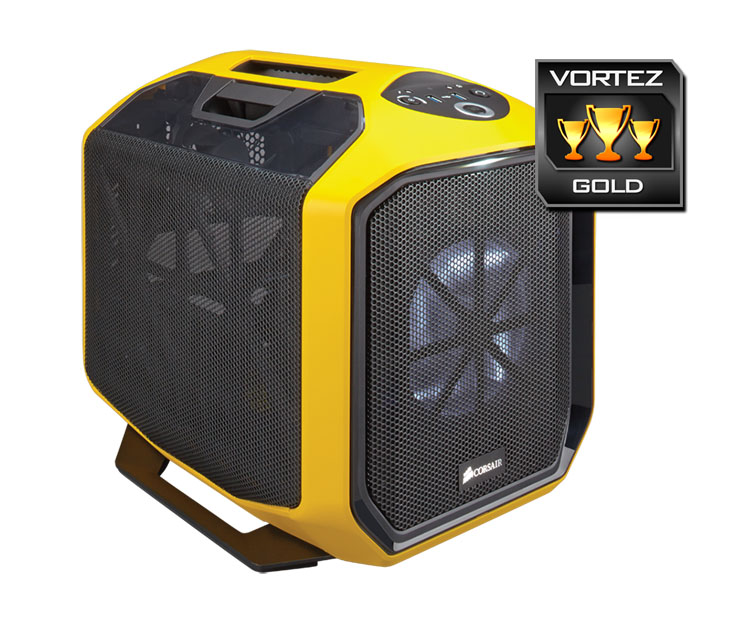
Click here for an explanation of our awards at Vortez.net.


