As games get larger and larger, consoles don’t seem to keep up, forcing the deletion and redownloading of games, sometimes across painfully slow internet connections. However, Western Digital have the solution with the WD_Black P10.

Product on Review: Western Digital Black P10 Game Drive
Manufacturer: Western Digital
Street Price:
2TB GBP £89.99 / USD $89.99
4TB GBP £129.99 / USD $129.99
5TB GBP £134.99 / USD $149.99
Western Digital are a well-established manufacturer of high-end mass-storage devices, having been going for almost 50 years. They’re one of the largest manufacturers of hard drives and have recently merged with SanDisk to extend their portfolio even further.
Today we’re looking at a portable games drive, consisting of a high-performance 2.5” hard disk drive encased inside a metallic, rugged enclosure. The WD_Black P10 is available in 2TB, 4TB and 5TB capacities, with the 5TB offering the capacity to store a whopping 125 games (at an average of 40GB each).
The WD_Black P10 is compatible with the Playstation 4, Xbox One, PC and macOS and offers read speeds up to 140MB/s.
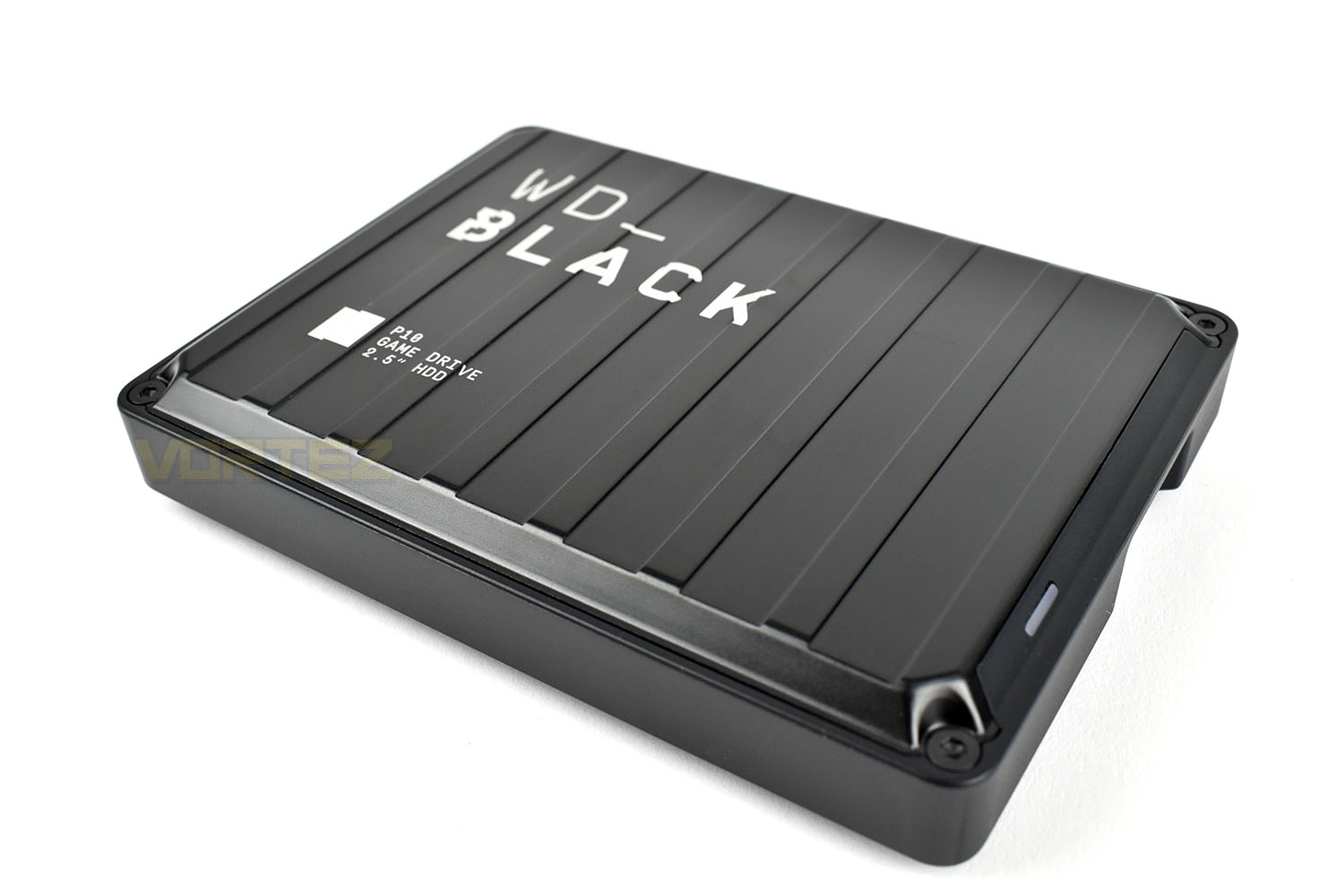
The metallic enclosure comes in two sizes, 118mm x 88mm is standard, but the 2TB measures in at 12.8mm in thickness, while the 4TB and 5TB models are 20.8mm thick, to accommodate the larger hard drive with additional platters. Data is transferred over a fairly standard USB Micro B connection, with the typical Type-A USB connection.
Backed by Western Digital’s 3-year warranty, you get that additional peace of mind that your data’s in safe hands. Let’s throw some benchmarks at it and see how it behaves.
Western Digital on the Black P10:
The WD_BLACK™ P10 Game Drive gives your console or PC the performance-enhancing tools it needs to keep your competitive edge. Its a top-tier external HDD in capacities up to 5TB, built specifically for gamers looking to expand the potential of their console or PC by saving their game library in an on-the-go form factor. Now, with WD_BLACK™ P10 Game Drive, you can drive your game the way you choose.
Technical Specifications
Capacity: 4TB
Interface: USB 3.2 Gen 1
Connector: USB Micro B
Compatibility:
Playstation™ 4 Pro or PS4 with system software version 4.50 or higher
Xbox One™
Windows® 8.1, 10
macOS 10.11+
Dimensions (L X W X H): 118mm x 88mm x 20.8mm
In The Box:
WD_BLACK™ P10 Game Drive
Quick Install Guide
Interface: USB 3.2 Gen 1
Connector: USB Micro B
Compatibility:
Playstation™ 4 Pro or PS4 with system software version 4.50 or higher
Xbox One™
Windows® 8.1, 10
macOS 10.11+
Dimensions (L X W X H): 118mm x 88mm x 20.8mm
In The Box:
WD_BLACK™ P10 Game Drive
Quick Install Guide
Packaging & Bundle
The dark packaging of the WD_Black P10 suits the style perfectly. The supported hardware is listed on the front, as is the capacity and speeds you can expect. The picture of the drive on the front looks more like one of those rugged suitcases than a hard drive, so the size of the packaging might be a tad confusing as first glance.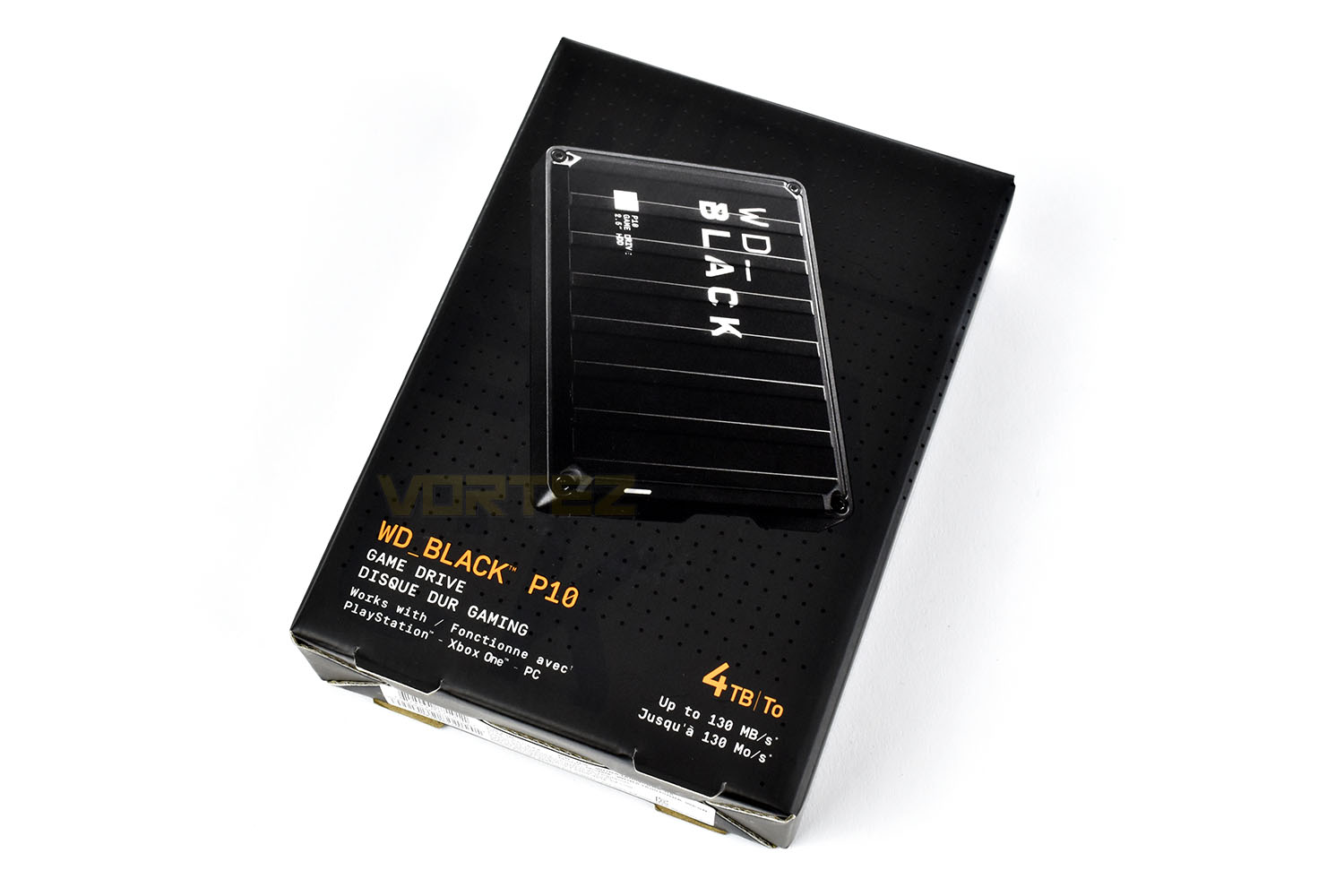
Flipping the box over, you get a look at the connection port, a list of the contents and some other important information.
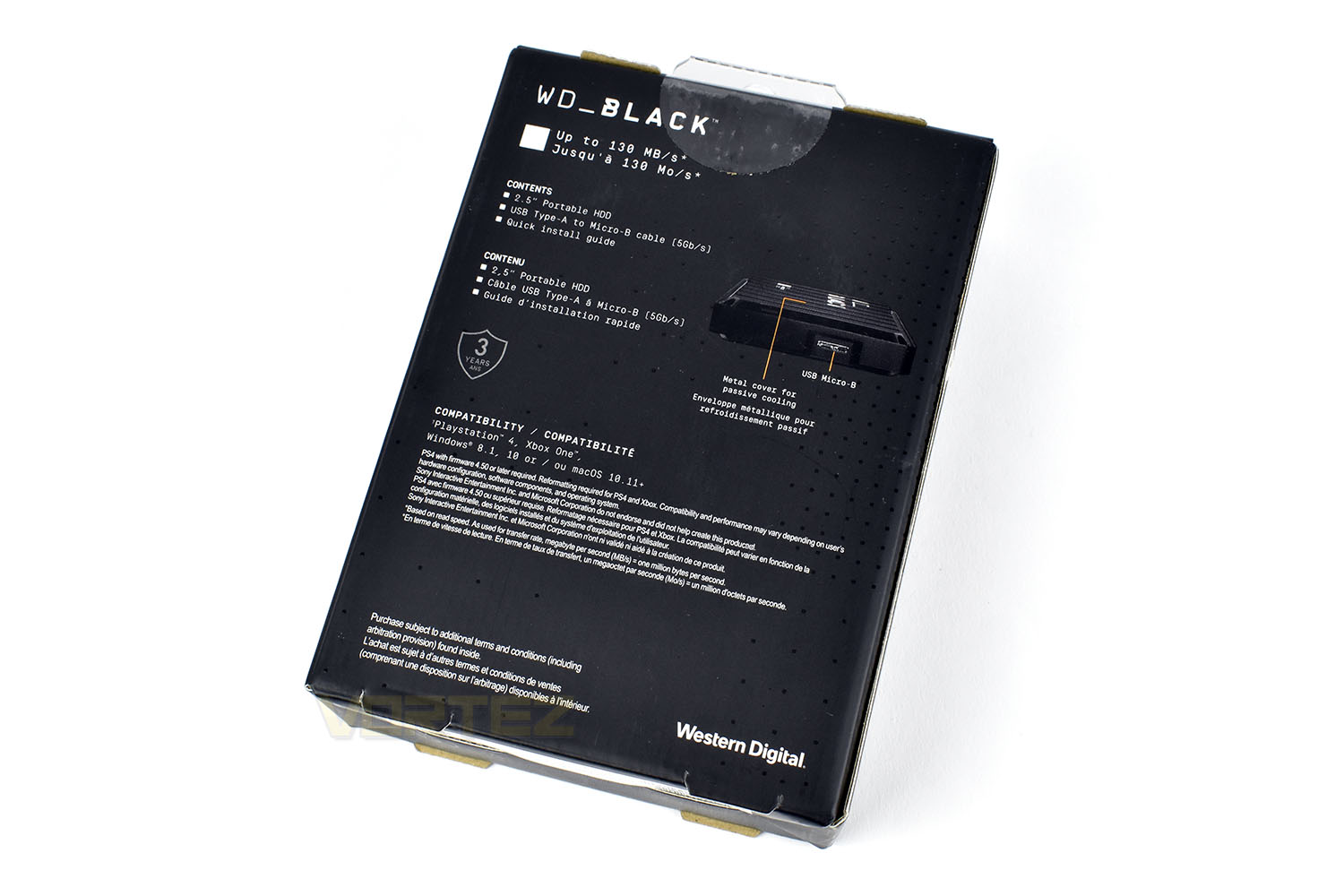
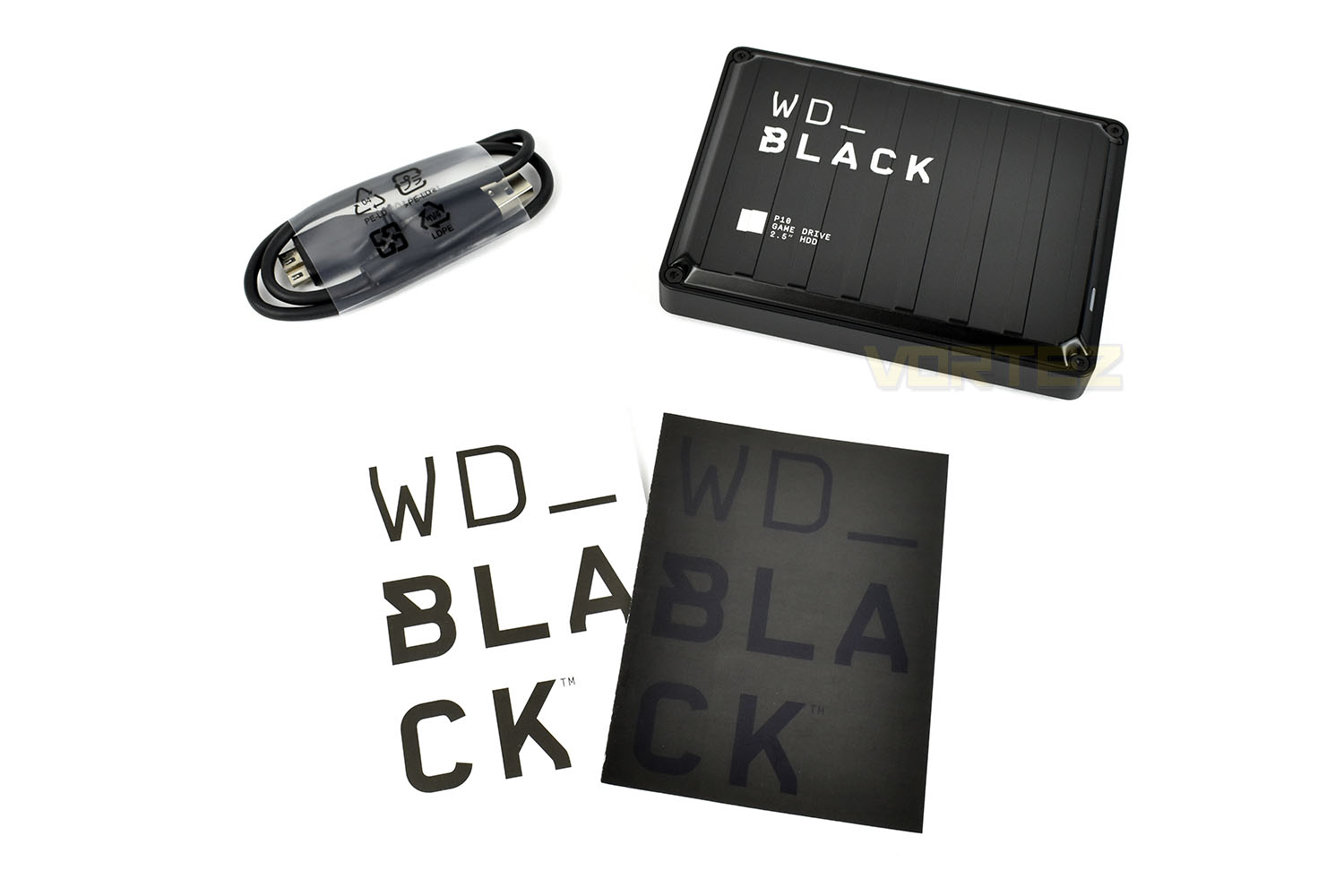
Included with the hard drive is a short Micro B USB cable and a couple of contrasting information leaflets.
Closer Look
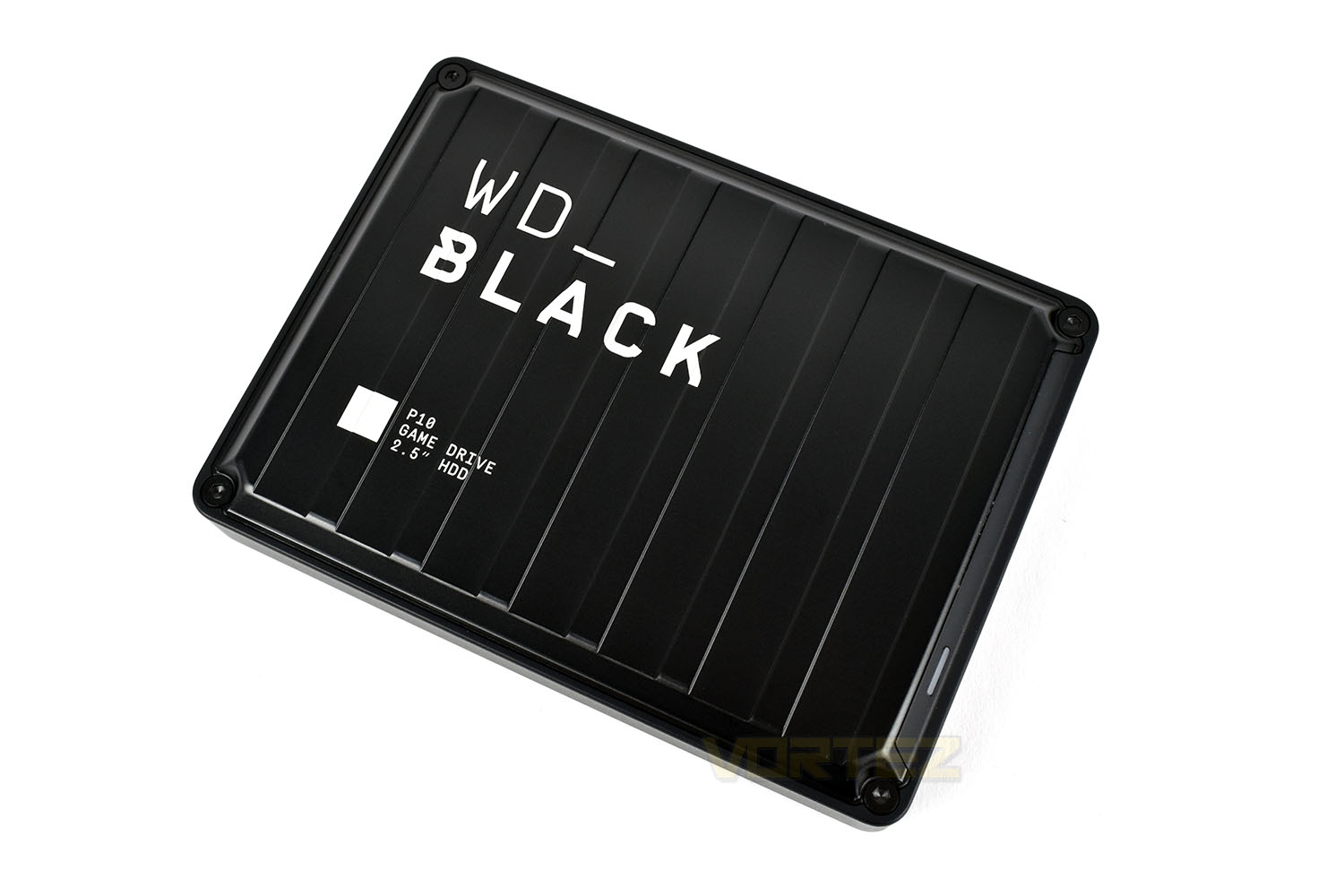
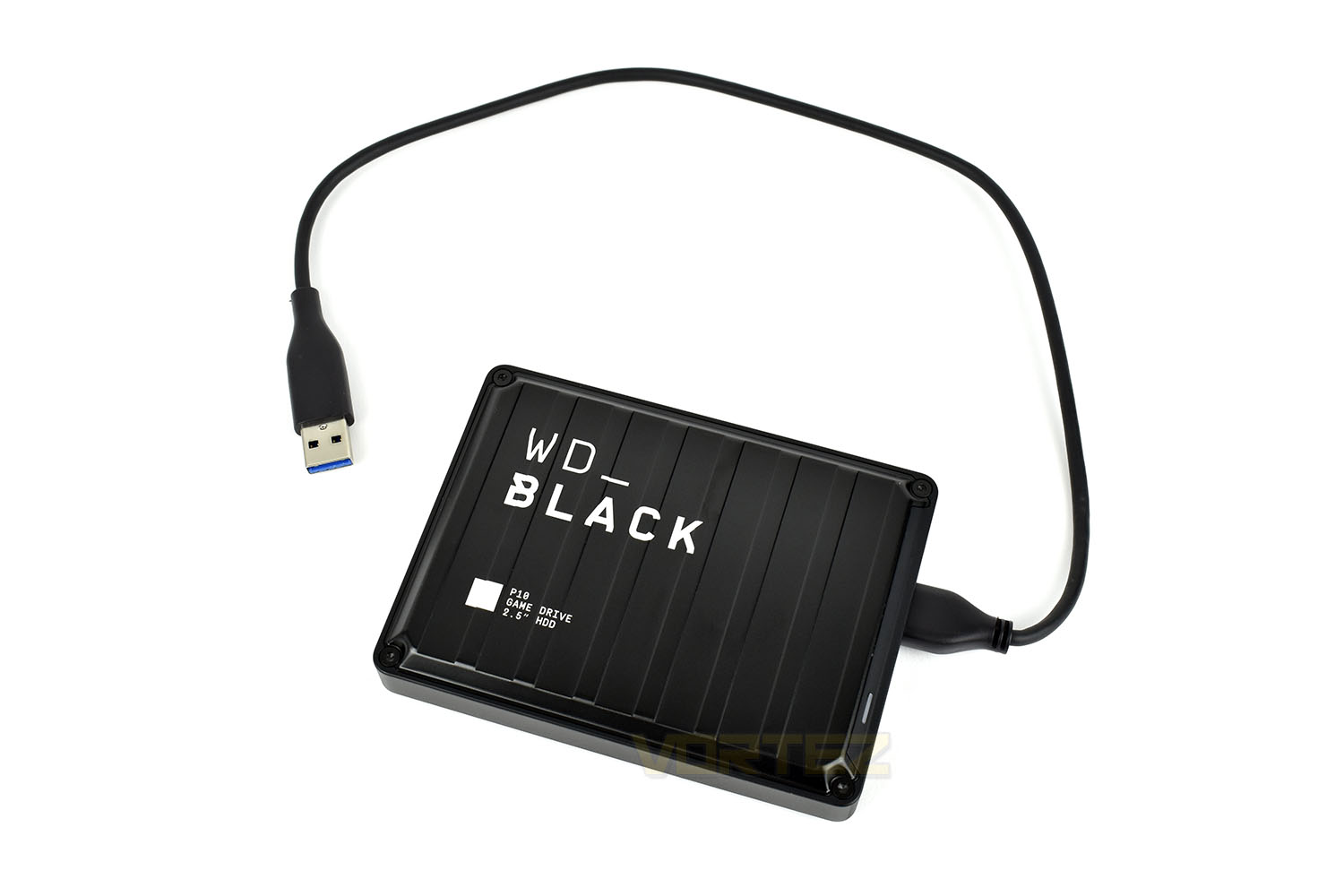
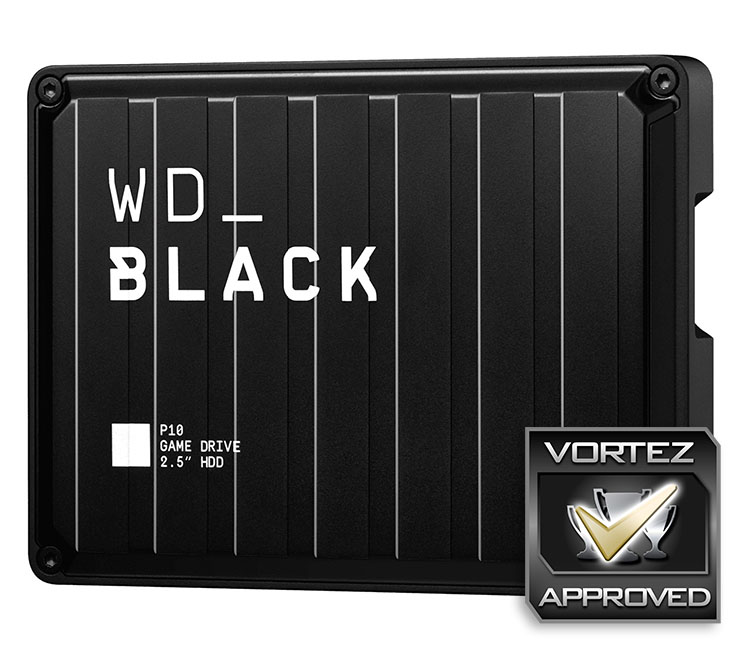
Measuring in at 120mm x 90mm x 21mm, the WD_Black P10 drive isn’t the slimmest or most elegant hard drive enclosure we’ve come across, instead going with a gamery-cross-industrial feel with its bolted corners and all-black appearance. The title on the top, including the underscore, also comes across as very modern.The metal enclosure, while looking sturdy and rugged, actually feels much lighter than expected, to its detriment. The 4TB model weighs in at 230g, so it’s not lightweight by any means, particularly when compared to an SSD model, but the metal enclosure feels flimsy and lacking in any real substantiality.
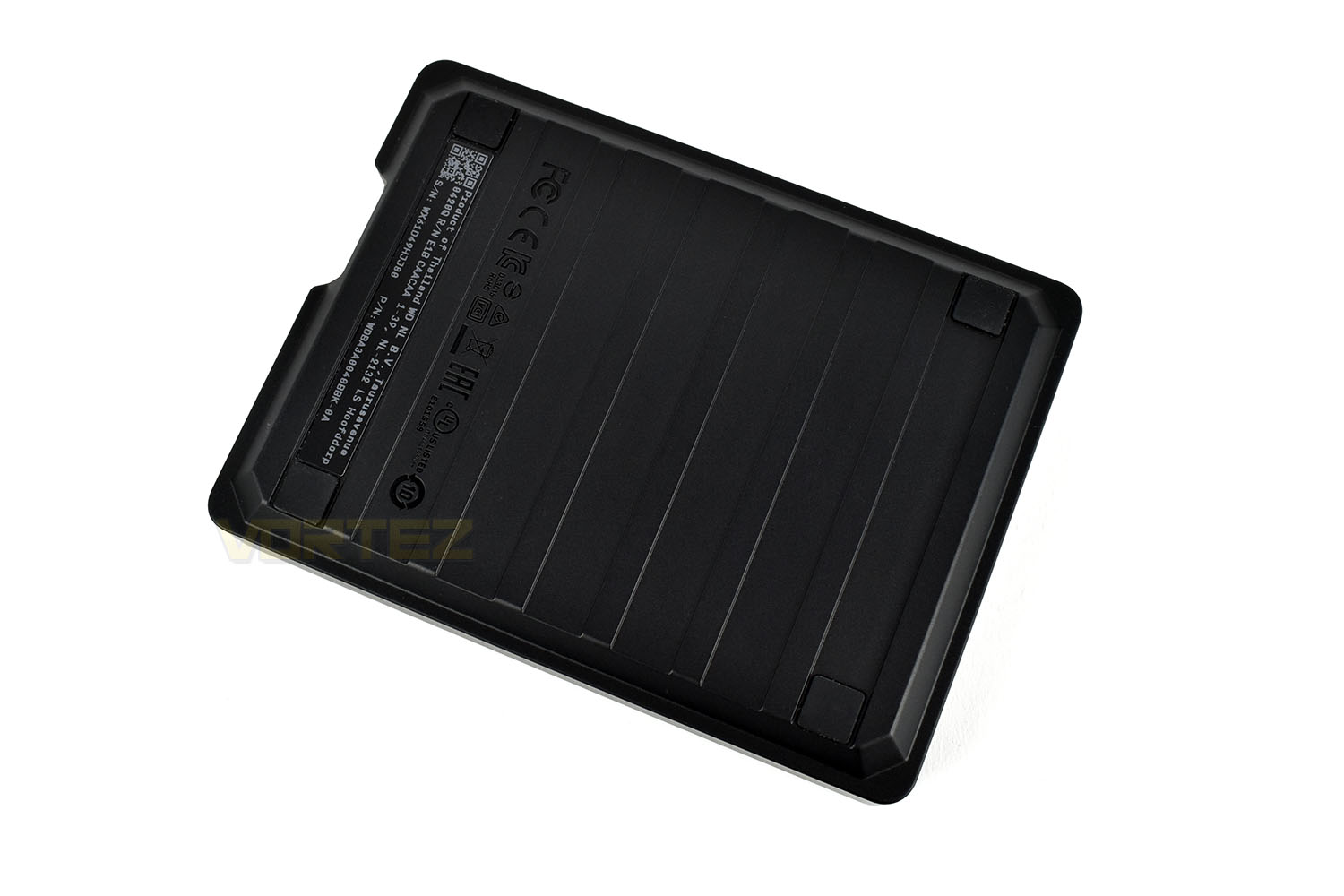
The reverse side is similar to the front, only with 4 small rubber pads in the corners. This will help dissipate vibrations instead of transmitting them straight into the surface on which it’s sitting, helping to reduce noise.
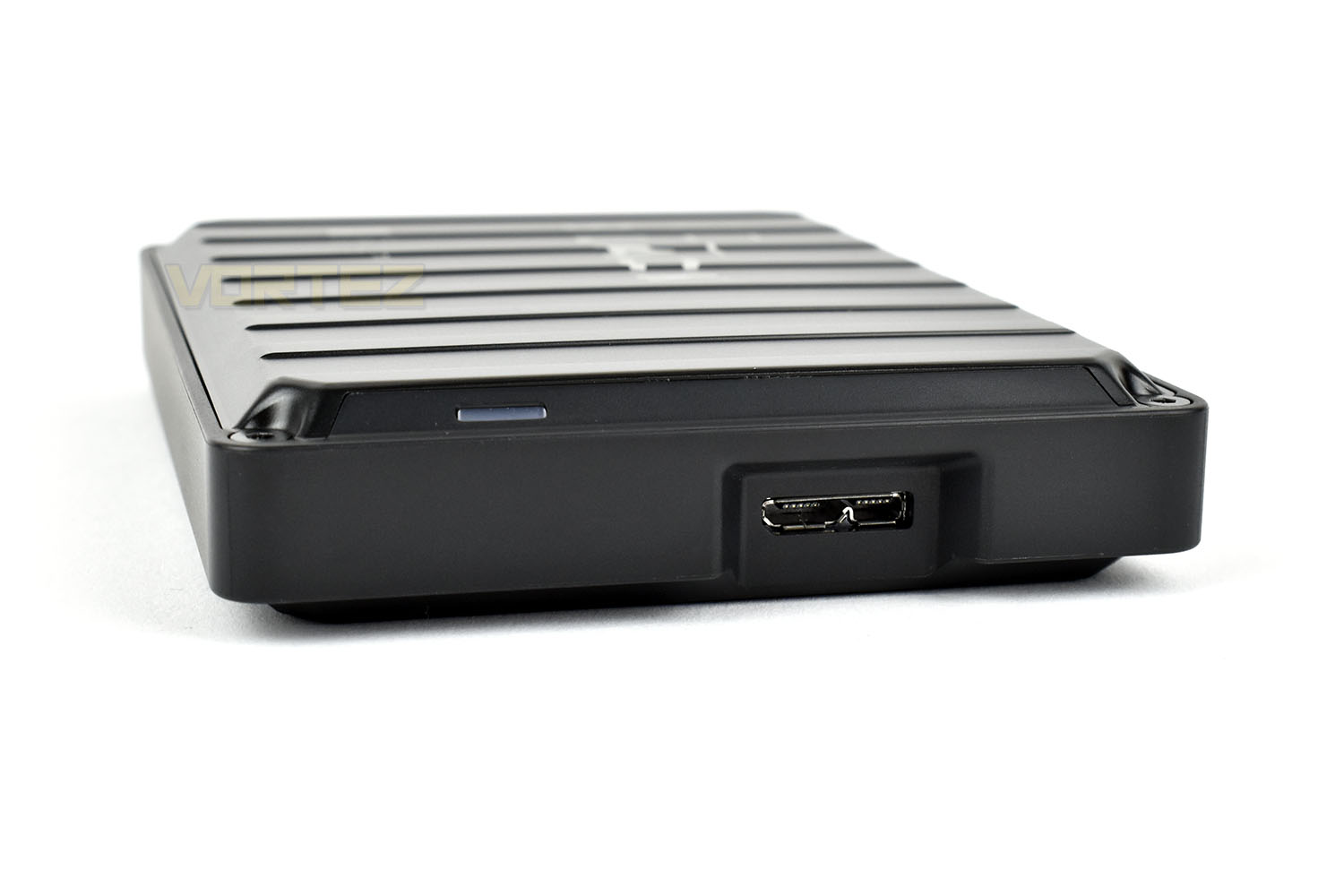
The Micro B USB port is located on the end of the drive, with a white power indicator LED also nearby.
With the typical use-case for this drive being to plug it in and tuck it away, allowing the games console or computer system to access the additional storage whenever it needs to, Western Digital have included a fairly short cable, measuring in at a little less than 500mm, including the connectors.
Test Setup & Methodology
Our test system is formatted and a fresh version of Windows is installed with just drives in place – no additional applications. Windows is then updated to the latest release and the drivers are installed.Included in the list of benchmarks are the following applications:
Benchmarks
Anvil Pro
AS SSD
ATTO Disk Benchmark v2.46
CrystalDiskMark
AIDA64
Games Transfer (Rise of the Tomb Raider, Total War: WARHAMMER & War Thunder – 85.3GB)
AS SSD
ATTO Disk Benchmark v2.46
CrystalDiskMark
AIDA64
Games Transfer (Rise of the Tomb Raider, Total War: WARHAMMER & War Thunder – 85.3GB)
Test system:
CPU: AMD Ryzen 7 3800X
Motherboard: MSI Prestige X570 Creation
Graphics: AMD Radeon RX480
Memory: 16GB (2x 8GB) Corsair Vengeance LPX 3000MHz
PSU: Corsair RM750x
OS: Microsoft Windows 10 Pro 64-Bit
Monitor: ASUS ROG PG279Q
Motherboard: MSI Prestige X570 Creation
Graphics: AMD Radeon RX480
Memory: 16GB (2x 8GB) Corsair Vengeance LPX 3000MHz
PSU: Corsair RM750x
OS: Microsoft Windows 10 Pro 64-Bit
Monitor: ASUS ROG PG279Q
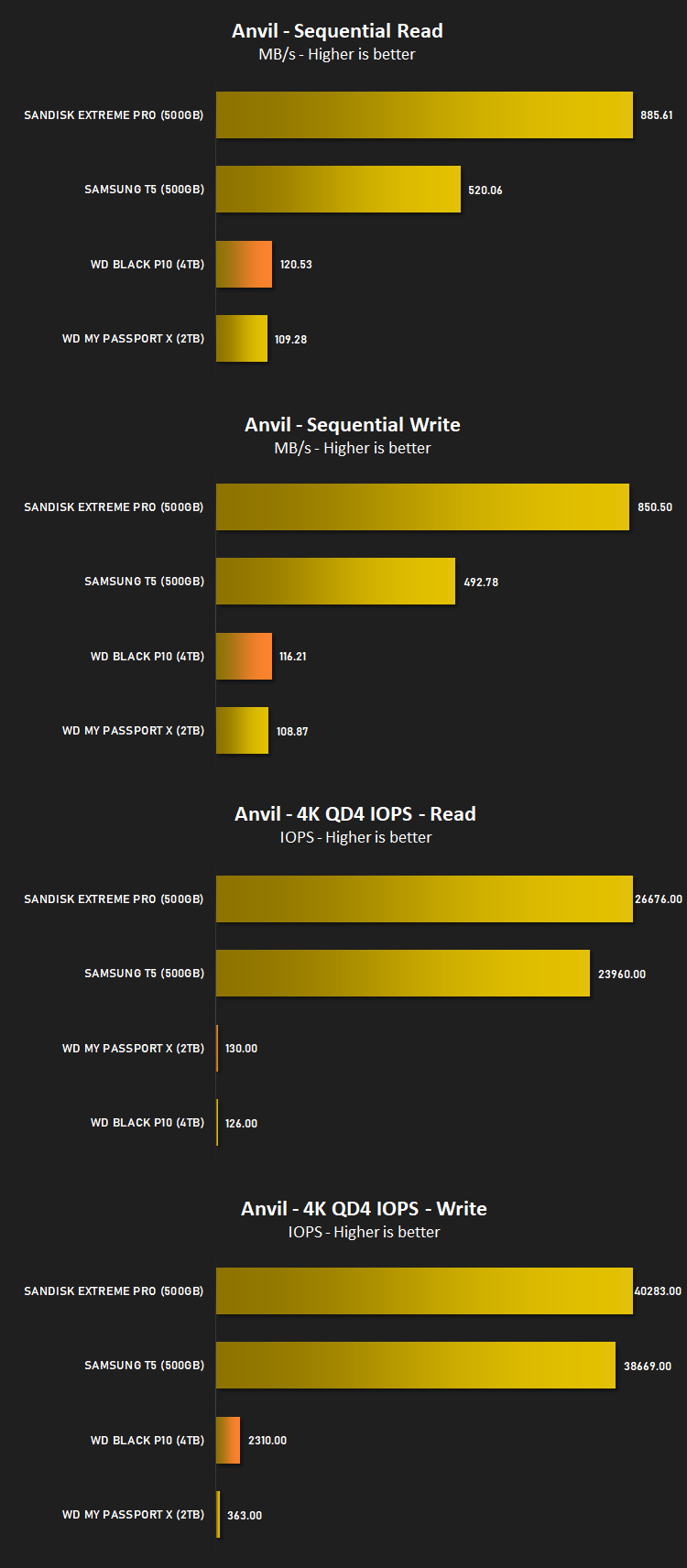
Benchmarks: Anvil Pro
Anvil Pro from Anvil Storage utilities is one of the most popular storage benchmarking utilities today thanks to the large suit of tests available. You can test pretty much anything from Read/write Speed to IOPs with many variables to tweak allowing you to get either a single or host of results to compare with other likeminded enthusiasts. In our test we ran the standard suite 5 times, subtracting both the highest and lowest scores and determined the final result from the average of the remaining three results.
Benchmarks: AS SSD
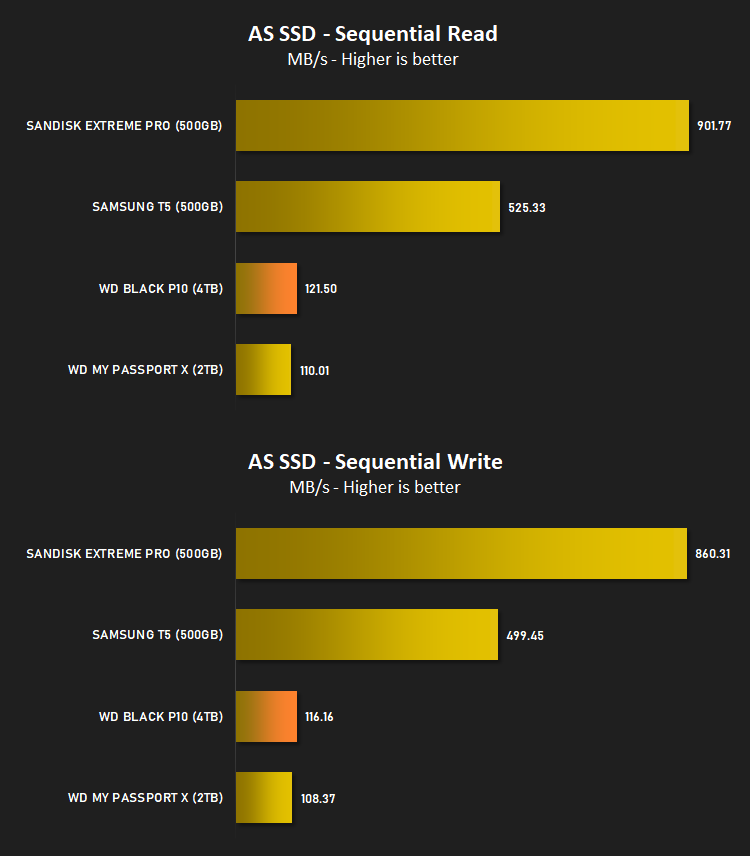
AS SSD Benchmark is a straightforward tool for measuring the speed of your SSD drive.
Simply launch the program, choose your drive, click Start, and it’ll test your SSD’s read and write speed in a variety of ways, delivering a score for each when it’s done. And if that’s not enough, there are also additional file copy and compression-related benchmarks available from the Tools menu. (The author’s support page is German only, but if you need further English explanations then there’s a thread on the program at the OCZ Technology forum.).
Simply launch the program, choose your drive, click Start, and it’ll test your SSD’s read and write speed in a variety of ways, delivering a score for each when it’s done. And if that’s not enough, there are also additional file copy and compression-related benchmarks available from the Tools menu. (The author’s support page is German only, but if you need further English explanations then there’s a thread on the program at the OCZ Technology forum.).
Benchmarks: ATTO
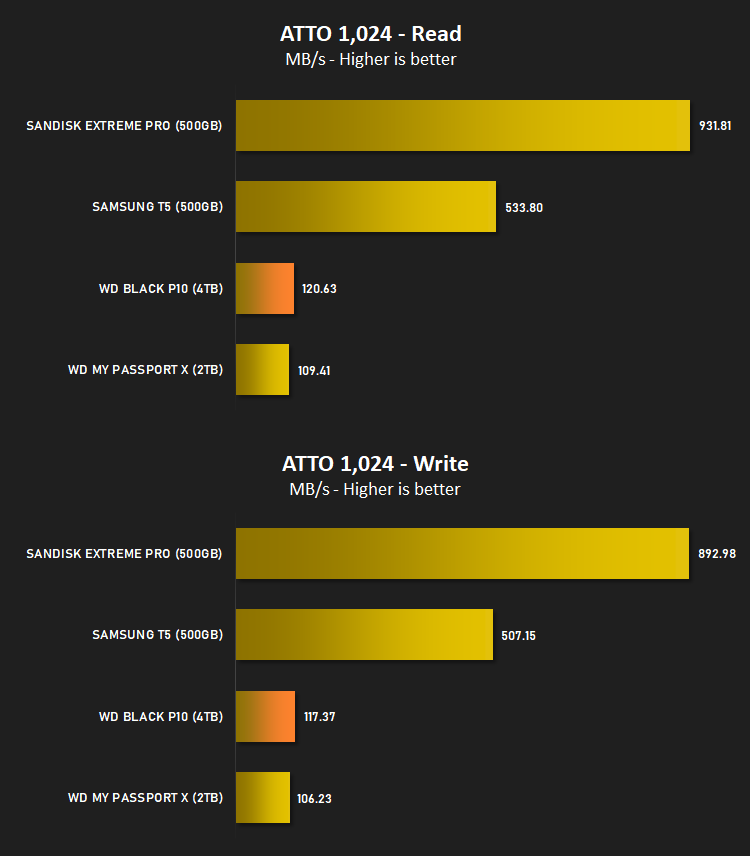
The ATTO Disk Benchmark performance measurement tool is compatible with Microsoft Windows. Measure your storage systems performance with various transfer sizes and test lengths for reads and writes. Several options are available to customize your performance measurement including queue depth, overlapped I/O and even a comparison mode with the option to run continuously. Use ATTO Disk Benchmark to test any manufacturers RAID controllers, storage controllers, host adapters, hard drives and SSD drives and notice that ATTO products will consistently provide the highest level of performance to your storage.
Benchmarks: AIDA64
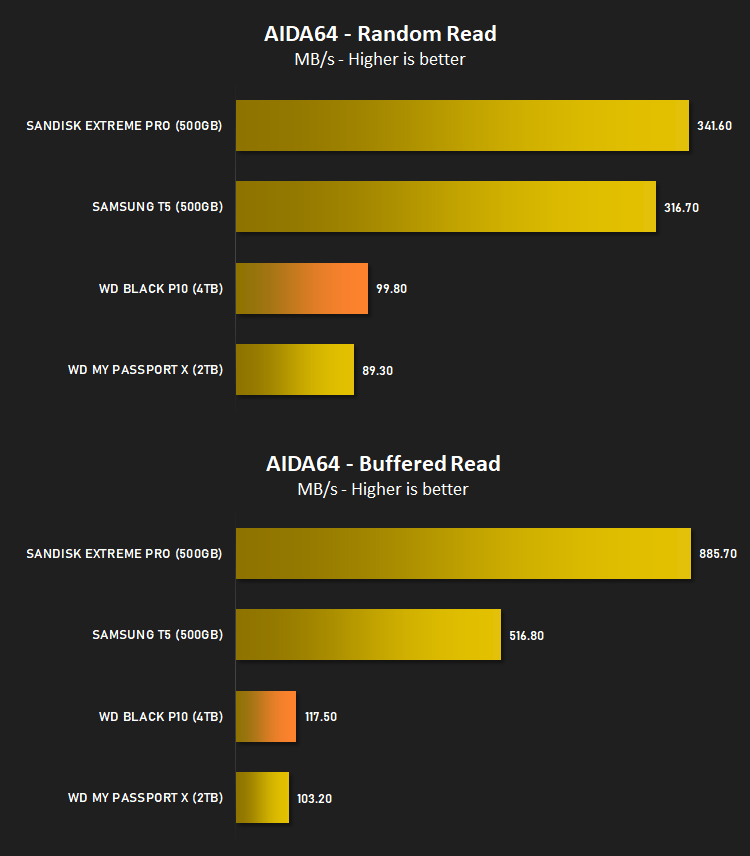
With this module, we can measure the performance of the PC’s storage devices, including (S)ATA or SCSI hard disk drives, RAID arrays, optical drives, solid-state drives (SSD), USB drives and memory cards. It also allows us to perform write tests, which helps us detect fake products and errors on the devices. In order to attain reliable benchmark results we have to make sure to close all background applications.
Benchmarks: CrystalDiskMark
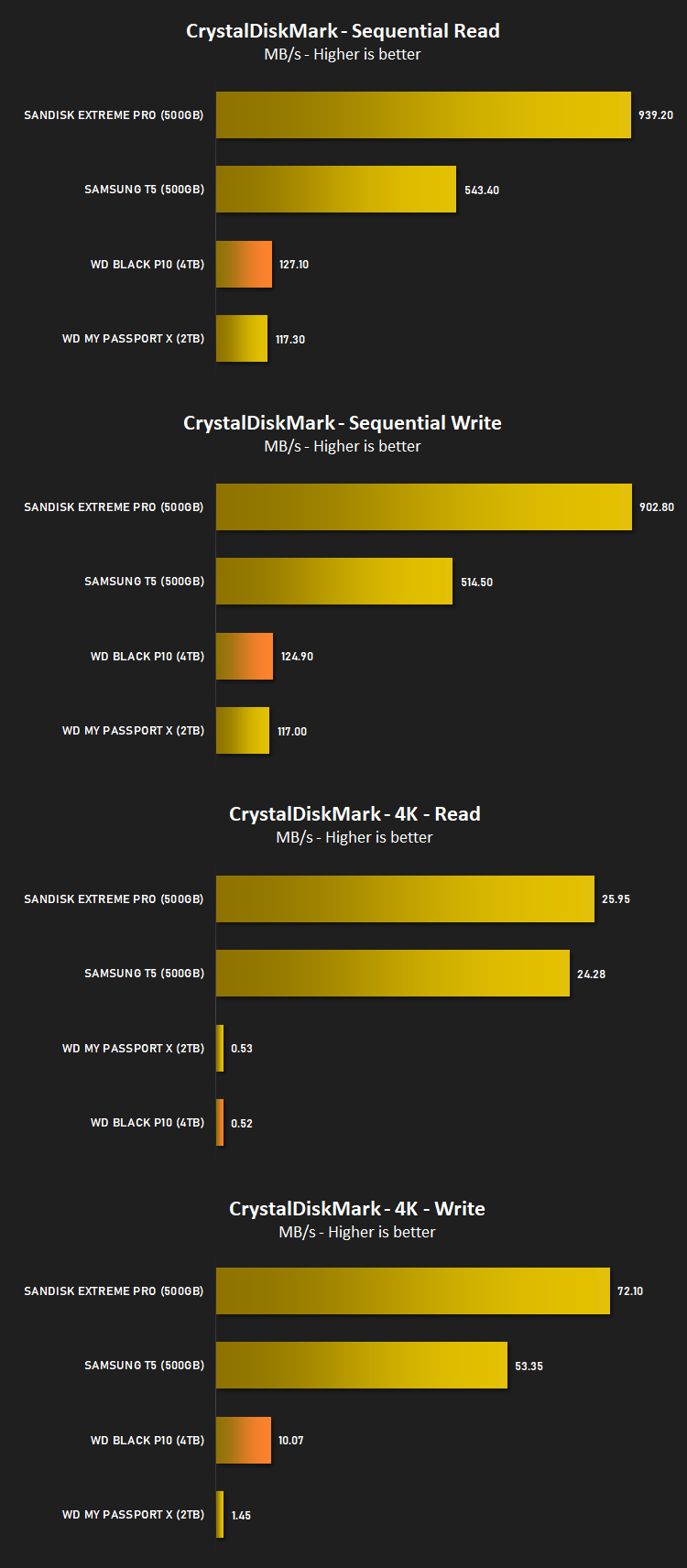
CrystalDiskMark is an open source disk drive benchmark tool for Microsoft Windows. Based on Microsoft’s MIT-licensed Diskspd tool, this graphical benchmark is commonly used for testing the performance of solid-state storage. It works by reading and writing through the filesystem in a volume-dependent way. It generates read/write speeds in sequential and random positions with varying numbers of queues and threads.
Benchmarks: Games Transfer
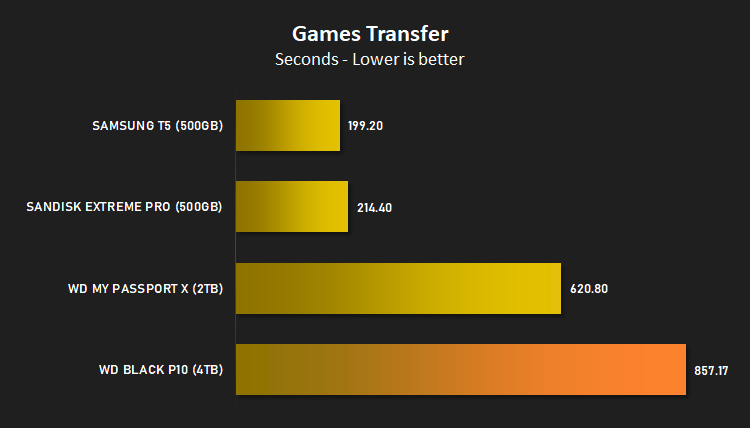
To test the “real world” performance of the drive, we transfer the Rise of the Tomb Raider, Total War: WARHAMMER and War Thunder Steam files from an M.2 NVMe drive to the external drive. These files total 85.3GB and feature a mix of large and small files.
Conclusion
If you’re a console gamer, we’re fairly sure you’ll have come across the issue of running out of capacity for the latest releases, resulting in you deleting games that you might want to play again soon; but if you need the space, that’s the only remedy. However, recently manufacturers have been offering secondary storage solutions for your Playstation or Xbox, allowing you to store much more than the built-in 500GB HDD can handle.The WD_Black P10 comes in 2TB, 4TB and 5TB capacities, allowing 50, 100 or 125 games to be stored locally saving you the painful re-download in a few months’ time. The 2TB is a little more portable thanks to its 12mm thickness, whereas the 4TB and 5TB models are almost twice that.
The chassis of the drive doesn’t match the appearance, in our opinion, it feels thin and, dare we say it, cheap. We’d like it to feel thicker and more substantial, especially considering there could be hundreds of hours of downloading to do should the library become unreadable from a drop.
Thanks to the USB 3.2 Gen. 1 interface, we saw speeds up to 125MB/s in our testing, which is plenty for transferring games between your console and the hard drive, and will be much faster than the average internet connection, particularly here in the UK.
Pricing is somewhere close to what we’d expect from a top-end hard drive manufacturer like Western Digital, but looking at UK pricing in particular, we can’t see why you’d buy the 4TB model when the 5TB is only £5 more.
If you need to increase the capacity of your games console and you care about the appearance of the drive, the WD_Black P10 will do you great, we just wish it felt a bit more solid.
Pros
+ 3-year warranty
+ Good performance from a 2.5” HDD
+ Decent capacity options
+ Enclosure looks great
Neutral
+- Is beaten fairly substantially by an older and lower capacity WD Passport X
Cons
– Enclosure feels thin and cheap
+ 3-year warranty
+ Good performance from a 2.5” HDD
+ Decent capacity options
+ Enclosure looks great
Neutral
+- Is beaten fairly substantially by an older and lower capacity WD Passport X
Cons
– Enclosure feels thin and cheap
Click here for an explanation of our awards at Vortez.net.
Stay connected with the Vortez Social Media pages:
Join in with the discussions on Discord