CORSAIR’s K55-series gets an update for 2021 expanding lighting functionality, but can we fall in love with a membrane keyboard?

Product on Review: K55 RGB PRO XT Gaming Keyboard
Manufacturer: CORSAIR
MSRP: £74.99 inc. V.A.T., $64.99 excl. Tax, €79.99 inc. V.A.T., AUD 99.99 inc. Tax.
In recent years developments in gaming keyboards have rightly focussed on one aspect: the humble key switch. Premium designs with high quality mechanical switches largely captured the gaming landscape as an aspirational upgrade, but have remained tantalisingly out of reach on some budgets. ‘Memchanical’ switches – a hybrid of mechanical and membrane style switches – stole some of the limelight in the more affordable end of the market. Pure membrane layer with rubber dome designs meanwhile have largely fallen out of favour, but that isn’t preventing major manufacturers from investing resources into feature-rich updates.
Within that ecosystem CORSAIR are launching the K55 RGB PRO XT, an update that incorporates some of the lessons learned from the K57 Wireless for their K5x lineup of keyboards with rubber domed membrane switches. In particular, per-key RGB backlighting and more robust anti-ghosting/key rollover functionality are significant advances over the original K55, while the hold-over features are increasingly viewed as essential by niche segments within the gaming market.
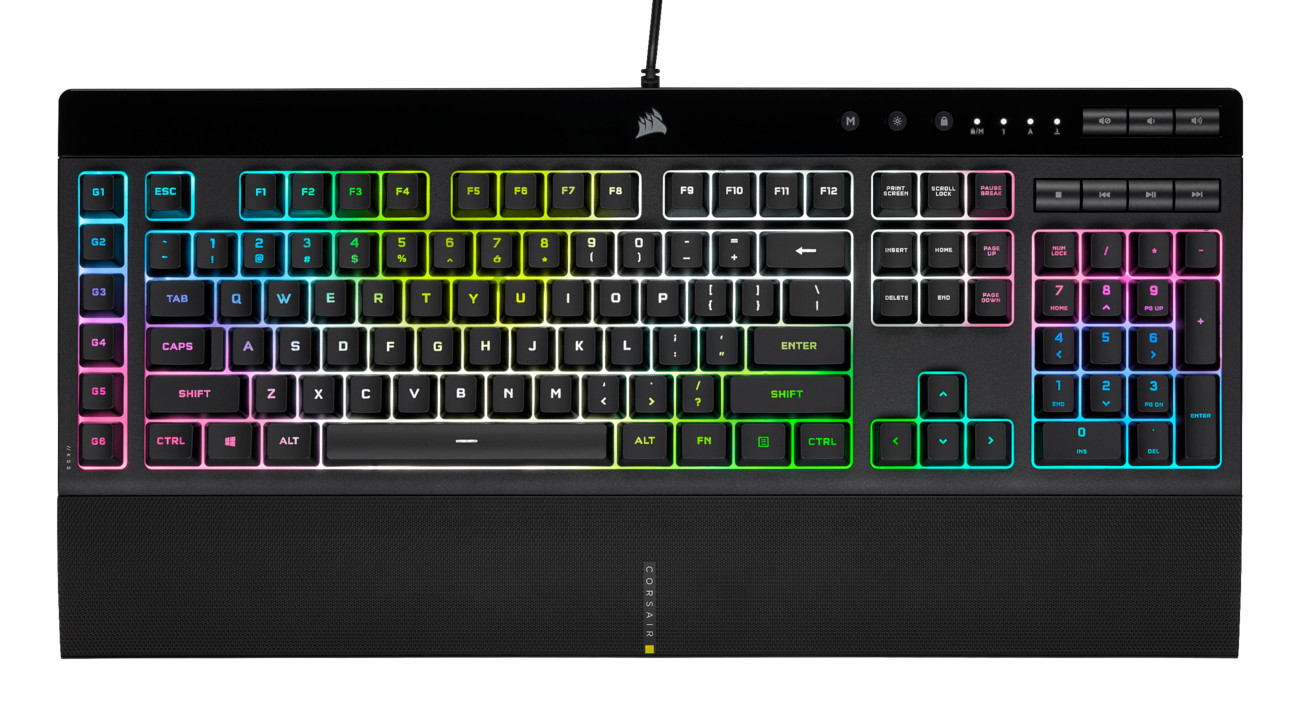
This XT variant launches alongside the K55 RGB PRO, a model that’s a little more restricted in its dynamic lighting capability but retains the same keyboard layout, switch type and advances in key rollover dynamics.
CORSAIR’s iCUE configuration software is once again the key to unlocking the full functionality of these keyboards, both through customisable lighting and advanced keybind remapping and macro construction. On-board memory is limited to pre-baked lighting and simplified macros, but with iCUE the K55 RGB PRO XT’s options are far more comprehensive. Streamers can also add in a sprinkle of Elgato Stream Deck magic for yet more utility.
The keyboards, which have an MSRP of $64.99 and $49.99 for XT and non-XT models respectively, will be making their debut amongst a host of competitive products within similar price bands. The market is dominated by hybrid switch types but without any one model or brand clearly staking a claim to leadership. Razer’s Cynosa V2 Chroma and the Steelseries Apex 3 are stand-out rivals, but trade-offs exist that could put the new K55 models ahead. Similarly, the looming presence of the K60 RGB PRO with CHERRY VIOLA mechanical switches cannot be ignored.
About the CORSAIR K55 RGB PRO XT
The CORSAIR K55 RGB PRO XT Gaming Keyboard lights up your desktop with vibrant dynamic per-key RGB backlighting and powers up your gameplay with six easy to set up dedicated macro keys. The K55 RGB PRO XT is certified for IP42 dust and spill-resistance to stand up to wear, tear and more, with a detachable palm rest to ensure all-day comfort. Quiet and responsive keys are comfortable for typing or gaming, and dedicated media keys put play, pause and more within easy reach. CORSAIR iCUE software makes it easy to personalise your lighting and macros, while anti-ghosting and selective key rollover ensure your critical inputs are delivered when they matter most.
At an MSRP of $69.99 USD, the K55 RGB PRO XT is ready to help you star your winning streak.
At an MSRP of $69.99 USD, the K55 RGB PRO XT is ready to help you star your winning streak.
Technical Specifications
Chassis:- Plastic, black, matte and gloss finish
Form-Factor:- Extended Full size
Keyswitches:- Rubber dome/membrane
Macro Keys:- 6 dedicated macro keys with Elgato Stream Deck software integration
Matrix: 12-key selective rollover with rollover
Onboard Memory:- Yes: predefined lighting effects, six simple macros, device settings
Processor:- 32-bit ARM Cortex
Backlight:- individually lit per-key programmable
LED Colour:- RGB, 16.8m colours
Media Keys:- 7 dedicated media keys
Brightness Key:- Yes
Windows Lock Key:- Yes
Macro Record Key:- Yes
Connectivity:- USB 3.0 Type-A
USB Report Rate:- 1000Hz
Adjustable height:- Yes
Cable:- 1.82m/6ft tangle free rubber
Dimensions:- 481mm x 167mm x 36mm (LxWxH)
Weight:- 0.94kg
iCUE Software:- Supported in Windows 10 and macOS 10.15
Form-Factor:- Extended Full size
Keyswitches:- Rubber dome/membrane
Macro Keys:- 6 dedicated macro keys with Elgato Stream Deck software integration
Matrix: 12-key selective rollover with rollover
Onboard Memory:- Yes: predefined lighting effects, six simple macros, device settings
Processor:- 32-bit ARM Cortex
Backlight:- individually lit per-key programmable
LED Colour:- RGB, 16.8m colours
Media Keys:- 7 dedicated media keys
Brightness Key:- Yes
Windows Lock Key:- Yes
Macro Record Key:- Yes
Connectivity:- USB 3.0 Type-A
USB Report Rate:- 1000Hz
Adjustable height:- Yes
Cable:- 1.82m/6ft tangle free rubber
Dimensions:- 481mm x 167mm x 36mm (LxWxH)
Weight:- 0.94kg
iCUE Software:- Supported in Windows 10 and macOS 10.15
K55 RGB PRO XT vs K55 RGB PRO
CORSAIR’s K55 RGB PRO incorporates 5 independent lighting zones and a total of 6 on-board pre-baked lighting effects (plus static lighting options) that can be enabled at the stroke of a key. That’s two more zones than the original K55 RGB.
The K55 RGB PRO XT by contrast has per-key RGB backlighting across the keyboard and ten built-in effects, plus more powerful lighting configuration options through iCUE software. Additionally, the XT variant is equipped with iCUE Game Integration, an SDK that allows game developers to take direct control of iCUE lighting for more atmospheric and immersive experiences.
The key takeaway for any gamer on a budget is that the differences between XT and non-XT K55 RGB PRO models are purely aesthetic rather than fundamental to your gaming experience.
Rubber Domed Membrane switches
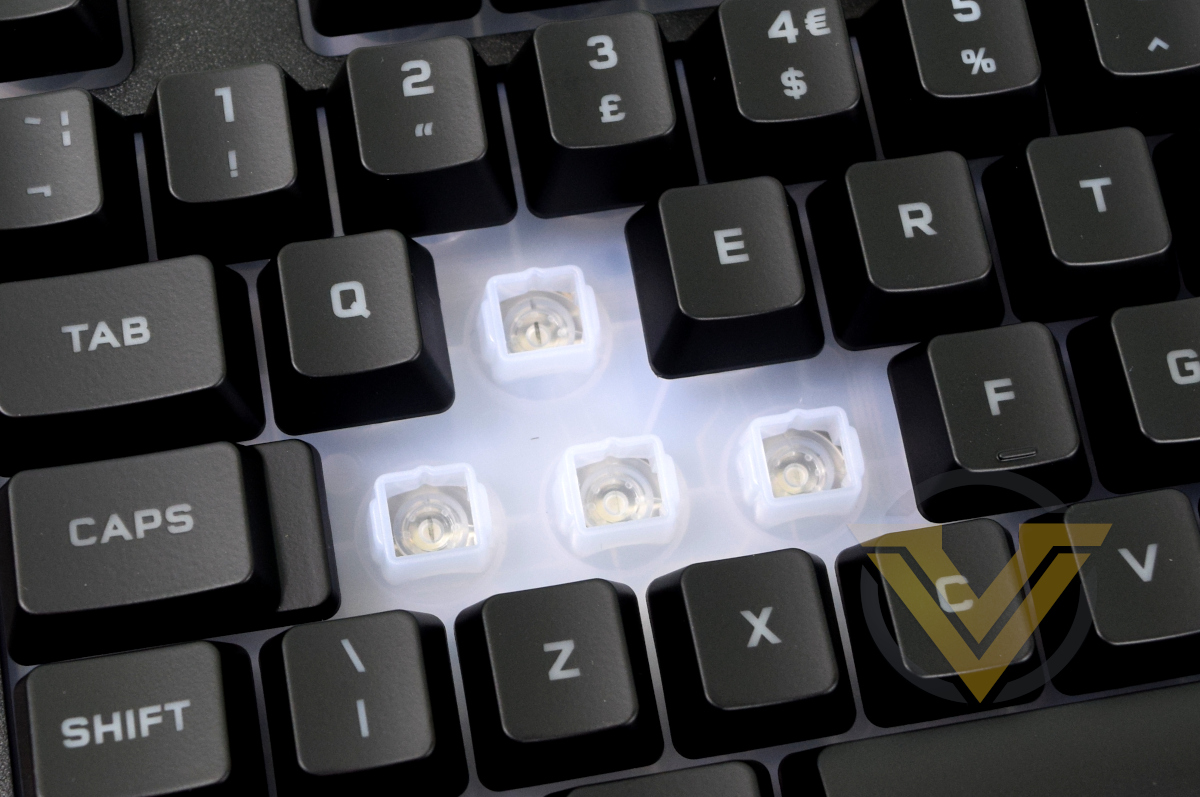
Any key switch relies on two core principles: a point of actuation where the switch closes and a press is detected, and some resistive component that will push the key back into place once actuated.
Mechanical switches rely on closing metal contacts for the former and a small spring for the latter. The predictable nature of a spring’s response to compression is what gives a mechanical switch a consistently smooth, linear action. Two metal contacts closing at the mid-point of the stroke ensures reliable detection that the key has been pressed.
Membrane keyboards substitute a buckling spring for a dome of rubber. Actuation occurs when the dome is pressed, pushing a conductor into the circuit board on which the dome sits to register a keypress. Rubber domes don’t collapse in the same linear fashion as springs and typically need to be pressed more firmly. The mechanism also requires that the key be fully depressed to register rather only a nominal mount, which can cause fatigue.
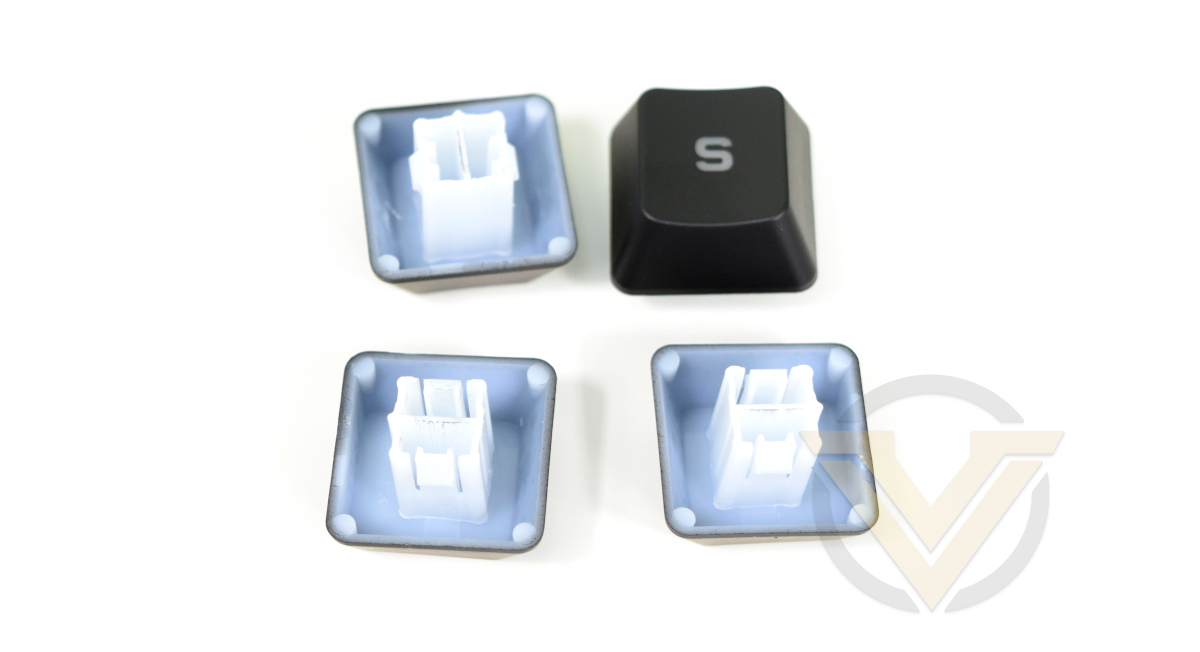
The K55 utilises a plastic conduit to guide the action of the keycap as the key is pressed, but the feel of the keypress is nonetheless typical of other rubber dome designs.
Additional Features – IP42 Certified
An interesting footnote in the K55 RGB PRO XT’s specs are its’ dust and spill resistance certification. It is rated up to IP42, but what does that actually mean?
A product’s Ingress Protection code defines how well it prevents small objects, liquids and particulate matter from entering its inner workings. The first number in the code refers to its solid particle protection, whereas the second outlines its liquid ingress protection, both defined by the specific test it passed. In this instance:
IP42 = Solid Particle Protection Level 4, Liquid Ingress Protection Level 2.
Solid Particle Protection Level 4: Protection for internal components from objects larger than 1mm, including most wires, slender screws, large ants etc.
Liquid Ingress Protection Level 2: Vertically dripping water shall have no harmful effect when the enclosure is tilted at an angle of 15° from its normal position. A total of four positions are tested within two axes for 2.5min each, equivalent to 3mm of rainfall per min.
Solid Particle Protection Level 4: Protection for internal components from objects larger than 1mm, including most wires, slender screws, large ants etc.
Liquid Ingress Protection Level 2: Vertically dripping water shall have no harmful effect when the enclosure is tilted at an angle of 15° from its normal position. A total of four positions are tested within two axes for 2.5min each, equivalent to 3mm of rainfall per min.
This isn’t a license to eat your cereal from it, but does provide some decent protection against spills and larger dust particulates. This should help to maintain the responsiveness of the keyboard and improve its effective life span.
Clip-on wrist rest.
The K55 RGB PRO XT also arrives with a wrist-rest. This is a solid piece of wedge-shaped plastic that’s gently curved, the upper-most surface of which is textured and feels soft to the touch. It clips on in two locations and rests on the desk rather than fitting between desk and keyboard, so it doesn’t affect stability.
Packaging and First Look
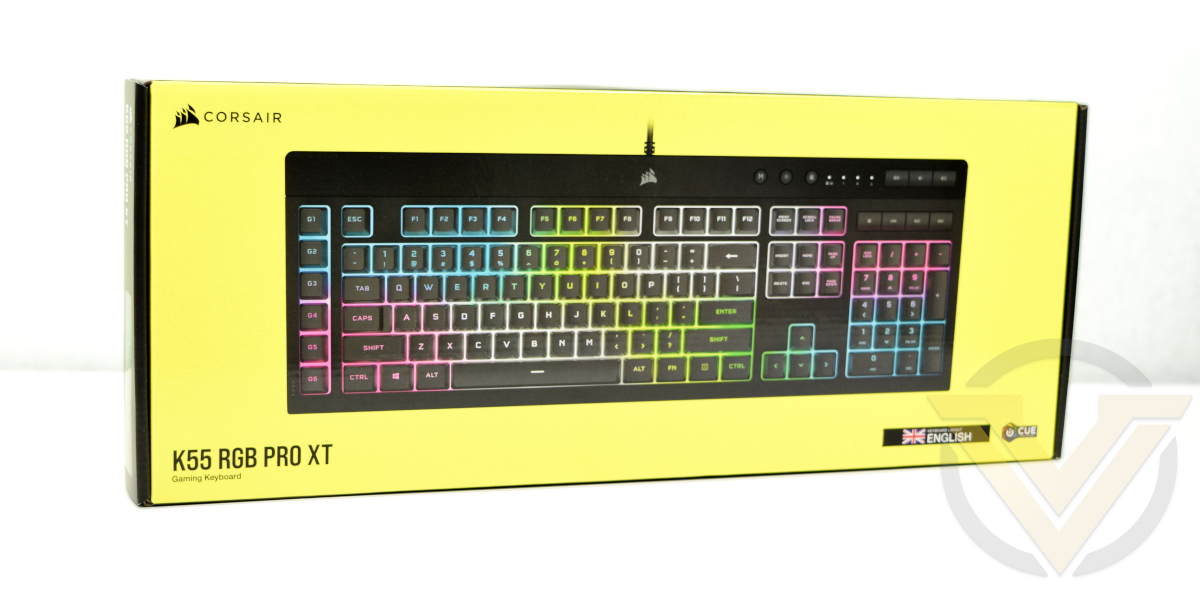
CORSAIR have given the K55 the same packaging treatment as their wider peripheral range, treating it as an aspirational design even if it sits in a lower price bracket.
Imagery hints at the broad per-key RGB lighting and hints at the opaque plastic layer just underneath the keycaps that diffuses this lighting.
No-where on the front, nor indeed across the entire package, does it state what type of keys this keyboard uses. That’s not deceptive – do you call it ‘membrane’ or ‘rubber dome’ and should you explain what that means – but it does mean that you need to be clued in rather than make assumptions about its feature-set if you see it on a shelf. Particularly as per-key lighting is rare outside of mechanical keyboards.
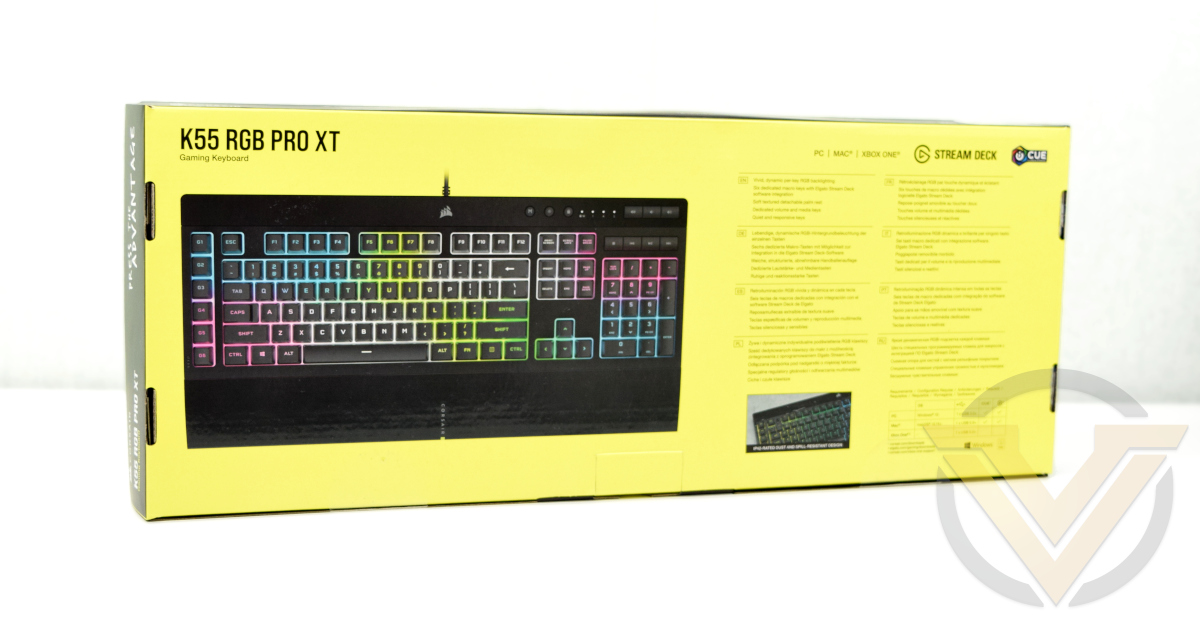
The rear has another picture of the keyboard and explanation of some key features – lighting, macro keys etc. Technical details – including dimensions, polling rate and 12-key rollover capability – are printed on the bottom edge of the package.
Kudos to CORSAIR for also mentioning XBOX support. Games console capabilities are increasing year by year, including support for advanced peripherals, so being up front about what you can expect from the keyboard even if you never plug it into a PC is creditable.
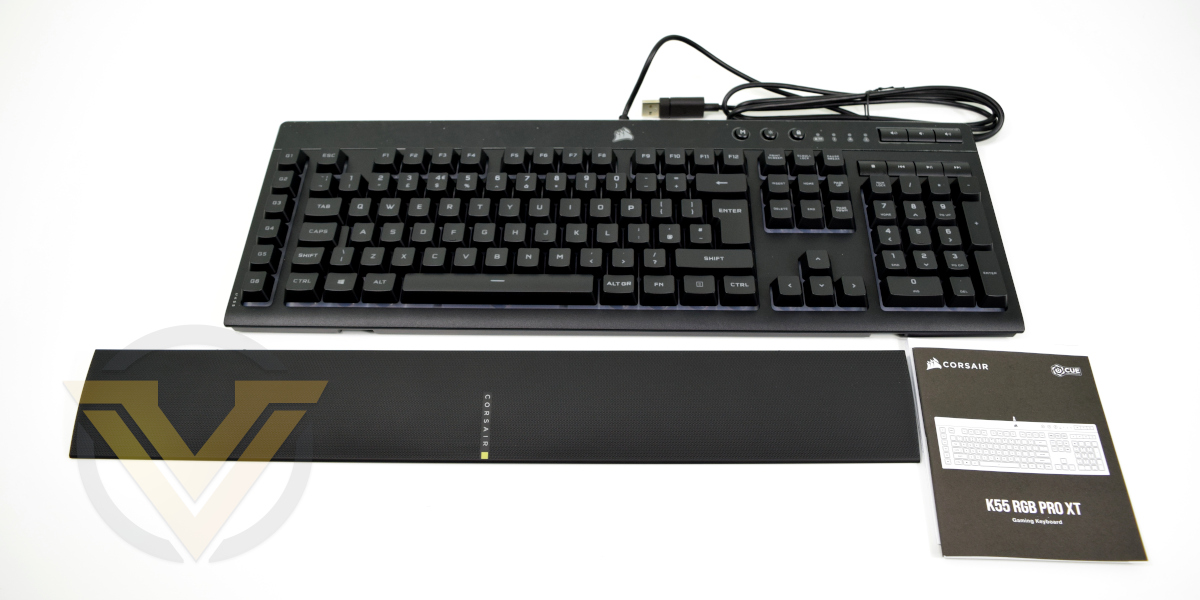
The only accessory to speak of in this bundle is the included wrist-rest; you won’t get so much as a keycap puller.
Closer Look
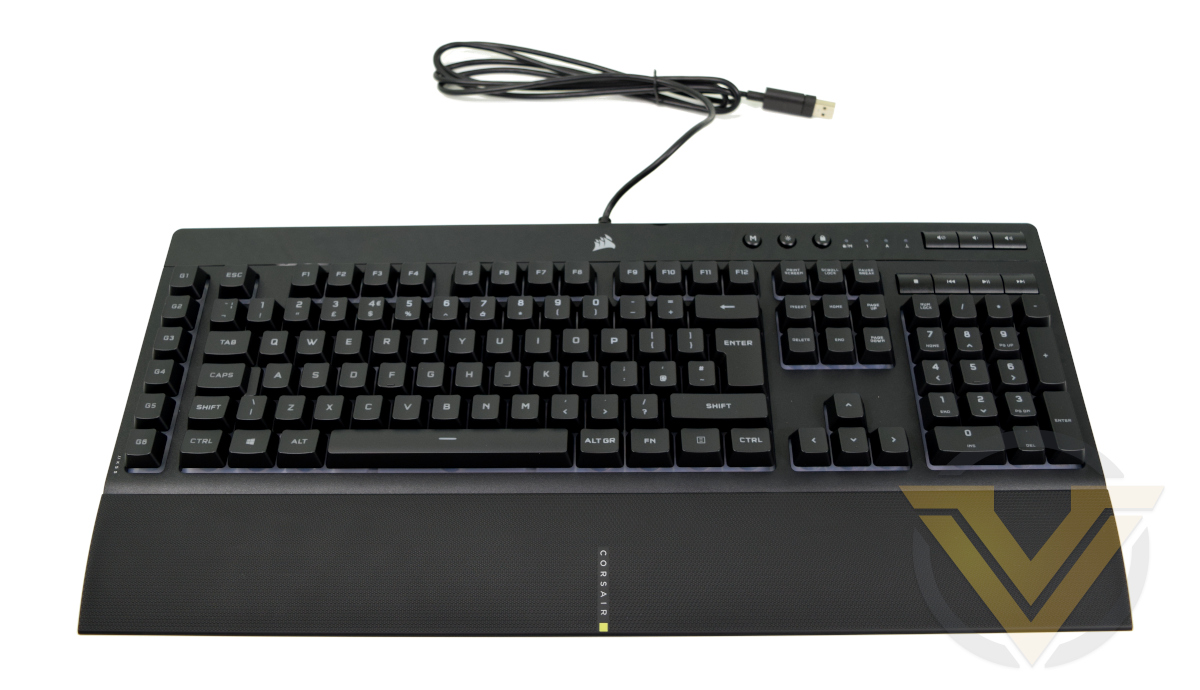
Little has changed from the chassis style of the K57 RGB Wireless and K55 RGB before it. The frame is evocative of CORSAIR’s premium series models from the K60 upward, but lacks many of those premium features such as the aluminium unibody frame and steel backplate. The K55 RGB PRO XT instead has a matte black plastic frame and glossy black upper section, aping the look of the aluminium base and folded upper of the K100 and the like without committing to the expense.
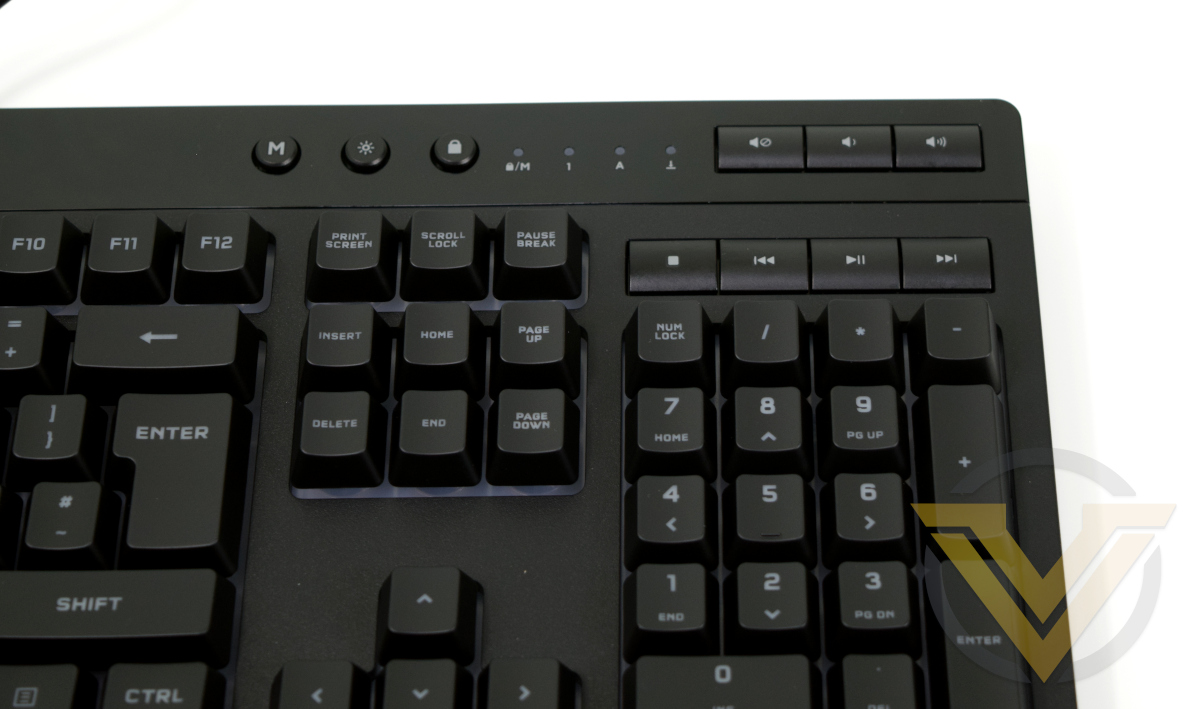
Media keys and indicator LEDs are located in the upper-right just above the number pad, similar to the K100 and older K70. Also placed there are the Macro recording, Brightness and Windows Lock buttons, making it quite a busy section for your right hand.
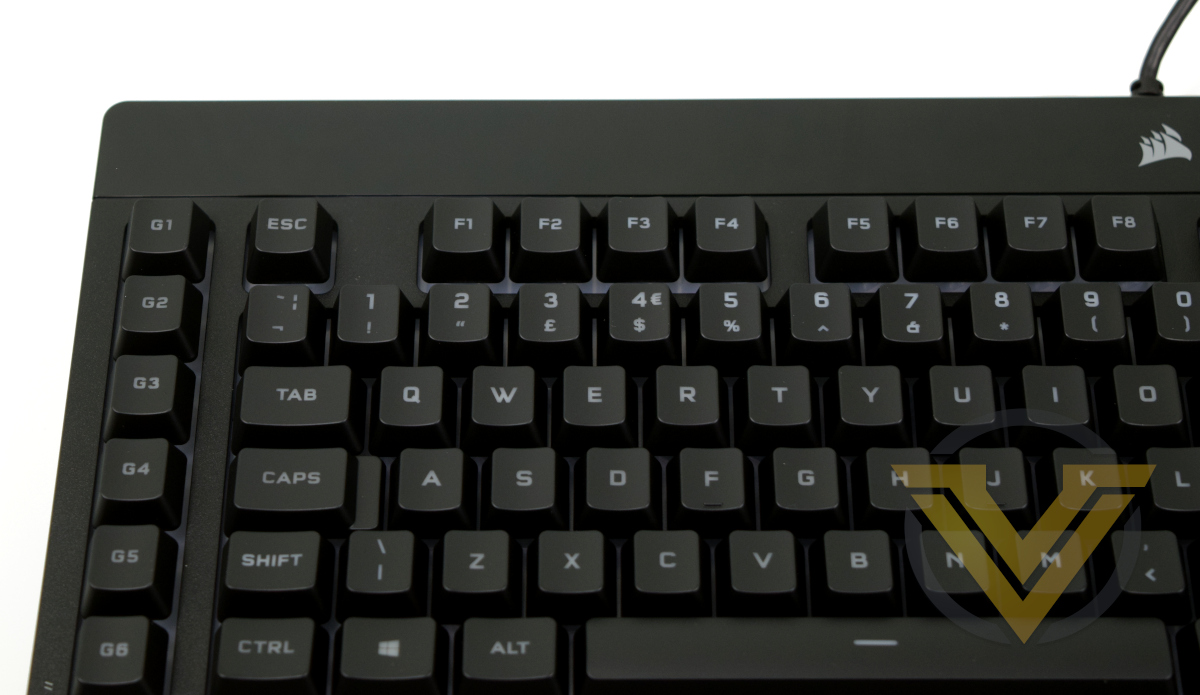
CORSAIR have also swapped in their sail logo in the centre of the glossy section, echoing a similar aesthetic choice on the K100 RGB.
‘G1-6’ labelled Keys on the left are the dedicated macro keys. Although most powerful when leveraged in conjunction with iCUE or Elgato Stream Deck software, they can be configured on-the-fly using the Macro button to record and assign macros. They used the same rubber dome switches as the rest of the keyboard.
Closer Look (2)
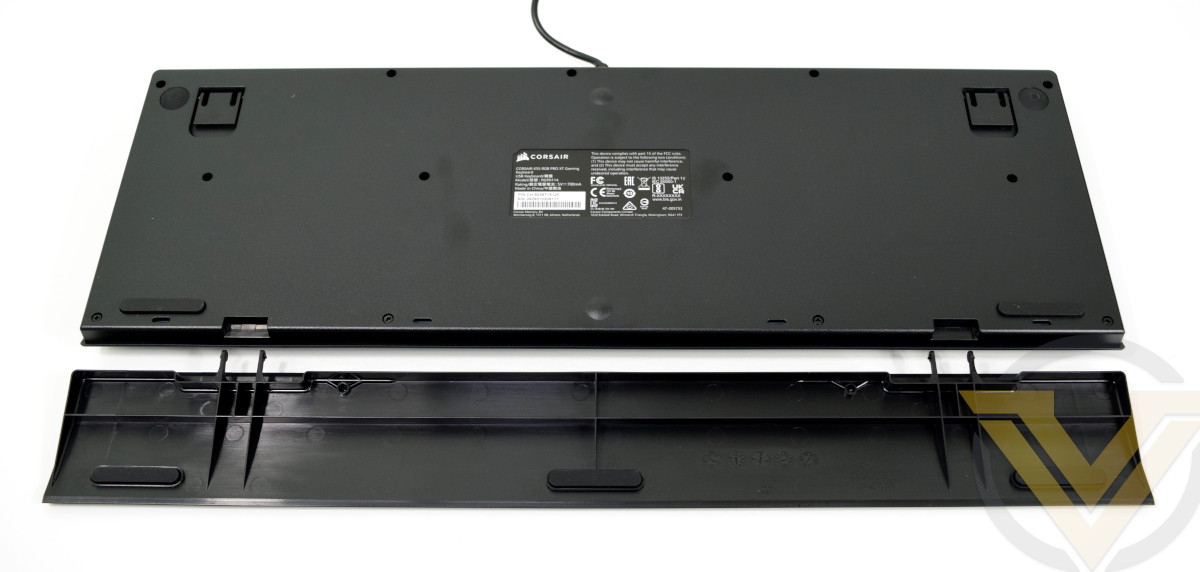
Flip to the underside and you’ll see a very basic plan in place. Two rubber pads at the front and two extendable feet at the rear hold the keyboard in place, but there’s not cable routing cut-outs in the floor itself. On the one hand it’s a little disappointing given how large a footprint the K55 RGB PRO has, but lack of integrated USB pass-through partially reduces the requirement.
Two small chevrons are cut out from the front to accommodate the wrist-rest clips. Rather than penetrating deep into the keyboard housing, the clips are quite short and held in place only with a bump on each prong. This could be a source of long-term wear that would make attachment unreliable, so you’ll need to treat it with some care.
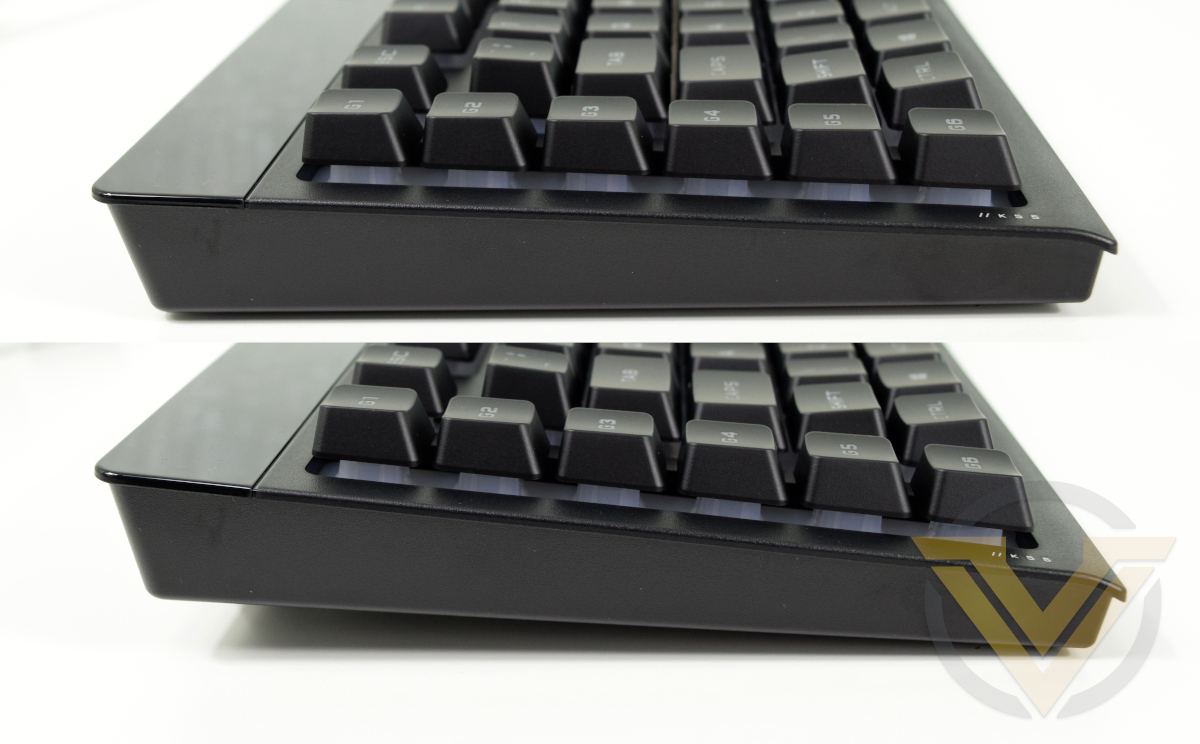
Both rear and side are unadorned with extras but a thin lip runs around the topmost edge. The two feet raise the keyboard up to a more ergonomic angle.
The USB cable is plainly sheathed rather than coming with a braided jacked. That makes it look a bit cheap, but that’s a little harsh as criticisms go. A 1.8m length should be plenty in general.
Software and Lighting.
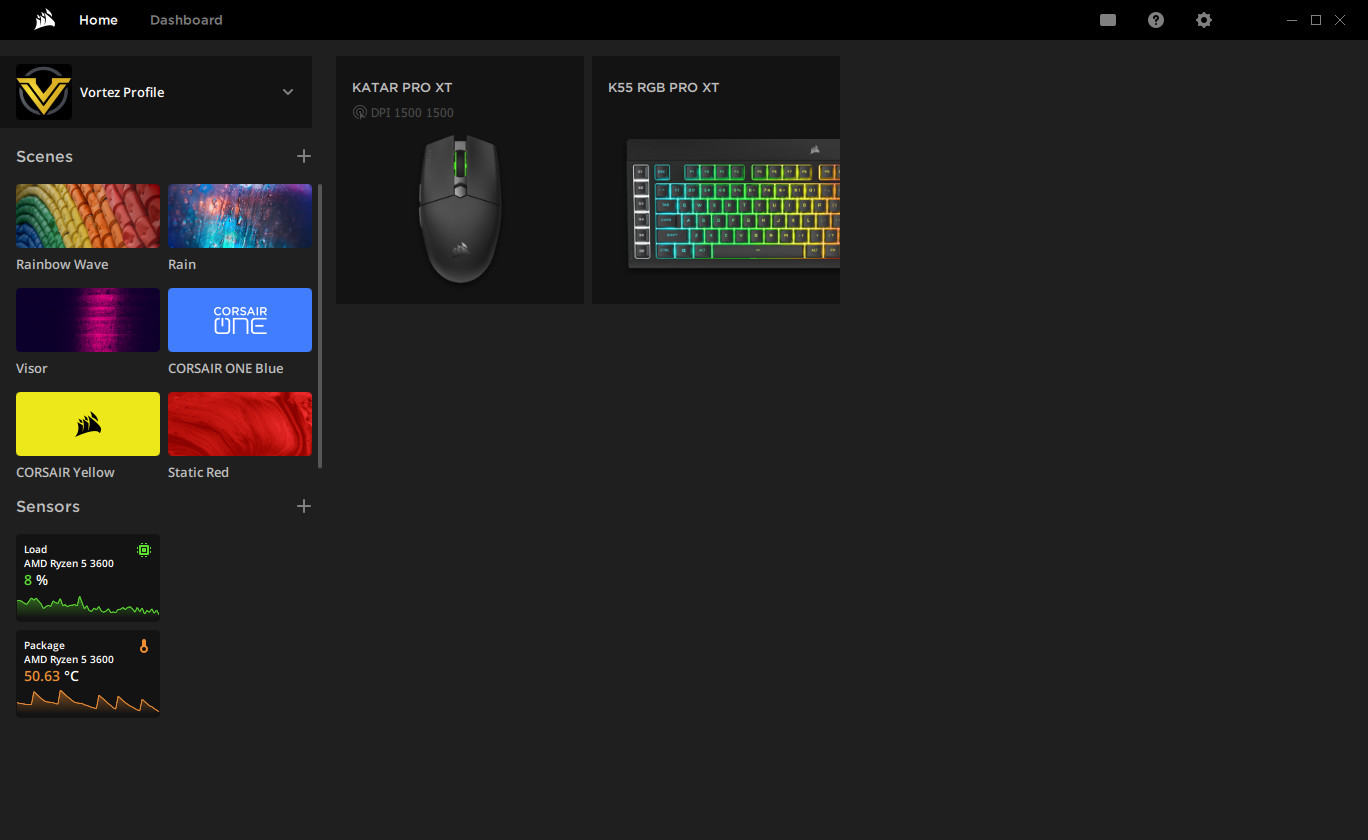
Home Screen for iCUE v4 with quick ‘scene’ lighting, sensor and profile selection
CORSAIR’s iCUE software was updated on March 16th to version 4, bringing significant changes to the UI to make it more approachable and easier to manage multiple iCUE devices. The good news is that v3 profiles are compatible with v4; any meticulously created lighting effects and key assignments will not be lost in the update.
Despite the UI change, the underlying organisational approach when configuring keyboard options remains the same:
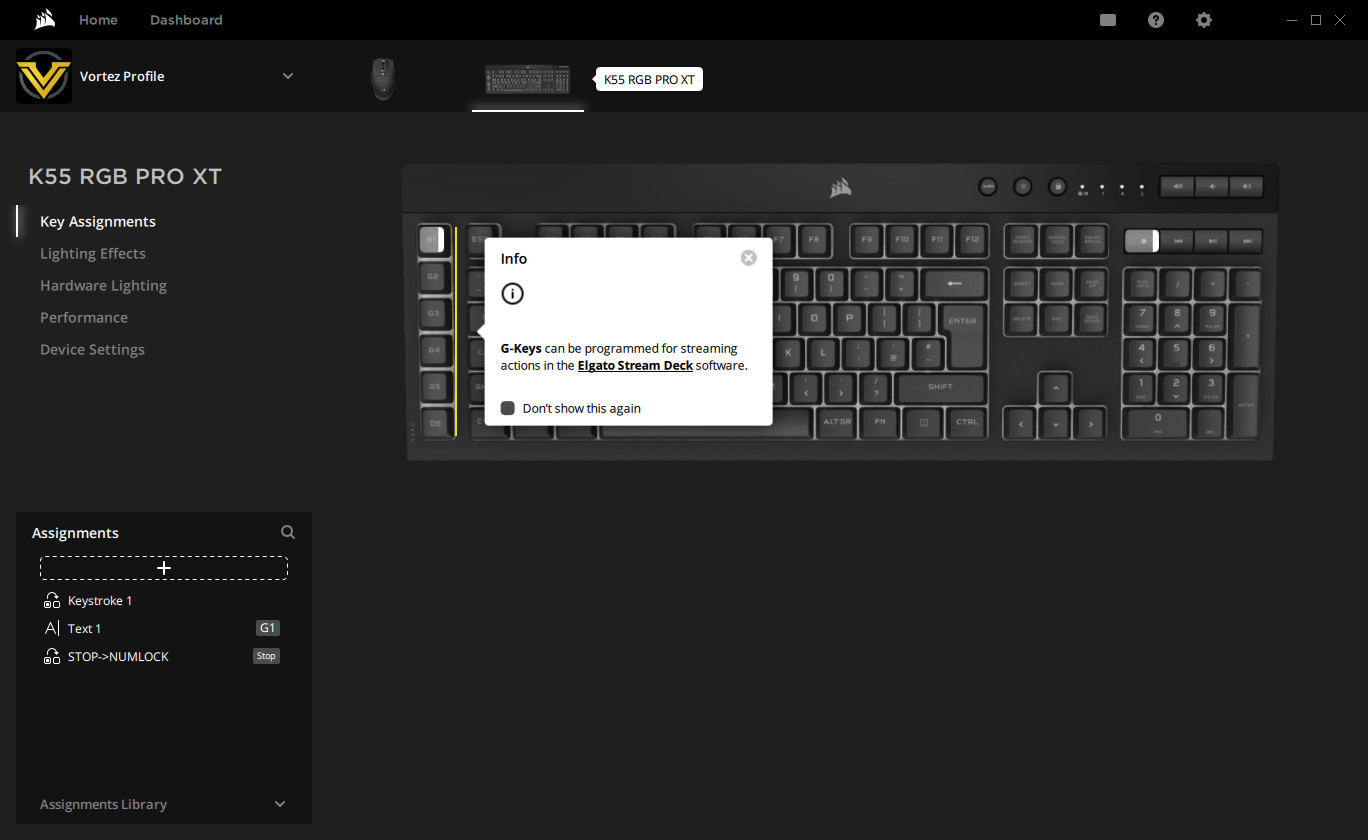
Key Assignment configuration
Key Assignments:
Software-defined and controlled key assignments made on a per-key basis. Does not apply on other PCs, nor when iCUE isn’t running.
Hardware Key Assignments:
Assignments stored in keyboard memory. Is the default behaviour when connected to systems without iCUE software installed, and only appears for keyboards with on-board profile memory. Not present for the K55 RGB PRO series.
Lighting Effects:
Software-defined and controlled lighting. Allows linked iCUE lighting across multiple devices.
Hardware Lighting Effects:
Lighting effects stored on the keyboard. Will apply when connected to systems without iCUE installed.
Software-defined and controlled key assignments made on a per-key basis. Does not apply on other PCs, nor when iCUE isn’t running.
Hardware Key Assignments:
Assignments stored in keyboard memory. Is the default behaviour when connected to systems without iCUE software installed, and only appears for keyboards with on-board profile memory. Not present for the K55 RGB PRO series.
Lighting Effects:
Software-defined and controlled lighting. Allows linked iCUE lighting across multiple devices.
Hardware Lighting Effects:
Lighting effects stored on the keyboard. Will apply when connected to systems without iCUE installed.
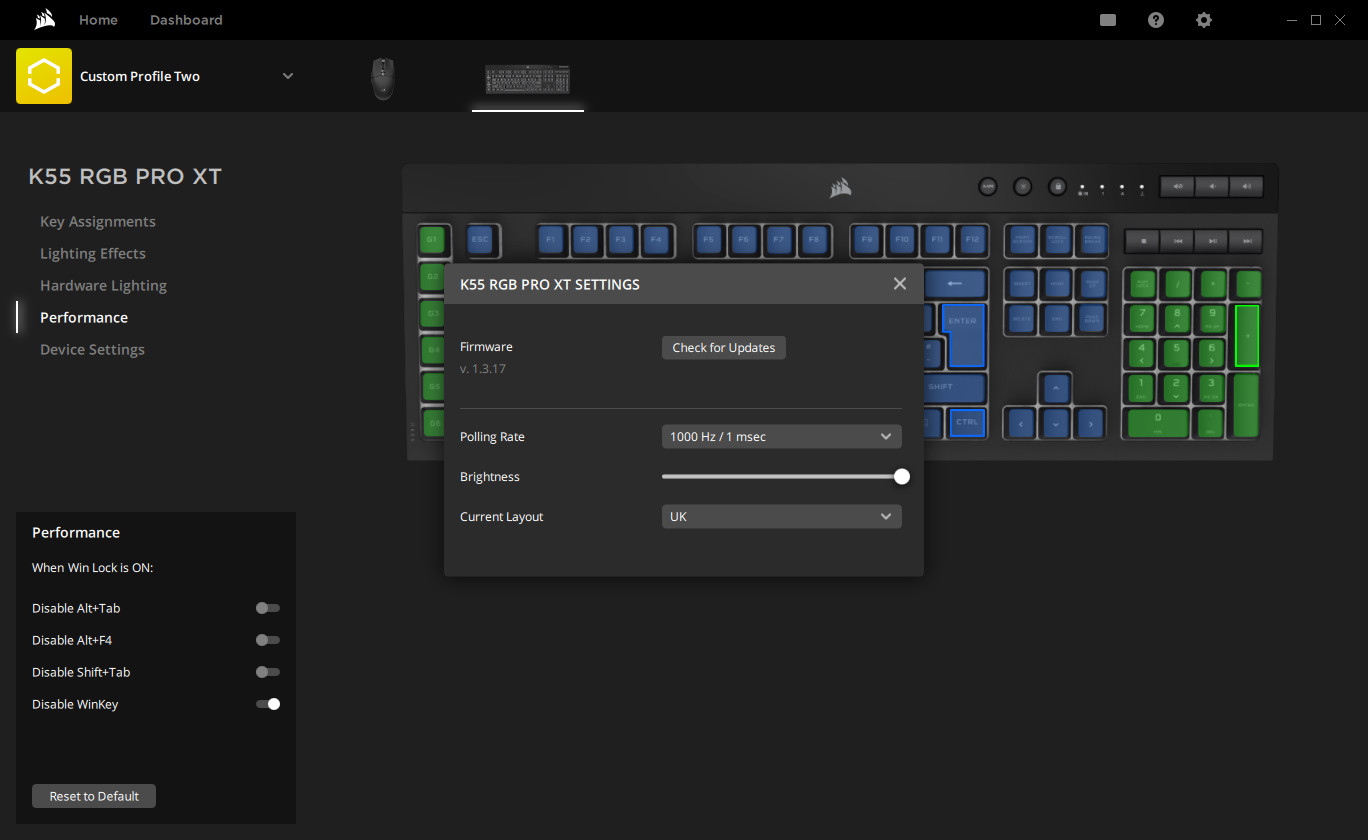
Performance tab with Device Settings activated
Each of these is stored on a per-profile basis, alongside device configuration information defined under the Performance and Device Settings tab. The number of software profiles available is effectively without limit, but the keyboard has no on-board profile functionality.
All attached iCUE devices are listed at the top as an image, and profiles are coherent across each of them. One-button profile switching will then apply to your entire iCUE peripheral set, both lighting and button assignments.
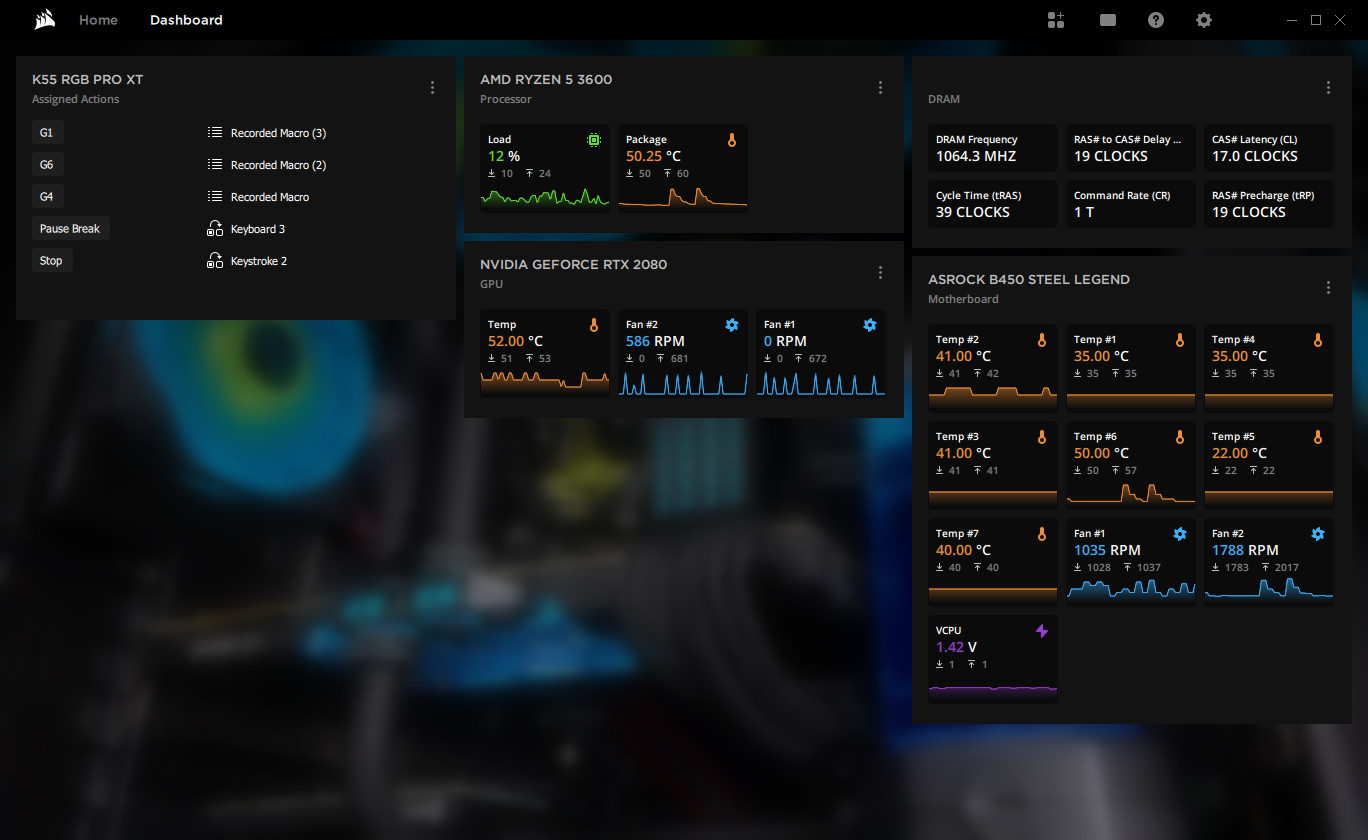
Key Assignment configuration
A frequently overlooked aspect of iCUE when it comes to peripheral control and configuration is the Dashboard panel. Here you can visualise all the system sensors – CPU Temp, GPU Fan RPM, Motherboard Sensors etc – in one convenient location. iCUE also has logging functionality, but we remain surprised that it’s not easily accessed through this tab. Optionally, you can also add a list of every active key assignment on attached peripherals (the K55 RGB PRO XT in this instance).
—
In contrast to other K-series keyboards, the K55 RGB PRO XT has no on-board hardware profiles and only limited lighting customisation options when not attached to a PC running iCUE. Hardware button assignments transferable between PCs are limited to the six G keys, and the keyboard will store the G-Key macro assignments of the last active software profile.
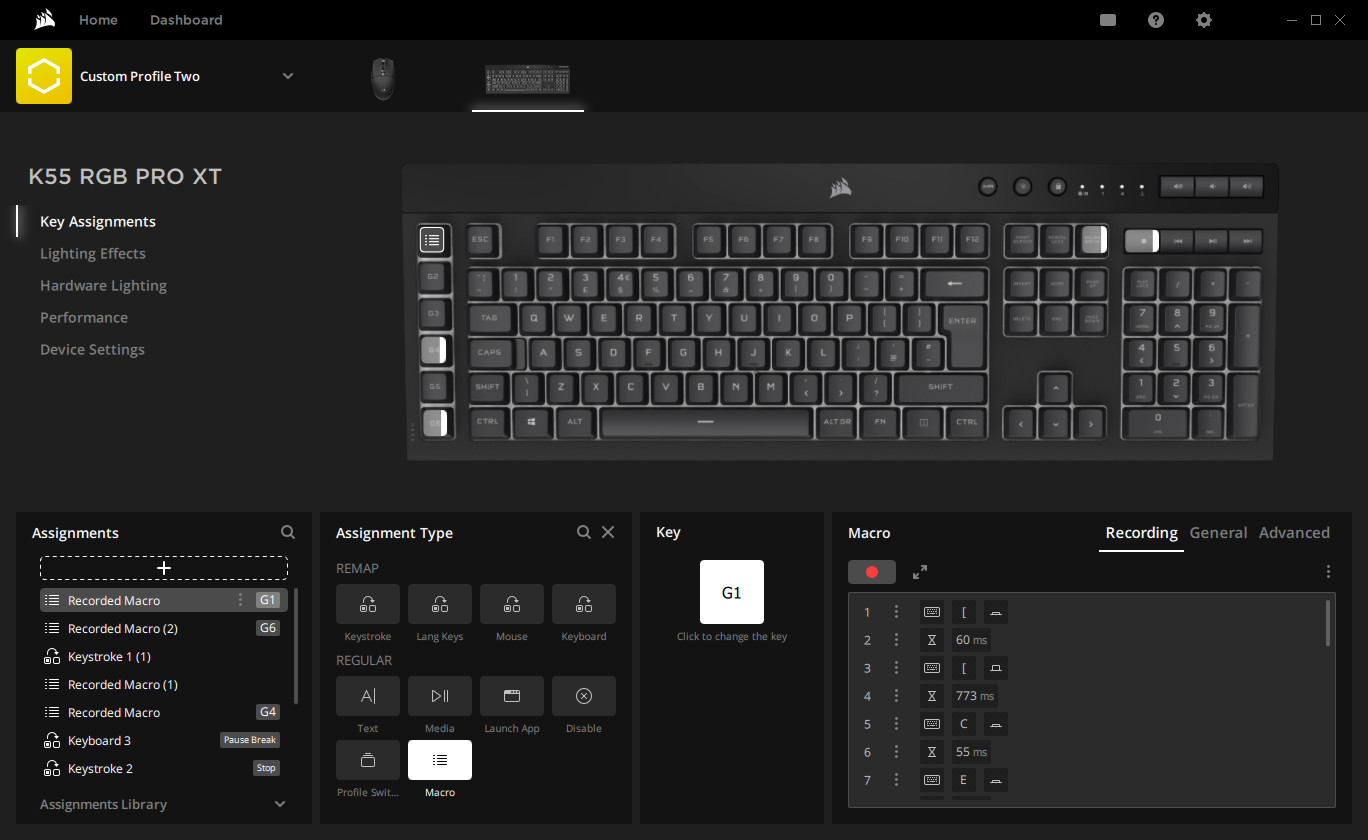
Macros recorded through the on-board ‘M’ key function can be edited through iCUE software to precisely modify timings, or created from scratch.
Alternatively, if Elgato’s Stream Deck software is running, the G keys can be assigned to one of any number of Stream Deck commands including community-sourced functions built from the SDK. This may be the best use of the G-Keys overall as the functions mitigate against the weaknesses of rubber-domed switches.
Lighting
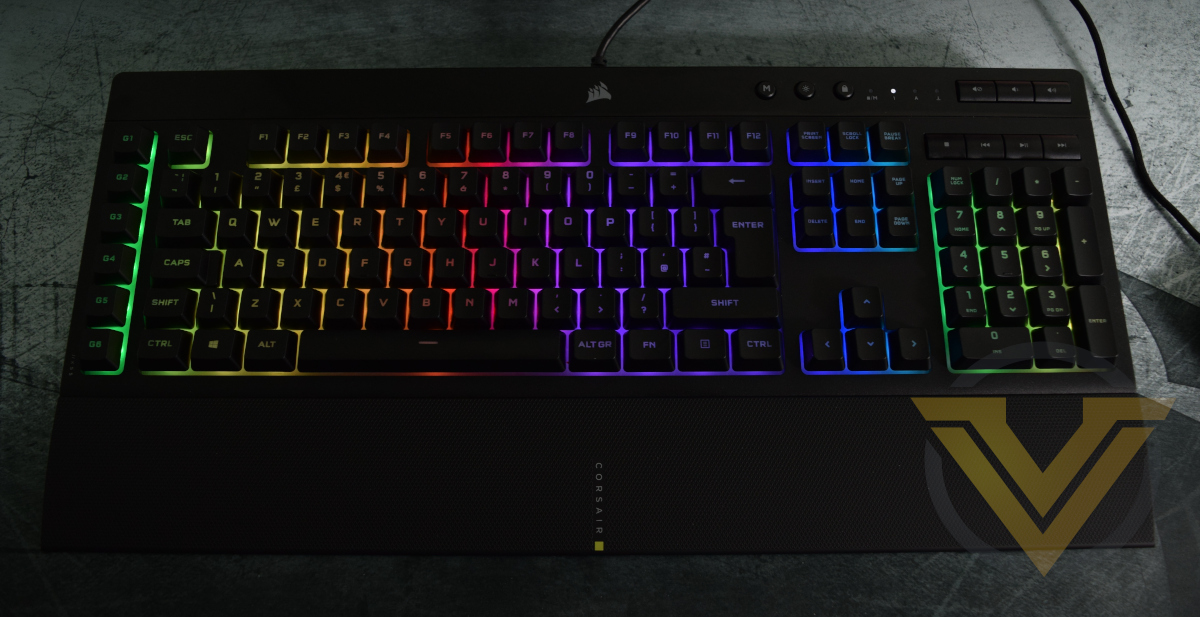
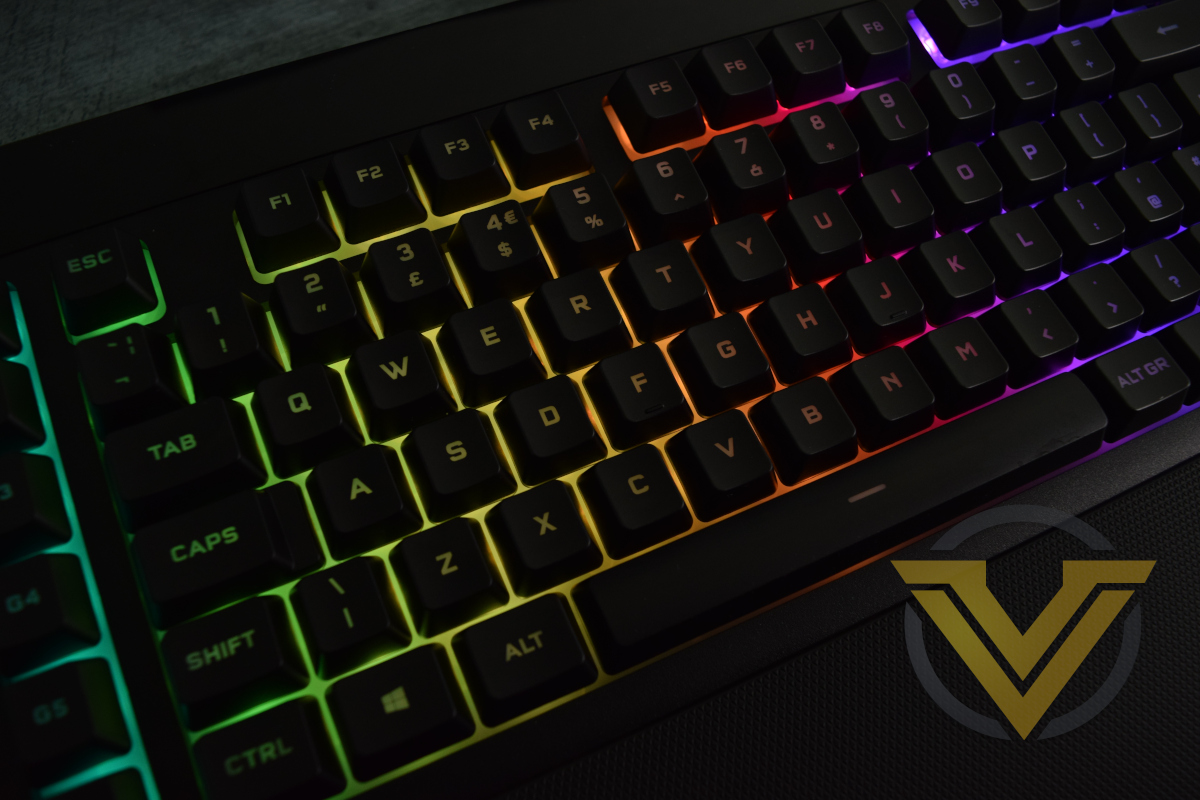
The K55 RGB PRO XT diverges a little from CORSAIR’s previous per-key backlighting designs having the lighting shine through the entire plastic backplate rather than just the key switches. The backplate acts as a diffusion medium, evening out each bright single light source so it blends with neighbouring sources. None the colour vibrancy of each LED is lost in the process.
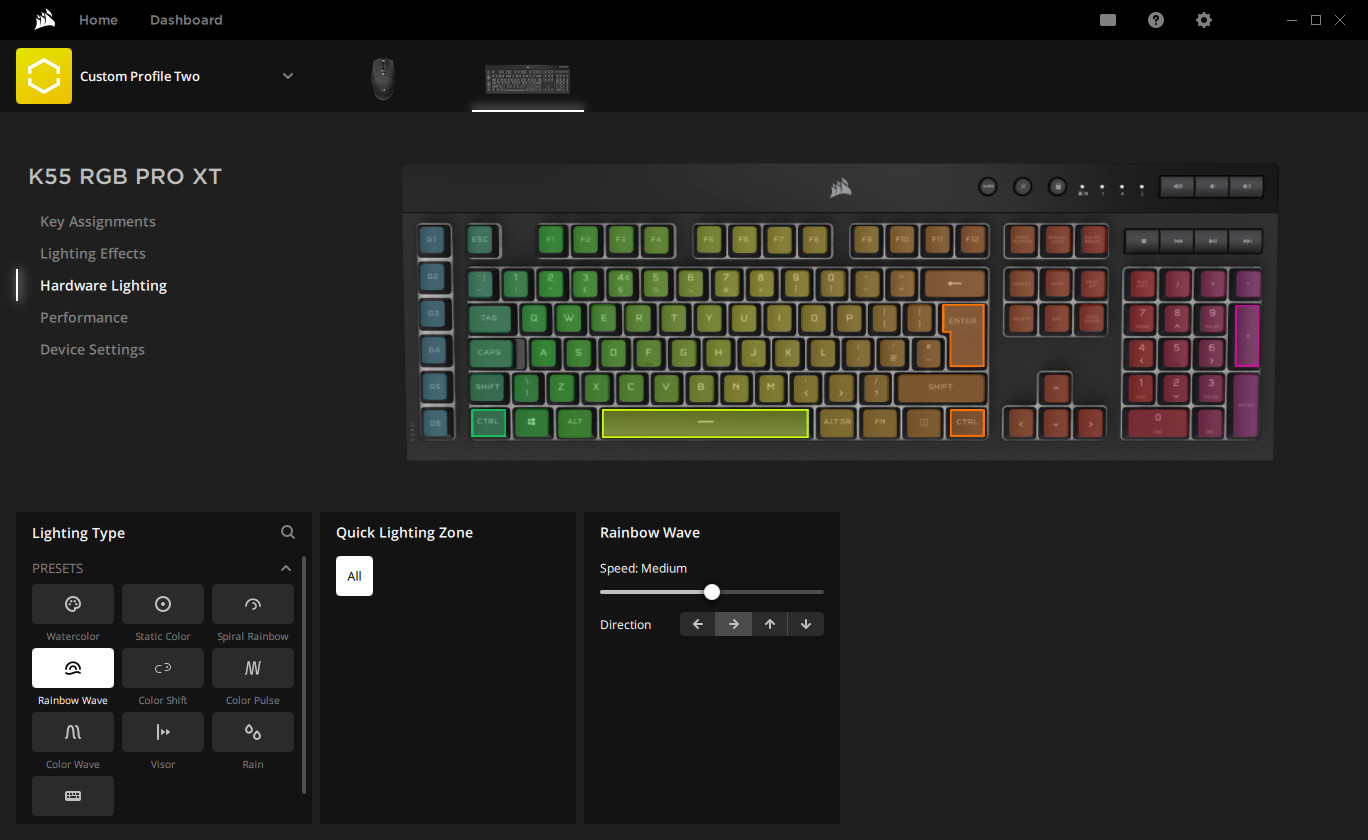
Backlighting for the XT model specifically is per-key rather than zonal, but requires iCUE to configure and process. In other cases it can default to one of 10 pre-configured lighting effects encompassing the entire keyboard, including full-RGB rainbow or static single-colour.
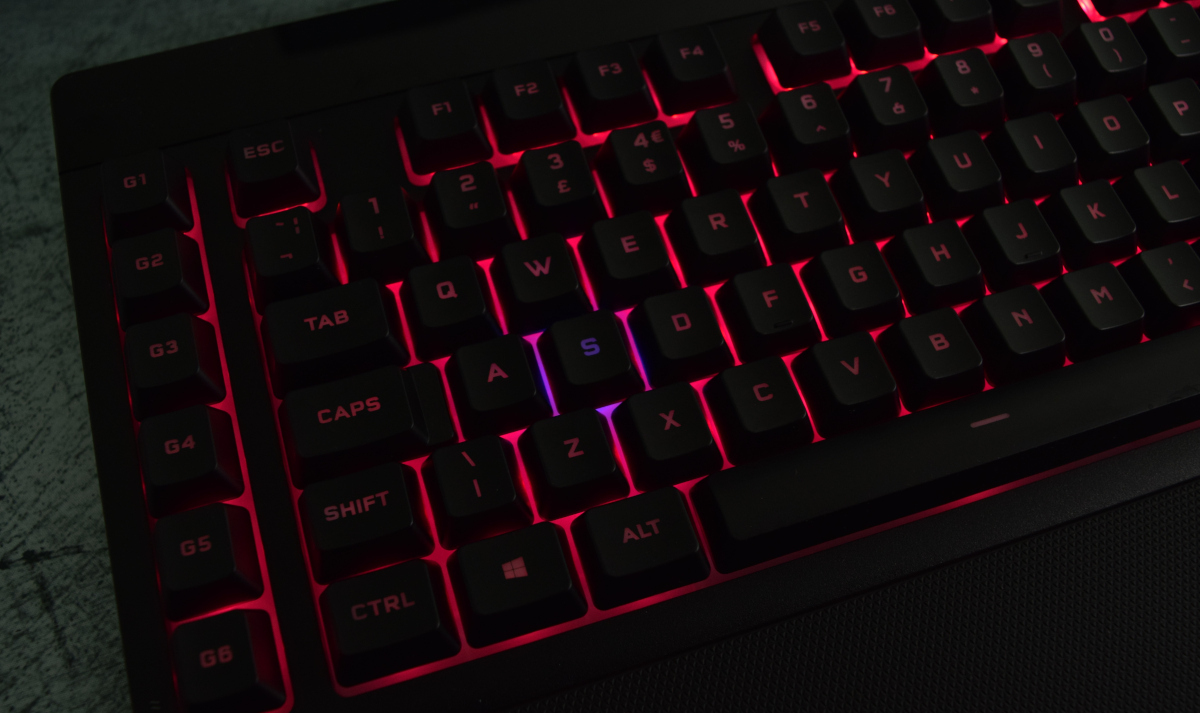
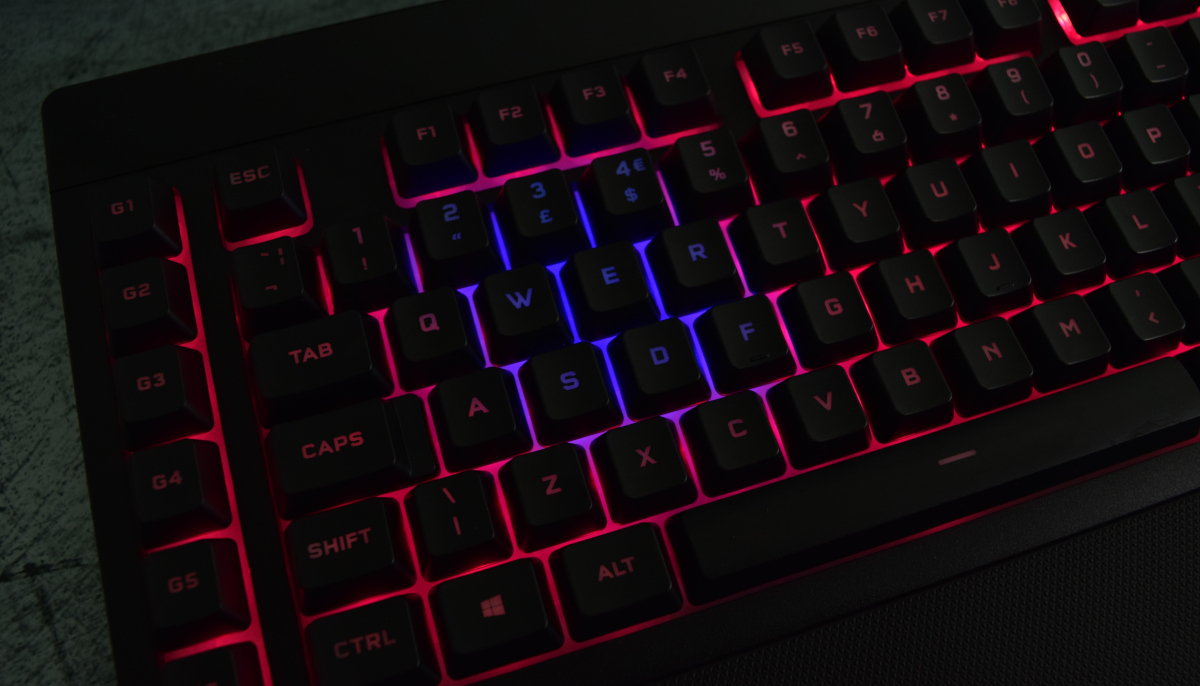
The diffuse nature of the backlighting rewards blocks of colour (2×2 LEDs or more) over single LEDs. More subtle effects of one or two LEDs tend to get lost in a pool of colour, and will be discoloured slightly by the light around them. For example a single red LED surrounded by blue will appear as a patch of blueish-purple under the selected key.
That being said, the underglow effect is more impressive than it sounds. Colours are still rich and vibrant, and the appearance is one of continuous colour banding rather than point lights. The most compelling lighting effects are ones that flow as blocks or bands of colour rather than single pixels, such as Visor and Rainbow defaults. On the other hand ‘Rain’ effects are less easy to pick as they rely on drawing a contrast between single pixels and a uniform background.
We should also say that the appropriate choice of keycaps allows light to shine through unobstructed, which isn’t always the case on membrane keyboards.
An area notably absent any lighting is the glossy top area and media keys. An illuminated logo at least would serve to balance the keyboard well, and none on the media keys can make them a little difficult to read in low-light conditions.
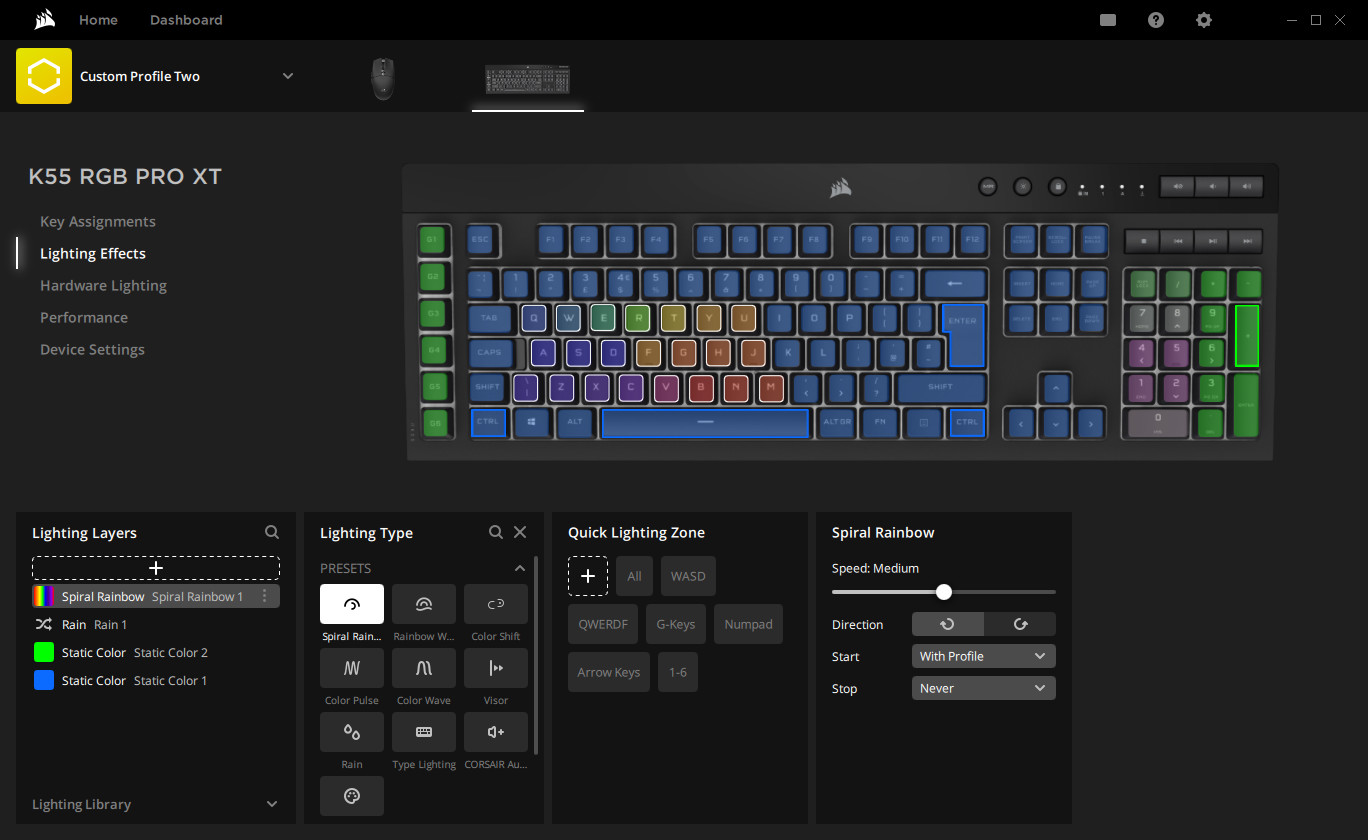
iCUE lighting customisation is effectively the same as in the previous iCUE version despite the changes to a new software version. It’s based on layers, where each layer defines simple per-key effects, and layers are then stacked together to construct an overall dynamic lighting scheme.
Varying opacity over time can allow layers underneath to dominate, for example you can have a rain effect on top of a static colour backdrop isolated specifically to the numberpad, and then a Visor band going across the whole keyboard. From these simple rules you can build up immensely complex lighting programs that may even change with CPU temperature, act as an audio visualiser, or react to in-game events.
iCUE settings can also be imported from community repositories and saved for later use. That’s another reason why CORSAIR’s deep penetration into the peripheral market can be to your advantage.
For the K55 RGB PRO XT therefore, unlike other recent CORSAIR keyboards tested, installation and continuous use of the iCUE software massively unlocks the full functionality of the keyboard in a manner that cannot be replicated when not attached to a PC running iCUE. Pre-baked effects are all well and good but shouldn’t be your main reason for choosing this model.
Performance
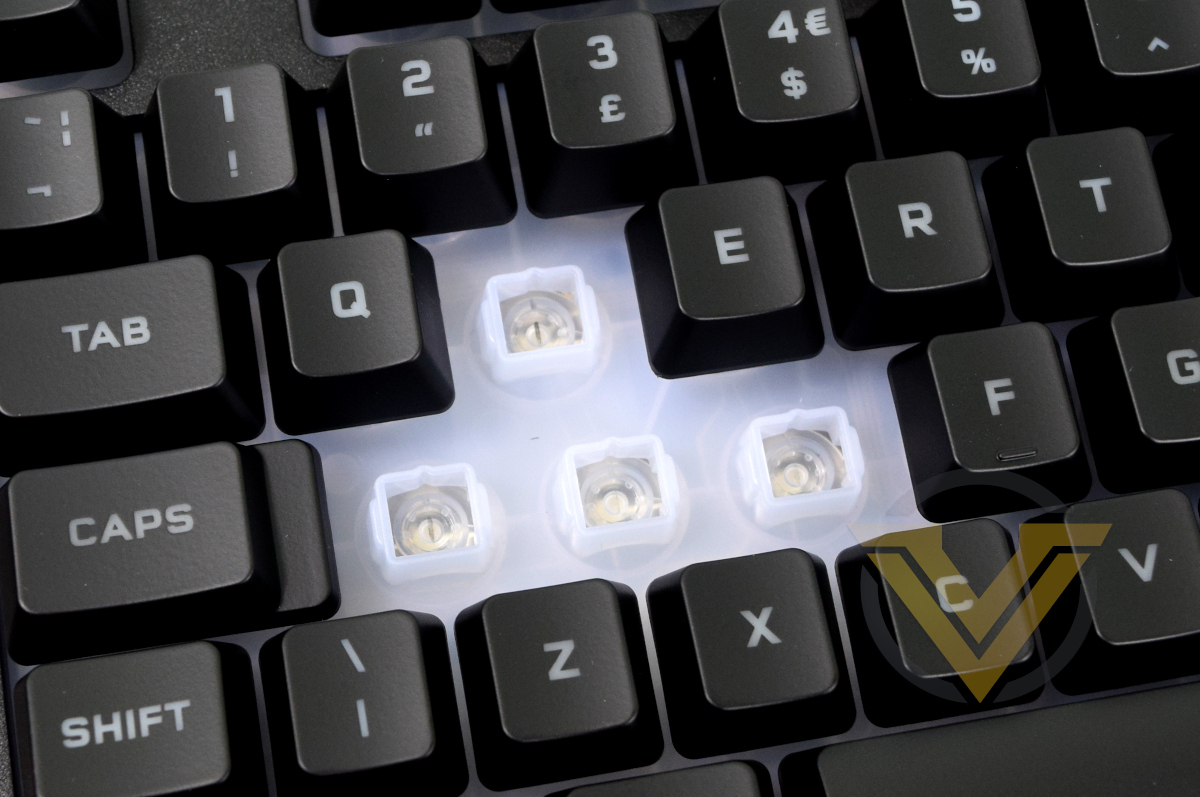
When discussing the performance of this keyboard in particular we believe that the key itself is the most important aspect, and the most divisive.
Rubber dome switches tend to have a very non-linear keystroke resistance, similar to a tactile mechanical switch but far more pronounced, and those on the K55 are no different. They’re heavy at first, and then when the dome buckles transition to be quite light until fully depressed. And they do need to be fully depressed; in contrast to conventional mechanical switches a keypress only registers when the stroke bottoms out. The spring back is similar, but reversed – soft then sudden.
This dynamic can make them fatiguing to use, particularly when brand new and if you’re used to lighter mechanical switches such as CHERRY’s MX Red style. We became accustomed to them after about a day but they remained more fatiguing well into our time with the keyboard.
CORSAIR claim that they are quieter than standard mechanical switches and that’s fair, particularly if you’re used to bottoming out against a metal backplate. They’re thus a little less noticeable over a skype call or discord meetup than an equivalent mechanical design, although MX Silent mech. switches or a common O-ring mod would also alleviate that particular problem.
If the main keys can be thought of as mushy then the media keys dail that up to 11. They certainly work perfectly well but the housing makes them more uneven and less crisp to use. You can rebind their functionality in software, but we wouldn’t suggest using them for important gaming keybinds.
When handling the keyboard initially we did notice a small amount of flex to the frame it we twisted it, but that didn’t really cross-over when typing. It remained stable even when typing with some force, exhibiting effectively no deformation unless pressing down hard on the CORSAIR logo with the feet extended.
Speaking of the feet, the rubber pads and feet tips kept the keyboard securely in place over extended sessions. The right side had slightly less friction than the left, but not so much that we observed any rotation.
In general we’d also suggest using the included wrist-rest. Despite not being a plush gel-filled rest as on the K100 RGB, the K55’s has a soft-feeling surface and elevates the palm just the right amount to reduce strain on the hand and fingers. The rest also didn’t meaningfully affect the position or other dynamics of the keyboard. We may have long-term reservations regarding the long-term durability of the clip-on mechanism, we had no issues whatsoever in practical testing.
Prior to cracking on with some gameplay we tried out the hardware macro recording feature. It’s a simple process: press the ‘M’ macro record button until the indicator LED starts flashing, then press the keystrokes in sequence, then the macro record button again, then a G-key to assign to sequence to. Timings are preserved, and existing macros bound to that G-key are overwritten. It’s an excellent system that doesn’t need software to operate, but using software will allow you to edit timings precisely.
In-Game Testing
Once again we cranked out World of Warcraft and Hades as our go-to games for testing. The former will tend to highlight any Key Rollover and ghosting problems, missed keystrokes and software inadequacies. The latter is all about responsiveness and missed keystrokes.
The software allowed us to re-use game-specific profiles created for the K100 RGB, which turned out to save us a lot of time in the short term. Sharing with other CORSAIR community members or just reusing profiles from other CORSAIR peripherals you might have used is an great but understated boon of their approach to the iCUE ecosystem.
The same wasn’t quite true of the macro keys. Our use patterns with such keys are for quick strikes rather than more deliberate presses which sometimes (and we must emphasise rarely) led to not fully bottoming out the key as required.
Mechanical keys in similar positions – particularly lightweight switches with short actuation distances of 1-1.5mm – are very reliable even if you’re not consistent in following through with the keystroke. That’s important in MMOs and MOBAs because you want to return to the more commonly used action keys quickly rather than take extra fractions of a second to ensure a fully pressed key.
We certainly missed the crisp response of a mechanical key in World of Warcraft, but after the first day of bedding-in time we didn’t notice any obvious missed keystrokes in the main set. Fatigue became more of a factor in extended sessions of a couple of hours or more than we’ve experienced in the past.
The same was true with our time in Action-RPG-Roguelite Hades. It requires the use of relatively few keys, but demands responsiveness and no missed strokes. As such you can be absolutely hammering those keys, particular any key you have set to Dash (default Space) yet still need precise and subtle movements.
In this role the K55 performed adequately. WASD keys didn’t flub their lines, but required a little more force and would make reaction times just a little slower. Clearly CORSAIR have paid particular attention to the Spacebar stabaliser however as it responded evenly even when being quite sloppy with where and how hard it was struck. All in all, it’s probably as good as a rubber dome keyboard is likely to get and far quieter, but doesn’t hold a candle to the mechanical experience.
Rollover Assessment
CORSAIR advertise 12-key rollover and some anti-ghosting (though their not quite so descriptive on the latter). We utilised a simple app that detects keypresses and observed when and how detection started to break down.
It swiftly became clear that the zone around the WASD, including number keys 1-3 and both the R and F key, all acted independently as desired. Each was detected in turn, even with the majority held down, and this appeared to be true with the modifier keys (CTRL, SHIFT and ALT).
Rollover started to break down as we moved right-wards. Taken in rows, from R, T and Y onwards only two of the three pressed with register, the third would not if the earlier two were held down first. This didn’t extend to rows above and below, which still registered if it was the third key pressed.
At no point did we detect any ghosted keys, i.e. keys that erroneously appear when multiple others are pressed.
In summary the K55 RGB PRO XT has good rollover characteristics for a membrane gaming keyboard, some of which advertise as little as 6kro. It’s not full-keyboard nkro, but will be good enough except in some very exotic game keybind setups or fast-typing scenarios.
Conclusion
We spent about a week with the K55 RGB PRO XT as a primary keyboard for work and gaming, and after every session came back to one central question: “Do you like rubber dome switches?”. Any assessment of the design is dominated by that point, to the extent that other benefits (or indeed weaknesses) are drowned out by that subjective preference. So let’s be realistic – if you actively dislike membrane switches then the new K55 models are not for you. But if you have a more neutral or positive outlook then there’s quite a lot here to recommend.Straight off the bat the most impressive part of the K55 RGB PRO XT is the lighting. At first we weren’t sold by the diffuse rather than discrete illumination, but the seamless way one colour can flow into another quickly grew on us. Comparing it directly with the K100 is a bit like comparing two painting styles – neither is inherently better or worse, just different. It’s not a stretch for us to imagine someone greatly preferring the K55, and the fact that CORSAIR support a complex lighting effect engine through iCUE is a real feather in their cap. Bear in mind of course that per-key lighting is only available on the XT model though.
The second aspect we value highly is the dedicated macro keys. We don’t often see them on either membrane or mechanical keyboards, and for a subset of games they’re exceptionally useful (particularly if you don’t have a complex MMO/MOBA-style mouse). Macro keys that can output complex sequential keystrokes and strings can also be helpful in some productivity applications, such as adding HTML markup to text. Functionality to record macros on the fly and then edit them later is a nice bonus made sweeter by it being so straightforward on the K55 RGB PRO XT.
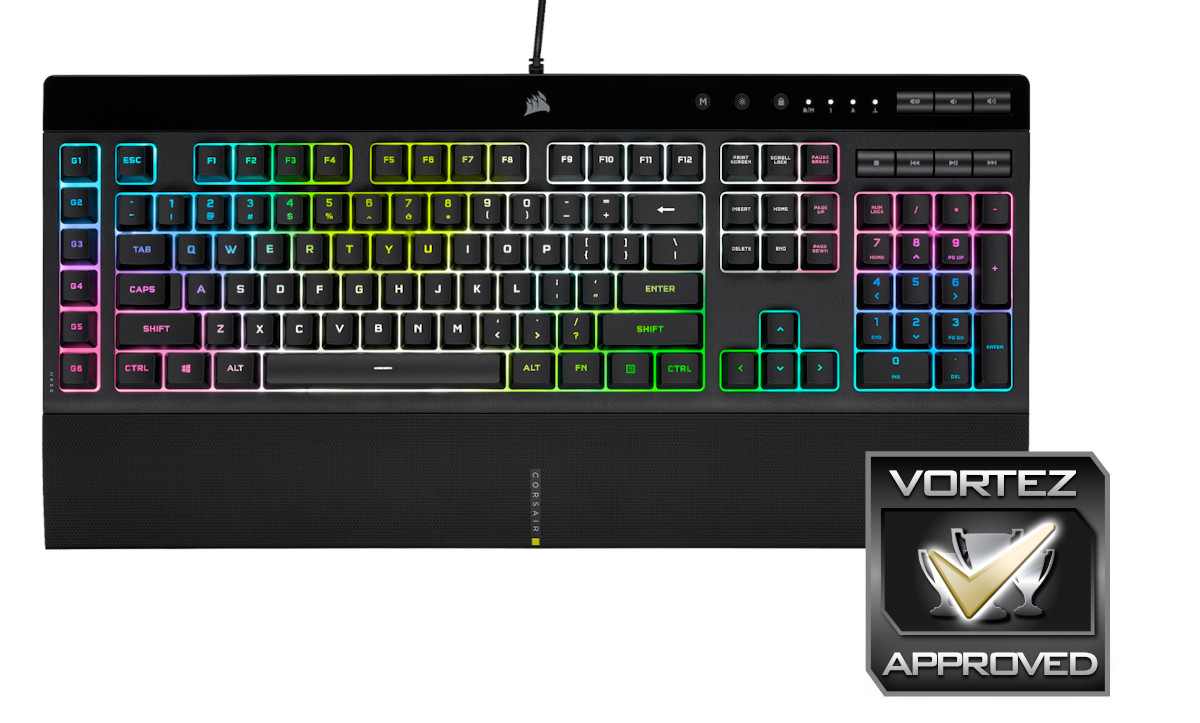
Our review of the K57 Wireless in 2019 criticised build quality in particular due to a flex in the chassis when typing. That doesn’t seem to be the case in the updated K55 model despite an outwardly similar frame, and indeed it feels very stable even when hammering the keys. It is possible to twist this keyboard when gripping both edges, but the deformation is small for the force required.
Backing up the build quality is IP42 Dust and Spill resistance. This isn’t as exotic as it sounds, just the definition of ‘nice to have’, but should improve longevity and reduce the risk posed by minor liquid spills.
Key rollover is another aspect worth touching on. We found it to be flawless around the critical WASD-zone (extending up to 1,2,3,4 and including Q,E,R,T,F,G) both with and without crucial modifiers (SHIFT etc). That’s not quite industry-leading, but it’s good enough for the majority of gamers. We also didn’t detect ghosting issues, so that’s a big plus over some membrane and ‘memchanical’ models on the market.
As for the membrane keys themselves… they’re the same unspectacular feel that you will see on models from manufacturers the world over. There’s some wobble on the keycaps, but not a devastating amount, the sort that you barely keep track over after your first day using the keyboard. The spacebar is good – stable and consistent across the key, even more so than some poorly stabalised mechanical keyboards we’ve experienced in the past.
Rubber dome switch keys are not for everyone. In fact, we generally recommend mechanical keyboards to anyone who can afford to invest in one. But if you’re running with a strict budget for your peripherals, and a laundry list of features necessary for the games of your choice, then switch type might be a compromise you’re willing to make.
Beginner streamers are one demographic in particular who might be the most attracted to the keyboard. RGB lighting, Elgato Stream Deck software integration for for the G-keys and relatively quiet switches are a solid combination of features for this use case below £100.
Some will be disappointed that CORSAIR haven’t progressed to offering their own ‘memchanical’ alternative switch. The variable quality of such alternatives indicates that such an investment could be a design dead-end, particularly if budget mechanical options become more widely utilised.
And to round things off, CORSAIR’s iCUE software does plenty to justify its inclusion as a major selling point. With little in terms of on-board memory and no hardware profiles, iCUE does the heavy lifting for both lighting configuration and context-dependent profiles that vary key assignments.
CORSAIR have thrown the proverbial kitchen sink at the K55 to make the new update a membrane keyboard for this decade rather than the last. Your enjoyment of it will be dictated by your appreciation for rubber-dome switches, but in other aspects – particularly per-key lighting – the K55 RGB PRO XT ticks all the right boxes. At $64.99 in the US it’s a mouth-watering budget option, while £74.99 in the UK puts it at the cusp of the budget mechanical segment.
Pros
+ Vibrant per-key RGB lighting (XT model only)
+ Dedicated macro keys
+ Easy on-the-fly macro recording.
+ Solid Construction
+ iCUE software that meaningfully expands functionality
+ 12-key rollover around the important WASD zone
+ No clearly perceptible ghosting
+ Removable wrist-rest
+ IP42 Rated for dust/spill resistance
Cons
– Membrane keyboard/rubber-dome switches
– Media keys not illuminated
– No onboard-profiles
– Premium price for a membrane keyboard, particularly in the UK/EU
+ Vibrant per-key RGB lighting (XT model only)
+ Dedicated macro keys
+ Easy on-the-fly macro recording.
+ Solid Construction
+ iCUE software that meaningfully expands functionality
+ 12-key rollover around the important WASD zone
+ No clearly perceptible ghosting
+ Removable wrist-rest
+ IP42 Rated for dust/spill resistance
Cons
– Membrane keyboard/rubber-dome switches
– Media keys not illuminated
– No onboard-profiles
– Premium price for a membrane keyboard, particularly in the UK/EU