Offering a healthy dose of RGB lighting and a striking orange and grey colour scheme, the AORUS X470 GAMING 7 WIFI looks great, but how does it perform?

Product on Review: AORUS X470 GAMING 7 WIFI
Manufacturer: GIGABYTE
Street Price: £206.99 / $239.99
AORUS, since their conception by GIGABYTE, have produced premium gaming hardware for enthusiasts, concentrating on the motherboard and graphics card markets, among others. Their focus on particular sectors helps to reduce overall costs while maximising features within a specific price bracket.
Today we look at the top-spec’ AORUS X470 GAMING 7 WIFI, priced at roughly £205 in the UK. The GAMING 7 WIFI arrives with a whole host of features, designed with a single purpose in mind, of extracting as much performance from a Ryzen 2nd Gen. system as possible.
Power delivery and cooling are two aspects where effort has been particularly concentrated. The 10+2 all-digital power phase ensures that the CPU and DRAM receive a smooth current, while the extensive, direct-mounted cooling helps to dissipate the associated heat.
There’s also a whole range of connectivity included, with 802.11ac WIFI being obvious from the naming scheme. There’s a huge range of USB connectivity on the rear IO, a pair of M.2 NVMe drive slots, each with Thermal Guard cooling, three PCI-E x16 slots and more PWM fan headers than you can shake a stick at. And of course, no gaming motherboard would be complete without the usual spattering of RGB LEDs, however, AORUS have taken this a step further with 7 individual lighting zones all across the board.
The AORUS X470 GAMING 7 WIFI aims to be the flagship model, despite another model with the name ULTRA GAMING within the same X470 range. With the features listed above, read on to see how the board performs during our testing procedure.
GIGABYTE AORUS on the X470 GAMING 7 WIFI:
Technical Specifications
CPU
AM4 Socket:
AMD Ryzen™ processor
(Please refer “CPU Support List” for more information.)
Chipset
AMD X470
Memory
4 x DDR4 DIMM sockets supporting up to 64 GB of system memory
Dual channel memory architecture
Support for DDR4 3600+(O.C.) / 3400(O.C.) / 3333(O.C.) / 3200(O.C.) / 3000(O.C.) / 2933 / 2667 / 2400 / 2133 MHz memory modules
Support for ECC Un-buffered DIMM 1Rx8/2Rx8 memory modules
Support for non-ECC Un-buffered DIMM 1Rx8/2Rx8/1Rx16 memory modules
Support for Extreme Memory Profile (XMP) memory modules
(Please refer “Memory Support List” for more information.)
Audio
Realtek® ALC1220 codec
ES9018Q2C chip
High Definition Audio
2/4/5.1/7.1-channel
Support for S/PDIF Out
LAN
Intel® GbE LAN chip (10/100/1000 Mbit)
Wireless Communication module
Wi-Fi 802.11a/b/g/n/ac, supporting 2.4/5 GHz Dual-Band
BLUETOOTH 5
Support for 11ac 160MHz wireless standard and up to 1.73 Gbps data rate
* Actual data rate may vary depending on environment and equipment.
Expansion Slots
1 x PCI Express x16 slot, running at x16 (PCIEX16)
* For optimum performance, if only one PCI Express graphics card is to be installed, be sure to install it in the PCIEX16 slot.
1 x PCI Express x16 slot, running at x8 (PCIEX8)
* The PCIEX8 slot shares bandwidth with the PCIEX16 slot. When the PCIEX8 slot is populated, the PCIEX16 slot operates at up to x8 mode.
(The PCIEX16 and PCIEX8 slots conform to PCI Express 3.0 standard.)
1 x PCI Express x16 slot, running at x4 (PCIEX4)
* The PCIEX4 slot becomes unavailable when a device is installed in the M2B_SOCKET connector.
2 x PCI Express x1 slots
(The PCIEX4 and PCI Express x1 slots conform to PCI Express 2.0 standard.)
Storage Interface
1 x M.2 connector (Socket 3, M key, type 2242/2260/2280/22110 SATA and PCIe x4/x2 SSD support) (M2A_SOCKET)
1 x M.2 connector (Socket 3, M key, type 2242/2260/2280 PCIe x4/x2 SSD support)
(M2B_SOCKET)
6 x SATA 6Gb/s connectors
Support for RAID 0, RAID 1, and RAID 10
Multi-Graphics Technology
Support for NVIDIA® Quad-GPU SLI™ and 2-Way NVIDIA® SLI™ technologies
Support for AMD Quad-GPU CrossFire™ and 2-Way AMD CrossFire™ technologies
USB
ASMedia® USB 3.1 Gen 2 Controller:
1 x USB Type-C™ port on the back panel, with USB 3.1 Gen 2 support
1 x USB 3.1 Gen 2 Type-A port (red) on the back panel
Chipset:
1 x USB Type-C™ port with USB 3.1 Gen 2 support, available through the internal USB header
6 x USB 3.1 Gen 1 ports (2 ports on the back panel, 4 ports available through the internal USB headers)
6 x USB 2.0/1.1 ports (2 ports on the back panel, 4 ports available through the internal USB headers)
CPU:
4 x USB 3.1 Gen 1 ports on the back panel
Internal I/O Connectors
1 x 24-pin ATX main power connector
1 x 8-pin ATX 12V power connector
1 x 4-pin ATX 12V power connector
1 x CPU fan header
1 x water cooling CPU fan header
4 x system fan headers
2 x system fan/water cooling pump headers
1 x CPU cooler LED strip/RGB LED strip header
2 x digital LED strip headers
2 x digital LED strip power select jumpers
2 x RGB (RGBW) LED strip headers
2 x M.2 Socket 3 connectors
6 x SATA 6Gb/s connectors
1 x front panel header
1 x front panel audio header
1 x S/PDIF Out header
1 x USB Type-C™ port, with USB 3.1 Gen 2 support
2 x USB 3.1 Gen 1 headers
2 x USB 2.0/1.1 headers
1 x Trusted Platform Module (TPM) header (2×6 pin, for the GC-TPM2.0_S module only)
1 x Clear CMOS jumper
1 x OC button
1 x BIOS switch
1 x DualBIOS™ switch
2 x temperature sensor headers
Back Panel Connectors
1 x power/reset button
1 x Clear CMOS button
2 x MMCX antenna connectors (2T2R)
6 x USB 3.1 Gen 1 ports
1 x USB Type-C™ port, with USB 3.1 Gen 2 support
1 x USB 3.1 Gen 2 Type-A port (red)
2 x USB 2.0/1.1 ports
1 x RJ-45 port
1 x optical S/PDIF Out connector
5 x audio jacks
I/O Controller
iTE® I/O Controller Chip
H/W Monitoring
Voltage detection
Temperature detection
Fan speed detection
Water cooling flow rate detection
Overheating warning
Fan fail warning
Fan speed control
* Whether the fan (pump) speed control function is supported will depend on the cooler (pump)you install.
BIOS
2 x 128 Mbit flash
Use of licensed AMI UEFI BIOS
Support for DualBIOS™
PnP 1.0a, DMI 2.7, WfM 2.0, SM BIOS 2.7, ACPI 5.0
Unique Features
Support for APP Center
* Available applications in APP Center may vary by motherboard model. Supported functions of each application may also vary depending on motherboard specifications.
3D OSD
@BIOS
AutoGreen
Cloud Station
EasyTune
Fast Boot
Game Boost
ON/OFF Charge
RGB Fusion
Smart Backup
Smart Keyboard
Smart TimeLock
Smart HUD
System Information Viewer
USB Blocker
USB DAC-UP 2
V-Tuner
Support for Q-Flash
Support for Xpress Install
Bundle Software
Norton® Internet Security (OEM version)
cFosSpeed
XSplit Gamecaster + Broadcaster (12 months license)
Operating System
Support for Windows 10 64-bit
Support for Windows 7 64-bit
* To support Windows 7 64-bit, you must install an AMD Ryzen™ Summit Ridge CPU.
Form Factor
ATX Form Factor; 30.5cm x 24.4cm
AMD X470 Chipset Overview
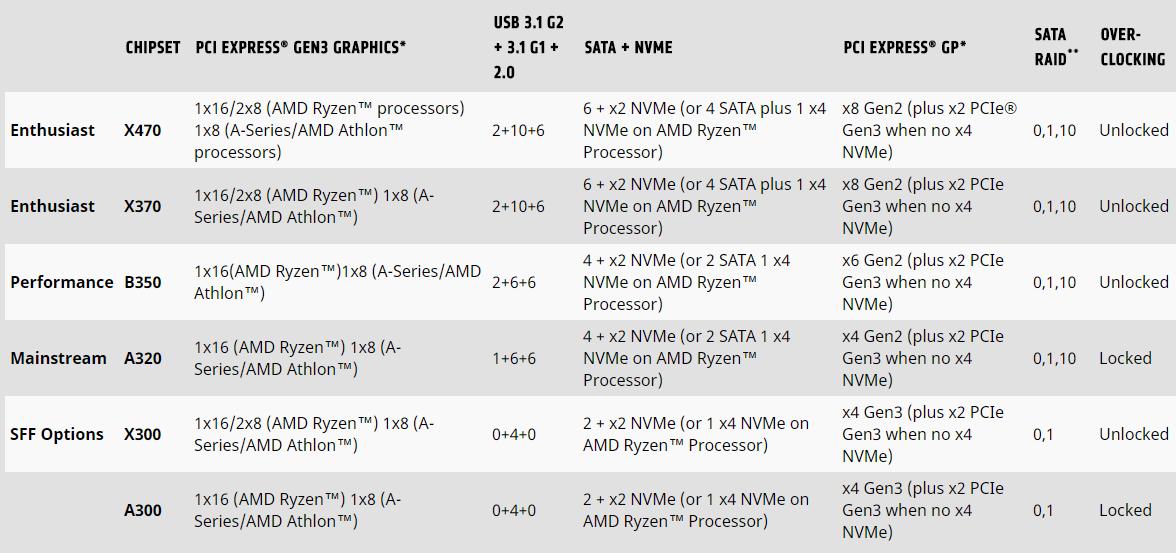
AMD designed the AM4 socket with longevity in mind, focussing on forwards and backwards compatibility. However, even a company like AMD doesn’t possess perfect precognition and some adaptations must be made within each revision. The main difference between the X370 and X470 chipsets are the utilisation of Precision Boost 2 and Extended Frequency Range 2 (XFR2).Check out our AMD Ryzen 7 2700X review for more information on those technologies.
Packaging & First Look
The AORUS Eagle dominates the front of the packaging, with a striking orange and grey colour scheme. Being the flagship model in the X470 range, the features listed on the front are plentiful.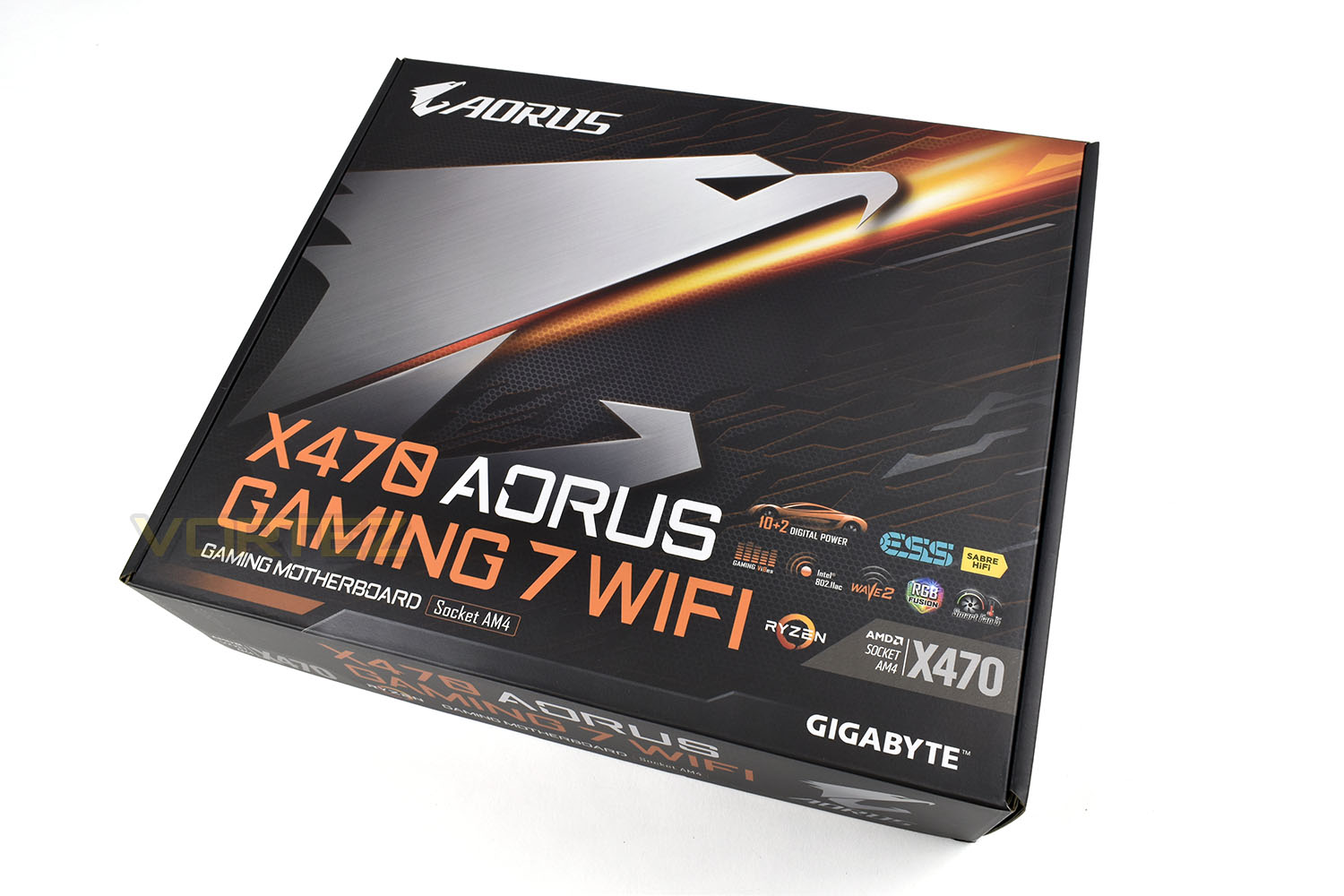
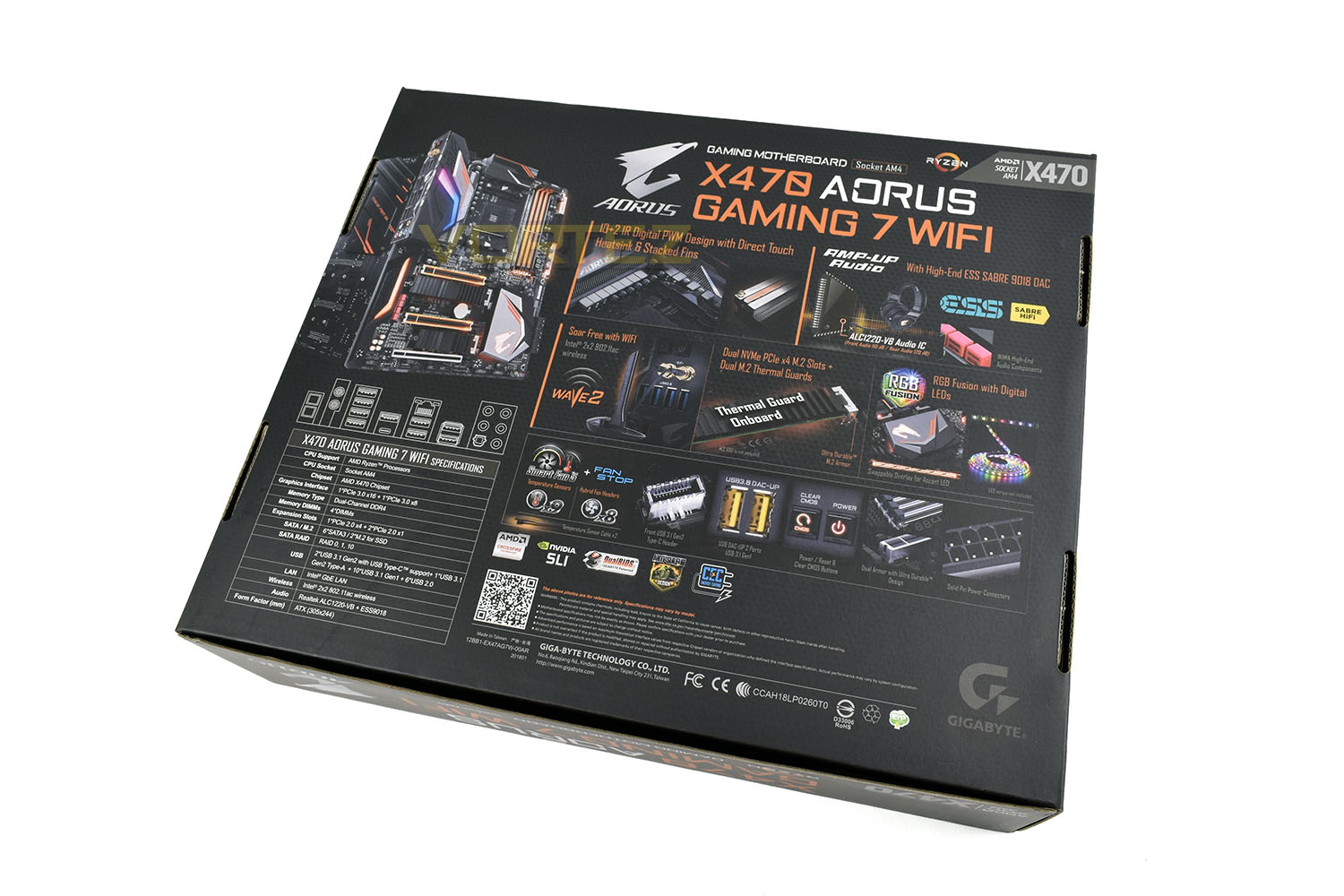
The rear of the box is plastered from head to toe with features. There’s a diagram of the rear IO panel, a short description of the key selling points and plenty of colour to attract the eye.
You will receive with the motherboard, the following:
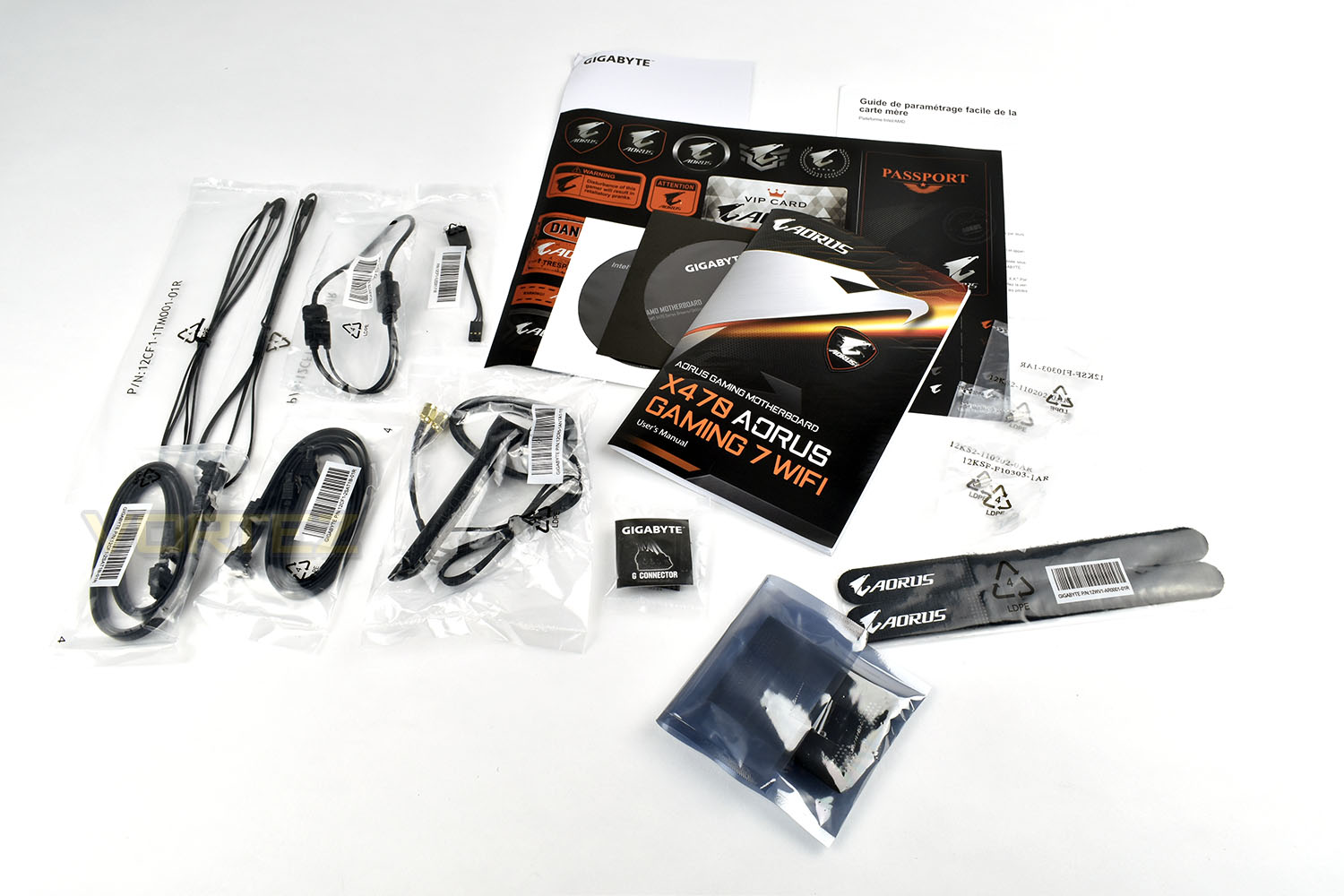
• AORUS Motherboard User Guide
• Sticker page
• Warranty information
• Installation discs
• Velcro cable wraps
• SLI Bridge
• M.2 screws
• Gigabyte G Connector (making front panel connections easier and less fiddly)
• 4x SATA cables
• 2x Temperature probes
• 2x RGB extension cables
• WIFI Antenna
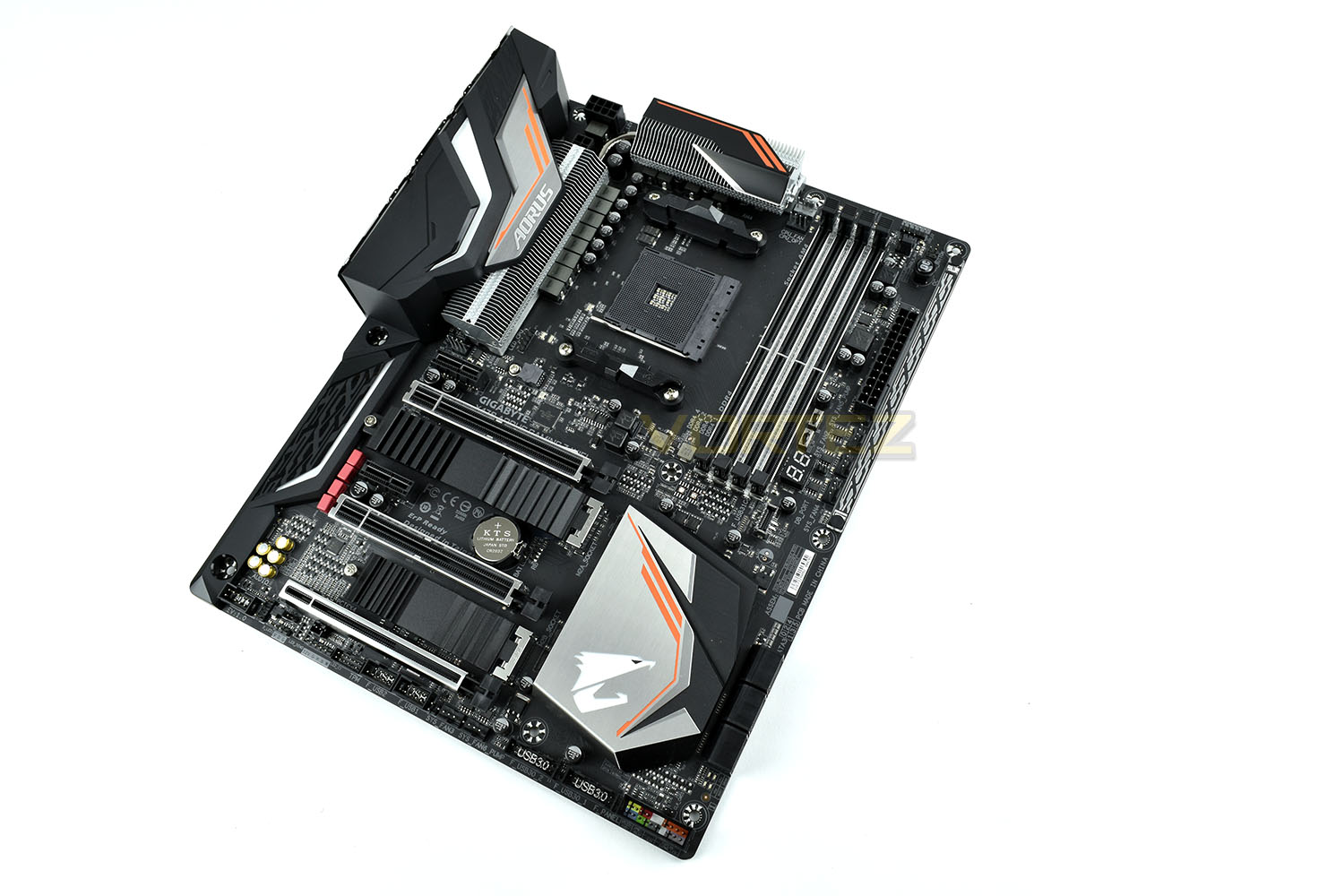
The AORUS X470 GAMING 7 WIFI measures 243mm wide and 306mm long, sitting exactly within the ATX Form Factor specifications. The dark PCB and silver/orange accents contrast incredibly well, with the large heatsinks giving a very premium feel to the whole board.
Closer Look
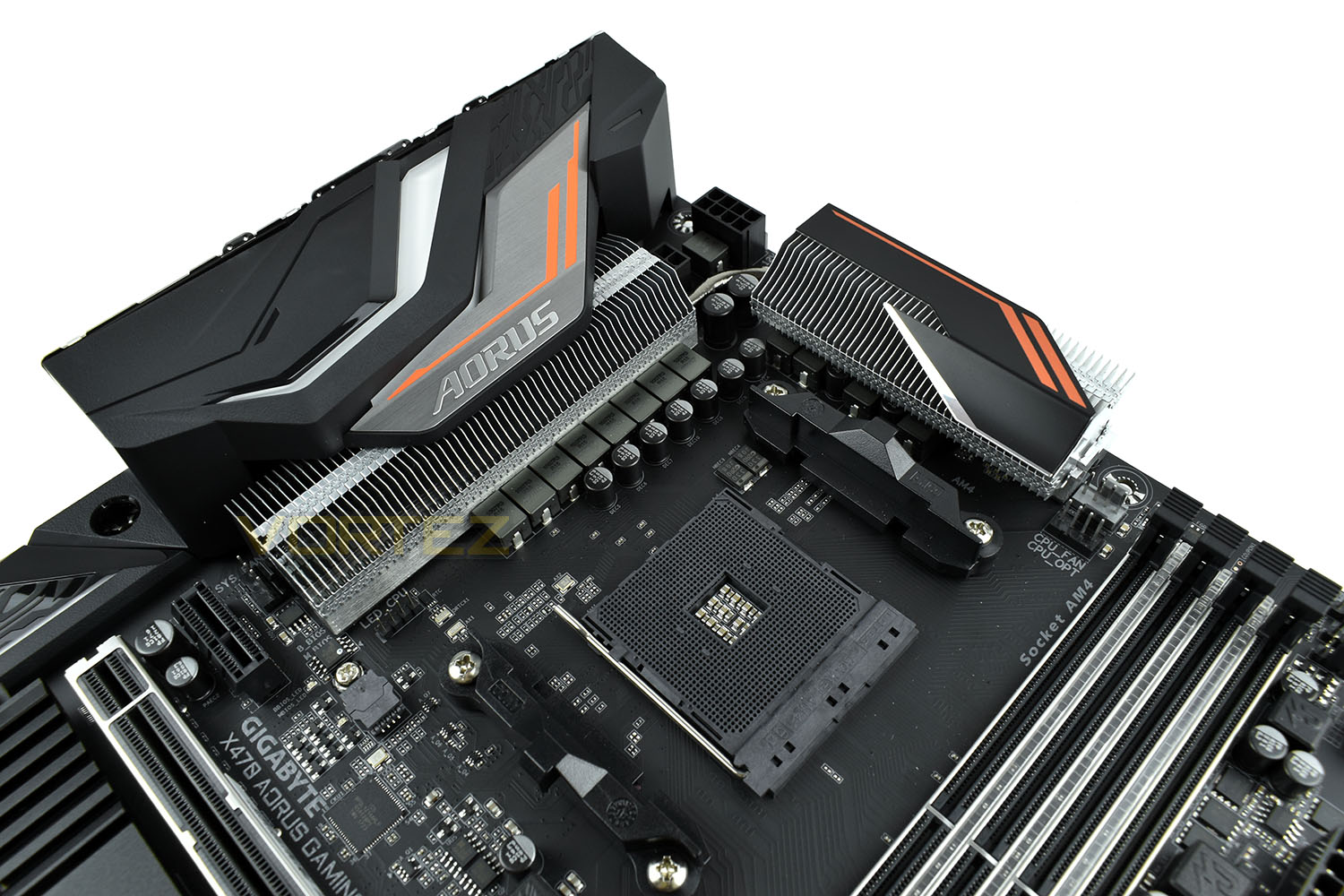
AMD, being the forward-thinking company that they are, generally design their sockets with both backwards and forwards compatibility in mind. The AORUS X470, with the AM4 socket, is therefore compatible with all of the 1st Gen. Ryzen 3, 5 and 7 processors as well as the 2nd Gen.The most prominent portion of the CPU socket region is the power delivery cooling heatsinks. There’s over 100 fins in that array, with direct heatpipe contact on the hottest components. The 10+2 Phase IR Digital PWM is designed to provide the most stable current possible for better overclocks and longer product life. GIGABYTE have utilised an 8+4 CPU power connectors for extreme overclocks, ensuring the most energy-sensitive components are properly dealt with.
A pair of 4 pin PWM fan headers are provided, to the right of the upper most heatsink. One is provisioned for a watercooling pump and the other for a typical fan.
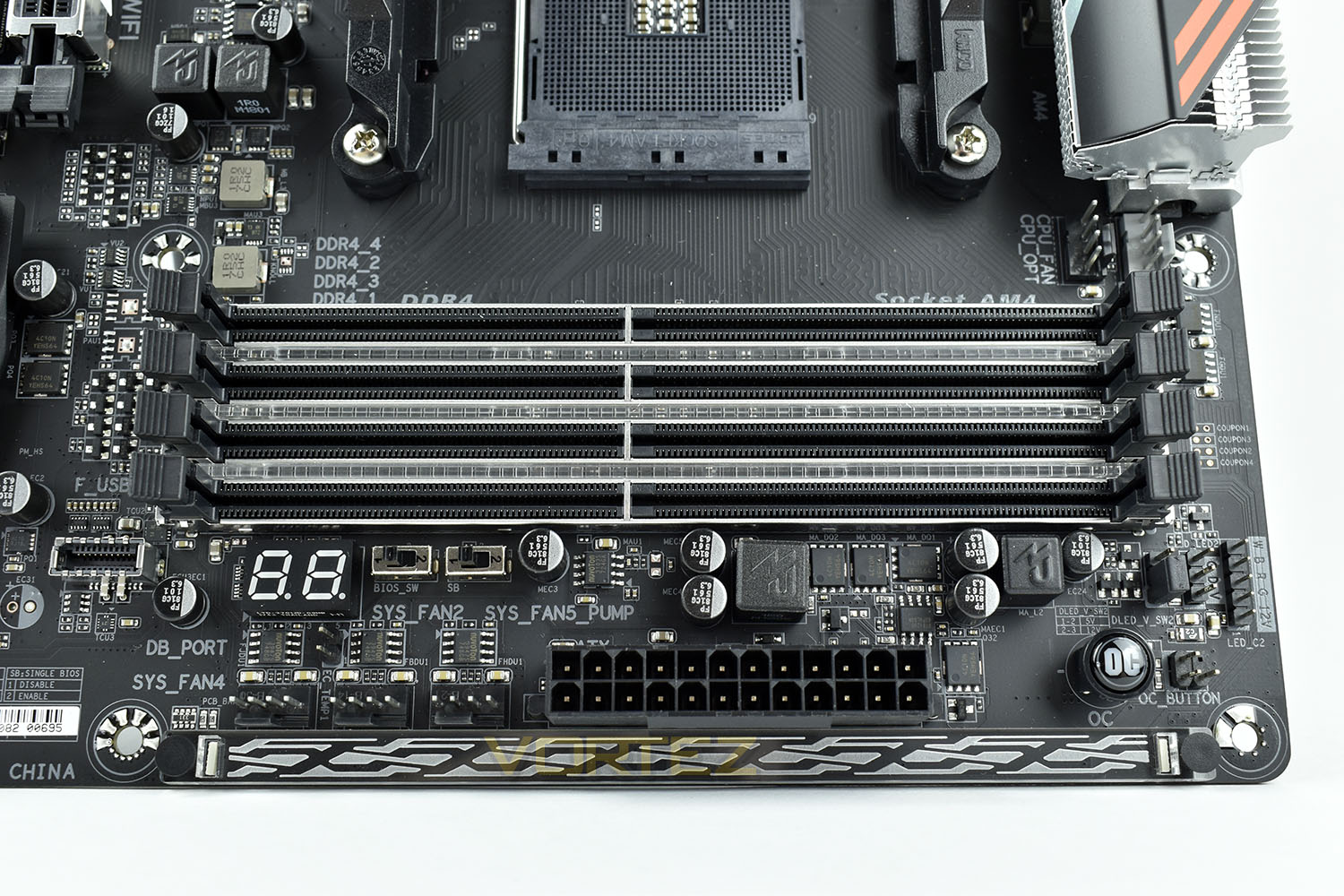
The 4x DIMM slots are supported with an ultra durable memory armour, designed to prevent memory modules from shifting and avoid the motherboard bending at all when installing RAM sticks. The 3 strips between the DIMM slots feature a row of RGB LEDs which can be customised in software.
Another three 4 pin PWM headers are found next to the 24-pin power slot. BIOS switches for any problems booting are just above, with a 2-digit BIOS debug display next to those. Over on the right is an OC switch, for fast overclocking of the Ryzen chip and RGB lighting headers on the far edge are available to make things even flashier.
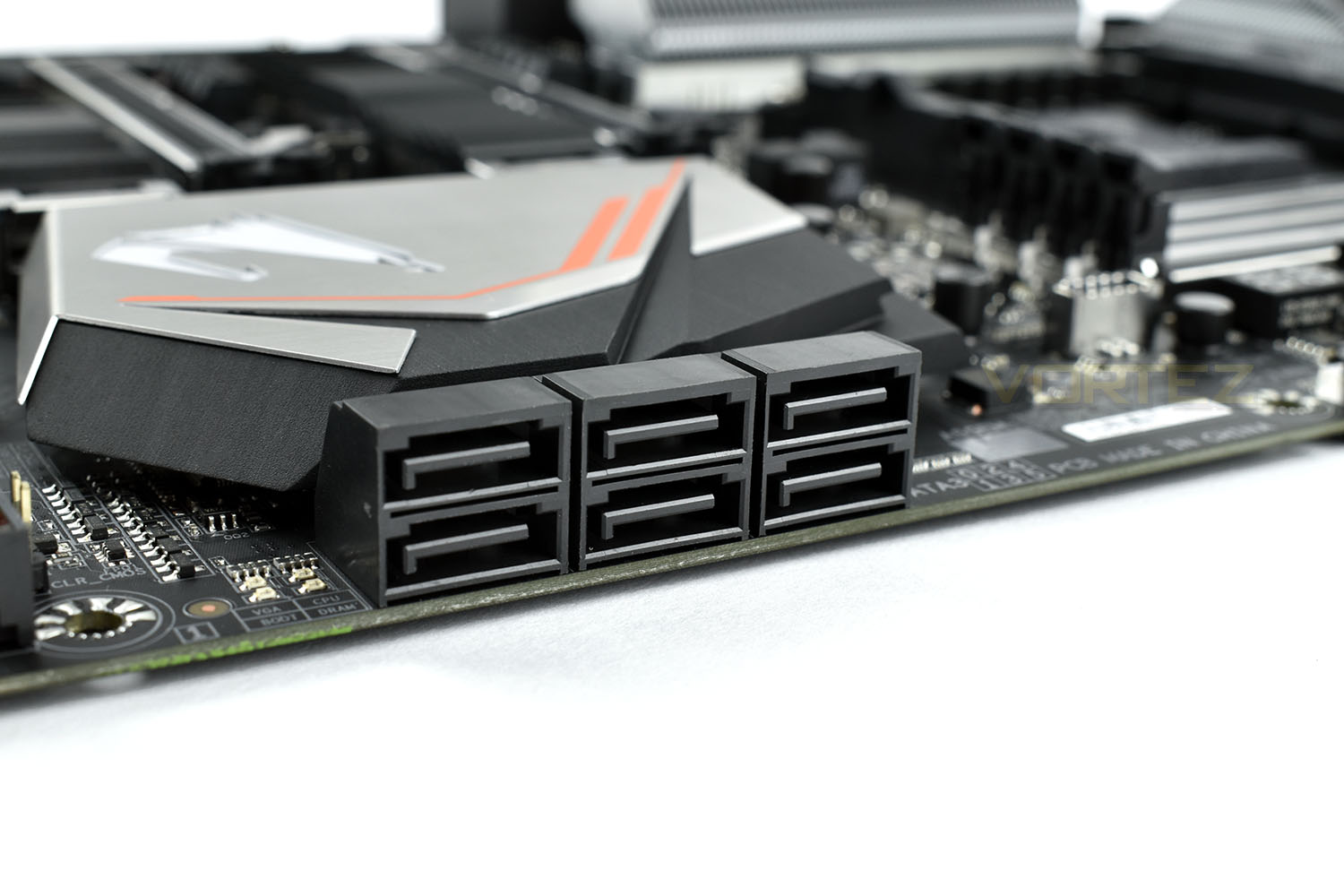
To the right of the southbridge heatsink is a bank of six 90° SATA 6GBPS connectors.
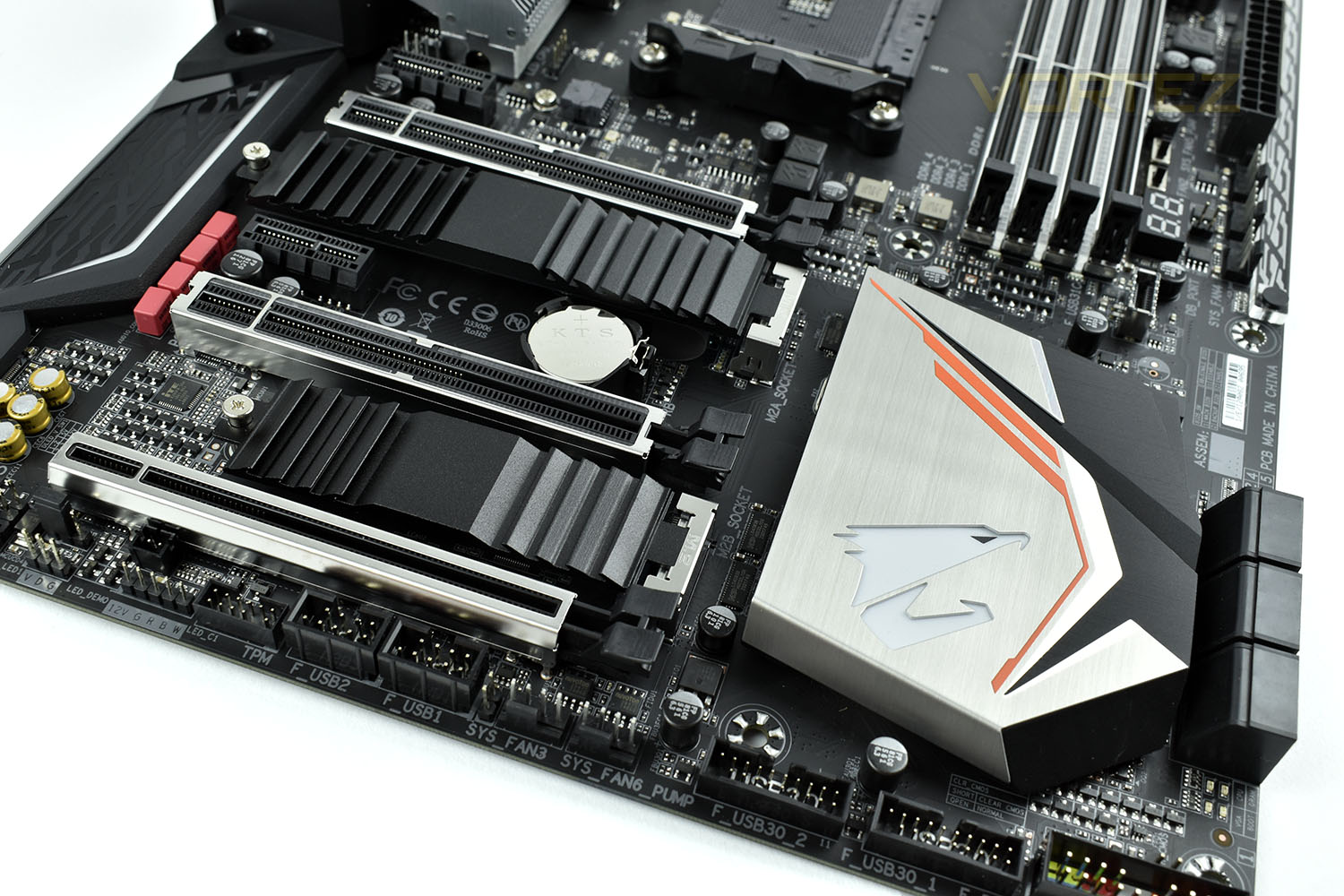
The southbridge heatsink is covered with a piece of brushed aluminium with orange accents, within which is a translucent AORUS logo featuring RGB LEDs underneath.
PCI-E ports are as follows:
• 1x PCI-E 1x
• 1x PCI-E 16x
• 1x PCI-E 1x
• 1x PCI-E 8x
• 1x PCI-E 4x (This bottom slot is disabled when the bottom M.2 NVMe slot is populated)
The two M.2 NVMe slots are covered by a Thermal Guard heatsink solution, one measuring 110mm in length, the other 80mm.
Along the bottom edge is a mass of connection options.
(From left to right)
• Front Audio
• Digital RGB LED pin header
• RGBW pin header
• TPM header
• 2x Front USB 2.0
• 2x 4-pin PWM system fan header
• 2x Front USB 3.0
• Front panel connections
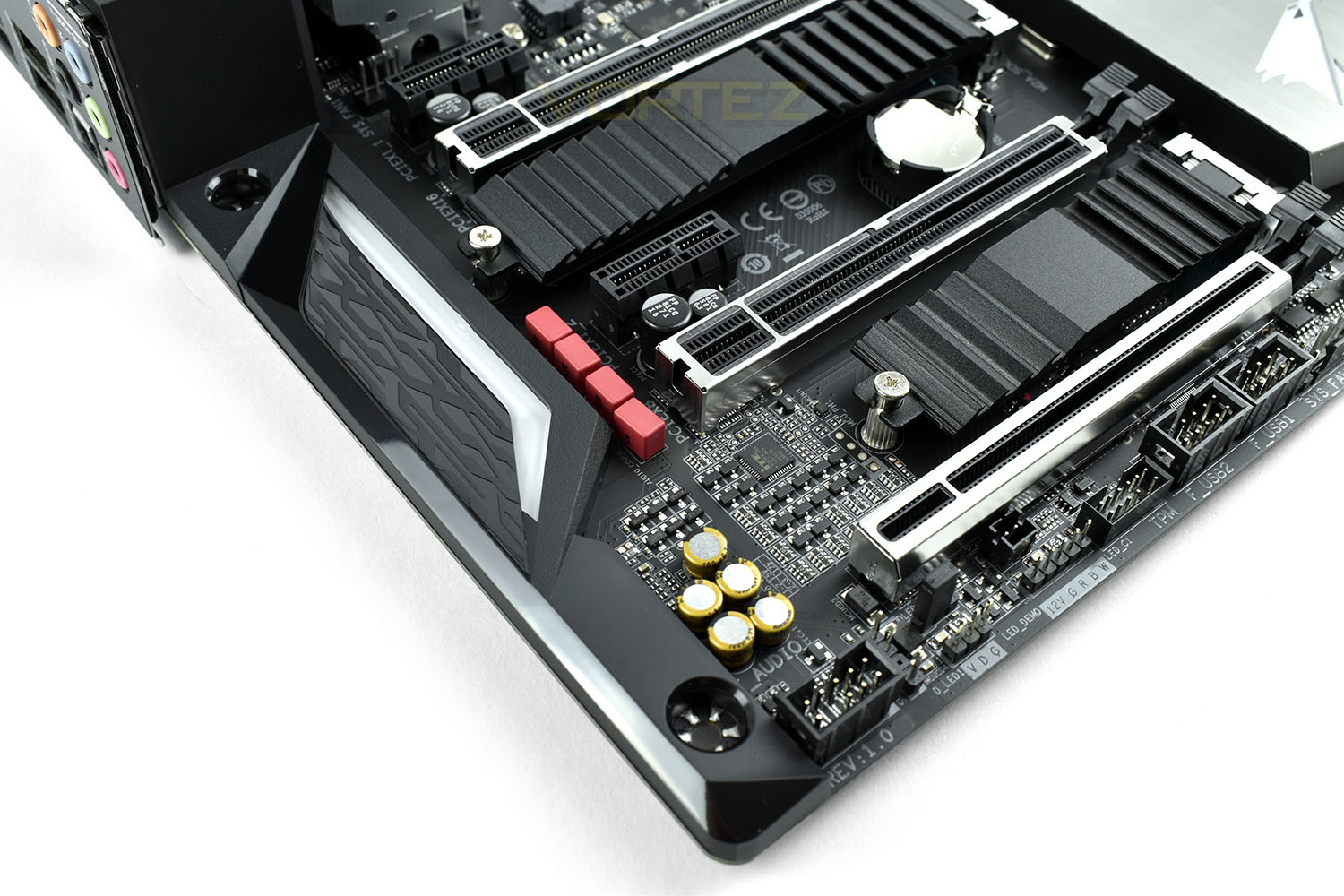
Onboard audio is refined and dealt with by a multitude of different components to ensure sound is as clear and as loud as possible. WIMA Nichicon fine gold capacitors are used for their audiophile level of reliability and sound production, these are the red rectangular pieces as well as the 5 golden cylinders. Sound is provided in 7.1 via the rear IO or through optical SPDIF.
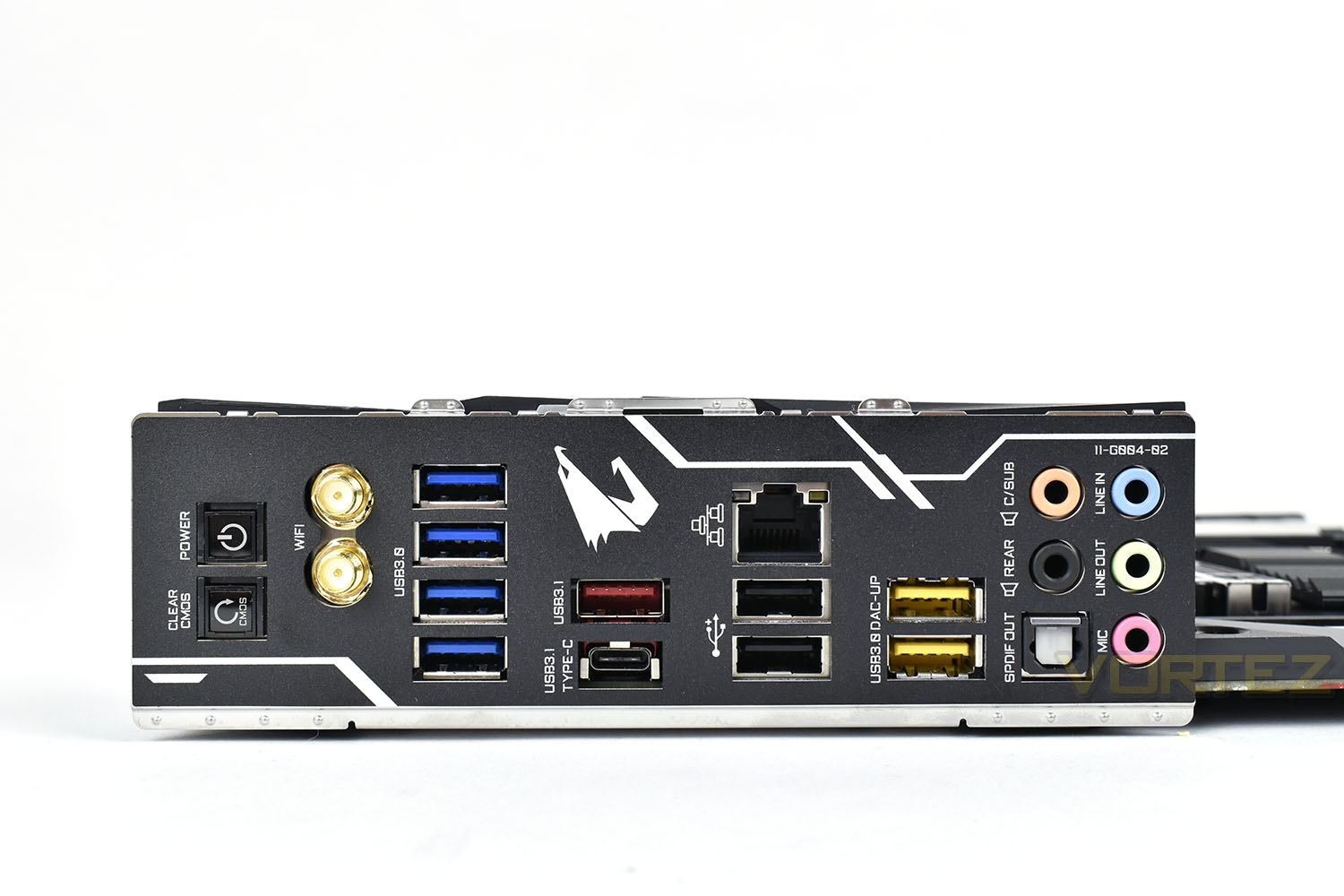
GIGABYTE attach the rear IO shield directly to the motherboard, saving any embarrassing mistakes when forgetting to attach it to the case before installing the motherboard. On the rear is a Clear CMOS button as well as a power switch, for test bench and overclocking functionality. We don’t see any PS/2 ports here, which is unusual, but who uses them anyway?
Connectivity on the rear is plentiful:
• WIFI 802.11ac (twin antenna)
• 4x USB 3.0
• 1x USB 3.1 Gen. 2 Type A
• 1x USB 3.1 Gen. 2 Type C
• RJ45 Gigabit Ethernet
• 2x USB 2.0
• 2x USB 3.0 with DAC-UP (useful for high-draw products like VR headsets)
• 5x 3.5mm jack
• 1x SPDIF out
BIOS & Overclocking
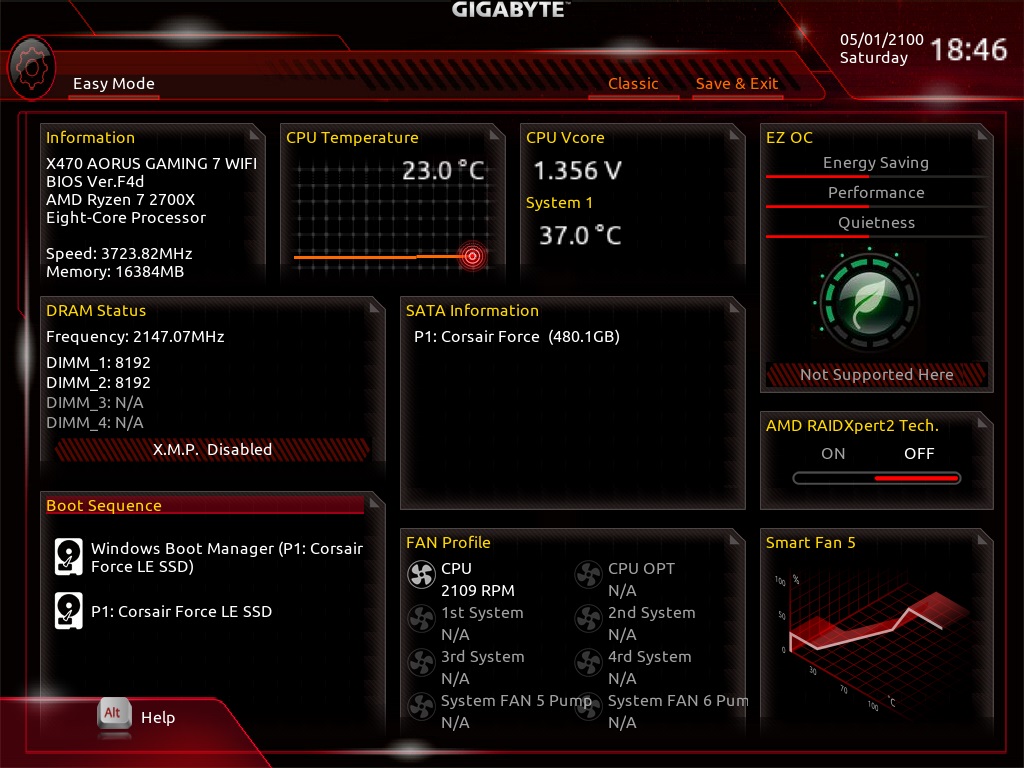
The GIGABYTE BIOS provided with the AORUS X470 GAMING 7 WIFI is unfortunately one of the poorer examples of how to do a BIOS. Despite the high pricetag and investment into high quality power circuitry and heatsinks, the BIOS looks decidedly cheap and empty, almost like it’s missing some features. It’s also slow and laggy and doesn’t support the SteelSeries Rival 700 gaming mouse which we use on the testbench; even at a basic level.The Easy Mode provides a good overview of settings, but for most people purchasing a motherboard of this calibre, you will almost certainly never look at this page and instead use the more in-depth features.
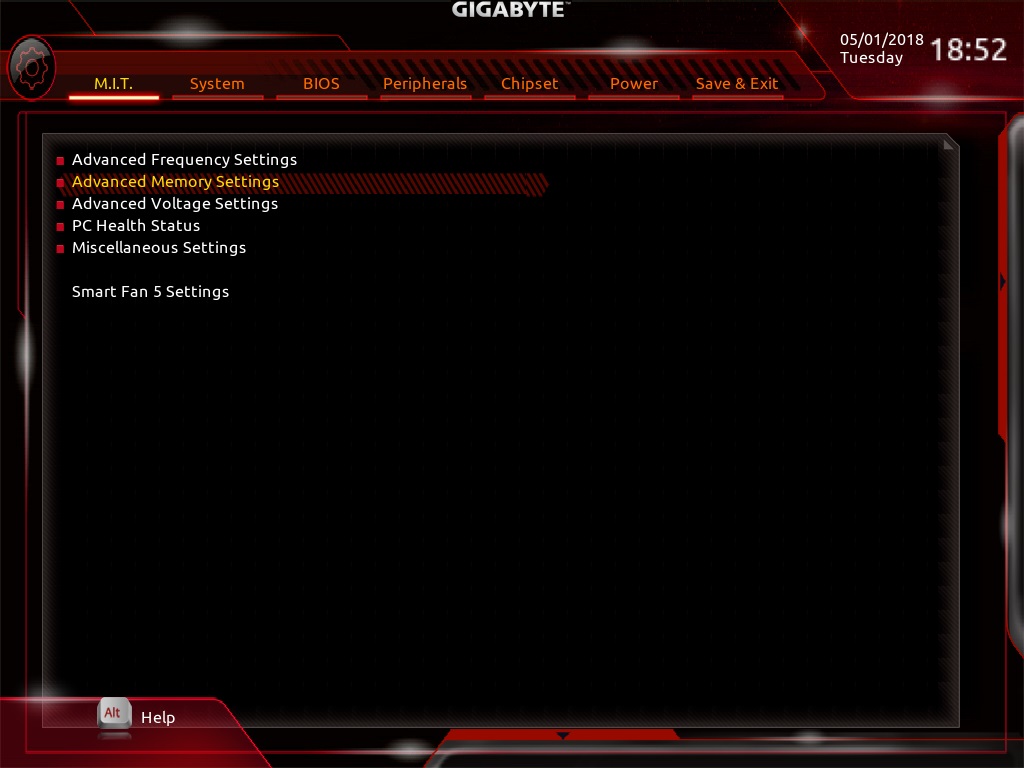
Disabling the Easy Mode and heading over to M.I.T. where frequency and voltage setting adjustments are made, the entire interface could definitely be regarded as simple, but another word we would use is lacking.
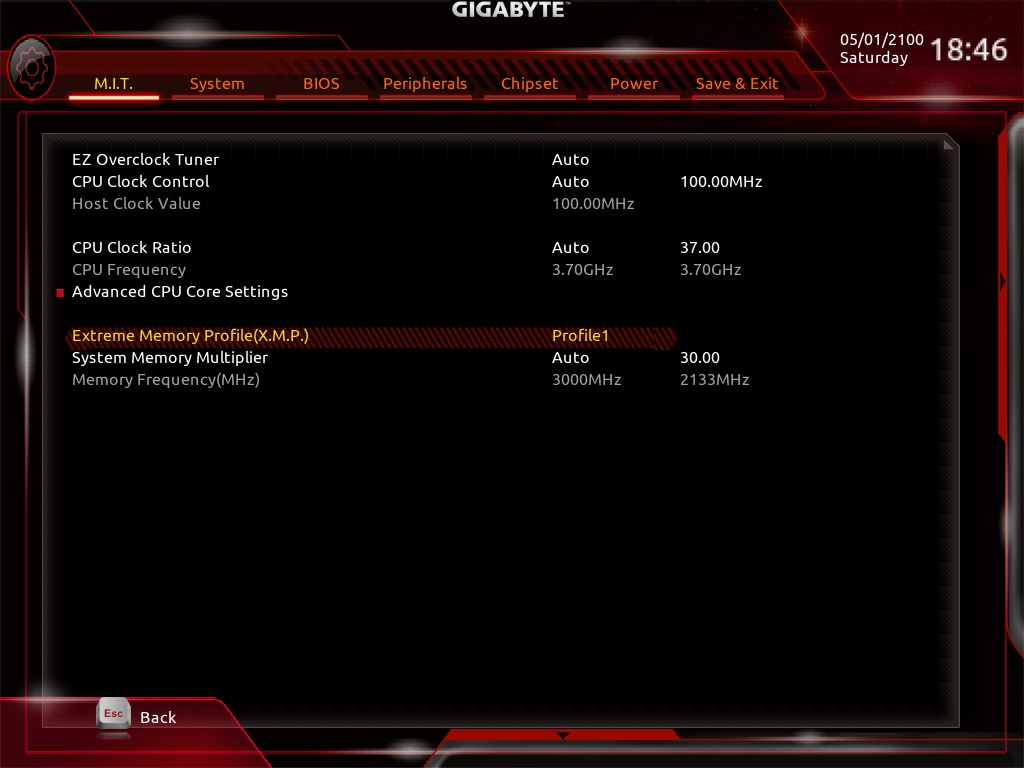
Delving into Advanced Frequency Settings, again, it’s simple but lacking. Even opening the advanced CPU Core Settings, we aren’t exactly overwhelmed with options.
DRAM timing can be tweaked until the heart’s content, but we tend to stick with XMP while testing. The decision to clearly segregate the Standard Timing Control and Advanced Timing Control is a nice gesture though, with some BIOS suites merging the two into a large list.
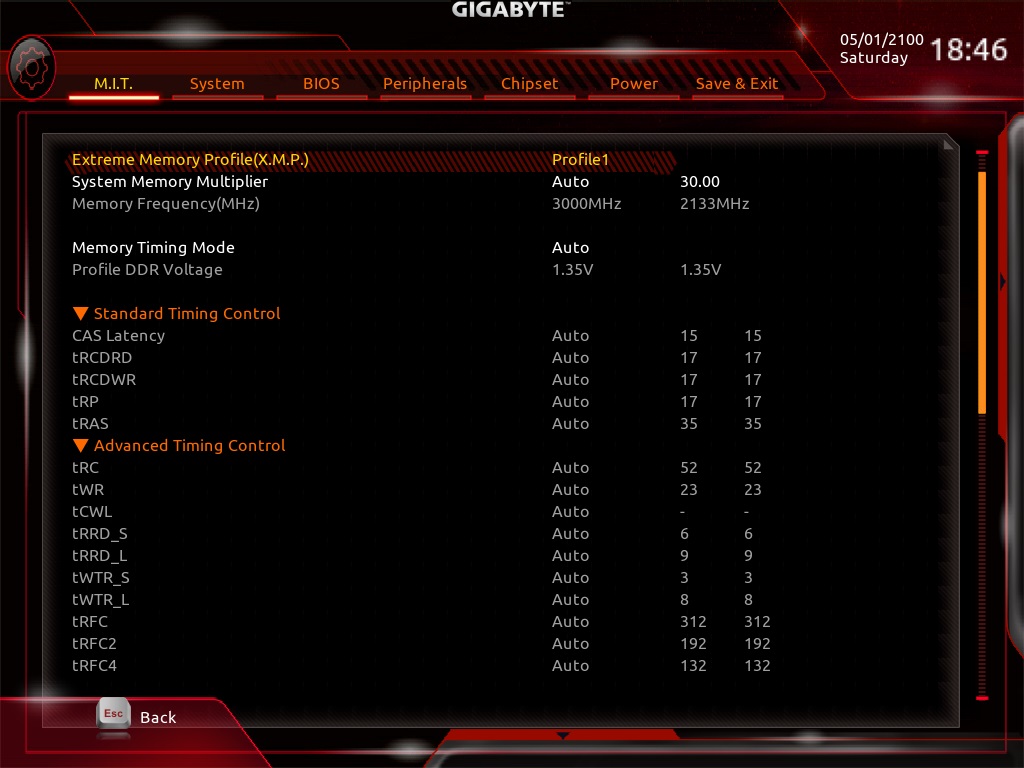
Overall, we’re not massively impressed by the GIGABYTE BIOS, but it gets the job done.
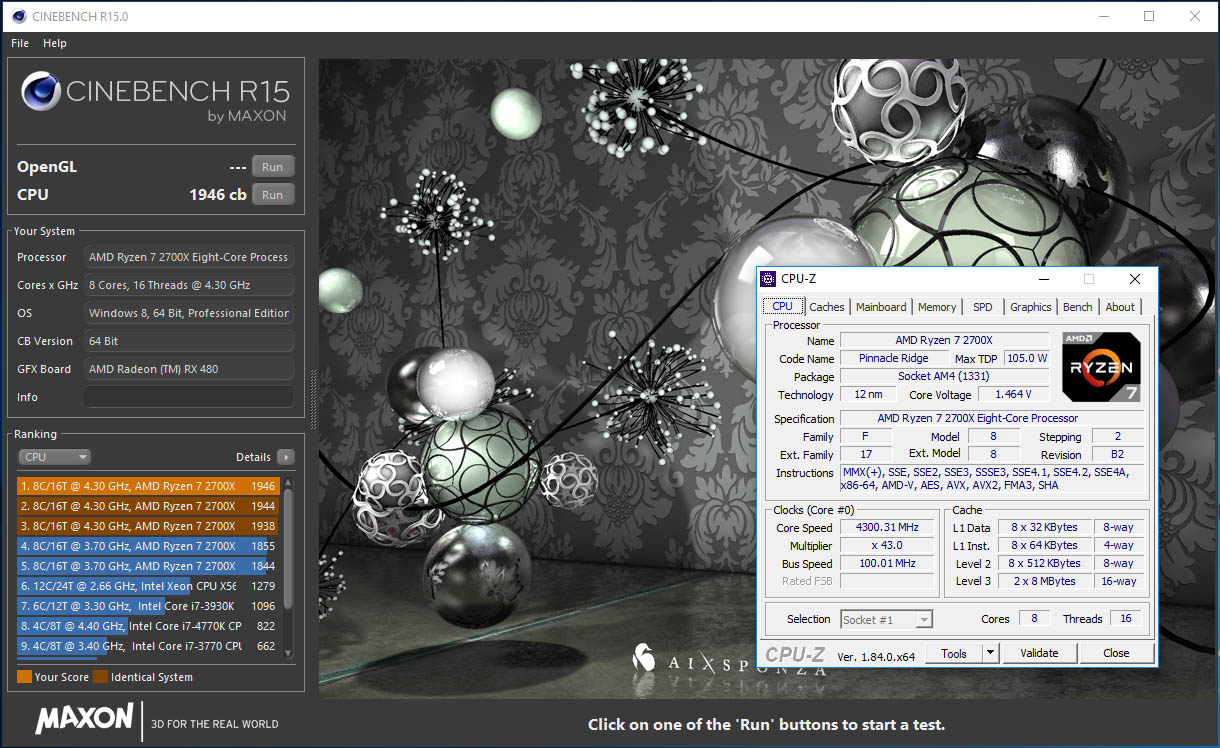
We achieved a 4.3GHz overclock on our AMD Ryzen 7-2700X CPU, which seems to be the ceiling for our particular piece of silicon. We were able to achieve this overclock on other motherboards, but more voltage was required. This may be down to the incredible cooling provided by the power phase heatsink or the 10+2 digital power delivery being a cleaner, more stable source of energy for the Ryzen CPU.
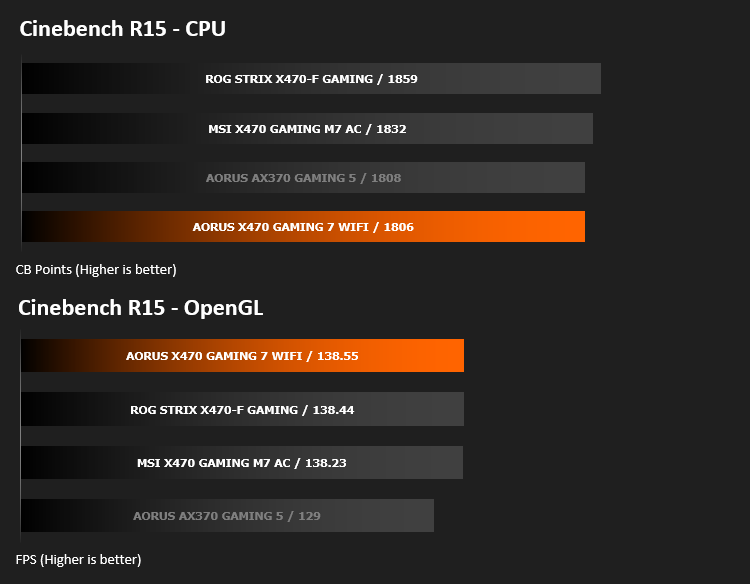
1946 was our eventual Cinebench R15 score, up from the 1806 base score.
Test Setup & Software
Test SetupCooling Noctua NH-U12S-SE-AM4
Motherboard GIGABYTE AORUS X470 GAMING 7 WIFI
Memory 16GB Corsair Vengeance LPX 3200MHz @ 3000MHz @ 15-17-17-38-58
Graphics AMD Radeon RX 480 8GB
Storage Corsair Force LE 480GB
PSU Corsair RM750X 80 Plus Gold Certified PSU
Benchmarks
x264 HD 4.0 – 1st and 2nd pass encoding
SiSoftware SANDRA – CPU & Memory benchmarks
POV-RAY – CPU benchmarks
TrueCrypt – CPU benchmarks
AIDA64 – CPU benchmarks & Memory
PCMark 8 – Home Suite & Photoshop
3DMark FireStrike – 3D Benchmark
Games – Rise of the Tomb Raider & Total War: WARHAMMER
Other Software
Stress Testing Software: AIDA64 Stability Test
CPU Specification Monitoring: CPU-Z
Performance Monitoring: MSI Afterburner
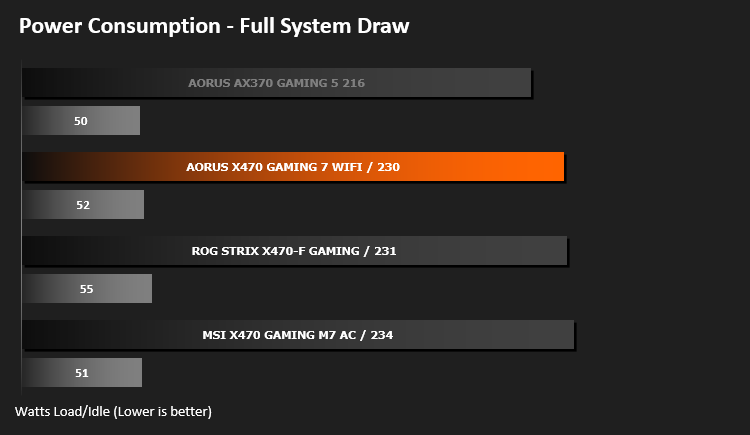
Benchmarks: Power Consumption
Benchmarks: Cinebench R15
Benchmarks: x264 HD
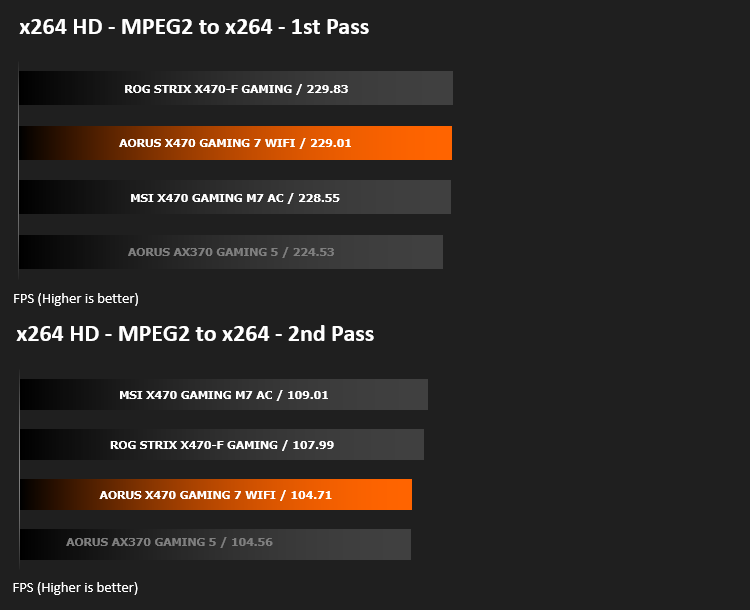
Benchmarks: POV-RAY 3.7
This product allows users to build their custom 3D worlds with excellent quality despite their computer’s hardware. It has adjustable options for levels of radiance, refraction, and reflection. Calculation time may vary depending on the computer model, but PovRay can adapt to many computer builds, and is supported by the open source community.
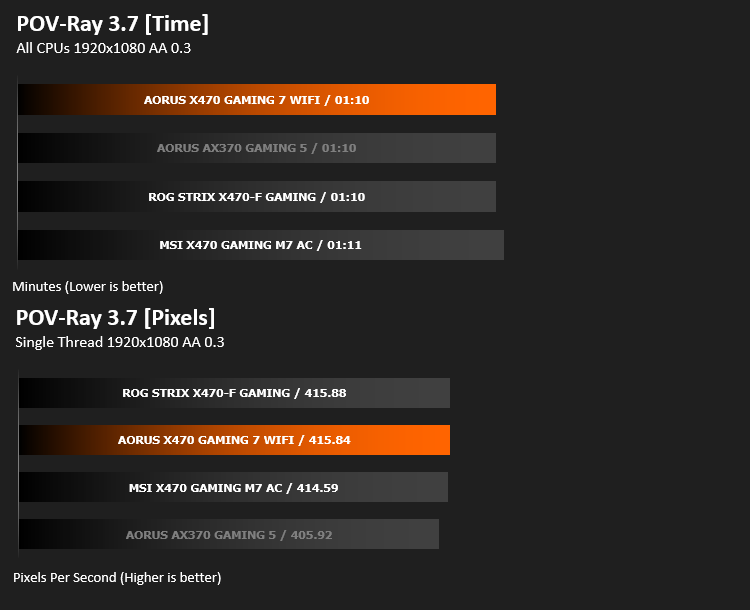
Benchmarks: TrueCrypt
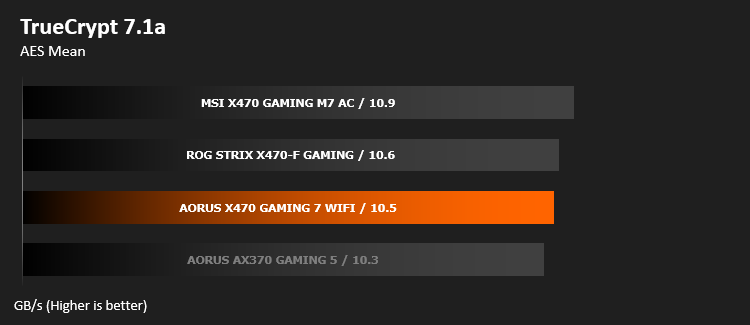
Benchmarks: AIDA64
AIDA64 Product Page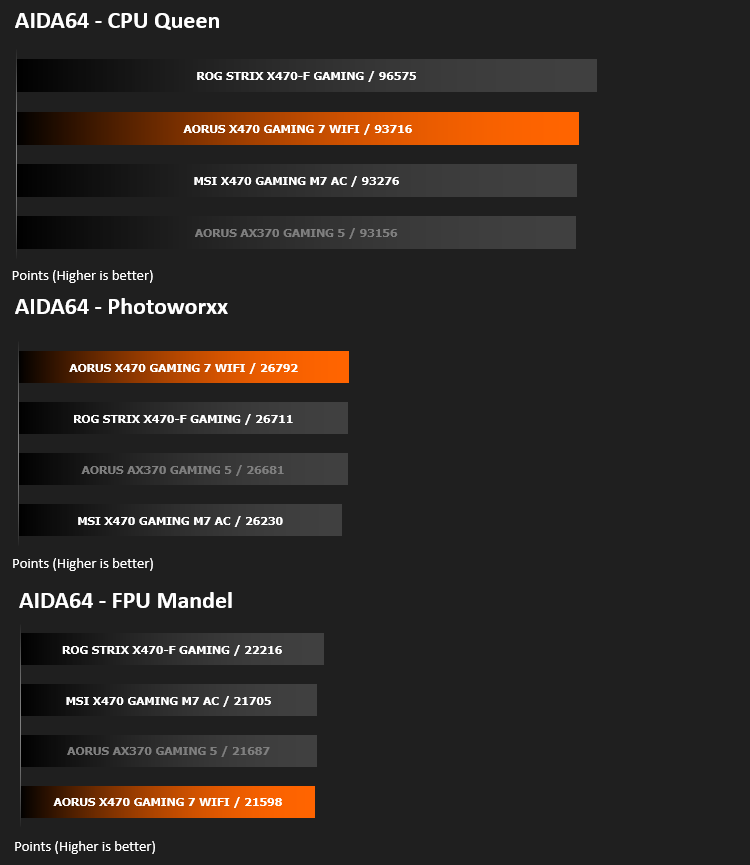
The Memory Latency benchmark measures the typical delay when the CPU reads data from system memory. Memory latency time means the penalty measured from the issuing of the read command until the data arrives to the integer registers of the CPU.

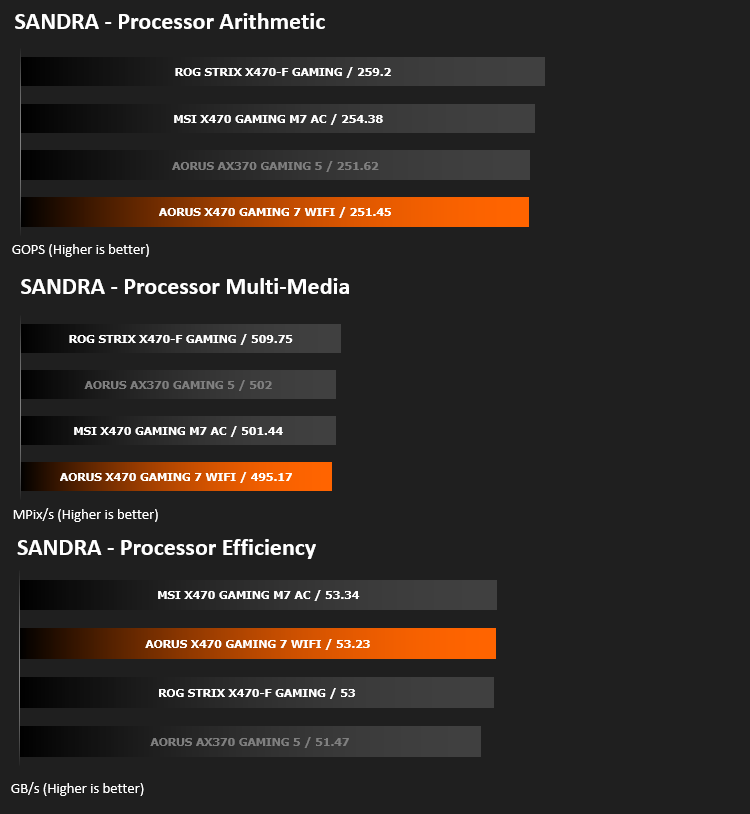
Benchmarks: SiSoftware SANDRA

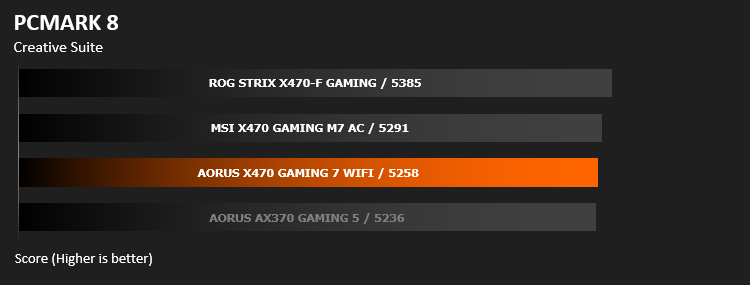
Benchmarks: PCMark 8
Benchmarks: PCMark 8 Photoshop
PCMark 8 Product Page
Benchmarks: 3DMark FireStrike & TimeSpy
3DMark FireStrike Product Page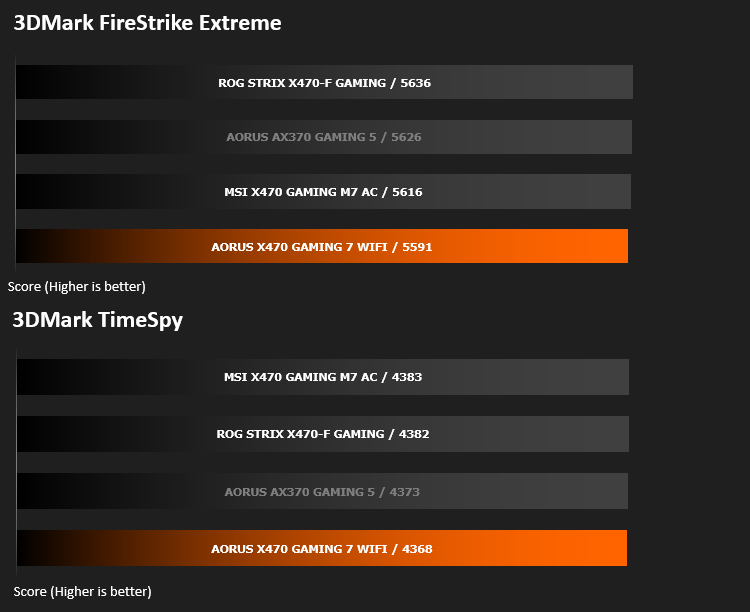
Benchmarks: VRMark
VRMark Product Page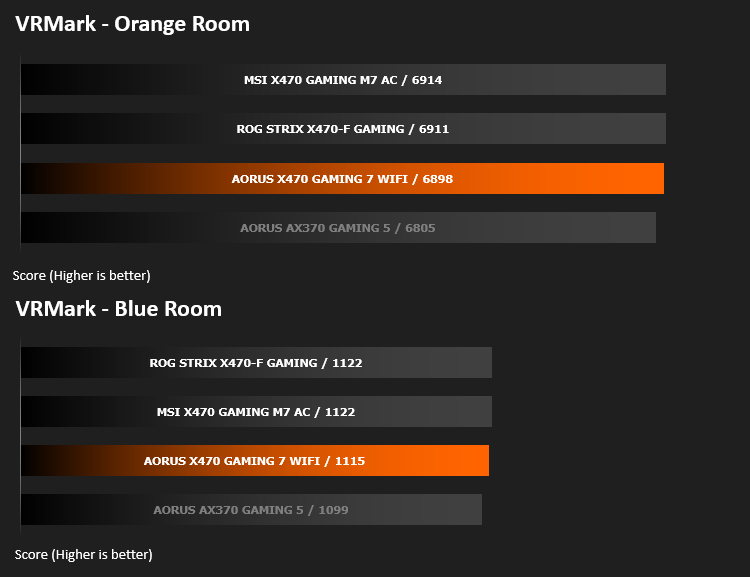
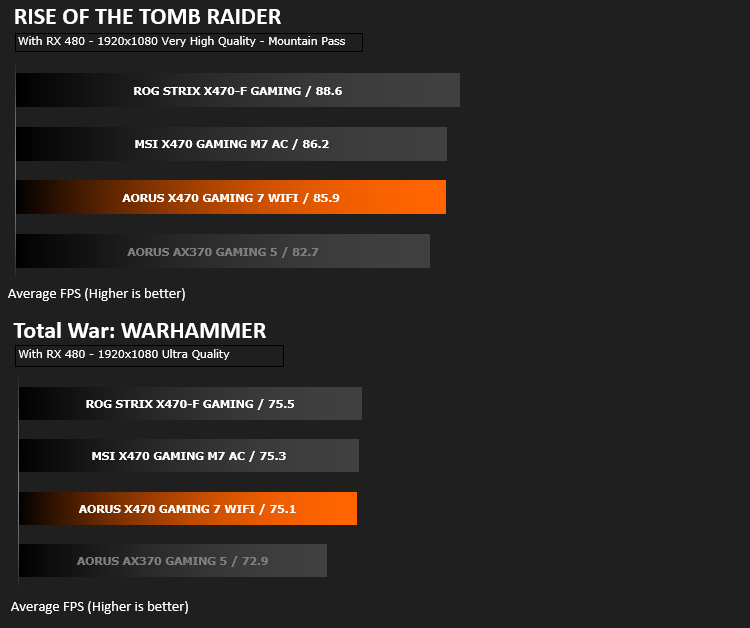
Benchmarks: Rise of the Tomb Raider & Total War: Warhammer
Conclusion
There’s absolutely no denying, the styling department employed to design this motherboard have earned their bonus this year; providing you’re an RGB lighting fan, that is. The orange accents on brushed aluminium plating looks fantastic, with the black PCB contrasting against the whole thing. We thoroughly loved the aesthetics of the GAMING 7 WIFI.Performance was there or there abouts with the other motherboards tested so far, though we did sometimes see some results dip below the “reference X370 board”, which was also an AORUS X370. However, it did also top some scoreboards, so it’s up to you what you take from the results.
The rear IO provides more than enough USB ports, as well as overclocking and enthusiast buttons which can be accessed without removing the case side. The lack of PS/2 ports is unlikely to ruffle too many feathers either; it’s probably about time that was phased out completely.
Internal connectivity is also on the plentiful side; there’s 8 4-pin PWM fan headers, USB 3.1, 3.0 and 2.0 front headers and RGB headers. We also see a pair of M.2 NVMe slots, with Thermal Guard cooling, for rapid, consistent data access and three PCI-E 16x slots.
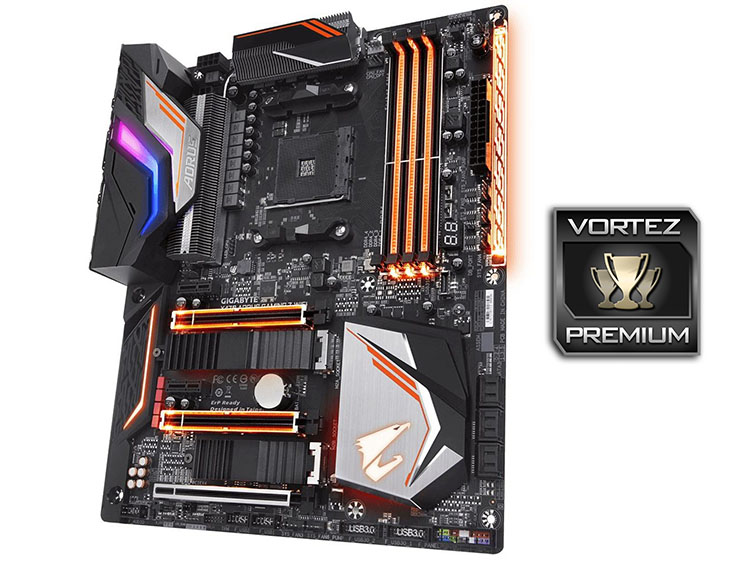
GIGABYTE AORUS’s dedication to providing high-quality audio is clearly evident on the motherboard, using top specification audio capacitors as well as multiple technologies to improve clarity. The Realtek ALC1220-VB audio codec and ESS SABRE DAC, to mention a couple are well known for their ability.
Overclocking was no issue, providing us with 4.30GHz, in line with our overclocking on other motherboards, at a lower vCore, however. We believe this is mostly due to the incredible cooling provided by the heatsink array around the CPU socket and the stable, consistent power provided by the digital 10+2 power phase.
To round up, the GIGABYTE AORUS X470 GAMING 7 WIFI offers plenty of options and opportunities, particularly for those wishing to extract the best performance from their machine. The build quality is excellent, header placement is well thought out and the board looks beautiful.
If you’re into the RGB scene at the moment, we can’t recommend this board enough; you get everything you expect with a gorgeous appearance to match.
+ Excellent RGB lighting
+ Good performance
+ Great overclocking
+ Well thought-out header placement
+ Ample connectivity
+ Twin M.2 NVMe slots
+ Twin BIOS
Cons
– BIOS isn’t the best
– You can’t stop looking at it
Click here for an explanation of our awards at Vortez.net.
Stay connected with the Vortez Social Media pages:
Join in with the discussions on Discord