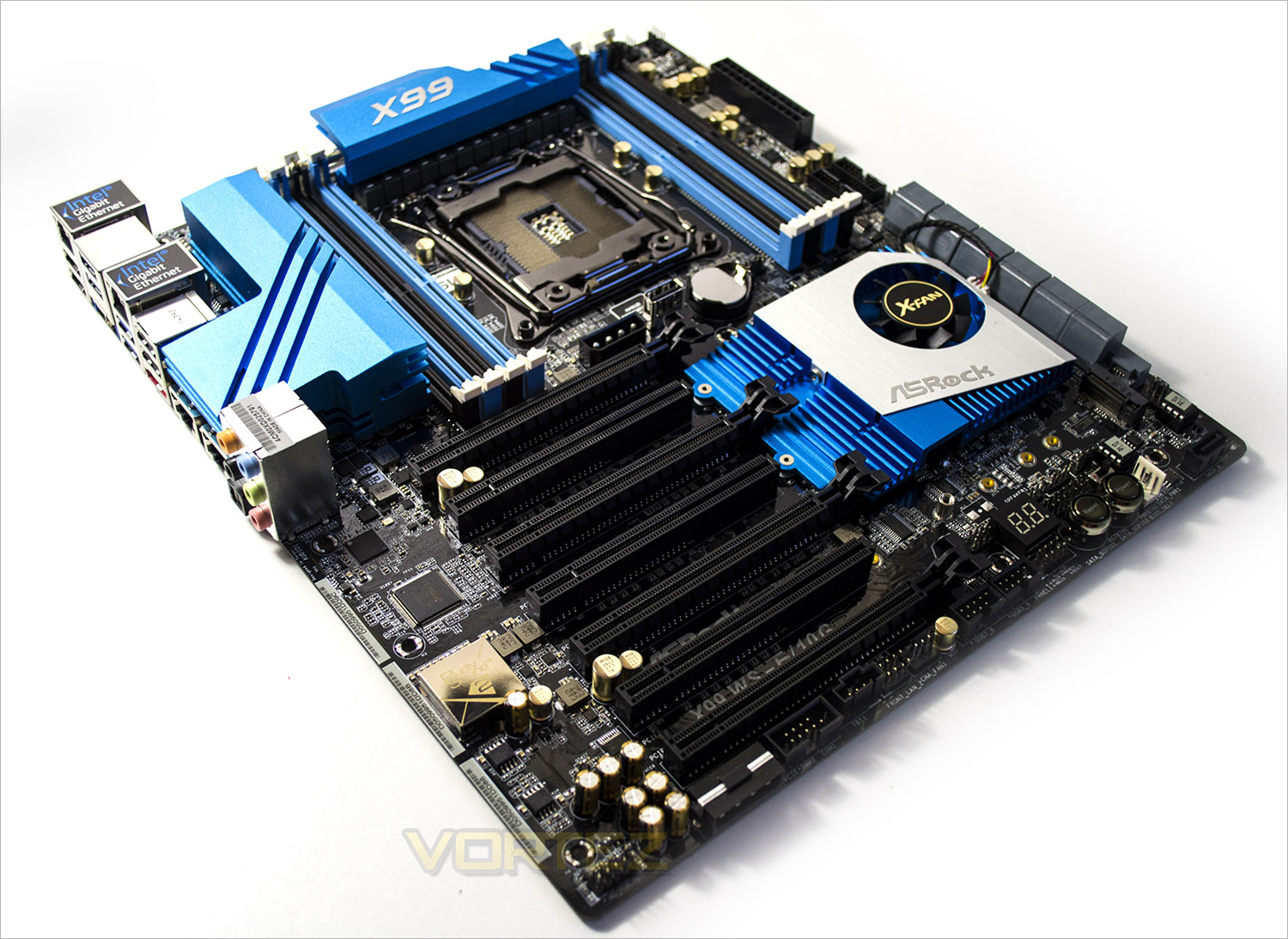
ASRock recently unveiled thier ultra high end X99 workstation motherboard, the X99 WS-E/10G boasting QUAD SLI, Dual Intel 10G BASE-T LAN along with Dual Intel Gigabit LAN ports for the ultimate in gaming and file transfer performance.

Product on Review: X99 WS-E/10G
Manufacturer and Sponsor: ASRock
Street Price: £693.59
How often are you left doing other things while you wait for that file transfer to complete? Have problems with buffering that 4k movie while the rest of the household are also streaming from your server? If like us you are the impatient type and want everything to work first time without compromising on quality or speed then perhaps you need more bandwidth. The X99 platform has most bases covered, multi-core processing, DDR4, multi GPU’s and some boards can even team up a couple of LAN ports to enhance their network speed. This motherboard has all that and more.
The key attraction to this motherboard are the Two 10G BASE-T LAN ports by Intel® X540. A further two gigabit LAN ports by Intel® I210AT with all four LAN ports supporting teaming means this board represents perhaps the fastest LAN solution on the consumer market. We say consumer lightly though, perhaps ‘pro-consumer/pro-enthusiast’ would be a better description because this board may well have a massive amount of features including the 4 LAN ports, 4way SLI and a 12 phase power design the huge specification has a big price to match.
We’ve reviewed motherboards that exceed the 3 and 4 hundred pound mark but never have we had a board costing in excess of £600. Yeah you read that right – £600! Bargain hunters need not apply. That said, a board like this is likely to feature SSD RAID, Multi GPU’s and a premium Intel processor be it extreme of Xeon and the cost of those components alone are likely to exceed two grand if not more so £600 for the foundation of such a monster setup is unlikely to be an issue.
For this reason we won’t be focusing on the cost as it is unlikely to be the deciding factor, instead we will be looking at just what this motherboard is capable of. We will of course be using our usual suite of benchmarks to compare against other X99 motherboards but we will also be looking at the usefulness of the 4 port LAN setup in a home environment.
About ASRock
ASRock has been growing fast and become world third largest motherboard brand with headquarter in Taipei, Taiwan and branches in Europe and the USA. The young and vibrant company targets from mainstream to enthusiast MB segments for different kinds of users, owning reputation around the world market with its reliability and proficiency.
Specification
Unique Feature
ASRock Super Alloy
– XXL Aluminum Alloy Heatsink
– Premium 60A Power Choke
– Premium Memory Alloy Choke (Reduces 70% core loss compared to iron powder choke)
– Ultra Dual-N MOSFET (UDM)
– Nichicon 12K Platinum Caps (100% Japan made high quality conductive polymer capacitors)
– Sapphire Black PCB
ASRock Full Spike Protection
ASRock APP Shop
CPU
– Supports Intel® Core™ i7 and Xeon® E5-1600/2600 v3 Processor Family for the LGA 2011-3 Socket, up to 18 Cores and 160W
– Digi Power design
– 12 Power Phase design
– Supports Intel® Turbo Boost 2.0 Technology
– Supports Untied Overclocking Technology
Chipset
– Intel® X99
Memory
– Quad Channel DDR4 Memory Technology
– 8 x DDR4 DIMM Slots
– Supports DDR4 3200+(OC)*/2933+(OC)/2800(OC)/2400(OC)/2133/1866/1600/1333/1066 non-ECC, un-buffered memory
– Supports non-ECC RDIMM (Registered DIMM)
– Supports DDR4 ECC, un-buffered memory/RDIMM with Intel® Xeon® processors E5 series in the LGA 2011-3 Socket
– Max. capacity of system memory: 128GB
– Supports Intel® Extreme Memory Profile (XMP) 2.0
– 15μ Gold Contact in DIMM Slots
*Due to the operating system limitation, the actual memory size may be less than 4GB for the reservation for system usage under Windows® 32-bit OS. For Windows® 64-bit OS with 64-bit CPU, there is no such limitation.
** Please refer to Memory Support List on ASRock’s website for more information.
BIOS
– 2 x 128Mb AMI UEFI Legal BIOS with multilingual GUI support (1 x Main BIOS and 1 x Backup BIOS)
– Supports Secure Backup UEFI Technology
– ACPI 1.1 Compliant wake up events
– SMBIOS 2.3.1 Support
– CPU, DRAM, PCH 1.05V, PCH 1.5V, VPPM Voltage Multi-adjustment
Audio
– 7.1 CH HD Audio with Content Protection (Realtek ALC1150 Audio Codec)
– Premium Blu-ray Audio support
– Supports Surge Protection (ASRock Full Spike Protection)
– Supports Purity Sound™ 2
– Nichicon Fine Gold Series Audio Caps
– 115dB SNR DAC with differential amplifier
– TI® NE5532 Premium Headset Amplifier (Supports up to 600 ohm headsets)
– Direct Drive Technology
– EMI shielding cover
– PCB isolate shielding
– Supports DTS Connect
LAN
– 2 x Gigabit LAN 10/100/1000 Mb/s (Supported by 2 x Intel® I210AT)
– 2 x 10G BASE-T LAN (Supported by Intel® X540 )
– Supports Wake-On-LAN
– Supports Lightning/ESD Protection (ASRock Full Spike Protection)
– Supports Dual LAN with Teaming
– Supports Quad LAN with Teaming
– Supports Energy Efficient Ethernet 802.3az
– Supports PXE
Expansion / Connectivity
Slots – 7 x PCI Express 3.0 x16 Slots (PCIE1/PCIE2/PCIE3/PCIE4/PCIE5/PCIE6/PCIE7: single at x16 (PCIE7); dual at x16 (PCIE7) / x16 (PCIE3); triple at x16 (PCIE7) / x16 (PCIE5) / x16 (PCIE3); quad at x16 (PCIE7) / x16 (PCIE5) / x16 (PCIE3) / x16 (PCIE1))
– 2 x embedded PLX PEX 8747
– Supports AMD Quad CrossFireX™, 4-Way CrossFireX™, 3-Way CrossFireX™ and CrossFireX™
– Supports NVIDIA® Quad SLI™, 4-Way SLI™, 3-Way SLI™ and SLI™
– 15μ Gold Contact in VGA PCIe Slot (PCIE1, PCIE3, PCIE5 and PCIE7)
Storage
– 10 x SATA3 6.0 Gb/s Connectors, support RAID (RAID 0, RAID 1, RAID 5, RAID 10 and Intel® Rapid Storage 13), NCQ, AHCI and Hot Plug*
– 2 x SATA3 6.0 Gb/s Connectors by Marvell SE9172, support RAID (RAID 0 and RAID 1), NCQ, AHCI and Hot Plug**
– 1 x SATA DOM Connector (shared with S_SATA3_2)
– 1 x SATA Express 10 Gb/s Connector (shared with SATA3_4 and SATA3_5)***
– 1 x eSATA Connector, supports NCQ, AHCI and Hot Plug
– 1 x M.2_SSD (NGFF) Socket 3, supports M.2 SATA3 6.0 Gb/s module and M.2 PCI Express module up to Gen2 x4 (20 Gb/s)****
*S_SATA3_2 is shared with the SATA DOM; S_SATA3_3 is shared with the eSATA. RAID is supported on SATA3_0 ~ SATA3_5 ports only.
**Marvell SE9172 RAID is supported with Windows® OS only.
***Support to be announced.
****If M2_1 is occupied by a SATA-type M.2 device, S_SATA3_0 will be disabled. If you install a M.2 PCI Express module and the SATA_EXP0 is in use, the M2_1 will downgrade to x2 mode.
Connector
– 1 x COM Port Header
– 1 x Chassis Intrusion Header
– 1 x TPM Header
– 1 x Power LED Header
– 2 x CPU Fan Connectors (1 x 4-pin, 1 x 3-pin)
– 3 x Chassis Fan Connectors (1 x 4-pin, 2 x 3-pin) (Smart Fan Speed Control)
– 1 x Power Fan Connector (3-pin)
– 1 x SB Fan Connector (3-pin)
– 1 x 24 pin ATX Power Connector
– 1 x 8 pin 12V Power Connector (Hi-Density Power Connector)
– 1 x SATA DOM Power Header
– 2 x PCIe Power Connectors
– 1 x SATA DOM Power Jumper
– 3 x SATA Serial General Purpose Input/Output Headers
– 2 x Front LAN LED Connectors
– 1 x Front Panel Audio Connector
– 2 x USB 2.0 Headers (support 4 USB 2.0 ports) (Supports ESD Protection (ASRock Full Spike Protection))
– 1 x USB DOM Connector
– 2 x USB 3.0 Headers (Supports 4 USB 3.0 ports) (Supports ESD Protection (ASRock Full Spike Protection))
– 1 x Dr. Debug with LED
– 1 x Power Switch with LED
– 1 x Reset Switch with LED
– 1 x BIOS Selection Switch
Rear Panel I/O
– 1 x Optical SPDIF Out Port
– 1 x eSATA Connector
– 4 x USB 2.0 Ports (Supports ESD Protection (ASRock Full Spike Protection))
– 4 x USB 3.0 Ports (ASMedia ASM1074 hub) (Supports ESD Protection (ASRock Full Spike Protection))
– 4 x RJ-45 LAN Ports with LED (ACT/LINK LED and SPEED LED)
– 1 x Clear CMOS Switch
– HD Audio Jacks: Rear Speaker / Central / Bass / Line in / Front Speaker / Microphone
Accessories
– 1 x ASRock Flexible SLI™ Bridge Connector Cable (14 cm)
– 1 x ASRock 3-Way SLI™ Bridge Card
– 1 x ASRock 4-Way SLI™ Bridge Card
– Quick Installation Guide, Support CD, I/O Shield
– 6 x SATA Data Cables
– 1 x Screw for M.2 Socket
Hardware Monitor
– CPU/Chassis temperature sensing
– CPU/Chassis/Power/SB Fan Tachometer
– CPU/Chassis Quiet Fan (Auto adjust chassis fan speed by CPU temperature)
– CPU/Chassis/SB Fan multi-speed control
– Voltage monitoring: +12V, +5V, +3.3V, CPU Input Voltage, CPU Internal Voltages
Form Factor
– EATX Form Factor
– 8 Layer PCB
– 4 x 2oz Copper PCB
– High Density Glass Fabric PCB
OS
– Microsoft® Windows® 8.1 32-bit / 8.1 64-bit / 8 32-bit / 8 64-bit / 7 32-bit / 7 64-bit / Server 2012 R2 64-bit / Server 2012 64-bit / Server 2008 R2 64-bit
Certifications – FCC, CE, WHQL
– ErP/EuP ready (ErP/EuP ready power supply is required)
Features
Two 10G BASE-T LAN ports by Intel® X540 plus another two gigabit LAN ports by Intel® I210AT. The four LAN ports on this motherboard support Teaming, which allows four connections to act as one single connection for an unearthly transmission bandwidth.
4-Way SLI & CrossFireX Supported by Two PLX PEX 8747 Bridge Chips
PLX PEX 8747 is a PCIe Gen3 bridge chip that offers solid PCIe 3.0 lanes for PCIe devices and is optimized to support high performance graphics. Via the two PLX PEX 8747 bridge chips onboard, this motherboard is able to support 4-Way SLI or 4-Way CrossFireX at PCIe Gen3 x16/x16/x16/x16 mode with four graphics cards.
12 Power Phase Design
Designed with a 12 Power Phase design, this motherboard features sturdy components and completely smooth power delivery to the CPU. Plus, it offers unmatched overclocking capabilities and enhanced performance with the lowest temperature for advanced gamers as well.
Ultra Thin Design to Fit 1U Chassis
The back of motherboard is mounted with ultra short screws and the length of the CPU back plate is less than 3mm, allowing this board to fit in server-grade 1U chassis.
XXL Aluminum Alloy Heatsink Design
The extra large aluminum alloy heatsinks take away heat dramatically. As the MOSFETs and chipsets areas are well covered by these heatsinks to protect them from overheating, MOSFET and chipsets can perform with lower temperature, and your motherboard and system will be more stable and reliable.
Premium 60A Power Choke
Compared to traditional chokes, ASRock’s new-gen premium power chokes effectively increase up to 3 times better saturation current, providing enhanced and improved Vcore voltage to the motherboard.
Premium Memory Alloy Choke
Specially designed for memory power delivery, the new-gen alloy chokes feature a highly magnetic and heat resistant design, thus delivering more stable and reliable power to the motherboard.
Ultra Dual-N MOSFET for Memory Power
Combining two silicon dies into one MOSFET, Ultra Dual-N MOSFET provides larger die area and lower Rds(on), so the power supply for the CPU Vcore is more efficient.
Nichicon 12K Platinum Caps
Supreme 12K platinum capacitors with lifespans of at least 12,000 hours. Compared to other counterparts on high-end motherboards that merely have lifespans of around 10,000 hours, ASRock applied Nichicon 12K Platinum Caps that offer 20% longer lifespans and provide more stability and reliability.
Sapphire Black PCB
Pure black PCB appearance. The new Sapphire Black PCB represents rock-solid quality and gives the motherboard a more mysterious touch.
X99 Chipset Features
First and foremost, Intel’s latest chipset is aimed at the home ‘power’ user, be this performance enthusiast (read overclocker), extreme gamer or indeed for those who require the ultimate media encoding platform. So whatever your vice, Intel have all the bases covered with their latest chipset. This isn’t, of course, to say the Z97 based chipset is poor by comparison (it’s not), but if you want the ultimate – the very best of the best supporting Intel’s 8 core processor (5960X) – then X99 is the only option.
So what’s new with X99?
DDR4 Quad Channel Memory
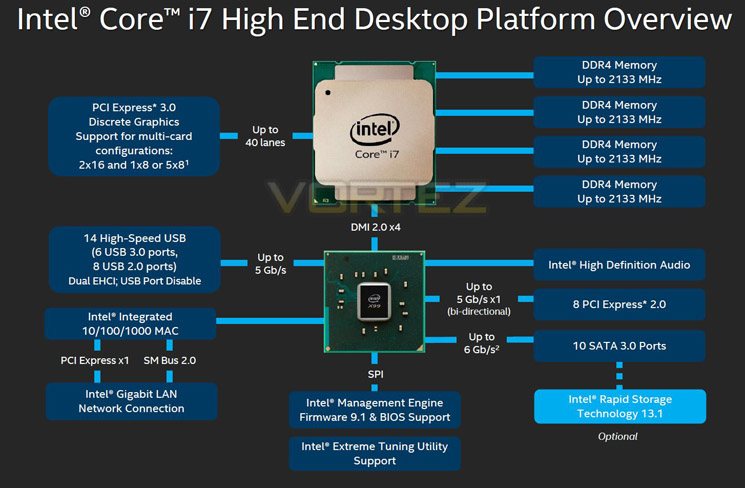
The above block diagram shows us that DDR4 is natively supported. Note that DDR3 is NOT supported (more on this later). While the block diagram shows a rated speed of up to 2133MHz, our test bench happily ran 16GB (4x4GB) Quad channel Corsair Vengeance LPX at 2666MHz. More recently niche 3000MHz and even 3333MHz DDR4 DIMMs are entering the market requiring high voltages and far deeper pocket, but it’s anticipated that eventually 4GHz DIMMs will be the high watermark at retail.
40 x PCI Express (PCIe) Lanes
Depending on CPU choice, the X99 chipset can support up to 40 lanes of PCIe in combinations of 2×16, 1×8 or 5×8. We also expect this figure to increase on some motherboards with the addition of PLX chips given sufficient demand. All of the PCIe lanes are now PCIe 3.0 compliant; while current generation GPU’s rarely saturate PCIe 2.0 it is nice to have that future proofing available, especially for SLI/Crossfire configurations.
USB 3.0
One of the heaviest criticisms of X79 was the lack of natively support USB 3.0 ports, especially when compared to its Z87/97 brethren. We are now happy to report that X99 will support 6 USB 3.0 ports along with 8 USB 2.0 ports. Of course, most motherboard manufacturers will also add the usual ‘aftermarket’ USB 3.0 support from components such as ASMedia and Marvel so transfer speeds of up to 5GB/s and port numbers in the double-digits can theoretically be achieved.
SATA 3.0 And Next Generation Storage
Despite having huge computational benefits, X79 was oft criticised by the lack of high speed SATA 6Gbps ports. This has been rectified with the X99 chipset supporting 10 x SATA 3.0 ports attaining a theoretical speed of 6Gb/s which can be enhanced using the latest Intel Rapid Storage driver to speeds of 10 Gb/s!
SATA of course has its limitations, which is where newer next generation storage technologies come in. First seen in limited quantities on Z87 and more widely on Z97, M.2 and SATA Express technologies unlock transfer speeds far in excess of SATA III. Support for PCIE storage remains sporadic – M.2 is starting to pick up but SATA Express is exceptionally rare – but it’s slowly proving to be a valid alternative to SATA 3 and mSATA. Many X99 motherboards support M.2 X4, which makes use of four PCIE lanes for up to a stunning 32Gbps bandwidth; however few M.2 drives come close to saturating even Gen 1’s ~8Gbps.
We must say that Intel have pulled out all the stops here. Clearly they have taken on board user feedback regarding the deficiencies of X79 by incorporating more modern storage and expansion options. No longer is the Enthusiast flagship the poor I/O brother to Z87/97. Perhaps the biggest draw though is the introduction of DDR4. This will see huge speed gains in almost every aspect of personal computing. With 8x8GB Dimms supported a mammoth 64GB of DDR4 will make the X99 chipset massively future proofed.
We will cover the overclocking capabilities of the new chipset and each motherboard specifically in the overclocking section but this area failed to disappoint too.
Overall, there is little to criticise here. While we would have liked 40 PCIe lanes regardless of CPU, we understand there has to be some compromise to keep costs down for the budget conscious so how many PCIe lanes you have available will be dictated by CPU choice and not the motherboard. The entry level 6 core i7-5820 will have 28 PCIe lanes at a cost of £299 (At the time of release), while the flagship 8 core i7-5960X and 6 core i7-5930K will both have the full blown 40 lanes available. Aside from lanes, cores cache and clockspeed, all of the X99 features will be available regardless of CPU choice and to this end we are grateful. We suspect that future additions to the CPU range will hit the middle ground while the 5960X will receive a speed bump although this is pure speculation at this point.
Which chip would we go for? Obviously if money was no object then the i7-5960X is the way to go, not only does it have the full 40 lanes available but it is a true 8 core (16 threads) CPU. The 5930K would be the obvious choice for the consumer and the CPU that we think will prove most popular due to the balance of speed vs. cost.
Whichever CPU you opt for though, you can be assured that the X99 chipset offers the very best available. It is powerful, feature packed and as you will see, the unrivalled component of choice for enthusiast users.
NIC Teaming
To take advantage of one of the main features of this motherboard you will need a compatible operating system such as a server version (Windows 2008/2012) and a switch that affords teaming capabilities. Sadly, we have neither so cannot fully test this feature however, we will go through the theory behind this feature to allow you to make an informed decision on whether this is of any use to you.
What is teaming?
NIC Teaming can also be referred to as NIC bonding, load balancing and failover or LBFO. NIC Teaming is not a new concept. It has been around for many years now and in a very basic sense allows a variety of configurations to your LAN ports to afford redundancy or throughput increases NOT bandwidth increases. Think of it as a highway/motorway. You can increase the amount of cars on the motorway by adding extra ‘lanes’ but what you can’t do with teaming is increase the bandwidth i.e the speed. So while we can increase the amount of information being sent at any given time, we cannot increase the speed at which this information is being sent. This is of course dependent on which mode you configure teaming for.
Switch independent or dependent?
Switch independent can use non-intelligent switches in your network however all of the traffic is sent to a single NIC and thus not distributed equally. This is useful for web traffic servers. Switch Dependent allows the use of Link Aggregation Control (LACP) and views the available NICs as a single ‘pipe’ which is perfect for servers that have heavy inbound/outbound traffic such as in an office environment.
Environment
The teaming feature is perhaps best utilised in a large network where multiple devices are connected to a single server. That server will be limited to a single port in normal configurations which will be split to the number of devices connected to it via a switch. There is built in support in Windows Server 2012 along with Hyper-V and this is the OS we recommend to use. Other server OS will be reliant on vendor driver software to enable teaming. Another great feature of NIC teaming is fault tolerance where if one port fails, you have the redundancy of the other ports available so your Network has a 4x redundancy rate (up to 3 ports can fail and it will still work albeit ‘slower’ in Independent mode).
For the vast majority of us, especially in a home user environment NIC teaming has little, if any use. You would have to have a ridiculously fast Hard disk setup to even come close to saturating the throughput of one port. Even home networks are unlikely to see much benefit unless each networked PC is streaming huge files at the same time. We can see the benefits of having redundancy or fault tolerance however the likelihood of a port failing is very small in our experience.
To summarise
Unless you are planning on using this motherboard in a heavy networked office with super fast hard drives in a dedicated server environment it will afford very little benefit to you. If however you like the idea of having a single PC with a variety of Virtual gaming machines then the X99
Packaging & Accessories
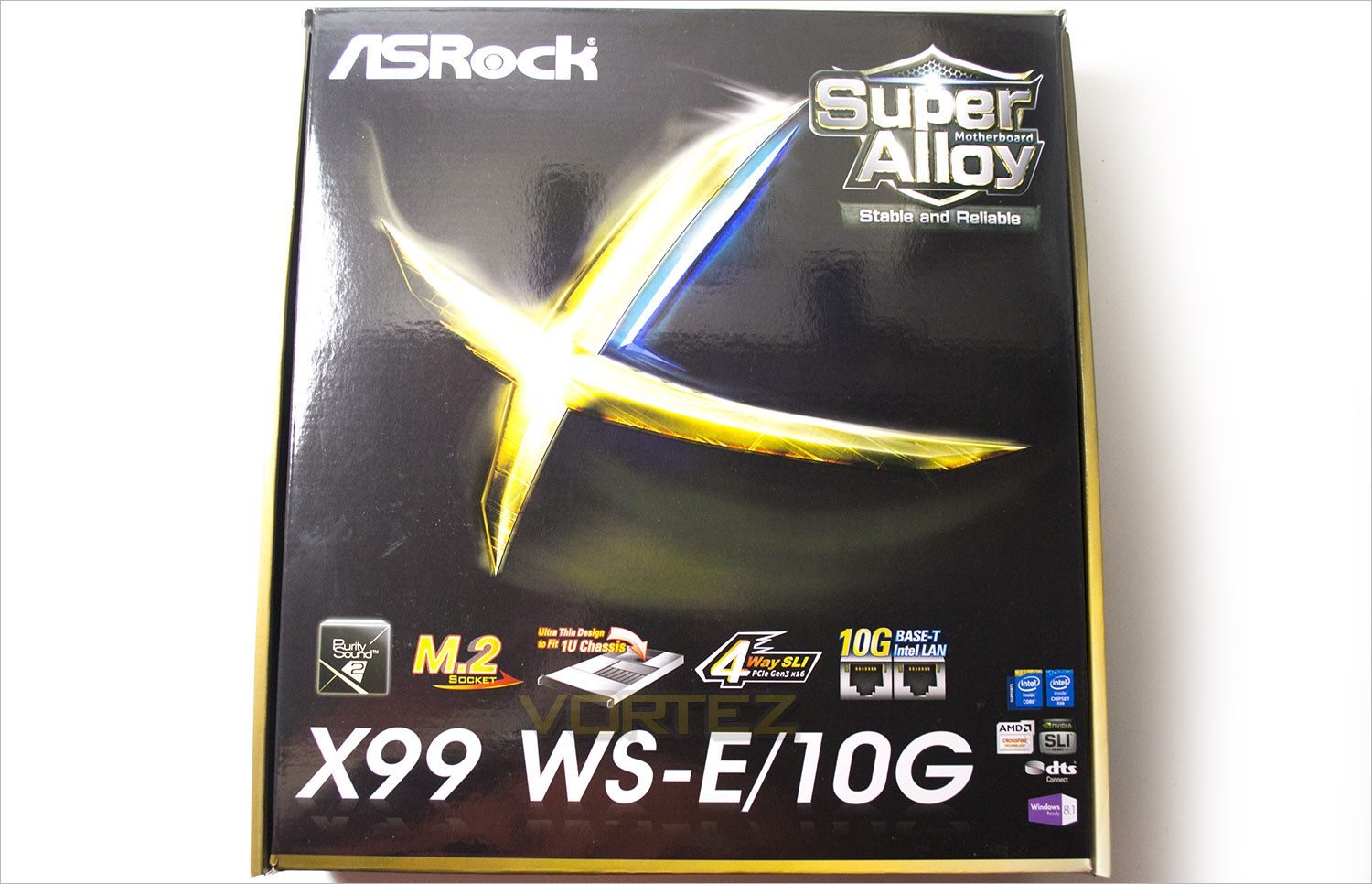
Despite being EATX the packaing is smaller than you would expect. It is however typical ASRock with a glossy appearance with gold and blue highlighting while having the main features displayed below the product title.
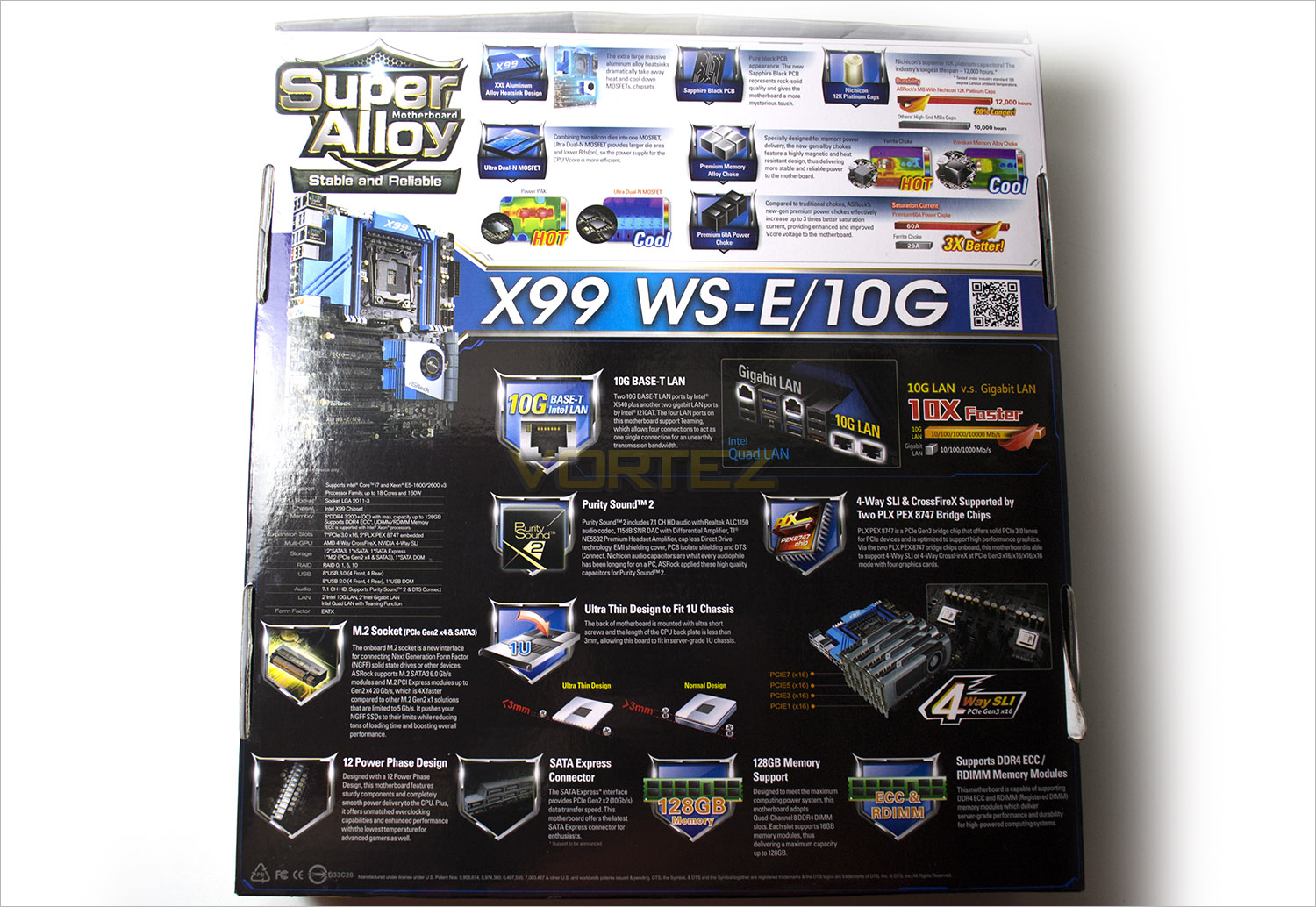
The rear of the box goes into great detail describing the main features of the motherboard. ASRock are making plenty of noise here about their Super Alloy feature which has some of the best power control features available in a motherboard including a host of premium chokes, capacitors and capacitors. They also feature what we believe is the main attraction of the WS-E/10G in the 10G Base T-LAN.
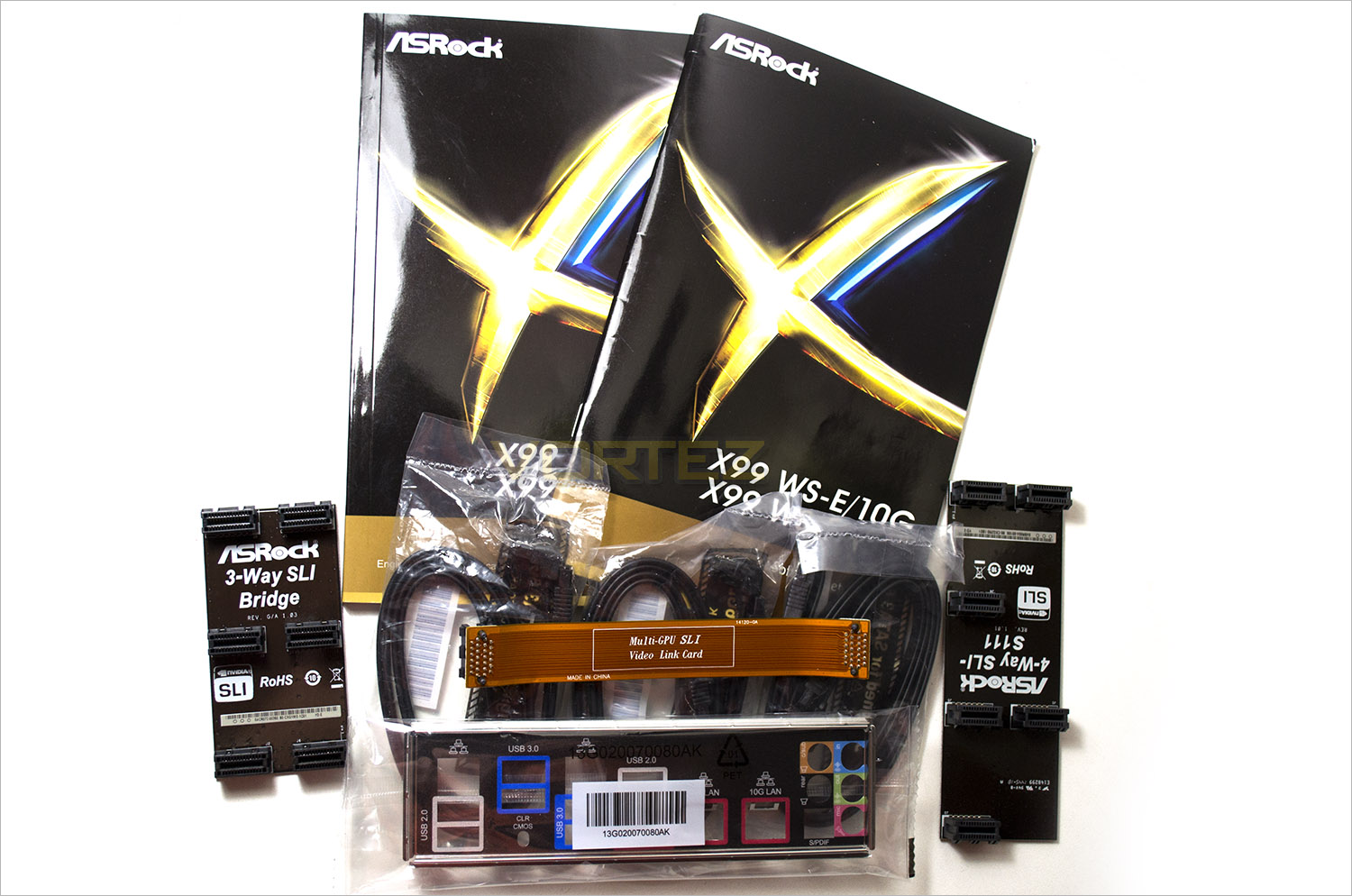
The accessory list is somewhat basic for a motherboard of this nature. We get the usual manuals and I/O shield but only 6 SATA cables which was a shame considering the amount of ports available. ASRock do however make amends by providing 3 SLI bridges which will be useful depending on your GPU configuration (2, 3 and 4 card).
First Look
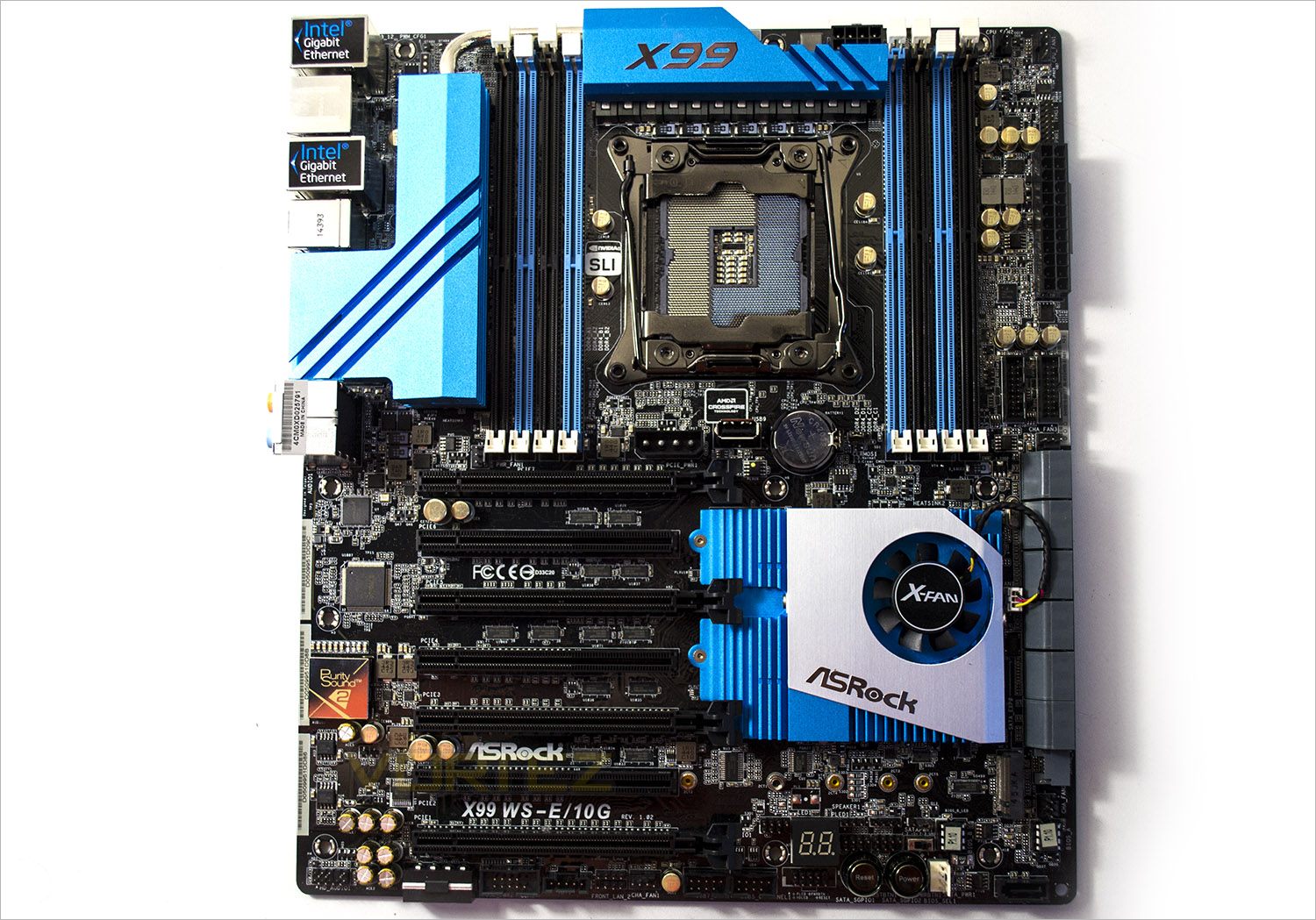
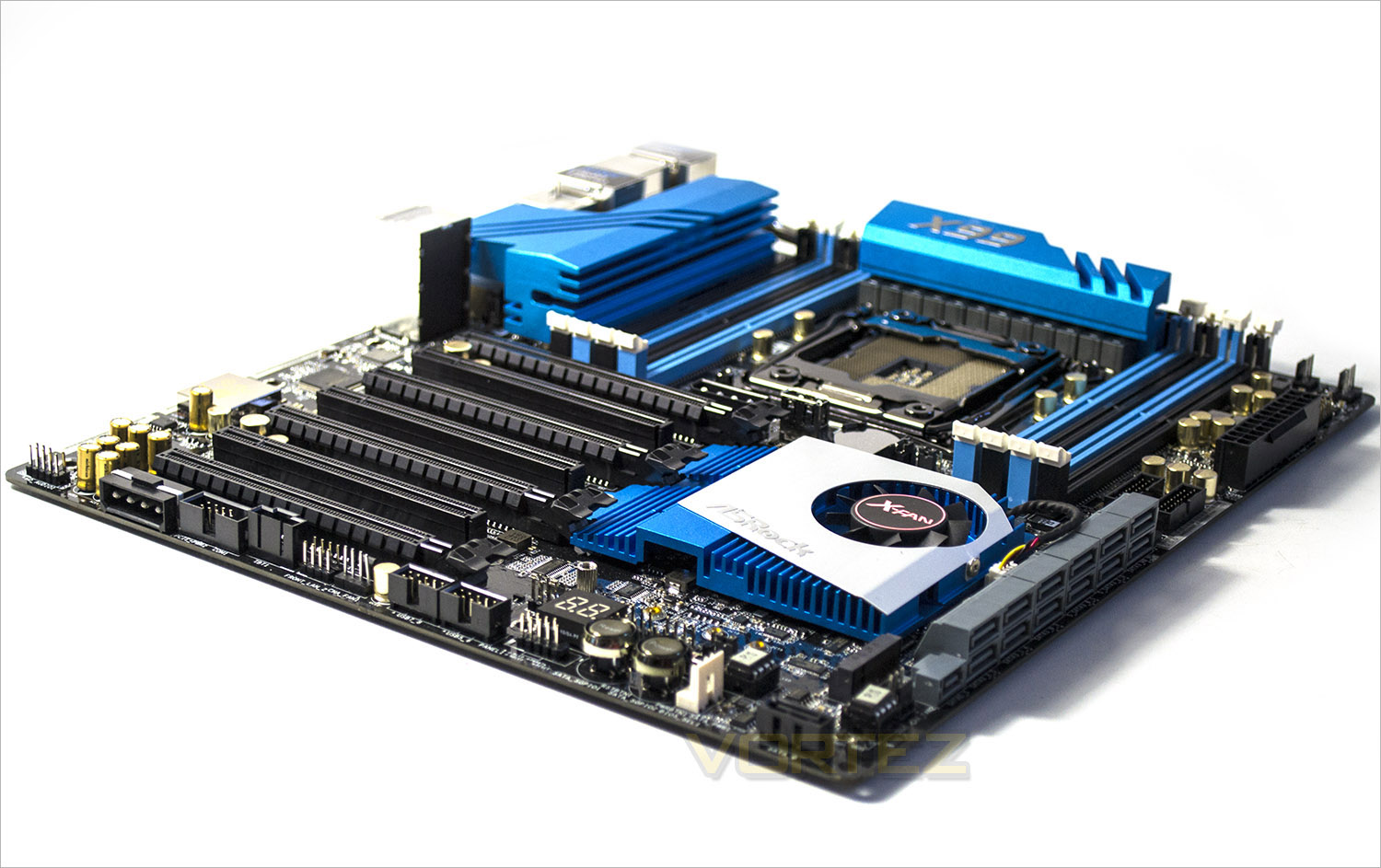
The motherboard colour scheme appears to be strikingly similar to that of the Extreme4 we reviewed back in October of last year with the blue and silver atop of an oily black PCB. We were not completely sold on this scheme and while this is an improvement, mainly due to the oversized chipset fan we still think that it doesn’t look as ‘premium’ as a motherboard of this stature should. Still, if blue is your thing then this motherboard is likely to please.
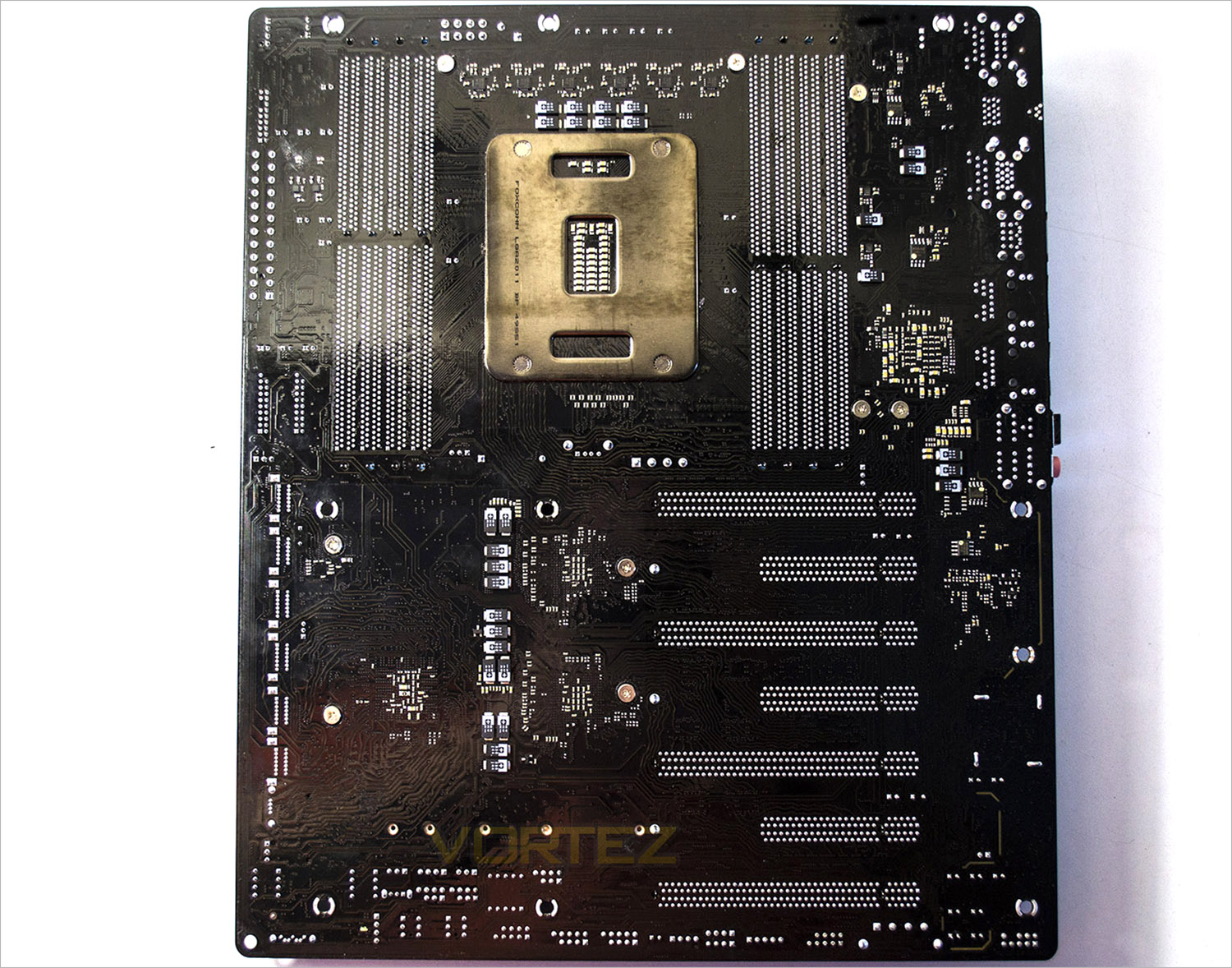
The rear of the main is quite busy with the amount of low profile caps. Perhaps most evident is the amount of full size (16 lanes) PCIe ports of which there are 4 coupled with a further three PCIe x8 which will be perfect for a QUAD SLI/Crossfire mutli-GPU configuration.
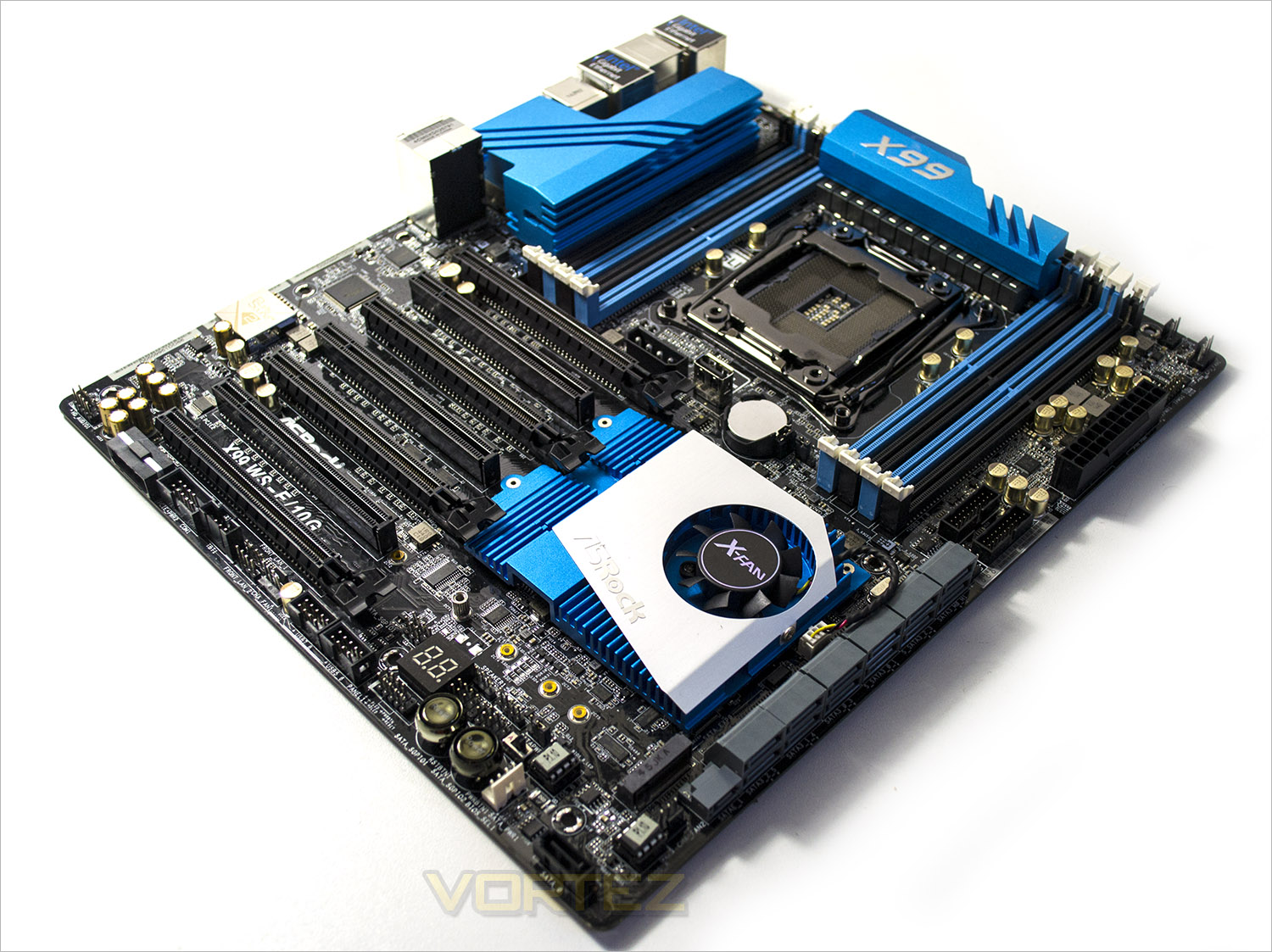
First impressions are that this is clearly a very high spec motherboard. The sheer amount of components tell us this motherboard is not for the feint hearted which is good because priced close to £700 you would need a strong heart not to keel over when handing over your credit card.
Closer Look
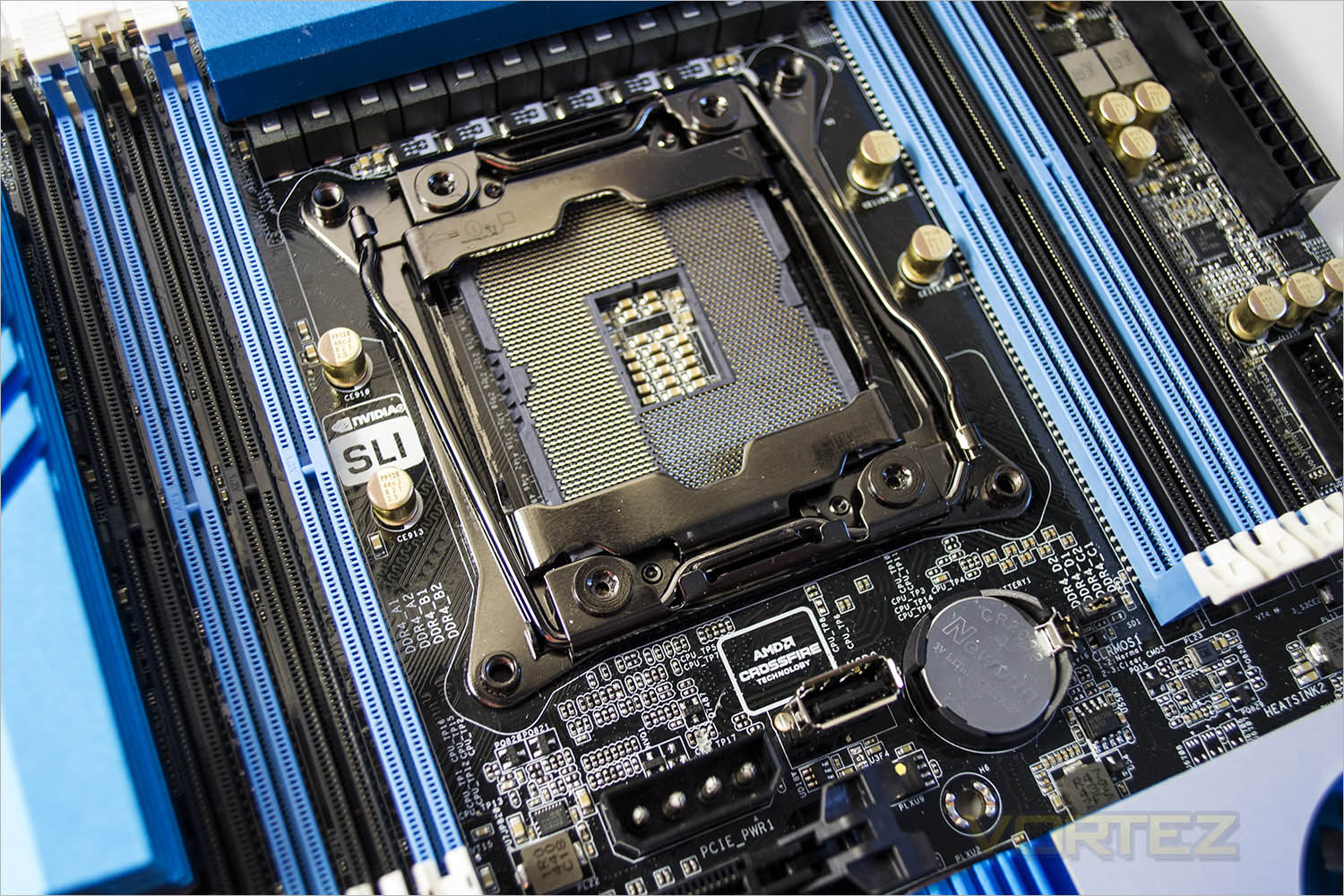
The socket area is akin to most other X99 motherboards. It is however worth noting that it is a little cramped in there with the VRM’s and memory ports situated fairly close to the socket. This along with both exposed USB and MOLEX power ports means insulation would be very tricky if you were crazy enough to consider using LN2 on a motherboard of this nature. Most waterblocks should however present no problem thanks to the elongated screw points and backplate to the socket.
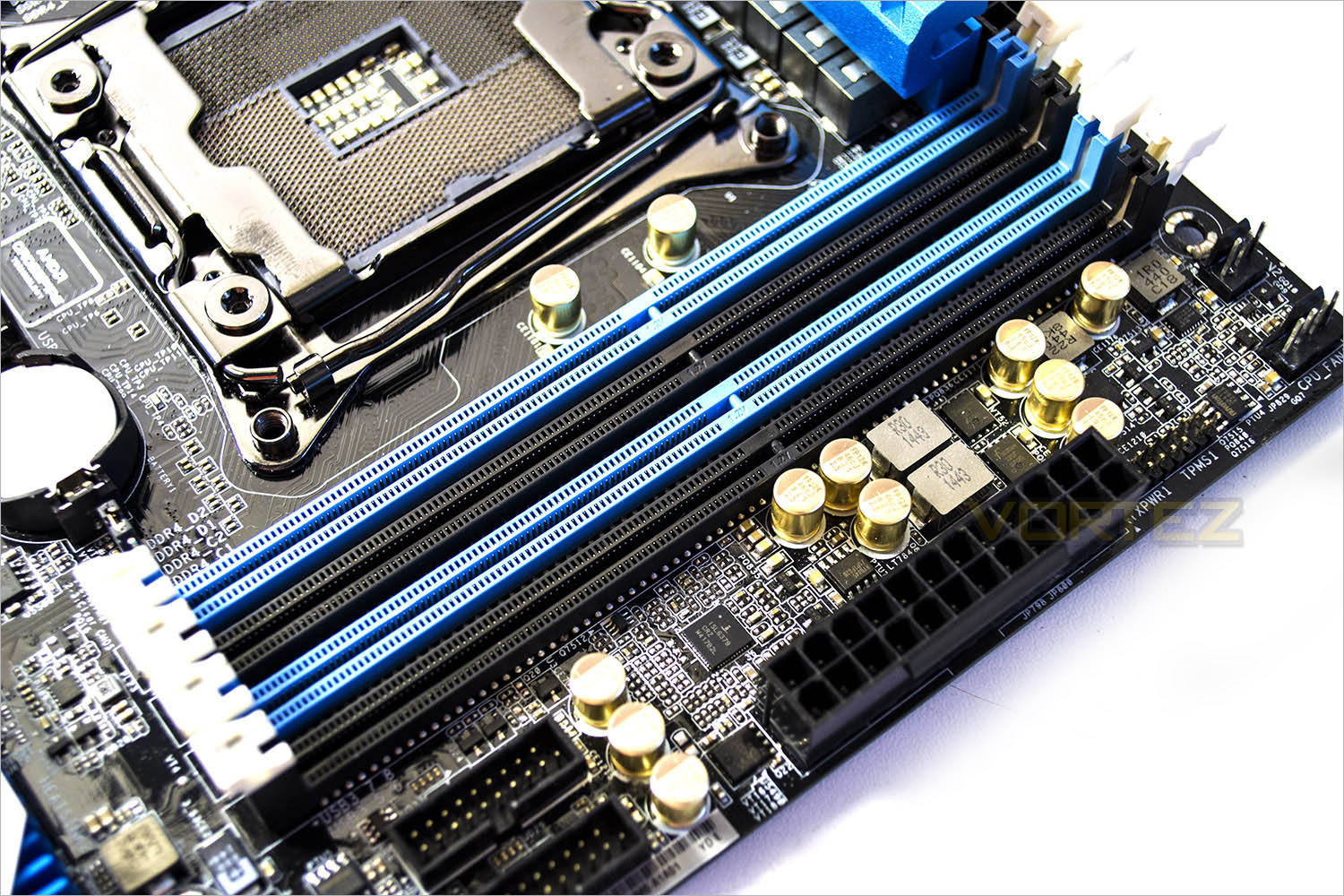
DDR4 2xquad channel memory is the order of the day here with a maximum capacity of 128GB at speeds above 3200MHz (overclocked) fully supported so whether you want capacity or bandwidth (or indeed both) this motherboard has plenty of scope. The tabs hold the memory sticks are the quick latch type with just a single latch found uppermost. Normally we like this method of memory installation however we found our particular example to be very stiff and we had to use considerable force to get the memory installed which flexed the motherboard which was less than ideal.
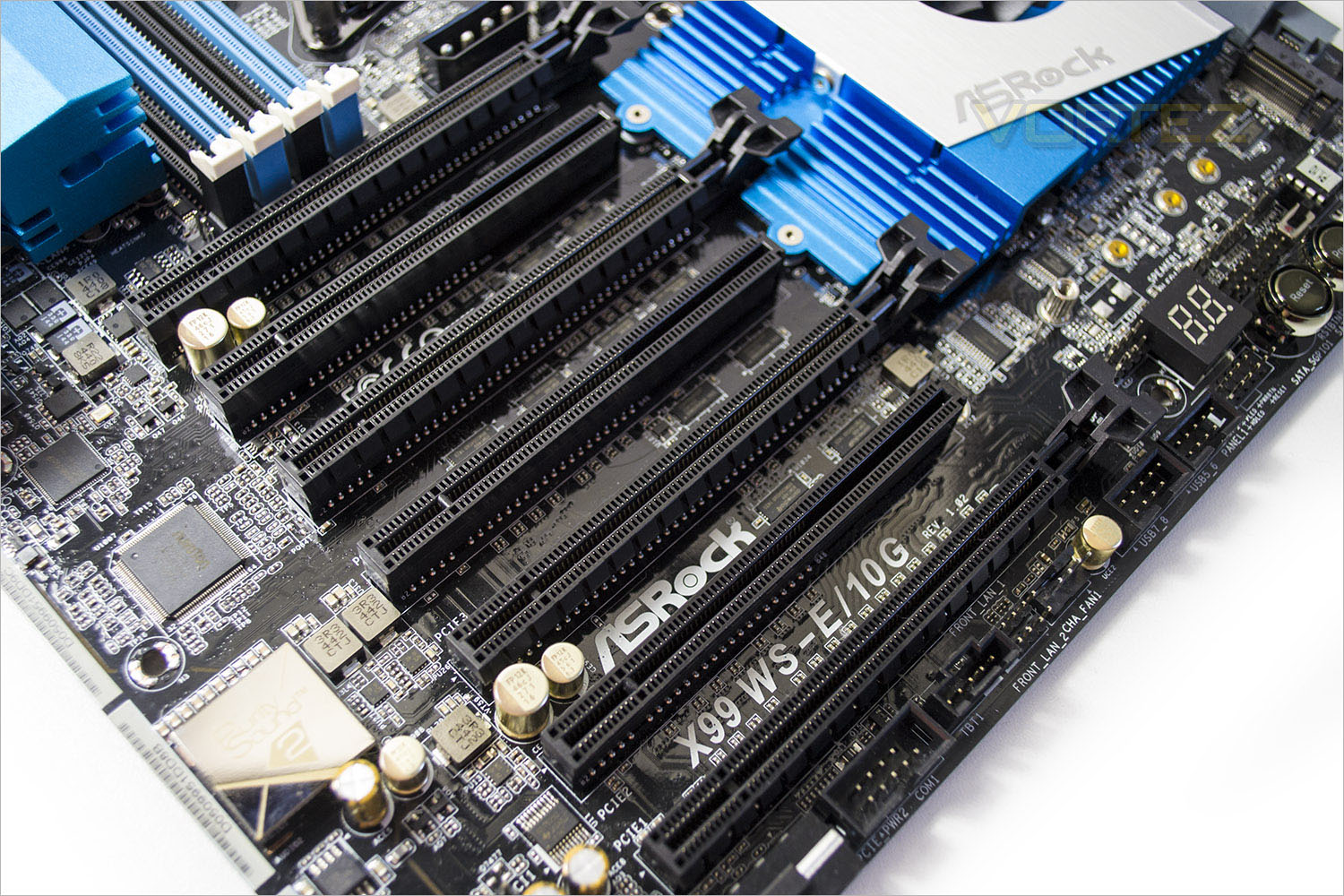
The PCIe sockets are well spaced with the 16x ports separated with 8x ports. The lanes available are as follows top to bottom 16x,8x,16x,8x,16x,8x,16x. Quad SLI/CrossfireX is supported with full 16x lanes thanks to the PLX chips.
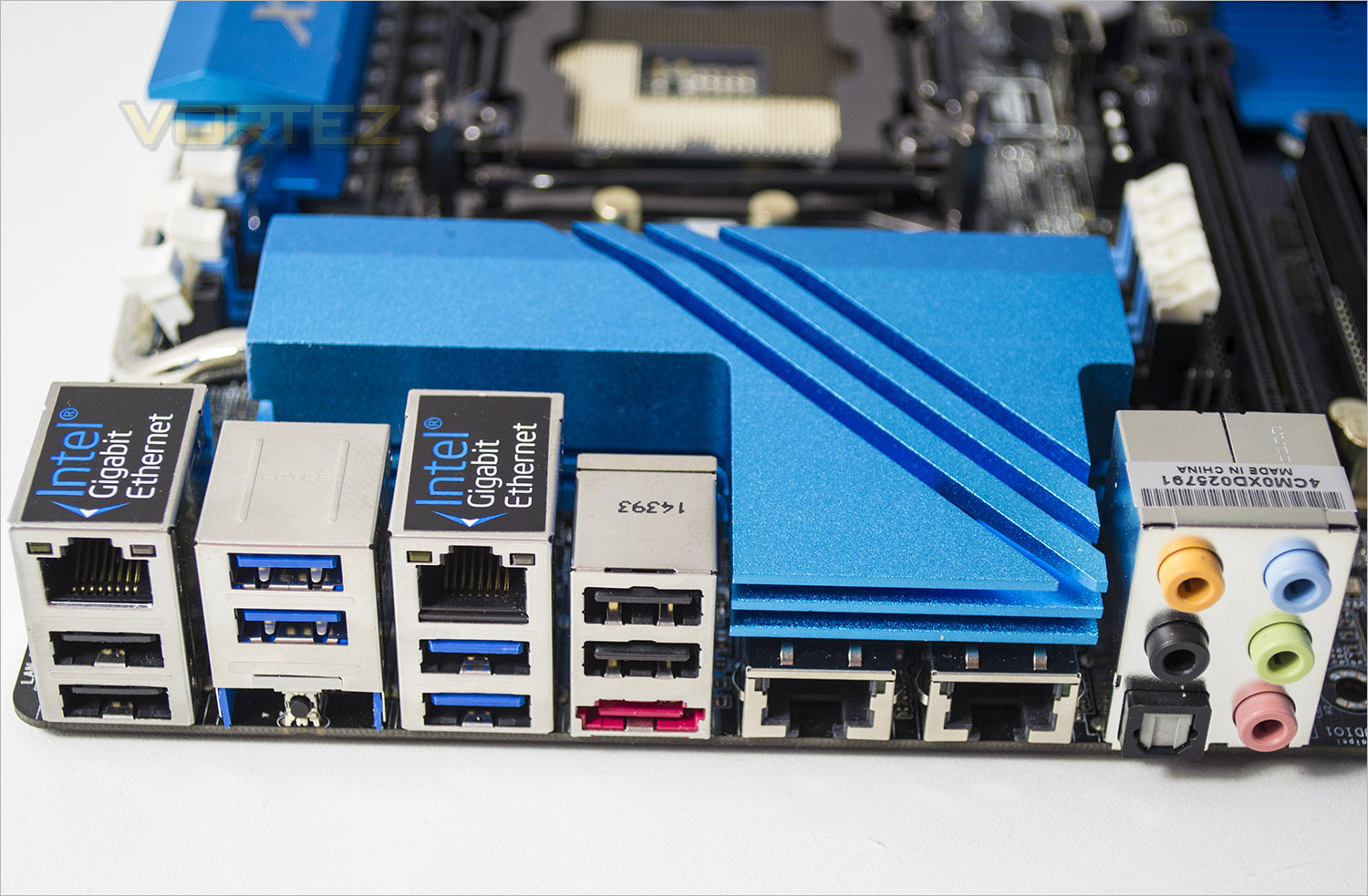
The I/O area is not as jam packed as you would expect. From left to right we have a couple of USB 3.0 ports with a GIGABIT I210AT LAN port above, next is a further 2x USB 3.0 and a CMOS clear button. A further GIGABIT I210AT LAN port is found atop of another 2x USB 3.0 ports with yet another coupel of USB 3.0 ports atop of eSATA. Then we get to the main feature: Two 10G BASE-T LAN ports by Intel® X540. Rightmost we find the Pure Audio 3.5mm and optical ports. While 8x USB ports should be enough for most, we would have liked to see a further four above the 10G ports instead of an extension to the heatsink.
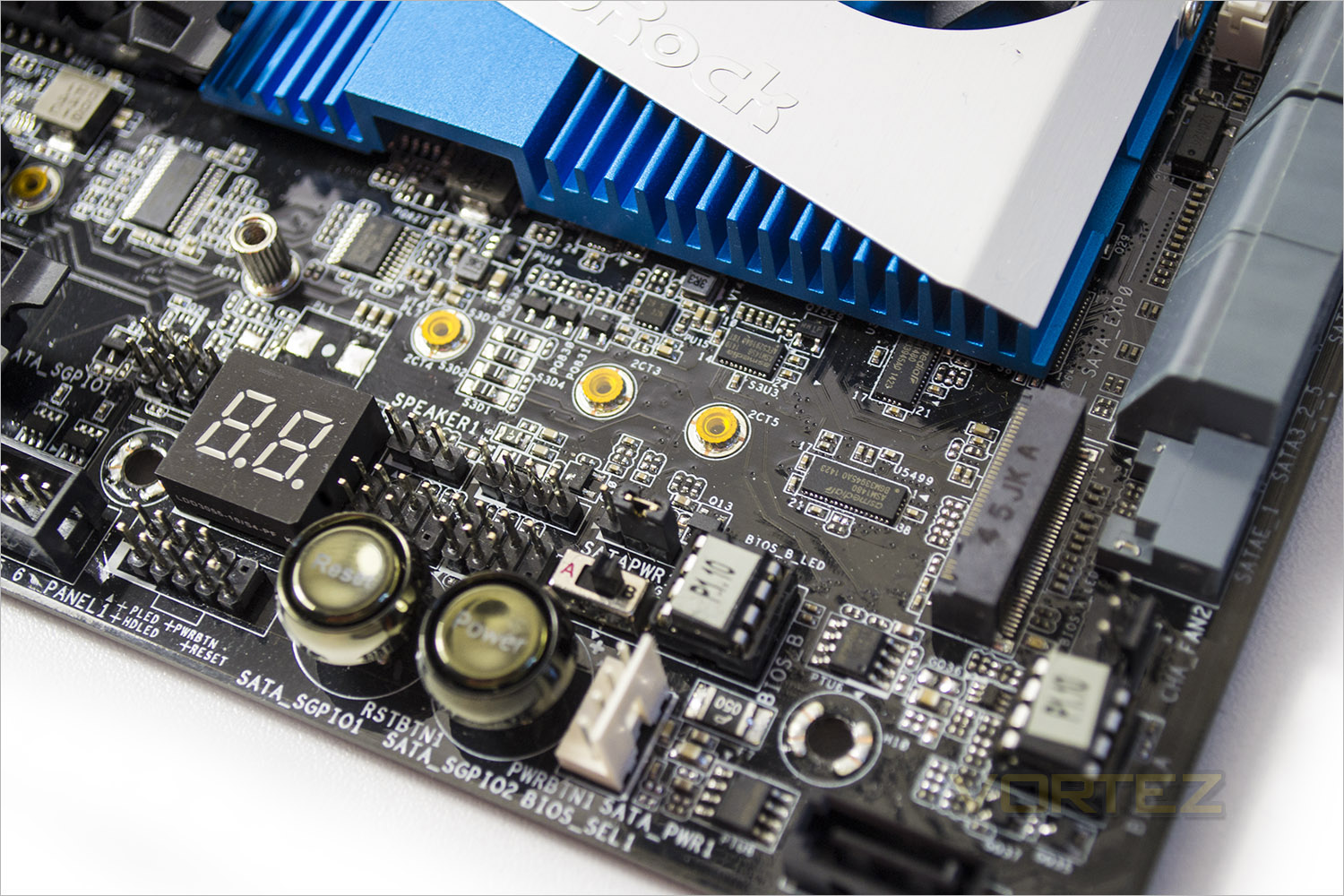
For the bench testers and overclockers out there, ASRock have seen fit to give us a power and reset button along with diagnostic LED and twin (removable) BIOS chips along with a handy switch. Sadly, there is no CMOS clear button on-board only in the I/O area which was a shame but we do have an old-school jumper should the need arise.
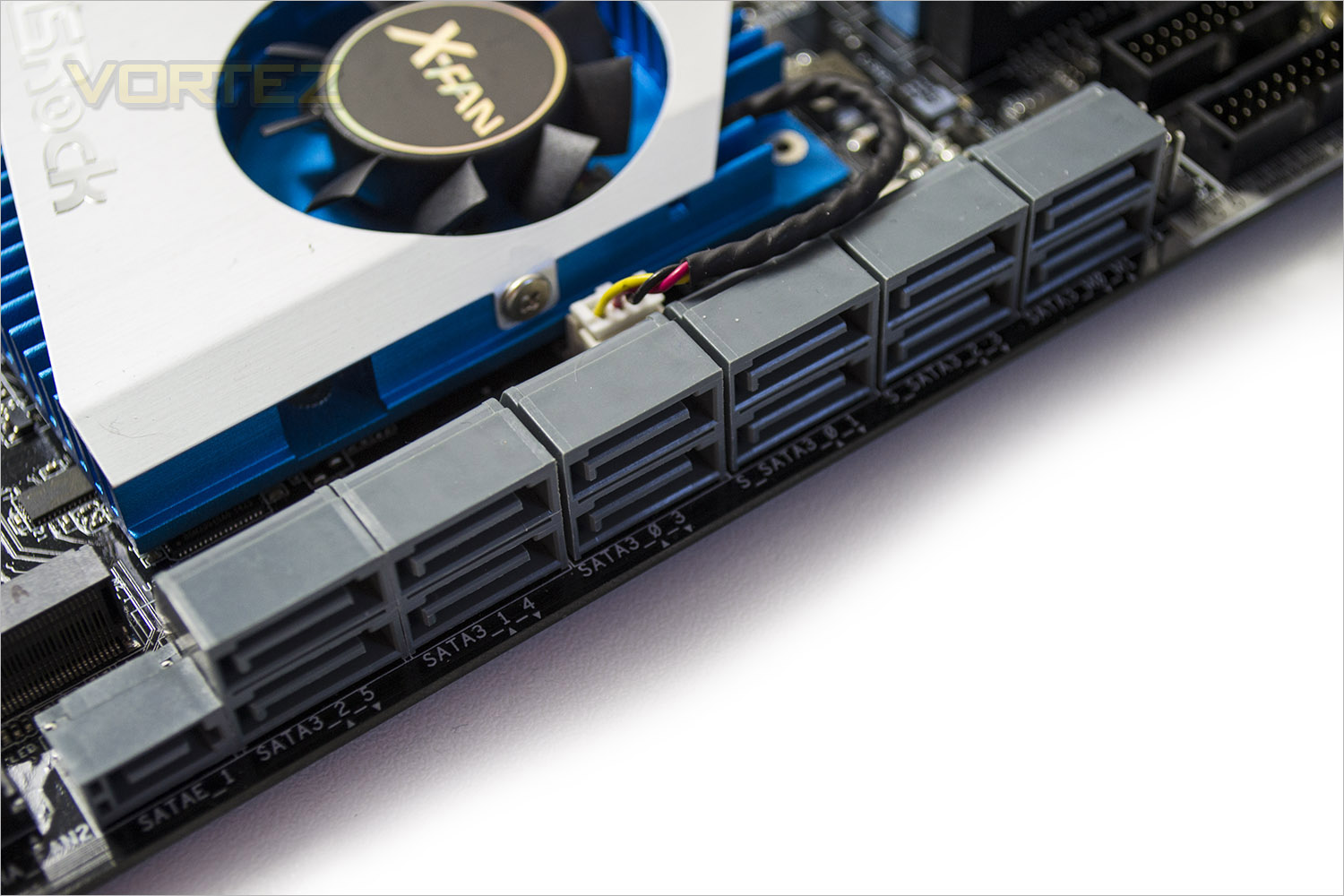
The storage capacity of the WS-E/10G is as you would expect from a workstation motherboard massive. There are 12 SATA 3.0 ports ( a mixture of Intel and Marvel) along with a SATA Express port. IF that were not enough than there is a further SATA port on the mainboard and M.2 SSD port. It is however worth noting that not all of the ports can be used simultaneously without affecting operation of other components. For example. If the SATA express port is used, the M.2 port will drop to PCIe 2.0 speeds. If the M.2 port is used than this will disable a SATA port. No doubt this will present some head scratching when initially setting the system up if you intend on using lots of mass storage devices but it is nice to have all of those options available rather than being restricting to SATA alone.
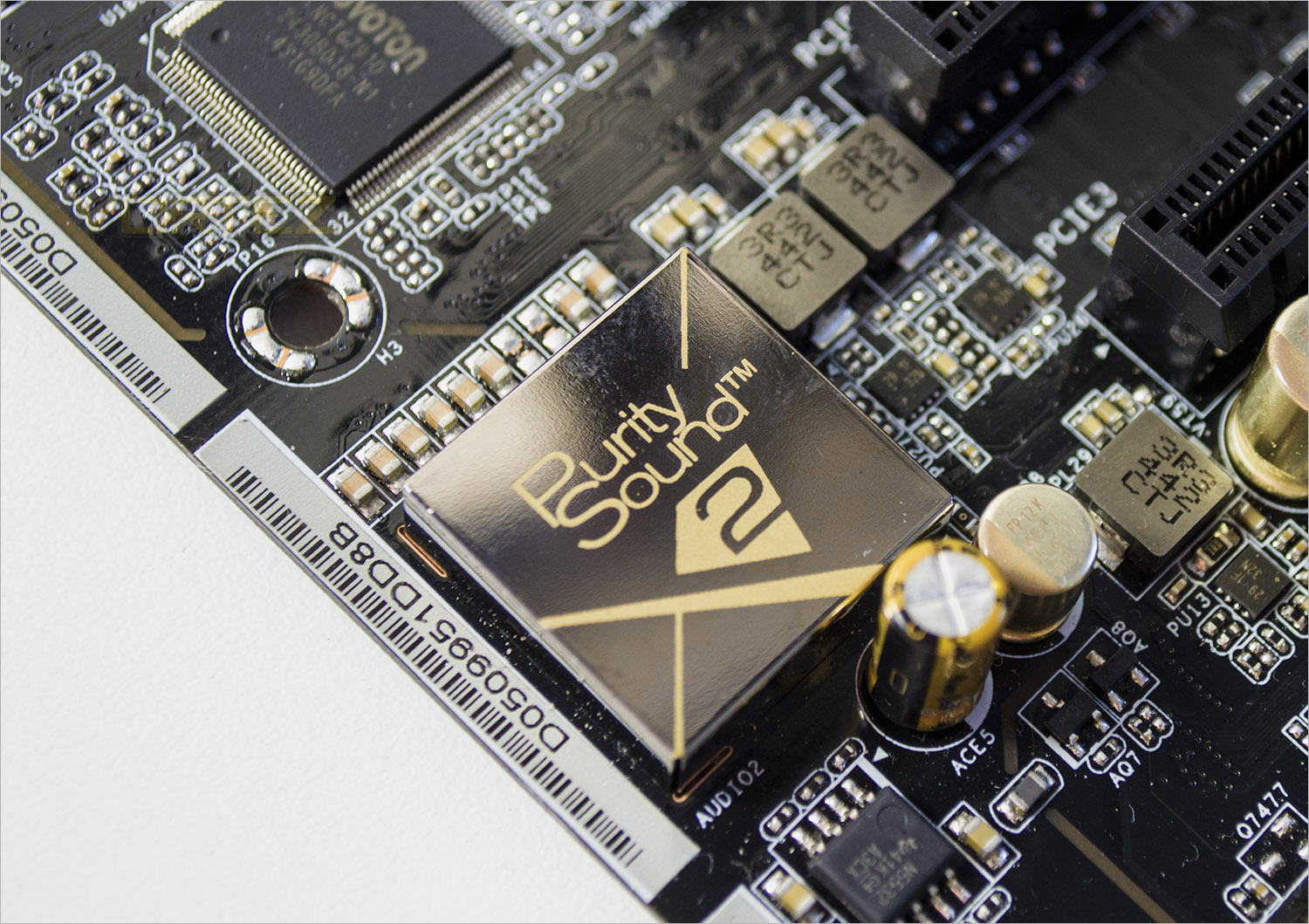
Purity Sound™ 2 includes 7.1 CH HD audio with Realtek ALC1150 audio codec, 115dB SNR DAC with Differential Amplifier, TI® NE5532 Premium Headset Amplifier, cap less Direct Drive technology, EMI shielding cover, PCB isolate shielding and DTS Connect. The GOLD EMI shielding adds to the boards aesthetics and compliments the gold capacitors the are scattered around the mainboard.
Detailed Look
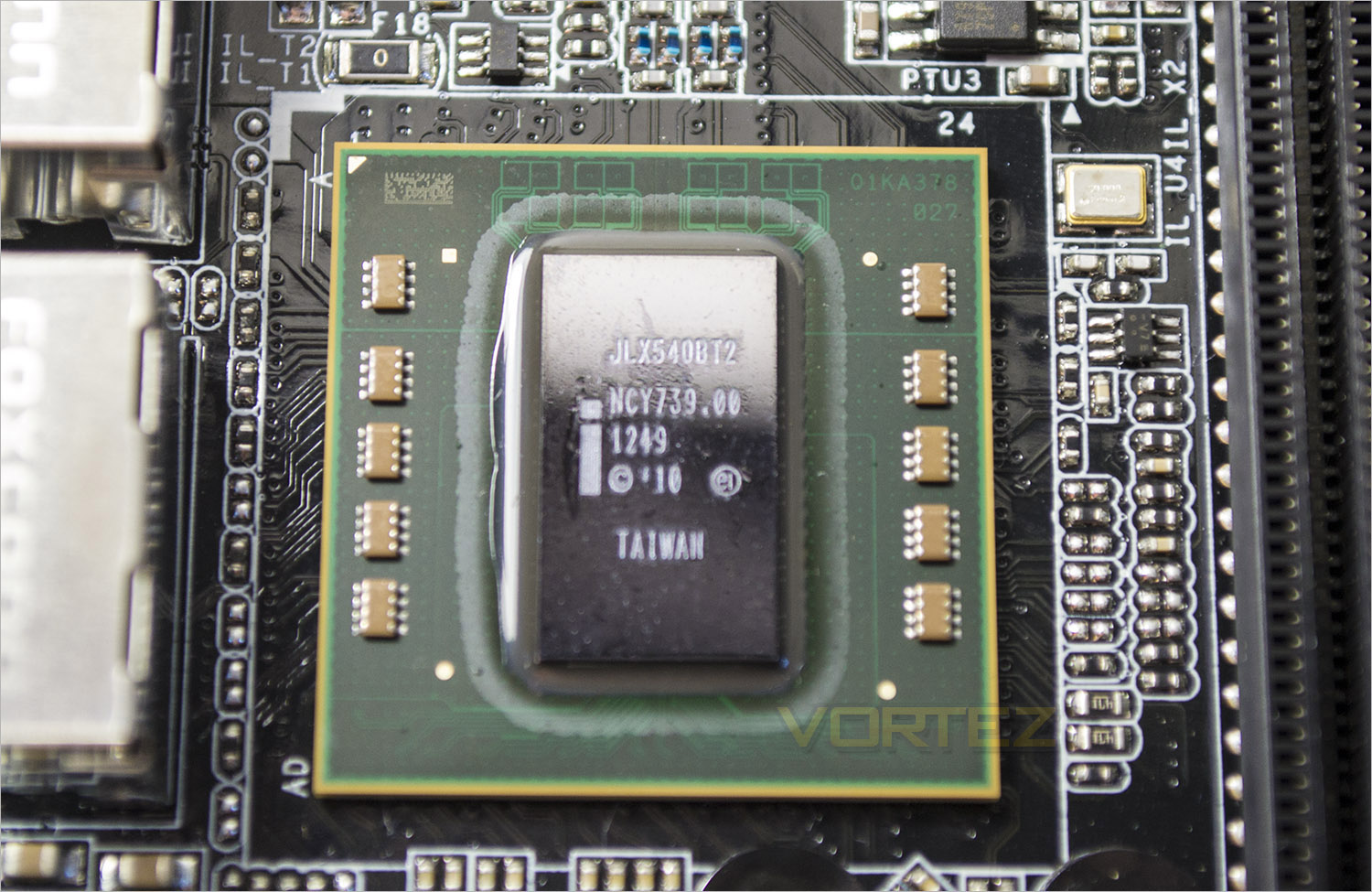
Here we can see the 10G BASE-T LAN X540 controller in all its nakedness. As detailed earlier this is fully compatible with the Intel I210AT ports for four port teaming or denominations thereof.
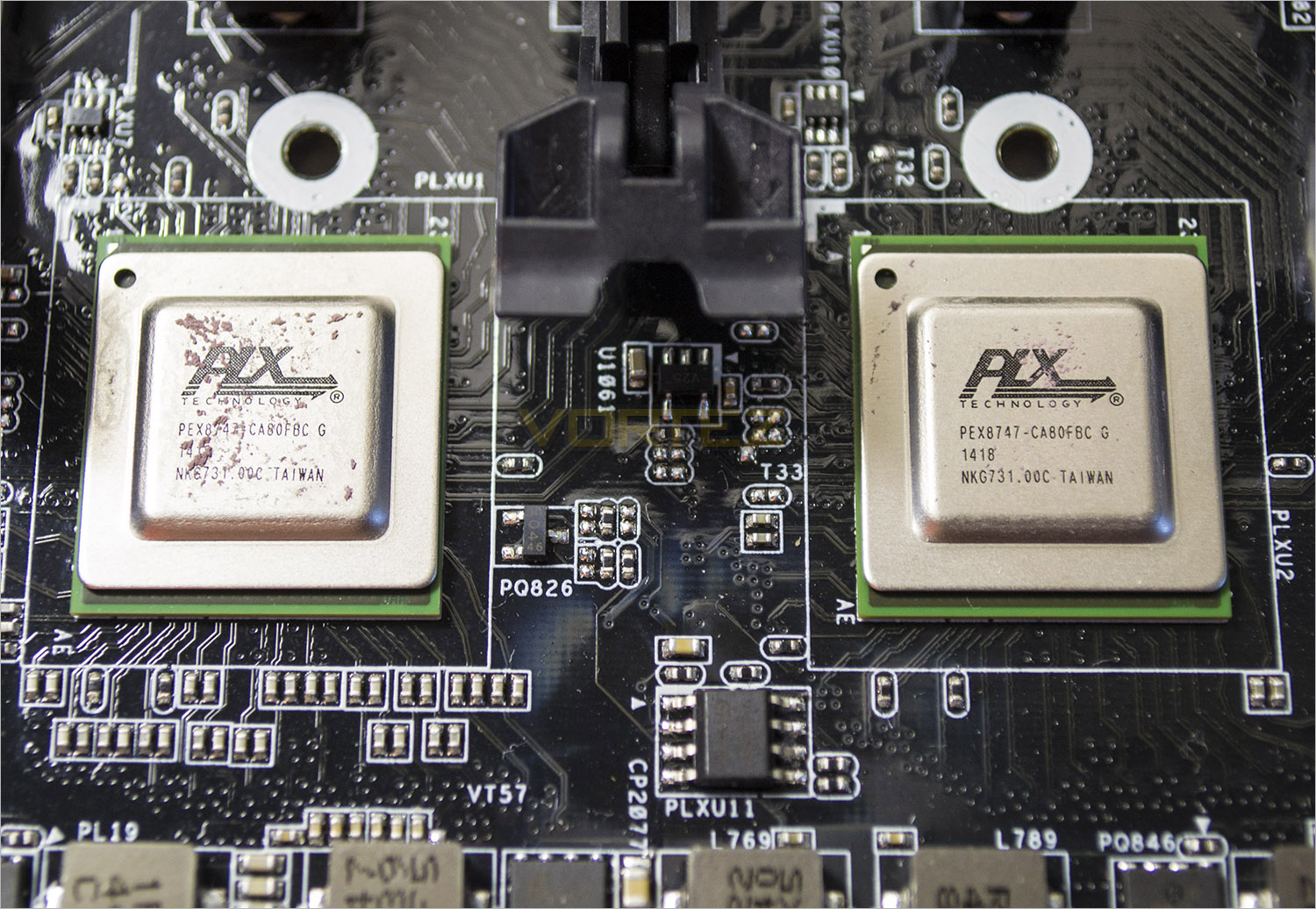
PLX PEX 8747 is a PCIe Gen3 bridge chip that offers solid PCIe 3.0 lanes for PCIe devices and is optimized to support high performance graphics. Via the two PLX PEX 8747 bridge chips on-board, this motherboard is able to support 4-Way SLI or 4-Way CrossFireX at PCIe Gen3 x16/x16/x16/x16 mode with four graphics cards.
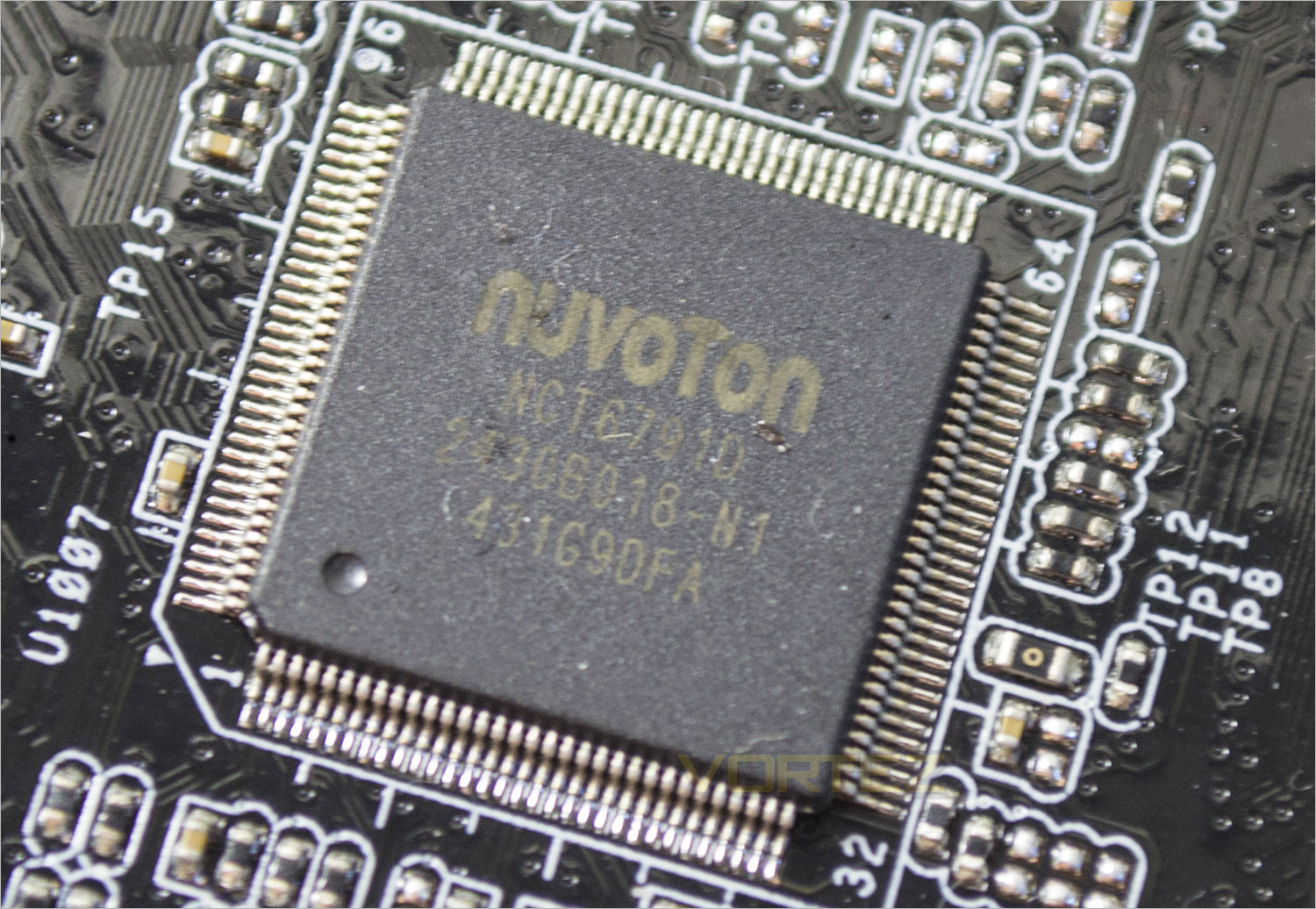
The NUVOTON chip takes care of all our hardware monitoring needs and appeared to be very accurate compared to what we know our components to run at. The BIOS has a wealth of configurables in the monitoring area which is also taken care of by this little chip.
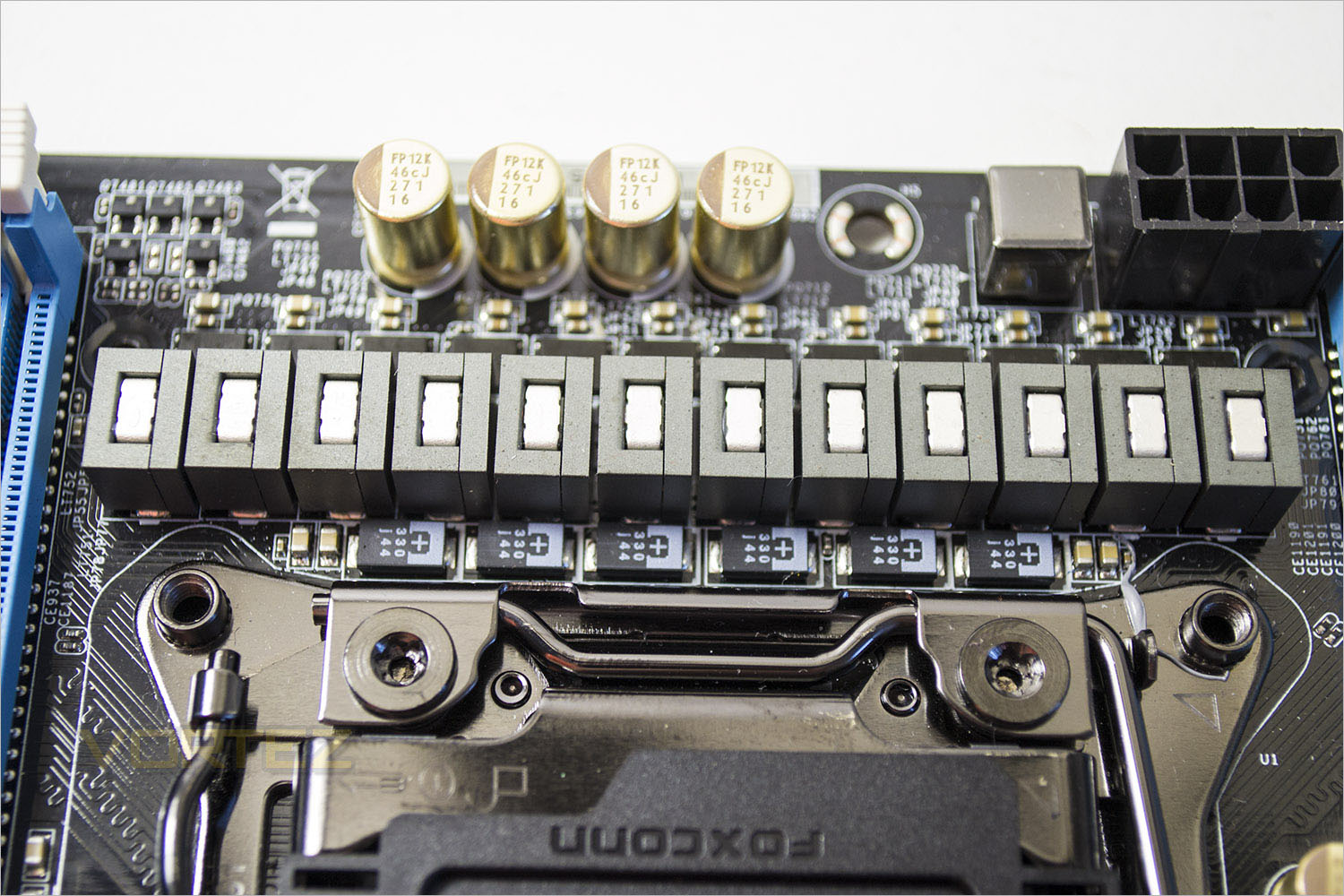
ASRock are very proud of the 12 phase design on the WS-E/10G and rightly so. Along with 60A chokes, the 12k nichikon solid capacitors and premium alloy chokes dedicated for the memory, this mainboard should prove to be a very stable motherboard when pushed to the limit.
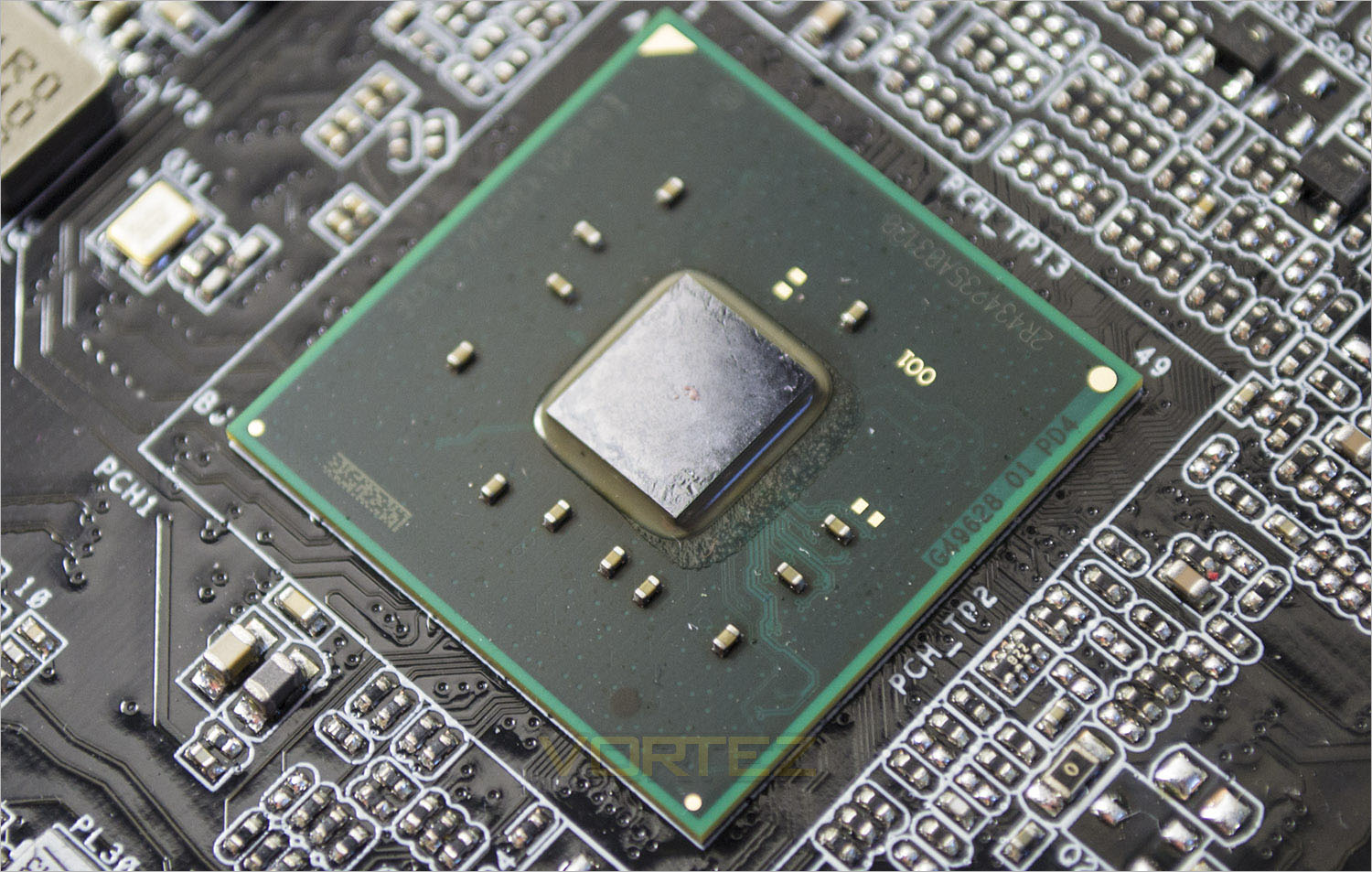
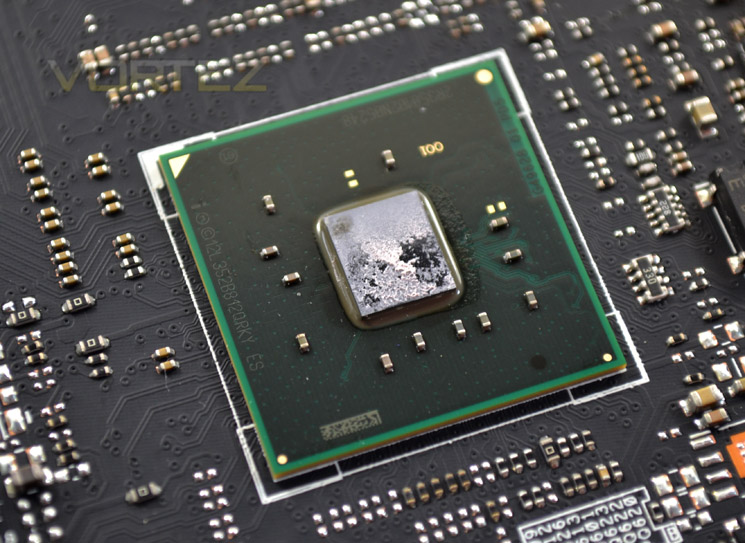
Last of all we find a familiar friend, the core of the X99 chipset. This core is no different from any other X99 chipset so don’t expect any innovations here. Not that this mainboard needs any innovations as their are plenty of sister chips to be found which complement Intel’s premier chipset to make this one mean mother (board).
Test Setup & Methodology
RAM: 16GB Corsair Vengeance LPX DDR4 @ 2666MHz 16-17-17-35 (CMK16GX4M4A2666C15R)
GPU: NVIDIA GTX 760
Power Supply: Corsair RM1000
Cooler: Corsair H105
ASROCK X99 Extreme4
GIGABYTE X99 SOC FORCE
ASUS X99 Deluxe
MSI X99S Gaming 9 AC
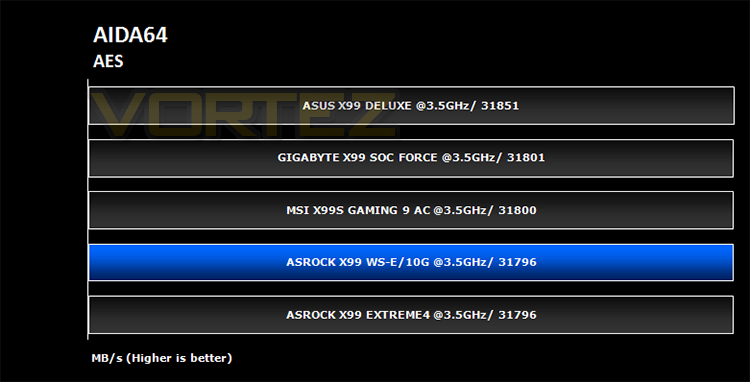
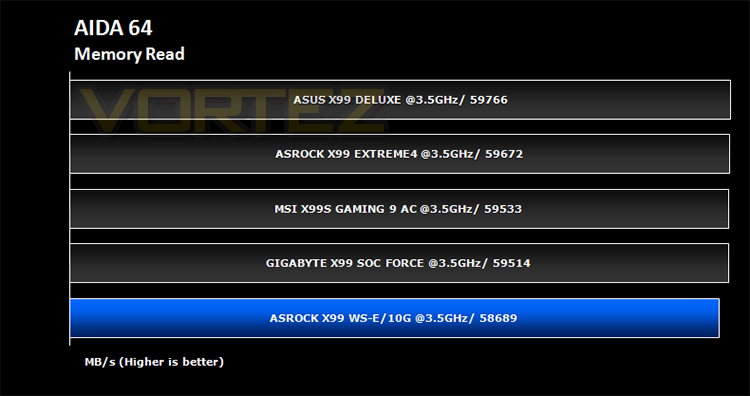
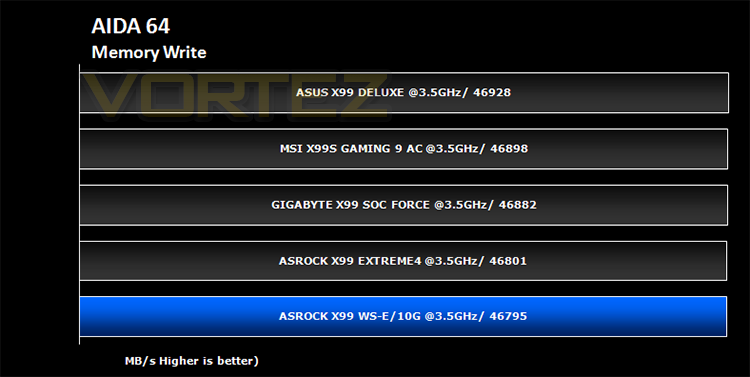
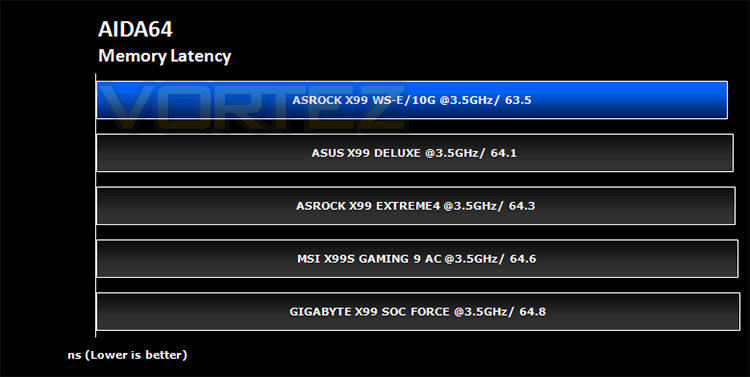
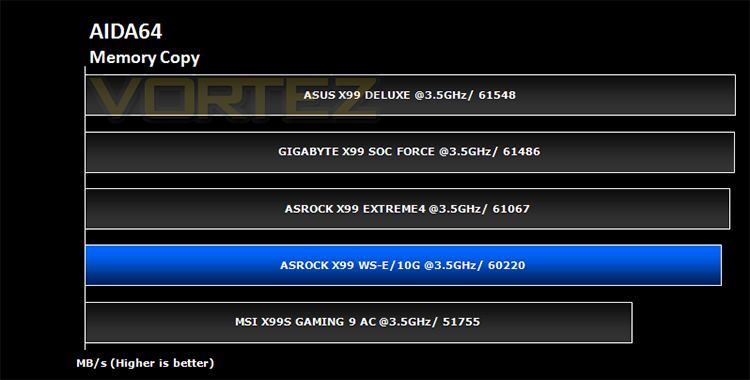
AIDA 64 – CPU & Memory/Cache Performance
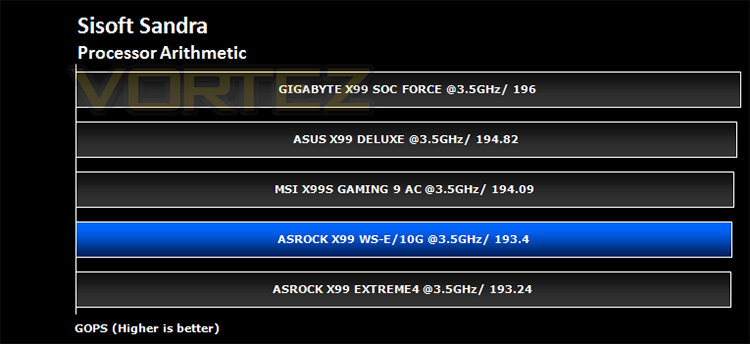
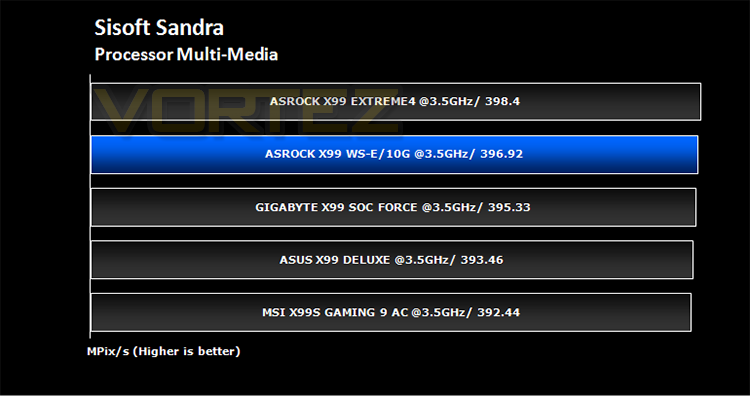
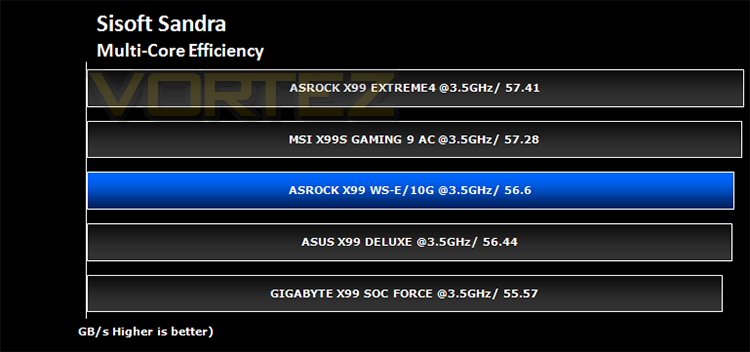
SiSoft Sandra – Compute & Memory Performance
HandBrake – Encoding Performance
Pov-Ray – 3D Image processing Performance
Cinebench R15 – Image processing Performance
AS SSD SATA Performance
Futuremark 3DMark (Firestrike) – Graphical Performance
Futuremark PCMark 8 – Overall PC Performance
Battlefield 4, THIEF, Company Of Heroes 2 & GRID:2 – Gaming Performance
Overclocking
BIOS
We pretty much covered the ASRock BIOS with the Extreme4 so we won’t bore you with the details once again as the BIOS for the WS-E/10G is pretty much identical save for a few additional options to assist in the configuration of the extra components the WS-E/10G provides.
With the BIOS set to defaults we set about seeing what limits we could attain:
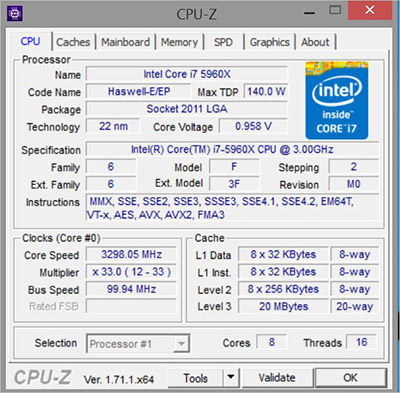
At default, the board posted at 3.3GHz but would throttle back or ‘boost’ dependent on the load conditions along with automatic voltage adjustments to compensate for the increase/decrease in clockspeeds.
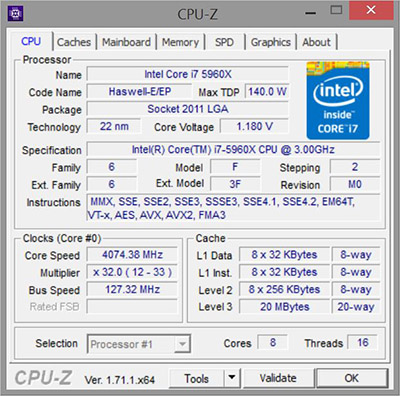
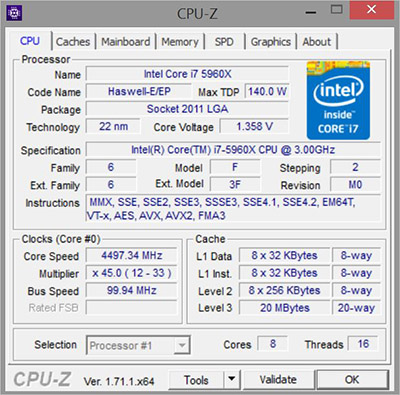
There were some neat pre-overclock settings which allowed 4.0, 4.2 and 4.5GHZ. This will however be CPU dependent. Upon testing, these settings were 100% stable with our own CPU.
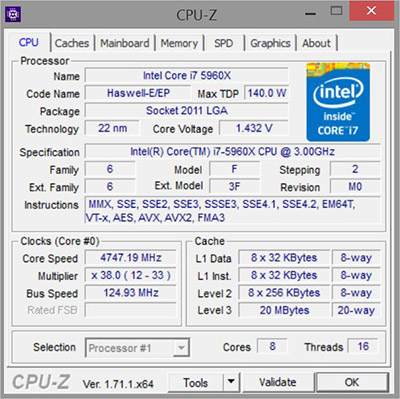
We tried to dial in settings which worked on other motherboards to surpass the 4.5GHz mark however we struggled to find 100% stability so we went back and took note of the auto 4.5GHz settings and adjusted the overclock manually to reach 4.75GHz which was our maximum stable overclock. IT would boot at up to 4.9GHz but this was far from stable, even with vCore set to 1.5v which is ill advised for anyone who values there CPU life.
Regardless, 4.75GHz is hardly a disgrace. Even the best overclocking motherboards in the form of the ASUS X99 deluxe and GIGABYTE SOC Force only managed just over 4.8GHz so unless you are looking for the absolute best overclocking experience then this board will suit all but the most ambitious of overclockers.
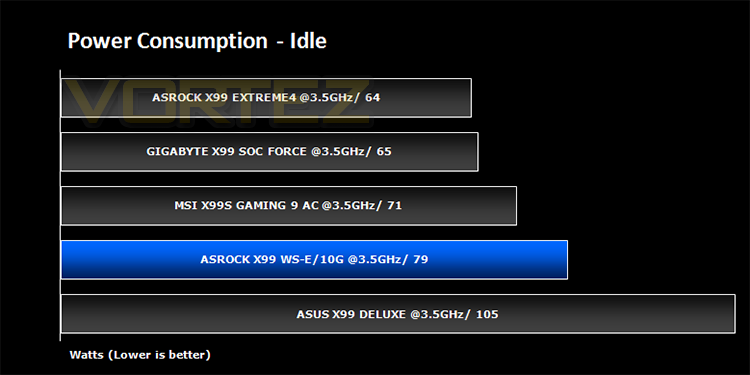
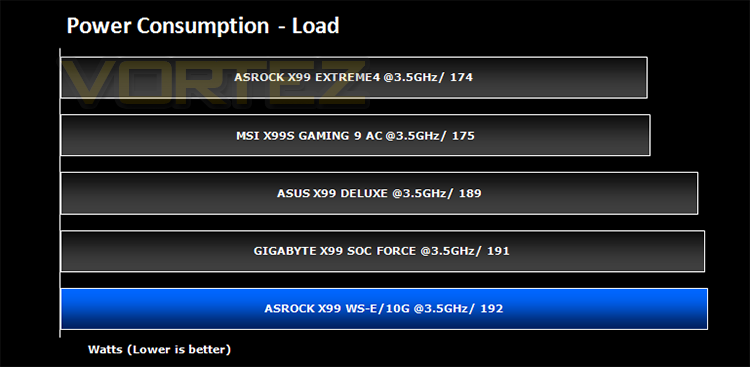
Power Consumption
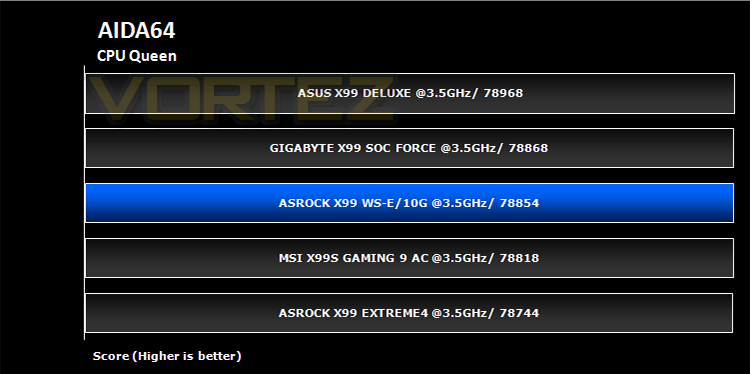
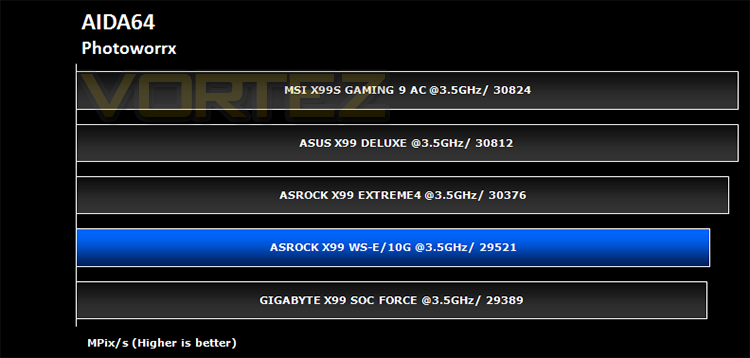
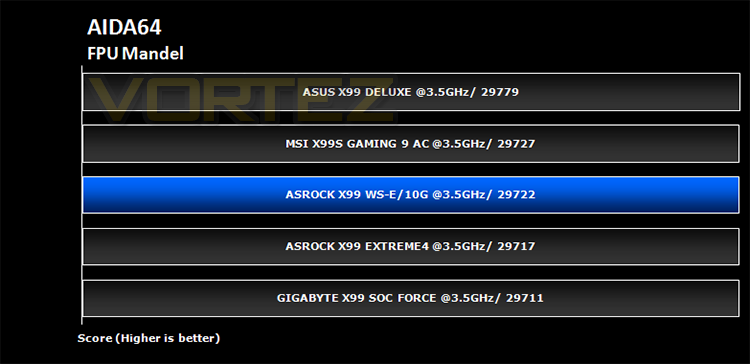
Benchmarks: AIDA64
Benchmarks: SiSoft Sandra
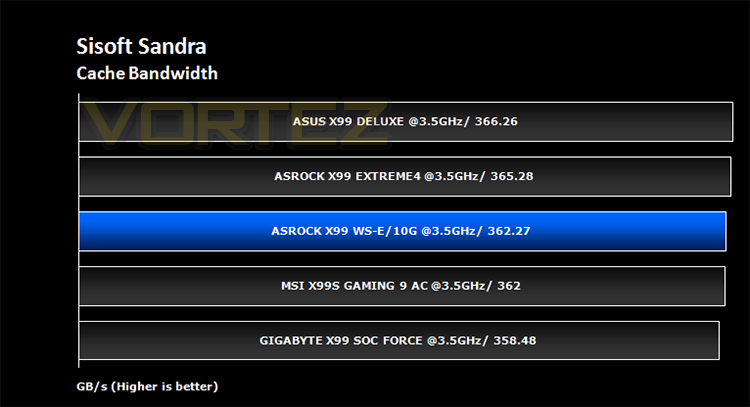
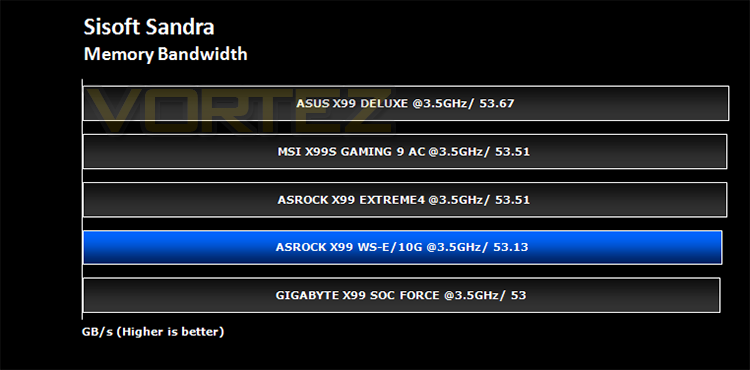
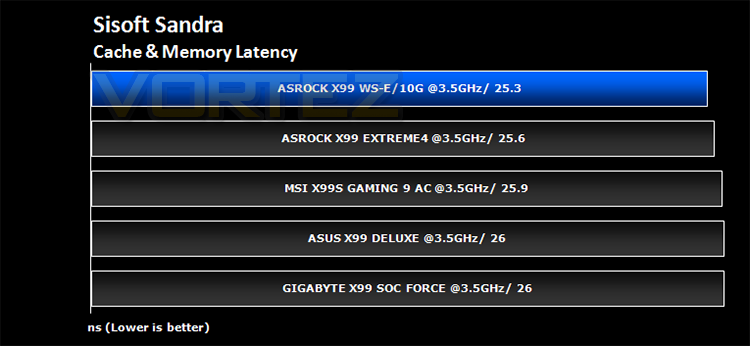
Benchmarks: Cinebench
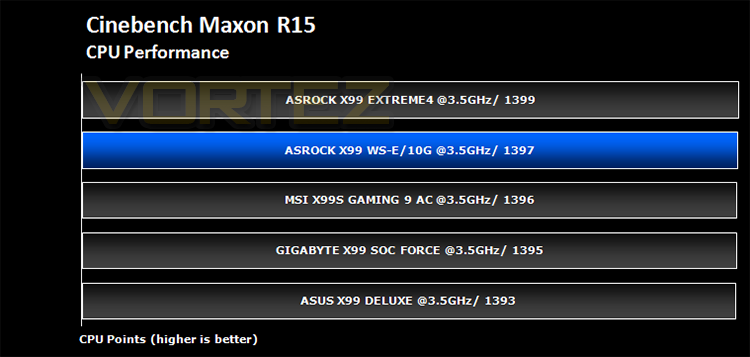
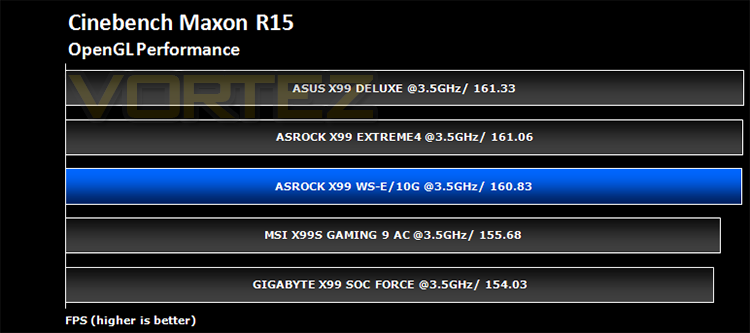
Benchmarks: Pov-Ray
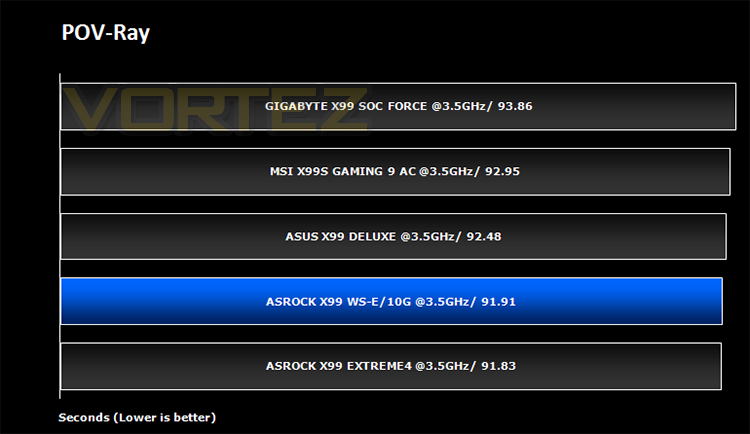
Benchmarks: Handbrake
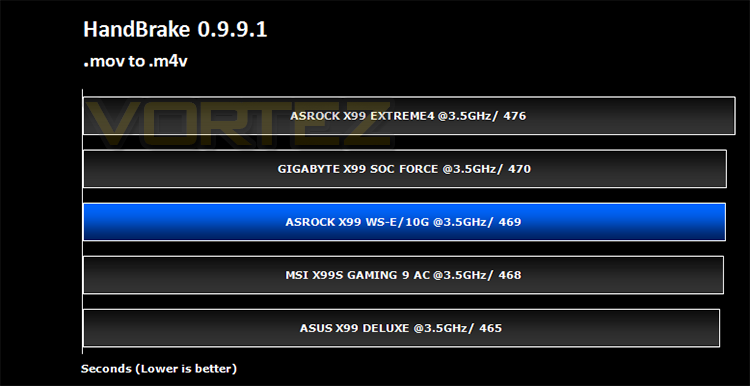
Benchmarks: PCMark 8
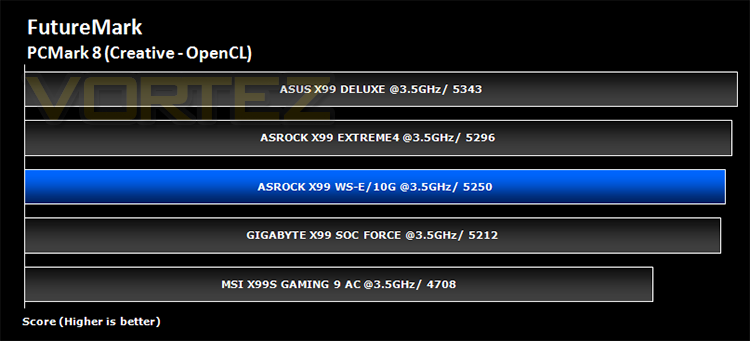
Benchmarks: AS SSD
Simply launch the program, choose your drive, click Start, and it’ll test your SSD’s read and write speed in a variety of ways, delivering a score for each when it’s done. And if that’s not enough, there are also additional file copy and compression-related benchmarks available from the Tools menu. (The author’s support page is German only, but if you need further English explanations then there’s a thread on the program at the OCZ Technology forum.).
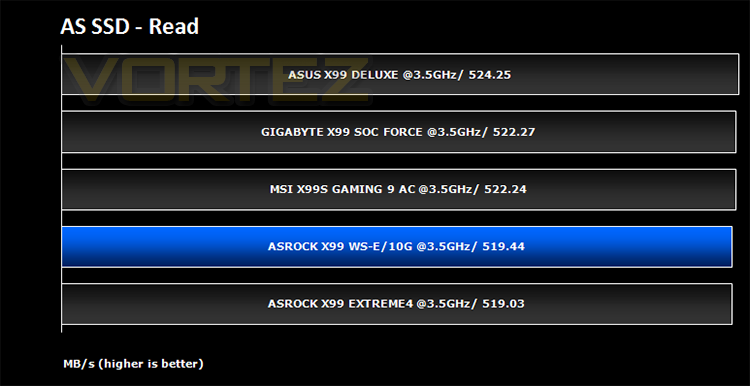
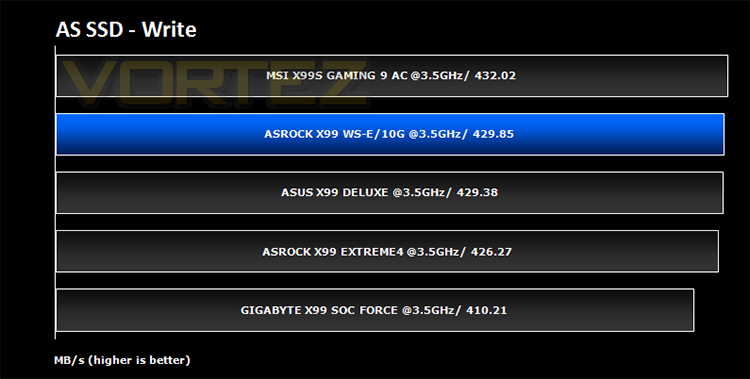
Benchmarks: Futuremark 3DMark Fire Strike
3DMark FireStrike Product Page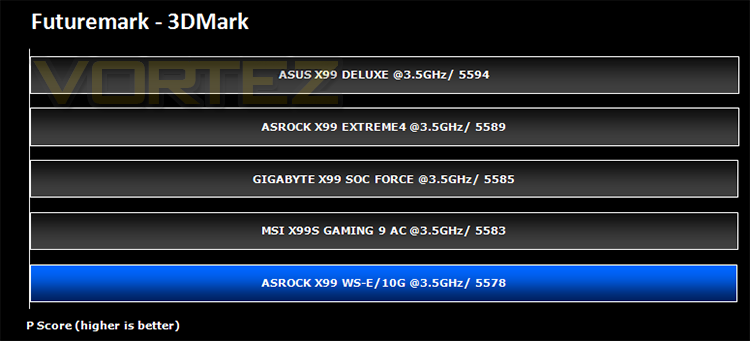
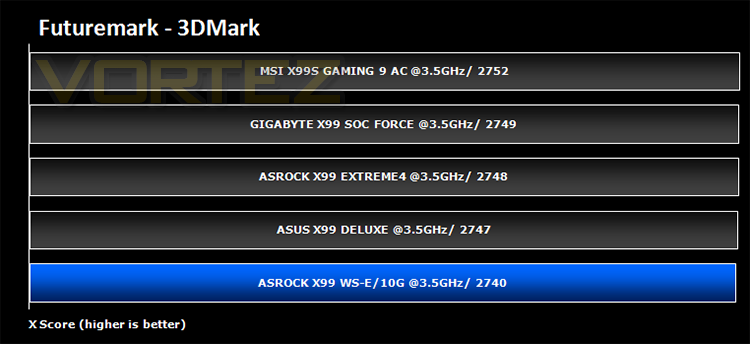
Benchmarks: Battlefield 4, THIEF, Company of Heroes 2, GRID 2
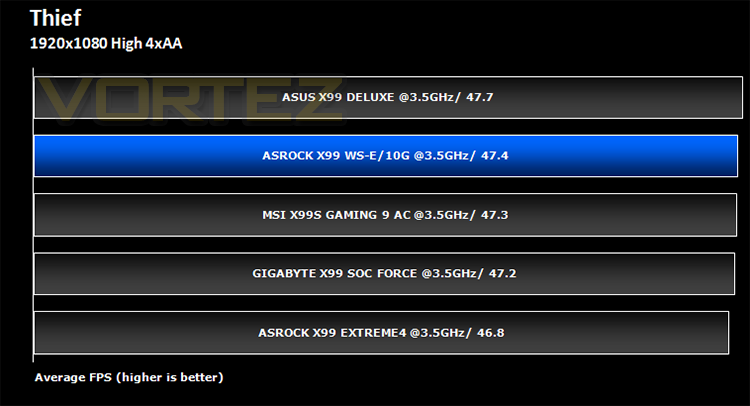
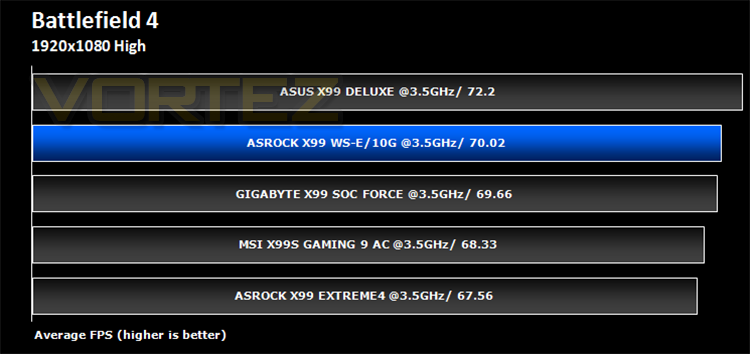
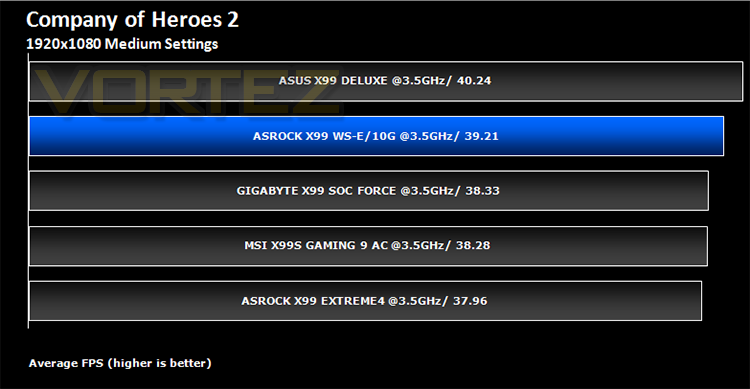
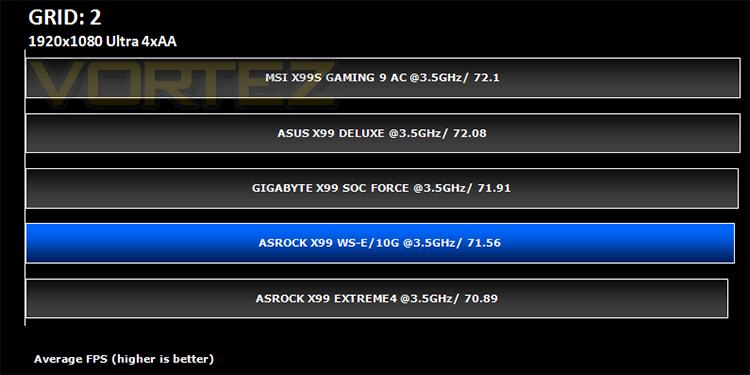
Conclusion
The ASRock X99 WS-E/10G is a monster of a motherboard. It has more features than you can shake a stick at that’s for sure! The main feature of the ASRock X99 WS-E/10G and partial justification for the astronomical price is the ability to team not two but four LAN ports. In a server environment this feature promises to excite and provide a host of benefits over your standard motherboard with, if you’re lucky, just two GBit ports. The sad truth is though that few home users will see any tangible benefit in this unless using the mainboard in a VM network heavy scenario which diminishes the mass appeal of such a product. While we couldn’t test this area ourselves, we have no reason to doubt ASRocks claims as the math does add up and should you require such throughput then this is certainly a feature you will make great use of. For the rest of us it is bragging rights with very little useful benefit.
Of course, that isn’t the only great feature of the ASRock X99 WS-E/10G. It has full fat quad SLI/Crossfire capability thanks to the addition of two PLX chips which will give you 4x 16 PCIe 3.0 lanes and if you are worried about the amount of power available to your GPU’s then fear not because the board has an extra 2 MOLEX power points in addition to the 24+8pin ATX power giving you ample overhead for even the most demanding multi-GPU setup.
Being a server mainboard you would expect there to be a multitude of storage ports and again, the ASRock X99 WS-E/10G does not disappoint with 14 main ports, m2 SATA along with eSATA too. We tried out a PCIe SATA card and this too worked fine so your options here are pretty much limitless.
We hoped the 12 phase power design would allow us to push the previous 4.8GHz maximum stable overclock of our test CPU but sadly we could quite hit that level, much less surpass it. Still, it was thereabouts equal with dedicated overclocking mainboards on the market so unless you are going for the absolute cream of overclocking records we wouldn’t dissuade you from this mainboard because of the overclocking results.
Overall, we really liked this mainboard, despite not being able to fully test out all of it’s features. The onboard buttons were useful as were the dual BIOS arrangement but we also felt that it was trying to cover both bases, home and workstation. On the one hand having the X540 Intel chip would be extremely useful teaming those ports controlled by that chip teamed up with regular GIGABIT Ethernet ports in a server environment but would a server need 4xSLI? Conversely, would a home gaming platform require the teaming of 4 LAN ports? We think not. Sure it gives the end user the flexibility of having both areas covered but it seems to us you would be better off buying a cheaper high end unit and adding your own compatible NICs should you want this multi-NIC teaming feature in the future. ASRock to their credit give you both options in one solution but it is unlikely you would use both in the same system scenario meaning you are spending a lot of dough for little benefit regardless of which side of the fence you find yourself.
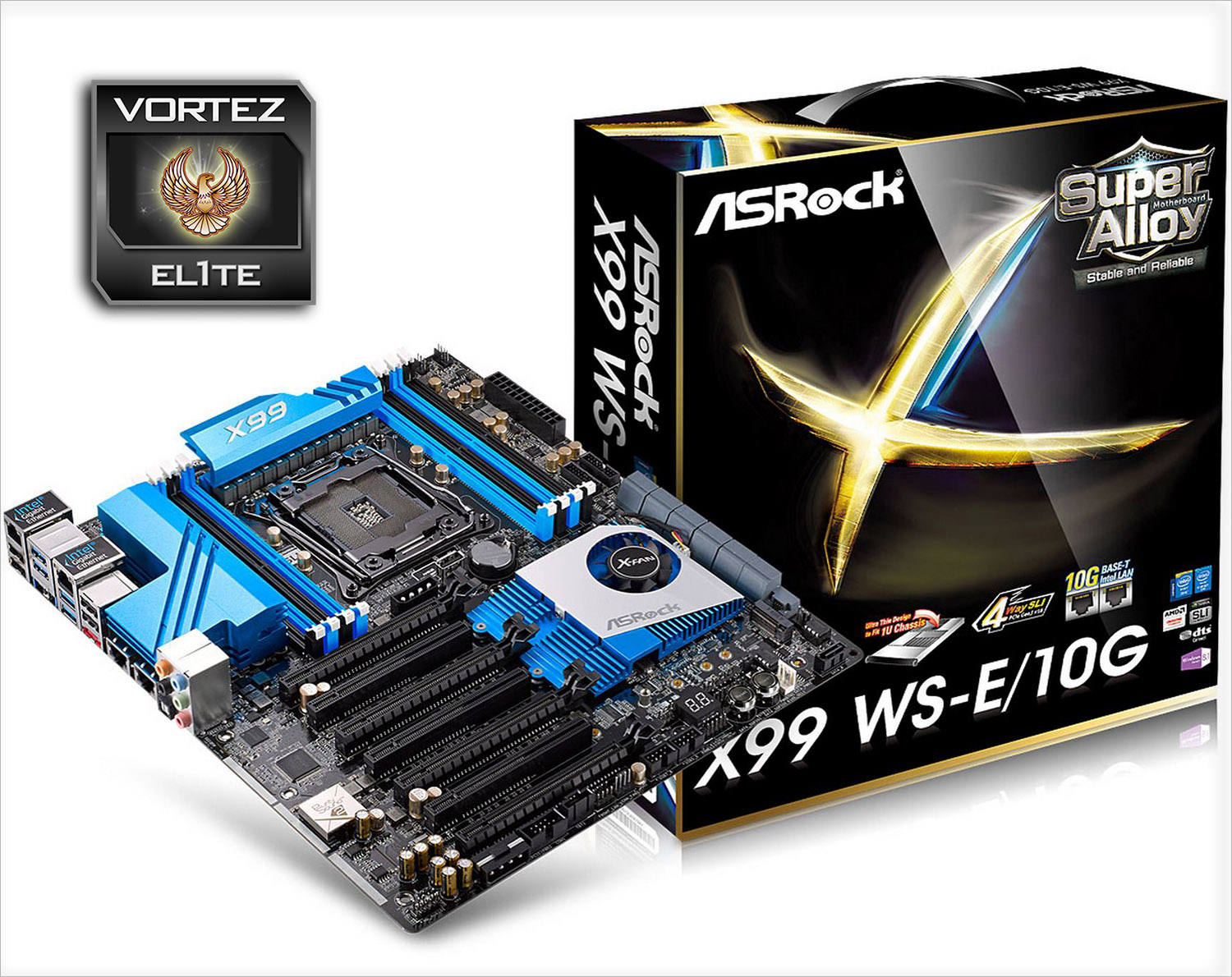
ASRock do however deserve ample credit for this attempt as it will suit both purposes extremely well. We are just not sold that you would need both at the same time! It would be easy to give this board our top tier platinum award because it does everything you could possibly want and does it very well but we would find it unlikely to be found in a gamers machine simply because there are other boards that offer the same features for a lot less money. That said, there can be no doubting that this is perhaps one of the best, all-round motherboards that you are likely to find on the X99 platform and for this reason it can be proud of our Elite award because price aside, it is an outstanding product.
A monster Workstation and gaming motherboard that will surpass your expectations whether you’re a gamer or intend to use it in a server environment. Sadly, it also has a price to match.
+ 4 Port Teaming
+ Quad graphics card compatibility
+ Great BIOS
+ Good Overclocking
Cons
– Price
– Basic packaging

Our thanks to ASUS, Corsair and Intel for providing some of the components crucial to this review