It’s time to take a look at the performance improvements drivers have brought to the table since since September’s launch.
Not long ago we looked at AMD’s Catalyst Omega driver release, the first major driver package for some time and heralded by AMD themselves as a big step forward in terms of driver stability and performance. In scant few months between it and a viable previous release driver compatible with our test system AMD were able to squeeze out substantial performance despite the relatively age of the GCN architecture. Today we’re putting Nvidia’s driver package through similar paces, primarily to see just how far they’ve come in optimising for their new Maxwell architecture since September’s hardware launch.
Nvidia are well known for an extremely fast turnaround time for new drivers, even WHQL-certified drivers. Game Day drivers – GeForce 347.52, the drivers we’re focusing on, among them – tend to be issued on the day of every major game release. AMD by contrast tend to rely on progressive beta candidates before rolling in changes to a major update later in the month. By working closely with game developers Nvidia tend to have access to game release candidates early on, allowing their driver team some lead time prior to release to smooth out any problems.
In the not so distant past Nvidia drivers were stand-alone packages, just the sort of software you install and then forget about. In 2013 however Nvidia unveiled GeForce Experience, a desktop application which not only kept all Nvidia product drivers up to date, but also served as a platform for delivering new technologies and quality of life improvements.
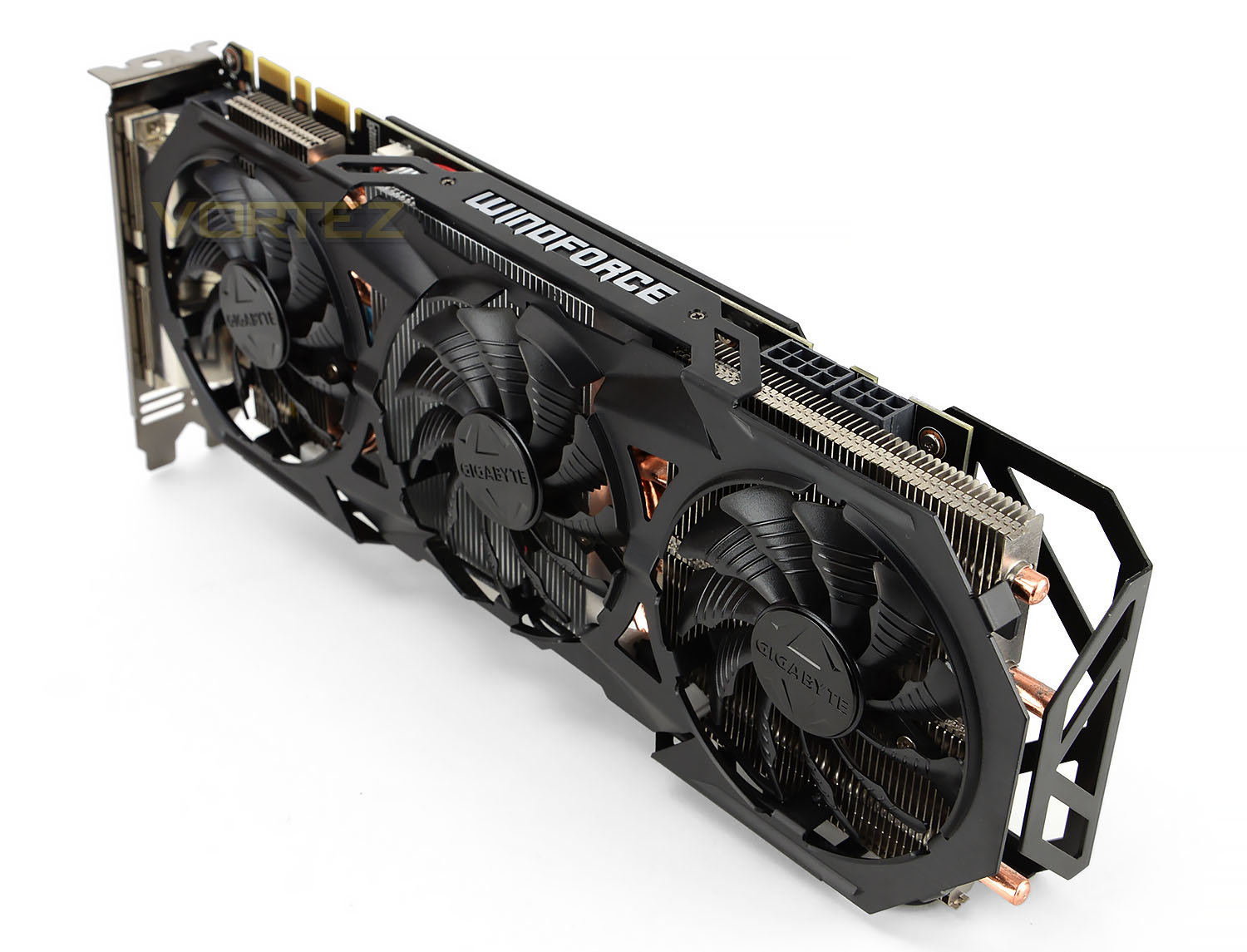
The humble GIGABYTE GTX 970 G1 GAMING, our date for the evening
GeForce Experience is currently a must-have application for both Shadowplay and GameStream recording and streaming functionality, whilst also offering automated performance optimisation for a plethora of games both old and new. Compared to the previous status quo, the application now means that users appreciate and interfaced with their hardware just a little bit more.
GeForce Experience is not critical though; users can still opt to download a stand-alone driver package. Even those who choose not to install the GeForce Experience application can take advantage of the Nvidia-exclusive DSR and MFAA technologies via the Nvidia Control Panel, whilst advanced user can make fine setting tweaks and adjust application profiles. Nvidia’s software can thus be considered a great jack-of-all-trades, whilst still having key areas of improvement left open in which additional functionality can be incorporated.
Today we’ll be looking at two key factors for Nvidia’s latest 347.52 driver software: performance improvements and DSR.
What is DSR?
Nvidia launched Dynamic Super Resolution (DSR) with the Maxwell GPU architecture in September, but in essence it’s a driver-level implementation of a process which is already well understood. The technique is now available to both Maxwell and Kepler-based GPUs, i.e. cards ranging from the GTX 600- through to the latest GTX 900-series.
Super Sampling Anti-Aliasing (SSAA) isn’t a new concept, but its adoption in games or graphics hardware over the years has been patchy due how processor-intensive the process is. SSAA relies on sampling the scene at a resolution much higher than your native screen resolution and then blending pixels together to output a ‘normal’ resolution frame, reducing ‘jaggies’. It’s often colloquially referred to as the ‘king of AA techniques’, but has given way to MSAA, MLAA and Nvidia’s own FXAA, each of which are faster and less computationally expensive even if the quality isn’t as good.
Progress in graphics technology and horsepower has meant that a game which would bring a GPU to its knees five years ago can be comfortably played on mid-range hardware these days, whilst top-tier hardware push frame rates well into the hundreds. The now classic example is League Of Legends, which can famously be played at 1080p @ 60fps V-Sync without the need of a single spin of a mid-range GTX 960’s fan. That’s a lot of horsepower going to waste when it could, if the game supported it, be used to improve image quality significantly.
Relatively recently enthusiasts have used a homebrew technique to increase the resolution which a game engine renders at, and then apply post-processing techniques to reduce the output resolution down to the monitor’s native. Known as downsampling, it’s essentially a form of SSAA. Unfortunately it’s very hit-and-miss, often reliant on 3rd-party applications and prone to throwing up OS-level errors; and of course it’s very computationally expensive. However the rewards – beautiful images from older game engines – make the effort worth it.
Today GPUs such as the GTX 980 are being produced which are capable of and designed for 4K resolutions in even modern titles. However most gamers still use 1080p monitors on a day-to-day basis, making a $500+ GPU obscene overkill for all but the most taxing of titles. Because of this Nvidia have started to support downsampling at the driver level through the method they’re calling Dynamic Super-Resolution (DSR).
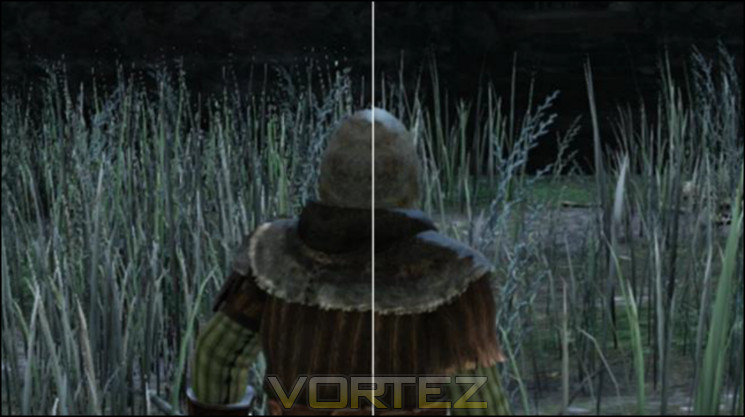
Composite scene, DSR sample on right
Using DSR – which can be enabled automatically through GeForce Experience or the driver application- the game is rendered at a higher resolution and then downscaled to the monitor native resolution. DSR, like AMD’s Virtual Super Resolution, is implemented at the driver level and so is generally supported by all game titles which has rendering at user-selected resolutions as an option.
Whilst the potential image quality benefits are significant it’s also worth noting that DSR is an excellent measure of assessing whether your setup is capable of supporting a higher resolution monitor in gaming. Nvidia estimate that the performance impact of the downsampling process is apparently only 1-2% (i.e less than a frame per second), so the framerates you get running DSR at 4K on your 1080p monitor will be close to those you get for 4K natively. We’re not sure if Nvidia intended this, but we’ll certainly take it.
Performance and Feature Testing
There are two aspects of driver performance we need to analyse for this article: in-game performance improvements against previous patches, and the performance impact of gradually higher levels of DSR. The former will allow us to assess whether GPU performance boost are system-wide with the latest Nvidia drivers or game-specific, and the latter gives us some indication of whether DSR is particularly impactful on game performance.
We first needed to choose a baseline from which we could compare results. Nvidia’s launch drivers – codename 344.11 – for the Maxwell performance parts made a whole lot of sense, and give us a good four months over which Nvidia will have improved their drivers. It also encompasses the Game Day Driver releases for Assassin’s Creed Unity and Far Cry 4, two of the most up to date titles we have in this testing regime, from which improvements have been baked into the main driver release.
Initial tests looked at the performance difference in a range of games and synthetic benchmarks to assess how well the new drivers had incorporated application-specific improvements and if across the board performance had been unlocked by the GeForce 347.52 drivers. Subsequent tests analysed Nvidia Dynamic Super Resolution, looking at not only performance but also qualitative impact on the experience.
Test System
CPU: Intel Core i7-5930K @ 3.5GHz
RAM: 8GB Corsair Vengerance LPX DDR4 (4 x 2GB)
Motherboard: GIGABYTE GA-X99-Gaming 5
Storage: Corsair Force LX 256GB SSD
PSU: Corsair CX600M Modular PSU
GPU: GIGABYTE GTX 970 4GB
OS: Windows 8.1
RAM: 8GB Corsair Vengerance LPX DDR4 (4 x 2GB)
Motherboard: GIGABYTE GA-X99-Gaming 5
Storage: Corsair Force LX 256GB SSD
PSU: Corsair CX600M Modular PSU
GPU: GIGABYTE GTX 970 4GB
OS: Windows 8.1
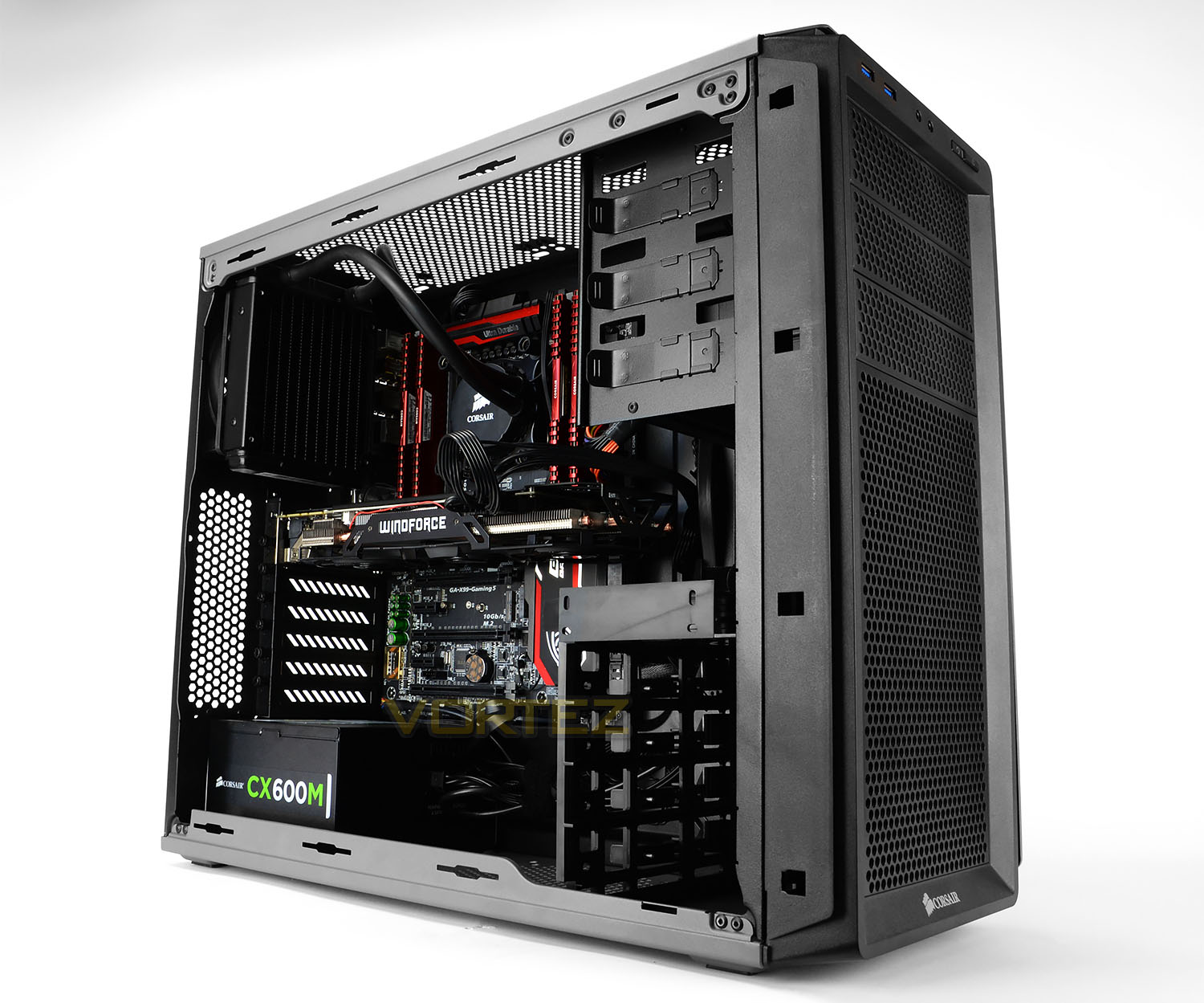
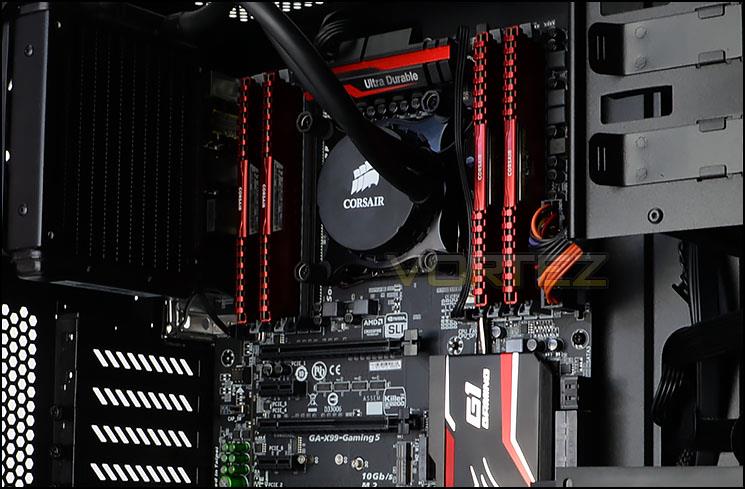
Our test system – featuring the latest Haswell-E technology from Intel, X99 gaming motherboard from GIGABYTE, and additional critical components from Corsair – allows the NVIDIA GPU to operate unencumbered by some of the usual bottlenecks when gaming. On the other hand this system doesn’t necessarily reflect benefits from reductions in CPU load, which disproportionately favours less muscular CPUs. Furthermore it’s not the sort of everyday system which the general populace would have access too. This underlines the fact that the performance figures shown in this article are intended to show relative performance rather than expected performance in mainstream systems, i.e. how much has performance improved for NVIDIA Maxwell-based hardware since launch, purely due to the drivers.
NVIDIA Dynamic Super resolution is the second aspect of NVIDIA’s driver package we want to test. The specific card chosen is an excellent example of the GTX 970 range, featuring top of the line GIGABYTE WINDFORCE 3X non-reference cooling that enables a factory overclocks to 1150MHz base and over 1.3GHz on the boost clock; no further overclocking was performed either on it or the CPU.
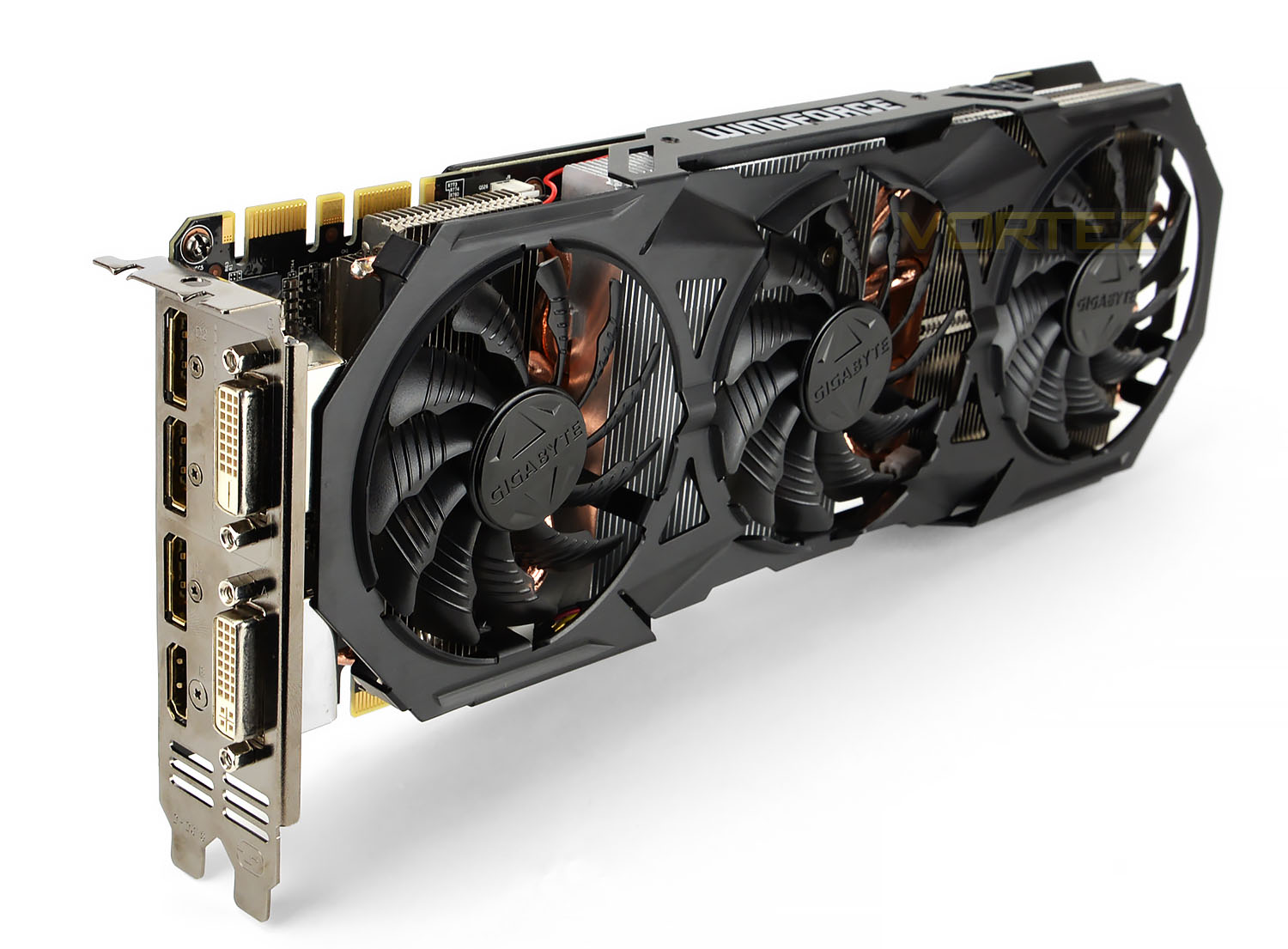
The GIGABYTE GTX 970 G1 GAMING 4GB video memory clocks at 7Gbps (GDDR5) and a 256-bit wide memory bus which also takes advantage of Third Generation Delta Colour Compression. This lossless algorithm allows better use of the memory bandwidth available, which is essential for higher resolution rendering, texture sizes and IQ settings. Benefits realised by using this algorithm largely depend on the scene but internally NVIDIA estimate that the GTX 980 has between 17 and 25% more effective use of memory bandwidth than the GTX 680.
Every GeForce GTX 970 exhibits the 3.5/0.5GB memory partition recently uncovered, which will limit performance at very high texture qualities and rendering resolutions. This would impact predominantly Dynamic Super Resolution in our testing, but generally problems have occurred in multi-GPU configurations looking to take image quality settings steps further still.
Nonetheless, only a few GPU models are more capable at high resolution gaming than this card, making it ideal not only for testing Nvidia DSR but also just the sort of card on the cusp of 4K-capable horsepower.
Testing Tools
NVIDIA GeForce 344.11 Drivers
NVIDIA GeForce 347.52 drivers
NVIDIA GeForce Experience
3DMark Firestrike
Cinebench R15
Thief 4
Assassins Creed Unity
Far Cry 4
NVIDIA GeForce 347.52 drivers
NVIDIA GeForce Experience
3DMark Firestrike
Cinebench R15
Thief 4
Assassins Creed Unity
Far Cry 4
The above applications provide us with a modest spread of synthetic and real-world datapoints from which we can assess performance changes for the transition to 347.52 from a recent stable driver release.
Benchmarks: Far Cry 4, Assassins Creed Unity & More
Whilst synthetic benchmarking tools and Square Enix’s Thief 4 have canned benchmarks neither Far Cry 4 nor Assassins Creed Unity offer the same luxury. In order to generate repeatable results we navigated to positions in game where reliably repeatable 2-minute snippets of gameplay were possible. Frame per second results were then averaged, providing us with an overall result for that title.
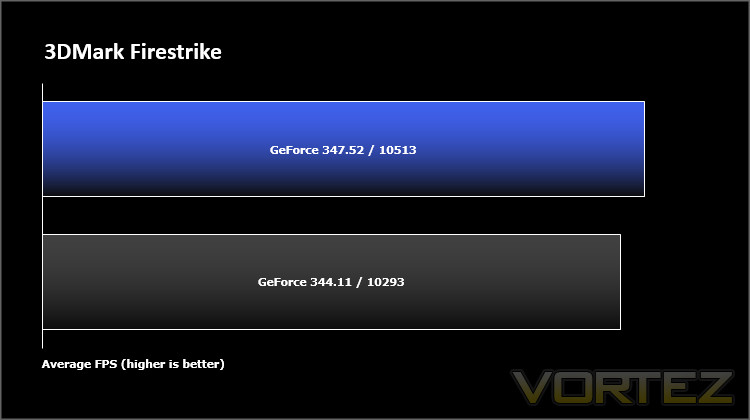
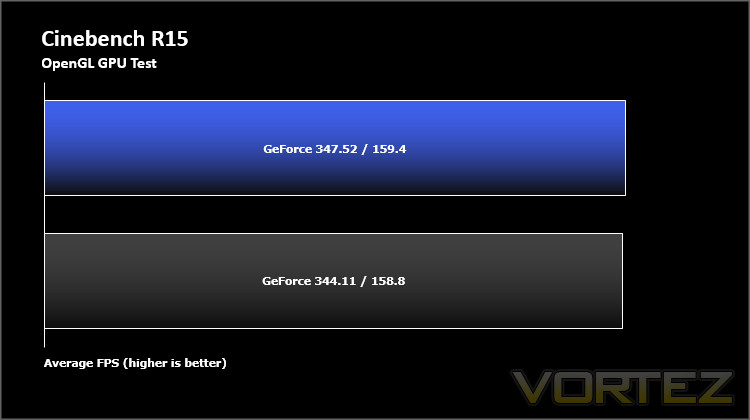
Both 3DMark Firestrike and Cinebench RC15 results see a small improvement in the transition from 344.11 to 347.52, generally of around 1-2%. This is in line with general optimisations rather than improvements targeting those benchmarks specifically, and will be of greatest value to overclockers using synthetic benchmarks in competition.
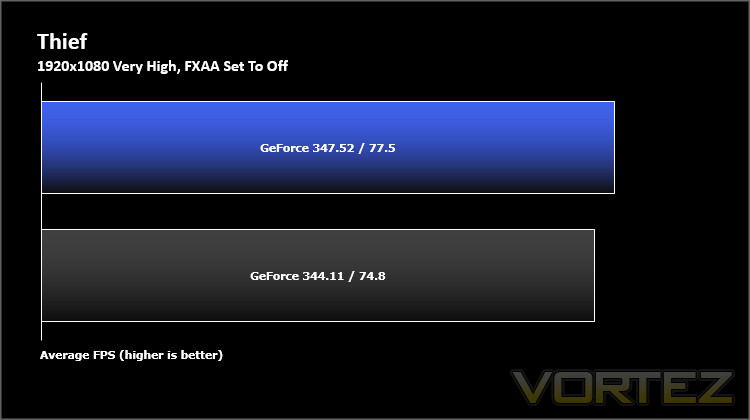
In a surprising turn of events 2014’s Thief 4 sees improvements of ~3%. Not shown are commensurate upward trends in minimum frame rates, indicating that the headline figure isn’t simply down to inflated maximum frame rates.
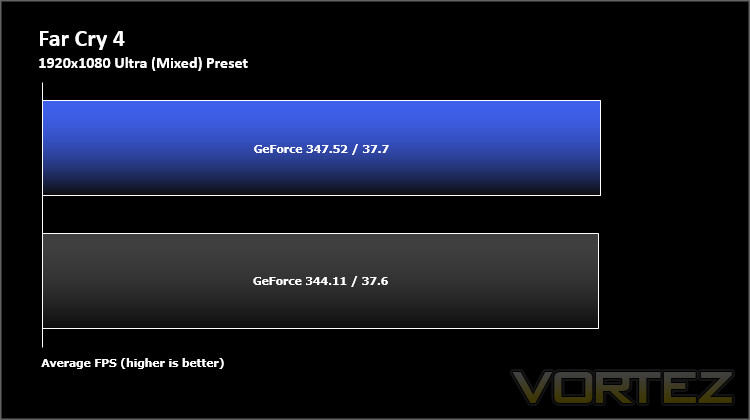
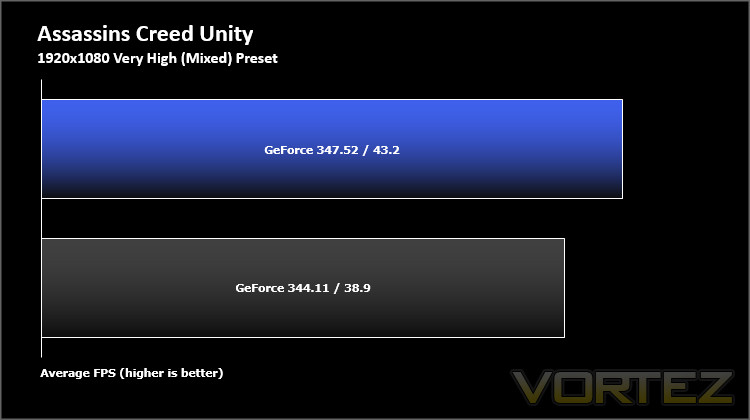
Perhaps the most marked improvements in our tests were in Assassin’s Creed Unity. Frame rate increases closed in on double-digits percent-wise, which would make a noticeable difference when gaming. Far Cry 4 by contrast showed effectively no change, pointing to few game-specific optimisations being put into place for this title in particular.
All told, the results point to a mix of tweaks which have unlocked general GPU performance, and a series of game-specific optimisations most apparent in Assassin’s Creed 4. Considering the title has been a considerable source of ire for gamers who haven’t enjoyed silky-smooth frame rates it’s no surprise that this would be the main target for improvements. We weren’t able to reach the lavish 18% improvements outlined in the patch notes – perhaps due at least in part to our own test system configuration – but the numbers we posted could have an appreciable impact when gaming.
The results are most significant when paired with a G-SYNC monitor. With such a setup you’re able to exploit every frame rather than being tied down to V-SYNC (at 30 or 60 fps)
Nvidia DSR Walkthrough
There are two means through which Nvidia Dynamic Super Resolution can be enabled for a game or games.
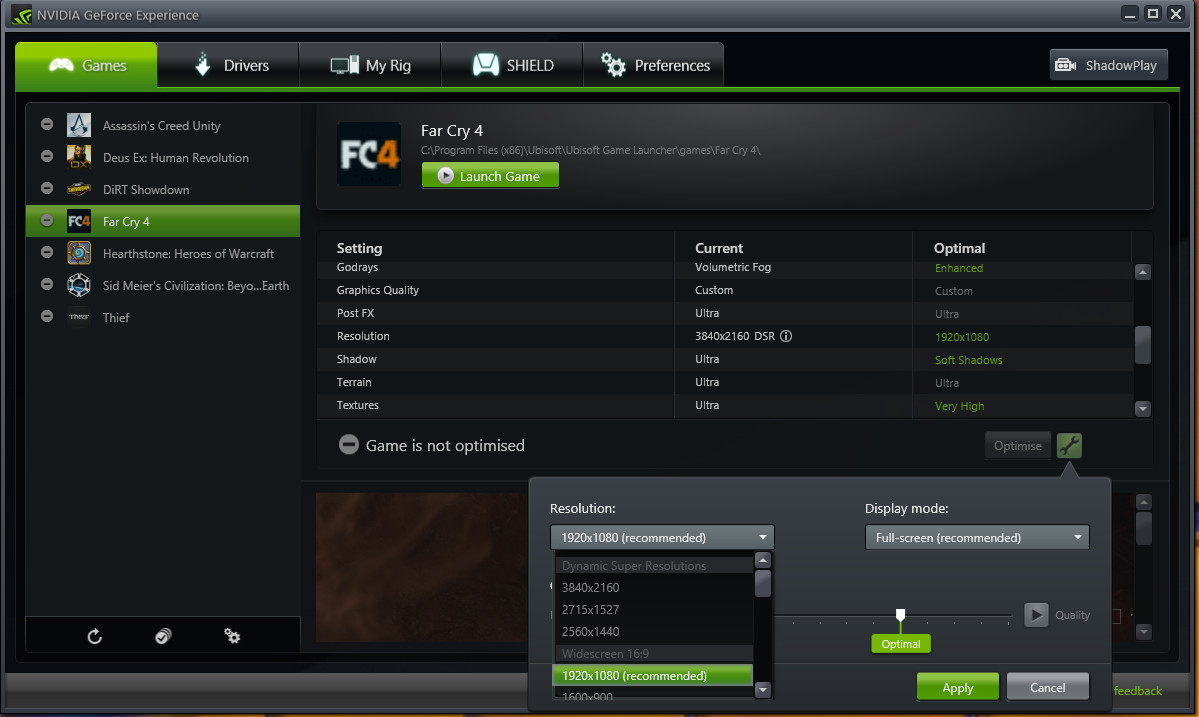
Most users will first become familiar with DSR through the GeForce Experience application. Within the app. users can optimise their settings and, if the game is compatible with higher than normal resolutions and/or UI scaling, select a DSR resolution. The optimisation process may automatically set a DSR resolution for you if appropriate, but clicking on the tool icon will allow you to manually selected one if at all possible. The graphics card will automatically downscale the frames sent to the monitor to that monitor’s native resolution.
Users searching for a DSR sweet-spot, or enable it in games incompatible with GeForce Experience, can instead unlock these super-sampling resolutions in the Nvidia control panel. From here you can select a scaling factor at which a scene will be rendered and from which will be downscale to the monitors native resolution. Note that for a 1080p monitor 1440p has a scaling factor of ~1.7, whilst 4K is can be unlocked with a scaling factor of 4; if your panel’s resolution is different from 1080p you’ll have to compensate accordingly.
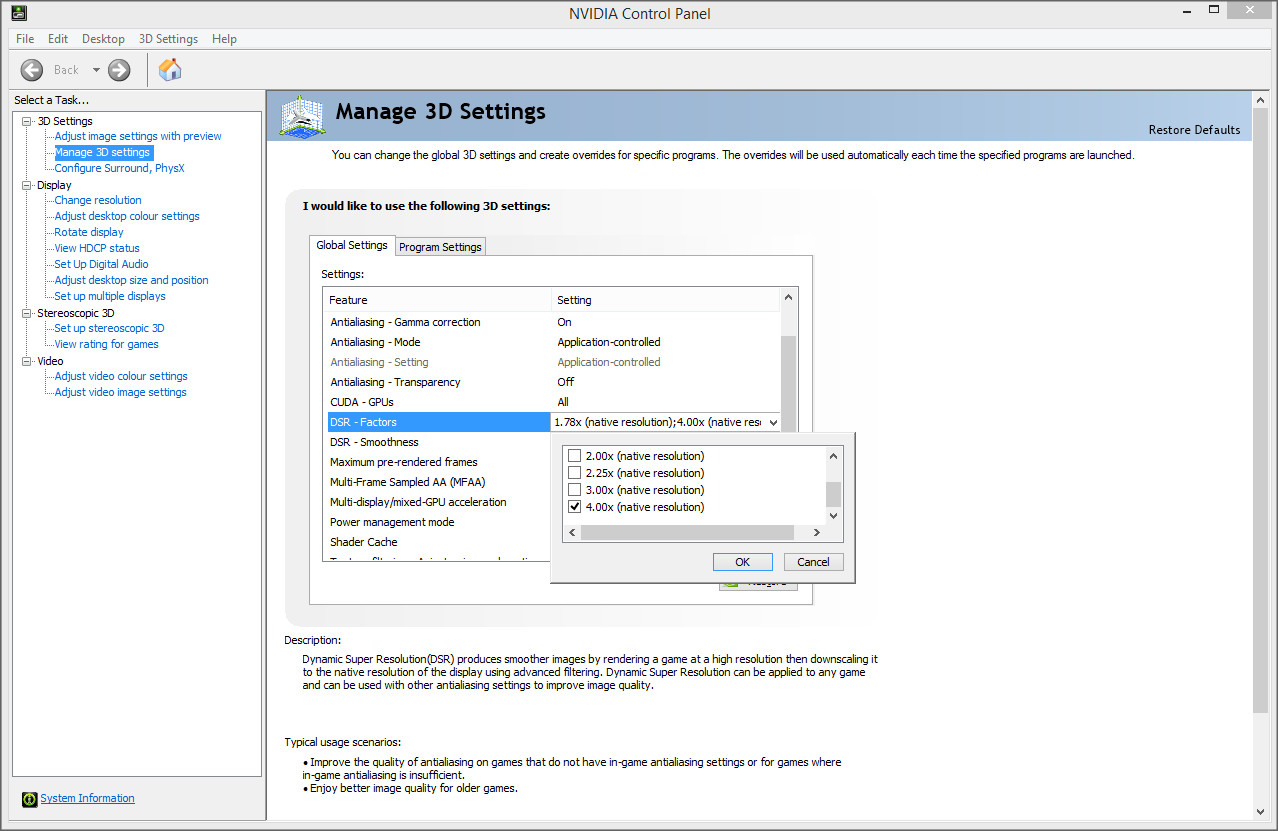
The Nvidia Control Panel includes a “DSR Smoothness” variable, which subtly adjusts the Gaussian filter used when downscaling the image. This setting, similar to settings on enthusiast tools such as SweetFX, subtly sharpens or blurs the visible image and is really a matter of personal preference. Play around with this setting to find yours.
Once the DSR resolution settings are unlocked they’ll appear in the in-game graphics options. Applying them through GeForce Experience will set them to default on launch, whereas you will want to manually set them if you unlocked the option via the Control Panel.
Currently 1440p is a resolution that generally results in good frame rates, and is used on a variety of high-end professional and gaming monitors. Although picking up in popularity, 4K is still relatively rare and more well suited to multiple-GPU configurations except where a game is particularly forgiving. Through liberal use of DSR on your Nvidia-equipped PC you’ll be able to determine if your system is capable of driving a higher resolution panel when playing your favorite game, before you buy the new monitor. Nifty.
Nvidia’s implementation of DSR is appreciably slicker than AMD’s VSR, and is a little bit better sign-posted. As with VSR and other super-sampling techniques screenshots taken will be at the super-sampled, rather than native resolution. Direct image quality comparison is therefore difficult without dedicated capture equipment or utilising the same Gaussian filter the renderer uses to downsample.
Benchmarks: DSR Performance Cost
During Nvidia Dynamic Super Resolution testing we incrementally changed the in-game rendering resolution, beginning at 1080p, then increasing to 1440p and 4K respectively. MSAA settings for Far Cry 4 and Assassins Creed 4 were adjusted downwards to more realistically simulate a relevant use-case, rather than re-purposing previous results which would have been unhelpful at higher resolutions.
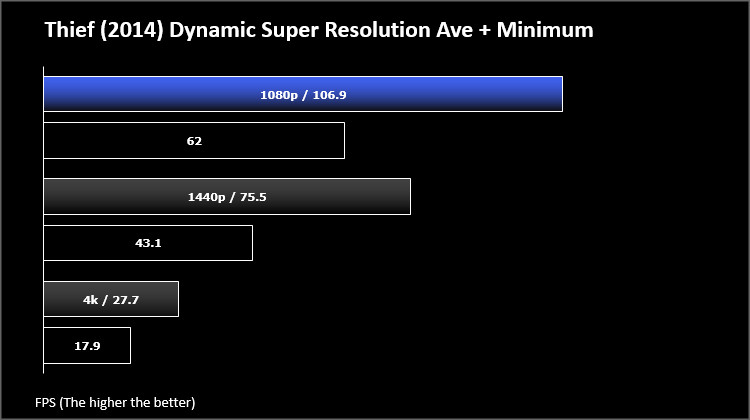
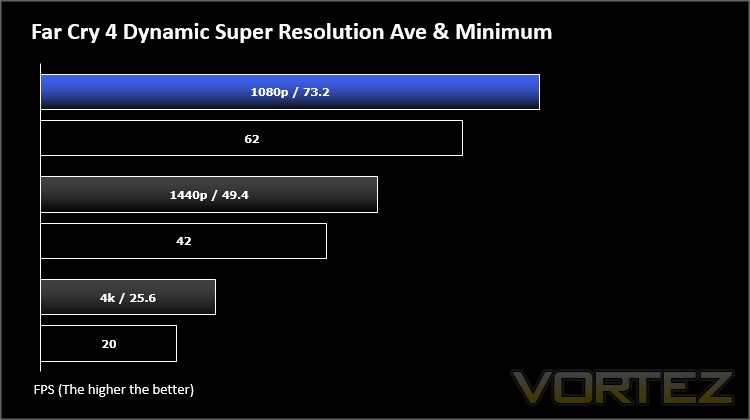
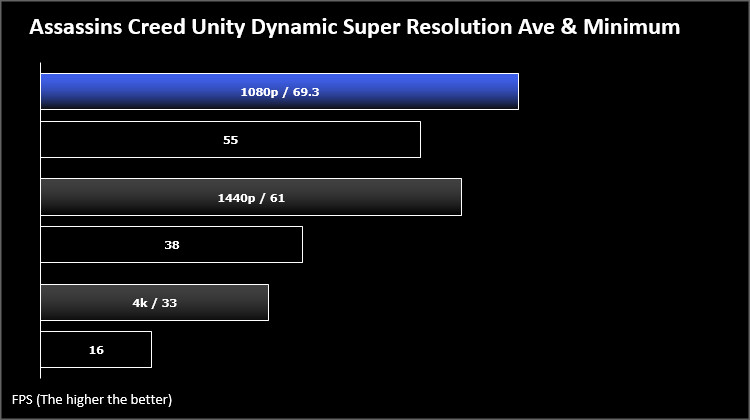
Results for these tests are interesting to unpack. First off, it’s admirable to see just how well GIGABYTE’s GTX 970 G1 GAMING coped with DSR resolutions of 1440p, especially in Thief 4. For a title not all that old being able to hold above 43fps with high levels of DSR and some MSAA thrown in for good measure is a mark of the quality of Nvidia’s GPU, and shows that 1440p is not at all a bad fit for this card.
At tweaked quality settings Assassins Creed Unity was also a solid contender at 1440p with average frame rates above 60fps, although the power of a GTX 970 couldn’t arrest the awful texture pop-in exhibited in that game. Frame rates dropped precipitously at 4K, with minimum FPS below what we’d consider to be a playable level. Hitting 4K resolutions is asking a lot of the GPU, but the fast fall-off may indicated issues with frame buffer size and bandwidth.
Far Cry 4 by contrast shows a much more linear drop-off in frame rates as you progress to 4K and, although 4K frame rates are still effectively unplayable, it should be possible to tweak settings for a far better experience. An experience at 1440p should still be a good one, but it’s a pity that it can’t quite hit that 60fps sweet spot.
Overall DSR is a great addition to Nvidia’s arsenal of tools, and anyone with a mid-range to performance GPU should seriously consider dabbling in it. This is especially the case for less taxing titles than the three above such as League of Legends and Counterstrike Source, where DSR can really make use of the horsepower overhead of a Maxwell or high-end Kepler GPU.
Tests like these not only show the weakness of super-sampling techniques, but also the strengths of syncing refresh rates to your display. Nvidia’s G-SYNC monitors, manufactured by an ever-widening cohort of brands, make the very best use of fluctuating frame rates between 30 and 60 fps, and our results should tend to urge users towards coupling a 1440p G-SYNC monitor with an single Nvidia GPU, rather than attempting to reach for 4K and having a poor experience.
Conclusion – Keeping Up To Date Makes Sense
Frankly, Nvidia has little to prove when it comes to their driver roll-out schedule and stability. Through years of hard work and close co-operation with software developers they’ve garnered a reputation for regularity and consistency which is second to none. AMD released their Catalyst Omega drivers at the tail end of last year, and for them it will hopefully be a watershed moment; Nvidia’s own moment came and went years ago, and they grasped the nettle admirably.
In that vein the GeForce 347.52 drivers exhibit large improvements in certain key areas – raw Assassins Creed Unity frame rates being a prime example – as well as incremental improvements to overall performance. However this is only half the equation; there’s only so much Nvidia can do with its drivers, and at some stage developers need to provide a game which is well optimised for as many platforms as possible. Once again Assassins Creed Unity is the quintessential example for which, despite all the trumpeting of Nvidia working closely with Ubisoft in the development of the game, hardware driver tweaks can only go so far.
Nonetheless Nvidia are undeterred, adding in both the excellent Dynamic Super Resolution for greater graphical fidelity, and the various tools for which GeForce Experience is swiftly becoming famous. Whilst the Nvidia Control Panel has its place, GeForce Experience makes these features accessible to the masses; by keeping its development in house they can and have made getting more out of your GPU easy for everyone.
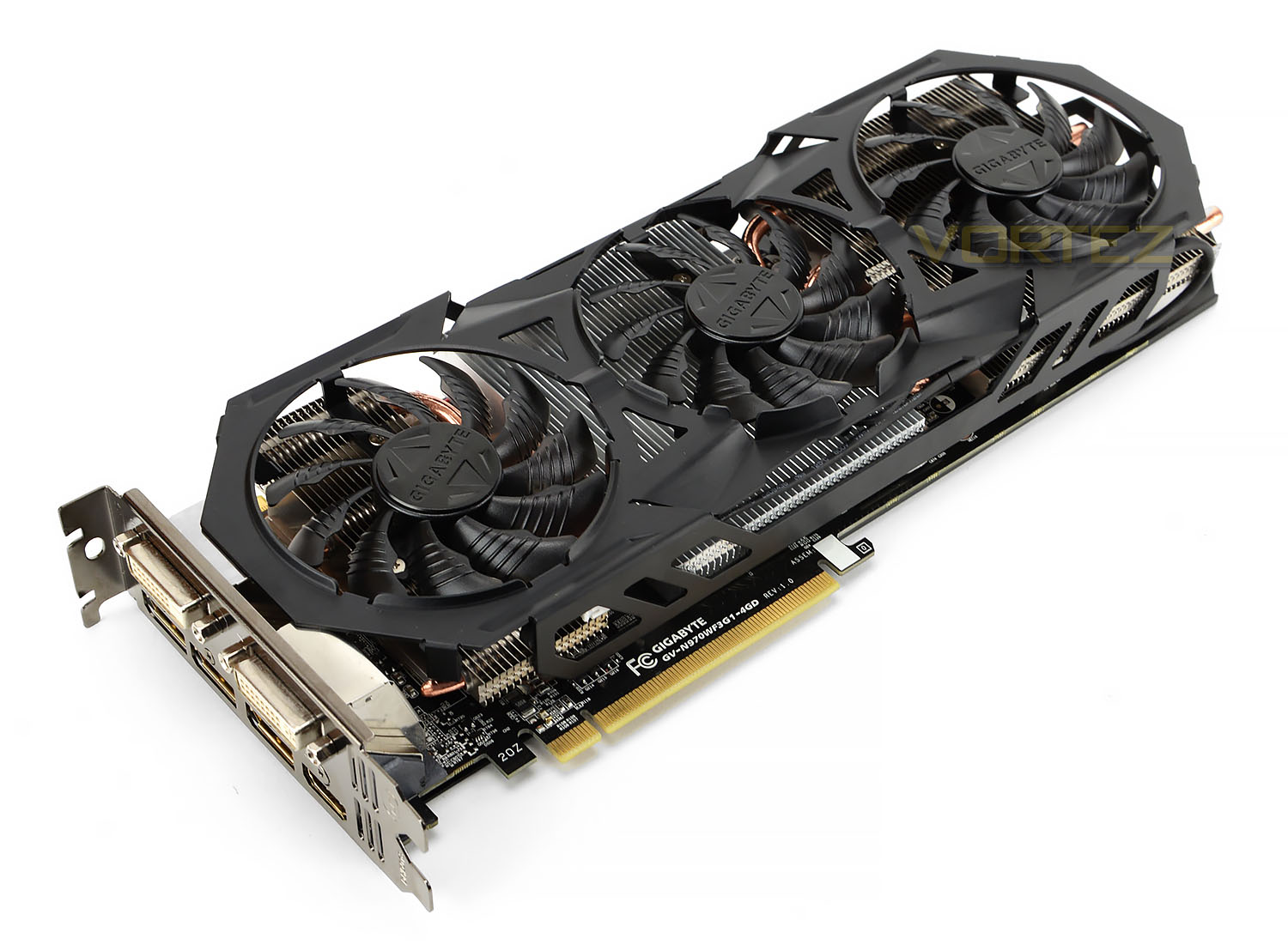
GIGABYTE’s GTX 970 G1 GAMING 4G was a trooper throughout, just as we expected from our initial review of the card. Built on the strong foundations of Nvidia’s Maxwell architecture and supported by GIGABYTE’s own WINDFORCE cooling technology, the GPU seems like an ideal match for the ever-increasing range of G-SYNC monitors currently on the market. Despite recent disappointing reports over the efficacy of its 4GB VRAM pool the card has still been able to put up strong numbers which would result in a great gaming experience.
We will be keeping an eye on driver releases over the course of Maxwell’s lifetime to judge performance improvements.
Nvidia’s driver programme sets the standard when it comes to being ready for every relevant game launch, but we’ve also shown that post-launch support is also excellent. The driver team continues to eek out small margins for all scenarios whilst simultaneously making large double-digit performance strides in the most relevant games. Gone are the days where you only update ‘when something doesn’t work’, now updating early and often makes sense and is trivial to do.
Pros
+ Consistent performance improvements
+ Value-added application
+ Make best use of spare GPU horsepower
Cons
– None
+ Consistent performance improvements
+ Value-added application
+ Make best use of spare GPU horsepower
Cons
– None
Our thanks to Intel, Corsair and GIGABYTE for providing some of the hardware necessary for this article.