







A mechanical keyboard which uses Cherry MX black switches with LED backlighting and up to four level of brightness. Is this a good choice for the gamer?
Product on Review Echelon Mechanical Keyboard
Manufacturer & Sponsor: ASUS
Street Price: £100 GBP
ASUS are perhaps more widely known for their commitment in the components sector but as with most other brands nowadays they have branched out into other departments in a bid to equip both the enthusiast and gamer with ASUS-specific products. Although ASUS now has their STRIX/ROG brands for all things peripheral related, prior to this ASUS used their Echelon brand to introduce a range of gaming peripherals and today we’re to take a look at once such product.
The Echelon is a mechanical gaming keyboard which uses Cherry MX black switches. It also comes with LED backlit keys which offer up to four levels of brightness. We’ve reviewed a number of mechanical keyboards recently, can Echelon match their quality/features?
ASUS on their Echelon Mechanical Keyboard
The Echelon mechanical keyboard is built to help you win. With the best available mechanical hardware and peerless Cherry MX Black switches, it responds the very instant you tap — so you’ll vastly improve your hit count, no matter what kind of games you like to play.
Features & Technical Specifications
Connectivity Technology
Wired
OS Support
Windows® 8.1 , 32bit/64bit
Windows® 8 , 32bit/64bit
Windows® 7 , 32bit/64bit
Windows® XP , 32bit/64bit
Mac OS X
Dimensions
448 x 215 x 35 (mm) (including palm rest)
Interface available
Keyboard : PS/2 / USB
Contents
1 x palm rest
4 x additional key caps
1 x key cap puller
Note
Mechnical switch: Cherry MX Black (50 million keystrokes lifespn)
Key cap: ABS
Backlit: Blue LED backlit with 4 levels of brightness
USB hub: 2 x USB 2.0
Audio ports: 2 x 3.5mm jacks (headphone & mic)
Cable: 1.8m braided cable
Media hotkeys: volume, play, pause, previous/next track
Wired
OS Support
Windows® 8.1 , 32bit/64bit
Windows® 8 , 32bit/64bit
Windows® 7 , 32bit/64bit
Windows® XP , 32bit/64bit
Mac OS X
Dimensions
448 x 215 x 35 (mm) (including palm rest)
Interface available
Keyboard : PS/2 / USB
Contents
1 x palm rest
4 x additional key caps
1 x key cap puller
Note
Mechnical switch: Cherry MX Black (50 million keystrokes lifespn)
Key cap: ABS
Backlit: Blue LED backlit with 4 levels of brightness
USB hub: 2 x USB 2.0
Audio ports: 2 x 3.5mm jacks (headphone & mic)
Cable: 1.8m braided cable
Media hotkeys: volume, play, pause, previous/next track
Packaging & Bundle
Packaging for Echelon
The Echelon keyboard is presented in a long box and features graphics which are pleasing to the eye. The front has an image of the actual keyboard along with the fundamental features whilst around the back there is more information about the other Echelon products within the range.
The few items included within bundle
Bundled with Echelon there are only a few items bundled. These items include the following:
• Documentation: warranty and instructions guide
• WASD swappable keys
• Detachable soft-touch wrist rest
Closer Look
Super sleek and elegant design
Echelon is extremely sleek in its visual appearance, the keyboard features a smooth matt grey/black upper and for the most part follows a minimalist approach to peripheral design – retaining the same look as the standard, conventional keyboard.
Matt black/grey styling
QWERTY design with multimedia keys
Observing the keyboard from an aerial perspective we can see that Echelon follows a QWERTY layout with no extra buttons aside from the “F” buttons which double up to offer some multimedia functionality.
Since Echelon is a mechanical keyboard, Cherry MX Black switches are used throughout and ASUS has given the keyboard LED backlighting which illuminates the keys with a blue glow. An additional USB cable is required to power these LEDs and to control the brightness FN + 8 or 2 are used on the numpad.
Our keyboard supports full NKRO via PS2 and just 6KRO with USB.
Folding feet on underside
The reverse of Echelon is plastic and features two folding feet on either side which alters the height of the keyboard. ASUS have also included rubber strips next to these feet to prevent the unit from slipping on smooth surfaces.
USB and audio cables
USB and audio jacks
Echelon has a thick braided cable which is hardwired to the keyboard. This cable branches off into audio cables for headphone and microphone functionality and a PS2 connection to power the keyboard – this connection comes with a PS2/USB adapter, which, when attached to the computer is rather cumbersome. An extra USB is supplied for LED operation.
The USB connection also supplies extra power for the USB ports on the top-side of Echelon and likewise, the audio jacks work in conjunction with the cables supplied.
Software & Performance
The eagled eyed amongst you will notice some key similarities between Echelon and QPAD’s MK85 keyboard. Echelon is based on the same design but surprisingly comes with no bundled software at all. As a result, the only additional functionality to be utilised on Echelon are the multimedia buttons and the LED backlight controls. Aside from this the keyboard just as any other USB keyboard.
Lighting
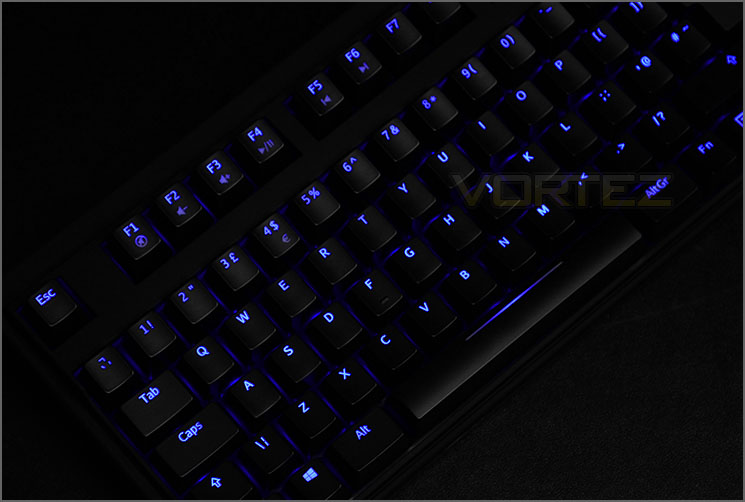
Echelon with LED backlit on maximum brightness
Moving from a standard membrane to a mechanical keyboard and especially one which uses Cherry MX Black will feel a rather strange at first and will take some getting used to. For gaming Cherry MX red switches are more commonly used because of their light tactile response but black switches are also a popular choice for gamers too. With black switches the actuation is significantly stiffer but after some time, general tasks such as typing up documents and web browsing are easy to perform. If you’re used to something with red or brown switches then black will be tricky to use in games at first, especially if you need to double-tap keys.
In general, Echelon is a great keyboard for general usage and gaming. The addition of multimedia keys are useful but we’re slightly disappointed there is no software with this keyboard. As a result of this, we cannot customise keys or apply macros. Echelon is literally just a standard USB keyboard, with mechanical switches and LED backlighting!
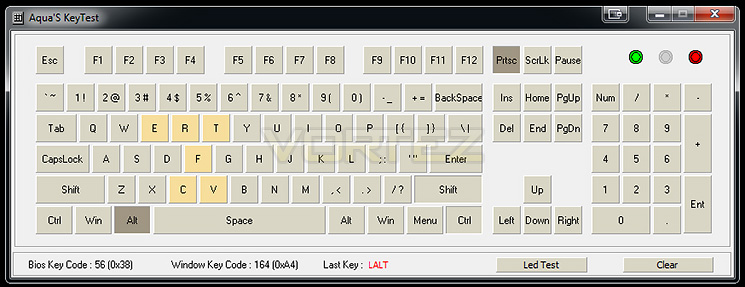
Echelon can support full NKRO via PS2 connection or 6KRO via USB. For some reason the PS2 connection wouldn’t give us any functionality so we had to use the USB adapter and as per above, this keyboard handled up to six key presses simultaneously.
Conclusion
Although ASUS now have STRIX – a dedicated gaming product line, it’s interesting to see how their products fared with the Echelon range prior to this.
Echelon appears to be a bit of a cheat, or even a quick-fix for ASUS. This keyboard is based upon the popular QPAD MK-85. ASUS haven’t designed their own keyboard, they’ve simply slapped on their own logo.
Build quality is something which Echelon does well with. The keyboard is solid and in this aspect it can be relied upon, it also has LED lighting and controls via the numpad section to control brightness. Along the top of the keyboard the F buttons double up to act as multimedia keys to add extra functionality.

Aside from the above, this is all we get. There is sadly no software included to customise the keyboard and we therefore cannot apply macros or modify individual keys. The LED backlighting although dimmable cannot be changed from its blue colour.
At a cost of £100 the Echelon is among one of the cheapest mechanical keyboards available and is an option for those wanting to jump ship from a membrane based peripheral.
Echelon is a reasonable option for a basic mechanical keyboard but there is no shying away from the fact that it lacks the finesse of other rivals at a similar price-point.
Pros
+ Minimalist design
+ Decent build quality
+ LED backlighting
+ On-the-fly buttons – LED/multimedia
+ Detachable wrist rest
Cons
– No software
– Lack of customisation
– Blue LED only
– No dedicated USB support
+ Minimalist design
+ Decent build quality
+ LED backlighting
+ On-the-fly buttons – LED/multimedia
+ Detachable wrist rest
Cons
– No software
– Lack of customisation
– Blue LED only
– No dedicated USB support

Click here for an explanation of our awards at Vortez.net. Thanks to Ebuyer for supplying this sample.


