Looking for the performance of the Crosshair IV but at a lower cost? This is the board.
Product on Review: ASUS M4A89TD PRO
Manufacturer and Sponsor: ASUS
MSRP: Not listed
Street Price: £160
It’s over a month since the AMD X6 debuted, but there have been an abundance of AM3 ready boards to welcome this new chip, with cutting edge features such as USB3 SATA 6G at the ready also. On the AMD platform there are 2 main chipsets to choose from. 890GX and 890FX. The M4A89GTD comes with the 890GX chipset whilst the board we are reviewing today, the M4A89TD PRO comes with 890FX chipset. James reviewed the M4A89GTD PRO in April.
The 890FX is said to allow for better overclocks and also supports multiple GPUs – Quad PCI-e anyone? This chipset supports all AM3 processors which includes Phenom II, Athlon II and of course the new X6 Thuban. With a wealth of features, power and potential the M4A89TD PRO shapes up to be a great mid-high end motherboard and will get you on your way to 6 core computing in next to no time.
Specifications
| CPU AMD Socket AM3 ;Phenom™II /Athlon™II /Sempron™ 100 Series Processors AMD 140W CPU Support AMD Cool ‘n’ Quiet™ Technology Supports 45nm CPU Chipset AMD 890FX/SB850 System Bus Up to 5200 MT/s ; HyperTransport™ 3.0 Memory 4 x DIMM, Max. 16 GB, DDR3 2000(O.C.)/1600/1333/1066 ECC,Non-ECC,Un-buffered Memory Dual Channel memory architecture *Due to CPU spec., AMD 100 and 200 series CPUs support up to DDR3 1066Mhz. With ASUS design, this motherboard can support up to DDR3 1333MHz. **Due to OS limitation, when installing total memory of 4GB capacity or more, Windows® 32-bit operation system may only recognize less than 3GB. Hence, a total installed memory of less than 3GB is recommended. ***Refer to www.asus.com for the memory QVL (Qualified Vendors Lists). Expansion Slots 2 x PCIe 2.0 x16 support ATI CrossFireX™ technology(@dual x16 speed) 1 x PCIe 2.0 x4 1 x PCIe 2.0 x1 2 x PCI Storage SB850 Chipset 6 xSATA 6.0 Gb/s ports Support RAID 0,1,5,10 JMicron® JMB361 PATA and SATA controller 1 xUltraDMA 133/100 for up to 2 PATA devices 1 xPower eSATA 3.0 Gb/s port LAN Realtek® 8111E Gigabit LAN controller featuring AI NET2 Audio ALC 892 8-Channel High Definition Audio CODEC – Supports 192kHz/ 24bit BD Lossless Sound – DTS Surround Sensation UltraPC – Supports Jack-Detection, Multi-Streaming, and Front Panel Jack-Retasking – Optical S/PDIF Out ports at back I/O – ASUS Noise Filter IEEE 1394 VIA® 6315N controller supports 2 x 1394a port(s) (1 at mid-board; 1 at back panel) USB 14 USB 2.0/1.1 ports (6 ports at mid-board, 8 ports at back panel) ASUS Unique Features ASUS Xtreme Design ASUS Hybrid Processor – TurboV EVO – Turbo Unlocker, Auto Tuning, TurboV, CPU Level UP ASUS Hybrid Switch – Core Unlocker – Turbo Key II ASUS Hybrid OS — Express Gate ASUS Power Solutions – 6+2 Phase Power Design – ASUS EPU ASUS Exclusive Features – MemOK! ASUS Quiet Thermal Solution – ASUS Fanless Design: Heat pipe solution – ASUS Fan Xpert ASUS EZ DIY – ASUS Q-DIMM – ASUS O.C. Profile – ASUS CrashFree BIOS 3 – ASUS EZ Flash 2 – ASUS MyLogo 2 – Percision Twerker 3 – Multi-language BIOS Overclocking Features Precision Tweaker 3 – vCore: Adjustable CPU voltage at 0.003125V increment – vDDNB: Adjustable CPU NB voltage at 0.003125V increment – vCPU PLL: Adjustable CPU_PLL voltage at 0.00625V increment – vHT bus: Adjustable PCH voltage at 0.00625V increment – vDRAM Bus: Adjustable DRAM voltage at 0.00625V increment – vChipset: Adjustable Chipset voltage at 0.00625V increment SFS (Stepless Frequency Selection) – PCI Express frequency tuning from 100MHz up to 150MHz at 1MHz increment – Internal Base Clock tuning from 100MHz up to 600MHz at 1MHz increment Overclocking Protection – ASUS C.P.R.(CPU Parameter Recall) Back Panel I/O Ports 1 x S/PDIF Out (Optical) 1 x IEEE 1394a 1 x LAN(RJ45) port 8 x USB 2.0/1.1 8 -Channel Audio I/O 1 x PS/2 Keyboard port (Purple) 1 x PS/2 mouse port (Green) 1 x Clear CMOS button 1 x Power eSATA port Internal I/O Connectors 3 x USB connectors support additional 6 USB ports 1 x IDE connector 1 x IEEE 1394a connector 1 x CPU Fan connector 6 x SATA 6Gb/s connectors 1 x Chassis Fan connector (4-pin) 1 x Chassis Fan connector (3-pin) 1 x Power Fan connector 1 x S/PDIF Out Header 1 x Core Unlocker Switch 1 x Turbo Key II Switch 1 x MemOK! Button Front panel audio connector 1 x COM connector 1 x 24-pin ATX Power connector 1 x 8-pin ATX 12V Power connector System Panel BIOS 16 Mb Flash ROM , SPI, AMI BIOS, PnP, DMI2.0, WfM2.0, SM BIOS 2.5, ACPI 2.0a, Multi-language BIOS, ASUS EZ Flash 2, ASUS CrashFree BIOS 3 Manageability WfM 2.0,DMI 2.0,WOL by PME,WOR by PME,PXE Accessories User’s manual 1 x UltraDMA 133/100/66 cable 4 x Serial ATA 6.0Gb/s cables 1 x Q-Shield 2 in 1 Q-connector (USB, System panel; Retail version only) Support Disc Drivers Anti-virus software (OEM version) ASUS Update ASUS Utilities Form Factor ATX Form Factor 12 inch x 9.6 inch ( 30.5 cm x 24.4 cm ) |
AMD® 890FX Chipset is designed to support quad PCI Express, so in essence this chipset is far from tame. Not only do we have great power on the graphical side of things, but this chipset also fully supports the new AMD X6 series of processor. Great system performance and overclocking capabilities.
Also worth mentioning is that the AMD® SB850 Southbridge natively supports next-generation Serial ATA (SATA) storage interface, this gives users the potential of up to 6.0 Gb/s transfer rates. Right on the pinnacle of innovation, 6G drives will soon be the mainstream interface on the SATA side of things. Remember, this is double the bandwidth of the traditional SATA drive bus system.
Packaging and First Look
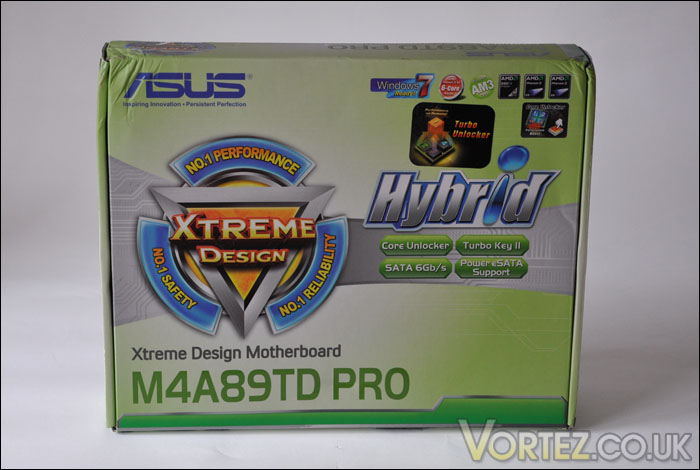
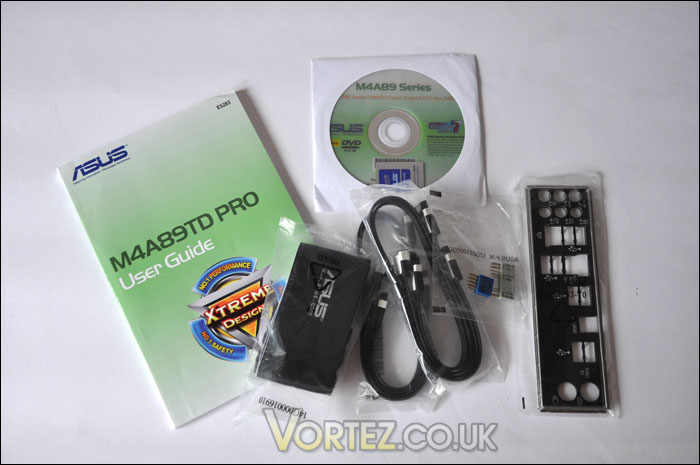
The M4A89TD PRO comes in a mint green box and as most motherboards, the packaging holds to being similar size and offering similar accessories. What you get inside, apart from the motherboard is an instructions manual, IO fascia, drivers disc, SATA 6G cables and an IDE cable.
M4A89TD PRO
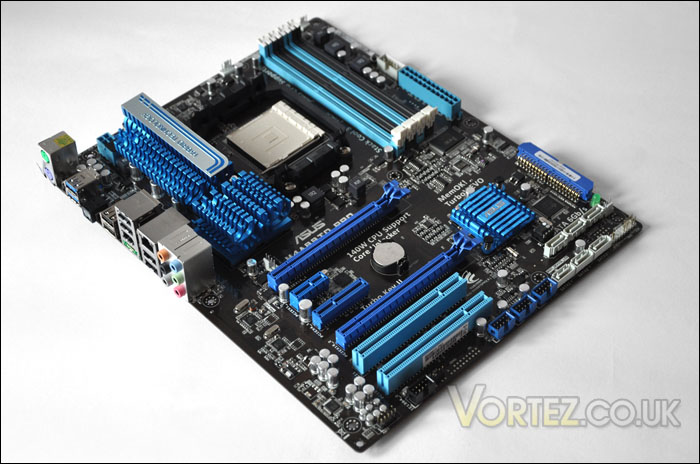
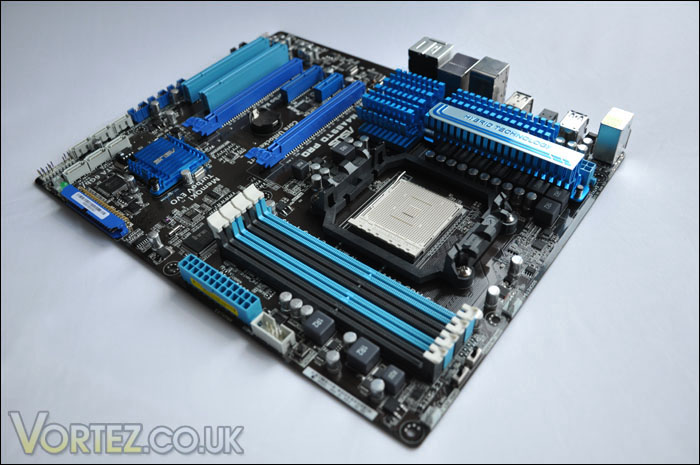
Removing the M4A89TD PRO from the box, we are instantly met by its vibrant colours. Not only does the board stand out by being colourful but the heatsinks are rather eyecatching and elaborate.
There is no mistaking it, this board was designed with the performance user in mind. The layout is fairly typical of a board of its calibre but its strange that ASUS have chosen to cater for IDE users. Perhaps ASUS are still holding out for those on the slower IDE platform. SATA has been on the market for a long time now though and it is time to abandon IDE, especially with the onslaught of SSD.
Closer Look (1)
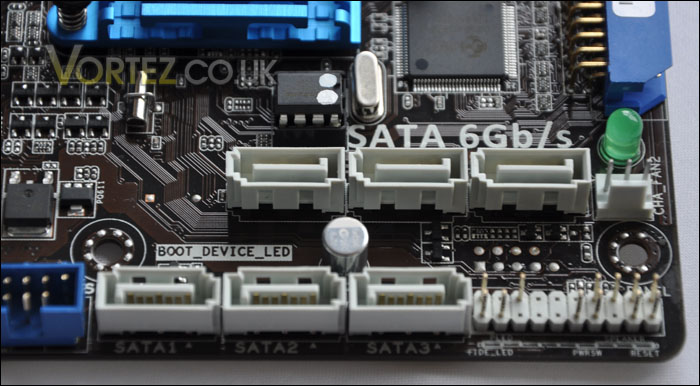
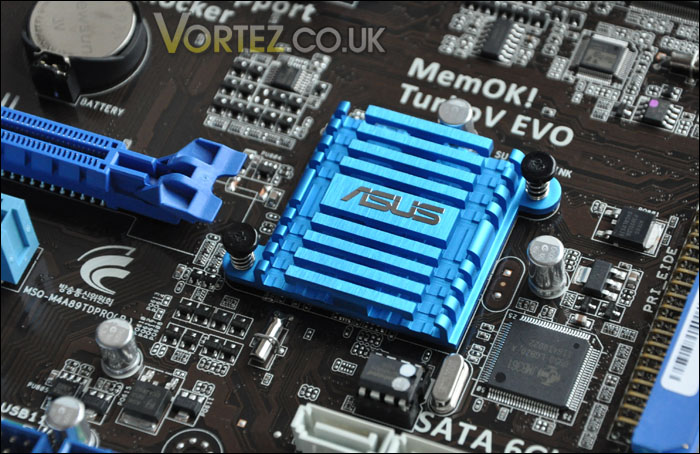
With the existence of the IDE port this does mean there are less SATA ports but there are still an abundance of this type of port right next to the Southbridge heatsink. The Southbridge hosts the newly embraced SATA 6G, so those with 6G ready HDDs we will be able to take advantage of that extra bandwidth.
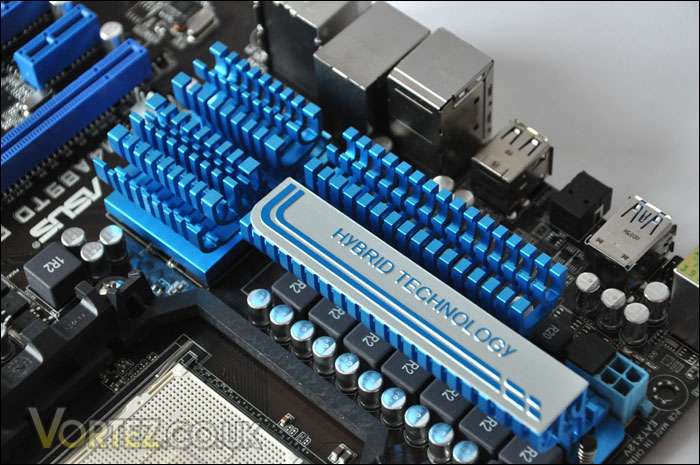
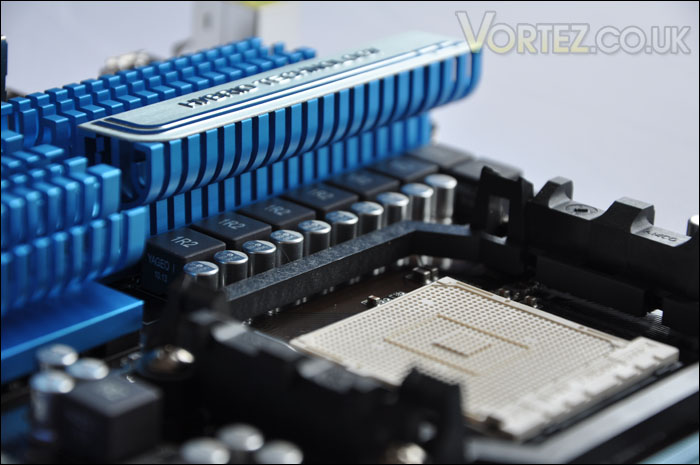
As you might agree, the heatsinks covering the VRM region are seriously stocky. If size is anything to go by then the heatsinks sitting here will provide some significant cooling.
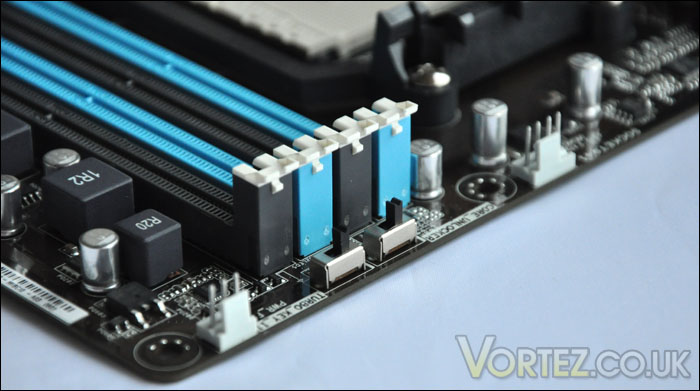
Moving to the two switches beside the DDR3 lanes, these two switches manage the Core Unlocker and Turbo Key II features.
With the Core Unlocker technology, you are able to unlock hidden CPU cores and CPU cache inside the AMD CPU. There is no background knowledge needed for this feature, it simple scans through and detects any hidden cores, unleashing even more performance for your CPU and system.
The Turbo Key II feature allows you to tune your CPU to extreme levels of performance, whilst remaining stable. This takes away the hassle of having to tweak settings and enter the BIOS. Perfect for the beginner overclocker or even those who want to get extra performance but aren’t sure about how to go about it.
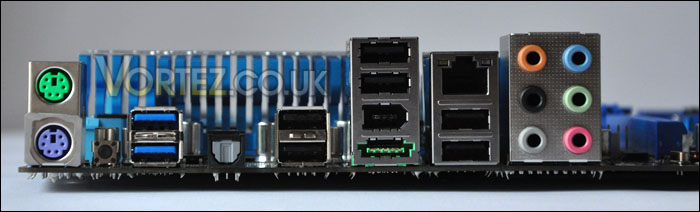
On the back panel there are quite a lot of features –
1 x S/PDIF Out (Optical)
1 x IEEE 1394a
1 x LAN(RJ45) port
8 x USB 2.0/1.1
8 – Channel Audio I/O
1 x PS/2 Keyboard port (Purple)
1 x PS/2 mouse port (Green)
1 x Clear CMOS button
1 x Power eSATA port
The CMOS button is especially useful, it saves you time having to remove side panels and get inside to clear settings should an overclock fail. All you have to do is press in the button by the PS2 sockets. It’s quite odd to see PS2 sockets on motherboards thesedays, again – as with the IDE decision on this board I think the PS2 should be replaced. It’s rarely used due to USB taking over.
Closer Look (2)
The PCI-E arrangement is overflowing with options. In particular there is CrossFire available.
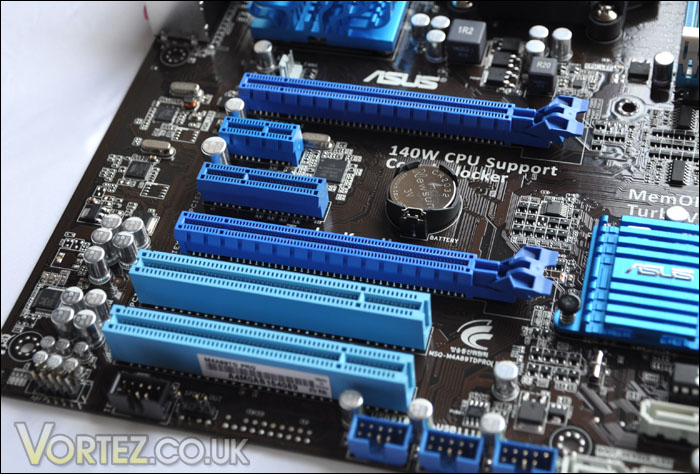
There are a good amount of phases near the CPU socket in fact the M4A89TD PRO uses a 6+2 phase design, these phases balance the power load so that the performance and lifespan isn’t damaged.
Unfortunately AMD are still using dual channel compared to Intel with their triple channel configuration. Whilst there may not be as much bandwidth to unleash there are still some quality dual channel kits out there at very fast rates – what’s more is they are cheaper than triple channel offerings. So some may interpret this as an advantage rather than a disadvantage. On our M4A89TD Pro we have 4 lanes offering a maximum of 16GB. There is the option of having 2000 (O.C.), 1600, 1333, or 1066 modules. The lanes here are using a single latch securing mechanism rather than double. This seems to be a trend that is catching on. It means modules are easier to install onto the motherboard.
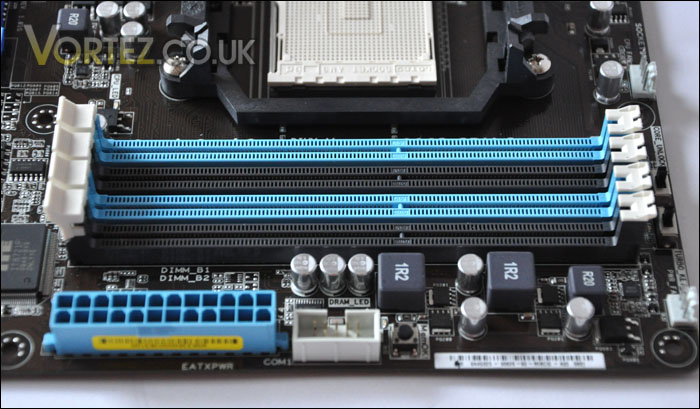
Integrated onto our motherboard is the MemOK! feature. At just the click of a button, with MemOK! you can patch your memory qualms. So if you have any worries about incompatible memory fear not, MemOK! resolves these concerns by loading failsafe settings.
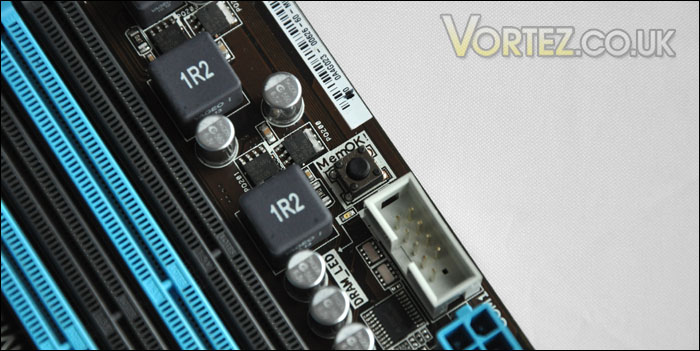
As with most ASUS boards, features such as Q Connect also come bundled. This makes connecting the FP of your case to the motherboard FP connectors so much easier. If you haven’t come across Q Connect before, a small adapter plug sits on the FP pins of the motherboard so unlike previous times when you had to get the motherboard manual out and find out which plug goes where, now all you do is plug each connector into the adapter and then just pop the connector onto the FP pins. A small feature, but it makes a big difference.
Turbo Unlocker, Turbo Key II, Overclocking
Turbo Unlocker
The Turbo Unlocker allows you to get the most out of your Black Edition or X6 AMD chip by providing a performance boost. It does this by raising the CPU core ratio of the core that is under load, thus meaning less cores for particular application use and more gain in performance can be achieved. So with the AMD X6 chip I am currently using, the ratio will notch up from 14 to 16. 14 being the maximum available without Turbo Unlocker enabled.
Turbo Key II
With Turbo Key II we are able to overclock the system by the flick of a switch. The process is automated, this makes overclocking possible for those who are not as confident at tackling such a task. It’s quite a handy tool, it should encourage those who are perhaps lack in self-belief to get put them onto the first stepping stone to tinkering hardware performance. Sure enough, you may not be manually altering certain aspects of the system to get performance gains but the results should be noticable, and could tease you to have a go yourself.
Overclocking
The M4A89TD PRO is said to be a step down from the Crosshair IV, hosting such a great chipset as the 890FX and a glorious array of heatsinks this board was built with performance in mind. Stock performance is all very good but if you are investing in a motherboard of such calibre you surely want to tweak system performance and get the most out of your components and so it is in your best interest to overclock.
For this overclocking exercise, I simply disabled some of the settings in CPU Configuration such as ‘Cool n’ Quiet’ C1 configuration and turned AI Overclock Tuner to ‘Manual’ notched the CPU Bus Frequency up – made sure the DRAM freqency was below stock parameters (so that we don’t head into instability) and finally modified the CPU voltage accordingly.
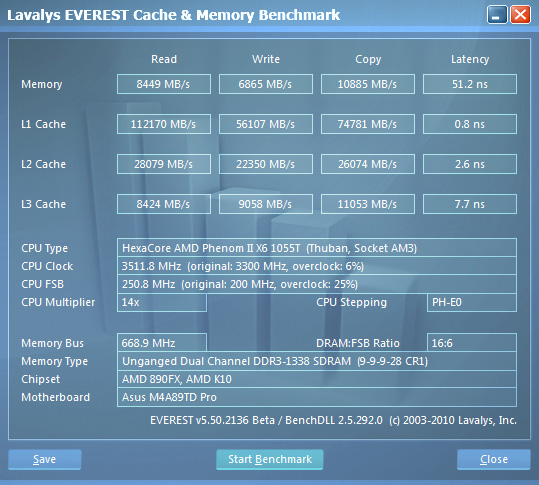
Whilst I didn’t want to spend massive amounts of time overclocking, I did want to establish a good overclock and without too much hassle I managed to get to 3.5GHz. The settings were CPU ratio – 14 CPU Bus Frequency to 250, memory to 1333MHz and CPU Voltage to 1.45.
Test Setup
AMD X6 1055T (2.8GHz)
ASUS M4A89TD PRO (890FX)
4GB (2x2GB) GeIL Black Dragon DDR3 1800MHz
MSI 8800GTX 898MB
500GB Samsung Spinpoint SATA-II
Enermax Revolution85+ 850W
Testing Suite
Windows 7 Professional 64-bit
Everest Ultimate
Cinebench
3DMark Vantage x64
SiSoftware SANDRA 2009
Street Fighter IV Benchmark
EVEREST Ultimate
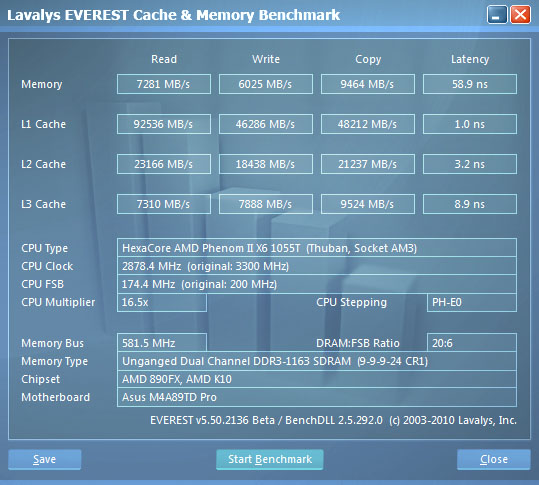
This is a tool used primarily as a system diagnostic application. For years now it has been a reliable source for generating up to date information on systems. Not only does it generate information about the system but there is a benchmark division to Everest. In particular we will be looking at the Cache/memory benchmark.
Stock (2.8GHz)
Overclocked (3.5GHz)
Cinebench
This is powerful real-world test suite that analyses system performance. It is used by professionals the world over to measure full system performance – results are scored in ‘points’.
As you can see, against the i7 720 the AMD representative performs very well. Furthermore, overclocking by 25% enables even more points to be achieved.
3DMark Vantage x64
Needing little introduction the 3DMark suite is notorious amongst hardware enthusiasts around the world for measuring 3D performance of a computer system. It is a comprehensive benchmarking tool and our tests would be incomplete without including this suite.
Some fair points scoring from the M4A89TD PRO/X6. With the system overclocked we are able to achieve a good points score, nearing the 40K mark. With a bigger overclock I’m fairly certain that 40K can be achieved.
SiSoftware SANDRA
SANDRA isn’t always a benchmark that is included in hardware reviews but I believe it shouldn’t be ignored. SANDRA provides a vigorous package that tests your system in a rather large array of benchmarks. There are many aspects of benchmark that can be executed. We will be considering – CPU, memory/motherboard tests.
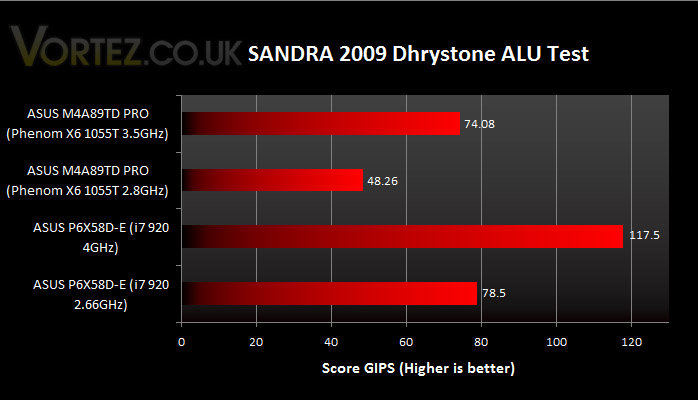
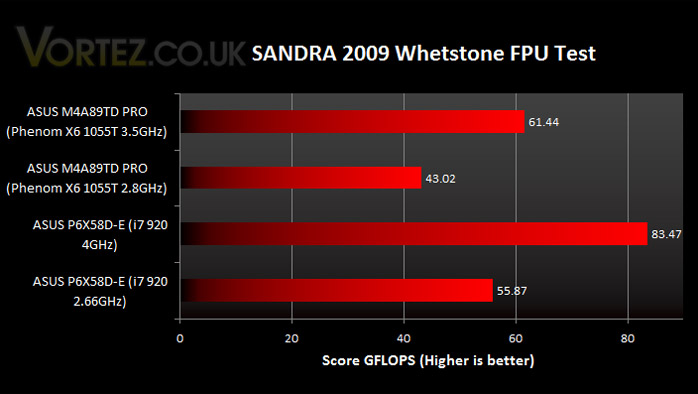
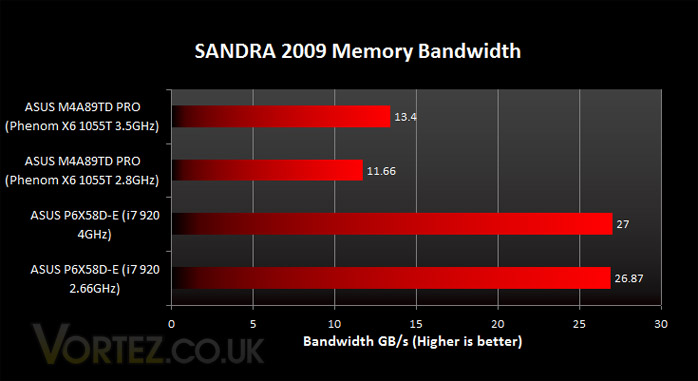
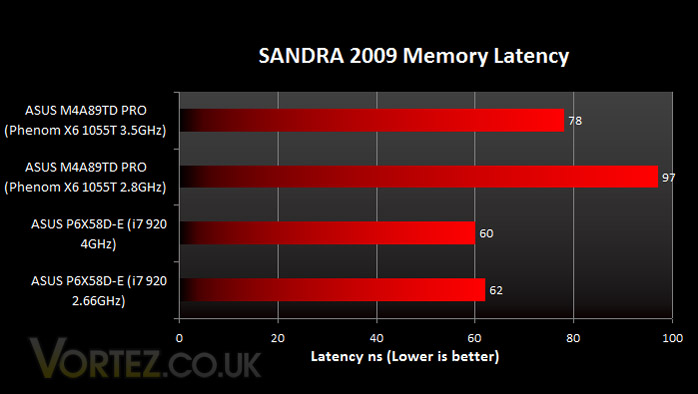
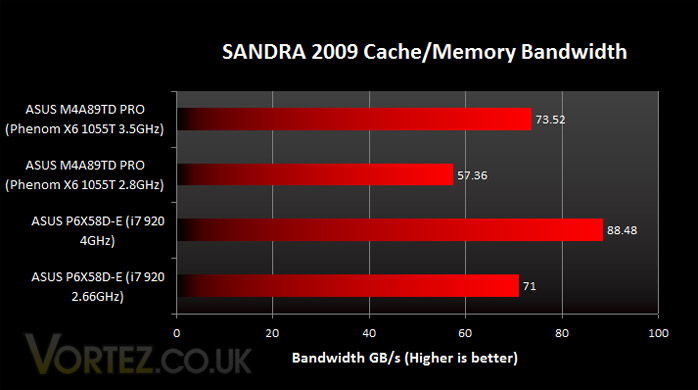
In the SANDRA tests we see the most significant of performance increases when overclocked. Even with stock speeds set the M4A89TD PRO allows for some impressive statistics.
Street Fighter IV Benchmark
Capcom released a Street Fighter IV Benchmark tool last year for users to establish how well the game will run on their system. It also gives gamers a good idea of how the game looks and feels. You don’t need the game to run this benchmark, its entirely independent and what’s more it’s only 397MB. This test gives an overall score as well as FPS rating too.
Whilst the average FPS remained within 0.1 when comparing stock to overclocked – the score made the biggest impact by almost entering the 10K mark. Time and time again, this overclock is proving to be a worthwhile undertaking.
Conclusion
We’ve seen a stack of exciting ASUS motherboards arrive this summer on both Intel and AMD platforms. Most notably we’ve seen the likes of the Rampage III Extreme and Crosshair IV Formula two astounding examples of pure power loaded with feature after feature.
These boards whilst very appealing carry a big price tag, and not all of us were born into royalty so along has come a wave of new boards, with not dissimilar features to these gargantuan but at a smaller price tag. One such board, is the one we have looked at today.
The M4A89TD PRO comes with some fantastic features and if you have read this review you will be aware that it certainly performs. It’s good to see that such a new board has the ability to host the new X6 chip and that both work hand in hand to provide some great overclocking potential. There are two versions of the M4A89TD PRO one with USB3 and one without. The price difference is just £10. Now to me, it seems a little strange to offer two variations for such little price difference when USB3 is backwards compatible. The argument from ASUS is that you shouldn’t have to pay for something if you don’t want it, but when it doesn’t come at a premium I don’t personally see the need to provide two examples. Surely its better to have it, than to not have it.
One of the things I found very handy about the M4A89TD PRO was the CMOS reset button which has been conveniently placed on the back panel of the motherboard by the USB ports. This saves copious amounts of time removing side panels, locating the battery and in some cases removing components such as graphics cards.
There’s no denying this is an excellent board of choice for those wanting to upgrade to X6 or even start a new setup based around AM3. You get the performance and feature set of something similar to the Crosshair IV (which is also using the same chipset) with a more appealing price tag.
Pros
+ Great performance/price ratio
+ Overclocks easily
+ Lots of useful features
+ SATA 6G support
Cons
– There are none!
With the above in mind, it\’s quite obvious that the ASUS M4A89TD PRO deserves the Gold Award.
We would like to thank ASUS for providing the M4A89TD PRO. Discuss this review on our forums