Aimed at the professional market with a desire for AMD’s latest 3rd Gen. Ryzen processors, the ASUS Prime X570-Pro offers all the bells and whistles you’d need without the typical gimmicks often thrown at more expensive options.

Product on Review: ASUS Prime X570-Pro
Manufacturer: ASUS
Street Price: GBP £239.99 / USD $239.99 / AUS $349.99
ASUS are a global technology leader, producing all kinds of components from wearables, monitors and graphics cards to monitors and peripherals. They’re widely regarded as one of the go-to brands for many PC-related products. Today we take a look at one of their motherboard offerings in the professional market, utilising AMD’s latest X570 chipset.
The ASUS Prime X570-Pro has been dressed in professional attire to cater to using with serious pursuits in mind, putting their Ryzen-3000 series CPU to a more productive use, such as content creation.
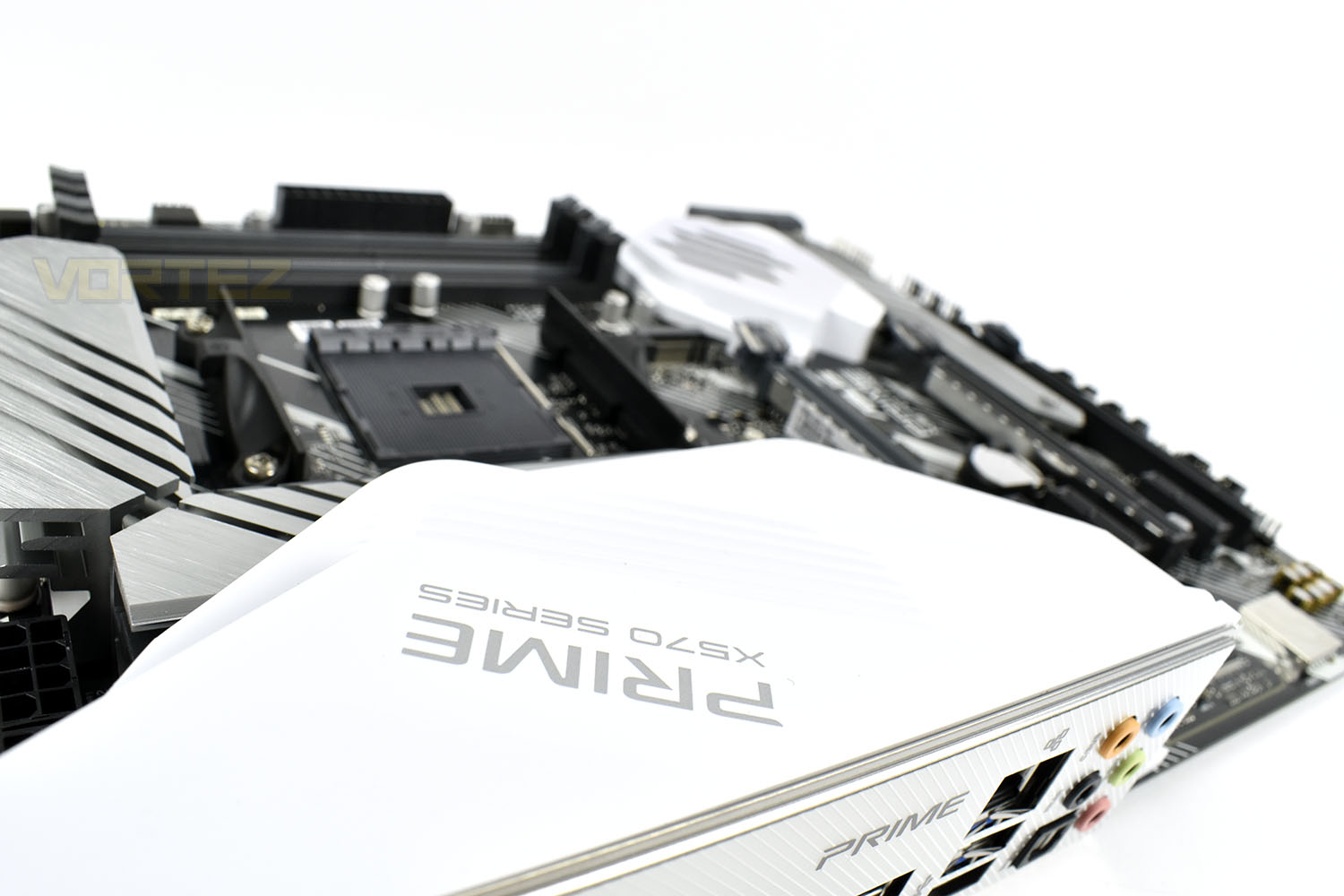
The X570-Pro tries to offer a balance between price and performance that their Republic of Gamers brand tends to exceed. Things like exotic LAN implementations and fancy board-wide RGB lighting has been omitted but powerful 14-phase VRMs and clever power-saving technologies have been employed.
Priced at £240/$240/$350, the Prime X570-Pro certainly isn’t ‘cheap’, but the X570 is well-established as being the premium offering at the present time. Having said that, there aren’t many that undercut the Prime and we’re not exactly short of features here. Let’s see how it compares to similar offerings.
ASUS on the Prime X570-Pro:
Dressed in a professional attire, the Prime X570 series cater to users with serious pursuits in mind, who prefer to put their Ryzen™ processors to more productive use. Prime X570, known for its all-around specs and ASUS signature features, includes a wide range of tuning options for accessible performance.
Technical Specifications
CPU
AMD AM4 Socket 3rd and 2nd AMD Ryzen™/2nd and 1st Gen AMD Ryzen™ with Radeon™ Vega Graphics Processors
* Refer to www.asus.com for CPU support list
* Due to CPU limitation, CPU cores supported varies by processors.
Chipset
AMD X570
Memory
3rd Gen AMD Ryzen™ Processors
4 x DIMM, Max. 128GB, DDR4 4400(O.C)/4266(O.C.)/4133(O.C.)/4000(O.C.)/3866(O.C.)/3733(O.C.)/3600(O.C.)/3466(O.C.)/3400(O.C.)/3200/3000/2933/2800/2666/2400/2133 MHz Un-buffered Memory
2nd Gen AMD Ryzen™ Processors
4 x DIMM, Max. 128GB, DDR4 3600(O.C.)/3466(O.C.)/3400(O.C.)/3200(O.C.)/3000(O.C.)/2933/2800/2666/2400/2133 MHz Un-buffered Memory
2nd and 1st Gen AMD Ryzen™ with Radeon™ Vega Graphics Processors
4 x DIMM, Max. 128GB, DDR4 3200(O.C.)/3000(O.C.)/2933/2800/2666/2400/2133 MHz Un-buffered Memory
Dual Channel Memory Architecture
ECC Memory (ECC mode) support varies by CPU.
* Refer to www.asus.com for the Memory QVL (Qualified Vendors Lists).
* The maximum memory capacity supported vary depending on the CPU you installed.
Graphic
Integrated Graphics in the 2nd and 1st Gen AMD Ryzen™ with Radeon™ Vega Graphics Processors
Multi-VGA output support : HDMI/DisplayPort ports
– Supports HDMI 2.0b with maximum resolution of 4096 x 2160 @ 60 Hz
– Supports DisplayPort 1.2 with max. resolution 4096 x 2160 @ 60 Hz
Multi-GPU Support
3rd and 2nd Gen AMD Ryzen™ Processors
Supports NVIDIA® 2-Way SLI® Technology
Supports AMD 3-Way CrossFireX™ Technology
2nd and 1st Gen AMD Ryzen™ with Radeon™ Vega Graphics Processors
Supports AMD 2-Way CrossFireX™ Technology
Expansion Slots
3rd Gen AMD Ryzen™ Processors
2 x PCIe 4.0 x16 (x16 or dual x8)
2nd Gen AMD Ryzen™ Processors
2 x PCIe 3.0 x16 (x16 or dual x8)
2nd and 1st Gen AMD Ryzen™ with Radeon™ Vega Graphics Processors
1 x PCIe 3.0 x16 (x8 mode)
AMD X570 chipset
1 x PCIe 4.0 x16 (max at x4 mode)
3 x PCIe 4.0 x1
Storage
3rd Gen AMD Ryzen™ Processors :
1 x M.2_1 socket 3, with M Key, Type 2242/2260/2280/22110(PCIE 4.0 x4 and SATA modes) storage devices support
2nd Gen AMD Ryzen™/2nd and 1st Gen AMD Ryzen™ with Radeon™ Vega Graphics Processors :
1 x M.2_1 socket 3, with M Key, Type 2242/2260/2280/22110(PCIE 3.0 x4 and SATA modes) storage devices support
AMD X570 chipset :
1 x M.2_2 socket 3, with M Key, Type 2242/2260/2280/22110(PCIE 4.0 x4 and SATA modes) storage devices support
6 x SATA 6Gb/s port(s)
Support Raid 0, 1, 10
LAN
Intel® I211-AT
ASUS LAN Guard
Audio
Realtek® S1220A 8-Channel High Definition Audio CODEC featuring Crystal Sound 3
– Impedance sense for front and rear headphone outputs
– Internal audio Amplifier to enhance the highest quality sound for headphone and speakers
– Supports : Jack-detection, Multi-streaming, Front Panel Jack-retasking
– High quality 120 dB SNR stereo playback output and 113 dB SNR recording input (Line-in)
– Front panel audio connector (AAFP)
– Supports up to 32-Bit/192kHz playback *
Audio Feature :
– Optical S/PDIF out port(s) at back panel
– Audio Shielding: Ensures precision analog/digital separation and greatly reduced multi-lateral interference
– Dedicated audio PCB layers: Separate layers for left and right channels to guard the quality of the sensitive audio signals
– Premium Japanese-made audio capacitors: Provide warm, natural and immersive sound with exceptional clarity and fidelity
– EMI protection cover to prevent electrical noise to affect the amplifier quality
* Due to limitations in HDA bandwidth, 32-Bit/192kHz is not supported for 8-Channel audio.
USB Ports
3rd and 2nd Gen AMD Ryzen™/2nd and 1st Gen AMD Ryzen™ with Radeon™ Vega Graphics Processors :
4 x USB 3.2 Gen 1 port(s) (4 at back panel, blue, Type-A)
AMD X570 chipset :
1 x USB 3.2 Gen 2 front panel connector port(s)
AMD X570 chipset :
4 x USB 3.2 Gen 2 port(s) (4 at back panel, teal blue, 3 x Type-A+1 x Type-C)
AMD X570 chipset :
2 x USB 3.2 Gen 1 port(s) (2 at mid-board)
AMD X570 chipset :
4 x USB 2.0 port(s) (4 at mid-board)
Special Features
5-Way Optimization by Dual Intelligent Processors 5
– 5-Way Optimization tuning key perfectly consolidates TPU Insight, EPU Guidance, DIGI+ VRM, Fan Expert 4, and Turbo App
DIGI+ VRM: Digital power design with Dr. MOS
EPU Guidance
TPU Insight
Fan Xpert4
– Fan Xpert 4 featuring Fan Auto Tuning function and multiple thermistors selection for optimized system cooling control
Turbo App: system performance tuning, network priority, and audio scene configuration for selected applications.
ASUS 5X Protection III :
– ASUS SafeSlot Core: Fortified PCIe Slot prevents damage
– ASUS LANGuard: Protects against LAN surges, lightning strikes and static-electricity discharges!
– ASUS Overvoltage Protection: World-class circuit-protecting power design
– ASUS Stainless-Steel Back I/O: 3X corrosion-resistance for greater durability!
– ASUS DIGI+ VRM – Digital power design with Dr. MOS
– ASUS Enhanced DRAM Overcurrent Protection – Short circuit damage prevention
– ASUS ESD Guards – Enhanced ESD protection
ASUS SafeSlot – Protect your graphics card Investment
ASUS OptiMem:
– Improved DDR4 Stability
AURA :
– Aura Lighting Control
– Aura RGB Strip Headers
– Addressable Gen 2 Header
ASUS Exclusive Features :
– AI Suite 3
– Ai Charger
– Turbo LAN
– Armoury Crate
– Pre-mounted I/O Shield
ASUS Quiet Thermal Solution :
– Stylish Design: MOS Heat-sink with dual thermal pads design, PCH Fan, PCH and M.2 Heatsink
– ASUS Fan Xpert 4
ASUS EZ DIY :
– ASUS CrashFree BIOS 3
– ASUS EZ Flash 3
– ASUS UEFI BIOS EZ Mode
ASUS Q-Design :
– ASUS Q-LED (CPU, DRAM, VGA, Boot Device LED)
– ASUS Q-Slot
– ASUS Q-DIMM
– ASUS Q-Connector
Back I/O Ports
1 x PS/2 keyboard/mouse combo port(s)
1 x DisplayPort
1 x HDMI
1 x LAN (RJ45) port(s)
1 x Optical S/PDIF out
5 x Audio jack(s)
4 x USB 3.2 Gen 1 (up to 5Gbps) ports Type-A
3 x USB 3.2 Gen 2 (up to 10Gbps) ports (Type-A)
1 x USB 3.2 Gen 2 (up to 10Gbps) ports (Type-C)
Internal I/O Ports
2 x Aura RGB Strip Headers
1 x Addressable Gen 2 header(s)
2 x USB 2.0 connector(s) support(s) additional 4 USB 2.0 port(s)
2 x M.2 Socket 3 with M Key, type 2242/2260/2280/22110 storage devices support (SATA mode & PCIE mode)
1 x SPI TPM header
1 x COM port(s) connector(s)
6 x SATA 6Gb/s connector(s)
1 x CPU Fan connector(s) (1 x 4 -pin)
1 x CPU OPT Fan connector(s) (1 x 4 -pin)
3 x Chassis Fan connector(s) (3 x 4 -pin)
1 x PCH_FAN (1 x 4 -pin)
1 x AIO_PUMP connector (1 x 4 -pin)
1 x 24-pin EATX Power connector(s)
1 x 8-pin ATX 12V Power connector(s)
1 x 4-pin ATX 12V Power connector(s)
1 x Front panel audio connector(s) (AAFP)
1 x System panel(s)
1 x Power-on button(s)
1 x Clear CMOS jumper(s)
1 x Node Connector(s)
1 x Water Pump header (4-pin)
1 x T_Sensor Connector
1 x USB 3.2 Gen 2 (up to 10Gbps) connector
1 x USB 3.2 Gen 1 (up to 5Gbps) connector support additional 2 USB ports
Accessories
User’s manual
2 x SATA 6Gb/s cable(s)
1 x M.2 Screw Package
1 x Supporting DVD
1 x Q-connector(s) (1 in 1)
1 x Extension cable for Addressable LED
BIOS
256 Mb Flash ROM, UEFI AMI BIOS, PnP, SM BIOS 3.2, ACPI 6.2, Multi-language BIOS, ASUS EZ Flash 3, CrashFree BIOS 3, F11 EZ Tuning Wizard, F6 Qfan Control, F3 My Favorites, Last Modified log, F12 PrintScreen,F4 AURA ON/OFF, F9 Search and ASUS DRAM SPD (Serial Presence Detect) memory information
Operating System
Windows® 10 64-bit
Form Factor
ATX Form Factor
12.0 inch x 9.6 inch (30.5 cm x 24.4 cm)
AMD AM4 Socket 3rd and 2nd AMD Ryzen™/2nd and 1st Gen AMD Ryzen™ with Radeon™ Vega Graphics Processors
* Refer to www.asus.com for CPU support list
* Due to CPU limitation, CPU cores supported varies by processors.
Chipset
AMD X570
Memory
3rd Gen AMD Ryzen™ Processors
4 x DIMM, Max. 128GB, DDR4 4400(O.C)/4266(O.C.)/4133(O.C.)/4000(O.C.)/3866(O.C.)/3733(O.C.)/3600(O.C.)/3466(O.C.)/3400(O.C.)/3200/3000/2933/2800/2666/2400/2133 MHz Un-buffered Memory
2nd Gen AMD Ryzen™ Processors
4 x DIMM, Max. 128GB, DDR4 3600(O.C.)/3466(O.C.)/3400(O.C.)/3200(O.C.)/3000(O.C.)/2933/2800/2666/2400/2133 MHz Un-buffered Memory
2nd and 1st Gen AMD Ryzen™ with Radeon™ Vega Graphics Processors
4 x DIMM, Max. 128GB, DDR4 3200(O.C.)/3000(O.C.)/2933/2800/2666/2400/2133 MHz Un-buffered Memory
Dual Channel Memory Architecture
ECC Memory (ECC mode) support varies by CPU.
* Refer to www.asus.com for the Memory QVL (Qualified Vendors Lists).
* The maximum memory capacity supported vary depending on the CPU you installed.
Graphic
Integrated Graphics in the 2nd and 1st Gen AMD Ryzen™ with Radeon™ Vega Graphics Processors
Multi-VGA output support : HDMI/DisplayPort ports
– Supports HDMI 2.0b with maximum resolution of 4096 x 2160 @ 60 Hz
– Supports DisplayPort 1.2 with max. resolution 4096 x 2160 @ 60 Hz
Multi-GPU Support
3rd and 2nd Gen AMD Ryzen™ Processors
Supports NVIDIA® 2-Way SLI® Technology
Supports AMD 3-Way CrossFireX™ Technology
2nd and 1st Gen AMD Ryzen™ with Radeon™ Vega Graphics Processors
Supports AMD 2-Way CrossFireX™ Technology
Expansion Slots
3rd Gen AMD Ryzen™ Processors
2 x PCIe 4.0 x16 (x16 or dual x8)
2nd Gen AMD Ryzen™ Processors
2 x PCIe 3.0 x16 (x16 or dual x8)
2nd and 1st Gen AMD Ryzen™ with Radeon™ Vega Graphics Processors
1 x PCIe 3.0 x16 (x8 mode)
AMD X570 chipset
1 x PCIe 4.0 x16 (max at x4 mode)
3 x PCIe 4.0 x1
Storage
3rd Gen AMD Ryzen™ Processors :
1 x M.2_1 socket 3, with M Key, Type 2242/2260/2280/22110(PCIE 4.0 x4 and SATA modes) storage devices support
2nd Gen AMD Ryzen™/2nd and 1st Gen AMD Ryzen™ with Radeon™ Vega Graphics Processors :
1 x M.2_1 socket 3, with M Key, Type 2242/2260/2280/22110(PCIE 3.0 x4 and SATA modes) storage devices support
AMD X570 chipset :
1 x M.2_2 socket 3, with M Key, Type 2242/2260/2280/22110(PCIE 4.0 x4 and SATA modes) storage devices support
6 x SATA 6Gb/s port(s)
Support Raid 0, 1, 10
LAN
Intel® I211-AT
ASUS LAN Guard
Audio
Realtek® S1220A 8-Channel High Definition Audio CODEC featuring Crystal Sound 3
– Impedance sense for front and rear headphone outputs
– Internal audio Amplifier to enhance the highest quality sound for headphone and speakers
– Supports : Jack-detection, Multi-streaming, Front Panel Jack-retasking
– High quality 120 dB SNR stereo playback output and 113 dB SNR recording input (Line-in)
– Front panel audio connector (AAFP)
– Supports up to 32-Bit/192kHz playback *
Audio Feature :
– Optical S/PDIF out port(s) at back panel
– Audio Shielding: Ensures precision analog/digital separation and greatly reduced multi-lateral interference
– Dedicated audio PCB layers: Separate layers for left and right channels to guard the quality of the sensitive audio signals
– Premium Japanese-made audio capacitors: Provide warm, natural and immersive sound with exceptional clarity and fidelity
– EMI protection cover to prevent electrical noise to affect the amplifier quality
* Due to limitations in HDA bandwidth, 32-Bit/192kHz is not supported for 8-Channel audio.
USB Ports
3rd and 2nd Gen AMD Ryzen™/2nd and 1st Gen AMD Ryzen™ with Radeon™ Vega Graphics Processors :
4 x USB 3.2 Gen 1 port(s) (4 at back panel, blue, Type-A)
AMD X570 chipset :
1 x USB 3.2 Gen 2 front panel connector port(s)
AMD X570 chipset :
4 x USB 3.2 Gen 2 port(s) (4 at back panel, teal blue, 3 x Type-A+1 x Type-C)
AMD X570 chipset :
2 x USB 3.2 Gen 1 port(s) (2 at mid-board)
AMD X570 chipset :
4 x USB 2.0 port(s) (4 at mid-board)
Special Features
5-Way Optimization by Dual Intelligent Processors 5
– 5-Way Optimization tuning key perfectly consolidates TPU Insight, EPU Guidance, DIGI+ VRM, Fan Expert 4, and Turbo App
DIGI+ VRM: Digital power design with Dr. MOS
EPU Guidance
TPU Insight
Fan Xpert4
– Fan Xpert 4 featuring Fan Auto Tuning function and multiple thermistors selection for optimized system cooling control
Turbo App: system performance tuning, network priority, and audio scene configuration for selected applications.
ASUS 5X Protection III :
– ASUS SafeSlot Core: Fortified PCIe Slot prevents damage
– ASUS LANGuard: Protects against LAN surges, lightning strikes and static-electricity discharges!
– ASUS Overvoltage Protection: World-class circuit-protecting power design
– ASUS Stainless-Steel Back I/O: 3X corrosion-resistance for greater durability!
– ASUS DIGI+ VRM – Digital power design with Dr. MOS
– ASUS Enhanced DRAM Overcurrent Protection – Short circuit damage prevention
– ASUS ESD Guards – Enhanced ESD protection
ASUS SafeSlot – Protect your graphics card Investment
ASUS OptiMem:
– Improved DDR4 Stability
AURA :
– Aura Lighting Control
– Aura RGB Strip Headers
– Addressable Gen 2 Header
ASUS Exclusive Features :
– AI Suite 3
– Ai Charger
– Turbo LAN
– Armoury Crate
– Pre-mounted I/O Shield
ASUS Quiet Thermal Solution :
– Stylish Design: MOS Heat-sink with dual thermal pads design, PCH Fan, PCH and M.2 Heatsink
– ASUS Fan Xpert 4
ASUS EZ DIY :
– ASUS CrashFree BIOS 3
– ASUS EZ Flash 3
– ASUS UEFI BIOS EZ Mode
ASUS Q-Design :
– ASUS Q-LED (CPU, DRAM, VGA, Boot Device LED)
– ASUS Q-Slot
– ASUS Q-DIMM
– ASUS Q-Connector
Back I/O Ports
1 x PS/2 keyboard/mouse combo port(s)
1 x DisplayPort
1 x HDMI
1 x LAN (RJ45) port(s)
1 x Optical S/PDIF out
5 x Audio jack(s)
4 x USB 3.2 Gen 1 (up to 5Gbps) ports Type-A
3 x USB 3.2 Gen 2 (up to 10Gbps) ports (Type-A)
1 x USB 3.2 Gen 2 (up to 10Gbps) ports (Type-C)
Internal I/O Ports
2 x Aura RGB Strip Headers
1 x Addressable Gen 2 header(s)
2 x USB 2.0 connector(s) support(s) additional 4 USB 2.0 port(s)
2 x M.2 Socket 3 with M Key, type 2242/2260/2280/22110 storage devices support (SATA mode & PCIE mode)
1 x SPI TPM header
1 x COM port(s) connector(s)
6 x SATA 6Gb/s connector(s)
1 x CPU Fan connector(s) (1 x 4 -pin)
1 x CPU OPT Fan connector(s) (1 x 4 -pin)
3 x Chassis Fan connector(s) (3 x 4 -pin)
1 x PCH_FAN (1 x 4 -pin)
1 x AIO_PUMP connector (1 x 4 -pin)
1 x 24-pin EATX Power connector(s)
1 x 8-pin ATX 12V Power connector(s)
1 x 4-pin ATX 12V Power connector(s)
1 x Front panel audio connector(s) (AAFP)
1 x System panel(s)
1 x Power-on button(s)
1 x Clear CMOS jumper(s)
1 x Node Connector(s)
1 x Water Pump header (4-pin)
1 x T_Sensor Connector
1 x USB 3.2 Gen 2 (up to 10Gbps) connector
1 x USB 3.2 Gen 1 (up to 5Gbps) connector support additional 2 USB ports
Accessories
User’s manual
2 x SATA 6Gb/s cable(s)
1 x M.2 Screw Package
1 x Supporting DVD
1 x Q-connector(s) (1 in 1)
1 x Extension cable for Addressable LED
BIOS
256 Mb Flash ROM, UEFI AMI BIOS, PnP, SM BIOS 3.2, ACPI 6.2, Multi-language BIOS, ASUS EZ Flash 3, CrashFree BIOS 3, F11 EZ Tuning Wizard, F6 Qfan Control, F3 My Favorites, Last Modified log, F12 PrintScreen,F4 AURA ON/OFF, F9 Search and ASUS DRAM SPD (Serial Presence Detect) memory information
Operating System
Windows® 10 64-bit
Form Factor
ATX Form Factor
12.0 inch x 9.6 inch (30.5 cm x 24.4 cm)
Packaging & Bundle
The Prime X570-Pro sits proud on the front of the box, with some huge claims written underneath.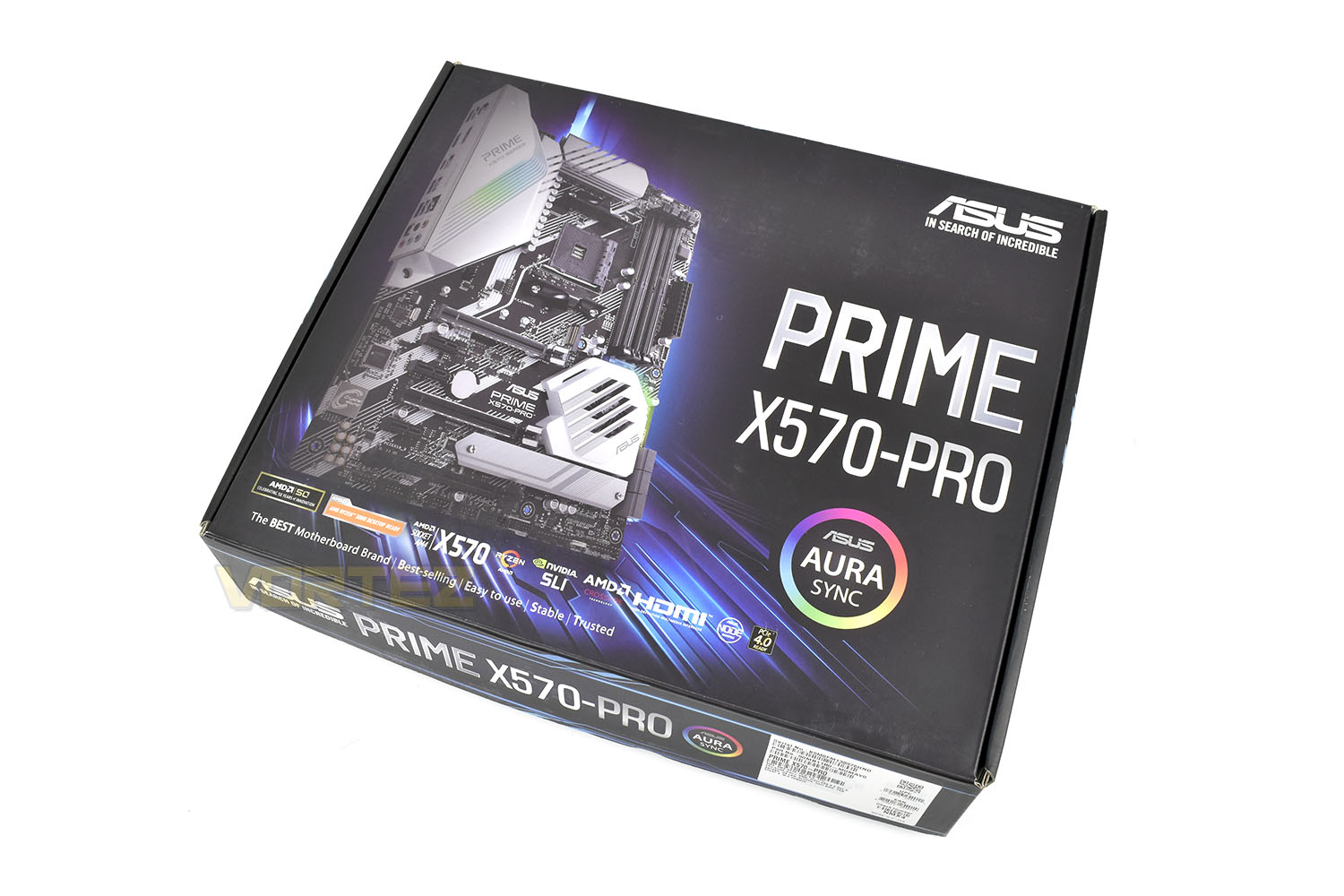
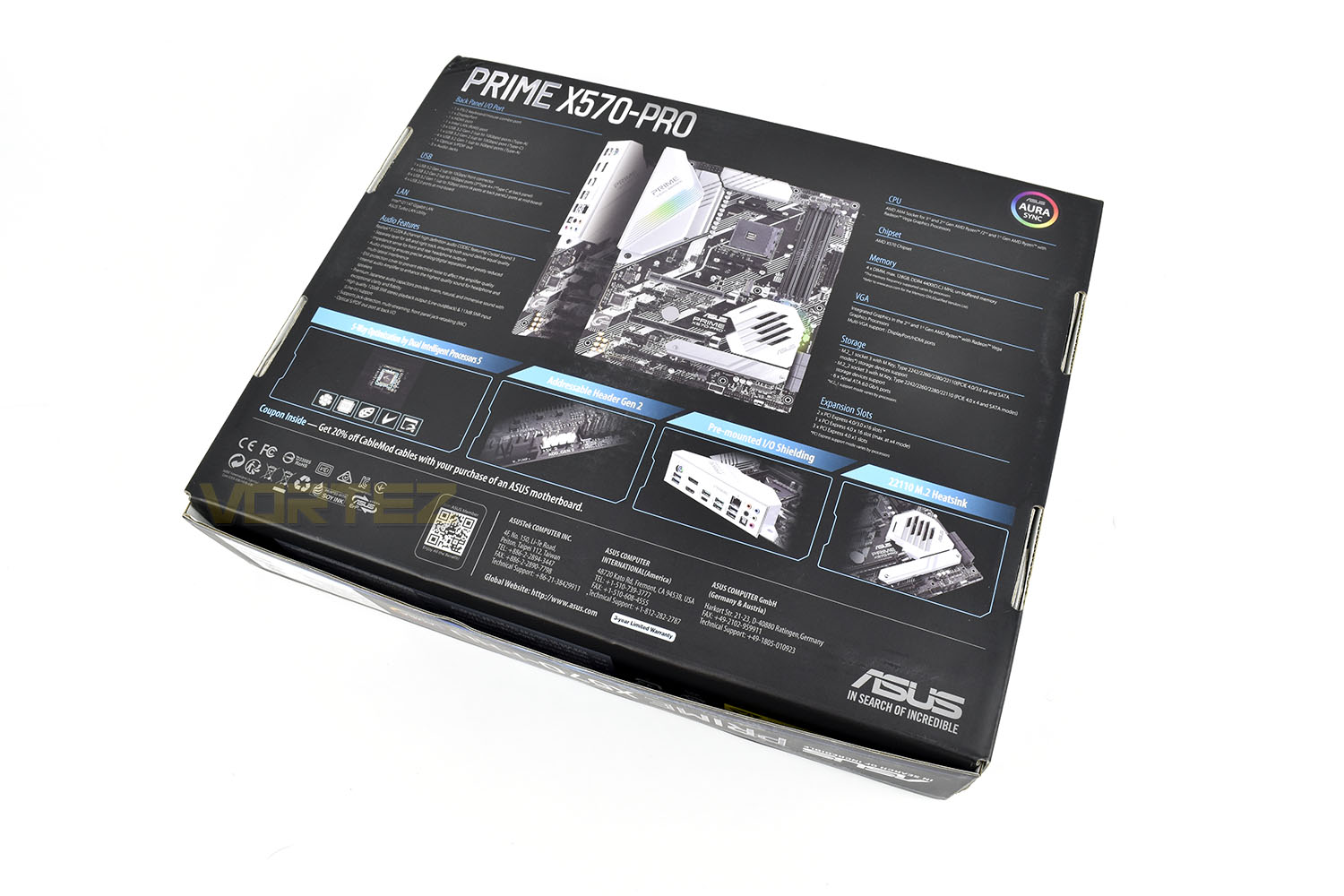
The professional approach is immediately apparent when looking at the rear of the box, with no gamery gimmicks, just down to the facts with a series of lists.
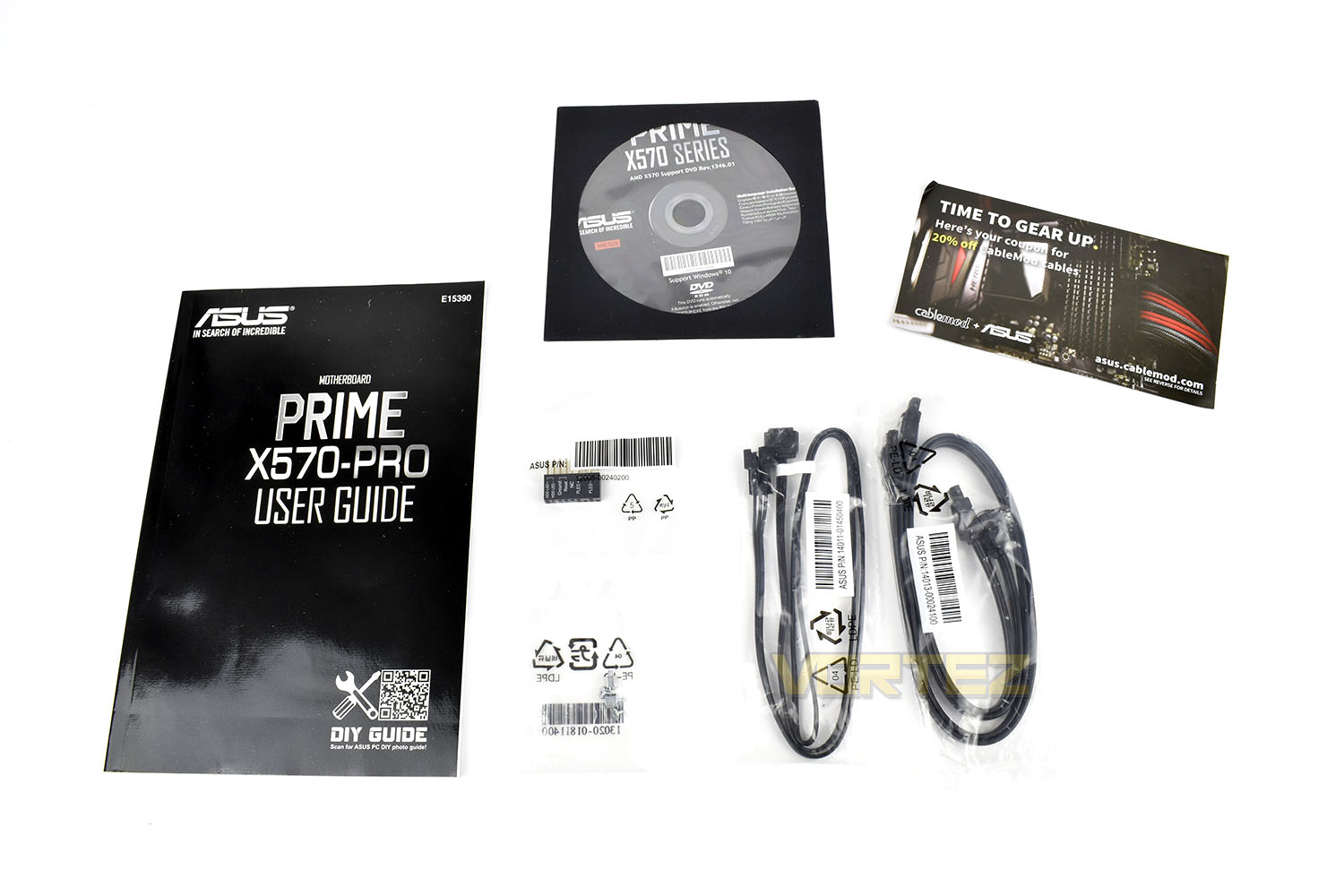
The bundle with the board is kept to a minimum, with two SATA cables, an RGB extension cable, M.2 stand off screws and a front panel connector. And, of course, a driver CD and User Guide.
Closer Look
The black and white styling on the board makes things quite difficult to distinguish, almost like a form of pre-launch camouflage that vehicle manufacturers use when testing their latest models. It’s certainly different and looks funky.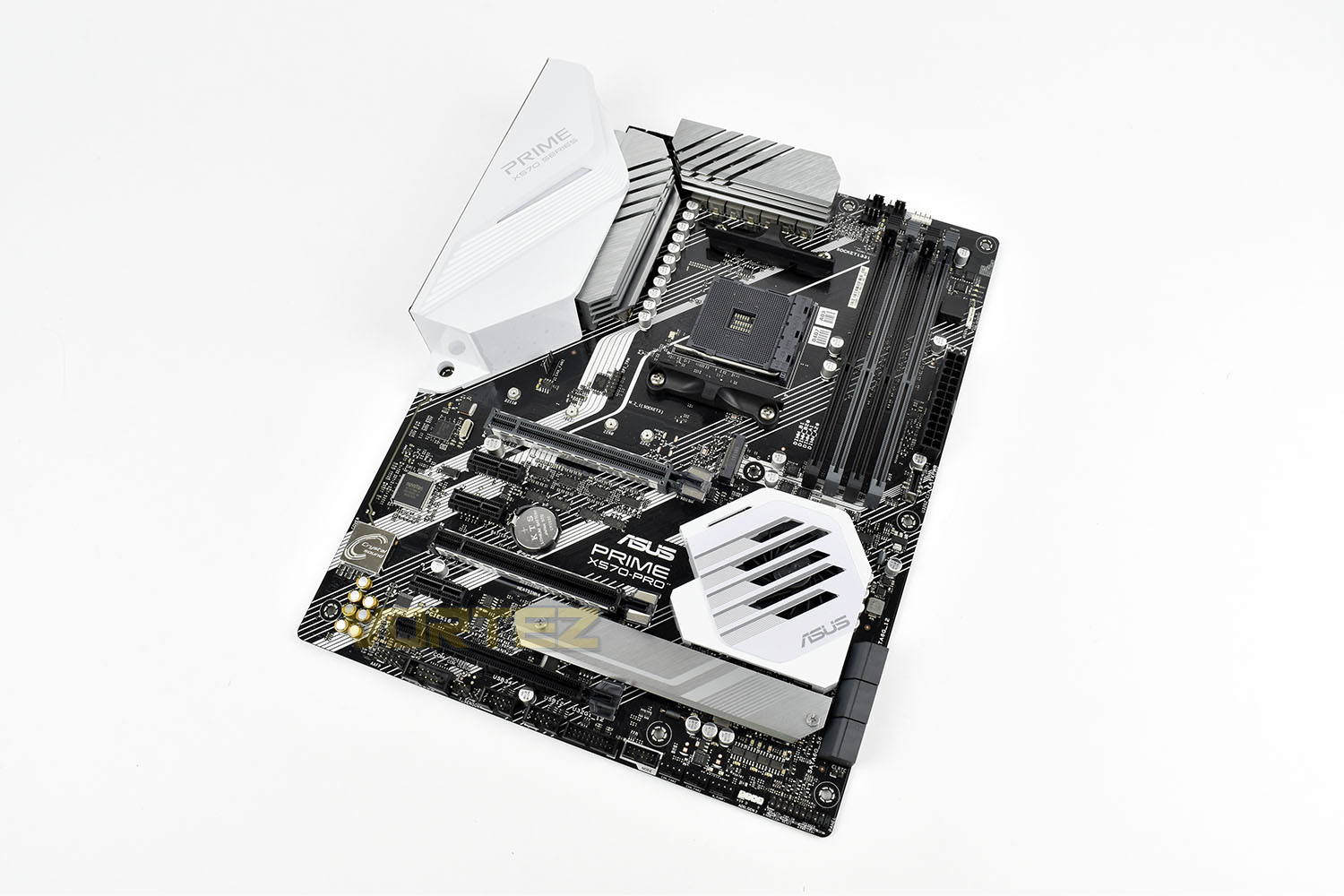
Kicking off with the AM4 CPU socket, the Prime X570-Pro offers full support for all of AMD’s 2nd and 3rd Generation Ryzen CPUs, all the way up to the upcoming Ryzen 9 3950X with 16 cores and 32 threads.
Providing all of the juice for those components is a 12+2-phase with DrMos MOSFETs, alloy chokes and durable capacitors to deliver the power that high core count CPUs require. All of that is cooled through the large silver heatsinks dropped right on top.
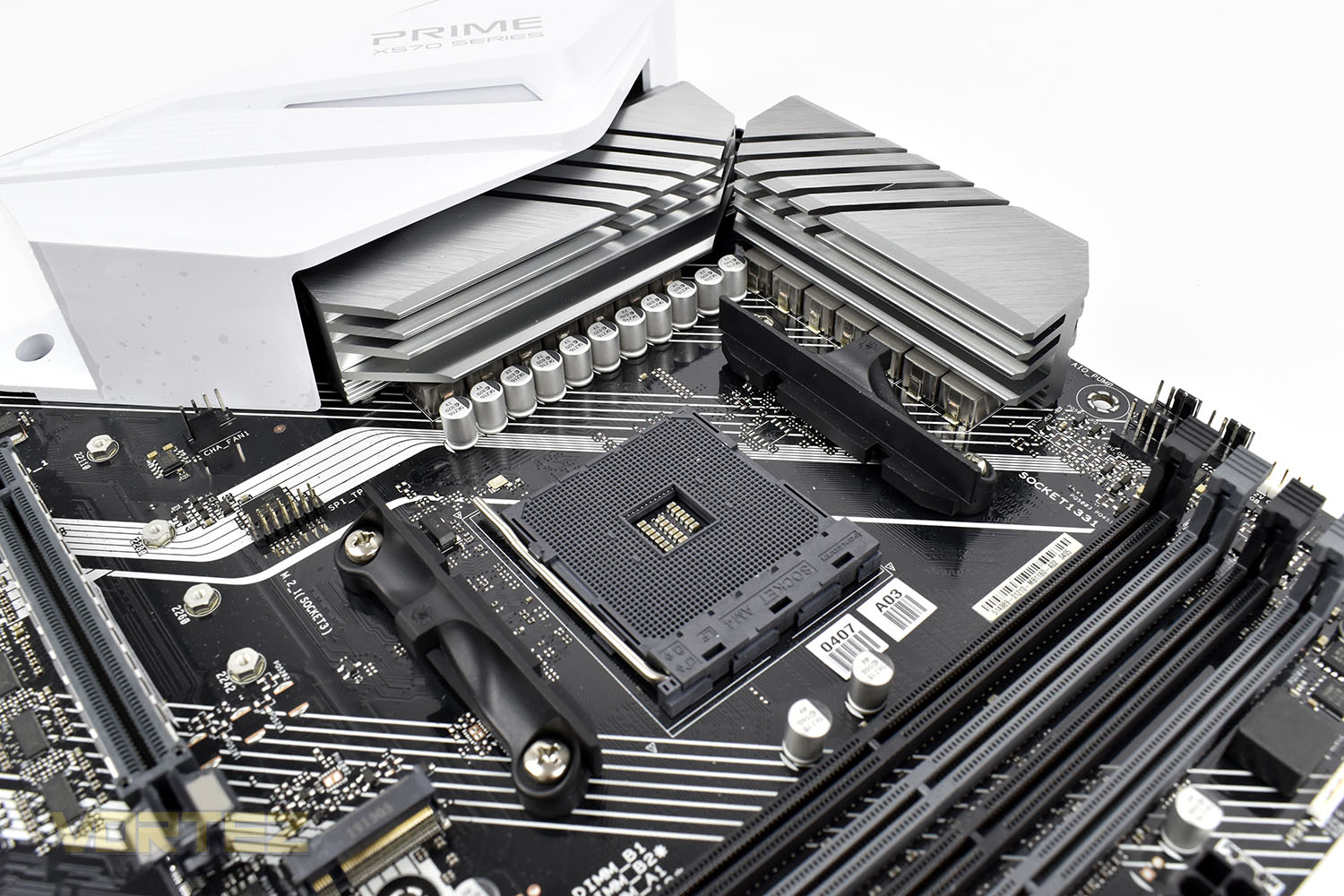
Supporting up to 128GB of 4400MHz DDR4, the Prime X570-Pro certainly goes a long way to warrant its Professional accolades, where large DRAM capacity is often a key factor to performance. To further help memory performance, ASUS OptiMem has been employed which uses optimised memory tracing to improve stability and compatibility.
Also found around the DRAM slots is a trio of 4-pin PWM fan headers, a couple of RGB headers, a power switch and a USB 3.2 Gen. 2 front connector.
Perhaps a little scarce are the SATA ports, only six of them. With ASUS aiming this solution towards the professional, a large storage library might be needed and adding in additional PCI-E SATA cards could add a considerable cost and complexity to the build. Eight or ten SATA ports would’ve been better here, we think. However, you could also argue that a NAS or similar might be in use and would negate the need for most, or possibly all, of the SATA ports, your mileage will vary here, obviously.
The rear I/O is decently populated, with all of the USB ports being rated to a USB 3.2 Gen. 1 as a minimum, with 4 of them exceeding that to 3.2 Gen. 2 for 10Gbps.
There’s also a DisplayPort and HDMI out, Gigabit ethernet and 7.1 audio.
Closer Look (Continued)
PCI-E 4.0 ports are well catered for on the X570-Pro, we get a trio of x16 slots and the same in x1 which should give plenty of scope for expansion cards. There’s also a pair of NVMe 4.0 slots, one of which is adorned with a metal heatsink for SSDs that don’t already have one; this can easily be removed and stored in the motherboard box if you wish.Along the bottom of the motherboard, ASUS have equipped the Prime X570 with three 4-pin PWM connections and internal and external USB headers.
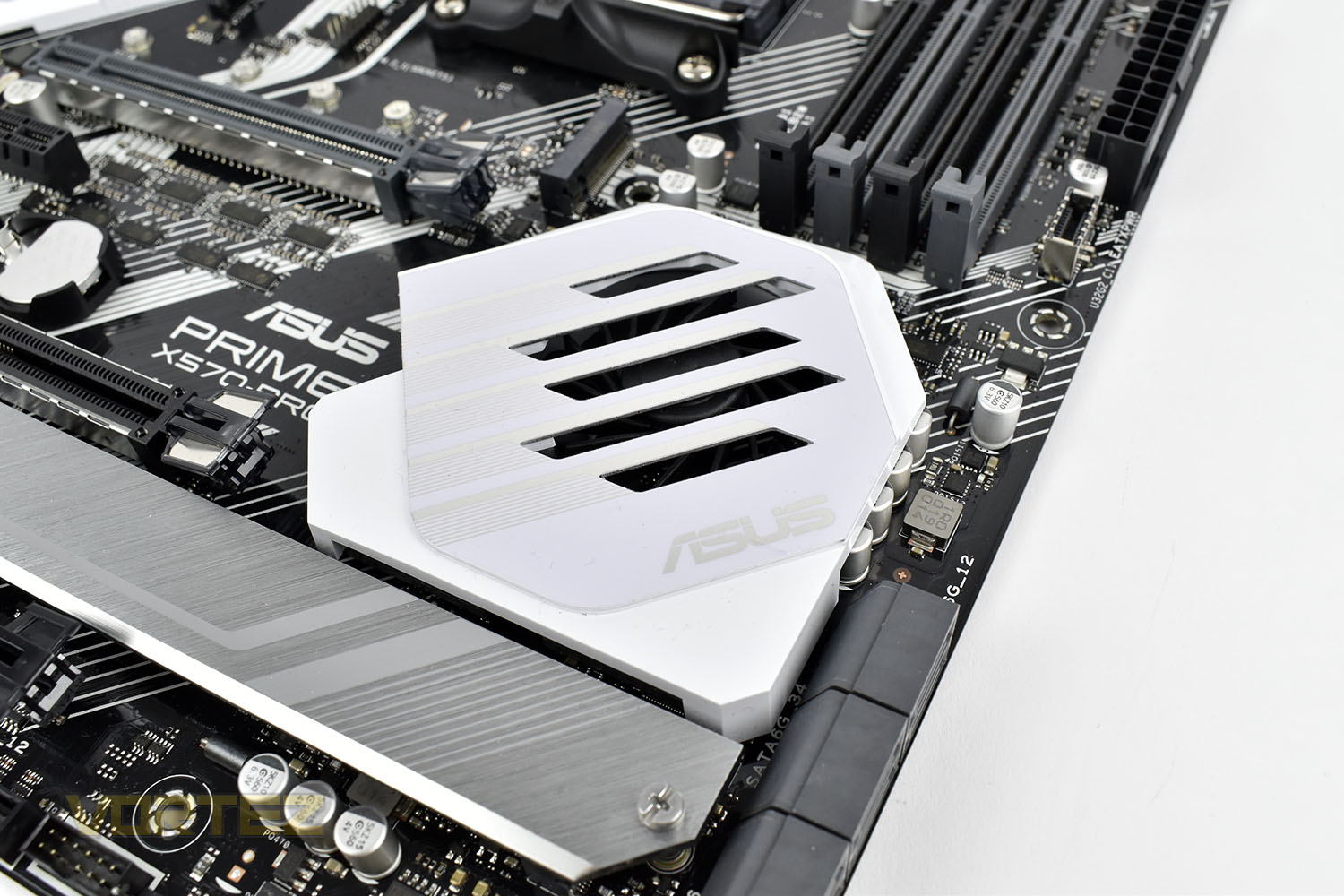
The 40mm fan hidden behind the white shroud is used to keep the power-hungry X570 chipset FCH cool under heavy loads, with the new PCI-E 4.0 specification generating quite a bit of heat when it’s called upon.
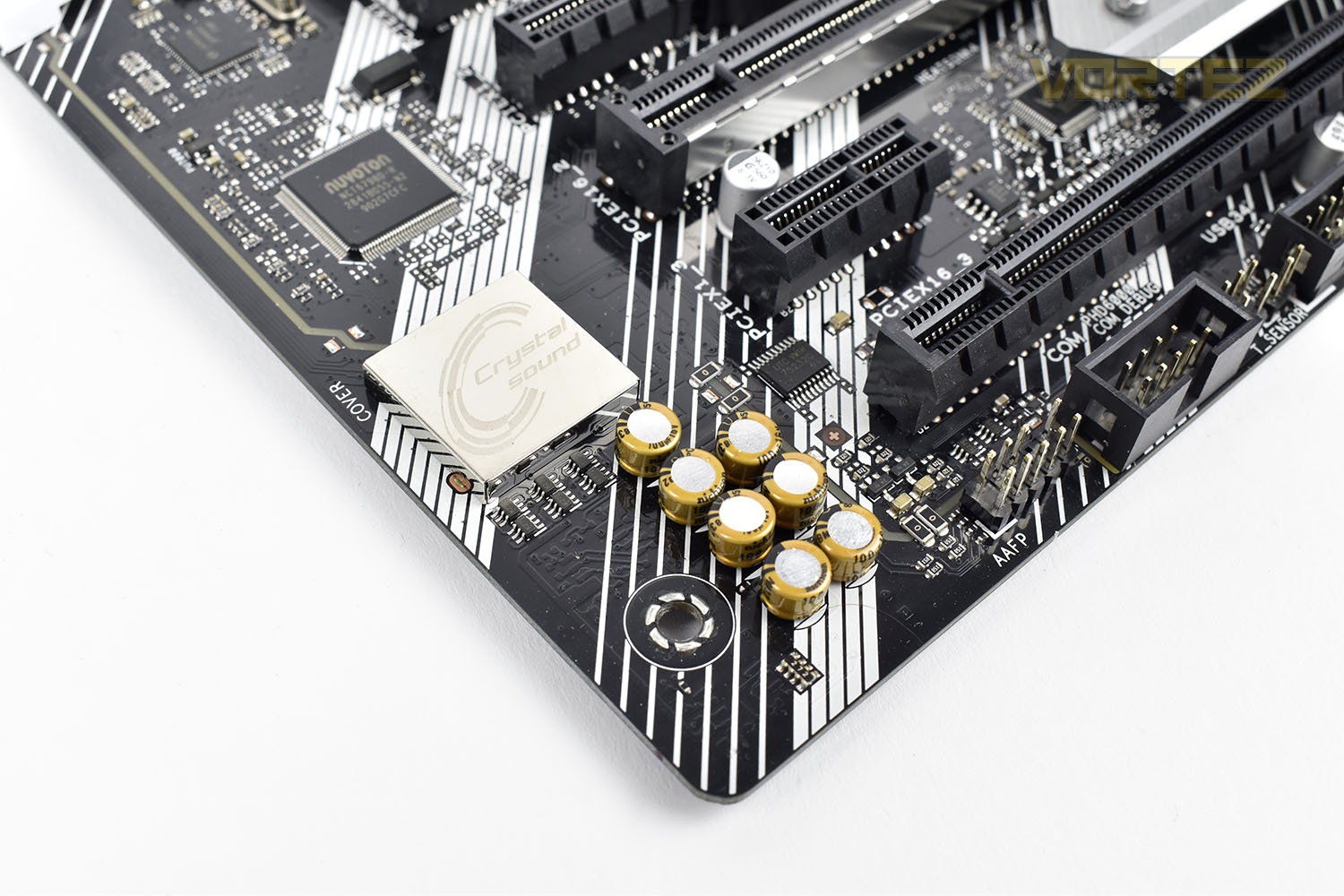
Finally, the audio solution, where ASUS have worked in close collaboration with Realtek to implement the Realtek S1220A audio codec, featuring 120dB SNR for the stereo line-out and 113dB SNR for the line-in, providing clear audio. Additionally, an impedance sensor can detect the optimal range for your headphones and make the relevant adjustments to the system to improve audio quality further.
BIOS
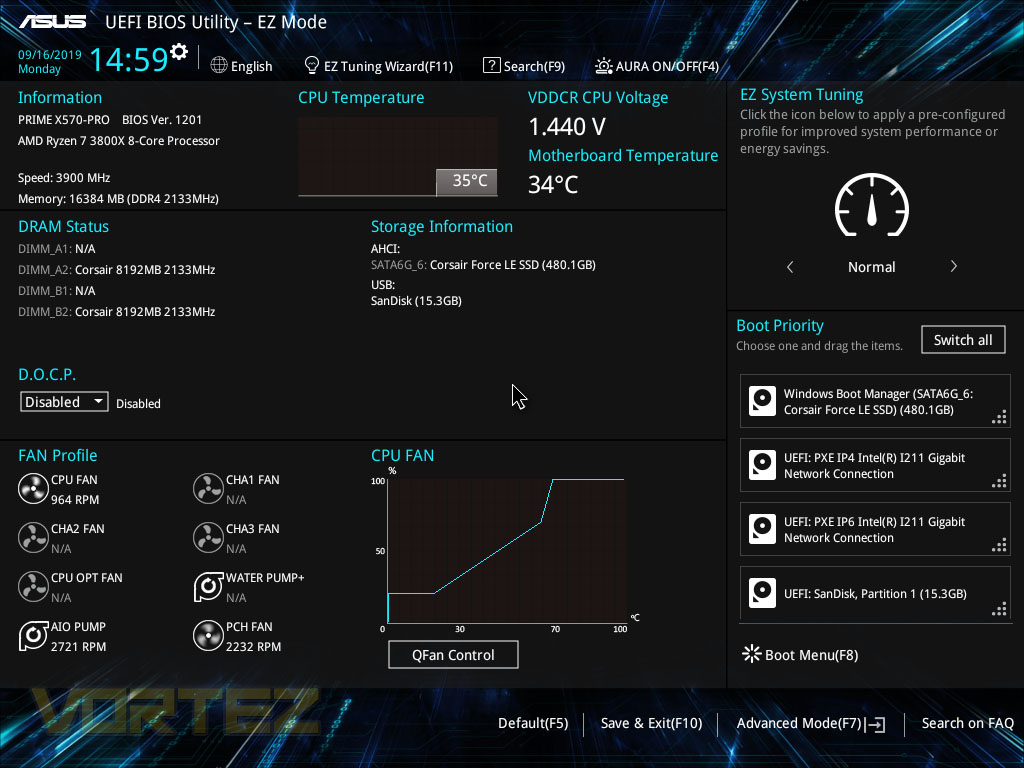
ASUS made their target audience clear for the Prime X570-Pro, aiming it directly towards professional users who rely on the performance of their machine to get stuff done, so tweaking in the BIOS might very well play a part here. If you can save yourself a minute or two on a process, several times per day or week, the differences can quickly mount up, so overclocking the processor or RAM would very much make sense here. However, it could also be argued that overclocking isn’t something that you can just stumble into and do, and the line between a professional and a PC enthusiast may become blurred sometimes but you definitely get people strictly either side of the ven diagram. For that reason, you need to know what you’re doing or have a simple BIOS into which you can follow straightforward guides.In EZ Mode, there’s the option to turn on XMP for your DRAM kit, something which almost everyone will do when building their own system. However, we hit a small bump here. ASUS, for some reason, call the technology that is almost identical to XMP, D.O.C.P. but if you’re not privy to this information, while scouring the BIOS for the setting, you might find yourself becoming quite frustrated.
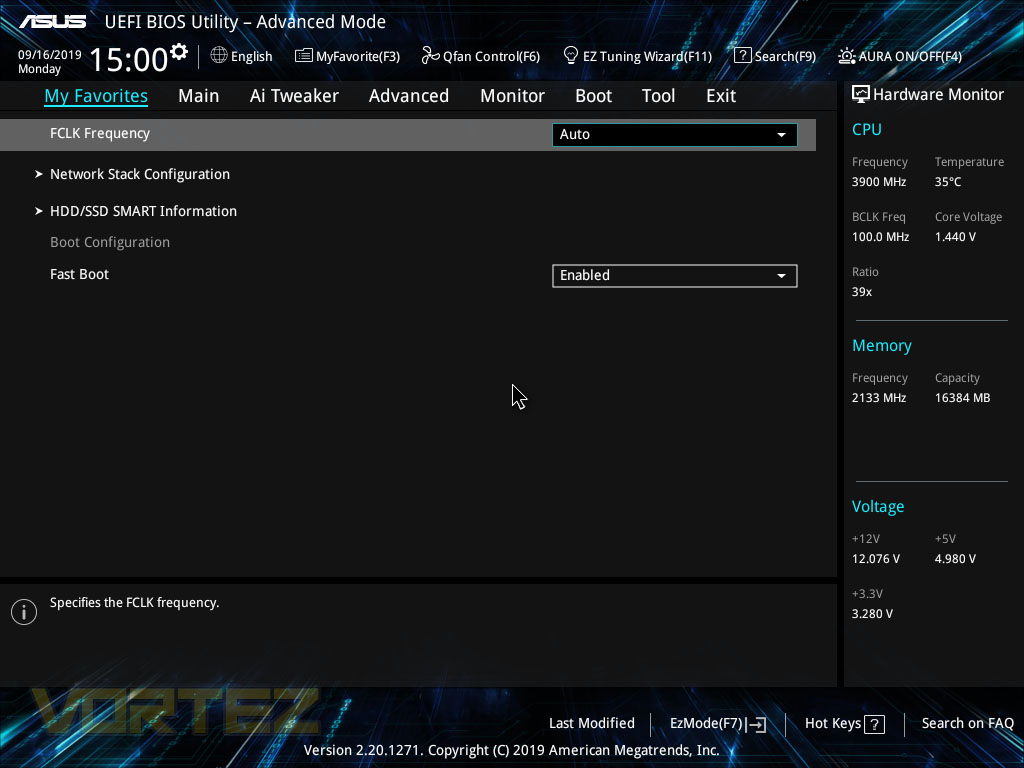
Jumping into the advanced mode, the first tab is “My Favourites”, you can press F3 on any settings found around the BIOS and they’ll be shortlisted here.
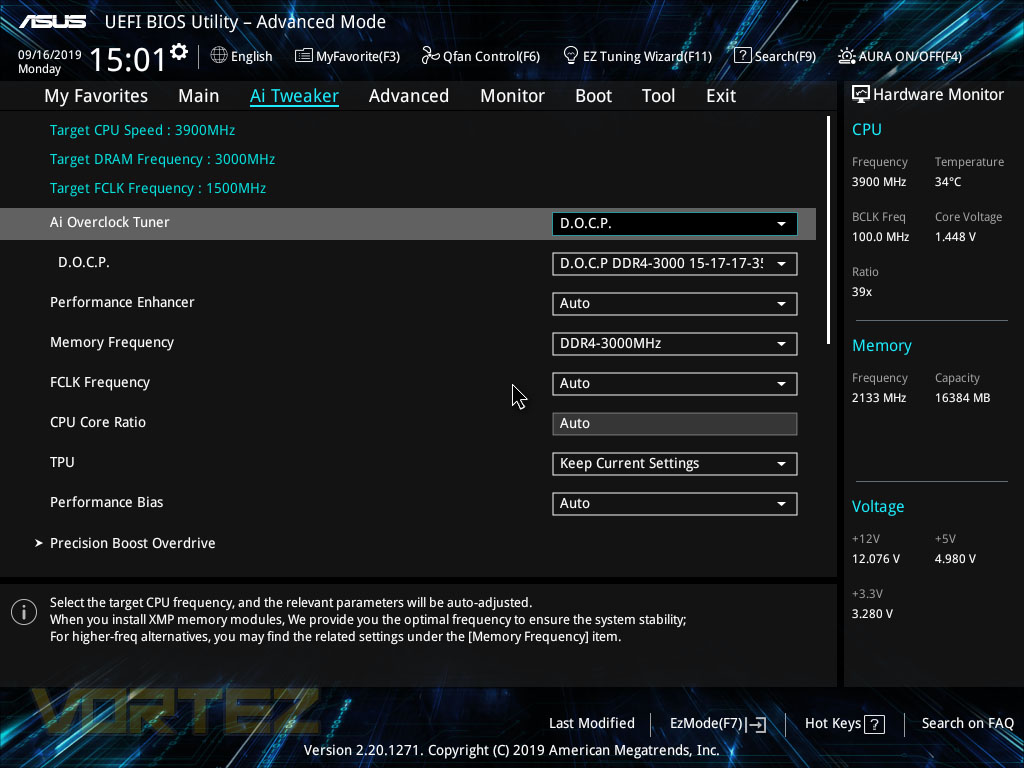
On the right hand side there’s a brief breakdown of all of the system’s main frequencies and voltages to check at a glance.
Next up is the AI Tweaker, we’re not sure what the name is for as there’s not really any artificial intelligence going on here, but this is where you can tune the system components to extract some extra performance.
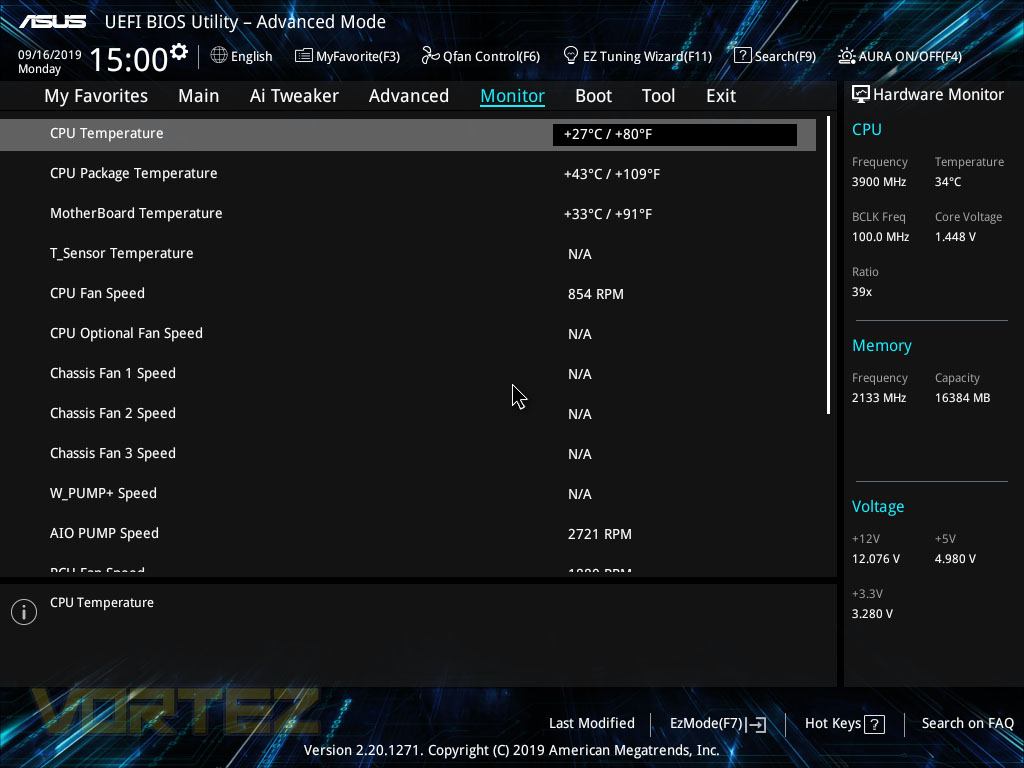
In the Monitor tab, you can keep an eye on all of your system’s temperatures and fan speeds, making sure things are running correctly and nothing’s going wrong.
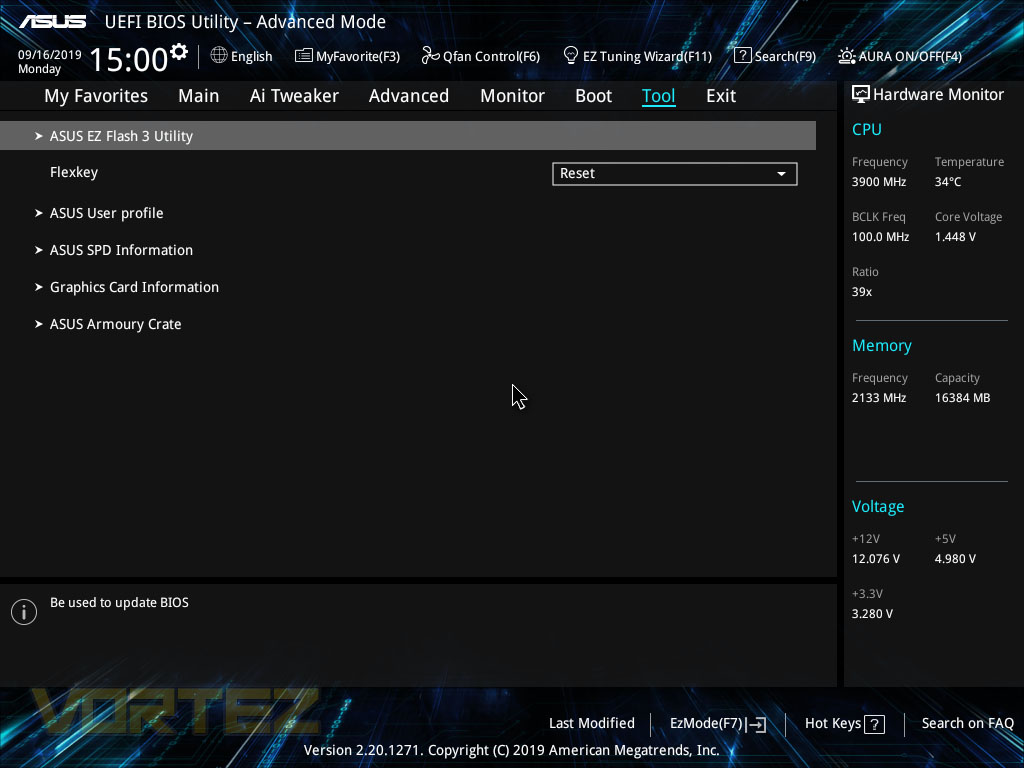
Finally, the Tool tab. On here you can update your BIOS version and check out other obscure sections of the BIOS, such as the SPD information on your DRAM or look into the attached GPU.
Test Setup & Software
BIOS Version Tested: 1201 – 12/09/2019Test Setup
CPU AMD Ryzen 7 3800X
Cooling Corsair” onclick=”window.open(this.href);return false;”>https://vortez.ivtest.isolly.com/corsair_h150i_pro_rgb_review/]Corsair H150i Pro RGB – Balanced Profile
Motherboard
Memory 16GB Corsair Vengeance LPX 3200MHz @ 3000MHz @ 15-17-17-38-58
Graphics AMD Radeon RX 480 8GB
Storage Corsair Force LE 480GB
PSU Corsair RM750X 80 Plus Gold Certified PSU
Cooling Corsair” onclick=”window.open(this.href);return false;”>https://vortez.ivtest.isolly.com/corsair_h150i_pro_rgb_review/]Corsair H150i Pro RGB – Balanced Profile
Motherboard
Memory 16GB Corsair Vengeance LPX 3200MHz @ 3000MHz @ 15-17-17-38-58
Graphics AMD Radeon RX 480 8GB
Storage Corsair Force LE 480GB
PSU Corsair RM750X 80 Plus Gold Certified PSU
Benchmarks
Cinebench R20 – CPU Score
SiSoftware SANDRA – CPU & Memory benchmarks
POV-RAY – CPU benchmarks
TrueCrypt – CPU benchmarks
AIDA64 – CPU benchmarks & Memory
PCMark 8 Photoshop
PC” onclick=”window.open(this.href);return false;”>https://benchmarks.ul.com/pcmark10]PC Mark 10 Extended Test
3DMark – FireStrike Extreme & TimeSpy
Games – Rise of the Tomb Raider & Total War: WARHAMMER
SiSoftware SANDRA – CPU & Memory benchmarks
POV-RAY – CPU benchmarks
TrueCrypt – CPU benchmarks
AIDA64 – CPU benchmarks & Memory
PCMark 8 Photoshop
PC” onclick=”window.open(this.href);return false;”>https://benchmarks.ul.com/pcmark10]PC Mark 10 Extended Test
3DMark – FireStrike Extreme & TimeSpy
Games – Rise of the Tomb Raider & Total War: WARHAMMER
Other Software
Temperature Analysis: Aida64 & Ryzen Master
Stress Testing Software: AIDA64 Stability Test
CPU Specification Monitoring: CPU-Z
Performance Monitoring: MSI Afterburner
Stress Testing Software: AIDA64 Stability Test
CPU Specification Monitoring: CPU-Z
Performance Monitoring: MSI Afterburner
Benchmarks: Power Consumption
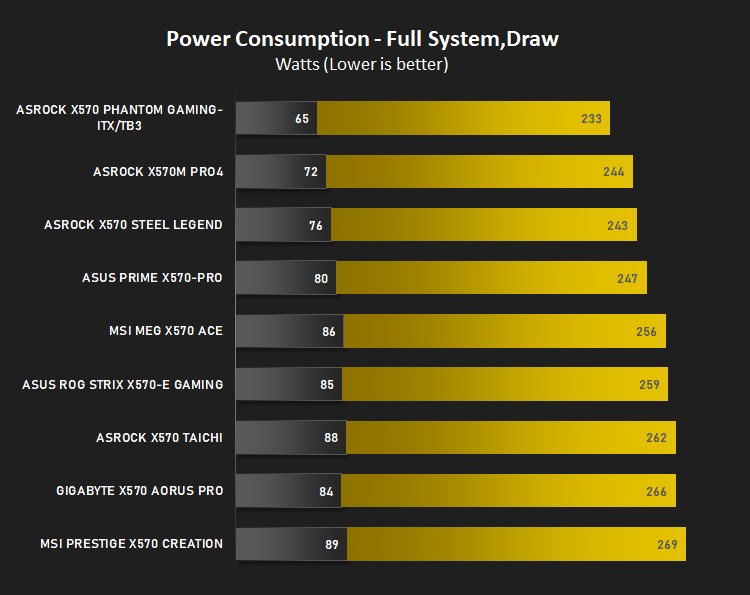
It’s interesting to note the power consumption across all motherboards. Although they are using the X570 chipset, energy results can fluctuate between manufacturers due to the features and specifications that are integrated. First of all, for the idle tests the system is cold booted into Windows and no additional applications are executed – the watts are noted on the external energy monitor we use and then the system is loaded with 3DMark FireStrike – watts are again monitored for the duration of the test and the highest rated wattage result is then noted down. Below are the results of this energy test.
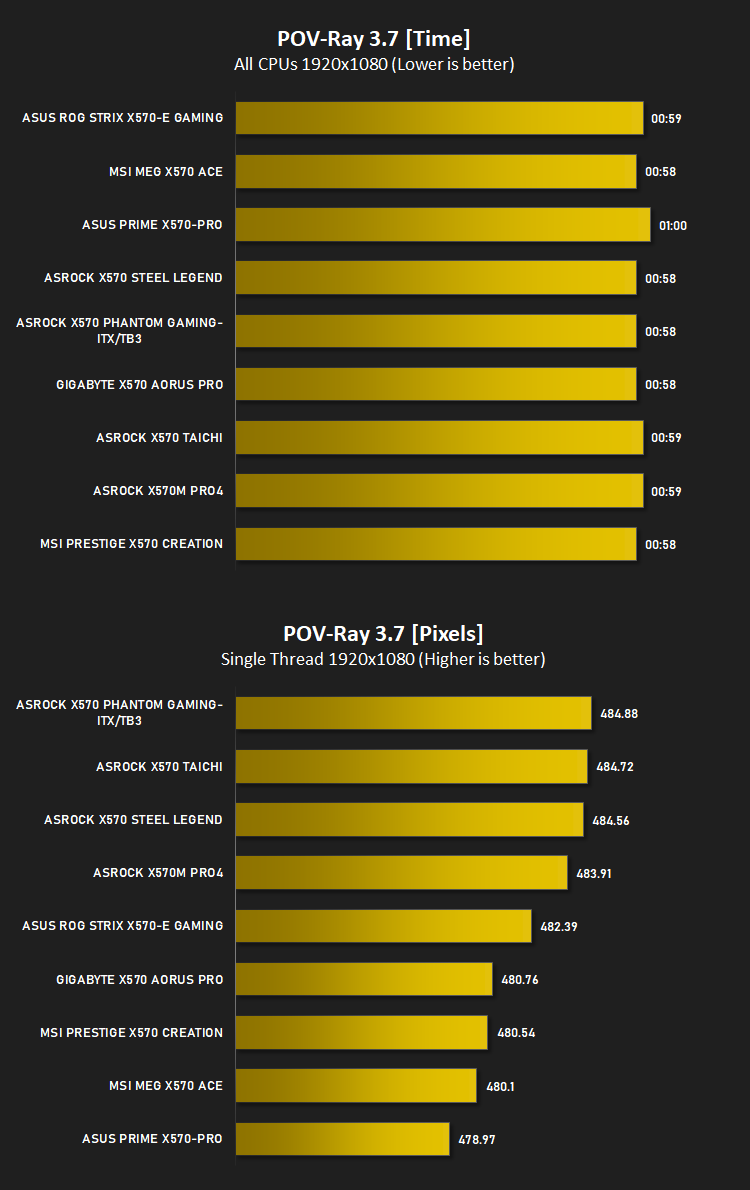
Ray Tracing Performance – POV-Ray 3.7
Persistence of Vision Raytracer’s PovRay is a free and open source 3D animator application with versions for computers with different operating systems.
This product allows users to build their custom 3D worlds with excellent quality despite their computer’s hardware. It has adjustable options for levels of radiance, refraction, and reflection. Calculation time may vary depending on the computer model, but PovRay can adapt to many computer builds, and is supported by the open source community.
This product allows users to build their custom 3D worlds with excellent quality despite their computer’s hardware. It has adjustable options for levels of radiance, refraction, and reflection. Calculation time may vary depending on the computer model, but PovRay can adapt to many computer builds, and is supported by the open source community.
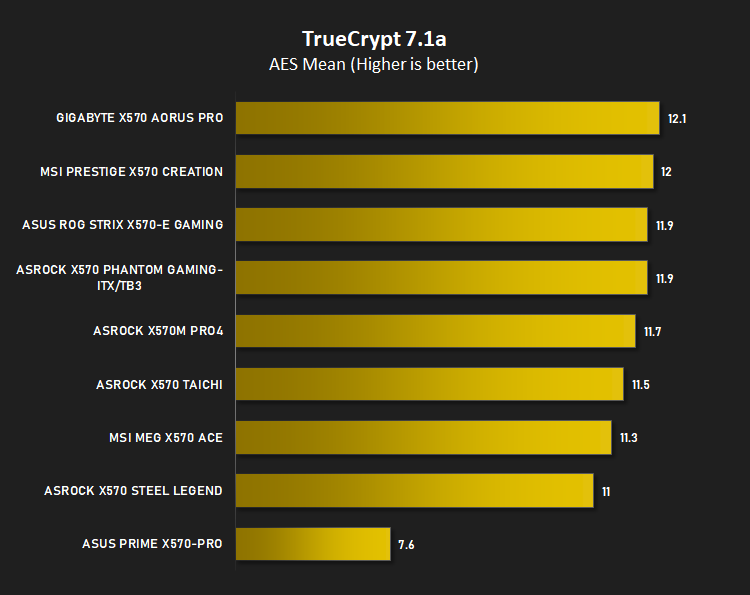
AES Encryption Performance – TrueCrypt 7.1a
TrueCrypt is a discontinued source-available freeware utility used for on-the-fly encryption (OTFE). It can create a virtual encrypted disk within a file or encrypt a partition or (under Microsoft Windows except Windows 8 with GPT) the entire storage device (pre-boot authentication).
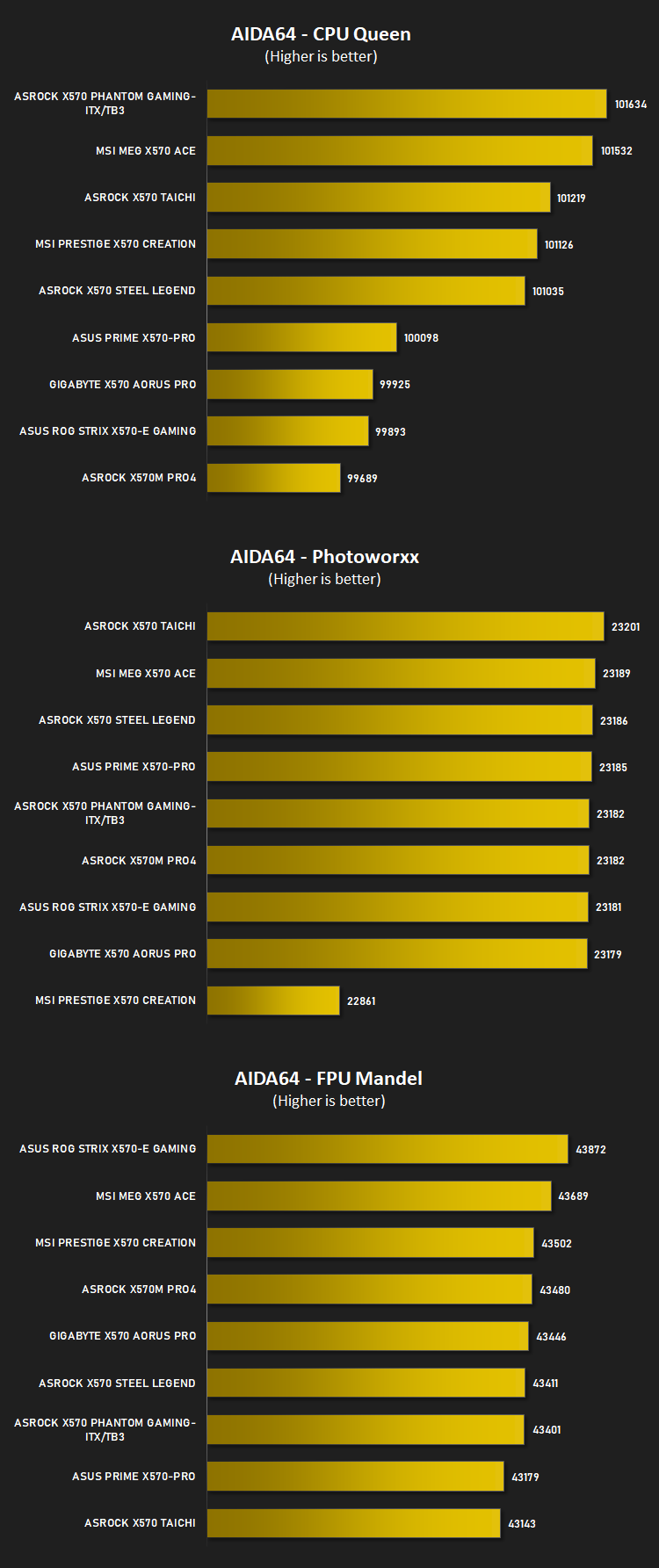
Processing Features Performance – AIDA64
AIDA64 Product PageThis simple integer benchmark focuses on the branch prediction capabilities and the misprediction penalties of the CPU. It finds the solutions for the classic “Queens problem” on a 10 by 10 sized chessboard. At the same clock speed theoretically the processor with the shorter pipeline and smaller misprediction penalties will attain higher benchmark scores. For example — with HyperThreading disabled — the Intel Northwood core processors get higher scores than the Intel Prescott core based ones due to the 20-step vs 31-step long pipeline. CPU Queen test uses integer MMX, SSE2 and SSSE3 optimizations.
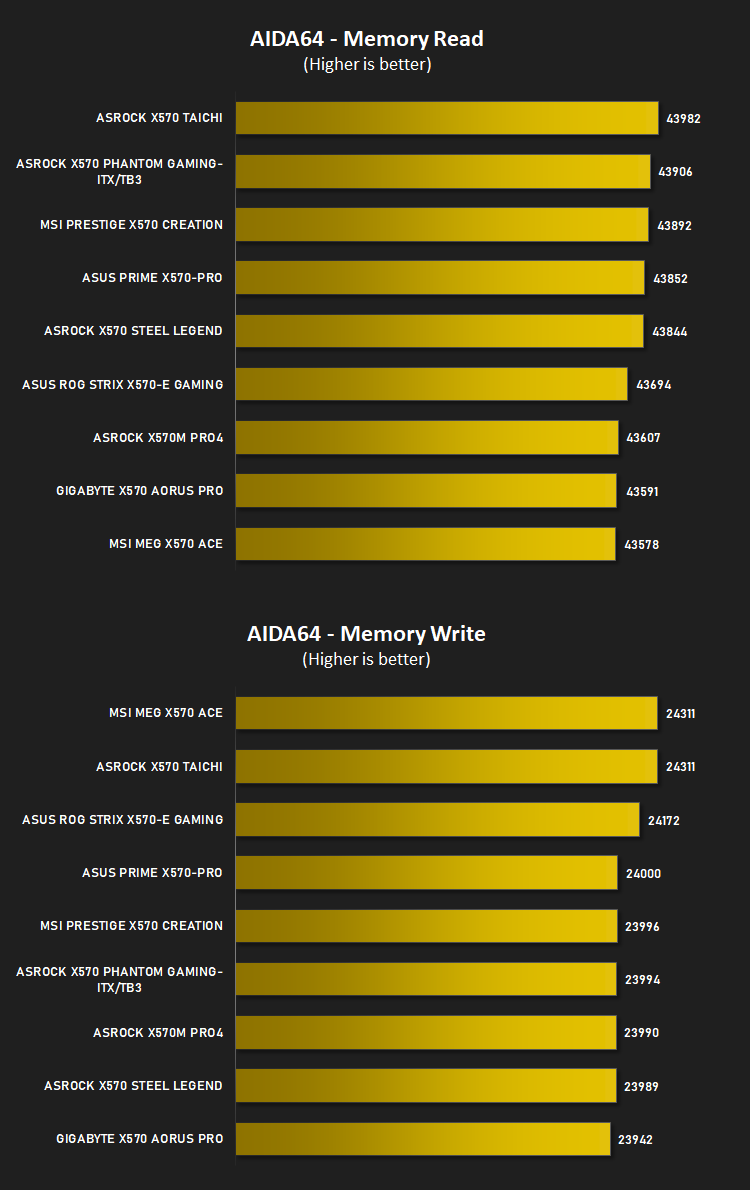
Memory Transfer Performance – AIDA64
AIDA64 Product PageMemory bandwidth benchmarks (Memory Read, Memory Write, Memory Copy) measure the maximum achiveable memory data transfer bandwidth. The code behind these benchmark methods are written in Assembly and they are extremely optimized for every popular AMD, Intel and VIA processor core variants by utilizing the appropriate x86/x64, x87, MMX, MMX+, 3DNow!, SSE, SSE2, SSE4.1, AVX, and AVX2 instruction set extension.
The Memory Latency benchmark measures the typical delay when the CPU reads data from system memory. Memory latency time means the penalty measured from the issuing of the read command until the data arrives to the integer registers of the CPU.
The Memory Latency benchmark measures the typical delay when the CPU reads data from system memory. Memory latency time means the penalty measured from the issuing of the read command until the data arrives to the integer registers of the CPU.
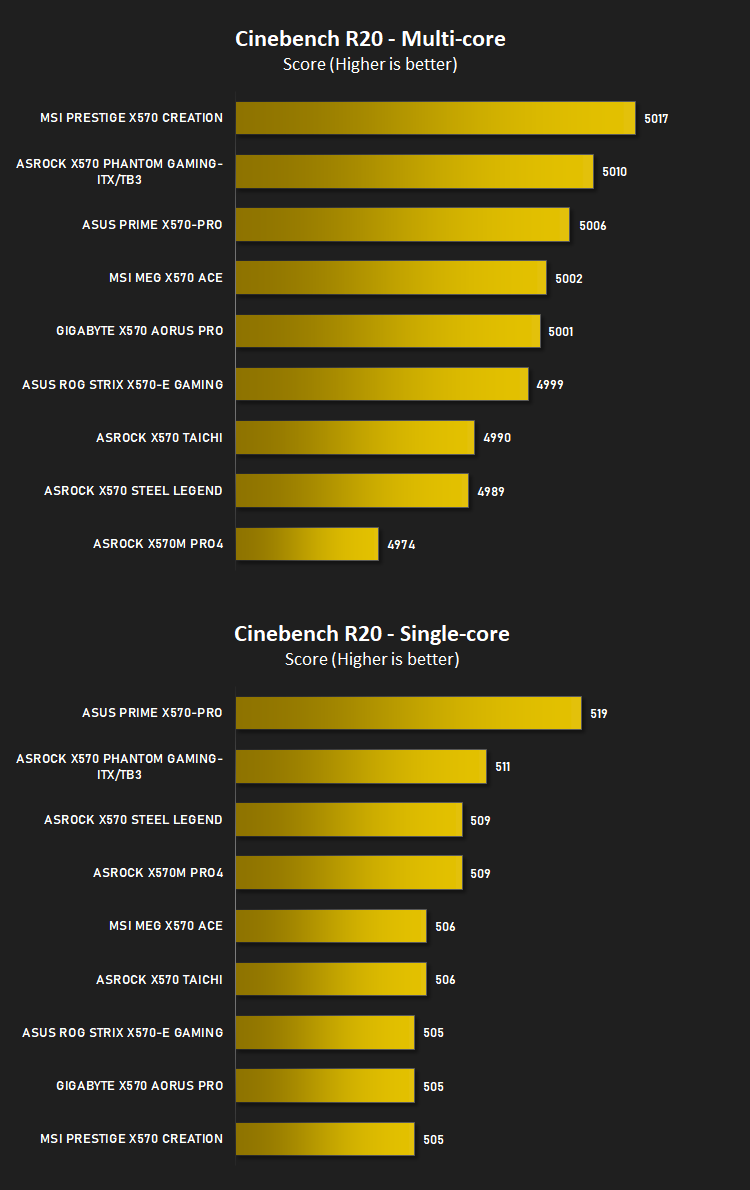
Processing Power Performance – Cinebench R20
Cinebench is a real-world cross-platform test suite that evaluates your computer’s hardware capabilities. Improvements to Cinebench Release 20 reflect the overall advancements to CPU and rendering technology in recent years, providing a more accurate measurement of Cinema 4D’s ability to take advantage of multiple CPU cores and modern processor features available to the average user.
Bandwidth Performance – SiSoftware SANDRA
SANDRA isn’t always a benchmark that is included in hardware reviews but I believe it shouldn’t be ignored. SANDRA provides a vigorous package that tests your system in a rather large array of benchmarks. There are many aspects of benchmark that can be executed. We will be considering – CPU and memory tests.
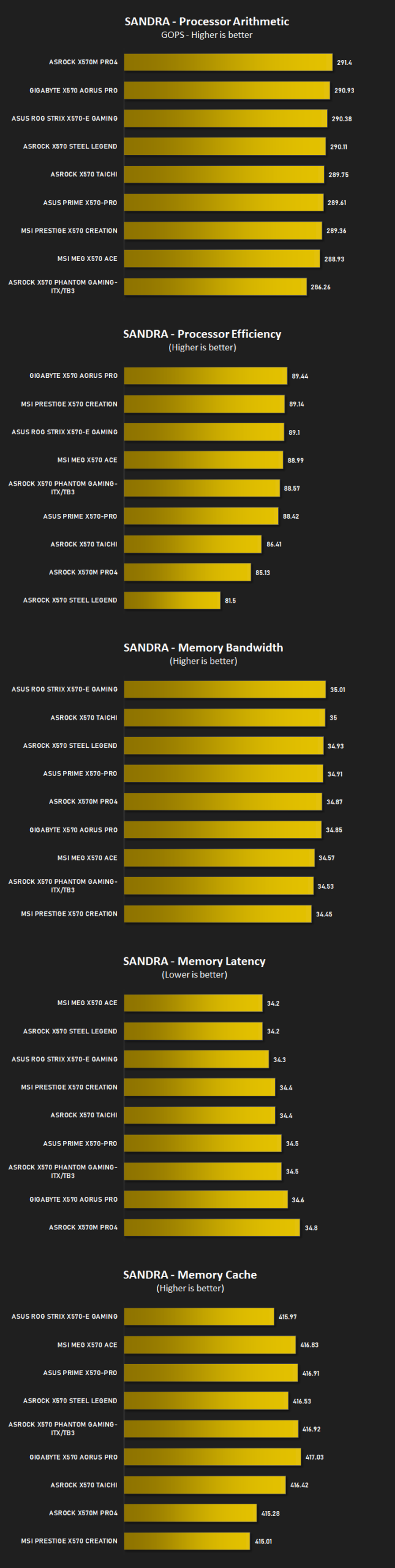
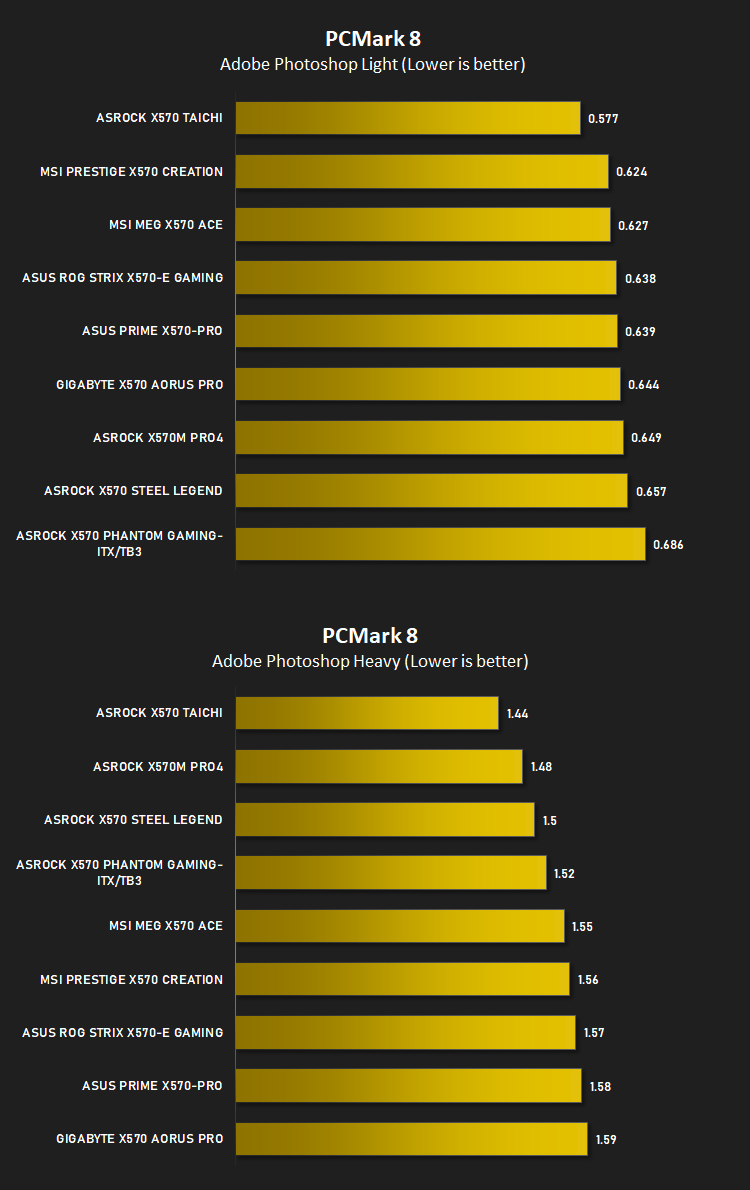
Image Editing Performance – PCMark 8 Photoshop
PCMark 8 Product Page Developed in partnership with Benchmark Development Program members Acer, AMD, Condusiv Technologies, Dell, HGST, HP, Intel, Microsoft, NVIDIA, Samsung, SanDisk, Seagate and Western Digital, PCMark 8 is the latest version in FutureMark’s popular series of PC benchmarking tools. Improving on previous releases, PCMark 8 includes new tests using popular applications from Adobe and Microsoft.
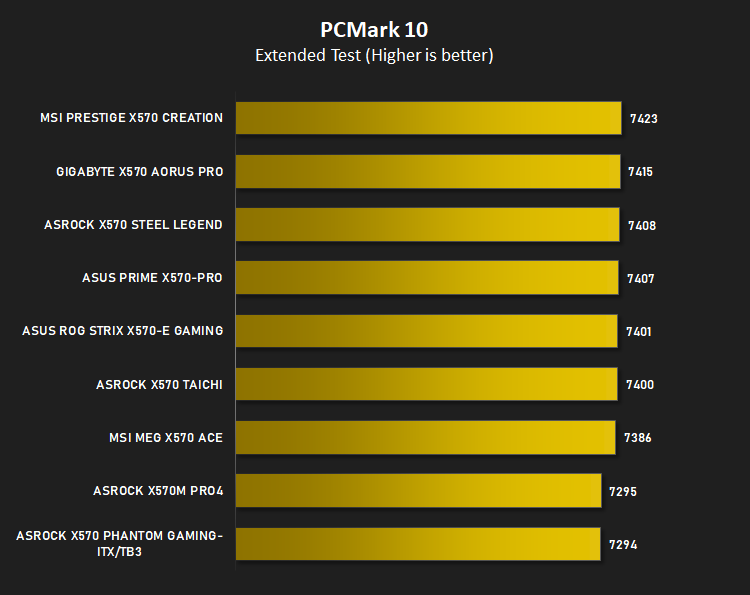
Overall System Performance – PCMark 10
PCMark 10 is the latest version in our series of industry standard PC benchmarks. Updated for Windows 10 with new and improved workloads, PCMark 10 is also faster and easier to use.
PCMark 10 features a comprehensive set of tests that cover the wide variety of tasks performed in the modern workplace. With a range of performance tests, custom run options, and the new Battery Life Profile, PCMark 10 is the complete PC benchmark for the modern office.
PCMark 10 features a comprehensive set of tests that cover the wide variety of tasks performed in the modern workplace. With a range of performance tests, custom run options, and the new Battery Life Profile, PCMark 10 is the complete PC benchmark for the modern office.
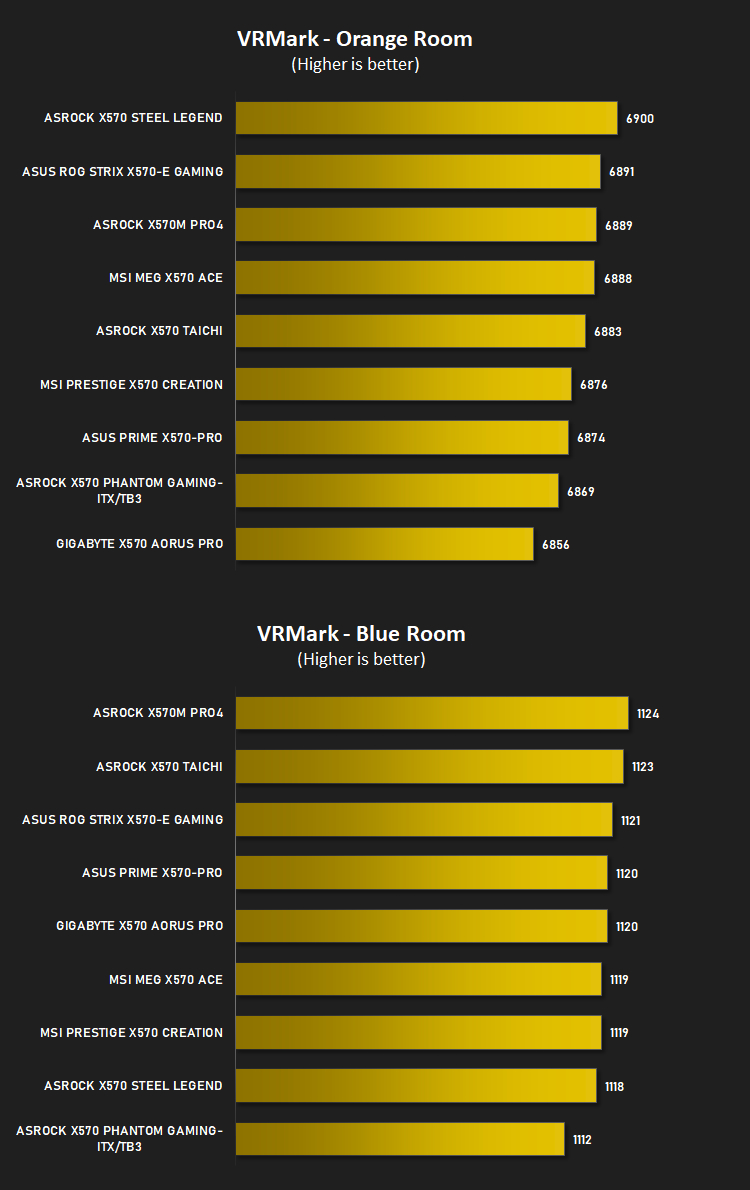
VR Performance – VRMark
VRMark Product PageVRMark includes two VR benchmark tests that run on your monitor, no headset required, or on a connected HMD. At the end of each test, you’ll see whether your PC is VR ready, and if not, how far it falls short.
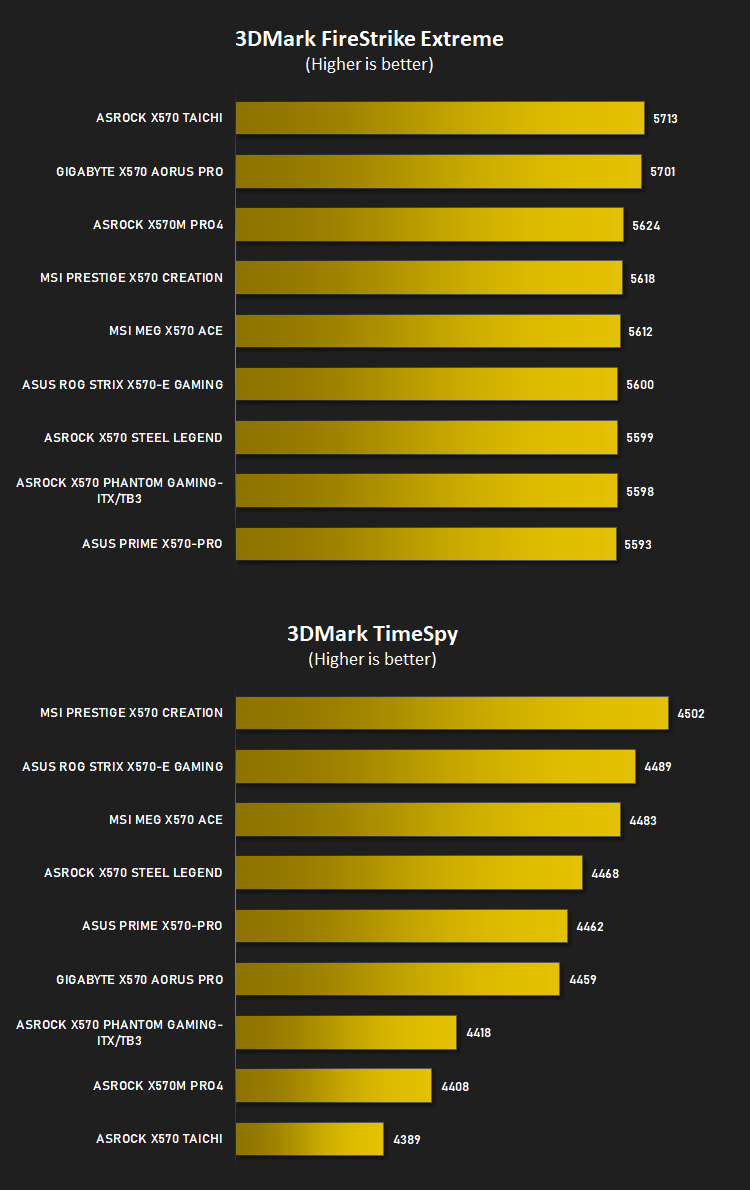
3D Performance – 3DMark
3DMark FireStrike Product PageFire Strike is our new showcase DirectX 11 benchmark designed for high-performance gaming PCs. It is our most ambitious and technical benchmark ever, featuring real-time graphics rendered with detail and complexity far beyond what is found in other benchmarks and games today. Fire Strike will only be available in the Windows editions of 3DMark initially.
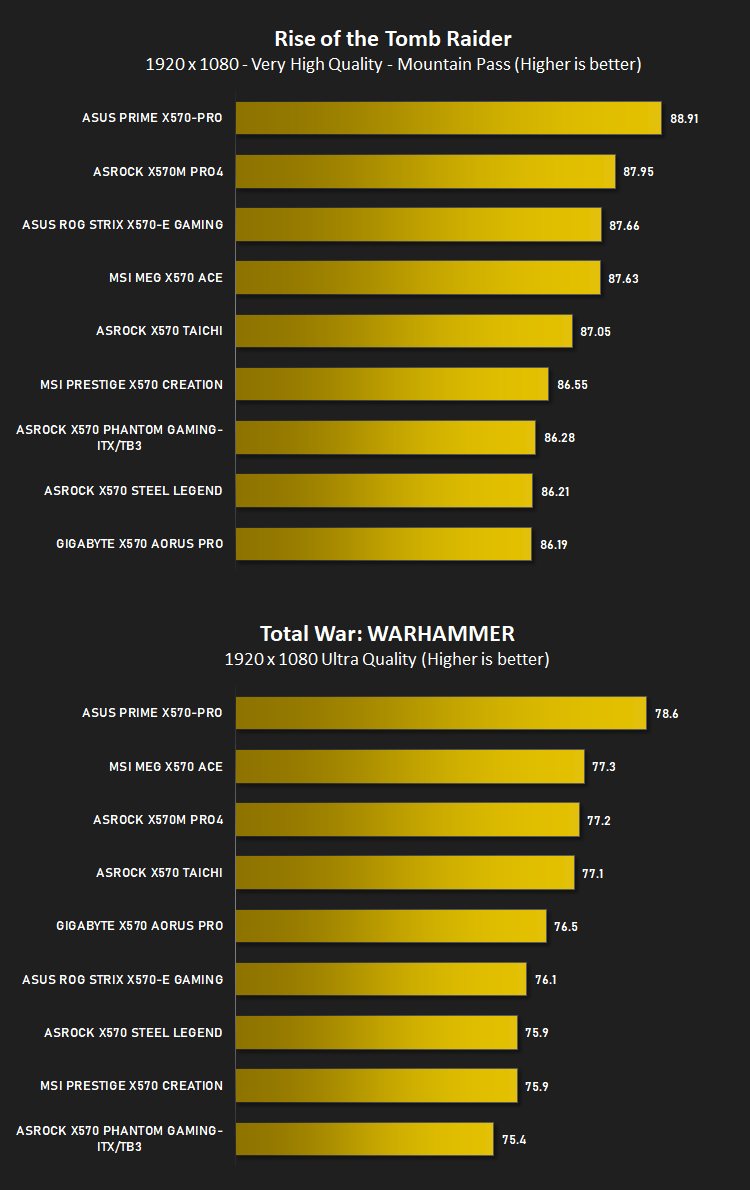
Gaming Performance – Rise of the Tomb Raider & Total War: WARHAMMER
It’s important for us to perform a number of game benchmarks as well as the synthetic tests because gamers will want to know if there are any significant benefits. So here we have two recent gaming titles.
Conclusion
The ASUS Prime X570-Pro arrives onto market with an RRP of £239 in the UK, $239 in the US and $349 in Australia, a large asking price in the grand scheme of things, but certainly not as expensive as other options.The Prime series offers an elegant design using neutral themes that should look decent in almost any case, that being said, the design likely won’t matter at all if it’s used by professionals who, we imagine, won’t be too bothered by the appearance of the inside of their chassis. If it works, it works. To that end, ASUS have used a small amount of RGB lighting because if it doesn’t have RGB in 2019, what use is it?
All performance figures considered, the board performs exactly as expected, with the 3800X pumping out impressive figures, as per usual. The 12-core 3900X and the expected 16-core 3950X might well find themselves mounted upon this board when content creators get a whiff of the processing power they can put out.
A pair of NVMe 4.0 slots and six SATA connections is good, but really we’d have liked to see eight or ten SATA ports to really cater to the professional market, even if you can argue that there would most probably be some kind of external mass storage solution elsewhere on the network. Moving straight from that, the board’s network connectivity isn’t exactly ‘top notch’. As a professional option, we’d expect a 2.5G and 1G ethernet, as well as WiFi AX, if possible.
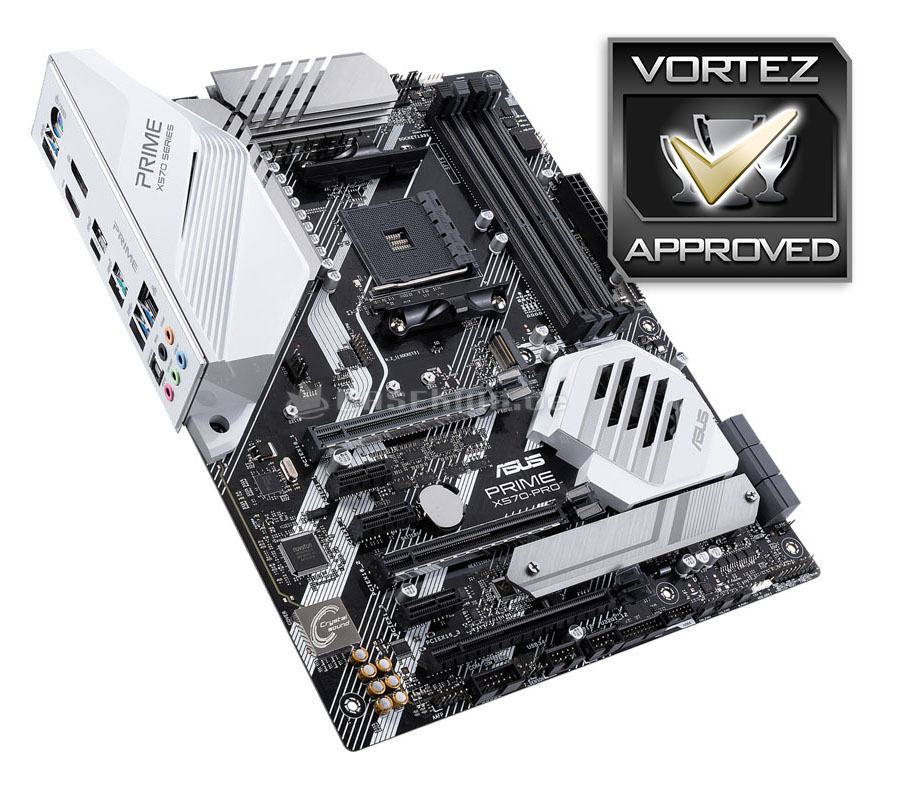
The ASUS Prime X570-Pro offers plenty for the professional market, foregoing many of the gaming or overclocking orientated features to bring a competitive motherboard at a good price point.
Pros
+ Neutral design
+ Good performance
+ Decent pricing
+ Reasonable power draw
Cons
– Just call it XMP, please
– More SATA connections needed
– No 2.5G+ ethernet
– No WiFi
+ Neutral design
+ Good performance
+ Decent pricing
+ Reasonable power draw
Cons
– Just call it XMP, please
– More SATA connections needed
– No 2.5G+ ethernet
– No WiFi
Click here for an explanation of our awards at Vortez.net.
Stay connected with the Vortez Social Media pages:
Join in with the discussions on Discord