Are you looking for a gaming laptop with a budget of £1000, this may be the portable gaming machine for you, with change to grab a bag of Haribo’s.

Product on Review: ASUS ROG Strix GL753V
Manufacturer: ASUS ROG
Street Price: £999 / $1299
Packing a 7th generation Core i5 processor along with 12GB of DDR4 memory, the Strix GL753VD should certainly be able to handle any kind of office or media editing workloads you can throw at it; pair that with M.2 storage, an NVIDIA GTX1050 and a 1080p display and this laptop aims to sensibly smash its way through games.
Priced at £999 in the UK, the laptop can be referred to as relatively low-priced, which is good for those on a tighter budget but still aiming to play games on the move.
The 17.3” monitor boasts a Full HD resolution and 60Hz refresh rates, which the GTX1050 should be able to handle fairly easily. Alongside the NVIDIA discrete graphics sits the Intel HD Graphics 630, ready to take the reins when in 2D mode.

ROG Strix GL753 comes with Windows 10 pre-installed and features a 7th-generation Intel® Core™ i5 quad-core processor, NVIDIA® GeForce® GTX 1050 graphics and full Microsoft® DirectX® 12 support to give you powerful performance and flawless gaming visuals.
Technical Specifications
Processor
Intel® Core™ i5 7300HQ Processor
Operating System
Windows 10 Home
Chipset
Intel® HM175 Express Chipset
Memory
8GB
12GB
Display
17.3″ (16:9) LED backlit FHD (1920×1080) 60Hz Anti-Glare Panel with 72% NTSC with 178˚ wide-viewing angle display
Graphic
NVIDIA GeForce GTX 1050 , with 4GB GDDR5 VRAM
Storage
Hard Drives:
1TB 7200RPM SATA HDD
Solid State Drives:
128GB SATA3 SSD
Optical Drive
Super-Multi DVD
Keyboard
Illuminated Chiclet Keyboard
Card Reader
WebCam
HD Web Camera
Networking
Wi-Fi
Integrated 802.11 AC
Bluetooth
Built-in Bluetooth V4.1
Interface
1 x Microphone-in jack
1 x Headphone-out jack
1 x USB 3.1 TYPE C port(s)
3 x USB 3.0 port(s)
2 x USB 2.0 port(s)
1 x RJ45 LAN Jack for LAN insert
1 x HDMI
1 x mini Display Port
Audio
Built-in Stereo W Speakers And Microphone
Battery
4 Cells 48 Whrs Battery
Power Adaptor
Plug Type :ø5.5 (mm)
Output :
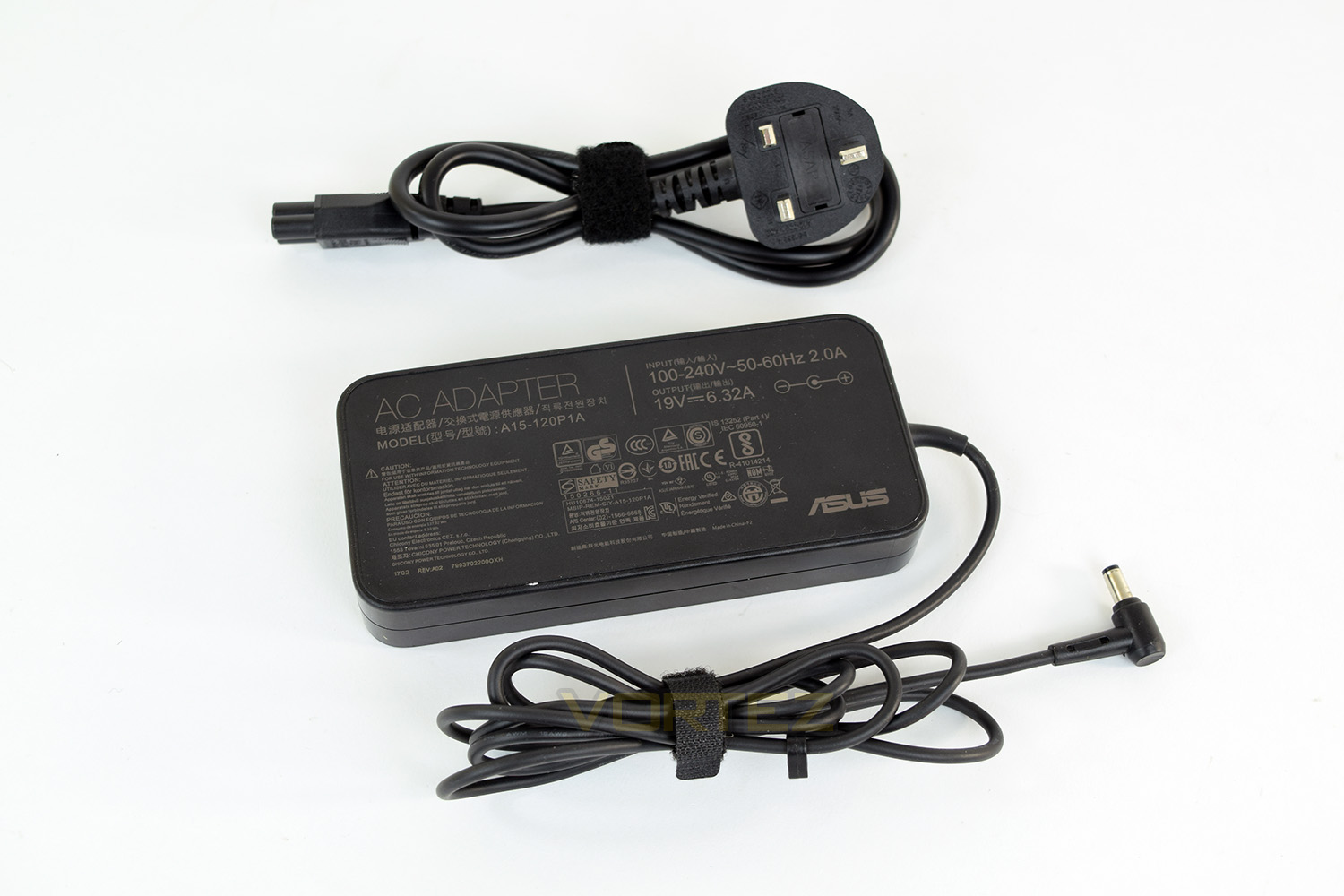
19 V DC, 6.32 A, 120 W
Input :
100 -240 V AC, 50/60 Hz universal
Dimensions
415 x 273 x 30 mm (WxDxH)
Weight
3 kg with Battery
Note
*Product specification and appearance may vary by location and retailer.
Intel® Core™ i5 7300HQ Processor
Operating System
Windows 10 Home
Chipset
Intel® HM175 Express Chipset
Memory
8GB
12GB
Display
17.3″ (16:9) LED backlit FHD (1920×1080) 60Hz Anti-Glare Panel with 72% NTSC with 178˚ wide-viewing angle display
Graphic
NVIDIA GeForce GTX 1050 , with 4GB GDDR5 VRAM
Storage
Hard Drives:
1TB 7200RPM SATA HDD
Solid State Drives:
128GB SATA3 SSD
Optical Drive
Super-Multi DVD
Keyboard
Illuminated Chiclet Keyboard
Card Reader
WebCam
HD Web Camera
Networking
Wi-Fi
Integrated 802.11 AC
Bluetooth
Built-in Bluetooth V4.1
Interface
1 x Microphone-in jack
1 x Headphone-out jack
1 x USB 3.1 TYPE C port(s)
3 x USB 3.0 port(s)
2 x USB 2.0 port(s)
1 x RJ45 LAN Jack for LAN insert
1 x HDMI
1 x mini Display Port
Audio
Built-in Stereo W Speakers And Microphone
Battery
4 Cells 48 Whrs Battery
Power Adaptor
Plug Type :ø5.5 (mm)
Output :
19 V DC, 6.32 A, 120 W
Input :
100 -240 V AC, 50/60 Hz universal
Dimensions
415 x 273 x 30 mm (WxDxH)
Weight
3 kg with Battery
Note
*Product specification and appearance may vary by location and retailer.
Packaging & Bundle
Being a 17.3” laptop, the box it comes in is rather large, but it does offer great protection from the outside world. The box itself features no indication of what the laptop may look like, only showing off the RGB styled STRIX logo across the front.Along with the laptop, the only accompanying piece is the charging block. We’re sure most people would rather they didn’t go down the route of including stickers, USB flash drives and any other cost-incurring pieces and spend the budget on improving the laptop itself, so this could be a smart move from ASUS ROG.
Closer Look
The GL753V comprises of a mixture of plastic and metal, likely due to cost-cutting and an attempt at keeping the weight down.The laptop measures in at 414mm x 272mm x 31mm (16¼” x 10¾” x 1¼”) and tips the scales at 3KG (6lb 9oz)
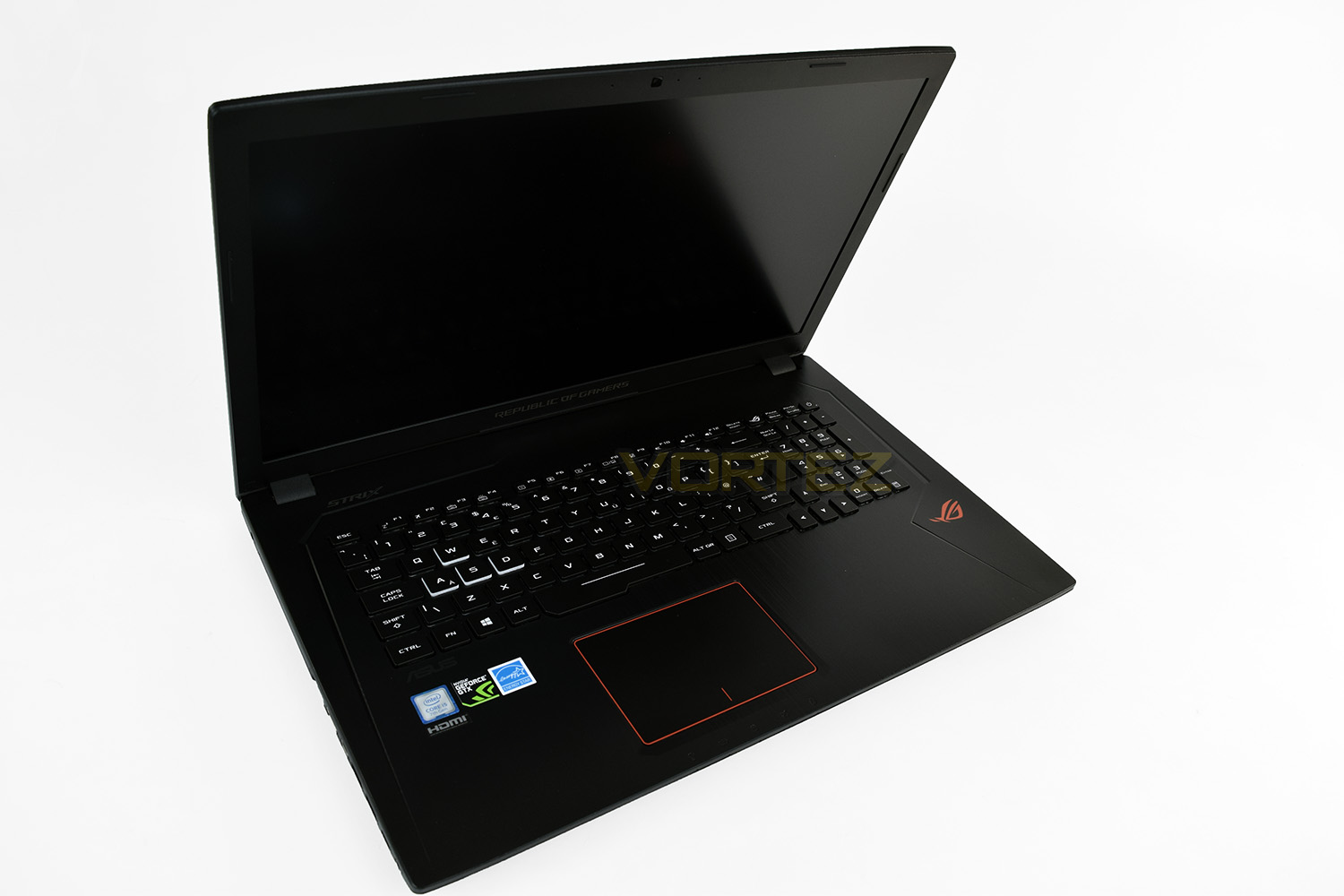
The lid of the laptop is made from black plastic that’s designed to look like brushed aluminium, with some bright orange inlays either side of the ROG logo.
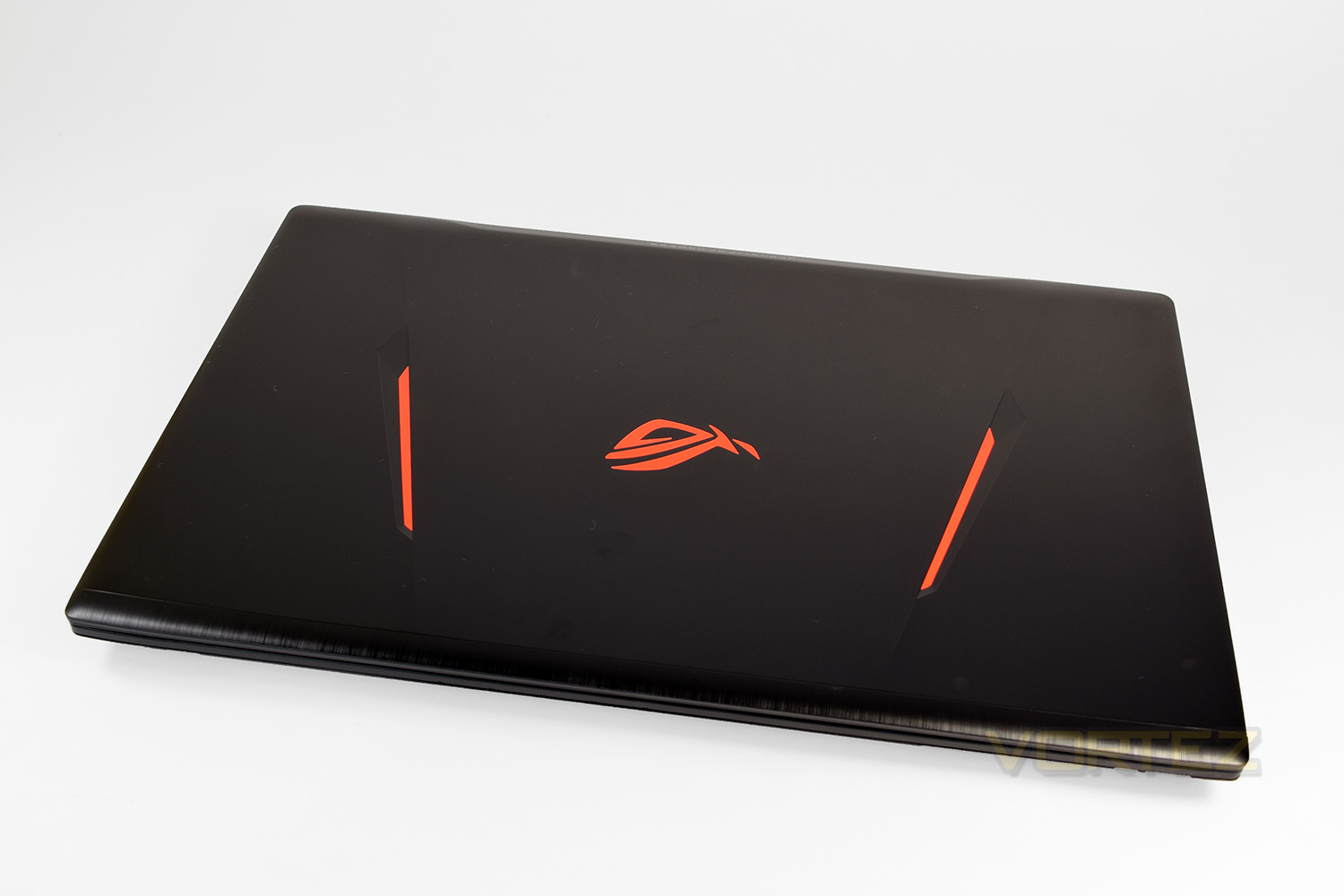
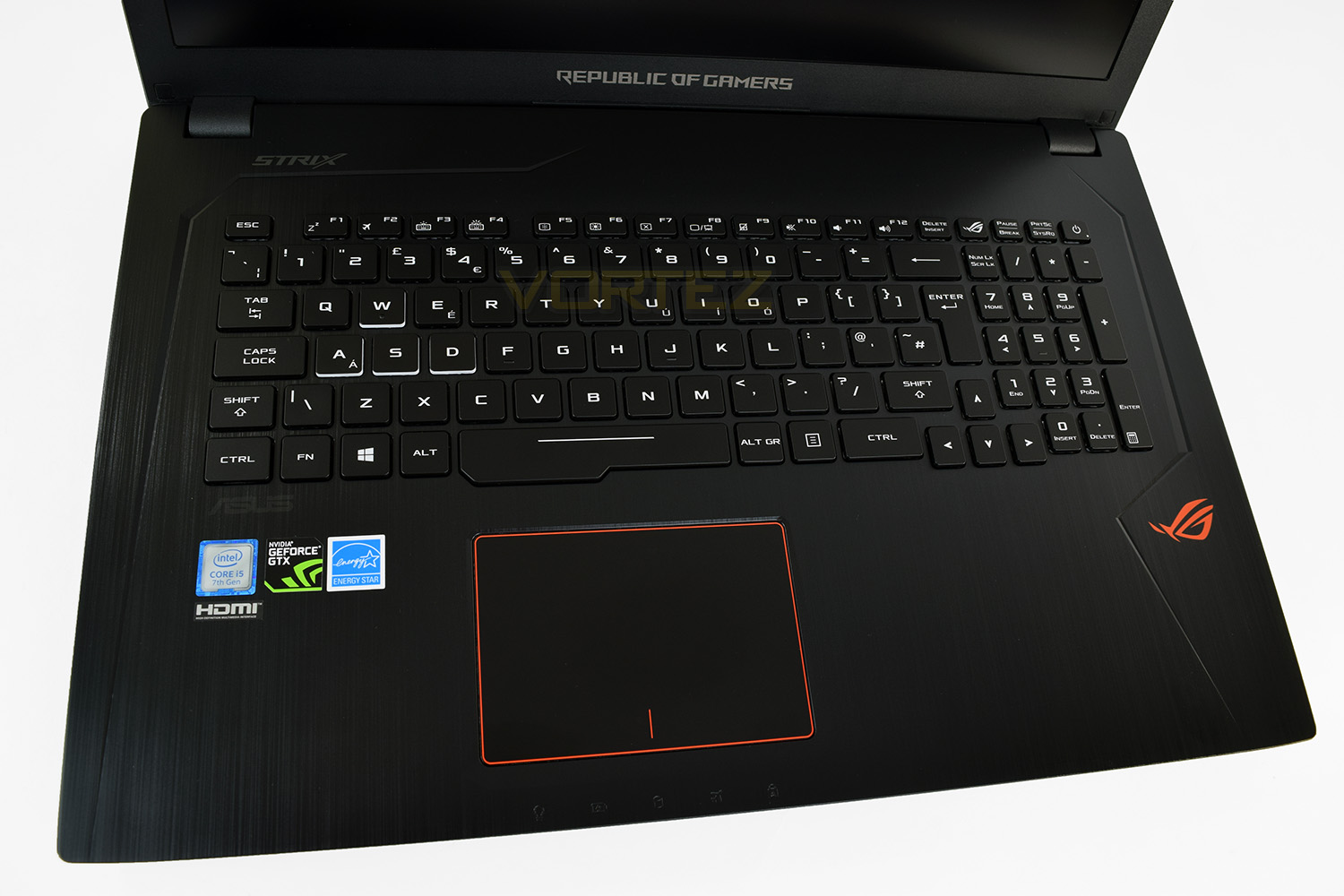
Lifting the lid reveals the 17.3” display along with the centralised keyboard with attached number pad. There’s more orange here, with an ASUS ROG logo in the bottom right and a thin stripe around the perimeter of the trackpad. There are the obligatory case-stickers under the keyboard on the left, displaying Intel’s i5 CPU, the NVIDIA GPU, an Energy Star rating as well as the HDMI branding.
The keyboard features 4 zones for RGB customisation and comprises of scissor switches. The WASD keys are white-bordered to help differentiate them from the rest.
Closer Look (Continued)
The right-hand-side houses 2x USB ports (1x USB 2.0, 1x USB 3.0), an optical Blu-ray drive (do people still use optical media?) and a Kensington lock adaptor.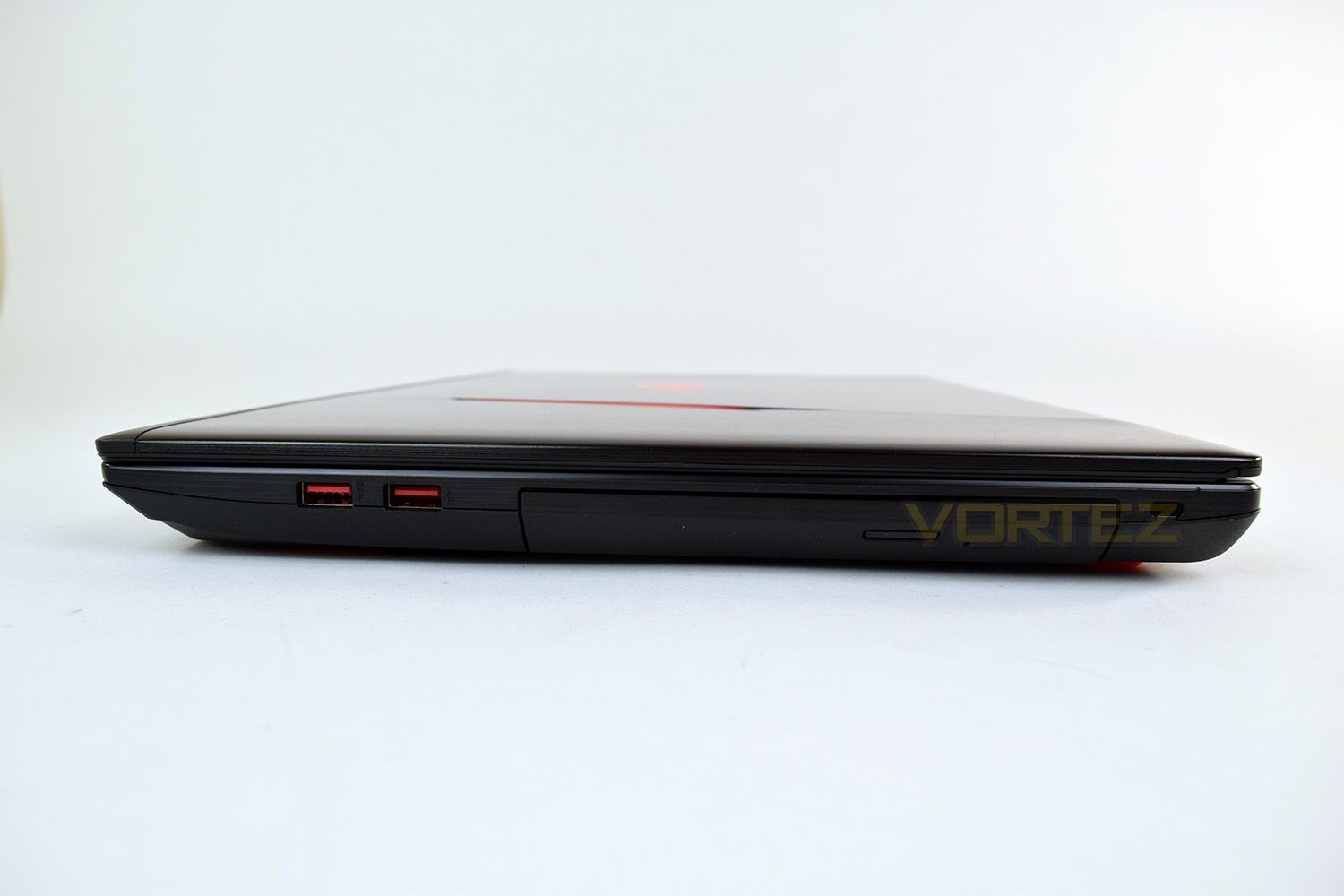
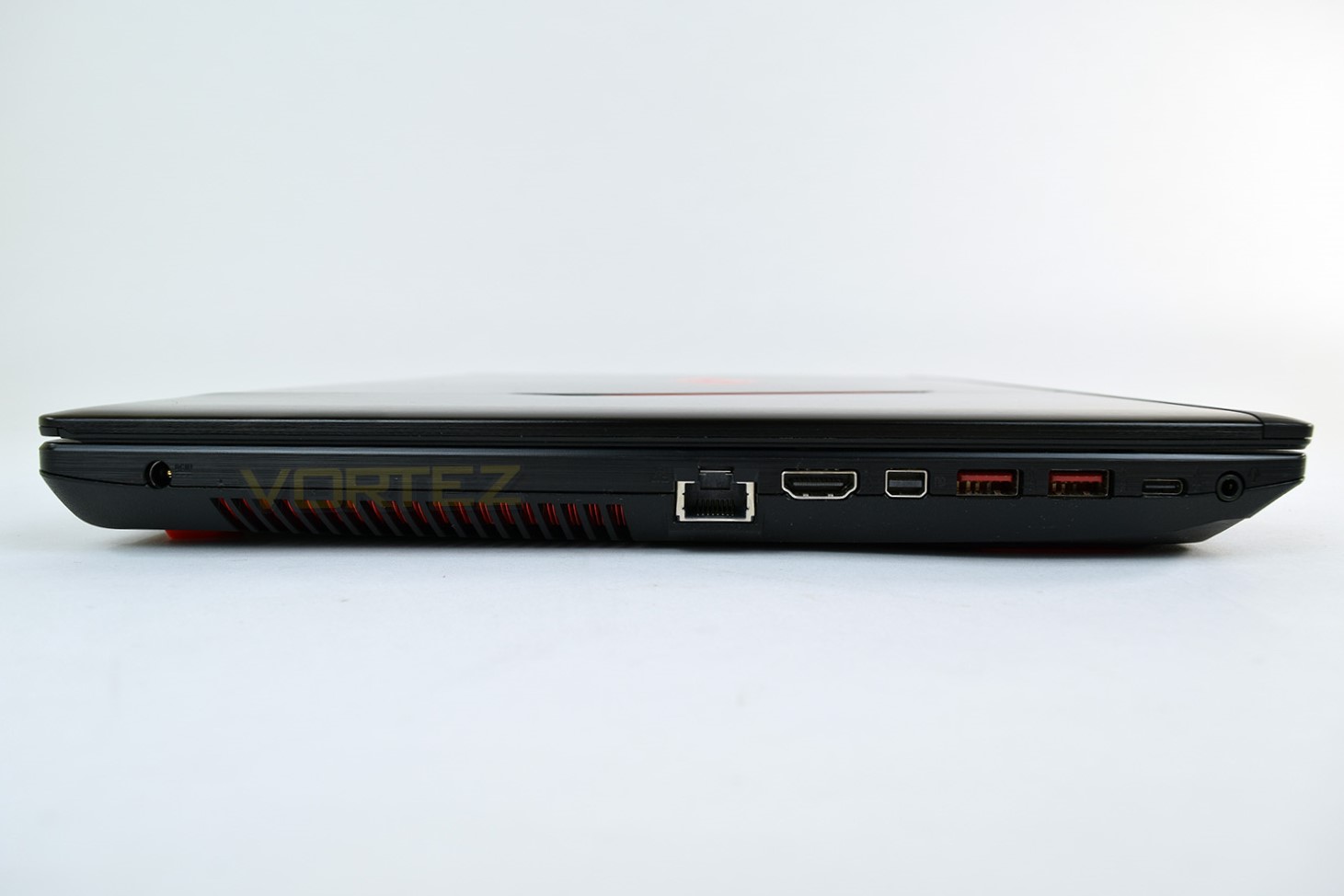
The left-hand-side is much more focussed on connectivity, offering up a 4-pole 3.5mm audio connector, an RJ-45 port, HDMI, mini Display Port, 2x USB 3.0 and a USB 3.1 Type-C. The power adaptor also finds itself on this side, located further to the rear.
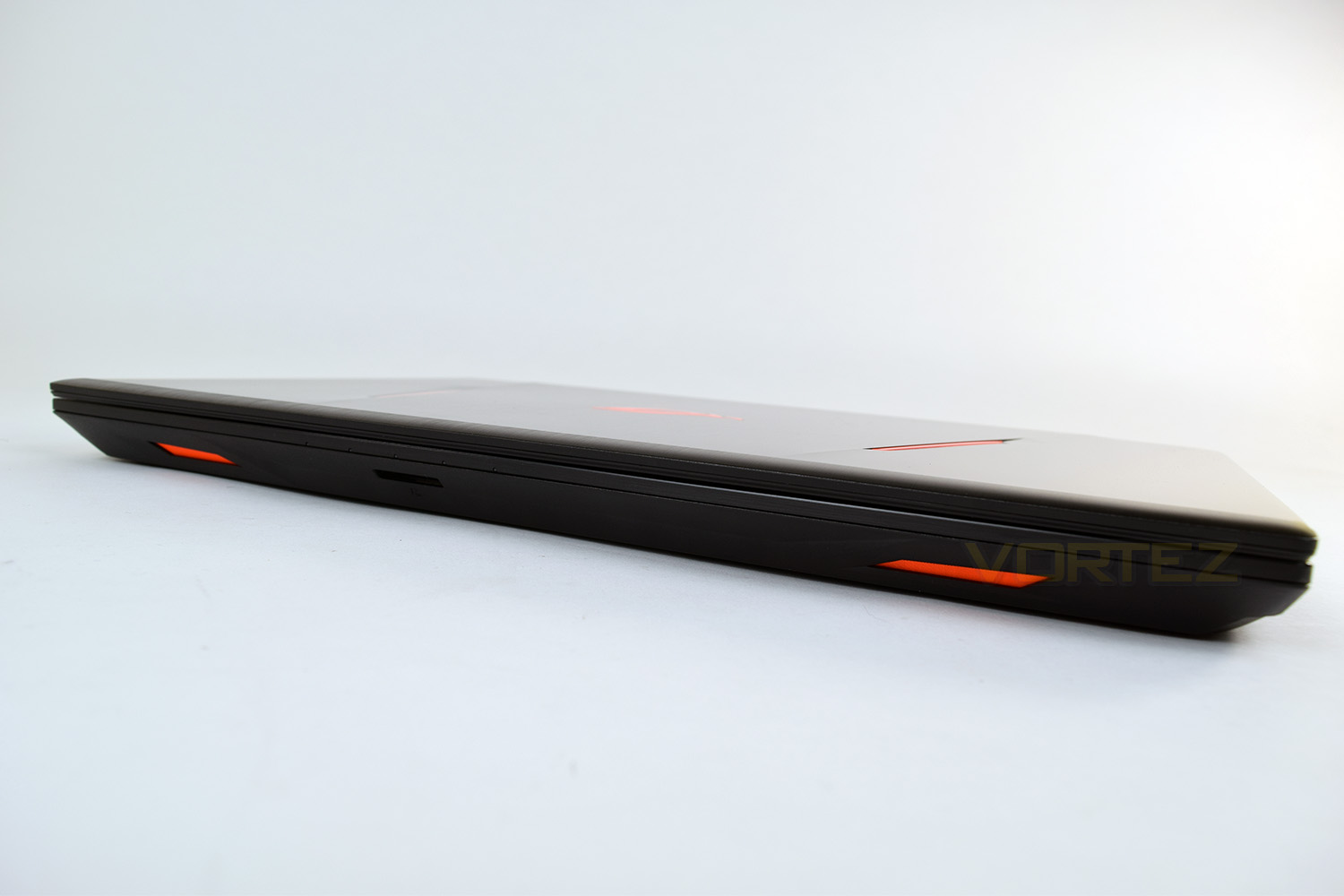
Along the front, there’s a couple of small accents within which is housed the speakers, in that bright orange used on the lid, along with an SD card reader. ASUS has also used this region to place 5 small, white indicator LEDs; these are used to display the current status of the display being active, battery power, HDD/SSD activity, flight-mode and CAPS lock.
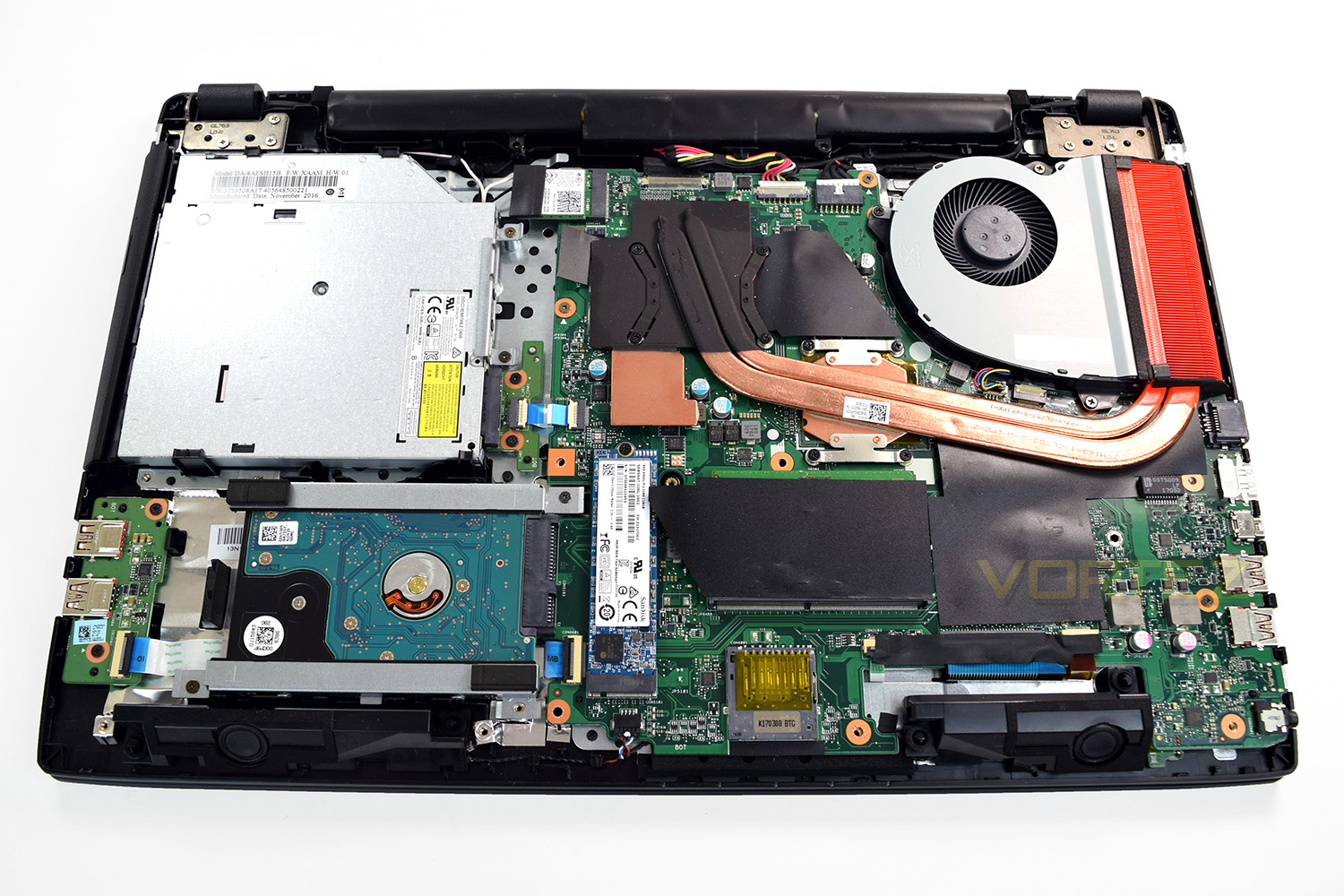
Flipping over the laptop, there are 11 screws on the underside. One of which is obstructed by a small rubber foot in the centre. Removing these screws allows access to the internals for repair or replacement, should you ever require more storage or extra DDR4 memory.
The GPU and CPU are both cooled by a pair of heat pipes and a single heatsink and fan arrangement.
A vast portion of the laptop is taken up by the optical drive on the left. The battery is located under the black plastic shield at the top of the image.
Benchmarks: Temperatures, Boot Time & Battery Uptime
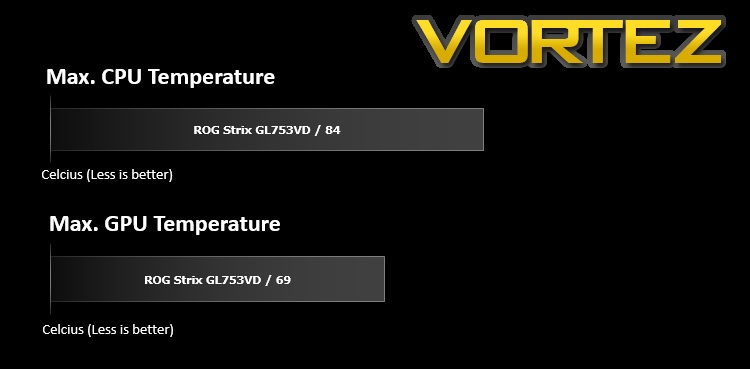
For our first benchmark test we observe the max. CPU/GPU temperatures of the system while allowing Unigine Heaven 4.0 to run on a 30-minute loop. To report back on the temperatures we use RealTemp and GPU-Z which provide the peak figures.
The temperature measured here was taken while the cores were utilising Intel TurboBoost, clocking as high as 3.5GHz, per core, from the standard 2.5GHz.
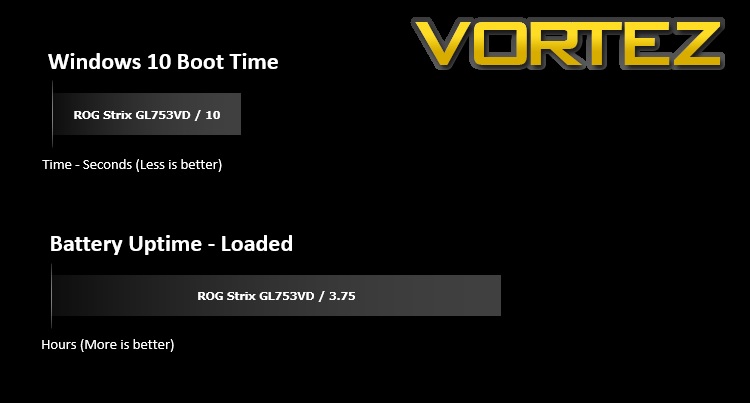
In this test we observe how fast the boot into Windows 10 is by using a digital stopwatch. Battery uptime is another important observation, for this, we charge the notebook up to 100% and then disconnect the charging unit and leave Heaven 4.0 running on a continuous loop until the notebook loses all power.
Benchmarks: Cinebench R15 & Handbrake
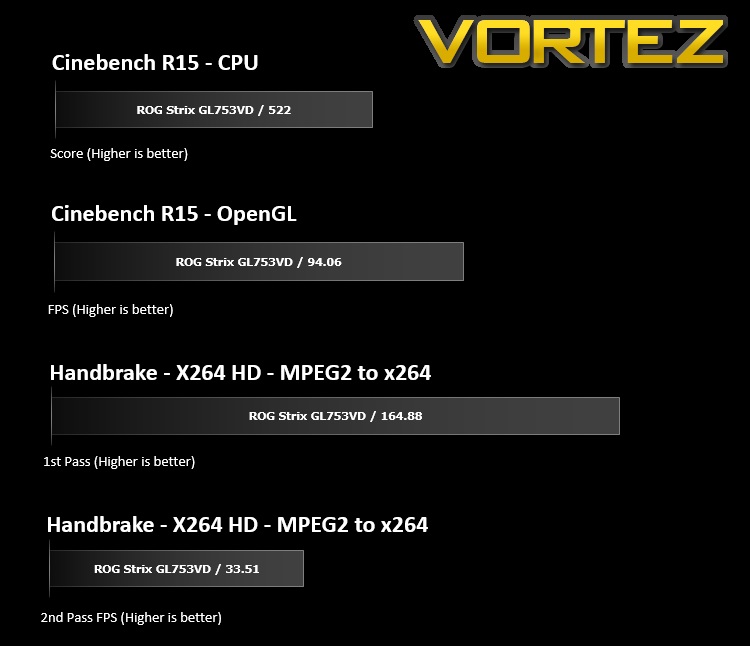
CINEBENCH can measure systems with up to 64 processor threads. This test scene contains approximately 2,000 objects which in turn contain more than 300,000 polygons in total, and uses sharp and blurred reflections, area lights, shadows, procedural shaders, antialiasing, and much more. The result is displayed in points (pts). The higher the number, the faster your processor is.
Benchmarks: 3DMark, Heaven 4.0 & PCMark 8
The new 3DMark includes everything you need to benchmark your hardware. With three all new tests you can bench everything from smartphones and tablets, to notebooks and home PCs, to the latest high-end, multi-GPU gaming desktops. And it’s not just for Windows. With 3DMark you can compare your scores with Android and iOS devices too. It’s the most powerful and flexible 3DMark we’ve ever created.
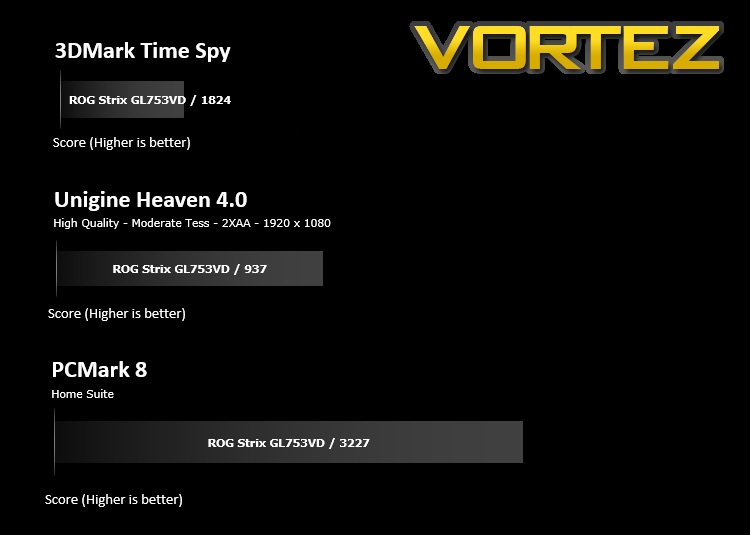
Benchmarks: Gaming
The ASUS ROG Strix GL753VD uses the GTX 1050 for graphics delivery, in this section we test the latest gaming titles to see how effective the 3D capabilities are. We report on the average framerate using FRAPS.

Performance Testing
The 17” frame is a wise choice from ASUS ROG, it evidently leaves plenty of space for decent cooling, which was demonstrated during the temperature tests; the cooling on the GPU is especially impressive, maxing out at 69°C during the toughest of benchmarks.Unfortunately, the exterior of the laptop doesn’t look or feel that great, with it being made largely of plastic that looks to imitate aluminium. The overall build quality is good enough, but you wonder how it may fare after a few months/years of use. The plastic on the lid is already showing signs of scratches and swirls. The orange accents are also an acquired taste, to say the least.
The 1080p display, married with the GTX1050 is a great match; the GTX 1050 isn’t the strongest GPU on the market, but it’s much more energy efficient than the likes of the 1070 and 1080, this allows a reasonable level of image quality while gaming, but also makes a session of an hour or two possible without a plug socket to hand. The display is bright and produces colours well with bright greens and oranges “popping” from the screen. Despite the 1080p resolution, the screen is still sharp due to the 17” monitor size.
Speaking of gaming, the keyboard, with the white border around the WASD keys is obviously aimed at the gamer, but those who wish to type out a few emails or use the laptop for general work purposes shouldn’t be put off, the scissor-switch keys feel incredibly good to type on, providing ample feedback with a quiet action. They’re backlit, too, so late night sessions aren’t a problem at all, however, per-key backlighting didn’t appear to make it into the budget so you’ve only got 4 zones to play with.

The trackpad, as is usually the case with a laptop, leaves a lot to be desired, but it will get the job done when a mouse just isn’t available. The trackpad features multi-touch to make scrolling and zooming etc more easily accessed but a separate mouse is advised.
Wireless and wired network performance was good, but nothing to write home about. Providing you’re within an acceptable range of the nearest WiFi Access Point or plugged in via the RJ45 connection, you should have no issues.
Due to the laptop’s 31mm thickness, there’s plenty of space inside for some reasonable speakers, which provide a surprising amount of volume without the usual tinny sound you come to expect; the handy 4-pole 3.5mm jack on the side is useful for a gaming headset while minimising wires. Unfortunately, ASUS seems to have made the decision to use the front portion of the laptop for all of their connectivity, which makes a tidy desktop much more difficult to achieve; we find that, at the bare minimum, the RJ45, a couple of USBs and the power connector should be on the rear edge, behind the screen.
Conclusion
A laptop of this kind must be considered with price as a top priority, which at £999 from many different retailers, lands at a fairly palatable amount. We’ve recently seen some laptops begin to tickle the £2500 barrier which makes this seem like quite the bargain. That being said, for only a couple of hundred pounds more, there are some much more capable laptops out there, equipped with a GTX1060 and sometimes even an i7 processor.The ROG GL753VD is a capable laptop, both in general use with a great battery life and in even the most demanding of games, though you will have to drop the image quality somewhat (entirely expected from a sub-£1000 gaming laptop). The keyboard feels excellent, as does the trackpad for browsing the net or flicking through an Excel spreadsheet.
Temperatures were kept under control remarkably well from the single fan, which also remained surprisingly quiet even under load.
It’s evident through the entire testing process that ROG have removed features to keep the cost down, but their choice of including an optical drive is, odd. Considering the expense required to source the drives, manufacture their enclosure and not to the mention the space required inside the chassis. Who watches films on optical media anymore? We feel this is by far the strangest decision they’ve made with this laptop.
All things considered, the Republic of Gamers have put together a tidy little package with the GL753VD but we can’t help but think that stretching your budget that little bit further could grab something much more capable.
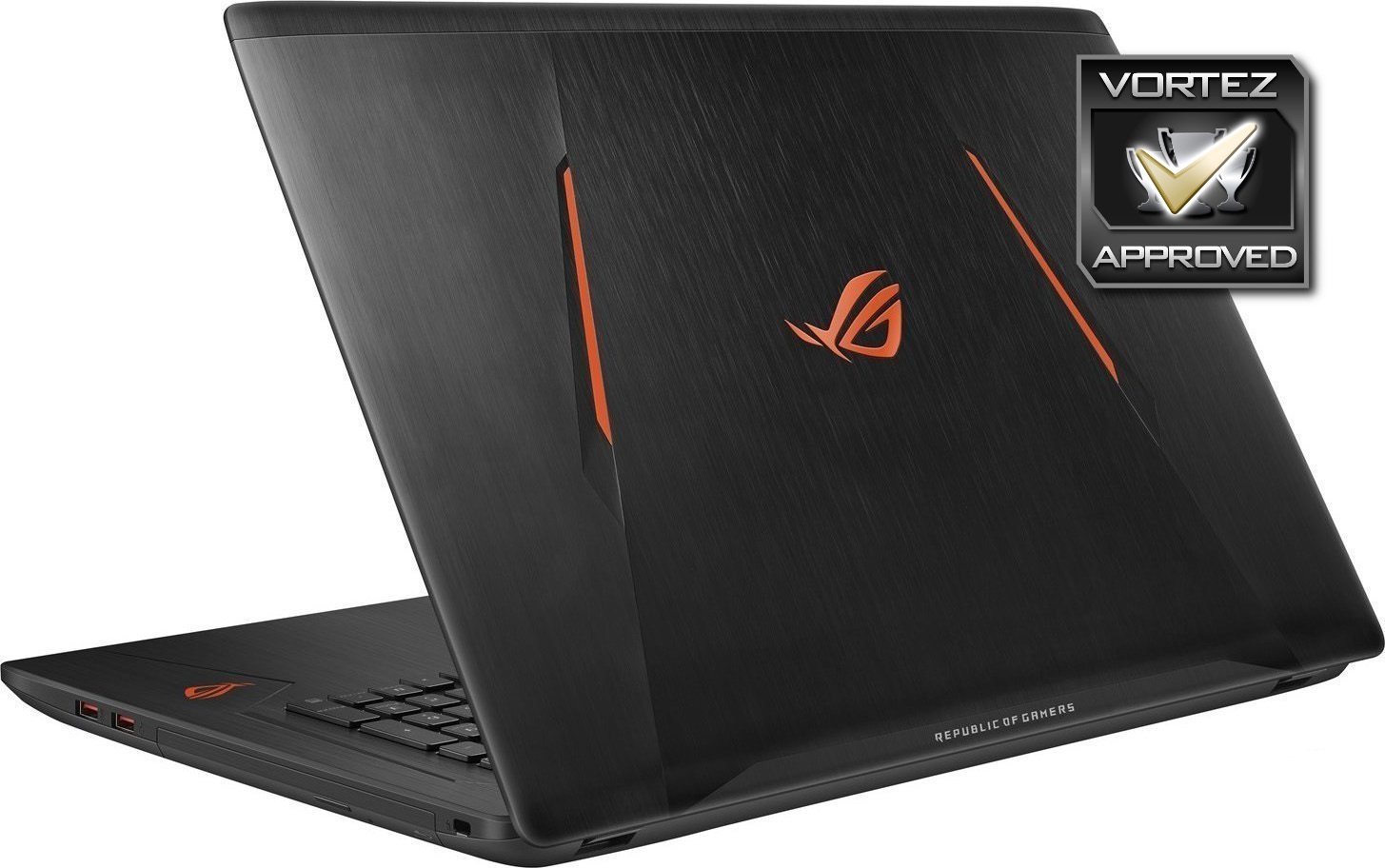
The ASUS ROG GL753VD is capable of gaming at 1080p, but is also ideal for office applications or watching movies, making this a relatively cheap, well-rounded laptop
Pros
+ Great budget gaming performance on the go
+ Sharp, bright and colourful 1080p monitor
+ Tactile, yet quiet keyboard
+ Large array of connectivity options, plenty of USBs etc
+ Above average battery life
+ M.2 Storage paired with HDD
Neutral
+- The styling is a little garish
Cons
– Doesn’t have per-key backlighting
– Poor placement of connections
– Who is the optical drive for?
+ Great budget gaming performance on the go
+ Sharp, bright and colourful 1080p monitor
+ Tactile, yet quiet keyboard
+ Large array of connectivity options, plenty of USBs etc
+ Above average battery life
+ M.2 Storage paired with HDD
Neutral
+- The styling is a little garish
Cons
– Doesn’t have per-key backlighting
– Poor placement of connections
– Who is the optical drive for?
Click here for an explanation of our awards at Vortez.net.