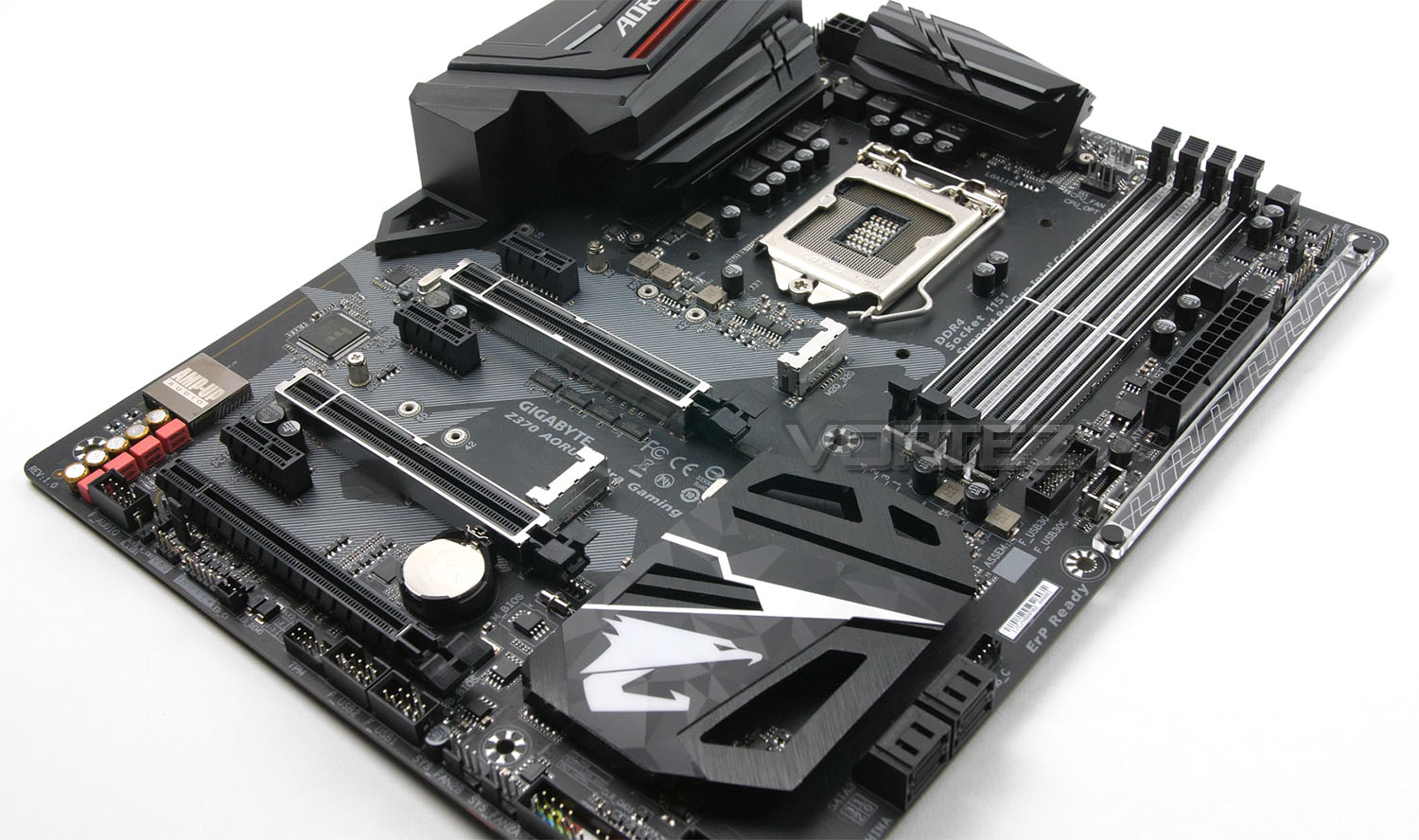
In our first Intel Z370 motherboard review, we take a look at what GIGABYTE has to offer in their Z370 AORUS Ultra Gaming. Aimed at the mid-tier specficially for gamers.

Product on Review: Z370 AORUS Ultra Gaming
Manufacturer & Sponsor: GIGABYTE
Street Price: £189 GBP – $200 USD
It goes without saying that 2017 has been one of the most eventful years for the computer hardware market. Competition between industry giants, Intel and AMD has never been so fierce after the successful launch of AMD Ryzen in the first quarter.
Earlier than expected, Intel has returned fire with the release of their 8th Generation of Core processors codenamed Coffee Lake and along with the new CPUs, we also have a new chipset, namely Z370. Today we’ll be turning to GIGABYTE for our first Intel Z370 review for a look at their Z370 AORUS Ultra Gaming.
The Z370 AORUS Ultra Gaming should be regarded as GIGABYTE’s go-to motherboard for Z370. It sits in a mid-tier position, boasting a wealth of features which should satisfy novice and avid gamers wanting to get the most out of their new Core i7-8700K.
GIGABYTE on AORUS
GIGABYTE shares the same passion for gaming with all types of gamers. Therefore, we have extended the premium gaming brand – AORUS, the pinnacle of our hardware excellence, to provide a full spectrum of innovative gaming products that deliver the ultimate performance and exemplifies the PC’s capability for bringing gamers unprecedented delights. We will continue to participate in global gaming events, connecting with the community and actively listening to gamers’ desires in order to create marvellous products that are focused on gamers’ needs. AORUS is a team of gamers in the PC industry, looking to side with gamers in their quest for gaming, to challenge the limits, and become legendary.
Technical Specifications
Below are the technical specifications concerning the Z370 AORUS Ultra Gaming:
CPU
• Supports 8th Gen Intel® Core™ i3/i5/i7 processors, and Intel® Pentium® and Celeron® processors for Socket LGA1151
Chipset
• Intel® Z370 Chipset
Main Memory
• 4 x DDR4 memory slots, support up to 64GB
DDR4 4000(O.C.) / 3866(O.C.) / 3800(O.C.) / 3733(O.C.) / 3666(O.C.) / 3600(O.C.) / 3466(O.C.) / 3400(O.C.) / 3333(O.C.) / 3300(O.C.) / 3200(O.C.) / 3000(O.C.) / 2800(O.C.) / 2666 / 2400 / 2133 MHz memory modules • Dual channel memory architecture
• Supports Intel®; Extreme Memory Profile (XMP)
Slots
• 3 x PCIe 3.0 x16 slots (support x16/x0/x0, x8/x8/x0, x8/x4/x4 modes)
• 3 x PCIe 3.0 x1 slots
Multi-GPU
• Supports Quad NVIDIA® SLI™ Technology
• Supports Quad AMD® CrossFire™ Technology
Onboard Graphics
• 1 x HDMI™ port, supports a maximum resolution of 4096×2160@30Hz(7th Gen CPU), 4096×2160@24Hz(6th Gen CPU), 2560×1600@60Hz
• 1 x DVI-D port, supporting a maximum resolution of 1920×1200@60 Hz
Storage
Chipset:
1 x M.2 connector (Socket 3, M key, type 2242/2260/2280/22110 PCIe x4/x2 SSD support) (M2Q_32G)
1 x M.2 connector (Socket 3, M key, type 2242/2260/2280 SATA and PCIe x4/x2 SSD support) (M2A_32G)
6 x SATA 6Gb/s connectors
Support for RAID 0, RAID 1, RAID 5, and RAID 10
* Refer to “1-8 Internal Connectors,” for the installation notices for the M.2 and SATA connectors.
Intel® Optane™ Memory Ready
RAID
• Intel® Z270 Chipset
• Supports RAID 0, RAID 1, RAID 5 and RAID 10 for SATA storage devices
• Supports RAID mode for M.2 PCIe storage devices*
* M.2 PCIe RAID volume can be created with M.2 GENIE.
USB
Chipset+ASMedia® USB 3.1 Gen 2 Controller:
1 x USB Type-C™ port on the back panel, with USB 3.1 Gen 2 support
1 x USB 3.1 Gen 2 Type-A port (red) on the back panel
Chipset:
1 x USB Type-C™ port with USB 3.1 Gen 1 support, available through the internal USB header
6 x USB 3.1 Gen 1 ports (4 ports on the back panel, 2 ports available through the internal USB header)
6 x USB 2.0/1.1 ports (2 ports on the back panel, 4 ports available through the internal USB headers)
Audio
• Dual Realtek® ALC1220 Codec
– 7.1-Channel High Definition Audio
LAN
• 1 x Intel i219v Gigabit LAN controller
Internal I/O Connectors
1 x 24-pin ATX main power connector
1 x 8-pin ATX 12V power connector
1 x CPU fan header
1 x water cooling CPU fan header
3 x system fan headers
1 x system fan/water cooling pump header
2 x digital LED strip headers
2 x digital LED strip power select jumpers
2 x RGB (RGBW) LED strip headers
6 x SATA 6Gb/s connectors
2 x M.2 Socket 3 connectors
1 x front panel header
1 x front panel audio header
1 x S/PDIF Out header
1 x USB Type-C™ port, with USB 3.1 Gen 1 support
1 x USB 3.1 Gen 1 header
2 x USB 2.0/1.1 headers
1 x Thunderbolt™ add-in card connector
1 x Trusted Platform Module (TPM) header (2×6 pin, for the GC-TPM2.0_S module only)
1 x Clear CMOS jumper
Back Panel I/O Ports
1 x PS/2 keyboard/mouse port
1 x DVI-D port
1 x HDMI port
1 x USB Type-C™ port, with USB 3.1 Gen 2 support
1 x USB 3.1 Gen 2 Type-A port (red)
4 x USB 3.1 Gen 1 ports
2 x USB 2.0/1.1 ports
1 x RJ-45 port
1 x optical S/PDIF Out connector
5 x audio jacks (Center/Subwoofer Speaker Out, Rear Speaker Out, Line In, Line Out, Mic In)
Dimension
• 12.0 in. x 9.6 in. (30.5 cm x 24.4 cm)
• ATX Form Factor
Mounting
• 9 mounting holes
• Supports 8th Gen Intel® Core™ i3/i5/i7 processors, and Intel® Pentium® and Celeron® processors for Socket LGA1151
Chipset
• Intel® Z370 Chipset
Main Memory
• 4 x DDR4 memory slots, support up to 64GB
DDR4 4000(O.C.) / 3866(O.C.) / 3800(O.C.) / 3733(O.C.) / 3666(O.C.) / 3600(O.C.) / 3466(O.C.) / 3400(O.C.) / 3333(O.C.) / 3300(O.C.) / 3200(O.C.) / 3000(O.C.) / 2800(O.C.) / 2666 / 2400 / 2133 MHz memory modules • Dual channel memory architecture
• Supports Intel®; Extreme Memory Profile (XMP)
Slots
• 3 x PCIe 3.0 x16 slots (support x16/x0/x0, x8/x8/x0, x8/x4/x4 modes)
• 3 x PCIe 3.0 x1 slots
Multi-GPU
• Supports Quad NVIDIA® SLI™ Technology
• Supports Quad AMD® CrossFire™ Technology
Onboard Graphics
• 1 x HDMI™ port, supports a maximum resolution of 4096×2160@30Hz(7th Gen CPU), 4096×2160@24Hz(6th Gen CPU), 2560×1600@60Hz
• 1 x DVI-D port, supporting a maximum resolution of 1920×1200@60 Hz
Storage
Chipset:
1 x M.2 connector (Socket 3, M key, type 2242/2260/2280/22110 PCIe x4/x2 SSD support) (M2Q_32G)
1 x M.2 connector (Socket 3, M key, type 2242/2260/2280 SATA and PCIe x4/x2 SSD support) (M2A_32G)
6 x SATA 6Gb/s connectors
Support for RAID 0, RAID 1, RAID 5, and RAID 10
* Refer to “1-8 Internal Connectors,” for the installation notices for the M.2 and SATA connectors.
Intel® Optane™ Memory Ready
RAID
• Intel® Z270 Chipset
• Supports RAID 0, RAID 1, RAID 5 and RAID 10 for SATA storage devices
• Supports RAID mode for M.2 PCIe storage devices*
* M.2 PCIe RAID volume can be created with M.2 GENIE.
USB
Chipset+ASMedia® USB 3.1 Gen 2 Controller:
1 x USB Type-C™ port on the back panel, with USB 3.1 Gen 2 support
1 x USB 3.1 Gen 2 Type-A port (red) on the back panel
Chipset:
1 x USB Type-C™ port with USB 3.1 Gen 1 support, available through the internal USB header
6 x USB 3.1 Gen 1 ports (4 ports on the back panel, 2 ports available through the internal USB header)
6 x USB 2.0/1.1 ports (2 ports on the back panel, 4 ports available through the internal USB headers)
Audio
• Dual Realtek® ALC1220 Codec
– 7.1-Channel High Definition Audio
LAN
• 1 x Intel i219v Gigabit LAN controller
Internal I/O Connectors
1 x 24-pin ATX main power connector
1 x 8-pin ATX 12V power connector
1 x CPU fan header
1 x water cooling CPU fan header
3 x system fan headers
1 x system fan/water cooling pump header
2 x digital LED strip headers
2 x digital LED strip power select jumpers
2 x RGB (RGBW) LED strip headers
6 x SATA 6Gb/s connectors
2 x M.2 Socket 3 connectors
1 x front panel header
1 x front panel audio header
1 x S/PDIF Out header
1 x USB Type-C™ port, with USB 3.1 Gen 1 support
1 x USB 3.1 Gen 1 header
2 x USB 2.0/1.1 headers
1 x Thunderbolt™ add-in card connector
1 x Trusted Platform Module (TPM) header (2×6 pin, for the GC-TPM2.0_S module only)
1 x Clear CMOS jumper
Back Panel I/O Ports
1 x PS/2 keyboard/mouse port
1 x DVI-D port
1 x HDMI port
1 x USB Type-C™ port, with USB 3.1 Gen 2 support
1 x USB 3.1 Gen 2 Type-A port (red)
4 x USB 3.1 Gen 1 ports
2 x USB 2.0/1.1 ports
1 x RJ-45 port
1 x optical S/PDIF Out connector
5 x audio jacks (Center/Subwoofer Speaker Out, Rear Speaker Out, Line In, Line Out, Mic In)
Dimension
• 12.0 in. x 9.6 in. (30.5 cm x 24.4 cm)
• ATX Form Factor
Mounting
• 9 mounting holes
Unboxing & Video Review
For this review we’ve produced a video showcasing the items included in the box and a detailed rundown of the included features on this motherboard. Please click on this link or watch the video below:
Test Setup, Methodology & Overclocking
Test Setup
CPU Intel Core i7-8700K
Cooling Corsair H100i GTX
Motherboard GIGABYTE Z370 AORUS Ultra Gaming
Memory 16GB Corsair Vengeance LPX 3000MHz
Graphics GIGABYTE GTX 1080 G1 Gaming
Storage OCZ Vector 180 240GB SSD
PSU Corsair HX1050 80 Plus Gold Certified PSU
Monitor AOC U2879VF
Capture Device Epiphan AV.iO 4K
Cooling Corsair H100i GTX
Motherboard GIGABYTE Z370 AORUS Ultra Gaming
Memory 16GB Corsair Vengeance LPX 3000MHz
Graphics GIGABYTE GTX 1080 G1 Gaming
Storage OCZ Vector 180 240GB SSD
PSU Corsair HX1050 80 Plus Gold Certified PSU
Monitor AOC U2879VF
Capture Device Epiphan AV.iO 4K
Benchmarks
Cinebench R15 – CPU/OpenGL Score
x264 HD 4.0 – 1st and 2nd pass encoding
SiSoftware SANDRA – CPU & Memory benchmarks
POV-RAY – CPU benchmarks
TrueCrypt – CPU benchmarks
AIDA64 – CPU benchmarks & Memory
PCMark 8 – Home Suite & Photoshop
3DMark FireStrike – 3D Benchmark
Games – Civilization IV & Total War: WARHAMMER
x264 HD 4.0 – 1st and 2nd pass encoding
SiSoftware SANDRA – CPU & Memory benchmarks
POV-RAY – CPU benchmarks
TrueCrypt – CPU benchmarks
AIDA64 – CPU benchmarks & Memory
PCMark 8 – Home Suite & Photoshop
3DMark FireStrike – 3D Benchmark
Games – Civilization IV & Total War: WARHAMMER
Other Software
Temperature Analysis: Real Temp
Stress Testing Software: AIDA64 Stability Test
CPU Specification Monitoring: CPU-Z
Stress Testing Software: AIDA64 Stability Test
CPU Specification Monitoring: CPU-Z
Overclocking
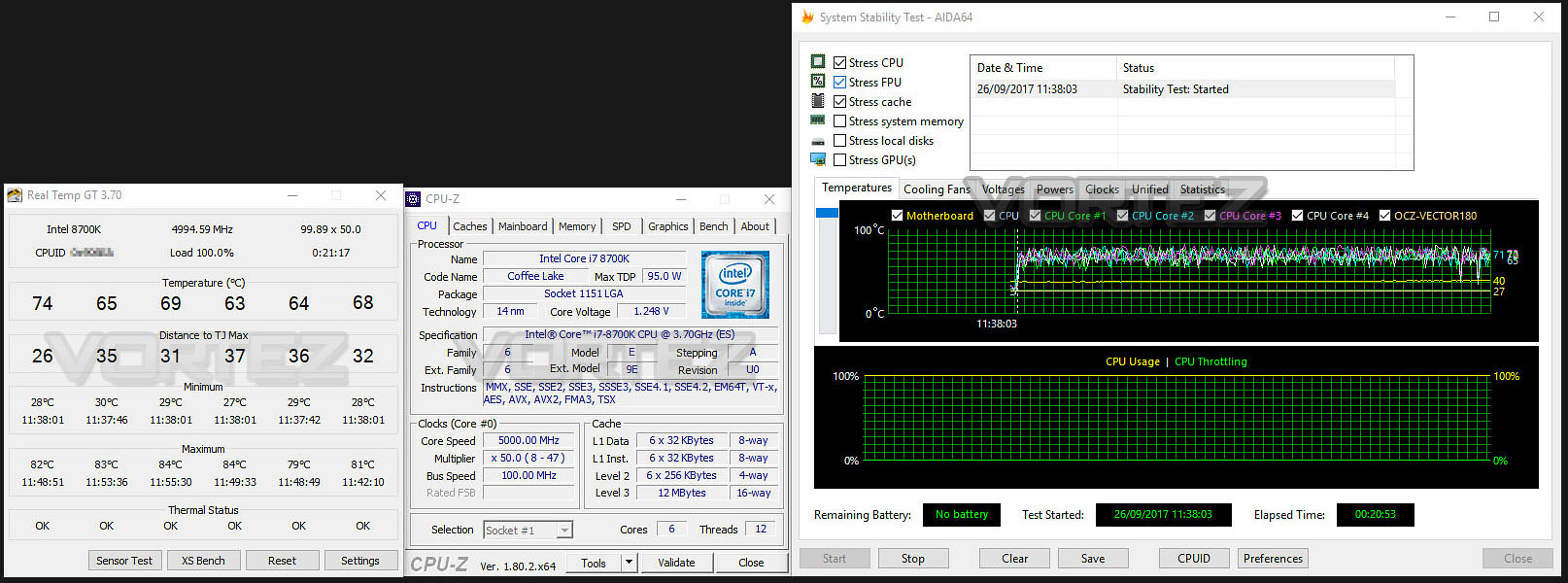
Like previous generations, the Intel Core i7-8700K is unlocked and also has flexible attributes in terms of the BCLK and ratio/multiplier. This makes the job of overclocking much easier.
We actually used this motherboard to review the Intel Core i7-8700K as it was able to give us the best overclock out of the bunch of motherboards we tested. Our achievement saw us hit 5GHz @ 1.37v. We were able to nudge the frequency above 5GHz but unfortunately were weren’t able to accomplish any stability, even by applying more voltage.
So, this demonstrates how capable this motherboard is – it can be regarded as a superb motherboard for overclocking and squeezing the most out of your 8th generation processor.
AORUS BIOS Video Tour
Below is a video demonstration of what options are available in the AORUS UEFI BIOS. This brief tour covers some basic/advanced options:
Benchmarks: Power Consumption
It’s interesting to note the power consumption across all motherboards. Although they are using the Z370 chipset, energy results can fluctuate between manufacturers due to the features and specifications that are integrated. First of all, for the idle tests the system is cold booted into Windows and no additional applications are executed – the watts are noted on the external energy monitor we use and then the system is loaded with 3DMark FireStrike – watts are again monitored for the duration of the test and the highest rated wattage result is then noted down. Below are the results of this energy test.
Benchmarks: Cinebench R15
CINEBENCH is a real-world cross platform test suite that evaluates your computer’s performance capabilities. CINEBENCH is based on MAXON’s award-winning animation software CINEMA 4D, which is used extensively by studios and production houses worldwide for 3D content creation. MAXON software has been used in blockbuster movies such as Iron Man 3, Oblivion, Life of Pi or Prometheus and many more.
Benchmarks: X264 HD
Simply put, this test measures how fast your machine can encode a short, DVD quality MPEG-2 video clip into a high-quality x264 video clip. What’s x264, you ask? It’s more or less the next-generation Xvid/DivX codec. I think it’s ideal for a benchmark because the application (x264.exe) reports fairly accurate compression results (in frames per second) for each pass of the video encoding process, and it uses multi-core processors very efficiently.
Benchmarks: SiSoftware SANDRA
SANDRA isn’t always a benchmark that is included in hardware reviews but we believe it shouldn’t be ignored. SANDRA provides a vigorous package that tests your system in a rather large array of benchmarks. There are many aspects of benchmark that can be executed. We will be considering – CPU and memory tests.
Benchmarks: POV-RAY
Persistence of Vision Raytracer’s PovRay is a free and open source 3D animator application with versions for computers with different operating systems.
This product allows users to build their custom 3D worlds with excellent quality despite their computer’s hardware. It has adjustable options for levels of radiance, refraction, and reflection. Calculation time may vary depending on the computer model, but PovRay can adapt to many computer builds, and is supported by the open source community.
This product allows users to build their custom 3D worlds with excellent quality despite their computer’s hardware. It has adjustable options for levels of radiance, refraction, and reflection. Calculation time may vary depending on the computer model, but PovRay can adapt to many computer builds, and is supported by the open source community.
Benchmarks: TrueCrypt
TrueCrypt is a discontinued source-available freeware utility used for on-the-fly encryption (OTFE). It can create a virtual encrypted disk within a file or encrypt a partition or (under Microsoft Windows except Windows 8 with GPT) the entire storage device (pre-boot authentication).
Benchmarks: AIDA64
AIDA64 Product PageThis simple integer benchmark focuses on the branch prediction capabilities and the misprediction penalties of the CPU. It finds the solutions for the classic “Queens problem” on a 10 by 10 sized chessboard. At the same clock speed theoretically the processor with the shorter pipeline and smaller misprediction penalties will attain higher benchmark scores. For example — with HyperThreading disabled — the Intel Northwood core processors get higher scores than the Intel Prescott core based ones due to the 20-step vs 31-step long pipeline. CPU Queen test uses integer MMX, SSE2 and SSSE3 optimizations.
Benchmarks: PCMark 8 & PCMark 10
PCMark 8 combines performance benchmarking with battery life measurement and includes tests based on popular Adobe and Microsoft applications. Whether you are looking for long battery life, or maximum power, PCMark 8 will help you find the devices that offer the perfect combination of efficiency and performance for your needs. It’s the complete PC performance benchmark for home and business.
Benchmarks: PCMark 8 Photoshop
The PCMark 8 Applications benchmark measures system performance using popular applications from the Adobe Creative Suite and Microsoft Office. You can choose which tests to run based on the applications installed on your system. Each test automatically steps through a series of actions such as opening, editing and saving a file. The results are used to calculate the PCMark 8 Applications scores for the system.
Benchmarks: 3DMark FireStrike & TimeSpy
3DMark FireStrike Product PageFire Strike is our new showcase DirectX 11 benchmark designed for high-performance gaming PCs. It is our most ambitious and technical benchmark ever, featuring real-time graphics rendered with detail and complexity far beyond what is found in other benchmarks and games today. Fire Strike will only be available in the Windows editions of 3DMark initially.
Benchmarks: ROT Tomb Raider & Total War: WARHAMMER
It’s important for us to perform a number of game benchmarks as well as the synthetic tests because gamers will want to know if there are any significant benefits. So here we have two recent gaming titles.
Conclusion
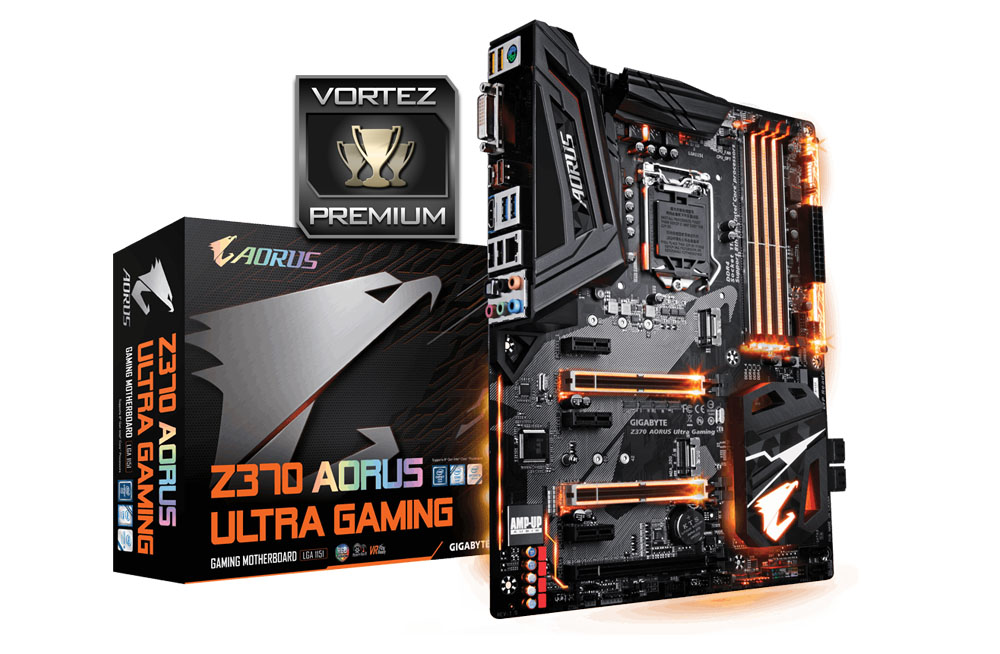
While there are many Intel Z370 motherboards being launched today, we can rest assured that what GIGABYTE has presented in the Z370 AORUS Ultra Gaming, sets the standard very high indeed.
Once upon a time, lively and eye catching colours were once all the rage in the motherboard sector but now, the likes of GIGABYRE are applying subtle and understated designs in order to blend in with other hardware. This makes a lot of sense, particularly when we consider the Ultra Gaming, because we can inject some colour by modifying the RGB lighting and create a highly decorative theme without being constrained to the heatsink/PCB styling. The overall layout and styling on Ultra Gaming is eye-catching and certainly one which is up there as one of the more favourable designs that we’ve looked at thus far.
Although Ultra Gaming is a mid-tier Intel Z370 motherboard it packs in quite an assortment of features. GIGABYTE has included a USB 3.1 front panel header on the board, which is omitted on some rival motherboards at this price point. Although most cases lack USB 3.1 on the front panel, we are starting to see some newer chassis releases adopt USB 3.1 – so this will undoubtedly future proof the system. The inclusion of twin M.2 slots is a feature that is becoming standard on motherboards nowadays and being able to RAID0 such a device is very useful for those wishing to maximise their storage bandwidth. We were also mightily impressed with the included audio solution, sound is crisp, relatively noise-less and offers a good balance of low, mids and highs.
On the performance front, Ultra Gaming is a strong performer which delivers consistently good results throughout a range of scenarios. Overclocking is one particular area which this board is predominantly optimised for and it had no problems shifting up to 5GHz with the all-new 8700K. Thanks to a well-laid out BIOS we were able to jump in and out without any hitches – the interface should suit both novice and advanced users wanting to adjust any settings.
One thing we would have liked to see, (especially in this new generation of motherboards) is USB 2.0 being phased out. Instead, using USB 3.0 or even USB 3.1 ports would have been viewed as a more practical use of space on the rear IO.
Mid-range motherboards using the Intel Z370 chipset have pushed prices up somewhat and a lot of the options of this calibre are now sitting around the £200/$200 mark. Ultra Gaming has a price-tag of £189/$200 and packs in a lot of features and performance. This is all backed by a decent 2 years warranty.
GIGABYTE’s new Z370 AORUS Ultra Gaming should be on everyone’s shortlist for an upgrade to Intel’s 8th Generation CPUs, it packs in the features and is able to comfortably take the 8700K beyond 5GHz!
Pros
+ Clean, attractive aesthetics
+ A multitude of RGB functionality
+ Offers great performance
+ Excellent for overclocking
+ Arrives with USB 3.1 front header
+ Uses strengthened PCI Express/memory slots
+ Features twin M.2 slots
+ Capable audio solution
+ Lowest power consumption of Z370 motherboards
Cons
– Still using USB 2.0 ports
+ Clean, attractive aesthetics
+ A multitude of RGB functionality
+ Offers great performance
+ Excellent for overclocking
+ Arrives with USB 3.1 front header
+ Uses strengthened PCI Express/memory slots
+ Features twin M.2 slots
+ Capable audio solution
+ Lowest power consumption of Z370 motherboards
Cons
– Still using USB 2.0 ports
Click here for an explanation of our awards at Vortez.net.
Stay connected with Vortez social media pages: