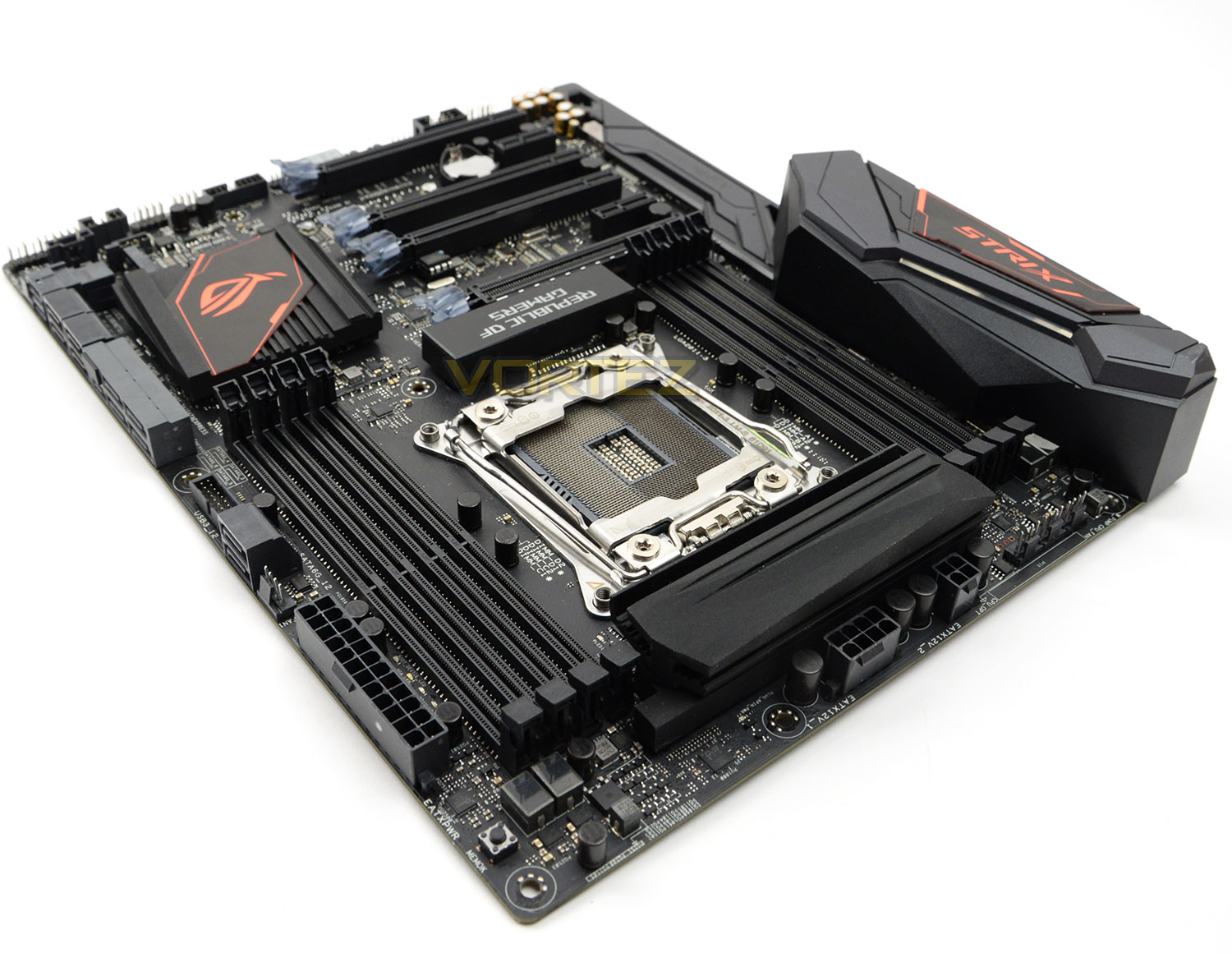
ASUS has added a new Intel X99 motherbaord to their STRIX series; boasting a stylish design with features like USB 3.1, U.2 and much more!

Product on Review: ROG STRIX X99 Gaming
Manufacturer & Sponsor: ASUS
Street Price: £278 GBP / $334 USD
Many had perhaps forgotten all about the Intel X99 chipset until Intel unveiled their new Broadwell-E Processors. This fresh release generated a revival of the ‘High End Desktop’ platform with many motherboard manufacturers re-launching their popular solutions with a slight facelift – bringing them up to date with the latest features like USB 3.1. For today’s review however, we’re looking at a completely new design.
STRIX X99 Gaming arrives under the Republic of Gamers branding and is the latest in a number of products to join the STRIX portfolio. Bearing a stylish design, the STRIX X99 Gaming has the visual appearance and all the features too – this motherboard has characteristics which both gamers and overclockers will appreciate. Onboarding power/reset buttons, MemOK!, water pump fan headers, dual X16 mode PCI express and an assortment of storage options.
On paper this new motherboard appears to have all the boxes ticked but is it worth your hard earned cash? Let’s find out!
About ASUS
This visionary approach is the reason ASUS is able to bring high-quality innovation and design to all, and the reason for its widespread acclaim. ASUS products won 4,256 international awards and accolades in 2013 – that’s over 11 a day, every day. ASUS has consistently achieved significant year-on-year growth in terms of consumer notebook units shipped too, and closed 2011 on a high with revenues hitting US$11.9 billion.
Technical Specifications
Below are the technical details surrounding the STRIX motherboard obtained directly from ASUS:
CPU
Intel® Socket 2011-v3 Core™ i7 Processors
Supports Intel® 14 nm CPU
Supports Intel® Turbo Boost Technology 3.0
Chipset
Intel® X99
Memory
8 x DIMM, Max. 128GB, DDR4 3333(O.C.)/3300(O.C.)/3200(O.C.)/3000(O.C.)/2800(O.C.)/2666(O.C.)/2400(O.C.)/2133 MHz Non-ECC, Un-buffered Memory
Quad Channel Memory Architecture
Supports Intel® Extreme Memory Profile (XMP)
Multi-GPU Support
Supports NVIDIA® 3-Way SLI™ Technology
Supports AMD 3-Way CrossFireX™ Technology
Expansion Slots
3 x PCIe 3.0/2.0 x16 ( x16, x16/x16, x8/x16/x8 mode with 40-LANE CPU; x16, x16/x8, x8/x8/x8 mode with 28-LANE CPU)
1 x PCIe 2.0 x16 (x4 mode)
2 x PCIe 2.0 x1 *1
Storage
New Intel® Core™ i7 X-Series Processors :
1 x M.2 Socket 3, with M Key, type 2242/2260/2280/22110 storage devices support (Support PCIE SSD only)
1 x U.2 port, support PCIe 3.0 x4 NVM Express storage
Intel® X99 chipset :
1 x SATA Express port, Compatible with 2 x SATA 6.0 Gb/s ports
8 x SATA 6Gb/s port(s),
Supports Intel® Smart Response Technology, Intel® Rapid Recovery Technology*2
LAN
Intel® I218V, 1 x Gigabit LAN Controller(s)
Wireless Data Network
Wi-Fi 802.11 a/b/g/n/ac
Supports dual band frequency 2.4/5 GHz
Supports MU-MIMO
Bluetooth
Bluetooth V4.1
Audio
ROG SupremeFX 8-Channel High Definition Audio CODEC
– Supports : Jack-detection, Multi-streaming, Front Panel Jack-retasking
Audio Feature :
– SupremeFX Shielding™ Technology
– Optical S/PDIF out port(s) at back panel
– Audio amplifier: Provides the highest-quality sound for headphone and speakers
– Premium Japanese-made audio capacitors: Provide warm, natural and immersive sound with exceptional clarity and fidelity
– Sonic Radar II
USB Ports
Intel® X99 chipset :
5 x USB 3.0 port(s) (1 at back panel, blue, 4 at mid-board)
Intel® X99 chipset :
8 x USB 2.0 port(s) (4 at back panel, , 4 at mid-board)
ASMedia® USB 3.0 controller :
3 x USB port(s) (3 at back panel, blue)
ASMedia® USB 3.1 controller :
2 x USB 3.1 port(s) (2 at back panel, , Type-A + Type-C)
Special Features
5-Way Optimization by Dual Intelligent Processors 5
– 5-Way Optimization tuning key perfectly consolidates TPU, EPU, DIGI+ VRM, Fan Xpert 4, and Turbo Core App
Gamer’s Guardian:
– ESD Guards on LAN, Audio, KBMS and USB3.1/3.0/2.0 ports
– DRAM Overcurrent Protection
– Stainless Steel Back I/O
– Highly Durable Components
– DIGI+ VRM
ASUS Exclusive Features :
– USB BIOS Flashback
– MemOK!
– AI Suite 3
– Ai Charger+
– ESD Guards
– USB 3.0 Boost
– USB 3.1 Boost
– Disk Unlocker
– Mobo Connect
– PC Cleaner
ASUS Quiet Thermal Solution :
– ASUS Fan Xpert 4
ASUS EZ DIY :
– ASUS CrashFree BIOS 3
– ASUS EZ Flash 3
– Push Notice
ASUS Q-Design :
– ASUS Q-Shield
– ASUS Q-Code
– ASUS Q-LED (CPU, DRAM, VGA, Boot Device LED)
– ASUS Q-Slot
– ASUS Q-DIMM
– ASUS Q-Connector
RAMCache
AURA: RGB Lighting Control
Operating System Support
Windows® 10 , 64bit
Windows® 8.1 , 32bit/64bit
Windows® 7 , 32bit/64bit
Back I/O Ports
1 x PS/2 keyboard/mouse combo port(s)
1 x LAN (RJ45) port(s)
1 x USB 3.1 (red)Type-A
1 x USB 3.1 (black)Type-C
4 x USB 3.0 (blue)
4 x USB 2.0 (one port can be switched to USB BIOS Flashback)
5 x Audio jack(s)
1 x USB BIOS Flashback Button(s)
1 x ASUS Wi-Fi GO! module (Wi-Fi 802.11 a/b/g/n/ac and Bluetooth v4.0
Internal I/O Ports
1 x U.2 port
1 x AAFP connector
1 x Aura RGB Strip Header
2 x USB 3.0 connector(s) support(s) additional 4 USB 3.0 port(s)
2 x USB 2.0 connector(s) support(s) additional 4 USB 2.0 port(s)
1 x SATA Express connector: , Compatible with 2 x SATA 6.0 Gb/s ports
1 x M.2 Socket 3 with M Key design, type 2242/2260/2280/22110 storage devices support (Support PCIE SSD only)
8 x SATA 6Gb/s connector(s)
1 x CPU Fan connector(s)
1 x CPU OPT Fan connector(s)
2 x Chassis Fan connector(s)
1 x Thunderbolt header(s)
1 x 24-pin EATX Power connector(s)
1 x 8-pin ATX 12V Power connector(s)
1 x 4-pin ATX 12V Power connector(s)
1 x EZ XMP switch
1 x 5-pin EXT_FAN(Extension Fan) connector
1 x DRCT header(s)
1 x MemOK! button(s)
1 x Thermal sensor connector(s)
1 x CPU OV
1 x Power-on button(s)
1 x Reset button(s)
1 x Clear CMOS jumper(s)
1 x Water Pump header (4-pin)
1 x ROG extension (ROG_EXT) header(s)
1 x 14-1 pin TPM connector
1 x COM port header
1 x High AMP Fan header (4-pin)
Accessories
User’s manual
I/O Shield
4 x SATA 6Gb/s cable(s)
1 x M.2 Screw Package
1 x CPU installation tool
1 x Supporting DVD
1 x ASUS 2T2R dual band Wi-Fi moving antennas (Wi-Fi 802.11a/b/g/n/ac compliant)
1 x Cable ties pack(s)
ROG Fan Label
1 x Extension Cable for RGB strips (80 cm)
BIOS
128 Mb Flash ROM, UEFI AMI BIOS, PnP, WfM2.0, SM BIOS 3.0, ACPI 5.0, Multi-language BIOS,
ASUS EZ Flash 3, CrashFree BIOS 3, F11 EZ Tuning Wizard, F6 Qfan Control, F3 My Favorites, Quick Note, Last Modified log, F12 PrintScreen, and ASUS DRAM SPD (Serial Presence Detect) memory information.
Manageability
WfM 2.0, WOL by PME, PXE
Form Factor
ATX Form Factor
12 inch x 9.6 inch ( 30.5 cm x 24.4 cm )
Intel® Socket 2011-v3 Core™ i7 Processors
Supports Intel® 14 nm CPU
Supports Intel® Turbo Boost Technology 3.0
Chipset
Intel® X99
Memory
8 x DIMM, Max. 128GB, DDR4 3333(O.C.)/3300(O.C.)/3200(O.C.)/3000(O.C.)/2800(O.C.)/2666(O.C.)/2400(O.C.)/2133 MHz Non-ECC, Un-buffered Memory
Quad Channel Memory Architecture
Supports Intel® Extreme Memory Profile (XMP)
Multi-GPU Support
Supports NVIDIA® 3-Way SLI™ Technology
Supports AMD 3-Way CrossFireX™ Technology
Expansion Slots
3 x PCIe 3.0/2.0 x16 ( x16, x16/x16, x8/x16/x8 mode with 40-LANE CPU; x16, x16/x8, x8/x8/x8 mode with 28-LANE CPU)
1 x PCIe 2.0 x16 (x4 mode)
2 x PCIe 2.0 x1 *1
Storage
New Intel® Core™ i7 X-Series Processors :
1 x M.2 Socket 3, with M Key, type 2242/2260/2280/22110 storage devices support (Support PCIE SSD only)
1 x U.2 port, support PCIe 3.0 x4 NVM Express storage
Intel® X99 chipset :
1 x SATA Express port, Compatible with 2 x SATA 6.0 Gb/s ports
8 x SATA 6Gb/s port(s),
Supports Intel® Smart Response Technology, Intel® Rapid Recovery Technology*2
LAN
Intel® I218V, 1 x Gigabit LAN Controller(s)
Wireless Data Network
Wi-Fi 802.11 a/b/g/n/ac
Supports dual band frequency 2.4/5 GHz
Supports MU-MIMO
Bluetooth
Bluetooth V4.1
Audio
ROG SupremeFX 8-Channel High Definition Audio CODEC
– Supports : Jack-detection, Multi-streaming, Front Panel Jack-retasking
Audio Feature :
– SupremeFX Shielding™ Technology
– Optical S/PDIF out port(s) at back panel
– Audio amplifier: Provides the highest-quality sound for headphone and speakers
– Premium Japanese-made audio capacitors: Provide warm, natural and immersive sound with exceptional clarity and fidelity
– Sonic Radar II
USB Ports
Intel® X99 chipset :
5 x USB 3.0 port(s) (1 at back panel, blue, 4 at mid-board)
Intel® X99 chipset :
8 x USB 2.0 port(s) (4 at back panel, , 4 at mid-board)
ASMedia® USB 3.0 controller :
3 x USB port(s) (3 at back panel, blue)
ASMedia® USB 3.1 controller :
2 x USB 3.1 port(s) (2 at back panel, , Type-A + Type-C)
Special Features
5-Way Optimization by Dual Intelligent Processors 5
– 5-Way Optimization tuning key perfectly consolidates TPU, EPU, DIGI+ VRM, Fan Xpert 4, and Turbo Core App
Gamer’s Guardian:
– ESD Guards on LAN, Audio, KBMS and USB3.1/3.0/2.0 ports
– DRAM Overcurrent Protection
– Stainless Steel Back I/O
– Highly Durable Components
– DIGI+ VRM
ASUS Exclusive Features :
– USB BIOS Flashback
– MemOK!
– AI Suite 3
– Ai Charger+
– ESD Guards
– USB 3.0 Boost
– USB 3.1 Boost
– Disk Unlocker
– Mobo Connect
– PC Cleaner
ASUS Quiet Thermal Solution :
– ASUS Fan Xpert 4
ASUS EZ DIY :
– ASUS CrashFree BIOS 3
– ASUS EZ Flash 3
– Push Notice
ASUS Q-Design :
– ASUS Q-Shield
– ASUS Q-Code
– ASUS Q-LED (CPU, DRAM, VGA, Boot Device LED)
– ASUS Q-Slot
– ASUS Q-DIMM
– ASUS Q-Connector
RAMCache
AURA: RGB Lighting Control
Operating System Support
Windows® 10 , 64bit
Windows® 8.1 , 32bit/64bit
Windows® 7 , 32bit/64bit
Back I/O Ports
1 x PS/2 keyboard/mouse combo port(s)
1 x LAN (RJ45) port(s)
1 x USB 3.1 (red)Type-A
1 x USB 3.1 (black)Type-C
4 x USB 3.0 (blue)
4 x USB 2.0 (one port can be switched to USB BIOS Flashback)
5 x Audio jack(s)
1 x USB BIOS Flashback Button(s)
1 x ASUS Wi-Fi GO! module (Wi-Fi 802.11 a/b/g/n/ac and Bluetooth v4.0
Internal I/O Ports
1 x U.2 port
1 x AAFP connector
1 x Aura RGB Strip Header
2 x USB 3.0 connector(s) support(s) additional 4 USB 3.0 port(s)
2 x USB 2.0 connector(s) support(s) additional 4 USB 2.0 port(s)
1 x SATA Express connector: , Compatible with 2 x SATA 6.0 Gb/s ports
1 x M.2 Socket 3 with M Key design, type 2242/2260/2280/22110 storage devices support (Support PCIE SSD only)
8 x SATA 6Gb/s connector(s)
1 x CPU Fan connector(s)
1 x CPU OPT Fan connector(s)
2 x Chassis Fan connector(s)
1 x Thunderbolt header(s)
1 x 24-pin EATX Power connector(s)
1 x 8-pin ATX 12V Power connector(s)
1 x 4-pin ATX 12V Power connector(s)
1 x EZ XMP switch
1 x 5-pin EXT_FAN(Extension Fan) connector
1 x DRCT header(s)
1 x MemOK! button(s)
1 x Thermal sensor connector(s)
1 x CPU OV
1 x Power-on button(s)
1 x Reset button(s)
1 x Clear CMOS jumper(s)
1 x Water Pump header (4-pin)
1 x ROG extension (ROG_EXT) header(s)
1 x 14-1 pin TPM connector
1 x COM port header
1 x High AMP Fan header (4-pin)
Accessories
User’s manual
I/O Shield
4 x SATA 6Gb/s cable(s)
1 x M.2 Screw Package
1 x CPU installation tool
1 x Supporting DVD
1 x ASUS 2T2R dual band Wi-Fi moving antennas (Wi-Fi 802.11a/b/g/n/ac compliant)
1 x Cable ties pack(s)
ROG Fan Label
1 x Extension Cable for RGB strips (80 cm)
BIOS
128 Mb Flash ROM, UEFI AMI BIOS, PnP, WfM2.0, SM BIOS 3.0, ACPI 5.0, Multi-language BIOS,
ASUS EZ Flash 3, CrashFree BIOS 3, F11 EZ Tuning Wizard, F6 Qfan Control, F3 My Favorites, Quick Note, Last Modified log, F12 PrintScreen, and ASUS DRAM SPD (Serial Presence Detect) memory information.
Manageability
WfM 2.0, WOL by PME, PXE
Form Factor
ATX Form Factor
12 inch x 9.6 inch ( 30.5 cm x 24.4 cm )
Intel X99 Features
First and foremost, Intel’s latest chipset is aimed at the home ‘power’ user, be this performance enthusiast (read overclocker), extreme gamer or indeed for those who require the ultimate media encoding platform. So whatever your vice, Intel have all the bases covered with their latest chipset. This isn’t, of course, to say the Z97 based chipset is poor by comparison (it’s not), but if you want the ultimate – the very best of the best supporting Intel’s 8 core processor (5960X) – then X99 is the only option.
So what’s new with X99?
DDR4 Quad Channel Memory
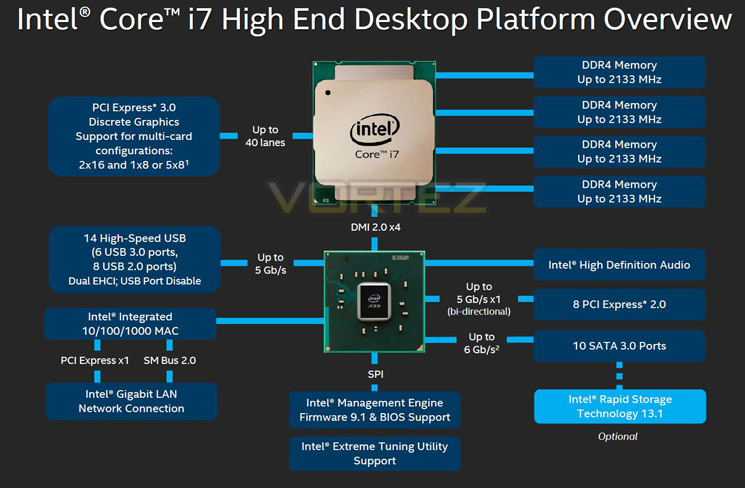
The above block diagram shows us that DDR4 is natively supported. Note that DDR3 is NOT supported (more on this later). While the block diagram shows a rated speed of up to 2133MHz, our test bench happily ran 16GB (4x4GB) Quad channel Corsair Vengeance LPX at 2666MHz. More recently niche 3000MHz and even 3333MHz DDR4 DIMMs are entering the market requiring high voltages and far deeper pocket, but it’s anticipated that eventually 4GHz DIMMs will be the high watermark at retail.
40 x PCI Express (PCIe) Lanes
Depending on CPU choice, the X99 chipset can support up to 40 lanes of PCIe in combinations of 2×16, 1×8 or 5×8. We also expect this figure to increase on some motherboards with the addition of PLX chips given sufficient demand. All of the PCIe lanes are now PCIe 3.0 compliant; while current generation GPU’s rarely saturate PCIe 2.0 it is nice to have that future proofing available, especially for SLI/Crossfire configurations.
USB 3.0
One of the heaviest criticisms of X79 was the lack of natively support USB 3.0 ports, especially when compared to its Z87/97 brethren. We are now happy to report that X99 will support 6 USB 3.0 ports along with 8 USB 2.0 ports. Of course, most motherboard manufacturers will also add the usual ‘aftermarket’ USB 3.0 support from components such as ASMedia and Marvel so transfer speeds of up to 5GB/s and port numbers in the double-digits can theoretically be achieved.
SATA 3.0 And Next Generation Storage
Despite having huge computational benefits, X79 was oft criticised by the lack of high speed SATA 6Gbps ports. This has been rectified with the X99 chipset supporting 10 x SATA 3.0 ports attaining a theoretical speed of 6Gb/s which can be enhanced using the latest Intel Rapid Storage driver to speeds of 10 Gb/s!
SATA of course has its limitations, which is where newer next generation storage technologies come in. First seen in limited quantities on Z87 and more widely on Z97, M.2 and SATA Express technologies unlock transfer speeds far in excess of SATA III. Support for PCIE storage remains sporadic – M.2 is starting to pick up but SATA Express is exceptionally rare – but it’s slowly proving to be a valid alternative to SATA 3 and mSATA. Many X99 motherboards support M.2 X4, which makes use of four PCIE lanes for up to a stunning 32Gbps bandwidth; however, few M.2 drives come close to saturating even Gen 1’s ~8Gbps.
We must say that Intel have pulled out all the stops here. Clearly they have taken on board user feedback regarding the deficiencies of X79 by incorporating more modern storage and expansion options. No longer is the Enthusiast flagship the poor I/O brother to Z87/97. Perhaps the biggest draw though is the introduction of DDR4. This will see huge speed gains in almost every aspect of personal computing. With 8x8GB DIMMS supported a mammoth 64GB of DDR4 will make the X99 chipset massively future proofed.
We will cover the overclocking capabilities of the new chipset and each motherboard specifically in the overclocking section but this area failed to disappoint too.
Overall, there is little to criticise here. While we would have liked 40 PCIe lanes regardless of CPU, we understand there has to be some compromise to keep costs down for the budget conscious so how many PCIe lanes you have available will be dictated by CPU choice and not the motherboard. The entry level 6 core i7-5820 will have 28 PCIe lanes at a cost of £299 (At the time of release), while the flagship 8 core i7-5960X and 6 core i7-5930K will both have the full blown 40 lanes available. Aside from lanes, cores cache and clockspeed, all of the X99 features will be available regardless of CPU choice and to this end we are grateful. We suspect that future additions to the CPU range will hit the middle ground while the 5960X will receive a speed bump although this is pure speculation at this point.
Which chip would we go for? Obviously if money was no object then the i7-5960X is the way to go, not only does it have the full 40 lanes available but it is a true 8 core (16 threads) CPU. The 5930K would be the obvious choice for the consumer and the CPU that we think will prove most popular due to the balance of speed vs. cost.
Whichever CPU you opt for though; you can be assured that the X99 chipset offers the very best available. It is powerful, feature packed and as you will see, the unrivalled component of choice for enthusiast users.
Packaging & First Look
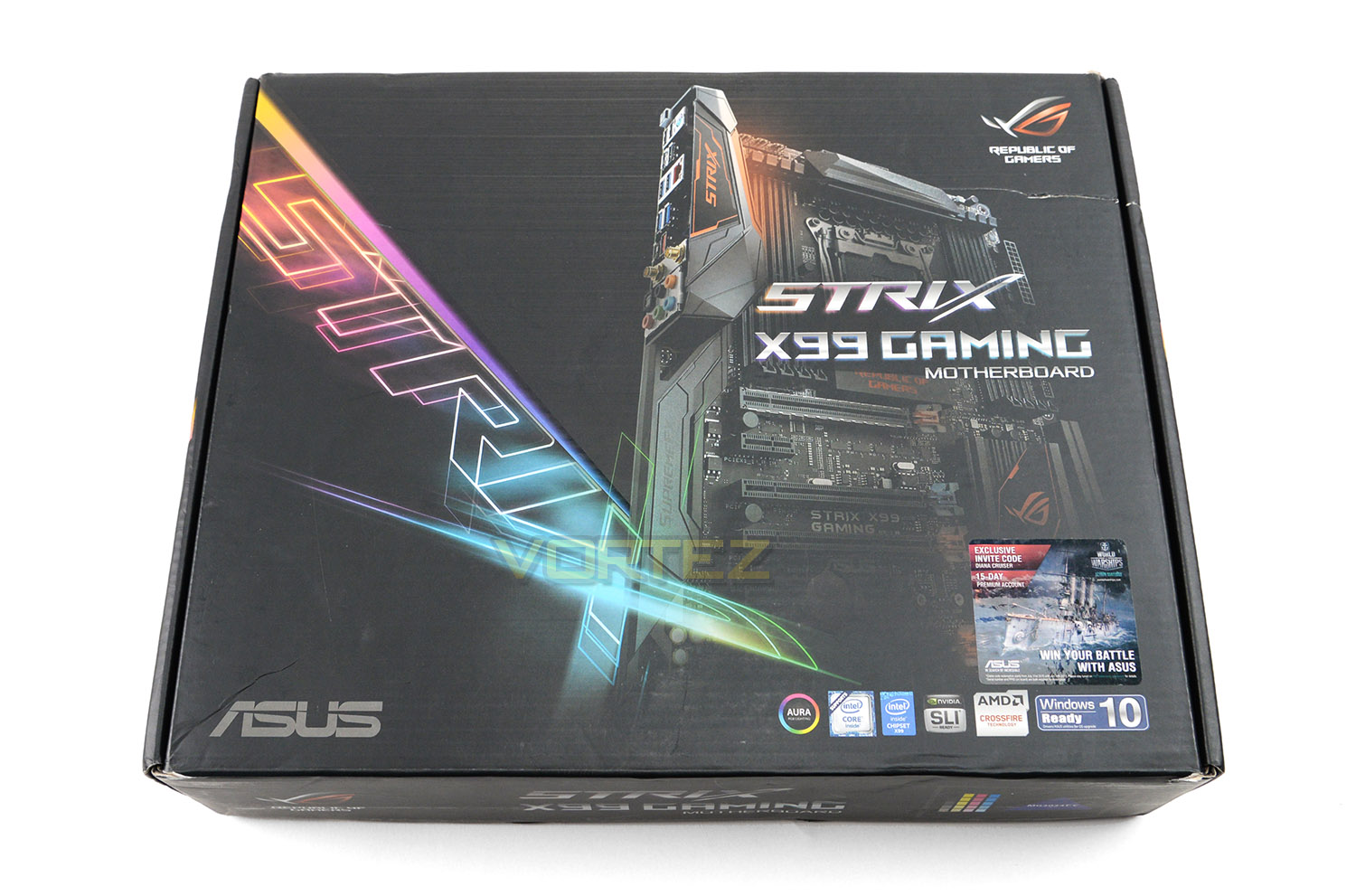
Much like other products which fall into the STRIX lineup, the STRIX X99 Gaming carries with it the bright and lively theme on the packaging. The box reveals an exciting illustration of the motherboard and lists some of the key features while on the reverse we have a breakdown of the fundamental attributes and a diagram highlighting the features with technical detailing.
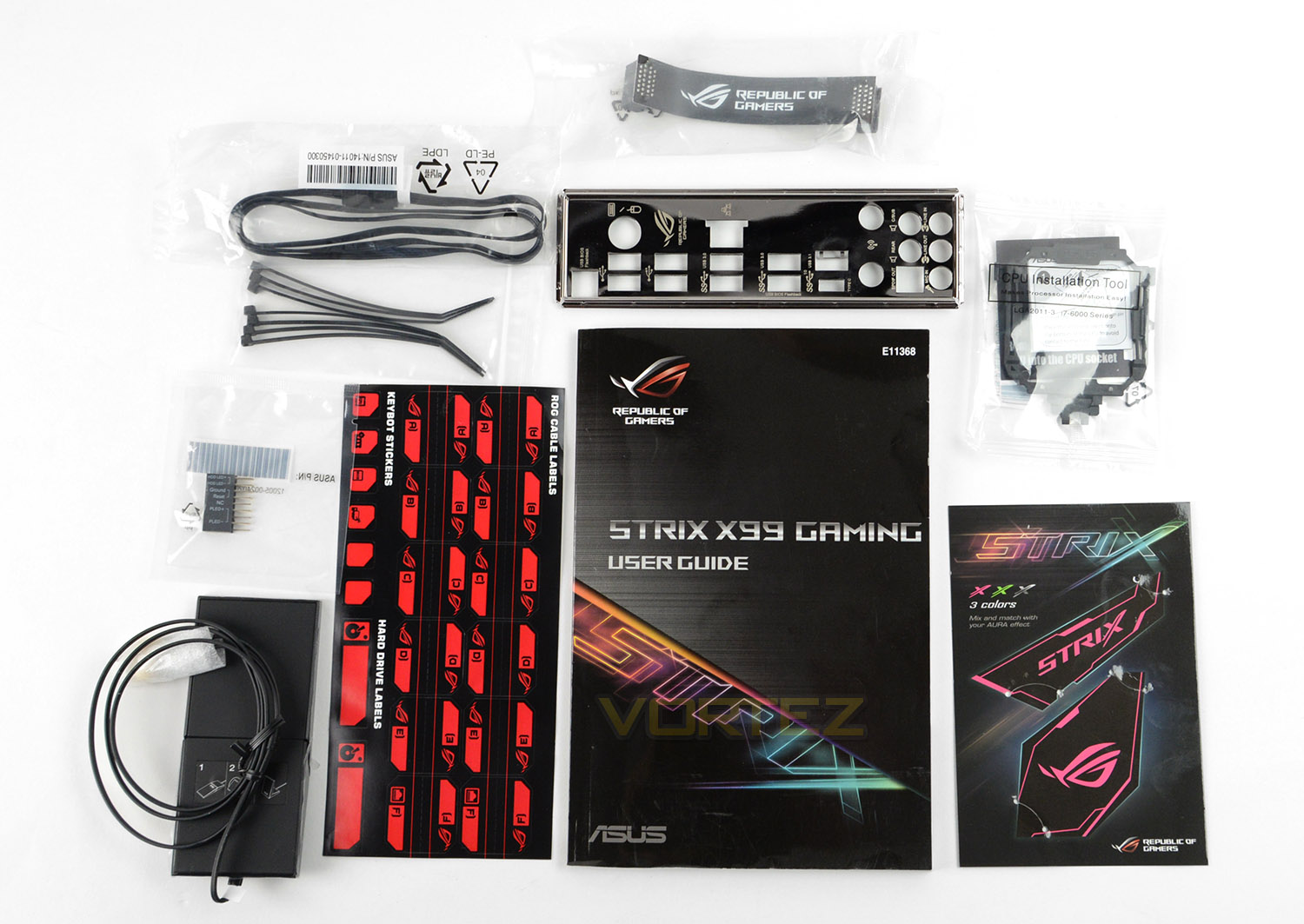
Delving inside the box, we are met by quite a number of bundled accessories. We have the following items:
• User’s manual
• I/O Shield
• 4 x SATA 6Gb/s cable(s)
• 1 x M.2 Screw Package
• 1 x CPU installation tool
• 1 x Supporting DVD
• 1 x ASUS 2T2R dual band Wi-Fi moving antennas (Wi-Fi 802.11a/b/g/n/ac compliant)
• 1 x Cable ties pack(s)
• ROG Fan Label
• 1 x Extension Cable for RGB strips (80 cm)
Unlike the signature series, this STRIX variant does not come with any of the add-in cards, but we do receive WiFi adapters and an extension cable to make use of the Aura lighting.
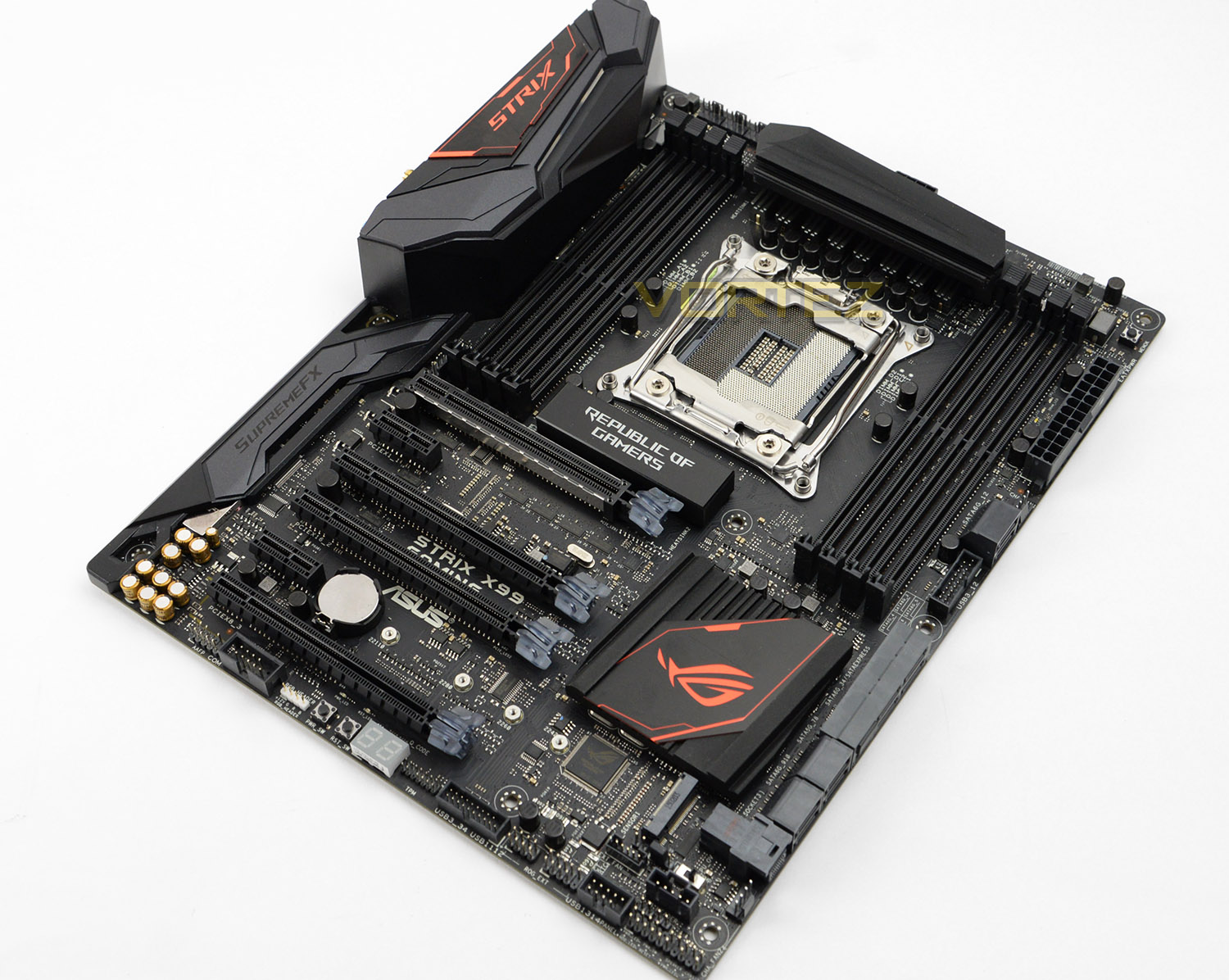
Unpacking STRIX X99 Gaming from the box we have a rather distinct looking motherboard. The overall design is aggressive yet sleek. Across the expanse of the board we have black being used for the slots, lanes and ports with the only distinguishing colour being that of orange on the heatsink and rear IO cover. Aesthetically, STRIX X99 Gaming is a delight and it will pair up with other hardware very well for its neutral appearance.
STRIX X99 Gaming conforms to the ATX form factor measuring: 12 inch x 9.6 inch ( 30.5 cm x 24.4 cm ).
Closer Look
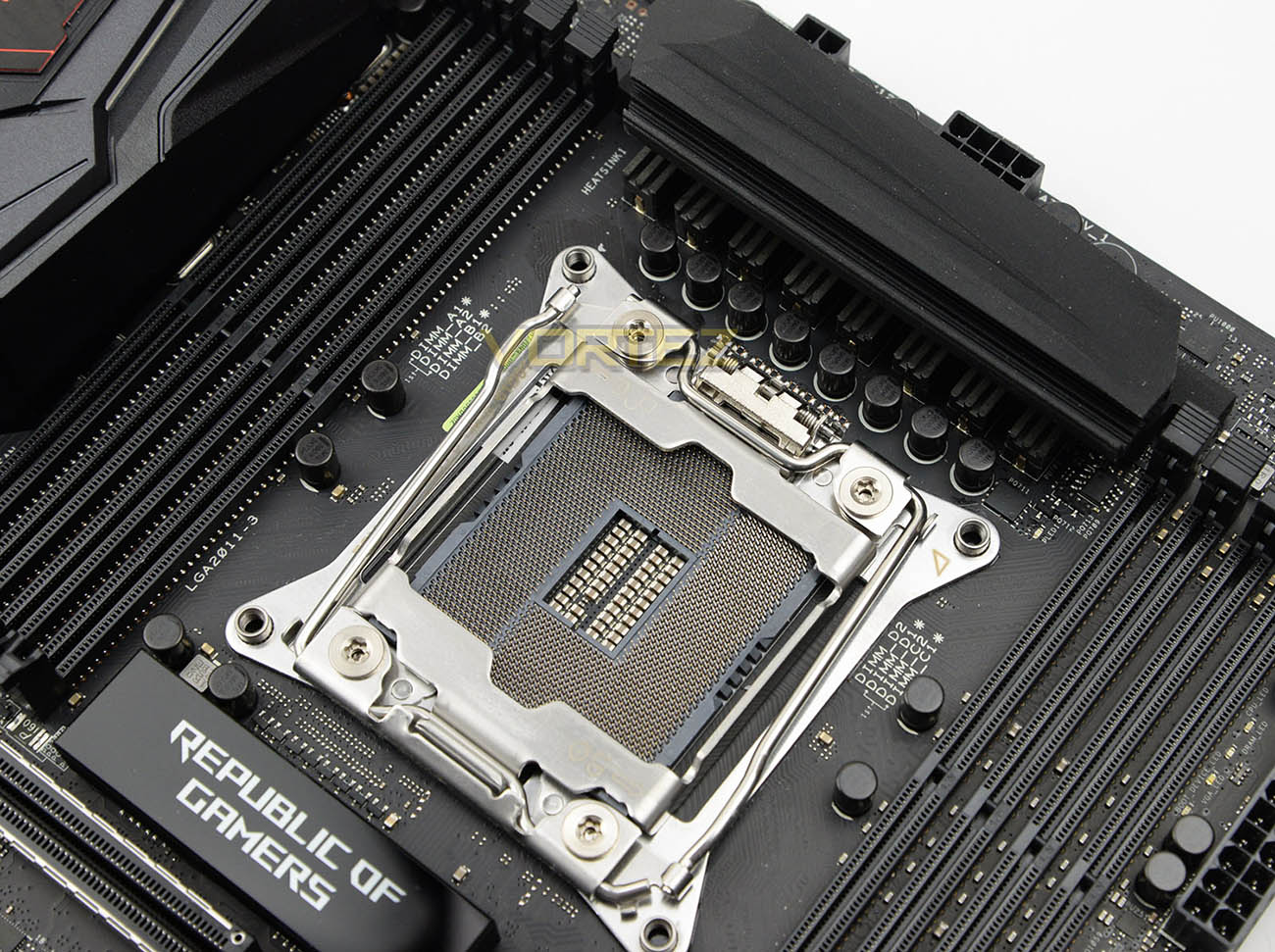
STRIX X99 Gaming is designed to work with Intel’s Core-i7 processors aka Haswell-E, as well as the next-gen Broadwell-E chips. We therefore have the 2011-v3 Socket which supports 14nm CPUs and the next-generation of Turbo Boost technology – 3.0.
As with other ASUS X99 motherboards, the STRIX X99 Gaming takes advantage of OC Socket – adding extra pins to the socket area which tie in to a proprietary circuit to enhance the overall system performance.
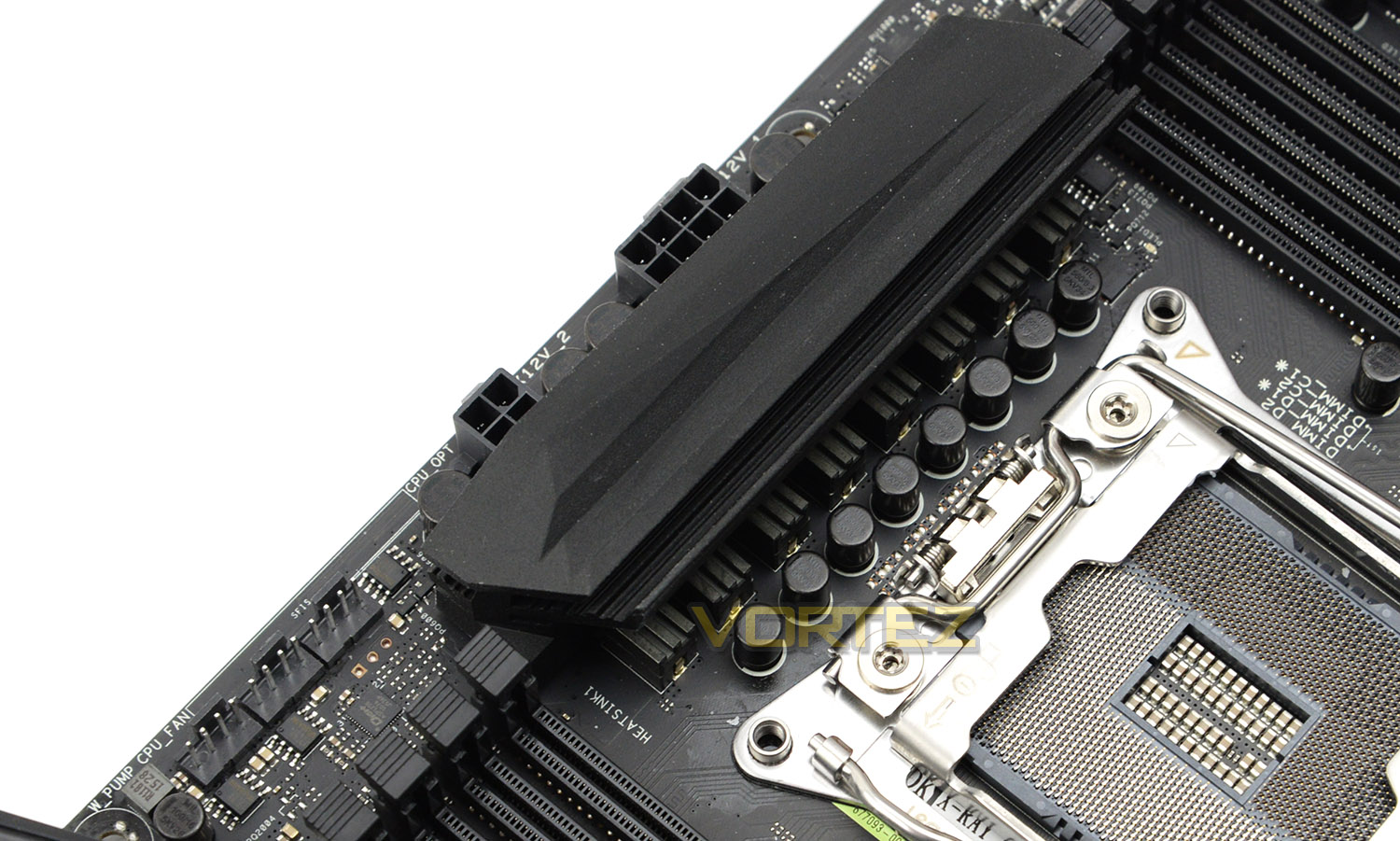
The edge of the mounting plate utilises four screw holes for use with LGA2011 ready CPU coolers – this motherboard also benefits from having a multitude of fan headers in the top corner which include: twin-CPU fan headers and H_AMP (high speed fan support) and W_PUMP headers for an LCS.
Around the CPU socket there is single heatsink design which sits over the MOSFETs. STRIX X99 Gaming uses an all-digital design via DIGI+ Power control to bring about better power efficiency and stability, with an 8+2 phase configuration.
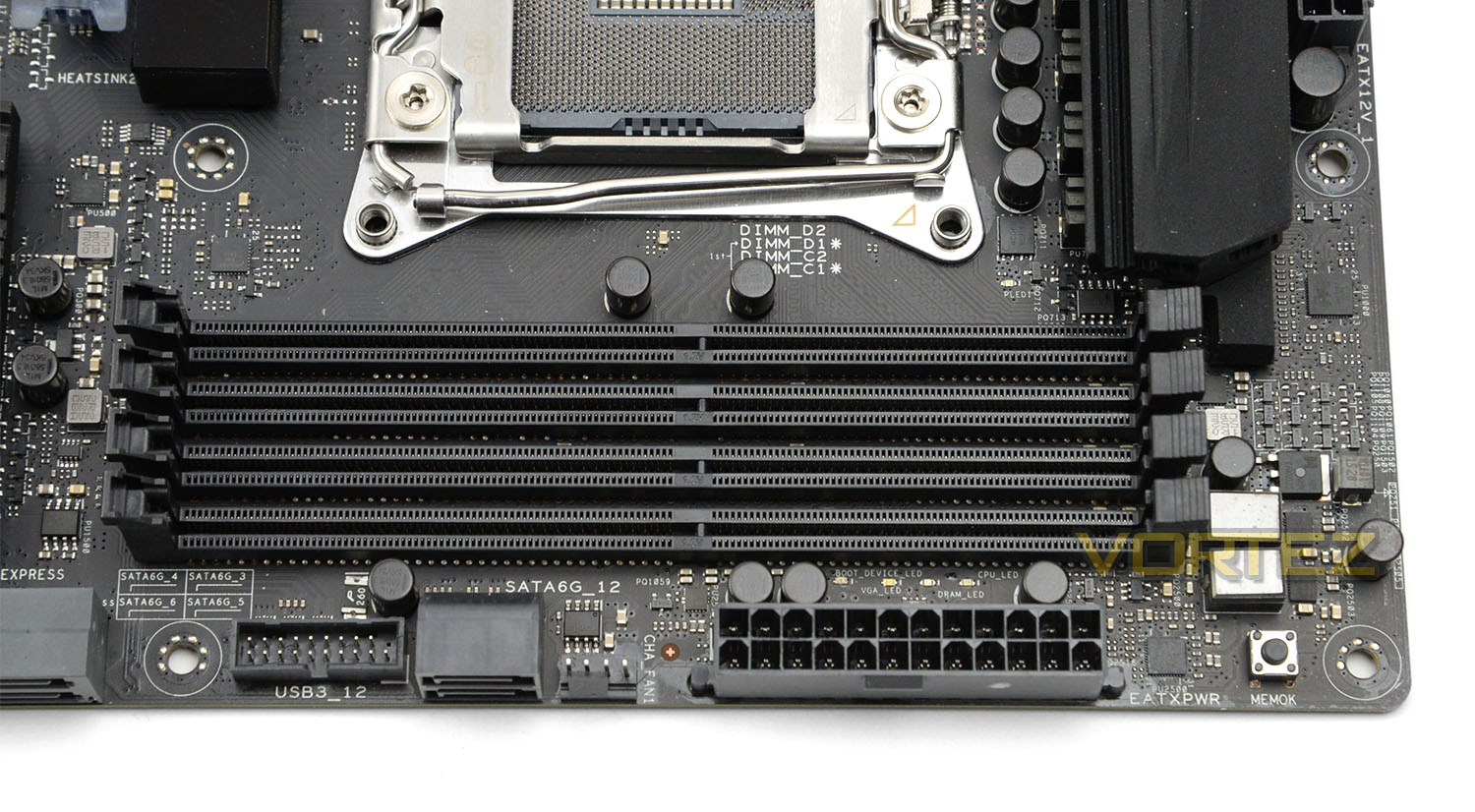
On either side of the socket there are four slots for DDR4 memory. These eight slots support up to 128GB and speeds of up to 3333MHz (OC). Quad-channel support and XMP is available as expected.
Around the memory region there are some additional features which include MemOK! – ASUS’ exclusive memory compatibility tool, after pressing this button problematic bootups with unsupported memory are resolved. Beside the 24-pin ATX power, there is also two SATA 3 (6GB/s) ports and a single USB 3.0 header.
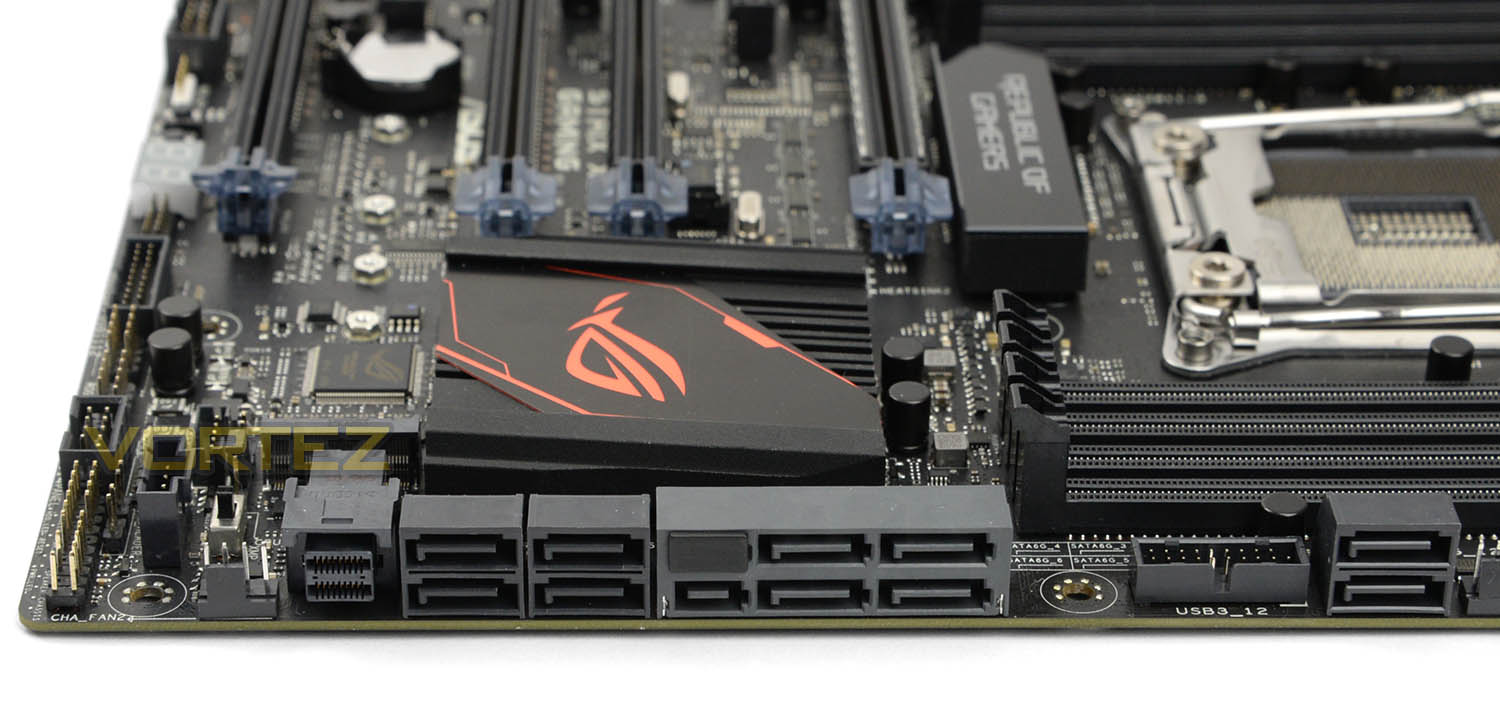
Further along the edge we have even more storage options. These include:
• Four SATA 3 (6GB/s) ports
• Two SATA Express ports
• One U.2 (PCIe 3.0 x4) port
Having such flexible storage options means that we aren’t stuck with one particular standard. The inclusion of U.2 future-proofs the motherboard considerably. If SATA Express aren’t being used the additional four SATA ports can be used separately.
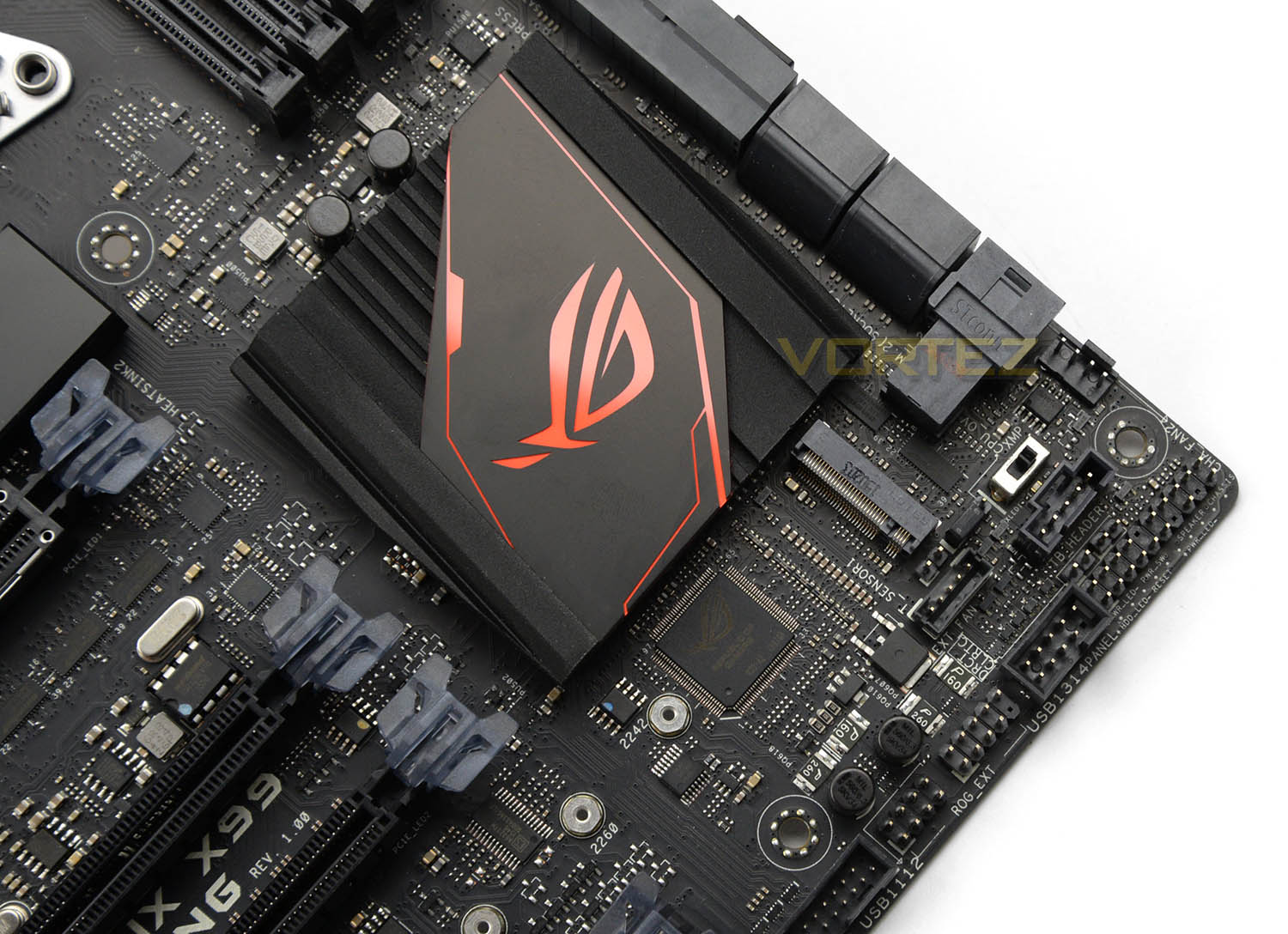
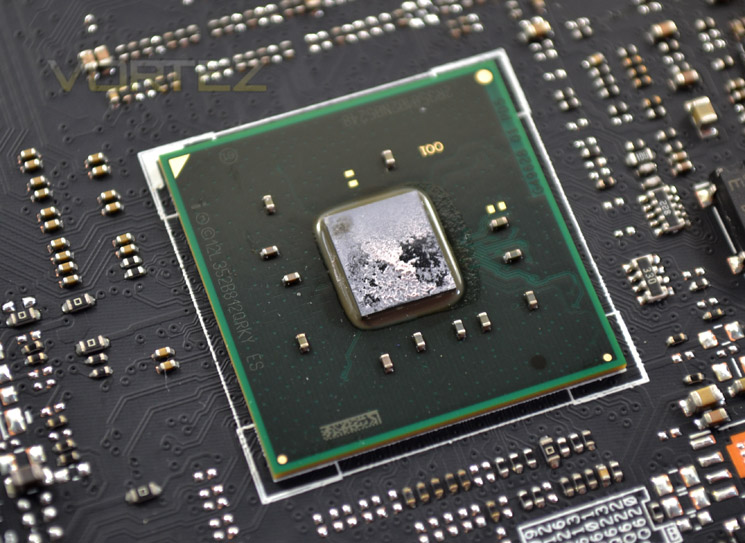
Located just behind the SATA ports is a large heatsink which sits over the X99 chip. Just below this heatsink there is a single M.2 slot for an M.2 SSD offering up to 32GB/s.
Even further down there an EXT_fan for ASUS’ own external fan card and TB_header for ASUS’ thunderbolt add-in card (not supplied) along with an EZ XMP switch allowing the user to enable XMP on-the-fly for the installed DDR4 kit.
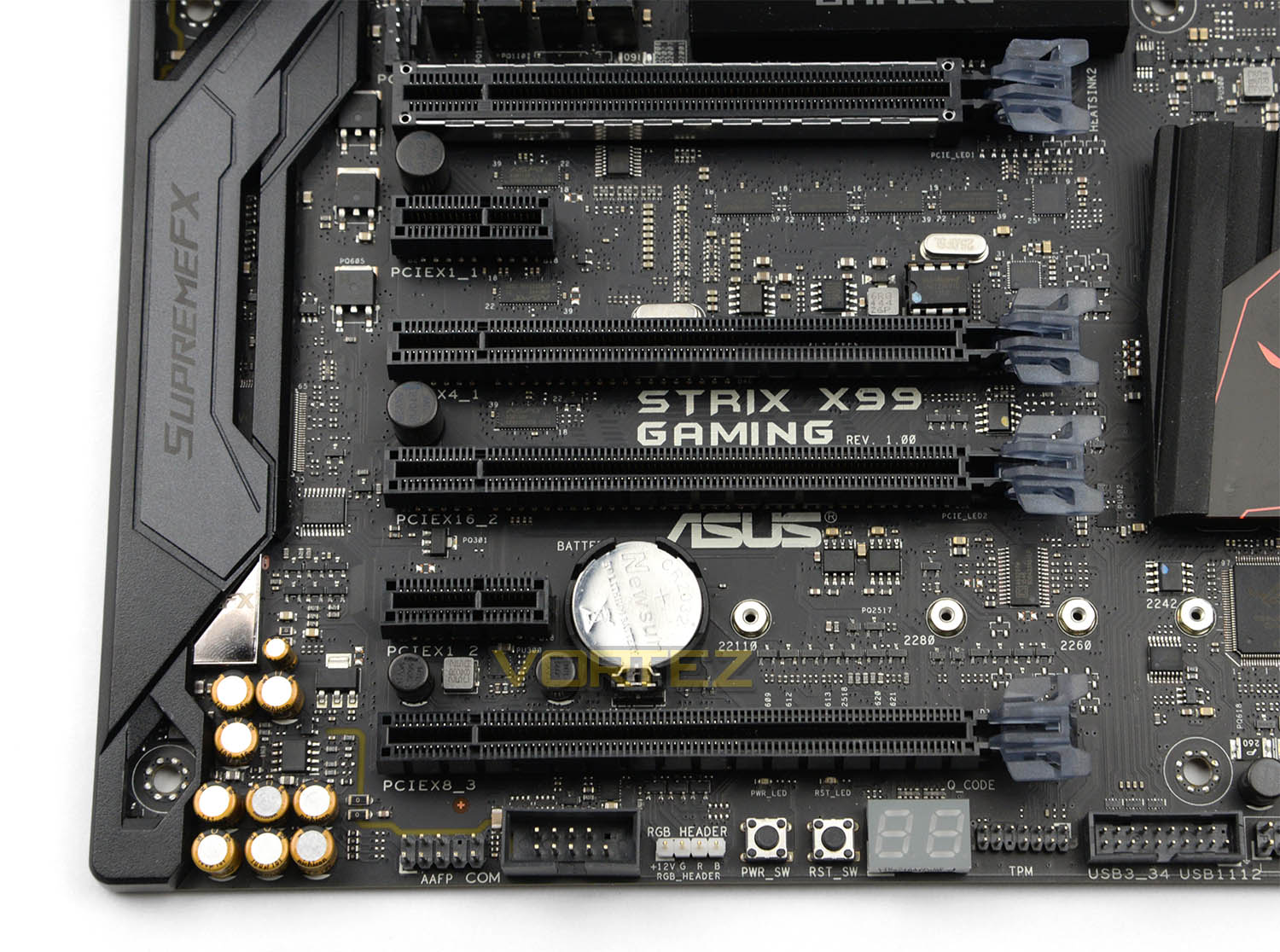
Next we arrive at the PCI Express slot region. One of the five X16 slots is reinforced with a steel protector. Each of the latches on the slots feature LED indicators which light up when the system has power. Available in this area we have:
• 4 x PCIe 3.0/2.0 x16
• 2 x PCIe 3.0/2.0 x1
For those interested in the modes for each of the x16 slots – users can take advantage of:
• Slots 1 & 3 – x16/x16
• Slots 2 & 4– x8/x8
STRIX X99 Gaming has a clear advantage over other motherboards by offering dual-graphics accommodation by way of dual X16 mode.
Along with these slots there is SLI and CrossFireX support.
Running through the bottom-edge of Deluxe-II we have a series of onboard buttons which include:
• Power/reset buttons – fast power management
• Q-CODE panel – displays codes throughout POST for diagnostics
• USB 3.0 header – an additional front panel header
• RGB header – enables RGB strips to be installed
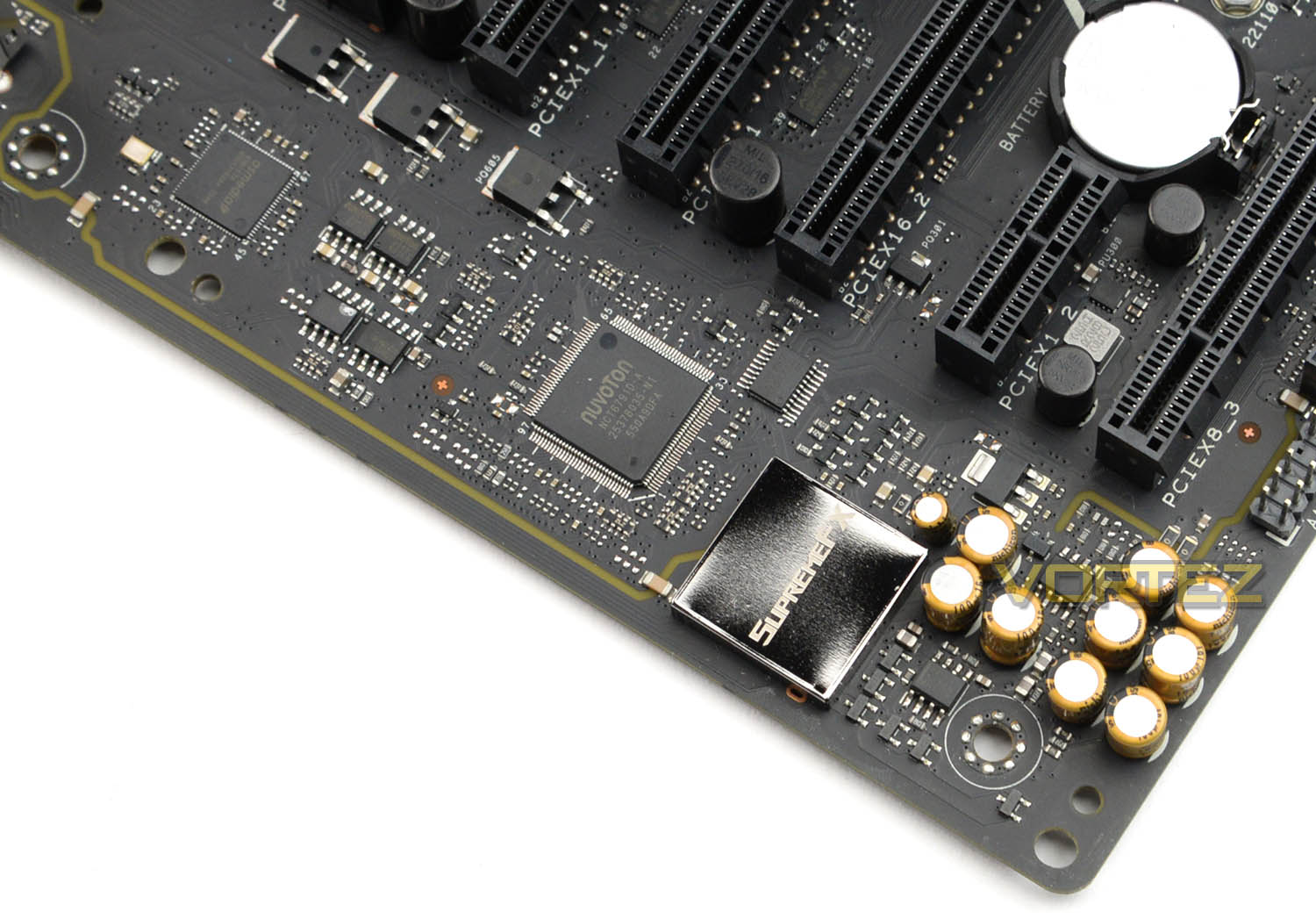
After detaching the plastic shroud, we can inspect the audio components in closer detail. The basis for the audio is SupremeFX – a modified variant of Realtek ALC 1150. This codec is renowned for its solid performance, and is a popular choice for motherboard manufacturers. Along with the ALC1150, we also have an isolated area for all the audio components to prevent interference, dual headphone amp, and premium Japanese-made audio CAPs.
This audio package can be managed via Sonic Radar II.
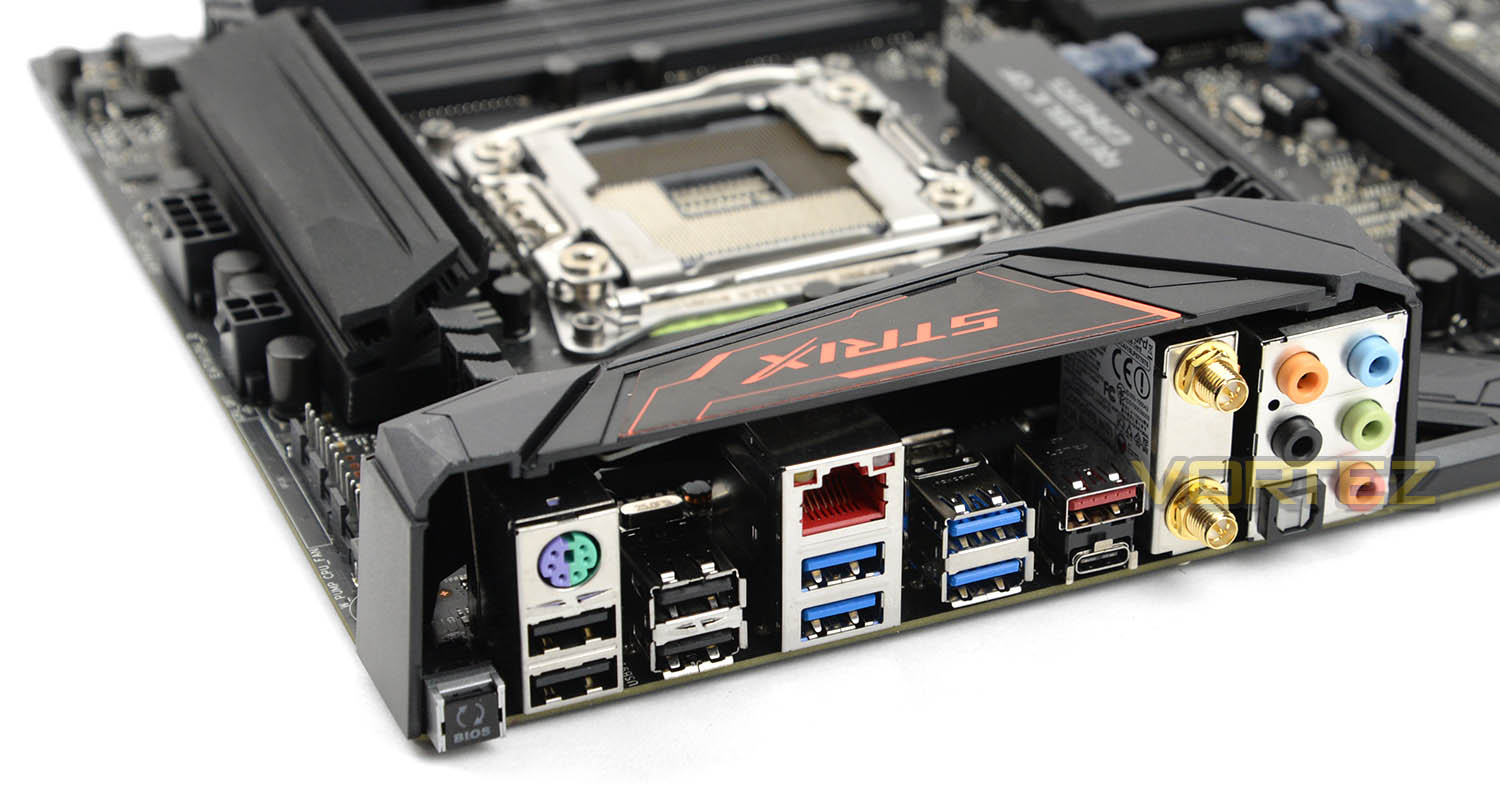
Casting an eye over the rear IO section of STRIX X99 Gaming we have:
• USB BIOS Flashback Button(s)
• PS/2 keyboard/mouse combo port
• 4 x USB 2.0 (one port can be switched to USB BIOS Flashback)
• Gigabit LAN port (via Intel i218V controller)
• 4 x USB 3.0 (blue)
• 1 x USB 3.1 (red)Type-A
• 1 x USB 3.1 (black)Type-C
• Wi-Fi GO! module (Wi-Fi 802.11 a/b/g/n/ac and Bluetooth v4.0
• 5 x Audio jack(s)
So, quite a variety of ports to use which should give flexibility to the overall functionality.
Test Setup, Methodology & Overclocking
Test Setup
CPU Intel Core i7-5960X Extreme Edition
Cooling Corsair H100i GTX
Motherboard ASUS STRIX X99 Gaming
Memory 16GB Corsair Vengeance LPX DDR4 @ 2666MHz
Graphics NVIDIA GTX 760
Storage Samsung 840 EVO 750GB
PSU Corsair HX1050 80 Plus Gold Certified PSU
Cooling Corsair H100i GTX
Motherboard ASUS STRIX X99 Gaming
Memory 16GB Corsair Vengeance LPX DDR4 @ 2666MHz
Graphics NVIDIA GTX 760
Storage Samsung 840 EVO 750GB
PSU Corsair HX1050 80 Plus Gold Certified PSU
Benchmarks
Cinebench R15 – CPU/OpenGL Score
x264 HD 4.0 – 1st and 2nd pass encoding
SiSoftware SANDRA 2014 – CPU & Memory benchmarks
HandBrake – Encoding Performance
Pov-Ray – 3D Image processing Performance
AIDA64 – CPU benchmarks
PCMark 8 – Creative Suite
3DMark FireStrike – DX11 3D Benchmark
Games – BF4, THIEF Company of Heroes 2
x264 HD 4.0 – 1st and 2nd pass encoding
SiSoftware SANDRA 2014 – CPU & Memory benchmarks
HandBrake – Encoding Performance
Pov-Ray – 3D Image processing Performance
AIDA64 – CPU benchmarks
PCMark 8 – Creative Suite
3DMark FireStrike – DX11 3D Benchmark
Games – BF4, THIEF Company of Heroes 2
Other Software
Stress Testing Software: AIDA64 Stability Test
CPU Specification Monitoring: CPU-Z
CPU Specification Monitoring: CPU-Z
Overclocking
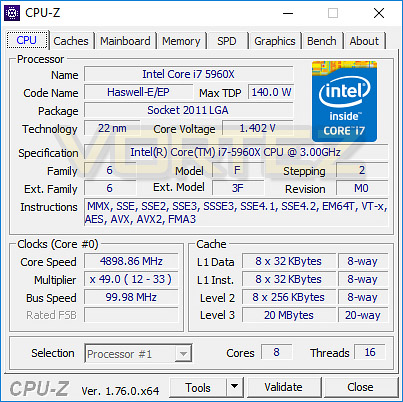
Overclocking with STRIX X99 Gaming is a breeze thanks to the strong features and flexible options within the UEFI BIOS. In the past, our Intel Core i7-5960X has been capable of up to 4.9/5GHz, so we instantly began testing for the maximum possible overclock.
STRIX X99 Gaming was able to achieve our milestone quite easily, requiring 1.4v to reach the heights of 4.9GHz. Since our board can hit the same marker as other previously reviewed boards this is an indication of how capable STRIX X99 Gaming really is.
Benchmarks: Power Consumption
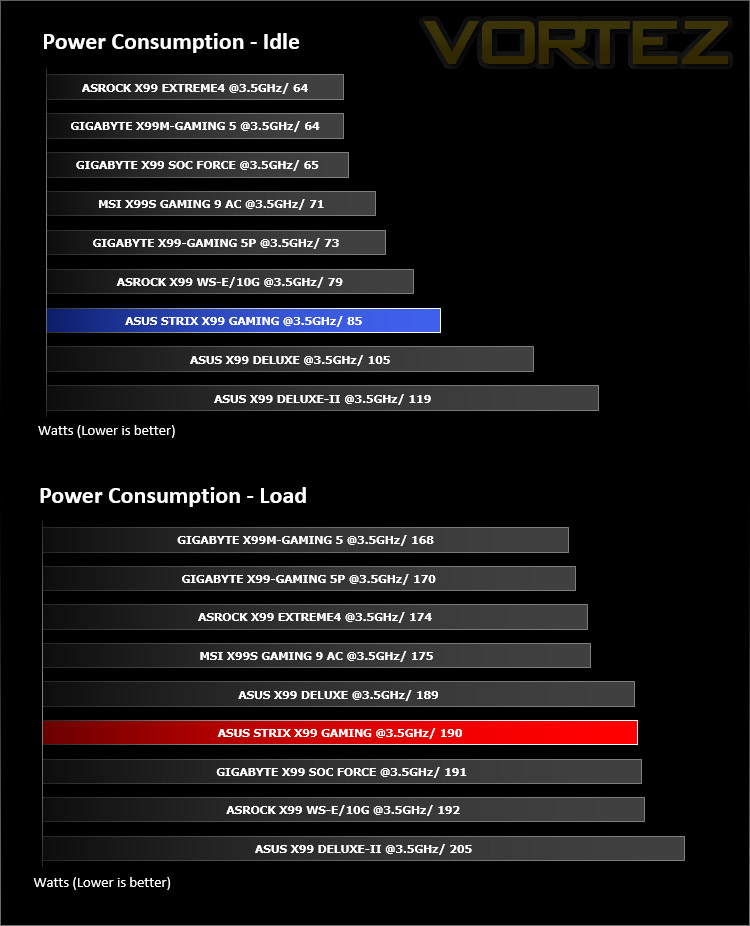
It’s interesting to note the power consumption across all motherboards. Although they are using the X99 chipset, energy results can fluctuate between manufacturers due to the features and specifications that are integrated. First of all, for the idle tests the system is cold booted into Windows and no additional applications are executed – the watts are noted on the external energy monitor we use and then the system is loaded with 3DMark FireStrike – watts are again monitored for the duration of the test and the highest rated wattage result is then noted down. Below are the results of this energy test.
Benchmarks: AIDA64
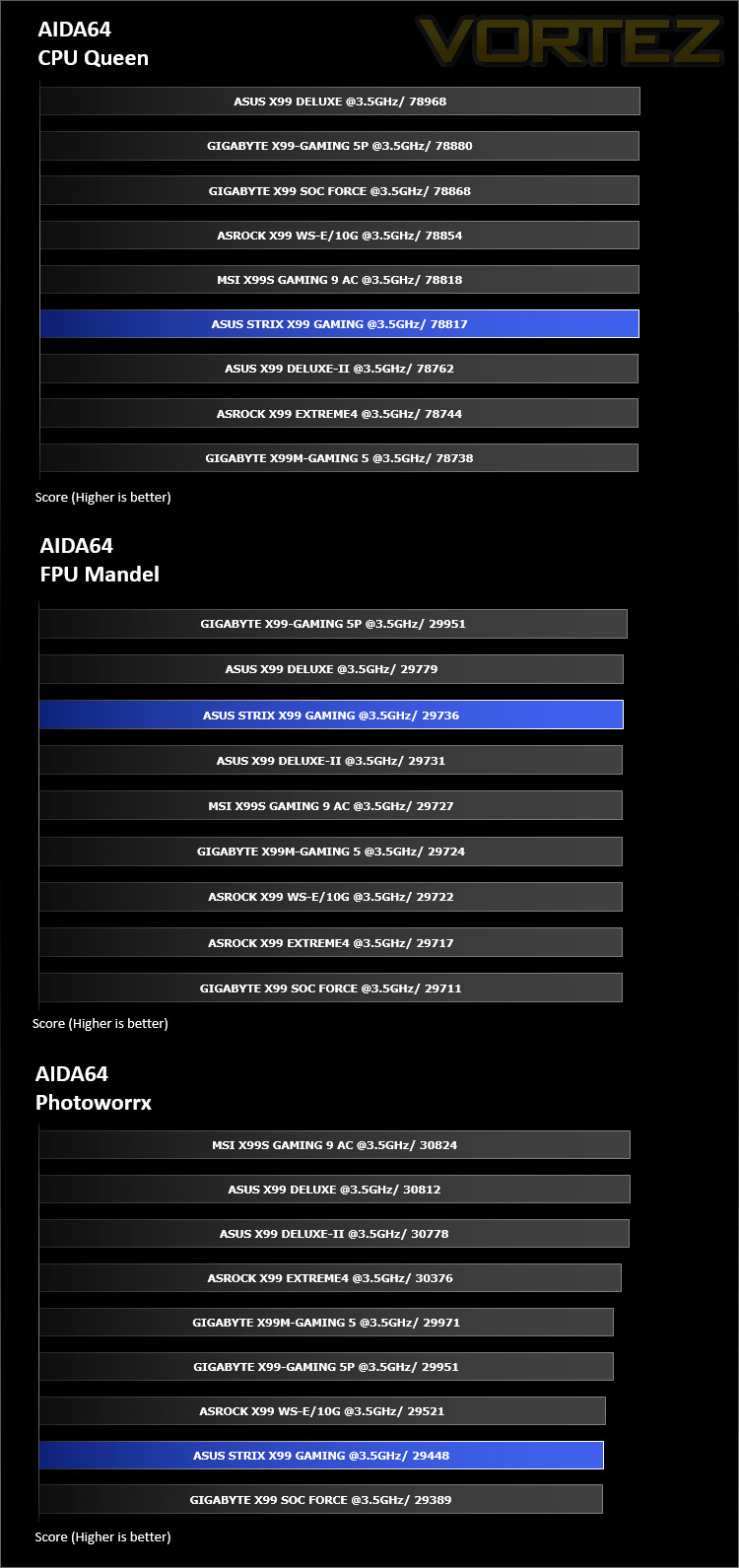
AIDA64 Product PageThis simple integer benchmark focuses on the branch prediction capabilities and the misprediction penalties of the CPU. It finds the solutions for the classic “Queens problem” on a 10 by 10 sized chessboard. At the same clock speed theoretically the processor with the shorter pipeline and smaller misprediction penalties will attain higher benchmark scores. For example — with HyperThreading disabled — the Intel Northwood core processors get higher scores than the Intel Prescott core based ones due to the 20-step vs 31-step long pipeline. CPU Queen test uses integer MMX, SSE2 and SSSE3 optimizations.
Benchmarks: Cinebench R15
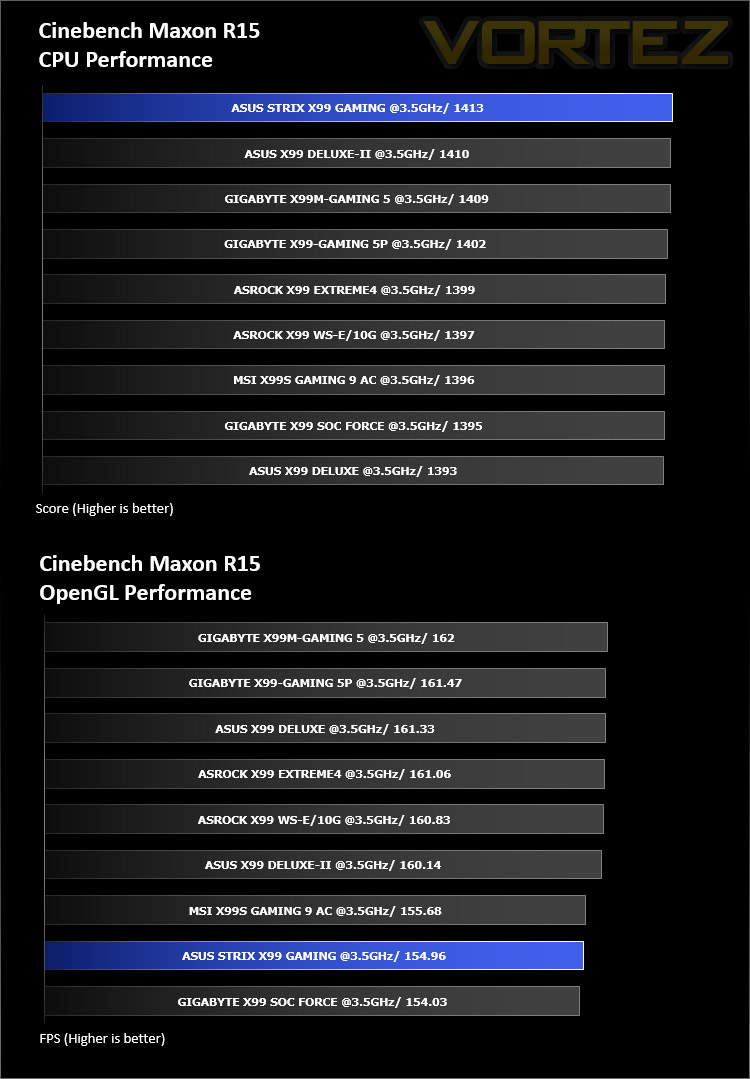
CINEBENCH is a real-world cross platform test suite that evaluates your computer’s performance capabilities. CINEBENCH is based on MAXON’s award-winning animation software CINEMA 4D, which is used extensively by studios and production houses worldwide for 3D content creation. MAXON software has been used in blockbuster movies such as Iron Man 3, Oblivion, Life of Pi or Prometheus and many more.
Benchmarks: SiSoftware SANDRA
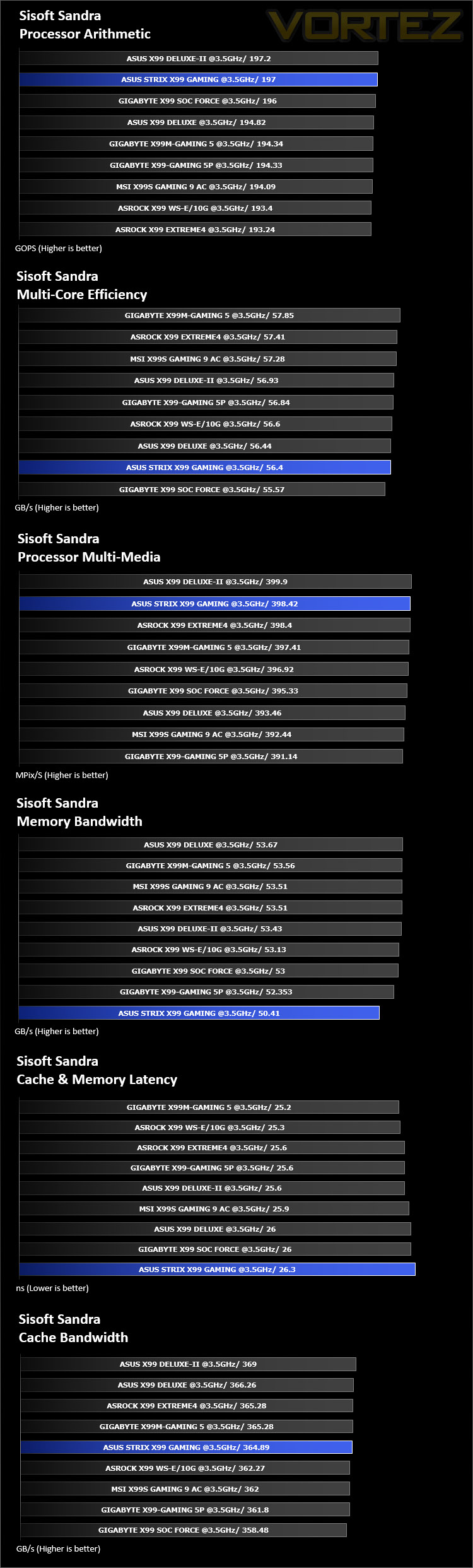
SANDRA isn’t always a benchmark that is included in hardware reviews but I believe it shouldn’t be ignored. SANDRA provides a vigorous package that tests your system in a rather large array of benchmarks. There are many aspects of benchmark that can be executed. We will be considering – CPU and memory tests.
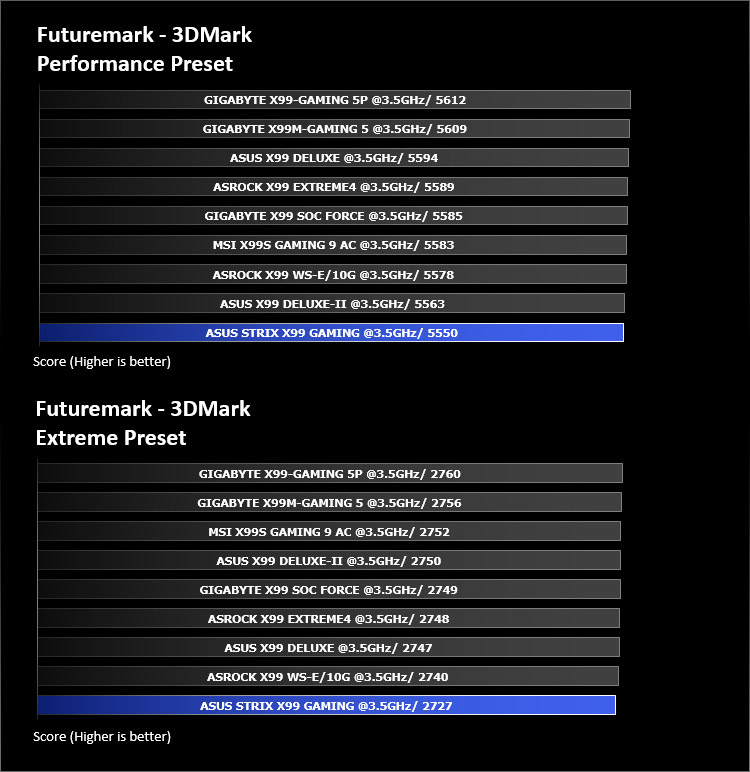
Benchmarks: 3DMark FireStrike
3DMark FireStrike Product PageFire Strike is our new showcase DirectX 11 benchmark designed for high-performance gaming PCs. It is our most ambitious and technical benchmark ever, featuring real-time graphics rendered with detail and complexity far beyond what is found in other benchmarks and games today. Fire Strike will only be available in the Windows editions of 3DMark initially.
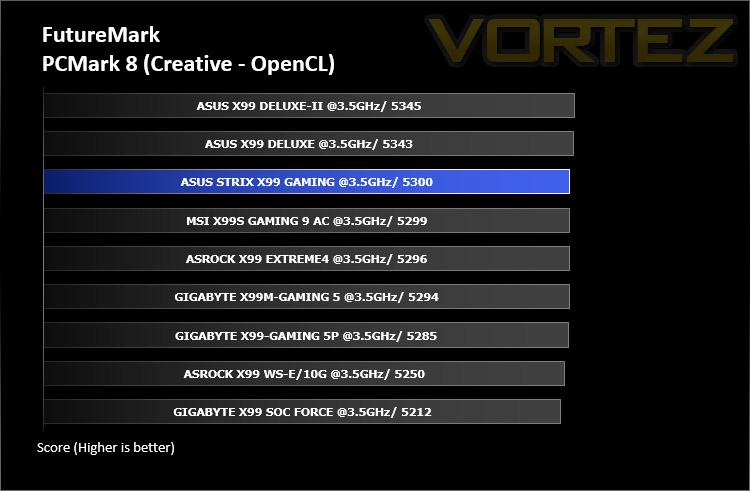
Benchmarks: PCMark 8
PCMark 8 combines performance benchmarking with battery life measurement and includes tests based on popular Adobe and Microsoft applications. Whether you are looking for long battery life, or maximum power, PCMark 8 will help you find the devices that offer the perfect combination of efficiency and performance for your needs. It’s the complete PC performance benchmark for home and business.
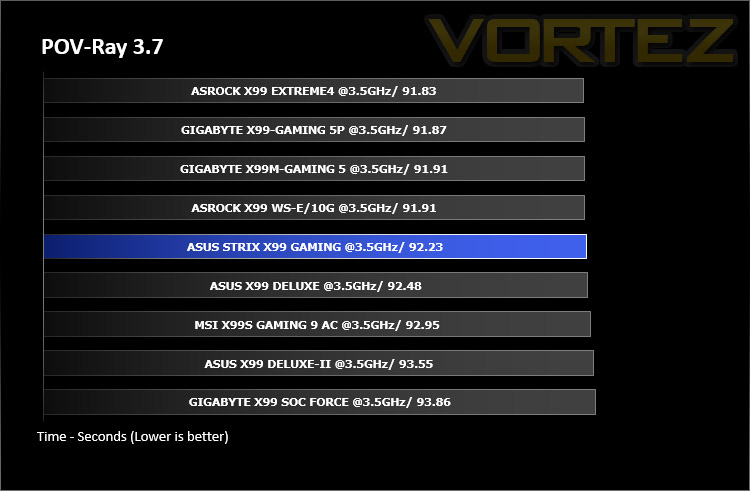
Benchmarks: POV-Ray 3.7
The Persistence of Vision Raytracer, or POV-Ray, is a ray tracing program which generates images from a text-based scene description, and is available for a variety of computer platforms. It was originally based on DKBTrace, written by David Kirk Buck and Aaron A. Collins for the Amiga computers.
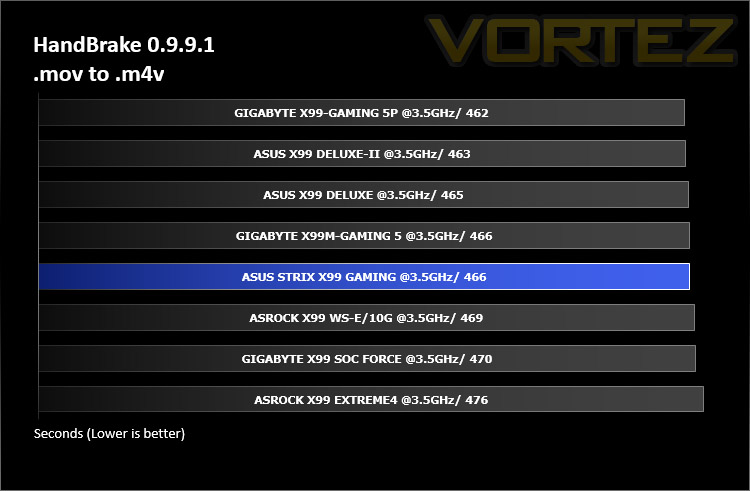
Benchmarks: Handbrake 0.9.9.1
HandBrake is an open source transcoding tool for converting video from nearly any format to a selection of modern, widely supported codecs. Strong multi-threading support tends to favour high core counts and hyperthreading support.
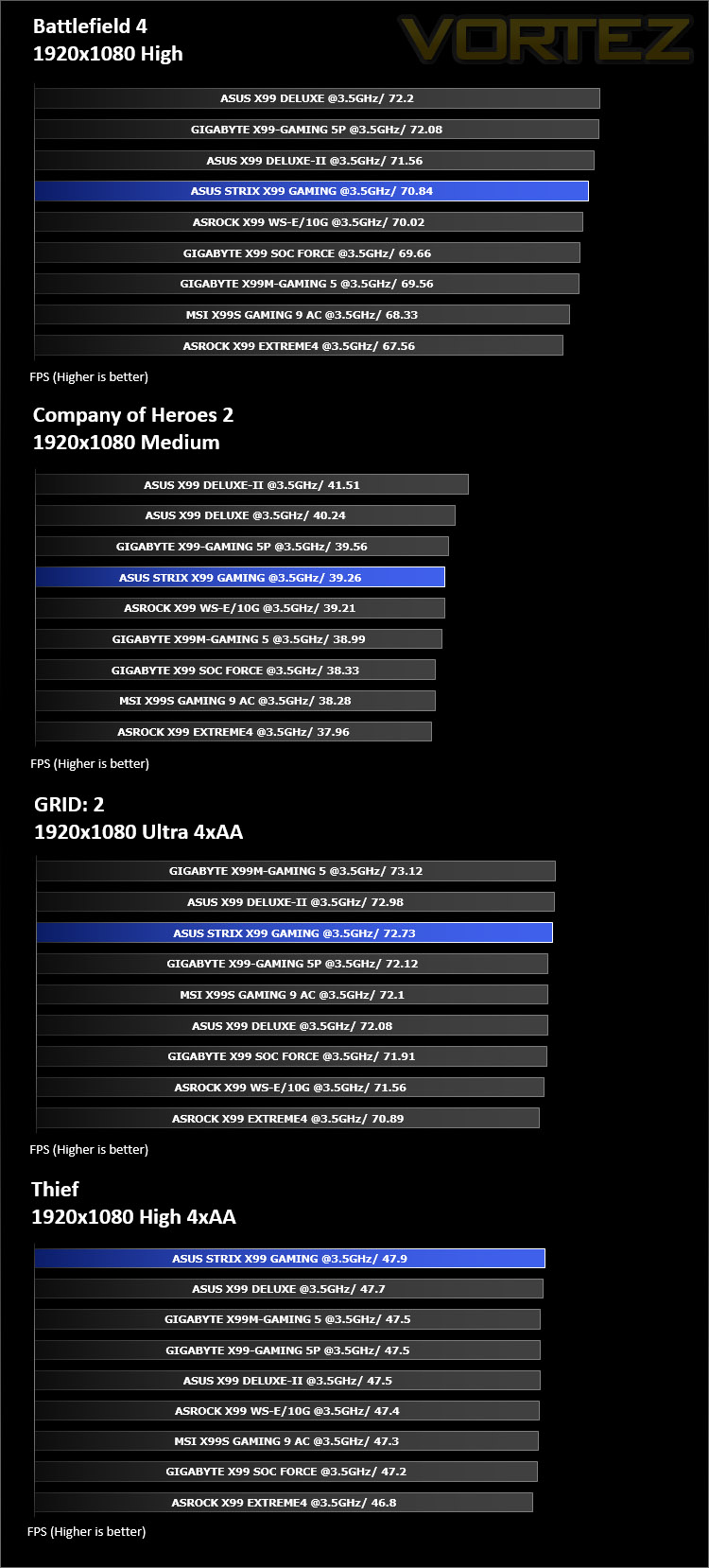
Gaming Benchmarks: BF4, COH2, GRID 2, THIEF
It’s important for us to perform a number of game benchmarks as well as the synthetic tests because gamers will want to know if there are any significant benefits. So here we have two popular and recent gaming titles which feature a dedicated benchmark tool within them to display results.
Conclusion
Refreshed Intel X99 motherboards have been a hot topic for the last few months since Intel announced their next-gen Broadwell-E Processors. Many brands are reviving their popular models and bringing them up-to-date with new features but today’s STRIX offering is its debut.
ASUS are keen to expand their STRIX portfolio by including a number of new motherboards – this began with the Intel Z170 chipset but has now included the Intel X99 chipset by way of the STRIX X99 Gaming. Since this board comes under the ROG branding we have a livery which is familiar; the aesthetics on this motherboard are just what gamers typically seek – aggressive yet stylish. The overall look and design of X99 STRIX Gaming is impressive and anyone investing in this board will be able to coordinate all of their hardware quite well since this board carries a neutral design.
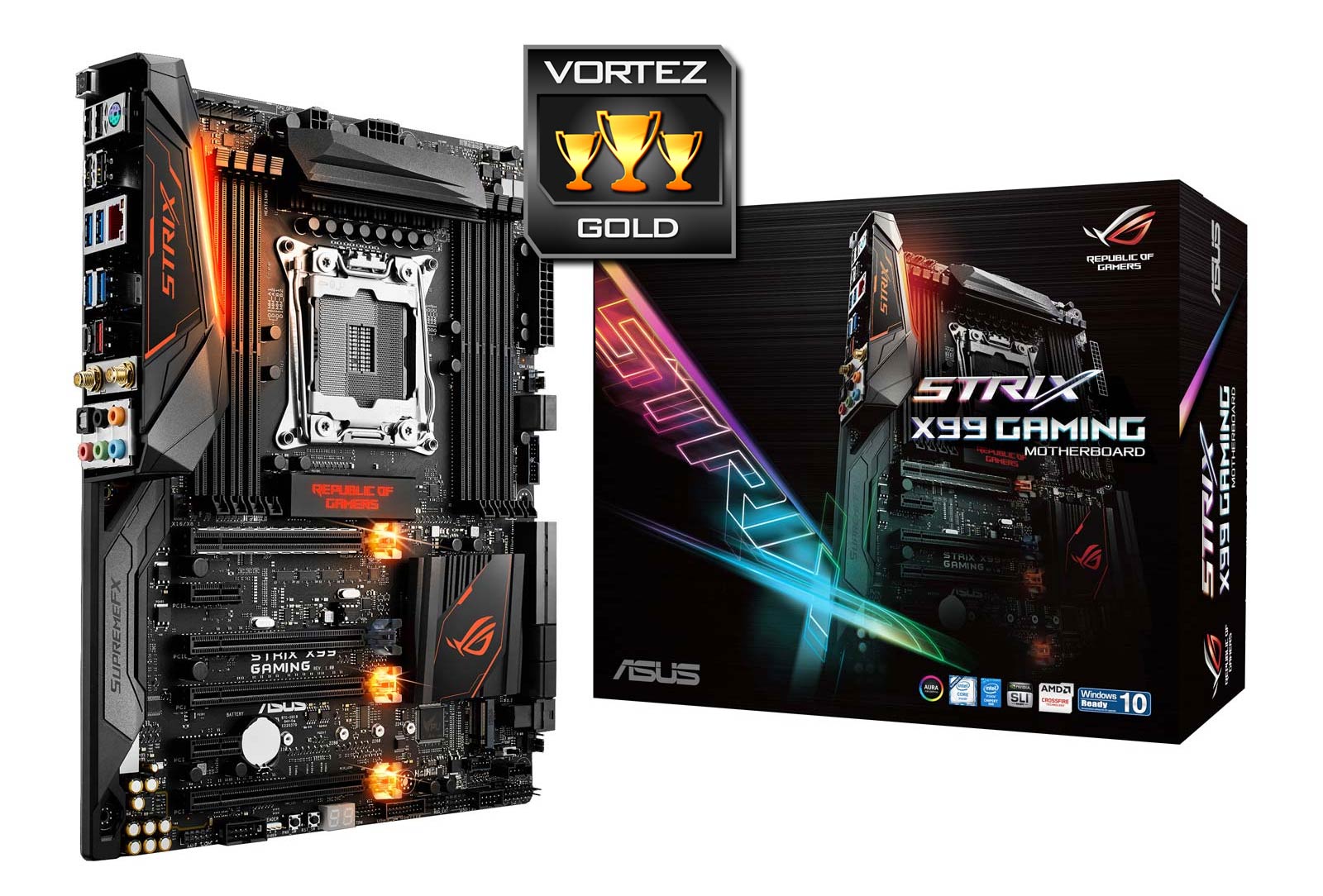
Users will find a good assortment of features right across the board which will satisfy overclockers and gamers. There are ASUS-specific features like MemOK!, OC Socket and SupremeFX and there are also a versatile lineup of storage solutions which cover SATA, SATA Express, M.2 and U.2. Even the PCI Express benefits from dual X16 mode for those wanting the optimum bandwidth for a multi-GPU configuration; so in this aspect STRIX X99 Gaming has all of the bases covered.
Performance is in line with previously tested Intel X99 motherboards – showing that this STRIX offering is consistent in its design. Applying a decent overclock to the CPU is easy thanks to the intuitive UEFI BIOS; there are a wide-range of features available to modify which should appeal to both novice and advanced overclockers. We managed to squeeze 4.9GHz out of our Intel Core i7 processor which is the absolute maximum for the chip in use. This once again verifies how capable the STRIX X99 Gaming is even when pushing the CPU to its very limit.
The STRIX X99 Gaming is priced at £278 GBP / $334 USD. So this motherboard is neither the cheapest nor the most expensive solution bearing the X99 chipset. Our STRIX board is packed with all the features most would need and represents good value. Further to this, it is backed by a generous 3-year warranty which should help to seal the deal.
STRIX X99 Gaming is a capable motherboard which oozes style and finesse. Those wanting to make the transition over to the High End Desktop platform would be well-advised to consider this offering.
Pros
+ Attractive to the eye
+ x16/x16 multi-GPU support
+ Numerous storage options inc. U.2
+ Provides good overclocking results
+ Includes a selection of USB 3.1 ports
+ Dual USB 3.0 headers
+ SupremeFX audio
Cons
– Only one of the PCI Express slots is reinforced w/steel
+ Attractive to the eye
+ x16/x16 multi-GPU support
+ Numerous storage options inc. U.2
+ Provides good overclocking results
+ Includes a selection of USB 3.1 ports
+ Dual USB 3.0 headers
+ SupremeFX audio
Cons
– Only one of the PCI Express slots is reinforced w/steel
Click here for an explanation of our awards at Vortez.net.