It’s time to see what the ROG team has to offer in the form of the STRIX Z690-E GAMING WIFI. Should you consider this motherboard for Intel Alder Lake?

Product on Review: ROG STRIX Z690-E Gaming WiFi
Manufacturer: ASUS Republic of Gamers
Street Price: GBP £500 | USD $450 | AUD $800
Deciding on an Intel Z690 motherboard to pair up with your new Intel 12th Gen. CPU isn’t an easy task. There are a plethora of models to choose from – each offering a variety of features and coming in at different price-points. So far, we’ve checked an assortment of mid-range solutions which are is the most common segment for new adopters and today we’re to check out another mid-ranger from ASUS.
Under examination today is the ASUS ROG STRIX Z690-E Gaming WiFi. Although a mid-range model, this board still delivers features which you’ll find on the top end options. As is the case with Z690, we have PCIe 5.0 – our board in question provides this in the form of PCIe X16 and M.2.
STRIX Z690-E Gaming WiFi commands a big price-tag, should you even consider it? Let’s find out!
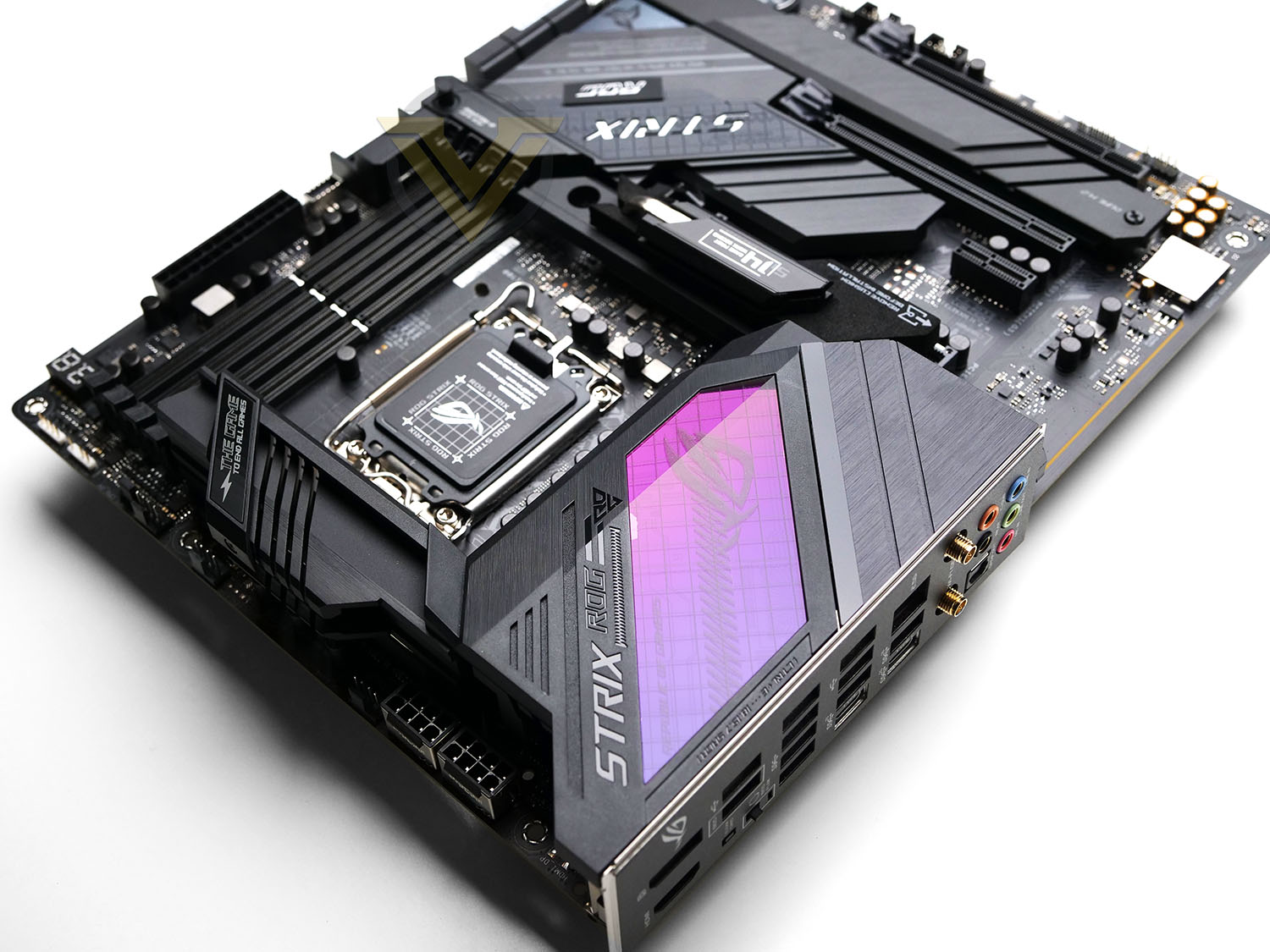
ASUS on their ROG STRIX Z690-E GAMING WiFi
ROG Strix Z690-E Gaming WiFi puts 12th Gen Intel® Core™ processors at center stage, with beefed-up power delivery, cooling, cutting-edge connectivity options, and a range of accoutrements that effortlessly propel builds to maximum performance. This series flagship is your ticket to next-level gaming.
Technical Specifications
Below are the technical specifications concerning the STRIX Z690-E Gaming WiFi:
CPU
Intel 12th Generation Core Processors
Chipset
Intel Z690 Chipset
Memory
DDR5 6400-4800 MHz
Dual Channel Memory Architecture
Supports Intel® Extreme Memory Profile (XMP)
Graphics
1 x HDMI 2.1
1x DP 1.4
Expansion Slots
1x PCIe 5.0 x16 slot
2x PCIe 4.0 x16 slot
1x PCIe 3.0 x1 slot
Multi-GPU Support
Supports 2-Way NVIDIA® SLI™ Technology
Storage
6x SATA 6Gb/s ports (from Z590 chipset)
3x M.2 slots (Key M) (1x PCIe 5.0 x4 and 2x PCIe 4.0 x4)
Ethernet
1x Intel® I225V 2.5Gbps LAN controller
Wireless & Bluetooth
WiFi 6E + BT5.2
USB
1 x USB 3.2 Gen 2×2 port (1 x USB Type-C®)
3 x USB 3.2 Gen 2 ports (2 x Type-A + 1 x USB Type-C®)
4 x USB 3.2 Gen 1 ports (4 x Type-A)
4 x USB 2.0 ports (4 x Type-A)
Front USB: Total 7 ports
1 x USB 3.2 Gen 2×2 connector (supports USB Type-C®)
1 x USB 3.2 Gen 1 header supports additional 2 USB 3.2 Gen 1 ports
2 x USB 2.0 headers support additional 4 USB 2.0 ports
Audio
– SupremeFX Shielding Technology
– ALC4080 + Savitech SV3H712 AMP
– Gold-plated audio jacks
– Rear optical S/PDIF out port
– Premium audio capacitors
– Audio cover
Back Panel I/O Ports
1 x USB 3.2 Gen 2×2 port (1 x USB Type-C®)
3 x USB 3.2 Gen 2 port(s) (2 x Type-A, 1 x USB Type-C® )
4 x USB 3.2 Gen 1 port(s) (4 x Type-A)
2 x USB 2.0 port(s) (2 x Type-A)
1 x HDMI™ port
1 x DisplayPort
1 x Intel® Wi-Fi 6E
2 x Intel® I225-V 2.5Gb Ethernet
5 x Gold-plated audio jacks
1 x Optical S/PDIF out port
1 x BIOS FlashBack™ button
1 x Clear CMOS button
Cables
4 x SATA 6Gb/s cables
ROG HYPER M.2 CARD
1 x ROG HYPER M.2 CARD
Miscellaneous
1 x ASUS 2×2 Dual-Band Wi-Fi moving antennas
1 x M.2 Q-Latch package
1 x M.2 Q-Latch package for M.2 backplate
1 x M.2 Rubber Packages
2 x M.2 Screw Packages
1 x ROG Graphics card holder
1 x ROG key chain
1 x cable tie
1 x ROG STRIX stickers
1 x ROG STRIX thank you card
Installation Media
1 x Support DVD
Documentation
1 x User manual
Operating System
Windows 10 64bit / Windows 11 64bit
Form Factor
ATX 12 inch x 9.6 inch ( 30.5 cm x 24.4 cm )
Intel 12th Generation Core Processors
Chipset
Intel Z690 Chipset
Memory
DDR5 6400-4800 MHz
Dual Channel Memory Architecture
Supports Intel® Extreme Memory Profile (XMP)
Graphics
1 x HDMI 2.1
1x DP 1.4
Expansion Slots
1x PCIe 5.0 x16 slot
2x PCIe 4.0 x16 slot
1x PCIe 3.0 x1 slot
Multi-GPU Support
Supports 2-Way NVIDIA® SLI™ Technology
Storage
6x SATA 6Gb/s ports (from Z590 chipset)
3x M.2 slots (Key M) (1x PCIe 5.0 x4 and 2x PCIe 4.0 x4)
Ethernet
1x Intel® I225V 2.5Gbps LAN controller
Wireless & Bluetooth
WiFi 6E + BT5.2
USB
1 x USB 3.2 Gen 2×2 port (1 x USB Type-C®)
3 x USB 3.2 Gen 2 ports (2 x Type-A + 1 x USB Type-C®)
4 x USB 3.2 Gen 1 ports (4 x Type-A)
4 x USB 2.0 ports (4 x Type-A)
Front USB: Total 7 ports
1 x USB 3.2 Gen 2×2 connector (supports USB Type-C®)
1 x USB 3.2 Gen 1 header supports additional 2 USB 3.2 Gen 1 ports
2 x USB 2.0 headers support additional 4 USB 2.0 ports
Audio
– SupremeFX Shielding Technology
– ALC4080 + Savitech SV3H712 AMP
– Gold-plated audio jacks
– Rear optical S/PDIF out port
– Premium audio capacitors
– Audio cover
Back Panel I/O Ports
1 x USB 3.2 Gen 2×2 port (1 x USB Type-C®)
3 x USB 3.2 Gen 2 port(s) (2 x Type-A, 1 x USB Type-C® )
4 x USB 3.2 Gen 1 port(s) (4 x Type-A)
2 x USB 2.0 port(s) (2 x Type-A)
1 x HDMI™ port
1 x DisplayPort
1 x Intel® Wi-Fi 6E
2 x Intel® I225-V 2.5Gb Ethernet
5 x Gold-plated audio jacks
1 x Optical S/PDIF out port
1 x BIOS FlashBack™ button
1 x Clear CMOS button
Cables
4 x SATA 6Gb/s cables
ROG HYPER M.2 CARD
1 x ROG HYPER M.2 CARD
Miscellaneous
1 x ASUS 2×2 Dual-Band Wi-Fi moving antennas
1 x M.2 Q-Latch package
1 x M.2 Q-Latch package for M.2 backplate
1 x M.2 Rubber Packages
2 x M.2 Screw Packages
1 x ROG Graphics card holder
1 x ROG key chain
1 x cable tie
1 x ROG STRIX stickers
1 x ROG STRIX thank you card
Installation Media
1 x Support DVD
Documentation
1 x User manual
Operating System
Windows 10 64bit / Windows 11 64bit
Form Factor
ATX 12 inch x 9.6 inch ( 30.5 cm x 24.4 cm )
Board layout, features and RGB
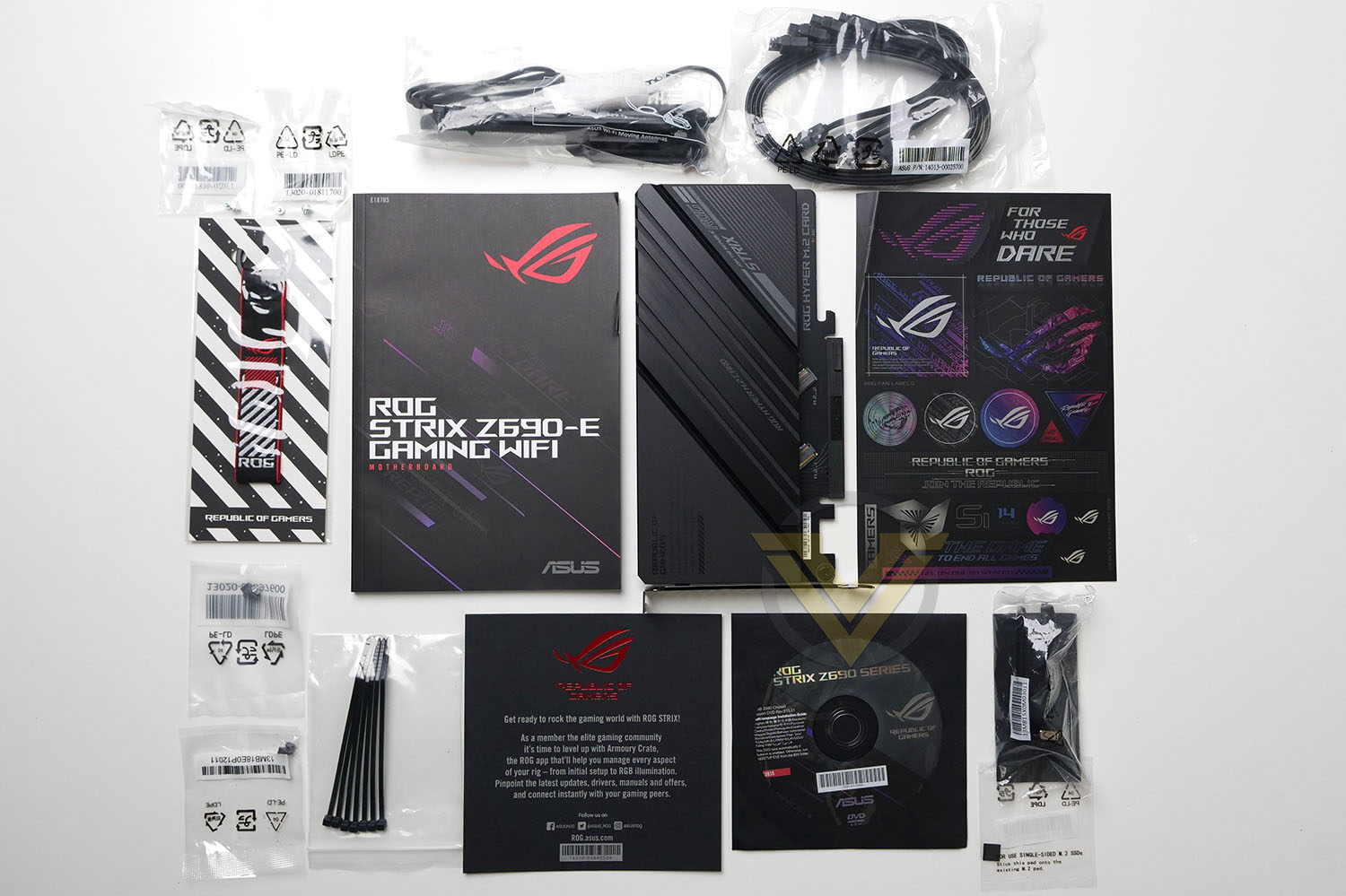
Being a high performance model from ROG, The E has quite a few accessories included. Here they are:
4 x SATA 6Gb/s cables
1 x ROG HYPER M.2 CARD
1 x ROG HYPER M.2 CARD
1 x ASUS 2×2 Dual-Band Wi-Fi moving antennas
1 x M.2 Q-Latch package
1 x M.2 Q-Latch package for M.2 backplate
1 x M.2 Rubber Packages
2 x M.2 Screw Packages
1 x ROG Graphics card holder
1 x ROG key chain
1 x cable tie
1 x ROG STRIX stickers
1 x ROG STRIX thank you card
1 x Support DVD
1 x User manual
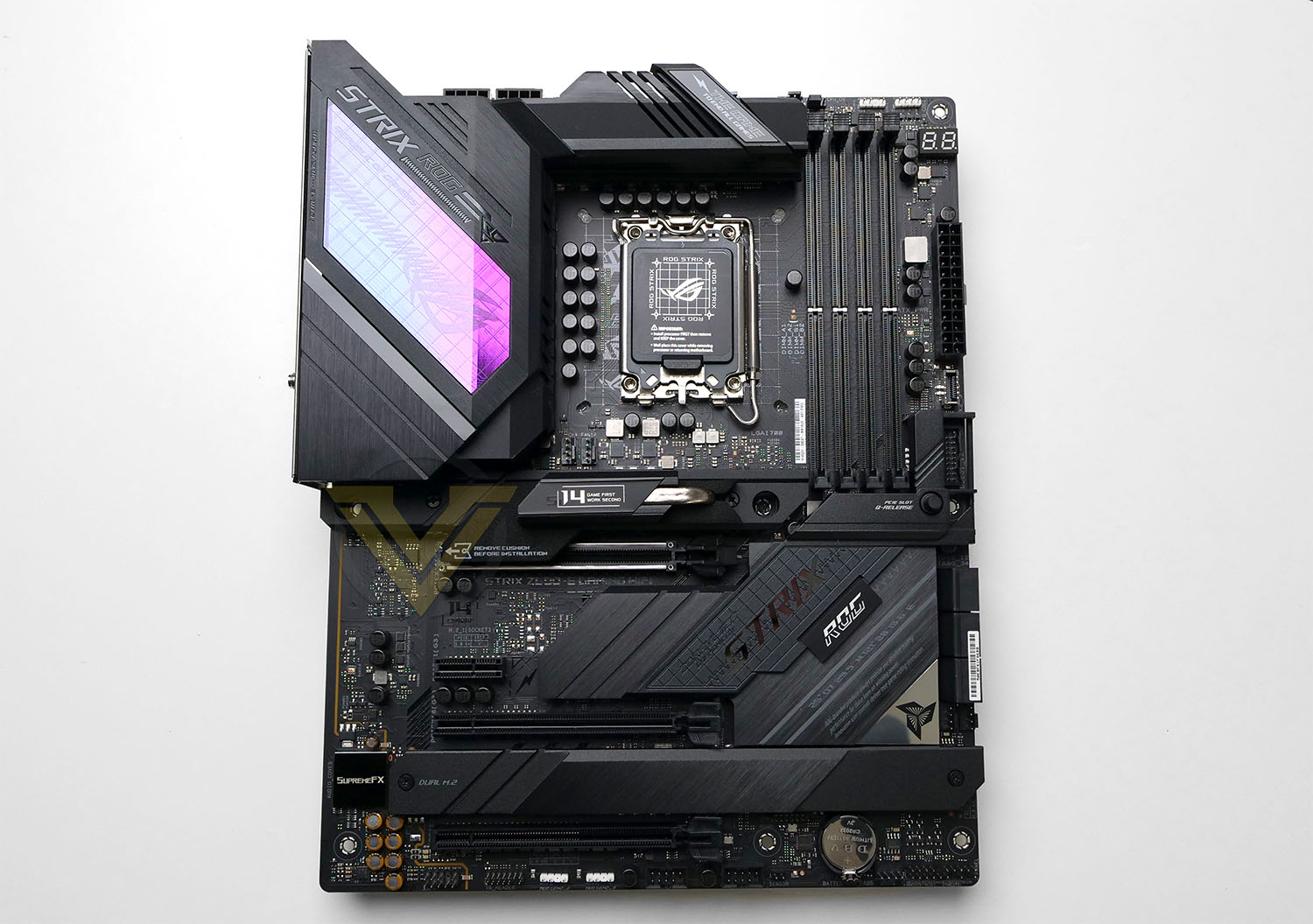
E conforms to the ATX form factor and follows a traditional layout. The overall look and feel to E is superb. It’s a great looking board which adopts a monochrome theme and has been carefully crafted to look appealing to the eye.
Being a Z690 motherboard, the socket is LGA 1700 and has support for Intel 12th Gen. Processors (Alder Lake). E comes in with a 18 + 1 digital phase design with alloy chokes and black solid caps throughout. Two large heatsinks cover the mosfets – the effectiveness of this thermal solution can be found in our thermal tests later in the review. Behind the heatsinks there are two 8pin CPU power connectors which utilise “Pro Cool II” – steel pins and reinforcement.
There are 8x 4-pin fan headers spread out at the top, side, bottom and middle of the board with designated compatibility for water pumps. 4 RGB LED headers are also present for lighting strips and other devices. This pairs up with ASUS Aura Sync tech.
Memory support sees us able to use up to 128GB of DDR5 and up to 6400MHz. In the memory region there is also Debug LED panel which is a handy diagnostic feature identifying any problems on bootup. Q-Code is also present which is a simple LED pinpointing if there is a problem area.
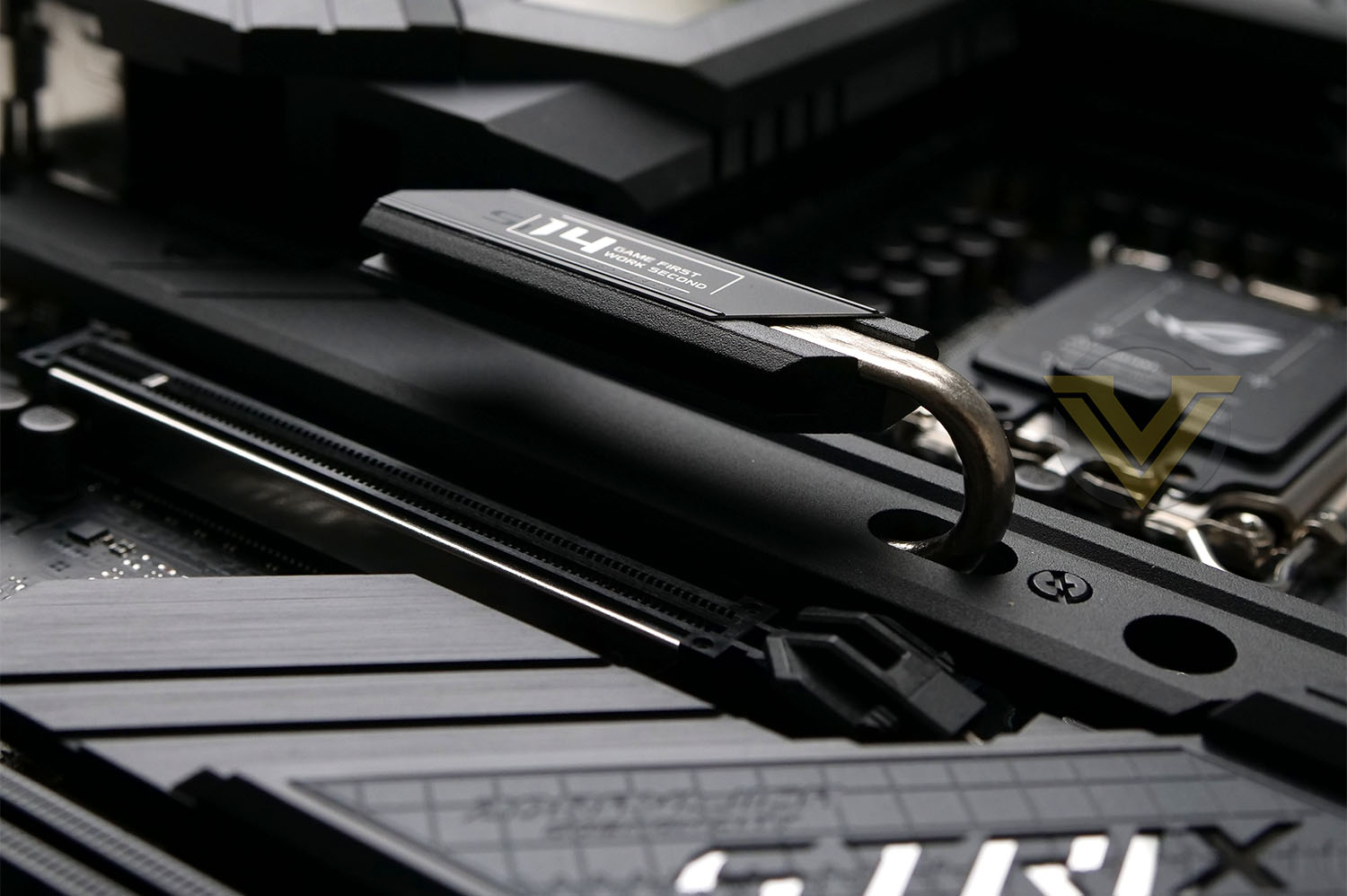
Connectivity for your computer case comes in the form of 1x USB 3.2 Gen 2 header and 1x USB 3.2 Gen 1 header for the front panel. In terms of storage, there are up to 6 SATA 6GB/s ports and 3x PCIe M.2 slots – which is surprising given that most boards now have 4x – though we do receive a PCIe add-in card for extending the M.2 storage. Two of these are PCIe 4.0 x4 ready (the two upper slots) while the remaining is PCIe 5.0 x4. The two lower slots are situated side-by-side, allowing space for an additional slot. All M.2 slots feature a corresponding heatsink to control temperatures – the upper PCIe 5.0 even has a dedicated heatpipe and additional heatspreader.
For graphics delivery there is are 2x PCIe 4.0 X16 slots and 1x PCIe 5.0 x16 slots. The upper slot is Gen5 and should be used if a single graphics card is operating – ROG has even equipped this slot to use a push-release button which is an extremely handy feature to have, making it less troublesome to detach the graphics card. So the uppermost X16 is wired for the full 16 lanes and should be used for a single GPU configuration. While the other slots are wired for 8 and 4.
For audio, E uses the Realtec ALC 4080 processor, which is one of the latest from Realtec. The audio package itself includes:
– SupremeFX Shielding Technology
– ALC4080 + Savitech SV3H712 AMP
– Gold-plated audio jacks
– Rear optical S/PDIF out port
– Premium audio capacitors
– Audio cover
The RGB lighting on E is fairly subdued with just the rear IO shield featuring active lighting. This lighting can of course tap into Aura Sync.
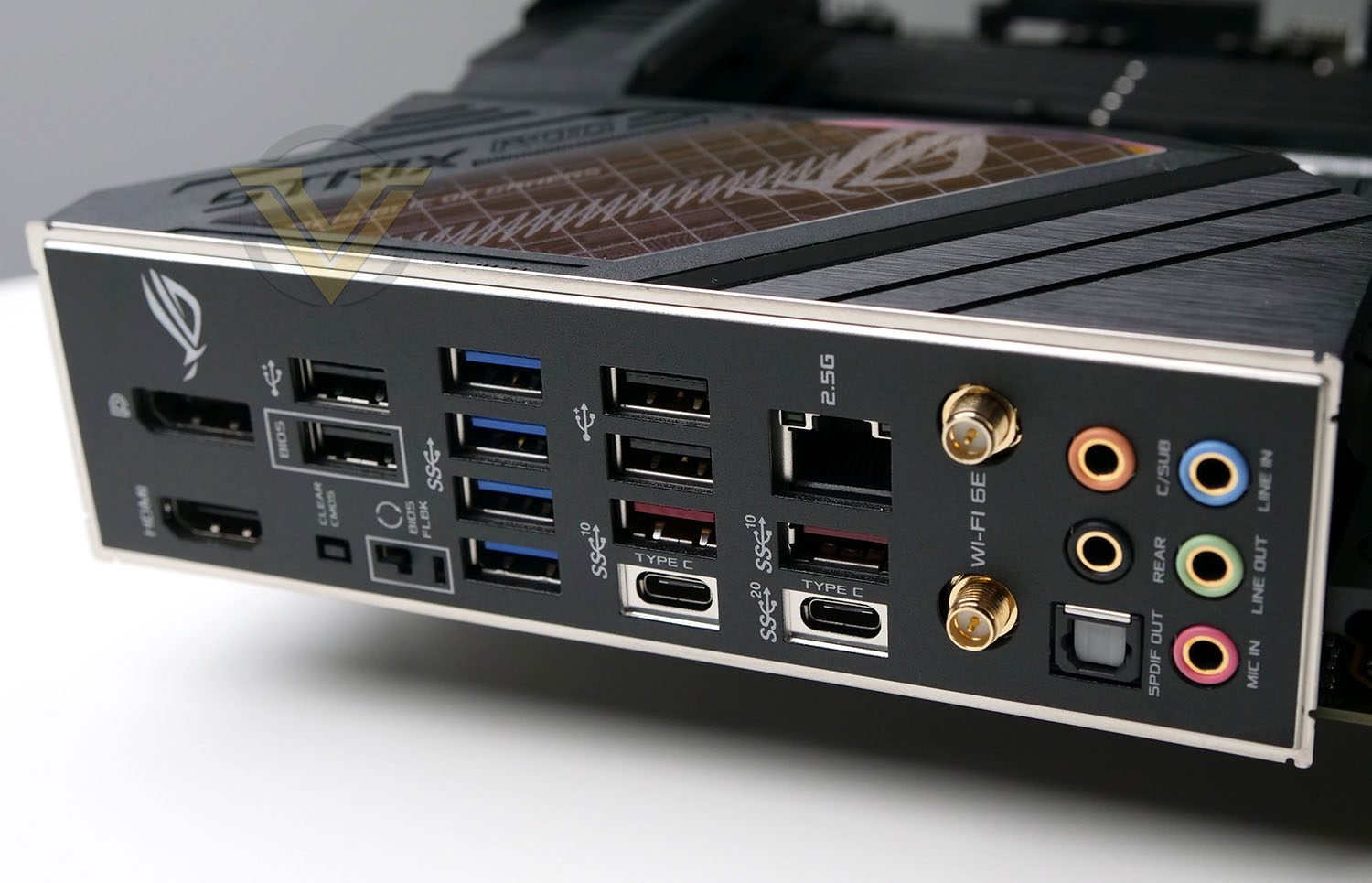
The back panel of E is loaded with a plethora of connectivity – enough to satisfy the needs of most users. On offer here we have:
1 x USB 3.2 Gen 2×2 port (1 x USB Type-C®)
3 x USB 3.2 Gen 2 port(s) (2 x Type-A, 1 x USB Type-C® )
4 x USB 3.2 Gen 1 port(s) (4 x Type-A)
2 x USB 2.0 port(s) (2 x Type-A)
1 x HDMI™ port
1 x DisplayPort
1 x Intel® Wi-Fi 6E
2 x Intel® I225-V 2.5Gb Ethernet
5 x Gold-plated audio jacks
1 x Optical S/PDIF out port
1 x BIOS FlashBack™ button
1 x Clear CMOS button
Test Setup & Methodology
Notes: We’ve revamped our benchmark regime by removing a number of tests which reveal little, to no difference between each motherboard model. Gaming performance is one such area which has been removed due to the inability for each motherboard to offer any advantage over another. Instead, we have focussed on meaningful/tangible analysis which examines the VRM/chipset design, and the storage performance which will be far more informative to the end user.
TEST SETUP
CPU Intel Core i9-12900KCooling CORSAIR H150i ELITE LCD
Motherboard ASUS ROG STRIX Z690-E GAMING WIFI
Memory 64GB CORSAIR Dominator Platinum RGB 5200MHz DDR5
Graphics ZOTAC RTX 3070 Ti HOLO Extreme
Storage CORSAIR Force LX 512GB SSD
PSU Corsair RM 1000 80 Plus Gold Certified PSU
Monitor AOC U2879VF
BENCHMARKS
PCMark 10 – Overall Extended Score
SiSoftware SANDRA – SATA/PCIe Storage Tests
SiSoftware SANDRA – Processor Image Processing
SiSoftware SANDRA – SATA/PCIe Storage Tests
SiSoftware SANDRA – Processor Image Processing
OTHER SOFTWARE
Temperature Analysis: HWMonitor
Stress Testing Software: AIDA64 Stability Test
CPU Specification Monitoring: CPU-Z
Stress Testing Software: AIDA64 Stability Test
CPU Specification Monitoring: CPU-Z
Benchmarks: Power Consumption
In this first test we analyse the power efficiency from the wall for each motherboard (Minus the GPU). While each model uses the same chipset/platform, energy results can fluctuate between manufacturers due to the features and specifications that are integrated. First of all, for the idle tests the system is cold booted into Windows and no additional applications are executed – wattage is noted on the external energy monitor we use and then we open Aida64 stability test and execute a stress test, noting the highest reading on the monitor. Below are the results of this energy test.
Benchmarks: VRM & Chipset Cooling
Each motherboard manufacturer designs their board with a unique set of heatsinks to cover key areas like the VRM/mosfets and the chipset itself. In these test we use HWMonitor to identify the minimum values for VRM and chipset and then we load up Aida64 stability test again and perform a 20 minute run, recording the maximum value for both attributes.
Benchmarks: PCMark 10
PCMark 10 features a comprehensive set of tests that cover the wide variety of tasks performed in the modern workplace. With a range of performance tests, custom run options, and the new Battery Life Profile, PCMark 10 is the complete PC benchmark for the modern office.
Benchmarks: SATA Performance
In order to ascertain the SATA performance for our motherboards we use SiSoftware SANDRA and the File System Bandwidth performance test. This allows us to obtain the sequential read/write transfer rates for the drive being tested – Crucial MX300 SSD.
Benchmarks: PCIe M.2 Performance
In order to ascertain the PCIe M.2 performance for our motherboards we use SiSoftware SANDRA and the File System Bandwidth performance test. This allows us to obtain the sequential read/write transfer rates for the drive being tested – Kingston KC2500.
Benchmarks: CPU Image Processing
In our last test we observe the Image Processing performance from the CPU attached to the motherboard. For this we use SiSoftware SANDRA and the benchmark specifically designed for measuring the common algorithms associated with processing imagery.
Conclusion
We’ve already feasted our eyes on a number of Z690 models here at Vortez – each having their own strengths and weaknesses, but does the STRIX Z690-E Gaming WiFi do enough to separate itself from the competition?
First and foremost, ROG has done a superb job on the aesthetics with this motherboard, it is very appealing and oozes style. It is true that many board designers are opting for a monochrome colour palate, but E has a few unique character tics up its sleeve.
This motherboard has a lot to offer – regardless of which way you come in at, whether its storage, memory options, or USB connectivity as a few examples, it serves up a good helping in each department. PCIe 5.0 is one of the biggest talking points for this generation, and E provides us with a PCIe x16 slot and M.2 capable of tapping into such tech (as and when it becomes available). The USB connectivity is far reaching – providing a plethora of fast ports, including USB Gen2x2 Type-C. Most Intel Z690 motherboards come with these features – so it’s nothing out of the ordinary, but there are some additional perks which may sway a purchase. E comes with extras such as LED debug, Q-Code, up to 8 fan headers, a handy push to release PCIe button and enhanced cooling for the uppermost M.2 slot.
Performance from E is solid and consistently good and the VRM/chipset cooling performance is also very encouraging – providing us with better than average results.
Our only gripe is the cost. This motherboard comes in at GBP £500 | USD $450 | AUD $800. This is significantly more than last seasons Z590 version. There are unfortunately other models which offer the same/similar features for a lower price-tag.
The STRIX Z690-E Gaming WiFi is laden with exciting features and will provide a solid foundation for Intel’s new 12th Gen. platform.
Pros
+ Visually impressive design
+ Good layout
+ Decent VRM thermals
+ Features a number of advanced diagnostic features
+ Comes with M.2 add-in card
+ Useful quick release features for M.2 and PCIe
+ Offers solid performance
+ Plenty of USB connectivity
+ Up to 8 fan headers
+ Support for up to 6400MHz DDR5 memory
+ Features a PCIe 5.0 M.2 slot
+ Extensive accessories bundle
Cons
– Expensive
+ Visually impressive design
+ Good layout
+ Decent VRM thermals
+ Features a number of advanced diagnostic features
+ Comes with M.2 add-in card
+ Useful quick release features for M.2 and PCIe
+ Offers solid performance
+ Plenty of USB connectivity
+ Up to 8 fan headers
+ Support for up to 6400MHz DDR5 memory
+ Features a PCIe 5.0 M.2 slot
+ Extensive accessories bundle
Cons
– Expensive
Click here for an explanation of our awards at Vortez.net.
Stay connected with Vortez social media pages: